License: Current license
Catalog id: resource.license.overview
The license decides what this installation is allowed to run. Every product surface reads the same record, so when a call is refused with an entitlement error, this page is where you confirm whether the license covers it, whether it has expired, and whether a quota is already spent.
This view is platform-scoped and read-only. Changing what it shows means importing a new license, not editing anything here.
Audience: platform operator.
Guide: License and capabilities.
What the record tells you
status gates everything else. Entitlement checks only pass while it reads ACTIVE, so a license
that lists every product you need still authorises nothing if its status says otherwise. Expiry
works the same way: expiresAt is enforced rather than advisory, and once it passes, product
surfaces stop accepting work. daysToExpiry is the value worth alerting on, because a renewal has
to be requested, issued and imported before it reaches zero.
installationId and customerId say which installation the license was issued for. A license
issued for a different installation will not verify here, so quote both when you ask for a renewal
or a change of entitlements. issuer and signingCertificateFingerprint say who signed it. The
fingerprint is what distinguishes a genuine license from a file that merely parses, so if you do not
recognise it, the license did not come from your licensing authority and importing it will not help.
The rest of the record describes what you may run. Each entry in productSummaries names a
product and an edition, which is what separates an evaluation entitlement from an enterprise
one. Its modules array holds the module ids this license permits, such as oid4vci, oid4vp,
oauth2 and statuslists. A module missing from that array is refused at runtime even when the
service is deployed and healthy, which is the usual explanation for an endpoint that returns an
entitlement error on a system that looks correctly configured.
Each product also carries quotaProjections, a list of used against limit for keys such as
max-root-tenants or oid4vci.issuer.instances.pertenant.max. These are projections of current
usage rather than a historical count, so you can read them to find out whether creating one more
tenant or issuer instance will be allowed, without attempting it first.
- Admin Console
- Request
- Response
- Try it
Open Resources > License > Current license in the platform scope. The page shows the license in force right now, not the one most recently imported: if an import was rejected, the previous license is still what you see here.
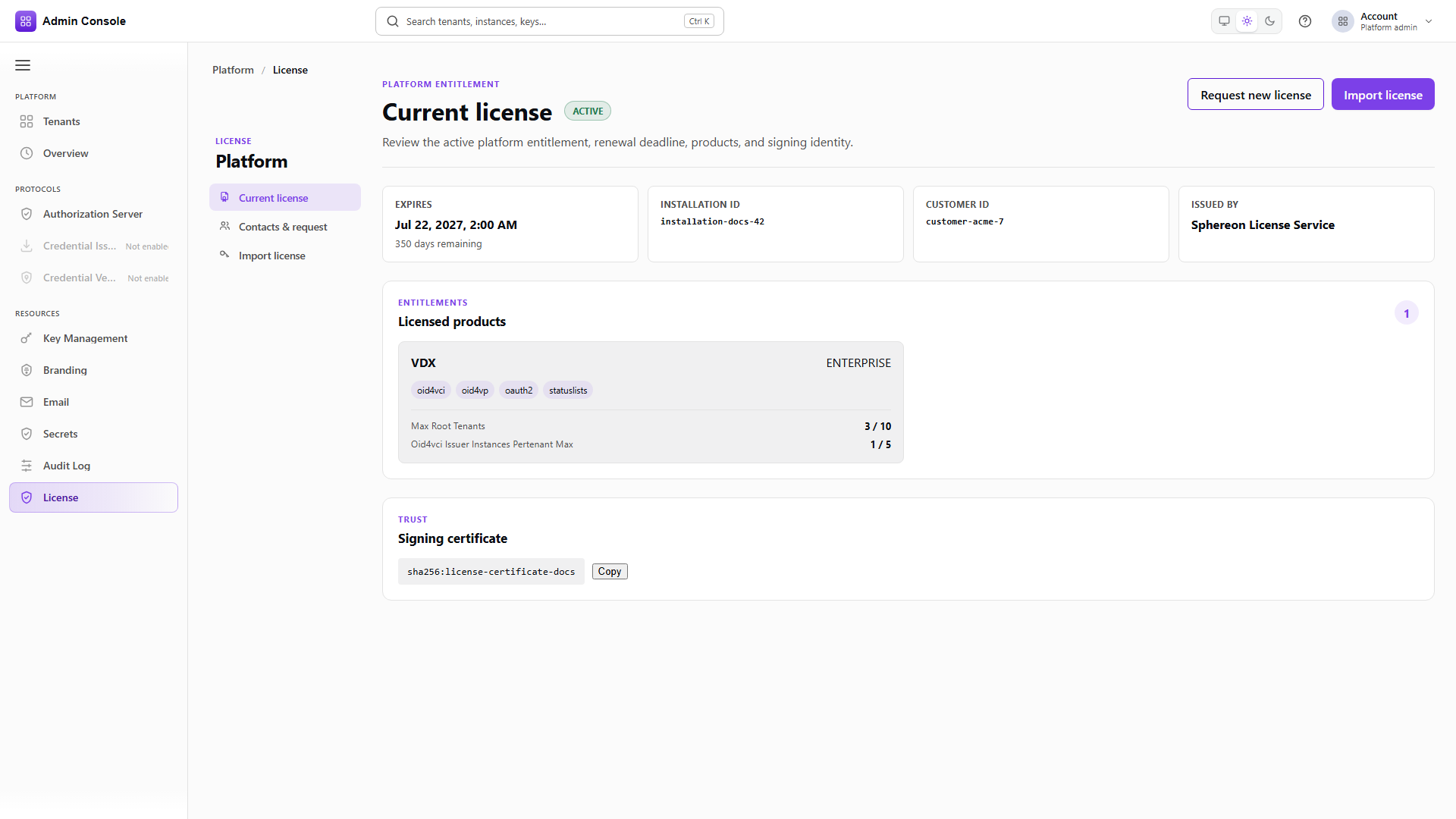
Full schema: Platform Admin API.
When a refusal names an entitlement
Check it against this record in order: confirm status is ACTIVE, confirm the module appears under
the relevant product, then confirm the quota it consumes still has headroom. If all three hold and
the call is still refused, the license is not the cause.