Configuration System
The EDK's configuration system manages application settings across environments, tenants, and deployment types, from local development with property files to production with Azure App Configuration, AWS Secrets Manager, and HashiCorp Vault. Your application code reads configuration through a single ConfigService interface. Where the values actually come from, environment variables, a cloud provider, a database, or a local file, is a deployment decision, not a development decision.
The Core Idea: Just Add the Dependency
Configuration providers use auto-registration. When you add a provider module to your classpath and supply the required connection details (a vault URL, a connection string, an API key), the provider discovers itself, connects to the backend, and starts serving values. Your application code doesn't change:
val apiUrl = configService.getProperty("api.base.url", String::class)
val timeout = configService.getProperty("http.timeout.ms", Int::class, 30000)

// Secrets are resolved transparently via interpolation
// If db.password is configured as ${secret:vault:app/database:password},
// the vault provider resolves the actual password at read time
val dbPassword = configService.getProperty("db.password", String::class)
This design means you can start development with a local application.properties file, add Azure App Configuration when you deploy to staging, add HashiCorp Vault for production secrets, and add database-backed settings for per-tenant configuration, all without changing any application code.
Architecture
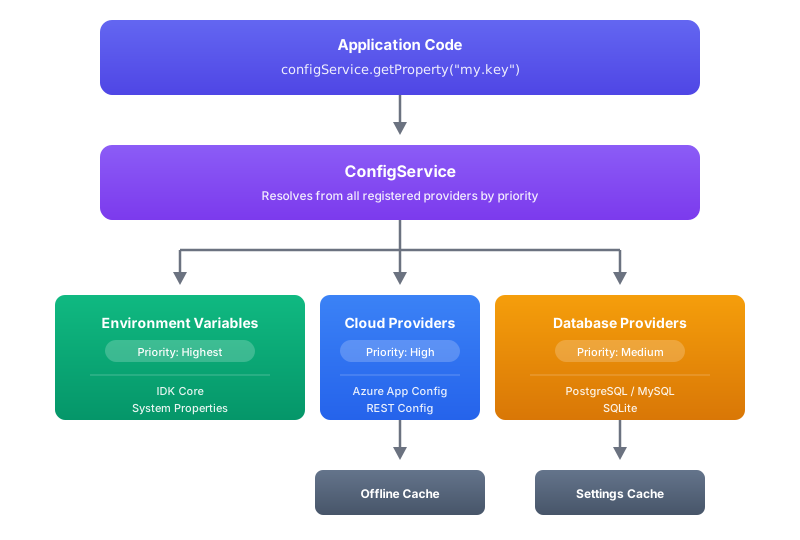
The configuration system is layered across three tiers:
IDK (core) provides the resolution pipeline, the ConfigService that application code calls, PropertySource abstraction for value providers, interpolation for ${...} references, property protection (final/non-overridable values), and in-memory caching. This layer handles the mechanics of "given a key, find its value across all registered sources."
EDK (enterprise) adds cloud configuration providers (Azure App Configuration, REST Config Client), secret vault integrations (AWS Secrets Manager, Azure Key Vault, HashiCorp Vault), and offline caching for disconnected scenarios. These are the providers that connect the generic resolution pipeline to real infrastructure.
VDX (product) adds database-backed persistence for settings that change at runtime, per-tenant configuration that operators update through an admin UI without redeployment. PostgreSQL, MySQL, and SQLite are supported.
All three tiers plug into the same PropertySourceBootstrap mechanism. The bootstrap runs at startup, discovers all providers, checks which ones are enabled, initializes them, and registers them with the ConfigService in priority order.
How Auto-Registration Works
When your application starts:
- Discovery: Metro DI finds all
PropertySourceContributionimplementations on the classpath. Each provider module contributes one. - Enablement check: each contribution checks two things: is it explicitly disabled (
config.providers.{id}.enabled=false), and are its required properties present (e.g., vault address, connection string)? - Registration: enabled providers are registered with
ConfigServiceat the correct scope (app-level, tenant-level, or principal-level). - Async initialization: cloud providers that need a network call to load initial data (REST client, Azure App Config) perform their first refresh.
If a provider's required config is missing, it silently stays disabled, your application starts without it. If it's explicitly enabled but misconfigured, it logs a warning. This means adding a provider module to your classpath is safe; it won't break anything until you provide connection details.
Priority Order
When the same configuration key exists in multiple providers, the highest-priority source wins. This ordering is intentional, it lets you define defaults in property files, override them centrally via cloud configuration, and override everything with environment variables in emergency hotfix scenarios.
| Priority | Source | Typical use |
|---|---|---|
| 1 (highest) | Environment Variables | Production overrides, CI/CD injection, Docker/Kubernetes env |
| 2 | Cloud Providers (Azure App Config, REST) | Centralized management, dynamic updates without redeployment |
| 3 | YAML / Programmatic Maps | Application-bundled defaults, profiles |
| 4 | Database Providers (PostgreSQL, MySQL, SQLite) | Per-tenant settings, operator-managed configuration |
| 5 | Properties Files | Fallback defaults, developer-local configuration |
| 6 (lowest) | Programmatic Defaults | Hard-coded fallbacks |
Environment variables always win because they're the safest override mechanism, they're set at the infrastructure level, outside the application, and can be changed without touching code or config files.
Multi-Tenant Configuration
The configuration system is scope-aware. Every property can exist at three levels:
APP: global to the application. Shared by all tenants and users. This is where you put database connection strings, external service URLs, and other infrastructure settings.
TENANT: per-tenant overrides. Tenant A might use a different OIDC provider than Tenant B, or have different rate limits. Tenant-scoped properties override APP-scoped properties for that tenant's requests.
PRINCIPAL: per-user overrides. Individual user preferences or user-specific feature flags. Overrides both APP and TENANT for that user's requests.
Cloud providers support this through key conventions. In Azure App Configuration, tenant-scoped keys use the prefix tenant.{tenantId}.{key}. In the REST Config Client, the API returns scope metadata alongside each value. The resolution pipeline automatically applies the correct scope based on the current session context.
Property Protection
Some properties shouldn't be overridable at lower scopes. An APP-level security setting like auth.require-mfa=true should not be overridable by a tenant to false. The configuration system supports two protection levels:
FINAL: the property cannot be overridden at lower scopes. A FINAL property set at APP scope is locked; tenant and principal scopes cannot change it.
INTERPOLATION_PROTECTED: the property's value cannot be used in ${...} interpolation from lower scopes. This prevents a tenant-scoped config from referencing an APP-scoped secret via interpolation.
Protection metadata travels with the property value through the REST Config Client and Azure App Config, so centrally managed protection rules are enforced everywhere.
Secret Interpolation
Secrets are never stored as plain values in configuration. Instead, configuration values reference secrets using interpolation syntax:
db.password=${secret:vault:myapp/database:password}
api.key=${secret:aws:myapp-api-key}
signing.key=${secret:azure:jwt-signing-key}
The ${secret:provider:path} syntax tells the configuration system to resolve the value from the named secret provider at read time. The actual secret never appears in configuration files, environment variables, or cloud config, only the reference does. Secret providers cache resolved values with a configurable TTL (default 5 minutes) to avoid excessive calls to the secret backend.
See Secret Management for provider-specific configuration.
Caching & Offline Resilience
Cloud Provider Caching
Cloud providers cache their values in memory and persist them to disk via the offline cache. When a cloud provider successfully fetches configuration, it updates both the in-memory store and the disk cache. If the next fetch fails (network outage, provider unavailable), the provider falls back to the disk cache transparently:
refresh()
  ├── Network request to Azure/REST
  │    ├── Success → update memory + persist to disk → serve fresh values
  │    └── Failure → load from disk cache → serve stale-but-available values
This means your application can start and run even when the cloud config provider is temporarily unreachable, as long as a previous successful fetch was cached to disk.
Database Provider Caching
Database providers use an LRU cache (max 10,000 entries, 5-minute TTL) to avoid hitting the database on every getProperty() call. Cache entries include negative results, if a key doesn't exist in the database, that "not found" is also cached to prevent repeated queries for missing keys.
Available Providers
| Provider | Module | What it does |
|---|---|---|
| Azure App Configuration | lib-conf-azure-app-config | Fetches configuration from Azure App Configuration with label-based environment separation and sentinel-based change detection |
| REST Config Client | lib-conf-config-rest-client | Fetches configuration from any REST API that implements the VDX settings endpoint |
| AWS Secrets Manager | lib-conf-secret-aws | Resolves ${secret:aws:...} references from AWS Secrets Manager with JSON key extraction |
| Azure Key Vault | lib-conf-secret-azure | Resolves ${secret:azure:...} references from Azure Key Vault |
| HashiCorp Vault | lib-conf-secret-vault | Resolves ${secret:vault:...} references from HashiCorp Vault (KV v2) with Token, AppRole, and Kubernetes auth |
| Offline Cache | lib-conf-config-offline-cache | Persists cloud config to disk for offline/disconnected resilience |
| PostgreSQL / MySQL / SQLite (VDX) | vdx-conf-settings-persistence-* | Database-backed settings for runtime-configurable per-tenant properties |
Enabling and Disabling
Providers are enabled by default when their required config is present. Disable any provider explicitly:
config.providers.azure-app-config.enabled=false
config.providers.rest-config.enabled=false
config.providers.aws-secrets.enabled=false
config.providers.azure-keyvault-secrets.enabled=false
config.providers.vault-secrets.enabled=false