Pronto Integration
Pronto V2 is Simac's physical access control and facility management platform. It manages door access, visitor registration, NFC card provisioning, locker management, and room booking through a unified system. The EDK provides a type-safe, command-based integration with Pronto's REST API, enabling wallet-verified identities to automatically receive physical access rights.
This integration bridges the digital identity world (verifiable credentials, wallets, OID4VP) with the physical access world (NFC cards, door readers, access zones). When a student presents their educational credential via a wallet, the system can automatically provision their NFC card in Pronto, assign them to the correct access zone group for their building, and set time-bounded access windows that match their class schedule, all without manual badge office intervention.
What Pronto Manages
Pronto's domain model centers around people, their identification credentials, and which physical zones they can access:
Persons are the primary identity entity, employees, students, visitors. Each person has a unique ID, name, contact details, and optional time bounds (valid from/until). A person can belong to multiple groups and hold multiple identifications.
Identifications are physical credentials, Mifare NFC cards, barcodes, PIN codes, mobile credentials, or smartphone badges. Each identification has a serial number and can be blocked or time-limited. A person typically has one primary NFC card, but can have multiple identifications for different access methods.
PersonsGroups define collections of access zones. A group named "Building A, Daytime" might grant access to all doors in Building A between 7:00 and 19:00. Groups can be hierarchical (a parent group contains child groups) and time-bounded. Membership in a group is what actually grants physical access.
PersonsGroupRelation is the time-bounded link between a person and a group. This is the key entity for booking-based access: when a student books a room, the system creates a relation with fromTime set to the booking start (minus a lead time) and untilTime set to the booking end. The student's NFC card grants access to that zone only during that window.
Readers are the physical access control devices, card readers mounted at doors, turnstiles, or gates. Each reader has an address and can be remotely commanded (e.g., unlock a door).
Registrations are the audit trail, every card scan at every reader is logged with the serial number, reader ID, scan type (In, Blocked, Antipassback, etc.), and timestamp.
Integration Architecture
The EDK integration communicates with Pronto's REST API v1 over HTTP with OAuth bearer token authentication:
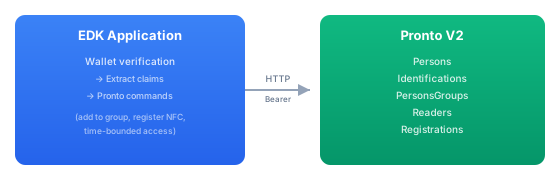
All communication uses Pronto's REST API. The integration handles OAuth token management (automatic fetch, 5-minute caching, transparent refresh), JSON serialization with Pronto's PascalCase field naming, and adaptive rate limiting from Pronto's X-RateLimit-* response headers.
Connecting Credentials to Physical Access
The integration maps verified credential claims to Pronto entities through two configurable claim keys:
identificationClaimKey (default: "nfckaart"), the credential claim that contains the person's NFC card serial number. When a wallet credential includes an nfckaart claim, the integration can look up the corresponding Pronto Person by their identification.
zoneGroupClaimKey (default: "zoneGroupId"), the credential claim that specifies which PersonsGroup the holder should be granted access to. This links the credential to a physical access zone.
A typical flow:
- Student presents a verifiable credential from their wallet
- The credential contains
nfckaart: "04:A2:B3:C4:D5"andzoneGroupId: "building-a-lab" - The system looks up the Pronto Person with that NFC serial number
- It adds a time-bounded
PersonsGroupRelationlinking the student to the "building-a-lab" group - The student's NFC card now opens doors in Building A's lab area during the specified time window
Time-Bounded Access
The integration is designed around bookings and reservations, temporary access grants with explicit start and end times. This is fundamentally different from permanent badge access; it supports scenarios where access should be granted only for specific time windows.
Three commands manage time-bounded group membership:
AddPersonToGroupCommand creates a new time-bounded relation between a person and a group. If the person doesn't exist in Pronto yet, the command creates them automatically. The schedulingLeadTimeSeconds config (default 60 seconds) determines how early before the booking start the access is provisioned, so a student arriving a minute early can still get through the door.
ExtendPersonInGroupCommand extends an existing relation's untilTime. Useful when a booking is extended or a class runs overtime, the access window grows without creating a new relation.
RemovePersonFromGroupCommand removes a person from a group. Used when a booking is cancelled or access needs to be revoked immediately.
RegisterReservationCommand is a higher-level command that combines person creation/update with group assignment and time bounds in a single operation. It's the preferred command for booking system integrations.
Commands
The integration provides 30+ commands covering all Pronto API operations. Every command follows the EDK's standard ServiceCommand<Args, Result> pattern, so they participate in authorization, audit, telemetry, and remote transport like any other command.
Person Management
| Command | ID | Description |
|---|---|---|
ListPersonsCommand | pronto.person.list | List all persons (paginated) |
CreatePersonCommand | pronto.person.create | Create a new person |
GetPersonCommand | pronto.person.get | Get a person by ID |
UpdatePersonCommand | pronto.person.update | Update person details |
DeletePersonCommand | pronto.person.delete | Delete a person |
Identification Management
| Command | ID | Description |
|---|---|---|
ListIdentificationsCommand | pronto.identification.list | List all identifications |
CreateIdentificationCommand | pronto.identification.create | Register a new NFC card/barcode |
GetIdentificationCommand | pronto.identification.get | Get identification by ID |
UpdateIdentificationCommand | pronto.identification.update | Update identification (e.g., block a card) |
Identification types: Mifare, Barcode, Pincode, Mobile, Smartphone.
Access Zone Groups
| Command | ID | Description |
|---|---|---|
ListPersonsGroupsCommand | pronto.personsgroup.list | List access zone groups |
CreatePersonsGroupCommand | pronto.personsgroup.create | Create a new access zone group |
GetPersonsGroupCommand | pronto.personsgroup.get | Get group details |
UpdatePersonsGroupCommand | pronto.personsgroup.update | Update group |
DeletePersonsGroupCommand | pronto.personsgroup.delete | Delete group |
Time-Bounded Access
| Command | ID | Description |
|---|---|---|
AddPersonToGroupCommand | pronto.person-group.add | Grant time-bounded access to a zone group |
RemovePersonFromGroupCommand | pronto.person-group.remove | Revoke access from a zone group |
ExtendPersonInGroupCommand | pronto.person-group.extend | Extend access window |
RegisterReservationCommand | pronto.reservation.register | Create/update person with time-bounded access |
Physical Control
| Command | ID | Description |
|---|---|---|
ListReadersCommand | pronto.reader.list | List access control readers |
OpenReaderCommand | pronto.reader.open | Remotely unlock a door |
OpenOrCloseZoneDomLocksCommand | pronto.zone.dom-locks | Open or close all locks in a zone |
Audit & Registration
| Command | ID | Description |
|---|---|---|
ListRegistrationsCommand | pronto.registration.list | Query access logs (filterable by date range) |
Administration
| Command | ID | Description |
|---|---|---|
ListRolesCommand | pronto.role.list | List Pronto roles |
CreateRoleCommand | pronto.role.create | Create role |
AssignRolePermissionCommand | pronto.role.assign-permission | Assign permission to role |
ListWebUsersCommand | pronto.webuser.list | List Pronto web interface users |
CreateWebUserCommand | pronto.webuser.create | Create web user |
Configuration
The integration is configured per tenant through the EDK's configuration system, under the integrations.pronto.* prefix:
integrations:
  pronto:
    enabled: true
    base-url: https://pronto.example.com
    base-path: /api/v1
    oauth:
      client-id: my-api-user
      client-secret: ${secret:vault:pronto/api-secret}
    zone-group-claim-key: zoneGroupId
    identification-claim-key: nfckaart
    scheduling-lead-time-seconds: 60
    http:
      enable-logging: false
      enable-http-cache: true
| Property | Default | Description |
|---|---|---|
enabled | true | Enable/disable the Pronto integration |
base-url | - | Pronto server URL (required) |
base-path | /api/v1 | API path prefix |
oauth.client-id | - | API username for token authentication |
oauth.client-secret | - | API password (use ${secret:...} interpolation) |
zone-group-claim-key | zoneGroupId | Credential claim name for the target PersonsGroup |
identification-claim-key | nfckaart | Credential claim name for the NFC card serial number |
scheduling-lead-time-seconds | 60 | How many seconds before a booking start time to provision access |
Because configuration is tenant-scoped, different tenants can connect to different Pronto instances, a multi-campus deployment might have each campus running its own Pronto server, with the EDK routing commands to the correct instance based on the tenant context.
Multi-Tenant Support
The TenantProntoClientConfig reads configuration from the tenant-scoped ConfigService. This means:
- Different tenants can have different Pronto servers, credentials, and claim mappings
- A single EDK deployment can manage physical access across multiple Pronto installations
- Tenant configuration can be stored in Azure App Configuration, database settings, or environment variables, the integration doesn't care where the values come from