Version: v0.25.0 (Latest)
eIDAS Signature Framework
The EDK provides an eIDAS-compliant digital signature framework for creating, validating, and timestamping electronic signatures that meet EU regulatory requirements.
Overview
The eIDAS signature framework provides:
- Multiple signature formats - CAdES (binary), PAdES (PDF), JAdES (JSON), XAdES (XML)
- ETSI compliance - Baseline levels B, T, LT, and LTA per EN 319 102-1
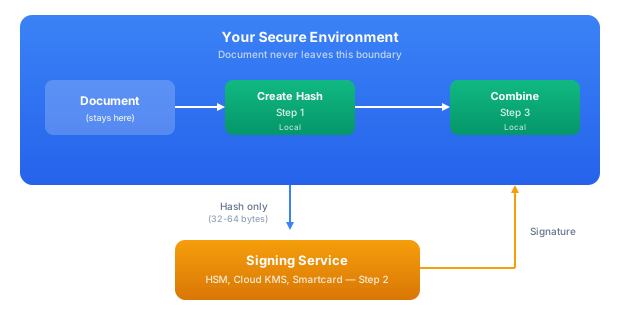
- Document sovereignty - Two-step signing keeps documents on-premise while using remote keys
- Timestamping - RFC 3161 TSA integration
- Signature validation - Certificate revocation and trust list checking
- Multi-platform - Core API runs on JVM and JavaScript
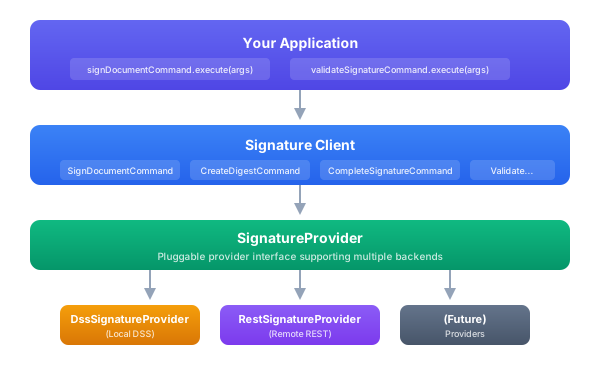
- REST Client - Call remote eIDAS servers using the same SignatureProvider interface
Architecture
Signature Formats
| Format | Use Case | Standards |
|---|---|---|
| CAdES | Binary data, attachments | EN 319 122 |
| PAdES | PDF documents with visible signatures | EN 319 142 |
| JAdES | JSON data, APIs | TS 119 182 |
| XAdES | XML documents | EN 319 132 |
Signature Levels
Each format supports ETSI baseline levels:
| Level | Description | Use Case |
|---|---|---|
| B | Basic signature | Short-term validity |
| T | With timestamp | Proves signing time |
| LT | Long-term validation | Certificate revocation data embedded |
| LTA | Long-term archival | Periodic timestamp renewal |
EDK vs VDX
The eIDAS functionality is split between EDK (client libraries) and VDX (server deployment):
| Component | Location | Description |
|---|---|---|
| Signature Client | EDK | Core signing commands with DI integration |
| DSS Provider | EDK | Local in-process signing using EU DSS library |
| REST Client | EDK | HTTP client implementing SignatureProvider |
| REST API Models | EDK | OpenAPI-generated DTOs for REST communication |
| REST Server | VDX | Full REST server with persistence (PostgreSQL, MySQL, SQLite) |
This separation enables:
- Mobile apps: Use REST client to delegate signing to a server
- Desktop apps: Use DSS provider for local in-process signing
- Hybrid: Create digest locally, sign remotely, complete locally
Modules
| Module | Description | Platform |
|---|---|---|
lib-eidas-signature-client-public | Public API interfaces | Multiplatform |
lib-eidas-signature-client-impl | Implementation with IDK integration | Multiplatform |
lib-eidas-signature-client-dss | Local DSS provider for full eIDAS compliance | JVM only |
lib-eidas-signature-rest-api | OpenAPI models for REST endpoints | Multiplatform |
lib-eidas-signature-rest-client | REST client implementing SignatureProvider | JVM |
REST Server in VDX
The eIDAS REST Server with database persistence is part of VDX.
Quick Start
Sign a PDF Document
import com.sphereon.eidas.signature.*
import kotlin.time.Duration.Companion.hours

// Inject the signing command
val signDocumentCommand: SignDocumentCommand

// Prepare the document
val pdfBytes = File("contract.pdf").readBytes()
val input = SignInput.pdf(pdfBytes)

// Configure signature parameters
val params = PAdESParameters(
    signatureLevel = SignatureLevel.PAdES_BASELINE_LT,
    visualSignatureParameters = VisualSignatureParameters(
        fieldParameters = SignatureFieldParameters(
            page = 1,
            originX = 50f,
            originY = 700f,
            width = 200f,
            height = 50f
        ),
        textParameters = SignatureTextParameters(
            text = "Signed by: John Doe\nDate: 2025-01-02"
        )
    ),
    reason = "Contract approval",
    location = "Amsterdam, Netherlands"
)

// Sign the document
val result = signDocumentCommand.execute(
    SignDocumentArgs(
        input = input,
        keyInfo = keyManagerService.getKeyInfo("signing-key"),
        signatureLevel = SignatureLevel.PAdES_BASELINE_LT,
        parameters = params,
        timestampParameters = TimestampParameters(
            tsaUrl = "http://timestamp.example.com/rfc3161"
        )
    ),
    sessionContext
)

when (result) {
    is Ok -> {
        val signed = result.value
        File("contract-signed.pdf").writeBytes(signed.signedData)
        println("Signed at: ${signed.signingTime}")
        println("Certificate: ${signed.certificateInfo?.subjectDN}")
    }
    is Err -> println("Error: ${result.error.message}")
}
Validate a Signature
val validationResult = validateSignatureCommand.execute(
    ValidateSignatureArgs(
        signedDocument = signedPdfBytes,
        checkCertificateRevocation = true
    ),
    sessionContext
)

when (validationResult) {
    is Ok -> {
        val validation = validationResult.value
        println("Valid: ${validation.isValid}")

        validation.signatures.forEach { sig ->
            println("Signature: ${sig.signatureId}")
            println("  Status: ${sig.indication}")
            println("  Signer: ${sig.certificateInfo?.subjectDN}")
            println("  Time: ${sig.signingTime}")
        }
    }
    is Err -> println("Validation error: ${result.error.message}")
}
Two-Step Signing for Document Sovereignty
The two-step signing workflow is designed for scenarios where documents must not leave your infrastructure. This is critical for:
- Regulatory compliance - Documents containing sensitive data (healthcare, financial, legal) that cannot be transmitted to external signing services
- Data sovereignty - Organizations that must keep documents within specific geographic or network boundaries
- Air-gapped environments - Secure facilities where documents cannot reach the internet
- HSM/smartcard integration - Using remote or hardware-based keys while keeping documents local
How It Works
- Step 1 (Local): Create a cryptographic digest (hash) of the document. Only this small hash value leaves your system.
- Step 2 (Remote): Send the hash to your signing service (HSM, cloud KMS, smartcard) which returns a signature value.
- Step 3 (Local): Combine the signature with the original document to produce the signed output.
The document never leaves your infrastructure. Only a hash (typically 32-64 bytes) is transmitted externally.
Implementation
// Step 1: Create digest locally - document stays on-premise
val digestResult = createDigestCommand.execute(
    CreateDigestArgs(
        input = SignInput.pdf(pdfBytes),
        keyInfo = certificateChain,  // Public cert only
        parameters = PAdESParameters(signatureLevel = SignatureLevel.PAdES_BASELINE_LT)
    ),
    sessionContext
)

val digest = digestResult.getOrThrow()
// Only the hash is sent externally - document remains local
println("Hash to sign: ${digest.digestToSign.toBase64()}")  // ~32-64 bytes

// Step 2: Send ONLY the hash to signing service (HSM, cloud KMS, smartcard)
// The signing service never sees the document content
val signatureValue = signingService.signHash(digest.digestToSign)

// Step 3: Complete signature locally - combine signature with document
val signedResult = completeSignatureCommand.execute(
    CompleteSignatureArgs(
        signingSessionId = digest.signingSessionId,
        signatureValue = signatureValue,
        signatureDocumentBytes = digest.signatureDocumentBytes
    ),
    sessionContext
)

// Final signed document - created entirely within your infrastructure
val signedDoc = signedResult.getOrThrow()
File("document-signed.pdf").writeBytes(signedDoc.signedData)
Use Cases
| Scenario | Benefit |
|---|---|
| Healthcare records | Patient data never leaves hospital network |
| Financial documents | Contracts stay within bank infrastructure |
| Government classified | Documents remain in secure facility |
| GDPR compliance | Personal data doesn't cross jurisdictions |
| Legal discovery | Maintain chain of custody for evidence |
Configuration
eidas:
  signature:
    default-level: PAdES_BASELINE_B
    default-digest-algorithm: SHA256

    timestamp:
      enabled: true
      url: http://timestamp.example.com/rfc3161
      policy-oid: 1.2.3.4.5
      digest-algorithm: SHA256
      timeout-ms: 30000

    validation:
      check-revocation: true
      revocation-freshness: 86400
      allow-expired-certificates: false
      lotl-url: https://ec.europa.eu/tools-databases/lotl/eu-lotl.xml

    cache:
      enabled: true
      ttl-seconds: 3600
      max-size: 1000
Next Steps
- Client API - Detailed client API documentation with format-specific parameters
- REST Server - Deploy signature services as REST APIs