Getting Started
The Kiwa eLicense Holder SDK provides a comprehensive toolkit for integrating with Kiwa's e-license services. Built using Kotlin Multiplatform, it offers a structured, type-safe way to interact with Kiwa APIs for authentication, license management, and secure credential presentation.
Architecture Overview
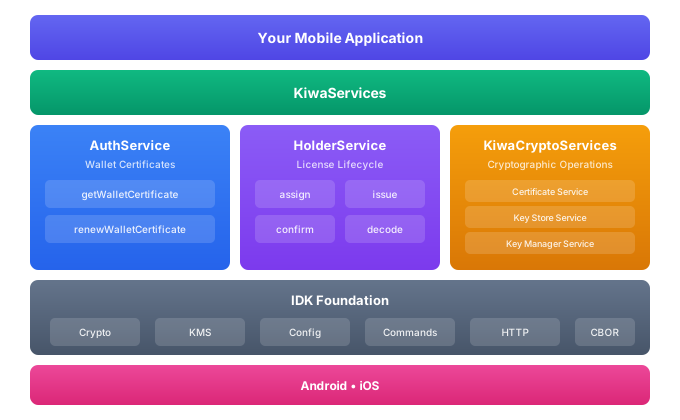
This is proprietary software subject to a license agreement restricted to Kiwa customers only.
The SDK leverages both a command-based architecture and traditional service interfaces, enabling clear, maintainable interactions with the Kiwa eLicense platform.
The Kiwa eLicense SDK builds on the Identity Development Kit (IDK). For IDK documentation, please visit the separate IDK product section. The Kiwa SDK includes all required IDK dependencies.
Quick Start
Installation
See Installation for detailed SDK installation instructions.
Add the following dependency to your project:
dependencies {
    // Recommended: All-in-one dependency with pre-built DI components
    implementation("com.sphereon.kiwa:kiwa-holder-sdk-all:0.13.0")

    // Or use the implementation module directly
    // implementation("com.sphereon.kiwa:kiwa-holder-sdk-impl:0.13.0")
}
API Reference
See the Kotlin API Reference for the complete API documentation.
SDK Overview
The Kiwa eLicense SDK provides a structured interface for working with Kiwa's e-license APIs. It's organized around services and commands that encapsulate both high-level actions and low-level operations.
SDK Artifacts
The SDK is distributed as three Maven artifacts:
| Artifact | Description |
|---|---|
kiwa-holder-sdk-public | Public APIs, interfaces, and common code. All code depends on the interfaces defined in this package. |
kiwa-holder-sdk-impl | Implementation classes that get injected as concrete implementations of the interfaces. Depends on and exports the public APIs. |
kiwa-holder-sdk-all | Complete SDK with pre-built dependency injection components. Recommended for most use cases. |
Core Services
The SDK provides three main service entry points through the KiwaServices interface:
1. Authentication Service (AuthService)
Handles wallet certificate operations required for secure API communication:
| Command | Description |
|---|---|
getWalletCertificate | Request and obtain a client mTLS certificate for secure API access |
renewWalletCertificate | Extend certificate validity before expiration |
2. Holder Service (HolderService)
Manages the complete license lifecycle:
| Command | Description |
|---|---|
assign | Assign a pre-existing license to a device/holder using an activation code and email |
issue | Retrieve new licenses available for the authenticated holder (returns CBOR-encoded data) |
confirm | Notify the backend that licenses have been successfully retrieved |
decode | Parse CBOR-encoded license data into structured objects |
3. Cryptographic Services (KiwaCryptoServices)
Provides underlying cryptographic operations:
- Certificate Service: X.509 certificate handling and validation
- Certificate Store Service: Secure certificate storage
- Key Store Service: Cryptographic key storage
- Key Manager Service: Key generation and management
Additional Components
For advanced customization, the SDK exposes these lower-level components:
| Component | Description |
|---|---|
ApiEnvironment | Dynamic configuration of API endpoints based on target environment (DEV, TEST, ACC, PROD, CUSTOM) |
KiwaHttpFactory | Pre-configured Ktor HTTP clients with mTLS support |
SDK Architecture
The SDK follows clean architecture principles with clear separation of concerns.
Key architectural patterns:
- Services: High-level entry points that aggregate related commands (
KiwaServices,AuthService,HolderService) - Commands: Self-contained units of work following the Command pattern with
executemethods - Data Classes: Strongly-typed request/response objects for all API interactions
- Dependency Injection: Managed via kotlin-inject and Amazon App Platform (Anvil) for loose coupling
Package Structure
| Package | Description |
|---|---|
com.sphereon.kiwa.elicense.sdk | Main entry point (KiwaServices) |
com.sphereon.kiwa.elicense.sdk.auth | Authentication services and commands |
com.sphereon.kiwa.elicense.sdk.auth.command | Auth command interfaces |
com.sphereon.kiwa.elicense.sdk.auth.model | Auth request/response models |
com.sphereon.kiwa.elicense.sdk.holder | License holder services |
com.sphereon.kiwa.elicense.sdk.holder.license.command | License lifecycle commands |
com.sphereon.kiwa.elicense.sdk.holder.license.model | License models |
com.sphereon.kiwa.elicense.sdk.display | Display utilities for e-licenses |
com.sphereon.kiwa.elicense.sdk.intern.crypto | Cryptographic operations |
com.sphereon.kiwa.elicense.sdk.intern.encoding | CBOR/license encoding |
com.sphereon.kiwa.elicense.sdk.intern.env.model | Environment configuration |
Configuration
The Kiwa eLicense Holder SDK uses the configuration abstraction from the Identity Development Kit. Configuration can be provided through:
- Environment variables (highest priority)
- Programmatic maps
- Properties files (lowest priority)
Configuration Properties
| Property | Description | Example |
|---|---|---|
kiwa.api.environment | Default API environment. Each environment must be provisioned by Kiwa before use. | dev, test, acc, prod |
kiwa.subscription.key | Global Kiwa subscription key (provided by Kiwa) | abc123-key |
kiwa.subscription.key.prod | Production environment subscription key | prod-abc123-key |
kiwa.subscription.key.acc | Acceptance environment subscription key | acc-abc123-key |
kiwa.subscription.key.test | Test environment subscription key | test-abc123-key |
Environment variable names use underscores instead of dots. For example, kiwa.subscription.key can be set as KIWA_SUBSCRIPTION_KEY or kiwa_subscription_key.
See the IDK Configuration documentation for details.
API Environments
The SDK supports multiple deployment environments:
| Environment | Config Key | Description |
|---|---|---|
DEV | dev | Development environment |
TEST | test | Integration testing |
ACCEPTANCE | acc | Staging/pre-production |
PROD | prod | Production |
CUSTOM | custom | Custom endpoint configuration |
When using the e-license solution, you will have a subscription with Kiwa. Your subscription key will be provided along with your license agreement. Contact your account manager for more information.
Multi-tenancy
The Kiwa eLicense Holder SDK uses the Identity Development Kit, which employs dependency injection with multi-tenancy support.
Even if your application doesn't require multi-tenancy, you must initialize a tenant context when calling SDK services. This is required because:
- The dependency injection framework relies on scope management
- Configuration values can differ between environments and tenants
For mobile applications where multi-tenancy isn't needed, you can:
- Map to a single virtual tenant, or
- Use the anonymous context scope
See the IDK Scopes documentation for details on the three scopes (App, Context, Session) present in every application using the SDK.
Platform Support
| Platform | Status | Requirements |
|---|---|---|
| Android | Supported | API 27+ (Android 8.1+) |
| iOS | Supported | iOS native targets (arm64, x64, simulator-arm64) |
| JVM/Desktop | Future | Currently not enabled |
Next Steps
- Installation - Set up the SDK in your project
- Dependency Injection - Initialize scopes and components
- Holder Functions - Implement the complete license lifecycle
- eLicense Mdocs - Work with license display and verification