Scopes and Lifecycle
The IDK uses a hierarchical scope system to manage graph lifecycles, multi-tenant isolation, and dependency injection.
Scope Hierarchy
The IDK defines four scope levels, each building upon the previous:
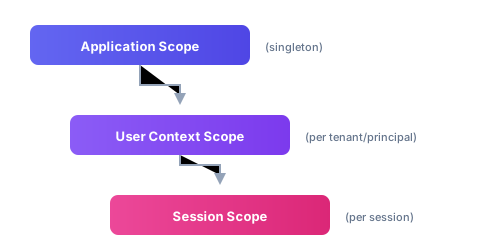
Each scope level has its own graph. Services live as long as the scope that owns them.
Application Scope
The application scope represents the top-level singleton scope for your entire application. There is typically one application scope instance per running application or service. The application graph is created once at startup and lives for the duration of the application.
Services at this level include global configuration, application-wide logging, and the context manager that creates lower-level scopes.
User Context Scope
The user context scope represents a specific tenant and principal combination. A principal is either a user (natural person) or a system account. This scope enables multi-tenant applications to isolate data and configuration between different users or organizations.
For mobile applications that don't require multi-tenancy, you can use the anonymous context which provides a default tenant and principal. The user context scope persists across multiple sessions and holds tenant-specific configuration values.
Session Scope
The session scope represents an active working session. What constitutes a session is defined by your application. In a mobile app, a session might span from user login to logout. In a REST API, each request might be a separate session.
Most IDK services are obtained from the session scope, including the KeyManagerService for cryptographic operations, the MdocEngagementManager for credential presentation, and HTTP clients configured with the appropriate credentials.
Creating Graphs
Graphs are created by traversing down the scope hierarchy. You start with the application graph and use its managers to create user context and session instances.
- Android/kotlin
- iOS/Swift
// 1. Create the application graph (singleton)
val appGraph = MyAppGraph.init(
    application = applicationContext,
    appId = "my-app",
    profile = "production",
    version = "1.0.0"
)

// 2. Create a user context (for a specific tenant/principal)
val userContext = appGraph.userContextManager.createOrGetFromInputs(
    tenantInput = DefaultTenantInputString(tenant = "acme-corp"),
    principalInput = DefaultPrincipalInputString(principal = "user@example.com"),
    makeActive = true
)

// Or use the anonymous context if multi-tenancy is not needed
// val userContext = appGraph.userContextManager.getAnonymous(makeActive = true)

// 3. Create a session within that user context
val session = userContext.sessionContextManager.createOrGetFromId(
    sessionId = "session-123",
    makeActive = true
)

// 4. Access services from the session graph
val keyManager = session.graph.keyManagerService
val engagementManager = session.graph.mdocEngagementManager
// 1. Create the application graph (singleton)
let appGraph = MyAppGraph.companion.doInit(
    application: UIApplication.shared,
    appId: "my-app",
    profile: "production",
    version: "1.0.0"
)

// 2. Create a user context (for a specific tenant/principal)
let userContext = appGraph.userContextManager.createOrGetFromInputs(
    tenantInput: DefaultTenantInputString(tenant: "acme-corp"),
    principalInput: DefaultPrincipalInputString(principal: "user@example.com"),
    makeActive: true
)

// Or use the anonymous context if multi-tenancy is not needed
// let userContext = appGraph.userContextManager.getAnonymous(makeActive: true)

// 3. Create a session within that user context
let session = userContext.sessionContextManager.createOrGetFromId(
    sessionId: "session-123",
    makeActive: true
)

// 4. Access services from the session graph
let keyManager = session.graph.keyManagerService
let engagementManager = session.graph.mdocEngagementManager
Scope Lifecycle
Understanding when scopes are created and destroyed helps manage resources correctly.
Application Lifecycle
The application graph should be created once when your application starts. On Android, this is typically in your Application class. On iOS, this is typically in your AppDelegate or during initial app setup.
class MyApplication : Application() {
    lateinit var appGraph: MyAppGraph
        private set

    override fun onCreate() {
        super.onCreate()
        appGraph = MyAppGraph.init(
            application = this,
            appId = "my-app",
            profile = BuildConfig.BUILD_TYPE,
            version = BuildConfig.VERSION_NAME
        )
    }
}
User Context Lifecycle
User contexts can be created and retrieved by ID. If a context with the given tenant and principal already exists, it's returned rather than creating a new one. User contexts are typically long-lived and persist across sessions.
// Creating or retrieving a user context
val context = appGraph.userContextManager.createOrGetFromInputs(
    tenantInput = DefaultTenantInputString(tenant = "tenant-id"),
    principalInput = DefaultPrincipalInputString(principal = "user-id"),
    makeActive = true
)

// Later, you can retrieve an active context
val activeContext = appGraph.userContextManager.getActive()
Session Lifecycle
Sessions are created within a user context and should be destroyed when no longer needed. Destroying a session cancels any outstanding asynchronous operations and releases resources.
// Create a session
val session = userContext.sessionContextManager.createOrGetFromId(
    sessionId = "session-123",
    makeActive = true
)

// Use the session...

// Destroy when done (optional but recommended)
userContext.sessionContextManager.destroyById(sessionId = "session-123")
Service Access Patterns
Access services through the session graph:
- Android/kotlin
- iOS/Swift
// Direct property access
val keyManager = session.graph.keyManagerService

// Generic service access by type
val oauth2Client: OAuth2Client = session.getService()

// Generic service access by ID
val customService = session.getService<MyService>(MyService.SERVICE_ID)
// Direct property access
let keyManager = session.graph.keyManagerService

// Generic service access
let oauth2Client = session.getService(id: OAuth2Client.companion.SERVICE_ID) as! OAuth2Client
Configuration by Scope
Configuration values can be set at different scope levels, with more specific scopes overriding less specific ones. This enables patterns like:
- Application-wide default settings
- Tenant-specific overrides for API endpoints
- Principal-specific credentials
- Session-specific temporary values
See the Configuration guide for details on how to configure values at each scope level.
Tips
- Create the application graph once and store it somewhere globally accessible, like the
Applicationclass on Android or a singleton on iOS. - For apps without multi-tenancy, use the anonymous context. It gives you the same scope structure with less boilerplate.
- Use meaningful session IDs. They show up in logs and make tracing much easier.
- Destroy sessions when done, especially on the server where each request is typically its own session.
- Don't hold references to services from a destroyed session. They won't work.