Credential Design
Credential Design is the IDK's metadata and presentation layer that controls how credentials, issuers, and verifiers are displayed to end users. It decouples visual presentation from credential structure, providing a unified system for branding, localization, claim labeling, and rendering across all credential formats.
What Problem Does It Solve?
Verifiable credentials come from many sources and in many formats (SD-JWT, mDoc, W3C VC), but wallets and verifiers need to display them consistently to users. Without a design layer, each application would need to manually map raw claim names like family_name to user-friendly labels, figure out which logo to show for an issuer, or decide how to render a credential card.
Credential Design solves this by providing:
- Unified display metadata across credential formats: a single design can describe how to present an SD-JWT, mDoc, or W3C VC
- Multi-locale support so credential names, descriptions, and claim labels adapt to the user's language
- Issuer and verifier branding with logos, colors, and display names
- Claim presentation rules including ordering, grouping, widget hints, and selective disclosure policies
- Render variants for different visual representations: simple cards, SVG templates, W3C render methods, and PDF templates
- Automatic metadata aggregation from external sources like OID4VCI issuer metadata, SD-JWT VCT type metadata, and JSON schemas
Architecture
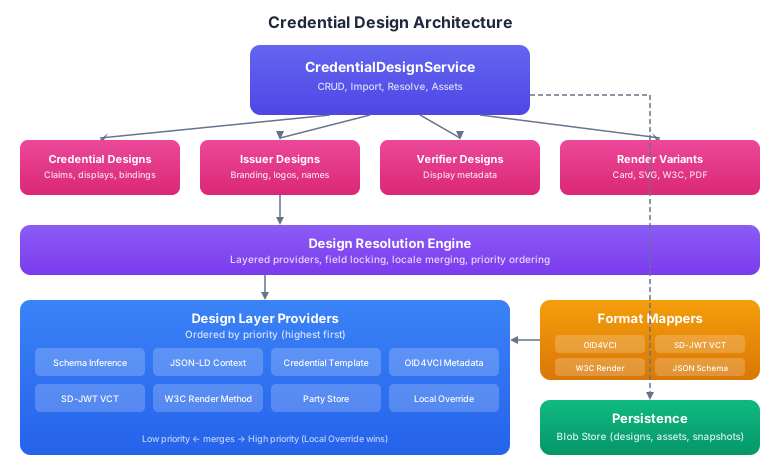
The architecture centers around three concepts:
Design entities store the display metadata. There are three types: credential designs (claims, displays, bindings), issuer designs (branding, logos), and verifier designs (display names). Each design can have multiple render variants for different visual representations.
The resolution engine combines metadata from multiple sources through a layered provider system. When an application needs to display a credential, the engine finds the matching design and enriches it by pulling in metadata from OID4VCI servers, SD-JWT type metadata, JSON schemas, and local overrides. Higher-priority providers win on conflicts, and authoritative sources can lock fields to prevent lower-priority overrides.
Format mappers translate between the IDK's canonical design model and format-specific metadata structures (OID4VCI credential configurations, SD-JWT VCT metadata, W3C render methods, JSON schemas). These mappers work bidirectionally, so the IDK can both import designs from external sources and export them to format-specific representations.
Design Bindings
Designs are connected to credentials through bindings, a multi-key matching system that links a design to the credentials it describes. A single design can have multiple bindings, allowing it to match credentials identified in different ways.
| Binding Key | Example Value | Use Case |
|---|---|---|
VCT | https://issuer.example.com/identity | SD-JWT verifiable credential type |
CREDENTIAL_CONFIGURATION_ID | IdentityCredential | OID4VCI credential configuration |
DOCTYPE | org.iso.18013.5.1.mDL | ISO mDoc document type |
VC_TYPE | VerifiableCredential | W3C VC type URI |
SCHEMA | https://schema.org/Person | JSON Schema or schema.org type |
CONTEXT | https://www.w3.org/2018/credentials/v1 | JSON-LD context |
ISSUER_ID | https://issuer.example.com | Issuer identifier |
ISSUER_DID | did:web:issuer.example.com | Issuer DID |
ISSUER_URI | https://issuer.example.com | Issuer URI (broader match) |
CREDENTIAL_TEMPLATE_ID | template-123 | Internal template reference |
CUSTOM | any value | Application-specific matching |
When resolving a design, the engine tries to match the credential's properties against the binding keys. This means a wallet can look up the design for a credential using whichever identifier it has available, whether that's a VCT from an SD-JWT, a doctype from an mDoc, or a configuration ID from an OID4VCI offer.
Core Components
- Android/Kotlin
- iOS/Swift
val designService: CredentialDesignService = session.graph.credentialDesignService
let designService: CredentialDesignService = session.graph.credentialDesignService
The CredentialDesignService is the main entry point for all design operations: creating and managing designs, resolving display metadata for credentials, importing designs from external sources, and managing visual assets.
Key Concepts
Localized Displays
Every design supports multiple localized displays. Each display contains a name, description, and optionally an issuer name override, all tied to a specific locale. When resolving a design, the caller specifies preferred locales and the engine returns the best match.
Claim Presentations
Claim presentations define how individual claims within a credential should be displayed. Each claim has:
- Path: identifies the claim using path segments (e.g.,
["address", "city"]or["org.iso.18013.5.1", "family_name"]) - Labels: localized display names and descriptions
- Ordering and grouping: controls layout in wallet UIs
- Widget hints: suggests how to render the value (text, date, image, checkbox, etc.)
- SD policy: whether selective disclosure is
ALWAYSrequired,ALLOWED, orNEVERfor this claim - Value kind: the data type (string, date, URI, image, etc.)
Render Variants
A design can have multiple render variants, each providing a different visual representation:
| Kind | Description |
|---|---|
SIMPLE_CARD | Basic card with logo, background color, and text colors |
SVG_TEMPLATE | SVG template with placeholder substitution for claim values |
W3C_RENDER_METHOD | W3C VC Render Method specification reference |
PDF_TEMPLATE | PDF template for printable credential representations |
EXTERNAL_REFERENCE | Link to an externally hosted rendering |
Render variants can be scoped to specific locales and include orientation (portrait/landscape), color scheme (light/dark), and contrast (normal/high) preferences.
Hosting Modes
Designs can be managed in three hosting modes:
| Mode | Description |
|---|---|
LOCAL | Created and managed entirely within the IDK |
CACHED_EXTERNAL | Imported from an external source and cached locally |
INFERRED | Automatically derived from credential metadata (schemas, contexts) |
Next Steps
- Working with Designs: Create and manage credential, issuer, and verifier designs
- Resolution and Import: Resolve designs from multiple sources and import external metadata