Resolution and Import
The design resolution engine is the core of the credential design system. Rather than relying on a single source for display metadata, it combines information from multiple providers in a defined priority order, producing a complete design that reflects the best available metadata for any credential.
How Resolution Works
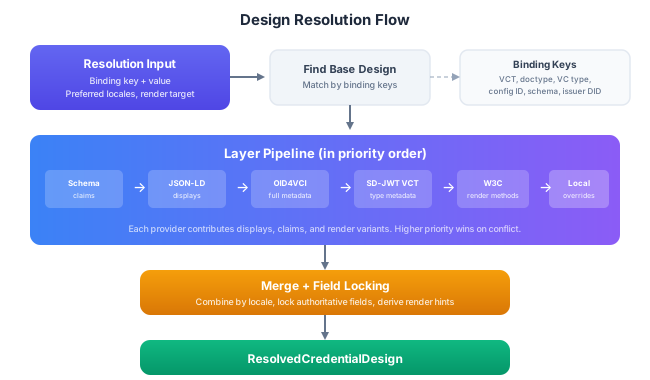
When you resolve a design, the engine follows these steps:
- Find the base design by matching the input's binding keys against stored designs
- Run the provider pipeline: each provider contributes displays, claims, and render variants from its metadata source
- Merge the layers: displays are merged by locale, claims by path, render variants collected. Higher-priority providers override lower-priority ones
- Apply field locks: authoritative providers can lock fields, preventing lower-priority sources from overwriting them
- Return the result as a
ResolvedCredentialDesignwith full tracking of which layers contributed what
The result includes not just the merged design, but also metadata about the resolution process: which providers contributed, which fields are locked, and the ETag for cache validation.
Resolving a Design
- Android/Kotlin
- iOS/Swift
// Resolve by binding
val result = designService.resolveCredentialDesign(
    tenantId = tenantId,
    input = ResolveCredentialDesignInput(
        bindingKey = DesignBindingKey.VCT,
        bindingValue = "https://issuer.example.com/identity",
        preferredLocales = listOf("en", "nl"),
        renderTarget = RenderVariantKind.SIMPLE_CARD
    )
)
val resolved = result.value  // IdkResult<ResolvedCredentialDesign, IdkError>

// Access the merged design
val display = resolved.design.displays.first()  // Best locale match
println("Credential: ${display.name}")
println("Description: ${display.description}")

// Access claim labels for UI rendering
resolved.design.claims.sortedBy { it.order }.forEach { claim ->
    val label = claim.labels.firstOrNull { it.locale == "en" }
    println("${label?.label}: ${claim.valueKind} (${claim.widgetHint})")
}

// Access the matched render variant
resolved.renderVariants.forEach { variant ->
    println("Render: ${variant.kind} - ${variant.alias}")
}

// See which providers contributed
resolved.appliedLayers.forEach { layer ->
    println("Layer: ${layer.sourceType} (priority ${layer.priority})")
}
// Resolve by binding
let result = try await designService.resolveCredentialDesign(
    tenantId: tenantId,
    input: ResolveCredentialDesignInput(
        bindingKey: .vct,
        bindingValue: "https://issuer.example.com/identity",
        preferredLocales: ["en", "nl"],
        renderTarget: .simpleCard
    )
)
let resolved = result.value  // IdkResult<ResolvedCredentialDesign, IdkError>

// Access the merged design
let display = resolved.design.displays.first!  // Best locale match
print("Credential: \(display.name)")
print("Description: \(display.description ?? "")")

// Access claim labels for UI rendering
for claim in resolved.design.claims.sorted(by: { ($0.order ?? 0) < ($1.order ?? 0) }) {
    let label = claim.labels.first { $0.locale == "en" }
    print("\(label?.label ?? ""): \(claim.valueKind) (\(claim.widgetHint))")
}

// Access the matched render variant
for variant in resolved.renderVariants {
    print("Render: \(variant.kind) - \(variant.alias ?? "")")
}

// See which providers contributed
for layer in resolved.appliedLayers {
    print("Layer: \(layer.sourceType) (priority \(layer.priority))")
}
You can also resolve by design ID directly if you already know which design to use, or resolve issuer and verifier designs the same way:
- Android/Kotlin
- iOS/Swift
// Resolve by design ID
val result = designService.resolveCredentialDesign(
    tenantId = tenantId,
    input = ResolveCredentialDesignInput(designId = knownDesignId)
)
val resolved = result.value  // IdkResult<ResolvedCredentialDesign, IdkError>

// Resolve issuer design
val issuerResolved = designService.resolveIssuerDesign(
    tenantId = tenantId,
    input = ResolveIssuerDesignInput(
        bindingKey = DesignBindingKey.ISSUER_ID,
        bindingValue = "https://issuer.example.com"
    )
)

// Resolve verifier design
val verifierResolved = designService.resolveVerifierDesign(
    tenantId = tenantId,
    input = ResolveVerifierDesignInput(designId = verifierDesignId)
)
// Resolve by design ID
let result = try await designService.resolveCredentialDesign(
    tenantId: tenantId,
    input: ResolveCredentialDesignInput(designId: knownDesignId)
)
let resolved = result.value  // IdkResult<ResolvedCredentialDesign, IdkError>

// Resolve issuer design
let issuerResolved = try await designService.resolveIssuerDesign(
    tenantId: tenantId,
    input: ResolveIssuerDesignInput(
        bindingKey: .issuerId,
        bindingValue: "https://issuer.example.com"
    )
)

// Resolve verifier design
let verifierResolved = try await designService.resolveVerifierDesign(
    tenantId: tenantId,
    input: ResolveVerifierDesignInput(designId: verifierDesignId)
)
Design Layer Providers
The resolution engine uses an ordered pipeline of providers. Each provider is specialized for a particular metadata source and contributes the information it can extract.
Provider Priority (Credentials)
Providers run in this order, from lowest to highest priority. Later providers override earlier ones on conflict:
| Priority | Provider | What It Contributes |
|---|---|---|
| 1 | Schema Inference | Claims derived from JSON schemas (names, types, cardinality) |
| 2 | JSON-LD Context | Display hints from linked JSON-LD contexts |
| 3 | Credential Template | Claims and displays from IDK credential templates |
| 4 | OID4VCI Metadata | Full display info from OID4VCI credential_configurations_supported |
| 5 | SD-JWT VCT | Type metadata from SD-JWT Verifiable Credential Type definitions |
| 6 | W3C Render Method | Render variants from W3C VC Render Method references |
| 7 | Local Override | User-defined designs stored in the IDK (highest priority) |
Provider Priority (Issuers)
| Priority | Provider | What It Contributes |
|---|---|---|
| 1 | OID4VCI Issuer Metadata | Display info from .well-known/openid-credential-issuer |
| 2 | Party Store | Entity branding from the IDK party management system |
| 3 | Local Override | User-defined issuer designs (highest priority) |
The local override provider always wins, which means you can always customize how a credential or issuer is displayed in your application regardless of what the external metadata says.
Field Locking
When a provider is marked as authoritative, the fields it contributes are locked; lower-priority providers can add new fields but cannot overwrite locked ones. This is useful when an issuer's own metadata (via OID4VCI or SD-JWT) should be considered the definitive source for certain display properties, while still allowing local customizations for fields the issuer didn't specify.
Importing External Designs
Instead of manually creating designs, you can import them from external metadata sources. The design service fetches the metadata, converts it using format mappers, and stores the result locally.
From OID4VCI Issuer Metadata
Import credential and issuer designs from an OID4VCI issuer's .well-known endpoint:
- Android/Kotlin
- iOS/Swift
// Import credential designs from OID4VCI metadata
val imported = designService.importExternalDesign(
    tenantId = tenantId,
    input = ImportExternalDesignInput(
        sourceUrl = "https://issuer.example.com/.well-known/openid-credential-issuer",
        sourceType = DesignSourceType.OID4VCI_CREDENTIAL_CONFIGURATION,
        entityType = DesignEntityType.CREDENTIAL,
        bindings = listOf(
            DesignBinding(
                key = DesignBindingKey.CREDENTIAL_CONFIGURATION_ID,
                value = "IdentityCredential"
            )
        )
    )
)

// Import the issuer's branding
val issuerImported = designService.importIssuerDesign(
    tenantId = tenantId,
    input = ImportIssuerDesignInput(
        sourceUrl = "https://issuer.example.com/.well-known/openid-credential-issuer",
        sourceType = DesignSourceType.OID4VCI_ISSUER_METADATA,
        bindings = listOf(
            DesignBinding(
                key = DesignBindingKey.ISSUER_ID,
                value = "https://issuer.example.com"
            )
        )
    )
)
// Import credential designs from OID4VCI metadata
let imported = try await designService.importExternalDesign(
    tenantId: tenantId,
    input: ImportExternalDesignInput(
        sourceUrl: "https://issuer.example.com/.well-known/openid-credential-issuer",
        sourceType: .oid4vciCredentialConfiguration,
        entityType: .credential,
        bindings: [
            DesignBinding(
                key: .credentialConfigurationId,
                value: "IdentityCredential"
            )
        ]
    )
)

// Import the issuer's branding
let issuerImported = try await designService.importIssuerDesign(
    tenantId: tenantId,
    input: ImportIssuerDesignInput(
        sourceUrl: "https://issuer.example.com/.well-known/openid-credential-issuer",
        sourceType: .oid4vciIssuerMetadata,
        bindings: [
            DesignBinding(key: .issuerId, value: "https://issuer.example.com")
        ]
    )
)
When importing from OID4VCI metadata, the Oid4vciDesignMapper extracts credential names, descriptions, logos, claim definitions, and locale-specific displays from the credential_configurations_supported structure. This means a wallet can automatically pick up display metadata from any OID4VCI-compliant issuer without manual design creation.
From SD-JWT VCT Metadata
For SD-JWT credentials, type metadata can be fetched from the VCT URL:
- Android/Kotlin
- iOS/Swift
val imported = designService.importExternalDesign(
    tenantId = tenantId,
    input = ImportExternalDesignInput(
        sourceUrl = "https://issuer.example.com/.well-known/vct/identity",
        sourceType = DesignSourceType.SD_JWT_VCT_METADATA,
        entityType = DesignEntityType.CREDENTIAL,
        bindings = listOf(
            DesignBinding(
                key = DesignBindingKey.VCT,
                value = "https://issuer.example.com/identity"
            )
        )
    )
)
let imported = try await designService.importExternalDesign(
    tenantId: tenantId,
    input: ImportExternalDesignInput(
        sourceUrl: "https://issuer.example.com/.well-known/vct/identity",
        sourceType: .sdJwtVctMetadata,
        entityType: .credential,
        bindings: [
            DesignBinding(key: .vct, value: "https://issuer.example.com/identity")
        ]
    )
)
Refreshing Imported Designs
Imported designs can be refreshed to pick up changes from the external source:
- Android/Kotlin
- iOS/Swift
val refreshed = designService.refreshCredentialDesign(
    tenantId = tenantId,
    designId = importedDesign.id
)
// Uses ETag for conditional fetches to minimize network traffic
let refreshed = try await designService.refreshCredentialDesign(
    tenantId: tenantId,
    designId: importedDesign.id
)
// Uses ETag for conditional fetches to minimize network traffic
Source Snapshots
When a design is imported or refreshed, the raw external metadata is stored as a source snapshot. This serves as a cache and audit trail, allowing the IDK to re-derive the design without another network fetch and to compare against future versions.
val snapshot = designService.getSourceSnapshot(tenantId, snapshotId)
// snapshot.sourceUrl - Where it was fetched from
// snapshot.sourceType - OID4VCI, SD-JWT, etc.
// snapshot.content - Raw fetched content
// snapshot.etag - For conditional refreshes
// snapshot.fetchedAt - Timestamp
Configuration
The design module's behavior is controlled through CredentialDesignModuleConfig, which has three sections:
Resolution Policy
Controls how the resolution engine aggregates metadata from multiple sources:
credential-design:
  policy:
    schema-hints-enabled: true           # Derive claims from JSON schemas
    json-ld-context-hints-enabled: true   # Extract hints from JSON-LD contexts
    markdown-rendering-enabled: false     # Allow markdown in claim values
    issuer-metadata-preference: OID4VCI_FIRST  # OID4VCI_FIRST | SD_JWT_FIRST | MERGE | LOCAL_ONLY
    credential-metadata-preference: MERGE      # How to combine format-specific metadata
    prefer-integrity-protected-sources: true   # Prefer sources with integrity protection
    allow-remote-template-fetch: false         # Fetch SVG/PDF templates from remote URLs
    allow-remote-asset-fetch: false            # Fetch logos/images from remote URLs
The issuerMetadataPreference setting is important when the same issuer has metadata available in multiple formats. OID4VCI_FIRST prioritizes OID4VCI issuer metadata, SD_JWT_FIRST prioritizes SD-JWT issuer metadata, MERGE combines both, and LOCAL_ONLY ignores external sources entirely.
Refresh Settings
Controls automatic refresh behavior for imported designs:
credential-design:
  refresh:
    enabled: false                # Enable automatic refresh
    default-ttl-seconds: 86400    # Re-fetch after 24 hours
    rehost-remote-assets: true    # Download and store remote assets locally
    max-asset-size-bytes: 5242880 # 5 MB limit per asset
When rehost-remote-assets is enabled, logos and images referenced by imported designs are downloaded and stored in the IDK's blob store. This avoids runtime dependencies on external servers and ensures assets remain available even if the source goes offline.
Validation Limits
Guards against malformed or excessively large designs:
credential-design:
  validation:
    max-bindings-per-design: 16
    max-displays-per-design: 64
    max-claims-per-design: 256
    max-render-variants-per-design: 32
    max-entry-codes-per-claim: 1024
    fail-on-unknown-source-type: true
    validate-on-read: false       # Re-validate designs when reading from store
Security
External metadata fetching includes built-in SSRF (Server-Side Request Forgery) protection. The DesignExternalFetcher blocks requests to private IP ranges and local network addresses, preventing imported design URLs from being used to probe internal infrastructure. This protection is always enabled and cannot be disabled.
Fetched content is also size-limited (configurable, default 10 MB) to prevent denial-of-service through oversized responses.
Data Types
ResolvedCredentialDesign
data class ResolvedCredentialDesign(
    val design: CredentialDesignRecord,         // Merged credential design
    val issuerDesign: IssuerDesignRecord?,       // Associated issuer branding
    val verifierDesign: VerifierDesignRecord?,   // Associated verifier display
    val renderVariants: List<RenderVariantRecord>, // Matched render variants
    val derivedRenderHints: DerivedRenderHintsRecord?, // Auto-derived field hints
    val appliedLayers: List<AppliedDesignLayer>, // Which providers contributed
    val lockedFields: Set<String>,              // Fields locked by authoritative sources
    val resolvedAt: Instant,                    // Resolution timestamp
    val etag: String?                           // Cache validation tag
)
AppliedDesignLayer
data class AppliedDesignLayer(
    val sourceType: DesignSourceType,   // OID4VCI, SD_JWT, LOCAL_OVERRIDE, etc.
    val sourceUrl: String?,             // Where the metadata came from
    val priority: Int,                  // Provider priority (higher wins)
    val authoritative: Boolean          // Whether this layer can lock fields
)