Getting Started
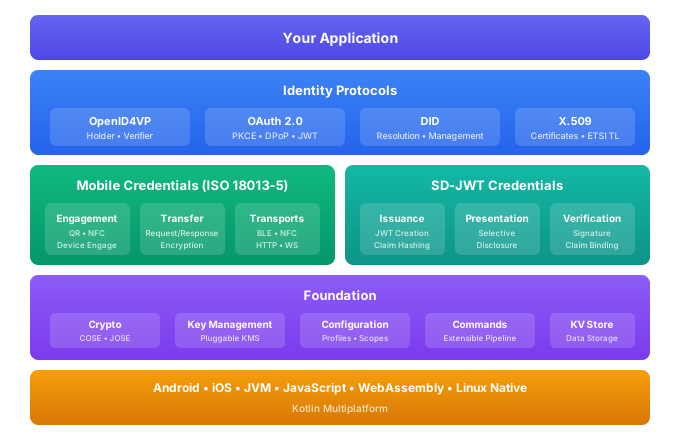
The Identity Development Kit (IDK) is a Kotlin Multiplatform library that provides foundational technologies for digital identity applications. It offers comprehensive support for mobile credentials based on ISO/IEC 18013-5, cryptographic operations with pluggable key management, OAuth 2.0 flows, OpenID4VP credential presentation, and SD-JWT selective disclosure.
The IDK is designed as a modular toolkit where developers can include only the components they need. Whether you're building a mobile wallet, a credential verifier, or integrating identity services into an existing application, the IDK provides the building blocks to do so across Android, iOS, and JVM platforms.
Architecture Overview
Platform Support
The IDK supports multiple platforms through Kotlin Multiplatform:
| Platform | Requirements | Notes |
|---|---|---|
| Android | API 27+ (Android 8.1), Java 17+ | Full support including BLE, NFC HCE |
| iOS | iosX64, iosArm64, iosSimulatorArm64 | CoreBluetooth, CoreNFC support |
| JVM | Java 21+ | Server-side applications |
| JavaScript/WASM | Modern browsers | Experimental support |
Core Capabilities
Mobile Credentials (mDoc/mDL)
The IDK implements ISO/IEC 18013-5 for mobile driving licenses and other mobile credentials. This includes device engagement via QR codes, NFC, and Bluetooth, secure data transfer with session encryption, selective disclosure of credential attributes, and cryptographic verification of both reader and device.
Cryptography and Key Management
A pluggable key management system supports multiple backends including the iOS Secure Enclave, Android Keystore, AWS KMS, Azure Key Vault, and software-based ephemeral keys. The cryptography module handles COSE and JOSE operations, X.509 certificate validation, and supports algorithms including ECDSA (P-256, P-384, P-521), EdDSA, and RSA-PSS.
OAuth 2.0 and OpenID
Complete OAuth 2.0 client implementation with support for authorization code flow, PKCE, and DPoP token binding. The OpenID4VP module enables credential presentation between holders and verifiers using standardized protocols.
SD-JWT
Selective Disclosure JWT implementation allows credential holders to present only specific claims from a credential while maintaining cryptographic integrity of the disclosed information.
Trust Validation
Framework for validating certificates and credentials against trust anchors, including support for ETSI TS 119 612 Trust Service Status Lists used in EU qualified trust services.
Quick Start
The fastest way to get started is to include the lib-all artifact which bundles all IDK modules:
dependencies {
    implementation("com.sphereon.idk:lib-all:0.13.0")
}
For iOS projects using Swift Package Manager, add the IDK package from the Sphereon repository.
Once you have the dependency configured, you'll need to set up the dependency injection framework and create your application component. The IDK uses a hierarchical scope system that manages component lifecycles and provides proper isolation for multi-tenant scenarios.
See the Installation guide for detailed setup instructions and the Dependency Injection section for information on configuring the scope hierarchy.
Example: Presenting Credentials via QR Code
This example demonstrates how to present mobile credentials to a verifier using a QR code and Bluetooth:
- Android/kotlin
- iOS/Swift
import com.sphereon.mdoc.engagement.MdocEngagementManager
import com.sphereon.mdoc.engagement.EngagementConfig
import com.sphereon.mdoc.transfer.UiPhase
import kotlinx.coroutines.flow.collect
import kotlinx.coroutines.launch

// Obtain the engagement manager from your DI component
val engagementManager: MdocEngagementManager = sessionComponent.engagementManager

// Create an engagement with QR code and BLE transport
engagementManager.createEngagement {
    engagement {
        qr { scheme = "mdoc:" }
    }
    retrieval {
        ble { centralClientMode = true }
    }
}

// Get the QR code content to display
val qrEngagement = engagementManager.qrEngagement.value
displayQrCode(qrEngagement.uri)

// Handle the presentation flow via state changes
launch {
    engagementManager.eventHub.sessionState.collect { state ->
        when (state.phase) {
            UiPhase.ENGAGEMENT -> {
                // Reader has scanned the QR code, BLE connecting
            }
            UiPhase.TRANSFER -> {
                // Request received, user consent needed
                if (state.userInteractionRequired) {
                    val request = state.deviceRequest
                    showConsentDialog(request)
                }
            }
            UiPhase.TERMINAL -> {
                // Presentation complete
                handleOutcome(state.terminalOutcome)
            }
        }
    }
}
import SphereonIDK

// Obtain the engagement manager from your DI component
let engagementManager = sessionComponent.engagementManager

// Create an engagement with QR code and BLE transport
try await engagementManager.createEngagement { config in
    config.engagement { engagement in
        engagement.qr { qr in
            qr.scheme = "mdoc:"
        }
    }
    config.retrieval { retrieval in
        retrieval.ble { ble in
            ble.centralClientMode = true
        }
    }
}

// Get the QR code content to display
let qrEngagement = engagementManager.qrEngagement.value
displayQrCode(uri: qrEngagement.uri)

// Handle the presentation flow via state changes
for await state in engagementManager.eventHub.sessionState {
    switch state.phase {
    case .engagement:
        // Reader has scanned the QR code, BLE connecting
        break
    case .transfer:
        // Request received, user consent needed
        if state.userInteractionRequired {
            let request = state.deviceRequest
            showConsentDialog(request: request)
        }
    case .terminal:
        // Presentation complete
        handleOutcome(outcome: state.terminalOutcome)
    }
}
Next Steps
To continue setting up the IDK in your project:
- Review the Installation guide for complete dependency configuration
- Learn about Dependency Injection and the scope hierarchy
- Explore Configuration options for customizing behavior
- Dive into specific modules like Mobile Credentials, Cryptography, or OAuth 2.0
Resources
- GitHub Repository
- ISO/IEC 18013-5:2021 - Mobile Driving License standard
- ETSI TS 119 612 - Trust Service Status Lists
- RFC 9449 - DPoP (Demonstration of Proof of Possession)