Registration Journeys
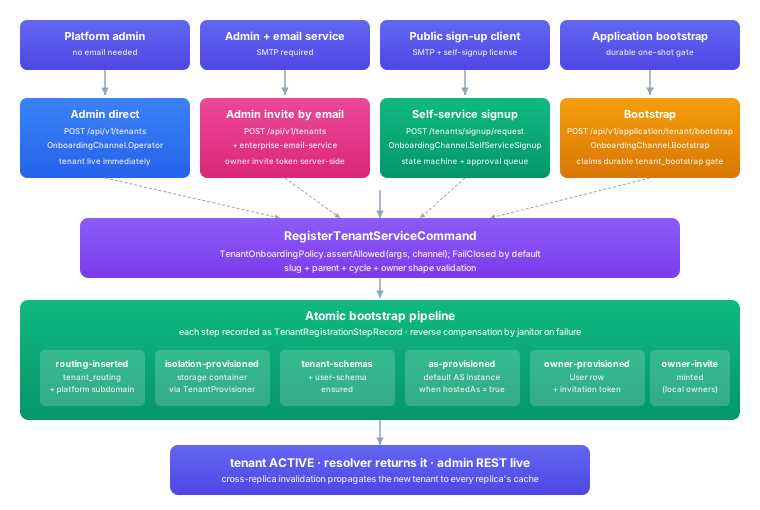
tenants come into existence through three journeys: admin direct creation, admin invite by email, and public self-service signup. The one-shot bootstrap is separate: it brings up the platform/application tenant and operator login on a fresh deployment. The production journeys end in the same atomic registration; they differ in how the caller proves it is allowed to register and how the owner is activated.
Every journey honours the same contract:
- Tenant creation does not collect upstream OAuth or OpenID client credentials. After the owner is active, the tenant creates an external authorization-server resource and an explicit federation binding when federated sign-in is required.
- Secrets are never embedded inline in registration payloads. SMTP credentials, federation-binding client secrets, webhook secrets, and integration secrets always go through the selected secret backend as references.
- License gates run before signup policy. Policy can turn off or constrain a licensed route, but it cannot enable a route the license disallows.
- Email delivery, when enabled, is server-side. The browser never receives raw signup or invitation tokens.
Prerequisites at the Deployment Level
Before any production root-tenant journey is offered, the deployment must be configured with:
- License activation. A license is installed and its feature/limit snapshot is loaded. Root creation checks
maxRootTenantsandmaxTotalTenants; self-signup and subtenant availability come from theself-signupandsubtenantsfeatures andsubtenantsAllowed. - Optional email service. When email transport is enabled, the deployment runs the email service, which owns SMTP configuration, template rendering, send, test-send, and delivery status. Onboarding calls it server-side. Without it, admin direct creation remains available but invite and self-service signup do not.
- Secret management. One active backend is selected. Tenant config stores secret references, not values.
- Public URL settings. The application base URL for activation and signup links, and the tenant public-endpoint base host settings.
- Signup policy. Whether root self-service signup is enabled, whether it requires approval, rate limits, and verification-token TTL.
- Application tenant. Exists before tenants, has a hosted AS, and owns the operator access path. See Application Tenant and Bootstrap and License, Quota, and Policy.
Admin Direct Creation
An authenticated administrator posts to /tenants and the tenant is created immediately, with no email roundtrip. This is the only journey that works with no email service configured, and it is the safe-mode operator path during initial onboarding or after an outage.
License gates:
- Root creation requires an active license plus available root and total tenant quota.
- Subtenant creation additionally requires the
subtenantsfeature,subtenantsAllowed = true, available total quota, and hierarchy depth withinmaxHierarchyDepth.
Create the tenant with POST /tenants (registerTenant). The ownerDelivery.mode field controls how the owner is activated:
none: the platform sends nothing; the operator completes owner activation out of band. Use this with no email service, or when handing the activation token to the owner through another channel.email: the platform emails the owner an invitation (the admin invite journey below).
A root tenant leaves parentTenantId null; a subtenant sets it to the parent's id and scopes the slug accordingly. The owner shape, the platform-subdomain flag, and the remaining fields are in the Platform Admin API reference.
- Overview
- API reference
- gRPC
- Command
Supply the tenant name, slug, tenantType, an owner, and ownerDelivery.mode (none here for a no-email direct creation). A root tenant leaves parentTenantId null. The result carries the new tenant id and a correlationId.
POST /api/platform-admin/v1/tenants
The full request and response schema is in the API reference, or open the API reference tab to read it inline.
Flow:
- The admin submits
POST /tenantswith a bearer JWT carrying platform-admin scope andownerDelivery.mode = none. - The onboarding policy asserts the call is allowed.
- The registration runs the full atomic bootstrap: routing, isolation provisioning, schema setup, the default AS, the owner account, and a one-time owner invitation token.
- When email is configured and requested, the owner invitation token is handed to the email service server-side; otherwise the admin completes owner onboarding through authenticated admin flows.
- The API returns
201with the tenant id, slug, primary domain, the issuer URL when available, and a registration correlation id.
The registration call does not accept external authorization-server configuration, OIDC issuer URLs, federation bindings, or OAuth client secrets. After activation, the owner creates an external authorization-server resource through the tenant Platform Config API, validates its discovery document, and attaches it to the hosted authorization server as a disabled federation binding. The binding can be enabled only after its current validation succeeds. See Tenant Federation.
Admin Invite By Email
The administrator creates the tenant exactly as in direct creation, and the owner invitation token is handed to the email service server-side so the owner receives an activation email. This is the default for local-owner onboarding when email is configured.
Availability: only when the email service is deployed, SMTP is configured, and template/test-send verification has passed. License gates: same as admin direct creation.
The request is the same registerTenant call with ownerDelivery.mode = email. The difference is the post-create step:
- The admin submits
POST /tenantswithownerDelivery.mode = email. - The tenant and owner bootstrap state are created.
- The owner invitation token is minted server-side.
- The email service is called with the owner-invitation template and server-side token context.
- The email service renders and sends the activation email via SMTP.
- The API and admin UI report invite delivery status.
- The owner opens the activation link and completes owner activation through the AS.
The token never leaves the server side. API responses redact it; the admin UI shows "invite sent", not the link. The SMTP password the email service uses is a secret reference through the selected backend.
Self-Service Signup
A prospective owner starts onboarding from a public signup page or API client. The EDK validates the request, mints a verification token, and hands it to the email service for delivery. The user clicks the link, the EDK confirms possession of the token, and the tenant is registered (or queued for operator approval, depending on policy).
Availability: the email service is required, because email-token delivery is required.
License gates:
- Root self-service signup requires an active license, the
self-signupfeature, and available root/total quota. - Subtenant self-service signup additionally requires the
subtenantsfeature,subtenantsAllowed = true, available total quota, and hierarchy depth withinmaxHierarchyDepth.
A prospective owner starts with POST /tenants/signup/request (requestTenantSignup), supplying the desired slug, the owner email, and a bot-challenge proof. A root request leaves parentTenantId null; a subtenant request sets it to the parent's id. See the reference for the schema.
- Overview
- API reference
- gRPC
- Command
Supply the email, desired slug, optional parentTenantId, and a challengeProof. The public HTTP response is 202 with the request id and expiry only. The plaintext verification token in the command result is for the email channel server-side and is never returned over REST.
POST /api/platform-admin/v1/tenants/signup/request
The full request and response schema is in the API reference, or open the API reference tab to read it inline.
Flow:
- A public client submits
POST /tenants/signup/request. - The backend validates signup policy, the bot challenge, slug constraints, and rate limits.
- The backend creates a
PENDING_EMAILrequest, stores the verification token hashed, and persists the row. - The plaintext verification token is handed to the email service server-side.
- The email service renders and sends the verification email via SMTP.
- The response returns
202without the plaintext token. - The owner opens the verification link and submits
POST /tenants/signup/confirmwith the token. - If approval is not required, the tenant is registered and the row transitions to
REGISTERED. - If approval is required, the row transitions to
PENDING_APPROVAL. - An operator approves or rejects through
POST /tenants/signup/{signupRequestId}/approveor/reject. - Approval registers the tenant and the row transitions to
REGISTERED.
The owner confirms possession of the emailed token with POST /tenants/signup/confirm (confirmTenantSignup):
- Overview
- API reference
- gRPC
- Command
The body is the plainVerificationToken the owner clicked through. The result status is REGISTERED (with the registration payload) when no approval is required, or PENDING_APPROVAL when the parent tenant's policy holds it for an operator.
POST /api/platform-admin/v1/tenants/signup/confirm
The full request and response schema is in the API reference, or open the API reference tab to read it inline.
Signup State Machine
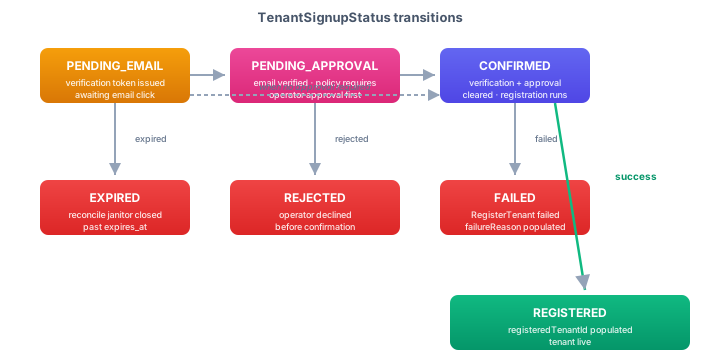
PENDING_EMAIL. Request created; verification token issued; waiting for the owner to click the email link.PENDING_APPROVAL. Email verified, but signup policy requires operator approval before registration runs.CONFIRMED. Verification and any required approval cleared; registration is allowed to proceed.REGISTERED. Registration succeeded;registeredTenantIdis populated.REJECTED. Operator declined before confirmation.EXPIRED. The reconcile pass closed the row past its expiry without confirmation.FAILED. Registration was attempted but failed;failureReasoncarries the operator diagnostic.
Signup Policy Keys
tenant.signup.platform.enabled
tenant.signup.platform.requires-approval
tenant.signup.platform.rate-limit.per-email-per-hour
tenant.signup.platform.rate-limit.per-ip-per-hour
tenant.signup.platform.token-ttl-minutes

tenant.signup.children.enabled
tenant.signup.children.requires-approval
tenant.signup.children.rate-limit.per-email-per-hour
tenant.signup.children.rate-limit.per-ip-per-hour
tenant.signup.children.token-ttl-minutes
License is evaluated before policy. Policy can disable or constrain a licensed route, but it cannot enable a route the license disallows.
Resend, Expiry, and Reconciliation
A signup that expires before the user clicks the link can be resent with POST /tenants/signup/{signupRequestId}/resend. The resend mints a new verification token and updates the expiry, the last-resend timestamp, and the resend count atomically; the per-row minimum interval and maximum resend count are enforced at the database level, so two replicas racing for the same row cannot bypass the limit.
- Overview
- API reference
- gRPC
- Command
The signupRequestId comes from the path. The command refuses unless the row is still PENDING_EMAIL and within the rate-limit window, then re-mints the token; the fresh plaintext goes to the email channel server-side, not the REST response.
POST /api/platform-admin/v1/tenants/signup/{signupRequestId}/resend
The full request and response schema is in the API reference, or open the API reference tab to read it inline.
POST /tenants/signup/reconcile/expired runs the reconcile pass that moves stale PENDING_EMAIL rows past their expiry to EXPIRED, and rows that started but never completed registration to FAILED.
- Overview
- API reference
- gRPC
- Command
A maintenance sweep, typically run on a schedule. The result reports expiredCount. The evaluation instant is supplied by the adapter, so there is no request body to send.
POST /api/platform-admin/v1/tenants/signup/reconcile/expired
The full request and response schema is in the API reference, or open the API reference tab to read it inline.
Bootstrap
The bootstrap is the one-shot platform/application tenant claim, used to bring up the internal platform tenant and operator login on a fresh deployment after the license is activated.
A durable flag in the database carries the gate. On a fresh deployment the gate is open. Claiming it creates or reconciles the platform/application tenant atomically, and a database-level guard prevents two concurrent calls from both winning. Once claimed, the gate is closed for good. Reopening requires a direct operator SQL action (set the tenant_bootstrap row's completed_at back to NULL), which is intentionally not exposed at the REST surface.
The bootstrap is the only path the fail-closed onboarding policy accepts unconditionally: by the time it runs, the durable gate has already proved the deployment is in its first-run state. tenant registration happens afterwards with an authenticated platform-admin token.
The authenticated confirmation path is invoked through POST /application/tenant/bootstrap on the application admin surface, rather than /tenants, because the caller acts as the application operator rather than a customer tenant administrator. After bootstrap, tenants register through one of the other three journeys.
- Overview
- API reference
- gRPC
- Command
Creates or reconciles the application tenant and its hosted AS, optionally setting the operator contact. Idempotent: a second call returns the current status rather than failing. The result reports the tenant id, hosted-AS availability, and whether tenants can be registered.
POST /api/platform-admin/v1/application/tenant/bootstrap
The full request and response schema is in the API reference, or open the API reference tab to read it inline.
Operator Approval Queue
For signup journeys that require operator approval:
GET  /tenants/signup/pending                          # root signups
GET  /tenants/signup/pending?parentTenantId=acme      # subtenant signups under acme
POST /tenants/signup/{signupRequestId}/approve
POST /tenants/signup/{signupRequestId}/reject
Platform administrators see root-level pending rows. Parent tenant administrators see child signup rows scoped to their tenant. Each row carries email, slug, displayName, parentTenantId, status, createdAt, expiresAt, resendCount, and the failure/rejection diagnostics where applicable. Approve immediately attempts registration; reject records a reason and transitions to REJECTED.
- Overview
- API reference
- gRPC
- Command
The signupRequestId comes from the path; optional notes record the operator decision. Approval drives the row through to registration and returns the resulting status with the registration payload when it succeeds.
POST /api/platform-admin/v1/tenants/signup/{signupRequestId}/approve
The full request and response schema is in the API reference, or open the API reference tab to read it inline.
- Overview
- API reference
- gRPC
- Command
The signupRequestId comes from the path; an optional reason is recorded. The row transitions to REJECTED and no tenant is created.
POST /api/platform-admin/v1/tenants/signup/{signupRequestId}/reject
The full request and response schema is in the API reference, or open the API reference tab to read it inline.
When the Email Service Is Absent
A deployment can run without an email service, but the operating mode changes:
- Admin direct creation: works. The admin completes owner onboarding through authenticated admin flows.
- Admin invite by email: unavailable. The admin UI hides or disables the invite flow.
- Self-service signup: unavailable. The public signup endpoints reject with a
503and the signup screens are hidden. - Bootstrap: works. It does not depend on email.
A minimal on-prem or early-bootstrap deployment typically runs in this mode initially, then enables the email service once the team is ready to operate the signup queues.