EDK Configuration System Overview
The Enterprise Development Kit (EDK) extends the IDK core configuration system with cloud providers, database persistence, and offline caching capabilities for enterprise deployments.
Key Concept: Just Add the Dependency
EDK configuration providers use auto-registration. When you add a provider module to your classpath, it automatically integrates with the ConfigService. Your application code just calls:
val apiUrl = configService.getProperty("api.base.url", String::class)
The system figures out where to get the value - environment variables, Azure App Configuration, database, or property files.
Architecture
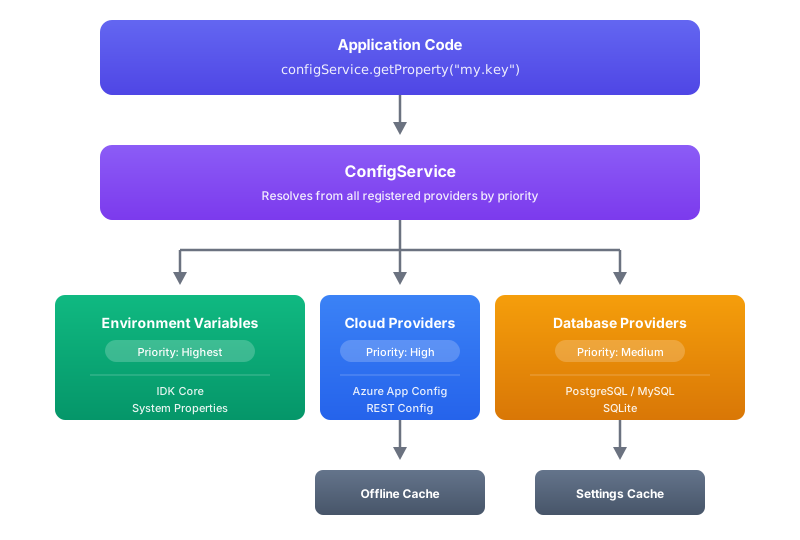
Auto-Registration
Providers register themselves automatically when:
- Their module is on the classpath
- Required configuration is provided (e.g., connection strings)
- They're not explicitly disabled
How It Works
When your application starts, the PropertySourceBootstrap service:
- Discovers all
PropertySourceContributionimplementations via dependency injection - Checks if each provider is enabled (configuration flag + required config)
- Registers enabled providers with the appropriate
ConfigService - Initializes providers that need async setup (cloud providers)
Enabling a Provider
Simply add the dependency and provide connection details:
- Azure App Config
- REST Config
- Database (VDX)
dependencies {
    implementation("com.sphereon.edk:lib-conf-azure-app-config:$version")
}
# Azure auto-enables when connection details are provided
export AZURE_APPCONFIG_CONNECTION_STRING="Endpoint=https://myapp.azconfig.io;..."

# Or use endpoint with managed identity
export AZURE_APPCONFIG_ENDPOINT="https://myapp.azconfig.io"
dependencies {
    implementation("com.sphereon.edk:lib-conf-config-rest-client:$version")
}
export REST_CONFIG_BASE_URL="https://config.example.com"
export REST_CONFIG_TENANT_ID="my-tenant"
export REST_CONFIG_AUTH_API_KEY="my-api-key"
dependencies {
    implementation("com.sphereon.vdx:vdx-conf-settings-persistence-postgresql:$version")
}
Database providers auto-register when database connection is configured.
Disabling a Provider
Disable any provider via configuration:
# Disable Azure provider
export CONFIG_PROVIDERS_AZURE_APP_CONFIG_ENABLED=false

# Disable REST provider
export CONFIG_PROVIDERS_REST_CONFIG_ENABLED=false

# Disable PostgreSQL database provider
export CONFIG_PROVIDERS_POSTGRESQL_DB_ENABLED=false
Or in properties:
config.providers.azure-app-config.enabled=false
config.providers.rest-config.enabled=false
config.providers.postgresql-db.enabled=false
Provider IDs
Each provider has a unique ID for configuration:
| Provider | Provider ID | Module |
|---|---|---|
| Azure App Configuration | azure-app-config | lib-conf-azure-app-config |
| REST Config Client | rest-config | lib-conf-config-rest-client |
| PostgreSQL Database | postgresql-db | vdx-conf-settings-persistence-postgresql |
| MySQL Database | mysql-db | vdx-conf-settings-persistence-mysql |
| SQLite Database | sqlite-db | vdx-conf-settings-persistence-sqlite |
Module Summary
Cloud Configuration Providers
| Module | Description | Platform | Priority |
|---|---|---|---|
config-rest-client | REST API client for remote configuration servers | Multiplatform | High |
azure-app-config | Azure App Configuration integration | JVM | High |
Database Providers (VDX)
| Module | Description | Platform | Priority |
|---|---|---|---|
vdx-conf-settings-persistence-postgresql | PostgreSQL settings storage | JVM | Medium |
vdx-conf-settings-persistence-mysql | MySQL settings storage | JVM | Medium |
vdx-conf-settings-persistence-sqlite | SQLite settings storage | JVM | Medium |
Caching
| Module | Description | Platform |
|---|---|---|
config-offline-cache | Offline-capable configuration caching | Multiplatform |
Priority Order
When the same key exists in multiple providers:
| Priority | Provider Type | Example |
|---|---|---|
| 1 (Highest) | Environment Variables | API_URL=... |
| 2 | System Properties | -Dapi.url=... |
| 3 | Cloud Providers | Azure, REST |
| 4 | Database Providers | PostgreSQL, MySQL |
| 5 | Property Files | application.properties |
| 6 (Lowest) | Programmatic Defaults | MapPropertySource |
This allows you to:
- Define defaults in property files or database
- Override with cloud configuration for centralized management
- Override everything with environment variables in production
Configuration Reference
Azure App Configuration
# Connection (use one)
azure.appconfig.connection-string=Endpoint=https://...;Id=...;Secret=...
azure.appconfig.endpoint=https://myapp.azconfig.io

# Key filtering
azure.appconfig.key-filter=myapp/*
azure.appconfig.key-prefix=myapp/
azure.appconfig.trim-key-prefix=true

# Label/environment
azure.appconfig.label-filter=production

# Change detection
azure.appconfig.sentinel-key=app:version
azure.appconfig.refresh-interval=30s

# Scoping
azure.appconfig.tenant-id=my-tenant
REST Config Client
# Connection
rest.config.base-url=https://config.example.com
rest.config.tenant-id=my-tenant
rest.config.profile=production

# Paths
rest.config.settings-path=/api/v1/config/settings
rest.config.refresh-path=/api/v1/config/refresh

# Authentication (choose one method)
rest.config.auth.method=API_KEY
rest.config.auth.api-key=my-api-key
rest.config.auth.api-key-header=X-API-Key

# Or Bearer token
rest.config.auth.method=BEARER_TOKEN
rest.config.auth.bearer-token=my-jwt-token

# Timeouts
rest.config.connect-timeout-ms=5000
rest.config.read-timeout-ms=30000

# Caching
rest.config.offline-cache-enabled=true
Quick Start Example
// Your application just uses ConfigService - providers are auto-registered
class MyService(
    private val configService: ConfigService
) {
    fun doSomething() {
        // This value might come from Azure, REST, database, or env vars
        // Your code doesn't need to know!
        val apiUrl = configService.getProperty("api.base.url", String::class)
            ?: throw IllegalStateException("api.base.url not configured")

        val timeout = configService.getProperty("http.timeout.ms", Int::class, 30000)
        val retryEnabled = configService.getProperty("retry.enabled", Boolean::class, true)

        // Use the configuration...
    }
}
Caching Behavior
Cloud Providers
Cloud providers use OfflineConfigCache for network resilience:
refresh() called
    │
    ├─ Network request to Azure/REST
    │    │
    │    ├─ Success
    │    │    ├─ Update in-memory store
    │    │    ├─ Persist to offline cache (disk)
    │    │    └─ Return success
    │    │
    │    └─ Failure (network error)
    │         ├─ Load from offline cache
    │         └─ Return cached data (or error if cache empty)
Database Providers
Database providers use SettingsCache for performance:
- Read: Check cache → query database → cache result
- Write: Update database → invalidate cache
- TTL: Cached entries expire automatically
Related Documentation
- Cloud Providers - Detailed REST and Azure configuration
- Offline Cache - Offline caching system details
- IDK Configuration - Core configuration concepts
- IDK Providers - Provider overview and custom providers