Spring Boot Integration
The EDK provides first-class Spring Boot integration that bridges the IDK's kotlin-inject dependency injection system with Spring's IoC container. This enables you to build production-ready identity services with multi-tenant support.
Two Integration Modes
The Spring Boot integration offers two modes depending on your application type:
| Mode | Annotation | Use Case |
|---|---|---|
| REST API | @EnableSphereonRestApi | Multi-tenant REST APIs with request-scoped contexts |
| Application | @EnableSphereonApplication | Desktop/server apps with login/logout lifecycle |
REST API Mode
For multi-tenant REST APIs where each HTTP request may have a different tenant and user:
import com.sphereon.spring.annotation.EnableSphereonRestApi
import org.springframework.boot.autoconfigure.SpringBootApplication
import org.springframework.boot.runApplication

@SpringBootApplication
@EnableSphereonRestApi
class IdentityServiceApplication

fun main(args: Array<String>) {
    runApplication<IdentityServiceApplication>(*args)
}
Key Features
- Request-scoped contexts - Each HTTP request gets its own tenant/user context
- Thread-safe - No global state; contexts resolved per-request via IDs
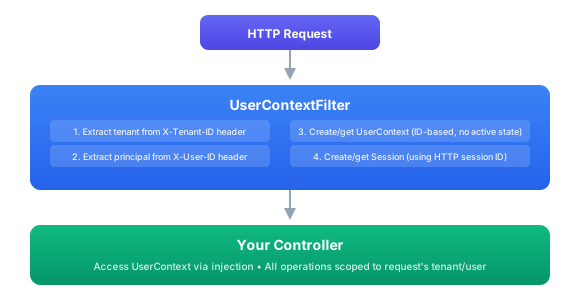
- Automatic HTTP filter - Extracts tenant and principal from headers
- kotlin-inject bridge - IDK services available as Spring beans
Request Flow
Configuration
sphereon:
  app:
    id: identity-service
    profile: ${spring.profiles.active:development}

  kotlin-inject:
    scan-packages:
      - com.sphereon
      - com.yourcompany
    auto-register: true

  rest-api:
    auto-filter: true
    filter-order: -100

    auth:
      methods:
        - header
        - oauth2
        - oidc
      auth-header: Authorization
      tenant-header: X-Tenant-ID
      principal-header: X-User-ID
Using IDK Services
IDK services are automatically registered as Spring beans:
import com.sphereon.data.store.db.routing.DatabaseRouter
import org.springframework.web.bind.annotation.*

@RestController
@RequestMapping("/api/v1/parties")
class PartyController(
    private val router: DatabaseRouter,  // From IDK
    private val partyService: PartyService  // Your service
) {
    @GetMapping
    suspend fun listParties(
        @RequestHeader("X-Tenant-ID") tenantId: String
    ): List<PartyDto> {
        val driver = router.getDriver(DatabaseScope.TENANT, tenantId)
        return partyService.findAll(driver)
    }

    @PostMapping
    suspend fun createParty(
        @RequestHeader("X-Tenant-ID") tenantId: String,
        @RequestBody input: CreatePartyInput
    ): PartyDto {
        val driver = router.getDriver(DatabaseScope.TENANT, tenantId)
        return partyService.create(driver, input)
    }
}
Application Mode
For desktop or server applications with a single active user (login/logout lifecycle):
import com.sphereon.spring.annotation.EnableSphereonApplication
import org.springframework.boot.autoconfigure.SpringBootApplication
import org.springframework.boot.runApplication

@SpringBootApplication
@EnableSphereonApplication
class WalletDesktopApplication

fun main(args: Array<String>) {
    runApplication<WalletDesktopApplication>(*args)
}
Key Features
- Application-wide context holder - Single active user context
- Login/logout lifecycle - Spring events for state changes
- User switch support - Switch between users in multi-profile apps
- Services scoped to active user - Automatic scoping
User Lifecycle Events
Subscribe to user state changes:
import com.sphereon.spring.event.*
import org.springframework.context.event.EventListener
import org.springframework.stereotype.Component

@Component
class UserLifecycleListener {

    @EventListener
    fun onLogin(event: UserLoggedInEvent) {
        logger.info("User logged in: ${event.context.principal}")
        // Initialize user-specific resources
    }

    @EventListener
    fun onLogout(event: UserLoggedOutEvent) {
        logger.info("User logged out: ${event.context.principal}")
        // Clean up user resources
    }

    @EventListener
    fun onSwitch(event: UserSwitchedEvent) {
        logger.info("User switched from ${event.previousContext} to ${event.newContext}")
    }
}
Managing User Sessions
import com.sphereon.spring.service.SpringUserContextService
import org.springframework.stereotype.Service

@Service
class AuthService(
    private val userContextService: SpringUserContextService
) {
    fun login(username: String, tenantId: String) {
        // Create and activate user context
        userContextService.login(
            tenantId = tenantId,
            principalId = username
        )
    }

    fun logout() {
        userContextService.logout()
    }

    fun switchUser(newUsername: String, newTenantId: String) {
        userContextService.switchUser(
            tenantId = newTenantId,
            principalId = newUsername
        )
    }
}
Configuration
sphereon:
  app:
    id: desktop-wallet

  application:
    auto-login: false        # Don't auto-login with anonymous
    remember-user: true      # Remember last user across restarts
Configuration Properties
SphereonProperties
The root configuration class:
@ConfigurationProperties(prefix = "sphereon")
data class SphereonProperties(
    var app: AppProperties,
    var kotlinInject: KotlinInjectProperties,
    var restApi: RestApiProperties,
    var application: ApplicationProperties
)
App Properties
sphereon:
  app:
    id: my-app                      # Application ID
    profile: production             # IDK profile (defaults to Spring profile)
kotlin-inject Properties
sphereon:
  kotlin-inject:
    scan-packages:                  # Packages to scan for @SingleIn services
      - com.sphereon
      - com.mycompany
    auto-register: true             # Register as Spring beans
REST API Properties
sphereon:
  rest-api:
    auto-filter: true               # Register UserContextFilter
    filter-order: -100              # Filter priority

    auth:
      methods:                      # Allowed auth methods
        - header
        - oauth2
        - oidc
      auth-header: Authorization    # Bearer token header
      tenant-header: X-Tenant-ID    # Tenant ID header
      principal-header: X-User-ID   # Principal/User ID header
Application Properties
sphereon:
  application:
    auto-login: false               # Auto-login on startup
    remember-user: true             # Persist last user
Custom Resolvers
Custom Tenant Resolver
Extract tenant from JWT claims instead of headers:
import com.sphereon.di.context.TenantInput
import com.sphereon.di.context.TenantInputString
import com.sphereon.spring.resolver.TenantResolver
import jakarta.servlet.http.HttpServletRequest
import org.springframework.stereotype.Component

@Component
class JwtTenantResolver : TenantResolver {

    override fun resolve(request: HttpServletRequest): TenantInput {
        val authHeader = request.getHeader("Authorization")
            ?: return TenantInputString("default")

        val jwt = parseJwt(authHeader.removePrefix("Bearer "))
        val tenantId = jwt.getClaim("tenant_id") as String?
            ?: return TenantInputString("default")

        return TenantInputString(tenantId)
    }

    private fun parseJwt(token: String): Claims {
        // Parse and validate JWT
    }
}
Custom Principal Resolver
Extract principal from OIDC subject:
import com.sphereon.di.context.PrincipalInput
import com.sphereon.di.context.PrincipalInputString
import com.sphereon.spring.resolver.PrincipalResolver
import jakarta.servlet.http.HttpServletRequest
import org.springframework.security.core.context.SecurityContextHolder
import org.springframework.security.oauth2.server.resource.authentication.JwtAuthenticationToken
import org.springframework.stereotype.Component

@Component
class OidcPrincipalResolver : PrincipalResolver {

    override fun resolve(request: HttpServletRequest): PrincipalInput {
        val authentication = SecurityContextHolder.getContext().authentication
            ?: return PrincipalInputString("anonymous")

        if (authentication is JwtAuthenticationToken) {
            val subject = authentication.token.subject
            return PrincipalInputString(subject)
        }

        return PrincipalInputString(authentication.name)
    }
}
Environment Integration
The IDK's configuration system integrates with Spring's Environment:
SpringEnvironmentConfiguration
Backs the IDK's ConfigService with Spring's property sources:
// Automatically configured
// IDK services can read Spring properties via ConfigService

@Singleton
class MyService @Inject constructor(
    private val configService: ConfigService
) {
    fun getDbUrl(): String {
        // Reads from Spring's Environment
        return configService.getProperty("spring.datasource.url")
            ?: throw IllegalStateException("Database URL not configured")
    }
}
Profile Alignment
The IDK profile aligns with Spring profiles by default:
# Spring profile
spring:
  profiles:
    active: production

# IDK profile (defaults to Spring's if not set)
sphereon:
  app:
    profile: ${spring.profiles.active}
kotlin-inject Bridge
The integration bridges kotlin-inject's @SingleIn with Spring:
Service Scanning
Services annotated with @SingleIn are discovered and registered as Spring beans:
import amazon.lastmile.inject.anvil.SingleIn
import com.sphereon.di.scope.AppScope
import jakarta.inject.Inject

@SingleIn(AppScope::class)
class MyIdkService @Inject constructor(
    private val database: DatabaseRouter
) {
    // This class is available as a Spring bean
}
Named Qualifiers
The @Named qualifier from kotlin-inject works with Spring's autowiring:
@SingleIn(AppScope::class)
@Named("primary")
class PrimaryDataSource @Inject constructor() : DataSource

@SingleIn(AppScope::class)
@Named("replica")
class ReplicaDataSource @Inject constructor() : DataSource

// Spring can inject by name
@Service
class DataService(
    @Named("primary") private val primary: DataSource,
    @Named("replica") private val replica: DataSource
)
Best Practices
Use REST API mode for microservices. Request-scoped contexts ensure thread safety in concurrent environments.
Implement custom resolvers for production. Extract tenant/principal from JWTs rather than headers for security.
Align IDK and Spring profiles. Keep configuration consistent across both systems.
Monitor user lifecycle events. Use events to initialize and clean up user-specific resources.
Configure proper filter ordering. Ensure UserContextFilter runs before your business logic filters.