The Data Domain (L1)
Before any credential is designed, the Data Domain lets an organization describe its world: the party types it deals with, the business terms those parties carry, and the relationships between them. Object Models, Data Products, Channels, issuer designs, and verifier DCQL all derive from this governed layer.
A Data Domain is owned by a Party. Every data domain is bound to its owner through ownerPartyRef. The tenant is resolved from the operator's bearer token. A data domain is the authoritative source for its Object Types, Business Terms, Relationship Types, root governance overlays, and schema bindings.
The Data Domain is created as a shell with a name, ownerPartyRef, description, and root overlays. Object Types and Relationship Types are then appended through sub-collection calls. Individual Business Terms can be added or replaced through the business-term tree endpoint. Finally, the data domain is published. Publishing freezes the snapshot that downstream Object Models pin.
The REST calls on this page are the operations VDX performs when you author a Data Domain through its guided UI. The concepts and resulting model are identical whether you use the UI or the API directly.
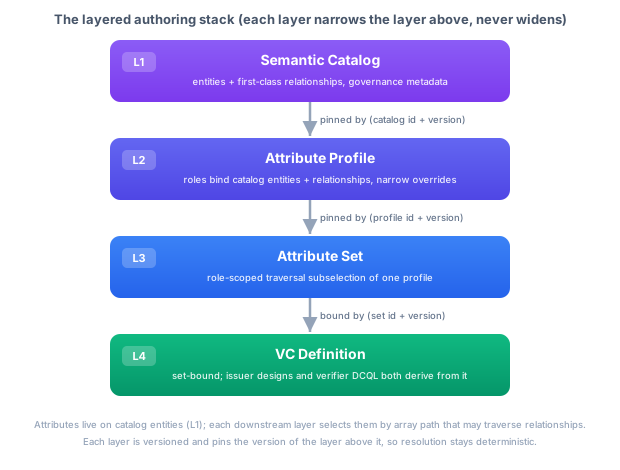
Concepts
Object Types: PREDEFINED and SPECIALIZATION
Each Object Type is a kind of party. The platform knows party types including natural_person, organization, address, and group, alongside platform roles such as identity, credential_template, resource, and user. The partyType token is extensible for additional platform party types.
There are two Object Type kinds:
kind: "PREDEFINED"is a party type modelled up front and identified by apartyTypetoken. The walkthrough usesnatural_person(Person),address(Address), andorganization(Organization). Address is a party type in its own right, so parties link to it through a Relationship Type rather than carrying address fields inline.kind: "SPECIALIZATION"is a use-case subtype that extends an existing Object Type withspecializes: { entity: "<ObjectTypeName>" }and adds Business Terms. The walkthrough defines Employee as a specialization of Person and Employer as a specialization of Organization. A specialization inherits the base party type and must not declare its ownpartyType.
An Object Type has a name, kind, an attributes array of Business Terms, an optional schemaRelationships array, and an object-type overlays bag. The Data Domain response currently exposes the Object Types in its entities property.
Business Term anatomy
Each Business Term in an Object Type's attributes array has this shape:
| Field | Meaning |
|---|---|
path | One location segment as an array, for example ["given_name"]. A segment never contains .; nested paths are composed from ancestor segments. |
valueType | An OCA capture-base token: Text, Numeric, Boolean, Binary, DateTime, Reference, or an array form such as [Text] or [Reference]. |
overlays | The typed overlay bag. It carries cardinality, conformance, format, entry codes, unit, standard, character encoding, sensitivity, widget hint, selective-disclosure policy, localized text, and governance. |
children | Child Business Terms for a compound Reference. Scalar terms have no children. |
entityType | Optional PERSON or ORGANIZATION marker for a compound that is party-typed. |
entryCodeScheme | Optional SkosConceptSchemeReference with schemeUri, schemeName, and R14 codeListKind. |
semanticTerms | Optional SemanticTermReference entries with semanticVocabularyId, termUri, and optional termLabel. |
grounding | R14 source provenance: source, optional pinned legalBasis, retrievedOn, and kind. |
Every piece of meaning beyond the capture base belongs in the overlay or grounding fields. For example, conformance is MANDATORY or OPTIONAL, sdPolicy is ALWAYS, NEVER, or OPTIONAL, and entryCodes is either an inline codes list or an external codeTableRef. Localized code labels live under overlays.i18n.<language>.entries and must refer to declared codes.
The four governance overlays (classification, processing, residency, and assurance) are grounded in W3C DPV, GDPR, NIST FIPS 199, ISO 27001, and eIDAS2. They are authored once on a Business Term and flow through the Object Model, Data Product, and Channel. Personal-data classification is overlays.classification.pii; special-category information is carried by overlays.classification.specialCategory.
R14 grounding and governed code lists
R14 adds additive contract fields to Business Terms without changing the lifecycle:
{
  "grounding": {
    "source": "https://example.test/legal-source/hrw/article-18",
    "legalBasis": {
      "sourceId": "nl-hrw",
      "snapshotId": "nl-hrw-2026-01-01"
    },
    "retrievedOn": "2026-01-15T09:30:00Z",
    "kind": "LEGAL_SOURCE"
  },
  "entryCodeScheme": {
    "schemeUri": "https://example.test/vocab/country",
    "schemeName": "Country codes",
    "codeListKind": "REFERENCE_LIST"
  }
}
GroundingKind accepts LEGAL_SOURCE, AUTHORITATIVE_REGISTER, STANDARD, and INTERNAL_DEFINITION. codeListKind accepts ENUMERATION, REFERENCE_LIST, and CODE_LIST. ObligationKind is the governed vocabulary OBLIGATION, REQUIREMENT, and CRITERION where obligation records use it. These are field-level features; publish-time grounding enforcement is not included. The OpenAPI component and generated documentation expose the same grounding and code-list fields as the runtime contract.
Relationship Types are first-class
Relationship Types are first-class Data Domain objects. A Relationship Type has:
| Field | Meaning |
|---|---|
name | The relationship name, used as a traversal path segment, for example residentialAddress. |
relationType | A directed semantic type token, for example has-address or employed-by. |
source | A RelationshipEnd with an Object Type reference, optional role, and cardinality. |
target | A RelationshipEnd with an Object Type reference, optional role, and cardinality. |
overlays | Localized labels and governance metadata for the relationship itself. |
Cardinality is per end and follows UML look-across semantics. The cardinality on an end describes how many instances of that end's Object Type relate to one instance of the opposite end. Relationship multiplicity lives on source.cardinality and target.cardinality, not in overlays.cardinality.
Schema bindings and relationships
A Data Domain can record how its Business Terms relate to external schemas through two sub-collections:
- Schema bindings (
/data-domains/{dataDomainId}/schema-bindings) name external or internal schemas through aSchemaRef,purpose, andorigin. - Schema relationships (
/data-domains/{dataDomainId}/object-types/{objectTypeName}/schema-relationships) map a canonicalsemanticPathto an external schema attribute and carry a relation such asDERIVED_FROM_EXTERNAL,EQUIVALENT_TO_EXTERNAL, orUSES_EXTERNAL_SHAPE, plus direction and optional transform details.
The API can introspect a bound schema, propose candidate relationships, persist reviewed relationships, import a draft Data Domain from inline JSON Schema, and generate a Data Domain JSON Schema. This keeps schema provenance in the model instead of in an unmanaged spreadsheet.
Lifecycle
A Data Domain's status moves through DRAFT | PUBLISHED. A DRAFT is editable. A PUBLISHED snapshot is frozen and can be pinned by an Object Model through dataDomainId and dataDomainVersion. The monotonic version starts at 1 and can be bumped through the version endpoint.
REST: Build the walkthrough Data Domain
All calls use the operator's OIDC bearer token. The tenant is resolved from the token's tenant_id claim.
Authorization: Bearer <operator access token>
Content-Type: application/json
The semantic-model API is rooted at /api/model/v1 and declares the enterprise feature semantic-modeling.v1. Gated writes require that feature. Reads, resolution, and pure schema generation are read operations; schema registration is gated. See Modeling Your World.
The walkthrough Data Domain has five Object Types and two Relationship Types:
| Object Type | Kind | partyType | Business Terms |
|---|---|---|---|
| Person | PREDEFINED | natural_person | given_name, family_name, email |
| Address | PREDEFINED | address | street, postal_code, city, country |
| Organization | PREDEFINED | organization | legal_name, registration_number |
| Employee | SPECIALIZATION of Person | absent | employee_id, job_title, employment_status |
| Employer | SPECIALIZATION of Organization | absent | department |
| Relationship Type | relationType | Source | Target |
|---|---|---|---|
residentialAddress | has-address | Person (min: 0) | Address, role home (min: 1, max: 1) |
employment | employed-by | Employee (min: 0) | Employer, role employer (min: 1, max: 1) |
Step 1: Create the Data Domain shell
- Request
- Response
POST /api/model/v1/data-domains
{
  "name": "Acme Employee Data Domain",
  "description": "Canonical Acme employee data domain authored through the semantic-model API.",
  "ownerPartyRef": "acme",
  "overlays": {
    "meta": {
      "en": {
        "name": "Acme Employee Data Domain",
        "description": "Canonical employee, address, and organization business terms governed by Acme HR"
      },
      "nl": {
        "name": "Acme Medewerkersdomein",
        "description": "Canonieke medewerker-, adres- en organisatie-business-termen, beheerd door Acme HR"
      }
    },
    "governance": {
      "jurisdictions": [
        {
          "region": "EU",
          "laws": ["eu-gdpr"],
          "frameworks": ["GDPR", "EIDAS2", "NIS2"],
          "authority": "EDPB",
          "residency": { "allowed": ["EU", "EEA"], "localizationRequired": false },
          "defaultTransfer": { "mechanism": "ADEQUACY_DECISION" }
        }
      ],
      "primaryJurisdiction": "EU",
      "controller": { "partyId": "acme", "role": "CONTROLLER", "establishedIn": "NL" },
      "classificationScheme": ["PUBLIC", "INTERNAL", "CONFIDENTIAL", "RESTRICTED"]
    }
  }
}
201 Created returns a DataDomain in DRAFT status with version: 1. Capture .id and .version.
{
  "id": "5b8c...dataDomainId",
  "tenantId": "acme-tenant",
  "name": "Acme Employee Data Domain",
  "version": 1,
  "status": "DRAFT",
  "ownerPartyRef": "acme",
  "entities": [],
  "relationships": [],
  "schemaBindings": []
}
Step 2: Add Object Types
Append each Object Type to the shell with POST /api/model/v1/data-domains/{dataDomainId}/object-types. Each call returns the updated DataDomain; check that its entities count increased. The ObjectType schema accepts a full Business Term tree, so a compound value is represented with valueType: "Reference" and children.
Person (PREDEFINED, natural_person)
- Request
- Response
POST /api/model/v1/data-domains/{dataDomainId}/object-types
{
  "name": "Person",
  "kind": "PREDEFINED",
  "partyType": "natural_person",
  "attributes": [
    {
      "path": ["given_name"],
      "valueType": "Text",
      "semanticTerms": [
        {
          "semanticVocabularyId": "11111111-1111-4111-8111-111111111111",
          "termUri": "https://schema.org/givenName",
          "termLabel": "given name"
        }
      ],
      "overlays": {
        "conformance": "MANDATORY",
        "sdPolicy": "ALWAYS",
        "classification": { "pii": true },
        "i18n": { "en": { "label": "Given name" }, "nl": { "label": "Voornaam" } }
      },
      "grounding": {
        "source": "https://schema.org/givenName",
        "retrievedOn": "2026-01-15T09:30:00Z",
        "kind": "STANDARD"
      }
    },
    {
      "path": ["family_name"],
      "valueType": "Text",
      "overlays": {
        "conformance": "MANDATORY",
        "sdPolicy": "ALWAYS",
        "classification": { "pii": true },
        "i18n": { "en": { "label": "Family name" }, "nl": { "label": "Achternaam" } }
      }
    },
    {
      "path": ["email"],
      "valueType": "Text",
      "overlays": {
        "conformance": "OPTIONAL",
        "sdPolicy": "ALWAYS",
        "format": "^[^@]+@[^@]+$",
        "classification": { "pii": true },
        "i18n": { "en": { "label": "Email" }, "nl": { "label": "E-mail" } }
      }
    }
  ],
  "schemaRelationships": [],
  "overlays": { "i18n": { "en": { "label": "Person", "information": "A natural person" } } }
}
200 OK returns the updated DataDomain with Person appended to its entities array. The response retains semanticTerms, grounding, and all Business Term overlays.
Address (PREDEFINED, address)
Address is a predefined party in its own right. Its terms are governed independently and can be reached from any party through a named Relationship Type.
{
  "name": "Address",
  "kind": "PREDEFINED",
  "partyType": "address",
  "attributes": [
    { "path": ["street"], "valueType": "Text", "overlays": { "conformance": "OPTIONAL", "classification": { "pii": true }, "i18n": { "en": { "label": "Street" } } } },
    { "path": ["postal_code"], "valueType": "Text", "overlays": { "conformance": "OPTIONAL", "classification": { "pii": true }, "i18n": { "en": { "label": "Postal code" } } } },
    { "path": ["city"], "valueType": "Text", "overlays": { "conformance": "OPTIONAL", "classification": { "pii": true }, "i18n": { "en": { "label": "City" } } } },
    {
      "path": ["country"],
      "valueType": "Text",
      "overlays": {
        "conformance": "OPTIONAL",
        "widgetHint": "PICKLIST",
        "entryCodes": { "codes": ["NL", "DE", "FR", "BE"] },
        "standard": "ISO 3166-1",
        "classification": { "pii": true },
        "i18n": { "en": { "label": "Country", "entries": { "NL": "Netherlands", "DE": "Germany", "FR": "France", "BE": "Belgium" } } }
      },
      "entryCodeScheme": {
        "schemeUri": "https://www.iso.org/obp/ui/#iso:code:3166:NL",
        "schemeName": "ISO 3166-1 alpha-2",
        "codeListKind": "REFERENCE_LIST"
      }
    }
  ],
  "schemaRelationships": [],
  "overlays": { "i18n": { "en": { "label": "Address", "information": "A physical postal address" } } }
}
The inline entryCodes value domain and the i18n.<language>.entries labels are separate. The entryCodeScheme provides the RDF/SKOS reference and its R14 code-list governance.
Organization (PREDEFINED, organization)
{
  "name": "Organization",
  "kind": "PREDEFINED",
  "partyType": "organization",
  "attributes": [
    { "path": ["legal_name"], "valueType": "Text", "overlays": { "conformance": "MANDATORY", "sdPolicy": "ALWAYS", "classification": { "pii": false }, "i18n": { "en": { "label": "Legal name" } } } },
    { "path": ["registration_number"], "valueType": "Text", "overlays": { "conformance": "OPTIONAL", "sdPolicy": "ALWAYS", "classification": { "pii": false }, "i18n": { "en": { "label": "Registration number" } } } }
  ],
  "schemaRelationships": [],
  "overlays": { "i18n": { "en": { "label": "Organization", "information": "A legal organization" } } }
}
Employee (SPECIALIZATION of Person)
Employee specializes Person and contributes employment-specific Business Terms. It inherits given_name, family_name, and email from Person.
{
  "name": "Employee",
  "kind": "SPECIALIZATION",
  "specializes": { "entity": "Person" },
  "attributes": [
    { "path": ["employee_id"], "valueType": "Text", "overlays": { "conformance": "MANDATORY", "sdPolicy": "ALWAYS", "classification": { "pii": true }, "i18n": { "en": { "label": "Employee identifier" } } } },
    { "path": ["job_title"], "valueType": "Text", "overlays": { "conformance": "OPTIONAL", "sdPolicy": "ALWAYS", "classification": { "pii": true }, "i18n": { "en": { "label": "Job title" } } } },
    {
      "path": ["employment_status"],
      "valueType": "Text",
      "overlays": {
        "conformance": "OPTIONAL",
        "sdPolicy": "ALWAYS",
        "widgetHint": "PICKLIST",
        "entryCodes": { "codes": ["active", "suspended", "terminated"] },
        "classification": { "pii": true },
        "i18n": { "en": { "label": "Employment status", "entries": { "active": "Active", "suspended": "Suspended", "terminated": "Terminated" } } }
      }
    }
  ],
  "schemaRelationships": [],
  "overlays": { "i18n": { "en": { "label": "Employee", "information": "A person employed by the organization" } } }
}
Employer (SPECIALIZATION of Organization)
Employer specializes Organization and contributes department.
{
  "name": "Employer",
  "kind": "SPECIALIZATION",
  "specializes": { "entity": "Organization" },
  "attributes": [
    { "path": ["department"], "valueType": "Text", "overlays": { "conformance": "OPTIONAL", "sdPolicy": "ALWAYS", "classification": { "pii": false }, "i18n": { "en": { "label": "Department" } } }
  ],
  "schemaRelationships": [],
  "overlays": { "i18n": { "en": { "label": "Employer", "information": "An organization in its role as employer" } } }
}
Adding a Business Term separately
Object Types can be authored as complete trees, or a Business Term can be appended to an existing tree. Use parentPath for a compound parent or omit it for a root term.
POST /api/model/v1/data-domains/{dataDomainId}/business-terms
{
  "attribute": {
    "path": ["birth_date"],
    "valueType": "DateTime",
    "overlays": {
      "format": "YYYY-MM-DD",
      "conformance": "OPTIONAL",
      "classification": { "pii": true },
      "i18n": { "en": { "label": "Date of birth" } }
    }
  },
  "parentPath": null
}
Replace a term and its subtree with PUT /api/model/v1/data-domains/{dataDomainId}/business-terms/{termPath} and a body containing the replacement attribute. The path in the URL is the fully qualified dotted path; Business Term JSON paths remain arrays of clean segments.
Step 3: Add Relationship Types
Relationship Types are appended with POST /api/model/v1/data-domains/{dataDomainId}/relationship-types. Each call returns the updated Data Domain; check that its relationships count increased.
residentialAddress (Person to Address)
POST /api/model/v1/data-domains/{dataDomainId}/relationship-types
{
  "name": "residentialAddress",
  "relationType": "has-address",
  "source": {
    "entity": { "entity": "Person" },
    "cardinality": { "min": 0 }
  },
  "target": {
    "entity": { "entity": "Address" },
    "role": "home",
    "cardinality": { "min": 1, "max": 1 }
  },
  "overlays": { "i18n": { "en": { "label": "Residential address" }, "nl": { "label": "Woonadres" } } }
}
The source cardinality means a Person may have zero residential addresses. The target cardinality means that relationship points to exactly one Address when present. The target role home is part of traversal resolution.
employment (Employee to Employer)
{
  "name": "employment",
  "relationType": "employed-by",
  "source": {
    "entity": { "entity": "Employee" },
    "cardinality": { "min": 0 }
  },
  "target": {
    "entity": { "entity": "Employer" },
    "role": "employer",
    "cardinality": { "min": 1, "max": 1 }
  },
  "overlays": { "i18n": { "en": { "label": "Employment" }, "nl": { "label": "Dienstverband" } } }
}
Step 4: Publish and resolve
Once all five Object Types and both Relationship Types are appended, publish the Data Domain:
PUT /api/model/v1/data-domains/{dataDomainId}/status
{ "status": "PUBLISHED" }
200 OK returns the Data Domain with status: "PUBLISHED". Capture its version; this is the dataDomainVersion an Object Model will pin.
Resolve the complete tree before authoring the Object Model:
GET /api/model/v1/data-domains/{dataDomainId}/resolved
The resolved response includes the full Business Term trees, object-type schema relationships, Relationship Types, root overlays, and schema bindings. Its response shape uses the current DataDomain fields:
{
  "id": "5b8c...dataDomainId",
  "tenantId": "acme-tenant",
  "name": "Acme Employee Data Domain",
  "version": 1,
  "status": "PUBLISHED",
  "ownerPartyRef": "acme",
  "entities": [
    { "name": "Person", "kind": "PREDEFINED", "partyType": "natural_person", "attributes": ["..."] },
    { "name": "Address", "kind": "PREDEFINED", "partyType": "address", "attributes": ["..."] },
    { "name": "Organization", "kind": "PREDEFINED", "partyType": "organization", "attributes": ["..."] },
    { "name": "Employee", "kind": "SPECIALIZATION", "specializes": { "entity": "Person" }, "attributes": ["..."] },
    { "name": "Employer", "kind": "SPECIALIZATION", "specializes": { "entity": "Organization" }, "attributes": ["..."] }
  ],
  "relationships": [
    { "name": "residentialAddress", "relationType": "has-address", "source": { "entity": { "entity": "Person" } }, "target": { "entity": { "entity": "Address" }, "role": "home" } },
    { "name": "employment", "relationType": "employed-by", "source": { "entity": { "entity": "Employee" } }, "target": { "entity": { "entity": "Employer" }, "role": "employer" } }
  ],
  "schemaBindings": []
}
Schema binding and generated schema operations
Use the Data Domain schema sub-collections when external provenance or generated JSON Schema is needed:
GET  /api/model/v1/data-domains/{dataDomainId}/schema-bindings
PUT  /api/model/v1/data-domains/{dataDomainId}/schema-bindings
GET  /api/model/v1/data-domains/{dataDomainId}/schema-bindings/{bindingId}/business-terms
GET  /api/model/v1/data-domains/{dataDomainId}/object-types/{objectTypeName}/schema-relationships
PUT  /api/model/v1/data-domains/{dataDomainId}/object-types/{objectTypeName}/schema-relationships
POST /api/model/v1/data-domains/{dataDomainId}/schema-relationships/proposals
POST /api/model/v1/data-domains/{dataDomainId}/schemas
The schema-generation request currently supports targetType: "JSON_SCHEMA" and an optional register flag. Importing a Data Domain from JSON Schema is available at POST /api/model/v1/data-domains/imports/schema.
Listing Data Domains (the paged envelope)
GET /api/model/v1/data-domains?limit=10&offset=0
Filter and sort:
GET /api/model/v1/data-domains?nameContains=Acme&status=PUBLISHED&sort=name&sortDirection=ASC&limit=50
200 OK returns the common { data, pagination } envelope. The Data Domain list contains the current DataDomain response shape.
{
  "data": [
    {
      "id": "5b8c...dataDomainId",
      "tenantId": "acme-tenant",
      "name": "Acme Employee Data Domain",
      "version": 1,
      "status": "PUBLISHED",
      "ownerPartyRef": "acme"
    }
  ],
  "pagination": {
    "limit": 10,
    "offset": 0,
    "page": 0,
    "size": 1,
    "total": 1,
    "totalPages": 1,
    "hasMore": false
  }
}
Object Type and Relationship Type list endpoints also return paged summary envelopes. Their full records are available from the by-name GET endpoints.
What you have now
One published Data Domain that is the organization's single source of truth: five governed Object Types, their Business Terms, two first-class Relationship Types, schema-grounding points, and OCA-based governance that downstream tiers can narrow but never widen.
The Data Domain id and published version are the values the Object Model will pin in its domainRefs array.
Next steps
- Object Model (L2): bind Object Types to use-case roles, select Relationship Types, and apply narrow-only overrides
- Data Product (L3): select the exact traversals needed by one issuance or verification scenario
- Channels (L4): render a Data Product as a form, document, verifiable credential, issuance definition, or API payload
- Modeling Your World: the concepts behind the four tiers, governance, R14 grounding, schema operations, and the enterprise license