Trust domains
A trust domain is a named, tenant-owned set of public cryptographic evidence: root and intermediate CAs, DIDs, JWKs, OpenID Federation entities, issuer URIs, DNS names. On its own a domain does nothing. It becomes enforcement only when something attaches it for a specific usage.
For the complete credential-format, status, KMS, and verification sequence, start with Credentials, status, and trust. For the ISO mdoc-specific VICAL and CWT boundary, use mDoc VICAL and CWT status.
That separation is the whole model. A domain says what evidence exists. An attachment says which resource uses that evidence, and for what question. The same domain can be the issuer allow-list for one verifier and the wallet-provider allow-list for an issuer, without either resource knowing about the other.
Trust domains are not credential designs and not status lists. Designs describe what a credential contains. Status lists say whether a credential was revoked. Trust domains answer who was allowed to sign it.
Audience: tenant admin, or platform operator acting in a tenant context.
Prerequisites: complete Platform foundations and authentication boundaries and Tenant provisioning and confidential-client access. Anchors reference identifiers managed under Keys and DID. For a credential-focused verification journey, complete Credential designs and claims, Status-list creation and lifecycle, Issuer configuration, and Credential issuance first. Finish this guide before Verifier and DCQL configuration creates a verification request that depends on the trust policy.
Postman correlation: The canonical EDK Enterprise collection uses 23 Trust Domains and Trust Lists. Run 01 List trust domains, 02 List anchors of the seeded domain, 03 List admissions of the issuer anchor, then 04 Read the tenant issuer-trust attachment and 05 Read the verifier eligibility grant. Create or activate a domain with 07 Create a second trust domain and 08 Activate the second trust domain when the journey needs an isolated policy. Return to 22 Verification only after the verifier binding is complete.
Reference: Domains, Policy.
API: Trust domain, base path /api/trust-domain/v1.
- Admin Console
- REST
Use Resources > Trust domains to create, edit, activate, disable and delete domains, review their anchors, and see which resources consume each domain. Attach a domain on the consuming resource, for example the verifier Trust domains setting. Adding anchors, granting admissions, and configuring trust sources, catalogs and VICAL sources use the REST API. The domain list alone is not enforcement.
Use the Trust domain REST API for domain, anchor, admission and attachment operations. Read each response before using its id in the next call. The Developer Console exposes only operations mounted and permitted for the current tenant.
- Overview
- Request
- Response
List trust domains
Endpoint: GET /api/trust-domain/v1/domains
Captured response: 200 OK
This captured endpoint is shown from the E2E run; it is not mapped to one of the generated EDK REST API reference pages.
Connect an environment to rewrite this call to real service bases and run it.
What the Admin Console shows
Resources > Trust domains has a single area, Domains.
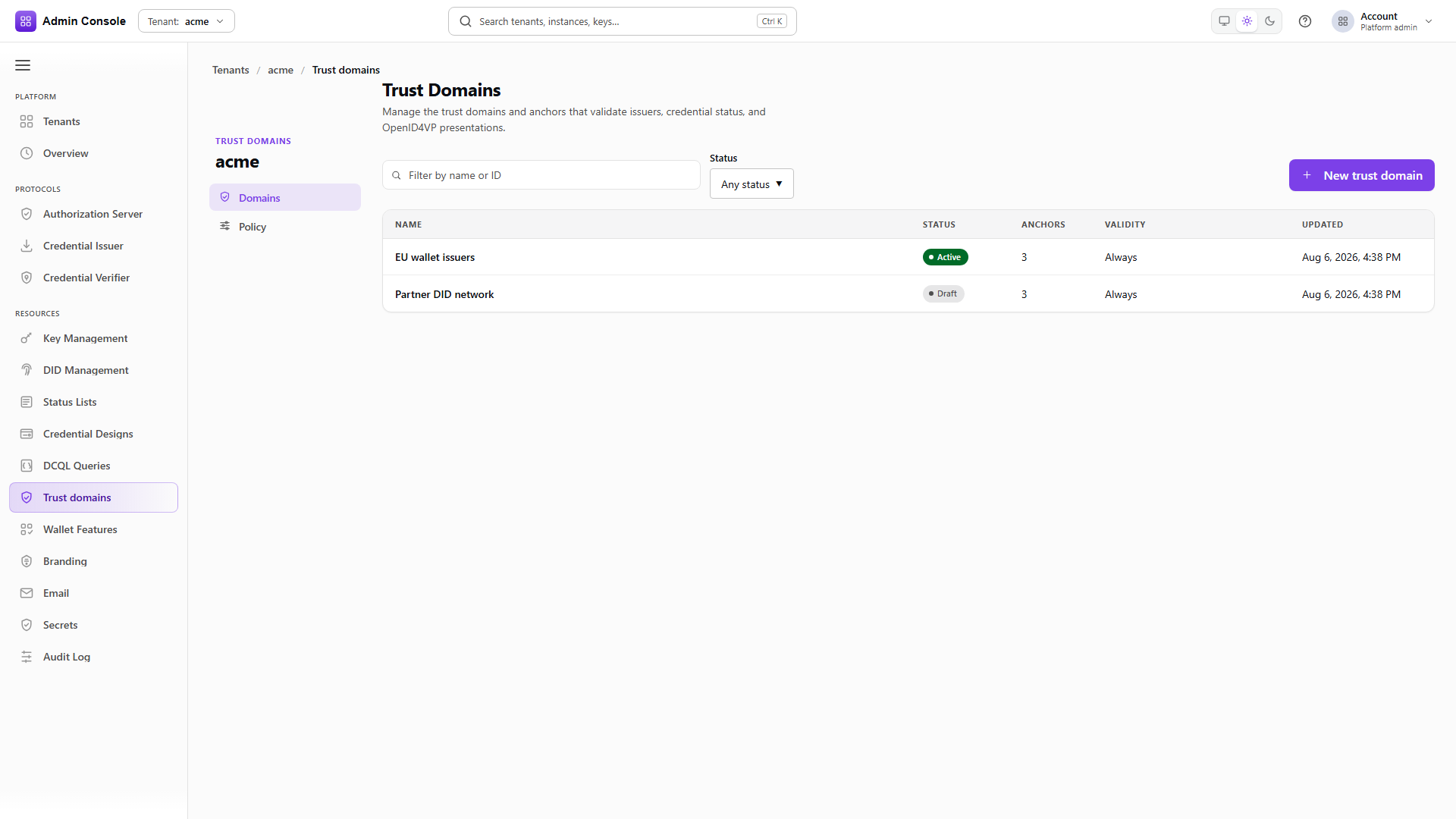
Domain list. A search field (Filter by name or ID), a Status filter (Any status, Draft, Active, Disabled) and New trust domain. The table columns are Name, Status, Anchors, Validity and Updated. Select a row to open the domain.
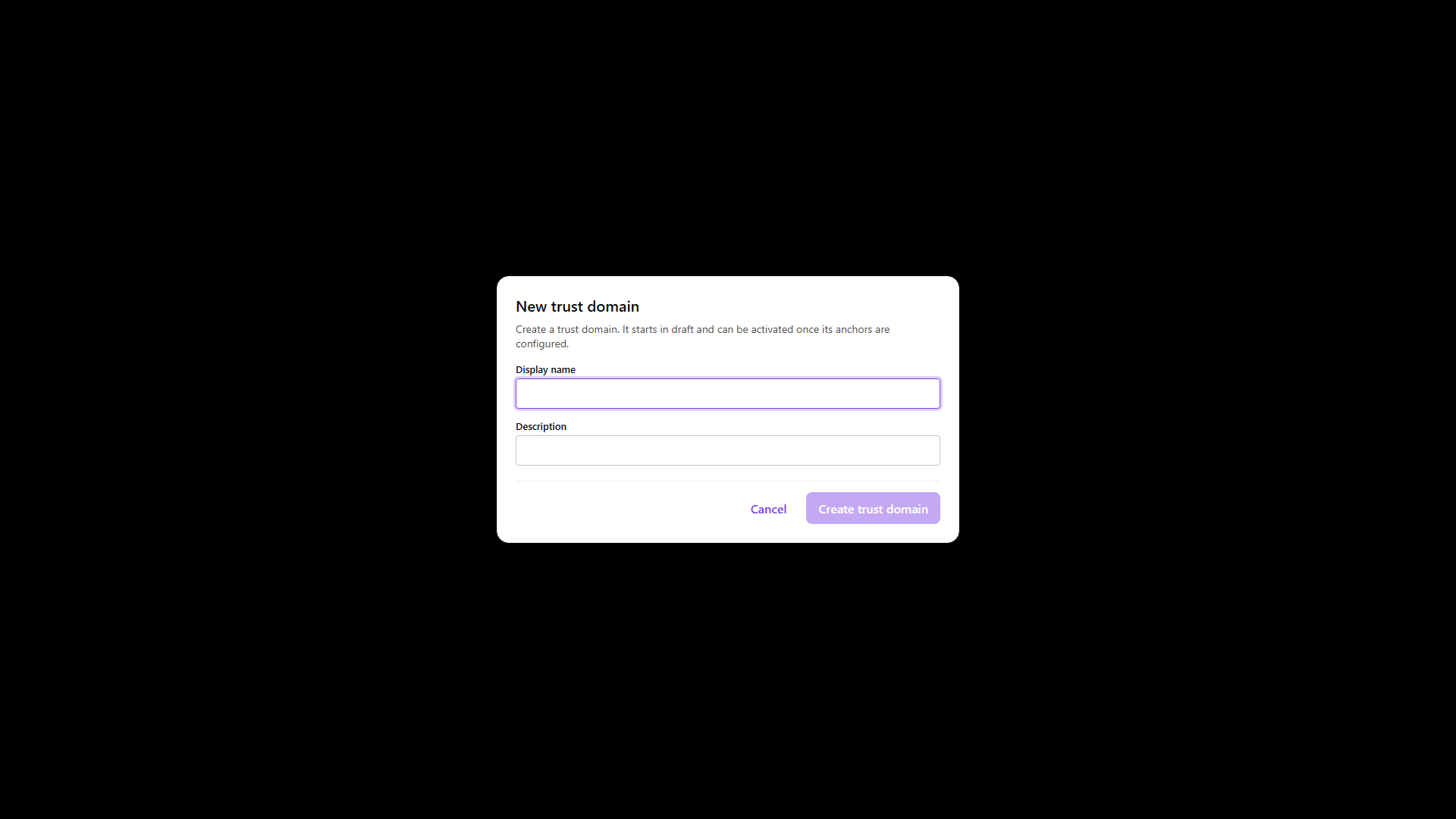
Create. New trust domain asks for a Display name and an optional Description. Create trust domain creates the domain in Draft.
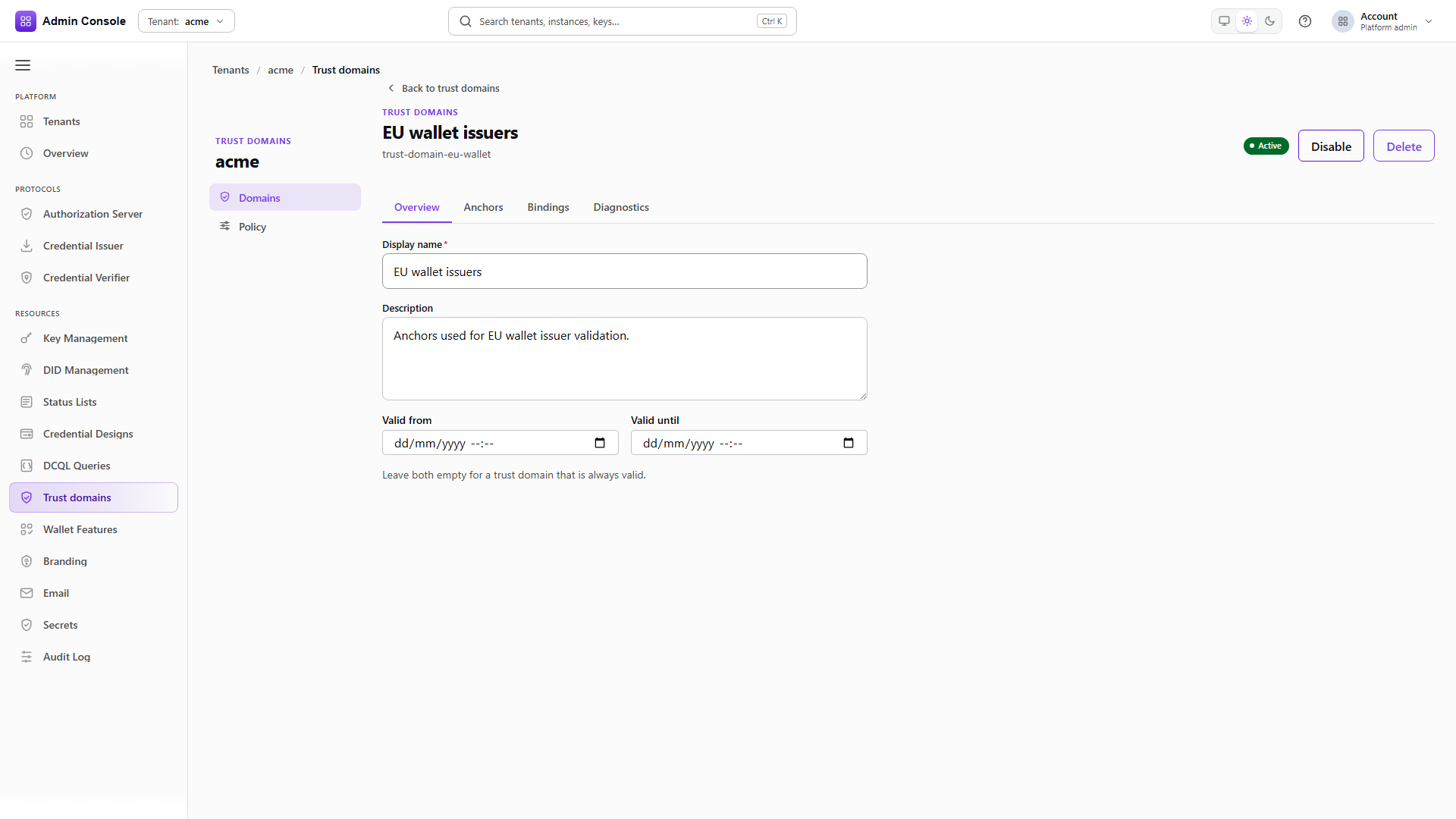
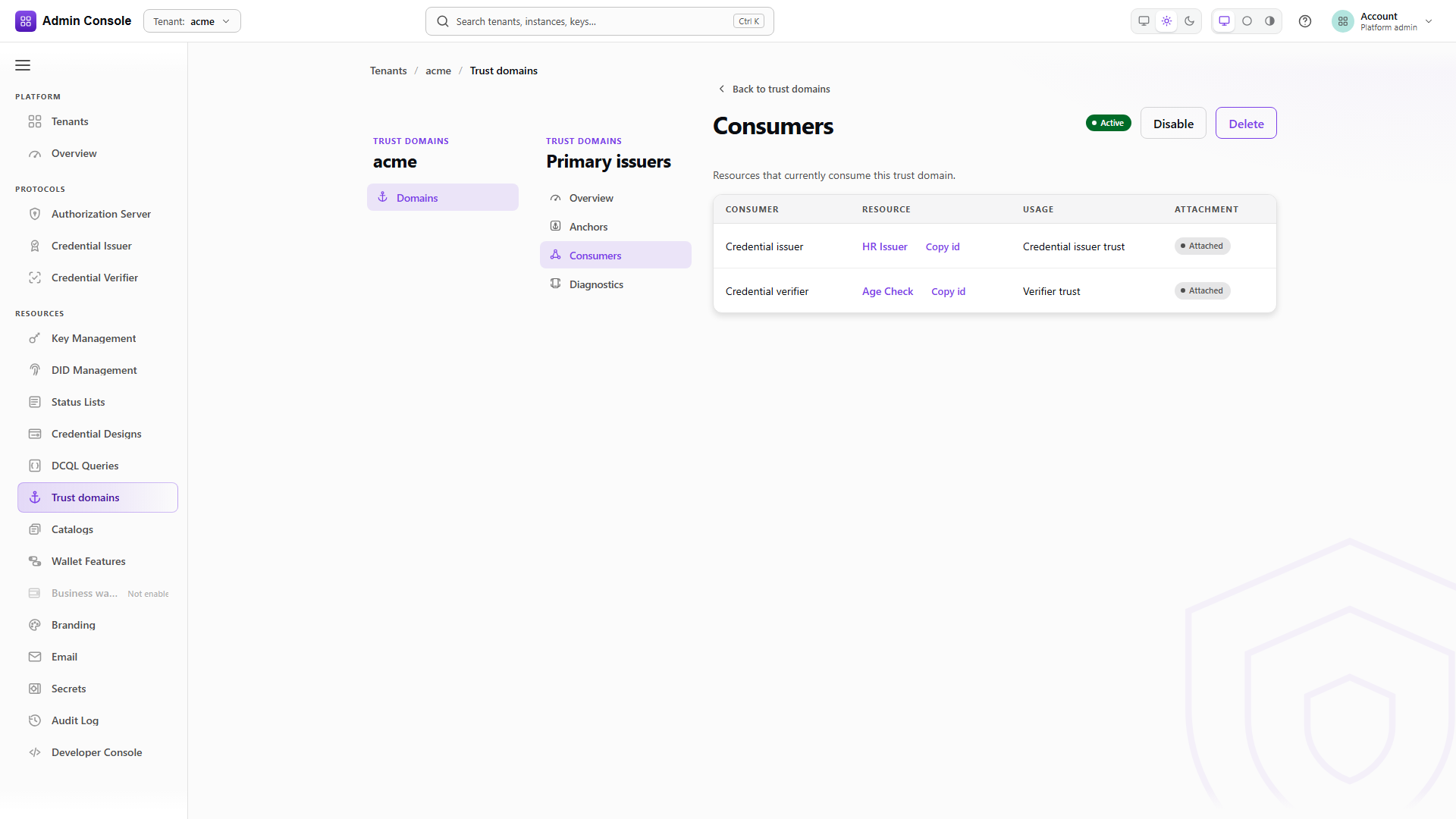
Domain detail. The header shows the display name, the status, and the lifecycle actions Activate (draft), Disable (active) and Delete. A side navigation labeled Trust domain detail holds four sections:
| Section | Content |
|---|---|
| Overview | Display name, Description, Valid from, Valid until, with Save changes and Reset. |
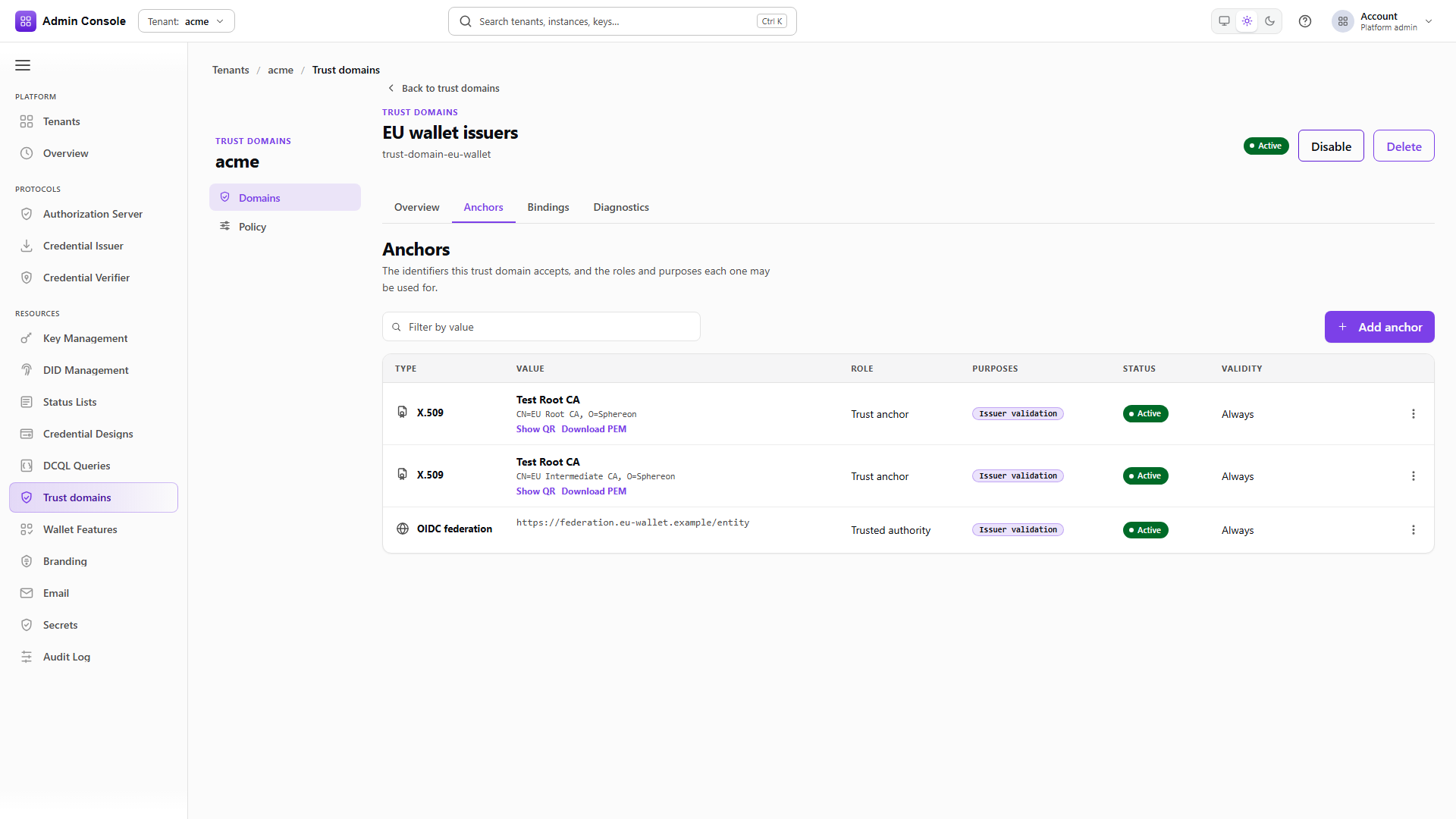
| Anchors | Read-only anchor table: Mechanism, Value, Status, Verification, with copy, QR, PEM, DID and JWK export actions on the value. |
| Consumers | Attachments that select the domain: Consumer, Resource, Usage, Attachment. |
| Diagnostics | Per-consumer resolution: Consumer, Resource, Usage, Resolution. |
There are no admissions, trust sources, LoTE sources, catalogs, attachments, eligibility or VICAL sections in the domain detail, and no tenant Policy area. Those records are managed through the REST calls in the rest of this guide. The Domains reference lists every label.
The three things you configure
Every trust decision in the product is assembled from three records. Getting a presentation to succeed means all three are right, and a failure is almost always one of them being absent.
Domains and anchors. The evidence. An anchor carries one identifier (a certificate, a DID, a federation entity) plus, separately, the admission classes it is allowed to answer for. An X.509 root admitted as CREDENTIAL_ISSUER cannot silently become a TLS server root because someone attached the domain somewhere else.
Attachments. The binding from a consuming resource to an ordered list of domains, for one usage. The key is the triple (consumerKind, consumerId, usage). There is exactly one attachment per triple.
Eligibility grants. A tenant-level cap on which domains a given consumer kind is permitted to select for a usage. This is governance, not selection. It exists so that delegating verifier editing to a team does not also delegate the choice of which trust roots that team may point at.
Usages
A usage is the question being asked. Each one resolves independently, so a verifier can be strict about issuers and say nothing at all about wallet providers.
| Usage | Question | Anchor admission class required |
|---|---|---|
CREDENTIAL_ISSUER_TRUST | May this issuer have issued the credential being presented? | CREDENTIAL_ISSUER |
WALLET_PROVIDER_ESTABLISHMENT | Is this wallet from a wallet provider we accept? | WALLET_PROVIDER |
VERIFIER_TRUST | Is this relying party one we release attributes to? | VERIFIER |
AUTHORIZATION_SERVER_TRUST | Did this token, ID token, JARM response or logout come from an authorization server we admit? | AUTHORIZATION_SERVER_SIGNER |
TLS_SERVER | Should this connector complete a TLS handshake with this host? | TLS_SERVER_CA |
CATALOG_AUTHORIZATION | Is this credential type authorized for this issuer by a catalog? | none, catalog snapshots carry the authority |
Two admission classes exist for artifacts rather than for a usage of their own. CATALOG_SIGNER
verifies a catalog snapshot, and MDOC_VICAL_SIGNER verifies an ISO 18013-5 VICAL. Both admit the
signature over a list; the entries inside the list are then admitted separately, normally as
CREDENTIAL_ISSUER.
The admission class column is the part people miss. An anchor participates in a decision only when it holds the admission class that the usage requires. Adding a certificate to a domain is not enough.
Consumer kinds and the resolution cascade
An attachment is looked up against a fixed chain that starts at the exact resource and ends at the tenant. Resolution takes the first level that has an attachment row for that usage. It does not merge levels, and it does not continue past a match.
| Consumer kind | Lookup order |
|---|---|
TENANT | tenant |
OID4VCI_ISSUER | issuer, tenant |
OID4VCI_ISSUANCE_TEMPLATE | template, issuer, tenant |
OID4VCI_CREDENTIAL_CONFIGURATION | configuration, template, issuer, tenant |
OID4VP_VERIFIER | verifier, tenant |
OID4VP_DCQL_QUERY | query, verifier, tenant |
OID4VP_VERIFIER_DCQL_BINDING | binding, query, verifier, tenant |
OID4VP_REQUEST_TEMPLATE | template, binding, query, verifier, tenant |
CONNECTOR_HTTP_ENDPOINT | endpoint, tenant |
AS | authorization server, tenant |
Two consequences worth designing around:
An attachment at a specific level replaces the tenant default rather than adding to it. If you attach one narrow domain to a DCQL query, the query stops seeing the tenant's domains entirely. Add the tenant's domain to that attachment's list if you meant to extend.
An attachment with an empty domain list under FAIL_CLOSED is a valid, meaningful configuration: it trusts nothing at that level and stops the cascade there. That is how you disable inherited trust for one query without touching the tenant.
Policy modes
Identity usages carry an IdentityAdmissionPolicy with one of two modes.
FAIL_CLOSED means only the domains listed on the attachment admit an identity. This is the default and the only mode a new tenant starts with.
UNRESTRICTED means identity admission is not limited to named domains. It is always explicit. It is never inferred from an absent attachment or an empty list. It does not weaken anything else: signatures, revocation status, holder binding, hostname verification and egress policy all still run.
TLS_SERVER has no mode. It carries a TlsServerPolicy with expectedDnsNames and optional requiredExtendedKeyUsages, and it admits only what it lists. There is no unrestricted TLS.
Walking one decision through
A verifier verifier-age-check runs a DCQL query query-over18 and receives a presentation. To decide whether the issuer is acceptable, the runtime does this:
- Build the consumer chain for
OID4VP_DCQL_QUERY:query-over18, thenverifier-age-check, then the tenant. - Look for an attachment on
(OID4VP_DCQL_QUERY, query-over18, CREDENTIAL_ISSUER_TRUST). Not found. - Look for
(OID4VP_VERIFIER, verifier-age-check, CREDENTIAL_ISSUER_TRUST). Found, listingtrust-domain-nl-pidat order 0 andtrust-domain-eu-walletat order 1. Stop here. - The winner is not the tenant, so check the eligibility grant for
(OID4VP_VERIFIER, CREDENTIAL_ISSUER_TRUST). Both domains are in it, so the selection stands. A domain outside the grant is a configuration error, not a silent drop. - For each domain in order, require the domain to be
ACTIVEand inside its validity window, then collect anchors that are active, inside their own validity window, and hold theCREDENTIAL_ISSUERadmission class. - Collect any active ETSI trust source snapshots on those domains and add their derived entries.
- Evaluate the credential's issuer identity against that assembled evidence.
Steps 3, 4, 5 and 6 can each produce an empty result, and each empty result fails the presentation for a different reason. The decision response tells you which one.
Building a domain
- Admin Console
- Request
- Response
- Try it
Resources > Trust domains > Domains lists display name, lifecycle status, anchor count, validity window and last update. An empty list is the expected state on a new tenant, since nothing is trusted until an operator opts in.
The captured tenant has the one domain provisioning seeded for its own issuer material.
- Admin Console
- Request
- Response
- Try it
New trust domain takes a Display name and an optional Description and returns a DRAFT
domain at version 1.
Draft exists so you can add anchors and grant admissions before anything resolves against the
domain. Attaching a draft domain is allowed and resolving against one is not, because resolution
requires ACTIVE. That lets you wire up a consumer ahead of the evidence.
- Admin Console
- Request
- Response
- Try it
In the console, select Activate in the detail header. Over REST, activation writes the whole
domain with status set to ACTIVE and the version you read, and the version comes back
incremented.
The Overview section holds the display name, description and the optional validity window (Valid from, Valid until), which you can leave empty for a domain that is always in range. The header holds Disable and Delete. Disable stops an active domain resolving without touching its anchors or the attachments pointing at it. Delete removes the domain, its anchors and its admissions, and leaves any attachment that still names it unresolvable, so check the Consumers section first.
Every mutation is optimistically concurrent. version increments on write, GET returns the
current strong ETag, and a mutating request carries it in If-Match. A missing header returns 428
and a stale one returns 412.
Read a domain back
GET/api/trust-domain/v1/domains/trust-domain-issuer-00000000-0000-4000-8000-000000000000200 OK- Admin Console
- Request
- Response
- Try it
A single read returns identity, status, validity window and version. Use it to confirm a change landed and to pick up the version the next conditional write needs.
Anchors and admissions
An anchor is one piece of public evidence inside a domain. Its evidence mechanism says what kind of
material it is (X509, DID, JWK, OIDFED_ENTITY, ISSUER_URI, DNS_NAME) and its origin says
where it came from: IMPORTED for material an operator supplied, TENANT_PUBLIC for a public
resource this tenant produced itself.
An anchor never carries a private key. It references a public identifier. Signing selectors live on the issuer, catalog or LoTE settings that need them, and trust evaluation never resolves a private key. A design that puts a KMS key reference on an anchor is wrong.
X.509 anchors may carry an x509Policy constraining permitted DNS names, permitted URI origins,
required extended key usages and required certificate policy OIDs. Those constraints are applied
during path validation rather than at admission time.
Entries derived from an ETSI trust source snapshot are not anchors. They stay inside their immutable source snapshot and join the evidence set at resolution time, so refreshing a source cannot leave stale rows behind in the anchor table.
List the anchors
GET/api/trust-domain/v1/domains/trust-domain-issuer-00000000-0000-4000-8000-000000000000/anchors200 OK- Admin Console
- Request
- Response
- Try it
Each entry pairs the stored anchor with a resolved, enforcement-safe identifier summary. The
console's Anchors section renders that summary as Mechanism, Value, Status and
Verification, and its Show QR and Download PEM actions use it. The section is read-only
and does not show origin or admission classes.
The metadata block is where provisioning records why an anchor exists. The captured anchors carry
source: tenant-onboarding and a productRole, which is how you tell seeded material apart from
anything an operator added later.
Add an anchor
POST/api/trust-domain/v1/domains/00000000-0000-4000-8000-000000000000/anchors201 Created- Admin Console
- Request
- Response
- Try it
Creating an anchor binds an existing identity identifier into the domain under a chosen evidence mechanism and origin. It does not create the identifier and it grants no admission, so the anchor answers nothing yet. The console has no add-anchor action; use this API call.
Read an anchor's admissions
GET/api/trust-domain/v1/domains/trust-domain-issuer-00000000-0000-4000-8000-000000000000/anchors/trust-anchor-issuer-00000000-0000-4000-8000-000000000000-issuer-did/admissions200 OK- Admin Console
- Request
- Response
- Try it
Admission is a separate sub-resource because it is a separate decision. Adding an anchor puts evidence in the domain; granting an admission class says which question that evidence may answer.
GET    /api/trust-domain/v1/domains/{domainId}/anchors/{anchorId}/admissions
PUT    /api/trust-domain/v1/domains/{domainId}/anchors/{anchorId}/admissions/{admissionClass}
DELETE /api/trust-domain/v1/domains/{domainId}/anchors/{anchorId}/admissions/{admissionClass}
The captured issuer anchor holds CREDENTIAL_ISSUER, which is what lets it answer credential issuer
trust questions and nothing else.
Grant a class
PUT/api/trust-domain/v1/domains/00000000-0000-4000-8000-000000000000/anchors/00000000-0000-4000-8000-000000000000/admissions/MDOC_VICAL_SIGNER200 OK- Admin Console
- Request
- Response
- Try it
PUT takes the domain id and the anchor's current version as expectedAnchorVersion, so an
admission grant cannot race an anchor edit. DELETE removes only that one class.
An anchor can hold several classes: the same DID can be admitted as a credential issuer and as an
mdoc VICAL signer, granted separately. An admission may also carry constraints, and a
requiredIssuerUriOrigin constraint pins the anchor to issuers under one origin. Constrained paths
are evaluated against asserted request material, which is not part of the public evaluation
contract, so an anchor carrying that constraint is deliberately excluded from the generic resolve
response and admits nothing there.
Grant only the classes the consuming usage needs. An admission is not a substitute for attaching the domain, and an anchor that is inactive, outside its validity window, or edited since you read its version will have the grant refused rather than applied.
Attachments
An attachment is addressed by its triple, so there is no create step and no attachment id to track in your client.
GET    /api/trust-domain/v1/attachments
GET    /api/trust-domain/v1/attachments/{consumerKind}/{consumerId}/{usage}
PUT    /api/trust-domain/v1/attachments/{consumerKind}/{consumerId}/{usage}
DELETE /api/trust-domain/v1/attachments/{consumerKind}/{consumerId}/{usage}
Attachments are edited where the resource lives rather than in a central list. In the console, the
verifier Trust domains setting, the DCQL query and verifier-DCQL binding Trust domains
sections, and the verification template Trust domains section render the same editor against a
different triple. The editor has a Trust mode (Verified only for FAIL_CLOSED, Trust all
for UNRESTRICTED where supported) and an Allowed trust domains checklist. The tenant attachment
and the other consumer kinds have no console editor; write them with the calls below.
The captured payloads below come from a run where the sanitizer replaces every identifier with the
same placeholder, so two genuinely different domain ids look identical. The ordinal values are what
tell the entries apart.
Read the tenant attachment
GET/api/trust-domain/v1/attachments/TENANT/00000000-0000-4000-8000-000000000000/CREDENTIAL_ISSUER_TRUST200 OK- Admin Console
- Request
- Response
- Try it
The tenant's own configuration is just an attachment on (TENANT, <tenantId>, <usage>). There is no
special tenant policy record, and a brand-new tenant has no tenant attachment at all, which is why
every usage admits nothing until an operator writes one.
The policy block is what the attachment enforces: type is IDENTITY_ADMISSION and mode is
FAIL_CLOSED or UNRESTRICTED.
To deliberately make one verifier trust every issuer identity, write an explicit V2 unrestricted
attachment. The empty domains array is required for this posture; it is not the same as an empty
FAIL_CLOSED attachment, which denies every identity and stops inheritance.
PUT /api/trust-domain/v1/attachments/OID4VP_VERIFIER/verifier-123/VERIFIER_TRUST
If-Match: *
Content-Type: application/json

{
  "attachment": {
    "consumerKind": "OID4VP_VERIFIER",
    "consumerId": "verifier-123",
    "usage": "VERIFIER_TRUST",
    "policy": {
      "type": "IDENTITY_ADMISSION",
      "mode": "UNRESTRICTED",
      "walletEvidencePolicy": "NONE"
    },
    "version": 1
  },
  "domains": []
}
The response persists policy.mode: "UNRESTRICTED" and an empty domain list. This mode is valid
for issuer, wallet-provider and verifier identity attachments only. Authorization-server trust,
TLS trust and catalog authorization remain fail-closed and reject an unrestricted policy.
Read a more specific one
GET/api/trust-domain/v1/attachments/OID4VP_VERIFIER/acme/CREDENTIAL_ISSUER_TRUST200 OK- Admin Console
- Request
- Response
- Try it
The same route with a different consumer kind and id reads the verifier's own attachment. When one exists it wins outright and the tenant attachment is never consulted for that usage. That is how one verifier gets a narrower or wider trust set than the tenant default.
Replace the selection
PUT/api/trust-domain/v1/attachments/OID4VP_VERIFIER/acme/CREDENTIAL_ISSUER_TRUST200 OK- Admin Console
- Request
- Response
- Try it
PUT replaces the whole aggregate: the policy and the complete ordered domain list. There is no
partial update and no per-domain endpoint, which keeps ordering unambiguous. Use If-Match with the
attachment ETag, or If-Match: * on a first write.
ordinal sets the order domains are consulted in. This call adds a second domain at ordinal 1 behind
the existing one at ordinal 0.
Note what this capture shows. The write was accepted with 200 even though the added domain was
outside the verifier's eligibility grant at the time. The grant is enforced when the attachment is
used to resolve a decision, not when it is written, so widen the grant as part of the same change
rather than leaving an attachment that will fail at the next presentation.
Remove a domain from the list
PUT/api/trust-domain/v1/attachments/OID4VP_VERIFIER/acme/CREDENTIAL_ISSUER_TRUST200 OK- Admin Console
- Request
- Response
- Try it
Removing works the same way: write back the list you want to end up with. There is no per-entry delete.
Deleting the attachment itself is different again. DELETE re-opens the cascade so the consumer
falls through to the next level, which is not the same as writing an empty FAIL_CLOSED list. The
empty list is a valid configuration that stops the cascade there and trusts nothing, and it is how
you disable inherited trust for one query without touching the tenant.
Eligibility grants
A grant caps which domains a consumer kind may select for a usage. It is checked against the winning attachment, and only when that attachment is not the tenant's own. The tenant is the authority, so the tenant is not capped by itself.
GET    /api/trust-domain/v1/eligibility/{consumerKind}/{usage}
PUT    /api/trust-domain/v1/eligibility/{consumerKind}/{usage}
DELETE /api/trust-domain/v1/eligibility/{consumerKind}/{usage}
Read the grant for a consumer kind
GET/api/trust-domain/v1/eligibility/OID4VP_VERIFIER/CREDENTIAL_ISSUER_TRUST200 OK- Admin Console
- Request
- Response
- Try it
eligibleDomainIds is the permitted set for that consumer kind and usage, and version is what the
next conditional write needs.
A consumer kind with no grant for a usage has no domains available to it at resolution time. Write the grant before delegating resource editing to a team, not after.
- Admin Console
- Request
- Response
- Try it
Widening writes the full eligibleDomainIds set with the version you read, taking the captured grant
from one domain to two.
Widen the grant when a verifier legitimately needs a domain it could not use before. Moving the domain into the tenant attachment instead would change the default for everything that falls through to the tenant.
- Admin Console
- Request
- Response
- Try it
The same call with a shorter list. Narrowing does not rewrite the attachments that already selected the removed domain, so tighten the grant and then check that domain's consumers to see which attachments still name it.
Configuring an mdoc VICAL
A VICAL is a signed CBOR list of mdoc issuing-authority certificates, and it is configured on the anchor that represents the VICAL provider rather than on the domain. The Admin Console has no VICAL editor; use these routes.
GET    /api/trust-domain/v1/domains/{domainId}/anchors/{anchorId}/mdoc-vical
PUT    /api/trust-domain/v1/domains/{domainId}/anchors/{anchorId}/mdoc-vical
DELETE /api/trust-domain/v1/domains/{domainId}/anchors/{anchorId}/mdoc-vical
What happens without the admission
PUT/api/trust-domain/v1/domains/00000000-0000-4000-8000-000000000000/anchors/00000000-0000-4000-8000-000000000000/mdoc-vical400 Bad Request- Admin Console
- Request
- Response
- Try it
Configuring a VICAL whose signer anchor is not admitted as MDOC_VICAL_SIGNER is refused with a
validation error naming the anchor and the class it lacks.
This is the separation working as intended. An unverified VICAL would admit every authority it
happens to contain, so a certificate that is merely present in a domain must not be able to vouch for
a whole list. Granting the anchor MDOC_VICAL_SIGNER is the deliberate step that allows it.
Read the unconfigured VICAL
GET/api/trust-domain/v1/domains/00000000-0000-4000-8000-000000000000/anchors/00000000-0000-4000-8000-000000000000/mdoc-vical200 OK- Admin Console
- Request
- Response
- Try it
Reading the VICAL of an anchor that has none returns an unconfigured VICAL rather than 404, so a
client can render the empty form without a special case.
Configure the source
PUT/api/trust-domain/v1/domains/00000000-0000-4000-8000-000000000000/anchors/00000000-0000-4000-8000-000000000000/mdoc-vical200 OK- Admin Console
- Request
- Response
- Try it
The body carries an absolute HTTPS URL, the signerAnchorIds that verify the artifact signature, the
issuerAnchorIds it is allowed to carry, and optional requiredCertificateProfiles such as
iso18013-5-iaca.
Every referenced anchor has to exist in the same domain, be ACTIVE, and hold the class for its own
job: MDOC_VICAL_SIGNER for signers, CREDENTIAL_ISSUER for issuing authorities. At least one
signer is required.
These routes have no VICAL-specific validate or activate operation. Saving validates the
configuration and records an internal MDOC_VICAL source revision in draft state; it does not
activate it. Revision listing, validation and activation use the generic trust-source lifecycle, and
trust-domain activation is a third separate step. See the
VICAL source workflow.
Plain HTTP is refused
PUT/api/trust-domain/v1/domains/00000000-0000-4000-8000-000000000000/anchors/00000000-0000-4000-8000-000000000000/mdoc-vical400 Bad Request- Admin Console
- Request
- Response
- Try it
The URL has to be an absolute HTTPS URL. A plain HTTP source would let anyone on the path substitute the list, and verifying the signature does not help when the signer reference can be swapped along with it.
Remove the configuration
DELETE/api/trust-domain/v1/domains/00000000-0000-4000-8000-000000000000/anchors/00000000-0000-4000-8000-000000000000/mdoc-vical200 OK- Admin Console
- Request
- Response
- Try it
Removing a VICAL leaves the anchor and its admission in place. Only the source goes away, so the anchor is still available to configure again or to serve another purpose.
Who uses this domain
List the consumers before changing anything
GET/api/trust-domain/v1/domains/trust-domain-issuer-00000000-0000-4000-8000-000000000000/consumers200 OK- Admin Console
- Request
- Response
- Try it
The response is derived from attachment rows and carries the consumer kind, consumer id, usage, the policy applied and the selected domain's position. The domain's Consumers section shows the same list, and its Diagnostics section resolves each consumer and reports whether the domain is Effective at position N of M, Not effective for this resource or Resolution failed, with the evidence mechanisms and resolver diagnostics. There is no reverse pointer stored on the domain itself; this is a query over attachments.
Use those response-derived ids to read or replace each attachment. Resolve them first, or explicitly accept that their next evaluation will fail.
Delete a domain nothing depends on
DELETE/api/trust-domain/v1/domains/00000000-0000-4000-8000-000000000000200 OK- Admin Console
- Request
- Response
- Try it
Delete returns {"deleted": true}. For anything in production, disable instead: a disabled domain
stops answering while keeping its anchors and attachments intact, so the change is reversible and the
consumers stay visible.
Catalogs
Catalogs are managed through the REST API only. A catalog authorizes credential types for an issuer, and it runs after issuer trust has already succeeded. Issuer trust says the signer is admissible. The catalog says this admissible signer is authorized for this credential type.
Catalogs are plural and domain-owned. There is no central registry. A non-qualified use case may keep a tenant-local, unpublished catalog. A qualified use case requires catalog authorization; a non-qualified one makes it opt in through the CATALOG_AUTHORIZATION usage.
GET  /api/trust-domain/v1/domains/{domainId}/catalogs
PUT  /api/trust-domain/v1/domains/{domainId}/catalogs/{catalogId}
GET  /api/trust-domain/v1/domains/{domainId}/catalogs/{catalogId}/snapshots
POST /api/trust-domain/v1/domains/{domainId}/catalogs/{catalogId}/candidates/validate
POST /api/trust-domain/v1/domains/{domainId}/catalogs/{catalogId}/snapshots/{snapshotId}/activate
Catalogs follow the same candidate, validate, activate discipline as trust sources. Editing a catalog produces a candidate snapshot. Only an explicitly activated snapshot is authoritative, and runtime reads the active snapshot rather than live catalog state.
ETSI trust sources
ETSI trust sources are managed per trust domain. TS 119 612 EU and custom LoTL sources authorize QEAA providers only. TS 119 602 LoTE resources authorize exactly PID Provider, Wallet Provider, PuB-EAA Provider, Access CA and Registration Certificate Provider roles. There is no cross-profile or cross-territory fallback. Revocation-only services do not establish issuer trust.
The EU LoTL is a product-owned singleton. Its URL, XML format, scheme identity and signer or pivot bootstrap are immutable. The Admin Console can change only its enabled flag. Custom sources take an HTTPS URL, format, scheme identity, signer anchor references and a bounded egress policy. A changed configuration creates a candidate revision instead of replacing the active one.
The platform validates and refreshes sources. Runtime services consume the local immutable snapshot and never fetch external LoTL or national Trusted List URLs during a request. A refresh failure preserves the previous snapshot only until its signed NextUpdate. After that the source is EXPIRED and supplies no usable trust.
The Admin Console does not manage ETSI trust sources: the trust domain detail has no trusted-list section and the domain list has no bulk EU action. Enable the fixed EU singleton or configure a custom TS 119 612 source through the REST lifecycle below. The fixed EU source never takes a URL. The revision, active snapshot, derived QEAA entries, signed freshness, refresh history and diagnostics are available from the corresponding read routes.
The REST lifecycle is:
GET  /api/trust-domain/v1/domains/{domainId}/trust-sources
PUT  /api/trust-domain/v1/domains/{domainId}/trust-sources/eu
GET  /api/trust-domain/v1/domains/{domainId}/trust-sources/{sourceId}/revisions
POST /api/trust-domain/v1/domains/{domainId}/trust-sources/{sourceId}/revisions/{revision}/validate
POST /api/trust-domain/v1/domains/{domainId}/trust-sources/{sourceId}/revisions/{revision}/activate
POST /api/trust-domain/v1/domains/{domainId}/trust-sources/{sourceId}/refresh
GET  /api/trust-domain/v1/domains/{domainId}/trust-sources/{sourceId}/snapshot
GET  /api/trust-domain/v1/domains/{domainId}/trust-sources/{sourceId}/derived-entries
GET  /api/trust-domain/v1/domains/{domainId}/trust-sources/{sourceId}/refresh-attempts
GET  /api/trust-domain/v1/domains/{domainId}/trust-sources/{sourceId}/diagnostics
List responses use the items envelope. Source management and activation are separate permissions. The EU, custom, validate, activate and disable mutations require the current strong ETag in If-Match.
Custom LoTL request
Use the externally hosted test LoTL URL and pinned signer references supplied by the accepted deployment configuration. Do not enter a private key, a secret or an unapproved URL.
PUT /api/trust-domain/v1/domains/trust-domain-eu-wallet/trust-sources/webuild-test-lotl
If-Match: "source:webuild-test-lotl:1"
Content-Type: application/json

{
  "url": "https://<approved-we-build-host>/<path-to-test-lotl>",
  "format": "application/xml",
  "schemeIdentity": "<accepted-we-build-scheme-identity>",
  "signerAnchorIds": ["<accepted-we-build-signer-anchor-id>"],
  "egressPolicy": {
    "allowedHosts": ["<approved-we-build-host>"],
    "maxArtifactBytes": 10485760
  },
  "enabled": true
}
The source is not trusted after this request alone. Validate the candidate, then activate the exact validated revision. The immutable snapshot carries its sequence, digest, signed issue time, signed NextUpdate and normalized QEAA entries.
External TS 119 602 LoTE sources
Configure an external LoTE through the REST routes below; the Admin Console has no section for it. Supply an HTTPS URL, one of the five supported profiles, pinned signer-anchor references and a bounded allowed-host policy. The source follows the same candidate, validate, activate discipline as a custom LoTL.
For a JSON source, publish the signed compact JAdES artifact, not just its decoded JSON payload. The relevant provider-list profiles in ETSI TS 119 602 V1.1.1, annexes D–H require JAdES Baseline B for the JSON binding. Configure signer trust independently of the HTTPS server certificate. Successful download or JSON parsing alone does not establish that the listed providers are trusted.
GET    /api/trust-domain/v1/domains/{domainId}/lote-sources
PUT    /api/trust-domain/v1/domains/{domainId}/lote-sources/{sourceId}
DELETE /api/trust-domain/v1/domains/{domainId}/lote-sources/{sourceId}
GET    /api/trust-domain/v1/domains/{domainId}/lote-sources/{sourceId}/revisions
POST   /api/trust-domain/v1/domains/{domainId}/lote-sources/{sourceId}/revisions/{revision}/validate
POST   /api/trust-domain/v1/domains/{domainId}/lote-sources/{sourceId}/revisions/{revision}/activate
POST   /api/trust-domain/v1/domains/{domainId}/lote-sources/{sourceId}/refresh
GET    /api/trust-domain/v1/domains/{domainId}/lote-sources/{sourceId}/diagnostics
Diagnostics expose operational state, attempts and active snapshot metadata such as provider count and signed freshness. They do not expose artifact bytes, normalized providers, source configuration, signer material or anchors. A failed refresh preserves the last-known-good snapshot only through its signed nextUpdate; an expired snapshot supplies no trust.
ETSI trust lists and mdoc VICAL are different inputs
Do not use the terms interchangeably in an integration design:
| Artifact | Encoding and purpose | Configuration responsibility |
|---|---|---|
| ETSI TS 119 602 trust list | Signed JSON/JAdES list of trusted entities and roles | Select the list profile and signer authority; validate, activate and refresh the source snapshot used for verification. |
| ISO 18013-5 VICAL | Signed CBOR/COSE list of mdoc issuing-authority certificates | Select the VICAL source and signer authority; constrain which IACAs it may admit and attach the trust domain to the verifier. |
The existence of TS 119 602 LoTE routes, an mso_mdoc credential configuration or a DSC certificate does not prove VICAL support. The two are configured separately and evaluated separately: trust sources on the domain, VICAL on an anchor. A tenant can have a fully working ETSI trust list and no VICAL, or the reverse. See the AAMVA Mobile DL Implementation Guidelines for the mdoc trust vocabulary and ETSI TS 119 602 for the trusted-entity-list model.
Hosted TS 119 602 LoTE resources
Hosted LoTE authoring is a publication capability, not a trust-establishment control. An LoTE resource has one editable draft and immutable published versions. The supported profiles are PID_PROVIDER, WALLET_PROVIDER, PUB_EAA_PROVIDER, ACCESS_CA and REGISTRATION_CERTIFICATE_PROVIDER. QEAA is never an LoTE profile. The registration certificate profile uses the WRPRC provider type and issuance service, not the EU registrars or Register service type.
Draft and provider changes use the draft ETag. Provider identity is (country, providerId), so the same provider identifier can exist in more than one country. Validation requires the profile-specific issuance service type, the exact NOTIFIED service status, country-qualified identity, certificate data and signed validity rules.
Publication signs the exact JSON bytes with a non-exportable KMS key reference, independently verifies the JAdES artifact and publishes atomically through the EDK_HOSTED, AWS_S3 or AZURE_BLOB adapters. Use opaque secret references for external publication. The sequence increments only after publication succeeds. Published versions retain exact payload bytes, signed artifact bytes, publication receipt, signer reference and nextUpdate, and cannot be edited.
GET    /api/trust-domain/v1/domains/{domainId}/lotes/{loteId}/v1/providers
POST   /api/trust-domain/v1/domains/{domainId}/lotes/{loteId}/v1/{country}/providers
GET    /api/trust-domain/v1/domains/{domainId}/lotes/{loteId}/v1/{country}/providers/{providerId}
PUT    /api/trust-domain/v1/domains/{domainId}/lotes/{loteId}/v1/{country}/providers/{providerId}
DELETE /api/trust-domain/v1/domains/{domainId}/lotes/{loteId}/v1/{country}/providers/{providerId}
The provider list response uses { "providers": [...] }. Provider mutations require If-Match. Runtime checks consume the domain's active published LoTE snapshot and reject an absent, ambiguous, mismatched, withdrawn or expired publication.
Connector TLS trust
Outbound connector endpoints select TLS trust the same way everything else does: an attachment on (CONNECTOR_HTTP_ENDPOINT, <endpointId>, TLS_SERVER), cascading to the tenant.
Public WebPKI is explicit tenant policy backed by a pinned product bundle. It is not an ambient fallback to the JVM trust store. If you want an endpoint to trust the public web, say so with a domain that carries the public root material. An endpoint with no TLS_SERVER attachment anywhere in its chain does not complete a handshake.
Client keys stay in KMS and are unrelated to this. Trust resolution returns public CA material and digests only.
The internal resolution surface
Runtime services do not read domains, anchors and attachments directly. They call a small set of evaluation routes, which is why a misconfiguration surfaces as one clear decision rather than as scattered lookup failures.
POST /api/trust-domain/v1/internal/resolve/attachment
POST /api/trust-domain/v1/internal/resolve/authentication-material
POST /api/trust-domain/v1/internal/resolve/tls-server-material
POST /api/trust-domain/v1/internal/evaluate/credential-issuer
POST /api/trust-domain/v1/internal/evaluate/wallet-provider
POST /api/trust-domain/v1/internal/evaluate/verifier
POST /api/trust-domain/v1/internal/evaluate/catalog-authorization
These are east-west routes between platform services and are not part of the customer-facing contract. They are documented here because reading a decision response is the fastest way to understand why a presentation failed. The response carries the domain revisions that participated, the evidence mechanisms that were available and diagnostics such as trust.anchor.token-unavailable. It does not carry raw identifier material.
Use resolve/attachment from automation when you want to preview which level of the cascade would win for a consumer before you change it.
Recommended order of work
- Create draft domains, one per issuer ecosystem you care about.
- Add anchors, then grant each anchor the admission classes it should answer for.
- Activate the domains that are ready.
- Write the tenant attachment for each usage you enforce. Until you do, that usage admits nothing.
- Write eligibility grants for every consumer kind you intend to delegate.
- Attach domains on specific verifiers, issuers, queries, authorization servers and connector endpoints where they need to differ from the tenant.
- Preview with
resolve/attachmentbefore cutting production traffic over.
Coming from the earlier binding model
If you are updating an integration written against the previous release, the mapping is:
| Previously | Now |
|---|---|
/bindings with purpose and target type | An attachment on the matching (consumerKind, consumerId, usage) |
/oid4vp/trust-domains and the per-verifier, per-query and per-template selection routes | The same attachments, addressed by consumer kind |
Tenant allowed list | An eligibility grant per consumer kind and usage |
Tenant defaults | The TENANT attachment for that usage |
issuerTrustMode: TRUST_DOMAINS and UNRESTRICTED | policy.mode: FAIL_CLOSED and UNRESTRICTED |
Anchor trustRole and purposes | Admission classes on the anchor sub-resource |
There is no compatibility route, no dual read and no fallback. The database migration translates every unambiguous record and blocks on ambiguity rather than guessing, so an upgrade that reports unresolved authority ambiguity is telling you a real decision was never expressible in the old model.