Developer Console
The Developer Console covers the backend REST APIs of all deployed non-wallet services available to the current tenant. Use it to read an operation's OpenAPI definition, inspect request and response schemas, and send a request. This includes credential designs, credential formats and configurations, status lists, issuance offers and sessions, verification requests and results, and the other deployed management APIs. Tenant permissions and deployment policy still determine which operations you can use.
Issuance and verification operations start backend processes and inspect their status or results. The console does not act as a holder or wallet: wallet authorization, credential acquisition, and presentation submission belong to a separate protocol client.
Before you start
The Developer Console is always tenant-scoped. Open /developer-console on your target tenant's HTTPS domain, for example https://acme.example.com/developer-console. This is also the public gateway origin for that tenant's REST APIs.
Normal Sign in uses the target tenant's authorization server (tenant AS) as the primary login, with an account authorized for that tenant. Your administrator must enable the Developer Console and the APIs you intend to use. Public access to the catalog does not grant permission to issue credentials, change status, or manage keys. For repeatable API work, complete the one-time bootstrap in the platform foundations journeys; use Postman’s Client Credentials OAuth helper for your service client. The 3. Tenant APIs folder inherits that token; there is no token variable to maintain.
The exception is an authorized platform administrator: use Open on the Admin Console's tenant page to launch that tenant's Developer Console with platform SSO intent. The launch carries only safe login intent, not tokens or tenant IDs; the target tenant is resolved from the registered tenant host. The administrator authenticates through the platform authorization server, then the login helper uses the Security Token Service (STS) to exchange that identity for authorized access bound to the target tenant and the requested service audience and scopes. The console remains tenant-scoped, and platform sign-in alone does not grant unrestricted tenant access. Keep the target tenant host when returning from sign-in; do not substitute the platform host or a tenant identifier in a request header.
For protected operations, the login/STS helper supplies the service access token. The browser sends the API request directly to the documented same-origin gateway path with that bearer token. API request and response bodies do not pass through the Developer Console BFF. Session handling and token exchange remain helper responsibilities; you do not need to paste tokens into Scalar.
Prepare the resource identifiers required by the operation. For KMS requests, these are the runtime providerId and provider-native key alias; a platform configuration resource handle is not a key selector. Follow Azure KMS and external keys for provider and certificate setup.
The providerId selects the runtime provider; the alias and canonical kid identify a key within that provider. Sharing a provider with a tenant does not authorize every key in its vault. The selected key must also satisfy that tenant's ownership and access checks.
Check the tenant policy
A platform administrator can read the tenant-wide Developer Console policy before a tenant user opens the console. This request uses the platform configuration API.
A captured request and response for this read is produced by the 24 Developer Console Settings
walkthrough and appears here once that scenario has been run.
The response says whether the console is enabled and which sign-in it requires: AS_PROTECTED means
authenticated access, including authorized platform-operator access through target-bound STS. An empty tools object means there are no tool-specific
overrides. The policy carries a revision, and yours will differ from any example; after replacing the
policy through the configuration API, read it again to confirm both the settings and the new revision.
Find your way around
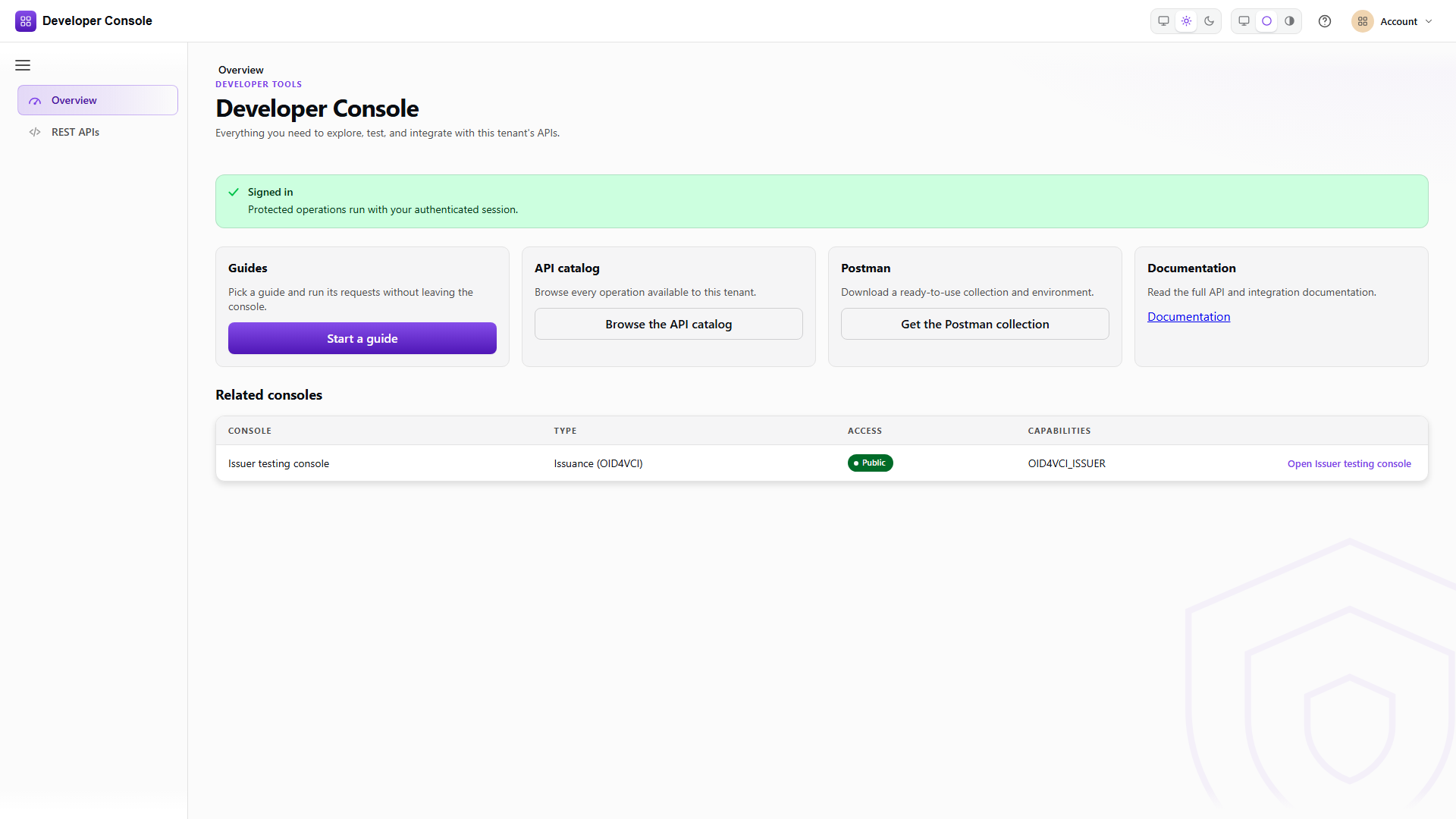
The console opens on Overview, which says what the console is, shows your sign-in state, and links straight into a guide, the API catalog and Postman. It also lists the issuer and verifier consoles configured for the tenant, which open in their own tabs. A tenant can run several of each, so that list is per tenant rather than a fixed menu.
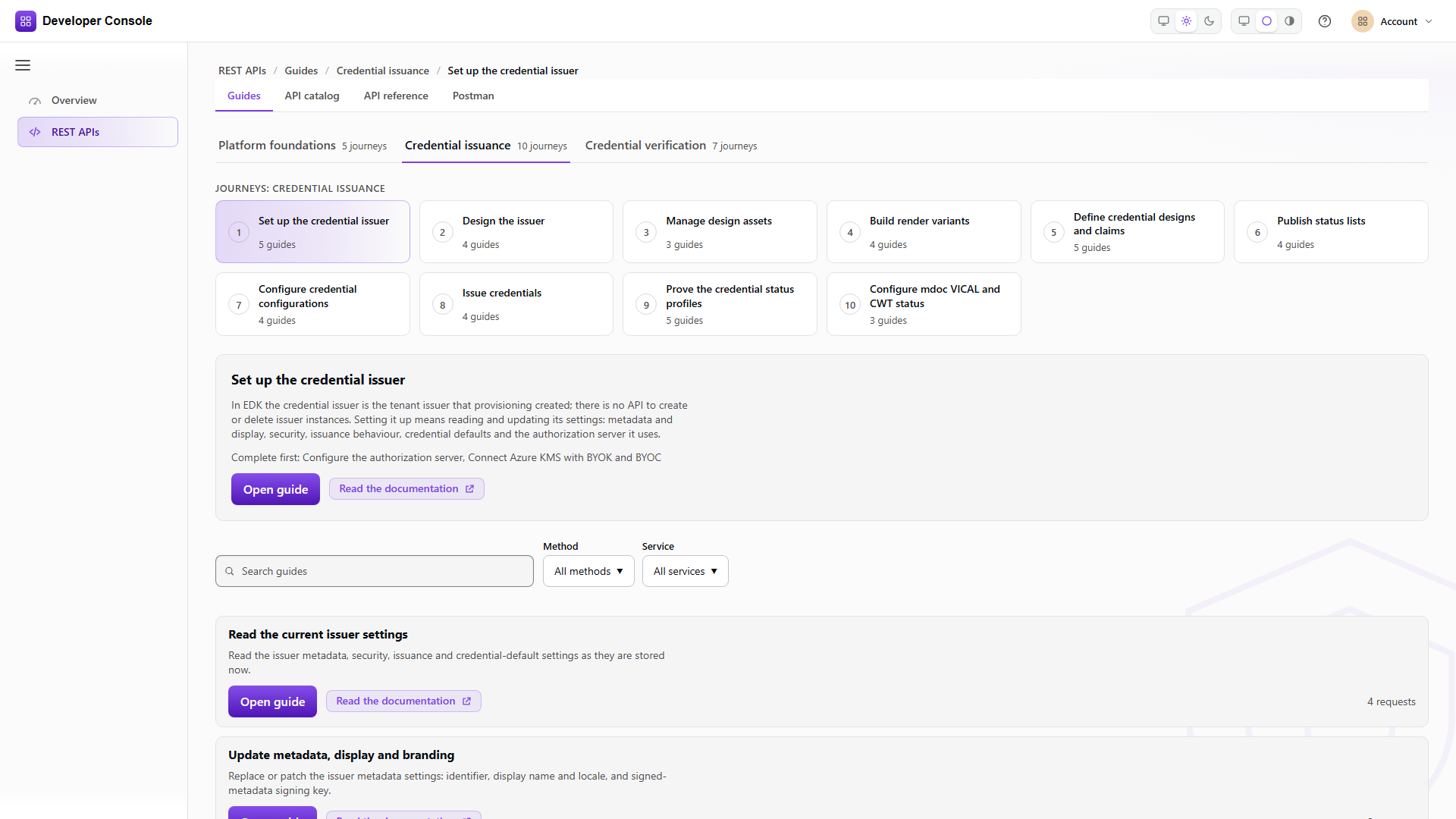
REST APIs is where the request work happens. It holds four related views. Guides is the place to start. Guides are grouped the way the work is done: Platform foundations, then Credential issuance and Credential verification. Each group holds journeys, one per subject (for example setting up the credential issuer, or building render variants), and each journey opens with a request that lists what already exists before you add or change anything.
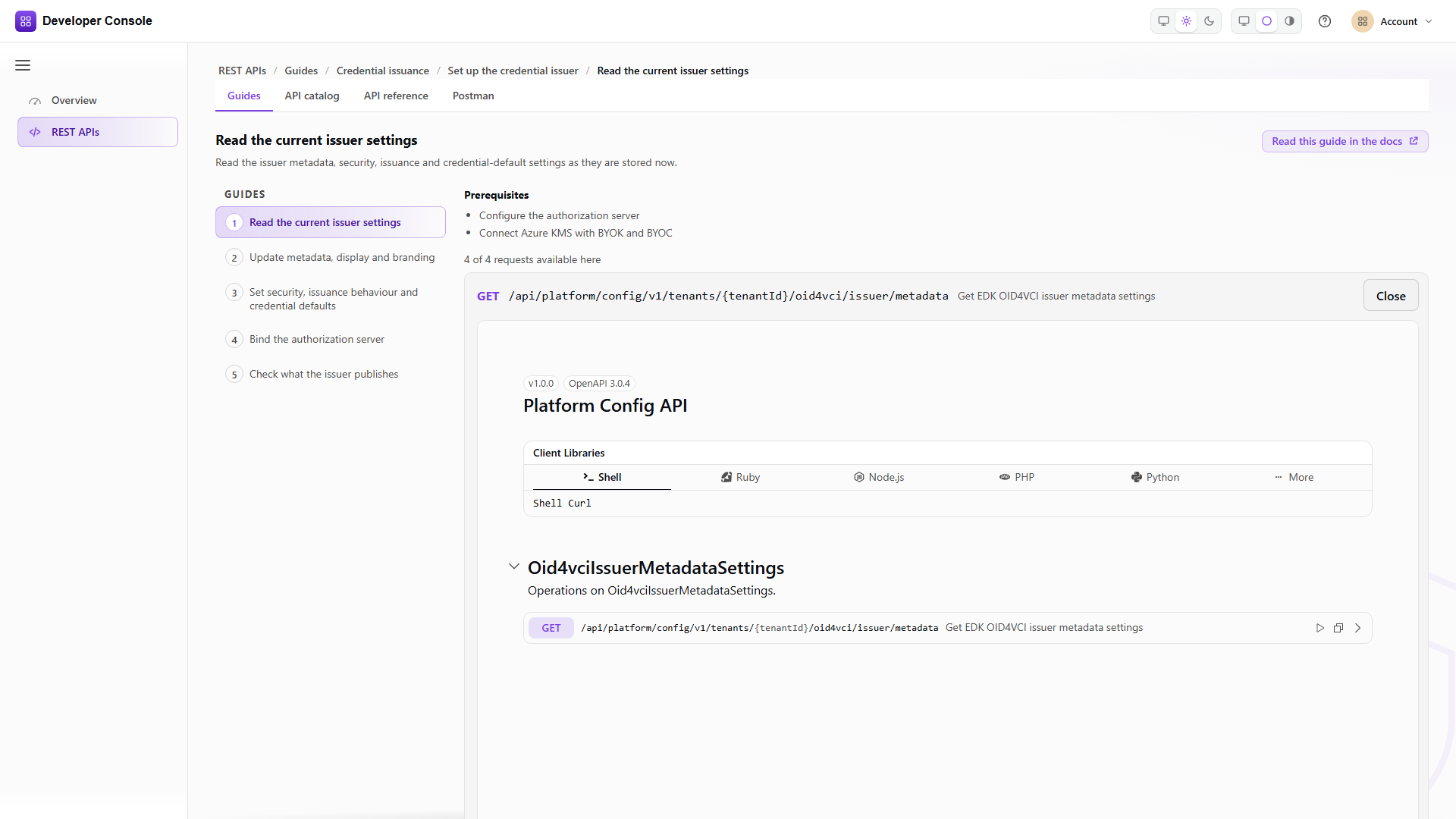
A guide links to its page on this site and lists its requests in the order you run them, each one expandable into a live API reference without leaving the guide.
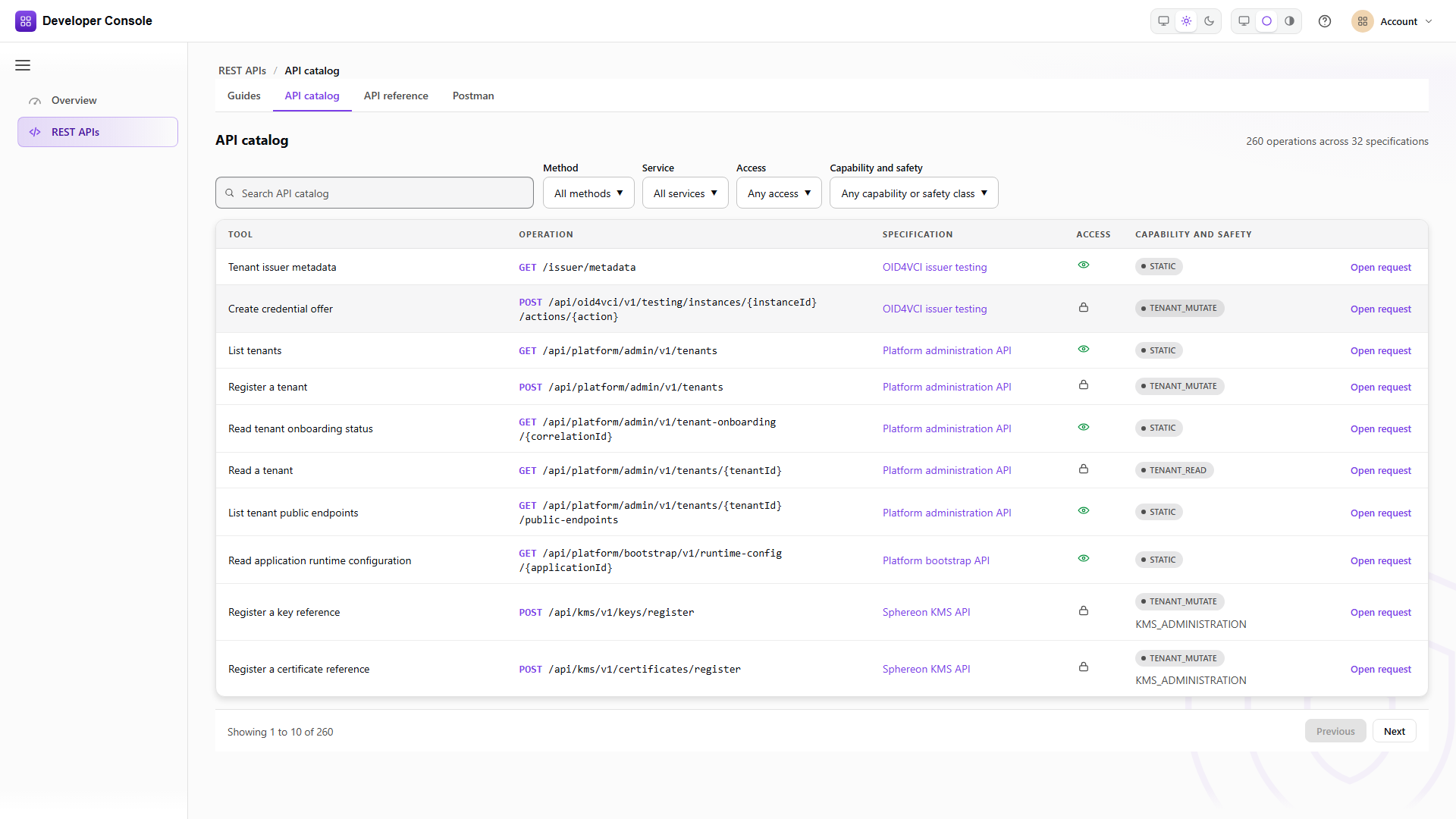
API catalog is the searchable table of every operation your tenant exposes. API reference is the full browse of one OpenAPI document. Postman exports the catalog as a collection and environment.
Find an API operation
In API catalog, find the operation and note its method, path, specification, access requirements, and owning service. Open API reference, choose that document in API specification, and follow its Scalar/OpenAPI link when you need the raw contract. The operation's Overview identifies purpose and access; Request shows the values you send; Response shows what the server returned; API reference shows the schema, examples, and documented status codes. These tabs are related views, not four separate executions.
The catalog endpoint returns the same list for API clients:
Use the catalog's operation identity, not a UI label, as the handoff key. If an operation is absent, record the tenant, license/capability, mounted specification, and policy context before changing a request body. A missing catalog entry is an exposure/configuration boundary, not a malformed credential.
Read an OpenAPI definition
The reference view is generated from the selected OpenAPI document. Check the required parameters, authentication method, content type, and documented response codes before sending the request.
Where the document has supported named examples, Profile and request example selects the example and its associated operation. Choose the credential or status profile you intend to exercise; the first option is not necessarily the right one. Select Browse all mounted operations to return to the complete document before looking up another operation. Use the Scalar/OpenAPI link to compare the rendered operation with the authored contract when a field is unclear. A rendered reference is not a live execution and selecting an example does not send it. Scalar is mounted only for the active guide section, so switching between Console, REST, and Postman does not keep inactive references alive.
Create a credential offer and track its session
In API reference, select the OID4VCI Issuer Integration API document in API specification, which lists documents by their published title, and locate createCredentialOffer: POST /api/oid4vci/v1/backend/credential/offers. This is the canonical backend offer operation. Select the credential configuration IDs configured for your tenant and supply the fields described by its request schema.
The response provides the offer and a tracked issuance session. Preserve the returned correlation_id and status_uri, then use getCredentialOfferStatus to inspect progress and any issuance results. Creating an offer does not mean issuance has completed; a separate holder client drives the protocol. The console observes that progress through backend APIs.
Use the profile walkthroughs for format and status-list configuration. For verification, follow Verify credentials to create a backend verification request and retrieve its status and results. Presentation submission remains the responsibility of the holder client.
Run an operation
The following tabs describe three distinct execution surfaces. Use the Admin Console/Portal for guided tenant setup, the Developer Console for catalog-backed request execution, and REST for an integration client. A request can be prepared in one surface and verified in another, but a prepared request is not evidence that it ran.
- Admin Console / Portal
- Developer Console
- REST
Use the linked Admin Console/Portal task guide for setup fields such as tenant, issuer/verifier instance, credential design, status list, trust attachment, and returned IDs. The Portal is the right place to establish tenant-scoped configuration; the Developer Console is the right place to discover and exercise mounted operations. Existing screenshots and links in the task guides are static/customer-neutral unless a capture is explicitly identified as a runtime result.
- Find the operation in API reference and select Test Request. This opens the request client; it does not execute the operation.
- Check the method and path. Enter the path and query parameters, using identifiers returned by earlier requests.
- Complete the request body using the schema or the selected named example. Replace resource identifiers with values from your tenant and check the credential format and status-list representation.
- Select Send. For a protected operation, the login/STS helper supplies a service token bound to the target tenant and required service authorization, and the browser calls the same-origin gateway directly. If sign-in is required, complete it and return to the target tenant console. If the request has not been executed, reopen the same operation, recheck its body, and select Send.
- Review the returned HTTP status, response headers, and response body. Copy the returned identifier into the next operation rather than assuming an example identifier was created.
- For a state-changing operation, close the request client, select Browse all mounted operations, and use the corresponding read operation to confirm the result.
Use tenant values that belong to the environment you are working in. Keep credentials and private key material out of saved examples.
Do not resend a mutation just because a response is slow or the browser returns from sign-in. Check whether it already completed before retrying; creating an issuance offer or changing credential status has an effect on the tenant.
Call the operation's documented REST method and path with the required tenant authorization. Send the content type shown by the operation and handle its documented success and error responses. The task guides below show how these API calls relate to actions in the Admin Console.
The Developer Console calls these same gateway REST paths directly, using a service token supplied by its login/STS helper. An integration obtains its own authorized service token; do not copy console session cookies or helper CSRF tokens into it.
Interpret the result
A successful HTTP response must be interpreted according to the operation's contract; an accepted asynchronous request may still be pending. After creating an issuance offer or verification request, use the backend status and result operations to follow progress. Completion depends on the participating external clients. After a status change, read the status to confirm it. For mdoc CWT status lists, preserve the binary response and its content type; it is not a JSON document.
The catalog is tenant-scoped. A missing operation can mean that the tenant, license, deployed service capability, or OpenAPI set filters it out; it is not evidence that the operation is malformed. A 401 or 403 points to token, tenant, or service authorization; check the target-bound STS exchange when signed in as a platform operator. A 400 points to request validation; a 404 can mean that a route or referenced resource is unavailable. Inspect the response body and the operation's documented errors.
If a protected request is denied, check the signed-in tenant, operation permissions, and service authorization before retrying. If the document or an operation is absent, check that the relevant service and console policy are enabled for the tenant. A browser-blocked page is different from an API authorization or validation response; changing API request parameters cannot resolve a page that never loaded.
Export a Postman collection
The Developer Console can export its current API catalog as a Postman collection and environment. Review the generated variables before use and supply secrets through your normal secret store.
Open Postman, select Download collection and Download environment, then import both files. The generated authorization configuration uses authorization code with PKCE (S256), without a client secret. Complete authorization separately in Postman; the exported environment does not contain the browser's authenticated session.
Task guides
Start with the developer journeys for the ordered groups, and with Prove the credential status profiles for the exact Postman profile lanes. The focused task guides below explain each operation in more detail: