License and capabilities
The platform license is the signed entitlement that makes a deployment legal and functional. It names the customer and installation, the licensed products and modules, and, where the backend reports them, quota projections. Capabilities are what that entitlement produces at runtime: which protocol products appear in the rail, whether multi-instance issuers are allowed, whether sub-tenant management exists, and which options the tenant onboarding wizard offers.
Keeping the two apart saves time when something is missing. The license is an artifact you manage under Resources > License on the platform tenant. A capability is the effect of that artifact plus product defaults, and a missing module usually shows up as a locked or hidden rail entry rather than as an error.
Audience: platform operator.
Prerequisites: platform management access, with the platform tenant selected. The first license install is part of enterprise deployment; this page covers review, contact maintenance, request generation and bundle import on a running platform.
What the license decides
When an operator session loads, the console resolves a deployment context from the license and the product bootstrap: enabled protocol services, resource products, instance caps and tenant scope.
| Effect | Licensed | Not licensed |
|---|---|---|
| Protocol rail: authorization server, issuer, verifier | The surface is open for tenant configuration | The surface is locked or omitted |
| Instance caps | Create instance stays available until the quota is reached | Create is disabled once used equals limit |
| Sub-tenant management | The tenants list and Register tenant appear | The operator stays in a single tenant scope |
| Resource products such as KMS, Secrets and Status Lists | Shown for this deployment | Hidden or locked |
The capability flags on the tenant onboarding wizard cannot invent modules the license does not allow. Checking Issuer for a tenant when issuer is not licensed produces no usable issuer later, and the failure surfaces at configuration time rather than at the wizard.
Quota numbers explain the other common confusion: a Create action greyed out while the rail still shows the product means the quota is spent, not that the module is missing.
Reviewing and renewing
- Admin Console
- Request
- Response
- Try it
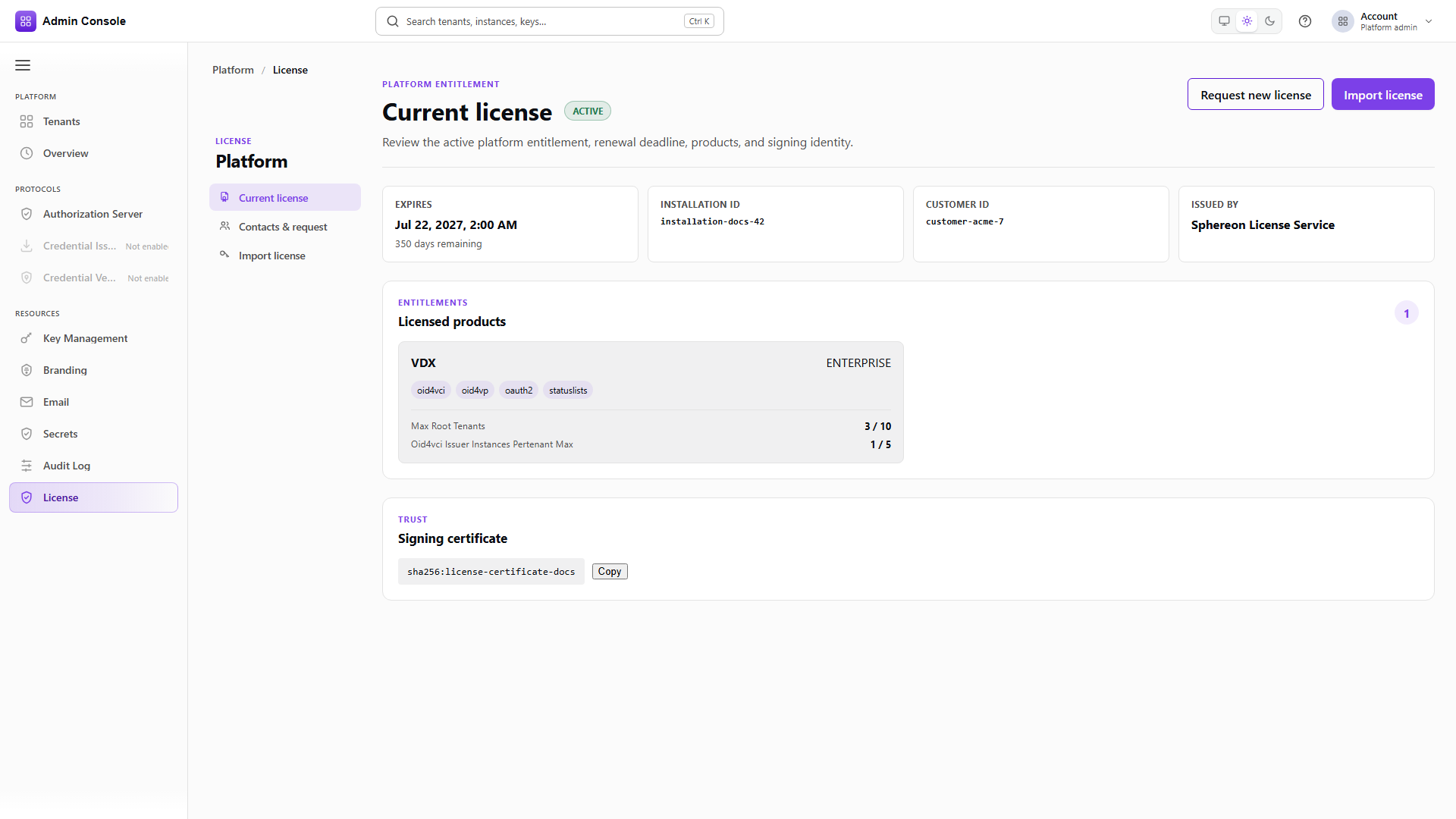
Switch the tenant picker to the platform management tenant and open Resources > License > Current license. This is Platform Admin on the platform origin; a tenant host does not answer it.
status and expiresAt with daysToExpiry are the operational numbers. installationId,
customerId and issuer identify which entitlement this is, and matter when a bundle arrives from
the license provider. productSummaries lists each product with its edition and modules, and carries
quotaProjections with a used and limit per quota key, which is where a blocked Create action
gets explained.
signingCertificateFingerprint identifies the trust material behind the entitlement. Operators copy
it for support tickets; it is not a secret and not a password.
Warnings appear when renewal is close or a projection reports a problem. Act on those before they become an outage, since the sequence below takes a commercial round trip.
- Admin Console
- Request
- Response
- Try it
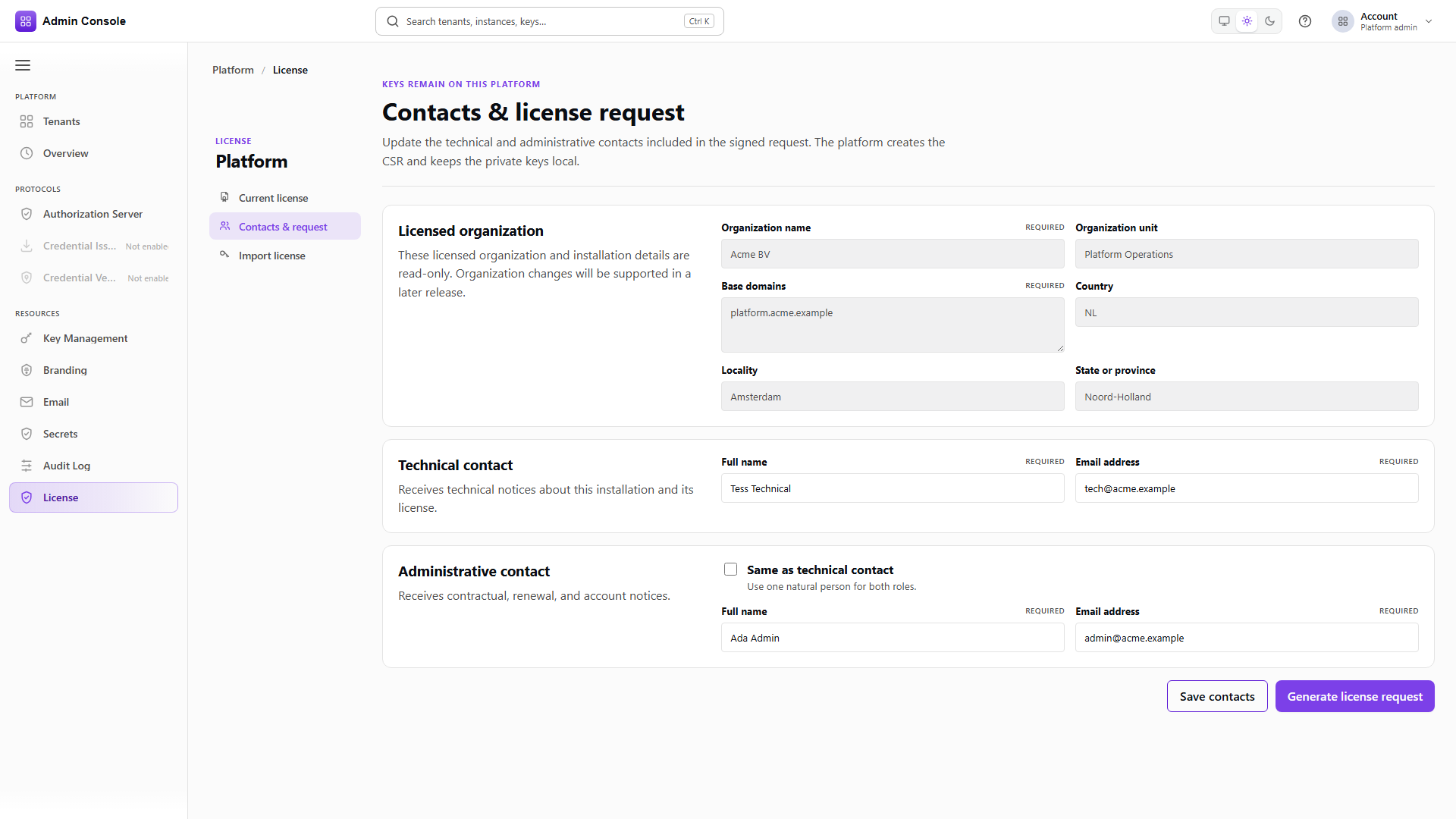
Resources > License > Contacts and request holds the data a new or renewed license needs.
The organization name, unit, base domains and location fields are usually read-only after first setup, because they are bound into the existing entitlement. The technical and administrative contacts are editable, and one person can cover both roles.
Saving contacts persists the draft without generating anything, so keeping them current between renewal cycles costs nothing.
- Admin Console
- Request
- Response
- Try it
Generate builds a signed artifact from the draft: a requestId, the certificate signing request with
its fingerprint and PEM, the request JSON, and the signature with its algorithm.
The private keys behind this stay on the platform. What you send outward is the signed JSON and the CSR material, delivered to the license provider through your commercial channel. Never paste key material into a ticket.
Full schema: Platform Admin API for the license read, Platform Setup API for the request and import routes.
Importing the returned bundle
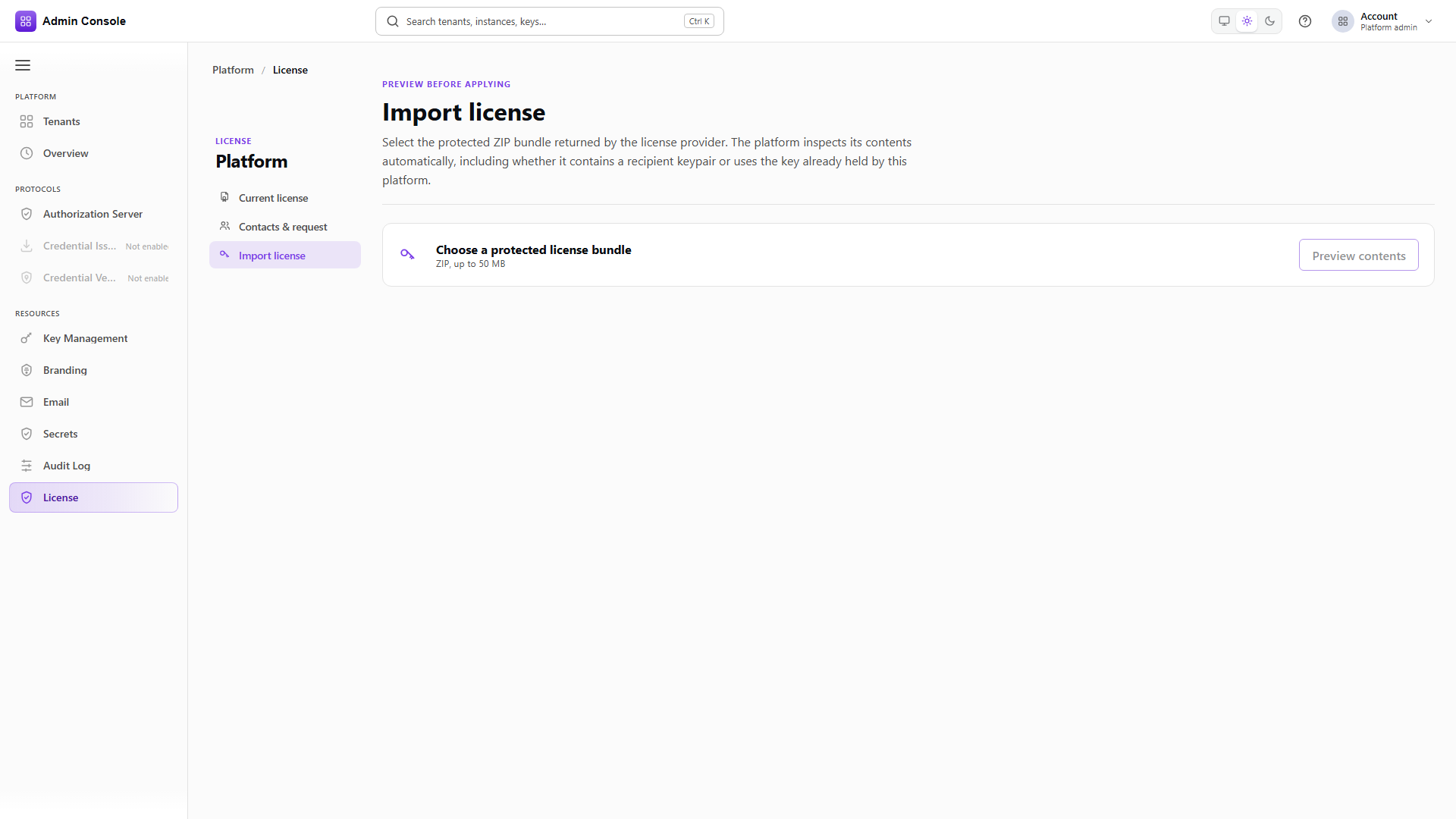
The provider returns a protected ZIP. Import is deliberately two steps so the overwrite impact is visible before anything is applied.
Choose the ZIP, within the size limit the deployment allows, and use Preview contents. The preview reports whether the recipient private key is present, the platform certificate, the license root CA, the customer party information, and the list of files in the bundle. Read the Will overwrite section carefully: import replaces the active license and can replace the security material listed there. Acknowledge the impact, then Import and activate.
Afterwards, go back to Current license and confirm the status, expiry and modules, then re-check tenant onboarding and any instance Create actions that quotas had blocked.
Do not import a bundle meant for a different installation id or customer. The wrong recipient key material either fails the import or leaves the platform unable to prove its entitlement.
Preview and import are multipart operations under Platform Setup's /license-management/import
routes. The console is the right tool for an operator; automation should follow the same
preview-then-import sequence with operator credentials.
Capabilities at tenant onboarding
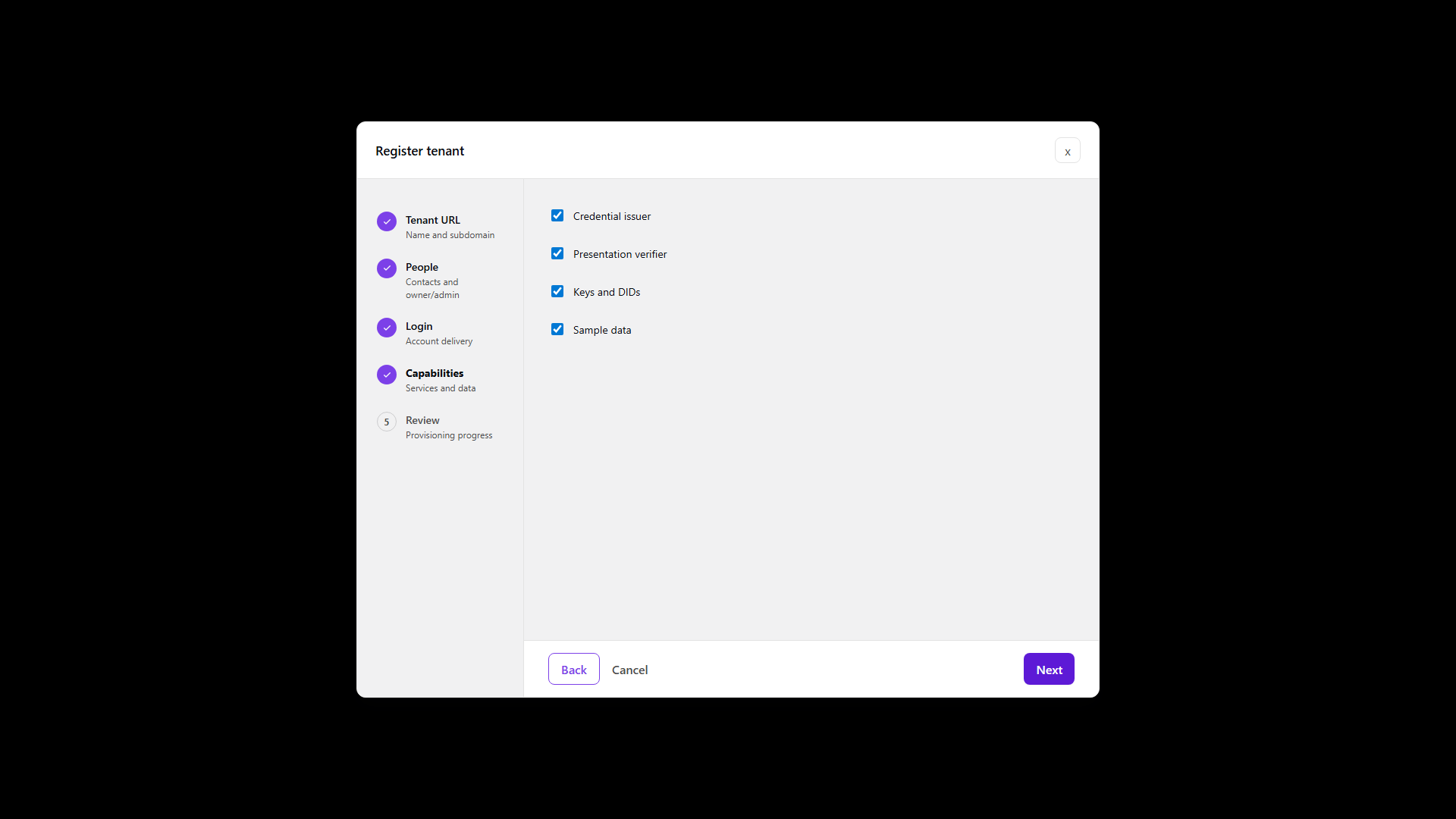
The Capabilities step when you register a tenant chooses what that tenant receives during provisioning, within what the platform license permits.
| Capability | Enabled | Disabled |
|---|---|---|
| Credential issuer | An issuer instance and OID4VCI paths for the tenant | No issuer product until one is added later, if licensed |
| Presentation verifier | A verifier instance and OID4VP paths | No verifier until added later |
| Keys and DIDs | Product-managed KMS and DID material created during setup | Empty Key Management and DID areas until operators create them |
| Sample data | Lab designs, playground clients and demo fixtures | A clean tenant with no sample catalog |
Sample data suits labs and demos. Leave it off for production customer tenants unless your product standard requires it, because the seeded designs are indistinguishable from real ones a week later.
Order of work
Confirm the current license is active and its expiry is acceptable, and keep the contacts current before a renewal cycle rather than during one. Generate the request, send it through the commercial channel, and import the returned bundle. Then re-check the rail products and the instance Create actions, and onboard tenants with capability flags that match the modules you actually renewed.
Related
Current license, Contacts and request, Import license, Onboard a tenant, Secrets and KMS providers