Join an existing federation
This guide takes a tenant from nothing to an effective participation in a federation that another party operates. It assumes you know the federation's Trust Anchor Entity Identifier and who operates the Immediate Superior you will sit under, which is either the Trust Anchor itself or one of its intermediates. The concepts are explained in OpenID Federation.
Every operation below is in the OpenID Federation API.
Paths are relative to /api/platform/config/v1. Operations that change an existing record require
If-Match with the record's current version, which reads return as the ETag. A missing header is
answered with 428, a stale one with 412.
Before you start
A tenant without any federation records enables administration once with
POST /tenants/{tenantId}/openid-federation/initialize (initializeOpenIdFederation). The complete
administration state, entities, bindings, superiors, participations and contexts, is returned by
GET /tenants/{tenantId}/openid-federation/graph (getOpenIdFederationGraph). The graph is intent; it
says nothing about what is published or trusted.
Decide the Entity Identifier first. It must be an https URL that the deployment serves for this
tenant, because the Entity Configuration is published below it. For a credential issuer it is the
Credential Issuer Identifier; for the organization it is usually the tenant's base URL or a path below
it.
1. Create the entity and bind the resource
Create the entity with POST /tenants/{tenantId}/openid-federation/entities
(createOpenIdFederationEntity). Give it the Entity Identifier, the authority kind LEAF for a
resource, or INTERMEDIATE for an organization that will vouch for its own departments and resources,
and the publication authority PLATFORM_MANAGED, which means the tenant signs and serves the
entity's statements here.
Then bind the resource with POST /tenants/{tenantId}/openid-federation/bindings
(createOpenIdFederationBinding). The binding names the resource by kind and identifier and lists the
roles it serves with their metadata profile. An organization binding uses an empty role map. Relying
party and OAuth client roles cannot be declared on a binding; they only come from an observed client
source.
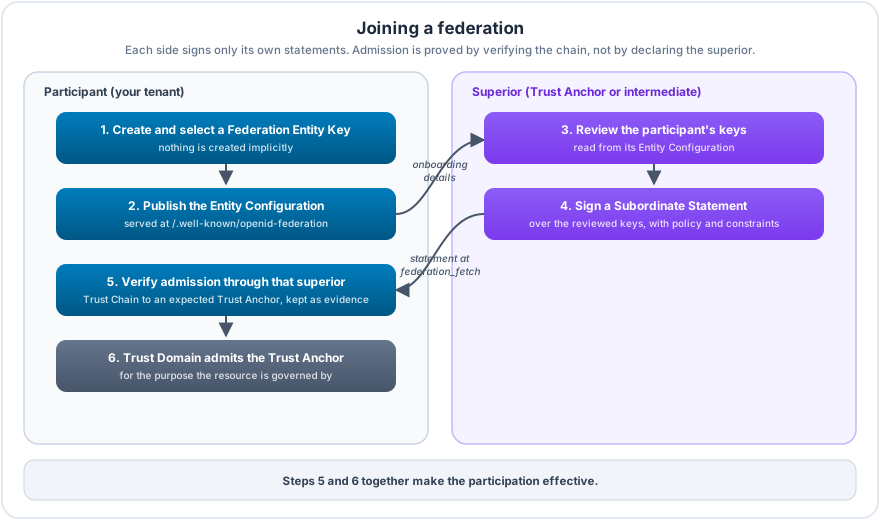
2. Create and select a Federation Entity Key
No key is ever created implicitly. Create one with
POST /tenants/{tenantId}/openid-federation/entities/{entityId}/keys
(createOpenIdFederationEntityKey), choosing an algorithm from ES256, ES384, ES512, PS256,
PS384, PS512, RS256, RS384 or RS512. The private key stays in key management; the API only
ever returns the public key.
A new key signs nothing until it is selected with
PUT /tenants/{tenantId}/openid-federation/entities/{entityId}/keys/selection
(selectOpenIdFederationEntitySigningKey). The request carries the selection revision you last read,
so two administrators cannot overwrite each other's choice. The selected key cannot be revoked; select
another key first, then revoke the old one with
POST /tenants/{tenantId}/openid-federation/entities/{entityId}/keys/{keyId}/revoke
(revokeOpenIdFederationEntityKey). GET .../keys (listOpenIdFederationEntityKeys) lists them.
3. Declare the federation, the superior and the participation
Record the federation with POST /tenants/{tenantId}/openid-federation/contexts
(createOpenIdFederationContext), listing its Trust Anchor Entity Identifiers as the expected anchors.
Declare where the entity sits with POST /tenants/{tenantId}/openid-federation/superiors
(createOpenIdFederationSuperior): the subordinate is your entity (LOCAL) and the superior is the
federation's anchor or intermediate (EXTERNAL, by Entity Identifier). Declared superiors become the
authority_hints of the Entity Configuration.
Add the entity to the federation with POST /tenants/{tenantId}/openid-federation/participations
(createOpenIdFederationParticipation) and choose which declared superiors carry it with
PUT /tenants/{tenantId}/openid-federation/participations/{participationId}/superiors
(replaceOpenIdFederationParticipationSuperiors). The link matters later: admission is verified
against the Trust Anchors of the federations a superior carries.
4. Publish the Entity Configuration
POST /tenants/{tenantId}/openid-federation/entities/{entityId}/publish
(publishOpenIdFederationEntity, with If-Match on the entity) prepares the Entity Configuration from
the bound resource as it is served now and from the declared superiors, signs it with the selected key,
and serves it at <Entity Identifier>/.well-known/openid-federation as
application/entity-statement+jwt.
Publication is guarded against drift. A new revision is only promoted when nothing it was prepared from
changed in the meantime; otherwise the previous revision stays in place and you publish again. Every
served revision is immutable. When you later change the administration, for instance by adding a
superior, the publication stops being current, but the last signed revision keeps being served until it
expires or you publish a new one. GET .../entities/{entityId}/publication
(getOpenIdFederationEntityPublication) shows the served revision, whether it is still current, and why
it was withdrawn if it is not.
5. Hand the onboarding details to the superior
OpenID Federation has no universal join endpoint. Each federation onboards members in its own way, usually by a form, a ticket or a contract, and an operator decides. Whatever the channel, send the superior's operator three things:
- the Entity Identifier;
- the Entity Configuration URL,
<Entity Identifier>/.well-known/openid-federation; - the key ids (
kid) of the Federation Entity Keys your Entity Configuration publishes, as listed bylistOpenIdFederationEntityKeys.
The key ids are the part that matters. The operator fetches your Entity Configuration, compares the keys in it with the ids you sent through the separate channel, and only then signs a Subordinate Statement that vouches for exactly those keys, optionally adding metadata, a metadata policy and constraints for you. Expect the operator to ask for proof that you control the Entity Identifier's host and for organization details, depending on the federation's rules. When the superior runs on this platform, its side of the process is described in Operate a federation.
Do not change or rotate the published keys while the review is pending. A superior on this platform refuses to sign when the keys it reads differ from the ones its operator reviewed.
6. Verify admission
Declaring a superior proves nothing. Once the superior says it has signed,
POST /tenants/{tenantId}/openid-federation/superiors/{edgeId}/verify
(verifyOpenIdFederationSuperior, with If-Match on the relationship) checks the result from your side.
It takes the expected Trust Anchors of the federations whose participations this superior carries, and
for each of them resolves your entity's Trust Chain through that superior's Subordinate Statement and
verifies it (OpenID Federation 1.1 §4, §10). The anchor's keys come from the anchor's own Entity
Configuration.
On the first anchor that verifies, the response names that Trust Anchor, the chain path from your entity through each superior to the anchor, and the time until which the chain is valid. The superior's verified statement is recorded on the relationship as its evidence. Verification only applies to superiors of your own entities; the members you admit verify their own side.
A failed verification leaves the relationship unchanged and reports why no chain verified. Common causes:
- the relationship is not linked to any participation, or the linked federation context lists no expected Trust Anchor, so there is nothing to verify against;
- the superior has not yet served its statement, so fetching it at the superior's fetch endpoint fails;
- the statement lists different keys than your Entity Configuration publishes, typically after a key change during the review;
- the chain ends at an anchor that the federation context does not list, or a statement in it has expired.
The evidence expires with the chain. When the superior renews its statement, verify again so the recorded evidence follows; a participation whose evidence has expired is no longer effective.
7. Make the participation effective
Verified evidence alone does not make the tenant trust the federation. Add the federation's Trust Anchor
to a Trust Domain as an OIDFED_ENTITY anchor, admit it for the usage your resource is governed by, and
attach the domain to that resource. A credential verifier deciding which issuers to accept uses
CREDENTIAL_ISSUER_TRUST; a hosted authorization server accepting federation clients uses
CLIENT_REGISTRATION_TRUST. Trust domains explains anchors,
admissions and attachments, and the Trust Domain API holds
the operations.
With both the verified superior and the Trust Domain admission in place, the participation is effective. Keep it that way by renewing statements before they expire; see Renewal, which applies to a participant's own Entity Configurations as well.
Changing and leaving
Update or end records with the matching PUT and .../end operations on contexts, bindings, superiors
and participations, and retire an entity with
POST /tenants/{tenantId}/openid-federation/entities/{entityId}/decommission
(decommissionOpenIdFederationEntity). Ending a record does not unpublish what is already signed:
statements stay valid until they expire. Tell the superior's operator when you leave so it stops serving
its statement about you.
Superior relationships can only be written on PostgreSQL, the production database. Deployments on MySQL or SQLite can read the administration graph and publish, but refuse to change superior relationships.