HTTP/WebSocket Transport
HTTP and WebSocket transports enable remote mDoc presentations over the network. These are used with TO_APP (reverse) engagement for online verification scenarios.
Use Cases
Remote transports are used for:
- Online identity verification during account registration
- Remote document verification for digital services
- Integration with OID4VP presentation flows
- Server-based verification without physical proximity
TO_APP Engagement with HTTP
The TO_APP engagement type uses HTTP-based retrieval:
- Android/Kotlin
- iOS/Swift
val engagementManager = session.graph.mdocEngagementManager

// Handle incoming mdoc:// URI from verifier
fun handleIncomingUri(uri: String) {
    lifecycleScope.launch {
        val result = engagementManager.toApp(
            mdocUri = uri,
            autoStart = true
        )

        if (result.isOk) {
            val engagement = result.value
            handleEngagement(engagement)
        } else {
            showError(result.error)
        }
    }
}
let engagementManager = session.graph.mdocEngagementManager

// Handle incoming mdoc:// URI from verifier
func handleIncomingUri(uri: String) async {
    let result = engagementManager.toApp(
        mdocUri: uri,
        autoStart: true
    )

    if result.isOk {
        await handleEngagement(engagement: result.value)
    } else {
        showError(error: result.error)
    }
}
URI Scheme Patterns
The toApp() method supports three URI patterns:
| Scheme | Transport | Description |
|---|---|---|
mdoc: (opaque) | BLE/NFC | Classic reverse engagement |
mdoc:// (hierarchical) | REST API | Website/server retrieval |
mdoc-openid4vp:// | OID4VP | OAuth 2.0 integration |
Protocol Flow
REST API Mode
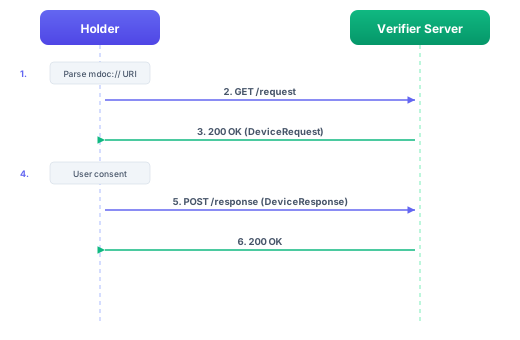
REST API Protocol (ISO 18013-7 Annex A)
The REST API transport implements the online presentation flow defined in ISO 18013-7 Annex A. The protocol proceeds as follows:
- Holder POSTs DeviceEngagement: The holder sends a Tag 24-wrapped
DeviceEngagementCBOR structure to the reader's URI. - Reader responds with SessionEstablishment: The response contains a
SessionEstablishmentmessage, which includes the encryptedDeviceRequest. - SessionTranscript derivation: Both parties derive the
SessionTranscriptusingRestApiHandover. This handover includes the SHA-256 hash of the Tag 24-wrappedReaderEngagementbytes, binding the session to the specific reader. - Session encryption: The session uses ECDH key agreement followed by HKDF key derivation with AES-256-GCM encryption (Cipher Suite 1).
- Holder processes request: The holder decrypts the
DeviceRequest, evaluates the requested data elements, and encrypts theDeviceResponse. - Holder POSTs SessionData: The holder sends the encrypted
SessionData(containing theDeviceResponse) back to the reader's endpoint.
HTTPS is required for all REST API transport connections. The transport validates this at construction time and rejects plain HTTP URIs.
OID4VP Protocol (ISO 18013-7 Annex B)
The OID4VP transport implements the OpenID for Verifiable Presentations flow for mDoc credentials, as defined in ISO 18013-7 Annex B.
The protocol proceeds as follows:
- URI reception: The holder receives an
mdoc-openid4vp://URI containingclient_idandrequest_uriparameters. - Authorization Request fetch: The holder fetches the JWT Authorization Request from the
request_uriendpoint. - Query format: The request supports both DCQL queries (the default format) and Presentation Definition (legacy format) for specifying which credentials and data elements are requested.
- SessionTranscript derivation: The
SessionTranscriptusesOID4VPHandover, which incorporatesclientIdHash,responseUriHash, and a nonce to bind the session cryptographically. - Response format: The response uses JARM (JWT-Secured Authorization Response Mode) for encryption.
- DeviceResponse encoding: The
vp_tokenin the authorization response contains a base64url-encoded CBORDeviceResponse.
Handling TO_APP Flow
Complete TO_APP flow with HTTP retrieval:
- Android/Kotlin
- iOS/Swift
class ToAppHandler(
    private val engagementManager: MdocEngagementManager,
    private val documentProvider: DocumentProvider
) {
    suspend fun handleUri(uri: String) {
        // Create engagement from URI
        val result = engagementManager.toApp(
            mdocUri = uri,
            autoStart = false
        )

        if (result.isOk) {
            val engagement = result.value

            // Monitor engagement events
            engagement.events.collect { event ->
                when (event.state) {
                    is MdocEngagementState.Connected -> {
                        // Start transfer
                        val transferManager = engagement.start()

                        // Handle the transfer
                        val deviceRequest = transferManager.receiveDeviceRequest()
                        val approved = showConsentDialog(deviceRequest)

                        if (approved) {
                            val response = transferManager.createResponse(
                                deviceRequest = deviceRequest,
                                documentProvider = documentProvider
                            )
                            transferManager.sendDeviceResponse(response)
                        }
                    }
                }
            }
        } else {
            handleError(result.error)
        }
    }
}
class ToAppHandler {
    private let engagementManager: MdocEngagementManager
    private let documentProvider: DocumentProvider

    func handleUri(uri: String) async {
        // Create engagement from URI
        let result = engagementManager.toApp(
            mdocUri: uri,
            autoStart: false
        )

        if result.isOk {
            let engagement = result.value

            // Monitor engagement events
            for await event in engagement.events {
                switch event.state {
                case .connected:
                    do {
                        // Start transfer
                        let transferManager = try await engagement.start()

                        // Handle the transfer
                        let deviceRequest = try await transferManager.receiveDeviceRequest()
                        let approved = await showConsentDialog(request: deviceRequest)

                        if approved {
                            let response = try await transferManager.createResponse(
                                deviceRequest: deviceRequest,
                                documentProvider: documentProvider
                            )
                            try await transferManager.sendDeviceResponse(deviceResponse: response)
                        }
                    } catch {
                        handleError(error: error)
                    }
                default:
                    break
                }
            }
        } else {
            handleError(error: result.error)
        }
    }
}
OID4VP Integration
For mdoc-openid4vp:// URIs, the IDK integrates with OID4VP:
- Android/Kotlin
- iOS/Swift
// OID4VP URIs are handled the same way
val uri = "mdoc-openid4vp://authorize?..."

val result = engagementManager.toApp(
    mdocUri = uri,
    autoStart = true
)

// The IDK handles the OID4VP protocol internally
// OID4VP URIs are handled the same way
let uri = "mdoc-openid4vp://authorize?..."

let result = engagementManager.toApp(
    mdocUri: uri,
    autoStart: true
)

// The IDK handles the OID4VP protocol internally
Deep Link Registration
Android
Register to handle mDoc URIs in AndroidManifest.xml:
<activity
    android:name=".MdocHandlerActivity"
    android:exported="true">
    <intent-filter>
        <action android:name="android.intent.action.VIEW" />
        <category android:name="android.intent.category.DEFAULT" />
        <category android:name="android.intent.category.BROWSABLE" />
        <data android:scheme="mdoc" />
    </intent-filter>
    <intent-filter>
        <action android:name="android.intent.action.VIEW" />
        <category android:name="android.intent.category.DEFAULT" />
        <category android:name="android.intent.category.BROWSABLE" />
        <data android:scheme="mdoc-openid4vp" />
    </intent-filter>
</activity>
iOS
Register URL schemes in Info.plist:
<key>CFBundleURLTypes</key>
<array>
    <dict>
        <key>CFBundleURLSchemes</key>
        <array>
            <string>mdoc</string>
            <string>mdoc-openid4vp</string>
        </array>
    </dict>
</array>
Monitoring Transfer State
Monitor HTTP-based transfer progress:
- Android/Kotlin
- iOS/Swift
engagementManager.eventHub.allEvents.collect { event ->
    when (event) {
        is MdocEngagementEvent -> {
            when (event.state) {
                is MdocEngagementState.Connecting -> {
                    showMessage("Connecting to verifier...")
                }
                is MdocEngagementState.Connected -> {
                    showMessage("Connected")
                }
                is MdocEngagementState.Transferring -> {
                    showMessage("Transferring credentials...")
                }
                is MdocEngagementState.Completed -> {
                    showMessage("Transfer complete")
                }
                is MdocEngagementState.Error -> {
                    val error = (event.state as MdocEngagementState.Error).error
                    showError("Error: ${error.message}")
                }
            }
        }
    }
}
for await event in engagementManager.eventHub.allEvents {
    if let engagementEvent = event as? MdocEngagementEvent {
        switch engagementEvent.state {
        case .connecting:
            showMessage(text: "Connecting to verifier...")
        case .connected:
            showMessage(text: "Connected")
        case .transferring:
            showMessage(text: "Transferring credentials...")
        case .completed:
            showMessage(text: "Transfer complete")
        case .error(let error):
            showError(text: "Error: \(error.message)")
        default:
            break
        }
    }
}
Error Handling
Handle network errors gracefully:
- Android/Kotlin
- iOS/Swift
if (result.isErr) {
    val error = result.error
    val message = when {
            error.message.contains("timeout", ignoreCase = true) ->
                "Connection timed out. Please try again."
            error.message.contains("network", ignoreCase = true) ->
                "Network error. Check your connection."
            error.message.contains("ssl", ignoreCase = true) ->
                "Security error. The connection is not secure."
            else -> error.message
        }
        showError(message)
}
if result.isErr {
    let error = result.error
    let message: String
    if error.message.lowercased().contains("timeout") {
        message = "Connection timed out. Please try again."
    } else if error.message.lowercased().contains("network") {
        message = "Network error. Check your connection."
    } else if error.message.lowercased().contains("ssl") {
        message = "Security error. The connection is not secure."
    } else {
        message = error.message
    }
    showError(message: message)
}
Tips
When implementing HTTP/WebSocket transport:
- Use HTTPS: Never use plain HTTP for credential exchange
- Handle errors gracefully: Network requests can fail for many reasons
- Set appropriate timeouts: Balance user experience with reliability
- Validate server certificates: Ensure secure connections
- Clean up on completion: Close engagements when transfer completes