Universal OID4VP
The Universal OID4VP module provides a backend-focused API for web applications and services that need to verify credentials without managing the low-level protocol details.
Overview
While the standard Verifier API gives you full control over the OID4VP protocol, the Universal API simplifies common use cases:
- Session Management - Handles session creation and lifecycle automatically
- QR Code Generation - Creates QR codes with customizable styling
- Status Polling - Exposes a single endpoint that returns the current verification state
- Webhook Callbacks - Posts to a URL you configure when verification completes
Use Cases
The Universal API is ideal for:
| Scenario | Description |
|---|---|
| Web Applications | Display QR code, poll for result, redirect on success |
| Kiosk Systems | Stateless verification with QR display |
| Backend Services | Webhook-based verification for async workflows |
| Mobile Web | Same-device flows with deep links |
Architecture
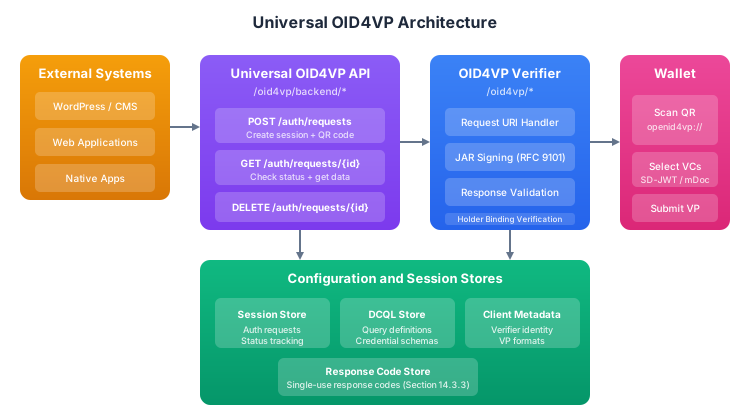
REST Endpoints
The Universal API exposes three endpoints that map to the lifecycle of a verification session: create one, check its status, and clean it up when you're done.
Create Authorization Request
This is the starting point for any verification flow. You post a DCQL query (either by referencing a pre-configured query_id or by inlining the query directly) and get back everything you need to present a QR code to the user and track the session.
POST /oid4vp/backend/auth/requests
Content-Type: application/json

{
  "query_id": "age-verification",
  "client_id": "https://verifier.example.com",
  "callback": {
    "url": "https://my-app.example.com/webhook",
    "statuses": ["AUTHORIZATION_RESPONSE_VERIFIED"],
    "include_verified_data": true
  },
  "ttl_seconds": 600,
  "qr_code": {
    "size": 400,
    "color_dark": "#000000",
    "color_light": "#ffffff"
  }
}
Request Fields:
| Field | Type | Required | Description |
|---|---|---|---|
query_id | string | Either query_id or dcql_query | Reference to pre-configured DCQL query |
dcql_query | object | Either query_id or dcql_query | Inline DCQL query |
client_id | string | No | Override default client ID |
callback | object | No | Webhook configuration |
ttl_seconds | number | No | Session TTL (default: 600) |
qr_code | object | No | QR code styling options |
Response:
{
  "correlation_id": "sess-abc123",
  "query_id": "age-verification",
  "request_uri": "openid4vp://authorize?request_uri=https%3A%2F%2Fverifier.example.com%2Foid4vp%2Frequests%2Fsess-abc123",
  "qr_code_content": "openid4vp://authorize?request_uri=...",
  "qr_code_data_uri": "data:image/png;base64,iVBORw0KGgo...",
  "status_uri": "https://verifier.example.com/oid4vp/backend/auth/requests/sess-abc123",
  "expires_at": 1704200400000,
  "status": "CREATED"
}
Get Authorization Request Status
After creating a session, your frontend (or backend) needs to know when the user has scanned the QR code and whether verification succeeded. Poll this endpoint on an interval, or use it as a one-off check if you're primarily relying on webhooks.
GET /oid4vp/backend/auth/requests/{correlationId}
Response:
{
  "correlation_id": "sess-abc123",
  "query_id": "age-verification",
  "status": "AUTHORIZATION_RESPONSE_VERIFIED",
  "created_at": 1704199800000,
  "last_updated": 1704199850000,
  "expires_at": 1704200400000,
  "verified_data": {
    "credentials": [
      {
        "id": "age_over_18",
        "format": "dc+sd-jwt",
        "type": "VerifiedPerson",
        "claims": {
          "age_over_18": true,
          "given_name": "John"
        }
      }
    ]
  }
}
Delete Authorization Request
Sessions expire automatically based on ttl_seconds, but you can also remove them explicitly. This is useful if a user cancels a flow or navigates away, and you want to free up the session immediately rather than waiting for the TTL.
DELETE /oid4vp/backend/auth/requests/{correlationId}
Session Status Values
A session moves through these states in order. Your polling logic or webhook handler should look for the terminal states (AUTHORIZATION_RESPONSE_VERIFIED, ERROR, EXPIRED) to decide what to do next.
| Status | Description |
|---|---|
CREATED | Session created, waiting for wallet scan |
REQUEST_RETRIEVED | Wallet has retrieved the authorization request |
AUTHORIZATION_RESPONSE_RECEIVED | Wallet submitted response, verification in progress |
AUTHORIZATION_RESPONSE_VERIFIED | Credentials verified successfully |
ERROR | Verification failed |
EXPIRED | Session timed out |
Usage Examples
Web Application Flow
The most common pattern is a two-step flow: create a session to get a QR code, then poll for the result. The examples below show both the Kotlin SDK and a plain JavaScript approach using fetch against the REST API.
- Kotlin/JVM
- JavaScript
// 1. Create session and get QR code
val createCommand: CreateAuthRequestEndpointCommand = session.graph.createAuthRequestCommand

val result = createCommand.execute(
    CreateAuthorizationRequestInput(
        queryId = "age-verification",
        qrCodeOptions = QrCodeOptions(size = 300)
    ),
    sessionContext
)

val output = result.getOrThrow()
println("Display QR: ${output.qrCodeDataUri}")
println("Poll status at: ${output.statusUri}")

// 2. Poll for completion
val statusCommand: GetAuthRequestStatusEndpointCommand = session.graph.getAuthRequestStatusCommand

while (true) {
    delay(2000)
    val status = statusCommand.execute(
        correlationId = output.correlationId,
        sessionContext
    ).getOrThrow()

    when (status.status) {
        AuthorizationSessionStatus.AUTHORIZATION_RESPONSE_VERIFIED -> {
            println("Verified: ${status.verifiedData}")
            break
        }
        AuthorizationSessionStatus.ERROR -> {
            println("Error: ${status.error}")
            break
        }
        AuthorizationSessionStatus.EXPIRED -> {
            println("Session expired")
            break
        }
        else -> continue
    }
}
// 1. Create session and get QR code
const response = await fetch('/oid4vp/backend/auth/requests', {
  method: 'POST',
  headers: { 'Content-Type': 'application/json' },
  body: JSON.stringify({
    query_id: 'age-verification',
    qr_code: { size: 300 }
  })
});

const session = await response.json();

// Display QR code
document.getElementById('qr').src = session.qr_code_data_uri;

// 2. Poll for completion
const pollStatus = async () => {
  const statusResponse = await fetch(session.status_uri);
  const status = await statusResponse.json();

  switch (status.status) {
    case 'AUTHORIZATION_RESPONSE_VERIFIED':
      handleSuccess(status.verified_data);
      break;
    case 'ERROR':
      handleError(status.error);
      break;
    case 'EXPIRED':
      handleExpired();
      break;
    default:
      setTimeout(pollStatus, 2000);
  }
};

pollStatus();
Webhook Integration
If you don't want to poll, you can register a callback URL when creating the session. The server will POST to that URL whenever the session reaches one of the statuses you specify. This is a better fit for backend services where you don't have a browser polling loop.
val result = createCommand.execute(
    CreateAuthorizationRequestInput(
        queryId = "kyc-verification",
        callback = CallbackConfig(
            url = "https://my-app.example.com/webhook/oid4vp",
            statuses = listOf(
                AuthorizationSessionStatus.AUTHORIZATION_RESPONSE_VERIFIED,
                AuthorizationSessionStatus.ERROR
            ),
            includeVerifiedData = true
        )
    ),
    sessionContext
)
Your webhook endpoint will receive a POST with a JSON body like this:
{
  "correlation_id": "sess-abc123",
  "status": "AUTHORIZATION_RESPONSE_VERIFIED",
  "verified_data": {
    "credentials": [...]
  }
}
Dependencies
You need the universal implementation module plus the underlying verifier and DCQL libraries. If you're already using the standard verifier API, you only need to add the universal module.
dependencies {
    // Universal OID4VP
    implementation("com.sphereon.idk:lib-openid-oid4vp-universal-impl:0.25.0")

    // Required dependencies
    implementation("com.sphereon.idk:lib-openid-oid4vp-verifier-impl:0.25.0")
    implementation("com.sphereon.idk:lib-openid-oid4vp-dcql:0.25.0")
}
Configuration
Instead of sending a full DCQL query with every request, you can register named queries in a registry. Then reference them by query_id when creating sessions. This keeps your request payloads small and your query definitions in one place.
@Inject
@SingleIn(AppScope::class)
class Oid4vpQueryRegistry {
    val queries = mapOf(
        "age-verification" to DcqlQuery(
            credentials = listOf(
                DcqlCredential(
                    id = "age_over_18",
                    format = "dc+sd-jwt",
                    claims = listOf(
                        DcqlClaim(path = listOf("age_over_18"))
                    )
                )
            )
        ),
        "kyc-verification" to DcqlQuery(
            credentials = listOf(
                DcqlCredential(
                    id = "identity",
                    format = "dc+sd-jwt",
                    claims = listOf(
                        DcqlClaim(path = listOf("given_name")),
                        DcqlClaim(path = listOf("family_name")),
                        DcqlClaim(path = listOf("birth_date"))
                    )
                )
            )
        )
    )
}
Next Steps
- Verifier Implementation - Full control over OID4VP protocol
- DCQL Queries - Define credential requirements
- Holder Implementation - Build wallet functionality