DCQL (Digital Credentials Query Language)
DCQL (Digital Credentials Query Language) is the query language for specifying credential requirements in OID4VP 1.0. It provides a structured way for verifiers to express what credentials and claims they need from a holder's wallet.
Overview
DCQL enables verifiers to precisely describe their credential requirements:
- Which credential types and formats are needed
- What specific claims must be disclosed
- Alternative credentials that can satisfy a requirement
- Trusted authorities for issuer validation
Query Structure
A DCQL query has a hierarchical structure:
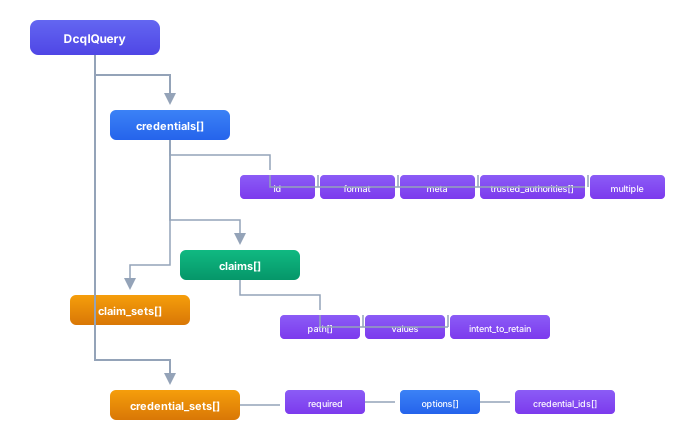
Basic Query
The simplest DCQL query requests a single credential with a list of claims. Each query needs a credential id (a label you choose), a format indicating the credential type, meta for format-specific matching criteria, and a claims array listing the data points you want disclosed.
- Android/Kotlin
- iOS/Swift
import com.sphereon.openid.oid4vp.dcql.*

// Create a DCQL query for an mDL credential
val dcqlQuery = DcqlQuery(
    credentials = listOf(
        DcqlCredentialQuery(
            id = "mDL",
            format = "mso_mdoc",
            meta = buildJsonObject {
                put("doctype_value", "org.iso.18013.5.1.mDL")
            },
            claims = listOf(
                DcqlClaimQuery(path = listOf("org.iso.18013.5.1", "family_name")),
                DcqlClaimQuery(path = listOf("org.iso.18013.5.1", "given_name")),
                DcqlClaimQuery(path = listOf("org.iso.18013.5.1", "birth_date")),
                DcqlClaimQuery(path = listOf("org.iso.18013.5.1", "portrait"))
            )
        )
    )
)
import SphereonOid4vp

// Create a DCQL query for an mDL credential
let dcqlQuery = DcqlQuery(
    credentials: [
        DcqlCredentialQuery(
            id: "mDL",
            format: "mso_mdoc",
            meta: ["doctype_value": "org.iso.18013.5.1.mDL"],
            claims: [
                DcqlClaimQuery(path: ["org.iso.18013.5.1", "family_name"]),
                DcqlClaimQuery(path: ["org.iso.18013.5.1", "given_name"]),
                DcqlClaimQuery(path: ["org.iso.18013.5.1", "birth_date"]),
                DcqlClaimQuery(path: ["org.iso.18013.5.1", "portrait"])
            ]
        )
    ]
)
JSON Representation
DCQL queries are transmitted as JSON in the OID4VP authorization request. The SDK handles serialization automatically, but it helps to see the wire format. The above query serializes to:
{
  "credentials": [
    {
      "id": "mDL",
      "format": "mso_mdoc",
      "meta": {
        "doctype_value": "org.iso.18013.5.1.mDL"
      },
      "claims": [
        { "path": ["org.iso.18013.5.1", "family_name"] },
        { "path": ["org.iso.18013.5.1", "given_name"] },
        { "path": ["org.iso.18013.5.1", "birth_date"] },
        { "path": ["org.iso.18013.5.1", "portrait"] }
      ]
    }
  ]
}
Credential Formats
DCQL supports multiple credential formats:
| Format | Description | Meta Fields |
|---|---|---|
mso_mdoc | ISO 18013-5 mobile documents | doctype_value, namespace_values |
dc+sd-jwt | SD-JWT Verifiable Credentials | vct_values, sd_jwt_alg_values, kb_jwt_alg_values |
jwt_vc_json | JWT-encoded W3C VC | type_values, alg_values |
ldp_vc | JSON-LD W3C VC | type_values, proof_type_values |
mDoc Credentials
mDoc credentials organize claims into namespaces. When building a claim path, the first element is the namespace (e.g., org.iso.18013.5.1) and the second is the claim name within that namespace. You can request claims from multiple namespaces in the same query, including country-specific domestic namespaces.
- Android/Kotlin
- iOS/Swift
val mdocQuery = DcqlCredentialQuery(
    id = "driving_license",
    format = "mso_mdoc",
    meta = buildJsonObject {
        put("doctype_value", "org.iso.18013.5.1.mDL")
    },
    claims = listOf(
        // Claims use namespace as first path element
        DcqlClaimQuery(path = listOf("org.iso.18013.5.1", "family_name")),
        DcqlClaimQuery(path = listOf("org.iso.18013.5.1", "given_name")),
        DcqlClaimQuery(path = listOf("org.iso.18013.5.1", "birth_date")),
        DcqlClaimQuery(path = listOf("org.iso.18013.5.1", "issue_date")),
        DcqlClaimQuery(path = listOf("org.iso.18013.5.1", "expiry_date")),
        DcqlClaimQuery(path = listOf("org.iso.18013.5.1", "issuing_country")),
        DcqlClaimQuery(path = listOf("org.iso.18013.5.1", "document_number")),
        DcqlClaimQuery(path = listOf("org.iso.18013.5.1", "portrait")),
        DcqlClaimQuery(path = listOf("org.iso.18013.5.1", "driving_privileges")),

        // Age attestation claims
        DcqlClaimQuery(path = listOf("org.iso.18013.5.1", "age_over_18")),
        DcqlClaimQuery(path = listOf("org.iso.18013.5.1", "age_over_21")),

        // Domestic namespace (country-specific)
        DcqlClaimQuery(path = listOf("org.iso.18013.5.1.US", "domestic_category"))
    )
)
let mdocQuery = DcqlCredentialQuery(
    id: "driving_license",
    format: "mso_mdoc",
    meta: ["doctype_value": "org.iso.18013.5.1.mDL"],
    claims: [
        // Claims use namespace as first path element
        DcqlClaimQuery(path: ["org.iso.18013.5.1", "family_name"]),
        DcqlClaimQuery(path: ["org.iso.18013.5.1", "given_name"]),
        DcqlClaimQuery(path: ["org.iso.18013.5.1", "birth_date"]),
        DcqlClaimQuery(path: ["org.iso.18013.5.1", "issue_date"]),
        DcqlClaimQuery(path: ["org.iso.18013.5.1", "expiry_date"]),
        DcqlClaimQuery(path: ["org.iso.18013.5.1", "issuing_country"]),
        DcqlClaimQuery(path: ["org.iso.18013.5.1", "document_number"]),
        DcqlClaimQuery(path: ["org.iso.18013.5.1", "portrait"]),
        DcqlClaimQuery(path: ["org.iso.18013.5.1", "driving_privileges"]),

        // Age attestation claims
        DcqlClaimQuery(path: ["org.iso.18013.5.1", "age_over_18"]),
        DcqlClaimQuery(path: ["org.iso.18013.5.1", "age_over_21"]),

        // Domestic namespace
        DcqlClaimQuery(path: ["org.iso.18013.5.1.US", "domestic_category"])
    ]
)
SD-JWT Credentials
SD-JWT credentials use a flat or nested JSON structure instead of namespaces. Top-level claims have a single-element path like ["family_name"], while nested claims use multiple path elements like ["address", "street_address"]. The vct_values meta field filters by verifiable credential type.
- Android/Kotlin
- iOS/Swift
val sdJwtQuery = DcqlCredentialQuery(
    id = "identity_credential",
    format = "dc+sd-jwt",
    meta = buildJsonObject {
        putJsonArray("vct_values") {
            add("https://credentials.example.com/identity")
        }
    },
    claims = listOf(
        // Top-level claims
        DcqlClaimQuery(path = listOf("family_name")),
        DcqlClaimQuery(path = listOf("given_name")),
        DcqlClaimQuery(path = listOf("birth_date")),
        DcqlClaimQuery(path = listOf("nationalities")),

        // Nested claims using path
        DcqlClaimQuery(path = listOf("address", "street_address")),
        DcqlClaimQuery(path = listOf("address", "locality")),
        DcqlClaimQuery(path = listOf("address", "country"))
    )
)
let sdJwtQuery = DcqlCredentialQuery(
    id: "identity_credential",
    format: "dc+sd-jwt",
    meta: ["vct_values": ["https://credentials.example.com/identity"]],
    claims: [
        // Top-level claims
        DcqlClaimQuery(path: ["family_name"]),
        DcqlClaimQuery(path: ["given_name"]),
        DcqlClaimQuery(path: ["birth_date"]),
        DcqlClaimQuery(path: ["nationalities"]),

        // Nested claims using path
        DcqlClaimQuery(path: ["address", "street_address"]),
        DcqlClaimQuery(path: ["address", "locality"]),
        DcqlClaimQuery(path: ["address", "country"])
    ]
)
Claim Configuration
Value Constraints
You can constrain a claim to one or more acceptable values. If you provide a single value, the claim must match exactly. If you provide multiple values, the claim must match any one of them. This is useful for filtering by country, category, or boolean flags like age attestations.
- Android/Kotlin
- iOS/Swift
val claims = listOf(
    // Claim must have this exact value
    DcqlClaimQuery(
        path = listOf("org.iso.18013.5.1", "issuing_country"),
        values = listOf(JsonPrimitive("US"))
    ),

    // Claim must be one of these values
    DcqlClaimQuery(
        path = listOf("org.iso.18013.5.1", "vehicle_category_code"),
        values = listOf(JsonPrimitive("A"), JsonPrimitive("B"), JsonPrimitive("C"))
    ),

    // Boolean value constraint
    DcqlClaimQuery(
        path = listOf("org.iso.18013.5.1", "age_over_21"),
        values = listOf(JsonPrimitive(true))
    )
)
let claims = [
    // Claim must have this exact value
    DcqlClaimQuery(
        path: ["org.iso.18013.5.1", "issuing_country"],
        values: ["US"]
    ),

    // Claim must be one of these values
    DcqlClaimQuery(
        path: ["org.iso.18013.5.1", "vehicle_category_code"],
        values: ["A", "B", "C"]
    ),

    // Boolean value constraint
    DcqlClaimQuery(
        path: ["org.iso.18013.5.1", "age_over_21"],
        values: [true]
    )
]
Intent to Retain
The intent_to_retain flag tells the wallet whether the verifier plans to store a claim beyond the immediate transaction. Wallets typically surface this information in their consent screen, so holders can make an informed decision about sharing data that will be persisted.
- Android/Kotlin
- iOS/Swift
val claims = listOf(
    // Verifier will store this claim
    DcqlClaimQuery(
        path = listOf("email"),
        intent_to_retain = true
    ),

    // Verifier will only use for verification, not store
    DcqlClaimQuery(
        path = listOf("age_over_21"),
        intent_to_retain = false
    )
)
let claims = [
    // Verifier will store this claim
    DcqlClaimQuery(
        path: ["email"],
        intentToRetain: true
    ),

    // Verifier will only use for verification, not store
    DcqlClaimQuery(
        path: ["age_over_21"],
        intentToRetain: false
    )
]
Multiple Credentials
A single DCQL query can request several credentials at once by adding multiple entries to the credentials array. By default (without credential_sets), the holder must present all listed credentials. Each credential query has its own id, format, and claims definition.
- Android/Kotlin
- iOS/Swift
val dcqlQuery = DcqlQuery(
    credentials = listOf(
        // Request mDL for identity verification
        DcqlCredentialQuery(
            id = "identity",
            format = "mso_mdoc",
            meta = buildJsonObject {
                put("doctype_value", "org.iso.18013.5.1.mDL")
            },
            claims = listOf(
                DcqlClaimQuery(path = listOf("org.iso.18013.5.1", "family_name")),
                DcqlClaimQuery(path = listOf("org.iso.18013.5.1", "given_name")),
                DcqlClaimQuery(path = listOf("org.iso.18013.5.1", "portrait"))
            )
        ),

        // Request proof of address
        DcqlCredentialQuery(
            id = "address_proof",
            format = "dc+sd-jwt",
            meta = buildJsonObject {
                putJsonArray("vct_values") { add("AddressCredential") }
            },
            claims = listOf(
                DcqlClaimQuery(path = listOf("street_address")),
                DcqlClaimQuery(path = listOf("locality")),
                DcqlClaimQuery(path = listOf("postal_code")),
                DcqlClaimQuery(path = listOf("country"))
            )
        ),

        // Request employment verification
        DcqlCredentialQuery(
            id = "employment",
            format = "dc+sd-jwt",
            meta = buildJsonObject {
                putJsonArray("vct_values") { add("EmploymentCredential") }
            },
            claims = listOf(
                DcqlClaimQuery(path = listOf("employer_name")),
                DcqlClaimQuery(path = listOf("job_title")),
                DcqlClaimQuery(path = listOf("employment_status"))
            )
        )
    )
)
let dcqlQuery = DcqlQuery(
    credentials: [
        // Request mDL for identity verification
        DcqlCredentialQuery(
            id: "identity",
            format: "mso_mdoc",
            meta: ["doctype_value": "org.iso.18013.5.1.mDL"],
            claims: [
                DcqlClaimQuery(path: ["org.iso.18013.5.1", "family_name"]),
                DcqlClaimQuery(path: ["org.iso.18013.5.1", "given_name"]),
                DcqlClaimQuery(path: ["org.iso.18013.5.1", "portrait"])
            ]
        ),

        // Request proof of address
        DcqlCredentialQuery(
            id: "address_proof",
            format: "dc+sd-jwt",
            meta: ["vct_values": ["AddressCredential"]],
            claims: [
                DcqlClaimQuery(path: ["street_address"]),
                DcqlClaimQuery(path: ["locality"]),
                DcqlClaimQuery(path: ["postal_code"]),
                DcqlClaimQuery(path: ["country"])
            ]
        ),

        // Request employment verification
        DcqlCredentialQuery(
            id: "employment",
            format: "dc+sd-jwt",
            meta: ["vct_values": ["EmploymentCredential"]],
            claims: [
                DcqlClaimQuery(path: ["employer_name"]),
                DcqlClaimQuery(path: ["job_title"]),
                DcqlClaimQuery(path: ["employment_status"])
            ]
        )
    ]
)
Credential Sets (Alternatives)
Sometimes different credential types can satisfy the same requirement. For example, age verification could come from a mobile driving license, a standalone age attestation, or a national ID. Credential sets let you define these alternatives: you list all possible credentials in the credentials array, then use credential_sets to group them into options. The holder only needs to present one of the options.
Each option in the options array contains a list of credential_ids that reference the id fields from the credential queries above.
- Android/Kotlin
- iOS/Swift
val dcqlQuery = DcqlQuery(
    credentials = listOf(
        DcqlCredentialQuery(
            id = "mdl_age",
            format = "mso_mdoc",
            meta = buildJsonObject {
                put("doctype_value", "org.iso.18013.5.1.mDL")
            },
            claims = listOf(
                DcqlClaimQuery(path = listOf("org.iso.18013.5.1", "age_over_21"))
            )
        ),
        DcqlCredentialQuery(
            id = "age_attestation",
            format = "dc+sd-jwt",
            meta = buildJsonObject {
                putJsonArray("vct_values") { add("AgeAttestation") }
            },
            claims = listOf(
                DcqlClaimQuery(path = listOf("age_over_21"))
            )
        ),
        DcqlCredentialQuery(
            id = "national_id_age",
            format = "mso_mdoc",
            meta = buildJsonObject {
                put("doctype_value", "org.iso.23220.1.nid")
            },
            claims = listOf(
                DcqlClaimQuery(path = listOf("org.iso.23220.1", "age_over_21"))
            )
        )
    ),
    // Group them as alternatives - holder provides any ONE
    credential_sets = listOf(
        DcqlCredentialSetQuery(
            required = true,
            options = listOf(
                DcqlCredentialSetOption(credential_ids = listOf("mdl_age")),
                DcqlCredentialSetOption(credential_ids = listOf("age_attestation")),
                DcqlCredentialSetOption(credential_ids = listOf("national_id_age"))
            )
        )
    )
)
let dcqlQuery = DcqlQuery(
    credentials: [
        DcqlCredentialQuery(
            id: "mdl_age",
            format: "mso_mdoc",
            meta: ["doctype_value": "org.iso.18013.5.1.mDL"],
            claims: [
                DcqlClaimQuery(path: ["org.iso.18013.5.1", "age_over_21"])
            ]
        ),
        DcqlCredentialQuery(
            id: "age_attestation",
            format: "dc+sd-jwt",
            meta: ["vct_values": ["AgeAttestation"]],
            claims: [
                DcqlClaimQuery(path: ["age_over_21"])
            ]
        ),
        DcqlCredentialQuery(
            id: "national_id_age",
            format: "mso_mdoc",
            meta: ["doctype_value": "org.iso.23220.1.nid"],
            claims: [
                DcqlClaimQuery(path: ["org.iso.23220.1", "age_over_21"])
            ]
        )
    ],
    // Group them as alternatives - holder provides any ONE
    credentialSets: [
        DcqlCredentialSetQuery(
            required: true,
            options: [
                DcqlCredentialSetOption(credentialIds: ["mdl_age"]),
                DcqlCredentialSetOption(credentialIds: ["age_attestation"]),
                DcqlCredentialSetOption(credentialIds: ["national_id_age"])
            ]
        )
    ]
)
Combined Credentials Per Option
An option does not have to be a single credential. You can require multiple credentials together as one option. In this example, the holder can either present a diploma alone, or present both a university ID and transcript as a pair.
- Android/Kotlin
- iOS/Swift
// Either present diploma OR (university_id AND transcript together)
val credentialSets = listOf(
    DcqlCredentialSetQuery(
        required = true,
        options = listOf(
            // Option 1: Just a diploma
            DcqlCredentialSetOption(credential_ids = listOf("diploma")),
            // Option 2: University ID AND transcript together
            DcqlCredentialSetOption(credential_ids = listOf("university_id", "transcript"))
        )
    )
)
// Either present diploma OR (university_id AND transcript together)
let credentialSets = [
    DcqlCredentialSetQuery(
        required: true,
        options: [
            // Option 1: Just a diploma
            DcqlCredentialSetOption(credentialIds: ["diploma"]),
            // Option 2: University ID AND transcript together
            DcqlCredentialSetOption(credentialIds: ["university_id", "transcript"])
        ]
    )
]
Trusted Authorities
You can restrict which issuers the verifier will accept by specifying trusted authorities. DCQL supports several trust establishment mechanisms: OpenID Federation trust chains, ETSI Trusted Lists (common in eIDAS deployments), and raw X.509 Authority Key Identifiers. If you provide multiple authorities, the credential must chain to at least one of them.
- Android/Kotlin
- iOS/Swift
val credentialQuery = DcqlCredentialQuery(
    id = "identity",
    format = "dc+sd-jwt",
    trusted_authorities = listOf(
        // OpenID Federation trust anchor
        DcqlTrustedAuthority(
            type = DcqlTrustedAuthority.TYPE_OPENID_FEDERATION,
            values = listOf("https://federation.example.com")
        ),
        // ETSI Trusted List
        DcqlTrustedAuthority(
            type = DcqlTrustedAuthority.TYPE_ETSI_TRUSTED_LIST,
            values = listOf("https://eidas.europa.eu/TL/EN_TL.xml")
        ),
        // X.509 Authority Key Identifier
        DcqlTrustedAuthority(
            type = DcqlTrustedAuthority.TYPE_AUTHORITY_KEY_IDENTIFIER,
            values = listOf("0a1b2c3d4e5f...")
        )
    ),
    claims = listOf(
        DcqlClaimQuery(path = listOf("family_name"))
    )
)
let credentialQuery = DcqlCredentialQuery(
    id: "identity",
    format: "dc+sd-jwt",
    trustedAuthorities: [
        // OpenID Federation trust anchor
        DcqlTrustedAuthority(
            type: .openidFederation,
            values: ["https://federation.example.com"]
        ),
        // ETSI Trusted List
        DcqlTrustedAuthority(
            type: .etsiTrustedList,
            values: ["https://eidas.europa.eu/TL/EN_TL.xml"]
        ),
        // X.509 Authority Key Identifier
        DcqlTrustedAuthority(
            type: .authorityKeyIdentifier,
            values: ["0a1b2c3d4e5f..."]
        )
    ],
    claims: [
        DcqlClaimQuery(path: ["family_name"])
    ]
)
Holder Binding
Holder binding requires the presenter to prove they control the credential, typically through a key proof or key binding JWT. This prevents replay attacks where someone presents a credential that was issued to a different person. The flag defaults to true, so you only need to set it explicitly if you want to disable it for a specific query.
- Android/Kotlin
- iOS/Swift
val credentialQuery = DcqlCredentialQuery(
    id = "identity",
    format = "dc+sd-jwt",
    require_cryptographic_holder_binding = true,  // Default is true
    claims = listOf(
        DcqlClaimQuery(path = listOf("family_name"))
    )
)
let credentialQuery = DcqlCredentialQuery(
    id: "identity",
    format: "dc+sd-jwt",
    requireCryptographicHolderBinding: true,  // Default is true
    claims: [
        DcqlClaimQuery(path: ["family_name"])
    ]
)
Scope-to-DCQL Mapping
Instead of constructing a DCQL query for every request, you can predefine named scopes that map to specific queries. This is useful when your application has a fixed set of verification scenarios (e.g., identity check, age verification) that get reused across multiple endpoints. The ScopeResolver takes a space-separated scope string and merges the corresponding DCQL queries into a single combined query.
- Android/Kotlin
- iOS/Swift
import com.sphereon.openid.oid4vp.common.ScopeRegistry
import com.sphereon.openid.oid4vp.common.ScopeDefinition
import com.sphereon.openid.oid4vp.common.ScopeResolver

// Define scope mappings
val registry = ScopeRegistry(
    definitions = listOf(
        ScopeDefinition(
            scopeValue = "com.example.identity",
            description = "Basic identity information",
            dcqlQuery = DcqlQuery(
                credentials = listOf(
                    DcqlCredentialQuery(
                        id = "identity",
                        format = "dc+sd-jwt",
                        claims = listOf(
                            DcqlClaimQuery(path = listOf("given_name")),
                            DcqlClaimQuery(path = listOf("family_name"))
                        )
                    )
                )
            )
        ),
        ScopeDefinition(
            scopeValue = "com.example.age_verification",
            description = "Age verification",
            dcqlQuery = DcqlQuery(
                credentials = listOf(
                    DcqlCredentialQuery(
                        id = "age",
                        format = "dc+sd-jwt",
                        claims = listOf(
                            DcqlClaimQuery(path = listOf("age_over_18"))
                        )
                    )
                )
            )
        )
    )
)

// Resolve scopes to DCQL
val resolver = ScopeResolver(registry)
val result = resolver.resolve("com.example.identity com.example.age_verification")

if (result.fullyResolved) {
    // Use merged DCQL query
    val dcqlQuery = result.dcqlQuery
    println("Resolved scopes: ${result.resolvedScopes}")
} else {
    println("Unresolved scopes: ${result.unresolvedScopes}")
}
import SphereonOid4vp

// Define scope mappings
let registry = ScopeRegistry(
    definitions: [
        ScopeDefinition(
            scopeValue: "com.example.identity",
            description: "Basic identity information",
            dcqlQuery: DcqlQuery(
                credentials: [
                    DcqlCredentialQuery(
                        id: "identity",
                        format: "dc+sd-jwt",
                        claims: [
                            DcqlClaimQuery(path: ["given_name"]),
                            DcqlClaimQuery(path: ["family_name"])
                        ]
                    )
                ]
            )
        ),
        ScopeDefinition(
            scopeValue: "com.example.age_verification",
            description: "Age verification",
            dcqlQuery: DcqlQuery(
                credentials: [
                    DcqlCredentialQuery(
                        id: "age",
                        format: "dc+sd-jwt",
                        claims: [
                            DcqlClaimQuery(path: ["age_over_18"])
                        ]
                    )
                ]
            )
        )
    ]
)

// Resolve scopes to DCQL
let resolver = ScopeResolver(registry: registry)
let result = resolver.resolve(scopeString: "com.example.identity com.example.age_verification")

if result.fullyResolved {
    // Use merged DCQL query
    let dcqlQuery = result.dcqlQuery
    print("Resolved scopes: \(result.resolvedScopes)")
} else {
    print("Unresolved scopes: \(result.unresolvedScopes)")
}
Using DCQL in Authorization Requests
Once you have a DCQL query (built directly or resolved from scopes), pass it to the OID4VP relying party service to create an authorization request. The resulting request can be encoded as a URI for a QR code or used in a redirect flow.
- Android/Kotlin
- iOS/Swift
val rp = session.graph.oid4vpRpService

val createResult = rp.createAuthorizationRequest(
    CreateAuthorizationRequestArgs(
        dcqlQuery = dcqlQuery,
        clientId = "https://verifier.example.com",
        responseUri = "https://verifier.example.com/callback",
        responseMode = ResponseMode.DIRECT_POST,
        nonce = generateSecureNonce()
    )
)

if (createResult.isOk) {
    val request = createResult.value.request
    // Build URI for QR code or redirect
} else {
    handleError(createResult.error)
}
let rp = session.graph.oid4vpRpService

let createResult = try await rp.createAuthorizationRequest(
    args: CreateAuthorizationRequestArgs(
        dcqlQuery: dcqlQuery,
        clientId: "https://verifier.example.com",
        responseUri: "https://verifier.example.com/callback",
        responseMode: .directPost,
        nonce: generateSecureNonce()
    )
)

if createResult.isOk {
    let request = createResult.value.request
    // Build URI for QR code or redirect
} else {
    handleError(createResult.error)
}
Data Types Reference
These are the core data types used throughout the DCQL API. The Kotlin definitions below apply to both platforms; the Swift API uses the same structure with idiomatic naming conventions (e.g., credential_sets becomes credentialSets).
DcqlQuery
The top-level object for any DCQL request. It contains one or both of credentials (the individual credential queries) and credential_sets (grouping logic for alternatives).
data class DcqlQuery(
    val credentials: List<DcqlCredentialQuery>? = null,
    val credential_sets: List<DcqlCredentialSetQuery>? = null
)
// At least one of credentials or credential_sets must be present
DcqlCredentialQuery
Describes a single credential the verifier wants. The format and meta fields narrow down which credential types match. The claims field lists the specific data points to disclose. Set multiple to true if the holder should present more than one credential matching this query.
data class DcqlCredentialQuery(
    val id: String,
    val format: String? = null,
    val meta: JsonObject? = null,
    val claims: List<DcqlClaimQuery>? = null,
    val claim_sets: List<DcqlClaimSet>? = null,
    val require_cryptographic_holder_binding: Boolean = true,
    val multiple: Boolean = false,
    val trusted_authorities: List<DcqlTrustedAuthority>? = null
)
DcqlClaimQuery
Identifies a single claim within a credential. The path is an array of strings that navigates the credential's data structure. For mDoc credentials, the path starts with the namespace. For SD-JWT credentials, it follows the JSON structure. Optional values constrain what the claim must contain.
data class DcqlClaimQuery(
    val path: List<String>,
    val values: List<JsonElement>? = null,
    val intent_to_retain: Boolean? = null
)
DcqlCredentialSetQuery
Defines alternative ways to satisfy a credential requirement. Each option lists one or more credential IDs that must be presented together. The required flag indicates whether the set must be fulfilled or is optional.
data class DcqlCredentialSetQuery(
    val required: Boolean = false,
    val options: List<DcqlCredentialSetOption>
)

data class DcqlCredentialSetOption(
    val credential_ids: List<String>
)
DcqlTrustedAuthority
Specifies a trust anchor that the credential's issuer must chain to. The type field selects the trust mechanism, and values provides the corresponding identifiers (URLs for federation and ETSI lists, hex-encoded key IDs for X.509).
data class DcqlTrustedAuthority(
    val type: String,
    val values: List<String>
) {
    companion object {
        const val TYPE_AUTHORITY_KEY_IDENTIFIER = "authority_key_identifier"
        const val TYPE_ETSI_TRUSTED_LIST = "etsi_trusted_list"
        const val TYPE_OPENID_FEDERATION = "openid_federation"
    }
}
Best Practices
Request only necessary claims. Only request the claims your application actually uses. Fewer claims means a smaller consent dialog and less data to handle.
Use meaningful credential IDs. Use IDs like identity_verification rather than cred1 so they are useful in logs and error messages.
Use intent_to_retain appropriately. Set this flag honestly to reflect whether claims will be stored, since wallets display it to the user during consent.
Provide alternatives with credential_sets. When multiple credential types can satisfy a requirement, define alternatives to maximize compatibility with different wallets.
Validate queries. Use the DCQL validation utilities to catch errors before sending requests to wallets.