Telemetry & Observability
The EDK's telemetry system gives you visibility into what your application is doing at runtime, which commands are executing, how long they take, where time is spent across service boundaries, and how errors propagate through the system. It covers the three pillars of observability: distributed tracing, metrics, and log correlation.
The system is built as a platform-agnostic abstraction with an OpenTelemetry backend. Application code uses the EDK's TracerProvider and MetricsCollector interfaces, it never imports OpenTelemetry directly. This means telemetry works identically across Kotlin Multiplatform targets (JVM, JS, Node.js), and the backend can be swapped without changing application code.
Why Telemetry Matters for the EDK
In a command-oriented architecture where operations can execute locally or be forwarded to remote microservices via command transport, understanding what happens across service boundaries is essential. A single user action might trigger a chain of commands: authenticate → resolve identity → check policy → generate key → sign credential. Without tracing, debugging a slow response or intermittent failure in that chain means reading logs from multiple services and manually correlating timestamps.
With the telemetry system:
- A trace follows the entire chain from the initial HTTP request through every command and remote call, with a single trace ID that links everything together
- Spans within the trace show where time is spent, 200ms in policy evaluation, 50ms in KMS, 10ms in the database
- Metrics track command success/failure rates, latency distributions, and concurrent execution counts
- Log correlation injects the trace ID and span ID into application logs, so you can filter your log aggregator (Elasticsearch, Loki, Datadog) by trace ID and see every log line from every service that participated in that request
Architecture
The telemetry system uses a two-layer architecture:
Public API (lib-telemetry-public) defines the interfaces that all application code uses: TracerProvider, Tracer, Span, SpanBuilder, MetricsCollector, and TraceContext. This module has no OpenTelemetry dependencies and supports Kotlin Multiplatform.
OTel Implementation (lib-telemetry-otel) adapts the OpenTelemetry SDK to the public API. It provides OtelTracerProvider, OtelMetricsCollector, and OtelContextPropagator, JVM-only implementations backed by the OTel SDK. When this module is on the classpath, Metro DI automatically replaces the no-op defaults with the OTel implementations.
When lib-telemetry-otel is not on the classpath, all telemetry calls go to zero-overhead no-op implementations. There's no runtime cost, method calls return immediately, no objects are allocated, no data is collected. This means libraries can instrument their code unconditionally; the cost is zero unless someone explicitly opts in by adding the OTel module.
Distributed Tracing
Trace Context
Every trace starts with a TraceContext that carries a W3C-compliant trace ID and span ID:
data class TraceContext(
    val traceId: String,        // 32-char hex (128 bits)
    val spanId: String,         // 16-char hex (64 bits)
    val parentSpanId: String?,
    val traceFlags: Int = 0     // Sampled bit
)
The TraceContext can be serialized to/from the standard traceparent header (00-{traceId}-{spanId}-{flags}), which is how traces propagate across HTTP and gRPC boundaries. When a service receives a request with a traceparent header, it extracts the parent context and creates child spans under it, linking the entire request chain into a single trace.
Creating Spans
Spans represent units of work. Each span has a name, a parent (if it's not the root), attributes (key-value metadata), events (timestamped log entries), and a status (OK or ERROR):
val tracer = tracerProvider.getTracer("com.example.myservice")

val span = tracer.spanBuilder("process-credential")
    .setAttribute("credential.type", "VerifiableCredential")
    .setAttribute("tenant.id", tenantId)
    .startSpan()

try {
    span.makeCurrent().use {
        // All child operations inherit this span as parent
        val result = credentialService.process(input)
        span.setStatus(SpanStatus.OK, null)
    }
} catch (e: Exception) {
    span.recordException(e)
    span.setStatus(SpanStatus.ERROR, e.message)
    throw e
} finally {
    span.end()
}
The makeCurrent() call pushes the span onto the current context (thread-local on JVM, coroutine context element in suspend functions). Any child spans created within that scope automatically become children of this span. This is how a trace tree forms, you don't need to manually pass parent references.
Coroutine Integration
In Kotlin coroutine-based code (which is most EDK code), spans propagate via a SpanContextElement in the coroutine context:
val span = tracer.spanBuilder("background-job").startSpan()

launch(SpanContextElement(span)) {
    // This coroutine and all its children carry the span
    val metadata = LogCorrelation.currentTraceMetadata()
    // metadata = { "traceId": "abc...", "spanId": "def..." }
}
This means suspend functions don't need to accept trace context as a parameter, it flows automatically through the coroutine hierarchy.
Cross-Service Propagation
When the command transport forwards a command to a remote service, the trace context must travel with it. The OtelContextPropagator handles this:
Outbound: before sending an HTTP RPC or gRPC request, the transport injects the current span's context into the request headers as a traceparent header.
Inbound: when receiving a request, the transport extracts the traceparent header and creates a child span under the received parent context.
This happens automatically in the transport layer. Application code doesn't need to manage trace propagation, it creates spans for its own work, and the transport ensures those spans are linked across service boundaries.
The result is an end-to-end trace that shows the full path of a request:
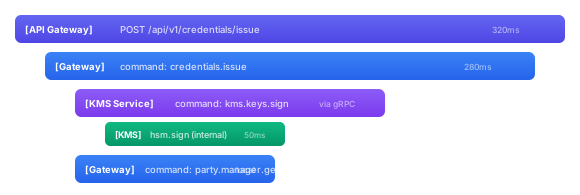
Each service contributes its spans to the same trace, and tools like Jaeger, Zipkin, or Grafana Tempo render the full tree.
Metrics
The MetricsCollector provides three instrument types:
Counters track how many times something happens. Command executions, authorization denials, cache hits/misses, HTTP requests by status code:
metricsCollector.incrementCounter(
    "command.executed",
    mapOf("command" to "kms.keys.generate", "result" to "success")
)
Histograms track the distribution of values, typically latencies. Command execution time, PDP evaluation time, database query time. Histograms give you percentiles (p50, p95, p99) rather than just averages:
metricsCollector.recordHistogram(
    "command.duration_ms",
    durationMs.toDouble(),
    mapOf("command" to "kms.keys.generate")
)
Gauges track current values that go up and down, active connections, queue depth, cache size:
metricsCollector.setGauge(
    "connections.active",
    connectionPool.activeCount.toDouble(),
    mapOf("database" to "primary")
)
All instruments support tags (key-value pairs) for dimensional filtering. The OTel implementation creates instruments lazily on first use and caches them for thread-safe reuse.
Exporting Metrics
The OTel SDK supports multiple metrics exporters:
| Exporter | Protocol | Use case |
|---|---|---|
| OTLP | gRPC or HTTP | OpenTelemetry Collector, Grafana Cloud, Datadog |
| Prometheus | Pull-based scrape | Prometheus server, Grafana |
| Logging | stdout | Development, debugging |
The exporter is configured via environment variables (see Configuration), your application code doesn't know or care where metrics go.
Log Correlation
Traces and logs serve different purposes, but they're most useful when connected. The LogCorrelation utility extracts trace metadata that you can inject into your structured logs:
val metadata = LogCorrelation.currentTraceMetadata()
// Returns: { "traceId": "abc123...", "spanId": "def456...", "parentSpanId": "..." }
// Returns null if no active trace
In practice, this means you can configure your logging framework to include trace IDs in every log line. When a user reports a problem, you find their trace ID in the API response headers, search your log aggregator for that trace ID, and see every log line from every service that handled their request, without needing to know which services were involved.
The mergeTraceMetadata helper merges trace fields into existing metadata maps, which is useful when building audit events or structured log entries that already carry other context.
Command Integration
The telemetry system integrates with the EDK's command lifecycle through the same extension mechanism used by authorization and audit. A telemetry extension can:
- Before execution: create a span named after the command, set attributes for the command ID, tenant, and principal
- After execution: set the span status (OK/ERROR), record the duration, increment success/failure counters
- On error: record the exception on the span for error analysis
This gives you automatic tracing and metrics for every command without instrumenting individual command implementations.
Configuration
The telemetry system is configured through TelemetryConfig and standard OpenTelemetry environment variables.
TelemetryConfig
data class TelemetryConfig(
    val enabled: Boolean = true,
    val serviceName: String = "sphereon-vdx",
    val serviceVersion: String = "0.14.0",
    val tracingEnabled: Boolean = true,
    val metricsEnabled: Boolean = true,
    val samplingRate: Double = 1.0    // 0.0 to 1.0
)
| Property | Default | Description |
|---|---|---|
enabled | true | Master switch. When false, returns OpenTelemetry.noop(), zero overhead. |
serviceName | sphereon-vdx | Identifies your service in trace visualizers and metric dashboards |
serviceVersion | 0.14.0 | Version tag for distinguishing deployments |
tracingEnabled | true | Enable/disable trace collection independently of metrics |
metricsEnabled | true | Enable/disable metric collection independently of tracing |
samplingRate | 1.0 | Probability that a trace is sampled. 1.0 = all traces, 0.1 = 10% of traces. Lower rates reduce overhead in high-throughput services. |
OpenTelemetry Environment Variables
The OTel SDK reads standard environment variables for exporter configuration:
# Service identity
OTEL_SERVICE_NAME=my-service
OTEL_SERVICE_VERSION=1.0.0

# Trace export
OTEL_TRACES_EXPORTER=otlp              # otlp, logging, zipkin, none
OTEL_EXPORTER_OTLP_ENDPOINT=http://otel-collector:4318

# Metrics export
OTEL_METRICS_EXPORTER=otlp             # otlp, logging, prometheus, none

# Sampling
OTEL_TRACES_SAMPLER=parentbased_traceidratio
OTEL_TRACES_SAMPLER_ARG=0.1            # 10% sampling
For development, OTEL_TRACES_EXPORTER=logging writes traces to stdout, useful for verifying instrumentation without deploying a collector.
Production Setup
A typical production setup routes telemetry to an OpenTelemetry Collector, which then forwards to your observability platform:
# docker-compose
services:
  otel-collector:
    image: otel/opentelemetry-collector:latest
    ports:
      - "4318:4318"   # OTLP HTTP
      - "4317:4317"   # OTLP gRPC
    volumes:
      - ./otel-config.yaml:/etc/otel/config.yaml

  app:
    environment:
      - OTEL_SERVICE_NAME=my-service
      - OTEL_TRACES_EXPORTER=otlp
      - OTEL_METRICS_EXPORTER=otlp
      - OTEL_EXPORTER_OTLP_ENDPOINT=http://otel-collector:4318
The collector can export to Jaeger, Zipkin, Grafana Tempo, Datadog, New Relic, or any OTLP-compatible backend.
Modules
| Module | Platform | Description |
|---|---|---|
lib-telemetry-public | Kotlin Multiplatform | Platform-agnostic interfaces (TracerProvider, MetricsCollector, TraceContext, LogCorrelation), no-op defaults |
lib-telemetry-otel | JVM only | OpenTelemetry SDK adapter (OTel API 1.44.1, SDK auto-configuration, OTLP + logging exporters) |