Command Authorization Extension
The PolicyCommandExtension is what makes authorization transparent. It hooks into the EDK's command execution pipeline and evaluates policies before business logic runs, without any authorization code in the commands themselves. Every command that matches the configured patterns is automatically authorized against the PDP.
This page explains how the extension works internally: how it decides which commands to authorize, how it builds the authorization request from the command's context, and how it handles the PDP's response. If you're looking for the high-level architecture and configuration, see the Authorization Overview.
Where It Sits in the Pipeline
The EDK's command execution model supports extensions that run before and after a command executes. The PolicyCommandExtension implements the beforeExecute hook:
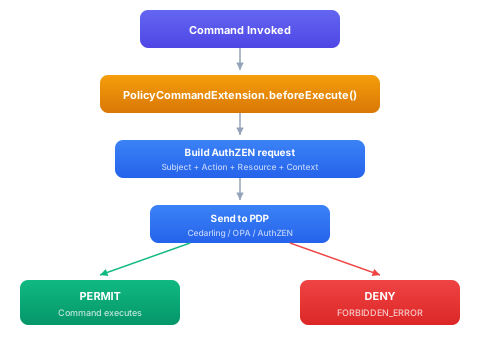
The extension runs inside the command's coroutine context, so it has access to the session context (tenant, principal, access token) that was established for the current request. If the PDP denies the request, the command's execute() method is never called, the caller receives a FORBIDDEN_ERROR as if the command itself had rejected the input.
Pattern Matching: Which Commands Get Authorized
Not every command should go through the PDP. Health checks, OIDC discovery endpoints, and actuator probes need to work without authorization. The extension uses glob-style patterns against command IDs to decide:
sphereon:
  authzen:
    include:
      - "**"              # Start with everything
    exclude:
      - "health.**"       # Skip health checks
      - "actuator.**"     # Skip Spring actuator
      - "discovery.**"    # Skip OIDC discovery
      - "oauth2.*.authorize"  # Skip OAuth2 authorization endpoint
Command IDs follow a module.service.operation convention (e.g., kms.keys.generate, party.manager.create, identity.matching.lookup). Patterns can match at any level:
| Pattern | What it matches |
|---|---|
kms.** | All commands in the KMS module |
*.*.create | All create operations across all modules |
party.contacts.* | All operations on the contacts service |
kms.keys.sign | Exactly this one command |
When a command is invoked, the extension checks:
- Is authorization enabled at all? (
config.enabled) - Is the enforcement mode something other than
DISABLED? - Does the command ID match any include pattern?
- Does the command ID match any exclude pattern?
If the command passes all checks, it goes to the PDP. Otherwise it's allowed through without evaluation.
During rollout, you might start narrow, include: ["party.**", "kms.**"], and widen as you gain confidence in your policies. Or start with include: ["**"] in LOG_ONLY mode to see what would be denied before enforcing.
Building the Authorization Request
The extension builds a full PolicyRequest by extracting information from three sources: the session context (who), the command ID (what action), and the command arguments (what resource).
Subject Extraction
The AuthZenSubjectExtractor reads the session's access token and produces one or more subjects. A single request can carry multiple subject types:
User subject: the end user, identified by the JWT's sub claim. Their tenant, email, name, and any other claims are included as properties. This is the primary principal in most evaluations.
Workload subject: the calling service, identified by the JWT's issuer or client ID. This matters in service-to-service calls where the API gateway forwards a user token but you also want to authorize the calling service. Workload subjects enable policies like "only the KMS service can call kms.keys.sign on behalf of users."
Role subjects: extracted from configurable JWT claims (roles, groups, realm_access.roles). Each role becomes a separate subject, which lets Cedar or OPA policies match on role membership directly.
The dualPrincipalMode configuration controls how multiple subjects are evaluated (see Overview).
Action Mapping
The DefaultActionMapper decomposes the command ID into structured attributes that policies can match against:
| Command ID | name | module | service | operation | operation_category |
|---|---|---|---|---|---|
kms.keys.generate | kms.keys.generate | kms | keys | generate | create |
party.contacts.delete | party.contacts.delete | party | contacts | delete | delete |
identity.matching.lookup | identity.matching.lookup | identity | matching | lookup | read |
The operation_category groups operations into broad categories so policies can say "allow all read operations" without listing every specific command:
| Category | Operations |
|---|---|
read | get, list, find, search, exists |
create | create, add, register |
update | update, patch, modify |
delete | delete, remove, unregister |
admin | enable, disable, configure |
execute | execute, run, invoke |
crypto | sign, verify, encrypt, decrypt |
This normalization ensures that all policy engines, Cedar, OPA, or any AuthZEN-compliant PDP, receive the same structured action regardless of which command triggered the evaluation.
Resource Mapping
Resources are extracted from the command's input arguments. Since each command has different argument types, resource mapping uses a pluggable registry of type-specific mappers:
interface AuthZenResourceMapper<Arg> {
    fun mapResource(commandId: String, args: Arg): AuthZenResource?
    fun supports(commandId: String): Boolean
}
For example, an identity domain mapper:
class IdentityResourceMapper : AuthZenResourceMapper<IdentityArgs> {
    override fun supports(commandId: String) = commandId.startsWith("identity.")

    override fun mapResource(commandId: String, args: IdentityArgs) = AuthZenResource(
        type = "Identity",
        id = args.identityId,
        properties = buildMap {
            args.partyId?.let { put("party_id", JsonPrimitive(it)) }
        }
    )
}
Mappers are registered in the ResourceMapperRegistry via Metro multibinding. When the extension processes a command, it looks up the appropriate mapper for the argument type. If no mapper is registered, a fallback resource is constructed from the command ID alone (type derived from the service name, no specific resource ID).
This is where domain-specific knowledge enters the authorization pipeline. The KMS domain knows that GenerateKeyInput has a keyId field. The party domain knows that CreatePartyInput has a tenantId. Each domain registers its own mapper.
Context Assembly
The PolicyContext carries ambient information that policies may need:
- Tenant ID: from the session context, enables tenant-scoped policies
- Session ID: for session-level rate limiting or session-specific rules
- Timestamp: for time-based access control (business hours, maintenance windows)
- Jurisdiction: resolved from tenant configuration, enables territory-specific rules
- Access token claims: selected claims (not the raw JWT) for attribute-based policies
Claims are extracted through a ConfigurableClaimsExtractor with a whitelist, the extension never forwards the raw JWT to the PDP. Only explicitly allowed claim keys are included in the context, preventing accidental exposure of sensitive token content.
Pre-PDP Enforcement Gates
Before the request reaches the PDP, the AuthZenAuthorizationEvaluator applies several fast-path gates that can short-circuit the evaluation without a network call:
AAL requirement: if the policy profile requires a minimum Authentication Assurance Level (e.g., AAL2 for writes), and the session's token doesn't meet it, the request is denied immediately with a STEP_UP_REQUIRED decision.
Cross-border gates: if the resolved jurisdiction disallows cross-border data access, the request is denied before hitting the PDP. A separate RESTRICT gate can trigger a step-up challenge instead of an outright denial.
MFA-for-writes: configurable gate that requires multi-factor authentication for any write operation (create, update, delete) regardless of the PDP's decision. This provides a safety net independent of policy configuration.
These gates are evaluated from the PolicyProfileResolver, which maps tenant/jurisdiction combinations to enforcement profiles. They provide defense-in-depth, even if a PDP policy is misconfigured, the gates catch violations.
Handling the Decision
After the PDP returns its decision:
PERMIT: the extension returns BeforeExecuteResult.Continue(args), and the command executes normally. In LOG_ONLY mode, DENY decisions are also treated as PERMIT (but logged).
DENY: the extension returns BeforeExecuteResult.ShortCircuit(Err(...)) with an AuthorizationDeniedException. The command never runs. The denial reason from the PDP is included in the exception for debugging and audit trail purposes.
STEP_UP_REQUIRED: similar to DENY, but the error carries a step-up challenge per RFC 9470. The caller can re-authenticate at a higher level and retry.
PDP error: if the PDP is unreachable or returns an invalid response, the behavior depends on the fallback policy (DENY, ALLOW, or FAIL). The circuit breaker and cache in the resilience layer handle transient failures.
Error Types
Two exception types distinguish policy denials from infrastructure failures:
AuthorizationDeniedException: the PDP evaluated the policy and returned DENY. This is a legitimate policy decision, not an error. The command ID and denial reason are attached. Map this to HTTP 403.
AuthorizationException: something went wrong during evaluation (PDP unreachable, malformed response, internal error). The command ID and error reason are attached. How you handle this depends on your fallback policy.
Spring Boot Integration
With Spring Boot auto-configuration, the extension is registered as a bean and injected into the command pipeline automatically:
sphereon:
  authzen:
    enabled: true
    pdp:
      type: cedarling
      base-url: http://cedarling:5000
    exclude:
      - "health.**"
      - "actuator.**"
    include:
      - "**"
No additional wiring is needed. Every command that matches the patterns is authorized before execution.
Testing
For unit tests, you can inject a mock PolicyEngine and verify that the correct authorization requests are built:
val mockEngine = mockk<PolicyEngine>()
coEvery { mockEngine.evaluate(any()) } returns Ok(
    PolicyDecision(decision = Decision.DENY, reasons = listOf("Insufficient role"))
)

val extension = PolicyCommandExtension(
    policyEngineProvider = { mockEngine },
    config = AuthZenConfig(enabled = true),
    sessionContextProvider = { testSessionContext }
)

assertThrows<AuthorizationDeniedException> {
    extension.beforeExecute(createPartyCommand, createPartyArgs, null)
}
For integration tests, deploy a real PDP (Cedarling or OPA) with test policies and verify end-to-end authorization:
@Test
fun `admin can create party`() {
    withAdminContext {
        val party = partyService.createParty(input)
        assertNotNull(party)
    }
}

@Test
fun `regular user cannot delete party`() {
    withUserContext {
        assertThrows<AuthorizationDeniedException> {
            partyService.deleteParty(partyId)
        }
    }
}
The second test verifies that the PolicyCommandExtension intercepted the delete command, sent it to the PDP, received a DENY, and threw AuthorizationDeniedException, all without any authorization code in PartyService.