Authentication Flows
Three distinct authentication paths all produce the same output: a standard OIDC access token and ID token from the Security Token Service. The choice of authentication method is invisible to downstream systems. A student information system, a learning management platform, or any other relying party receives the same token schema regardless of whether the user clicked a button and logged in through SURFconext, or scanned a QR code with their wallet.
What differs between the three paths is how the user's identity is established and how the canonical claims are sourced. The federated path retrieves claims live from SURFconext. The wallet fast path loads cached claims from an encrypted local binding. The wallet reconciliation path establishes that binding for the first time through a one-time institutional login. Once you understand these three paths, you understand the full authentication surface of the portal.
Flow 1: Federated Login (eduID via SURFconext)
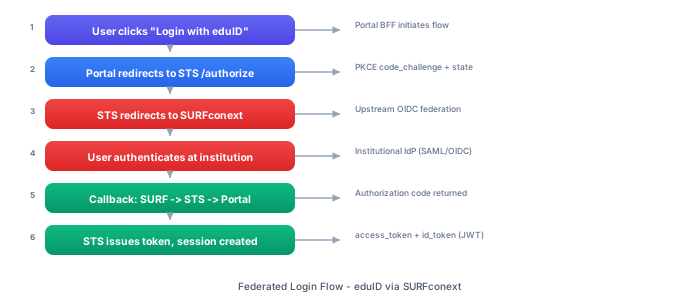
The federated login flow is the traditional authentication path that institutions already know from existing SURFconext integrations. The user authenticates at their institutional identity provider, and the resulting claims flow back through SURFconext and the STS to produce the final tokens.
Step-by-Step Walkthrough
Step 1: User selects "Login with institution account." On the Portal's login page, the user clicks the button for institutional login. This is the familiar path for anyone who has used SURFconext before.
Step 2: Portal initiates the OIDC flow with the STS. The Portal calls signIn('sts') via NextAuth.js, which constructs an authorization request and redirects the user's browser to the STS /authorize endpoint. This request includes a PKCE code challenge (using the S256 method), a random state parameter for CSRF protection, and a nonce for ID token replay prevention.
Step 3: STS redirects to the upstream federation provider. The STS recognizes this as a federation login (no login_hint indicating wallet authentication) and redirects the user to the configured upstream OIDC provider -- SURFconext in production, or a Keycloak instance in development environments. The STS generates its own PKCE challenge, state, and nonce for this upstream request, maintaining a complete security context independent of the downstream session with the Portal.
Step 4: User authenticates at their institution. SURFconext presents the institutional identity provider selection screen (the "Where Are You From" or WAYF page). The user selects their institution and authenticates using whatever method their institution requires -- typically username/password, possibly with multi-factor authentication. This step is entirely outside the portal's control and happens at the institution's identity provider.
Step 5: SURFconext calls back to the STS. After successful authentication, SURFconext redirects the user's browser back to the STS's federation callback endpoint with an authorization code. The STS validates the state parameter to ensure the callback matches the original request.
Step 6: STS exchanges the authorization code for tokens. The STS sends a back-channel request to SURFconext's token endpoint, presenting the authorization code and the PKCE code verifier. SURFconext validates the code and verifier, then returns an access token, an ID token, and optionally a refresh token.
Step 7: STS extracts and enriches claims. The STS decodes the ID token from SURFconext to obtain the initial set of claims. It then calls SURFconext's /userinfo endpoint with the access token to retrieve additional claims. The combined claim set typically includes: the institution-scoped eduid, eduperson_principal_name, given_name, family_name, and email.
Step 8: STS applies canonical attribute mapping. The raw claims from SURFconext are transformed according to the STS's attribute rules configuration. This mapping normalizes claim names, applies default values where needed, and constructs the canonical claim schema that all portal tokens share. The mapping is configuration-driven, so changes to the upstream claim format can be accommodated without code changes.
Step 9: STS issues an authorization code to the Portal. With the canonical claims established, the STS auto-approves consent (the Portal is a trusted first-party client) and generates an authorization code. The user's browser is redirected back to the Portal's callback URL with this code.
Step 10: Portal exchanges the STS authorization code for tokens. NextAuth.js's callback handler receives the authorization code and exchanges it at the STS token endpoint, presenting the original PKCE code verifier. The STS validates everything and returns the final access token and ID token.
Step 11: Session established. NextAuth.js stores the tokens using its JWT session strategy. The session data -- including the access token, ID token, and extracted user claims -- is encrypted and stored in an HTTP-only cookie. The user is now authenticated, and subsequent requests to the Portal include this session cookie.
Claims Produced
The STS token from a federated login contains all canonical attributes sourced from SURFconext. The most critical claims are the institution-scoped eduid and the eduperson_principal_name, which are the identifiers that downstream systems use for identity resolution. The acr (Authentication Context Class Reference) is set to urn:mace:surfnet.nl:assurance:loa2, and the amr (Authentication Methods References) contains ["pwd"], reflecting that the user authenticated with a password-based mechanism at their institution.
Flow 2: Wallet Login (Known Holder -- Fast Path)
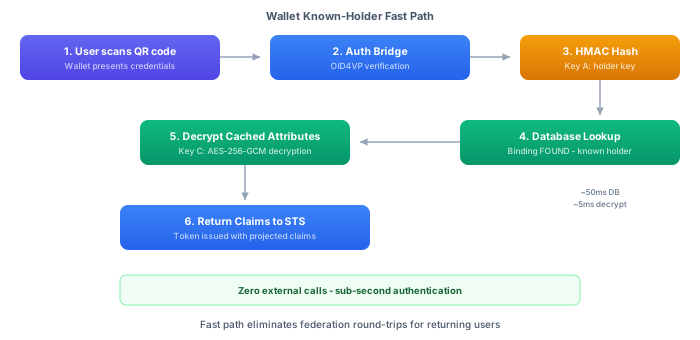
The wallet fast path is the optimized authentication flow for returning wallet users. When a user's wallet holder key has been previously linked to an institutional identity through reconciliation, subsequent wallet logins resolve entirely from local data. No external calls to SURFconext are required. This makes wallet authentication faster than traditional federation and reduces dependency on external services.
Step-by-Step Walkthrough
Step 1: User selects "Login with wallet." On the Portal's login page, the user clicks the button for wallet login. The Portal prepares to display a QR code that the user will scan with their wallet application.
Step 2: Portal creates an OID4VP session. The Portal sends a POST request to the Auth Bridge at /auth/oid4vp/sessions to create a new OID4VP session. The request specifies which credential types are required from the wallet, expressed using DCQL (Digital Credentials Query Language). This is a critical trust boundary: the DCQL query defines exactly which credentials the system accepts -- in this case, an eduID credential from a trusted issuer. Only wallets that hold a valid eduID credential can participate in the authentication flow.
Step 3: Auth Bridge returns session details. The Auth Bridge creates the session, generates a signed request object (a JAR -- JWT-Secured Authorization Request), and returns a response containing the sessionId, a qrCodeDataUri (a base64-encoded PNG of the QR code), and the requestUri that the wallet will fetch. The QR code encodes a URI that points back to the Auth Bridge where the wallet can retrieve the full request object.
Step 4: Portal displays the QR code. The Portal renders the QR code in the browser. The user opens their wallet application and scans the QR code with their device's camera.
Step 5: Wallet processes the request. The wallet application decodes the QR code to obtain the request URI, fetches the JAR-signed request object from that URI, and validates the signature. The request object specifies that an eduID credential is required -- the wallet identifies a matching eduID credential in its store and prompts the user to consent to sharing the requested attributes (such as the eduPersonPrincipalName).
Step 6: Wallet submits a Verifiable Presentation. The wallet constructs a Verifiable Presentation containing the eduID credential and signs it with the holder's private key, proving control of the key that is bound to the credential. The wallet sends this VP to the Auth Bridge's response endpoint.
Step 7: Auth Bridge verifies the Verifiable Presentation. The Auth Bridge runs the VP through the Universal OID4VP Verifier provided by the IDK. This verification checks the cryptographic signatures, validates the credential's status (checking for revocation), verifies the holder binding (proving the presenter holds the private key corresponding to the credential's holder key), and extracts the credential attributes and the holder's public key.
Step 8: Auth Bridge computes the holder key hash. With the holder's public key extracted, the Auth Bridge computes HMAC-SHA256(holder_public_key_fingerprint, Key_A) to produce the holder_identifier_hash. This hash is the lookup key for the identity matching database. Key A is the domain-separated cryptographic key dedicated to holder key hashing, managed in the KMS.
Step 9: Database lookup finds a match. The Auth Bridge queries the database: SELECT * FROM identity_match WHERE tenant_id = ? AND identifier_hash = ? AND identifier_type = 'KEY'. Because this holder has previously completed reconciliation, a matching record exists. The query returns the identity_match record, which includes the internal_identity_id that links to the corresponding identity_link_binding record.
Step 10: Auth Bridge loads and decrypts cached attributes. Using the internal_identity_id, the Auth Bridge retrieves the identity_link_binding record. This record contains a persisted_attributes_envelope -- an AES-256-GCM encrypted payload containing the canonical claims that were cached during the original reconciliation. The Auth Bridge requests decryption from the KMS using Key C, recovering the plaintext canonical attributes (the institution-scoped eduID, eduPersonPrincipalName, name, email, assurance metadata).
Step 11: Session completes. The OID4VP session status transitions to COMPLETED. The Auth Bridge stores the resolved identity data in the session record, ready for retrieval by the STS.
Step 12: Portal detects completion. The Portal has been polling the Auth Bridge at regular intervals, checking the session status. When it detects the COMPLETED status, it proceeds with the authentication flow.
Step 13: Portal initiates STS authentication with wallet context. The Portal calls signIn('sts-wallet', { login_hint: 'oid4vp:{sessionId}' }), which redirects the user's browser to the STS /authorize endpoint. The login_hint parameter tells the STS that this is a wallet authentication and provides the session ID for identity retrieval.
Step 14: STS retrieves the resolved identity. The STS calls the Auth Bridge at /auth/oid4vp/sessions/{sessionId}/complete to retrieve the resolved canonical claims for the given session.
Step 15: STS issues tokens. With the canonical claims in hand, the STS applies its attribute mapping rules, projects the claims into the standard token schema, and issues the access token and ID token. The Portal receives these tokens through the same OIDC code flow as in the federated path.
Key Insight
The critical characteristic of the fast path is that zero external calls are required. The entire identity resolution happens from the local database and KMS. SURFconext is not contacted. No external OIDC provider is involved. The only network calls are between the portal's own services and the KMS. This has two important consequences: the authentication is significantly faster (sub-second rather than the multiple-second round trips involved in federation), and the authentication is resilient to upstream outages (if SURFconext is temporarily unavailable, wallet logins still work).
Flow 3: Wallet Login (Unknown Holder -- Reconciliation)
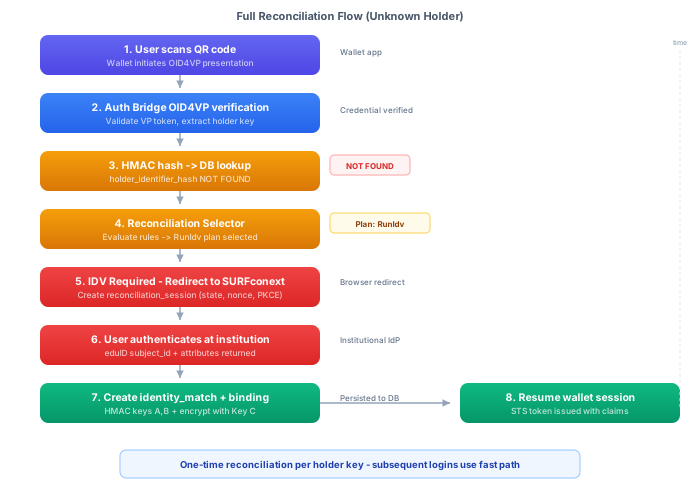
The reconciliation flow handles the case where a wallet holder is encountered for the first time. The wallet presents a valid eduID credential (verified against the trusted issuer), and the system extracts both the credential attributes (like the eduPersonPrincipalName) and the holder key. However, the system has never seen this holder key before, so it cannot resolve the holder to the institution-scoped eduID that backend systems require. The user must perform a one-time institutional login through SURFconext to obtain the institution-scoped eduID and establish the link. Once this reconciliation completes, all future wallet logins use the fast path.
Step-by-Step Walkthrough
Steps 1 through 8: Identical to the fast path. The user selects wallet login, the Portal creates an OID4VP session, the QR code is displayed, the wallet scans and submits a Verifiable Presentation, the Auth Bridge verifies it, extracts the holder key, and computes the HMAC hash. These steps are exactly the same as the fast path described above.
Step 9: No match found. The database query for identity_match WHERE identifier_hash = ? AND identifier_type = 'KEY' returns no results. This holder key has never been seen before. The Auth Bridge cannot resolve the holder to any institutional identity.
Step 10: Auth Bridge evaluates reconciliation selector rules. The Auth Bridge consults its configuration to determine what to do with an unrecognized holder. The reconciliation selector rules are evaluated against the current context -- the credential type presented, the issuer, the assurance level, and other contextual attributes. The default rule matches and selects the RunIdv (Run Identity Verification) plan, which will verify the holder's institutional identity through an OIDC flow to SURFconext.
Step 11: Session transitions to IDV_REQUIRED. The OID4VP session status is updated to IDV_REQUIRED, signaling that the authentication cannot complete without additional identity verification. The session now waits for the user to initiate the IDV flow.
Step 12: Portal detects the IDV requirement. The Portal's status polling detects the IDV_REQUIRED status. Instead of completing the login, the Portal transitions to the IDV reconciliation UI.
Step 13: Portal displays the reconciliation interface. The user sees a screen explaining that this is their first time logging in with their wallet, and that a one-time link to their institutional account is needed. The explanation is designed to be non-technical and reassuring: "To connect your wallet to your institution account, please log in once with your institution credentials. This only needs to happen once -- after this, your wallet login will be instant."
Step 14: User initiates IDV. The user clicks "Link with institution account." The Portal sends a POST request to the Auth Bridge at .../idv/initiate to start the reconciliation flow.
Step 15: Auth Bridge creates a reconciliation session. The Auth Bridge generates a new OIDC authorization request targeting SURFconext. It creates its own PKCE challenge, state, and nonce, stores them in the reconciliation session for later validation, and returns an authorizationUrl to the Portal.
Step 16: User authenticates at SURFconext. The Portal redirects the user's browser to the authorization URL. The user goes through the familiar SURFconext institutional authentication flow: selecting their institution, entering their credentials, and completing any required multi-factor authentication.
Step 17: SURFconext calls back to the Auth Bridge. After successful authentication, SURFconext redirects the user's browser to the Auth Bridge's IDV callback endpoint with an authorization code. The Auth Bridge validates the state parameter against the stored reconciliation session.
Step 18: Auth Bridge exchanges the code and extracts claims. The Auth Bridge sends the authorization code to SURFconext's token endpoint along with the PKCE code verifier. SURFconext returns tokens. The Auth Bridge validates the ID token, extracts the claims, and calls the userinfo endpoint for additional attributes. The critical claim is the eduid -- the institutional identifier that downstream systems need.
Step 19: Auth Bridge creates identity records. This is the core of the reconciliation. Three records are created atomically within a single database transaction:
- An
identity_matchrecord mappingHMAC(holder_key_fingerprint, Key_A)to a newinternal_identity_idwithidentifier_type = 'KEY'. This enables future fast-path lookups by holder key. - An
identity_matchrecord mappingHMAC(eduid, Key_B)to the sameinternal_identity_idwithidentifier_type = 'EDUID'. This enables reverse lookups -- given an eduid, the system can find the associated identity and any linked holder keys. - An
identity_link_bindingrecord associated with theinternal_identity_id, containing the canonical claims (eduid, name, email, assurance metadata) encrypted with Key C. This is the cached attribute data that the fast path will decrypt on future logins.
The use of separate HMAC keys (Key A for holder keys, Key B for institutional identifiers) is a deliberate security measure. Even if Key A is compromised, an attacker cannot use it to reverse-engineer the institutional identifier hashes created with Key B.
Step 20: Session transitions to COMPLETED. With the identity records created, the OID4VP session status transitions to COMPLETED. The reconciliation is done.
Step 21: Portal resumes the wallet login flow. The Portal detects the COMPLETED status and resumes the authentication flow. From this point, the process is identical to the fast path: the Portal initiates STS authentication with the login_hint containing the session ID, the STS retrieves the resolved identity from the Auth Bridge, and tokens are issued.
One-Time Cost, Permanent Benefit
This reconciliation flow happens once per holder key. After the identity records are created, every subsequent wallet login with that holder key resolves through the fast path -- no SURFconext involvement, no institutional login, sub-second authentication. The one-time reconciliation cost buys permanent fast-path access.
If a user gets a new device or a new wallet, they will have a new holder key and will need to reconcile again. But the process is the same: one institutional login, and they are linked forever (or until the records are deleted for a right-to-erasure request).
Session Status State Machine
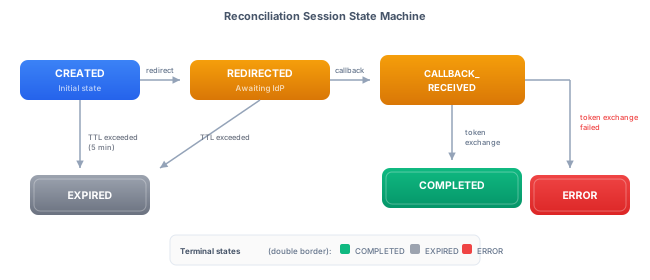
Every OID4VP session progresses through a defined set of states. The Portal polls the session status to determine what to display to the user, and the Auth Bridge transitions the session through states as the authentication progresses.
| Status | Description |
|---|---|
CREATED / PENDING | The session has been created and the QR code is displayed. The system is waiting for the wallet to scan the QR code and fetch the request object. |
INTERACTION_STARTED | The wallet has fetched the request object from the request URI. The user is being prompted to consent to sharing their credentials. |
VERIFYING | The wallet has submitted a Verifiable Presentation and it is being validated by the Universal Verifier. |
VERIFIED | The VP has been successfully validated. The holder's public key has been extracted and the HMAC lookup is about to begin. |
IDV_REQUIRED | The HMAC lookup found no match for this holder key. Identity verification (reconciliation) is required before authentication can complete. |
RECONCILING | The IDV flow is in progress. The user has been redirected to SURFconext and is authenticating at their institution. |
COMPLETED | The identity has been resolved -- either through the fast path (existing match found) or through reconciliation (new match created). The canonical claims are available for token issuance. |
EXPIRED | The session has timed out. The default timeout is 5 minutes from session creation. The user must start a new wallet login. |
FAILED / ERROR | Something went wrong during verification or reconciliation. The VP might have been invalid, a credential might have been revoked, or the reconciliation callback might have failed. Error details are logged for debugging. |
The Portal uses these states to drive the user interface. During CREATED/PENDING, the QR code is displayed with a "Waiting for wallet..." message. During IDV_REQUIRED, the reconciliation UI is shown. During COMPLETED, the login completes automatically. During EXPIRED or FAILED, an error message is shown with an option to retry.
Token Output Comparison
Regardless of which authentication flow is used, the STS issues tokens with a standardized claims schema. This is the fundamental guarantee that makes wallet authentication a drop-in enhancement for institutions: downstream systems do not need to be modified.
| Claim | Federated Source | Wallet Source |
|---|---|---|
sub | Generated internal ID | Generated internal ID |
eduid | SURFconext userinfo | Cached from reconciliation binding |
eduperson_principal_name | SURFconext userinfo | Wallet credential + OIDC (merge: OIDC_WINS) |
given_name | SURFconext userinfo | Wallet credential (merge: OIDC_WINS) |
family_name | SURFconext userinfo | Wallet credential (merge: OIDC_WINS) |
email | SURFconext userinfo | Wallet credential (merge: OIDC_WINS) |
acr | urn:mace:surfnet.nl:assurance:loa2 | urn:sphereon:oid4vp:vp |
amr | ["pwd"] | ["vp"] |
The merge strategy OIDC_WINS means that when both the wallet credential and the OIDC reconciliation flow provide a value for the same claim, the OIDC value (from SURFconext) takes precedence. This ensures that the authoritative institutional data always wins over self-asserted wallet credential data for claims like name and email.
There are two intentional differences between the flows:
The acr claim reflects the authentication context. Federated login through SURFconext produces urn:mace:surfnet.nl:assurance:loa2, indicating Level of Assurance 2 within the SURFconext federation. Wallet login produces urn:sphereon:oid4vp:vp, indicating that authentication was performed via a Verifiable Presentation. Downstream systems that need to distinguish authentication methods can inspect this claim.
The amr claim reflects the authentication method. Federated login produces ["pwd"] (password-based), while wallet login produces ["vp"] (Verifiable Presentation). Like acr, this allows downstream systems to make policy decisions based on how the user authenticated -- for instance, requiring federated login for administrative actions while accepting wallet login for general access.
The identity data itself -- eduid, eduperson_principal_name, given_name, family_name, email -- is always present and always sourced from the same authoritative origin (SURFconext claims, either live or cached). A downstream system that only inspects the identity claims will see no difference between a federated login and a wallet login. This is by design: the portal's purpose is to make wallet authentication seamless and invisible to existing institutional infrastructure.