Join a federation
This guide takes your organization and its hosted services into a federation that someone else operates. By the end, each service publishes a signed Entity Configuration, the federation's superior has signed a statement about it, you have verified that admission, and a Trust Domain makes the participation effective.
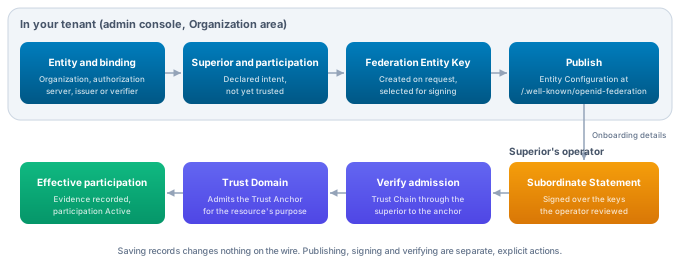
All steps happen in the Organization area of OpenID Federation unless a step says otherwise. Administration operations are listed in the OpenID Federation API reference; paths below are relative to /api/platform/config/v1/tenants/{tenantId}/openid-federation.
Before you start
From the federation, get the Entity Identifier of its Trust Anchor and of the superior that will admit you. The superior is often the Trust Anchor itself, but large federations admit members through intermediates. Ask how the operator wants to receive onboarding requests and whether members must hold particular Trust Marks or follow metadata policies.
On your side, check the sources your entities will publish from. VDX does not let you type federation metadata. It reads it from the resources it manages, so those resources must be complete and reachable:
- The organization record supplies the organization's name (its legal name), contact email, website and privacy policy URL.
- Each hosted authorization server, credential issuer and verifier must be active and have an active public endpoint on an HTTPS host without a port. The resource's own identifier becomes its Entity Identifier, so the endpoint decides it.
If federation administration is not set up yet, choose Set up federation administration (POST /initialize, initializeOpenIdFederation).
Find your way around the workspace
Overview counts your federations, entities, resource bindings and declared superiors, and lists each federation with its expected Trust Anchors and how many entities have a declared path into it. Hierarchy draws, per federation, the tree built from the superiors that carry each participation. It is your declared intent until superiors sign their statements, and it flags entities that are not yet connected to an external superior. Resources is a matrix of entities against federations; selecting a cell opens that participation so you can add it or choose its superiors. Records holds the editors for Federations, Entities, Bindings, Superiors and Participations.
Each record editor offers a Form view and a Raw JSON view of the same draft, so you can paste a prepared record and still see it validated field by field. Selecting an entity in Hierarchy or Resources opens Entity details next to the tabs, with its lifecycle, publication state, superior statements, bound resources and the key and publication tools you use later in this guide.
When you request a lifecycle you choose between Draft and Suspended. The platform moves a record to Active itself once the conditions for it hold. Ending a record (for example End federation or Decommission entity) is final for that record; statements that other parties already issued keep their own expiry.
Create the federation
In Records, open Federations and choose New federation. Give it a Federation ID and a Name, and enter the Expected trust anchors, one Entity Identifier per line. These are the anchors you expect the federation's Trust Chains to end at. They are expectations, not trust: nothing is accepted because it is listed here. Default immediate superior optionally records the superior new members normally join under.
API: POST /contexts (createOpenIdFederationContext).
Create an entity for each thing you publish
In Records, open Entities and choose New entity. Each entity is one Entity Identifier that you publish.
Entity Identifier is the HTTPS URL others fetch the entity's configuration from, without query or fragment. It cannot be changed later. For a hosted service it must be that service's own identifier: the issuer URL of an authorization server, the Credential Issuer Identifier of a credential issuer, or the URL of a verifier's public endpoint. For the organization itself, choose a URL on a domain that routes to the platform for your tenant.
Requested role in federations is Leaf, Intermediate or Trust anchor. Authorization servers, credential issuers and verifiers are leaves. Make the organization a leaf if it only identifies itself, or an intermediate if it should vouch for its own branches and services by signing statements about them. Being an intermediate needs no entitlement, because owning the organization is that permission. Trust anchor is for federations you operate yourself; see Operate a federation.
Who publishes the entity configuration is This platform for everything VDX hosts. Choose The external owner only for an entity that another system publishes.
One organization can back several entities, for example one per branch, when each needs its own identity in a federation.
API: POST /entities (createOpenIdFederationEntity).
Bind the resource whose metadata the entity publishes
A binding ties an entity to the resource it speaks for. Create it in Records, Bindings, New binding, or open the resource's own page in the console, go to its OpenID Federation area and choose Bind to an entity, which fills in the resource for you.
Pick the Entity, the Resource kind, the Resource ID and the Deployment (Hosted for resources this platform runs). Then declare which roles the entity publishes for the resource and the profile each role follows. What ends up in the Entity Configuration depends on the resource kind:
Organization. An organization binding declares no protocol roles. The entity publishes federation_entity metadata from the organization record: organization_name, contacts, organization_uri and policy_uri. Use the organization's party ID as the Resource ID. When the entity is an intermediate, its metadata also advertises the federation endpoints the platform serves for it, so others can fetch the statements it signs.
Authorization server. Declare Authorization server, OpenID provider or both. The entity publishes the metadata the hosted server actually serves for those roles, so a change to the server's configuration shows up in the next publication. When the server accepts federation clients (see Client onboarding), its metadata also advertises federation registration.
Credential issuer. Declare the Credential issuer role with the OpenID Federation Wallet Architectures profile. The entity publishes the Credential Issuer Metadata the issuer serves at its /.well-known/openid-credential-issuer location, read at publication time, so wallets resolving the federation see exactly what they would fetch from the issuer. The served credential_issuer must equal the Entity Identifier.
Credential verifier. Declare the Credential verifier role. A verifier serves no metadata document of its own, so the entity publishes the verifier metadata configured for the Client Identifier openid_federation: followed by the Entity Identifier. That configuration must exist and be enabled. Wallets that trust the federation address the verifier with this Client Identifier.
API: POST /bindings (createOpenIdFederationBinding).
Declare the superior and the participation
A superior relationship says which entity is expected to sign a statement about which. In Records, Superiors, New superior, set the Subordinate to This tenant and your entity, and the Superior to External with the superior's Entity Identifier. Use This tenant for the superior when one of your own intermediates vouches for the entity. Valid from and Valid until optionally bound the relationship. The superior signs its own statement about you with its own key; no private key is shared in either direction.
Then take part in the federation. In Records, Participations, New participation, choose the Entity and the Federation, save, and use Superiors carrying this participation to tick the superiors that carry it and Save superiors. A local superior can only carry the participation if it takes part in the same federation. If a superior you tick also takes part in other federations, the console warns that your entity would become reachable there too, and suggests a separate branch entity instead. The Resources tab gives you the same flow from the matrix.
The chosen superiors become the authority_hints of your Entity Configuration, so declare them before you publish, or publish again after changing them.
API: POST /superiors (createOpenIdFederationSuperior), POST /participations (createOpenIdFederationParticipation), PUT /participations/{participationId}/superiors (replaceOpenIdFederationParticipationSuperiors).
Create a key and publish
Open the entity's Entity details. Under Signing keys, choose an Algorithm and Create key, then Use for signing on the key that should sign. An entity can hold several keys, which is how you roll keys over: create the new key, hand its Key ID to your superior, then switch signing to it. Revoke retires a key that must no longer be used.
Choose Publish Entity Configuration. VDX prepares the configuration from the bound resource's current metadata and your chosen superiors, signs it with the selected key and serves it at the Entity Identifier plus /.well-known/openid-federation with media type application/entity-statement+jwt. The panel then shows the revision and until when it is valid.
A served revision never changes. If the administration or a source changes afterwards, the panel adds that the entity changed since publication and should be published again. The last signed revision keeps being served until it expires, and a new revision replaces it only if nothing it was prepared from changed while it was being signed.
API: POST /entities/{entityId}/keys (createOpenIdFederationEntityKey), PUT /entities/{entityId}/keys/selection (selectOpenIdFederationEntitySigningKey), POST /entities/{entityId}/keys/{keyId}/revoke (revokeOpenIdFederationEntityKey), POST /entities/{entityId}/publish (publishOpenIdFederationEntity), GET /entities/{entityId}/publication (getOpenIdFederationEntityPublication).
Hand the onboarding details to the superior's operator
OpenID Federation defines no universal endpoint for joining a federation, so admission starts with an out-of-band request. Once the entity is published, Entity details shows Joining a federation with the three facts the superior's operator needs: the Entity Identifier, the Entity Configuration URL and the Federation Entity Keys by Key ID.
Send these through the channel the federation asked for. The operator fetches your Entity Configuration, compares the keys it publishes with the Key IDs you sent, and signs a Subordinate Statement over those keys. If the federation runs on VDX, the operator does this under Hosted federations as described in Admit members. Entity onboarding walks through the exchange from both sides.
Verify admission
Declaring a superior proves nothing by itself. Once the operator confirms the statement, open the superior relationship in Records, Superiors. Its Admission section shows whether admission has been verified. Choose Verify admission.
VDX resolves your entity's Trust Chain through that superior's Subordinate Statement to a Trust Anchor of the federation and verifies every signature on the way, using the anchor's keys from its own Entity Configuration. On success it records the superior's statement as evidence on the relationship and shows the verified path, the Trust Anchor and until when the result is valid. When verification fails, the console shows the reason and nothing is recorded. The usual causes are a statement the superior has not signed yet, or a statement over keys other than the ones your entity publishes now.
API: POST /superiors/{edgeId}/verify (verifyOpenIdFederationSuperior).
Make participation effective with a Trust Domain
A participation becomes Active only when two things hold. The superior relationship that carries it has verified evidence, and a Trust Domain that governs one of the resource's trust purposes admits the federation's Trust Anchor as an anchor with the mechanism OpenID Federation entity.
The governing Trust Domain is the one attached to the resource for a purpose such as Credential issuer trust, Verifier trust or Authorization server trust. For the organization entity, the tenant-wide attachments govern. Add the Trust Anchor to that Trust Domain by its Entity Identifier, and admit it for the purpose. The anchor's keys come from its own Entity Configuration; pinning them is optional.
This is also the only way federation membership affects what your services accept from others. A verifier that should accept credential issuers from the federation needs a Trust Domain admitting the federation's Trust Anchor under its Credential issuer trust attachment, and the same Trust Domain lets the participation of your verifier become effective.
See Trust domains for anchors, admissions and attachments. API: POST /api/trust-domain/v1/domains/{domainId}/anchors (createTrustAnchor), PUT /api/trust-domain/v1/attachments/{consumerKind}/{consumerId}/{usage} (putTrustAttachment) in the Trust Domain API reference.
Accept federation clients on a hosted authorization server
Once your authorization server is a federation member, it can also accept the federation's relying parties as clients without manual registration, through Automatic and Explicit Registration. You decide which federations' clients it accepts with a Trust Domain attached for client registration. The full process, including what the server advertises and how to troubleshoot refused registrations, is in Client onboarding.
Keep it current
Your published statements expire, by default after one hour. Renewal signs every Entity Configuration your tenant serves again from current facts, not only those of Trust Anchors, so a recurring schedule keeps participants current as well. The console shows the Renewal tools in the Hosted federations area once your tenant operates a federation; a tenant that only takes part in federations renews through the API or a workflow step, as described in Renew statements. Your superior renews the statement it signed about you on its own schedule.
When your resource changes, for example a new credential configuration on an issuer or a new key on an authorization server, publish the entity again so the federation sees the change. If you rotate Federation Entity Keys, tell your superior before you switch signing, because its statement vouches only for the keys it reviewed.