Operations & Management
VDX is not just a set of APIs, it's a complete operational platform. Management portals for administrators, issuers, verifiers, and end users. A workflow engine that orchestrates multi-step identity processes. A forms editor for code-free data collection. White-label branding down to the individual design token. And the deployment flexibility to run anywhere from a single Docker container to a distributed Kubernetes cluster.
Portals
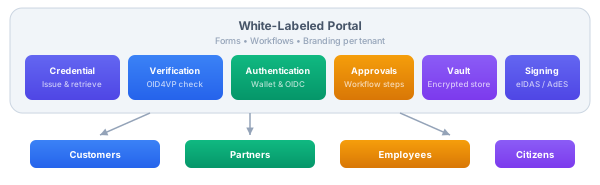
Portals are where organizations interact with their customers, partners, employees, and citizens. A portal is a collection of forms and workflows that guide users through identity processes, onboarding a new employee, verifying a student's enrollment, signing a contract, issuing a credential, or granting access to a resource.
Each portal integrates the full VDX capability set: credential issuance and retrieval, verification of presented credentials, wallet-based authentication, approval workflows, encrypted vault storage, and document signing. The organization defines which capabilities each portal exposes, and the portal handles the user-facing experience, forms, consent collection, status tracking, and notifications.
Portals are fully white-labeled per tenant. An educational institution's student onboarding portal looks and feels like the institution's own product. A government agency's citizen services portal carries the agency's branding and language. The underlying infrastructure is shared, but each tenant's users see only their organization's brand.
VDX Applications
Alongside portals, VDX includes purpose-built applications for platform operations:
- Admin Console: platform administration, tenant management, policy configuration, device management, audit review, system health monitoring
- Issuer Management: credential schema design, issuance configuration, batch and individual issuance, revocation, lifecycle analytics
- Verifier Management: verification requirement configuration, trusted issuer lists, event monitoring, compliance reporting
These are operational tools for the teams that run the platform, separate from the portals that end users interact with.
Workflows & Forms
Real-world identity processes aren't single API calls. Credential issuance might require data collection, manager approval, identity verification, and notification. Onboarding might combine document verification with organizational checks and compliance review. These multi-step, multi-actor processes are modeled as workflows.
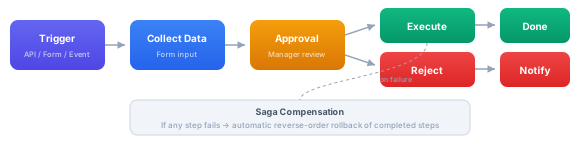
The Workflow Engine orchestrates these processes. Each step in a workflow is a command, the same command abstraction that powers the rest of the platform. This means every step is automatically authorized by the policy engine, recorded in the audit trail, traced with OpenTelemetry, and can execute locally or on a remote microservice. If a step fails midway through, saga-based compensation rolls back completed steps in reverse order.
The Forms Editor lets administrators design input forms without writing code. Forms collect structured data for workflow steps, credential issuance requests, identity verification inputs, approval decisions, and any process that needs user input. Form definitions include:
- Validation rules (required fields, regex patterns, value ranges)
- Conditional visibility (show field B only when field A has value X)
- Multi-language labels and descriptions
- Accessibility metadata (ARIA labels, keyboard navigation)
Forms are versioned and tenant-scoped, different organizations can have different forms for the same workflow type.
White-Label Branding
Every visual aspect of the platform is customizable per tenant through a Material Design 3 token-based theming system. Organizations deploy VDX as their own product, under their own brand.
Simple Branding
Pick one seed color. The platform generates the full M3 palette, 89 color tokens across light, dark, and high-contrast variants. Upload a logo and custom fonts. 15 typography styles, 6 elevation levels, motion tokens, and responsive scales, all derived automatically.
Full Customization
Override any of the 200+ design tokens, colors, typography, spacing, border radius, elevation, motion, for pixel-perfect brand alignment. Export as CSS custom properties for web. Use the Compose Multiplatform SDK for native iOS and Android.
The scope hierarchy (SYSTEM → APP → TENANT → PRINCIPAL) means platform defaults cascade through organizational overrides down to individual user preferences. A tenant only needs to define the tokens it wants to change, everything else inherits from the level above.
Deployment
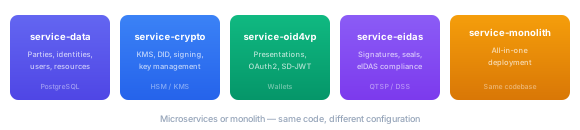
VDX runs as microservices or as a monolith, same codebase, different configuration. Choose the deployment model that fits your scale and operational maturity.
Kubernetes
Helm charts per service. Environment overlays for dev, staging, and production. Horizontal scaling per service. Health and readiness probes. License material is mounted as Secret and ConfigMap backed files, so the deployment references license.jwe, the recipient key, and trust bundles without storing secret contents in Git.
Docker Compose
Single-command local setup. Microservices or monolith mode. PostgreSQL and Keycloak included. Environment file configuration.
Cloud Native
AWS ECS/EKS, Azure AKS, or any container platform. Prebuilt service images on Eclipse Temurin 21 base images.
On-Premise
Fat JAR or GraalVM native images. Air-gapped environment support. Full control over data residency. No container runtime required.
All deployment modes include PostgreSQL for persistence and integrate with Keycloak or any OIDC-compliant provider for administrative authentication.
Device Management
VDX manages the physical devices that participate in your identity ecosystem, not just software clients.
Verification devices: tablets at reception desks, kiosks at building entrances, card readers at access points, terminals at border control. Each device is registered in the platform, assigned to a tenant, given verification policies that control what credentials it accepts, and monitored for health and activity.
Push verification flips the traditional flow. Instead of waiting for the user to start the process, the device initiates it. A reception kiosk starts an OID4VP flow when it detects a visitor. A turnstile triggers NFC verification. A customs terminal requests specific credentials. The platform manages the device-initiated sessions the same way it manages user-initiated ones, same verification, same policies, same audit trail.
Workload identity (SPIFFE/SPIRE) provides zero-trust service-to-service authentication. Every microservice in a VDX deployment has a cryptographic workload identity, eliminating shared secrets, API keys, and static credentials for internal communication. Combined with dual-principal authorization, this means even compromised internal services can't escalate privileges.
Observability
Every operation in VDX is observable through three complementary systems:
Distributed Tracing
OpenTelemetry with W3C Trace Context. One trace ID follows a request through every service. Latency breakdown per span.
Audit Logging
Immutable, tamper-evident trail. Automatic data redaction. JSON, CEF, OCSF export to any SIEM.
Shared Signals
OpenID SSF (CAEP/RISC). Real-time cross-domain security event exchange. Instant session revocation.
Get Started
VDX is available as a managed service or for on-premise deployment. Contact Sphereon to discuss your requirements:
- Website: sphereon.com
- Email: info@sphereon.com
- GitHub (open source): github.com/Sphereon-OpenSource