Version: v0.13
BLE Transport
Bluetooth Low Energy (BLE) is the most common transport for mobile-to-mobile mDoc presentations. This guide covers platform setup and usage patterns.
BLE Modes
The IDK supports two BLE modes per ISO 18013-5:
| Mode | Device Role | Description |
|---|---|---|
| Central Client | BLE Central | Device connects to a peripheral (reader) |
| Peripheral Server | BLE Peripheral | Device advertises and accepts connections |
Most holder apps use Central Client mode, where the wallet connects to the verifier's device.
Checking BLE Availability
Check if BLE transport is available on the engagement:
- Android/Kotlin
- iOS/Swift
val engagement = engagementManager.activeEngagement.value
val retrievalMethods = engagement?.getRetrievalMethods() ?: emptySet()

for (method in retrievalMethods) {
    if (method is DeviceRetrievalMethod.Ble) {
        println("BLE available")
        println("  Central client: ${method.centralClientMode}")
        println("  Peripheral server: ${method.peripheralServerMode}")
    }
}
let engagement = engagementManager.activeEngagement.value
let retrievalMethods = engagement?.getRetrievalMethods() ?? []

for method in retrievalMethods {
    if let ble = method as? DeviceRetrievalMethod.Ble {
        print("BLE available")
        print("  Central client: \(ble.centralClientMode)")
        print("  Peripheral server: \(ble.peripheralServerMode)")
    }
}
BLE UUIDs
The shared parameters manage BLE UUIDs used for service discovery:
- Android/Kotlin
- iOS/Swift
val sharedParams = engagementManager.sharedParameters

// Access BLE UUIDs
val centralClientUuid = sharedParams.bleCentralClientUuid.value
val peripheralServerUuid = sharedParams.blePeripheralServerUuid.value

// Use same UUID for both modes (required by some verifiers)
sharedParams.useSameUuidForBothModes()

// Regenerate UUIDs for new session
sharedParams.regenerate()
let sharedParams = engagementManager.sharedParameters

// Access BLE UUIDs
let centralClientUuid = sharedParams.bleCentralClientUuid.value
let peripheralServerUuid = sharedParams.blePeripheralServerUuid.value

// Use same UUID for both modes (required by some verifiers)
sharedParams.useSameUuidForBothModes()

// Regenerate UUIDs for new session
sharedParams.regenerate()
Android Setup
Permissions
Add to AndroidManifest.xml:
<!-- Bluetooth permissions -->
<uses-permission android:name="android.permission.BLUETOOTH" />
<uses-permission android:name="android.permission.BLUETOOTH_ADMIN" />
<uses-permission android:name="android.permission.BLUETOOTH_CONNECT" />
<uses-permission android:name="android.permission.BLUETOOTH_ADVERTISE" />
<uses-permission android:name="android.permission.BLUETOOTH_SCAN" />

<!-- Location (required for BLE scanning on Android 6-11) -->
<uses-permission android:name="android.permission.ACCESS_FINE_LOCATION" />

<uses-feature
    android:name="android.hardware.bluetooth_le"
    android:required="false" />
Runtime Permission Request
private val requiredPermissions = if (Build.VERSION.SDK_INT >= Build.VERSION_CODES.S) {
    arrayOf(
        Manifest.permission.BLUETOOTH_CONNECT,
        Manifest.permission.BLUETOOTH_SCAN,
        Manifest.permission.BLUETOOTH_ADVERTISE
    )
} else {
    arrayOf(
        Manifest.permission.ACCESS_FINE_LOCATION
    )
}

private fun requestBluetoothPermissions() {
    ActivityCompat.requestPermissions(this, requiredPermissions, REQUEST_BLE)
}
iOS Setup
Info.plist
<key>NSBluetoothAlwaysUsageDescription</key>
<string>This app uses Bluetooth to transfer credentials</string>

<key>NSBluetoothPeripheralUsageDescription</key>
<string>This app uses Bluetooth to transfer credentials</string>

<key>UIBackgroundModes</key>
<array>
    <string>bluetooth-central</string>
    <string>bluetooth-peripheral</string>
</array>
Connection Flow
Central Client Mode
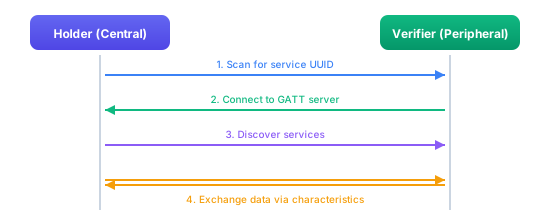
Peripheral Server Mode
The peripheral server mode is similar but with roles reversed - the holder advertises and the verifier connects.
Monitoring Connection State
Use the event hub to monitor BLE connection status:
- Android/Kotlin
- iOS/Swift
engagementManager.eventHub.engagementEvents.collect { event ->
    when (event.state) {
        is MdocEngagementState.Connecting -> {
            showMessage("Connecting via Bluetooth...")
        }
        is MdocEngagementState.Connected -> {
            showMessage("Connected via Bluetooth")
        }
        is MdocEngagementState.Error -> {
            val error = (event.state as MdocEngagementState.Error).error
            if (error.message.contains("bluetooth", ignoreCase = true)) {
                showMessage("Bluetooth connection failed")
            }
        }
    }
}
for await event in engagementManager.eventHub.engagementEvents {
    switch event.state {
    case .connecting:
        showMessage(text: "Connecting via Bluetooth...")
    case .connected:
        showMessage(text: "Connected via Bluetooth")
    case .error(let error):
        if error.message.lowercased().contains("bluetooth") {
            showMessage(text: "Bluetooth connection failed")
        }
    default:
        break
    }
}
Troubleshooting
Common BLE issues and solutions:
| Issue | Cause | Solution |
|---|---|---|
| Can't find device | Service UUID mismatch | Verify UUIDs match between devices |
| Connection fails | Device out of range | Move devices closer (within 10m) |
| Slow transfer | Small MTU | BLE MTU is negotiated automatically |
| Disconnects | Timeout | Keep devices in range during transfer |
| Permissions denied | Missing runtime permissions | Request permissions before use |
Best Practices
When implementing BLE transport:
- Keep devices close: BLE range is typically 10-30 meters but varies by environment
- Handle background transitions: BLE behavior changes when apps go to background, especially on iOS
- Test on physical devices: BLE behavior on emulators is not reliable
- Regenerate parameters: Use fresh UUIDs for each session via
sharedParams.regenerate()