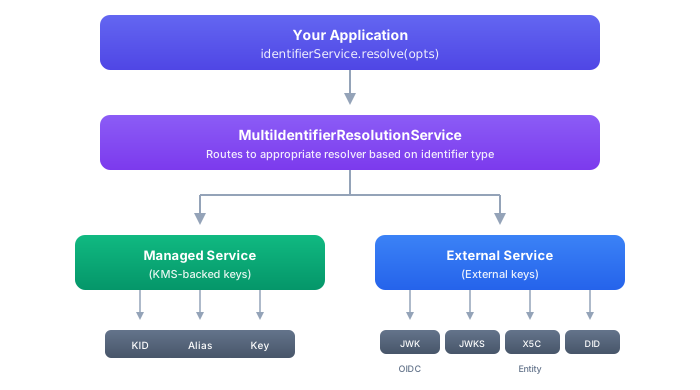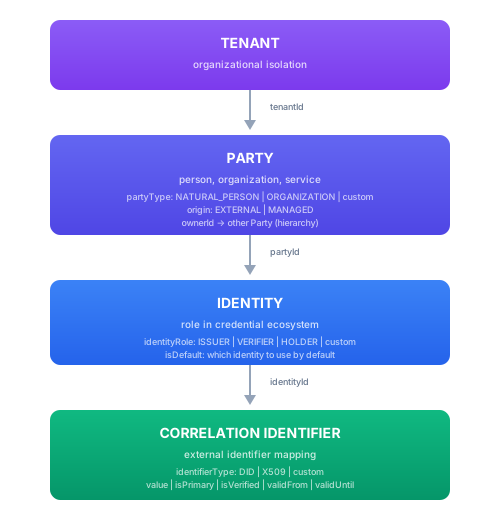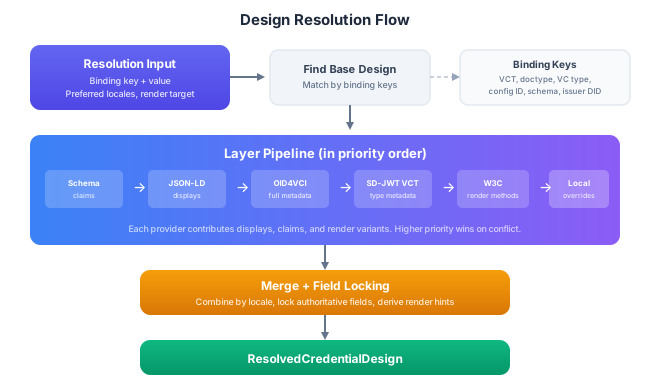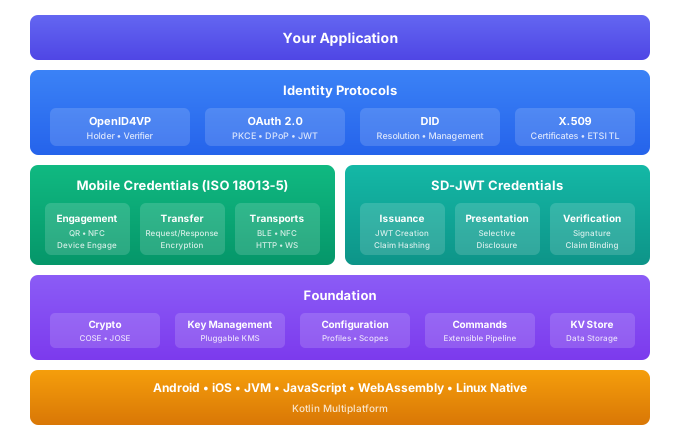
# Sphereon Documentation --- # Introduction # Introduction The Identity Development Kit (IDK) is a Kotlin Multiplatform library for digital identity applications. It covers credential issuance and verification, identity proofing, trust establishment, and secure data exchange, all from a single codebase that compiles to Android, iOS, JVM, JavaScript (browser and Node.js), WebAssembly, and Linux native. The IDK is the open-source core behind Sphereon's commercial [Enterprise Development Kit (EDK)](/edk/guides/getting-started). Use it standalone to build wallets, verifiers, issuers, and identity services, or as the foundation layer under the EDK. IDK Architecture Overview ## What You Can Build ### Mobile Wallets and Credential Holders Store and present credentials using ISO/IEC 18013-5 (mDL/mDoc), SD-JWT, and OpenID4VP. The IDK handles device engagement (QR, NFC, BLE), session encryption, selective disclosure, and proximity and remote presentation protocols. ### Credential Verifiers Request and verify credentials as a relying party. Supported flows include OpenID4VP with DCQL queries or presentation definitions, mDoc reader verification over BLE/NFC/HTTP, SD-JWT signature and disclosure verification, and multi-framework trust validation. ### Issuance and Authorization Services Run server-side issuance with the built-in OAuth 2.0 authorization server (authorization code, client credentials, pre-authorized code, token exchange, DPoP, PKCE, PAR, introspection, revocation), SD-JWT credential issuance with selective disclosure, and DID-based issuer identity. ### Identity Proofing and Onboarding Combine OIDC federation, wallet-based credential presentation, document verification, biometric checks, and OTP into identity verification workflows. Includes policy-driven reconciliation, privacy-preserving identity matching, and compliance tracking for eIDAS, NIST 800-63A, and UK DIATF. ### Cross-Platform Libraries and SDKs The IDK compiles to all major platforms, so a single codebase can serve native Android, iOS, web, and server applications. JavaScript and WebAssembly targets ship with TypeScript definitions. ## Platform Support The IDK targets all major Kotlin Multiplatform platforms: | Platform | Targets | Notes | |----------|---------|-------| | **JVM** | Java 17+ | Server-side applications, Ktor | | **Android** | API 27+ (Android 8.1) | Full support including BLE, NFC HCE, Android Keystore | | **iOS** | arm64, x64, simulator-arm64 | CoreBluetooth, CoreNFC, Secure Enclave | | **JavaScript** | Browser (Webpack), Node.js | ES modules, TypeScript definitions generated | | **WebAssembly** | wasmJs (Browser + Node.js) | BigInt support, TypeScript definitions | | **Linux** | x64 | Server and CLI tooling | Most IDK modules compile to all of these targets. Platform-specific modules (BLE transport, NFC transport, mobile KMS) are available only on the platforms they support. ## Architecture The IDK is organized into functional domains, each with a clean separation between public API and implementation: | Domain | What it provides | |--------|-----------------| | **Core** | Dependency injection (Metro), configuration, logging, events, HTTP client | | **Cryptography** | Key management (software, mobile, AWS, Azure), COSE/JOSE signing and verification, identifier resolution | | **Identity** | DID resolution and management, trust establishment (ETSI, X.509, OpenID Federation, DID), identity verification, matching, and reconciliation | | **Credentials** | SD-JWT issuance and presentation, mDoc/mDL with BLE/NFC/HTTP transports, credential claims mapping | | **Protocols** | OAuth 2.0 client and server, OpenID4VP holder and verifier, DPoP, PKCE | | **Data** | Key-value store, blob storage, party/identity data models | Each domain follows the `-public` / `-impl` module pattern (see [Installation](/idk/guides/installation)). ## How These Docs Are Organized The IDK documentation is split by reading mode: | Section | Use it when you need to | |---------|-------------------------| | **Start Here** | Understand what the IDK is, how it is layered, how to install it, and which platforms need extra setup | | **Concepts and Models** | Learn the domain model: identity, trust, identifiers, credential formats, credential design, mDoc, OID4VP, and OID4VCI | | **Technical Guides** | Implement a capability in code: configure DI, call services, manage keys, resolve DIDs, issue credentials, verify presentations, or wire storage | | **Deployable Services** | Embed pre-built HTTP services for KMS, OAuth2, OID4VCI, OID4VP, and Ktor-based hosting | | **Examples and Reference** | Find runnable examples, the module list, REST API reference, Kotlin API reference, and FAQ material | Start with concept pages when you are still deciding how a capability should fit into your application. Use technical guides once you know the capability and need concrete setup, APIs, configuration, or code flow details. ## Next Steps 1. **[Architecture](/idk/architecture)**: command architecture, services, contracts, HTTP adapters, and error handling 2. **[Installation](/idk/guides/installation)**: repository setup, module architecture (`-public` vs `-impl`), and the `lib-all` shortcut 3. **[Identity](/idk/guides/identity/overview)**: the conceptual identity model for verification, matching, resolution, and reconciliation 4. **[Dependency Injection](/idk/guides/di/scopes)**: the App / User / Session scope hierarchy 5. **[Module Reference](/idk/guides/modules)**: complete list of available modules --- # Architecture # Architecture The IDK is built on a command-based architecture. Every operation (generating a key, exchanging a token, verifying a credential) is modeled as a command: a unit of work with typed input, typed output, and a well-defined identity. This page explains how commands, services, contracts, and the HTTP layer fit together. The architecture has two views that are useful to keep separate: | View | What it explains | Where to go next | |------|------------------|------------------| | **Conceptual model** | The domain capabilities: identity, trust, credentials, protocols, and storage | Use the **Concepts and Models** section for domain-level orientation | | **Technical model** | The implementation machinery: commands, services, contracts, adapters, DI scopes, configuration, and error handling | Use the **Technical Guides** section when wiring the IDK into an application | The rest of this page focuses on the technical model: how IDK capabilities are exposed, composed, configured, intercepted, and transported. ## Commands A command is the fundamental building block. The base interface looks like this: ```kotlin interface Command { val id: String val isEnabled: Boolean fun supports(args: Arg): Boolean suspend fun execute(args: Arg): IdkResult } ``` Every command has an `id`, reports whether it `isEnabled`, checks whether it `supports` a given input, and `execute`s that input to produce a result. The result is always an `IdkResult`, a sealed type that is either a success or an error. There are no thrown exceptions during normal operation. ### Command Identity Commands follow a structured naming convention: `module.service.command`. For example: | Command ID | Module | Service | Action | |-----------|--------|---------|--------| | `kms.keys.generate` | kms | keys | generate | | `oauth2.token.exchange` | oauth2 | token | exchange | | `did.resolution.resolve` | did | resolution | resolve | | `party.manager.create` | party | manager | create | This naming convention is not cosmetic. It drives several systems: - **Configuration overrides** use the `cmd.*` prefix to target specific commands, services, or entire modules. A configuration entry for `cmd.kms.keys.*` applies to every command in the KMS keys service. - **Logging policies** can be scoped to a command, a service, or a module. You might enable debug logging for `oauth2.token.*` without affecting the rest of the system. - **Metrics and tracing** use the command ID as the span name, so distributed traces reflect the exact operation being performed. ### Command Types The IDK provides several specialized command types that extend the base interface for different use cases. #### ServiceCommand `ServiceCommand` is the workhorse for business logic. Most domain operations (key generation, token issuance, DID resolution) are `ServiceCommand` implementations. A service command takes a domain-specific input type and produces a domain-specific output type: ```kotlin interface ServiceCommand : Command { override val id: String override val isEnabled: Boolean override suspend fun execute(args: TInput): IdkResult } ``` Service commands participate in the full command lifecycle: initialization extensions, execution extensions, interceptor chains, configuration overrides, and transport routing all apply. #### HttpEndpointCommand `HttpEndpointCommand` bridges the HTTP layer with the command system. It takes a `GenericHttpRequest` and returns a `GenericHttpResponse`, handling request parsing, delegation to a service command, and response serialization: ```kotlin interface HttpEndpointCommand : Command { val method: String // GET, POST, PUT, DELETE, etc. val pathPattern: String // e.g., "/{keyId}" or "/token" } ``` HTTP endpoint commands are grouped into adapters (see [HTTP Layer](#http-layer) below). Each endpoint command is a standalone unit that can be enabled, disabled, or overridden independently. #### ChainCommand `ChainCommand` runs a list of commands in sequence, passing the output of one as the input to the next. If any command in the chain fails, execution stops and the error propagates. This is useful for composing multi-step operations where each step must succeed before the next begins. #### PipelineCommand `PipelineCommand` is similar to `ChainCommand` but supports more complex workflows with branching, conditional steps, and error recovery. Pipelines are used internally for operations like identity verification, where the sequence of steps depends on the outcome of earlier steps. ## Contracts Commands can declare input and output contracts. A contract describes what the command expects and what it produces, using a structured schema. ```kotlin interface CommandContract { val inputContract: ContractSchema? val outputContract: ContractSchema? } ``` The **input contract** specifies the shape of valid input: required fields, types, constraints. The **output contract** specifies the shape of the command's success result. Together they make each command self-describing. This has practical benefits: - **Validation**: Input can be validated against the contract before execution, catching malformed requests early. - **Documentation generation**: Contracts can be serialized into OpenAPI schemas or other formats, so API documentation stays in sync with the actual command signatures. - **Tooling**: Development tools can inspect contracts to provide autocompletion, type checking, and request scaffolding. Contracts are optional. Commands that do not declare a contract still work normally; they just lack the machine-readable description. ## Services While commands are the core execution unit, most application code does not call commands directly. Instead, it interacts with **service interfaces** that aggregate related commands into a convenient API surface. The IDK provides service interfaces for each major domain: | Service | Domain | |---------|--------| | `KeyManagerService` | Key generation, storage, signing, verification | | `OAuth2Client` | Token requests, PKCE, DPoP, authorization code flows | | `AuthorizationServerService` | Authorization server operations (parse, verify, create for each grant type) | | `Oid4vciIssuerService` | Credential issuance, offers, deferred issuance | | `DidResolver` | DID document resolution | | `DidManager` | DID creation, update, deactivation | | `TrustValidationService` | Trust chain validation across frameworks | | `KvStore` | Key-value data storage | | `BlobService` | Binary object storage | Under the hood, each service method delegates to a command. For example, when you call `authorizationServerService.createAccessToken(...)`, the service locates and executes the corresponding `ServiceCommand`. This means every service call goes through the same lifecycle as a direct command invocation. Configuration overrides, interceptors, logging policies, and extension hooks all apply regardless of whether you call the service method or the command. ```kotlin // These two approaches are equivalent: // 1. Through the service interface (typical application code) val token = session.graph.authorizationServerService.createAccessToken(input) // 2. Through the command directly (lower-level, same lifecycle) val token = createAccessTokenCommand.execute(input) ``` Services exist to provide a discoverable, IDE-friendly API. The command layer underneath provides the extensibility. ## Extension Hooks and Interceptors Commands support lifecycle hooks that let you inject behavior at specific points without modifying the command itself. ### Initialization Extensions `ICommandInitExtension` runs when a command is first initialized. Use it for setup tasks like validating configuration, registering metrics collectors, or pre-loading data that the command will need. ```kotlin interface ICommandInitExtension { suspend fun onInit(command: Command) } ``` ### Execution Extensions `ICommandExecutionExtension` hooks into the execution lifecycle. It provides callbacks for before execution, after successful execution, and after failed execution: ```kotlin interface ICommandExecutionExtension { suspend fun beforeExecute( command: Command, args: Arg ) suspend fun afterExecuteSuccess( command: Command, args: Arg, result: SuccessResult ) suspend fun afterExecuteError( command: Command, args: Arg, error: ErrorResult ) } ``` Execution extensions are well suited for cross-cutting concerns: audit logging, telemetry, input sanitization, or rate limiting. Because they run around every command invocation, they apply uniformly across the system. ### Interceptor Chains `CommandLifecycleInterceptorChain` composes multiple extensions into an ordered chain. Interceptors can inspect and modify inputs, short-circuit execution (for example, to enforce a policy denial), or transform outputs. The chain runs in a defined order, so you can control precedence. A policy enforcement interceptor runs before an audit logging interceptor, for instance. Interceptors are registered through dependency injection. Adding an interceptor to the DI graph is enough to activate it for all commands in the relevant scope. ## HTTP Layer The IDK exposes HTTP APIs through a command-backed adapter pattern. Rather than coupling endpoint handlers to a specific framework (Ktor, Spring, etc.), the IDK uses framework-agnostic types and routes requests to commands. ### CommandBackedHttpAdapter The `CommandBackedHttpAdapter` groups related `HttpEndpointCommand` instances and routes incoming requests to the matching command by HTTP method and path: ```kotlin abstract class CommandBackedHttpAdapter( override val id: String, execution: SessionExecution, protected val mount: HttpAdapterMount, // ... ) : HttpAdapter { protected abstract val endpointCommands: List override suspend fun handleRequest( request: GenericHttpRequest ): GenericHttpResponse } ``` Each adapter declares a mount point (a server prefix and base path) and a list of endpoint commands. When a request arrives, the adapter finds the endpoint command whose method and path pattern match, extracts path parameters, and delegates to that command. Built-in IDK services use this pattern. The OID4VCI issuer, OID4VP verifier, OAuth2 authorization server, and KMS REST API are all sets of `HttpEndpointCommand` instances grouped by adapter. For example, the OAuth2 authorization server adapter groups endpoint commands for `/token`, `/authorize`, `/introspect`, `/revoke`, `/par`, and `/.well-known/oauth-authorization-server`. ### Request and Response Types All HTTP commands work with `GenericHttpRequest` and `GenericHttpResponse`, plain data classes that carry the method, path, headers, query parameters, and body without any framework dependency: ```kotlin data class GenericHttpRequest( val method: String, val path: String, val pathParameters: Map, val queryParameters: Map, val headers: Map, val bodySupplier: (() -> String?)?, val bodyContent: GenericHttpBody ) data class GenericHttpResponse( val statusCode: Int, val headers: Map = emptyMap(), val body: String? = null, val bodyContent: GenericHttpBody = GenericHttpBody.Empty ) ``` Framework-specific bridges (like the Ktor server plugin) translate between these generic types and the framework's native request/response objects. This means the same adapter code works on Ktor, Spring Boot, or a serverless runtime without changes. ### Adapter Dispatching At startup, all adapters contributed to the DI graph are collected into an `HttpAdapterCatalog`. The catalog indexes adapters by their mount points and detects collisions (duplicate paths, overlapping endpoints). An `HttpAdapterDispatcher` routes each incoming request to the correct adapter based on path matching and specificity scoring. This architecture means adding a new HTTP endpoint is a matter of writing an `HttpEndpointCommand` and adding it to an adapter's `endpointCommands` list. There is no manual route registration. ## Error Handling All commands return `IdkResult`. This is a sealed type with two variants: ```kotlin sealed class IdkResult { data class Ok(val value: S) : IdkResult() data class Err(val error: E) : IdkResult() } ``` Errors are typed and carry structured information: an error type enum, a human-readable message, an optional cause, and optional detail fields. The standard error type is `IdkError`, which covers common categories like `NOT_FOUND_ERROR`, `ILLEGAL_ARGUMENT_ERROR`, `UNAUTHORIZED_ERROR`, `FORBIDDEN_ERROR`, `INVALID_STATE`, and `UNKNOWN_ERROR`. ### Error Mapping `CommandErrorMapper` transforms command errors into context-appropriate responses. When a command fails inside an HTTP adapter, the error mapper converts the `IdkError` into an HTTP status code and response body. The mapping follows standard conventions: | IdkError Type | HTTP Status | |--------------|-------------| | `ILLEGAL_ARGUMENT_ERROR` | 400 | | `UNAUTHORIZED_ERROR` | 401 | | `FORBIDDEN_ERROR` | 403 | | `NOT_FOUND_ERROR` | 404 | | `INVALID_STATE` | 409 | | `UNKNOWN_ERROR` | 500 | ### Protocol-Specific Error Renderers Some protocols define their own error response formats. For example, OID4VCI requires errors to follow a specific JSON structure with `error` and `error_description` fields. Protocol-specific error renderers (like `Oid4vciErrorRenderer`) transform `IdkError` instances into the format required by the protocol specification, so clients receive standards-compliant error responses. ```kotlin // Standard IDK error handling when (val result = command.execute(input)) { is IdkResult.Ok -> handleSuccess(result.value) is IdkResult.Err -> when (result.error.type) { IdkErrorType.NOT_FOUND_ERROR -> handleNotFound() IdkErrorType.UNAUTHORIZED_ERROR -> handleUnauthorized() else -> handleGenericError(result.error) } } ``` This pattern is consistent throughout the entire IDK. Whether you are calling a service method, executing a command directly, or handling an HTTP request, error handling always follows the same structure. ## How the Layers Compose The layering works like this: 1. **Services** provide the developer-facing API. You call `authorizationServerService.verifyTokenRequest(...)` and get back a typed result. 2. **Commands** do the actual work. The service delegates to a `ServiceCommand` that runs through the full lifecycle: extensions, interceptors, configuration overrides. 3. **Contracts** describe what commands expect and produce, enabling validation and documentation generation. 4. **HTTP adapters** expose commands as REST endpoints. Each endpoint is an `HttpEndpointCommand` grouped into a `CommandBackedHttpAdapter`. The adapter handles routing; the command handles logic. 5. **Extensions and interceptors** add cross-cutting behavior (audit, policy, telemetry) without modifying the commands themselves. 6. **Error handling** is uniform. `IdkResult` flows from command to service to HTTP adapter, with mappers and renderers transforming errors into the right format at each boundary. This architecture means that adding a new capability (a new key type, a new grant flow, a new verification method) follows the same pattern every time: define a command, wire it into a service, optionally expose it through an HTTP adapter, and let the existing infrastructure handle configuration, lifecycle, and error handling. ## Key Abstractions The IDK abstracts several cross-cutting concerns so that application code does not couple to specific implementations. Each abstraction follows the same pattern: a public interface in the `-public` module, one or more implementations in `-impl` modules, and DI contributions that wire the right implementation at startup. This means you can swap backends, providers, or strategies without changing the code that depends on them. ### Configuration The configuration system (`ConfigService`) abstracts property resolution across multiple sources (environment variables, YAML, properties files, cloud providers, databases). Application code calls `configService.getProperty("key", Type::class)` without knowing where the value comes from. The system supports scoped overrides (app, tenant, principal) and command-scoped overrides (module, service, command) so the same code can behave differently per tenant or per operation. See [Configuration](guides/config/configuration) for details. ### Key Management The `KeyManagerService` abstracts cryptographic key operations across multiple KMS providers (software, Android Keystore, iOS Secure Enclave, AWS KMS, Azure Key Vault, REST-based). Application code calls `keyManagerService.generateKeyAsync(...)` or `keyManagerService.createRawSignature(...)` and the service routes to the correct provider based on the key's provider ID or the requested algorithm. Multiple providers can be active simultaneously, and keys from different providers can be used interchangeably. See [Key Management](guides/crypto/key-management) for details. ### Logging The logging system is scope-aware and config-driven. Each DI scope (app, user context, session) has its own log manager and log services. Log messages automatically carry scope context (tenant ID, principal, session ID). Log policies can be set globally or overridden per module, service, or command through the configuration system. Multiple log providers (console, mobile buffer, custom) run simultaneously. See [Logging](guides/core/logging/overview) for details. ### Trust Validation Trust validation abstracts multiple trust frameworks (X.509 certificate chains, ETSI trust lists, OpenID Federation, DID-based trust) behind a single `TrustValidationService.validate()` call. The service delegates to framework-specific validators contributed via DI and returns a unified `TrustValidationResult`. Application code does not need to know which trust framework applies; the validators evaluate the input and report whether it is trusted. See [Trust](guides/trust/overview) for details. ### Identity Resolution The `IIdentifierService` abstracts the mapping from cryptographic identifiers (DIDs, X.509 certificates, JWKs) to public key material. When verifying a signature, the IDK resolves the signer's identifier to a public key through a chain of resolution strategies (DID resolution, JWKS fetching, X.509 chain extraction, cnf claim parsing). This decouples signature verification from the specific identifier format. See [Identifier Resolution](guides/crypto/identifier-resolution) for details. ### Data Storage The key-value store (`KvStore`) and blob store (`BlobService`) abstract data persistence across backends (in-memory, filesystem, SQLite/Kottage, HTTP remote). Application code uses the same interface regardless of backend. Both stores support scope-based tenant isolation and pluggable backends via DI contributions. See [Data Storage](guides/data-store/key-value-store) for details. ## Commands and Services: Two Levels of Access When you are building an application, you typically use service interfaces. They provide a clean, typed API: ```kotlin // Service-level access (typical application code) val keyPair = keyManagerService.generateKeyAsync( GenerateKeyArgs(algorithm = SignatureAlgorithm.ECDSA_SHA256) ) ``` When you need to customize behavior (add interceptors, override configuration per command, build custom pipelines), you work with commands directly. The same operation is available as a command: ```kotlin // Command-level access (for customization, pipelines, interceptors) val command = session.getCommand() command.execute(GenerateKeyArgs(algorithm = SignatureAlgorithm.ECDSA_SHA256)) ``` Both paths go through the same lifecycle. The service is a convenience layer; the command is the execution unit. Most developers never need the command level directly, but it is there when you need fine-grained control. --- # Sdk installation ## Maven repositories The Kiwa Sdk is distributed through Sphereon's Nexus repository. Nexus is available at https://nexus.sphereon.com and hosts both the Kiwa Sdk and the Open-Source Identity Development Kit. All Open-Source software can be found in the following Maven repositories: - https://nexus.sphereon.com/content/repositories/sphereon-opensource-releases/ - https://nexus.sphereon.com/content/repositories/sphereon-opensource-snapshots/ :::info Snapshot versions are not guaranteed to be stable as they are built from the latest code. ::: ### Kiwa SDK repositories need an account Although Kiwa customers get source code access to the Kiwa SDK, the Kiwa SDK itself is not open source and thus is not available in the above Maven repositories. The Kiwa SDK is available through the Sphereon Nexus repositories below - https://nexus.sphereon.com/content/repositories/kiwa-releases/ - https://nexus.sphereon.com/content/repositories/kiwa-snapshots/ ### Groups Ids and artifacts The Kiwa SDK is using the following group Id for its artifacts: - com.sphereon.kiwa The SDK artifacts are: - **com.sphereon.kiwa:kiwa-holder-sdk-public:** The API's, interfaces and common code. All code depends on the interfaces defined in this package. - **com.sphereon.kiwa:kiwa-holder-sdk-impl:** The implementation of the API's. This code is being injected as actual implementation of the interfaces. The artifact depends and exports the public API's. - **com.sphereon.kiwa:kiwa-holder-sdk-all:** Provides pre-build Dependency components and depends on the public and implementation artifacts. ## Setting up authentication To access the Kiwa SDK repositories, you need to obtain Nexus credentials from Sphereon. Contact Sphereon to receive your username and password for accessing the kiwa-releases and kiwa-snapshots repositories. ### Maven authentication For Maven, add your Nexus credentials to your `~/.m2/settings.xml` file: ```xml kiwa-releases YOUR_NEXUS_USERNAME YOUR_NEXUS_PASSWORD kiwa-snapshots YOUR_NEXUS_USERNAME YOUR_NEXUS_PASSWORD ``` ### Gradle authentication For Gradle, add your Nexus credentials to your `~/.gradle/gradle.properties` file: ```properties nexusUsername=YOUR_NEXUS_USERNAME nexusPassword=YOUR_NEXUS_PASSWORD ``` ## Using dependencies in your project ### Maven configuration Add the Kiwa repositories and dependencies to your `pom.xml`: ```xml kiwa-releases https://nexus.sphereon.com/content/repositories/kiwa-releases/ kiwa-snapshots https://nexus.sphereon.com/content/repositories/kiwa-snapshots/ true com.sphereon.kiwa kiwa-holder-sdk-all 0.6.0 com.sphereon.kiwa kiwa-holder-sdk-impl 0.6.0 ``` ### Gradle configuration Add the Kiwa repositories and dependencies to your `build.gradle`: ```groovy repositories { maven { url 'https://nexus.sphereon.com/content/repositories/kiwa-releases/' credentials { username = project.findProperty('nexusUsername') ?: System.getenv('NEXUS_USERNAME') password = project.findProperty('nexusPassword') ?: System.getenv('NEXUS_PASSWORD') } } maven { url 'https://nexus.sphereon.com/content/repositories/kiwa-snapshots/' credentials { username = project.findProperty('nexusUsername') ?: System.getenv('NEXUS_USERNAME') password = project.findProperty('nexusPassword') ?: System.getenv('NEXUS_PASSWORD') } } } dependencies { // Use the all-in-one dependency for the complete SDK implementation 'com.sphereon.kiwa:kiwa-holder-sdk-all:0.6.0' // Or use individual dependencies implementation 'com.sphereon.kiwa:kiwa-holder-sdk-public:0.6.0' implementation 'com.sphereon.kiwa:kiwa-holder-sdk-impl:0.6.0' } ``` For Gradle Kotlin DSL (`build.gradle.kts`): ```kotlin repositories { maven { url = uri("https://nexus.sphereon.com/content/repositories/kiwa-releases/") credentials { username = project.findProperty("nexusUsername") as String? ?: System.getenv("NEXUS_USERNAME") password = project.findProperty("nexusPassword") as String? ?: System.getenv("NEXUS_PASSWORD") } } maven { url = uri("https://nexus.sphereon.com/content/repositories/kiwa-snapshots/") credentials { username = project.findProperty("nexusUsername") as String? ?: System.getenv("NEXUS_USERNAME") password = project.findProperty("nexusPassword") as String? ?: System.getenv("NEXUS_PASSWORD") } } } dependencies { // Use the all-in-one dependency for the complete SDK implementation("com.sphereon.kiwa:kiwa-holder-sdk-all:0.6.0") // Or use individual dependencies implementation("com.sphereon.kiwa:kiwa-holder-sdk-public:0.6.0") implementation("com.sphereon.kiwa:kiwa-holder-sdk-impl:0.6.0") } ``` :::tip Replace `0.6.0` with the desired version of the Kiwa SDK. For snapshot versions, use a version like `0.6.0-SNAPSHOT`. ::: ## Using local binaries If you prefer to download the binaries manually or cannot access the Nexus repository directly, you can use local file dependencies. ### Obtaining binaries manually 1. Contact Sphereon to receive the JAR files for the Kiwa SDK artifacts 2. Alternatively, if you have Nexus access, download the binaries directly from the next URLs or from the [Nexus UI](https://nexus.sphereon.com/): - https://nexus.sphereon.com/content/repositories/kiwa-releases/com/sphereon/kiwa/ - https://nexus.sphereon.com/content/repositories/kiwa-snapshots/com/sphereon/kiwa/ 3. Save the JAR files to a local directory in your project (e.g., `libs/` folder) ### Maven local file dependencies Add local file dependencies to your `pom.xml`: ```xml com.sphereon.kiwa kiwa-holder-sdk-all 0.6.0 system ${project.basedir}/libs/kiwa-holder-sdk-all-0.6.0.jar com.sphereon.kiwa kiwa-holder-sdk-public 0.6.0 system ${project.basedir}/libs/kiwa-holder-sdk-public-0.6.0.jar com.sphereon.kiwa kiwa-holder-sdk-impl 0.6.0 system ${project.basedir}/libs/kiwa-holder-sdk-impl-0.6.0.jar ``` ### Gradle local file dependencies Add local file dependencies to your `build.gradle`: ```groovy dependencies { // Use the all-in-one dependency for the complete SDK implementation files('libs/kiwa-holder-sdk-all-0.6.0.jar') // Or use individual dependencies implementation files('libs/kiwa-holder-sdk-public-0.6.0.jar') implementation files('libs/kiwa-holder-sdk-impl-0.6.0.jar') } ``` For Gradle Kotlin DSL (`build.gradle.kts`): ```kotlin dependencies { // Use the all-in-one dependency for the complete SDK implementation(files("libs/kiwa-holder-sdk-all-0.6.0.jar")) // Or use individual dependencies implementation(files("libs/kiwa-holder-sdk-public-0.6.0.jar")) implementation(files("libs/kiwa-holder-sdk-impl-0.6.0.jar")) } ``` Alternatively, you can include all JARs from a directory: ```groovy dependencies { implementation fileTree(dir: 'libs', include: ['*.jar']) } ``` Or in Kotlin DSL: ```kotlin dependencies { implementation(fileTree(mapOf("dir" to "libs", "include" to listOf("*.jar")))) } ``` :::warning When using system scope dependencies in Maven or local file dependencies, ensure that the JAR files are committed to version control or documented clearly so other developers can obtain them. ::: --- # Platform Setup import Tabs from '@theme/Tabs'; import TabItem from '@theme/TabItem'; # Platform Setup Platform-specific configuration on top of the base [Installation](installation). Most IDK modules work out of the box everywhere, but BLE, NFC, and secure key storage need extra setup. ## Android ### Gradle Configuration ```kotlin title="app/build.gradle.kts" android { compileSdk = 35 defaultConfig { minSdk = 27 targetSdk = 35 } compileOptions { sourceCompatibility = JavaVersion.VERSION_17 targetCompatibility = JavaVersion.VERSION_17 } kotlinOptions { jvmTarget = "17" } } ``` ### Bluetooth Low Energy (BLE) Required for mDoc proximity presentation over Bluetooth. Add permissions to `AndroidManifest.xml`: ```xml ``` ### NFC with Host Card Emulation (HCE) Required for mDoc presentation via NFC tap. Add permissions and register the HCE service in `AndroidManifest.xml`: ```xml ``` ### Android Keystore (Mobile KMS) The `lib-crypto-kms-provider-mobile` module uses the Android Keystore for hardware-backed key storage. No additional manifest configuration is needed; the Keystore is available on all devices running API 27+. ## iOS ### Bluetooth and NFC Entitlements Add the following to your `Info.plist`: ```xml NSBluetoothAlwaysUsageDescription This app uses Bluetooth to transfer credentials NSBluetoothPeripheralUsageDescription This app uses Bluetooth to transfer credentials NFCReaderUsageDescription This app uses NFC to present credentials UIBackgroundModes bluetooth-central bluetooth-peripheral ``` For NFC, add the NFC Tag Reader entitlement: ```xml com.apple.developer.nfc.readersession.formats TAG ``` ### Secure Enclave (Mobile KMS) The `lib-crypto-kms-provider-mobile` module uses the iOS Secure Enclave for hardware-backed key storage on devices that support it (iPhone 5s and later, iPads with Touch ID or Face ID). No additional entitlements are required; the Secure Enclave is accessed through the standard Keychain Services API. ## JVM ### Java Version The IDK requires Java 17 or later. For server applications: ```kotlin title="build.gradle.kts" java { toolchain { languageVersion.set(JavaLanguageVersion.of(17)) } } ``` ### Ktor For Ktor server integration, include the server plugin: ```kotlin dependencies { implementation("com.sphereon.idk:ktor-server-kotlin-inject:0.25.0") } ``` See the [Ktor Integration](http/ktor) guide for details. ## JavaScript and WebAssembly IDK modules compile to both JavaScript (ES modules) and WebAssembly (wasmJs) targets, each supporting both browser and Node.js environments. ### JavaScript (ES Modules) JavaScript targets produce ES2015 modules with TypeScript definitions. They work with standard bundlers (Webpack, Vite, esbuild) and can be consumed from TypeScript and JavaScript projects. ### WebAssembly (wasmJs) The wasmJs target compiles to WebAssembly with a JavaScript interop layer, useful when you need better performance for cryptographic operations in the browser. Both targets support BigInt for large number operations and generate TypeScript `.d.ts` files alongside the compiled output. ### Node.js For server-side JavaScript/TypeScript applications, both the JS and wasmJs targets can be used with Node.js. This is useful for building credential verification services, REST APIs, or CLI tools in the Node.js ecosystem. ## Linux Native The IDK compiles to Linux x64 native binaries. This target is primarily used for CLI tools and server applications that need to run without a JVM. No additional configuration is required beyond standard Kotlin/Native setup. ## Next Steps - **[Dependency Injection](di/scopes)**: setting up the scope hierarchy - **[Application Setup](di/app-setup)**: defining your application graph - **[Configuration](config/configuration)**: configuring IDK behavior --- # Identity # Identity The IDK identity framework manages the lifecycle of binding external subjects (people, organizations, or workloads) to internal identities. It answers the questions: "Who is this external subject?", "Have we seen them before?", "Do we trust the evidence they present?", and "What level of assurance do we have?" The framework sits at the intersection of several IDK subsystems. [Decentralized Identifiers](../did/overview) provide the subject identifiers. [Identifier Resolution](../crypto/identifier-resolution) turns those identifiers into cryptographic key material for signature verification. [Trust Establishment](../trust/overview) validates whether the issuer of a credential or the provider of an OIDC token is trusted. The identity modules add the layer on top: linking those verified external identifiers to internal identity records, and orchestrating the verification workflows that produce those links. Four modules handle distinct concerns: ## Identity Verification (IDV) IDV defines and executes multi-step verification workflows. A workflow is a directed graph of verification nodes, where each node delegates to a pluggable **method driver** that performs the actual check. ### Method Types | Type | Driver | What it does | |------|--------|--------------| | `oidc` | `OidcMethodDefinition` | Redirects to an OIDC provider, exchanges the authorization code, extracts identity attributes from the ID token and optional UserInfo endpoint | | `wallet` | `WalletMethodDefinition` | Triggers an OID4VP credential presentation request (via DCQL query or presentation definition), verifies the presented credential against `trustedIssuers`, and extracts attributes | | `document` | ID verification | Delegates to document verification providers (Onfido, Jumio, ReadID) for passport, ID card, or driving license checks | | `biometric` | Biometric | Delegates to biometric providers (iProov, Onfido, Jumio) for liveness and face-match verification | | `otp` | OTP | Sends a one-time password via email, SMS, or authenticator app and validates the user's response | | `claim_match` | `AttributeMatchMethodDefinition` | Performs a hash-based lookup against the identity matching store to check whether the subject's identifier (DID, key, email) is already known | | `rest_api` | REST | Calls a custom external API with configurable authentication (API key, OAuth2 client credentials, mTLS, basic) | ### Graph Composition Verification nodes compose into graphs using four structural node types: - **`SequenceNode`**: children execute in order; all must pass - **`ParallelNode`**: children execute concurrently with configurable join policy (`All`, `Any`, `BestEffort`) and failure policy (`FailFast`, `WaitForAll`, `ContinueOnFailure`) - **`ChoiceNode`**: user or system selects one child to execute (policies: `UserSelect`, `HighestAssurance`, `LowestCost`, `FirstAvailable`) - **`ThresholdNode`**: at least `minimumSuccesses` out of N children must pass Each `MethodNode` can bind inputs from context attributes, prior node results, or user-provided form data. Nodes can be conditionally skipped (`skipIfAttributePresent`). ### Assurance and Compliance Every method definition carries an `IdvAssuranceProfile` declaring the maximum eIDAS assurance level (`LOW`, `SUBSTANTIAL`, `HIGH`), authentication assurance level (`AAL1`/`AAL2`/`AAL3`), and supported authentication method references (MFA, OTP, face, fingerprint, hardware key, etc.). Verification results (`IdvNodeResult`) include the achieved assurance, the evidence type and strength (`fair`/`strong`/`superior`), and optional trust framework metadata. The execution policy enforces a minimum assurance level; if the combined results of the graph don't meet it, the execution fails with an `AssuranceError`. Compliance profiles track regulatory frameworks (eIDAS, NIST 800-63A, UK DIATF, DE AML), ETSI LoIP scenarios, territory restrictions, and required consent types (biometric processing, data sharing, cross-border transfer). ### Materialization When an IDV execution completes successfully, materialization rules automatically create downstream records: | Rule | Effect | |------|--------| | `CreateIdentifiersMaterialization` | Creates `CorrelationIdentifier` records (DID, X.509, etc.) linked to the party identity | | `CreateIdentityMatchMaterialization` | Creates HMAC-hashed `IdentityMatch` entries in the matching store | | `CreateRelationshipMaterialization` | Links the subject party to an organization party | | `CreateRegistrationMaterialization` | Creates a jurisdiction-scoped registration record | | `AttachEvidenceMaterialization` | Persists verification evidence for audit | | `MarkVerifiedMaterialization` | Marks the identity as verified for a given role or use case | This is where the identity framework feeds back into the [Party Data Models](../data-store/party-management): the materialization step creates `CorrelationIdentifier` records with types like `IdentifierType.DID` or `IdentifierType.X509`, linking the verified external identifier to an identity in the party store. ### How IDV Uses DIDs and Trust Consider a wallet-based verification flow. The `WalletMethodDefinition` specifies a set of `trustedIssuers` (typically DID strings like `did:web:gov.example.com`) and a DCQL query describing which credentials to request. When the holder presents a verifiable credential: 1. The credential's issuer DID is extracted from the proof 2. [Identifier Resolution](../crypto/identifier-resolution) resolves the DID to the issuer's public key via the DID document 3. The credential signature is verified against that key 4. [Trust Establishment](../trust/overview) validates whether the issuer DID is trusted. This may check the `trustedIssuers` allow-list, an ETSI trust list, or an OpenID Federation trust chain 5. If trusted, the verified attributes and identifiers flow into the IDV execution result and downstream materialization A similar pattern applies for OIDC verification: the OIDC provider's signing keys are resolved via OIDC discovery (an [identifier resolution method](../crypto/identifier-resolution#identifier-types)), the ID token signature is verified, and the provider can be validated via OpenID Federation trust if configured. ## Identity Matching Identity matching maintains privacy-preserving links between external identifiers and internal identity IDs. The core record is: ```kotlin data class IdentityMatch( val id: String, val identifierHash: String, // HMAC-SHA256 of the external identifier val identifierType: IdentifierType, // KEY, DID, EMAIL, SUBJECT_ID, CLAIM_TUPLE val internalIdentityId: String, val tenantId: String, val metadata: Map, val hashKeyVersion: String?, // Tracks which HMAC key was used val createdAt: Instant, val lastUsedAt: Instant?, ) ``` External identifiers are never stored in plaintext. The `ReconciliationCryptoService` provides domain-separated hashing with two distinct keys: - **Key A** (`hashHolderKey`): HMAC-SHA256 for holder key identifiers (e.g., a DID the holder controls) - **Key B** (`hashExternalIdentifier`): HMAC-SHA256 for institution/external identifiers (e.g., a subject ID from an OIDC provider) For reversible fields (e.g., encrypted identity payloads in reconciliation sessions), **Key C** provides AES-256-GCM encryption. Key rotation is supported through dual-read methods (`hashHolderKeyWithPrevious`, `hashExternalIdentifierWithPrevious`) that hash with the previous key version during a migration window. The `hashKeyVersion` field on each match record tracks which key produced the hash. ### Relationship to CorrelationIdentifier There are two complementary identity linking mechanisms: - **`CorrelationIdentifier`** (in the [Party Data Models](../data-store/party-management)) stores the plaintext identifier value (DID string, X.509 subject, etc.) linked to an identity in the party store. This supports direct lookup by value and is used when the identifier is not sensitive. - **`IdentityMatch`** stores a one-way HMAC hash of the identifier. This is used when the identifier should not be stored in plaintext, e.g., for privacy-sensitive matching scenarios or when the identifier itself is a secret. Both can be created by IDV materialization. `CreateIdentifiersMaterialization` creates `CorrelationIdentifier` records; `CreateIdentityMatchMaterialization` creates `IdentityMatch` records. ## Identity Resolution Identity resolution answers: "given this external identifier string, which internal identity ID does it belong to?" This is distinct from [Identifier Resolution](../crypto/identifier-resolution), which answers: "given this cryptographic identifier, what is the public key?" | Concept | Input | Output | Module | |---------|-------|--------|--------| | **Identifier Resolution** | DID, JWK, X5C, JWKS URL, etc. | Public key (JWK), certificate info | `lib-crypto-core-public` | | **Identity Resolution** | External identifier string + tenant | Internal identity ID | `lib-identity-resolution-public` | The `IdentityResolver` interface is pluggable via multibinding: ```kotlin interface IdentityResolver { val resolverId: String // e.g., "identity-matching", "oidc-introspection" val priority: Int // Higher = tried first suspend fun supports(tenantId: String, resolverConfig: ResolverConfig?): Boolean suspend fun resolve( identifier: String, tenantId: String, resolverConfig: ResolverConfig? ): IdkResult } ``` Multiple resolvers are tried in priority order. A resolver returns `resolved = false` to pass to the next strategy without failing, which lets you chain strategies like "try hash-based matching first, then fall back to OIDC introspection". An `Err` result stops the chain (hard failure). The built-in `MatchingIdentityResolverImpl` uses the identity matching store: it hashes the incoming identifier with the tenant's HMAC key and looks up the hash. Custom resolvers can implement any strategy (LDAP lookup, external API call, database query) and are contributed per tenant via `IdentityResolutionConfig`. ## Reconciliation Reconciliation is the policy engine that decides what to do when an external subject arrives. Given context about the incoming request (tenant, entry point, credential types, issuers, holder state), the `ReconciliationSelector` evaluates a list of `ReconciliationSelectorRule`s and produces a `ReconciliationPlan`: ```kotlin sealed interface ReconciliationPlan { val materialProfileId: String? val requiredAttributeNames: Set val selectorRuleVersion: String } ``` The concrete plan types: | Plan | Meaning | |------|---------| | `SkipReconciliation` | No identity binding needed; pass through | | `UseExistingBinding` | The subject already has a matching identity; reuse it | | `RunIdv` | No match found. Starts a full IDV workflow via the specified provider, with a `BindingPolicy` of `REUSE_OR_CREATE`, `CREATE_NEW`, or `REUSE_ONLY` | | `StepUp` | Match exists but assurance is insufficient; run additional verification | | `FailClosed` | Policy requires binding but conditions aren't met; reject with a reason | ### Selector Rules Rules match against the incoming `ReconciliationSelectorInput`: ```kotlin data class ReconciliationSelectorRule( val id: String, val priority: Int = 0, val tenants: Set?, // Match specific tenants val entryPointTypes: Set?, // wallet_oid4vp, federated_oidc, api_call, ... val triggerTypes: Set?, // onboarding, step_up, revalidation, ... val credentialTypes: Set?, // mDL, PID, diploma, ... val issuers: Set?, // DID strings or URL patterns val knownHolderStates: Set?, val attributePredicates: List?, val plan: ReconciliationPlanTemplate, // ... ) ``` The `issuers` field is where reconciliation connects to the DID and trust infrastructure: rules can target specific issuer DIDs (e.g., `did:web:gov.nl`) or patterns, ensuring that only credentials from trusted issuers trigger specific reconciliation plans. ### Reconciliation Sessions For flows that require an external OAuth2 authorization (e.g., linking an identity via an OIDC provider), the reconciliation module manages `ReconciliationSession` objects that track the authorization URL, PKCE code verifier, nonce, state, and encrypted identity payload through the redirect flow. Sessions are tenant-scoped and time-limited. ## Module Structure ``` lib/identity/ ├── idv/ # Identity Verification │ ├── public/ # Models, commands, method driver interface, stores │ ├── oidc/ # OIDC method driver implementation │ └── wallet/ # Wallet/OID4VP method driver implementation ├── matching/ # Identity Matching │ ├── public/ # IdentityMatch, IdentifierType, crypto interface, commands │ └── impl/ # In-memory and Kottage-backed store implementations ├── resolution/ # Identity Resolution │ ├── public/ # IdentityResolver interface, resolution types, commands │ └── impl/ # MatchingIdentityResolverImpl └── reconciliation/ # Reconciliation ├── public/ # Plans, selector rules, session model, commands └── impl/ # Orchestrator, KMS-backed crypto, session stores ``` ## EDK Integration The identity modules described here provide the core interfaces, models, and pluggable infrastructure. The [EDK](/edk/guides/getting-started) builds on these with pre-configured verification workflows, managed reconciliation policies, administrative APIs for identity lifecycle management, and production-ready method driver implementations. If you are building a production identity system, the EDK documentation covers the full operational feature set. --- # Design Overview # Credential Design in the EDK The [IDK credential design guide](/idk/guides/credential-design/overview) is the conceptual reference. It explains what a credential design *is*, what a binding does, how claim presentations work, how the resolution engine combines layers, and what each format mapper (OID4VCI, SD-JWT VCT, JSON Schema, JSON-LD context, W3C render method, OCA) contributes. **None of that changes in the EDK**. The Kotlin interface you call is the same `CredentialDesignService`; the records you get back are the same `CredentialDesignRecord`, `IssuerDesignRecord`, `VerifierDesignRecord`, `RenderVariantRecord`, `ResolvedCredentialDesign`. Examples written for the IDK service work against the EDK service without modification. What the EDK gives you is a different set of *bindings* of that interface. Most consumers do not call the EDK-specific service directly; they just include the right modules and the IDK interface they already use is now backed by SQL, fronted by HTTP, optionally cached, optionally version-snapshotted. ## What You Get By Default Add the EDK `lib-data-store-credential-design-impl` plus one of the persistence modules (`-persistence-postgresql` or `-persistence-mysql`) to your service. Through Metro DI's `replaces` mechanism, the binding for `CredentialDesignService` swaps from the IDK's `DefaultCredentialDesignService` (blob-backed) to the EDK's `DefaultVersionedCredentialDesignService` (SQL-backed). Existing code that injects `CredentialDesignService` and calls `getCredentialDesign`, `listCredentialDesigns`, `resolveCredentialDesign`, `importExternalDesign`, etc. continues to work, now hitting your relational database. You also get the `VersionedCredentialDesignService` interface which extends `CredentialDesignService` with four extra operations: ```kotlin interface VersionedCredentialDesignService : CredentialDesignService { suspend fun createDesignVersion( tenantId: String, designId: Uuid, input: CreateDesignVersionInput, ): IdkResult suspend fun listDesignVersions( tenantId: String, designId: Uuid, ): IdkResult, IdkError> suspend fun getDesignVersionContent( tenantId: String, designId: Uuid, version: Int, ): IdkResult suspend fun setLatestDesignVersion( tenantId: String, designId: Uuid, version: Int, ): IdkResult } ``` Inject this interface (instead of `CredentialDesignService`) only when you actually need the version operations. See [Versioning](./versioning) for what they do and what they do not do. ## What You Need To Decide Three deployment choices, and what they mean in code: **Persistence backend.** Pick one of `-persistence-postgresql` or `-persistence-mysql`. Both implement the same repository contracts; they share SQLDelight-generated query code with dialect-specific tweaks for JSON column types. The choice is operational, not architectural. Multi-tenant database routing is handled by the standard EDK [database routing](/edk/guides/database/routing) layer; the design store does not have its own routing. **REST exposure.** If anything outside the JVM (a UI, a CLI, a CI pipeline, another service) needs to manage designs, include `lib-data-store-credential-design-rest-vdx` on the server side. That module registers `CredentialDesignHttpAdapter` into the session scope, and the [Universal HTTP Adapter](/edk/guides/http/universal-adapter) mounts it under `/api/v1/designs/...`. The full endpoint reference is in [REST API](./rest-api). If your service only consumes designs internally, you do not need this module. **Offline cache.** If your service is a wallet or verifier UI that must keep rendering credentials when the network is down, wrap the remote `CredentialDesignService` with `CachingCredentialDesignService` from the `-cache` module. See [Persistence](./persistence#offline-cache). For server-side services that have direct database access, the cache is not relevant. ## How a Developer Actually Uses the Service The IDK guide has the full method reference. The patterns that show up most often in real code: **Read a design by binding.** Most consumers do not have a design `id`; they have a credential type identifier (a `CREDENTIAL_CONFIGURATION_ID`, a `VCT`, an mDoc doctype) and want the design that matches. Use `findCredentialDesignByBindingKey`: ```kotlin val designs = service.findCredentialDesignByBindingKey( tenantId = tenantId, bindingKey = DesignBindingKey.CREDENTIAL_CONFIGURATION_ID, bindingValue = "IdentityCredential", ).getOrElse { emptyList() } val record: CredentialDesignRecord? = designs.firstOrNull() ``` A single design can have multiple bindings (a VCT plus a `CREDENTIAL_CONFIGURATION_ID` plus an OCA SAID), so the lookup works regardless of which identifier the caller has. **Resolve a design before rendering or before issuance.** The find returns the bare stored record; the resolve runs it through the layered resolution engine, pulling in OID4VCI metadata, SD-JWT VCT, JSON Schema hints, render method content, OCA overlays, and local overrides in priority order. The result is what you render: ```kotlin val resolved = service.resolveCredentialDesign( tenantId = tenantId, input = ResolveCredentialDesignInput( designId = record.id, preferredLocales = listOf("en", "nl"), renderTarget = RenderVariantKind.SIMPLE_CARD, ), ).getOrElse { return } // Read display metadata for UI val display = resolved.design.displays.firstOrNull { it.locale == "en" } // Read claim policy (mandatory + selective-disclosure) for issuance val mandatory: Set = resolved.design.claims.filter { it.mandatory }.map { it.path }.toSet() val sdPolicies: Map = resolved.design.claims.associate { it.path to it.sdPolicy } ``` The same `resolved.design.claims` list is what the OID4VCI issuer translates into its runtime selective-disclosure and mandatory-claim policy (see `DeferredPipelineReExecutor.mapDesignToContext`). Display fields and policy fields live on the same record, so a UI render and an issuance decision can both read from the same resolved design. **Build OID4VCI metadata from designs.** A credential design with a `CREDENTIAL_CONFIGURATION_ID` binding is the canonical source for one entry in `credential_configurations_supported`. List designs, filter for ones with that binding, resolve each, and pass each through `Oid4vciDesignMapper.toCredentialConfiguration(resolved, format)` to get the wire-format object. This is exactly what `DesignBackedOid4vciIssuerConfigProvider` does in the EDK OID4VCI issuer. If you are building an OID4VCI issuer of your own, follow that pattern; if you are using the EDK issuer service, it does this for you and the only thing you need to manage is the designs themselves. **Import a design from an external source.** OID4VCI issuer metadata, SD-JWT VCT metadata, an OCA bundle URL, a JSON Schema URL: any of these can be turned into a persisted credential design through `importExternalDesign`. The server fetches the source through the SSRF-protected `DesignExternalFetcher`, snapshots the response as a `SourceSnapshotRecord`, runs the appropriate format mapper, and writes the resulting design. The snapshot is preserved so `refreshCredentialDesign` can later compare with `If-None-Match` and re-import only when the source has changed. The full method reference (CRUD per entity type, render variants, asset upload/download, snapshots, all argument shapes) is in the IDK [Working with Designs](/idk/guides/credential-design/designs) and [Resolution and Import](/idk/guides/credential-design/resolution) guides. ## What's in This Section - [REST API](./rest-api): every HTTP endpoint, with request/response shapes and tenancy/authorization rules - [Versioning](./versioning): how the explicit-snapshot operations work, what "current version" actually points at, and how to do rollback - [Persistence](./persistence): PostgreSQL and MySQL repositories, what tables they own, and how the offline cache wrapper behaves - [OCA Bundles](../oca/overview): OCA as a credential design source --- # SD-JWT Overview import Tabs from '@theme/Tabs'; import TabItem from '@theme/TabItem'; # SD-JWT Overview SD-JWT (Selective Disclosure for JWTs) enables holders to present only specific claims from a credential, enhancing privacy while maintaining cryptographic verifiability. The IDK provides comprehensive support for creating, presenting, and verifying SD-JWT credentials per RFC 9901. ## What is SD-JWT? Traditional JWTs reveal all claims to every verifier. SD-JWT solves this by allowing the issuer to create a credential where individual claims can be selectively disclosed. When presenting the credential, the holder chooses which claims to reveal, and the verifier can only see those specific claims. The format extends standard JWT with disclosure tokens that are cryptographically bound to the main credential. This binding ensures that disclosed claims cannot be forged or modified while keeping undisclosed claims invisible to the verifier. ## SD-JWT Structure An SD-JWT credential consists of three parts: ``` ~~~...~~ ``` | Component | Description | |-----------|-------------| | Issuer JWT | The main credential signed by the issuer, containing hashes of disclosures in the `_sd` array | | Disclosures | Base64url-encoded JSON arrays containing `[salt, claim_name, claim_value]` | | Key Binding JWT | Optional JWT proving possession of a holder key (contains `aud`, `nonce`, `iat`, `sd_hash`) | ## How Selective Disclosure Works When an issuer creates an SD-JWT: 1. Each selectively disclosable claim is replaced with a hash digest in the JWT's `_sd` array 2. The original claim values are encoded as separate disclosures 3. The issuer signs the JWT containing only the hashes 4. The complete SD-JWT (JWT + all disclosures) is given to the holder When a holder presents to a verifier: 1. The holder selects which claims to reveal 2. Only the selected disclosures are included in the presentation 3. A Key Binding JWT proves the holder controls the credential (optional) 4. The verifier receives the issuer JWT plus only the revealed disclosures SD-JWT Selective Disclosure ## Core Service The IDK provides `SdJwtService` for all SD-JWT operations: ```kotlin // Get the SD-JWT service from the session val sdJwtService = session.component.sdJwtService // Issue SD-JWT val issueResult = sdJwtService.issueSdJwt(issueArgs) // Create presentation with selective disclosure val presentResult = sdJwtService.presentSdJwt(presentArgs) // Verify SD-JWT or presentation val verifyResult = sdJwtService.verifySdJwt(verifyArgs) // Access individual commands for advanced usage val commands = sdJwtService.commands commands.issueSdJwt commands.presentSdJwt commands.verifySdJwt ``` ```swift // Get the SD-JWT service from the session let sdJwtService = session.component.sdJwtService // Issue SD-JWT let issueResult = try await sdJwtService.issueSdJwt(args: issueArgs) // Create presentation with selective disclosure let presentResult = try await sdJwtService.presentSdJwt(args: presentArgs) // Verify SD-JWT or presentation let verifyResult = try await sdJwtService.verifySdJwt(args: verifyArgs) ``` ## Payload Builder Extensions The IDK extends `JwsPayloadBuilder` with selective disclosure functions: ```kotlin import com.sphereon.crypto.jose.jws.jwsPayload import com.sphereon.sdjwt.* val payload = jwsPayload { // Standard claims (always visible) iss("https://issuer.example.com") iat(System.currentTimeMillis() / 1000) exp(System.currentTimeMillis() / 1000 + 86400) // Selectively disclosable claims claimSd("email", "user@example.com") claimSd("given_name", "John") claimSd("family_name", "Doe") claimSd("age", 25) claimSd("verified", true) // Nested object as selectively disclosable objClaimSd("address") { custom("street", "123 Main St") custom("city", "Springfield") custom("country", "US") } // Add decoy digests for privacy minimumDigests(5) } ``` ```swift import SphereonCrypto import SphereonSdJwt let payload = JwsPayloadBuilder() // Standard claims (always visible) .iss("https://issuer.example.com") .iat(Int64(Date().timeIntervalSince1970)) .exp(Int64(Date().timeIntervalSince1970) + 86400) // Selectively disclosable claims .claimSd(name: "email", value: "user@example.com") .claimSd(name: "given_name", value: "John") .claimSd(name: "family_name", value: "Doe") .claimSd(name: "age", value: 25) .claimSd(name: "verified", value: true) .build() ``` ## Data Types ### SdJwt The parsed SD-JWT structure: ```kotlin data class SdJwt( val jwt: JwtType, // Signed JWT val header: JsonObject, // JWT header val payload: SdJwtPayload, // Payload with disclosure info val disclosures: List, // All disclosures val keyBindingJwt: KeyBindingJwt? // Optional KB-JWT ) { val algorithm: String? // From header val keyId: String? // From header val type: String? // From header } ``` ### SdJwtPayload Provides both undisclosed and resolved views of the payload: ```kotlin data class SdJwtPayload( val undisclosedPayload: JsonObject, // Contains _sd array with digests val fullPayload: JsonObject, // All disclosed claims resolved val digestedDisclosures: Map // Digest to disclosure mapping ) ``` ### Disclosure Individual disclosure structure: ```kotlin data class Disclosure( val salt: String, // Random salt val key: String, // Claim name val value: JsonElement, // Claim value val encoded: String, // Base64url-encoded [salt, key, value] val digest: String? // Hash of encoded disclosure ) ``` ### KeyBindingJwt Key Binding JWT for holder authentication: ```kotlin data class KeyBindingJwt( val jwt: String, val header: JsonObject, val payload: JsonObject ) { val audience: String? // Verifier identifier val nonce: String? // Fresh nonce val issuedAt: Long? // Timestamp val sdHash: String? // Hash of presentation } ``` ## Security Considerations Per RFC 9901, certain claims should NOT be made selectively disclosable: | Claim | Reason | |-------|--------| | `iss` | Required for trust establishment and signature verification | | `aud` | Required to determine if JWT is intended for the verifier | | `exp` | Required for token lifetime validation | | `nbf` | Required for token lifetime validation | | `cnf` | Required for holder binding validation | The IDK intentionally does not provide `*Sd()` variants for these claims to discourage unsafe usage. ## SD-JWT vs Other Formats | Feature | SD-JWT | mDoc | Standard JWT | |---------|--------|------|--------------| | Selective Disclosure | Yes | Yes | No | | Format | JWT + Disclosures | CBOR | JWT | | Key Binding | Optional | Required | No | | Revocation | Via status list | Via MSO validity | Expiration only | | Standards | RFC 9901 | ISO 18013-5 | RFC 7519 | ## Next Steps - [Issuance](./issuance) - Create SD-JWT credentials with selective disclosure - [Presentation](./presentation) - Present credentials and verify presentations --- # Mobile Credentials Overview import Tabs from '@theme/Tabs'; import TabItem from '@theme/TabItem'; # Mobile Credentials (mDoc) Overview The IDK implements ISO/IEC 18013-5 for mobile driving licenses (mDL) and mobile credentials (mDoc). This standard defines how to store, present, and verify identity credentials on mobile devices using secure, privacy-preserving protocols. ## What is mDoc? An mDoc (mobile document) is a digital credential stored on a mobile device that can be presented to verifiers through close-range communication technologies like NFC and Bluetooth. The ISO 18013-5 standard was originally designed for mobile driving licenses but has been adopted for other credential types. Key characteristics of mDoc: - **Offline verification**: Credentials can be verified without an internet connection - **Selective disclosure**: Holders can share only specific attributes, not the entire credential - **Cryptographic security**: Issuer signatures and device authentication prevent tampering - **Privacy preserving**: Reader authentication ensures credentials are only shared with legitimate verifiers ## Protocol Flow The mDoc presentation protocol consists of two main phases: ### Phase 1: Engagement During engagement, the holder and verifier establish how they will communicate. The holder's device generates engagement data containing: - A device engagement structure with transport options - An ephemeral public key for establishing the session This engagement data is transmitted out-of-band through: - **QR code**: The holder displays a QR code that the verifier scans - **NFC tap**: The holder taps their device on the verifier's reader - **TO_APP (mdoc://)**: App-to-app reverse engagement for ISO 18013-7 ### Phase 2: Data Transfer Once engaged, the actual credential exchange occurs: 1. **Reader request**: The verifier sends a `DeviceRequest` specifying which data elements are needed 2. **User consent**: The holder reviews the request and approves sharing 3. **Device response**: The holder's device creates a signed `DeviceResponse` with the requested data 4. **Verification**: The verifier validates signatures and trust chains ## IDK Components The IDK provides several components for implementing mDoc functionality: ### MdocEngagementManager The central entry point for mDoc operations. It manages the complete lifecycle from engagement through data transfer. ```kotlin val engagementManager = session.component.mdocEngagementManager // Access engagement instances val qrEngagement = engagementManager.qrEngagement // StateFlow val nfcEngagement = engagementManager.nfcEngagement // StateFlow val toAppEngagement = engagementManager.toAppEngagement // StateFlow // Access event hub for UI integration val eventHub = engagementManager.eventHub ``` ```swift let engagementManager = session.component.mdocEngagementManager // Access engagement instances let qrEngagement = engagementManager.qrEngagement // StateFlow let nfcEngagement = engagementManager.nfcEngagement // StateFlow let toAppEngagement = engagementManager.toAppEngagement // StateFlow // Access event hub for UI integration let eventHub = engagementManager.eventHub ``` See the [Engagement Manager](engagement/engagement-manager) guide for details. ### TransferManager Handles the data transfer phase after engagement is established. Manages device requests and responses. ```kotlin // Start engagement to get transfer manager val transferManager = engagementInstance.start() // Receive and respond to requests val deviceRequest = transferManager.receiveDeviceRequest() val deviceResponse = transferManager.createResponse(deviceRequest, documentProvider) transferManager.sendDeviceResponse(deviceResponse) ``` ```swift // Start engagement to get transfer manager let transferManager = try await engagementInstance.start() // Receive and respond to requests let deviceRequest = try await transferManager.receiveDeviceRequest() let deviceResponse = try await transferManager.createResponse( deviceRequest: deviceRequest, documentProvider: documentProvider ) try await transferManager.sendDeviceResponse(deviceResponse: deviceResponse) ``` See the [Transfer Manager](transfer/transfer-manager) guide for details. ### Transport Layer The IDK supports multiple transports for the data transfer phase: | Transport | Use Case | |-----------|----------| | BLE (Bluetooth Low Energy) | Common for mobile-to-mobile presentation | | NFC | Quick tap-and-go scenarios | | REST API / Website | Remote or server-based verification | | OID4VP | Integration with OpenID4VP presentation flows | | WiFi Aware | Direct device-to-device WiFi connections | See the [Transports](transports/ble) guides for configuration details. ## Engagement Types The IDK supports three engagement types: | Type | Standard | URI Scheme | Description | |------|----------|------------|-------------| | QR | ISO 18013-5 | `mdoc:` (opaque) | QR code displayed by holder | | NFC | ISO 18013-5 | N/A | NFC tap proximity engagement | | TO_APP | ISO 18013-7 | `mdoc://` or `mdoc-openid4vp://` | App-to-app reverse engagement | ### URI Scheme Patterns The `toApp()` method supports three URI patterns: - **`mdoc:`** (opaque, no slashes): Classic reverse engagement with BLE/NFC - **`mdoc://`** (hierarchical, with slashes): REST API / Website retrieval - **`mdoc-openid4vp://`**: OID4VP with OAuth 2.0 integration ## Credential Structure An mDoc credential consists of: ### IssuerSigned Data Data signed by the credential issuer: - **Mobile Security Object (MSO)**: Contains digests of all data elements, signed by the issuer - **Namespaces**: Data elements organized by namespace (e.g., `org.iso.18013.5.1` for mDL) - **Issuer certificate chain**: X.509 certificates establishing trust ```kotlin // IssuerSigned structure data class IssuerSigned( val nameSpaces: IssuerSignedNameSpaces?, val issuerAuth: COSE_Sign1 ) { val MSO: MobileSecurityObject // Mobile Security Object val deviceKeyInfo: DeviceKeyInfoCbor // Device key from MSO fun getNameSpaces(): Set fun getIssuerSignedItems(ns: String): List>? fun limitDisclosures(docRequest: DocRequest): IssuerSigned } ``` ```swift // IssuerSigned structure struct IssuerSigned { let nameSpaces: IssuerSignedNameSpaces? let issuerAuth: COSE_Sign1 var MSO: MobileSecurityObject // Mobile Security Object var deviceKeyInfo: DeviceKeyInfoCbor // Device key from MSO func getNameSpaces() -> Set func getIssuerSignedItems(ns: String) -> [IssuerSignedItem]? func limitDisclosures(docRequest: DocRequest) -> IssuerSigned } ``` ### DeviceSigned Data Data signed by the holder's device during presentation: - **Session transcript**: Cryptographic binding to the current session - **Device authentication**: Proves the holder controls the device key ```kotlin // DeviceSigned structure data class DeviceSigned( val nameSpaces: DeviceNameSpaces, val deviceAuth: DeviceAuth ) ``` ```swift // DeviceSigned structure struct DeviceSigned { let nameSpaces: DeviceNameSpaces let deviceAuth: DeviceAuth } ``` ## Data Elements Data elements are individual attributes within a credential. For an mDL, typical elements include: | Element | Namespace | Description | |---------|-----------|-------------| | `family_name` | `org.iso.18013.5.1` | Holder's family name | | `given_name` | `org.iso.18013.5.1` | Holder's given name | | `birth_date` | `org.iso.18013.5.1` | Date of birth | | `portrait` | `org.iso.18013.5.1` | Photo of the holder | | `document_number` | `org.iso.18013.5.1` | License number | | `driving_privileges` | `org.iso.18013.5.1` | License categories | | `issue_date` | `org.iso.18013.5.1` | When the license was issued | | `expiry_date` | `org.iso.18013.5.1` | When the license expires | | `age_over_18` | `org.iso.18013.5.1` | Age attestation claim | | `age_over_21` | `org.iso.18013.5.1` | Age attestation claim | ## Security Model mDoc security relies on several layers: ### Issuer Trust The credential issuer signs the MSO with their private key. Verifiers validate this signature against a trust anchor (typically a certificate from a trusted authority). ### Device Binding The credential is bound to a specific device through a device key. During issuance, the device generates a key pair and the public key is included in the MSO. During presentation, the device proves possession of the private key. ### Session Encryption All communication after engagement is encrypted using keys derived from the ephemeral key exchange. This prevents eavesdropping and man-in-the-middle attacks. ### Reader Authentication Optionally, holders can require verifiers to prove their identity before sharing data. This prevents credential harvesting by unauthorized parties. ## Getting Started To implement mDoc functionality in your application: 1. Set up the [Engagement Manager](engagement/engagement-manager) for holder or verifier roles 2. Configure appropriate [transports](transports/ble) for your use case 3. Handle [events](engagement/events-ui) to build responsive UIs 4. Implement the [data transfer](transfer/transfer-manager) flow for actual credential exchange --- # DID REST Services # DID REST Services The EDK provides REST APIs for DID lifecycle management compatible with the [DIF Universal Registrar](https://github.com/decentralized-identity/universal-registrar) specification. ## Overview The EDK extends the IDK's DID capabilities with enterprise REST services: | Service | Specification | Description | |---------|--------------|-------------| | Universal Registrar | DIF Universal Registrar | Create, update, deactivate DIDs | | Universal Resolver | DIF Universal Resolver | Resolve DIDs (via IDK) | ## Architecture DID Universal API Architecture ## Universal Registrar The Universal Registrar provides a REST API for DID lifecycle operations. ### Endpoints | Method | Path | Description | |--------|------|-------------| | `POST` | `/1.0/create` | Create a new DID | | `POST` | `/1.0/update` | Update an existing DID | | `POST` | `/1.0/deactivate` | Deactivate a DID | | `GET` | `/1.0/methods` | List supported DID methods | | `GET` | `/1.0/properties` | Get registrar capabilities | ### Create DID ```http POST /1.0/create HTTP/1.1 Content-Type: application/json { "method": "web", "options": { "domain": "example.com", "path": ["users", "alice"] }, "secret": { "verificationMethod": [{ "type": "JsonWebKey2020", "purpose": ["authentication", "assertionMethod"] }] } } ``` Response: ```json { "jobId": null, "didState": { "state": "finished", "did": "did:web:example.com:users:alice", "didDocument": { "@context": ["https://www.w3.org/ns/did/v1"], "id": "did:web:example.com:users:alice", "verificationMethod": [{ "id": "did:web:example.com:users:alice#key-1", "type": "JsonWebKey2020", "controller": "did:web:example.com:users:alice", "publicKeyJwk": { "kty": "EC", "crv": "P-256", "x": "...", "y": "..." } }], "authentication": ["did:web:example.com:users:alice#key-1"], "assertionMethod": ["did:web:example.com:users:alice#key-1"] } }, "didDocumentMetadata": {}, "didRegistrationMetadata": {} } ``` ### Update DID ```http POST /1.0/update HTTP/1.1 Content-Type: application/json { "did": "did:web:example.com:users:alice", "options": {}, "didDocumentOperation": ["addToDidDocument"], "didDocument": [{ "service": [{ "id": "#hub", "type": "LinkedDomains", "serviceEndpoint": "https://hub.example.com" }] }] } ``` ### Deactivate DID ```http POST /1.0/deactivate HTTP/1.1 Content-Type: application/json { "did": "did:web:example.com:users:alice", "options": { "reason": "Key rotation" } } ``` ### List Supported Methods ```http GET /1.0/methods HTTP/1.1 ``` Response: ```json { "methods": ["key", "web", "jwk"] } ``` ### Get Properties ```http GET /1.0/properties HTTP/1.1 ``` Response: ```json { "properties": { "supportedMethods": ["key", "web", "jwk"], "supportsKeyGeneration": true, "supportsUpdate": true, "supportsDeactivate": true } } ``` ## Spring Boot Integration ### Auto-Configuration The registrar is automatically configured with Spring Boot: ```kotlin dependencies { implementation("com.sphereon.edk:lib-did-rest-registrar-server:0.13.0") implementation("com.sphereon.edk:idk-spring-support:0.13.0") } ``` ```yaml # application.yml sphereon: did: registrar: enabled: true base-path: /did/registrar ``` ### Custom DID Method Providers Register custom DID method providers: ```kotlin import com.sphereon.did.manager.DidProvider import com.sphereon.did.manager.DidProviderRegistry import org.springframework.context.annotation.Configuration import jakarta.annotation.PostConstruct @Configuration class DidConfiguration( private val providerRegistry: DidProviderRegistry ) { @PostConstruct fun registerProviders() { // Providers are auto-registered via DI // Custom providers can be added here } } ``` ## Programmatic Usage ### Creating DIDs via REST Client ```kotlin import io.ktor.client.* import io.ktor.client.request.* import io.ktor.http.* val client = HttpClient() val response = client.post("https://api.example.com/1.0/create") { contentType(ContentType.Application.Json) setBody(""" { "method": "key", "options": {}, "secret": { "verificationMethod": [{ "type": "JsonWebKey2020", "purpose": ["authentication"] }] } } """) } ``` ### Using the HTTP Adapter Directly ```kotlin import com.sphereon.did.rest.registrar.UniversalRegistrarHttpAdapter class DidService( private val registrarAdapter: UniversalRegistrarHttpAdapter ) { // The adapter automatically handles routing for /1.0/* endpoints // It delegates to injected command handlers: // - CreateDidEndpointCommand // - UpdateDidEndpointCommand // - DeactivateDidEndpointCommand // - GetRegistrarMethodsEndpointCommand // - GetRegistrarPropertiesEndpointCommand } ``` ## Integration with IDK DID Manager The REST API delegates to the IDK's DID Manager for actual operations: ```kotlin import com.sphereon.did.manager.dsl.didCreateOptions import com.sphereon.crypto.core.generic.KeyTypeMapping import com.sphereon.crypto.core.generic.Curve import com.sphereon.did.models.VerificationPurpose // The same DSL used in IDK works with EDK val options = didCreateOptions { method("web") domain("example.com") path("users", "alice") autoGenerateKey { keyType(KeyTypeMapping.EC) curve(Curve.P_256) } service("hub") { type("LinkedDomains") endpoint("https://hub.example.com") } } // Create via manager val result = didManager.create(options.options, options.keyConfigs) ``` See the [IDK DID Documentation](/idk/guides/did/overview) for detailed DSL usage. ## Filtering and Querying Use the IDK's `DidFilter` for querying DIDs: ```kotlin import com.sphereon.did.manager.DidFilter import com.sphereon.did.manager.DidRole // Filter by method val webDids = didManager.list(DidFilter(method = "web")) // Filter by role val managedDids = didManager.list(DidFilter(role = DidRole.MANAGED)) // Combined filters val activeWebDids = didManager.list( DidFilter( method = "web", role = DidRole.MANAGED, includeDeactivated = false ) ) ``` ## Dependencies ```kotlin dependencies { // Universal Registrar server implementation("com.sphereon.edk:lib-did-rest-registrar-server:0.13.0") // Universal Resolver server (from IDK) implementation("com.sphereon.idk:lib-did-rest-resolver-server:0.13.0") // DID methods (include what you need) implementation("com.sphereon.idk:lib-did-methods-key:0.13.0") implementation("com.sphereon.idk:lib-did-methods-jwk:0.13.0") implementation("com.sphereon.idk:lib-did-methods-web:0.13.0") // DID persistence (for storing managed DIDs) implementation("com.sphereon.idk:lib-did-persistence-sqlite:0.13.0") // or for enterprise // implementation("com.sphereon.edk:lib-did-persistence-postgresql:0.13.0") } ``` ## Security Considerations 1. **Authentication**: Protect registrar endpoints with appropriate authentication (JWT, OAuth2) 2. **Authorization**: Use AuthZEN policies to control who can create/update/deactivate DIDs 3. **Key Storage**: Ensure KMS providers are properly secured 4. **Audit Logging**: Enable event persistence for audit trails ```yaml # Example: Require authentication for registrar sphereon: did: registrar: require-authentication: true security: jwt: issuer: https://auth.example.com audience: did-registrar ``` ## Next Steps - [IDK DID Overview](/idk/guides/did/overview) - DID creation DSL and management - [Authorization](../authorization/overview) - Protect DID operations with policies - [Events](../events/overview) - Audit DID operations --- # Trust Framework Overview import Tabs from '@theme/Tabs'; import TabItem from '@theme/TabItem'; # Trust Framework Overview The IDK provides a comprehensive trust validation framework for verifying the authenticity and trustworthiness of credentials, issuers, and certificate chains. This is essential for building applications that require high-assurance identity verification. ## Why Trust Matters In digital identity systems, trust validation answers critical questions: - Is the issuer of this credential authorized to issue it? - Is the certificate chain valid and properly rooted? - Has the credential or certificate been revoked? - Does the issuer meet regulatory requirements? Without proper trust validation, credentials from unauthorized sources could be accepted, undermining the entire identity ecosystem. ## Trust Components The IDK trust framework consists of several integrated components: | Component | Purpose | |-----------|---------| | Trust Lists | Published lists of authorized issuers and their metadata | | Certificate Validation | X.509 certificate chain verification | | Revocation Checking | CRL and OCSP verification for certificate status | | Trust Policies | Configurable rules for trust decisions | ## Trust Validation Flow Trust Validation Flow ## Core Components ```kotlin // Access trust components from session val trustValidator = session.component.trustValidator val certificateValidator = session.component.certificateValidator val trustListService = session.component.trustListService ``` ```swift // Access trust components from session let trustValidator = session.component.trustValidator let certificateValidator = session.component.certificateValidator let trustListService = session.component.trustListService ``` ## Basic Trust Validation ```kotlin // Validate trust for an issuer certificate val trustResult = trustValidator.validateTrust( certificate = issuerCertificate, purpose = TrustPurpose.CREDENTIAL_ISSUER ) when (trustResult) { is TrustResult.Trusted -> { println("Issuer is trusted") println("Trust level: ${trustResult.trustLevel}") println("Trust list: ${trustResult.trustListName}") } is TrustResult.NotTrusted -> { println("Issuer is not trusted: ${trustResult.reason}") } is TrustResult.Unknown -> { println("Trust status could not be determined") } } ``` ```swift // Validate trust for an issuer certificate let trustResult = try await trustValidator.validateTrust( certificate: issuerCertificate, purpose: .credentialIssuer ) switch trustResult { case .trusted(let result): print("Issuer is trusted") print("Trust level: \(result.trustLevel)") print("Trust list: \(result.trustListName)") case .notTrusted(let reason): print("Issuer is not trusted: \(reason)") case .unknown: print("Trust status could not be determined") } ``` ## Trust Purposes Different validation contexts require different trust evaluations: | Purpose | Description | |---------|-------------| | `CREDENTIAL_ISSUER` | Entity issuing identity credentials | | `DOCUMENT_SIGNER` | Entity signing mDoc documents | | `TLS_SERVER` | Server providing TLS/HTTPS | | `TLS_CLIENT` | Client authenticating via mTLS | | `SIGNATURE` | General document/data signing | | `ENCRYPTION` | Key used for encryption | ```kotlin // Validate for mDoc document signing val mdocTrust = trustValidator.validateTrust( certificate = documentSignerCert, purpose = TrustPurpose.DOCUMENT_SIGNER ) // Validate for credential issuance val issuerTrust = trustValidator.validateTrust( certificate = issuerCert, purpose = TrustPurpose.CREDENTIAL_ISSUER ) ``` ```swift // Validate for mDoc document signing let mdocTrust = try await trustValidator.validateTrust( certificate: documentSignerCert, purpose: .documentSigner ) // Validate for credential issuance let issuerTrust = try await trustValidator.validateTrust( certificate: issuerCert, purpose: .credentialIssuer ) ``` ## Trust Levels The framework supports different trust levels: | Level | Description | |-------|-------------| | `HIGH` | Government-approved, heavily audited issuers | | `MEDIUM` | Commercially trusted, audited issuers | | `LOW` | Self-asserted or minimally verified issuers | | `NONE` | Not trusted | ```kotlin // Require minimum trust level val trustResult = trustValidator.validateTrust( certificate = issuerCertificate, purpose = TrustPurpose.CREDENTIAL_ISSUER, minimumTrustLevel = TrustLevel.MEDIUM ) if (trustResult is TrustResult.Trusted) { // Only accepts HIGH or MEDIUM trust levels val level = trustResult.trustLevel if (level >= TrustLevel.HIGH) { // High assurance credential } } ``` ```swift // Require minimum trust level let trustResult = try await trustValidator.validateTrust( certificate: issuerCertificate, purpose: .credentialIssuer, minimumTrustLevel: .medium ) if case .trusted(let result) = trustResult { // Only accepts HIGH or MEDIUM trust levels let level = result.trustLevel if level >= .high { // High assurance credential } } ``` ## Trust Anchors Configure root trust anchors for certificate validation: ```kotlin // Configure trust anchors val trustConfig = TrustConfiguration { // Add root CA certificates trustAnchors { // From file certificate(loadCertificate("/path/to/root-ca.pem")) // From resource certificateResource("certificates/root-ca.pem") // PEM string certificatePem(""" -----BEGIN CERTIFICATE----- MIICxjCCAa6gAwIBAgIIQx... -----END CERTIFICATE----- """.trimIndent()) } // Trust IACA certificates for mDoc iacaTrustAnchors { certificate(loadCertificate("/path/to/iaca-root.pem")) } } val trustValidator = TrustValidator(trustConfig) ``` ```swift // Configure trust anchors let trustConfig = TrustConfiguration { config in // Add root CA certificates config.trustAnchors { anchors in // From file anchors.certificate(cert: loadCertificate(path: "/path/to/root-ca.pem")) // From bundle resource anchors.certificateResource(name: "certificates/root-ca", extension: "pem") // PEM string anchors.certificatePem(pem: """ -----BEGIN CERTIFICATE----- MIICxjCCAa6gAwIBAgIIQx... -----END CERTIFICATE----- """) } // Trust IACA certificates for mDoc config.iacaTrustAnchors { anchors in anchors.certificate(cert: loadCertificate(path: "/path/to/iaca-root.pem")) } } let trustValidator = TrustValidator(configuration: trustConfig) ``` ## Trust Policies Define custom trust policies for specific requirements: ```kotlin val policy = TrustPolicy { name = "Production Policy" // Require certificates from specific issuers allowedIssuers { issuer("CN=Government Root CA, O=Government, C=US") issuer("CN=Acme Identity CA, O=Acme Corp, C=US") } // Require specific certificate extensions requiredExtensions { extension(OID.EXTENDED_KEY_USAGE) extension(OID.KEY_USAGE) } // Minimum key strength minimumKeySize = 2048 // Required signature algorithms allowedSignatureAlgorithms = setOf( SignatureAlgorithm.ES256, SignatureAlgorithm.ES384, SignatureAlgorithm.RS256 ) // Revocation checking revocationCheck = RevocationCheckPolicy.REQUIRE_VALID } val trustValidator = TrustValidator( configuration = trustConfig, policy = policy ) ``` ```swift let policy = TrustPolicy { policy in policy.name = "Production Policy" // Require certificates from specific issuers policy.allowedIssuers { issuers in issuers.issuer(dn: "CN=Government Root CA, O=Government, C=US") issuers.issuer(dn: "CN=Acme Identity CA, O=Acme Corp, C=US") } // Require specific certificate extensions policy.requiredExtensions { extensions in extensions.extension(oid: .extendedKeyUsage) extensions.extension(oid: .keyUsage) } // Minimum key strength policy.minimumKeySize = 2048 // Required signature algorithms policy.allowedSignatureAlgorithms = Set([.es256, .es384, .rs256]) // Revocation checking policy.revocationCheck = .requireValid } let trustValidator = TrustValidator( configuration: trustConfig, policy: policy ) ``` ## Configuration Configure trust validation via properties: ```properties # Trust anchors trust.anchors.path=/path/to/trust-anchors/ trust.anchors.include-system=true # IACA trust for mDoc trust.iaca.path=/path/to/iaca-certs/ # Trust lists trust.lists.etsi.enabled=true trust.lists.etsi.url=https://trust.example.com/tsl.xml trust.lists.etsi.refresh-interval-hours=24 # Revocation checking trust.revocation.enabled=true trust.revocation.prefer-ocsp=true trust.revocation.cache-duration-hours=1 # Policy trust.policy.minimum-key-size=2048 trust.policy.minimum-trust-level=MEDIUM ``` ## Next Steps - [ETSI Trust Lists](./etsi-trust-lists) - Work with European trust service lists - [Certificate Validation](./certificate-validation) - Detailed certificate chain validation --- # Identifier Resolution import Tabs from '@theme/Tabs'; import TabItem from '@theme/TabItem'; # Identifier Resolution The IDK's identifier resolution system provides a unified way to resolve various cryptographic identifiers (DIDs, JWKs, X.509 certificates, key aliases) to their corresponding key material. This is essential for signature verification, encryption, and trust validation. ## Overview When verifying signatures or establishing trust, you often receive identifiers rather than raw keys: - A JWT with a `kid` (key ID) header - A DID (Decentralized Identifier) like `did:web:example.com` - An X.509 certificate chain - A JWKS URL pointing to a key set The identifier resolution system resolves these to usable key objects. ## Architecture Identifier Resolution Architecture ## Identifier Types The IDK supports multiple identifier methods: | Method | Description | Example | |--------|-------------|---------| | `DID` | Decentralized Identifier | `did:web:example.com` | | `JWK` | JSON Web Key object | `{ "kty": "EC", "crv": "P-256", ... }` | | `X5C` | X.509 certificate chain | Base64-encoded certificates | | `KID` | Key ID in KMS | `signing-key-001` | | `KEY_ALIAS` | Key alias in KMS | `my-signing-key` | | `JWKS_URL` | URL to JWKS endpoint | `https://example.com/.well-known/jwks.json` | | `OIDC_DISCOVERY` | OpenID Connect discovery | `https://example.com/.well-known/openid-configuration` | | `OID4VCI_ISSUER` | OID4VCI credential issuer | `https://issuer.example.com/.well-known/openid-credential-issuer` | | `ENTITY_ID` | OpenID Federation entity | `https://federation.example.com` | | `CNF` | RFC 7800 Confirmation claim | `{ "kid": "did:key:...", "jwk": {...} }` | ## Managed vs External Identifiers The system distinguishes between two categories: ### Managed Identifiers Keys managed by your KMS (Key Management System): ```kotlin // Resolve by key ID val opts = ManagedIdentifierOpts( method = IdentifierMethodDefaults.KID, identifier = "signing-key-001", providerId = "azure-keyvault" ) val result = identifierService.resolve(opts) val keyInfo = result.getOrThrow().keyInfo ``` ### External Identifiers Keys from external sources (URLs, certificates, DIDs): ```kotlin // Resolve from JWKS URL val opts = ExternalIdentifierOpts( method = IdentifierMethodDefaults.JWKS_URL, identifier = "https://example.com/.well-known/jwks.json", kid = "key-1" // Select specific key from the set ) val result = identifierService.resolve(opts) val jwk = result.getOrThrow().jwk ``` ## Usage Examples ### Resolve DID to Key ```kotlin val identifierService: IIdentifierService = session.component.identifierService // Resolve a did:web identifier val result = identifierService.resolve( ExternalIdentifierOpts( method = IdentifierMethodDefaults.DID, identifier = "did:web:example.com", kid = "key-1" // Optional: select specific key from DID document ) ) result.fold( success = { resolved -> val key = resolved.jwk println("Resolved key type: ${key?.kty}") println("Key ID: ${key?.kid}") }, failure = { error -> println("Resolution failed: ${error.message}") } ) ``` ```swift let identifierService = session.component.identifierService let result = try await identifierService.resolve( opts: ExternalIdentifierOpts( method: .DID, identifier: "did:web:example.com", kid: "key-1" ) ) if let resolved = result.value { print("Resolved key type: \(resolved.jwk?.kty ?? "unknown")") } ``` ### Resolve X.509 Certificate Chain ```kotlin // X.509 certificates as base64-encoded strings val x5c = listOf( "MIIBkTCB+wIJAJ...", // End-entity certificate "MIIBkTCB+wIJAK..." // CA certificate ) val result = identifierService.resolve( ExternalIdentifierOpts( method = IdentifierMethodDefaults.X5C, identifier = x5c ) ) val resolved = result.getOrThrow() println("Subject: ${resolved.certificateInfo?.subjectDN}") println("Issuer: ${resolved.certificateInfo?.issuerDN}") ``` ### Resolve from OpenID Connect Discovery ```kotlin // Resolve keys from OIDC provider val result = identifierService.resolve( ExternalIdentifierOpts( method = IdentifierMethodDefaults.OIDC_DISCOVERY, identifier = "https://accounts.google.com/.well-known/openid-configuration", kid = "abc123" // Select key by ID ) ) ``` ### Resolve from KMS ```kotlin // Resolve a managed key by alias val result = identifierService.resolve( ManagedIdentifierOpts( method = IdentifierMethodDefaults.KEY_ALIAS, identifier = "production-signing-key", providerId = "aws-kms" ) ) val keyInfo = result.getOrThrow().keyInfo println("Provider: ${keyInfo?.providerId}") println("Algorithm: ${keyInfo?.algorithm}") ``` ## Context Information Provide context to help resolution: ```kotlin val context = IdentifierContext( issuer = "https://issuer.example.com", clientId = "my-client-id", clientIdScheme = "redirect_uri" ) val opts = ExternalIdentifierOpts( method = IdentifierMethodDefaults.JWKS_URL, identifier = "https://example.com/jwks.json", context = context ) ``` ## Checking Supported Methods Query what identifier types a service supports: ```kotlin val identifierService: IIdentifierService = session.component.identifierService // List all supported methods val methods = identifierService.supportedIdentifierMethods println("Supported: ${methods.map { it.methodName }}") // Check if specific identifier is supported val isSupported = identifierService.isSupportedIdentifier("did:web:example.com") // Check if method is supported val methodSupported = identifierService.isSupportedIdentifierMethod( IdentifierMethodDefaults.DID ) ``` ## Resolution Order When multiple resolvers can handle an identifier, they are tried in priority order: | Priority | Description | |----------|-------------| | `HIGH` (100) | Preferred resolvers | | `MEDIUM` (500) | Default priority | | `LOW` (1000) | Fallback resolvers | Custom resolvers can specify their order: ```kotlin @Inject @SingleIn(SessionScope::class) @ContributesBinding(SessionScope::class, IExternalIdentifierService::class, multibinding = true) class MyCustomResolver : ExternalIdentifierServiceAdapter() { override val order: Int = Order.HIGH.orderValue // Run before default resolvers override val supportedIdentifierMethods = listOf( IdentifierMethodDefaults.DID ) override suspend fun doResolve( opts: ExternalIdentifierOptsOrResult ): IdkResult { // Custom resolution logic } } ``` ## Caching Resolution results can be cached to avoid repeated network requests: ```kotlin val opts = ExternalIdentifierOpts( method = IdentifierMethodDefaults.JWKS_URL, identifier = "https://example.com/jwks.json", noCache = false // Use cached result if available (default) ) // Force fresh resolution val freshOpts = opts.copy(noCache = true) ``` ## Integration with JWS Verification The identifier resolution system integrates with JWS verification: ```kotlin val verifyJwsCommand: VerifyJwsCommand = session.component.verifyJwsCommand // The command automatically resolves the key from the JWT header val result = verifyJwsCommand.execute( VerifyJwsArgs( jws = signedJwt, // Resolution happens automatically based on 'kid', 'jwk', 'x5c' headers identifierOpts = ExternalIdentifierOpts( method = IdentifierMethodDefaults.JWKS_URL, identifier = "https://issuer.example.com/.well-known/jwks.json" ) ), sessionContext ) ``` ## CNF (Confirmation) Claims The IDK supports [RFC 7800](https://datatracker.ietf.org/doc/html/rfc7800) Confirmation claims for holder binding in SD-JWT and other proof-of-possession scenarios. ### CNF Structure A CNF claim can contain any combination of: | Property | Description | |----------|-------------| | `jwk` | Public key as JWK (most common) | | `kid` | Key identifier - can be a DID or opaque string | | `jku` | JWK Set URL from which to fetch keys | ### Resolution Rules The CNF resolver follows strict priority rules: CNF Resolution Priority **Key rule**: A `kid` that is not a DID cannot be resolved on its own. It must be accompanied by a `jwk` or `jku` that provides the actual key material. ### Creating CNF Claims Use the `CnfBuilder` DSL to create CNF claims: ```kotlin import com.sphereon.sdjwt.cnf import com.sphereon.sdjwt.cnfFromDid import com.sphereon.sdjwt.cnfFromJwk // Simple CNF with just a JWK val simpleCnf = cnf { jwk(holderPublicKey) } // DID-based CNF (recommended for interoperability) val didCnf = cnf { kid("did:key:z6MkhaXgBZDvotDkL5257faiztiGiC2QtKLGpbnnEGta2doK#z6MkhaXgBZDvotDkL5257faiztiGiC2QtKLGpbnnEGta2doK") jwk(holderPublicKey) // Include for backwards compatibility } // Convenience function for DID-based CNF val didCnf2 = cnfFromDid( verificationMethodId = "did:key:z6Mk...#z6Mk...", publicKey = holderPublicKey ) // JWK Set URL reference val jkuCnf = cnf { jku("https://holder.example.com/.well-known/jwks.json") kid("key-1") // Select specific key from the set } ``` ### CNF Validation Rules When building a CNF claim, the following rules are enforced: 1. At least one of `kid`, `jwk`, or `jku` must be present 2. If only `kid` is provided (no `jwk` or `jku`), it **must** be a DID 3. Non-DID `kid` values can only be used alongside `jwk` or `jku` ```kotlin // Valid: DID-only kid (can be resolved) val valid1 = cnf { kid("did:key:z6Mk...") } // Valid: non-DID kid with jwk val valid2 = cnf { kid("key-1") jwk(publicKey) } // INVALID: non-DID kid alone (throws IllegalArgumentException) val invalid = cnf { kid("key-1") } // Error! ``` ### Resolving CNF Claims ```kotlin val identifierService: IIdentifierService = session.component.identifierService // Resolve a CNF claim val result = identifierService.resolve( ExternalIdentifierCnfOpts( identifier = mapOf( "kid" to "did:key:z6MkhaXgBZDvotDkL5257faiztiGiC2QtKLGpbnnEGta2doK", "jwk" to jwkMap ), kid = "did:key:z6MkhaXgBZDvotDkL5257faiztiGiC2QtKLGpbnnEGta2doK", jwk = holderJwk ) ) result.fold( success = { cnfResult: ExternalIdentifierResult.Cnf -> val holderKey = cnfResult.keyInfo.key val resolvedFrom = cnfResult.resolvedFrom // DID, JWK, or JKU println("Key resolved from: $resolvedFrom") }, failure = { error -> println("CNF resolution failed: ${error.message}") } ) ``` ### CNF Resolution Sources The result indicates how the key was resolved: | Source | Description | |--------|-------------| | `CnfResolutionSource.JWK` | Key obtained from `cnf.jwk` directly | | `CnfResolutionSource.DID` | Key obtained by resolving DID from `cnf.kid` | | `CnfResolutionSource.JKU` | Key obtained by fetching JWK Set from `cnf.jku` | ### SD-JWT Holder Binding CNF claims are primarily used for holder binding in SD-JWT: ```kotlin // When issuing an SD-JWT with holder binding val sdJwtPayload = sdJwtPayload { iss("https://issuer.example.com") sub("user123") cnf { kid("did:key:z6MkhaXgBZDvotDkL5257faiztiGiC2QtKLGpbnnEGta2doK#key-1") jwk(holderPublicKey) } // ... other claims } // When verifying, the CNF is automatically resolved val verifyResult = verifySdJwtCommand.execute( VerifySdJwtArgs( sdJwt = sdJwtPresentation, issuerIdentifier = ExternalIdentifierOpts( method = IdentifierMethodDefaults.DID, identifier = issuerDid ) // Holder binding verification uses the CNF claim automatically ), sessionContext ) ``` ## Available Resolvers | Resolver | Identifier Types | Description | |----------|-----------------|-------------| | `JwkExternalIdentifierResolutionService` | JWK | Resolves inline JWK objects | | `JwksUrlExternalIdentifierResolutionService` | JWKS_URL | Fetches keys from JWKS endpoints | | `X5cExternalIdentifierResolutionService` | X5C | Parses X.509 certificate chains | | `KeyInfoIdentifierResolutionService` | KID, KEY_ALIAS | Resolves from KMS providers | | `CnfExternalIdentifierResolutionService` | CNF | Resolves RFC 7800 confirmation claims | | `ETSITrustListIdentifierResolutionService` | ENTITY_ID | Resolves from ETSI trust lists | ## Dependencies ```kotlin dependencies { // Core crypto with resolution implementation("com.sphereon.idk:lib-crypto-core:0.13.0") // For trust list resolution implementation("com.sphereon.idk:lib-trust-etsi:0.13.0") } ``` ## Next Steps - [Key Management](./key-management) - Managing keys in KMS providers - [Signing & Verification](./signing-verification) - Using resolved keys - [Trust Validation](../trust/overview) - Validating certificate chains --- # OID4VP Overview # OpenID for Verifiable Presentations (OID4VP) OpenID for Verifiable Presentations (OID4VP) is an OpenID Foundation standard that enables verifiable credential verification. It allows Relying Parties (verifiers) to request and verify cryptographically-signed credentials from digital wallets. ## Architecture Overview Universal OID4VP Architecture ## What is OID4VP? OID4VP extends OAuth 2.0 to support verification of Verifiable Credentials. Unlike traditional authentication where an Identity Provider vouches for user identity, OID4VP enables wallets to present cryptographically verifiable credentials directly to Relying Parties. **Key characteristics:** - **Credential Format Agnostic** - Supports SD-JWT VC, mDoc (ISO 18013-5), W3C VCDM, and other formats - **Privacy Preserving** - Users control which claims to disclose via selective disclosure - **Decentralized** - No central authority required during verification - **Interoperable** - Based on open standards from OpenID Foundation ## Universal OID4VP API The **Universal OID4VP API** is a simplified REST interface that abstracts the complexity of the OID4VP specification. It provides just three endpoints that external systems (websites, CMS plugins, native apps) can use to verify credentials. | Endpoint | Method | Purpose | |----------|--------|---------| | `/oid4vp/backend/auth/requests` | POST | Create an authorization request session | | `/oid4vp/backend/auth/requests/{id}` | GET | Check session status and retrieve verified data | | `/oid4vp/backend/auth/requests/{id}` | DELETE | Clean up a completed or abandoned session | This design enables: - **CMS Integration** - WordPress, Drupal, Shopify plugins with a single integration - **Wallet Interoperability** - Works with any OID4VP-compliant wallet - **Vendor Neutrality** - Swap backend implementations without code changes ## Pre-configured Queries The Universal OID4VP API uses **pre-configured credential queries** that are set up in the verifier backend. This approach: - **Simplifies integration** - Just reference a `query_id`, no need to understand query syntax - **Centralizes policy** - Credential requirements are managed by administrators - **Improves security** - Prevents arbitrary credential requests from external systems Your administrator will provide the available `query_id` values for your use case (e.g., `age_verification`, `identity_check`, `license_verification`). ## Verification Flow OID4VP Verification Flow The typical verification flow: 1. **Create Request** - Your backend calls `POST /auth/requests` with a `query_id` 2. **Display QR Code** - Show the returned QR code to the user 3. **Wallet Scans** - User scans QR with their wallet app 4. **Fetch Request** - Wallet retrieves the full authorization request via `request_uri` 5. **Present Credentials** - Wallet submits selected credentials via `direct_post` 6. **Get Results** - Your backend polls status and retrieves verified claims ## Supported Credential Formats | Format | Identifier | Description | |--------|------------|-------------| | SD-JWT VC | `dc+sd-jwt` | Selective Disclosure JWT Verifiable Credentials | | mDoc | `mso_mdoc` | ISO 18013-5 Mobile Driving License format | | JWT VC | `jwt_vc_json` | W3C JWT-encoded Verifiable Credentials | | LDP VC | `ldp_vc` | W3C Linked Data Proof Verifiable Credentials | ## Security Features The implementation includes several security mechanisms: - **JAR (JWT-secured Authorization Request)** - Requests are signed per RFC 9101 - **Holder Binding Verification** - Proves the presenter controls the credential - **Response Code Protection** - Single-use codes prevent replay attacks - **JARM Support** - Encrypted authorization responses for sensitive data ## Module Structure The OID4VP implementation is split across IDK and EDK: | Layer | Location | Description | |-------|----------|-------------| | Core Verifier | IDK | `idk/lib/openid/oid4vp/verifier` - Core verification logic | | Query Language | IDK | `idk/lib/openid/oid4vp/dcql` - Query language implementation | | Universal API | IDK | `idk/lib/openid/oid4vp/universal` - REST API layer | | Holder | IDK | `idk/lib/openid/oid4vp/holder` - Wallet-side implementation | ## Next Steps - **[Integration Guide](./integration)** - Step-by-step integration tutorial - **[OID4VP Verifier REST API](/edk/rest-apis/verifiable-credentials/oid4vp-verifier)** - Full OpenAPI documentation ## References - [OpenID for Verifiable Presentations 1.0](https://openid.net/specs/openid-4-verifiable-presentations-1_0.html) --- # OpenID4VCI Overview # OpenID for Verifiable Credential Issuance (OpenID4VCI) The IDK implements the OpenID4VCI issuer: metadata, credential offers, wallet-facing protocol handlers for `/credential`, `/credential_deferred`, `/nonce`, `/notification`, the DI graph wiring, and in-memory stores for a self-contained issuer. The protocol primitives and basic handler extension points remain in the [IDK OpenID4VCI issuer guide](/idk/guides/oid4vci/issuer). The EDK adds the enterprise issuance runtime around that protocol. The issuer gets claim values through a connector-native `PipelineConfiguration`: automatic integration is expressed as `ConnectorInvocationBinding` records bound to named OID4VCI lifecycle stages. A binding can enrich fields, export selected data, write evidence to a vault, send notifications, or orchestrate a connector route. The session has an encrypted attribute bag and connector-field map; the pipeline contract is connector invocation bindings, not a parallel source model. ## The Mental Model An EDK issuance is an `IssuancePipelineSession`. The session carries: - an attribute bag: resolved fields that can become credential claims, - connector fields: correlation and integration inputs such as `email`, `employee_id`, `identity_id`, AS claims, or callback handles, - protocol status: where the session is in issuance, deferral, approval, and completion. The session passes through OID4VCI phases. Connector invocations can run before or during offer creation, authorization, pre-authorized issuance, token exchange, credential request, pre-issue, deferred polling, post-issuance, and notification receipt. Each invocation sees the accumulated fields and can add fields for later phases. When the wallet calls `/credential`, the EDK runs the credential-request and pre-issue connector phases, assembles claims from the bag, and hands the result to the IDK protocol handler to sign. If required data is not available synchronously, the wallet can receive a deferred response; later connector or callback work can complete the session before `/credential_deferred` returns the credential. ## What the EDK Adds **A registered `PipelineConfiguration` per issuance flow.** It declares `invocationBindings`, credential bindings, and expected initial connector fields. See [Attribute Pipeline](./attribute-pipeline). **Connector invocation bindings.** A binding connects an OID4VCI stage to a connector route, connector instance, or operation binding. It carries role, exchange mode, subset mapping, execution policy, logical context, governance metadata, Party anchors, and materialization policy. See [Connector Invocations](./connector-invocations). **Pipeline session management endpoints.** The EDK adds REST endpoints under `/oid4vci/sessions/...` for creating sessions, manually contributing attributes, evaluating completeness, approving issuance, failing an integration, and reading accumulated state. These endpoints are operator/backend surfaces; the wallet-facing OID4VCI endpoints remain protocol endpoints. See [REST API](./rest-api). **Manual contribution surfaces.** `POST /api/oid4vci/v1/backend/sessions/{correlationId}/attributes` and `POST /api/oid4vci/v1/backend/credential/offers` can push data into the session using compact groups. In those request bodies, `contributorId` is record provenance for manually supplied data. It is not the automatic integration contract; automatic runtime integration uses `PipelineConfiguration.invocationBindings`. **Async and deferred execution.** Connector execution policies can be inline, optional, deferred async, or durable outbox. The EDK can hold `/credential` open for a configured sync window and fall through to deferred issuance when an integration cannot complete in time. Callback ingress is still secured by an opaque capability token scoped to one session and contribution. **Deferral and approval gates.** Each credential binding carries deferral and approval policy. `AWAITING_DEFERRED` and `AWAITING_APPROVAL` are observable separately from the protocol-level deferred credential response. **Encrypted session persistence.** Sessions carry sensitive data. The EDK provides plaintext mode for development, platform-encrypted mode under a tenant KEK, and client-bound mode tied to the session correlation id. See [Persistence](./persistence). **Tenant-aware issuer paths.** Protocol endpoints can optionally be reached through a tenant slug path, while host-based tenant resolution continues to work. ## How a Developer Builds an Issuer 1. Define credential designs. The credential design system is the source of truth for credential configurations, claim policy, status lists, and display/render data. 2. Register connector invocation bindings for the stages where issuance needs integration. A typical employee credential pipeline might bind `OID4VCI_START` for audit, `OID4VCI_AUTHORIZATION` for authenticated-user context, `OID4VCI_TOKEN` to resolve an external identifier, `OID4VCI_CREDENTIAL_REQUEST` to fetch the HR record, `OID4VCI_PRE_ISSUE` for final enrichment or policy state, and `OID4VCI_POST_ISSUANCE` for vault retention. 3. Register the `PipelineConfiguration` with `invocationBindings`, credential bindings, and expected initial connector fields. 4. Let the IDK/EDK protocol handlers run the phases at the correct OID4VCI moments. You only call the pipeline REST API when backend code needs to seed, observe, approve, or manually contribute to a session. You write code only when you need a new connector implementation, a custom route executor, or a custom claim mapper. ## Where Things Live | Concern | Module | |---------|--------| | Issuer protocol service, DSL, handlers | `com.sphereon.idk:lib-openid-oid4vci-issuer-public` / `-impl` | | Issuer REST endpoints | `com.sphereon.idk:services-oid4vci-issuer-rest` plus EDK tenant adapters | | Pipeline session and command types | `com.sphereon.edk:lib-credential-issuance-pipeline-public` | | Attribute bag and phase types | `com.sphereon.idk:lib-attribute-flow-public` | | Connector invocation contracts | `com.sphereon.edk:lib-connector-public` | | Pipeline command implementations and OID4VCI connector bridge | `com.sphereon.edk:lib-credential-issuance-pipeline-impl` | | VDX durable connector registry, routes, grants, throttling, run lineage, and invocation binding REST/admin surface | `com.sphereon.vdx:vdx-data-store-connector-*` | | Tenant-aware path adapter | `com.sphereon.edk:lib-openid-oid4vci-issuer-rest-tenant` | | Service contracts | `com.sphereon.edk:lib-openid-oid4vci-issuer-contract` | | Deployable container | `com.sphereon.edk:services-oid4vci-issuer` | ## Next Steps - [Attribute Pipeline](./attribute-pipeline): phases, connector invocation bindings, session lifecycle, deferral, approval - [Connector Invocations](./connector-invocations): binding connector routes into OID4VCI phases - [REST API](./rest-api): pipeline session and callback endpoints - [Persistence](./persistence): session store and encryption modes - [IDK OpenID4VCI Issuer Guide](/idk/guides/oid4vci/issuer): protocol layer, metadata, offers, and handlers --- # intro import Tabs from "@theme/Tabs"; import TabItem from "@theme/TabItem"; Currently, the Mdoc SDK supports the following device engagement methods: - QR - NFC tag - URI (reverse) engagement and the retrieval (transfer) is done via: - Bluetooth Low Energy (BLE) - NFC (not recommended) - ISO 18013-7 REST API - ISO 18013-7 OID4VP protocol ## Quick outline of the below process Given the engagement and transfer of mdocs can happen via multiple transports and transmission protocols, we will first give a quick summary. The process is defined in the ISO 18013-5 and 18013-7 specifications. - You will first start the engagement process, typically either via a QR code or via NFC. The mdoc holder by default generates the QR code, so the recipient can scan it. - The engagement manager is responsible for creating a new engagement instance. The instance returns all the information about the specific engagement - At this point the engagement is not started yet. Meaning no connections are made yet. You will need to call `start()` on the engagement instance. - One or more retrieval (transfer) methods will now be enabled. This allows the external Relying Party (mdoc reader) to connect to your device. Via BLE, NFC, or you connect via HTTPS (reverse) - The mdoc reader will connect via one of the supported methods. The other methods will be automatically closed by the mdoc holder device at this point as these apparently will not be used. As soon as one of the methods is being used, the state will move to `CONNECTING`. - The transfer connection is being setup until the `CONNECTED` state is reached. - The Relying Party (mdoc reader) will send a session establishment message to the mdoc holder device. It contains a Device Request object - The Device Request object's main responsibility is expressing which mdoc/mdoc document(s) the Relying Party would like to receive and which claims to receive. - The mdoc holder device now will perform matching of the available mdocs against the requested document(s), typically including the user in this process to both validate and approve the data transmission of the claims - The mdoc holder device now will create a Device Response object, encrypt it into a SessionData object, and send it back to the Relying Party. - The transfer session will be terminated successfully, and all connections will be closed. ### QR Engagement QR engagement means you will generate and show a QR code to the remote party. This QR code contains information about the retrieval methods supported, like BLE and NFC. It also contains a unique value used by the other party to set up the connection for the transfer/retrieval phase. ### NFC Engagement NFC engagement means you will be able to tap your device to a remote mdoc reader device or terminal operated by the Relying Party. NFC engagement can either be started and enabled on application startup, so it is always available, or it can be started on demand. Meaning it will only be enabled once the `init` method is being called with `nfc` as one of its arguments. ### URI (reverse) Engagement Reverse engagement is defined in ISO 18013-7 and basically means that the other side generates an mdoc URI, that you will use. So similar to the QR code being generated above which in turn contains an mdoc URI, now you recieve a URI in the app from the reader. It contains the following information: - URI starts with “mdoc://” - Followed by the reader Engagement data encoded base64 url-without-padding The SDK interprets the engagement data instead of generating the engagement data, hence why it is called reverse engagement. Typically this also involves ReaderEngagement data being interpreted by the mdoc holder, instead of starting with DeviceEngagement data from the mdoc holder. How the reverse engagement reaches the holder (mdoc) device is not really important. Could be a QR code, could even be a link via a website or e-mail. If it is not a QR code your app should be able to handle the URI that starts with the `mdoc://` scheme. We provide limited information below. Please consult the respective platform documentation on how to handle the actual URLs in your code. The idea is that you would call the engagement manager explained below using the `uri` option, once you receive a URL. For instance for Android apps you would have to declare the intent filter in your app's manifest file (AndroidManifest.xml) for your MainActivity: ```xml ``` ```xml CFBundleURLTypes CFBundleURLName com.yourcompany.yourapp CFBundleURLSchemes mdoc ``` :::info On android set `launchMode="singleTask"` for the activity. ::: :::note The above talks about the ISO 18013-7 reverse engagement using the scheme `mdoc://`. There is another protocol that is also supported, called OID4VP. That protocol uses a similar scheme, called `mdoc-openid4vp://`. The above notes about intents and mobile platform support also applies for this scheme. If you want to support both, then both should be configured properly for your app. ::: --- # Device Request and Response import Tabs from '@theme/Tabs'; import TabItem from '@theme/TabItem'; # Device Request and Response The ISO 18013-5 protocol uses DeviceRequest and DeviceResponse structures to exchange credential data. This guide explains their structure and how to work with them in the IDK. ## DeviceRequest Structure A DeviceRequest specifies what data the verifier is requesting: ``` DeviceRequest = { version: "1.0", docRequests: [DocRequest, ...] } DocRequest = { docType: "org.iso.18013.5.1.mDL", itemsRequest: { nameSpaces: { "org.iso.18013.5.1": { "family_name": true, "given_name": true, ... } } }, readerAuth: ReaderAuthentication (optional) } ``` ### Parsing Device Requests ```kotlin val deviceRequest: DeviceRequest = transferManager.receiveDeviceRequest() // Iterate over document requests for (docRequest in deviceRequest.docRequests) { val docType = docRequest.docType // e.g., "org.iso.18013.5.1.mDL" val itemsRequest = docRequest.itemsRequest // Iterate over namespaces for ((namespace, elements) in itemsRequest.nameSpaces) { // Iterate over requested elements for ((elementId, intentToRetain) in elements) { println("Requested: $docType / $namespace / $elementId") println(" Intent to retain: $intentToRetain") } } } ``` ```swift let deviceRequest: DeviceRequest = try await transferManager.receiveDeviceRequest() // Iterate over document requests for docRequest in deviceRequest.docRequests { let docType = docRequest.docType // e.g., "org.iso.18013.5.1.mDL" let itemsRequest = docRequest.itemsRequest // Iterate over namespaces for (namespace, elements) in itemsRequest.nameSpaces { // Iterate over requested elements for (elementId, intentToRetain) in elements { print("Requested: \(docType) / \(namespace) / \(elementId)") print(" Intent to retain: \(intentToRetain)") } } } ``` ## DeviceResponse Structure A DeviceResponse contains the requested data with cryptographic proofs: ``` DeviceResponse = { version: "1.0", documents: [Document, ...], status: 0 } Document = { docType: "org.iso.18013.5.1.mDL", issuerSigned: IssuerSigned, deviceSigned: DeviceSigned } ``` ### IssuerSigned Data Data signed by the credential issuer, containing the Mobile Security Object (MSO) and namespace data: ```kotlin val document = deviceResponse.documents?.first() val issuerSigned: IssuerSigned = document?.issuerSigned!! // Mobile Security Object val mso: MobileSecurityObject = issuerSigned.MSO // Device key info from MSO val deviceKeyInfo: DeviceKeyInfoCbor = issuerSigned.deviceKeyInfo // Get available namespaces val namespaces: Set = issuerSigned.getNameSpaces() // Get signed items for a namespace val items: List>? = issuerSigned.getIssuerSignedItems("org.iso.18013.5.1") items?.forEach { item -> println("Element: ${item.elementIdentifier}") println("Value: ${item.elementValue}") } ``` ```swift let document = deviceResponse.documents?.first let issuerSigned: IssuerSigned = document?.issuerSigned! // Mobile Security Object let mso: MobileSecurityObject = issuerSigned.MSO // Device key info from MSO let deviceKeyInfo: DeviceKeyInfoCbor = issuerSigned.deviceKeyInfo // Get available namespaces let namespaces: Set = issuerSigned.getNameSpaces() // Get signed items for a namespace let items: [IssuerSignedItem]? = issuerSigned.getIssuerSignedItems(ns: "org.iso.18013.5.1") items?.forEach { item in print("Element: \(item.elementIdentifier)") print("Value: \(item.elementValue)") } ``` ### DeviceSigned Data Data signed by the holder's device during presentation: ```kotlin val deviceSigned: DeviceSigned = document?.deviceSigned!! // Device namespaces (additional device-provided data) val deviceNameSpaces: DeviceNameSpaces = deviceSigned.nameSpaces // Device authentication (COSE_Sign1 or COSE_Mac0) val deviceAuth: DeviceAuth = deviceSigned.deviceAuth ``` ```swift let deviceSigned: DeviceSigned = document?.deviceSigned! // Device namespaces (additional device-provided data) let deviceNameSpaces: DeviceNameSpaces = deviceSigned.nameSpaces // Device authentication (COSE_Sign1 or COSE_Mac0) let deviceAuth: DeviceAuth = deviceSigned.deviceAuth ``` ## Selective Disclosure The `limitDisclosures` method allows filtering which elements to include in a response: ```kotlin val issuerSigned: IssuerSigned = document.issuerSigned // Limit disclosures based on the request val limitedIssuerSigned: IssuerSigned = issuerSigned.limitDisclosures(docRequest) ``` ```swift let issuerSigned: IssuerSigned = document.issuerSigned // Limit disclosures based on the request let limitedIssuerSigned: IssuerSigned = issuerSigned.limitDisclosures(docRequest: docRequest) ``` ## Common Data Elements Standard mDL data elements in the `org.iso.18013.5.1` namespace: | Element ID | Type | Description | |------------|------|-------------| | `family_name` | string | Family name | | `given_name` | string | Given name(s) | | `birth_date` | full-date | Date of birth | | `issue_date` | full-date | Document issue date | | `expiry_date` | full-date | Document expiry date | | `issuing_country` | string | ISO 3166-1 alpha-2 code | | `issuing_authority` | string | Issuing authority name | | `document_number` | string | License number | | `portrait` | bytes | Photo of holder (JPEG) | | `driving_privileges` | array | License categories | | `un_distinguishing_sign` | string | UN country sign | | `sex` | integer | ISO/IEC 5218 code | | `height` | integer | Height in cm | | `weight` | integer | Weight in kg | | `eye_colour` | string | Eye color | | `hair_colour` | string | Hair color | | `resident_address` | string | Address | | `age_over_18` | boolean | Age attestation | | `age_over_21` | boolean | Age attestation | | `nationality` | string | Nationality | ## Response Status Codes DeviceResponse status codes: | Code | Meaning | Description | |------|---------|-------------| | 0 | OK | Request processed successfully | | 10 | General error | Unspecified error | | 11 | CBOR decoding error | Invalid CBOR in request | | 20 | User cancelled | User declined to share | ```kotlin val response = deviceResponse when (response.status?.value?.toInt()) { 0 -> { // Success - process documents val documents = response.documents processDocuments(documents) } 10 -> { // General error handleError("General error from holder") } 20 -> { // User cancelled handleCancellation() } else -> { handleError("Unknown status: ${response.status}") } } ``` ```swift let response = deviceResponse switch response.status?.value { case 0: // Success - process documents let documents = response.documents processDocuments(documents: documents) case 10: // General error handleError(message: "General error from holder") case 20: // User cancelled handleCancellation() default: handleError(message: "Unknown status: \(response.status)") } ``` ## Building Requests (Verifier Side) When building a DeviceRequest as a verifier: ```kotlin // Build items request for mDL val itemsRequest = ItemsRequest( nameSpaces = mapOf( "org.iso.18013.5.1" to mapOf( "family_name" to false, "given_name" to false, "birth_date" to false, "portrait" to false, "age_over_18" to false ) ) ) // Build doc request val docRequest = DocRequest( docType = "org.iso.18013.5.1.mDL", itemsRequest = itemsRequest, readerAuth = null // Optional reader authentication ) // Build device request val deviceRequest = DeviceRequest( version = "1.0", docRequests = listOf(docRequest) ) ``` ```swift // Build items request for mDL let itemsRequest = ItemsRequest( nameSpaces: [ "org.iso.18013.5.1": [ "family_name": false, "given_name": false, "birth_date": false, "portrait": false, "age_over_18": false ] ] ) // Build doc request let docRequest = DocRequest( docType: "org.iso.18013.5.1.mDL", itemsRequest: itemsRequest, readerAuth: nil // Optional reader authentication ) // Build device request let deviceRequest = DeviceRequest( version: "1.0", docRequests: [docRequest] ) ``` ## Intent to Retain The `intentToRetain` boolean in the request indicates whether the verifier intends to store the data element: - `false` - Verifier will not retain the data (e.g., for one-time verification) - `true` - Verifier may store the data (e.g., for records) Holders may choose to decline sharing elements where `intentToRetain` is `true`. --- # Session Transcript import Tabs from '@theme/Tabs'; import TabItem from '@theme/TabItem'; # Session Transcript The session transcript is a cryptographic binding that ties each mDoc presentation to a specific session, preventing replay attacks and ensuring data authenticity. ## Purpose The session transcript serves critical security functions: 1. **Replay prevention**: A response signed in one session cannot be used in another 2. **Session binding**: Ensures the device response was created for this specific interaction 3. **Integrity verification**: Both parties can verify they're in the same session ## Transcript Structure The session transcript is computed from engagement data per ISO 18013-5: ``` SessionTranscript = [ DeviceEngagementBytes, // CBOR-encoded device engagement EReaderKeyBytes, // Reader's ephemeral public key (if applicable) Handover // Additional handover data (QR/NFC/OID4VP specific) ] ``` ## How It Works ### During Engagement 1. The holder creates a device engagement with an ephemeral key 2. The verifier receives the engagement and generates its own ephemeral key 3. Both parties compute the session transcript from the same inputs ### During Response Signing The holder signs the device response with a signature that covers: ``` DeviceAuthentication = [ "DeviceAuthentication", // Context string SessionTranscript, // The computed transcript DocType, // Document type being presented DeviceNameSpaceBytes // Additional device-signed data (if any) ] ``` ### During Verification The verifier computes the same transcript and verifies that: 1. The device signature is valid 2. The signature was computed over the correct transcript 3. The transcript matches the verifier's view of the session ## Handover Types Different engagement methods produce different handover data: ### QR Code Handover For QR-based engagement, the handover contains the device engagement bytes: ``` QRHandover = DeviceEngagementBytes ``` ### NFC Handover For NFC-based engagement, the handover includes NFC-specific messages: ``` NFCHandover = [ HandoverSelectMessage, // NDEF handover select HandoverRequestMessage // NDEF handover request (if any) ] ``` ### OID4VP Handover For OpenID4VP integration, the handover binds to the OAuth flow: ``` OID4VPHandover = [ ClientIdHash, // Hash of client_id ResponseUriHash, // Hash of response_uri Nonce // Presentation nonce ] ``` ## Accessing Transcript Data The session transcript is managed internally by the IDK. When needed, you can access engagement-level information: ```kotlin val engagement = engagementManager.activeEngagement.value // Get device engagement val deviceEngagement: CborEncodedItem = engagement!!.getDeviceEngagement() // Get ephemeral key val ephemeralKey: CoseKeyType = engagement.getEphemeralKey() ``` ```swift let engagement = engagementManager.activeEngagement.value // Get device engagement let deviceEngagement = try await engagement!.getDeviceEngagement() // Get ephemeral key let ephemeralKey = try await engagement!.getEphemeralKey() ``` ## Security Considerations ### Ephemeral Keys Each session uses fresh ephemeral keys. This ensures that even if an attacker captures a valid response, they cannot replay it in a new session because the ephemeral keys will be different. ### Handover Binding The handover data binds the transcript to the specific engagement method used. A response created for a QR engagement cannot be used in an NFC session. ### Reader Key Inclusion When the reader provides an ephemeral key (for mutual encryption), it's included in the transcript. This prevents man-in-the-middle attacks where an attacker might try to intercept and relay sessions. ## Debugging Session Issues When session verification fails, common causes include: | Issue | Cause | Solution | |-------|-------|----------| | Transcript mismatch | Different engagement bytes | Ensure both parties use identical device engagement | | Missing reader key | Key not included in transcript | Verify reader key is provided when expected | | Wrong handover type | Handover doesn't match engagement | Use correct handover for the engagement method | | Encoding differences | Non-deterministic CBOR | Ensure deterministic CBOR encoding | ## Best Practices When working with mDoc sessions: - **Use fresh ephemeral keys**: Never reuse ephemeral keys across sessions - **Let the IDK manage transcripts**: The IDK handles transcript computation internally - **Validate before processing**: A transcript mismatch indicates a potential security issue - **Log security events**: Track transcript mismatches for security monitoring --- # Party Data Models import Tabs from '@theme/Tabs'; import TabItem from '@theme/TabItem'; # Party Data Models The IDK provides data models for representing parties, identities, tenants, and correlation identifiers. These models form the foundation for managing entities in credential ecosystems. ## Overview The party module follows an "everything is a party" pattern where: - **Parties** are the central entity representing any actor (person, organization, service) - **Identities** represent how a party presents itself in the credential ecosystem (issuer, verifier, holder) - **Tenants** provide organizational isolation - **Correlation Identifiers** link external identifiers (DIDs, X.509, email) to identities ## Core Data Models ### Party A party represents any entity in the system: ```kotlin import com.sphereon.data.store.party.model.* data class Party( val partyId: String, val tenantId: String, val partyType: PartyType, val origin: PartyOrigin, val displayName: String, val uri: String?, val ownerId: String?, val createdAt: Instant, val updatedAt: Instant, val deletedAt: Instant? ) ``` ```swift import SphereonDataStore struct Party { let partyId: String let tenantId: String let partyType: PartyType let origin: PartyOrigin let displayName: String let uri: String? let ownerId: String? let createdAt: Date let updatedAt: Date let deletedAt: Date? } ``` ### Party Types Party types are extensible value classes: ```kotlin // Built-in party types val naturalPerson = PartyType.NATURAL_PERSON // A human individual val organization = PartyType.ORGANIZATION // Company, institution, legal entity // Custom party types val customType = PartyType("SERVICE") val deviceType = PartyType("DEVICE") ``` ```swift // Built-in party types let naturalPerson = PartyType.naturalPerson // A human individual let organization = PartyType.organization // Company, institution, legal entity // Custom party types let customType = PartyType(value: "SERVICE") let deviceType = PartyType(value: "DEVICE") ``` ### Party Origin Indicates how the party was created: | Origin | Description | |--------|-------------| | `EXTERNAL` | Synced from outside source (IdP, external system, import, auto-discovery) | | `MANAGED` | Created and managed natively within the system | ### Identity An identity represents a role that a party plays in the credential ecosystem: ```kotlin data class Identity( val identityId: String, val partyId: String, val tenantId: String, val identityRole: IdentityRole, val isDefault: Boolean, val createdAt: Instant, val updatedAt: Instant, val deletedAt: Instant? ) ``` ```swift struct Identity { let identityId: String let partyId: String let tenantId: String let identityRole: IdentityRole let isDefault: Bool let createdAt: Date let updatedAt: Date let deletedAt: Date? } ``` ### Identity Roles Identity roles define how an identity participates in credential flows: ```kotlin // Built-in identity roles val issuer = IdentityRole.ISSUER // Issues credentials (OID4VCI) val verifier = IdentityRole.VERIFIER // Requests/verifies credentials (OID4VP) val holder = IdentityRole.HOLDER // Holds and presents credentials // Custom roles val registrar = IdentityRole("REGISTRAR") val trustAnchor = IdentityRole("TRUST_ANCHOR") ``` ```swift // Built-in identity roles let issuer = IdentityRole.issuer // Issues credentials (OID4VCI) let verifier = IdentityRole.verifier // Requests/verifies credentials (OID4VP) let holder = IdentityRole.holder // Holds and presents credentials // Custom roles let registrar = IdentityRole(value: "REGISTRAR") let trustAnchor = IdentityRole(value: "TRUST_ANCHOR") ``` ### Tenant A tenant provides organizational isolation: ```kotlin data class Tenant( val tenantId: String, val tenantType: TenantType, val name: String, val description: String?, val ownerPartyId: String?, val createdAt: Instant, val updatedAt: Instant, val deletedAt: Instant? ) ``` ```swift struct Tenant { let tenantId: String let tenantType: TenantType let name: String let description: String? let ownerPartyId: String? let createdAt: Date let updatedAt: Date let deletedAt: Date? } ``` ### Tenant Types ```kotlin // Built-in tenant types val orgTenant = TenantType.ORGANIZATION val personTenant = TenantType.NATURAL_PERSON // Custom types val departmentTenant = TenantType("DEPARTMENT") ``` ```swift // Built-in tenant types let orgTenant = TenantType.organization let personTenant = TenantType.naturalPerson // Custom types let departmentTenant = TenantType(value: "DEPARTMENT") ``` ### Correlation Identifier Links external identifiers to identities: ```kotlin data class CorrelationIdentifier( val correlationId: String, val identityId: String, val tenantId: String, val identifierType: IdentifierType, val value: String, val isPrimary: Boolean, val isVerified: Boolean, val validFrom: Instant?, val validUntil: Instant?, val createdAt: Instant, val updatedAt: Instant, val deletedAt: Instant? ) ``` ```swift struct CorrelationIdentifier { let correlationId: String let identityId: String let tenantId: String let identifierType: IdentifierType let value: String let isPrimary: Bool let isVerified: Bool let validFrom: Date? let validUntil: Date? let createdAt: Date let updatedAt: Date let deletedAt: Date? } ``` ### Identifier Types Types of external identifiers that can be correlated: ```kotlin // Built-in identifier types val didIdentifier = IdentifierType.DID // W3C Decentralized Identifier val x509Identifier = IdentifierType.X509 // X.509 Certificate // Custom identifier types val vatNumber = IdentifierType("VAT") val leiCode = IdentifierType("LEI") val emailIdentifier = IdentifierType("EMAIL") val phoneIdentifier = IdentifierType("PHONE") ``` ```swift // Built-in identifier types let didIdentifier = IdentifierType.did // W3C Decentralized Identifier let x509Identifier = IdentifierType.x509 // X.509 Certificate // Custom identifier types let vatNumber = IdentifierType(value: "VAT") let leiCode = IdentifierType(value: "LEI") let emailIdentifier = IdentifierType(value: "EMAIL") let phoneIdentifier = IdentifierType(value: "PHONE") ``` ## Lookup Flow The correlation identifier enables flexible lookup: ``` External Identifier Value ↓ Correlation Identifier (matches type + value) ↓ Identity (role in credential ecosystem) ↓ Party (the actual entity) ``` For example, to find who issued a credential: 1. Extract the issuer DID from the credential 2. Look up the correlation identifier with type=DID and value=the DID 3. Get the identity from the correlation identifier 4. Get the party from the identity ## Query Filters ### PartyFilter Filter parties when querying: ```kotlin // Filter by type val filter = PartyFilter.byType(PartyType.ORGANIZATION) // Filter by multiple types val multiFilter = PartyFilter.byTypes( setOf(PartyType.ORGANIZATION, PartyType.NATURAL_PERSON) ) // Filter by origin val externalFilter = PartyFilter.byOrigin(PartyOrigin.EXTERNAL) // Filter by display name (partial match) val nameFilter = PartyFilter.byDisplayName("Acme") // Filter by owner val ownedFilter = PartyFilter.byOwner("owner-party-id") // Filter for root parties (no owner) val rootFilter = PartyFilter.rootParties() // Filter by creation date val recentFilter = PartyFilter.createdBetween( from = Instant.now().minus(Duration.ofDays(7)), to = Instant.now() ) ``` ```swift // Filter by type let filter = PartyFilter.byType(type: .organization) // Filter by multiple types let multiFilter = PartyFilter.byTypes(types: [.organization, .naturalPerson]) // Filter by origin let externalFilter = PartyFilter.byOrigin(origin: .external) // Filter by display name (partial match) let nameFilter = PartyFilter.byDisplayName(name: "Acme") // Filter by owner let ownedFilter = PartyFilter.byOwner(ownerId: "owner-party-id") // Filter for root parties (no owner) let rootFilter = PartyFilter.rootParties() ``` ### Fetch Options Control which related data to include when fetching parties: ```kotlin // Minimal - party only val minimal = PartyFetchOptions.MINIMAL // Include owner party val withOwner = PartyFetchOptions.WITH_OWNER // Include identities val withIdentities = PartyFetchOptions.WITH_IDENTITIES // Include identities with their correlation identifiers val withFullIdentities = PartyFetchOptions.WITH_FULL_IDENTITIES // Everything val full = PartyFetchOptions.FULL // Custom options val custom = PartyFetchOptions( includeOwner = true, includeIdentities = true, identityOptions = IdentityFetchOptions( includeCorrelationIdentifiers = true ) ) ``` ```swift // Minimal - party only let minimal = PartyFetchOptions.minimal // Include owner party let withOwner = PartyFetchOptions.withOwner // Include identities let withIdentities = PartyFetchOptions.withIdentities // Include identities with their correlation identifiers let withFullIdentities = PartyFetchOptions.withFullIdentities // Everything let full = PartyFetchOptions.full ``` ## Input Models ### Creating Parties ```kotlin val createInput = PartyCreateInput( partyType = PartyType.ORGANIZATION, origin = PartyOrigin.MANAGED, displayName = "Acme Corporation", uri = "https://acme.example.com", ownerId = null // Root party ) ``` ```swift let createInput = PartyCreateInput( partyType: .organization, origin: .managed, displayName: "Acme Corporation", uri: "https://acme.example.com", ownerId: nil // Root party ) ``` ### Updating Parties ```kotlin val updateInput = PartyUpdateInput( displayName = "Acme Corp (Updated)", uri = "https://new.acme.example.com", ownerId = "new-owner-id" ) ``` ```swift let updateInput = PartyUpdateInput( displayName: "Acme Corp (Updated)", uri: "https://new.acme.example.com", ownerId: "new-owner-id" ) ``` ## Result Models Query operations return result models with associated data: ```kotlin data class PartyResult( val party: Party, val owner: Party?, val identities: List? ) data class IdentityResult( val identity: Identity, val correlationIdentifiers: List? ) data class TenantResult( val tenant: Tenant, val ownerParty: Party? ) ``` ```swift struct PartyResult { let party: Party let owner: Party? let identities: [IdentityResult]? } struct IdentityResult { let identity: Identity let correlationIdentifiers: [CorrelationIdentifier]? } struct TenantResult { let tenant: Tenant let ownerParty: Party? } ``` ## Entity Relationships Party Entity Relationships ## Use Cases ### Representing an Issuer ```kotlin // Party for the issuing organization val issuerParty = Party( partyId = "party-gov-dmv", tenantId = "tenant-123", partyType = PartyType.ORGANIZATION, origin = PartyOrigin.EXTERNAL, displayName = "Department of Motor Vehicles", uri = "https://dmv.gov.example.com", // ... ) // Identity for their issuer role val issuerIdentity = Identity( identityId = "identity-dmv-issuer", partyId = "party-gov-dmv", tenantId = "tenant-123", identityRole = IdentityRole.ISSUER, isDefault = true, // ... ) // Correlation identifier for their DID val issuerDid = CorrelationIdentifier( correlationId = "corr-dmv-did", identityId = "identity-dmv-issuer", tenantId = "tenant-123", identifierType = IdentifierType.DID, value = "did:web:dmv.gov.example.com", isPrimary = true, isVerified = true, // ... ) ``` ### Representing a Wallet User ```kotlin // Party for the user val userParty = Party( partyId = "party-user-alice", tenantId = "tenant-123", partyType = PartyType.NATURAL_PERSON, origin = PartyOrigin.MANAGED, displayName = "Alice", // ... ) // Identity for their holder role val holderIdentity = Identity( identityId = "identity-alice-holder", partyId = "party-user-alice", tenantId = "tenant-123", identityRole = IdentityRole.HOLDER, isDefault = true, // ... ) ``` --- # Injection Scopes This document explains the three dependency injection (DI) scopes used across the Identity Development Kit (IDK) core libraries and the solutions that build on top of the SDK: - App Scope - Context Scope - Session Scope These scopes are implemented using Kotlin Inject + Anvil-style scoping. You will see types such as `AppScope`, `UserContextScope`, and `SessionScope` in the codebase. ## Scope hierarchy and access rules The scopes form a strict parent→child hierarchy: - App Scope (root, longest-lived) - Context Scope (per-tenant/principal) - Session Scope (per-session) Access rules: - App Scope cannot access instances from Context or Session scopes. There is no “reach down” into child scopes. - Context Scope can access App Scope. - Session Scope can access both Context Scope and App Scope. This arrangement lets shorter‑lived work reuse longer‑lived services while preserving isolation toward the bottom of the hierarchy. ## App Scope - Lifetime: Application lifetime (process or app lifecycle). - Purpose: Hosts global, cross-tenant services and singletons. - Access: Has no access to Context or Session scoped objects (by design). Lower scopes may depend on App-scoped services. - Notes: Often represented via `AppScope` (from `software.amazon.lastmile.kotlin.inject.anvil.AppScope`). ## User context Scope - Type: `UserContextScope` - Lifetime: Created early in the request/user flow and tied to a specific tenant and principal combination. - Purpose: Holds tenant- and principal-aware services that should be isolated per (tenant, principal). - Typical creation points: - Backend: Early request interception (e.g., middleware/interceptor) before passing control to session logic. - Frontend/mobile: During or immediately after authentication. - Annotations: Use `@SingleIn(UserContextScope::class)` for bindings that must be singletons within a given context. - Access: Can access App Scope; cannot reach down into Session Scope. About tenant and principal: - “Tenant” and “principal” are generic concepts in the IDK. We provide some interfaces and example implementations, but your application/back end/front end defines how to determine the current tenant and principal. - The context scope is where these values are bound for the lifetime of that context. Isolation: - Objects in a context scope are contained to that scope instance. They cannot observe or mutate state in other tenants/principals. ## Session Scope - Type: `SessionScope` - Lifetime: Shortest-lived; created beneath a specific Context Scope. - Purpose: Encapsulates per-session state and services (e.g., logging, per-session coroutines). - Input: This is where the session is initialized and where tenant and principal (coming from the active Context Scope) are effectively the inputs for the session’s runtime. - Access: Can access Context Scope and App Scope. - Annotations: Use `@SingleIn(SessionScope::class)` for bindings that must be singletons within a given session. Isolation: - Objects in a session scope are contained to that session instance. They cannot reach across different sessions, tenants, or principals. ## Lifecycle and cleanup - Each scope owns its set of instances. When a scope is no longer referenced/used, it is cleaned up, including its resources (e.g., child coroutine scopes created via `CoroutineScopeScoped`). - The codebase provides managers to help with scope lifecycle, for example: - Context: `UserContextManager`, `UserContextComponent` and `UserContextScope` - Session: `SessionContextManager`, `SessionComponent` and `SessionScope` ## Working with the IDK and SDK - The IDK and solutions built on the SDK assume that these scopes are used as designed. This is reflected in APIs that expect a context and/or session to be active. - While it may be technically possible to operate without the provided DI setup, we do not recommend it and it is not tested. ## Quick reference - App Scope - Root scope - No access to lower scopes - Reused by Context/Session - Context Scope (`UserContextScope`) - Per-tenant/principal - Access to App Scope - Isolated across tenants/principals - Session Scope (`SessionScope`) - Per-session - Access to Context and App Scopes - Isolated across sessions ## Related types in code - Context - `sure.di.context.UserContextScope` - `sure.di.context.UserContextComponent` - `sure.di.context.UserContextManager` - `sure.di.context.UserContext` - Session - `sure.di.session.SessionScope` - `sure.di.session.SessionComponent` - `sure.di.session.SessionContextManager` - `sure.di.session.SessionContext` For more details, explore the interfaces and documentation comments within the codebase under `libraries/core/api/public/src/commonMain/kotlin/sure/di/`. --- # App component setup import Tabs from '@theme/Tabs'; import TabItem from '@theme/TabItem'; # Setup app with scopes :::info Please read the [scopes documentation](/idk/v0.10/guides/di/scopes) first to grasp the 3 scopes being used in the IDK. ::: ## 1. **Initialize application component and scope** Typically, there only is one application scope within a single app or service. Technically, multiple instances could be created. The app scope has an app component, that is initialized with some information. The app component acts as a singleton in the app scope. The `application` parameter below for instance is the typically the Android context or Apple app object. The `appId` is the name of your application. It is mainly being used in configuration management. All configuration properties being used, will use the `appId` internally. Same for the `profile`. Within a single app you can support multiple profiles. However, a single app instance will only be started with a single profile. What a profile exactly is, is up to you as a developer. A typical use case is the type of environment the app is running in. The profile is also being used in the configuration service to distinguish, for instance, between different configuration values between your production and test app. Lastly there is the app version. Although the component expects your app version to be supplied there, currently it is not really in use yet in the IDK. ```kotlin // Create your application component val appComponent = YourAppComponent.init( application = yourApplication, // This can be your mobile app reference instance appId = "your-app-id", // A string denoting your app profile = "prod", // A profile so you could have different properties for different environments or profiles of the app version = "1.0.0" // The version of your app. ) ``` Now you get access to a few objects in the app scope via the `appComponent` above. The app component however knows about quite a lot more interfaces it can injects. Its primary function is to ensure that any objects being created with these interfaces are using Dependency Injection, so a developer does not directly provide an actual implementation. This allows for clean, cohesive code with low coupling. One of the most important objects on the app component is the `contextManager` which we will use next. ## 2. **Initialize context scope**: Once the application component has been created it is time to create the context scope, which contains the tenant and principal values. A principal either is a natural person (user) or system account. This scope is used to allow separation of object instances and asynchronous code. It is also being used by the configuration system, meaning that it is possible to have different configuration values for different tenants, or even principals. If multi-tenancy is not needed in your use case, you can either always initialize with a fake tenant and principal, or simply leverage the anonymous context scope. ```kotlin // Initialize context with tenant and principal information val contextComponent = appComponent.contextManager .initFromTenantAndPrincipal( TenantInputString("your-tenant-id"), PrincipalInputString("your-principal-id@for-instance-an-email.com") ) // As an anonymous user, or if you don't use multi-tenancy at all: //val contextComponent = appComponent.contextManager.initAnonymous() ``` ## 3. **Initialize Session scope**: Now we have a singleton app scope, and a context scope for the tenant and principal, it is time to create a session. You can define what a session entails. It could be a long-lived session (from user login to logout in a mobile app) or a short-lived one (a single request/response in a REST API, for instance). The session scope is mainly used to bind all objects and asynchronous code together. This means that any outstanding work within a session will be stopped once the session is destroyed. ```kotlin // Initialize session val sessionContextManager = contextComponent.sessionContextManager val sessionComponent = sessionContextManager.initSession("unique-example-session") // A unique value for the session ``` # Create your components Since we are using Dependency Injection and have gradle module seperation between interfaces and implementations, it is possible to swap out implementations of the interfaces without having to change other code that relies on the interfaces. The `public` modules contain the interfaces and data classes, whilst the `impl` modules contain the actual implementations. The DI system brings all the contributions together at build time. All components, subcomponents and injections are being brought together and this should typically happen in your app. If you do not have a Kotlin Multiplatform App, we suggest to create a specific project in Kotlin Multiplatform with the specific purpose to build the modules and dependencies. The 3 scope components then can be used in your app, and will only contain the actual implementations you need. ## Example components Below you can find example code to create components that you could use in your app. ```kotlin /** * Jvm implementation for [AbstractAppComponent] and provides the package name as application * ID as well as the application and its context. * * This class is a singleton and automatically provided in the dependency graph whenever you * inject [AbstractAppComponent] through the [ContributesBinding] annotation. */ @SingleIn(AppScope::class) @MergeComponent(AppScope::class) @Component abstract class YourAppComponent( application: Any, appId: String, profile: String, version: String, ) : YourAppComponentMerged, AbstractAppComponent(application, version, appId, profile, DefaultSureRootScopeProvider()) { companion object { fun init( application: Any, appId: String, profile: String, version: String, ): TestAppComponent { val component = TestAppComponent::class.create( application, appId, profile, version ) component.initRootScopeProvider() return component } } } ``` ```kotlin @SingleIn(UserContextScope::class) @MergeComponent(UserContextScope::class) @Component abstract class YourContextComponent( @Component val appComponent: YourAppComponent // <-- The app component is being injected here. ) : YourContextComponentMerged ``` ```kotlin @MergeComponent(SessionScope::class) @SingleIn(SessionScope::class) @Component abstract class YourSessionComponent( @Component val appComponent: YourAppComponent, // <-- The app component is being injected here. @Component val contextComponent: YourContextComponent // <-- The context component is being injected here.> ) : YourSessionComponentMerged ``` ```kotlin package my.example import me.tatarka.inject.annotations.Component import software.amazon.lastmile.kotlin.inject.anvil.AppScope import software.amazon.lastmile.kotlin.inject.anvil.ContributesBinding import software.amazon.lastmile.kotlin.inject.anvil.MergeComponent import software.amazon.lastmile.kotlin.inject.anvil.SingleIn import sure.di.app.AbstractAppComponent import sure.core.defaults.app.DefaultSureRootScopeProvider import sure.di.context.UserContextScope import sure.di.session.SessionScope ``` The interfaces being extended ending with `Merged` are being used to merge the components together. This is done by the `MergeComponent` annotation and KSP. These files and interfaces are automatically generated at build time. Please make sure that the name before the `Merged` part is the same as the name of the component. It is important to have components for all 3 scopes, just at is is important to inject the components of lower scopes into higher scopes. For example the AppScope has no additional components injects, but the Context scope has the app scope component injected, just like the session scope has both the app and context scope components injected. This ensures that the entire dependency graph is available in the respective scopes. So any injection at the app scope level will also be available at the context scope level, and so on. :::info It makes sense to have the above code somewhere early in your application. For instance during app start, or close to the authentication process. ::: > **Note** > You could be using [kotlin-inject](https://github.com/evant/kotlin-inject) in your own code as well, in which case you could inject an IKiwaHolderServices property as > constructor argument. You would automatically be provided with an instance. ## Kotlin Symbol Processing We are using [KSP](https://github.com/google/ksp) to generate the components and interfaces. Kotlin-inject, kotlin-inject-anvil and Amazon App platform provide contributions to KSP to make code generation happen at build time. The downside is a slightly longer build time. The upside is that DI happens at compile time instead of runtime which means: - Errors visible during build time - No runtime overhead - No reflection - No runtime dependencies In order to use KSP with injection you need to setup any project that needs to generate code properly ```kotlin ksp { // [ksp] Cannot find an @Inject constructor or provider for: kotlinx.coroutines.CoroutineDispatcher //provideAppScopeCoroutineScopeScoped(dispatcher: kotlinx.coroutines.CoroutineDispatcher): software.amazon.app.platform.scope.coroutine.CoroutineScopeScoped //appScopeCoroutineScopeScoped: software.amazon.app.platform.scope.coroutine.CoroutineScopeScoped // Only set to false if you get the above error about injecting CoroutineDispatcher useKsp2.set(false) // We are using the Amazon App Platform binding processor instead of the Kotlin Inject anvil binding processor! arg("software.amazon.lastmile.kotlin.inject.anvil.processor.ContributesBindingProcessor", "disabled") } dependencies { // Adjust for the languages you need addProvider("kspJs", libs.kotlin.inject.compiler.ksp) add("kspJs", libs.amz.kotlin.inject.contribute.public) add("kspJs", libs.amz.kotlin.inject.contribute.code.generators) add("kspJs", libs.anvil.compiler.ksp) addProvider("kspJsTest", libs.kotlin.inject.compiler.ksp) add("kspJsTest", libs.amz.kotlin.inject.contribute.public) add("kspJsTest", libs.amz.kotlin.inject.contribute.code.generators) add("kspJsTest", libs.anvil.compiler.ksp) addProvider("kspJvm", libs.kotlin.inject.compiler.ksp) add("kspJvm", libs.amz.kotlin.inject.contribute.public) add("kspJvm", libs.amz.kotlin.inject.contribute.code.generators) add("kspJvm", libs.anvil.compiler.ksp) addProvider("kspJvmTest", libs.kotlin.inject.compiler.ksp) add("kspJvmTest", libs.amz.kotlin.inject.contribute.public) add("kspJvmTest", libs.amz.kotlin.inject.contribute.code.generators) add("kspJvmTest", libs.anvil.compiler.ksp) addProvider("kspIosX64", libs.kotlin.inject.compiler.ksp) add("kspIosX64", libs.amz.kotlin.inject.contribute.public) add("kspIosX64", libs.amz.kotlin.inject.contribute.code.generators) add("kspIosX64", libs.anvil.compiler.ksp) addProvider("kspIosArm64", libs.kotlin.inject.compiler.ksp) add("kspIosArm64", libs.amz.kotlin.inject.contribute.public) add("kspIosArm64", libs.amz.kotlin.inject.contribute.code.generators) add("kspIosArm64", libs.anvil.compiler.ksp) addProvider("kspLinuxX64", libs.kotlin.inject.compiler.ksp) add("kspLinuxX64", libs.amz.kotlin.inject.contribute.public) add("kspLinuxX64", libs.amz.kotlin.inject.contribute.code.generators) add("kspLinuxX64", libs.anvil.compiler.ksp) } ``` --- # Extending the DI Graph import Tabs from '@theme/Tabs'; import TabItem from '@theme/TabItem'; # Extending the DI Graph The IDK uses [Metro](https://github.com/zacsweers/metro) for dependency injection. Metro is a Kotlin compiler plugin that generates all DI wiring at compile time, so there is no runtime reflection and no annotation processing step like KSP. This makes it fully compatible with Kotlin Multiplatform, including native targets and GraalVM. Every IDK application defines its own application graph (see [Application Setup](app-setup)). This page explains how Metro works, how the IDK uses it, and how you can contribute your own services into the dependency graph. ## The Metro Compiler Plugin The Metro Gradle plugin must be applied to any module that defines or contributes to a dependency graph: ```kotlin title="build.gradle.kts" plugins { id("dev.zacsweers.metro") version "" } ``` That's it: no annotation processor, no KSP plugin, no code generation task to configure. Metro hooks into the Kotlin compiler directly. ## How Metro DI Works Metro uses a small set of annotations to define dependency graphs at compile time. The compiler plugin reads these annotations, resolves the dependency tree, and generates the wiring code as part of normal Kotlin compilation. There is no service locator, no classpath scanning, and no runtime overhead. The key concepts are: - **Dependency graphs** define a set of services and how they are created - **Scopes** control the lifetime of instances (singleton per scope) - **Contributions** let modules declare bindings that are automatically merged into a graph - **Factories** define the inputs needed to create a graph instance ### Key Annotations | Annotation | Purpose | |-----------|---------| | `@DependencyGraph` | Marks an abstract class as a dependency graph (the top-level container for a scope) | | `@DependencyGraph.Factory` | Interface for creating a graph instance with external parameters | | `@GraphExtension` | Defines a child scope graph that extends a parent graph | | `@GraphExtension.Factory` | Interface for creating a child scope instance | | `@Provides` | Marks a method or parameter that supplies a dependency | | `@Inject` | Marks a class for constructor injection | | `@SingleIn(Scope::class)` | Scopes an instance as a singleton within the given scope | | `@ContributesTo(Scope::class)` | Contributes an interface (with accessors) to a scope's graph | | `@ContributesBinding(Scope::class)` | Binds an implementation to its interface within a scope | | `@ContributesIntoSet(Scope::class)` | Contributes an implementation into a `Set` multibinding | | `@Named("name")` | Distinguishes multiple bindings of the same type | | `@ForScope(Scope::class)` | Qualifies a binding to a specific scope (used with multibindings) | | `@Multibinds` | Declares a `Set` or `Map` multibinding that may have zero contributors | ### Scope Markers The IDK uses a three-level scope hierarchy: | Scope | Marker Class | Lifetime | |-------|-------------|----------| | Application | `AppScope` | Entire application lifetime | | User Context | `UserScope` | Per tenant + principal combination | | Session | `SessionScope` | Per working session or request | `AppScope` is provided by Metro. `UserScope` and `SessionScope` are defined by the IDK. When you annotate a class with `@SingleIn(SessionScope::class)`, Metro ensures only one instance exists within each session. ## Contributing Services to Existing Scopes The most common extension pattern is contributing your own service implementations into an existing IDK scope. This lets your services participate in the same lifecycle and be injected alongside IDK services. ### Single-Implementation Binding Use `@ContributesBinding` when there is one implementation per interface: ```kotlin import dev.zacsweers.metro.ContributesBinding import dev.zacsweers.metro.Inject import dev.zacsweers.metro.SingleIn import dev.zacsweers.metro.binding import com.sphereon.di.session.SessionScope interface MyCredentialFormatter { fun format(claims: Map): String } @Inject @SingleIn(SessionScope::class) @ContributesBinding(SessionScope::class, binding = binding()) class JsonCredentialFormatter( private val configProvider: ConfigProvider ) : MyCredentialFormatter { override fun format(claims: Map): String { // Format credentials as JSON return claims.entries.joinToString("\n") { "${it.key}: ${it.value}" } } } ``` Metro automatically discovers this binding at compile time and includes it in the session scope graph. Any service in the session scope can now receive `MyCredentialFormatter` as a constructor parameter. ### Set Multibinding Use `@ContributesIntoSet` when multiple implementations contribute to a `Set`: ```kotlin import dev.zacsweers.metro.ContributesIntoSet import dev.zacsweers.metro.Inject import dev.zacsweers.metro.SingleIn import dev.zacsweers.metro.binding import dev.zacsweers.metro.AppScope @Inject @SingleIn(AppScope::class) @ContributesIntoSet(AppScope::class, binding = binding()) class MyCustomProviderContribution( private val configService: AppConfigService ) : PropertySourceContribution { override val configLevel = ConfigLevel.APP override val providerId = "my-custom-provider" override fun isEnabled(resolver: PropertyResolver): Boolean { val disabled = resolver.getProperty( "config.providers.my-custom-provider.enabled", Boolean::class ) return disabled != false } override fun getPropertySource(): PropertySource<*> = MyCustomPropertySource(configService) override fun getOrder(): Int = Order.MEDIUM.orderValue } ``` This contributes your provider into the `Set` that the IDK's configuration bootstrap process collects at startup. ### Exposing Accessors on Scope Graphs Use `@ContributesTo` to add accessor properties to an existing scope's graph. This makes your service available as a named property on the graph: ```kotlin import dev.zacsweers.metro.ContributesTo import com.sphereon.di.session.SessionScope @ContributesTo(SessionScope::class) interface MyCredentialFormatterAccessor { val myCredentialFormatter: MyCredentialFormatter } ``` With this in place, any code that has access to the session graph can call `session.graph.myCredentialFormatter`. ## Defining the Application Graph Every application defines its own `@DependencyGraph(AppScope::class)` class that extends `AbstractAppGraph`. At compile time, Metro merges all contributed bindings from the IDK modules on your classpath into this graph: ```kotlin import dev.zacsweers.metro.DependencyGraph import dev.zacsweers.metro.Provides import dev.zacsweers.metro.Named import dev.zacsweers.metro.AppScope import dev.zacsweers.metro.Provides import dev.zacsweers.metro.createGraphFactory import com.sphereon.di.app.AbstractAppGraph import com.sphereon.di.app.RootScopeProvider import com.sphereon.core.defaults.app.DefaultRootScopeProvider @DependencyGraph(AppScope::class) abstract class MyAppGraph : AbstractAppGraph() { @DependencyGraph.Factory fun interface Factory { fun create( @Provides application: Any, @Provides @Named("appId") appId: String, @Provides @Named("profile") profile: String, @Provides @Named("version") version: String, @Provides rootScopeProvider: RootScopeProvider, ): MyAppGraph } companion object { fun init( application: Any, appId: String = "my-app", profile: String = "production", version: String = "1.0.0" ): MyAppGraph { val graph = createGraphFactory().create( application = application, appId = appId, profile = profile, version = version, rootScopeProvider = DefaultRootScopeProvider() ) graph.initRootScopeProvider() return graph } } } ``` The `@DependencyGraph(AppScope::class)` annotation tells Metro to merge all `@ContributesBinding` and `@ContributesTo` contributions targeting `AppScope` into this graph. The child scopes (`UserScope`, `SessionScope`) are created automatically through the IDK's scope managers. ## Testing with Metro For unit tests, create a test-specific dependency graph that provides mock or stub implementations: ```kotlin @DependencyGraph(SessionScope::class) abstract class TestSessionGraph { @Provides fun provideKeyManager(): KeyManagerService = mockk() @Provides fun provideConfigProvider(): ConfigProvider = mockk() @Provides fun provideCredentialFormatter( configProvider: ConfigProvider ): MyCredentialFormatter = JsonCredentialFormatter(configProvider) } class MyFormatterTest { @Test fun testFormat() { val graph = createGraph() val formatter = graph.provideCredentialFormatter(graph.provideConfigProvider()) val result = formatter.format(mapOf("name" to "Alice")) assertEquals("name: Alice", result) } } ``` For integration tests where you need the full IDK scope hierarchy, use your application graph's `init()` as you would in production, then access services from the session graph. ## Comparison with Other DI Frameworks If you're coming from another DI framework, these concepts map as follows: | Concept | Dagger | Koin | Metro | |---------|--------|------|-------| | Container | `@Component` | `module { }` | `@DependencyGraph` | | Binding | `@Provides` / `@Binds` | `single { }` / `factory { }` | `@Provides` / `@ContributesBinding` | | Scope | `@Singleton` / custom | `single` | `@SingleIn(Scope::class)` | | Injection | `@Inject` constructor | `inject()` / `get()` | `@Inject` constructor | | Multibinding | `@IntoSet` | n/a | `@ContributesIntoSet` | | Child scope | `@Subcomponent` | `scope` | `@GraphExtension` | The main difference from Dagger is that Metro uses a compiler plugin rather than annotation processing, making it compatible with Kotlin Multiplatform without platform-specific workarounds. Unlike Koin, all wiring is validated at compile time, so missing dependencies are compilation errors, not runtime crashes. ## Best Practices **Use constructor injection.** Declare dependencies as constructor parameters on your `@Inject`-annotated classes. This makes dependencies explicit, enables compile-time validation, and simplifies testing. ```kotlin @Inject @SingleIn(SessionScope::class) @ContributesBinding(SessionScope::class, binding = binding()) class MyServiceImpl( private val keyManager: KeyManagerService, private val configProvider: ConfigProvider ) : MyService { // Implementation } ``` **Choose the right scope.** Place services in the narrowest scope that fits their lifetime. Application-wide singletons go in `AppScope`, tenant-specific services in `UserScope`, and per-request or per-session services in `SessionScope`. **Avoid circular dependencies.** If service A depends on B and B depends on A, restructure one of them to break the cycle. Metro validates the dependency graph at compile time and will report cycles as errors. **Keep contributions focused.** Each `@ContributesBinding` or `@ContributesIntoSet` class should do one thing. Rather than a single large service, prefer multiple focused services that each contribute to the appropriate scope. --- # Events System import Tabs from '@theme/Tabs'; import TabItem from '@theme/TabItem'; # Events System The IDK provides a core event system for broadcasting and subscribing to events across the application. Events are used for command lifecycle tracking, audit logging, cross-component communication, and integration with external systems. ## Modules | Module | Description | |--------|-------------| | `lib-core-events-public` | Event interfaces, types, and filtering | | `lib-core-events-impl` | Default implementations | ## Core Concepts ### Event Events are immutable records of something that happened in the system: ```kotlin interface Event { val id: Uuid // Unique event identifier val type: EventType // Event type (extensible) val origin: String // Command/service that emitted the event val timestamp: Instant // When the event occurred val context: EventContext // Session, tenant, principal info val subsystem: EventSubsystem // Which subsystem emitted the event val category: EventCategory // Event category for filtering val payload: JsonObject // Event-specific data val signature: EventSignature? // Optional cryptographic signature val encryption: EventEncryption? // Optional encryption } ``` ### EventHub The central hub for event broadcasting and subscription. It's an AppScope singleton that serves as the distribution point for all events: ```kotlin import com.sphereon.core.events.EventHub import com.sphereon.core.events.EventTypes import kotlinx.coroutines.launch // Get the EventHub from your DI component val eventHub: EventHub = appComponent.eventHub // Collect all events launch { eventHub.events.collect { event -> when (event.type) { EventTypes.COMMAND_COMPLETED -> { log.info("Command completed: ${event.origin}") } EventTypes.COMMAND_FAILED -> { log.error("Command failed: ${event.origin}") } } } } ``` ```swift import SphereonIDK // Get the EventHub from your DI component let eventHub = appComponent.eventHub // Collect all events Task { for await event in eventHub.events { switch event.type { case EventTypes.commandCompleted: print("Command completed: \(event.origin)") case EventTypes.commandFailed: print("Command failed: \(event.origin)") default: break } } } ``` ### EventService Scoped services for emitting events at different levels: | Service | Scope | Description | |---------|-------|-------------| | `AppEventService` | AppScope | Application-level events | | `UserEventService` | UserScope | Per-tenant/principal events | | `SessionEventService` | SessionScope | Per-session events | ## Event Types Built-in event types for common scenarios: | Type | Description | |------|-------------| | `COMMAND_STARTED` | Command execution began | | `COMMAND_COMPLETED` | Command completed successfully | | `COMMAND_FAILED` | Command execution failed | | `STATE_CHANGED` | State machine transition | | `CUSTOM` | Application-defined events | ### Defining Custom Event Types ```kotlin import com.sphereon.core.events.EventType // Create custom event types as extensions object MyEventTypes { val USER_LOGGED_IN = EventType("user.logged_in") val CREDENTIAL_PRESENTED = EventType("credential.presented") val VERIFICATION_COMPLETED = EventType("verification.completed") } ``` ## Subsystems Events are categorized by subsystem for filtering: | Subsystem | Description | |-----------|-------------| | `CORE` | Core IDK operations | | `CRYPTO` | Cryptographic operations | | `KMS` | Key management operations | | `MDOC` | Mobile credential operations | | `OID4VP` | OpenID4VP operations | | `OAUTH2` | OAuth 2.0 operations | ## Event Filtering The `EventFilter` allows selective subscription to events: ```kotlin import com.sphereon.core.events.EventFilter import com.sphereon.core.events.EventSubsystems import com.sphereon.core.events.EventCategories // Build a filter val filter = EventFilter { // Filter by subsystems subsystems(EventSubsystems.CRYPTO, EventSubsystems.KMS) // Filter by categories categories(EventCategories.ERROR, EventCategories.WARNING) // Filter by event type pattern (glob-style) typePatterns("command.*", "kms.key.*") // Filter by origin origins("SignDocumentCommand", "KeyManagerService") // Filter by context tenantIds("tenant-123") principalIds("user@example.com") } // Use the filter with subscription val job = eventHub.subscribe(scope, filter) { event -> alertService.notify("Issue in ${event.subsystem}: ${event.payload}") } ``` ```swift import SphereonIDK // Build a filter let filter = EventFilter { builder in builder.subsystems([.crypto, .kms]) builder.categories([.error, .warning]) builder.typePatterns(["command.*", "kms.key.*"]) } // Use the filter with subscription let job = eventHub.subscribe(scope: scope, filter: filter) { event in alertService.notify("Issue in \(event.subsystem): \(event.payload)") } ``` ## Subscription DSL Subscribe to events using a builder DSL: ```kotlin val job = eventHub.subscribe(scope) { filter { subsystems(EventSubsystems.MDOC) categories(EventCategories.INFO, EventCategories.SUCCESS) } onEvent { event -> when (event.type) { EventTypes.COMMAND_COMPLETED -> { analytics.track("mdoc_operation", event.payload) } } } } // Cancel subscription when done job.cancel() ``` ## Flow-Based API For integration with Kotlin Flow operators: ```kotlin import kotlinx.coroutines.flow.filter import kotlinx.coroutines.flow.map // Get filtered flow val errorFlow = eventHub.filteredEvents( EventFilter { categories(EventCategories.ERROR) } ) // Use Flow operators errorFlow .filter { it.subsystem == EventSubsystems.KMS } .map { it.payload } .collect { payload -> errorReporter.report(payload) } // Convenience methods eventHub.eventsBySubsystem(EventSubsystems.CRYPTO).collect { ... } eventHub.eventsByCategory(EventCategories.ERROR).collect { ... } eventHub.eventsByTypePattern("command.*").collect { ... } ``` ## Event Storage The `EventStore` interface provides persistent event storage: ```kotlin interface EventStore { suspend fun store(event: Event) suspend fun query(filter: EventFilter, limit: Int = 100): List suspend fun getById(id: Uuid): Event? suspend fun count(filter: EventFilter): Long } ``` ### RingBufferEventStore The default in-memory implementation with configurable capacity: ```kotlin val eventStore = RingBufferEventStore( capacity = 10000, // Keep last 10,000 events scope = applicationScope ) // Query recent events val recentErrors = eventStore.query( EventFilter { categories(EventCategories.ERROR) }, limit = 50 ) ``` ## Event Signing Events can be cryptographically signed for authenticity: ```kotlin interface EventSigningService { suspend fun sign(event: Event): Event suspend fun verify(event: Event): Boolean } // Signed events include signature metadata data class EventSignature( val keyAlias: String, // Key used for signing val providerId: String, // KMS provider val algorithm: String, // e.g., "ES256" val jws: String // JWS signature ) ``` ## Event Encryption Events can be encrypted for confidentiality: ```kotlin interface EventEncryptionService { suspend fun encrypt(event: Event, parts: Set): Event suspend fun decrypt(event: Event): Event } enum class EncryptedPart { PAYLOAD, // Encrypt event data CONTEXT // Encrypt session/tenant info } ``` ## Command Event Integration Commands automatically emit lifecycle events when configured: ```kotlin // Configure command to emit events val commandConfig = CommandEventConfig( emitStarted = true, emitCompleted = true, emitFailed = true, includeArgsInPayload = false, // Privacy control includeResultInPayload = true ) // Or use the @SilentCommand annotation to disable events @SilentCommand class InternalHelperCommand : ICommand { ... } ``` ## Best Practices **Use subsystem filtering.** Subscribe only to relevant subsystems to minimize processing overhead. **Handle events asynchronously.** Event handlers should not block. Use coroutines for I/O operations. **Consider event signing for audit trails.** Sign events that may be used for compliance or legal purposes. **Use the ring buffer store for debugging.** Keep recent events in memory for troubleshooting. **Don't include sensitive data in payloads.** Or use encryption for events containing PII. ```kotlin // Good: Include only necessary metadata val payload = buildJsonObject { put("documentId", documentId) put("signatureType", "PAdES") put("success", true) } // Avoid: Including sensitive document content val payload = buildJsonObject { put("documentContent", Base64.encode(sensitiveDocument)) // Don't do this } ``` --- # CBOR # CBOR The IDK includes a CBOR (RFC 8949) library used throughout the mDoc, COSE, and credential modules. It provides type-safe encoding and decoding, a Kotlin DSL for building CBOR structures, tagged value support, and diagnostic output. ## Modules | Module | Description | |--------|-------------| | `lib-cbor-public` | Types, interfaces, and the builder DSL | | `lib-cbor-impl` | Encoder, decoder, and diagnostics | ## Core Types All CBOR values are represented by the `CborItem` sealed hierarchy. This gives you compile-time type safety when constructing and inspecting CBOR data. ### Primitives | Type | Description | |------|-------------| | `CborUInt` | Unsigned integer (major type 0) | | `CborNInt` | Negative integer (major type 1) | | `CborString` | UTF-8 text string | | `CborByteString` | Raw byte string | | `CborBool` | Boolean, with subtypes `CborTrue` and `CborFalse` | | `CborNull` | CBOR null value | | `CborFloat` | 16/32-bit floating point | | `CborDouble` | 64-bit floating point | ### Collections | Type | Description | |------|-------------| | `CborArray` | Ordered sequence of CBOR items; supports indefinite-length encoding | | `CborMap` | Key-value map of CBOR items; supports indefinite-length encoding | ### Tagged Values | Type | Description | |------|-------------| | `CborTagged` | Wraps a value with an RFC 8949 tag number | | `CborEncodedItem` | Tag 24 embedded CBOR with lazy decoding; the inner value is not decoded until `data()` is called | ### COSE Labels | Type | Description | |------|-------------| | `NumberLabel` | Integer-based COSE map key | | `StringLabel` | String-based COSE map key | ## Builder DSL The library provides a Kotlin DSL for building CBOR maps and arrays without manual type wrapping. ### Building Maps ```kotlin val engagement = cborMap { "version" to "1.0" 1 to algorithmId "security" array { add(cipherSuite) add(ephemeralKey) } optional("info", optionalValue) // skipped when null } ``` ### Building Arrays ```kotlin val items = cborArray { +"hello" add(42) +true map { "nested" to "value" } } ``` ### DSL Features - **`optional(key, value)`**: Adds the entry only when `value` is non-null. Eliminates boilerplate null checks. - **`nonEmptyArray(key) { ... }`**: Adds an array entry only when at least one element is present. - **String and Int keys**: Both `"key" to value` and `1 to value` are supported. - **`@DslMarker` annotation**: Prevents accidental access to outer builder scopes, catching mistakes at compile time. ## Encoding and Decoding There are three ways to encode and decode CBOR, depending on the context. ### DI-injected services The `lib-cbor-impl` module contributes three singleton services into `AppScope` via Metro. If your class is part of the DI graph, inject them as constructor parameters: ```kotlin @Inject class MyCredentialProcessor( private val cborEncoder: CborEncoder, private val cborParser: CborParser, private val cborDiagnostics: CborDiagnostics, ) { fun processCredential(issuerSignedBytes: ByteArray) { // Decode val result = cborParser.parse(issuerSignedBytes) if (result.isOk) { val item = result.value // ... } else { // handle error } // Encode val response = cborMap { "status" to 0 "version" to "1.0" } val bytes: ByteArray = cborEncoder.encode(response) } } ``` The interfaces and their implementations: | Interface | Implementation | Scope | Description | |-----------|---------------|-------|-------------| | `CborEncoder` | `CborEncoderImpl` | `AppScope` | Encodes a `CborItem` to `ByteArray` | | `CborParser` | `CborParserImpl` | `AppScope` | Parses `ByteArray` into `CborItem`, returns `IdkResult` | | `CborDiagnostics` | `CborDiagnosticsImpl` | `AppScope` | Renders CBOR as human-readable diagnostic notation | ### CborParser methods `CborParser` has two methods: ```kotlin interface CborParser { // Parse from the start of the byte array fun parse( bytes: ByteArray, config: CborDecoderConfig = CborDecoderConfig.DEFAULT, ): IdkResult, IdkError> // Parse from a specific offset, returns (newOffset, item) pair fun parseWithOffset( bytes: ByteArray, offset: Int, config: CborDecoderConfig = CborDecoderConfig.DEFAULT, ): IdkResult>, IdkError> } ``` `parseWithOffset` is useful when reading multiple CBOR values concatenated in a single byte array. It returns the byte offset after the decoded item so you can continue reading from there. ### Static Cbor object For code outside the DI graph (tests, utilities, standalone scripts), the `Cbor` object provides static access to the same operations: ```kotlin // Encode val bytes = Cbor.encode(cborMap { "key" to "value" }) // Decode (returns IdkResult) val result = Cbor.tryDecode(bytes) // Decode with offset val (newOffset, item) = Cbor.tryDecodeWithOffset(bytes, offset = 0) // Diagnostics val text = Cbor.toDiagnostics(item, setOf(DiagnosticOption.PRETTY_PRINT)) val textFromBytes = Cbor.toDiagnosticsEncoded(bytes) ``` ### Direct encoding on CborItem Every `CborItem` has an `encodeCbor()` method that encodes itself to bytes without needing an injected encoder: ```kotlin val map = cborMap { "name" to "Alice" } val bytes: ByteArray = map.encodeCbor() ``` This is convenient for one-off encoding when you already have a `CborItem` in hand. ### Decoder security limits `CborDecoderConfig` protects against malicious or malformed input. Pass it to `parse()` or `tryDecode()`. | Setting | Default | Strict | Permissive | Purpose | |---------|---------|--------|------------|---------| | `maxDepth` | 64 | 32 | unlimited | Stack overflow from deep nesting | | `maxItems` | 1,000,000 | 100,000 | unlimited | Memory exhaustion from large collections | | `maxStringLength` | 10,000,000 | 1,000,000 | unlimited | Memory exhaustion from huge strings | ```kotlin // Use strict limits for untrusted external input val result = cborParser.parse(untrustedBytes, CborDecoderConfig.STRICT) // Use permissive limits only for input you control val result = cborParser.parse(trustedBytes, CborDecoderConfig.PERMISSIVE) ``` ## Tagged CBOR RFC 8949 defines semantic tags that annotate CBOR values with additional meaning. The IDK supports these through `CborTagged`. ### Standard Tags | Tag | Type | Description | |-----|------|-------------| | 0 | `CborDate` | RFC 3339 datetime string | | 1 | `CborTime` | Epoch-based timestamp | | 24 | `CborEncodedItem` | Embedded CBOR (byte string containing a CBOR-encoded value) | | 1004 | - | Full-date string (RFC 8943) | Tag 24 is used heavily in mDoc for wrapping structures like `DeviceEngagement` and `IssuerSignedItem`. The wrapped content is not decoded until explicitly requested, which improves performance when processing large credential payloads. ```kotlin // Wrap a value in Tag 24 val encoded = CborEncodedItem.fromValue(deviceEngagement, encoder) // Lazy decode: the inner bytes are only parsed when data() is called val decoded = encoded.data { bytes -> decoder.decode(bytes) } ``` ## Diagnostic Notation The `CborDiagnostics` service renders CBOR structures in human-readable diagnostic notation, which is useful for debugging and logging. ```kotlin val diagnostics: CborDiagnostics = ... // Render a CborItem as diagnostic text val text = diagnostics.render(item, setOf(DiagnosticOption.PRETTY_PRINT)) // Render directly from raw bytes val text = diagnostics.renderEncoded(bytes, setOf( DiagnosticOption.PRETTY_PRINT, DiagnosticOption.EMBEDDED_CBOR )) ``` ### Diagnostic Options | Option | Effect | |--------|--------| | `PRETTY_PRINT` | Adds indentation and line breaks for readability | | `EMBEDDED_CBOR` | Automatically decodes and expands Tag 24 content inline | | `BSTR_PRINT_LENGTH` | Shows byte count instead of raw byte content | ## CDDL Type System The `CDDL` sealed class hierarchy maps CBOR types to CDDL (Concise Data Definition Language) notation. This is used internally for JSON interop and type metadata. Common CDDL types include `CDDL.bstr`, `CDDL.tstr`, `CDDL.uint`, `CDDL.int`, `CDDL.bool`, and `CDDL.float`. Each type provides factory methods for creating typed `CborItem` instances, ensuring that values conform to the expected CDDL schema. ## JSON Interop `CborItem` instances support conversion to JSON for interoperability with JSON-based systems: - **`toJson()`**: Converts the CBOR item to a standard JSON representation. - **`toJsonSimple()`**: Produces a simplified JSON form, omitting type metadata. - **`toJsonWithCDDL()`**: Outputs JSON annotated with CDDL type information, useful for debugging or schema validation. --- # Configuration import Tabs from '@theme/Tabs'; import TabItem from '@theme/TabItem'; # Configuration The IDK provides a powerful configuration system that lets you read configuration values from multiple sources without worrying about where they come from. Your application code simply calls `configService.getProperty("my.key")` and the system handles resolution from environment variables, property files, cloud providers, and databases. ## Quick Start The most common pattern is reading configuration values through the `ConfigService`: ```kotlin // Get ConfigService from your DI component val configService: ConfigService = appComponent.configService // Read a string property val apiUrl = configService.getProperty("api.base.url", String::class) // Read with a default value val timeout = configService.getProperty("http.timeout.ms", Int::class, 30000) // Read a required property (throws if missing) val apiKey = configService.getRequiredProperty("api.key", String::class) // Check if a property exists if (configService.containsProperty("feature.enabled")) { // ... } ``` ```swift // Get ConfigService from your DI component let configService = appComponent.configService // Read a string property let apiUrl = configService.getProperty(key: "api.base.url", targetType: String.self) // Read with a default value let timeout = configService.getProperty(key: "http.timeout.ms", targetType: Int.self, defaultValue: 30000) // Read a required property (throws if missing) let apiKey = configService.getRequiredProperty(key: "api.key", targetType: String.self) // Check if a property exists if configService.containsProperty(key: "feature.enabled") { // ... } ``` ## ConfigService API The `ConfigService` interface provides type-safe access to configuration: | Method | Description | |--------|-------------| | `getProperty(key, type)` | Get a property value, returns `null` if not found | | `getProperty(key, type, default)` | Get a property with a default fallback | | `getRequiredProperty(key, type)` | Get a property, throws if not found | | `containsProperty(key)` | Check if a property exists | | `getAllProperties()` | Get all properties as a map | | `getSubProperties(prefix)` | Get all properties under a prefix | | `getActiveProfile()` | Get the current configuration profile | | `getAppName()` | Get the application name | ### Supported Types The configuration system supports automatic type conversion: ```kotlin // String val name = configService.getProperty("app.name", String::class) // Numbers val port = configService.getProperty("server.port", Int::class) val timeout = configService.getProperty("timeout.ms", Long::class) val ratio = configService.getProperty("cache.ratio", Double::class) // Boolean val enabled = configService.getProperty("feature.enabled", Boolean::class) ``` ## Configuration Sources Configuration values are resolved from multiple sources in priority order: | Priority | Source | Description | |----------|--------|-------------| | 1 (Highest) | Environment Variables | `API_BASE_URL` maps to `api.base.url` | | 2 | System Properties | JVM `-D` properties | | 3 | Cloud Providers | Azure App Config, REST API servers | | 4 | Database | Persisted settings (VDX only) | | 5 | Property Files | `application-{profile}.properties` | | 6 (Lowest) | Programmatic Defaults | Code-defined defaults | Higher priority sources override lower priority ones. This means environment variables always win, allowing production overrides without code changes. ### Key Normalization Keys are normalized for consistent lookup across sources: | Property Key | Environment Variable | Normalized Form | |-------------|---------------------|-----------------| | `api.base.url` | `API_BASE_URL` | `api.base.url` | | `http.timeout-ms` | `HTTP_TIMEOUT_MS` | `http.timeout.ms` | | `OAuth2.ClientId` | `OAUTH2_CLIENTID` | `oauth2.clientid` | You can use any format when reading properties - they'll all resolve to the same value: ```kotlin // All these read the same configuration value configService.getProperty("api.base.url", String::class) configService.getProperty("api.baseUrl", String::class) configService.getProperty("api.base-url", String::class) ``` ## Property Files Create `application-{profile}.properties` files in your classpath: ```properties title="application-production.properties" # API Configuration api.base.url=https://api.production.example.com api.timeout.ms=30000 # Feature Flags feature.new-dashboard.enabled=true feature.beta-features.enabled=false # Logging logging.level=INFO ``` ```properties title="application-development.properties" # API Configuration api.base.url=http://localhost:8080 api.timeout.ms=60000 # Feature Flags feature.new-dashboard.enabled=true feature.beta-features.enabled=true # Logging logging.level=DEBUG ``` The profile is set during application initialization: ```kotlin val appComponent = IdkAppComponent.init( appId = "my-app", profile = "production", // Loads application-production.properties version = "1.0.0" ) ``` ```swift let appComponent = IdkAppComponent.companion.doInit( appId: "my-app", profile: "production", // Loads application-production.properties version: "1.0.0" ) ``` ## Environment Variables Environment variables provide the highest priority configuration source. They're ideal for: - Production deployments - Secrets and credentials - Container/Kubernetes configurations - CI/CD pipeline overrides ```bash # Set configuration via environment variables export API_BASE_URL=https://api.example.com export API_KEY=secret-key-value export LOG_LEVEL=DEBUG export FEATURE_NEW_DASHBOARD_ENABLED=true ``` ### Conversion Rules | Property Format | Environment Variable | |-----------------|---------------------| | `api.base.url` | `API_BASE_URL` | | `oauth2.client-id` | `OAUTH2_CLIENT_ID` | | `kms.providers.aws.region` | `KMS_PROVIDERS_AWS_REGION` | ## Writing Configuration You can write configuration programmatically using property sources: ```kotlin // Add a property source with configuration values val myConfig = MapPropertySource( name = "my-custom-config", source = mapOf( "api.base.url" to "https://api.example.com", "http.timeout.ms" to 30000, "feature.enabled" to true ) ) configService.addPropertySource(myConfig) ``` For persistent configuration storage, see [EDK settings persistence](/edk/v0.13/guides/persistence/settings) (EDK/VDX only). ## Scoped Configuration The configuration system supports hierarchical scopes for multi-tenant applications: | Scope | Description | Use Cases | |-------|-------------|-----------| | **App** | Application-wide settings | API endpoints, default timeouts, feature flags | | **Tenant** | Organization-specific settings | API keys, branding, org feature flags | | **Principal** | User-specific settings | Preferences, individual credentials | Each scope inherits from its parent, so tenant settings can override app settings, and principal settings can override tenant settings. ```kotlin // App-level configuration (shared by all tenants) val appConfigService: AppConfigService = appComponent.appConfigService val apiUrl = appConfigService.getProperty("api.base.url", String::class) // Tenant-level configuration (inherits from app) val tenantConfigService: TenantConfigService = tenantComponent.tenantConfigService val tenantApiKey = tenantConfigService.getProperty("api.subscription.key", String::class) // Principal-level configuration (inherits from tenant) val principalConfigService: PrincipalConfigService = principalComponent.principalConfigService val userTimeout = principalConfigService.getProperty("http.timeout.ms", Int::class) ``` For more details on multi-tenant configuration, see [Multi-Tenancy](./multi-tenancy). ## Common Configuration Patterns ### Feature Flags ```kotlin // Check if a feature is enabled val isNewDashboardEnabled = configService.getProperty( "feature.new-dashboard.enabled", Boolean::class ) ?: false if (isNewDashboardEnabled) { showNewDashboard() } else { showLegacyDashboard() } ``` ### API Client Configuration ```kotlin // Configure an API client from properties val apiConfig = ApiClientConfig( baseUrl = configService.getRequiredProperty("api.base.url", String::class), timeoutMs = configService.getProperty("api.timeout.ms", Long::class, 30000L), retryCount = configService.getProperty("api.retry.count", Int::class, 3) ) ``` ### Getting All Properties with a Prefix ```kotlin // Get all properties under "kms.providers" val kmsProviderProps = configService.getSubProperties( prefixes = setOf("kms.providers"), stripPrefix = true // "kms.providers.aws.region" becomes "aws.region" ) kmsProviderProps.forEach { (key, value) -> println("$key = $value") } ``` ## Best Practices **Use environment variables for secrets.** Never commit API keys, passwords, or other sensitive values to source control. Use environment variables in production. **Define sensible defaults.** Property files should contain reasonable defaults for development. Production values come from environment variables. **Use descriptive key names.** Follow dot-notation conventions: `component.feature.setting` (e.g., `http.client.timeout.ms`). **Validate at startup.** Check that required configuration is present before serving requests: ```kotlin fun validateConfig(configService: ConfigService) { val requiredKeys = listOf("api.base.url", "api.key", "database.url") val missing = requiredKeys.filter { !configService.containsProperty(it) } if (missing.isNotEmpty()) { throw IllegalStateException("Missing required configuration: $missing") } } ``` **Use typed configuration classes** for complex configuration: ```kotlin data class DatabaseConfig( val url: String, val username: String, val password: String, val poolSize: Int = 10 ) { companion object { fun fromConfigService(config: ConfigService) = DatabaseConfig( url = config.getRequiredProperty("database.url", String::class), username = config.getRequiredProperty("database.username", String::class), password = config.getRequiredProperty("database.password", String::class), poolSize = config.getProperty("database.pool.size", Int::class, 10) ) } } ``` ## Next Steps - [Property Resolution](./property-resolution) - Deep dive into how properties are resolved - [Configuration Providers](./providers) - Available configuration providers and how to enable them - [Secrets Management](./secrets) - Handling sensitive configuration values - [Multi-Tenancy](./multi-tenancy) - Scoped configuration for multi-tenant applications --- # Configuration Providers import Tabs from '@theme/Tabs'; import TabItem from '@theme/TabItem'; # Configuration Providers The configuration system uses **property sources** (also called providers) to supply configuration values. Multiple providers can be active simultaneously, with values resolved by priority order. ## Available Providers | Provider | Module | Priority | Description | |----------|--------|----------|-------------| | Environment Variables | IDK Core | Highest | System environment variables | | System Properties | IDK Core | High | JVM `-D` properties | | Azure App Configuration | EDK | High | Cloud-based configuration from Azure | | REST Config Client | EDK | High | Configuration from a REST API server | | Database (PostgreSQL) | VDX | Medium | Persisted settings in PostgreSQL | | Database (MySQL) | VDX | Medium | Persisted settings in MySQL | | Database (SQLite) | VDX | Medium | Persisted settings in SQLite | | Properties Files | IDK Core | Low | `application-{profile}.properties` | | Programmatic Maps | IDK Core | Lowest | Code-defined configuration | ## Auto-Registration Providers are **automatically registered** when their module is on the classpath. You don't need to write any code to enable them - just add the dependency and configure connection details. ```kotlin title="build.gradle.kts" dependencies { // Adding this dependency automatically enables Azure App Configuration implementation("com.sphereon.edk:lib-conf-azure-app-config:$version") // Adding this enables REST-based configuration implementation("com.sphereon.edk:lib-conf-config-rest-client:$version") } ``` When the application starts, the `PropertySourceBootstrap` service: 1. Discovers all available providers via dependency injection 2. Checks if each provider is enabled (via configuration) 3. Registers enabled providers with the appropriate `ConfigService` 4. Initializes providers that need async setup (like cloud providers) ## Enabling and Disabling Providers Each provider has a unique ID used to control whether it's enabled: | Provider | Provider ID | Enable/Disable Key | |----------|-------------|-------------------| | Azure App Config | `azure-app-config` | `config.providers.azure-app-config.enabled` | | REST Config Client | `rest-config` | `config.providers.rest-config.enabled` | | PostgreSQL Database | `postgresql-db` | `config.providers.postgresql-db.enabled` | | MySQL Database | `mysql-db` | `config.providers.mysql-db.enabled` | | SQLite Database | `sqlite-db` | `config.providers.sqlite-db.enabled` | ### Disabling a Provider Providers are enabled by default when their module is on the classpath. To disable a provider: ```bash # Disable Azure App Configuration export CONFIG_PROVIDERS_AZURE_APP_CONFIG_ENABLED=false # Disable database provider export CONFIG_PROVIDERS_POSTGRESQL_DB_ENABLED=false ``` ```properties title="application.properties" # Disable Azure App Configuration config.providers.azure-app-config.enabled=false # Disable database provider config.providers.postgresql-db.enabled=false ``` ### Conditional Enablement Some providers only enable themselves when properly configured. For example, Azure App Configuration only registers if connection details are provided: ```bash # Azure provider enables itself when these are set export AZURE_APPCONFIG_CONNECTION_STRING=Endpoint=https://myconfig.azconfig.io;... # Or using endpoint + managed identity export AZURE_APPCONFIG_ENDPOINT=https://myconfig.azconfig.io ``` ## Built-in Providers (IDK Core) These providers are always available in IDK applications. ### Environment Variables Automatically reads all system environment variables. Keys are converted: - `API_BASE_URL` → `api.base.url` - Uppercase with underscores → lowercase with dots **Priority:** Highest (always wins) ### System Properties Reads JVM system properties set via `-D` flags: ```bash java -Dapi.base.url=https://api.example.com -jar myapp.jar ``` **Priority:** High ### Properties Files Reads `application-{profile}.properties` from the classpath: ```properties title="application-production.properties" api.base.url=https://api.production.example.com http.timeout.ms=30000 ``` The profile is set during app initialization via `profile` parameter. **Priority:** Low ### Programmatic Maps Add configuration programmatically using `MapPropertySource`: ```kotlin val defaults = MapPropertySource( name = "app-defaults", source = mapOf( "http.timeout.ms" to 30000, "retry.max.attempts" to 3 ) ) configService.addPropertySource(defaults) ``` **Priority:** Lowest ## Cloud Providers (EDK) Cloud providers fetch configuration from external services and provide: - Centralized configuration management - Dynamic configuration updates - Offline caching for resilience See [Cloud Providers](/edk/v0.13/guides/config/cloud-providers) for detailed configuration. ### Azure App Configuration Fetches configuration from Azure App Configuration service. **Module:** `lib-conf-azure-app-config` **Configuration:** ```properties azure.appconfig.connection-string=Endpoint=https://myconfig.azconfig.io;Id=...;Secret=... # Or use endpoint with managed identity azure.appconfig.endpoint=https://myconfig.azconfig.io # Optional settings azure.appconfig.key-filter=myapp/* azure.appconfig.label-filter=production azure.appconfig.key-prefix=myapp/ azure.appconfig.trim-key-prefix=true ``` ### REST Configuration Client Fetches configuration from a VDX or compatible REST API server. **Module:** `lib-conf-config-rest-client` **Configuration:** ```properties rest.config.base-url=https://config.example.com rest.config.tenant-id=my-tenant rest.config.profile=production # Authentication rest.config.auth.method=API_KEY rest.config.auth.api-key=my-api-key rest.config.auth.api-key-header=X-API-Key ``` ## Database Providers (VDX) Database providers store and retrieve configuration from SQL databases, supporting: - Persistent configuration storage - Multi-tenant isolation - Profile-aware settings - In-memory caching for performance See [EDK settings persistence](/edk/v0.13/guides/persistence/settings) for detailed configuration. ### PostgreSQL **Module:** `vdx-conf-settings-persistence-postgresql` Stores settings in a PostgreSQL database with caching. ### MySQL **Module:** `vdx-conf-settings-persistence-mysql` Stores settings in a MySQL database with caching. ### SQLite **Module:** `vdx-conf-settings-persistence-sqlite` Stores settings in a SQLite database. Ideal for embedded or single-server deployments. ## Provider Priority When the same key exists in multiple providers, the highest-priority provider wins: ``` Environment Variable: api.url=https://env.example.com ← WINS Azure App Config: api.url=https://azure.example.com Database: api.url=https://db.example.com Properties File: api.url=https://file.example.com ``` This allows you to: - Define defaults in property files - Override with cloud configuration - Override everything with environment variables in production ## Creating Custom Providers To create a custom configuration provider: 1. **Implement `PropertySource`**: ```kotlin class MyCustomPropertySource( private val dataSource: MyDataSource ) : AbstractPropertySource( name = "my-custom-source", source = dataSource, order = Order.MEDIUM.orderValue ) { override fun getProperty(name: String, targetType: KClass): T? { val value = dataSource.getValue(name) ?: return null // Convert and return value return convertValue(value, targetType) } override fun getAllPropertyNames(): Set { return dataSource.getAllKeys() } override val isPlatformSupported: Boolean = true } ``` 2. **Create a contribution for auto-registration** (optional): ```kotlin @Inject @SingleIn(AppScope::class) @ContributesBinding(AppScope::class, boundType = PropertySourceContribution::class, multibinding = true) class MyCustomProviderContribution( private val dataSource: MyDataSource ) : PropertySourceContribution { override val configLevel = ConfigLevel.APP override val providerId = "my-custom-provider" override fun isEnabled(resolver: PropertyResolver): Boolean { val disabled = resolver.getProperty( "config.providers.my-custom-provider.enabled", Boolean::class ) return disabled != false && dataSource.isConfigured } override fun getPropertySource(): PropertySource<*> { return MyCustomPropertySource(dataSource) } override fun getOrder(): Int = Order.MEDIUM.orderValue } ``` 3. **Register manually** (if not using auto-registration): ```kotlin val mySource = MyCustomPropertySource(dataSource) configService.addPropertySource(mySource) ``` ## Caching Providers use caching to improve performance: | Provider Type | Cache Type | Purpose | |--------------|------------|---------| | Cloud Providers | `OfflineConfigCache` | Persists config to disk for network failure resilience | | Database Providers | `SettingsCache` | In-memory cache to reduce database queries | ### Offline Cache Cloud providers (Azure, REST) can persist configuration locally. When the cloud service is unavailable, the cached configuration is used: ```properties # Enable offline caching (enabled by default when available) azure.appconfig.offline-cache.enabled=true ``` ### Database Cache Database providers cache query results in memory with TTL-based expiration: - Cache hit: Returns immediately from memory - Cache miss: Queries database, caches result - Write/Delete: Invalidates relevant cache entries ## Troubleshooting ### Provider Not Registering 1. **Check module is on classpath**: Verify the dependency is in your build file 2. **Check enable flag**: Ensure `config.providers.{id}.enabled` isn't set to `false` 3. **Check required config**: Some providers need connection details to enable ### Wrong Value Being Used 1. **Check provider priority**: Higher priority sources override lower ones 2. **Check key normalization**: `api.baseUrl` and `api.base.url` resolve to the same key 3. **Enable debug logging**: Set `logging.level.config=DEBUG` to see resolution details ### Cloud Provider Failing 1. **Check credentials**: Verify connection strings, API keys, or managed identity setup 2. **Check network**: Ensure firewall allows connections to cloud service 3. **Check offline cache**: If available, cached values may be returned during outages --- # Property Resolution Pipeline import Tabs from '@theme/Tabs'; import TabItem from '@theme/TabItem'; # Property Resolution Pipeline The IDK configuration system uses a sophisticated resolution pipeline that handles property lookup, value interpolation, type conversion, and caching. Understanding this pipeline helps you design effective configuration strategies. ## Resolution Pipeline Overview When you request a configuration value, it passes through several stages: Property Resolution Pipeline ## Key Normalization All property keys are normalized before lookup: ```kotlin // These all resolve to the same property configProvider.getProperty("database.host") configProvider.getProperty("DATABASE.HOST") configProvider.getProperty("Database.Host") configProvider.getProperty("database-host") // Kebab case configProvider.getProperty("database_host") // Snake case ``` ### Normalization Rules | Input | Normalized | |-------|------------| | `DATABASE.HOST` | `database.host` | | `Database-Host` | `database.host` | | `database_host` | `database.host` | | `OAUTH2_CLIENT_ID` | `oauth2.client.id` | ### Environment Variable Mapping Environment variables are mapped to property keys: ```bash # Environment variable export DATABASE_HOST=localhost export DATABASE_PORT=5432 export OAUTH2_CLIENT_ID=my-client ``` ```kotlin // These properties resolve from the environment variables val host = configProvider.getProperty("database.host") // "localhost" val port = configProvider.getProperty("database.port") // "5432" val clientId = configProvider.getProperty("oauth2.client.id") // "my-client" ``` ## Source Resolution Order Properties are resolved from sources in priority order: ### 1. Environment Variables (Highest Priority) ```bash export API_BASE_URL=https://api.production.com ``` ### 2. System Properties ```bash java -Dapi.base.url=https://api.staging.com -jar myapp.jar ``` ### 3. Programmatic Configuration ```kotlin configProvider.setProperty( scope = ConfigScope.APP, key = "api.base.url", value = "https://api.override.com" ) ``` ### 4. Properties Files ```properties # application-production.properties api.base.url=https://api.default.com ``` ### 5. Default Providers (Lowest Priority) Built-in defaults provided by IDK modules. ### Resolution Example ```kotlin // Given: // - ENV: API_BASE_URL=https://env.com // - System property: api.base.url=https://system.com // - Properties file: api.base.url=https://file.com val url = configProvider.getProperty("api.base.url") // Returns: "https://env.com" (environment variable wins) ``` ## Value Interpolation Properties can reference other properties using `${...}` syntax: ```properties # application.properties base.url=https://api.example.com api.users.endpoint=${base.url}/users api.orders.endpoint=${base.url}/orders ``` ```kotlin val usersEndpoint = configProvider.getProperty("api.users.endpoint") // Returns: "https://api.example.com/users" ``` ### Nested Interpolation ```properties env=production region=us-east-1 api.url=https://api-${env}.${region}.example.com ``` ```kotlin val apiUrl = configProvider.getProperty("api.url") // Returns: "https://api-production.us-east-1.example.com" ``` ### Default Values in Interpolation ```properties # Use default if property not found api.timeout=${custom.timeout:5000} log.level=${LOG_LEVEL:INFO} ``` ### Recursive Interpolation ```properties service.name=my-app instance.id=${HOSTNAME:localhost} full.service.id=${service.name}-${instance.id} ``` ### Escaping Interpolation Use `$$` to escape interpolation: ```properties # Literal ${variable} in output template.syntax=Use $${variable} for templates ``` ## Type Conversion The IDK automatically converts string values to requested types: ```kotlin // String → Int val port: Int = configProvider.getProperty("database.port", Int::class, 5432) // String → Boolean val enabled: Boolean = configProvider.getProperty("feature.enabled", Boolean::class, false) // String → Long val timeout: Long = configProvider.getProperty("http.timeout", Long::class, 30000L) // String → Double val ratio: Double = configProvider.getProperty("sample.ratio", Double::class, 1.0) // String → Duration val ttl: Duration = configProvider.getProperty("cache.ttl", Duration::class, 5.minutes) ``` ### Boolean Conversion These string values convert to `true`: - `"true"`, `"TRUE"`, `"True"` - `"yes"`, `"YES"`, `"Yes"` - `"1"` - `"on"`, `"ON"`, `"On"` All other values convert to `false`. ### Collection Conversion ```properties # Comma-separated lists allowed.origins=https://app.com,https://admin.com,https://api.com ``` ```kotlin val origins: List = configProvider.getPropertyList("allowed.origins") // Returns: ["https://app.com", "https://admin.com", "https://api.com"] ``` ## Caching The resolution pipeline includes caching for performance: ### Cache Configuration ```kotlin data class ConfigCacheConfig( val enabled: Boolean = true, val maxSize: Long = 1000, val expireAfterWrite: Duration = 5.minutes, val expireAfterAccess: Duration = 1.minutes ) ``` ### Cache Behavior ```kotlin // First call: full resolution pipeline val value1 = configProvider.getProperty("database.host") // Cache miss // Subsequent calls: cache hit val value2 = configProvider.getProperty("database.host") // Cache hit (instant) // After programmatic change: cache invalidated configProvider.setProperty(ConfigScope.APP, "database.host", "new-host") val value3 = configProvider.getProperty("database.host") // Cache miss (re-resolved) ``` ### Manual Cache Control ```kotlin // Invalidate specific key configProvider.invalidate("database.host") // Invalidate all cached values configProvider.invalidateAll() ``` ## Scope-Based Resolution Properties can be scoped to different levels: ```kotlin enum class ConfigScope { SESSION, // Most specific - current session PRINCIPAL, // Current user TENANT, // Current organization APP // Least specific - application-wide } ``` ### Resolution with Scopes ```kotlin // Set at different scopes configProvider.setProperty(ConfigScope.APP, "timeout", "5000") // Default configProvider.setProperty(ConfigScope.TENANT, "timeout", "10000") // Org override configProvider.setProperty(ConfigScope.PRINCIPAL, "timeout", "15000") // User override // Resolution checks scopes in order: SESSION → PRINCIPAL → TENANT → APP val timeout = configProvider.getProperty("timeout") // Returns: "15000" (most specific scope wins) ``` ## PropertySource Interface The core interface for configuration sources: ```kotlin interface PropertySource { val name: String val source: T fun containsProperty(key: String): Boolean fun getProperty(key: String, type: KClass): V? fun getProperty(key: String, type: KClass, defaultValue: V): V fun getPropertyNames(): Set } ``` ### Implementing Custom Sources ```kotlin class RemoteConfigPropertySource( private val remoteClient: RemoteConfigClient ) : PropertySource> { override val name = "remote-config" override val source: Map get() = cachedConfig private var cachedConfig: Map = emptyMap() override fun containsProperty(key: String): Boolean = source.containsKey(normalizeKey(key)) override fun getProperty(key: String, type: KClass): V? { val value = source[normalizeKey(key)] ?: return null return convertValue(value, type) } override fun getProperty(key: String, type: KClass, defaultValue: V): V = getProperty(key, type) ?: defaultValue override fun getPropertyNames(): Set = source.keys suspend fun refresh() { cachedConfig = remoteClient.fetchConfig() } } ``` ## ConfigEnvironment The `ConfigEnvironment` aggregates multiple property sources: ```kotlin interface ConfigEnvironment { val propertySources: List> val activeProfiles: Set fun getProperty(key: String, type: KClass): T? fun getProperty(key: String, type: KClass, defaultValue: T): T fun containsProperty(key: String): Boolean fun getPropertyNames(): Set } ``` ### Adding Custom Sources ```kotlin // DI configuration @ContributesBinding(AppScope::class) class CustomConfigEnvironment @Inject constructor( private val systemPropertySource: SystemPropertySource, private val envPropertySource: EnvironmentPropertySource, private val filePropertySource: FilePropertySource, private val remotePropertySource: RemoteConfigPropertySource ) : ConfigEnvironment { override val propertySources = listOf( envPropertySource, // Highest priority systemPropertySource, remotePropertySource, filePropertySource // Lowest priority ) // Resolution iterates sources in order override fun getProperty(key: String, type: KClass): T? { for (source in propertySources) { val value = source.getProperty(key, type) if (value != null) return value } return null } } ``` ## Best Practices ### 1. Use Meaningful Key Names ```properties # Good - hierarchical, descriptive database.connection.pool.max-size=10 oauth2.client.token-endpoint=https://auth.example.com/token # Avoid - flat, ambiguous maxPoolSize=10 tokenUrl=https://auth.example.com/token ``` ### 2. Provide Defaults for Optional Config ```kotlin // Always provide sensible defaults val timeout = configProvider.getProperty("http.timeout", Int::class, 30000) val retries = configProvider.getProperty("http.max-retries", Int::class, 3) ``` ### 3. Validate Required Configuration ```kotlin fun validateConfig() { val required = listOf("database.url", "api.key", "oauth2.client-id") val missing = required.filter { !configProvider.containsProperty(it) } if (missing.isNotEmpty()) { throw ConfigurationException("Missing required config: $missing") } } ``` ### 4. Use Interpolation for DRY Configuration ```properties # DRY - single source of truth api.base=https://api.example.com api.users=${api.base}/users api.orders=${api.base}/orders api.products=${api.base}/products ``` ### 5. Document Configuration Options ```kotlin /** * HTTP client timeout in milliseconds. * * Property: `http.timeout` * Environment: `HTTP_TIMEOUT` * Default: 30000 */ val httpTimeout = configProvider.getProperty("http.timeout", Int::class, 30000) ``` --- # Secret Management import Tabs from '@theme/Tabs'; import TabItem from '@theme/TabItem'; # Secret Management Secrets such as database passwords, API keys, signing keys, and client credentials must never be committed to configuration files or version control. Supply them through a secret store or an orchestrator-managed secret. A runtime may expose a secret to a process through a protected file or environment variable, but the literal value must not be present in Helm values, manifests, Compose files, or application configuration. Instead of `db.password=hunter2`, you write `db.password=${secret:vault:myapp/database:password}`. At runtime, when the configuration system reads this value, the secret provider resolves the reference by calling the vault, caching the result, and returning the actual secret. The plaintext secret never leaves memory, it's not in config files, not in logs, not in cloud provider storage. The EDK provides production-grade providers for **AWS Secrets Manager**, **Azure Key Vault**, and **HashiCorp Vault**. Each provider auto-registers, supports multi-tenant secret routing (different tenants can have different vault configurations), and caches resolved secrets to avoid excessive vault API calls. ## Deployment Bootstrap Secrets Kubernetes must resolve some secrets before an EDK process starts. The Helm chart therefore uses Kubernetes `secretKeyRef` entries for the east-west client credential and software-keystore password. These bootstrap values are not `${secret:...}` application-provider references. Create a Secret such as `edk-runtime-secrets` in the release namespace with both required keys: ```bash kubectl -n edk create secret generic edk-runtime-secrets \ --from-literal=internal-client-secret='' \ --from-literal=keystore-password='' ``` Bind it to the chart with: ```yaml serviceIdentity: internalClientExistingSecret: edk-runtime-secrets keystore: existingSecret: edk-runtime-secrets ``` The equivalent Helm parameter names are `serviceIdentity.internalClientExistingSecret` and `keystore.existingSecret`. The Secret must exist in the same namespace as the Helm release. If it is absent, pods remain in `CreateContainerConfigError` with `secret "edk-runtime-secrets" not found`. If either key is absent, Kubernetes reports the missing key. Application secret providers described below become relevant only after the process has started. ## Quick Comparison | | AWS Secrets Manager | Azure Key Vault | HashiCorp Vault | |---|---|---|---| | **Provider ID** | `aws` | `azure` | `vault` | | **Required config** | None (SDK default chain) | `secrets.azure.vault-url` | `secrets.vault.address` | | **Auth methods** | Default chain, Access Key, Profile | Default Credential, Client Secret, Managed Identity, CLI | Token, AppRole, Kubernetes | | **Structured secrets** | JSON key extraction | Single value only | JSON key extraction | | **Default cache TTL** | 5 minutes | 5 minutes | 5 minutes | | **Enterprise features** | Regional endpoints | - | Namespace isolation | ## AWS Secrets Manager AWS Secrets Manager is Amazon's managed secret storage service. It handles encryption, rotation, and access control for secrets. The EDK provider uses the AWS SDK for Kotlin (coroutine-native), which means secret resolution is non-blocking and works efficiently in high-throughput applications. The AWS provider is the easiest to set up because it requires no mandatory configuration when running in an environment with an ambient credential chain, EC2 instance roles, ECS task credentials, Lambda execution roles, and IAM Roles for Service Accounts (IRSA) in EKS all work out of the box. Just add the module to your classpath and reference secrets. For multi-tenant deployments, the provider supports per-tenant AWS account routing. Different tenants can have their secrets in different AWS accounts or regions. The provider maintains a concurrent pool of `SecretsManagerClient` instances, one per distinct configuration, so tenant isolation doesn't add configuration overhead. ### Configuration Properties | Property | Default | Description | |----------|---------|-------------| | `secrets.aws.region` | SDK default | AWS region for Secrets Manager requests | | `secrets.aws.endpoint` | - | Endpoint override (for LocalStack or VPC endpoints) | | `secrets.aws.auth-method` | `DEFAULT` | Authentication method: `DEFAULT`, `ACCESS_KEY`, or `PROFILE` | | `secrets.aws.access-key-id` | - | AWS access key ID (required for `ACCESS_KEY`) | | `secrets.aws.secret-access-key` | - | AWS secret access key (required for `ACCESS_KEY`) | | `secrets.aws.session-token` | - | Session token for temporary credentials | | `secrets.aws.profile-name` | - | Named profile from `~/.aws/credentials` (required for `PROFILE`) | | `secrets.aws.cache-ttl` | `300` | Cache TTL in seconds | ### Authentication Methods Uses the standard AWS SDK credential chain. No additional configuration needed, the SDK checks environment variables, `~/.aws/credentials`, IAM instance roles, ECS task credentials, and web identity tokens in order. ```properties secrets.aws.auth-method=DEFAULT secrets.aws.region=eu-west-1 ``` Authenticates with static credentials. Suitable for development or environments where IAM roles are not available. ```properties secrets.aws.auth-method=ACCESS_KEY secrets.aws.region=eu-west-1 secrets.aws.access-key-id=${secret:env:AWS_ACCESS_KEY_ID} secrets.aws.secret-access-key=${secret:env:AWS_SECRET_ACCESS_KEY} # Optional: for temporary credentials from STS secrets.aws.session-token=${secret:env:AWS_SESSION_TOKEN} ``` Uses a named profile from the local AWS credentials file. ```properties secrets.aws.auth-method=PROFILE secrets.aws.profile-name=production ``` ### Referencing Secrets AWS Secrets Manager stores secrets as either plaintext strings or JSON objects. The provider supports both: ```properties # Plaintext secret — returns the raw value api.key=${secret:aws:prod/api-key} # JSON secret — extract a specific field db.password=${secret:aws:prod/database:password} db.username=${secret:aws:prod/database:username} ``` When no `key` is specified and the stored value is JSON, the full JSON string is returned. ### Local Development with LocalStack Override the endpoint to point at a local LocalStack instance: ```properties secrets.aws.endpoint=http://localhost:4566 secrets.aws.region=us-east-1 ``` --- ## Azure Key Vault Azure Key Vault is Microsoft's cloud secret management service, commonly used alongside Azure App Configuration. While App Configuration holds non-sensitive settings (feature flags, endpoints, timeouts), Key Vault holds the secrets those settings reference (database passwords, API keys, certificates). The EDK provider uses Azure's async SDK with a coroutine bridge for non-blocking resolution. Like the AWS provider, it supports per-tenant vault routing, each tenant can have its own Key Vault instance, and the provider maintains a client pool per vault URL. The provider requires a `secrets.azure.vault-url` to be configured. Without it, the auto-registration check returns `false` and the provider stays disabled. ```properties config.providers.azure-keyvault-secrets.enabled=true secrets.azure.vault-url=https://my-vault.vault.azure.net/ ``` ### Configuration Properties | Property | Default | Description | |----------|---------|-------------| | `secrets.azure.vault-url` | - | Key Vault URL (**required**) | | `secrets.azure.auth-method` | `DEFAULT_CREDENTIAL` | Authentication method: `DEFAULT_CREDENTIAL`, `CLIENT_SECRET`, `MANAGED_IDENTITY`, or `CLI` | | `secrets.azure.tenant-id` | - | Azure AD tenant ID (required for `CLIENT_SECRET`) | | `secrets.azure.client-id` | - | Service principal client ID (required for `CLIENT_SECRET`) | | `secrets.azure.client-secret` | - | Service principal secret (required for `CLIENT_SECRET`) | | `secrets.azure.cache-ttl` | `300` | Cache TTL in seconds | ### Authentication Methods Uses `DefaultAzureCredential`, which tries environment variables, managed identity, Visual Studio auth, Azure CLI, and shared token cache in sequence. ```properties secrets.azure.auth-method=DEFAULT_CREDENTIAL secrets.azure.vault-url=https://my-vault.vault.azure.net/ ``` Authenticates as a service principal with a client secret. Typical for CI/CD and non-Azure hosted workloads. ```properties secrets.azure.auth-method=CLIENT_SECRET secrets.azure.vault-url=https://my-vault.vault.azure.net/ secrets.azure.tenant-id=12345678-1234-1234-1234-123456789012 secrets.azure.client-id=abcdefgh-abcd-abcd-abcd-abcdefghijkl secrets.azure.client-secret=${secret:env:AZURE_CLIENT_SECRET} ``` Uses the system-assigned managed identity of the Azure resource (VMs, App Service, Container Apps). ```properties secrets.azure.auth-method=MANAGED_IDENTITY secrets.azure.vault-url=https://my-vault.vault.azure.net/ ``` Uses Azure CLI credentials. Intended for **local development only**. ```properties secrets.azure.auth-method=CLI secrets.azure.vault-url=https://my-vault.vault.azure.net/ ``` ### Referencing Secrets Azure Key Vault stores each secret as a single string value. The `key` segment in the reference syntax is not used, the path maps directly to the Key Vault secret name. ```properties # Retrieve a secret named "database-password" db.password=${secret:azure:database-password} # Retrieve a secret named "api-key" api.key=${secret:azure:api-key} ``` :::note Azure Key Vault secret names may only contain alphanumeric characters and dashes. If your secret name does not match this constraint, rename it in Key Vault. ::: --- ## HashiCorp Vault HashiCorp Vault is the most flexible option, it's cloud-agnostic, self-hosted, and supports advanced features like dynamic secrets, secret rotation, and audit logging at the vault level. It's the natural choice for on-premises deployments, multi-cloud environments, and organizations that need full control over their secret infrastructure. The EDK provider communicates directly with Vault's KV v2 HTTP API using Ktor, no external Vault SDK or agent is required. It supports three authentication methods: direct token (simplest), AppRole (for automated systems), and Kubernetes service account JWT (for pods in Kubernetes clusters). For Vault Enterprise, the provider supports namespace isolation, allowing different tenants to access different Vault namespaces. Like the other providers, it maintains a token cache per configuration and supports per-tenant vault routing. The Vault provider requires `secrets.vault.address` to be configured. ```properties config.providers.vault-secrets.enabled=true secrets.vault.address=https://vault.example.com:8200 ``` ### Configuration Properties | Property | Default | Description | |----------|---------|-------------| | `secrets.vault.address` | - | Vault server URL (**required**) | | `secrets.vault.auth-method` | `TOKEN` | Authentication method: `TOKEN`, `APPROLE`, or `KUBERNETES` | | `secrets.vault.token` | - | Vault token (required for `TOKEN`) | | `secrets.vault.approle.role-id` | - | AppRole role ID (required for `APPROLE`) | | `secrets.vault.approle.secret-id` | - | AppRole secret ID (required for `APPROLE`) | | `secrets.vault.approle.mount` | `approle` | AppRole auth mount path | | `secrets.vault.kubernetes.role` | - | Kubernetes auth role (required for `KUBERNETES`) | | `secrets.vault.kubernetes.jwt-path` | `/var/run/secrets/kubernetes.io/serviceaccount/token` | Path to the Kubernetes service account JWT | | `secrets.vault.kubernetes.mount` | `kubernetes` | Kubernetes auth mount path | | `secrets.vault.mount` | `secret` | KV v2 secrets engine mount path | | `secrets.vault.namespace` | - | Vault Enterprise namespace | | `secrets.vault.cache-ttl` | `300` | Cache TTL in seconds | ### Authentication Methods Direct token authentication. The simplest method, suitable for development or when tokens are injected by an external process. ```properties secrets.vault.auth-method=TOKEN secrets.vault.token=${secret:env:VAULT_TOKEN} ``` Machine-oriented authentication using a role ID and secret ID. The provider authenticates and caches the resulting token automatically. ```properties secrets.vault.auth-method=APPROLE secrets.vault.approle.role-id=db27de19-1af8-a67c-7c1a-123456789012 secrets.vault.approle.secret-id=${secret:env:VAULT_SECRET_ID} # Optional: custom mount path secrets.vault.approle.mount=approle ``` Authenticates using the Kubernetes service account token mounted into the pod. The provider reads the JWT from the filesystem and exchanges it for a Vault token. ```properties secrets.vault.auth-method=KUBERNETES secrets.vault.kubernetes.role=my-app # Defaults to the standard K8s mount path secrets.vault.kubernetes.jwt-path=/var/run/secrets/kubernetes.io/serviceaccount/token secrets.vault.kubernetes.mount=kubernetes ``` ### Referencing Secrets Vault's KV v2 engine stores secrets as JSON objects. You can retrieve the entire object or extract a specific key: ```properties # Extract a single key from the secret at path "app/database" db.password=${secret:vault:app/database:password} db.username=${secret:vault:app/database:username} # Retrieve the full JSON object as a string db.config=${secret:vault:app/database} ``` When no `key` is specified, the provider looks for a `value` field in the secret data. If that field does not exist, the full data object is returned as a JSON string. ### Vault Enterprise Namespaces Set the `namespace` property to isolate secrets per Vault Enterprise namespace. The provider sends the `X-Vault-Namespace` header with every request. ```properties secrets.vault.namespace=team-payments ``` ### Custom Secrets Engine Mount If your KV v2 engine is mounted at a non-default path, specify it with the `mount` property: ```properties secrets.vault.mount=kv # Secrets are now read from /v1/kv/data/ ``` --- ## Multi-Tenant Configuration All three providers support multi-tenant deployments. When a secret is resolved, the provider reads its configuration through the `PropertyResolver` passed at resolution time. This means each tenant can override provider settings, for example, pointing at a different Vault address or AWS region. A typical setup stores tenant-specific overrides in the settings database: ```properties # App-level defaults secrets.vault.address=https://vault.example.com:8200 secrets.vault.auth-method=APPROLE # Tenant "acme" overrides (stored at TENANT scope) secrets.vault.address=https://vault-eu.example.com:8200 secrets.vault.namespace=acme ``` Each unique combination of provider configuration gets its own cached client connection, so tenants sharing the same backend reuse a single connection. ## Caching All three providers cache resolved secrets in memory with a configurable TTL (default: 5 minutes). The cache is thread-safe and per-provider. To force a fresh fetch for a specific secret, use the `bypassCache` option programmatically: ```kotlin provider.getSecret( path = "app/database", key = "password", options = SecretOptions(bypassCache = true) ) ``` To invalidate the entire cache (e.g. after a secret rotation event): ```kotlin provider.invalidateCache() // clear all provider.invalidateCache("app/database") // clear a specific path ``` ## Health Checks Each provider exposes a `healthCheck()` method that verifies connectivity to the backend: | Provider | Health check mechanism | |----------|----------------------| | AWS | Attempts a describe call against Secrets Manager | | Azure | Lists secret properties in the configured vault | | Vault | Calls `GET /v1/sys/health` | Use these in your application's readiness probe to detect secret backend outages early. ## Disabling a Provider To prevent a provider from being registered at startup, set its contribution flag to `false`: ```properties config.providers.aws-secrets.enabled=false config.providers.azure-keyvault-secrets.enabled=false config.providers.vault-secrets.enabled=false ``` --- # Multi-Tenancy import Tabs from '@theme/Tabs'; import TabItem from '@theme/TabItem'; # Multi-Tenancy The IDK provides built-in support for multi-tenant applications through its scope hierarchy. This enables you to isolate data, configuration, and keys between different tenants (organizations) and principals (users) within your application. ## Tenant and Principal Concepts In the IDK's multi-tenancy model, a tenant represents an organization or isolated environment, while a principal represents an individual user or system account within that tenant. The combination of tenant and principal creates a unique user context that isolates: - Configuration values specific to that tenant or principal - Cryptographic keys stored in the key management system - Session state and cached data - Logging context for traceability ## Creating Tenant-Specific Contexts When your application serves multiple organizations, create a user context for each tenant-principal combination: ```kotlin // User from Organization A val orgAUserContext = appComponent.userContextManager.createOrGetFromInputs( tenantInput = DefaultTenantInputString(tenant = "org-a.example.com"), principalInput = DefaultPrincipalInputString(principal = "alice@org-a.example.com"), makeActive = false ) // User from Organization B val orgBUserContext = appComponent.userContextManager.createOrGetFromInputs( tenantInput = DefaultTenantInputString(tenant = "org-b.example.com"), principalInput = DefaultPrincipalInputString(principal = "bob@org-b.example.com"), makeActive = false ) // Each context has isolated configuration and data val orgASession = orgAUserContext.sessionContextManager.createOrGetFromId("session-1", true) val orgBSession = orgBUserContext.sessionContextManager.createOrGetFromId("session-1", true) // Keys generated in one context are not visible in the other val orgAKeyManager = orgASession.component.keyManagerService val orgBKeyManager = orgBSession.component.keyManagerService ``` ```swift // User from Organization A let orgAUserContext = appComponent.userContextManager.createOrGetFromInputs( tenantInput: DefaultTenantInputString(tenant: "org-a.example.com"), principalInput: DefaultPrincipalInputString(principal: "alice@org-a.example.com"), makeActive: false ) // User from Organization B let orgBUserContext = appComponent.userContextManager.createOrGetFromInputs( tenantInput: DefaultTenantInputString(tenant: "org-b.example.com"), principalInput: DefaultPrincipalInputString(principal: "bob@org-b.example.com"), makeActive: false ) // Each context has isolated configuration and data let orgASession = orgAUserContext.sessionContextManager.createOrGetFromId(sessionId: "session-1", makeActive: true) let orgBSession = orgBUserContext.sessionContextManager.createOrGetFromId(sessionId: "session-1", makeActive: true) // Keys generated in one context are not visible in the other let orgAKeyManager = orgASession.component.keyManagerService let orgBKeyManager = orgBSession.component.keyManagerService ``` ## Configuration Scoping Configuration values can be set at different scope levels, allowing you to define defaults that can be overridden per tenant or principal. ### Scope Precedence When resolving a configuration value, the IDK checks scopes in this order: 1. Session scope (most specific) 2. Principal scope 3. Tenant scope 4. Application scope (least specific) The first scope that has a value for the requested property wins. ### Setting Tenant-Specific Configuration ```kotlin // Application-wide default appComponent.configProvider.setProperty( scope = ConfigScope.APP, key = "api.base.url", value = "https://api.default.example.com" ) // Tenant-specific override val tenantConfigProvider = userContext.component.configProvider tenantConfigProvider.setProperty( scope = ConfigScope.TENANT, key = "api.base.url", value = "https://api.tenant-a.example.com" ) // When resolved in this tenant's context, returns the tenant-specific value val apiUrl = tenantConfigProvider.getProperty("api.base.url") // Returns: "https://api.tenant-a.example.com" ``` ```swift // Application-wide default appComponent.configProvider.setProperty( scope: .app, key: "api.base.url", value: "https://api.default.example.com" ) // Tenant-specific override let tenantConfigProvider = userContext.component.configProvider tenantConfigProvider.setProperty( scope: .tenant, key: "api.base.url", value: "https://api.tenant-a.example.com" ) // When resolved in this tenant's context, returns the tenant-specific value let apiUrl = tenantConfigProvider.getProperty(key: "api.base.url") // Returns: "https://api.tenant-a.example.com" ``` ## Key Isolation Cryptographic keys are automatically isolated by the user context. Keys generated or stored in one tenant's context are not accessible from another tenant's context. ```kotlin // Generate a key in Tenant A's context val tenantASession = tenantAContext.sessionContextManager.createOrGetFromId("session", true) val tenantAKeyManager = tenantASession.component.keyManagerService val keyPairA = tenantAKeyManager.generateKeyAsync( alg = SignatureAlgorithm.ES256, keyId = "signing-key" ) // This key is NOT accessible from Tenant B's context val tenantBSession = tenantBContext.sessionContextManager.createOrGetFromId("session", true) val tenantBKeyManager = tenantBSession.component.keyManagerService // Attempting to retrieve the same key ID returns null or throws val keyPairB = tenantBKeyManager.getKey("signing-key") // keyPairB is null - the key doesn't exist in Tenant B's context ``` ```swift // Generate a key in Tenant A's context let tenantASession = tenantAContext.sessionContextManager.createOrGetFromId(sessionId: "session", makeActive: true) let tenantAKeyManager = tenantASession.component.keyManagerService let keyPairA = try await tenantAKeyManager.generateKeyAsync( alg: .es256, keyId: "signing-key" ) // This key is NOT accessible from Tenant B's context let tenantBSession = tenantBContext.sessionContextManager.createOrGetFromId(sessionId: "session", makeActive: true) let tenantBKeyManager = tenantBSession.component.keyManagerService // Attempting to retrieve the same key ID returns null let keyPairB = tenantBKeyManager.getKey(keyId: "signing-key") // keyPairB is nil - the key doesn't exist in Tenant B's context ``` ## Data Storage Isolation The key-value store and party data store also respect tenant boundaries: ```kotlin // Store data in Tenant A's context val tenantAStore = tenantASession.component.keyValueStore tenantAStore.put("user-preferences", userPreferencesJson) // This data is NOT accessible from Tenant B's context val tenantBStore = tenantBSession.component.keyValueStore val preferences = tenantBStore.get("user-preferences") // preferences is null - data doesn't exist in Tenant B's context ``` ## Mobile Applications For mobile applications that don't require true multi-tenancy (where a single user uses the app), you can still use the scope system with the anonymous context: ```kotlin // Single-user mobile app val userContext = appComponent.userContextManager.getAnonymous(makeActive = true) // The anonymous context provides default tenant and principal values // All data is still properly scoped, just not across multiple tenants ``` ```swift // Single-user mobile app let userContext = appComponent.userContextManager.getAnonymous(makeActive: true) // The anonymous context provides default tenant and principal values // All data is still properly scoped, just not across multiple tenants ``` ## Server Applications For server applications handling requests from multiple tenants, create a user context for each incoming request based on the authenticated user: ```kotlin suspend fun handleRequest(request: HttpRequest): HttpResponse { // Extract tenant and principal from the authenticated request val tenantId = request.headers["X-Tenant-Id"] ?: "default" val principalId = request.authentication.principal // Create or retrieve the user context val userContext = appComponent.userContextManager.createOrGetFromInputs( tenantInput = DefaultTenantInputString(tenant = tenantId), principalInput = DefaultPrincipalInputString(principal = principalId), makeActive = false ) // Create a request-scoped session val requestId = request.headers["X-Request-Id"] ?: UUID.randomUUID().toString() val session = userContext.sessionContextManager.createOrGetFromId(requestId, true) try { // Handle the request with tenant-isolated services val keyManager = session.component.keyManagerService // ... process request } finally { // Clean up the session after the request userContext.sessionContextManager.destroy(requestId) } } ``` ## Best Practices When implementing multi-tenancy: Use meaningful tenant identifiers. Domain names or organization IDs work well and make logs easier to understand. Don't hardcode tenant values. Accept them from authentication tokens or request headers. Clean up sessions promptly in server applications. This prevents resource leaks when handling many concurrent requests. Test with multiple tenants. Verify that data truly is isolated by creating test cases that attempt cross-tenant access. Consider tenant provisioning. You may need additional logic to provision tenant-specific configuration when a new tenant onboards. --- # Logging import Tabs from '@theme/Tabs'; import TabItem from '@theme/TabItem'; # Logging The IDK provides a structured logging system that is scope-aware, asynchronous, and multiplatform. Loggers are tied to the DI scope hierarchy (app, user context, and session), so every log message carries the context of where it was produced. Multiple log providers (console, mobile, custom) can run simultaneously, and a policy system controls what gets logged at runtime without code changes. ## Key Concepts **Scope-aware:** Each scope level has its own `LogManager` and set of `LogService` instances. A session-scoped logger automatically includes the session ID and context, while an app-scoped logger only has application-level context. In session-scoped code, prefer the session logger; it knows which tenant, principal, and session produced the log. **Async by default:** All logging is non-blocking. Log calls dispatch to a coroutine scope and return immediately, so logging never slows down your application's critical path. **Lazy evaluation:** Every log method has a lambda variant. The lambda is only evaluated when the log level is enabled, avoiding expensive string formatting for disabled levels. **Multi-provider:** The IDK routes log messages to all registered providers (console, mobile buffer, custom backends) simultaneously. Providers are contributed to the DI graph per scope. **Config-driven:** Log levels can be controlled entirely from config files, with overrides per module, service, or individual command. You can also set different log levels per tenant. No code changes needed to adjust logging in production. See [Configuration](configuration#config-driven-log-policy) for details. ## Log Managers Each scope has a dedicated `LogManager`: | Scope | Manager | Graph accessor | |-------|---------|---------------| | Application | `AppLogManager` | `appGraph.appLogManager` | | User Context | `UserContextLogManager` | `userContext.graph.logManager` | | Session | `SessionLogManager` | `session.graph.logManager` | The session graph also exposes a `SessionLogService` through `SessionExecution`, which is the most common way to log from session-scoped code. ## Basic Usage ```kotlin // Get a logger from the session graph val logger = session.graph.logManager.withTag("MyFeature") // Simple log calls logger.info("Processing credential request") logger.debug("Request payload size: ${payload.size}") logger.warn("Retry attempt 2 of 3") logger.error("Failed to verify signature", exception = ex) // Lazy evaluation - the lambda is only called if DEBUG is enabled logger.debug { "Full request dump: ${request.toDetailedString()}" } ``` ```swift // Get a logger from the session graph let logger = session.graph.logManager.withTag(tag: "MyFeature") // Simple log calls logger.info(message: "Processing credential request") logger.debug(message: "Request payload size: \(payload.count)") logger.warn(message: "Retry attempt 2 of 3") logger.error(message: "Failed to verify signature", exception: ex) ``` ## Log Levels | Level | Value | Use for | |-------|-------|---------| | `TRACE` | 0 | Fine-grained diagnostic detail | | `DEBUG` | 10 | Development and troubleshooting information | | `INFO` | 20 | Normal operational events | | `WARN` | 30 | Unexpected but recoverable situations | | `ERROR` | 40 | Failures that need attention | | `OFF` | 100 | Disables logging entirely | ## Log Messages Every log call produces a `LogMessage`: ```kotlin data class LogMessage( val level: LogLevel, val message: String, val tag: String? = null, val exception: Throwable? = null, val errorResult: IdkResult? = null, val metadata: Map? = null, val timestamp: Long ) ``` The `metadata` map lets you attach structured key-value pairs to any log entry. The `errorResult` field integrates with the IDK's `IdkResult` error handling, so you can log a failed result directly without extracting the error message yourself. ## Why Session Loggers Matter When code runs inside a session scope, the session logger knows the tenant, principal, and session ID. This context is automatically included in log output: ```kotlin // App logger - no session context val appLogger = appGraph.appLogManager.withTag("Startup") appLogger.info("Application started") // Logs: [INFO] [Startup] Application started // Session logger - includes session context val sessionLogger = session.graph.logManager.withTag("Verification") sessionLogger.info("Signature verified") // Logs: [INFO] [Verification] [session:abc-123] [tenant:acme] Signature verified ``` If you use an app-scoped logger from within session code, you lose this context. Always prefer the scope-appropriate logger. ## Next Steps - [Scoped Loggers](scoped-loggers): Detailed guide to app, user, and session loggers - [Configuration](configuration): Log levels, policies, output formats, and providers --- # Scoped Loggers import Tabs from '@theme/Tabs'; import TabItem from '@theme/TabItem'; # Scoped Loggers The IDK provides loggers at three scope levels. Each level carries progressively more context about the execution environment. Choosing the right scope for your logger ensures that log output is traceable and that expensive log evaluation only happens when needed. ## The Three Scopes ### Application Scope The `AppLogManager` is a singleton that lives for the entire application. Use it for startup/shutdown events, global configuration changes, and anything that happens outside a user context or session. ```kotlin val appLogger = appGraph.appLogManager.withTag("Startup") appLogger.info("IDK initialized, version ${appGraph.version}") appLogger.debug("Loaded ${providers.size} configuration providers") ``` ```swift let appLogger = appGraph.appLogManager.withTag(tag: "Startup") appLogger.info(message: "IDK initialized") ``` ### User Context Scope The `UserContextLogManager` is scoped to a tenant and principal combination. Use it when you have a user context but haven't created a session yet, for example during tenant-level configuration setup. ```kotlin val contextLogger = userContext.graph.logManager.withTag("TenantSetup") contextLogger.info("Configuring tenant ${userContext.context.tenant.tenantId}") contextLogger.debug("Loading tenant-specific trust anchors") ``` ```swift let contextLogger = userContext.graph.logManager.withTag(tag: "TenantSetup") contextLogger.info(message: "Configuring tenant") ``` ### Session Scope The `SessionLogManager` carries the full context: tenant, principal, and session ID. This is the logger you should use in most application code, since the majority of IDK operations happen within a session. ```kotlin val sessionLogger = session.graph.logManager.withTag("Verification") sessionLogger.info("Starting credential verification") sessionLogger.debug("Verifying against ${trustAnchors.size} trust anchors") sessionLogger.error("Verification failed", exception = ex) ``` ```swift let sessionLogger = session.graph.logManager.withTag(tag: "Verification") sessionLogger.info(message: "Starting credential verification") sessionLogger.error(message: "Verification failed", exception: ex) ``` ### SessionLogService via SessionExecution IDK services that extend `SessionExecution` have a built-in `log` property that is already tagged with the session ID: ```kotlin // Inside a session-scoped service class MyServiceImpl( private val sessionExecution: SessionExecution ) { fun doWork() { sessionExecution.log.info("Starting work") // Automatically tagged with session ID } } ``` ## Choosing the Right Scope The rule is simple: **use the most specific scope available.** | You are in... | Use | Why | |--------------|-----|-----| | Application startup, background tasks | `AppLogManager` | No session or user context exists | | Tenant configuration, user context setup | `UserContextLogManager` | Includes tenant/principal context | | Session-scoped services, request handlers, credential operations | `SessionLogManager` | Includes full context (tenant, principal, session ID) | Using an app-scoped logger inside session code is a common mistake. The log output will work, but it loses the session context that makes logs traceable in multi-tenant, multi-session environments. ## Tags Tags group related log messages. Use `withTag()` to create a tagged logger: ```kotlin val logger = session.graph.logManager.withTag("OID4VP") logger.info("Processing authorization request") // Output: [INFO] [OID4VP] [session:abc-123] Processing authorization request ``` Tags are also used by the log policy system to selectively enable or disable logging for specific features. The `withTagAsync()` variant returns an `AsyncLogService` for use in suspend functions: ```kotlin val asyncLogger = session.graph.logManager.withTagAsync("OID4VP") asyncLogger.info("Processing authorization request") ``` ## Lazy Log Evaluation Every log method has a lambda overload. The lambda is only evaluated when the log level is enabled, making it safe to include expensive computations: ```kotlin val logger = session.graph.logManager.withTag("Debug") // Eager - always evaluates the string, even if DEBUG is disabled logger.debug("Request: ${request.toJson()}") // Lazy - toJson() is only called if DEBUG is enabled logger.debug { "Request: ${request.toJson()}" } ``` This matters when formatting large objects, serializing data, or computing diagnostics that you only need during development. All levels support the lazy pattern: ```kotlin logger.trace { "Detailed state: ${computeState()}" } logger.debug { "Payload: ${payload.toHexString()}" } logger.info { "Processed ${items.size} items in ${elapsed}ms" } logger.warn(errorResult = result) { "Unexpected response: ${result.errorMessage}" } logger.error(exception = ex) { "Failed: ${ex.stackTraceToString()}" } ``` ## Metadata Attach structured key-value pairs to any log message for filtering and analysis: ```kotlin logger.info( "Credential presented", metadata = mapOf( "credentialType" to "mDL", "transport" to "BLE", "verifierDid" to verifier.did ) ) ``` Metadata is included in both text and JSON output formats, and is available to custom log providers for structured log ingestion. ## Error Integration Log methods accept `IdkResult` error results directly: ```kotlin val result = keyManager.generateKey(opts) if (result.isErr) { logger.error(errorResult = result.asErr()) { "Key generation failed" } } ``` The `warn` and `error` methods also accept exceptions: ```kotlin try { // ... } catch (e: Exception) { logger.error("Unexpected failure", exception = e) } ``` ## The Log Registry For code outside the DI graph, the `Log` object provides static access to registered log managers: ```kotlin // Access app-level logger (always available after initialization) Log.app().withTag("Global").info("Application-level log") // Access session-level logger by instance Log.sessionInstance(session).withTag("Ad-hoc").info("Session-level log") ``` This is a convenience for interop scenarios. In DI-managed code, prefer constructor-injected loggers. --- # Logging Configuration import Tabs from '@theme/Tabs'; import TabItem from '@theme/TabItem'; # Logging Configuration The IDK logging system is configured at two levels: **LoggerConfig** controls global settings like minimum level and output format, while **LogPolicy** provides fine-grained runtime filtering by scope, service, and command patterns. ## LoggerConfig The `LoggerConfig` sets the baseline behavior for a logger: ```kotlin data class LoggerConfig( val minLevel: LogLevel = LogLevel.DEBUG, val tag: String = "sphereon", val outputFormat: LogOutputFormat = LogOutputFormat.TEXT, val includeTimestamp: Boolean = false ) ``` ### Predefined Configurations | Config | Level | Format | Timestamp | |--------|-------|--------|-----------| | `LoggerConfig.Default` | DEBUG | TEXT | No | | `LoggerConfig.Debug` | DEBUG | TEXT | No | | `LoggerConfig.Disabled` | OFF | TEXT | No | | `LoggerConfig.JsonWithTimestamp` | DEBUG | JSON | Yes | ### Applying a Configuration Set the global config on any log manager: ```kotlin val logManager = session.graph.logManager // setGlobalConfig is a suspend function scope.launch { // Set minimum level to INFO (suppresses TRACE and DEBUG) logManager.setGlobalConfig(LoggerConfig(minLevel = LogLevel.INFO)) // Enable JSON output with timestamps logManager.setGlobalConfig(LoggerConfig.JsonWithTimestamp) // Disable all logging logManager.setGlobalConfig(LoggerConfig.Disabled) } ``` ### Output Formats **TEXT**: Human-readable plain text: ``` [2025-03-23T10:15:30Z] [INFO] [OID4VP] Processing authorization request {transport=BLE} ``` **JSON**: Structured format for log aggregation: ```json {"level":"INFO","message":"Processing authorization request","tag":"OID4VP","timestamp":1711181730000,"metadata":{"transport":"BLE"}} ``` ## LogPolicy A `LogPolicy` provides runtime filtering without changing code. Policies filter by scope, service pattern, and command pattern, with wildcard support. ```kotlin data class LogPolicy( val minLevelByScope: Map = emptyMap(), val minLevelByServicePattern: Map = emptyMap(), val minLevelByCommandPattern: Map = emptyMap(), val disabledScopes: Set = emptySet(), val disabledServicePatterns: Set = emptySet(), val disabledCommandPatterns: Set = emptySet() ) ``` ### Scope-Level Filtering Control the minimum log level per scope: ```kotlin val policy = LogPolicy( minLevelByScope = mapOf( IdkScope.APP to LogLevel.INFO, // App logs: INFO and above IdkScope.SESSION to LogLevel.DEBUG, // Session logs: DEBUG and above IdkScope.USER to LogLevel.WARN // User context logs: WARN and above ) ) // setGlobalPolicy is a suspend function scope.launch { logManager.setGlobalPolicy(policy) } ``` ### Pattern-Based Filtering Use wildcard patterns to filter by service or command: ```kotlin val policy = LogPolicy( // Suppress debug logs from all trust-related services minLevelByServicePattern = mapOf( "trust.*" to LogLevel.INFO ), // Enable trace logs for a specific command minLevelByCommandPattern = mapOf( "trust.etsi.validate" to LogLevel.TRACE ), // Disable logging from noisy services disabledServicePatterns = setOf("health-check*") ) ``` Patterns use `*` as a wildcard. When multiple patterns match, the most specific one (fewest wildcards) wins. ### Policy Evaluation Order When a log call is made, the policy is evaluated in this order: 1. **Scope**: Is the scope disabled? Is the level above the scope minimum? 2. **Service pattern**: Does the service ID match a pattern? Apply its level. 3. **Command/tag pattern**: Does the command or tag match? Apply its level. Later steps override earlier ones. A service-level override takes precedence over a scope-level setting. ## Config-Driven Log Policy Instead of setting log policies in code, you can drive them entirely from configuration files. The logging system uses the [module/service/command override](../../config/configuration#module-service-and-command-overrides) mechanism, so you can set a global log level and then override it for specific modules or commands without touching code. ### Global settings Set log policy at the application level using the `logging.policy` config suffix: ```properties # Default minimum level for everything logging.policy.min.level=INFO # Per-scope minimums logging.policy.by.scope.app=INFO logging.policy.by.scope.session=DEBUG # Per-module minimums (applies to all services in that module) logging.policy.by.module.kms=DEBUG logging.policy.by.module.trust=WARN # Per-service pattern logging.policy.by.service.trust.*=WARN # Disable logging for noisy services logging.policy.disabled.service.patterns=health-check* ``` Or in YAML: ```yaml title="application.yml" logging: policy: min: level: INFO by: scope: app: INFO session: DEBUG module: kms: DEBUG trust: WARN disabled: service-patterns: - "health-check*" ``` ### Per-module and per-command overrides For more targeted control, use the `cmd.*` prefix to override logging for a specific module, service, or command. This is the same mechanism the [HTTP client config](../../config/configuration#module-service-and-command-overrides) uses: ```properties # All OID4VP operations: DEBUG cmd.oid4vp.default.default.logging.policy.min.level=DEBUG # Just the KMS key-get command: TRACE cmd.kms.keys.get.logging.policy.min.level=TRACE # Trust validation service: suppress debug noise cmd.trust.default.default.logging.policy.min.level=WARN ``` These overrides compose with the global settings. The `CommandScopedConfigBinder` merges them from least-specific (global) to most-specific (command), so a command-level override only needs to specify the properties it changes. Everything else falls through to the module or global level. ### Tenant-level overrides Because the config system cascades through APP, TENANT, and PRINCIPAL scopes, you can set different log levels per tenant. A tenant's config file can override the global policy: ```properties title="config/tenant/acme-corp/tenant.properties" logging.policy.min.level=DEBUG logging.policy.by.module.oid4vp=TRACE ``` This only affects sessions running under the `acme-corp` tenant. Other tenants keep the app-level defaults. ### How it works The `LogPolicyConfigResolver` reads `logging.policy.*` properties through a `CommandScopedConfigBinder` and converts them to a runtime `LogPolicy`. It's injected into the user scope and resolves config from the principal-level `ConfigService`, which cascades through tenant and app parents automatically. The resolved `LogPolicy` is the same data structure you'd build programmatically, so the code-based and config-based approaches are interchangeable. ## Log Providers The IDK ships with built-in providers and supports custom ones. Providers are registered per scope via the DI graph. ### Console Logger The default provider. Writes to `println()` on all platforms. One instance is contributed per scope: - `AppConsoleLogServiceImpl`: `AppScope` - `UserContextConsoleLogServiceImpl`: `UserScope` - `SessionConsoleLogServiceImpl`: `SessionScope` These are always available. No additional dependencies needed. ### Mobile Logger (Optional) For iOS and Android apps, the mobile logger adds: - **In-memory circular buffer** (default 5000 entries) for on-device log inspection - **Platform-native output**: Android Logcat, iOS NSLog - **Log querying**: filter by level, tag, time range - **Export**: text, JSON, or CSV format - **Real-time flow**: `StateFlow>` for UI binding Add the mobile logger module: ```kotlin title="build.gradle.kts" dependencies { implementation("com.sphereon.idk:lib-core-mobile-logger:0.25.0") } ``` Once on the classpath, mobile log services are auto-registered at all three scopes via `@ContributesIntoSet`. Access the mobile log manager for querying and export: ```kotlin val mobileLogManager: MobileLogManager = session.graph.mobileLogManager // Query recent logs val recentLogs = mobileLogManager.getRecentLogs(count = 50) // Filter by level val errors = mobileLogManager.getErrorLogs() // Search by text val results = mobileLogManager.searchLogs(query = "verification") // Export for sharing val logText = mobileLogManager.exportLogsAsText() ``` ```swift let mobileLogManager = session.graph.mobileLogManager // Query recent logs let recentLogs = mobileLogManager.getRecentLogs(count: 50) // Export for sharing let logText = mobileLogManager.exportLogsAsText() ``` ### Custom Providers Implement `LogService` and contribute it to the appropriate scope: ```kotlin @Inject @SingleIn(SessionScope::class) @ContributesIntoSet(SessionScope::class, binding = binding()) class MyRemoteLogService( private val httpClient: HttpClientFactory ) : AbstractLogService() { override val id = "RemoteLogger" override val scope = IdkScope.SESSION override val isEnabled = true override suspend fun doExecute(args: LogMessage): IdkResult { // Send to your log aggregation backend httpClient.post("/logs", args.toJson()) return Unit.asOkResult() } } ``` The IDK's `MultiLogService` automatically routes messages to all registered providers, so your custom logger receives events alongside the console logger without any additional wiring. ## No-Op Loggers Each scope also contributes a `NoLogService` that discards all messages. These exist to satisfy the DI graph when no real loggers are configured. They are always disabled (`isEnabled = false`) and are filtered out by the log manager automatically. --- # Key Management import Tabs from '@theme/Tabs'; import TabItem from '@theme/TabItem'; # Key Management The IDK provides a unified key management system through the `KeyManagerService`. This service abstracts the details of different key storage backends, allowing you to generate, store, and use cryptographic keys consistently across platforms and providers. ## KeyManagerService Overview The `KeyManagerService` is the central entry point for all cryptographic key operations. It delegates actual key operations to registered KMS providers while presenting a consistent interface. Key capabilities include: - Key generation with configurable algorithms - Key storage and retrieval - Signing and verification operations - Encryption and decryption - Key wrapping and unwrapping - Key agreement for establishing shared secrets - Provider capability querying ## Accessing the Service The `KeyManagerService` is available from the session component: ```kotlin val keyManager = session.component.keyManagerService ``` ```swift let keyManager = session.component.keyManagerService ``` ## Generating Keys Generate cryptographic key pairs using the `generateKeyAsync` method: ```kotlin import com.sphereon.crypto.core.SignatureAlgorithm import com.sphereon.crypto.jose.JwkUse import com.sphereon.crypto.core.KeyOperations // Generate an ECDSA P-256 signing key val signingKeyPair = keyManager.generateKeyAsync( providerId = null, // Use default provider alias = "my-signing-key", use = JwkUse.sig, keyOperations = arrayOf(KeyOperations.SIGN, KeyOperations.VERIFY), alg = SignatureAlgorithm.ECDSA_SHA256, keyVisibility = KeyVisibility.PRIVATE ) // Generate with a specific provider val awsKeyPair = keyManager.generateKeyAsync( providerId = "aws", alias = "my-aws-key", use = JwkUse.sig, alg = SignatureAlgorithm.ECDSA_SHA256 ) ``` ```swift import SphereonCrypto // Generate an ECDSA P-256 signing key let signingKeyPair = try await keyManager.generateKeyAsync( providerId: nil, // Use default provider alias: "my-signing-key", use: .sig, keyOperations: [.sign, .verify], alg: .ecdsaSha256, keyVisibility: .private_ ) // Generate with a specific provider let awsKeyPair = try await keyManager.generateKeyAsync( providerId: "aws", alias: "my-aws-key", use: .sig, alg: .ecdsaSha256 ) ``` ### Supported Algorithms The IDK supports the following signature algorithms: | Algorithm | Description | Curve/Size | |-----------|-------------|------------| | `ECDSA_SHA256` | ECDSA with SHA-256 | P-256 | | `ECDSA_SHA384` | ECDSA with SHA-384 | P-384 | | `ECDSA_SHA512` | ECDSA with SHA-512 | P-521 | | `RSA_SHA256` | RSA PKCS#1 v1.5 with SHA-256 | 2048+ bits | | `RSA_SHA384` | RSA PKCS#1 v1.5 with SHA-384 | 2048+ bits | | `RSA_SHA512` | RSA PKCS#1 v1.5 with SHA-512 | 2048+ bits | | `RSA_SSA_PSS_SHA256_MGF1` | RSA-PSS with SHA-256 | 2048+ bits | | `RSA_SSA_PSS_SHA384_MGF1` | RSA-PSS with SHA-384 | 2048+ bits | | `RSA_SSA_PSS_SHA512_MGF1` | RSA-PSS with SHA-512 | 2048+ bits | ## ManagedKeyPair After generating a key, you receive a `ManagedKeyPair` containing both COSE and JOSE representations: ```kotlin // ManagedKeyPair contains both formats val keyPair: ManagedKeyPair = keyManager.generateKeyAsync(...) // Access COSE format val cosePublicKey = keyPair.cose.publicCoseKey val cosePrivateKey = keyPair.cose.privateCoseKey // May be null for hardware keys // Access JOSE/JWK format val publicJwk = keyPair.jose.publicJwk val privateJwk = keyPair.jose.privateJwk // May be null for hardware keys // Key identifiers val kid = keyPair.kid val alias = keyPair.alias val providerId = keyPair.providerId ``` ```swift // ManagedKeyPair contains both formats let keyPair: ManagedKeyPair = try await keyManager.generateKeyAsync(...) // Access COSE format let cosePublicKey = keyPair.cose.publicCoseKey let cosePrivateKey = keyPair.cose.privateCoseKey // May be nil for hardware keys // Access JOSE/JWK format let publicJwk = keyPair.jose.publicJwk let privateJwk = keyPair.jose.privateJwk // May be nil for hardware keys // Key identifiers let kid = keyPair.kid let alias = keyPair.alias let providerId = keyPair.providerId ``` ## Key Info Types The IDK provides different key info types for different use cases: ```kotlin // Convert to ManagedKeyInfo for COSE operations val coseKeyInfo: ManagedKeyInfoType = keyPair.cborToManagedKeyInfo( visibility = KeyVisibility.PUBLIC ) // Convert to ManagedKeyInfo for JOSE operations val joseKeyInfo: ManagedKeyInfoType = keyPair.joseToManagedKeyInfo( visibility = KeyVisibility.PUBLIC ) // Generic conversion with encoding specification val keyInfo = keyPair.toManagedKeyInfo( visibility = KeyVisibility.PRIVATE, keyEncoding = KeyEncoding.COSE ) // Access key info properties val providerId = keyInfo.providerId val alias = keyInfo.alias val signatureAlgorithm = keyInfo.signatureAlgorithm val x5c = keyInfo.x5c // X.509 certificate chain if available ``` ```swift // Convert to ManagedKeyInfo for COSE operations let coseKeyInfo: ManagedKeyInfoType = keyPair.cborToManagedKeyInfo( visibility: .public_ ) // Convert to ManagedKeyInfo for JOSE operations let joseKeyInfo: ManagedKeyInfoType = keyPair.joseToManagedKeyInfo( visibility: .public_ ) // Access key info properties let providerId = keyInfo.providerId let alias = keyInfo.alias let signatureAlgorithm = keyInfo.signatureAlgorithm let x5c = keyInfo.x5c // X.509 certificate chain if available ``` ## Signing Data Create signatures using stored keys: ```kotlin // Get key info for signing (needs private key access) val keyInfo = keyPair.cborToManagedKeyInfo(visibility = KeyVisibility.PRIVATE) // Sign raw bytes val data = "Hello, World!".encodeToByteArray() val signature = keyManager.createRawSignature( keyInfo = keyInfo, input = data, requireX5Chain = false ) // Sign with X.509 certificate chain requirement val signatureWithCert = keyManager.createRawSignature( keyInfo = keyInfo, input = data, requireX5Chain = true // Requires associated certificate ) ``` ```swift // Get key info for signing (needs private key access) let keyInfo = keyPair.cborToManagedKeyInfo(visibility: .private_) // Sign raw bytes let data = "Hello, World!".data(using: .utf8)! let signature = try await keyManager.createRawSignature( keyInfo: keyInfo, input: data, requireX5Chain: false ) // Sign with X.509 certificate chain requirement let signatureWithCert = try await keyManager.createRawSignature( keyInfo: keyInfo, input: data, requireX5Chain: true // Requires associated certificate ) ``` ## Verifying Signatures Verify signatures against public keys: ```kotlin // Get public key info for verification val publicKeyInfo = keyPair.cborToManagedKeyInfo(visibility = KeyVisibility.PUBLIC) // Verify the signature val isValid = keyManager.isValidRawSignature( keyInfo = publicKeyInfo, input = data, signature = signature ) if (isValid) { println("Signature is valid") } else { println("Signature verification failed") } ``` ```swift // Get public key info for verification let publicKeyInfo = keyPair.cborToManagedKeyInfo(visibility: .public_) // Verify the signature let isValid = try await keyManager.isValidRawSignature( keyInfo: publicKeyInfo, input: data, signature: signature ) if isValid { print("Signature is valid") } else { print("Signature verification failed") } ``` ## Key Retrieval Retrieve previously generated keys using the key store: ```kotlin // List all keys in the key store val allKeys = keyManager.keyStore.listKeys() for (keyInfo in allKeys) { println("Key: ${keyInfo.alias}, Provider: ${keyInfo.providerId}") } // Get a specific key val keyInfo = KeyInfo( alias = "my-signing-key", providerId = keyManager.defaultProviderId() ) val existingKey = keyManager.keyStore.getKey(keyInfo) ``` ```swift // List all keys in the key store let allKeys = try await keyManager.keyStore.listKeys() for keyInfo in allKeys { print("Key: \(keyInfo.alias), Provider: \(keyInfo.providerId)") } // Get a specific key let keyInfo = KeyInfo( alias: "my-signing-key", providerId: keyManager.defaultProviderId() ) let existingKey = try await keyManager.keyStore.getKey(keyInfo: keyInfo) ``` ## Key Deletion Remove keys that are no longer needed: ```kotlin // Delete a specific key val keyInfo = KeyInfo( alias = "my-signing-key", providerId = keyManager.defaultProviderId() ) val deleted = keyManager.keyStore.deleteKey(keyInfo) if (deleted) { println("Key deleted successfully") } ``` ```swift // Delete a specific key let keyInfo = KeyInfo( alias: "my-signing-key", providerId: keyManager.defaultProviderId() ) let deleted = try await keyManager.keyStore.deleteKey(keyInfo: keyInfo) if deleted { print("Key deleted successfully") } ``` ## Provider Management Query and manage KMS providers: ```kotlin // Get default provider ID val defaultProvider = keyManager.defaultProviderId() // List all registered providers val providerIds = keyManager.getProviderIds() // Get a specific provider val provider = keyManager.getProviderById("software") // Find provider by algorithm support val ecdsaProvider = keyManager.getKmsBySignatureAlgorithm(SignatureAlgorithm.ECDSA_SHA256) // Query providers by capabilities val queryResult = keyManager.queryProviderAsync( KmsProviderQuery( signatureAlgorithm = SignatureAlgorithm.ECDSA_SHA256, requireHardwareBacking = true ) ) when (queryResult) { is IdkResult.Success -> { val provider = queryResult.value.provider println("Found provider: ${provider.id}") } is IdkResult.Failure -> { println("No matching provider found") } } ``` ```swift // Get default provider ID let defaultProvider = keyManager.defaultProviderId() // List all registered providers let providerIds = keyManager.getProviderIds() // Get a specific provider let provider = keyManager.getProviderById(id: "software") // Find provider by algorithm support let ecdsaProvider = keyManager.getKmsBySignatureAlgorithm( alg: .ecdsaSha256 ) // Query providers by capabilities let queryResult = try await keyManager.queryProviderAsync( query: KmsProviderQuery( signatureAlgorithm: .ecdsaSha256, requireHardwareBacking: true ) ) switch queryResult { case .success(let value): let provider = value.provider print("Found provider: \(provider.id)") case .failure: print("No matching provider found") } ``` ## Provider Capabilities Query what operations a provider supports: ```kotlin // Get all capabilities from all providers val capsResult = keyManager.getAllCapabilitiesAsync(includeDisabled = false) when (capsResult) { is IdkResult.Success -> { for (cap in capsResult.value.capabilities) { println("Provider: ${cap.providerId}") println(" Storage types: ${cap.storageTypes.joinToString()}") println(" Supports import: ${cap.supportsKeyImport}") println(" Supports export: ${cap.supportsKeyExport}") println(" Hardware backing: ${cap.supportsHardwareBacking}") println(" Supported curves: ${cap.supportedCurves.joinToString()}") println(" Supports signing: ${cap.supportsSigning()}") println(" Supports encryption: ${cap.supportsEncryption()}") } } is IdkResult.Failure -> { println("Failed to get capabilities") } } ``` ```swift // Get all capabilities from all providers let capsResult = try await keyManager.getAllCapabilitiesAsync(includeDisabled: false) switch capsResult { case .success(let value): for cap in value.capabilities { print("Provider: \(cap.providerId)") print(" Storage types: \(cap.storageTypes)") print(" Supports import: \(cap.supportsKeyImport)") print(" Supports export: \(cap.supportsKeyExport)") print(" Hardware backing: \(cap.supportsHardwareBacking)") print(" Supported curves: \(cap.supportedCurves)") print(" Supports signing: \(cap.supportsSigning())") print(" Supports encryption: \(cap.supportsEncryption())") } case .failure: print("Failed to get capabilities") } ``` ## Key Lifecycle Best Practices When managing cryptographic keys: **Generate keys with appropriate algorithms.** `ECDSA_SHA256` (ES256) is a good default for signing, offering a balance of security and performance. **Use meaningful aliases.** Include context like purpose and creation date to simplify key management. **Scope keys appropriately.** Keys are tied to their provider and cannot be transferred between providers. **Consider key rotation.** For long-lived applications, implement key rotation where new keys are generated periodically and old keys retained for verification until they expire. **Use hardware backing when available.** The mobile provider uses platform secure storage (iOS Secure Enclave, Android Keystore) which cannot export private keys. --- # KMS Providers import Tabs from '@theme/Tabs'; import TabItem from '@theme/TabItem'; # KMS Providers The IDK supports multiple key management system (KMS) providers, allowing you to store cryptographic keys in the most appropriate backend for your use case. Multiple providers can be active simultaneously. ## Available Providers | Provider Type | Platforms | Use Case | |---------------|-----------|----------| | `SOFTWARE` | All | In-memory or file-based keys for development and testing | | `MOBILE` | iOS, Android | Hardware-backed keys using Secure Enclave or Android Keystore | | `AWS_KMS` | JVM | Cloud-hosted HSM keys with AWS Key Management Service | | `AZURE_KEYVAULT` | JVM, JS | Cloud-hosted HSM keys with Azure Key Vault | | `REST` | All | Remote KMS accessed via REST API | ## Provider Capabilities Comparison ### Platform Availability | Provider | Android | iOS | JVM/Server | Web/JS | |----------|---------|-----|------------|--------| | Software | ✓ | ✓ (Keychain) | ✓ | ✓ (WebCrypto) | | Mobile | ✓ (Keystore) | ✓ (Secure Enclave) | ✗ | ✗ | | AWS KMS | ✗ | ✗ | ✓ | ✗ | | Azure Key Vault | ✗ | ✗ | ✓ | ✓ | | REST Client | ✓ | ✓ | ✓ | ✓ | ### Key Operations | Operation | Software | Mobile | AWS KMS | Azure | REST | |-----------|----------|--------|---------|-------|------| | Generate Key | ✓ | ✓ | ✓ | ✓ | ✓ | | Import Key | ✓ | ✗ | ✓ | ✓ | ✓ | | Export Key | ✓ | ✗ | ✗ | ✗ | ✓ | | Delete Key | ✓ | ✓ | ✓ | ✓ | ✓ | | List Keys | ✓ | ✓ | ✓ | ✓ | ✓ | ### Cryptographic Operations | Operation | Software | Mobile | AWS KMS | Azure | REST | |-----------|----------|--------|---------|-------|------| | Sign | ✓ | ✓ | ✓ | ✓ | ✓ | | Verify | ✓ | ✓ | ✓ | ✓ | ✓ | | Encrypt | ✓ (GCM) | ✗ | ✓ | ✓ | ✗ | | Decrypt | ✓ (GCM) | ✗ | ✓ | ✓ | ✗ | | Key Wrap | ✓ (RSA-OAEP, AES-KW) | ✗ | ✓ | ✓ | ✗ | | Key Unwrap | ✓ (RSA-OAEP, AES-KW) | ✗ | ✓ | ✓ | ✗ | | Key Agreement (ECDH) | ✓ | ✗ | ✓ | ✗ | ✗ | ### Supported Key Types and Curves | Provider | EC Curves | RSA Key Sizes | |----------|-----------|---------------| | Software | P-256, P-384, P-521 | 2048, 3072, 4096 | | Mobile | P-256, P-384, P-521 | 2048, 3072, 4096 | | AWS KMS | P-256, P-384, P-521 | 2048, 3072, 4096 | | Azure Key Vault | P-256, P-384, P-521, secp256k1 | 2048 | | REST Client | P-256, P-384, P-521 | 2048, 3072, 4096 | ### Signature Algorithms | Algorithm | Software | Mobile | AWS KMS | Azure | REST | |-----------|----------|--------|---------|-------|------| | ECDSA + SHA-256 | ✓ | ✓ | ✓ | ✓ | ✓ | | ECDSA + SHA-384 | ✓ | ✓ | ✓ | ✓ | ✓ | | ECDSA + SHA-512 | ✓ | ✓ | ✓ | ✓ | ✓ | | RSA PKCS#1 + SHA-256 | ✓ | ✓ | ✓ | ✓ | ✓ | | RSA PKCS#1 + SHA-384 | ✓ | ✓ | ✓ | ✓ | ✓ | | RSA PKCS#1 + SHA-512 | ✓ | ✓ | ✓ | ✓ | ✓ | | RSA-PSS + SHA-256 | ✓ | ✓ | ✓ | ✓ | ✓ | | RSA-PSS + SHA-384 | ✓ | ✓ | ✓ | ✓ | ✓ | | RSA-PSS + SHA-512 | ✓ | ✓ | ✓ | ✓ | ✓ | ### Content Encryption Algorithms | Algorithm | Software | Mobile | AWS KMS | Azure | |-----------|----------|--------|---------|-------| | A128GCM | ✓ | ✗ | ✓ | ✓ | | A192GCM | ✓ | ✗ | ✓ | ✓ | | A256GCM | ✓ | ✗ | ✓ | ✓ | | A128CBC-HS256 | ✗ | ✗ | ✓ | ✓ | | A192CBC-HS384 | ✗ | ✗ | ✓ | ✓ | | A256CBC-HS512 | ✗ | ✗ | ✓ | ✓ | ### Key Wrapping Algorithms | Algorithm | Software | Mobile | AWS KMS | Azure | |-----------|----------|--------|---------|-------| | RSA-OAEP | ✓ | ✗ | ✓ | ✓ | | RSA-OAEP-256 | ✓ | ✗ | ✓ | ✓ | | RSA-OAEP-512 | ✓ | ✗ | ✗ | ✗ | | RSA1_5 | ✗ | ✗ | ✗ | ✓ | | A128KW | ✓ | ✗ | ✓ | ✓ | | A192KW | ✓ | ✗ | ✓ | ✓ | | A256KW | ✓ | ✗ | ✓ | ✓ | ### Key Agreement Algorithms | Algorithm | Software | Mobile | AWS KMS | Azure | |-----------|----------|--------|---------|-------| | ECDH-ES | ✓ | ✗ | ✓ | ✗ | | ECDH-ES+A128KW | ✓ | ✗ | ✗ | ✗ | | ECDH-ES+A192KW | ✓ | ✗ | ✗ | ✗ | | ECDH-ES+A256KW | ✓ | ✗ | ✗ | ✗ | ### Storage and Security | Feature | Software | Mobile | AWS KMS | Azure | REST | |---------|----------|--------|---------|-------|------| | Hardware Backing | Optional | ✓ | ✓ (HSM) | ✓ (HSM) | Depends on backend | | Private Key Export | ✓ | ✗ | ✗ | ✗ | Depends on backend | | Persistent Storage | ✓ | ✓ | ✓ | ✓ | ✓ | | Ephemeral Storage | ✓ | ✓ | ✗ | ✗ | ✓ | | Certificate Generation | ✓ | ✗ | ✗ | ✗ | ✗ | | Certificate Import | ✓ | ✗ | ✗ | ✗ | ✗ | ### Provider Selection Quick Reference | Use Case | Recommended Provider | |----------|---------------------| | Production mobile wallet | Mobile | | Development and testing | Software | | Server-side with AWS infrastructure | AWS KMS | | Server-side with Azure infrastructure | Azure Key Vault | | Delegated signing to remote service | REST Client | | Cross-platform with hardware preference | Software (uses native APIs when available) | ## Provider Capabilities Each provider declares its capabilities. Query them to understand what operations are available: ```kotlin val provider = keyManager.getProviderById("software") val capabilities = provider.getCapabilities() // Storage capabilities println("Storage types: ${capabilities.storageTypes.joinToString()}") // PERSISTENT, EPHEMERAL println("Supports import: ${capabilities.supportsKeyImport}") println("Supports export: ${capabilities.supportsKeyExport}") println("Exposes private keys: ${capabilities.exposePrivateKeys}") // Cryptographic capabilities println("Key types: ${capabilities.supportedKeyTypes.joinToString()}") // EC, RSA println("Curves: ${capabilities.supportedCurves.joinToString()}") // P_256, P_384, P_521 println("Digests: ${capabilities.supportedDigestAlgorithms.joinToString()}") // Operations println("Supports signing: ${capabilities.supportsSigning()}") println("Supports encryption: ${capabilities.supportsEncryption()}") println("Supports key agreement: ${capabilities.supportsKeyAgreement()}") println("Hardware backing: ${capabilities.supportsHardwareBacking}") println("X.509 support: ${capabilities.supportsX509}") ``` ```swift let provider = keyManager.getProviderById(id: "software") let capabilities = provider.getCapabilities() // Storage capabilities print("Storage types: \(capabilities.storageTypes)") // PERSISTENT, EPHEMERAL print("Supports import: \(capabilities.supportsKeyImport)") print("Supports export: \(capabilities.supportsKeyExport)") print("Exposes private keys: \(capabilities.exposePrivateKeys)") // Cryptographic capabilities print("Key types: \(capabilities.supportedKeyTypes)") // EC, RSA print("Curves: \(capabilities.supportedCurves)") // P_256, P_384, P_521 print("Digests: \(capabilities.supportedDigestAlgorithms)") // Operations print("Supports signing: \(capabilities.supportsSigning())") print("Supports encryption: \(capabilities.supportsEncryption())") print("Supports key agreement: \(capabilities.supportsKeyAgreement())") print("Hardware backing: \(capabilities.supportsHardwareBacking)") print("X.509 support: \(capabilities.supportsX509)") ``` ## Software Provider The software provider stores keys in memory or on the filesystem. It's suitable for development, testing, and scenarios where hardware-backed storage isn't required. ### Capabilities - **Storage**: Persistent and ephemeral - **Key Types**: EC, RSA, Symmetric (oct) - **Curves**: P-256, P-384, P-521 - **Operations**: Generate, import, export, delete, sign, verify, encrypt, decrypt, wrap, unwrap, key agreement - **Signature Algorithms**: ECDSA (SHA-256/384/512), RSA (SHA-256/384/512), RSA-PSS - **Encryption Algorithms**: A128GCM, A192GCM, A256GCM - **Key Wrap Algorithms**: RSA-OAEP, RSA-OAEP-256, RSA-OAEP-512, A128KW, A192KW, A256KW - **Key Agreement**: ECDH-ES, ECDH-ES+A128KW, ECDH-ES+A192KW, ECDH-ES+A256KW ### Configuration ```kotlin import com.sphereon.crypto.kms.provider.software.SoftwareKmsProviderConfig import com.sphereon.crypto.kms.provider.software.SoftwareKmsProviderFactory // Create software provider configuration val softwareConfig = SoftwareKmsProviderConfig( id = "software", exposePrivateKeysDuringGeneration = true, keyStore = KeyStoreConfig( path = "/data/app/keys", overwriteAlias = true ) ) // Factory creates the provider instance val factory: SoftwareKmsProviderFactory = ... val softwareProvider = factory.create(softwareConfig, session.execution) // Register with key manager keyManager.registerProvider(softwareProvider, makeDefaultKms = true) ``` ```swift import SphereonCrypto // Create software provider configuration let softwareConfig = SoftwareKmsProviderConfig( id: "software", exposePrivateKeysDuringGeneration: true, keyStore: KeyStoreConfig( path: "/data/app/keys", overwriteAlias: true ) ) // Factory creates the provider instance let factory: SoftwareKmsProviderFactory = ... let softwareProvider = factory.create(config: softwareConfig, execution: session.execution) // Register with key manager keyManager.registerProvider(provider: softwareProvider, makeDefaultKms: true) ``` ## Mobile Provider The mobile provider uses platform-specific secure storage: - **iOS**: Secure Enclave for private key operations - **Android**: Android Keystore with hardware backing when available This is the recommended provider for production mobile applications. ### Capabilities - **Storage**: Hardware-backed persistent - **Key Types**: EC (platform-dependent) - **Curves**: P-256 (most common) - **Operations**: Generate, sign, verify (no export of private keys) - **Hardware Backing**: Yes - **Attestation**: Platform-dependent ### Key Characteristics - Private keys never leave the secure hardware - Keys are bound to the device and cannot be exported - Biometric authentication can be required for key use - Keys persist across app restarts but may be deleted with app uninstall ## AWS KMS Provider The AWS KMS provider integrates with Amazon Web Services Key Management Service. ### Configuration ```kotlin import com.sphereon.crypto.kms.provider.aws.AwsKmsProviderConfig val awsConfig = AwsKmsProviderConfig( id = "aws", region = "us-east-1", accessKeyId = System.getenv("AWS_ACCESS_KEY_ID"), secretAccessKey = System.getenv("AWS_SECRET_ACCESS_KEY"), endpointOverride = null // Optional: for LocalStack testing ) ``` ```swift import SphereonCrypto let awsConfig = AwsKmsProviderConfig( id: "aws", region: "us-east-1", accessKeyId: ProcessInfo.processInfo.environment["AWS_ACCESS_KEY_ID"] ?? "", secretAccessKey: ProcessInfo.processInfo.environment["AWS_SECRET_ACCESS_KEY"] ?? "", endpointOverride: nil // Optional: for LocalStack testing ) ``` ### IAM Permissions The AWS credentials must have permissions for the following KMS actions: ```json { "Version": "2012-10-17", "Statement": [ { "Effect": "Allow", "Action": [ "kms:CreateKey", "kms:Sign", "kms:Verify", "kms:GetPublicKey", "kms:DescribeKey", "kms:ScheduleKeyDeletion" ], "Resource": "*" } ] } ``` ## Azure Key Vault Provider The Azure provider integrates with Azure Key Vault. ### Configuration ```kotlin import com.sphereon.crypto.kms.provider.azure.AzureKmsProviderConfig val azureConfig = AzureKmsProviderConfig( id = "azure", vaultUrl = "https://my-vault.vault.azure.net", tenantId = "12345678-1234-1234-1234-123456789012", clientId = "87654321-4321-4321-4321-210987654321", clientSecret = System.getenv("AZURE_CLIENT_SECRET") ) ``` ```swift import SphereonCrypto let azureConfig = AzureKmsProviderConfig( id: "azure", vaultUrl: "https://my-vault.vault.azure.net", tenantId: "12345678-1234-1234-1234-123456789012", clientId: "87654321-4321-4321-4321-210987654321", clientSecret: ProcessInfo.processInfo.environment["AZURE_CLIENT_SECRET"] ?? "" ) ``` ## Using Multiple Providers The `KeyManagerService` can work with multiple providers simultaneously. Specify the provider when generating keys: ```kotlin // Generate a key using the default provider val defaultKey = keyManager.generateKeyAsync( providerId = null, // Uses default alias = "default-key", alg = SignatureAlgorithm.ECDSA_SHA256 ) // Generate a key in AWS KMS val awsKey = keyManager.generateKeyAsync( providerId = "aws", alias = "aws-key", alg = SignatureAlgorithm.ECDSA_SHA256 ) // Generate a key in Azure Key Vault val azureKey = keyManager.generateKeyAsync( providerId = "azure", alias = "azure-key", alg = SignatureAlgorithm.ECDSA_SHA256 ) // Generate a key in software provider val softwareKey = keyManager.generateKeyAsync( providerId = "software", alias = "software-key", alg = SignatureAlgorithm.ECDSA_SHA256 ) ``` ```swift // Generate a key using the default provider let defaultKey = try await keyManager.generateKeyAsync( providerId: nil, // Uses default alias: "default-key", alg: .ecdsaSha256 ) // Generate a key in AWS KMS let awsKey = try await keyManager.generateKeyAsync( providerId: "aws", alias: "aws-key", alg: .ecdsaSha256 ) // Generate a key in Azure Key Vault let azureKey = try await keyManager.generateKeyAsync( providerId: "azure", alias: "azure-key", alg: .ecdsaSha256 ) // Generate a key in software provider let softwareKey = try await keyManager.generateKeyAsync( providerId: "software", alias: "software-key", alg: .ecdsaSha256 ) ``` ## Registering Providers Register custom or additional providers with the key manager: ```kotlin // Register a provider keyManager.registerProvider( provider = myCustomProvider, makeDefaultKms = false ) // Register and make it the default keyManager.registerProvider( provider = softwareProvider, makeDefaultKms = true ) // Check the default provider val defaultId = keyManager.defaultProviderId() println("Default provider: $defaultId") ``` ```swift // Register a provider keyManager.registerProvider( provider: myCustomProvider, makeDefaultKms: false ) // Register and make it the default keyManager.registerProvider( provider: softwareProvider, makeDefaultKms: true ) // Check the default provider let defaultId = keyManager.defaultProviderId() print("Default provider: \(defaultId)") ``` ## Provider Selection Guidelines When choosing a KMS provider: **Mobile Provider**: Use for production mobile apps. Keys are hardware-backed and cannot be extracted, providing strong security guarantees. **Software Provider**: Use for development, testing, or when you need to export keys. Not recommended for production mobile apps holding sensitive keys. **AWS KMS**: Use when you need centralized key management, audit logging, or when keys must be accessible from multiple services. **Azure Key Vault**: Similar to AWS KMS, use for Azure-centric architectures or when Azure compliance certifications are required. ## Storage Types Providers support different storage types: | Type | Description | |------|-------------| | `NONE` | No storage, ephemeral keys only | | `EPHEMERAL` | Session-scoped, keys lost on restart | | `PERSISTENT` | Disk or database storage, keys survive restart | | `HARDWARE` | HSM, Secure Enclave, or TPM backed | ## Supported Operations Providers may support different operations: | Operation | Description | |-----------|-------------| | `GENERATE_KEY` | Create new key pairs | | `IMPORT_KEY` | Import existing keys | | `EXPORT_KEY` | Export keys (if allowed) | | `DELETE_KEY` | Remove keys from storage | | `SIGN` | Create signatures | | `VERIFY` | Verify signatures | | `ENCRYPT` | Content encryption | | `DECRYPT` | Content decryption | | `WRAP_KEY` | Key wrapping | | `UNWRAP_KEY` | Key unwrapping | | `KEY_AGREEMENT` | ECDH key agreement | --- # Signing and Verification import Tabs from '@theme/Tabs'; import TabItem from '@theme/TabItem'; # Signing and Verification The IDK provides comprehensive support for creating and verifying cryptographic signatures. This guide covers raw signatures, the signature algorithms supported, and best practices. ## Raw Signatures Raw signatures operate directly on byte arrays without additional structure. They're suitable when you need full control over the data format or when integrating with systems that expect raw signatures. ### Creating Raw Signatures ```kotlin val keyManager = session.component.keyManagerService // Generate or retrieve a signing key val keyPair = keyManager.generateKeyAsync( providerId = null, alias = "signing-key", alg = SignatureAlgorithm.ECDSA_SHA256 ) // Prepare the data to sign val data = "Important message to sign".encodeToByteArray() // Get key info for signing (need private key access) val keyInfo = keyPair.cborToManagedKeyInfo(visibility = KeyVisibility.PRIVATE) // Create the signature val signature = keyManager.createRawSignature( keyInfo = keyInfo, input = data, requireX5Chain = false ) // The signature is a raw byte array println("Signature length: ${signature.size} bytes") ``` ```swift let keyManager = session.component.keyManagerService // Generate or retrieve a signing key let keyPair = try await keyManager.generateKeyAsync( providerId: nil, alias: "signing-key", alg: .ecdsaSha256 ) // Prepare the data to sign let data = "Important message to sign".data(using: .utf8)! // Get key info for signing (need private key access) let keyInfo = keyPair.cborToManagedKeyInfo(visibility: .private_) // Create the signature let signature = try await keyManager.createRawSignature( keyInfo: keyInfo, input: data, requireX5Chain: false ) // The signature is a raw byte array print("Signature length: \(signature.count) bytes") ``` ### Verifying Raw Signatures ```kotlin // Get public key info for verification val publicKeyInfo = keyPair.cborToManagedKeyInfo(visibility = KeyVisibility.PUBLIC) // Verify the signature val isValid = keyManager.isValidRawSignature( keyInfo = publicKeyInfo, input = data, signature = signature ) if (isValid) { println("Signature verified successfully") } else { println("Signature verification failed - data may have been tampered with") } ``` ```swift // Get public key info for verification let publicKeyInfo = keyPair.cborToManagedKeyInfo(visibility: .public_) // Verify the signature let isValid = try await keyManager.isValidRawSignature( keyInfo: publicKeyInfo, input: data, signature: signature ) if isValid { print("Signature verified successfully") } else { print("Signature verification failed - data may have been tampered with") } ``` ## Signature Algorithms The IDK supports multiple signature algorithms. Choose based on your security requirements and interoperability needs. ### ECDSA (Elliptic Curve Digital Signature Algorithm) ECDSA is the most common choice for mobile applications due to its compact signatures and good performance. | Algorithm | Curve | Signature Size | Security Level | |-----------|-------|----------------|----------------| | `ECDSA_SHA256` | P-256 | 64 bytes | 128-bit | | `ECDSA_SHA384` | P-384 | 96 bytes | 192-bit | | `ECDSA_SHA512` | P-521 | 132 bytes | 256-bit | ```kotlin // ECDSA_SHA256 - recommended for most use cases val es256Key = keyManager.generateKeyAsync( alias = "es256-key", alg = SignatureAlgorithm.ECDSA_SHA256 ) // ECDSA_SHA384 - higher security, larger signatures val es384Key = keyManager.generateKeyAsync( alias = "es384-key", alg = SignatureAlgorithm.ECDSA_SHA384 ) // ECDSA_SHA512 - highest security, largest signatures val es512Key = keyManager.generateKeyAsync( alias = "es512-key", alg = SignatureAlgorithm.ECDSA_SHA512 ) ``` ```swift // ECDSA_SHA256 - recommended for most use cases let es256Key = try await keyManager.generateKeyAsync( alias: "es256-key", alg: .ecdsaSha256 ) // ECDSA_SHA384 - higher security, larger signatures let es384Key = try await keyManager.generateKeyAsync( alias: "es384-key", alg: .ecdsaSha384 ) // ECDSA_SHA512 - highest security, largest signatures let es512Key = try await keyManager.generateKeyAsync( alias: "es512-key", alg: .ecdsaSha512 ) ``` ### RSA Signatures RSA signatures are larger but offer broad compatibility with legacy systems. | Algorithm | Description | |-----------|-------------| | `RSA_SHA256` | RSA PKCS#1 v1.5 with SHA-256 | | `RSA_SHA384` | RSA PKCS#1 v1.5 with SHA-384 | | `RSA_SHA512` | RSA PKCS#1 v1.5 with SHA-512 | | `RSA_SSA_PSS_SHA256_MGF1` | RSA-PSS with SHA-256 | | `RSA_SSA_PSS_SHA384_MGF1` | RSA-PSS with SHA-384 | | `RSA_SSA_PSS_SHA512_MGF1` | RSA-PSS with SHA-512 | ```kotlin // RSA-PSS with SHA-256 (recommended over PKCS#1 v1.5) val rsaPssKey = keyManager.generateKeyAsync( alias = "rsa-pss-key", alg = SignatureAlgorithm.RSA_SSA_PSS_SHA256_MGF1 ) // RSA PKCS#1 v1.5 with SHA-256 (for legacy compatibility) val rsaKey = keyManager.generateKeyAsync( alias = "rsa-key", alg = SignatureAlgorithm.RSA_SHA256 ) ``` ```swift // RSA-PSS with SHA-256 (recommended over PKCS#1 v1.5) let rsaPssKey = try await keyManager.generateKeyAsync( alias: "rsa-pss-key", alg: .rsaSsaPssSha256Mgf1 ) // RSA PKCS#1 v1.5 with SHA-256 (for legacy compatibility) let rsaKey = try await keyManager.generateKeyAsync( alias: "rsa-key", alg: .rsaSha256 ) ``` ## Including X.509 Certificates When signing for external parties, you may need to include the X.509 certificate chain that vouches for your signing key: ```kotlin // Sign with certificate chain included val signature = keyManager.createRawSignature( keyInfo = keyInfo, input = data, requireX5Chain = true // Include X.509 certificate chain ) // The key info must have an associated certificate for this to work // If no certificate is available and requireX5Chain is true, // the operation will fail ``` ```swift // Sign with certificate chain included let signature = try await keyManager.createRawSignature( keyInfo: keyInfo, input: data, requireX5Chain: true // Include X.509 certificate chain ) // The key info must have an associated certificate for this to work // If no certificate is available and requireX5Chain is true, // the operation will fail ``` ## Encryption and Decryption The `KeyManagerService` also supports content encryption operations: ```kotlin // Encrypt data val encryptionResult = keyManager.encrypt( keyInfo = keyInfo, plaintext = "Secret message".encodeToByteArray(), algorithm = ContentEncryptionAlgorithm.A256GCM, additionalAuthenticatedData = "context".encodeToByteArray() // Optional AAD ) // Access encrypted components val ciphertext = encryptionResult.ciphertext val iv = encryptionResult.iv val authTag = encryptionResult.authTag // Decrypt data val plaintext = keyManager.decrypt( keyInfo = keyInfo, ciphertext = ciphertext, algorithm = ContentEncryptionAlgorithm.A256GCM, iv = iv, authTag = authTag, additionalAuthenticatedData = "context".encodeToByteArray() ) ``` ```swift // Encrypt data let encryptionResult = try await keyManager.encrypt( keyInfo: keyInfo, plaintext: "Secret message".data(using: .utf8)!, algorithm: .a256gcm, additionalAuthenticatedData: "context".data(using: .utf8) // Optional AAD ) // Access encrypted components let ciphertext = encryptionResult.ciphertext let iv = encryptionResult.iv let authTag = encryptionResult.authTag // Decrypt data let plaintext = try await keyManager.decrypt( keyInfo: keyInfo, ciphertext: ciphertext, algorithm: .a256gcm, iv: iv, authTag: authTag, additionalAuthenticatedData: "context".data(using: .utf8) ) ``` ### Content Encryption Algorithms | Algorithm | Description | |-----------|-------------| | `A128GCM` | AES-128-GCM | | `A192GCM` | AES-192-GCM | | `A256GCM` | AES-256-GCM | ## Key Wrapping Wrap and unwrap keys for secure key transport: ```kotlin // Wrap a key for transport val wrappedKey = keyManager.wrapKey( wrappingKeyInfo = wrappingKeyInfo, keyToWrap = secretKey, algorithm = KeyWrapAlgorithm.RSA_OAEP_256 ) // Unwrap a received key val unwrappedKey = keyManager.unwrapKey( unwrappingKeyInfo = unwrappingKeyInfo, wrappedKey = wrappedKey, algorithm = KeyWrapAlgorithm.RSA_OAEP_256 ) ``` ```swift // Wrap a key for transport let wrappedKey = try await keyManager.wrapKey( wrappingKeyInfo: wrappingKeyInfo, keyToWrap: secretKey, algorithm: .rsaOaep256 ) // Unwrap a received key let unwrappedKey = try await keyManager.unwrapKey( unwrappingKeyInfo: unwrappingKeyInfo, wrappedKey: wrappedKey, algorithm: .rsaOaep256 ) ``` ### Key Wrap Algorithms | Algorithm | Description | |-----------|-------------| | `RSA_OAEP` | RSA-OAEP with SHA-1 | | `RSA_OAEP_256` | RSA-OAEP with SHA-256 | | `RSA_OAEP_512` | RSA-OAEP with SHA-512 | ## Key Agreement Perform ECDH key agreement to establish shared secrets: ```kotlin // Perform ECDH key agreement val sharedSecret = keyManager.performKeyAgreement( privateKeyInfo = myPrivateKeyInfo, publicKeyInfo = theirPublicKeyInfo, algorithm = KeyAgreementAlgorithm.ECDH_ES_HKDF_256, keyDataLen = 32 // Desired output length in bytes ) // Use the shared secret for symmetric encryption ``` ```swift // Perform ECDH key agreement let sharedSecret = try await keyManager.performKeyAgreement( privateKeyInfo: myPrivateKeyInfo, publicKeyInfo: theirPublicKeyInfo, algorithm: .ecdhEsHkdf256, keyDataLen: 32 // Desired output length in bytes ) // Use the shared secret for symmetric encryption ``` ### Key Agreement Algorithms | Algorithm | Description | |-----------|-------------| | `ECDH_ES_HKDF_256` | ECDH-ES with HKDF-SHA256 | | `ECDH_ES_HKDF_512` | ECDH-ES with HKDF-SHA512 | | `ECDH_SS_HKDF_256` | ECDH-SS with HKDF-SHA256 | | `ECDH_SS_HKDF_512` | ECDH-SS with HKDF-SHA512 | ## Best Practices When implementing signing and verification: **Always verify signatures before trusting data.** Never assume data is authentic without cryptographic verification. **Use appropriate algorithms for your security requirements.** `ECDSA_SHA256` provides good security for most applications. Use `ECDSA_SHA384` or `ECDSA_SHA512` for higher security requirements. **Protect signing keys.** Use the mobile KMS provider for hardware-backed protection on mobile devices. **Consider replay attacks.** Signatures alone don't prevent replay attacks. Include timestamps, nonces, or sequence numbers in signed data. **Log signature failures.** Failed signature verifications may indicate attacks or data corruption and should be logged for security monitoring. **Handle errors appropriately.** Signature operations can fail for various reasons including key not found, hardware errors, or missing certificates. --- # JOSE and COSE Operations import Tabs from '@theme/Tabs'; import TabItem from '@theme/TabItem'; # JOSE and COSE Operations The IDK provides comprehensive support for two major cryptographic message formats: JOSE (JSON Object Signing and Encryption) and COSE (CBOR Object Signing and Encryption). JOSE is the primary format used in OpenID protocols (OID4VP, OID4VCI, SD-JWT), while COSE is used for ISO mDoc credentials. ## Format Overview | Aspect | JOSE | COSE | |--------|------|------| | Encoding | Text (JSON) | Binary (CBOR) | | Size | Larger | Compact | | Primary Use | OAuth, OpenID, Web APIs | mDoc, IoT | | Key Format | JWK | COSE_Key | | Signature | JWS | COSE_Sign1 | | Encryption | JWE | COSE_Encrypt | ## JwtService - JWS and JWT Operations The `JwtService` is the primary service for creating and verifying JSON Web Signatures (JWS) and JSON Web Tokens (JWT). It provides a command-based API for all JWS operations. ### Obtaining the Service ```kotlin val jwtService = session.component.jwtService // Access individual commands val createJwsCompact = jwtService.commands.createJwsCompact val createJwsJsonFlattened = jwtService.commands.createJwsJsonFlattened val createJwsJsonGeneral = jwtService.commands.createJwsJsonGeneral val verifyJws = jwtService.commands.verifyJws ``` ```swift let jwtService = session.component.jwtService // Access individual commands let createJwsCompact = jwtService.commands.createJwsCompact let createJwsJsonFlattened = jwtService.commands.createJwsJsonFlattened let createJwsJsonGeneral = jwtService.commands.createJwsJsonGeneral let verifyJws = jwtService.commands.verifyJws ``` ### Creating JWS with Existing Keys The most common use case is signing with a key that already exists in your KMS. Reference keys by alias, key ID, or pass the key directly: ```kotlin // Reference key by alias (most common for KMS-managed keys) val byAlias = ManagedOptsAlias(identifier = "my-signing-key") // Reference key by key ID val byKid = ManagedOptsKid(identifier = "key-123") // Reference key by KeyInfo (with additional metadata) val byKeyInfo = ManagedOptsKeyInfo( identifier = KeyInfo( alias = "my-signing-key", providerId = "software", signatureAlgorithm = SignatureAlgorithm.ECDSA_SHA256 ) ) // Pass an existing JWK directly val byJwk = ManagedOptsJwk(identifier = existingJwkDto) ``` ```swift // Reference key by alias (most common for KMS-managed keys) let byAlias = ManagedOptsAlias(identifier: "my-signing-key") // Reference key by key ID let byKid = ManagedOptsKid(identifier: "key-123") // Reference key by KeyInfo (with additional metadata) let byKeyInfo = ManagedOptsKeyInfo( identifier: KeyInfo( alias: "my-signing-key", providerId: "software", signatureAlgorithm: .ecdsaSha256 ) ) // Pass an existing JWK directly let byJwk = ManagedOptsJwk(identifier: existingJwkDto) ``` ### Creating Compact JWS Compact serialization produces the familiar `header.payload.signature` format: ```kotlin // Create payload val payload = mapOf( "iss" to "https://issuer.example.com", "sub" to "user-123", "aud" to "https://verifier.example.com", "iat" to System.currentTimeMillis() / 1000, "exp" to (System.currentTimeMillis() / 1000) + 3600, "name" to "Alice Smith" ) // Create compact JWS using key alias val result = jwtService.createJwsCompact( CreateJwsArgs( issuer = ManagedOptsAlias("my-signing-key"), payload = payload, mode = JwsIdentifierMode.KID, // Include key ID in header opts = CreateJwsOpts( protectedHeader = buildJsonObject { put("typ", "JWT") } ) ) ) when (result) { is IdkResult.Success -> { val jwt = result.value.jwt println("JWT: $jwt") // eyJhbGciOiJFUzI1NiIsInR5cCI6IkpXVCIsImtpZCI6Im15LXNpZ25pbmcta2V5In0.eyJpc3MiOi... } is IdkResult.Failure -> { println("Error: ${result.error.message}") } } ``` ```swift // Create payload let payload: [String: Any] = [ "iss": "https://issuer.example.com", "sub": "user-123", "aud": "https://verifier.example.com", "iat": Int64(Date().timeIntervalSince1970), "exp": Int64(Date().timeIntervalSince1970) + 3600, "name": "Alice Smith" ] // Create compact JWS using key alias let result = try await jwtService.createJwsCompact( args: CreateJwsArgs( issuer: ManagedOptsAlias(identifier: "my-signing-key"), payload: payload, mode: .kid, // Include key ID in header opts: CreateJwsOpts( protectedHeader: ["typ": "JWT"] ) ) ) switch result { case .success(let value): let jwt = value.jwt print("JWT: \(jwt)") case .failure(let error): print("Error: \(error.message)") } ``` ### JWS Identifier Modes Control how the signing key is identified in the JWS header: | Mode | Header Field | Use Case | |------|--------------|----------| | `KID` | `kid` | Key ID reference - verifier looks up key | | `JWK` | `jwk` | Embed public key in header | | `X5C` | `x5c` | Embed X.509 certificate chain | | `DID` | `kid` (DID URL) | Decentralized identifier reference | | `AUTO` | Automatic | IDK selects based on key metadata | ```kotlin // Embed the public key in the header val jwsWithEmbeddedKey = jwtService.createJwsCompact( CreateJwsArgs( issuer = ManagedOptsAlias("my-signing-key"), payload = payload, mode = JwsIdentifierMode.JWK // Embeds public JWK in header ) ) // Include X.509 certificate chain val jwsWithCertChain = jwtService.createJwsCompact( CreateJwsArgs( issuer = ManagedOptsKeyInfo( identifier = KeyInfo( alias = "my-signing-key", x5c = arrayOf(base64EncodedCert) ) ), payload = payload, mode = JwsIdentifierMode.X5C ) ) ``` ```swift // Embed the public key in the header let jwsWithEmbeddedKey = try await jwtService.createJwsCompact( args: CreateJwsArgs( issuer: ManagedOptsAlias(identifier: "my-signing-key"), payload: payload, mode: .jwk // Embeds public JWK in header ) ) // Include X.509 certificate chain let jwsWithCertChain = try await jwtService.createJwsCompact( args: CreateJwsArgs( issuer: ManagedOptsKeyInfo( identifier: KeyInfo( alias: "my-signing-key", x5c: [base64EncodedCert] ) ), payload: payload, mode: .x5c ) ) ``` ### Creating JSON Serialized JWS For scenarios requiring JSON format or multiple signatures: ```kotlin // JSON Flattened - single signature in JSON format val flattenedResult = jwtService.createJwsJsonFlattened( CreateJwsJsonArgs( issuer = ManagedOptsAlias("my-signing-key"), payload = payload, mode = JwsIdentifierMode.KID ) ) // Result structure: // { // "payload": "eyJpc3MiOi...", // "protected": "eyJhbGciOi...", // "header": { "kid": "my-signing-key" }, // "signature": "DtEhU3lj..." // } // JSON General - supports multiple signatures val generalResult = jwtService.createJwsJsonGeneral( CreateJwsJsonArgs( issuer = ManagedOptsAlias("primary-key"), payload = payload, mode = JwsIdentifierMode.KID, existingSignatures = listOf(existingSignature) // Add to existing signatures ) ) // Result structure: // { // "payload": "eyJpc3MiOi...", // "signatures": [ // { "protected": "...", "header": {...}, "signature": "..." }, // { "protected": "...", "header": {...}, "signature": "..." } // ] // } ``` ```swift // JSON Flattened - single signature in JSON format let flattenedResult = try await jwtService.createJwsJsonFlattened( args: CreateJwsJsonArgs( issuer: ManagedOptsAlias(identifier: "my-signing-key"), payload: payload, mode: .kid ) ) // JSON General - supports multiple signatures let generalResult = try await jwtService.createJwsJsonGeneral( args: CreateJwsJsonArgs( issuer: ManagedOptsAlias(identifier: "primary-key"), payload: payload, mode: .kid, existingSignatures: [existingSignature] ) ) ``` ### Verifying JWS Verify signatures using the verifier's key or by resolving the key from the JWS header: ```kotlin // Parse the JWS val jws = Jws.fromCompact(jwtString) // Verify with explicit key val result = jwtService.verifyJws( VerifyJwsArgs( jws = jws, identifier = ManagedOptsAlias("issuer-public-key") ) ) when (result) { is IdkResult.Success -> { val validation = result.value if (validation.isValid) { println("Signature valid") println("Payload: ${jws.payload.decodeToString()}") } else { println("Invalid: ${validation.errorMessages.joinToString()}") } } is IdkResult.Failure -> { println("Verification error: ${result.error.message}") } } // Verify using embedded JWK from header (if present) val autoResult = jwtService.verifyJws( VerifyJwsArgs( jws = jws, identifier = null // Key resolved from header ) ) ``` ```swift // Parse the JWS let jws = Jws.fromCompact(compact: jwtString) // Verify with explicit key let result = try await jwtService.verifyJws( args: VerifyJwsArgs( jws: jws, identifier: ManagedOptsAlias(identifier: "issuer-public-key") ) ) switch result { case .success(let validation): if validation.isValid { print("Signature valid") print("Payload: \(String(data: jws.payload, encoding: .utf8)!)") } else { print("Invalid: \(validation.errorMessages.joined(separator: ", "))") } case .failure(let error): print("Verification error: \(error.message)") } // Verify using embedded JWK from header (if present) let autoResult = try await jwtService.verifyJws( args: VerifyJwsArgs( jws: jws, identifier: nil // Key resolved from header ) ) ``` ## JweService - JWE Encryption Operations The `JweService` handles JSON Web Encryption for encrypting content to one or more recipients. ### Obtaining the Service ```kotlin val jweService = session.component.jweService // Access individual commands val prepareJwe = jweService.commands.prepareJwe val createJweCompact = jweService.commands.createJweCompact val createJweJsonFlattened = jweService.commands.createJweJsonFlattened val createJweJsonGeneral = jweService.commands.createJweJsonGeneral val decryptJwe = jweService.commands.decryptJwe ``` ```swift let jweService = session.component.jweService // Access individual commands let prepareJwe = jweService.commands.prepareJwe let createJweCompact = jweService.commands.createJweCompact let createJweJsonFlattened = jweService.commands.createJweJsonFlattened let createJweJsonGeneral = jweService.commands.createJweJsonGeneral let decryptJwe = jweService.commands.decryptJwe ``` ### JWE Algorithm Selection JWE uses two algorithms: one for key encryption and one for content encryption. **Key Encryption Algorithms:** | Algorithm | Description | Key Type | |-----------|-------------|----------| | `RSA-OAEP` | RSA with OAEP padding | RSA | | `RSA-OAEP-256` | RSA-OAEP with SHA-256 | RSA | | `ECDH-ES` | Direct ECDH key agreement | EC | | `ECDH-ES+A128KW` | ECDH with AES key wrap | EC | | `ECDH-ES+A256KW` | ECDH with AES-256 key wrap | EC | | `A128KW` | AES key wrap (symmetric) | Symmetric | | `A256KW` | AES-256 key wrap (symmetric) | Symmetric | | `dir` | Direct encryption (no key wrap) | Symmetric | **Content Encryption Algorithms:** | Algorithm | Description | |-----------|-------------| | `A128GCM` | AES-128 in GCM mode | | `A192GCM` | AES-192 in GCM mode | | `A256GCM` | AES-256 in GCM mode | | `A128CBC-HS256` | AES-128-CBC with HMAC-SHA-256 | | `A256CBC-HS512` | AES-256-CBC with HMAC-SHA-512 | ### Creating Compact JWE ```kotlin val plaintext = "Sensitive data to encrypt".encodeToByteArray() // Step 1: Prepare the JWE (generates CEK, builds headers) val prepareResult = jweService.prepareJwe( PrepareJweArgs( plaintext = plaintext, recipient = ManagedOptsAlias("recipient-public-key"), keyEncryptionAlg = "RSA-OAEP-256", contentEncryptionAlg = "A256GCM", opts = CreateJweOpts( compress = false ) ) ) when (prepareResult) { is IdkResult.Success -> { val prepared = prepareResult.value // Step 2: Create the compact JWE val jweResult = jweService.createJweCompact( CreateJweCompactArgs( preparedJwe = prepared, aad = null // Optional additional authenticated data ) ) when (jweResult) { is IdkResult.Success -> { val jwe = jweResult.value println("JWE: ${jwe.compact}") // eyJhbGciOiJSU0EtT0FFUC0yNTYiLCJlbmMiOiJBMjU2R0NNIn0.OKOaw... } is IdkResult.Failure -> { println("Encryption failed: ${jweResult.error.message}") } } } is IdkResult.Failure -> { println("Preparation failed: ${prepareResult.error.message}") } } ``` ```swift let plaintext = "Sensitive data to encrypt".data(using: .utf8)! // Step 1: Prepare the JWE (generates CEK, builds headers) let prepareResult = try await jweService.prepareJwe( args: PrepareJweArgs( plaintext: plaintext, recipient: ManagedOptsAlias(identifier: "recipient-public-key"), keyEncryptionAlg: "RSA-OAEP-256", contentEncryptionAlg: "A256GCM", opts: CreateJweOpts( compress: false ) ) ) switch prepareResult { case .success(let prepared): // Step 2: Create the compact JWE let jweResult = try await jweService.createJweCompact( args: CreateJweCompactArgs( preparedJwe: prepared, aad: nil ) ) switch jweResult { case .success(let jwe): print("JWE: \(jwe.compact)") case .failure(let error): print("Encryption failed: \(error.message)") } case .failure(let error): print("Preparation failed: \(error.message)") } ``` ### Creating Multi-Recipient JWE JSON General serialization supports encrypting to multiple recipients: ```kotlin // Prepare for primary recipient val prepareResult = jweService.prepareJwe( PrepareJweArgs( plaintext = plaintext, recipient = ManagedOptsAlias("recipient-1-key"), keyEncryptionAlg = "ECDH-ES+A256KW", contentEncryptionAlg = "A256GCM" ) ) when (prepareResult) { is IdkResult.Success -> { val prepared = prepareResult.value // Create multi-recipient JWE val generalResult = jweService.createJweJsonGeneral( CreateJweJsonGeneralArgs( preparedJwe = prepared, additionalRecipients = listOf( AdditionalRecipient( recipient = ManagedOptsAlias("recipient-2-key"), keyEncryptionAlg = "ECDH-ES+A256KW" ), AdditionalRecipient( recipient = ManagedOptsAlias("recipient-3-key"), keyEncryptionAlg = "RSA-OAEP-256" ) ) ) ) // Result: JweJsonGeneral with recipients array // Each recipient can decrypt using their own key } is IdkResult.Failure -> { /* handle error */ } } ``` ```swift // Prepare for primary recipient let prepareResult = try await jweService.prepareJwe( args: PrepareJweArgs( plaintext: plaintext, recipient: ManagedOptsAlias(identifier: "recipient-1-key"), keyEncryptionAlg: "ECDH-ES+A256KW", contentEncryptionAlg: "A256GCM" ) ) switch prepareResult { case .success(let prepared): // Create multi-recipient JWE let generalResult = try await jweService.createJweJsonGeneral( args: CreateJweJsonGeneralArgs( preparedJwe: prepared, additionalRecipients: [ AdditionalRecipient( recipient: ManagedOptsAlias(identifier: "recipient-2-key"), keyEncryptionAlg: "ECDH-ES+A256KW" ), AdditionalRecipient( recipient: ManagedOptsAlias(identifier: "recipient-3-key"), keyEncryptionAlg: "RSA-OAEP-256" ) ] ) ) case .failure(let error): // handle error } ``` ### Decrypting JWE ```kotlin // Parse the JWE (handles compact, flattened, and general formats) val jwe = Jwe.parse(jweString) // Decrypt using recipient's private key val decryptResult = jweService.decryptJwe( DecryptJweArgs( jwe = jwe, decryptor = ManagedOptsAlias("my-private-key") ) ) when (decryptResult) { is IdkResult.Success -> { val decrypted = decryptResult.value val plaintext = decrypted.plaintext println("Decrypted: ${plaintext.decodeToString()}") // Access header information val header = decrypted.header println("Algorithm: ${header.alg}") println("Encryption: ${header.enc}") } is IdkResult.Failure -> { println("Decryption failed: ${decryptResult.error.message}") } } ``` ```swift // Parse the JWE (handles compact, flattened, and general formats) let jwe = Jwe.parse(jweString: jweString) // Decrypt using recipient's private key let decryptResult = try await jweService.decryptJwe( args: DecryptJweArgs( jwe: jwe, decryptor: ManagedOptsAlias(identifier: "my-private-key") ) ) switch decryptResult { case .success(let decrypted): let plaintext = decrypted.plaintext print("Decrypted: \(String(data: plaintext, encoding: .utf8)!)") // Access header information let header = decrypted.header print("Algorithm: \(header.alg)") print("Encryption: \(header.enc)") case .failure(let error): print("Decryption failed: \(error.message)") } ``` ## COSE Operations COSE is used for ISO mDoc credentials and other CBOR-based protocols. The IDK provides `CoseCryptoService` for COSE operations. ### Obtaining the Service ```kotlin val coseCryptoService = session.component.coseCryptoService ``` ```swift let coseCryptoService = session.component.coseCryptoService ``` ### Creating COSE_Sign1 COSE_Sign1 is the single-signer signature format used in mDoc: ```kotlin // Build COSE_Sign1 input val coseSign1Input = CoseSign1Input( protectedHeader = CoseHeaderCbor( algorithm = SignatureAlgorithm.ECDSA_SHA256.cose ), unprotectedHeader = null, payload = CborByteString("Payload data".encodeToByteArray()) ) // Get key info for signing val keyInfo = KeyInfo( alias = "my-signing-key", providerId = "mobile", keyVisibility = KeyVisibility.PRIVATE, signatureAlgorithm = SignatureAlgorithm.ECDSA_SHA256 ) // Sign val signResult = coseCryptoService.sign1( input = coseSign1Input, keyInfo = keyInfo, requireX5Chain = false ) val coseSign1 = signResult.coseSign1 val cborBytes = coseSign1.toCbor() ``` ```swift // Build COSE_Sign1 input let coseSign1Input = CoseSign1Input( protectedHeader: CoseHeaderCbor( algorithm: SignatureAlgorithm.ecdsaSha256.cose ), unprotectedHeader: nil, payload: CborByteString(data: "Payload data".data(using: .utf8)!) ) // Get key info for signing let keyInfo = KeyInfo( alias: "my-signing-key", providerId: "mobile", keyVisibility: .private_, signatureAlgorithm: .ecdsaSha256 ) // Sign let signResult = try await coseCryptoService.sign1( input: coseSign1Input, keyInfo: keyInfo, requireX5Chain: false ) let coseSign1 = signResult.coseSign1 let cborBytes = coseSign1.toCbor() ``` ### Verifying COSE_Sign1 ```kotlin // Parse COSE_Sign1 from CBOR bytes val coseSign1 = CoseSign1.fromCbor(cborBytes) // Get public key for verification val publicKeyInfo = KeyInfo( alias = "issuer-public-key", providerId = "software", keyVisibility = KeyVisibility.PUBLIC ) // Verify val verificationResult = coseCryptoService.verify1( input = coseSign1, keyInfo = publicKeyInfo, requireX5Chain = false ) if (verificationResult.isValid) { val payload = coseSign1.payload?.value println("Verified payload: ${payload?.decodeToString()}") } else { println("Verification failed: ${verificationResult.error}") } ``` ```swift // Parse COSE_Sign1 from CBOR bytes let coseSign1 = CoseSign1.fromCbor(cborBytes) // Get public key for verification let publicKeyInfo = KeyInfo( alias: "issuer-public-key", providerId: "software", keyVisibility: .public_ ) // Verify let verificationResult = try await coseCryptoService.verify1( input: coseSign1, keyInfo: publicKeyInfo, requireX5Chain: false ) if verificationResult.isValid { let payload = coseSign1.payload?.value print("Verified payload: \(String(data: payload!, encoding: .utf8)!)") } else { print("Verification failed: \(verificationResult.error)") } ``` ## Key Format Conversion The IDK provides mapping utilities to convert between COSE and JOSE formats. This is essential when working with systems that use different formats. ### Converting Existing Keys Use `KeyInfo` or `ResolvedKeyInfo` to work with existing keys and convert between formats: ```kotlin // Start with an existing JWK val existingJwk: Jwk = loadJwkFromSomewhere() // Create KeyInfo for JOSE operations val joseKeyInfo = ResolvedKeyInfo( key = existingJwk, kid = existingJwk.kid, keyVisibility = KeyVisibility.PUBLIC, signatureAlgorithm = SignatureAlgorithm.ECDSA_SHA256, keyEncoding = KeyEncoding.JOSE ) // Convert JWK to COSE Key val coseKey = CoseKey.fromJwk(existingJwk) // Create KeyInfo for COSE operations val coseKeyInfo = ResolvedKeyInfo( key = coseKey, kid = coseKey.kid?.value, keyVisibility = KeyVisibility.PUBLIC, signatureAlgorithm = SignatureAlgorithm.ECDSA_SHA256, keyEncoding = KeyEncoding.COSE ) ``` ```swift // Start with an existing JWK let existingJwk: Jwk = loadJwkFromSomewhere() // Create KeyInfo for JOSE operations let joseKeyInfo = ResolvedKeyInfo( key: existingJwk, kid: existingJwk.kid, keyVisibility: .public_, signatureAlgorithm: .ecdsaSha256, keyEncoding: .jose ) // Convert JWK to COSE Key let coseKey = CoseKey.fromJwk(jwk: existingJwk) // Create KeyInfo for COSE operations let coseKeyInfo = ResolvedKeyInfo( key: coseKey, kid: coseKey.kid?.value, keyVisibility: .public_, signatureAlgorithm: .ecdsaSha256, keyEncoding: .cose ) ``` ### Direct Key Conversion Convert keys directly between formats: ```kotlin // JWK to COSE Key val jwk: Jwk = ... val coseKey = CoseKey.fromJwk(jwk) // COSE Key to JWK val coseKey: CoseKey = ... val jwk = coseKey.toJwk() // Both directions preserve key material and metadata println("Original kid: ${jwk.kid}") println("Converted kid: ${coseKey.kid?.value}") ``` ```swift // JWK to COSE Key let jwk: Jwk = ... let coseKey = CoseKey.fromJwk(jwk: jwk) // COSE Key to JWK let coseKey: CoseKey = ... let jwk = coseKey.toJwk() // Both directions preserve key material and metadata print("Original kid: \(jwk.kid ?? "none")") print("Converted kid: \(coseKey.kid?.value ?? "none")") ``` ### Algorithm Mapping Convert algorithm identifiers between COSE and JOSE: ```kotlin // From SignatureAlgorithm to both formats val algorithm = SignatureAlgorithm.ECDSA_SHA256 val coseAlg = algorithm.cose // CoseAlgorithm.ES256 (-7) val joseAlg = algorithm.jose // JwaAlgorithm.ES256 ("ES256") // Convert COSE algorithm to JOSE val joseFromCose = SignatureAlgorithm.toJose(CoseAlgorithm.ES256) // Result: JwaAlgorithm.ES256 // Convert JOSE algorithm to COSE val coseFromJose = SignatureAlgorithm.toCose(JwaAlgorithm.RS256) // Result: CoseAlgorithm.RS256 // Flexible conversion from any format val alg = SignatureAlgorithm.toJoseAlg(-7) // Works with Int (COSE ID) val alg2 = SignatureAlgorithm.toCoseAlg("ES256") // Works with String (JOSE name) ``` ```swift // From SignatureAlgorithm to both formats let algorithm = SignatureAlgorithm.ecdsaSha256 let coseAlg = algorithm.cose // CoseAlgorithm.es256 (-7) let joseAlg = algorithm.jose // JwaAlgorithm.es256 ("ES256") // Convert COSE algorithm to JOSE let joseFromCose = SignatureAlgorithm.toJose(cose: .es256) // Result: JwaAlgorithm.es256 // Convert JOSE algorithm to COSE let coseFromJose = SignatureAlgorithm.toCose(jose: .rs256) // Result: CoseAlgorithm.rs256 ``` ### Key Type and Curve Mapping ```kotlin // Key type mapping val keyType = KeyTypeMapping.EC val joseKty = keyType.jose // JwaKeyType.EC val coseKty = keyType.cose // CoseKeyTypeEnum.EC2 // Convert from COSE to JOSE val joseKeyType = KeyTypeMapping.toJose(CoseKeyTypeEnum.EC2) // Result: JwaKeyType.EC // Curve mapping val curve = Curve.P_256 val joseCrv = curve.jose // JwaCurve.P_256 val coseCrv = curve.cose // CoseCurve.P_256 // Key operations mapping val ops = KeyOperations.SIGN val joseOps = ops.jose // JoseKeyOperations.SIGN val coseOps = ops.cose // CoseKeyOperations.SIGN ``` ```swift // Key type mapping let keyType = KeyTypeMapping.ec let joseKty = keyType.jose // JwaKeyType.ec let coseKty = keyType.cose // CoseKeyTypeEnum.ec2 // Convert from COSE to JOSE let joseKeyType = KeyTypeMapping.toJose(cose: .ec2) // Result: JwaKeyType.ec // Curve mapping let curve = Curve.p256 let joseCrv = curve.jose // JwaCurve.p256 let coseCrv = curve.cose // CoseCurve.p256 // Key operations mapping let ops = KeyOperations.sign let joseOps = ops.jose // JoseKeyOperations.sign let coseOps = ops.cose // CoseKeyOperations.sign ``` ## Algorithm Reference ### Signature Algorithms | Algorithm | COSE ID | JOSE Name | Curve/Key | |-----------|---------|-----------|-----------| | `ED25519` | -8 | EdDSA | Ed25519 | | `ECDSA_SHA256` | -7 | ES256 | P-256 | | `ECDSA_SHA384` | -35 | ES384 | P-384 | | `ECDSA_SHA512` | -36 | ES512 | P-521 | | `RSA_SHA256` | -257 | RS256 | RSA | | `RSA_SHA384` | -258 | RS384 | RSA | | `RSA_SHA512` | -259 | RS512 | RSA | | `RSA_SSA_PSS_SHA256_MGF1` | -37 | PS256 | RSA | | `RSA_SSA_PSS_SHA384_MGF1` | -38 | PS384 | RSA | | `RSA_SSA_PSS_SHA512_MGF1` | -39 | PS512 | RSA | ### Key Types | Key Type | COSE | JOSE | |----------|------|------| | Elliptic Curve | EC2 (2) | EC | | RSA | RSA (3) | RSA | | Octet Key Pair | OKP (1) | OKP | ### Curves | Curve | COSE | JOSE | |-------|------|------| | P-256 | P-256 (1) | P-256 | | P-384 | P-384 (2) | P-384 | | P-521 | P-521 (3) | P-521 | | Ed25519 | Ed25519 (6) | Ed25519 | | X25519 | X25519 (4) | X25519 | | secp256k1 | secp256k1 (8) | secp256k1 | ## When to Use JOSE vs COSE Use **JOSE** when: - Working with OAuth 2.0 or OpenID Connect - Implementing OID4VP or OID4VCI protocols - Working with SD-JWT credentials - Building web APIs - Human readability aids debugging Use **COSE** when: - Working with ISO mDoc credentials (ISO 18013-5) - Size constraints are critical - Interoperating with CBOR-based systems - Building IoT or constrained device applications Many identity solutions use both formats. The IDK makes it straightforward to work with both and convert between them as needed. --- # DID Resolution import Tabs from '@theme/Tabs'; import TabItem from '@theme/TabItem'; # DID Resolution The IDK provides a complete DID resolution system through the `DidResolverRegistry`, which manages method-specific resolvers and provides a unified API for resolution and dereferencing. ## DidResolverRegistry The `DidResolverRegistry` is the main entry point for DID resolution. It aggregates all registered method-specific resolvers and routes requests appropriately. ```kotlin val resolverRegistry: DidResolverRegistry = session.component.didResolverRegistry // Check supported methods val methods = resolverRegistry.getSupportedMethods() println("Supported methods: $methods") // [key, jwk, web] // Check if a method is supported if (resolverRegistry.hasResolver("web")) { println("did:web is supported") } // Get method capabilities val capabilities = resolverRegistry.getCapabilities("web") println("Supports update: ${capabilities?.lifecycle?.supportsUpdate}") ``` ## Basic Resolution Resolve a DID to retrieve its DID Document: ```kotlin val resolverRegistry: DidResolverRegistry = session.component.didResolverRegistry val result = resolverRegistry.resolve("did:web:example.com") result.fold( success = { resolutionResult -> val didDocument = resolutionResult.didDocument println("DID: ${didDocument?.id}") // Access verification methods didDocument?.verificationMethod?.forEach { vm -> println("Key ID: ${vm.id}") println("Type: ${vm.type}") println("Controller: ${vm.controller}") } // Access services didDocument?.service?.forEach { svc -> println("Service: ${svc.id} -> ${svc.serviceEndpoint}") } }, failure = { error -> println("Resolution failed: ${error.message}") } ) ``` ```swift let resolverRegistry = session.component.didResolverRegistry let result = try await resolverRegistry.resolve(did: "did:web:example.com") if let didDocument = result.didDocument { print("DID: \(didDocument.id)") for vm in didDocument.verificationMethod ?? [] { print("Key ID: \(vm.id)") print("Type: \(vm.type)") } } ``` ### Resolution Options ```kotlin val result = resolverRegistry.resolve( did = "did:web:example.com", options = DidResolutionOptions( accept = "application/did+ld+json", // Response format noCache = false // Use cached result if available ) ) ``` ### Resolution Result The `DidResolutionResult` contains: ```kotlin data class DidResolutionResult( val didDocument: DidDocument?, val didResolutionMetadata: DidResolutionMetadata, val didDocumentMetadata: DidDocumentMetadata ) // Metadata includes data class DidDocumentMetadata( val created: String?, // ISO 8601 timestamp val updated: String?, // ISO 8601 timestamp val deactivated: Boolean?, // Whether DID is deactivated val versionId: String? // Version identifier ) ``` ## Dereference DID URLs Dereference specific parts of a DID document using DID URLs: ### Get a Verification Method by Fragment ```kotlin val resolverRegistry: DidResolverRegistry = session.component.didResolverRegistry // Dereference did:web:example.com#key-1 val result = resolverRegistry.dereference("did:web:example.com#key-1") result.fold( success = { dereferenceResult -> val verificationMethod = dereferenceResult.contentStream println("Key: ${verificationMethod?.id}") println("Public Key: ${verificationMethod?.publicKeyJwk}") }, failure = { error -> println("Dereference failed: ${error.message}") } ) ``` ### Get a Service by Query Parameter ```kotlin // Dereference did:web:example.com?service=hub val result = resolverRegistry.dereference("did:web:example.com?service=hub") ``` ### DID URL Syntax ``` did:web:example.com/path?query=value#fragment │ │ │ │ │ └── Fragment (key ID) │ └── Query parameters └── Path ``` ## Method-Specific Resolvers Access individual resolvers for advanced use cases: ```kotlin // Get the did:web resolver directly val webResolver: DidResolver? = resolverRegistry.getResolver("web") webResolver?.let { resolver -> // Check capabilities println("Supports deactivation: ${resolver.capabilities.lifecycle.supportsDeactivate}") // Resolve directly through the method resolver val result = resolver.resolve("did:web:example.com") } ``` ### Available Resolvers | Resolver | Method | Module | |----------|--------|--------| | `KeyDidResolverImpl` | `did:key` | `lib-did-methods-key` | | `JwkDidResolverImpl` | `did:jwk` | `lib-did-methods-jwk` | | `WebDidResolverImpl` | `did:web` | `lib-did-methods-web` | Resolvers are automatically registered via DI multibinding when their modules are included. ## Querying Verification Methods ### Find Keys by Purpose ```kotlin val resolverRegistry: DidResolverRegistry = session.component.didResolverRegistry // Resolve the DID first val result = resolverRegistry.resolve("did:web:example.com") result.fold( success = { resolutionResult -> val doc = resolutionResult.didDocument ?: return@fold // Get authentication keys val authKeyIds = doc.authentication?.mapNotNull { it.reference ?: it.embedded?.id } println("Authentication keys: $authKeyIds") // Get assertion method keys val assertionKeyIds = doc.assertionMethod?.mapNotNull { it.reference ?: it.embedded?.id } println("Assertion keys: $assertionKeyIds") // Get key agreement keys (for encryption) val keyAgreementIds = doc.keyAgreement?.mapNotNull { it.reference ?: it.embedded?.id } println("Key agreement keys: $keyAgreementIds") // Resolve a specific verification method val keyId = "#key-1" val verificationMethod = doc.verificationMethod?.find { it.id == keyId || it.id.endsWith(keyId) } println("Found key: ${verificationMethod?.publicKeyJwk}") }, failure = { error -> println("Failed: ${error.message}") } ) ``` ### Helper Extension Functions ```kotlin // Extension to get verification methods for a purpose fun DidDocument.getVerificationMethodsForPurpose( purpose: VerificationPurpose ): List { val refs = when (purpose) { VerificationPurpose.AUTHENTICATION -> authentication VerificationPurpose.ASSERTION_METHOD -> assertionMethod VerificationPurpose.KEY_AGREEMENT -> keyAgreement VerificationPurpose.CAPABILITY_INVOCATION -> capabilityInvocation VerificationPurpose.CAPABILITY_DELEGATION -> capabilityDelegation } ?: return emptyList() return refs.mapNotNull { ref -> ref.embedded ?: verificationMethod?.find { it.id == ref.reference || it.id.endsWith("#${ref.reference}") } } } // Usage val authKeys = didDocument.getVerificationMethodsForPurpose(VerificationPurpose.AUTHENTICATION) ``` ## Integration with Identifier Resolution DIDs integrate with the unified [Identifier Resolution](../crypto/identifier-resolution) system for cryptographic operations. ### Resolve DID to Key Material ```kotlin val identifierService: IIdentifierService = session.component.identifierService // Resolve a DID to get its public key val result = identifierService.resolve( ExternalIdentifierOpts( method = IdentifierMethodDefaults.DID, identifier = "did:web:example.com", kid = "#key-1" // Optional: select specific key ) ) result.fold( success = { resolved: ExternalIdentifierResult.Did -> // Access the JWK val jwk = resolved.keyInfo.key println("Key type: ${jwk.kty}") // Access all JWKs from the document resolved.jwks.forEach { keyInfo -> println("Available key: ${keyInfo.kid}") } // Access JWKs by purpose val didJwks = resolved.didJwks val authKeys = didJwks?.get("authentication") val assertionKeys = didJwks?.get("assertionMethod") }, failure = { error -> println("Resolution failed: ${error.message}") } ) ``` ### Parsed DID Information ```kotlin val result: ExternalIdentifierResult.Did = identifierService.resolve(opts).getOrThrow() // Access parsed DID components val parsed = result.didParsed println("Method: ${parsed.method}") // "web" println("ID: ${parsed.id}") // "example.com" println("Path: ${parsed.path}") // "/users/alice" println("Fragment: ${parsed.fragment}") // "key-1" // Access full DID document val didDocument = result.didDocument ``` ### Using DIDs for Signature Verification ```kotlin val verifyJwsCommand: VerifyJwsCommand = session.component.verifyJwsCommand // Verify a JWS signed by a DID val result = verifyJwsCommand.execute( VerifyJwsArgs( jws = signedJwt, identifierOpts = ExternalIdentifierOpts( method = IdentifierMethodDefaults.DID, identifier = "did:key:z6MkhaXgBZDvotDkL5257faiztiGiC2QtKLGpbnnEGta2doK" ) ), sessionContext ) when { result.isSuccess -> println("Signature valid!") else -> println("Verification failed: ${result.error}") } ``` ### Using DIDs for SD-JWT Verification ```kotlin val verifySdJwtCommand: VerifySdJwtCommand = session.component.verifySdJwtCommand val result = verifySdJwtCommand.execute( VerifySdJwtArgs( sdJwt = sdJwtPresentation, issuerIdentifier = ExternalIdentifierOpts( method = IdentifierMethodDefaults.DID, identifier = issuerDid ) ), sessionContext ) ``` ## Querying Stored DIDs Query DIDs stored in the local repository using `DidFilter`: ```kotlin val didManager: IDidManager = session.component.didManager // Filter by method val webDids = didManager.list(DidFilter(method = "web")) // Filter by alias val namedDids = didManager.list(DidFilter(alias = "production-signing")) // Filter by role val managedDids = didManager.list(DidFilter(role = DidRole.MANAGED)) val externalDids = didManager.list(DidFilter(role = DidRole.EXTERNAL)) // Combined filters val activeWebDids = didManager.list( DidFilter( method = "web", role = DidRole.MANAGED, includeDeactivated = false ) ) // Include deactivated DIDs val allDids = didManager.list( DidFilter(includeDeactivated = true) ) ``` ### DidFilter Properties | Property | Type | Description | |----------|------|-------------| | `method` | `String?` | Filter by DID method (e.g., "web", "key") | | `alias` | `String?` | Filter by exact alias match | | `role` | `DidRole?` | Filter by MANAGED or EXTERNAL | | `includeDeactivated` | `Boolean` | Include deactivated DIDs (default: false) | ### Find by DID or Alias ```kotlin // Find by DID string val did = didManager.findByDid("did:web:example.com") // Find by alias val did = didManager.findByAlias("my-signing-did") ``` ## Method Capabilities Query what a DID method supports: ```kotlin val resolverRegistry: DidResolverRegistry = session.component.didResolverRegistry val capabilities = resolverRegistry.getCapabilities("web") capabilities?.let { caps -> // Resolution capabilities println("Supports resolution: ${caps.resolution.supportsResolution}") // Lifecycle capabilities println("Supports create: ${caps.lifecycle.supportsCreate}") println("Supports update: ${caps.lifecycle.supportsUpdate}") println("Supports deactivate: ${caps.lifecycle.supportsDeactivate}") // Key management println("Supports key rotation: ${caps.keyManagement.supportsKeyRotation}") println("Supported key types: ${caps.keyManagement.supportedKeyTypes}") // Metadata println("Method name: ${caps.metadata.methodName}") println("Specification: ${caps.metadata.specificationUrl}") } ``` ## Caching The resolver registry supports caching for improved performance: ```kotlin // Resolution with cache control val result = resolverRegistry.resolve( did = "did:web:example.com", options = DidResolutionOptions(noCache = true) // Force fresh resolution ) ``` Cache behavior by method: - `did:key` - Always cached (immutable, derived from identifier) - `did:jwk` - Always cached (immutable, derived from identifier) - `did:web` - Cached with TTL based on HTTP cache headers ## REST API (Universal Resolver) Expose DID resolution as a REST API: ```kotlin dependencies { implementation("com.sphereon.idk:lib-did-rest-resolver-server:0.13.0") } ``` ### Endpoint ```http GET /1.0/identifiers/{did} ``` ### Example Request ```http GET /1.0/identifiers/did:web:example.com HTTP/1.1 Accept: application/did+ld+json ``` ### Example Response ```json { "didDocument": { "@context": ["https://www.w3.org/ns/did/v1"], "id": "did:web:example.com", "verificationMethod": [...] }, "didResolutionMetadata": { "contentType": "application/did+ld+json" }, "didDocumentMetadata": { "created": "2024-01-15T10:30:00Z", "updated": "2024-06-20T14:45:00Z" } } ``` ## Error Handling Common resolution errors: | Error | Description | |-------|-------------| | `UNSUPPORTED_OPERATION` | DID method not registered | | `ILLEGAL_ARGUMENT` | Malformed DID syntax | | `NETWORK_ERROR` | Failed to fetch did:web document | | `NOT_FOUND` | DID document not found | ```kotlin result.fold( success = { /* handle success */ }, failure = { error -> when { error.message?.contains("No resolver registered") == true -> println("Unsupported DID method") error.message?.contains("Invalid DID") == true -> println("Malformed DID") else -> println("Error: ${error.message}") } } ) ``` ## Next Steps - [DID Management](./management) - Create, update, and manage DIDs - [Identifier Resolution](../crypto/identifier-resolution) - Unified identifier resolution - [SD-JWT](../sdjwt/overview) - Selective disclosure with DIDs --- # DID Management import Tabs from '@theme/Tabs'; import TabItem from '@theme/TabItem'; # DID Management The IDK provides a comprehensive DID management system for creating, updating, and deactivating DIDs with a fluent Kotlin DSL. ## DID Manager The `IDidManager` interface provides lifecycle operations for DIDs: | Operation | Description | |-----------|-------------| | `create` | Create a new DID with generated or existing keys | | `update` | Modify a DID document (add/remove keys, services) | | `addKey` | Add a verification method to an existing DID | | `deactivate` | Deactivate a DID | | `list` | Query stored DIDs with filters | | `findByDid` | Find a DID by its identifier | | `findByAlias` | Find a DID by alias | ## Creation DSL The IDK provides a Kotlin DSL for creating DIDs with a fluent, type-safe syntax. ### Simple did:key ```kotlin import com.sphereon.did.manager.dsl.didCreateOptions import com.sphereon.crypto.core.generic.KeyTypeMapping import com.sphereon.crypto.core.generic.Curve import com.sphereon.did.models.VerificationPurpose val options = didCreateOptions { method("key") alias("my-signing-did") autoGenerateKey { keyType(KeyTypeMapping.OKP) curve(Curve.Ed25519) purposes( VerificationPurpose.AUTHENTICATION, VerificationPurpose.ASSERTION_METHOD ) } } val result = didManager.create(options.options, options.keyConfigs) println("Created: ${result.did}") // Output: Created: did:key:z6MkhaXgBZDvotDkL5257faiztiGiC2QtKLGpbnnEGta2doK ``` ### did:jwk ```kotlin val options = didCreateOptions { method("jwk") alias("my-jwk-did") autoGenerateKey { keyType(KeyTypeMapping.EC) curve(Curve.P_256) purposes(VerificationPurpose.AUTHENTICATION) } } val result = didManager.create(options.options, options.keyConfigs) // Output: did:jwk:eyJrdHkiOiJFQyIsImNydiI6IlAtMjU2Ii... ``` ### did:web with Domain and Path ```kotlin val options = didCreateOptions { method("web") domain("example.com") path("users", "alice") // Results in did:web:example.com:users:alice alias("alice-did") autoGenerateKey { keyType(KeyTypeMapping.EC) curve(Curve.P_256) purposes( VerificationPurpose.AUTHENTICATION, VerificationPurpose.ASSERTION_METHOD ) } // Add service endpoints service("website") { type("LinkedDomains") endpoint("https://alice.example.com") } } val result = didManager.create(options.options, options.keyConfigs) // After creation, publish the DID document: // https://example.com/users/alice/did.json ``` ### Multiple Verification Methods For DIDs that need multiple keys (common with did:web): ```kotlin val options = didCreateOptions { method("web") domain("example.com") // Authentication key (Ed25519 for signatures) verificationMethod("key-1") { autoGenerateKey { keyType(KeyTypeMapping.OKP) curve(Curve.Ed25519) kmsProvider("software") // Optional: specify KMS provider } purposes(VerificationPurpose.AUTHENTICATION) } // Assertion key (P-256 for credentials) verificationMethod("key-2") { autoGenerateKey { keyType(KeyTypeMapping.EC) curve(Curve.P_256) } purposes(VerificationPurpose.ASSERTION_METHOD) } // Key agreement (X25519 for encryption) verificationMethod("key-3") { autoGenerateKey { keyType(KeyTypeMapping.OKP) curve(Curve.X25519) } purposes(VerificationPurpose.KEY_AGREEMENT) } // Multiple services service("hub") { type("LinkedDomains") endpoint("https://hub.example.com") } service("messaging") { type("DIDCommMessaging") endpoint("https://messaging.example.com") } } ``` ### Using Existing Keys Reference keys already stored in KMS: ```kotlin val options = didCreateOptions { method("web") domain("example.com") // Use existing key by alias verificationMethod("key-1") { useExistingKey { alias("my-existing-signing-key") providerId("aws-kms") // Optional: specify provider } purposes(VerificationPurpose.AUTHENTICATION) } } ``` ### Using an Existing JWK Create a DID from an existing public key: ```kotlin val existingJwk = Jwk( kty = JwaKeyType.EC, crv = "P-256", x = "WKn-ZIGevcwGFOMJ0GeEei2HpXXU6H0z...", y = "y77t-RvAHRKTsSGd5KhPq8dJ7VhxqPxM..." ) val options = didCreateOptions { method("jwk") useExistingKey(existingJwk) alias("imported-key") } val result = didManager.create(options.options, options.keyConfigs) ``` ## DSL Reference ### DidCreateBuilder | Method | Description | |--------|-------------| | `method(name)` | DID method: "key", "jwk", "web" | | `alias(name)` | Human-readable alias | | `domain(domain)` | Domain for did:web | | `path(segments...)` | Path segments for did:web | | `controller(did)` | Controller DID (defaults to self) | | `autoGenerateKey { }` | Generate a new key via KMS | | `useExistingKey { }` | Use existing key by alias | | `useExistingKey(jwk)` | Use existing JWK directly | | `verificationMethod(id) { }` | Add named verification method | | `service(id) { }` | Add service endpoint | ### AutoGenerateKeyBuilder | Method | Description | |--------|-------------| | `keyType(type)` | KeyTypeMapping.OKP, EC, or RSA | | `curve(curve)` | Curve.Ed25519, P_256, P_384, etc. | | `algorithm(alg)` | Optional signature algorithm | | `kmsProvider(id)` | KMS provider ID | | `purposes(...)` | Verification purposes | | `verificationMethodId(id)` | Custom key ID | ### ExistingKeyByAliasBuilder | Method | Description | |--------|-------------| | `alias(name)` | Key alias in KMS | | `providerId(id)` | KMS provider ID | | `purposes(...)` | Verification purposes | ### ServiceBuilder | Method | Description | |--------|-------------| | `type(type)` | Service type (e.g., "LinkedDomains") | | `endpoint(url)` | Service endpoint URL | | `endpoint(map)` | Complex endpoint as map | ## Update DID Modify an existing DID document: ```kotlin val updateResult = didManager.update( did = "did:web:example.com", options = DidUpdateOptions( // Add a new service addServices = listOf( DidService( id = "#messaging", type = "DIDCommMessaging", serviceEndpoint = "https://messaging.example.com" ) ), // Remove services removeServiceIds = listOf("#old-service"), // Add verification methods addVerificationMethods = listOf( VerificationMethod( id = "did:web:example.com#key-4", type = "JsonWebKey2020", controller = "did:web:example.com", publicKeyJwk = newPublicKey ) ), // Remove verification methods removeVerificationMethodIds = listOf("#deprecated-key") ) ) updateResult.fold( success = { result -> println("Updated: ${result.did}") // For did:web, publish the updated document }, failure = { error -> println("Update failed: ${error.message}") } ) ``` ## Add Key Add a verification method to an existing DID: ```kotlin val addKeyResult = didManager.addKey( did = "did:web:example.com", options = AddKeyOptions( publicKeyJwk = newPublicKey, verificationMethodId = "key-5", verificationMethodType = VerificationMethodType.JSON_WEB_KEY_2020, purposes = listOf(VerificationPurpose.ASSERTION_METHOD) ) ) ``` ## Deactivate DID Mark a DID as deactivated: ```kotlin val deactivateResult = didManager.deactivate( did = "did:web:example.com", options = DidDeactivateOptions( reason = "Key compromise" ) ) deactivateResult.fold( success = { result -> println("Deactivated: ${result.did}") // For did:web, publish the deactivated document val deactivatedDoc = result.deactivatedDocument // Publish to https://example.com/.well-known/did.json }, failure = { error -> println("Deactivation failed: ${error.message}") } ) ``` ## Persistence ### Storage Backends | Backend | Use Case | Module | |---------|----------|--------| | Memory | Testing, ephemeral | `lib-did-persistence-memory` | | SQLite | Mobile, embedded | `lib-did-persistence-sqlite` | | PostgreSQL | Enterprise (EDK) | EDK module | ### DidRepository API Direct access to DID storage: ```kotlin val didRepository: DidRepository = session.component.didRepository // Save a DID record didRepository.save(didRecord).getOrThrow() // Find by DID val record = didRepository.findByDid("did:web:example.com").getOrNull() // Find by alias val record = didRepository.findByAlias("my-did").getOrNull() // Query with filter val records = didRepository.findAll( DidRecordFilter( method = "web", role = DidRole.MANAGED ) ).getOrThrow() // Update didRepository.update(updatedRecord).getOrThrow() // Delete didRepository.delete("did:web:example.com").getOrThrow() ``` ### Key Mappings Track the relationship between verification methods and KMS keys: ```kotlin // Get key mappings for a DID val mappings = didRepository.getKeyMappings(didRecordId).getOrThrow() mappings.forEach { mapping -> println("Verification method: ${mapping.verificationMethodId}") println("KMS key alias: ${mapping.kmsKeyAlias}") println("KMS provider: ${mapping.kmsProviderId}") println("Purposes: ${mapping.purposesJson}") } // Save a key mapping didRepository.saveKeyMapping( didRecordId = recordId, mapping = DidKeyMappingRecord( id = uuid(), verificationMethodId = "#key-1", kmsKeyAlias = "my-signing-key", kmsProviderId = "software", purposesJson = """["authentication", "assertionMethod"]""" ) ).getOrThrow() // Delete key mappings didRepository.deleteKeyMapping(mappingId) didRepository.deleteKeyMappingsForDid(didRecordId) ``` ## Publishing did:web For did:web, you must publish the DID document to your web server: ```kotlin val result = didManager.create(options.options, options.keyConfigs) val didDocument = result.didDocument // Serialize to JSON val json = Json.encodeToString(didDocument) // Publish to the correct URL based on the DID: // did:web:example.com → https://example.com/.well-known/did.json // did:web:example.com:users:alice → https://example.com/users/alice/did.json // Example with Ktor client httpClient.put("https://example.com/.well-known/did.json") { contentType(ContentType.Application.Json) setBody(json) } ``` ### did:web URL Mapping | DID | Published URL | |-----|---------------| | `did:web:example.com` | `https://example.com/.well-known/did.json` | | `did:web:example.com:path` | `https://example.com/path/did.json` | | `did:web:example.com:users:alice` | `https://example.com/users/alice/did.json` | | `did:web:example.com%3A8080` | `https://example.com:8080/.well-known/did.json` | ## REST API (Universal Registrar) The EDK provides REST APIs for DID management. See [EDK Decentralized Identifiers](/edk/guides/identity/decentralized-identifiers/overview). | Endpoint | Description | |----------|-------------| | `POST /1.0/create` | Create a new DID | | `POST /1.0/update` | Update an existing DID | | `POST /1.0/deactivate` | Deactivate a DID | | `GET /1.0/methods` | List supported methods | | `GET /1.0/properties` | Get capabilities | ## Platform Examples ```kotlin // Complete example: Create and use a DID val didManager: IDidManager = session.component.didManager // 1. Create DID val createOptions = didCreateOptions { method("key") alias("signing-key") autoGenerateKey { keyType(KeyTypeMapping.OKP) curve(Curve.Ed25519) purposes(VerificationPurpose.ASSERTION_METHOD) } } val createResult = didManager.create( createOptions.options, createOptions.keyConfigs ) val did = createResult.did // 2. Use DID for signing val signCommand: SignJwsCommand = session.component.signJwsCommand val signResult = signCommand.execute( SignJwsArgs( payload = "Hello, World!".encodeToByteArray(), identifierOpts = ManagedIdentifierOpts( method = IdentifierMethodDefaults.DID, identifier = did ) ), sessionContext ) println("Signed JWS: ${signResult.getOrThrow().jws}") ``` ```swift // Create DID on iOS let didManager = session.component.didManager let options = DidCreateOptions( method: "key", alias: "signing-key" ) let result = try await didManager.create(options: options) print("Created DID: \(result.did)") // Use for signing let signCommand = session.component.signJwsCommand let signResult = try await signCommand.execute( args: SignJwsArgs( payload: "Hello, World!".data(using: .utf8)!, identifierOpts: ManagedIdentifierOpts( method: .DID, identifier: result.did ) ), context: sessionContext ) ``` ## Next Steps - [DID Resolution](./resolution) - Resolve and query DIDs - [Key Management](../crypto/key-management) - Manage cryptographic keys - [Identifier Resolution](../crypto/identifier-resolution) - Unified identifier resolution --- # ETSI Trust Lists import Tabs from '@theme/Tabs'; import TabItem from '@theme/TabItem'; # ETSI Trust Lists The IDK supports ETSI TS 119 612 Trust Service Status Lists (TSL), the standard format used across the European Union for publishing trusted service providers. This enables validation of credentials issued by EU-recognized trust services. ## What are ETSI Trust Lists? ETSI Trust Lists (also called Trusted Lists or TSL) are standardized XML documents that publish information about trust service providers and their services. In the EU, each member state maintains a trusted list of qualified trust service providers (QTSPs) that meet eIDAS regulation requirements. The EU also maintains a List of Trusted Lists (LOTL), which is a master index pointing to all member state trusted lists. ## Trust List Hierarchy ETSI Trust List Hierarchy ## Loading Trust Lists ```kotlin val trustListService = session.component.trustListService // Load the EU List of Trusted Lists val lotl = trustListService.loadLotl( url = "https://ec.europa.eu/tools/lotl/eu-lotl.xml" ) // This automatically loads all referenced member state lists println("Loaded ${lotl.trustedLists.size} member state lists") // Access a specific country's list val germanList = lotl.trustedLists.find { it.schemeTerritory == "DE" } println("German TSPs: ${germanList?.trustServiceProviders?.size}") ``` ```swift let trustListService = session.component.trustListService // Load the EU List of Trusted Lists let lotl = try await trustListService.loadLotl( url: "https://ec.europa.eu/tools/lotl/eu-lotl.xml" ) // This automatically loads all referenced member state lists print("Loaded \(lotl.trustedLists.count) member state lists") // Access a specific country's list if let germanList = lotl.trustedLists.first(where: { $0.schemeTerritory == "DE" }) { print("German TSPs: \(germanList.trustServiceProviders.count)") } ``` ## Loading Individual Lists For scenarios where you only need specific country lists: ```kotlin // Load a single country's trusted list val germanList = trustListService.loadTrustedList( url = "https://example.de/tsl.xml" ) // Inspect the list println("Territory: ${germanList.schemeTerritory}") println("Operator: ${germanList.schemeOperatorName}") println("Version: ${germanList.tslVersionIdentifier}") println("Sequence: ${germanList.tslSequenceNumber}") println("Issue Date: ${germanList.listIssueDateTime}") println("Next Update: ${germanList.nextUpdate}") ``` ```swift // Load a single country's trusted list let germanList = try await trustListService.loadTrustedList( url: "https://example.de/tsl.xml" ) // Inspect the list print("Territory: \(germanList.schemeTerritory)") print("Operator: \(germanList.schemeOperatorName)") print("Version: \(germanList.tslVersionIdentifier)") print("Sequence: \(germanList.tslSequenceNumber)") print("Issue Date: \(germanList.listIssueDateTime)") print("Next Update: \(germanList.nextUpdate)") ``` ## Querying Trust Service Providers ```kotlin // Find all qualified trust service providers val qualifiedProviders = lotl.findProviders { status = TrustServiceStatus.QUALIFIED } qualifiedProviders.forEach { provider -> println("Provider: ${provider.name}") println(" Country: ${provider.schemeTerritory}") println(" Services: ${provider.services.size}") } // Find providers offering specific service types val signatureProviders = lotl.findProviders { serviceType = ServiceType.QUALIFIED_CERTIFICATE_FOR_ELECTRONIC_SIGNATURE } // Find providers by certificate val matchingProviders = lotl.findProvidersByCertificate( certificate = issuerCertificate ) ``` ```swift // Find all qualified trust service providers let qualifiedProviders = lotl.findProviders { query in query.status = .qualified } for provider in qualifiedProviders { print("Provider: \(provider.name)") print(" Country: \(provider.schemeTerritory)") print(" Services: \(provider.services.count)") } // Find providers offering specific service types let signatureProviders = lotl.findProviders { query in query.serviceType = .qualifiedCertificateForElectronicSignature } // Find providers by certificate let matchingProviders = try lotl.findProvidersByCertificate( certificate: issuerCertificate ) ``` ## Trust Service Status ETSI defines specific status values for trust services: | Status | Description | |--------|-------------| | `GRANTED` | Service is currently granted/active | | `WITHDRAWN` | Service has been withdrawn | | `DEPRECATED` | Service is deprecated but may still be valid | | `RECOGNISEDAT NATIONALLEVEL` | Recognized at national level | | `QUALIFIED` | Service is qualified under eIDAS | ```kotlin // Check if a service is currently valid val service = provider.services.first() when (service.currentStatus) { TrustServiceStatus.GRANTED, TrustServiceStatus.QUALIFIED -> { println("Service is active and trusted") } TrustServiceStatus.WITHDRAWN -> { println("Service has been withdrawn") } TrustServiceStatus.DEPRECATED -> { println("Service is deprecated - check validity period") } } // Check status history service.statusHistory.forEach { statusEntry -> println("${statusEntry.status} from ${statusEntry.startDate}") } ``` ```swift // Check if a service is currently valid let service = provider.services.first! switch service.currentStatus { case .granted, .qualified: print("Service is active and trusted") case .withdrawn: print("Service has been withdrawn") case .deprecated: print("Service is deprecated - check validity period") default: break } // Check status history for statusEntry in service.statusHistory { print("\(statusEntry.status) from \(statusEntry.startDate)") } ``` ## Trust Validation with TSL Use trust lists for credential validation: ```kotlin // Configure trust validator with ETSI trust lists val trustValidator = TrustValidator { etsiTrustLists { // Load EU LOTL lotlUrl = "https://ec.europa.eu/tools/lotl/eu-lotl.xml" // Only trust qualified services minimumStatus = TrustServiceStatus.QUALIFIED // Cache settings cacheEnabled = true cacheDuration = Duration.ofHours(24) // Refresh in background backgroundRefresh = true } } // Validate a certificate against trust lists val result = trustValidator.validateTrust( certificate = issuerCertificate, purpose = TrustPurpose.CREDENTIAL_ISSUER ) when (result) { is TrustResult.Trusted -> { // Certificate found in trust list println("Issuer: ${result.trustServiceProvider}") println("Service: ${result.trustService}") println("Country: ${result.schemeTerritory}") println("Status: ${result.serviceStatus}") } is TrustResult.NotTrusted -> { println("Not found in trust lists") } } ``` ```swift // Configure trust validator with ETSI trust lists let trustValidator = TrustValidator { config in config.etsiTrustLists { etsi in // Load EU LOTL etsi.lotlUrl = "https://ec.europa.eu/tools/lotl/eu-lotl.xml" // Only trust qualified services etsi.minimumStatus = .qualified // Cache settings etsi.cacheEnabled = true etsi.cacheDuration = 24 * 60 * 60 // 24 hours // Refresh in background etsi.backgroundRefresh = true } } // Validate a certificate against trust lists let result = try await trustValidator.validateTrust( certificate: issuerCertificate, purpose: .credentialIssuer ) switch result { case .trusted(let trust): // Certificate found in trust list print("Issuer: \(trust.trustServiceProvider)") print("Service: \(trust.trustService)") print("Country: \(trust.schemeTerritory)") print("Status: \(trust.serviceStatus)") case .notTrusted: print("Not found in trust lists") } ``` ## Custom Trust Lists Create custom trust lists following the ETSI format: ```kotlin // Build a custom trust list val customList = TrustedListBuilder() .schemeOperatorName("My Organization") .schemeTerritory("XX") .tslVersionIdentifier(5) .tslSequenceNumber(1) .listIssueDateTime(Instant.now()) .nextUpdate(Instant.now().plus(Duration.ofDays(180))) .trustServiceProvider { name = "Internal Identity Provider" tradeName = "Internal IDP" electronicAddress = "https://idp.example.com" service { type = ServiceType.QUALIFIED_CERTIFICATE_FOR_ELECTRONIC_SIGNATURE name = "Identity Credential Service" status = TrustServiceStatus.GRANTED startDate = Instant.now() // Add service certificates certificates = listOf(issuerCertificate) } } .build() // Register custom list with trust service trustListService.registerCustomList(customList) ``` ```swift // Build a custom trust list let customList = TrustedListBuilder() .schemeOperatorName(name: "My Organization") .schemeTerritory(territory: "XX") .tslVersionIdentifier(version: 5) .tslSequenceNumber(sequence: 1) .listIssueDateTime(date: Date()) .nextUpdate(date: Date().addingTimeInterval(180 * 24 * 60 * 60)) .trustServiceProvider { provider in provider.name = "Internal Identity Provider" provider.tradeName = "Internal IDP" provider.electronicAddress = "https://idp.example.com" provider.service { service in service.type = .qualifiedCertificateForElectronicSignature service.name = "Identity Credential Service" service.status = .granted service.startDate = Date() // Add service certificates service.certificates = [issuerCertificate] } } .build() // Register custom list with trust service trustListService.registerCustomList(list: customList) ``` ## Trust List Caching Configure caching for performance: ```kotlin val trustListService = TrustListService { // Enable caching cache { enabled = true directory = context.cacheDir.resolve("trust-lists") maxAge = Duration.ofHours(24) // Keep expired cache as fallback staleWhileRevalidate = true } // Background refresh refresh { enabled = true interval = Duration.ofHours(12) retryOnError = true maxRetries = 3 } // Network settings http { timeout = Duration.ofSeconds(30) userAgent = "MyApp/1.0 IDK/0.13" } } // Force refresh if needed trustListService.refresh() // Check cache status val cacheStatus = trustListService.cacheStatus println("Last update: ${cacheStatus.lastUpdate}") println("Next refresh: ${cacheStatus.nextRefresh}") ``` ```swift let trustListService = TrustListService { config in // Enable caching config.cache { cache in cache.enabled = true cache.directory = FileManager.default.temporaryDirectory.appendingPathComponent("trust-lists") cache.maxAge = 24 * 60 * 60 // 24 hours // Keep expired cache as fallback cache.staleWhileRevalidate = true } // Background refresh config.refresh { refresh in refresh.enabled = true refresh.interval = 12 * 60 * 60 // 12 hours refresh.retryOnError = true refresh.maxRetries = 3 } // Network settings config.http { http in http.timeout = 30 http.userAgent = "MyApp/1.0 IDK/0.13" } } // Force refresh if needed try await trustListService.refresh() // Check cache status let cacheStatus = trustListService.cacheStatus print("Last update: \(cacheStatus.lastUpdate)") print("Next refresh: \(cacheStatus.nextRefresh)") ``` ## Configuration Configure trust list handling via properties: ```properties # ETSI Trust Lists trust.etsi.enabled=true trust.etsi.lotl.url=https://ec.europa.eu/tools/lotl/eu-lotl.xml # Caching trust.etsi.cache.enabled=true trust.etsi.cache.directory=${app.data.dir}/trust-lists trust.etsi.cache.max-age-hours=24 # Background refresh trust.etsi.refresh.enabled=true trust.etsi.refresh.interval-hours=12 # Validation trust.etsi.minimum-status=QUALIFIED trust.etsi.verify-signatures=true ``` ## Best Practices **Cache trust lists aggressively.** Trust lists are large and change infrequently. Use caching to improve performance and reduce network traffic. **Enable background refresh.** Keep trust lists current by refreshing in the background, so validation is never blocked by network requests. **Verify trust list signatures.** Trust lists are signed by the scheme operator. Always verify signatures to prevent tampering. **Handle offline scenarios.** Use stale cache data when network is unavailable, but log warnings for monitoring. **Monitor trust list updates.** Track when new versions are published and review changes that might affect your application. --- # Certificate Validation import Tabs from '@theme/Tabs'; import TabItem from '@theme/TabItem'; # Certificate Validation The IDK provides comprehensive X.509 certificate validation capabilities, including chain building, signature verification, revocation checking, and policy enforcement. This is essential for validating mDoc issuer certificates and other PKI-based trust relationships. ## Certificate Validator ```kotlin val certificateValidator = session.component.certificateValidator ``` ```swift let certificateValidator = session.component.certificateValidator ``` ## Basic Validation ```kotlin // Validate a certificate chain val result = certificateValidator.validate( certificate = endEntityCertificate, intermediates = intermediateCertificates, trustAnchors = rootCertificates ) when (result) { is ValidationResult.Valid -> { println("Certificate is valid") println("Chain: ${result.certPath.certificates.size} certificates") println("Trust anchor: ${result.trustAnchor.subject}") } is ValidationResult.Invalid -> { println("Validation failed: ${result.reason}") when (result.reason) { is CertificateExpired -> println("Certificate has expired") is CertificateNotYetValid -> println("Certificate not yet valid") is CertificateRevoked -> println("Certificate has been revoked") is SignatureInvalid -> println("Signature verification failed") is PathBuildingFailed -> println("Could not build chain to trust anchor") else -> println("Other error: ${result.reason}") } } } ``` ```swift // Validate a certificate chain let result = try await certificateValidator.validate( certificate: endEntityCertificate, intermediates: intermediateCertificates, trustAnchors: rootCertificates ) switch result { case .valid(let validation): print("Certificate is valid") print("Chain: \(validation.certPath.certificates.count) certificates") print("Trust anchor: \(validation.trustAnchor.subject)") case .invalid(let reason): print("Validation failed: \(reason)") switch reason { case .expired: print("Certificate has expired") case .notYetValid: print("Certificate not yet valid") case .revoked: print("Certificate has been revoked") case .signatureInvalid: print("Signature verification failed") case .pathBuildingFailed: print("Could not build chain to trust anchor") default: print("Other error: \(reason)") } } ``` ## Chain Building The validator automatically builds certificate chains: ```kotlin // Configure chain building options val options = ChainBuildingOptions( // Maximum chain depth maxPathLength = 5, // Include certificates from these URLs if needed fetchIntermediates = true, intermediateUrls = listOf( "https://certs.example.com/intermediates/" ), // Timeout for fetching fetchTimeout = Duration.ofSeconds(10) ) val result = certificateValidator.validate( certificate = endEntityCertificate, options = options ) ``` ```swift // Configure chain building options let options = ChainBuildingOptions( // Maximum chain depth maxPathLength: 5, // Include certificates from these URLs if needed fetchIntermediates: true, intermediateUrls: [ "https://certs.example.com/intermediates/" ], // Timeout for fetching fetchTimeout: 10 ) let result = try await certificateValidator.validate( certificate: endEntityCertificate, options: options ) ``` ## Revocation Checking ### OCSP (Online Certificate Status Protocol) ```kotlin // Check revocation via OCSP val result = certificateValidator.validate( certificate = endEntityCertificate, trustAnchors = rootCertificates, revocationOptions = RevocationOptions( checkOcsp = true, ocspResponderUrl = "https://ocsp.example.com", // Optional override ocspTimeout = Duration.ofSeconds(5), allowOcspNoCheck = false, // Require OCSP response cacheOcspResponses = true, ocspCacheDuration = Duration.ofHours(1) ) ) // Access OCSP details if (result is ValidationResult.Valid) { val ocspResponse = result.ocspResponse println("OCSP status: ${ocspResponse?.certStatus}") println("Produced at: ${ocspResponse?.producedAt}") println("Next update: ${ocspResponse?.nextUpdate}") } ``` ```swift // Check revocation via OCSP let result = try await certificateValidator.validate( certificate: endEntityCertificate, trustAnchors: rootCertificates, revocationOptions: RevocationOptions( checkOcsp: true, ocspResponderUrl: "https://ocsp.example.com", // Optional override ocspTimeout: 5, allowOcspNoCheck: false, // Require OCSP response cacheOcspResponses: true, ocspCacheDuration: 60 * 60 // 1 hour ) ) // Access OCSP details if case .valid(let validation) = result { if let ocspResponse = validation.ocspResponse { print("OCSP status: \(ocspResponse.certStatus)") print("Produced at: \(ocspResponse.producedAt)") print("Next update: \(ocspResponse.nextUpdate)") } } ``` ### CRL (Certificate Revocation List) ```kotlin // Check revocation via CRL val result = certificateValidator.validate( certificate = endEntityCertificate, trustAnchors = rootCertificates, revocationOptions = RevocationOptions( checkCrl = true, crlDistributionPoints = listOf( "https://crl.example.com/ca.crl" ), crlTimeout = Duration.ofSeconds(10), cacheCrls = true, crlCacheDuration = Duration.ofHours(24) ) ) ``` ```swift // Check revocation via CRL let result = try await certificateValidator.validate( certificate: endEntityCertificate, trustAnchors: rootCertificates, revocationOptions: RevocationOptions( checkCrl: true, crlDistributionPoints: [ "https://crl.example.com/ca.crl" ], crlTimeout: 10, cacheCrls: true, crlCacheDuration: 24 * 60 * 60 // 24 hours ) ) ``` ### Combined Revocation Checking ```kotlin val result = certificateValidator.validate( certificate = endEntityCertificate, trustAnchors = rootCertificates, revocationOptions = RevocationOptions( // Try OCSP first, fall back to CRL checkOcsp = true, checkCrl = true, preferOcsp = true, // Soft fail: continue if revocation check fails softFail = false, // Set true to allow when revocation info unavailable // What to do if no revocation information unknownRevocationPolicy = UnknownRevocationPolicy.REJECT ) ) ``` ```swift let result = try await certificateValidator.validate( certificate: endEntityCertificate, trustAnchors: rootCertificates, revocationOptions: RevocationOptions( // Try OCSP first, fall back to CRL checkOcsp: true, checkCrl: true, preferOcsp: true, // Soft fail: continue if revocation check fails softFail: false, // Set true to allow when revocation info unavailable // What to do if no revocation information unknownRevocationPolicy: .reject ) ) ``` ## Key Usage Validation Validate certificate key usage extensions: ```kotlin val result = certificateValidator.validate( certificate = endEntityCertificate, trustAnchors = rootCertificates, keyUsageOptions = KeyUsageOptions( // Required key usages requiredKeyUsages = setOf( KeyUsage.DIGITAL_SIGNATURE, KeyUsage.KEY_ENCIPHERMENT ), // Required extended key usages requiredExtendedKeyUsages = setOf( ExtendedKeyUsage.SERVER_AUTH, ExtendedKeyUsage.CLIENT_AUTH ), // Strict: fail if extension is missing strictKeyUsage = true ) ) ``` ```swift let result = try await certificateValidator.validate( certificate: endEntityCertificate, trustAnchors: rootCertificates, keyUsageOptions: KeyUsageOptions( // Required key usages requiredKeyUsages: Set([.digitalSignature, .keyEncipherment]), // Required extended key usages requiredExtendedKeyUsages: Set([.serverAuth, .clientAuth]), // Strict: fail if extension is missing strictKeyUsage: true ) ) ``` ## mDoc Certificate Validation Validate certificates for ISO 18013-5 mDoc: ```kotlin // Validate IACA (Issuing Authority Certificate Authority) certificate val iacaResult = certificateValidator.validateIaca( certificate = iacaCertificate, trustAnchors = iacaRootCertificates ) // Validate Document Signer certificate val dsResult = certificateValidator.validateDocumentSigner( certificate = documentSignerCertificate, iacaCertificate = iacaCertificate ) // Validate complete mDoc certificate chain val mdocResult = certificateValidator.validateMdocChain( mso = mobileSecurityObject, iacaTrustAnchors = iacaRootCertificates ) when (mdocResult) { is MdocValidationResult.Valid -> { println("mDoc issuer chain is valid") println("Issuing country: ${mdocResult.issuingCountry}") println("Issuing authority: ${mdocResult.issuingAuthority}") } is MdocValidationResult.Invalid -> { println("mDoc validation failed: ${mdocResult.reason}") } } ``` ```swift // Validate IACA (Issuing Authority Certificate Authority) certificate let iacaResult = try await certificateValidator.validateIaca( certificate: iacaCertificate, trustAnchors: iacaRootCertificates ) // Validate Document Signer certificate let dsResult = try await certificateValidator.validateDocumentSigner( certificate: documentSignerCertificate, iacaCertificate: iacaCertificate ) // Validate complete mDoc certificate chain let mdocResult = try await certificateValidator.validateMdocChain( mso: mobileSecurityObject, iacaTrustAnchors: iacaRootCertificates ) switch mdocResult { case .valid(let validation): print("mDoc issuer chain is valid") print("Issuing country: \(validation.issuingCountry)") print("Issuing authority: \(validation.issuingAuthority)") case .invalid(let reason): print("mDoc validation failed: \(reason)") } ``` ## Time Validation Control time-based validation: ```kotlin val result = certificateValidator.validate( certificate = endEntityCertificate, trustAnchors = rootCertificates, timeOptions = TimeValidationOptions( // Use specific time for validation (e.g., historical validation) validationTime = Instant.now(), // Allow some clock skew clockSkew = Duration.ofMinutes(5), // Grace period for recently expired certificates expirationGracePeriod = Duration.ofDays(1) ) ) ``` ```swift let result = try await certificateValidator.validate( certificate: endEntityCertificate, trustAnchors: rootCertificates, timeOptions: TimeValidationOptions( // Use specific time for validation (e.g., historical validation) validationTime: Date(), // Allow some clock skew clockSkew: 5 * 60, // 5 minutes // Grace period for recently expired certificates expirationGracePeriod: 24 * 60 * 60 // 1 day ) ) ``` ## Policy Constraints Enforce certificate policies: ```kotlin val result = certificateValidator.validate( certificate = endEntityCertificate, trustAnchors = rootCertificates, policyOptions = PolicyValidationOptions( // Required certificate policies requiredPolicies = setOf( "2.16.840.1.101.2.1.11.5", // Example policy OID "1.3.6.1.4.1.12345.1.1" ), // Inhibit policy mapping inhibitPolicyMapping = false, // Require explicit policy requireExplicitPolicy = true, // Inhibit any policy inhibitAnyPolicy = false ) ) ``` ```swift let result = try await certificateValidator.validate( certificate: endEntityCertificate, trustAnchors: rootCertificates, policyOptions: PolicyValidationOptions( // Required certificate policies requiredPolicies: Set([ "2.16.840.1.101.2.1.11.5", // Example policy OID "1.3.6.1.4.1.12345.1.1" ]), // Inhibit policy mapping inhibitPolicyMapping: false, // Require explicit policy requireExplicitPolicy: true, // Inhibit any policy inhibitAnyPolicy: false ) ) ``` ## Certificate Parsing Parse and inspect certificate details: ```kotlin // Parse a certificate from PEM val certificate = certificateValidator.parseCertificate(pemString) // Or from DER bytes val certificate = certificateValidator.parseCertificate(derBytes) // Inspect certificate details println("Subject: ${certificate.subject}") println("Issuer: ${certificate.issuer}") println("Serial: ${certificate.serialNumber}") println("Not Before: ${certificate.notBefore}") println("Not After: ${certificate.notAfter}") println("Public Key: ${certificate.publicKey.algorithm}") // Extensions certificate.extensions.forEach { ext -> println("Extension: ${ext.oid} (critical: ${ext.isCritical})") } // Subject Alternative Names certificate.subjectAltNames?.forEach { san -> println("SAN: ${san.type} = ${san.value}") } ``` ```swift // Parse a certificate from PEM let certificate = try certificateValidator.parseCertificate(pem: pemString) // Or from DER bytes let certificate = try certificateValidator.parseCertificate(der: derBytes) // Inspect certificate details print("Subject: \(certificate.subject)") print("Issuer: \(certificate.issuer)") print("Serial: \(certificate.serialNumber)") print("Not Before: \(certificate.notBefore)") print("Not After: \(certificate.notAfter)") print("Public Key: \(certificate.publicKey.algorithm)") // Extensions for ext in certificate.extensions { print("Extension: \(ext.oid) (critical: \(ext.isCritical))") } // Subject Alternative Names if let sans = certificate.subjectAltNames { for san in sans { print("SAN: \(san.type) = \(san.value)") } } ``` ## Configuration Configure certificate validation via properties: ```properties # Trust anchors certificate.trust-anchors.path=/path/to/trust-anchors/ certificate.trust-anchors.include-system=true # Chain building certificate.chain.max-depth=10 certificate.chain.fetch-intermediates=true # Revocation checking certificate.revocation.check-ocsp=true certificate.revocation.check-crl=true certificate.revocation.prefer-ocsp=true certificate.revocation.soft-fail=false certificate.revocation.cache-enabled=true certificate.revocation.cache-duration-hours=1 # Time validation certificate.time.clock-skew-minutes=5 certificate.time.expiration-grace-days=0 # mDoc/IACA validation certificate.iaca.trust-anchors.path=/path/to/iaca-roots/ ``` ## Best Practices **Always validate complete chains.** Don't just validate the end-entity certificate; ensure the entire chain to a trust anchor is valid. **Enable revocation checking** for production systems. Use OCSP for real-time status and CRL as a fallback. **Cache revocation information.** OCSP responses and CRLs can be cached to improve performance and reduce network traffic. **Use appropriate trust anchors.** Only include root certificates you explicitly trust. Don't blindly trust system certificates for high-security applications. **Monitor certificate expiration.** Track certificate validity periods and plan for renewal before expiration. --- # OpenID Federation Trust import Tabs from '@theme/Tabs'; import TabItem from '@theme/TabItem'; # OpenID Federation Trust The IDK supports [OpenID Federation](https://openid.net/specs/openid-federation-1_0.html) trust chain resolution and verification. OpenID Federation defines a hierarchical trust model where entities publish self-signed Entity Statements, and trust is established by resolving a chain of statements from an entity up to a recognized trust anchor. This is particularly useful in ecosystems like the European Digital Identity Wallet (EUDI), where relying parties and credential issuers must prove membership in a federation before interactions can take place. ## How It Works The `OidfTrustValidationService` implements the `TrustValidationService` interface and is automatically contributed to the session scope via `@ContributesIntoSet(SessionScope::class)`. It handles the `TrustContext.TYPE_OPENID_FEDERATION` trust type. When you request trust validation for an entity, the service executes the following flow: 1. **Extract entity identifier.** The `entityIdentifier` is read from the request context parameters. This is the OpenID Federation entity URL you want to validate (for example, `https://wallet-provider.example.com`). 2. **Resolve trust anchors.** The configured trust anchors are loaded from `OidfTrustConfig`. Request-level overrides can be supplied to use different anchors per validation call. 3. **Check cache.** The service checks the `trust.oidfed.chains` cache namespace. Cached results have a 30-minute TTL and are returned immediately when available. 4. **Resolve trust chain** (`ResolveTrustChainCommand`). Starting from the entity's well-known endpoint, the service fetches Entity Statements and Subordinate Statements, building a JWT chain from the target entity up to the trust anchor. 5. **Verify trust chain** (`VerifyTrustChainCommand`). Each JWT in the chain is cryptographically validated. Signatures are verified, expiration is checked, and issuer/subject constraints are enforced. 6. **Verify trust marks** (`VerifyTrustMarkCommand`, optional). If required trust marks are configured, the service validates that the entity holds the specified trust marks and that those marks are issued by a recognized trust mark issuer. 7. **Cache and return.** The `TrustValidationResult` is cached and returned to the caller. ## Usage Access the trust validation service from the session graph and call `validate()` with a `TrustContext` of type `TYPE_OPENID_FEDERATION`: ```kotlin val trustValidationService = session.graph.trustValidationService // Build a trust context for OpenID Federation val context = TrustContext( type = TrustContext.TYPE_OPENID_FEDERATION, parameters = mapOf( "entityIdentifier" to "https://wallet-provider.example.com" ) ) val result = trustValidationService.validate(context) when (result.status) { TrustStatus.TRUSTED -> { println("Entity is trusted") println("Trust chain depth: ${result.validationPath?.size}") println("Trust anchor: ${result.trustAnchor?.name}") } TrustStatus.UNTRUSTED -> { println("Entity is not trusted: ${result.details}") } TrustStatus.VALIDATION_ERROR -> { println("Validation error: ${result.details}") } else -> { println("Status: ${result.status}, details: ${result.details}") } } ``` ```swift let trustValidationService = session.graph.trustValidationService // Build a trust context for OpenID Federation let context = TrustContext( type: TrustContext.TYPE_OPENID_FEDERATION, parameters: [ "entityIdentifier": "https://wallet-provider.example.com" ] ) let result = try await trustValidationService.validate(context: context) if result.trusted { print("Entity is trusted") print("Validation path: \(result.validationPath ?? [])") print("Trust anchor: \(result.trustAnchor?.name ?? "unknown")") } else if result.status == .validationError { print("Validation error: \(result.details ?? "unknown error")") } else { print("Entity is not trusted: \(result.details ?? "no details")") } ``` ### Overriding Trust Anchors Per Request You can override the configured trust anchors on a per-request basis by passing them as a comma-separated list in the context parameters: ```kotlin val context = TrustContext( type = TrustContext.TYPE_OPENID_FEDERATION, parameters = mapOf( "entityIdentifier" to "https://issuer.example.com", "trustAnchors" to "https://anchor1.example.com,https://anchor2.example.com", "maxChainDepth" to "3" ) ) val result = trustValidationService.validate(context) ``` ```swift let context = TrustContext( type: TrustContext.TYPE_OPENID_FEDERATION, parameters: [ "entityIdentifier": "https://issuer.example.com", "trustAnchors": "https://anchor1.example.com,https://anchor2.example.com", "maxChainDepth": "3" ] ) let result = try await trustValidationService.validate(context: context) ``` ### Context Parameters | Parameter | Required | Description | |-----------|----------|-------------| | `entityIdentifier` | Yes | The OpenID Federation entity identifier (URL) to validate | | `trustAnchors` | No | Comma-separated list of trust anchor URLs; overrides the configured anchors | | `requiredTrustMarks` | No | Comma-separated list of trust mark identifiers that the entity must hold | | `maxChainDepth` | No | Maximum number of intermediaries allowed in the chain (default: 5) | ## Trust Marks Trust marks are signed assertions that an entity meets certain criteria defined by a trust mark issuer. They are optional but can be required through configuration or request parameters. ```kotlin // Require specific trust marks during validation val context = TrustContext( type = TrustContext.TYPE_OPENID_FEDERATION, parameters = mapOf( "entityIdentifier" to "https://issuer.example.com", "requiredTrustMarks" to "https://registry.example.com/marks/qualified-issuer,https://registry.example.com/marks/eudi-wallet" ) ) val result = trustValidationService.validate(context) if (result.trusted) { // The entity holds all required trust marks println("Trust anchor: ${result.trustAnchor?.name}") println("Details: ${result.details}") } ``` ```swift // Require specific trust marks during validation let context = TrustContext( type: TrustContext.TYPE_OPENID_FEDERATION, parameters: [ "entityIdentifier": "https://issuer.example.com", "requiredTrustMarks": "https://registry.example.com/marks/qualified-issuer,https://registry.example.com/marks/eudi-wallet" ] ) let result = try await trustValidationService.validate(context: context) if result.trusted { // The entity holds all required trust marks print("Trust anchor: \(result.trustAnchor?.name ?? "unknown")") print("Details: \(result.details ?? "none")") } ``` If any required trust mark is missing or fails verification, the result will have `trusted = false` with a status of `TrustStatus.UNTRUSTED`. ## Using the Command Directly You can also invoke the validation command directly via the command ID `trust.oidfed.validate`: ```kotlin val commandManager = session.graph.commandManager val result = commandManager.execute( ValidateOidfTrustCommand( entityIdentifier = "https://issuer.example.com", trustAnchors = listOf("https://federation.example.com"), requiredTrustMarks = listOf("https://registry.example.com/marks/qualified-issuer"), maxChainDepth = 5 ) ) ``` ```swift let commandManager = session.graph.commandManager let result = try await commandManager.execute( command: ValidateOidfTrustCommand( entityIdentifier: "https://issuer.example.com", trustAnchors: ["https://federation.example.com"], requiredTrustMarks: ["https://registry.example.com/marks/qualified-issuer"], maxChainDepth: 5 ) ) ``` ## Configuration Enable and configure OpenID Federation trust validation via properties: ```properties # Enable OpenID Federation trust validation trust.anchors.oidfed.enabled=false # Trusted federation anchor URLs (comma-separated) trust.anchors.oidfed.trust-anchors=https://federation.example.com # Maximum depth of the trust chain (number of intermediaries) trust.anchors.oidfed.max-chain-depth=5 # Required trust marks (comma-separated; empty means none required) trust.anchors.oidfed.required-trust-marks=https://example.com/trust-mark ``` ### Caching The service maintains two internal caches: | Cache | Namespace | Default TTL | Purpose | |-------|-----------|-------------|---------| | Chain results | `trust.oidfed.chains` | 30 minutes | Caches resolved and verified trust chain outcomes | | Trust anchor configs | `trust.oidfed.anchors` | 30 minutes | Caches fetched trust anchor Entity Statements | Caching avoids redundant network requests and cryptographic verification when validating the same entity multiple times within a short window. ## Module Dependencies The OpenID Federation trust module requires the `openid-federation-client` module on the classpath. Add the following to your `build.gradle.kts`: ```kotlin dependencies { implementation("com.sphereon.idk:lib-trust-oidfed:") implementation("com.sphereon.idk:openid-federation-client:") } ``` The `OidfTrustValidationService` is automatically discovered and registered when the module is present on the classpath. No additional wiring is needed beyond enabling the feature in configuration. --- # DID-Based Trust import Tabs from '@theme/Tabs'; import TabItem from '@theme/TabItem'; # DID-Based Trust Decentralized Identifiers (DIDs) are self-sovereign identifiers that resolve to DID Documents containing public keys and service endpoints. While DIDs are self-issued by design, real-world applications still need to answer the question: "Should I trust this DID?" The IDK provides a DID trust validation layer that applies configurable policies to determine whether a given DID should be trusted. This is separate from DID resolution itself; the trust layer decides *policy*, while the DID resolver handles *resolution*. ## How It Works The `DidTrustValidationService` implements the `TrustValidationService` interface and is automatically contributed to the session scope via `@ContributesIntoSet(SessionScope::class)`. It handles the `TrustContext.TYPE_DID` trust type. Validation follows a two-layer approach: ### Layer 1: Method Allow-List Gate Before any other checks, the service verifies that the DID method (the second segment of a DID, such as `web` in `did:web:example.com`) is in the configured list of allowed methods. If the method is not allowed, validation fails immediately. This provides a coarse-grained first filter. For example, you might allow `web` and `key` methods but reject `peer` DIDs. ### Layer 2: Trust List Check If the DID method passes the allow-list gate, the service checks whether the specific DID appears in the configured trusted DIDs list. This is a fine-grained check that lets you enumerate exactly which DIDs your application trusts. When no trusted DIDs list is configured, any DID with an allowed method passes this layer. ### Layer 3: Controller Chain Validation Finally, the service validates the DID controller chain. A DID Document may declare a `controller` field pointing to another DID. The service verifies that the controller chain is valid and terminates at a trusted DID or at the DID itself (self-controlled). ## Usage Access the trust validation service from the session graph and call `validate()` with a `TrustContext` of type `TYPE_DID`: ```kotlin val trustValidationService = session.graph.trustValidationService // Build a trust context for DID trust val context = TrustContext( type = TrustContext.TYPE_DID, parameters = mapOf( "did" to "did:web:issuer.example.com" ) ) val result = trustValidationService.validate(context) when (result.status) { TrustStatus.TRUSTED -> { println("DID is trusted") println("Trust anchor: ${result.trustAnchor?.name}") } TrustStatus.UNTRUSTED -> { println("DID is not trusted: ${result.details}") } TrustStatus.VALIDATION_ERROR -> { println("Validation error: ${result.details}") } else -> { println("Status: ${result.status}, details: ${result.details}") } } ``` ```swift let trustValidationService = session.graph.trustValidationService // Build a trust context for DID trust let context = TrustContext( type: TrustContext.TYPE_DID, parameters: [ "did": "did:web:issuer.example.com" ] ) let result = try await trustValidationService.validate(context: context) if result.trusted { print("DID is trusted") print("Trust anchor: \(result.trustAnchor?.name ?? "unknown")") } else if result.status == .validationError { print("Validation error: \(result.details ?? "unknown error")") } else { print("DID is not trusted: \(result.details ?? "no details")") } ``` ### Overriding Allowed Methods and Trusted DIDs You can override the configured allow-lists on a per-request basis: ```kotlin val context = TrustContext( type = TrustContext.TYPE_DID, parameters = mapOf( "did" to "did:key:z6MkhaXgBZDvotDkL5257faiztiGiC2QtKLGpbnnEGta2doK", "allowedMethods" to "key,web", "trustedDids" to "did:key:z6MkhaXgBZDvotDkL5257faiztiGiC2QtKLGpbnnEGta2doK,did:web:trusted.example.com" ) ) val result = trustValidationService.validate(context) ``` ```swift let context = TrustContext( type: TrustContext.TYPE_DID, parameters: [ "did": "did:key:z6MkhaXgBZDvotDkL5257faiztiGiC2QtKLGpbnnEGta2doK", "allowedMethods": "key,web", "trustedDids": "did:key:z6MkhaXgBZDvotDkL5257faiztiGiC2QtKLGpbnnEGta2doK,did:web:trusted.example.com" ] ) let result = try await trustValidationService.validate(context: context) ``` ### Context Parameters | Parameter | Required | Description | |-----------|----------|-------------| | `did` | Yes | The DID to validate | | `allowedMethods` | No | Comma-separated list of allowed DID methods; overrides config | | `trustedDids` | No | Comma-separated list of explicitly trusted DIDs; overrides config | | `identifierJson` | No | Pre-resolved DID Document as a JSON string (avoids re-resolution) | ### Using the Command Directly You can also invoke the validation command directly via the command ID `trust.did.validate`: ```kotlin val commandManager = session.graph.commandManager val result = commandManager.execute( ValidateDidTrustCommand( did = "did:web:issuer.example.com", allowedMethods = listOf("web", "key", "jwk"), trustedDids = listOf( "did:web:issuer.example.com", "did:web:another-trusted.example.com" ) ) ) ``` ```swift let commandManager = session.graph.commandManager let result = try await commandManager.execute( command: ValidateDidTrustCommand( did: "did:web:issuer.example.com", allowedMethods: ["web", "key", "jwk"], trustedDids: [ "did:web:issuer.example.com", "did:web:another-trusted.example.com" ] ) ) ``` ## Configuration Enable and configure DID trust validation via properties: ```properties # Enable DID trust validation trust.anchors.did.enabled=false # Explicitly trusted DIDs (comma-separated) trust.anchors.did.trusted-dids=did:web:example.com,did:key:z6Mk... # Allowed DID methods (comma-separated, without the "did:" prefix) trust.anchors.did.allowed-methods=web,key,jwk ``` When `trust.anchors.did.enabled` is set to `true` but no `trusted-dids` are configured, the service will trust any DID whose method appears in `allowed-methods`. When `trusted-dids` is configured, only DIDs that match both the method allow-list and the trusted DIDs list are considered trusted. ## Module Dependencies The DID trust module requires `lib-trust-did` and `lib-did-resolver` on the classpath. Add the following to your `build.gradle.kts`: ```kotlin dependencies { implementation("com.sphereon.idk:lib-trust-did:") implementation("com.sphereon.idk:lib-did-resolver:") } ``` The `DidTrustValidationService` is automatically discovered and registered when these modules are present on the classpath. No additional wiring is needed beyond enabling the feature in configuration. --- # Working with Designs import Tabs from '@theme/Tabs'; import TabItem from '@theme/TabItem'; # Working with Designs The IDK manages three types of design entities: credential designs for claim presentation, issuer designs for provider branding, and verifier designs for relying party display. This guide covers creating, querying, and updating these entities, along with their displays, claim definitions, and render variants. ## Credential Designs A credential design describes how a credential type should be presented to users. It combines localized display names, claim presentation rules, bindings that connect it to specific credential types, and render variants for different visual contexts. ### Creating a Credential Design ```kotlin val design = designService.createCredentialDesign( tenantId = tenantId, input = CreateCredentialDesignInput( alias = "identity-credential", bindings = listOf( DesignBinding( key = DesignBindingKey.VCT, value = "https://issuer.example.com/identity" ), DesignBinding( key = DesignBindingKey.CREDENTIAL_CONFIGURATION_ID, value = "IdentityCredential" ) ), displays = listOf( LocalizedCredentialDisplay( locale = "en", name = "Identity Credential", description = "Government-issued digital identity" ), LocalizedCredentialDisplay( locale = "nl", name = "Identiteitsbewijs", description = "Door de overheid uitgegeven digitale identiteit" ) ), claims = listOf( ClaimPresentation( path = DesignClaimPath(listOf(ClaimPathSegment.Property("given_name"))), labels = listOf( ClaimLabel(locale = "en", label = "First Name"), ClaimLabel(locale = "nl", label = "Voornaam") ), mandatory = true, order = 1, valueKind = ClaimValueKind.STRING, widgetHint = ClaimWidgetHint.TEXT ), ClaimPresentation( path = DesignClaimPath(listOf(ClaimPathSegment.Property("family_name"))), labels = listOf( ClaimLabel(locale = "en", label = "Last Name"), ClaimLabel(locale = "nl", label = "Achternaam") ), mandatory = true, order = 2, valueKind = ClaimValueKind.STRING, widgetHint = ClaimWidgetHint.TEXT ), ClaimPresentation( path = DesignClaimPath(listOf(ClaimPathSegment.Property("birth_date"))), labels = listOf( ClaimLabel(locale = "en", label = "Date of Birth"), ClaimLabel(locale = "nl", label = "Geboortedatum") ), mandatory = true, order = 3, valueKind = ClaimValueKind.DATE, widgetHint = ClaimWidgetHint.DATE ), ClaimPresentation( path = DesignClaimPath(listOf(ClaimPathSegment.Property("portrait"))), labels = listOf(ClaimLabel(locale = "en", label = "Photo")), mandatory = false, order = 4, valueKind = ClaimValueKind.IMAGE, widgetHint = ClaimWidgetHint.IMAGE, sdPolicy = SdPolicy.ALLOWED ) ) ) ) ``` ```swift let design = try await designService.createCredentialDesign( tenantId: tenantId, input: CreateCredentialDesignInput( alias: "identity-credential", bindings: [ DesignBinding(key: .vct, value: "https://issuer.example.com/identity"), DesignBinding(key: .credentialConfigurationId, value: "IdentityCredential") ], displays: [ LocalizedCredentialDisplay( locale: "en", name: "Identity Credential", description: "Government-issued digital identity" ), LocalizedCredentialDisplay( locale: "nl", name: "Identiteitsbewijs", description: "Door de overheid uitgegeven digitale identiteit" ) ], claims: [ ClaimPresentation( path: DesignClaimPath([.property("given_name")]), labels: [ ClaimLabel(locale: "en", label: "First Name"), ClaimLabel(locale: "nl", label: "Voornaam") ], mandatory: true, order: 1, valueKind: .string, widgetHint: .text ), ClaimPresentation( path: DesignClaimPath([.property("family_name")]), labels: [ ClaimLabel(locale: "en", label: "Last Name"), ClaimLabel(locale: "nl", label: "Achternaam") ], mandatory: true, order: 2, valueKind: .string, widgetHint: .text ), ClaimPresentation( path: DesignClaimPath([.property("birth_date")]), labels: [ ClaimLabel(locale: "en", label: "Date of Birth"), ClaimLabel(locale: "nl", label: "Geboortedatum") ], mandatory: true, order: 3, valueKind: .date, widgetHint: .date ), ClaimPresentation( path: DesignClaimPath([.property("portrait")]), labels: [ClaimLabel(locale: "en", label: "Photo")], mandatory: false, order: 4, valueKind: .image, widgetHint: .image, sdPolicy: .allowed ) ] ) ) ``` The `bindings` list is key: it determines which credentials this design applies to. A design with both a `VCT` and `CREDENTIAL_CONFIGURATION_ID` binding will match credentials identified by either property. ### Querying Designs Designs can be retrieved by ID, binding, or listed with filters. ```kotlin // By ID val design = designService.getCredentialDesign(tenantId, designId) // By exact binding val result = designService.findCredentialDesignByBinding( tenantId = tenantId, binding = DesignBinding( key = DesignBindingKey.VCT, value = "https://issuer.example.com/identity" ) ) val designs = result.value // IdkResult, IdkError> // By binding key and value (returns first match) val result = designService.findCredentialDesignByBindingKey( tenantId = tenantId, bindingKey = DesignBindingKey.CREDENTIAL_CONFIGURATION_ID, bindingValue = "IdentityCredential" ) val designs = result.value // IdkResult, IdkError> // List all designs val designs = designService.listCredentialDesigns(tenantId) ``` ```swift // By ID let design = try await designService.getCredentialDesign(tenantId: tenantId, designId: designId) // By exact binding let result = try await designService.findCredentialDesignByBinding( tenantId: tenantId, binding: DesignBinding(key: .vct, value: "https://issuer.example.com/identity") ) let designs = result.value // IdkResult, IdkError> // By binding key and value (returns first match) let result = try await designService.findCredentialDesignByBindingKey( tenantId: tenantId, bindingKey: .credentialConfigurationId, bindingValue: "IdentityCredential" ) let designs = result.value // IdkResult, IdkError> // List all designs let designs = try await designService.listCredentialDesigns(tenantId: tenantId) ``` ## Claim Presentation Claims are the most detailed part of a credential design. Each `ClaimPresentation` controls how a single claim is displayed to the user. ### Claim Paths Claims are identified by their path within the credential structure. Paths use segments that can be property names, array indices, or wildcard array elements: ```kotlin // Simple property: "family_name" DesignClaimPath(listOf(ClaimPathSegment.Property("family_name"))) // Nested property: "address.city" DesignClaimPath(listOf( ClaimPathSegment.Property("address"), ClaimPathSegment.Property("city") )) // mDoc namespace: "org.iso.18013.5.1.family_name" DesignClaimPath(listOf( ClaimPathSegment.Property("org.iso.18013.5.1"), ClaimPathSegment.Property("family_name") )) // Array element: "addresses[0].city" DesignClaimPath(listOf( ClaimPathSegment.Property("addresses"), ClaimPathSegment.Index(0), ClaimPathSegment.Property("city") )) ``` ### Value Kinds and Widget Hints The `valueKind` tells the wallet what type of data the claim contains, while `widgetHint` suggests how to render it. These work together to produce appropriate UI: | Value Kind | Widget Hints | Typical Rendering | |------------|-------------|-------------------| | `STRING` | `TEXT`, `MULTILINE_TEXT`, `BADGE` | Text field, text area, or colored badge | | `DATE` | `DATE` | Formatted date with locale-aware formatting | | `DATE_TIME` | `DATE_TIME` | Formatted timestamp | | `BOOLEAN` | `CHECKBOX` | Toggle or checkmark | | `IMAGE` | `IMAGE` | Rendered image (base64 or URI) | | `URI` | `URI` | Clickable link | | `NUMBER` | `TEXT` | Formatted number with optional unit | | `ARRAY` | `LIST`, `TABLE` | List items or table rows | | `OBJECT` | `GROUP` | Nested group of sub-claims | | `MARKDOWN` | `MARKDOWN` | Rendered markdown content | ### Selective Disclosure Policy For SD-JWT credentials, the `sdPolicy` controls whether a claim can be selectively disclosed: | Policy | Meaning | |--------|---------| | `ALWAYS` | This claim is always selectively disclosable and must be individually consented | | `ALLOWED` | The claim may be disclosed selectively if the wallet and verifier support it | | `NEVER` | This claim is always included in presentations (e.g., credential type identifiers) | ### Claim Groups and Ordering Claims can be organized into groups and ordered within those groups. The `order` field controls display sequence, and the `group` field allows visual grouping in wallet UIs: ```kotlin ClaimPresentation( path = DesignClaimPath(listOf(ClaimPathSegment.Property("given_name"))), labels = listOf(ClaimLabel(locale = "en", label = "First Name")), order = 1, group = "personal-info" ) ``` ## Issuer Designs Issuer designs store branding information for credential issuers: display names, descriptions, and logos. They are linked to issuers through bindings or a `partyId` reference. ```kotlin val issuerDesign = designService.createIssuerDesign( tenantId = tenantId, input = CreateIssuerDesignInput( alias = "example-issuer", bindings = listOf( DesignBinding( key = DesignBindingKey.ISSUER_ID, value = "https://issuer.example.com" ) ), displays = listOf( EntityLocaleDesign( locale = "en", displayName = "Example Government Agency", description = "Official credential issuer" ) ) ) ) ``` ```swift let issuerDesign = try await designService.createIssuerDesign( tenantId: tenantId, input: CreateIssuerDesignInput( alias: "example-issuer", bindings: [ DesignBinding(key: .issuerId, value: "https://issuer.example.com") ], displays: [ EntityLocaleDesign( locale: "en", displayName: "Example Government Agency", description: "Official credential issuer" ) ] ) ) ``` A credential design can reference an issuer design through its `issuerDesignId` field, linking the credential's display metadata to the issuer's branding. ## Verifier Designs Verifier designs follow the same structure as issuer designs but are used when displaying information about relying parties in consent screens: ```kotlin val verifierDesign = designService.createVerifierDesign( tenantId = tenantId, input = CreateVerifierDesignInput( alias = "airport-verifier", bindings = listOf( DesignBinding(key = DesignBindingKey.CUSTOM, value = "airport-border-control") ), displays = listOf( EntityLocaleDesign( locale = "en", displayName = "Airport Border Control", description = "Identity verification at border crossing" ) ) ) ) ``` ```swift let verifierDesign = try await designService.createVerifierDesign( tenantId: tenantId, input: CreateVerifierDesignInput( alias: "airport-verifier", bindings: [ DesignBinding(key: .custom, value: "airport-border-control") ], displays: [ EntityLocaleDesign( locale: "en", displayName: "Airport Border Control", description: "Identity verification at border crossing" ) ] ) ) ``` ## Render Variants Render variants define how a credential is visually represented. A single design can have multiple variants for different contexts: a simple card for list views, an SVG template for detail views, and a PDF template for printing. ### Simple Card The simplest render variant defines colors and an optional logo: ```kotlin val variant = designService.createRenderVariant( tenantId = tenantId, input = CreateRenderVariantInput( kind = RenderVariantKind.SIMPLE_CARD, alias = "identity-card-light", localeApplicability = listOf("en", "nl"), colors = CardColors( background = "#1a365d", text = "#ffffff", accent = "#63b3ed" ), logo = AssetReference( uri = "https://issuer.example.com/logo-white.png", altText = "Issuer Logo" ) ) ) ``` ```swift let variant = try await designService.createRenderVariant( tenantId: tenantId, input: CreateRenderVariantInput( kind: .simpleCard, alias: "identity-card-light", localeApplicability: ["en", "nl"], colors: CardColors( background: "#1a365d", text: "#ffffff", accent: "#63b3ed" ), logo: AssetReference( uri: "https://issuer.example.com/logo-white.png", altText: "Issuer Logo" ) ) ) ``` ### SVG Template SVG templates provide rich credential visuals with placeholder substitution. The template can reference claim values using placeholder syntax, and the IDK handles substitution at render time: ```kotlin val svgVariant = designService.createRenderVariant( tenantId = tenantId, input = CreateRenderVariantInput( kind = RenderVariantKind.SVG_TEMPLATE, alias = "identity-svg-portrait", svgTemplate = SvgTemplate( uri = "https://issuer.example.com/templates/identity.svg", orientation = SvgOrientation.PORTRAIT, colorScheme = SvgColorScheme.LIGHT, contrast = SvgContrast.NORMAL ) ) ) ``` ```swift let svgVariant = try await designService.createRenderVariant( tenantId: tenantId, input: CreateRenderVariantInput( kind: .svgTemplate, alias: "identity-svg-portrait", svgTemplate: SvgTemplate( uri: "https://issuer.example.com/templates/identity.svg", orientation: .portrait, colorScheme: .light, contrast: .normal ) ) ) ``` ### W3C Render Method For credentials following the W3C VC Render Method specification, you can reference external render method definitions: ```kotlin val w3cVariant = designService.createRenderVariant( tenantId = tenantId, input = CreateRenderVariantInput( kind = RenderVariantKind.W3C_RENDER_METHOD, alias = "w3c-html-render", w3cRenderMethod = W3cRenderMethodReference( type = "SvgRenderingTemplate2024", uri = "https://issuer.example.com/renders/identity.svg", mediaType = "image/svg+xml", name = "Identity Credential Card", digestMultibase = "zQmWvQ..." ) ) ) ``` ## Asset Management Design assets (logos, backgrounds, SVG templates) can be uploaded and managed through the design service. Assets are stored in the IDK's blob store and referenced from designs via `AssetReference`. ```kotlin // Upload a logo val assetRef = designService.uploadDesignAsset( tenantId = tenantId, input = UploadDesignAssetInput( designId = design.id, assetType = DesignAssetType.LOGO, content = logoPngBytes, contentType = "image/png", altText = "Issuer Logo" ) ) // Retrieve the asset val asset = designService.getDesignAsset( tenantId = tenantId, input = GetDesignAssetInput( designId = design.id, assetType = DesignAssetType.LOGO ) ) ``` ```swift // Upload a logo let assetRef = try await designService.uploadDesignAsset( tenantId: tenantId, input: UploadDesignAssetInput( designId: design.id, assetType: .logo, content: logoPngBytes, contentType: "image/png", altText: "Issuer Logo" ) ) // Retrieve the asset let asset = try await designService.getDesignAsset( tenantId: tenantId, input: GetDesignAssetInput( designId: design.id, assetType: .logo ) ) ``` Supported asset types are `LOGO`, `BACKGROUND_IMAGE`, `SVG_TEMPLATE`, and `PDF_TEMPLATE`. ## Data Types ### ClaimPresentation ```kotlin data class ClaimPresentation( val path: DesignClaimPath, // Claim path segments val labels: List, // Localized labels val mandatory: Boolean = false, // Required claim val sdPolicy: SdPolicy? = null, // Selective disclosure policy val order: Int? = null, // Display ordering val group: String? = null, // Visual grouping val svgId: String? = null, // SVG template placeholder ID val valueKind: ClaimValueKind? = null, // Data type hint val widgetHint: ClaimWidgetHint? = null, // UI rendering hint val markdownAllowed: Boolean = false, // Allow markdown rendering val entryCodes: List? = null, // Enumerated valid values val unit: String? = null // Unit of measurement ) ``` ### RenderVariantRecord ```kotlin data class RenderVariantRecord( val id: String, val tenantId: String, val kind: RenderVariantKind, // SIMPLE_CARD, SVG_TEMPLATE, etc. val alias: String? = null, val localeApplicability: List? = null, val logo: AssetReference? = null, val backgroundImage: AssetReference? = null, val colors: CardColors? = null, val svgTemplate: SvgTemplate? = null, val w3cRenderMethod: W3cRenderMethodReference? = null, val pdfTemplate: AssetReference? = null ) ``` --- # Resolution and Import import Tabs from '@theme/Tabs'; import TabItem from '@theme/TabItem'; # Resolution and Import The design resolution engine is the core of the credential design system. Rather than relying on a single source for display metadata, it combines information from multiple providers in a defined priority order, producing a complete design that reflects the best available metadata for any credential. ## How Resolution Works Design Resolution Flow When you resolve a design, the engine follows these steps: 1. **Find the base design** by matching the input's binding keys against stored designs 2. **Run the provider pipeline**: each provider contributes displays, claims, and render variants from its metadata source 3. **Merge the layers**: displays are merged by locale, claims by path, render variants collected. Higher-priority providers override lower-priority ones 4. **Apply field locks**: authoritative providers can lock fields, preventing lower-priority sources from overwriting them 5. **Return the result** as a `ResolvedCredentialDesign` with full tracking of which layers contributed what The result includes not just the merged design, but also metadata about the resolution process: which providers contributed, which fields are locked, and the ETag for cache validation. ## Resolving a Design ```kotlin // Resolve by binding val result = designService.resolveCredentialDesign( tenantId = tenantId, input = ResolveCredentialDesignInput( bindingKey = DesignBindingKey.VCT, bindingValue = "https://issuer.example.com/identity", preferredLocales = listOf("en", "nl"), renderTarget = RenderVariantKind.SIMPLE_CARD ) ) val resolved = result.value // IdkResult // Access the merged design val display = resolved.design.displays.first() // Best locale match println("Credential: ${display.name}") println("Description: ${display.description}") // Access claim labels for UI rendering resolved.design.claims.sortedBy { it.order }.forEach { claim -> val label = claim.labels.firstOrNull { it.locale == "en" } println("${label?.label}: ${claim.valueKind} (${claim.widgetHint})") } // Access the matched render variant resolved.renderVariants.forEach { variant -> println("Render: ${variant.kind} - ${variant.alias}") } // See which providers contributed resolved.appliedLayers.forEach { layer -> println("Layer: ${layer.sourceType} (priority ${layer.priority})") } ``` ```swift // Resolve by binding let result = try await designService.resolveCredentialDesign( tenantId: tenantId, input: ResolveCredentialDesignInput( bindingKey: .vct, bindingValue: "https://issuer.example.com/identity", preferredLocales: ["en", "nl"], renderTarget: .simpleCard ) ) let resolved = result.value // IdkResult // Access the merged design let display = resolved.design.displays.first! // Best locale match print("Credential: \(display.name)") print("Description: \(display.description ?? "")") // Access claim labels for UI rendering for claim in resolved.design.claims.sorted(by: { ($0.order ?? 0) < ($1.order ?? 0) }) { let label = claim.labels.first { $0.locale == "en" } print("\(label?.label ?? ""): \(claim.valueKind) (\(claim.widgetHint))") } // Access the matched render variant for variant in resolved.renderVariants { print("Render: \(variant.kind) - \(variant.alias ?? "")") } // See which providers contributed for layer in resolved.appliedLayers { print("Layer: \(layer.sourceType) (priority \(layer.priority))") } ``` You can also resolve by design ID directly if you already know which design to use, or resolve issuer and verifier designs the same way: ```kotlin // Resolve by design ID val result = designService.resolveCredentialDesign( tenantId = tenantId, input = ResolveCredentialDesignInput(designId = knownDesignId) ) val resolved = result.value // IdkResult // Resolve issuer design val issuerResolved = designService.resolveIssuerDesign( tenantId = tenantId, input = ResolveIssuerDesignInput( bindingKey = DesignBindingKey.ISSUER_ID, bindingValue = "https://issuer.example.com" ) ) // Resolve verifier design val verifierResolved = designService.resolveVerifierDesign( tenantId = tenantId, input = ResolveVerifierDesignInput(designId = verifierDesignId) ) ``` ```swift // Resolve by design ID let result = try await designService.resolveCredentialDesign( tenantId: tenantId, input: ResolveCredentialDesignInput(designId: knownDesignId) ) let resolved = result.value // IdkResult // Resolve issuer design let issuerResolved = try await designService.resolveIssuerDesign( tenantId: tenantId, input: ResolveIssuerDesignInput( bindingKey: .issuerId, bindingValue: "https://issuer.example.com" ) ) // Resolve verifier design let verifierResolved = try await designService.resolveVerifierDesign( tenantId: tenantId, input: ResolveVerifierDesignInput(designId: verifierDesignId) ) ``` ## Design Layer Providers The resolution engine uses an ordered pipeline of providers. Each provider is specialized for a particular metadata source and contributes the information it can extract. ### Provider Priority (Credentials) Providers run in this order, from lowest to highest priority. Later providers override earlier ones on conflict: | Priority | Provider | What It Contributes | |----------|----------|-------------------| | 1 | Schema Inference | Claims derived from JSON schemas (names, types, cardinality) | | 2 | JSON-LD Context | Display hints from linked JSON-LD contexts | | 3 | Credential Template | Claims and displays from IDK credential templates | | 4 | OID4VCI Metadata | Full display info from OID4VCI `credential_configurations_supported` | | 5 | SD-JWT VCT | Type metadata from SD-JWT Verifiable Credential Type definitions | | 6 | W3C Render Method | Render variants from W3C VC Render Method references | | 7 | Local Override | User-defined designs stored in the IDK (highest priority) | ### Provider Priority (Issuers) | Priority | Provider | What It Contributes | |----------|----------|-------------------| | 1 | OID4VCI Issuer Metadata | Display info from `.well-known/openid-credential-issuer` | | 2 | Party Store | Entity branding from the IDK party management system | | 3 | Local Override | User-defined issuer designs (highest priority) | The local override provider always wins, which means you can always customize how a credential or issuer is displayed in your application regardless of what the external metadata says. ### Field Locking When a provider is marked as **authoritative**, the fields it contributes are locked; lower-priority providers can add new fields but cannot overwrite locked ones. This is useful when an issuer's own metadata (via OID4VCI or SD-JWT) should be considered the definitive source for certain display properties, while still allowing local customizations for fields the issuer didn't specify. ## Importing External Designs Instead of manually creating designs, you can import them from external metadata sources. The design service fetches the metadata, converts it using format mappers, and stores the result locally. ### From OID4VCI Issuer Metadata Import credential and issuer designs from an OID4VCI issuer's `.well-known` endpoint: ```kotlin // Import credential designs from OID4VCI metadata val imported = designService.importExternalDesign( tenantId = tenantId, input = ImportExternalDesignInput( sourceUrl = "https://issuer.example.com/.well-known/openid-credential-issuer", sourceType = DesignSourceType.OID4VCI_CREDENTIAL_CONFIGURATION, entityType = DesignEntityType.CREDENTIAL, bindings = listOf( DesignBinding( key = DesignBindingKey.CREDENTIAL_CONFIGURATION_ID, value = "IdentityCredential" ) ) ) ) // Import the issuer's branding val issuerImported = designService.importIssuerDesign( tenantId = tenantId, input = ImportIssuerDesignInput( sourceUrl = "https://issuer.example.com/.well-known/openid-credential-issuer", sourceType = DesignSourceType.OID4VCI_ISSUER_METADATA, bindings = listOf( DesignBinding( key = DesignBindingKey.ISSUER_ID, value = "https://issuer.example.com" ) ) ) ) ``` ```swift // Import credential designs from OID4VCI metadata let imported = try await designService.importExternalDesign( tenantId: tenantId, input: ImportExternalDesignInput( sourceUrl: "https://issuer.example.com/.well-known/openid-credential-issuer", sourceType: .oid4vciCredentialConfiguration, entityType: .credential, bindings: [ DesignBinding( key: .credentialConfigurationId, value: "IdentityCredential" ) ] ) ) // Import the issuer's branding let issuerImported = try await designService.importIssuerDesign( tenantId: tenantId, input: ImportIssuerDesignInput( sourceUrl: "https://issuer.example.com/.well-known/openid-credential-issuer", sourceType: .oid4vciIssuerMetadata, bindings: [ DesignBinding(key: .issuerId, value: "https://issuer.example.com") ] ) ) ``` When importing from OID4VCI metadata, the `Oid4vciDesignMapper` extracts credential names, descriptions, logos, claim definitions, and locale-specific displays from the `credential_configurations_supported` structure. This means a wallet can automatically pick up display metadata from any OID4VCI-compliant issuer without manual design creation. ### From SD-JWT VCT Metadata For SD-JWT credentials, type metadata can be fetched from the VCT URL: ```kotlin val imported = designService.importExternalDesign( tenantId = tenantId, input = ImportExternalDesignInput( sourceUrl = "https://issuer.example.com/.well-known/vct/identity", sourceType = DesignSourceType.SD_JWT_VCT_METADATA, entityType = DesignEntityType.CREDENTIAL, bindings = listOf( DesignBinding( key = DesignBindingKey.VCT, value = "https://issuer.example.com/identity" ) ) ) ) ``` ```swift let imported = try await designService.importExternalDesign( tenantId: tenantId, input: ImportExternalDesignInput( sourceUrl: "https://issuer.example.com/.well-known/vct/identity", sourceType: .sdJwtVctMetadata, entityType: .credential, bindings: [ DesignBinding(key: .vct, value: "https://issuer.example.com/identity") ] ) ) ``` ### Refreshing Imported Designs Imported designs can be refreshed to pick up changes from the external source: ```kotlin val refreshed = designService.refreshCredentialDesign( tenantId = tenantId, designId = importedDesign.id ) // Uses ETag for conditional fetches to minimize network traffic ``` ```swift let refreshed = try await designService.refreshCredentialDesign( tenantId: tenantId, designId: importedDesign.id ) // Uses ETag for conditional fetches to minimize network traffic ``` ### Source Snapshots When a design is imported or refreshed, the raw external metadata is stored as a **source snapshot**. This serves as a cache and audit trail, allowing the IDK to re-derive the design without another network fetch and to compare against future versions. ```kotlin val snapshot = designService.getSourceSnapshot(tenantId, snapshotId) // snapshot.sourceUrl - Where it was fetched from // snapshot.sourceType - OID4VCI, SD-JWT, etc. // snapshot.content - Raw fetched content // snapshot.etag - For conditional refreshes // snapshot.fetchedAt - Timestamp ``` ## Configuration The design module's behavior is controlled through `CredentialDesignModuleConfig`, which has three sections: ### Resolution Policy Controls how the resolution engine aggregates metadata from multiple sources: ```yaml credential-design: policy: schema-hints-enabled: true # Derive claims from JSON schemas json-ld-context-hints-enabled: true # Extract hints from JSON-LD contexts markdown-rendering-enabled: false # Allow markdown in claim values issuer-metadata-preference: OID4VCI_FIRST # OID4VCI_FIRST | SD_JWT_FIRST | MERGE | LOCAL_ONLY credential-metadata-preference: MERGE # How to combine format-specific metadata prefer-integrity-protected-sources: true # Prefer sources with integrity protection allow-remote-template-fetch: false # Fetch SVG/PDF templates from remote URLs allow-remote-asset-fetch: false # Fetch logos/images from remote URLs ``` The `issuerMetadataPreference` setting is important when the same issuer has metadata available in multiple formats. `OID4VCI_FIRST` prioritizes OID4VCI issuer metadata, `SD_JWT_FIRST` prioritizes SD-JWT issuer metadata, `MERGE` combines both, and `LOCAL_ONLY` ignores external sources entirely. ### Refresh Settings Controls automatic refresh behavior for imported designs: ```yaml credential-design: refresh: enabled: false # Enable automatic refresh default-ttl-seconds: 86400 # Re-fetch after 24 hours rehost-remote-assets: true # Download and store remote assets locally max-asset-size-bytes: 5242880 # 5 MB limit per asset ``` When `rehost-remote-assets` is enabled, logos and images referenced by imported designs are downloaded and stored in the IDK's blob store. This avoids runtime dependencies on external servers and ensures assets remain available even if the source goes offline. ### Validation Limits Guards against malformed or excessively large designs: ```yaml credential-design: validation: max-bindings-per-design: 16 max-displays-per-design: 64 max-claims-per-design: 256 max-render-variants-per-design: 32 max-entry-codes-per-claim: 1024 fail-on-unknown-source-type: true validate-on-read: false # Re-validate designs when reading from store ``` ## Security External metadata fetching includes built-in SSRF (Server-Side Request Forgery) protection. The `DesignExternalFetcher` blocks requests to private IP ranges and local network addresses, preventing imported design URLs from being used to probe internal infrastructure. This protection is always enabled and cannot be disabled. Fetched content is also size-limited (configurable, default 10 MB) to prevent denial-of-service through oversized responses. ## Data Types ### ResolvedCredentialDesign ```kotlin data class ResolvedCredentialDesign( val design: CredentialDesignRecord, // Merged credential design val issuerDesign: IssuerDesignRecord?, // Associated issuer branding val verifierDesign: VerifierDesignRecord?, // Associated verifier display val renderVariants: List, // Matched render variants val derivedRenderHints: DerivedRenderHintsRecord?, // Auto-derived field hints val appliedLayers: List, // Which providers contributed val lockedFields: Set, // Fields locked by authoritative sources val resolvedAt: Instant, // Resolution timestamp val etag: String? // Cache validation tag ) ``` ### AppliedDesignLayer ```kotlin data class AppliedDesignLayer( val sourceType: DesignSourceType, // OID4VCI, SD_JWT, LOCAL_OVERRIDE, etc. val sourceUrl: String?, // Where the metadata came from val priority: Int, // Provider priority (higher wins) val authoritative: Boolean // Whether this layer can lock fields ) ``` --- # SD-JWT Issuance import Tabs from '@theme/Tabs'; import TabItem from '@theme/TabItem'; # SD-JWT Issuance The IDK provides tools for creating SD-JWT credentials with selective disclosure. This guide covers credential creation using the payload builder extensions and the SD-JWT service. ## Building the Payload SD-JWT issuance starts with building a JWT payload using `JwsPayloadBuilder` combined with selective disclosure extensions. Claims marked with `claimSd()` become selectively disclosable in the issued credential. ```kotlin import com.sphereon.crypto.jose.jws.jwsPayload import com.sphereon.sdjwt.claimSd import com.sphereon.sdjwt.subSd import com.sphereon.sdjwt.objClaimSd // Build payload with selective disclosure val payload = jwsPayload { iss("https://issuer.example.com") sub("user-123") iat(System.currentTimeMillis() / 1000) exp(System.currentTimeMillis() / 1000 + 86400) // Selectively disclosable claims claimSd("email", "user@example.com") claimSd("given_name", "John") claimSd("family_name", "Doe") claimSd("age", 25) // Regular claims (always visible) custom("credential_type", "IdentityCredential") } ``` ```swift import SphereonCrypto import SphereonSdJwt // Build payload with selective disclosure let payload = JwsPayloadBuilder() .iss("https://issuer.example.com") .sub("user-123") .iat(Int64(Date().timeIntervalSince1970)) .exp(Int64(Date().timeIntervalSince1970) + 86400) // Selectively disclosable claims .claimSd(name: "email", value: "user@example.com") .claimSd(name: "given_name", value: "John") .claimSd(name: "family_name", value: "Doe") .claimSd(name: "age", value: 25) // Regular claims (always visible) .custom("credential_type", "IdentityCredential") .build() ``` ## Selective Disclosure Extensions The IDK provides several extension functions for marking claims as selectively disclosable: | Function | Description | |----------|-------------| | `claimSd(name, value)` | Mark a custom claim as selectively disclosable | | `subSd(value)` | Mark the subject claim as selectively disclosable | | `iatSd(value)` | Mark the issued-at claim as selectively disclosable | | `jtiSd(value)` | Mark the JWT ID as selectively disclosable | | `objClaimSd(name) { }` | Mark an entire nested object as selectively disclosable | Security-sensitive claims like `iss`, `aud`, `exp`, `nbf`, and `cnf` should not be made selectively disclosable per RFC 9901 recommendations. ## Issuing the SD-JWT Once the payload is built, use `SdJwtService` to issue the credential: ```kotlin import com.sphereon.sdjwt.IssueSdJwtArgs import com.sphereon.sdjwt.SdJwtSpec // Get the SD-JWT service from the session val sdJwtService = session.component.sdJwtService // Create issuer identifier from managed key val issuer = ManagedOptsKeyInfo( identifier = issuerKeyInfo, context = IdentifierContext( clientId = "issuer-001", issuer = "https://issuer.example.com" ) ) // Issue the SD-JWT val result = sdJwtService.issueSdJwt( IssueSdJwtArgs( payload = payload, issuer = issuer, spec = SdJwtSpec.Default ) ) if (result.isOk) { val sdJwtResult = result.value // Complete SD-JWT string: JWT~disclosure1~disclosure2~... println("SD-JWT: ${sdJwtResult.sdJwt}") // Individual components println("JWT: ${sdJwtResult.jwt}") println("Disclosures: ${sdJwtResult.disclosures.size}") sdJwtResult.disclosures.forEach { disclosure -> println(" ${disclosure.key}: ${disclosure.value}") } } ``` ```swift import SphereonSdJwt // Get the SD-JWT service from the session let sdJwtService = session.component.sdJwtService // Create issuer identifier from managed key let issuer = ManagedOptsKeyInfo( identifier: issuerKeyInfo, context: IdentifierContext( clientId: "issuer-001", issuer: "https://issuer.example.com" ) ) // Issue the SD-JWT let result = try await sdJwtService.issueSdJwt( args: IssueSdJwtArgs( payload: payload, issuer: issuer, spec: SdJwtSpec.default ) ) if result.isOk { let sdJwtResult = result.value // Complete SD-JWT string: JWT~disclosure1~disclosure2~... print("SD-JWT: \(sdJwtResult.sdJwt)") // Individual components print("JWT: \(sdJwtResult.jwt)") print("Disclosures: \(sdJwtResult.disclosures.count)") for disclosure in sdJwtResult.disclosures { print(" \(disclosure.key): \(disclosure.value)") } } ``` ## Nested Object Disclosure Use `objClaimSd()` to make entire nested objects selectively disclosable: ```kotlin val payload = jwsPayload { iss("https://issuer.example.com") sub("user-123") // Simple selectively disclosable claims claimSd("given_name", "John") claimSd("family_name", "Doe") // Nested object as selectively disclosable objClaimSd("address") { custom("street", "123 Main St") custom("city", "Springfield") custom("postal_code", "12345") custom("country", "US") } // Nested object with inner selective disclosure objClaimSd("company") { custom("name", "Acme Corp") custom("department", "Engineering") claimSd("employee_id", "EMP-12345") // Nested SD claim } } ``` ```swift let payload = JwsPayloadBuilder() .iss("https://issuer.example.com") .sub("user-123") // Simple selectively disclosable claims .claimSd(name: "given_name", value: "John") .claimSd(name: "family_name", value: "Doe") // Nested object as selectively disclosable .objClaimSd(name: "address") { builder in builder.custom("street", "123 Main St") builder.custom("city", "Springfield") builder.custom("postal_code", "12345") builder.custom("country", "US") } .build() ``` ## Decoy Digests Add decoy digests to the `_sd` array to prevent correlation attacks. Decoys make it harder to determine how many claims are actually selectively disclosable. ```kotlin import com.sphereon.sdjwt.minimumDigests import com.sphereon.sdjwt.DecoyConfig import com.sphereon.sdjwt.DecoyMode // Using minimumDigests in the payload builder val payload = jwsPayload { iss("https://issuer.example.com") claimSd("email", "user@example.com") claimSd("phone", "+1234567890") // Ensure at least 5 digests in _sd array (adds decoys if needed) minimumDigests(5) } // Or configure via SdJwtSpec val result = sdJwtService.issueSdJwt( IssueSdJwtArgs( payload = payload, issuer = issuer, spec = SdJwtSpec( decoyConfig = DecoyConfig( mode = DecoyMode.MINIMUM, count = 5 ) ) ) ) ``` ```swift // Configure decoys via SdJwtSpec let result = try await sdJwtService.issueSdJwt( args: IssueSdJwtArgs( payload: payload, issuer: issuer, spec: SdJwtSpec( decoyConfig: DecoyConfig( mode: .minimum, count: 5 ) ) ) ) ``` Available decoy modes: | Mode | Description | |------|-------------| | `NONE` | No decoy digests (default) | | `FIXED` | Add exactly `count` decoy digests | | `MINIMUM` | Ensure at least `count` total digests | | `RANDOM` | Add random number of decoys up to `count` | ## Hash Algorithm Configuration Configure the hash algorithm used for disclosure digests: ```kotlin import com.sphereon.crypto.core.generic.DigestAlg val result = sdJwtService.issueSdJwt( IssueSdJwtArgs( payload = payload, issuer = issuer, spec = SdJwtSpec( digestAlg = DigestAlg.SHA256, // Default per RFC 9901 includeAlgClaim = true // Include _sd_alg in payload ) ) ) ``` ```swift let result = try await sdJwtService.issueSdJwt( args: IssueSdJwtArgs( payload: payload, issuer: issuer, spec: SdJwtSpec( digestAlg: .sha256, // Default per RFC 9901 includeAlgClaim: true ) ) ) ``` ## Complete Issuance Example ```kotlin import com.sphereon.crypto.jose.jws.jwsPayload import com.sphereon.crypto.core.generic.SignatureAlgorithm import com.sphereon.sdjwt.* class CredentialIssuer( private val sdJwtService: SdJwtService, private val keyManager: KeyManagerService ) { suspend fun issueIdentityCredential( subjectId: String, givenName: String, familyName: String, email: String, birthDate: String ): String { // Generate or retrieve issuer key val keyPair = keyManager.generateKeyAsync( alg = SignatureAlgorithm.ECDSA_SHA256 ) val keyInfo = keyPair.joseToManagedKeyInfo() val issuer = ManagedOptsKeyInfo( identifier = keyInfo, context = IdentifierContext( clientId = "identity-issuer", issuer = "https://issuer.example.com" ) ) // Build payload with selective disclosure val payload = jwsPayload { iss("https://issuer.example.com") sub(subjectId) iat(System.currentTimeMillis() / 1000) exp(System.currentTimeMillis() / 1000 + 31536000) // 1 year // All personal data is selectively disclosable claimSd("given_name", givenName) claimSd("family_name", familyName) claimSd("email", email) claimSd("birth_date", birthDate) // Credential metadata is always visible custom("vct", "IdentityCredential") custom("credential_schema", "https://schemas.example.com/identity/v1") } // Issue with decoy protection val result = sdJwtService.issueSdJwt( IssueSdJwtArgs( payload = payload, issuer = issuer, spec = SdJwtSpec( decoyConfig = DecoyConfig( mode = DecoyMode.MINIMUM, count = 8 ) ) ) ) return if (result.isOk) { result.value.sdJwt } else { throw IllegalStateException("Issuance failed: ${result.error}") } } } ``` ```swift import SphereonCrypto import SphereonSdJwt class CredentialIssuer { private let sdJwtService: SdJwtService private let keyManager: KeyManagerService init(sdJwtService: SdJwtService, keyManager: KeyManagerService) { self.sdJwtService = sdJwtService self.keyManager = keyManager } func issueIdentityCredential( subjectId: String, givenName: String, familyName: String, email: String, birthDate: String ) async throws -> String { // Generate or retrieve issuer key let keyPair = try await keyManager.generateKeyAsync( alg: .ecdsaSha256 ) let keyInfo = keyPair.joseToManagedKeyInfo() let issuer = ManagedOptsKeyInfo( identifier: keyInfo, context: IdentifierContext( clientId: "identity-issuer", issuer: "https://issuer.example.com" ) ) let now = Int64(Date().timeIntervalSince1970) // Build payload with selective disclosure let payload = JwsPayloadBuilder() .iss("https://issuer.example.com") .sub(subjectId) .iat(now) .exp(now + 31536000) // 1 year .claimSd(name: "given_name", value: givenName) .claimSd(name: "family_name", value: familyName) .claimSd(name: "email", value: email) .claimSd(name: "birth_date", value: birthDate) .custom("vct", "IdentityCredential") .custom("credential_schema", "https://schemas.example.com/identity/v1") .build() // Issue with decoy protection let result = try await sdJwtService.issueSdJwt( args: IssueSdJwtArgs( payload: payload, issuer: issuer, spec: SdJwtSpec( decoyConfig: DecoyConfig( mode: .minimum, count: 8 ) ) ) ) guard result.isOk else { throw NSError(domain: "Issuance", code: -1, userInfo: [NSLocalizedDescriptionKey: "Issuance failed"]) } return result.value.sdJwt } } ``` ## Result Types The issuance result contains all components of the SD-JWT: | Property | Type | Description | |----------|------|-------------| | `sdJwt` | `String` | Complete SD-JWT string (`JWT~disclosure1~disclosure2~...`) | | `jwt` | `String` | The signed JWT component | | `disclosures` | `List` | List of disclosure objects | Each `Disclosure` contains: | Property | Type | Description | |----------|------|-------------| | `salt` | `String` | Random salt value | | `key` | `String` | Claim name | | `value` | `JsonElement` | Claim value | | `encoded` | `String` | Base64url-encoded disclosure | | `digest` | `String?` | Hash of the encoded disclosure | --- # SD-JWT Presentation import Tabs from '@theme/Tabs'; import TabItem from '@theme/TabItem'; # SD-JWT Presentation The IDK provides tools for holders to create presentations with selective disclosure and for verifiers to validate those presentations. ## Creating Presentations Holders use `SdJwtService.presentSdJwt()` to create presentations from issued credentials, selecting which claims to disclose. ### Basic Presentation ```kotlin import com.sphereon.sdjwt.PresentSdJwtArgs import com.sphereon.sdjwt.SdMap import com.sphereon.sdjwt.SdField val sdJwtService = session.component.sdJwtService // Create presentation with all disclosures included val result = sdJwtService.presentSdJwt( PresentSdJwtArgs( sdJwt = issuedSdJwt, disclosureSelection = null // null = include all disclosures ) ) if (result.isOk) { val presentation = result.value println("Presentation: ${presentation.presentation}") println("Disclosed claims: ${presentation.disclosedClaims}") } ``` ```swift import SphereonSdJwt let sdJwtService = session.component.sdJwtService // Create presentation with all disclosures included let result = try await sdJwtService.presentSdJwt( args: PresentSdJwtArgs( sdJwt: issuedSdJwt, disclosureSelection: nil // nil = include all disclosures ) ) if result.isOk { let presentation = result.value print("Presentation: \(presentation.presentation)") print("Disclosed claims: \(presentation.disclosedClaims)") } ``` ### Selective Disclosure Choose which claims to reveal by providing an `SdMap`: ```kotlin // Select specific claims to disclose val disclosureSelection = SdMap( fields = mapOf( "email" to SdField(sd = true), // Disclose email "given_name" to SdField(sd = true) // Disclose given_name // family_name, age, etc. are NOT disclosed ) ) val result = sdJwtService.presentSdJwt( PresentSdJwtArgs( sdJwt = issuedSdJwt, disclosureSelection = disclosureSelection ) ) if (result.isOk) { // Presentation contains only email and given_name disclosures println("Disclosed: ${result.value.disclosedClaims}") } ``` ```swift // Select specific claims to disclose let disclosureSelection = SdMap( fields: [ "email": SdField(sd: true), // Disclose email "given_name": SdField(sd: true) // Disclose given_name // family_name, age, etc. are NOT disclosed ] ) let result = try await sdJwtService.presentSdJwt( args: PresentSdJwtArgs( sdJwt: issuedSdJwt, disclosureSelection: disclosureSelection ) ) if result.isOk { // Presentation contains only email and given_name disclosures print("Disclosed: \(result.value.disclosedClaims)") } ``` ### Key Binding JWT For credentials with holder key binding, include a Key Binding JWT (KB-JWT) to prove possession of the holder key: ```kotlin val result = sdJwtService.presentSdJwt( PresentSdJwtArgs( sdJwt = issuedSdJwt, disclosureSelection = SdMap( fields = mapOf( "given_name" to SdField(sd = true), "family_name" to SdField(sd = true) ) ), // Key binding parameters audience = "https://verifier.example.com", nonce = verifierProvidedNonce, holderKey = holderManagedKeyInfo ) ) if (result.isOk) { // Presentation format: JWT~disclosure1~disclosure2~KeyBindingJWT val presentation = result.value.presentation } ``` ```swift let result = try await sdJwtService.presentSdJwt( args: PresentSdJwtArgs( sdJwt: issuedSdJwt, disclosureSelection: SdMap( fields: [ "given_name": SdField(sd: true), "family_name": SdField(sd: true) ] ), // Key binding parameters audience: "https://verifier.example.com", nonce: verifierProvidedNonce, holderKey: holderManagedKeyInfo ) ) if result.isOk { // Presentation format: JWT~disclosure1~disclosure2~KeyBindingJWT let presentation = result.value.presentation } ``` The Key Binding JWT contains: | Claim | Description | |-------|-------------| | `aud` | Verifier's identifier (audience) | | `nonce` | Fresh nonce from verifier | | `iat` | Issued-at timestamp | | `sd_hash` | Hash of the presentation (binds KB-JWT to specific disclosures) | ## Verifying Presentations Verifiers use `SdJwtService.verifySdJwt()` to validate presentations. ### Basic Verification ```kotlin import com.sphereon.sdjwt.VerifySdJwtArgs val sdJwtService = session.component.sdJwtService val result = sdJwtService.verifySdJwt( VerifySdJwtArgs( sdJwt = presentation, identifier = issuerIdentifier ) ) if (result.isOk) { val verification = result.value if (verification.isValid) { println("Signature valid: ${verification.signatureValid}") println("Disclosures valid: ${verification.disclosuresValid}") // Access disclosed claims val fullPayload = verification.sdJwt.payload.fullPayload val email = fullPayload["email"]?.toString()?.trim('"') val givenName = fullPayload["given_name"]?.toString()?.trim('"') } else { println("Verification failed: ${verification.errorMessages}") } } ``` ```swift import SphereonSdJwt let sdJwtService = session.component.sdJwtService let result = try await sdJwtService.verifySdJwt( args: VerifySdJwtArgs( sdJwt: presentation, identifier: issuerIdentifier ) ) if result.isOk { let verification = result.value if verification.isValid { print("Signature valid: \(verification.signatureValid)") print("Disclosures valid: \(verification.disclosuresValid)") // Access disclosed claims let fullPayload = verification.sdJwt.payload.fullPayload let email = fullPayload["email"]?.description let givenName = fullPayload["given_name"]?.description } else { print("Verification failed: \(verification.errorMessages)") } } ``` ### Verifying Key Binding When validating presentations with holder binding: ```kotlin val result = sdJwtService.verifySdJwt( VerifySdJwtArgs( sdJwt = presentation, identifier = issuerIdentifier, expectedAudience = "https://verifier.example.com", expectedNonce = providedNonce ) ) if (result.isOk) { val verification = result.value if (verification.isValid) { // All checks passed: signature, disclosures, and key binding println("Key binding valid: ${verification.keyBindingValid}") // Access KB-JWT details verification.sdJwt.keyBindingJwt?.let { kbJwt -> println("KB-JWT audience: ${kbJwt.audience}") println("KB-JWT nonce: ${kbJwt.nonce}") println("KB-JWT sd_hash: ${kbJwt.sdHash}") } } } ``` ```swift let result = try await sdJwtService.verifySdJwt( args: VerifySdJwtArgs( sdJwt: presentation, identifier: issuerIdentifier, expectedAudience: "https://verifier.example.com", expectedNonce: providedNonce ) ) if result.isOk { let verification = result.value if verification.isValid { // All checks passed: signature, disclosures, and key binding print("Key binding valid: \(verification.keyBindingValid)") // Access KB-JWT details if let kbJwt = verification.sdJwt.keyBindingJwt { print("KB-JWT audience: \(kbJwt.audience ?? "")") print("KB-JWT nonce: \(kbJwt.nonce ?? "")") print("KB-JWT sd_hash: \(kbJwt.sdHash ?? "")") } } } ``` ### Accessing Verified Data The verification result provides access to both the undisclosed and full payloads: ```kotlin if (result.isOk && result.value.isValid) { val sdJwt = result.value.sdJwt // JWT header val algorithm = sdJwt.algorithm // e.g., "ES256" val keyId = sdJwt.keyId // "kid" from header // Payload views val undisclosed = sdJwt.payload.undisclosedPayload // Contains _sd array val full = sdJwt.payload.fullPayload // All disclosed claims resolved // Disclosures sdJwt.disclosures.forEach { disclosure -> println("${disclosure.key} = ${disclosure.value}") } // Digest to disclosure mapping sdJwt.payload.digestedDisclosures.forEach { (digest, disclosure) -> println("$digest -> ${disclosure.key}") } } ``` ```swift if result.isOk && result.value.isValid { let sdJwt = result.value.sdJwt // JWT header let algorithm = sdJwt.algorithm // e.g., "ES256" let keyId = sdJwt.keyId // "kid" from header // Payload views let undisclosed = sdJwt.payload.undisclosedPayload // Contains _sd array let full = sdJwt.payload.fullPayload // All disclosed claims resolved // Disclosures for disclosure in sdJwt.disclosures { print("\(disclosure.key) = \(disclosure.value)") } } ``` ## Complete Example ```kotlin import com.sphereon.sdjwt.* class PresentationService( private val sdJwtService: SdJwtService ) { // Holder: Create presentation for verifier suspend fun createPresentation( credential: String, verifierAudience: String, verifierNonce: String, claimsToDisclose: Set, holderKey: ManagedIdentifierOptsOrResult ): String { val disclosureSelection = SdMap( fields = claimsToDisclose.associateWith { SdField(sd = true) } ) val result = sdJwtService.presentSdJwt( PresentSdJwtArgs( sdJwt = credential, disclosureSelection = disclosureSelection, audience = verifierAudience, nonce = verifierNonce, holderKey = holderKey ) ) return if (result.isOk) { result.value.presentation } else { throw IllegalStateException("Presentation failed: ${result.error}") } } // Verifier: Validate presentation suspend fun verifyPresentation( presentation: String, issuerIdentifier: IdentifierOptsOrResult, expectedAudience: String, expectedNonce: String, requiredClaims: Set ): VerifiedClaims { val result = sdJwtService.verifySdJwt( VerifySdJwtArgs( sdJwt = presentation, identifier = issuerIdentifier, expectedAudience = expectedAudience, expectedNonce = expectedNonce ) ) if (!result.isOk) { throw IllegalStateException("Verification error: ${result.error}") } val verification = result.value if (!verification.isValid) { throw SecurityException( "Verification failed: ${verification.errorMessages.joinToString()}" ) } // Check required claims are present val disclosedClaims = verification.sdJwt.payload.fullPayload val missingClaims = requiredClaims.filter { !disclosedClaims.containsKey(it) } if (missingClaims.isNotEmpty()) { throw IllegalArgumentException("Missing required claims: $missingClaims") } return VerifiedClaims( issuer = disclosedClaims["iss"]?.toString()?.trim('"') ?: "", subject = disclosedClaims["sub"]?.toString()?.trim('"'), claims = disclosedClaims, keyBindingVerified = verification.keyBindingValid ) } } data class VerifiedClaims( val issuer: String, val subject: String?, val claims: Map, val keyBindingVerified: Boolean ) ``` ```swift import SphereonSdJwt class PresentationService { private let sdJwtService: SdJwtService init(sdJwtService: SdJwtService) { self.sdJwtService = sdJwtService } // Holder: Create presentation for verifier func createPresentation( credential: String, verifierAudience: String, verifierNonce: String, claimsToDisclose: Set, holderKey: ManagedIdentifierOptsOrResult ) async throws -> String { var fields: [String: SdField] = [:] for claim in claimsToDisclose { fields[claim] = SdField(sd: true) } let disclosureSelection = SdMap(fields: fields) let result = try await sdJwtService.presentSdJwt( args: PresentSdJwtArgs( sdJwt: credential, disclosureSelection: disclosureSelection, audience: verifierAudience, nonce: verifierNonce, holderKey: holderKey ) ) guard result.isOk else { throw NSError(domain: "Presentation", code: -1) } return result.value.presentation } // Verifier: Validate presentation func verifyPresentation( presentation: String, issuerIdentifier: IdentifierOptsOrResult, expectedAudience: String, expectedNonce: String, requiredClaims: Set ) async throws -> VerifiedClaims { let result = try await sdJwtService.verifySdJwt( args: VerifySdJwtArgs( sdJwt: presentation, identifier: issuerIdentifier, expectedAudience: expectedAudience, expectedNonce: expectedNonce ) ) guard result.isOk else { throw NSError(domain: "Verification", code: -1) } let verification = result.value guard verification.isValid else { throw NSError(domain: "Verification", code: -2, userInfo: [NSLocalizedDescriptionKey: verification.errorMessages.joined(separator: ", ")]) } return VerifiedClaims( issuer: verification.sdJwt.payload.fullPayload["iss"]?.description ?? "", subject: verification.sdJwt.payload.fullPayload["sub"]?.description, claims: verification.sdJwt.payload.fullPayload, keyBindingVerified: verification.keyBindingValid ) } } struct VerifiedClaims { let issuer: String let subject: String? let claims: [String: Any] let keyBindingVerified: Bool } ``` ## Verification Result The `SdJwtVerificationResult` contains: | Property | Type | Description | |----------|------|-------------| | `sdJwt` | `SdJwtCompact` | The parsed SD-JWT structure | | `signatureValid` | `Boolean` | JWT signature verification result | | `disclosuresValid` | `Boolean` | All disclosure digests match | | `keyBindingValid` | `Boolean` | KB-JWT validation result (if present) | | `errorMessages` | `List` | Validation error details | | `isValid` | `Boolean` | Combined validation result | ## Presentation Arguments The `PresentSdJwtArgs` accepts: | Parameter | Type | Description | |-----------|------|-------------| | `sdJwt` | `String` | Full SD-JWT from issuer | | `disclosureSelection` | `SdMap?` | Claims to disclose (null = all) | | `audience` | `String?` | Verifier identifier for KB-JWT | | `nonce` | `String?` | Verifier nonce for KB-JWT | | `holderKey` | `ManagedIdentifierOptsOrResult?` | Key for signing KB-JWT | | `kbJwtOpts` | `CreateJwsOpts` | Additional JWS options | --- # Engagement Manager import Tabs from '@theme/Tabs'; import TabItem from '@theme/TabItem'; # Engagement Manager The `MdocEngagementManager` is the primary entry point for mDoc operations in the IDK. It manages the complete lifecycle from creating engagements through completing data transfers. ## Obtaining the Engagement Manager The engagement manager is available from the session component: ```kotlin val engagementManager = session.component.mdocEngagementManager ``` ```swift let engagementManager = session.component.mdocEngagementManager ``` ## Key Properties The engagement manager provides access to engagement instances and events: ```kotlin // Event hub for UI integration (primary integration point) val eventHub: MdocEventHub = engagementManager.eventHub // Shared parameters (BLE UUIDs, ephemeral keys) val sharedParameters: SharedParameters = engagementManager.sharedParameters // Engagement instances by type (only ONE per type at a time) val engagementsByType: StateFlow> // Direct access to specific engagement types val qrEngagement: StateFlow = engagementManager.qrEngagement val nfcEngagement: StateFlow = engagementManager.nfcEngagement val toAppEngagement: StateFlow = engagementManager.toAppEngagement // Currently active engagement (ONE at a time) val activeEngagement: StateFlow = engagementManager.activeEngagement // Active transfer instances val transferInstances: StateFlow> ``` ```swift // Event hub for UI integration (primary integration point) let eventHub: MdocEventHub = engagementManager.eventHub // Shared parameters (BLE UUIDs, ephemeral keys) let sharedParameters: SharedParameters = engagementManager.sharedParameters // Engagement instances by type (only ONE per type at a time) let engagementsByType: StateFlow> // Direct access to specific engagement types let qrEngagement: StateFlow = engagementManager.qrEngagement let nfcEngagement: StateFlow = engagementManager.nfcEngagement let toAppEngagement: StateFlow = engagementManager.toAppEngagement // Currently active engagement (ONE at a time) let activeEngagement: StateFlow = engagementManager.activeEngagement // Active transfer instances let transferInstances: StateFlow> ``` ## Engagement Types The manager supports three engagement types: | Type | Description | |------|-------------| | `QR` | ISO 18013-5 QR code-based engagement | | `NFC` | ISO 18013-5 proximity-based engagement | | `TO_APP` | ISO 18013-7 app-to-app / reverse engagement | ## Creating TO_APP Engagement Create a TO_APP engagement from an incoming URI: ```kotlin // Handle incoming mdoc:// URI val uri = "mdoc://..." // or "mdoc:" or "mdoc-openid4vp://" val result = engagementManager.toApp( mdocUri = uri, autoStart = true // Automatically start the engagement ) when (result) { is IdkResult.Success -> { val engagementInstance = result.value // Engagement created successfully } is IdkResult.Failure -> { val error = result.error // Handle error } } ``` ```swift // Handle incoming mdoc:// URI let uri = "mdoc://..." // or "mdoc:" or "mdoc-openid4vp://" let result = engagementManager.toApp( mdocUri: uri, autoStart: true // Automatically start the engagement ) switch result { case .success(let engagementInstance): // Engagement created successfully case .failure(let error): // Handle error } ``` ### URI Scheme Patterns The `toApp()` method supports three URI patterns: | Scheme | Description | |--------|-------------| | `mdoc:` (opaque) | Classic reverse engagement with BLE/NFC | | `mdoc://` (hierarchical) | REST API / Website retrieval | | `mdoc-openid4vp://` | OID4VP with OAuth 2.0 | ## Working with EngagementInstance The `EngagementInstance` represents a single engagement session: ```kotlin val engagement: EngagementInstance = engagementManager.qrEngagement.value!! // Access engagement properties val id: Uuid = engagement.id val data: EngagementData = engagement.data val isActive: StateFlow = engagement.isActive // Get engagement URI for QR code val uri: String = engagement.getEngagementUri() // Get ephemeral key val ephemeralKey: CoseKeyType = engagement.getEphemeralKey() // Get device engagement object val deviceEngagement: CborEncodedItem = engagement.getDeviceEngagement() // Get current state val state: MdocEngagementStateType = engagement.getCurrentState() // Get available retrieval methods val retrievalMethods: Set = engagement.getRetrievalMethods() // Check if transfer is initialized val isTransferReady: Boolean = engagement.isTransferInitialized() // Subscribe to events engagement.events.collect { event -> // Handle engagement events } ``` ```swift let engagement: EngagementInstance = engagementManager.qrEngagement.value! // Access engagement properties let id: Uuid = engagement.id let data: EngagementData = engagement.data let isActive: StateFlow = engagement.isActive // Get engagement URI for QR code let uri: String = try await engagement.getEngagementUri() // Get ephemeral key let ephemeralKey: CoseKeyType = try await engagement.getEphemeralKey() // Get device engagement object let deviceEngagement: CborEncodedItem = try await engagement.getDeviceEngagement() // Get current state let state: MdocEngagementStateType = engagement.getCurrentState() // Get available retrieval methods let retrievalMethods: Set = engagement.getRetrievalMethods() // Check if transfer is initialized let isTransferReady: Bool = engagement.isTransferInitialized() // Subscribe to events for await event in engagement.events { // Handle engagement events } ``` ## Starting a Transfer Once an engagement is established, start the transfer to get a `TransferManager`: ```kotlin // Start engagement and get transfer manager val transferManager: TransferManager = engagement.start() // Or using Try interface for result-based error handling val result = engagement.tryOps().start() when (result) { is IdkResult.Success -> { val transferManager = result.value // Use transfer manager } is IdkResult.Failure -> { val error = result.error // Handle error } } ``` ```swift // Start engagement and get transfer manager let transferManager: TransferManager = try await engagement.start() // Or using Try interface for result-based error handling let result = try await engagement.tryOps().start() switch result { case .success(let transferManager): // Use transfer manager case .failure(let error): // Handle error } ``` ## Event Hub Integration The `MdocEventHub` is the primary integration point for UI: ```kotlin val eventHub: MdocEventHub = engagementManager.eventHub // Combined stream of all events eventHub.allEvents.collect { event -> when (event) { is MdocEngagementEvent -> handleEngagementEvent(event) is MdocRetrievalEvent -> handleRetrievalEvent(event) } } // Or subscribe to specific event types eventHub.engagementEvents.collect { event -> val state = event.state val engagementId = event.engagementId val isActive = event.isActive // Handle engagement-specific events } eventHub.retrievalEvents.collect { event -> // Handle transfer/retrieval events } // Get recent events for debugging val recentEvents: List = eventHub.getRecentEvents(count = 10) // Get current state by engagement ID val statesByEngagement: StateFlow> = eventHub.getCurrentStateByEngagement() ``` ```swift let eventHub: MdocEventHub = engagementManager.eventHub // Combined stream of all events for await event in eventHub.allEvents { if let engagementEvent = event as? MdocEngagementEvent { handleEngagementEvent(event: engagementEvent) } else if let retrievalEvent = event as? MdocRetrievalEvent { handleRetrievalEvent(event: retrievalEvent) } } // Or subscribe to specific event types for await event in eventHub.engagementEvents { let state = event.state let engagementId = event.engagementId let isActive = event.isActive // Handle engagement-specific events } // Get recent events for debugging let recentEvents: [SequencedEvent] = eventHub.getRecentEvents(count: 10) // Get current state by engagement ID let statesByEngagement: StateFlow> = eventHub.getCurrentStateByEngagement() ``` ## Closing Engagements Close engagements when done: ```kotlin // Close specific engagement types engagementManager.closeNfcEngagement() engagementManager.closeQrEngagement() engagementManager.closeToAppEngagement() // Close by instance engagementManager.closeEngagementByInstance(engagementInstance) // Close by ID engagementManager.closeEngagementById(engagementId) // Close all engagements engagementManager.closeAll() ``` ```swift // Close specific engagement types engagementManager.closeNfcEngagement() engagementManager.closeQrEngagement() engagementManager.closeToAppEngagement() // Close by instance engagementManager.closeEngagementByInstance(engagement: engagementInstance) // Close by ID engagementManager.closeEngagementById(id: engagementId) // Close all engagements engagementManager.closeAll() ``` ## Auto Restart Configuration Enable automatic cleanup and NFC restart: ```kotlin // Enable auto-restart for NFC engagements engagementManager.enableAutoRestart(backgroundNfcConfig) ``` ```swift // Enable auto-restart for NFC engagements engagementManager.enableAutoRestart(config: backgroundNfcConfig) ``` ## Shared Parameters The `SharedParameters` manage parameters shared across engagements: ```kotlin val sharedParams: SharedParameters = engagementManager.sharedParameters // Access BLE UUIDs val centralClientUuid: StateFlow = sharedParams.bleCentralClientUuid val peripheralServerUuid: StateFlow = sharedParams.blePeripheralServerUuid // Access shared ephemeral key val ephemeralKey: StateFlow = sharedParams.ephemeralKey // Regenerate parameters for new session sharedParams.regenerate() // Use same UUID for both BLE modes sharedParams.useSameUuidForBothModes() ``` ```swift let sharedParams: SharedParameters = engagementManager.sharedParameters // Access BLE UUIDs let centralClientUuid: StateFlow = sharedParams.bleCentralClientUuid let peripheralServerUuid: StateFlow = sharedParams.blePeripheralServerUuid // Access shared ephemeral key let ephemeralKey: StateFlow = sharedParams.ephemeralKey // Regenerate parameters for new session sharedParams.regenerate() // Use same UUID for both BLE modes sharedParams.useSameUuidForBothModes() ``` ## Engagement Lifecycle States Engagements progress through these states: | State | Description | |-------|-------------| | `INITIALIZING` | Engagement is being set up | | `CONNECTING` | Establishing transport connection | | `CONNECTED` | Transport connected, ready for transfer | | `TRANSFERRING` | Data exchange in progress | | `COMPLETED` | Transfer completed successfully | | `ERROR` | An error occurred | ## Complete Example Here's a complete example of handling an incoming mDoc URI: ```kotlin class MdocPresentationHandler( private val engagementManager: MdocEngagementManager, private val documentProvider: DocumentProvider ) { private val scope = CoroutineScope(Dispatchers.Main + SupervisorJob()) fun handleIncomingUri(uri: String) { scope.launch { // Create engagement from URI val result = engagementManager.toApp(mdocUri = uri, autoStart = false) when (result) { is IdkResult.Success -> { val engagement = result.value observeEngagement(engagement) // Start the engagement val transferManager = engagement.start() handleTransfer(transferManager) } is IdkResult.Failure -> { handleError(result.error) } } } } private suspend fun observeEngagement(engagement: EngagementInstance) { engagement.events.collect { event -> when (event.state) { is MdocEngagementState.Connected -> { updateUi("Connected to verifier") } is MdocEngagementState.Error -> { val error = (event.state as MdocEngagementState.Error).error handleError(error) } } } } private suspend fun handleTransfer(transferManager: TransferManager) { // Receive device request val deviceRequest = transferManager.receiveDeviceRequest() // Show consent UI to user val userApproved = showConsentDialog(deviceRequest) if (userApproved) { // Create and send response val deviceResponse = transferManager.createResponse( deviceRequest = deviceRequest, documentProvider = documentProvider ) transferManager.sendDeviceResponse(deviceResponse) } else { // Send error response val errorResponse = DeviceResponse.Builder() .withStatus(DeviceResponseStatus(20u)) // User cancelled .build() transferManager.sendDeviceResponse(errorResponse) } } fun cleanup() { engagementManager.closeAll() scope.cancel() } } ``` ```swift class MdocPresentationHandler { private let engagementManager: MdocEngagementManager private let documentProvider: DocumentProvider private var observationTask: Task? init(engagementManager: MdocEngagementManager, documentProvider: DocumentProvider) { self.engagementManager = engagementManager self.documentProvider = documentProvider } func handleIncomingUri(uri: String) async { // Create engagement from URI let result = engagementManager.toApp(mdocUri: uri, autoStart: false) switch result { case .success(let engagement): observeEngagement(engagement: engagement) do { // Start the engagement let transferManager = try await engagement.start() try await handleTransfer(transferManager: transferManager) } catch { handleError(error: error) } case .failure(let error): handleError(error: error) } } private func observeEngagement(engagement: EngagementInstance) { observationTask = Task { for await event in engagement.events { switch event.state { case .connected: await updateUi(message: "Connected to verifier") case .error(let error): handleError(error: error) default: break } } } } private func handleTransfer(transferManager: TransferManager) async throws { // Receive device request let deviceRequest = try await transferManager.receiveDeviceRequest() // Show consent UI to user let userApproved = await showConsentDialog(request: deviceRequest) if userApproved { // Create and send response let deviceResponse = try await transferManager.createResponse( deviceRequest: deviceRequest, documentProvider: documentProvider ) try await transferManager.sendDeviceResponse(deviceResponse: deviceResponse) } else { // Send error response let errorResponse = DeviceResponse.Builder() .withStatus(DeviceResponseStatus(value: 20)) // User cancelled .build() try await transferManager.sendDeviceResponse(deviceResponse: errorResponse) } } func cleanup() { observationTask?.cancel() engagementManager.closeAll() } } ``` --- # Engagement and Retrieval # Engagement and Retrieval ## Overview The Identity Development Kit implements ISO/IEC 18013-5 device engagement and data retrieval protocols for mobile credentials (mDL and other mdoc documents). The SDK provides two primary integration approaches: 1. **Session UI Projection Layer** (Recommended) - Simplified, opinionated state management for quick UI integration 2. **Direct EventHub Access** - Full control over raw events for custom state management Both approaches work with the same underlying `MdocEngagementManager`, which orchestrates the complete mdoc interaction lifecycle across both ISO 18013-5 phases: - **Phase 1: Engagement** - Establishing connection (QR, NFC, TO_APP) - **Phase 2: Retrieval/Transfer** - Exchanging device requests and responses (BLE, NFC, HTTP/WebSocket) ## Engagement Manager The Engagement Manager is the primary entry point for creating and managing mdoc engagement sessions. Access it through the presentation service: ```kotlin val engagementManager = presentationService.engagementManager ``` ### Key Features **Typed Engagement Access**: Direct property access without UUID tracking ```kotlin val qrEngagement = manager.qrEngagement.value val nfcEngagement = manager.nfcEngagement.value val toAppEngagement = manager.toAppEngagement.value val activeEngagement = manager.activeEngagement.value ``` **EventHub Architecture**: Centralized event management with filtering and projection ```kotlin // Access all events manager.eventHub.allEvents.collect { event -> /* ... */ } // Or filter by type manager.eventHub.engagementEvents.collect { event -> /* ... */ } manager.eventHub.transferEvents.collect { event -> /* ... */ } ``` **Session UI Projection**: Single state flow for simple UI integration (see [Session UI Projection](#session-ui-projection) below) ```kotlin manager.eventHub.sessionState.collect { state -> when (state.phase) { UiPhase.ENGAGEMENT -> handleEngagement(state) UiPhase.TRANSFER -> handleTransfer(state) UiPhase.TERMINAL -> handleTerminal(state) } } ``` **SharedParameters**: Automatic BLE UUID and ephemeral key management ```kotlin val bleCentralUuid = manager.sharedParameters.bleCentralClientUuid.value val blePeripheralUuid = manager.sharedParameters.blePeripheralServerUuid.value manager.sharedParameters.regenerate() // Generate new UUIDs ``` **Engagement Suspension**: Automatic suspension/resumption when switching between engagements ```kotlin // NFC engagement automatically suspends when QR becomes active manager.nfcEngagement.value?.isActive?.collect { isActive -> if (!isActive) showNfcInBackground() } ``` ### Creating Engagement Instances Create a new `EngagementInstance` using the DSL configuration. The instance manages the engagement phase and transitions to the transfer phase: ```kotlin val engagementInstance = engagementManager.createEngagement { // Engagement phase: How reader discovers holder engagement { // Option 1: Device-initiated (Holder creates engagement) device { qr { scheme = "mdoc://" // Default, can be customized } nfc { } // Enable NFC engagement } // Option 2: Reader-initiated (Reverse engagement via app link) // Note: Cannot be mixed with device engagement reader { uri = "mdoc://example-base64-url" // From deep link } } // Retrieval/Transfer phase: How data is transferred retrieval { ble { centralClientMode = true // Act as BLE central (scan for peripherals) peripheralServerMode = false } nfc { } // Enable NFC transfer // oid4vp { } // OpenID4VP support } } ``` :::note Engagement Methods **Device Engagement** (QR, NFC): Holder creates engagement and displays/broadcasts it for reader to connect **Reverse Engagement** (TO_APP via URI): Reader creates engagement and shares via app link; holder connects These cannot be mixed in a single engagement configuration. ::: ### Starting the Engagement Get QR code data before calling `start()` if needed: ```kotlin val qrCodeData = engagementInstance.getEngagementUri() displayQrCode(qrCodeData) // Show to user // Start the engagement and get transfer manager val transferManager = engagementInstance.start() ``` :::warning Important Call `start()` ideally before or immediately after showing the QR code. The actual hardware calls (BLE scanning, NFC listening) begin when `start()` is called. ::: ## Session UI Projection The Session UI Projection layer provides a simplified, single state flow for quick UI integration. Perfect for standard wallet applications with typical UI patterns. ### Quick Example ```kotlin // Collect single state flow manager.eventHub.sessionState.collect { state -> when (state.phase) { UiPhase.ENGAGEMENT -> { // Handle QR display, NFC prompts based on state.qrMode and state.nfcMode if (state.qrMode == QrMode.DISPLAY) showQrCode() if (state.nfcMode == NfcMode.FOREGROUND) showNfcPrompt() } UiPhase.TRANSFER -> { // Handle user consent, progress if (state.userInteractionRequired) showConsentDialog(state.deviceRequest!!) } UiPhase.TERMINAL -> { // Show result based on state.terminalOutcome when (state.terminalOutcome) { TerminalOutcome.SUCCESS -> showSuccess() TerminalOutcome.ERROR -> showError(state.terminalMessage) else -> handleOtherOutcomes() } } } } ``` :::info Complete UI Integration Guide For comprehensive documentation including SessionUiState properties, NFC/QR mode management, state transitions, code examples, and best practices, see the [Session UI Events Guide](./events-ui). :::
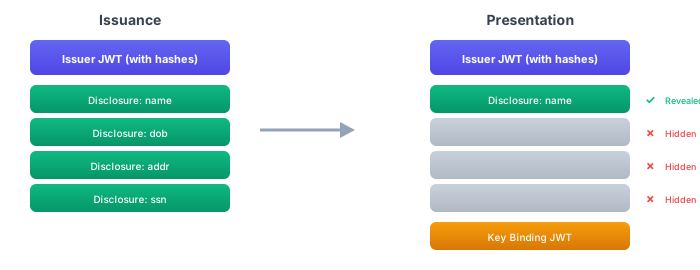
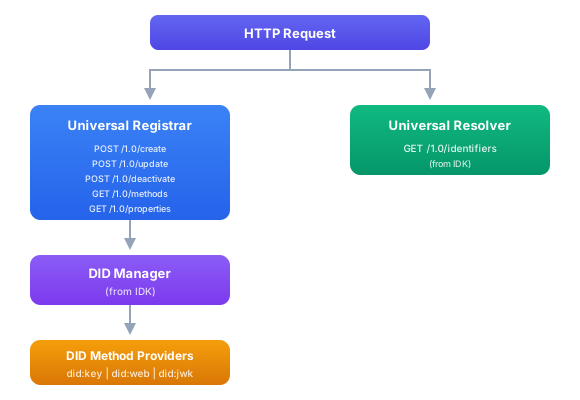
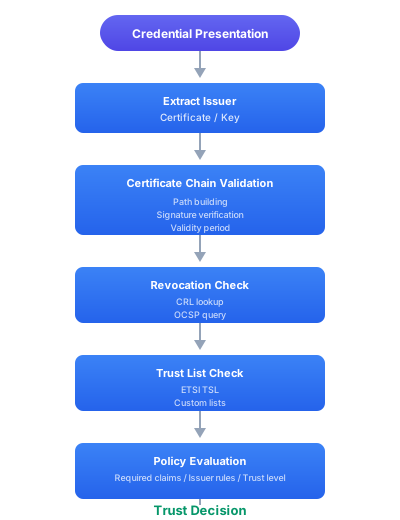
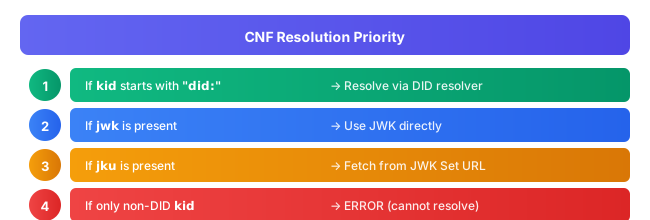
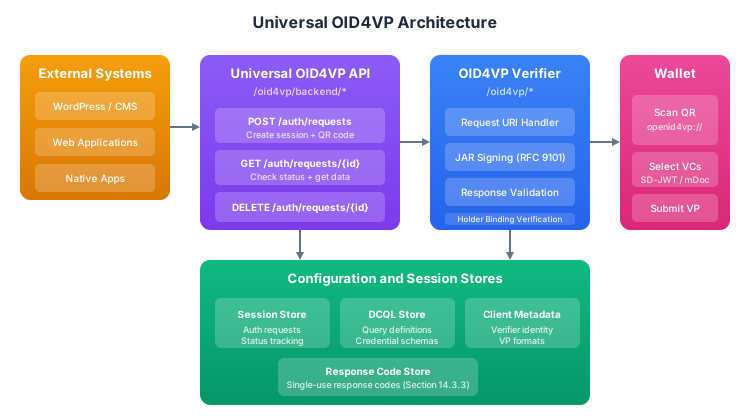
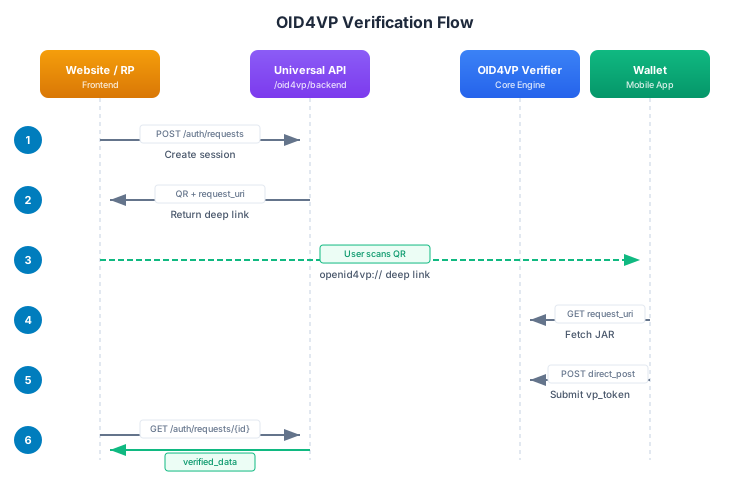
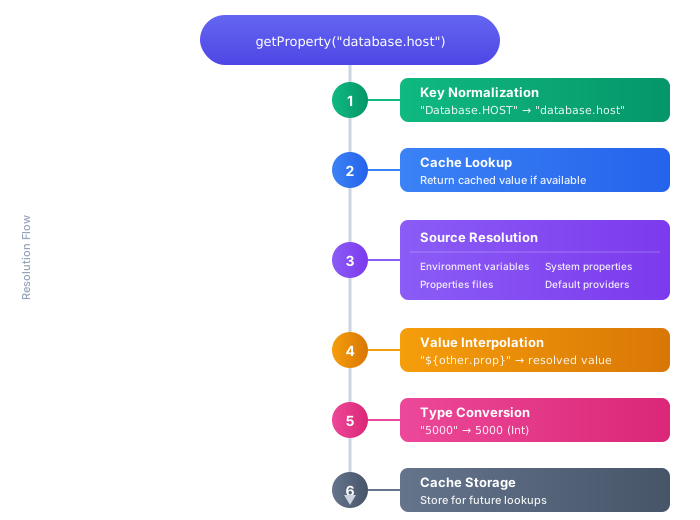
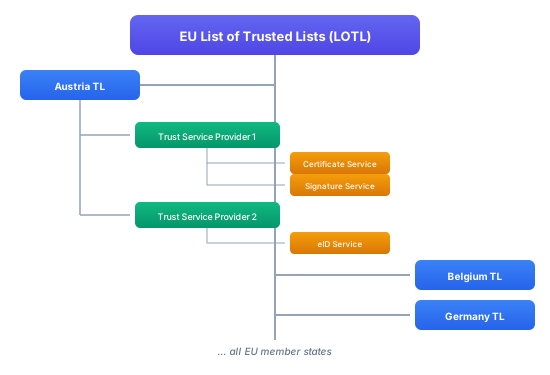
EngagementInstance Interface ```kotlin /** * Represents an instance of an engagement process with associated data, events, and operations. */ interface EngagementInstance : MdocEngagementEvent.Handlers { /** * Unique identifier for this engagement instance */ val id: Uuid /** * The engagement data containing connection details, ephemeral keys, and retrieval methods */ val data: MdocEngagementData /** * Whether this engagement is currently active (not suspended by another engagement) */ val isActive: StateFlow /** * Transfer instance associated with this engagement (available after start() is called) */ val transferInstance: TransferInstance? /** * Current state of the engagement */ fun getCurrentState(): MdocEngagementState /** * Starts the engagement process and initializes the transfer * * @return The transfer manager for handling device request/response exchange */ suspend fun start(): TransferManager /** * Retrieves the QR engagement data as a string (for generating QR code) * * @return QR code data encoded as mdoc:// URI */ suspend fun getEngagementUri(): String /** * Stream of engagement events for this instance */ val events: Flow } ```
## Direct EventHub Access For applications requiring fine-grained control, bypass the UI projection and access raw events directly: ```kotlin class CustomStateManager(private val manager: MdocEngagementManager) { private val eventHub = manager.eventHub fun observeEvents() { lifecycleScope.launch { // Option 1: All events (engagement + transfer) eventHub.allEvents.collect { event -> when (event) { is MdocEngagementEvent.QrShow -> handleQrShow(event) is MdocEngagementEvent.Connected -> handleConnected(event) is MdocRetrievalEvent.DocumentsSelectionProcessStart -> handleUserConsent(event) is MdocRetrievalEvent.SessionDataSend -> handleTransferComplete(event) } } } lifecycleScope.launch { // Option 2: Engagement events only eventHub.engagementEvents.collect { event -> /* ... */ } } lifecycleScope.launch { // Option 3: Transfer events only eventHub.transferEvents.collect { event -> /* ... */ } } } fun useBuiltInFilters() { lifecycleScope.launch { // Filter: Only final state events (order >= 200) eventHub.finalStateEvents().collect { event -> handleSessionCompletion(event) } } lifecycleScope.launch { // Filter: Only active transfer events (order 100-199) eventHub.activeTransferEvents().collect { event -> updateTransferProgress(event) } } lifecycleScope.launch { // Filter: Custom state order range eventHub.eventsInStateRange(minOrder = 100, maxOrder = 150).collect { event -> log("Mid-transfer event: ${event::class.simpleName}") } } } } ``` **EventHub Features:** - Filtered event streams by state order ranges - State tracking helpers (`latestEventByEngagement()`, `getCurrentStateByEngagement()`) - Event history and debugging (`getRecentEvents()`, `getEventTimeline()`) - Standard Flow operators for custom filtering ## Engagement and Transfer Events ### Engagement Events
MdocEngagementEvent Types ```kotlin sealed interface MdocEngagementEvent { val role: EngagementRole val engagementId: Uuid val state: MdocEngagementState val time: LocalDateTimeKMP data class Initializing(override val role: EngagementRole, override val engagementId: Uuid) : MdocEngagementEvent data class QrShow( override val role: EngagementRole, val qrCodeData: String, val engagement: DeviceEngagementCbor, override val engagementId: Uuid ) : MdocEngagementEvent data class NfcEngagement( override val role: EngagementRole, val engagement: DeviceEngagementCbor, override val engagementId: Uuid ) : MdocEngagementEvent data class Connecting( override val role: EngagementRole, val identifier: String, override val engagementId: Uuid, val dataRetrievalMethod: DataRetrievalTransmissionType ) : MdocEngagementEvent data class Connected( override val role: EngagementRole, override val engagementId: Uuid, val dataRetrievalMethod: DataRetrievalTransmissionType ) : MdocEngagementEvent data class Canceled( override val role: EngagementRole, val reason: String? = null, override val engagementId: Uuid ) : MdocEngagementEvent data class Disconnected( override val role: EngagementRole, val reason: String, override val engagementId: Uuid ) : MdocEngagementEvent data class Error( override val role: EngagementRole, val reason: String, val error: Throwable? = null, override val engagementId: Uuid ) : MdocEngagementEvent data class Data( override val role: EngagementRole, override val engagementId: Uuid, val data: ByteArray, val direction: Direction ) : MdocEngagementEvent { enum class Direction { INCOMING, OUTGOING } } } ```
### Engagement States
MdocEngagementState Values ```kotlin enum class MdocEngagementState(override val order: Int) : MdocEngagementStateEnum { INIT(10), // Initial state BLE_SCANNING(30), // BLE scanning in progress BLE_ADVERTISING(30), // BLE advertising active NFC_ENABLED(30), // NFC enabled and ready CONNECTING(50), // Connection process starting CONNECTED(70), // Connection established, data transfer can begin CANCELED(80), // Engagement canceled ERROR(90), // Error occurred DISCONNECTED(100) // Connection terminated } ``` States progress from lower to higher order values. Not every state is guaranteed to occur.
### Transfer/Retrieval Events
MdocRetrievalEvent Types ```kotlin sealed interface MdocRetrievalEvent { val data: ByteArray val time: LocalDateTimeKMP val state: MdocRetrievalStateType val engagementId: Uuid fun toCbor(): CborBaseItem class Initializing : MdocRetrievalEvent data class SessionEstablishmentReceived(override val data: ByteArray) : MdocRetrievalEvent // Contains encrypted session establishment from reader // Holder extracts DeviceRequest and prepares for document selection data class DeviceRequestReady(override val data: ByteArray) : MdocRetrievalEvent // DeviceRequest has been decrypted and is ready for processing data class DocumentsSelectionProcessStart(override val data: ByteArray) : MdocRetrievalEvent // User interaction required - show consent dialog data class DocumentsSelectionProcessAccepted(override val data: ByteArray) : MdocRetrievalEvent // User accepted - contains DeviceResponse data class DocumentsSelectionProcessDeclined(override val data: ByteArray) : MdocRetrievalEvent // User declined - will return error to reader data class SessionDataSend(override val data: ByteArray) : MdocRetrievalEvent // DeviceResponse is being sent to reader data class SessionTerminationSend(override val data: ByteArray) : MdocRetrievalEvent // Session termination message sent data class SessionTerminationReceived(override val data: ByteArray) : MdocRetrievalEvent // Session termination received from reader data class Error(override val data: ByteArray, val error: Throwable) : MdocRetrievalEvent } ```
### Transfer States
MdocRetrievalStateType Values ```kotlin enum class MdocRetrievalStateType(override val order: Int) : IMdocRetrievalState { INIT(10), // Initial state SESSION_ESTABLISHMENT_RECEIVED(30), // Session establishment received from reader DOCUMENTS_SELECTION_PROCESS_START(50), // User consent required DOCUMENTS_SELECTION_PROCESS_ACCEPTED(60), // User accepted request SESSION_DATA_SEND(70), // Sending DeviceResponse DOCUMENTS_SELECTION_PROCESS_DECLINED(80), // User declined request ERROR(90), // Error occurred TERMINATED(100) // Session terminated successfully } ```
## Transfer Manager The `TransferManager` handles the device request/response exchange after engagement is established. ### Typical Flow 1. Receive device request from reader 2. Show consent dialog to user 3. Create response with selected documents 4. Send response back to reader 5. Handle termination ```kotlin // 1. Start transfer (automatically done by engagement manager) val transferManager = engagementInstance.start() // 2. Receive device request val deviceRequest = transferManager.receiveDeviceRequest() // 3. Show to user and get consent showConsentDialog(deviceRequest) { accepted -> if (accepted) { lifecycleScope.launch { // 4. Create response with document provider val response = transferManager.createResponse( deviceRequest = deviceRequest, documentProvider = myDocumentProvider ) // 5. Send response transferManager.sendDeviceResponse(response) } } else { // User declined engagementManager.closeAll() } } ```
TransferManager Interface ```kotlin interface TransferManager : MdocRetrievalEvent.Handlers, RequestResponseProcessor { /** * The engagement instance associated with this transfer */ val engagement: EngagementInstance /** * The transfer session managing transmission state */ val session: TransferSession /** * The data channel for raw data transmission */ val datachannel: MdocDataRetrievalChannelService /** * Receives device request from reader * * @return DeviceRequest object containing requested documents and elements */ suspend fun receiveDeviceRequest(): DeviceRequest /** * Sends device response back to reader * * @param deviceResponse Response containing documents or error status */ suspend fun sendDeviceResponse(deviceResponse: DeviceResponse) /** * Creates response based on device request and document provider * * @param deviceRequest The request from the reader * @param documentProvider Provider that supplies requested documents * @return Result containing DeviceResponse or error */ override fun createResponse( deviceRequest: DeviceRequest, documentProvider: DocumentProvider ): IdkResult } ```
## Document Selection and Response Creation When a device request is received, you need to select appropriate documents and create a response. The SDK provides functional interfaces for customization: ### Default Implementation ```kotlin // Use default document selection val deviceResponse = transferManager.createResponse( deviceRequest = deviceRequest, documentProvider = myDocumentProvider ) ``` The default implementation: - Automatically performs selective disclosure (only returns requested elements) - Returns the first matching document if multiple are available - Handles namespace filtering and element intentToRetain flags ### Custom Document Selection Register custom selectors for fine-grained control: ```kotlin presentationService.registerCustomResponseSelectors( requestResponseProcessor = null, // Use default requestDocumentsSelector = null, // Use default docRequestSingleDocumentSelector = MyCustomSelector() // Custom single doc selector ) ```
Document Selection Interfaces ```kotlin /** * Selects a single document from available documents based on a request */ fun interface DocumentRequestSingleDocumentSelector { fun select( docRequest: DocRequestCbor, availableDocuments: (customSelectorData: Any?) -> Set ): IdkResult } /** * Selects documents based on the complete device request */ fun interface RequestDocumentsSelector { fun selectDocuments(deviceRequest: DeviceRequest): IdkResult, IdkError> } /** * Processes request and creates complete response */ fun interface RequestResponseProcessor { fun createResponse(deviceRequest: DeviceRequest): IdkResult } ```
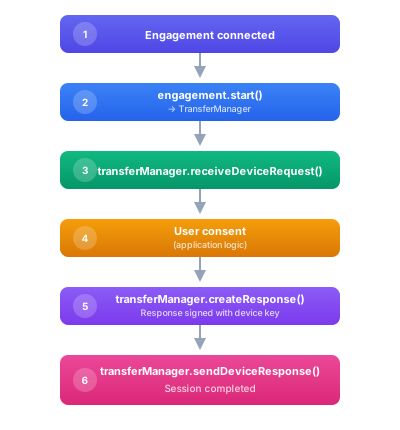
## Transport Methods ### BLE (Bluetooth Low Energy) **Holder Configuration:** ```kotlin retrieval { ble { centralClientMode = true // Holder scans for reader's peripheral peripheralServerMode = false } } ``` **Reader Configuration:** ```kotlin retrieval { ble { centralClientMode = false peripheralServerMode = true // Reader advertises peripheral } } ``` ### NFC (Near Field Communication) **Holder (Android only):** ```kotlin engagement { device { nfc { } // Enables NFC engagement } } retrieval { nfc { } // Enables NFC data transfer } ``` :::warning iOS NFC Limitation NFC engagement is not available for iOS mdoc holders due to Apple's NFC restrictions. Only mdoc readers can use NFC on iOS. ::: ### QR Code with BLE Transfer **Common Pattern:** ```kotlin engagement { device { qr { scheme = "mdoc://" } } } retrieval { ble { centralClientMode = true // Holder acts as BLE central } } ``` Reader scans QR code (engagement), then connects via BLE (transfer). ## Best Practices ### 1. Use Session UI Projection for Standard Wallets For typical wallet applications with standard UI patterns, use the Session UI Projection layer: ```kotlin manager.eventHub.sessionState.collect { state -> // Single state object with all UI-relevant information // Deterministic phase transitions // Automatic QR hiding on transfer start } ``` ### 2. Favor NFC for Engagement (Android) NFC provides better security and user experience: - Tap-to-share familiar from payments - Prevents QR code hijacking/shoulder surfing - Faster connection establishment ### 3. Favor BLE for Transfer BLE is better for data transfer than NFC: - Higher throughput - No need to keep devices touching during transfer - Better for larger payloads ### 4. Always Show Consent Dialog Display what will be shared before calling `sendDeviceResponse()`: ```kotlin val parsed = state.parseDeviceRequest() val summary = parsed.documents.joinToString("\n\n") { doc -> val attrs = doc.nameSpaces.flatMap { (ns, attributes) -> attributes.map { "$ns/$it" } } "${doc.docType}:\n${attrs.joinToString("\n")}" } showConsentDialog(summary) { accepted -> if (accepted) sendResponse() else manager.closeAll() } ``` ### 5. Handle Engagement Suspension When using multiple engagement types (e.g., NFC + QR), handle suspension properly: ```kotlin manager.eventHub.sessionState.collect { state -> if (state.isSuspended) { showSuspendedOverlay() statusText.text = "Suspended - another session active" } } ``` ### 6. Clean Up Resources Always close engagement manager when done: ```kotlin override fun onDestroy() { super.onDestroy() engagementManager.close() // Closes all engagements and transfers } ``` ## Platform-Specific Notes ### Android - **Min SDK**: 27 (Android 8) - **Target SDK**: 35 (Android 15) - **Permissions**: BLUETOOTH, BLUETOOTH_ADMIN, BLUETOOTH_ADVERTISE, BLUETOOTH_CONNECT, BLUETOOTH_SCAN, NFC - **NFC HCE**: Extend `AbstractMdocNfcService` for host card emulation ### iOS - **NFC Limitation**: NFC engagement not available for holders (only readers) - **CoreBluetooth**: Required for BLE operations - **Async/Await**: Kotlin coroutines bridge to Swift's async/await - **Memory**: Always call `.close()` on managers to prevent leaks ## Additional Resources - [ISO/IEC 18013-5:2021](https://www.iso.org/standard/69084.html) - Official standard - [Identity Development Kit Documentation](https://docs.sphereon.com/idk/v0.10/intro) For questions or support, open an issue at: https://github.com/Sphereon-Opensource/identity-development-kit/issues --- # Event and UI handling import Tabs from "@theme/Tabs"; import TabItem from "@theme/TabItem"; ## Overview This guide covers **two approaches** for integrating mdoc engagement and transfer events into your UI: ### 1. UI Projection Layer (Recommended for most apps) The Session UI Projection layer provides a simplified, opinionated view of the mdoc engagement and transfer lifecycle, specifically designed for quick UI integration. Instead of handling complex raw engagement and retrieval events, UIs can bind to a single state flow (`sessionState`) that provides deterministic, UI-friendly state information. **Best for:** - Standard wallet applications with typical UI patterns - Quick integration with sensible defaults - Developers who want deterministic QR visibility and phase transitions - Teams that prefer a single state object over coordinating multiple event streams ### 2. Direct EventHub Access (Advanced) For applications requiring fine-grained control, you can bypass the UI projection layer and access raw events directly from the `MdocEventHub`. This approach gives you complete control over event handling and state management. **Best for:** - Integration with existing state management frameworks (Redux, MVI, etc.) - Custom UI logic that differs from the opinionated projection - Applications that need to track multiple engagements simultaneously - Advanced debugging and event inspection - Full control over every event in the lifecycle --- **Implementation details:** - `SessionUiState.kt` - All types implemented and verified - `SessionUiProjector.kt` - Full projection logic implemented - `MdocEventHub.kt` - Exposes both `sessionState`/`sessionEvents` (projection) and `allEvents`/`engagementEvents`/`transferEvents` (direct access) - `MdocEngagementManager.kt` The starting point providing access to the above ## Key Concepts ### Design Principles 1. **Deterministic State Transitions** - Clear, predictable phase progression: ENGAGEMENT → TRANSFER → TERMINAL 2. **Single Source of Truth** - One state flow to bind, no need to coordinate multiple event streams 3. **UI-Centric Events** - Simplified events that map directly to UI actions 4. **Built-in Logic** - QR visibility, suspension tracking, and progress hints handled automatically 5. **Non-Breaking** - Optional layer on top of existing event system ### Architecture **Approach 1: UI Projection (Recommended)** ``` Raw Events (Engagement + Retrieval) ↓ SessionUiProjector ↓ SessionEvent (simplified) ↓ SessionUiState (deterministic) ↓ Your UI ``` **Approach 2: Direct EventHub Access** ``` MdocEngagementManager ↓ MdocEventHub ↓ ┌───────┴───────┐ │ │ allEvents engagementEvents + transferEvents │ │ └───────┬───────┘ ↓ Your Custom State Management ↓ Your UI ``` Both approaches are fully supported and can be used simultaneously if needed (e.g., using `sessionState` for main UI while observing raw events for analytics). ## Core Types ### UiPhase High-level phases of the session lifecycle: - **ENGAGEMENT** - QR display, NFC handover preparation - **TRANSFER** - Connection, data exchange, user interaction - **TERMINAL** - Session finished (success, error, declined, etc.) ### TerminalOutcome Classification of terminal states for appropriate UI feedback: - **SUCCESS** - Transfer completed successfully, data was shared - **DECLINED** - User declined to share the requested data - **CANCELED** - Session was canceled (by user or system) - **ERROR** - An error occurred during the session ### NfcMode NFC engagement state for UI display logic, determined by whether an NFC engagement exists and whether it is the active engagement: - **DISABLED** - No NFC engagement exists - **BACKGROUND** - NFC engagement exists but is not the active engagement - **FOREGROUND** - NFC engagement exists and is the active engagement ### QrMode QR display state for UI: - **NONE** - No QR engagement active, no scanning in progress - **DISPLAY** - Regular QR engagement active (display QR code for reader to scan) - **SCAN** - **UI-managed scanning mode** (user is scanning reader's QR code) **IMPORTANT:** `SCAN` mode is different from the other modes: - `NONE` and `DISPLAY` are set automatically by the projector based on engagements - `SCAN` is **UI-managed** and set manually by your code - Scanning happens *before* creating a TO_APP engagement - The UI opens a scanner, user scans to get a URI, then UI creates the engagement ### SessionUiState The main state object containing all UI-relevant information: ```kotlin data class SessionUiState( val phase: UiPhase, // Current phase val substateLabel: String, // Human-readable label val nfcMode: NfcMode, // NFC mode (DISABLED/BACKGROUND/FOREGROUND) val qrMode: QrMode, // QR mode (NONE/DISPLAY/SCAN) val isSuspended: Boolean, // Engagement suspended? val progressHint: Float?, // Progress (0.0-1.0) val terminalOutcome: TerminalOutcome?, // Terminal classification val terminalMessage: String?, // Terminal details val userInteractionRequired: Boolean, // User must act? val deviceRequest: ByteArray? // Device Request from Reader to review ) ``` ### SessionEvent Simplified events that drive state transitions. These are mapped from raw `MdocEngagementEvent` and `MdocRetrievalEvent`: - `QrShow` - QR code is being shown (from `MdocEngagementEvent.QrShow`) - `NfcPromptShown` - NFC prompt should be shown (from `MdocEngagementEvent.NfcEngagement`) - `NfcHandoverSuccess` - NFC handover succeeded (from `MdocEngagementEvent.Connected` when NFC) - `TransferConnecting` - Transfer is connecting (from `MdocEngagementEvent.Connecting` or `MdocRetrievalEvent.TransmissionTypeSelected`) - `TransferConnected` - Transfer connected successfully (from `MdocEngagementEvent.Connected` non-NFC or retrieval connected) - `UserInteractionRequired(deviceRequest)` - User must review and accept/decline (from `MdocRetrievalEvent.DocumentsSelectionProcessStart`) - `UserAccepted` - User accepted the document request (from `MdocRetrievalEvent.DocumentsSelectionProcessAccepted`) - `UserDeclined` - User declined the document request (from `MdocRetrievalEvent.DocumentsSelectionProcessDeclined`) - `TransferProgress(fraction)` - Transfer progress update (from `MdocRetrievalEvent.SessionDataReceived` at 0.3, `SessionDataSend` at 0.7) - `Terminal(outcome, message)` - Session reached terminal state (from various terminal events with appropriate outcome classification) ## Usage Examples > **Real-World Example:** For a complete sample app implementation using `sessionState` and the UI projection layer, see the [Kiwa Sample Holder App](https://github.com/Sphereon-Opensource/kiwa-sample/blob/develop/example/holder/ui/elicense/impl/src/commonMain/kotlin/com/sphereon/kiwa/sample/ui/elicense/engagement/qr/MdocEngagementPresenterImpl.kt). > > This example demonstrates: > - Collecting `sessionState` with `collectAsState()` in Jetpack Compose > - Handling all three phases (ENGAGEMENT, TRANSFER, TERMINAL) > - QR code generation based on `qrMode` > - User consent dialogs with document selection > - Proper cleanup and error handling > - Integration with a sample document provider ```kotlin class WalletActivity : AppCompatActivity() { private lateinit var manager: MdocEngagementManager private var currentTransferManager: TransferManager? = null override fun onCreate(savedInstanceState: Bundle?) { super.onCreate(savedInstanceState) // Track active transfer manager lifecycleScope.launch { manager.activeEngagement.collect { engagement -> currentTransferManager = engagement?.transferManager } } // Collect session state lifecycleScope.launch { manager.eventHub.sessionState.collect { state -> updateUI(state) } } } private fun updateUI(state: SessionUiState) { when (state.phase) { UiPhase.ENGAGEMENT -> handleEngagement(state) UiPhase.TRANSFER -> handleTransfer(state) UiPhase.TERMINAL -> handleTerminal(state) } } private fun handleEngagement(state: SessionUiState) { // Update status statusText.text = state.substateLabel // Handle QR based on mode when (state.qrMode) { QrMode.DISPLAY -> { // Show QR code for reader to scan qrCodeView.visibility = View.VISIBLE qrScannerView.visibility = View.GONE showQrButton.text = "Show QR" } QrMode.SCAN -> { // Show scanner for scanning reader's QR qrCodeView.visibility = View.GONE qrScannerView.visibility = View.VISIBLE showQrButton.text = "Scan QR" } QrMode.NONE -> { qrCodeView.visibility = View.GONE qrScannerView.visibility = View.GONE } } // Handle NFC based on mode when (state.nfcMode) { NfcMode.DISABLED -> { // No NFC available nfcPrompt.visibility = View.GONE nfcIcon.visibility = View.GONE } NfcMode.BACKGROUND -> { // Show icon but not active prompt nfcPrompt.visibility = View.GONE nfcIcon.visibility = View.VISIBLE nfcIcon.alpha = 0.5f // Dimmed to indicate background } NfcMode.FOREGROUND -> { // Show active "tap to share" prompt nfcPrompt.visibility = View.VISIBLE nfcIcon.visibility = View.VISIBLE nfcIcon.alpha = 1.0f nfcPrompt.text = "Hold near reader to share" } } // Handle suspension if (state.isSuspended) { overlayView.visibility = View.VISIBLE statusText.text = "Suspended - another session active" } } private fun handleTransfer(state: SessionUiState) { statusText.text = state.substateLabel // QR and scanner hidden during transfer qrCodeView.visibility = View.GONE qrScannerView.visibility = View.GONE when { state.userInteractionRequired -> { // User must review and accept/decline currentTransferManager?.let { transferMgr -> showConsentDialog(state.deviceRequest!!, transferMgr) } } state.progressHint != null -> { // Show progress progressBar.progress = (state.progressHint * 100).toInt() progressBar.visibility = View.VISIBLE } else -> { // Show spinner for connecting/processing progressBar.isIndeterminate = true progressBar.visibility = View.VISIBLE } } } private fun handleTerminal(state: SessionUiState) { progressBar.visibility = View.GONE when (state.terminalOutcome) { TerminalOutcome.SUCCESS -> { showSuccessDialog( title = "Success!", message = "Your data was shared successfully" ) } TerminalOutcome.DECLINED -> { showInfoDialog( title = "Request Declined", message = "You chose not to share your data" ) } TerminalOutcome.CANCELED -> { showInfoDialog( title = "Canceled", message = state.terminalMessage ?: "Session was canceled" ) } TerminalOutcome.ERROR -> { showErrorDialog( title = "Error", message = state.terminalMessage ?: "An error occurred" ) } } } private fun showConsentDialog(deviceRequestBytes: ByteArray, transferManager: TransferManager) { // Parse the device request using the helper extension val tempState = SessionUiState( phase = UiPhase.TRANSFER, substateLabel = "", nfcMode = NfcMode.DISABLED, qrMode = QrMode.NONE, isSuspended = false, progressHint = null, terminalOutcome = null, terminalMessage = null, userInteractionRequired = true, deviceRequest = deviceRequestBytes ) val parsed = tempState.parseDeviceRequest() if (parsed == null) { // Handle parse error return } // Decode the device request for creating response val deviceRequest = DeviceRequest.Decoder.decodeCbor(deviceRequestBytes) // Display requested documents and attributes val requestSummary = parsed.documents.joinToString("\n\n") { doc -> val attrs = doc.nameSpaces.flatMap { (ns, attributes) -> attributes.map { "$ns/$it" } } "${doc.docType}:\n${attrs.joinToString("\n")}" } AlertDialog.Builder(this) .setTitle("Share your data?") .setMessage("The verifier is requesting:\n\n$requestSummary") .setPositiveButton("Share") { _, _ -> // User accepted - create and send response with documents lifecycleScope.launch { val response = transferManager.createResponse( deviceRequest = deviceRequest, documentProvider = myDocumentProvider // Provides requested documents ) transferManager.sendDeviceResponse(response) // This will trigger DocumentsSelectionProcessAccepted event } } .setNegativeButton("Decline") { _, _ -> // User declined - close the session without sending documents lifecycleScope.launch { manager.closeAll() // This will trigger DocumentsSelectionProcessDeclined event } } .setCancelable(false) .show() } } ``` ```swift class WalletViewController: UIViewController { private var manager: MdocEngagementManager! private var stateObserver: Task? override func viewDidLoad() { super.viewDidLoad() // Observe session state using Kotlin Flow adapter stateObserver = Task { for await state in manager.eventHub.sessionState { await updateUI(state: state) } } } deinit { stateObserver?.cancel() } @MainActor private func updateUI(state: SessionUiState) { switch state.phase { case .engagement: handleEngagement(state: state) case .transfer: handleTransfer(state: state) case .terminal: handleTerminal(state: state) } } private func handleEngagement(state: SessionUiState) { statusLabel.text = state.substateLabel // Handle QR mode switch state.qrMode { case .display: qrCodeView.isHidden = false case .none, .scan: qrCodeView.isHidden = true } // Handle NFC mode switch state.nfcMode { case .disabled: nfcPromptView.isHidden = true nfcIcon.isHidden = true case .background: nfcPromptView.isHidden = true nfcIcon.isHidden = false nfcIcon.alpha = 0.5 case .foreground: nfcPromptView.isHidden = false nfcIcon.isHidden = false nfcIcon.alpha = 1.0 } // Handle suspension if state.isSuspended { overlayView.isHidden = false statusLabel.text = "Suspended - another session active" } } private func handleTransfer(state: SessionUiState) { statusLabel.text = state.substateLabel qrCodeView.isHidden = true if state.userInteractionRequired { showConsentSheet(deviceRequest: state.deviceRequest!) } else if let progress = state.progressHint { progressView.progress = progress progressView.isHidden = false } else { activityIndicator.startAnimating() } } private func handleTerminal(state: SessionUiState) { activityIndicator.stopAnimating() switch state.terminalOutcome { case .success: showAlert(title: "Success!", message: "Data shared successfully") case .declined: showAlert(title: "Declined", message: "You chose not to share") case .canceled: showAlert(title: "Canceled", message: state.terminalMessage ?? "Session canceled") case .error: showAlert(title: "Error", message: state.terminalMessage ?? "An error occurred") default: break } } } ``` ```kotlin @Composable fun WalletScreen(manager: MdocEngagementManager) { val sessionState by manager.eventHub.sessionState.collectAsState() WalletContent(state = sessionState) } @Composable fun WalletContent(state: SessionUiState) { Box(modifier = Modifier.fillMaxSize()) { when (state.phase) { UiPhase.ENGAGEMENT -> EngagementView(state) UiPhase.TRANSFER -> TransferView(state) UiPhase.TERMINAL -> TerminalView(state) } if (state.isSuspended) { SuspendedOverlay() } } } @Composable fun EngagementView(state: SessionUiState) { Column( modifier = Modifier.fillMaxSize(), horizontalAlignment = Alignment.CenterHorizontally, verticalArrangement = Arrangement.Center ) { Text(text = state.substateLabel, style = MaterialTheme.typography.h6) Spacer(modifier = Modifier.height(16.dp)) // Show QR code when in DISPLAY mode if (state.qrMode == QrMode.DISPLAY) { QRCodeDisplay() } // Show NFC prompt when in FOREGROUND mode if (state.nfcMode == NfcMode.FOREGROUND) { NfcPromptDisplay() } // Show small NFC icon when in BACKGROUND mode if (state.nfcMode == NfcMode.BACKGROUND) { NfcBackgroundIcon() } } } @Composable fun TransferView(state: SessionUiState) { Column( modifier = Modifier.fillMaxSize(), horizontalAlignment = Alignment.CenterHorizontally, verticalArrangement = Arrangement.Center ) { Text(text = state.substateLabel) when { state.userInteractionRequired -> { ConsentDialog(deviceRequest = state.deviceRequest!!) } state.progressHint != null -> { LinearProgressIndicator(progress = state.progressHint) } else -> { CircularProgressIndicator() } } } } @Composable fun TerminalView(state: SessionUiState) { val (icon, color, title) = when (state.terminalOutcome) { TerminalOutcome.SUCCESS -> Triple( Icons.Default.CheckCircle, Color.Green, "Success!" ) TerminalOutcome.DECLINED -> Triple( Icons.Default.Cancel, Color.Orange, "Declined" ) TerminalOutcome.ERROR -> Triple( Icons.Default.Error, Color.Red, "Error" ) else -> Triple( Icons.Default.Info, Color.Gray, "Completed" ) } Column( modifier = Modifier.fillMaxSize(), horizontalAlignment = Alignment.CenterHorizontally, verticalArrangement = Arrangement.Center ) { Icon( imageVector = icon, contentDescription = null, tint = color, modifier = Modifier.size(64.dp) ) Spacer(modifier = Modifier.height(16.dp)) Text(text = title, style = MaterialTheme.typography.h5) state.terminalMessage?.let { message -> Spacer(modifier = Modifier.height(8.dp)) Text(text = message, style = MaterialTheme.typography.body2) } } } ``` ## State Transition Flow ### QR Display Flow (Regular QR) ``` ENGAGEMENT (qrMode=DISPLAY, nfcMode=BACKGROUND) ↓ QrShow ENGAGEMENT (qrMode=DISPLAY, "Scan the QR with reader") ↓ TransferConnecting TRANSFER (qrMode=NONE, "Connecting…") ← QR automatically switched to NONE ↓ TransferConnected TRANSFER ("Connected") ↓ UserInteractionRequired TRANSFER (userInteractionRequired=true, "Review request") ↓ UserAccepted TRANSFER (userInteractionRequired=false, "Sharing credentials…") ↓ TransferProgress(0.7) TRANSFER (progressHint=0.7, "Transferring…") ↓ Terminal(SUCCESS, "Transfer completed successfully") TERMINAL (terminalOutcome=SUCCESS, qrMode=NONE, "Completed") ``` ### Reverse/ToApp Flow (Scan Then Engage) **Important:** Scanning happens *before* creating the engagement, so it's not reflected in session state. ``` [UI-managed scanning - not in sessionState] ↓ User opens scanner (your code manages this) ↓ User scans reader's QR code ↓ Get URI from scanned QR ↓ Create TO_APP engagement with URI ENGAGEMENT (qrMode=NONE, nfcMode=BACKGROUND) ↓ TransferConnecting (engagement starts immediately) TRANSFER (qrMode=NONE, "Connecting…") ↓ TransferConnected TRANSFER ("Connected") ↓ [continues as normal transfer flow] ``` **Note:** The `qrMode` stays `NONE` throughout because there's no QR code to *display*. The scanning was done before the engagement existed. ### NFC Foreground Flow ``` ENGAGEMENT (nfcMode=FOREGROUND, qrMode=NONE) ↓ NfcPromptShown ENGAGEMENT ("Hold near reader") ↓ User taps phone to reader ↓ NfcHandoverSuccess TRANSFER (nfcMode=FOREGROUND, "Connecting…") ↓ TransferConnected TRANSFER ("Connected") ↓ UserInteractionRequired TRANSFER (userInteractionRequired=true, "Review request") ↓ UserDeclined TERMINAL (terminalOutcome=DECLINED, "User declined to share data") ``` ### NFC Background Flow (QR active, NFC available) ``` ENGAGEMENT (nfcMode=BACKGROUND, qrMode=DISPLAY) ↓ User shows QR to reader, but reader uses NFC instead ↓ NfcHandoverSuccess (NFC takes over) TRANSFER (nfcMode=FOREGROUND, qrMode=NONE, "Connecting…") ↓ [continues as above] ``` ## Key Rules & Behaviors ### NFC Mode Management The `nfcMode` property automatically tracks NFC engagement status based on whether an NFC engagement exists and whether it is the currently active engagement: **DISABLED** - No NFC engagement exists: - No NFC engagement has been created - Typical scenarios: iOS mdoc holder (NFC not available for holder apps), Android with NFC hardware disabled - UI should not show any NFC elements **BACKGROUND** - NFC engagement exists but is not the active engagement: - An NFC engagement has been created but another engagement (QR or TO_APP) is currently active - The system can still respond to NFC taps, but focus is on the other engagement - UI should show a small NFC icon/indicator (dimmed/inactive state) - Don't show active "tap to share" prompt - User can tap their phone to a reader to switch NFC to foreground **FOREGROUND** - NFC engagement exists and is the active engagement: - The NFC engagement is currently the active engagement (no other engagement is active, or NFC became active) - UI should show prominent "tap to share" prompt - This is the primary engagement method the user should use ### QR Mode Management The `qrMode` property tracks QR display state: **NONE** - No QR engagement active (default state) **DISPLAY** - Regular QR engagement active (ISO 18013-5) - Automatically set when QR engagement is created - Display QR code for reader to scan - Reader scans holder's QR **SCAN** - UI-managed scanning mode (ISO 18013-7 pre-engagement) - **NOT set automatically** - you manage this yourself - Used for reverse/ToApp engagement flow - User scans reader's QR to get URI - Then you create TO_APP engagement with that URI **Important:** For reverse/ToApp engagements, scanning happens *before* creating the engagement: ```kotlin // Your own scanning state (not from sessionState) var isScanningQr by remember { mutableStateOf(false) } // User taps "Scan QR" Button(onClick = { isScanningQr = true }) { Text("Scan QR") } // Show scanner when YOUR state says so if (isScanningQr) { QrScanner { scannedUri -> isScanningQr = false // NOW create the engagement with scanned URI manager.createEngagement( EngagementType.TO_APP, config.copy(readerEngagementUri = scannedUri) ) // state.qrMode stays NONE (no QR to display) } } // Show QR code when engagement says so if (state.qrMode == QrMode.DISPLAY) { QrCodeDisplay() } ``` The projector only sets qrMode to DISPLAY (for QR engagements). You handle the scanning UI yourself. ### User Interaction - `userInteractionRequired=true` when `DocumentsSelectionProcessStart` received - `deviceRequest` contains CBOR-encoded DeviceRequest for decoding - UI should display consent dialog and wait for user decision - User response handled by transfer manager (accept/decline methods) - `UserAccepted` → continue transfer - `UserDeclined` → immediate transition to TERMINAL with DECLINED outcome ### Suspension - `isSuspended` mirrors `activeEngagement?.isActive == false` - Suspended engagements won't respond to connection attempts - UI should show overlay or disabled state when suspended ### Progress Tracking - `progressHint` is `null` during connection/setup phases - `progressHint` is `0.0-1.0` during data transfer - Use indeterminate progress indicator when `progressHint == null` ### Terminal States Always check `terminalOutcome` to provide appropriate feedback: - **SUCCESS** → Show success message, confetti, checkmark - **DECLINED** → Show neutral message, explain user choice - **CANCELED** → Show neutral message, allow retry - **ERROR** → Show error dialog with details, offer retry ## Advanced Usage ### Observing Raw Events (Optional) If you need access to detailed events alongside the UI state: ```kotlin // Observe simplified session events launch { manager.eventHub.sessionEvents.collect { event -> when (event) { is SessionEvent.UserInteractionRequired -> { logAnalytics("consent_shown") } is SessionEvent.Terminal -> { logAnalytics("session_ended", mapOf( "outcome" to event.outcome.name )) } else -> {} } } } // Observe UI state launch { manager.eventHub.sessionState.collect { state -> updateUI(state) } } ``` ### Direct EventHub Access (Alternative to UI Projection) If you need more control or prefer to build your own state management, you can bypass the UI projection layer entirely and access the raw event streams directly from the EventHub. The EventHub provides powerful filtering capabilities through built-in methods and standard Flow operators: ```kotlin class CustomStateManager(private val manager: MdocEngagementManager) { private val eventHub = manager.eventHub // Build your own state management by observing raw events fun observeEvents() { // Option 1: Observe all events (engagement + transfer) lifecycleScope.launch { eventHub.allEvents.collect { event -> when (event) { is MdocEngagementEvent.QrShow -> handleQrShow(event) is MdocEngagementEvent.Connected -> handleConnected(event) is MdocRetrievalEvent.DocumentsSelectionProcessStart -> handleUserConsent(event) is MdocRetrievalEvent.SessionDataSend -> handleTransferComplete(event) // ... handle all other events } } } // Option 2: Observe engagement events only lifecycleScope.launch { eventHub.engagementEvents.collect { event -> when (event) { is MdocEngagementEvent.QrShow -> { // Show QR code displayQrCode(event.qrCodeData) } is MdocEngagementEvent.NfcEngagement -> { // Show NFC prompt showNfcPrompt() } is MdocEngagementEvent.Connecting -> { // Connection starting showConnectingState() } is MdocEngagementEvent.Connected -> { // Connection established showConnectedState() } is MdocEngagementEvent.Error -> { // Handle error showError(event.reason) } // ... other engagement events } } } // Option 3: Observe transfer/retrieval events only lifecycleScope.launch { eventHub.transferEvents.collect { event -> when (event) { is MdocRetrievalEvent.TransmissionTypeSelected -> { // Transfer type selected log("Transfer starting with ${event.transmissionType}") } is MdocRetrievalEvent.DocumentsSelectionProcessStart -> { // User needs to consent val deviceRequest = DeviceRequest.Decoder.decodeCbor(event.data) showConsentDialog(deviceRequest) } is MdocRetrievalEvent.DocumentsSelectionProcessAccepted -> { // User accepted log("User accepted request") } is MdocRetrievalEvent.SessionDataSend -> { // Data sent log("Response sent to reader") } is MdocRetrievalEvent.SessionTerminationSend -> { // Session completed successfully showSuccess() } is MdocRetrievalEvent.Error -> { // Transfer error showError(event.error.message ?: "Transfer failed") } // ... other transfer events } } } } // Use state tracking helpers for building custom state fun trackState() { lifecycleScope.launch { // Track latest engagement events per engagement eventHub.latestEventByEngagement().collect { eventsMap -> eventsMap.forEach { (engagementId, event) -> log("Engagement $engagementId: ${event::class.simpleName}") } } } lifecycleScope.launch { // Track latest transfer events per engagement eventHub.latestTransferEventByEngagement().collect { transfersMap -> transfersMap.forEach { (engagementId, event) -> log("Transfer for engagement $engagementId: ${event::class.simpleName}") } } } lifecycleScope.launch { // Track current engagement state per engagement eventHub.getCurrentStateByEngagement().collect { statesMap -> statesMap.forEach { (engagementId, state) -> log("Engagement $engagementId state: $state") } } } lifecycleScope.launch { // Track current transfer state per engagement eventHub.getCurrentTransferStateByEngagement().collect { transferStatesMap -> transferStatesMap.forEach { (engagementId, state) -> log("Transfer state for engagement $engagementId: $state") } } } } // Built-in event filtering methods fun useBuiltInFilters() { lifecycleScope.launch { // Filter: Only final state events (order >= 200) // Detects when engagements or transfers finish eventHub.finalStateEvents().collect { event -> log("Session ended: ${event::class.simpleName}") handleSessionCompletion(event) } } lifecycleScope.launch { // Filter: Only active transfer events (order 100-199) // Track ongoing data exchange eventHub.activeTransferEvents().collect { event -> log("Active transfer: ${event::class.simpleName}") updateTransferProgress(event) } } lifecycleScope.launch { // Filter: Events within custom state order range // State orders: 0-99 (engagement), 100-199 (transfer), 200+ (final) eventHub.eventsInStateRange(minOrder = 100, maxOrder = 150).collect { event -> log("Mid-transfer event: ${event::class.simpleName}") } } lifecycleScope.launch { // Filter: Transfer completion events only eventHub.onTransferCompletion.collect { event -> log("Transfer completed: ${event::class.simpleName}") handleCompletion(event) } } } // Standard Flow operators for custom filtering fun customFiltering() { lifecycleScope.launch { // Filter by event type using Flow operators eventHub.allEvents .filter { it is MdocEngagementEvent.Connected || it is MdocEngagementEvent.Error } .collect { event -> log("Connection-related event: ${event::class.simpleName}") } } lifecycleScope.launch { // Filter by engagement ID val targetEngagementId = manager.activeEngagement.value?.id eventHub.allEvents .filter { it.engagementId == targetEngagementId } .collect { event -> log("Event for active engagement: ${event::class.simpleName}") } } } // Access event history for debugging fun debugEventHistory() { // Get recent events from buffer val recentEvents = eventHub.getRecentEvents(count = 20) recentEvents.forEach { event -> log("${event::class.simpleName} at ${event.time}") } // Get recent engagement events only val recentEngagementEvents = eventHub.getRecentEngagementEvents(count = 10) recentEngagementEvents.forEach { event -> log("Engagement: ${event::class.simpleName}") } // Get recent transfer events only val recentTransferEvents = eventHub.getRecentTransferEvents(count = 10) recentTransferEvents.forEach { event -> log("Transfer: ${event::class.simpleName}") } // Get complete event timeline with sequence numbers val timeline = eventHub.getEventTimeline() timeline.forEach { sequencedEvent -> log("#${sequencedEvent.sequenceNumber}: ${sequencedEvent.event::class.simpleName}") } // Configure buffer size if needed eventHub.setEventBufferSize(50) val currentSize = eventHub.getEventBufferSize() log("Event buffer size: $currentSize") } // State cleanup fun cleanup() { // Clear all state when closing all engagements eventHub.clearAllState() // Or clear state for a specific engagement val engagementId = manager.activeEngagement.value?.id if (engagementId != null) { eventHub.clearStateForEngagement(engagementId) } } } ``` **When to use direct EventHub access:** - You need fine-grained control over every event - You're integrating with existing state management (Redux, MVI, etc.) - You want to build custom UI logic that differs from the opinionated projection - You need to track multiple engagements simultaneously with custom logic - You're debugging complex state transitions **When to use UI Projection (sessionState/sessionEvents):** - You want quick, simple integration with sensible defaults - You're building a standard mdoc holder wallet UI - You want deterministic QR visibility and phase transitions - You prefer a single state object over coordinating multiple event streams **Example: Custom State Machine using EventHub** ```kotlin class CustomStateMachine(private val eventHub: MdocEventHub) { sealed class AppState { object Idle : AppState() data class ShowingQR(val qrData: String, val hasNfcBackground: Boolean) : AppState() object Connecting : AppState() data class WaitingForConsent(val request: DeviceRequest) : AppState() object Transferring : AppState() data class Completed(val success: Boolean, val message: String?) : AppState() } private val _state = MutableStateFlow(AppState.Idle) val state: StateFlow = _state.asStateFlow() init { // Build state machine from raw events lifecycleScope.launch { eventHub.allEvents.collect { event -> _state.value = when (event) { is MdocEngagementEvent.QrShow -> { val hasNfc = eventHub.getCurrentStateByEngagement().value.any { (_, state) -> state.name.contains("NFC", ignoreCase = true) } AppState.ShowingQR(event.qrCodeData, hasNfc) } is MdocEngagementEvent.Connecting -> AppState.Connecting is MdocRetrievalEvent.DocumentsSelectionProcessStart -> { AppState.WaitingForConsent(DeviceRequest.Decoder.decodeCbor(event.data)) } is MdocRetrievalEvent.SessionDataSend -> AppState.Transferring is MdocRetrievalEvent.SessionTerminationSend -> { AppState.Completed(success = true, message = "Transfer successful") } is MdocRetrievalEvent.Error -> { AppState.Completed(success = false, message = event.error.message) } else -> _state.value // Keep current state for other events } } } } } ``` ### Handling Multiple Sessions The UI projection automatically handles active engagement switching: ```kotlin // Manager automatically updates sessionState based on activeEngagement // You don't need to track which engagement is active manager.eventHub.sessionState.collect { state -> // This state is always for the currently active engagement updateUI(state) if (state.isSuspended) { // Current engagement is suspended, another is active showSuspendedOverlay() } } ``` ### Decoding Device Request When `userInteractionRequired=true`, use the built-in helper: ```kotlin // Simple parsing using the extension function manager.eventHub.sessionState.collect { state -> if (state.userInteractionRequired) { val parsed = state.parseDeviceRequest() if (parsed != null) { // Display consent dialog val summary = parsed.documents.joinToString("\n\n") { doc -> val attrs = doc.nameSpaces.flatMap { (ns, attributes) -> attributes.map { "$ns/$it" } } "${doc.docType}:\n${attrs.joinToString("\n")}" } showConsentDialog(summary) } else { // Handle parse error showError("Invalid device request") } } } ``` ## Common UI Patterns ### Pattern 1: NFC-Only App (Android Wallet) ```kotlin class WalletActivity : AppCompatActivity() { override fun onCreate(savedInstanceState: Bundle?) { super.onCreate(savedInstanceState) // Create background NFC on app start lifecycleScope.launch { manager.createEngagement(EngagementType.NFC, nfcConfig) } // Observe session state lifecycleScope.launch { manager.eventHub.sessionState.collect { state -> when (state.nfcMode) { NfcMode.DISABLED -> { // Should not happen on Android, but handle it showNfcDisabledDialog() } NfcMode.BACKGROUND -> { // On secondary screens, show small NFC icon nfcIcon.visibility = View.VISIBLE nfcIcon.alpha = 0.5f nfcPrompt.visibility = View.GONE } NfcMode.FOREGROUND -> { // On main screen, show prominent NFC prompt nfcIcon.visibility = View.VISIBLE nfcIcon.alpha = 1.0f nfcPrompt.visibility = View.VISIBLE } } } } } } ``` ### Pattern 2: QR-Primary with Background NFC (Android/iOS) ```kotlin class ShareActivity : AppCompatActivity() { override fun onCreate(savedInstanceState: Bundle?) { super.onCreate(savedInstanceState) // Create background NFC if available (Android only) if (isAndroid && nfcAvailable) { lifecycleScope.launch { manager.createEngagement(EngagementType.NFC, nfcConfig) } } // Main screen with QR buttons showQrButton.setOnClickListener { lifecycleScope.launch { manager.createEngagement(EngagementType.QR, qrConfig) } } scanQrButton.setOnClickListener { // Open QR scanner (UI-managed, not engagement-driven) openQrScanner { scannedUri -> // After scanning, create TO_APP engagement with the URI lifecycleScope.launch { manager.createEngagement( EngagementType.TO_APP, toAppConfig.copy(readerEngagementUri = scannedUri) ) } } } // Observe session state lifecycleScope.launch { manager.eventHub.sessionState.collect { state -> // Handle NFC indicator when (state.nfcMode) { NfcMode.DISABLED -> nfcIcon.visibility = View.GONE NfcMode.BACKGROUND -> { nfcIcon.visibility = View.VISIBLE nfcIcon.alpha = 0.5f } NfcMode.FOREGROUND -> { nfcIcon.visibility = View.VISIBLE nfcIcon.alpha = 1.0f } } // Handle QR modal (only DISPLAY mode shows engagement QR) when (state.qrMode) { QrMode.NONE -> { hideQrModal() } QrMode.DISPLAY -> { showQrDisplayModal() } QrMode.SCAN -> { // SCAN is UI-managed, not set by projector // This case typically won't occur from sessionState } } } } } } ``` ### Pattern 3: QR-Only App (iOS mdoc Holder) ```swift class ShareViewController: UIViewController { private var isScanning = false override func viewDidLoad() { super.viewDidLoad() // No NFC on iOS holder - state.nfcMode will always be DISABLED // Observe session state Task { for await state in manager.eventHub.sessionState { await MainActor.run { // NFC always disabled nfcIcon.isHidden = true // Handle engagement-driven QR display if state.qrMode == .display { showQrCodeView() } else if !isScanning { hideQrView() } } } } } @IBAction func showQrPressed() { // Create QR engagement to display QR code Task { try await manager.createEngagement(type: .QR, config: qrConfig) // state.qrMode will become DISPLAY } } @IBAction func scanQrPressed() { // Open scanner (UI-managed, before engagement) isScanning = true showQrScanner { [weak self] scannedUri in guard let self = self else { return } self.isScanning = false // NOW create TO_APP engagement with scanned URI Task { try await self.manager.createEngagement( type: .TO_APP, config: self.toAppConfig.copy(readerEngagementUri: scannedUri) ) // state.qrMode stays NONE (no QR to display) } } } private func showQrScanner(onScan: @escaping (String) -> Void) { // Show camera-based QR scanner let scanner = QRScannerViewController() scanner.onScanComplete = onScan present(scanner, animated: true) } } ``` ### Pattern 4: Modal QR with Persistent NFC ```kotlin // Main activity with background NFC class MainActivity : AppCompatActivity() { override fun onCreate(savedInstanceState: Bundle?) { super.onCreate(savedInstanceState) // Background NFC throughout app lifetime lifecycleScope.launch { manager.createEngagement(EngagementType.NFC, nfcConfig) } showQrButton.setOnClickListener { // Show modal fragment with QR QrModalFragment().show(supportFragmentManager, "qr") } } } // Modal fragment for QR class QrModalFragment : DialogFragment() { override fun onViewCreated(view: View, savedInstanceState: Bundle?) { super.onViewCreated(view, savedInstanceState) // Create QR engagement when modal opens lifecycleScope.launch { manager.createEngagement(EngagementType.QR, qrConfig) } // Observe state lifecycleScope.launch { manager.eventHub.sessionState.collect { state -> // NFC stays BACKGROUND while QR modal is open // qrMode switches to DISPLAY when (state.phase) { UiPhase.TRANSFER -> { // Transfer started, dismiss modal dismiss() } UiPhase.TERMINAL -> { // Show result and close showResult(state) dismiss() } else -> { // Show QR code renderQrCode(state) } } } } } override fun onDismiss(dialog: DialogInterface) { super.onDismiss(dialog) // Close QR engagement when modal dismissed lifecycleScope.launch { manager.closeQrEngagement() } } } ``` ## Troubleshooting ### NFC Shows Wrong Mode **Issue:** NFC shows as FOREGROUND when it should be BACKGROUND **Solution:** Check that you're creating the correct engagement as active. Only one engagement can be active at a time. The `nfcMode` is automatically determined based on which engagement is active. ```kotlin // Correct - QR becomes active, NFC goes to background manager.createEngagement(EngagementType.NFC, config) // Creates NFC in background manager.createEngagement(EngagementType.QR, config) // QR becomes active, NFC stays background // The nfcMode is automatically computed: // - DISABLED if no NFC engagement exists // - FOREGROUND if NFC engagement is the active engagement // - BACKGROUND if NFC engagement exists but another engagement is active ``` ### QR Mode Confusion **Issue:** Expecting `qrMode` to automatically become SCAN for reverse engagements **Solution:** Remember that SCAN mode is UI-managed, not engagement-managed. The projector will never set `qrMode` to SCAN. You manage scanning in your UI code before creating the TO_APP engagement. ```kotlin // Correct - UI manages scanning before engagement var isScanningQr by remember { mutableStateOf(false) } Button(onClick = { isScanningQr = true }) { Text("Scan QR") } if (isScanningQr) { QrScanner { uri -> isScanningQr = false // Create TO_APP engagement with scanned URI manager.createEngagement(EngagementType.TO_APP, config.copy(readerEngagementUri = uri)) // state.qrMode will be NONE (no QR to display) } } // Display QR when engagement says so if (state.qrMode == QrMode.DISPLAY) { QrCodeDisplay() } // Wrong - expecting sessionState.qrMode to be SCAN // The projector doesn't set SCAN mode - you control it ``` ### User Interaction Not Triggered **Issue:** Consent dialog never appears **Solution:** Check that you're handling `userInteractionRequired` in TRANSFER phase: ```kotlin when (state.phase) { UiPhase.TRANSFER -> { if (state.userInteractionRequired) { showConsentDialog(state.deviceRequest!!) } } // ... } ``` ### Terminal State Shows Wrong Outcome **Issue:** Success shows as error, or vice versa **Solution:** Ensure you're checking `terminalOutcome`, not just `terminalMessage`: ```kotlin // Correct when (state.terminalOutcome) { TerminalOutcome.SUCCESS -> showSuccess() TerminalOutcome.ERROR -> showError() } // Wrong if (state.terminalMessage?.contains("error") == true) { showError() // Message might not contain "error" } ``` ## Best Practices 1. **Trust the State** - Don't try to replicate the projector's logic. Trust `qrMode`, `nfcMode`, `userInteractionRequired`, etc. 2. **Use `substateLabel`** - Display it to users for real-time feedback about what's happening 3. **Check `terminalOutcome`** - Always use the enum, not string matching on messages 4. **Handle Suspension** - Always check `isSuspended` and show appropriate UI 5. **Decode Lazily** - Only decode `deviceRequest` when needed (when showing consent dialog) 6. **One Collector** - Collect `sessionState` once and route to different handlers based on phase 7. **Null Progress** - Use indeterminate progress when `progressHint == null`, determinate when present --- # Transfer Manager import Tabs from '@theme/Tabs'; import TabItem from '@theme/TabItem'; # Transfer Manager The `TransferManager` handles the data transfer phase of the mDoc protocol, managing the exchange of device requests and responses between holder and verifier. ## Obtaining the Transfer Manager The transfer manager is obtained by starting an engagement: ```kotlin val engagementManager = session.component.mdocEngagementManager val engagement = engagementManager.activeEngagement.value // Start engagement and get transfer manager val transferManager: TransferManager = engagement!!.start() // Or using Try interface for result-based error handling val result = engagement.tryOps().start() when (result) { is IdkResult.Success -> { val transferManager = result.value // Use transfer manager } is IdkResult.Failure -> { val error = result.error // Handle error } } ``` ```swift let engagementManager = session.component.mdocEngagementManager let engagement = engagementManager.activeEngagement.value // Start engagement and get transfer manager let transferManager: TransferManager = try await engagement!.start() // Or using Try interface for result-based error handling let result = try await engagement!.tryOps().start() switch result { case .success(let transferManager): // Use transfer manager case .failure(let error): // Handle error } ``` ## Receiving Device Requests Receive and process the verifier's request: ```kotlin // Receive the device request from verifier val deviceRequest: DeviceRequest = transferManager.receiveDeviceRequest() // Examine what's being requested for (docRequest in deviceRequest.docRequests) { println("Document type: ${docRequest.docType}") // Get requested namespaces and elements val namespaces = docRequest.itemsRequest.nameSpaces for ((namespace, elements) in namespaces) { println(" Namespace: $namespace") for ((elementId, intentToRetain) in elements) { println(" - $elementId (retain: $intentToRetain)") } } } ``` ```swift // Receive the device request from verifier let deviceRequest: DeviceRequest = try await transferManager.receiveDeviceRequest() // Examine what's being requested for docRequest in deviceRequest.docRequests { print("Document type: \(docRequest.docType)") // Get requested namespaces and elements let namespaces = docRequest.itemsRequest.nameSpaces for (namespace, elements) in namespaces { print(" Namespace: \(namespace)") for (elementId, intentToRetain) in elements { print(" - \(elementId) (retain: \(intentToRetain))") } } } ``` ## Creating Device Responses Create a response with the requested data: ```kotlin // Create response using a document provider val deviceResponse = transferManager.createResponse( deviceRequest = deviceRequest, documentProvider = documentProvider ) // The response contains signed documents println("Response has ${deviceResponse.documents?.size ?: 0} documents") ``` ```swift // Create response using a document provider let deviceResponse = try await transferManager.createResponse( deviceRequest: deviceRequest, documentProvider: documentProvider ) // The response contains signed documents print("Response has \(deviceResponse.documents?.count ?? 0) documents") ``` ## Sending Responses Send the response to the verifier: ```kotlin // Send the device response transferManager.sendDeviceResponse(deviceResponse) ``` ```swift // Send the device response try await transferManager.sendDeviceResponse(deviceResponse: deviceResponse) ``` ## Complete Transfer Flow Here's a complete holder-side transfer flow: ```kotlin class MdocTransferHandler( private val engagementManager: MdocEngagementManager, private val documentProvider: DocumentProvider ) { suspend fun handleTransfer(engagement: EngagementInstance) { try { // 1. Start the transfer val transferManager = engagement.start() // 2. Receive device request val deviceRequest = transferManager.receiveDeviceRequest() // 3. Show consent UI to user val userApproved = showConsentDialog(deviceRequest) if (userApproved) { // 4. Create response with user-approved data val deviceResponse = transferManager.createResponse( deviceRequest = deviceRequest, documentProvider = documentProvider ) // 5. Send response to verifier transferManager.sendDeviceResponse(deviceResponse) } else { // User declined - send error response val errorResponse = DeviceResponse.Builder() .withStatus(DeviceResponseStatus(20u)) // User cancelled .build() transferManager.sendDeviceResponse(errorResponse) } } catch (e: Exception) { handleError(e) } finally { // Clean up engagement engagementManager.closeEngagementByInstance(engagement) } } } ``` ```swift class MdocTransferHandler { private let engagementManager: MdocEngagementManager private let documentProvider: DocumentProvider init(engagementManager: MdocEngagementManager, documentProvider: DocumentProvider) { self.engagementManager = engagementManager self.documentProvider = documentProvider } func handleTransfer(engagement: EngagementInstance) async { do { // 1. Start the transfer let transferManager = try await engagement.start() // 2. Receive device request let deviceRequest = try await transferManager.receiveDeviceRequest() // 3. Show consent UI to user let userApproved = await showConsentDialog(request: deviceRequest) if userApproved { // 4. Create response with user-approved data let deviceResponse = try await transferManager.createResponse( deviceRequest: deviceRequest, documentProvider: documentProvider ) // 5. Send response to verifier try await transferManager.sendDeviceResponse(deviceResponse: deviceResponse) } else { // User declined - send error response let errorResponse = DeviceResponse.Builder() .withStatus(DeviceResponseStatus(value: 20)) // User cancelled .build() try await transferManager.sendDeviceResponse(deviceResponse: errorResponse) } } catch { handleError(error: error) } // Clean up engagement engagementManager.closeEngagementByInstance(engagement: engagement) } } ``` ## Transfer Instance Tracking The engagement manager tracks active transfer instances: ```kotlin // Track all active transfers lifecycleScope.launch { engagementManager.transferInstances.collect { transfers: Map -> for ((id, transfer) in transfers) { println("Active transfer: $id") } } } ``` ```swift // Track all active transfers Task { for await transfers in engagementManager.transferInstances { for (id, transfer) in transfers { print("Active transfer: \(id)") } } } ``` ## DeviceResponse Builder Build custom device responses: ```kotlin // Build a device response manually val response = DeviceResponse.Builder() .withVersion("1.0") .withStatus(DeviceResponseStatus(0u)) // Success .withDocuments(listOf(document)) .build() // Build an error response val errorResponse = DeviceResponse.Builder() .withStatus(DeviceResponseStatus(10u)) // General error .build() ``` ```swift // Build a device response manually let response = DeviceResponse.Builder() .withVersion("1.0") .withStatus(DeviceResponseStatus(value: 0)) // Success .withDocuments([document]) .build() // Build an error response let errorResponse = DeviceResponse.Builder() .withStatus(DeviceResponseStatus(value: 10)) // General error .build() ``` ## Response Status Codes Standard device response status codes: | Code | Meaning | |------|---------| | 0 | Success | | 10 | General error | | 11 | CBOR decoding error | | 20 | User cancelled | ## Transfer Lifecycle The transfer phase follows this sequence: mDoc Transfer Lifecycle ## Best Practices When implementing transfer handling: - **Always get user consent**: Never send data without explicit user approval - **Use the document provider**: Let the IDK handle credential signing - **Handle errors gracefully**: Network interruptions and timeouts can occur during transfer - **Clean up after transfer**: Close the engagement when complete - **Send appropriate status codes**: Use correct status codes for error responses --- # BLE Transport import Tabs from '@theme/Tabs'; import TabItem from '@theme/TabItem'; # BLE Transport Bluetooth Low Energy (BLE) is the most common transport for mobile-to-mobile mDoc presentations. This guide covers platform setup and usage patterns. ## BLE Modes The IDK supports two BLE modes per ISO 18013-5: | Mode | Device Role | Description | |------|-------------|-------------| | Central Client | BLE Central | Device connects to a peripheral (reader) | | Peripheral Server | BLE Peripheral | Device advertises and accepts connections | Most holder apps use Central Client mode, where the wallet connects to the verifier's device. ## Checking BLE Availability Check if BLE transport is available on the engagement: ```kotlin val engagement = engagementManager.activeEngagement.value val retrievalMethods = engagement?.getRetrievalMethods() ?: emptySet() for (method in retrievalMethods) { if (method is DeviceRetrievalMethod.Ble) { println("BLE available") println(" Central client: ${method.centralClientMode}") println(" Peripheral server: ${method.peripheralServerMode}") } } ``` ```swift let engagement = engagementManager.activeEngagement.value let retrievalMethods = engagement?.getRetrievalMethods() ?? [] for method in retrievalMethods { if let ble = method as? DeviceRetrievalMethod.Ble { print("BLE available") print(" Central client: \(ble.centralClientMode)") print(" Peripheral server: \(ble.peripheralServerMode)") } } ``` ## BLE UUIDs The shared parameters manage BLE UUIDs used for service discovery: ```kotlin val sharedParams = engagementManager.sharedParameters // Access BLE UUIDs val centralClientUuid = sharedParams.bleCentralClientUuid.value val peripheralServerUuid = sharedParams.blePeripheralServerUuid.value // Use same UUID for both modes (required by some verifiers) sharedParams.useSameUuidForBothModes() // Regenerate UUIDs for new session sharedParams.regenerate() ``` ```swift let sharedParams = engagementManager.sharedParameters // Access BLE UUIDs let centralClientUuid = sharedParams.bleCentralClientUuid.value let peripheralServerUuid = sharedParams.blePeripheralServerUuid.value // Use same UUID for both modes (required by some verifiers) sharedParams.useSameUuidForBothModes() // Regenerate UUIDs for new session sharedParams.regenerate() ``` ## Android Setup ### Permissions Add to `AndroidManifest.xml`: ```xml ``` ### Runtime Permission Request ```kotlin private val requiredPermissions = if (Build.VERSION.SDK_INT >= Build.VERSION_CODES.S) { arrayOf( Manifest.permission.BLUETOOTH_CONNECT, Manifest.permission.BLUETOOTH_SCAN, Manifest.permission.BLUETOOTH_ADVERTISE ) } else { arrayOf( Manifest.permission.ACCESS_FINE_LOCATION ) } private fun requestBluetoothPermissions() { ActivityCompat.requestPermissions(this, requiredPermissions, REQUEST_BLE) } ``` ## iOS Setup ### Info.plist ```xml NSBluetoothAlwaysUsageDescription This app uses Bluetooth to transfer credentials NSBluetoothPeripheralUsageDescription This app uses Bluetooth to transfer credentials UIBackgroundModes bluetooth-central bluetooth-peripheral ``` ## Connection Flow ### Central Client Mode BLE Central Client Flow ### Peripheral Server Mode The peripheral server mode is similar but with roles reversed - the holder advertises and the verifier connects. ## Monitoring Connection State Use the event hub to monitor BLE connection status: ```kotlin engagementManager.eventHub.engagementEvents.collect { event -> when (event.state) { is MdocEngagementState.Connecting -> { showMessage("Connecting via Bluetooth...") } is MdocEngagementState.Connected -> { showMessage("Connected via Bluetooth") } is MdocEngagementState.Error -> { val error = (event.state as MdocEngagementState.Error).error if (error.message.contains("bluetooth", ignoreCase = true)) { showMessage("Bluetooth connection failed") } } } } ``` ```swift for await event in engagementManager.eventHub.engagementEvents { switch event.state { case .connecting: showMessage(text: "Connecting via Bluetooth...") case .connected: showMessage(text: "Connected via Bluetooth") case .error(let error): if error.message.lowercased().contains("bluetooth") { showMessage(text: "Bluetooth connection failed") } default: break } } ``` ## Troubleshooting Common BLE issues and solutions: | Issue | Cause | Solution | |-------|-------|----------| | Can't find device | Service UUID mismatch | Verify UUIDs match between devices | | Connection fails | Device out of range | Move devices closer (within 10m) | | Slow transfer | Small MTU | BLE MTU is negotiated automatically | | Disconnects | Timeout | Keep devices in range during transfer | | Permissions denied | Missing runtime permissions | Request permissions before use | ## Best Practices When implementing BLE transport: - **Keep devices close**: BLE range is typically 10-30 meters but varies by environment - **Handle background transitions**: BLE behavior changes when apps go to background, especially on iOS - **Test on physical devices**: BLE behavior on emulators is not reliable - **Regenerate parameters**: Use fresh UUIDs for each session via `sharedParams.regenerate()` --- # NFC Transport import Tabs from '@theme/Tabs'; import TabItem from '@theme/TabItem'; # NFC Transport NFC (Near Field Communication) provides a tap-and-go experience for mDoc presentations. This guide covers platform setup and usage patterns. ## NFC in mDoc NFC can be used for both engagement and data transfer: | Scenario | Description | |----------|-------------| | NFC Engagement | Holder taps device to initiate connection | | NFC Data Transfer | Credential data exchanged via NFC | | NFC to BLE Handover | Engage via NFC, transfer via BLE | ## Checking NFC Availability Check if NFC transport is available on the engagement: ```kotlin val engagement = engagementManager.activeEngagement.value val retrievalMethods = engagement?.getRetrievalMethods() ?: emptySet() for (method in retrievalMethods) { if (method is DeviceRetrievalMethod.Nfc) { println("NFC available") } } ``` ```swift let engagement = engagementManager.activeEngagement.value let retrievalMethods = engagement?.getRetrievalMethods() ?? [] for method in retrievalMethods { if method is DeviceRetrievalMethod.Nfc { print("NFC available") } } ``` ## NFC Engagement Flow Observe NFC engagement state: ```kotlin lifecycleScope.launch { engagementManager.nfcEngagement.collect { engagement -> if (engagement != null) { // NFC tap detected, engagement created println("NFC engagement: ${engagement.id}") engagement.events.collect { event -> when (event.state) { is MdocEngagementState.Connected -> { // Start transfer val transferManager = engagement.start() handleTransfer(transferManager) } } } } } } ``` ```swift Task { for await engagement in engagementManager.nfcEngagement { guard let engagement = engagement else { continue } // NFC tap detected, engagement created print("NFC engagement: \(engagement.id)") for await event in engagement.events { switch event.state { case .connected: // Start transfer let transferManager = try await engagement.start() try await handleTransfer(transferManager: transferManager) default: break } } } } ``` ## Android Setup ### Host Card Emulation (HCE) Android uses Host Card Emulation to present credentials via NFC. #### Manifest Configuration ```xml ``` #### Service Configuration Create `res/xml/mdoc_nfc_service.xml`: ```xml ``` ## iOS Setup ### Info.plist Configuration ```xml NFCReaderUsageDescription Present your credentials via NFC tap com.apple.developer.nfc.readersession.formats TAG com.apple.developer.nfc.readersession.iso7816.select-identifiers A0000002480400 ``` ### Entitlements Add the NFC Tag Reading capability to your app's entitlements. ## NFC Protocol Flow ``` Holder Device Verifier Reader │ │ │ 1. Tap device on reader │ │────────────────────────────────────►│ │ │ │ 2. SELECT command (AID) │ │◄────────────────────────────────────│ │ │ │ 3. SELECT response │ │────────────────────────────────────►│ │ │ │ 4. APDU commands (request/response)│ │◄───────────────────────────────────►│ │ │ │ 5. Complete │ │────────────────────────────────────►│ ``` ## Monitoring NFC State Use the event hub to monitor NFC status: ```kotlin engagementManager.eventHub.engagementEvents.collect { event -> when (event.state) { is MdocEngagementState.Connecting -> { showMessage("NFC connection in progress...") } is MdocEngagementState.Connected -> { showMessage("Connected via NFC") } is MdocEngagementState.Transferring -> { showMessage("Transferring data via NFC...") } is MdocEngagementState.Error -> { showMessage("NFC error occurred") } } } ``` ```swift for await event in engagementManager.eventHub.engagementEvents { switch event.state { case .connecting: showMessage(text: "NFC connection in progress...") case .connected: showMessage(text: "Connected via NFC") case .transferring: showMessage(text: "Transferring data via NFC...") case .error: showMessage(text: "NFC error occurred") default: break } } ``` ## NFC to BLE Handover NFC engagement with BLE data transfer provides the best of both worlds: 1. Quick NFC tap for engagement (no QR scanning) 2. Higher bandwidth BLE for actual data transfer ```kotlin // Observe NFC engagement lifecycleScope.launch { engagementManager.nfcEngagement.collect { engagement -> if (engagement != null) { // Check available retrieval methods val methods = engagement.getRetrievalMethods() // If BLE is available, it will be used for transfer if (methods.any { it is DeviceRetrievalMethod.Ble }) { println("NFC engagement with BLE transfer") } } } } ``` ```swift Task { for await engagement in engagementManager.nfcEngagement { guard let engagement = engagement else { continue } // Check available retrieval methods let methods = engagement.getRetrievalMethods() // If BLE is available, it will be used for transfer if methods.contains(where: { $0 is DeviceRetrievalMethod.Ble }) { print("NFC engagement with BLE transfer") } } } ``` ## Large Data Considerations NFC has limited bandwidth compared to BLE. For credentials with photos: - Transfer may take several seconds - Keep devices in contact until transfer completes - Consider NFC-to-BLE handover for large payloads - Provide visual feedback during transfer ## Troubleshooting | Issue | Cause | Solution | |-------|-------|----------| | NFC not detected | Device not NFC-enabled | Check device capabilities | | Tap not recognized | AID not registered | Verify manifest configuration | | Transfer interrupted | Tap released too early | Keep devices in contact | | Permission denied | Missing permissions | Add NFC permission to manifest | | HCE not working | Background restrictions | Ensure app is in foreground | ## Best Practices When implementing NFC transport: - **Keep devices in contact**: NFC disconnects as soon as devices separate - **Provide visual feedback**: Show progress so users know to maintain the tap - **Handle background case**: NFC HCE may not work when app is in background - **Test with real hardware**: NFC behavior varies between manufacturers - **Consider handover**: Use NFC engagement with BLE transfer for large credentials --- # HTTP/WebSocket Transport import Tabs from '@theme/Tabs'; import TabItem from '@theme/TabItem'; # HTTP/WebSocket Transport HTTP and WebSocket transports enable remote mDoc presentations over the network. These are used with TO_APP (reverse) engagement for online verification scenarios. ## Use Cases Remote transports are used for: - Online identity verification during account registration - Remote document verification for digital services - Integration with OID4VP presentation flows - Server-based verification without physical proximity ## TO_APP Engagement with HTTP The TO_APP engagement type uses HTTP-based retrieval: ```kotlin val engagementManager = session.component.mdocEngagementManager // Handle incoming mdoc:// URI from verifier fun handleIncomingUri(uri: String) { lifecycleScope.launch { val result = engagementManager.toApp( mdocUri = uri, autoStart = true ) when (result) { is IdkResult.Success -> { val engagement = result.value handleEngagement(engagement) } is IdkResult.Failure -> { showError(result.error) } } } } ``` ```swift let engagementManager = session.component.mdocEngagementManager // Handle incoming mdoc:// URI from verifier func handleIncomingUri(uri: String) async { let result = engagementManager.toApp( mdocUri: uri, autoStart: true ) switch result { case .success(let engagement): await handleEngagement(engagement: engagement) case .failure(let error): showError(error: error) } } ``` ## URI Scheme Patterns The `toApp()` method supports three URI patterns: | Scheme | Transport | Description | |--------|-----------|-------------| | `mdoc:` (opaque) | BLE/NFC | Classic reverse engagement | | `mdoc://` (hierarchical) | REST API | Website/server retrieval | | `mdoc-openid4vp://` | OID4VP | OAuth 2.0 integration | ## Protocol Flow ### REST API Mode ``` Holder Verifier Server │ │ │ 1. Parse mdoc:// URI │ │ │ │ 2. GET /request │ │────────────────────────────────────────►│ │ │ │ 3. 200 OK (DeviceRequest) │ │◄────────────────────────────────────────│ │ │ │ 4. User consent │ │ │ │ 5. POST /response (DeviceResponse) │ │────────────────────────────────────────►│ │ │ │ 6. 200 OK │ │◄────────────────────────────────────────│ ``` ## Handling TO_APP Flow Complete TO_APP flow with HTTP retrieval: ```kotlin class ToAppHandler( private val engagementManager: MdocEngagementManager, private val documentProvider: DocumentProvider ) { suspend fun handleUri(uri: String) { // Create engagement from URI val result = engagementManager.toApp( mdocUri = uri, autoStart = false ) when (result) { is IdkResult.Success -> { val engagement = result.value // Monitor engagement events engagement.events.collect { event -> when (event.state) { is MdocEngagementState.Connected -> { // Start transfer val transferManager = engagement.start() // Handle the transfer val deviceRequest = transferManager.receiveDeviceRequest() val approved = showConsentDialog(deviceRequest) if (approved) { val response = transferManager.createResponse( deviceRequest = deviceRequest, documentProvider = documentProvider ) transferManager.sendDeviceResponse(response) } } } } } is IdkResult.Failure -> { handleError(result.error) } } } } ``` ```swift class ToAppHandler { private let engagementManager: MdocEngagementManager private let documentProvider: DocumentProvider func handleUri(uri: String) async { // Create engagement from URI let result = engagementManager.toApp( mdocUri: uri, autoStart: false ) switch result { case .success(let engagement): // Monitor engagement events for await event in engagement.events { switch event.state { case .connected: do { // Start transfer let transferManager = try await engagement.start() // Handle the transfer let deviceRequest = try await transferManager.receiveDeviceRequest() let approved = await showConsentDialog(request: deviceRequest) if approved { let response = try await transferManager.createResponse( deviceRequest: deviceRequest, documentProvider: documentProvider ) try await transferManager.sendDeviceResponse(deviceResponse: response) } } catch { handleError(error: error) } default: break } } case .failure(let error): handleError(error: error) } } } ``` ## OID4VP Integration For `mdoc-openid4vp://` URIs, the IDK integrates with OID4VP: ```kotlin // OID4VP URIs are handled the same way val uri = "mdoc-openid4vp://authorize?..." val result = engagementManager.toApp( mdocUri = uri, autoStart = true ) // The IDK handles the OID4VP protocol internally ``` ```swift // OID4VP URIs are handled the same way let uri = "mdoc-openid4vp://authorize?..." let result = engagementManager.toApp( mdocUri: uri, autoStart: true ) // The IDK handles the OID4VP protocol internally ``` ## Deep Link Registration ### Android Register to handle mDoc URIs in `AndroidManifest.xml`: ```xml ``` ### iOS Register URL schemes in `Info.plist`: ```xml CFBundleURLTypes CFBundleURLSchemes mdoc mdoc-openid4vp ``` ## Monitoring Transfer State Monitor HTTP-based transfer progress: ```kotlin engagementManager.eventHub.allEvents.collect { event -> when (event) { is MdocEngagementEvent -> { when (event.state) { is MdocEngagementState.Connecting -> { showMessage("Connecting to verifier...") } is MdocEngagementState.Connected -> { showMessage("Connected") } is MdocEngagementState.Transferring -> { showMessage("Transferring credentials...") } is MdocEngagementState.Completed -> { showMessage("Transfer complete") } is MdocEngagementState.Error -> { val error = (event.state as MdocEngagementState.Error).error showError("Error: ${error.message}") } } } } } ``` ```swift for await event in engagementManager.eventHub.allEvents { if let engagementEvent = event as? MdocEngagementEvent { switch engagementEvent.state { case .connecting: showMessage(text: "Connecting to verifier...") case .connected: showMessage(text: "Connected") case .transferring: showMessage(text: "Transferring credentials...") case .completed: showMessage(text: "Transfer complete") case .error(let error): showError(text: "Error: \(error.message)") default: break } } } ``` ## Error Handling Handle network errors gracefully: ```kotlin when (result) { is IdkResult.Failure -> { val error = result.error val message = when { error.message.contains("timeout", ignoreCase = true) -> "Connection timed out. Please try again." error.message.contains("network", ignoreCase = true) -> "Network error. Check your connection." error.message.contains("ssl", ignoreCase = true) -> "Security error. The connection is not secure." else -> error.message } showError(message) } } ``` ```swift case .failure(let error): let message: String if error.message.lowercased().contains("timeout") { message = "Connection timed out. Please try again." } else if error.message.lowercased().contains("network") { message = "Network error. Check your connection." } else if error.message.lowercased().contains("ssl") { message = "Security error. The connection is not secure." } else { message = error.message } showError(message: message) ``` ## Best Practices When implementing HTTP/WebSocket transport: - **Use HTTPS**: Never use plain HTTP for credential exchange - **Handle errors gracefully**: Network requests can fail for many reasons - **Set appropriate timeouts**: Balance user experience with reliability - **Validate server certificates**: Ensure secure connections - **Clean up on completion**: Close engagements when transfer completes --- # OAuth 2.0 Client import Tabs from '@theme/Tabs'; import TabItem from '@theme/TabItem'; # OAuth 2.0 Client The IDK provides a comprehensive OAuth 2.0 client implementation supporting authorization code flow, token management, and modern security extensions like PKCE and DPoP. ## Overview The OAuth 2.0 client handles: - Authorization server metadata discovery - Authorization code flow with PKCE - Token exchange and refresh - DPoP token binding - Token introspection ## Obtaining the Client ```kotlin val oauth2Client = session.component.oauth2Client ``` ```swift let oauth2Client = session.component.oauth2Client ``` ## Authorization Server Discovery Fetch authorization server metadata: ```kotlin // Discover server metadata from well-known endpoint val metadata = oauth2Client.discoverMetadata( issuer = "https://auth.example.com" ) // Access discovered endpoints val authorizationEndpoint = metadata.authorizationEndpoint val tokenEndpoint = metadata.tokenEndpoint val jwksUri = metadata.jwksUri // Check supported features val supportsPkce = metadata.codeChallengeMethodsSupported.contains("S256") val supportsDpop = metadata.dpopSigningAlgValuesSupported.isNotEmpty() ``` ```swift // Discover server metadata from well-known endpoint let metadata = try await oauth2Client.discoverMetadata( issuer: "https://auth.example.com" ) // Access discovered endpoints let authorizationEndpoint = metadata.authorizationEndpoint let tokenEndpoint = metadata.tokenEndpoint let jwksUri = metadata.jwksUri // Check supported features let supportsPkce = metadata.codeChallengeMethodsSupported.contains("S256") let supportsDpop = !metadata.dpopSigningAlgValuesSupported.isEmpty ``` ## Authorization Code Flow ### Starting Authorization ```kotlin // Build authorization request val authRequest = oauth2Client.buildAuthorizationRequest { clientId = "my-client-id" redirectUri = "myapp://callback" scopes = setOf("openid", "profile", "email") // PKCE is enabled by default usePkce = true // Optional: request specific claims claims { idToken { claim("email") { essential = true } claim("email_verified") } } } // Get the authorization URL val authUrl = authRequest.authorizationUrl // Open in browser or WebView openBrowser(authUrl) // Store state and code verifier for later saveState(authRequest.state, authRequest.codeVerifier) ``` ```swift // Build authorization request let authRequest = try await oauth2Client.buildAuthorizationRequest { builder in builder.clientId = "my-client-id" builder.redirectUri = "myapp://callback" builder.scopes = Set(["openid", "profile", "email"]) // PKCE is enabled by default builder.usePkce = true // Optional: request specific claims builder.claims { claims in claims.idToken { idToken in idToken.claim(name: "email") { c in c.essential = true } idToken.claim(name: "email_verified") } } } // Get the authorization URL let authUrl = authRequest.authorizationUrl // Open in browser openBrowser(url: authUrl) // Store state and code verifier for later saveState(state: authRequest.state, codeVerifier: authRequest.codeVerifier) ``` ### Handling the Callback ```kotlin // Parse the callback URL val callbackUrl = "myapp://callback?code=abc123&state=xyz789" val authResponse = oauth2Client.parseAuthorizationResponse(callbackUrl) // Validate state matches val savedState = loadState() if (authResponse.state != savedState.state) { throw SecurityException("State mismatch - possible CSRF attack") } // Exchange code for tokens val tokenResponse = oauth2Client.exchangeCode( code = authResponse.code, redirectUri = "myapp://callback", codeVerifier = savedState.codeVerifier, clientId = "my-client-id" ) // Access tokens val accessToken = tokenResponse.accessToken val idToken = tokenResponse.idToken val refreshToken = tokenResponse.refreshToken ``` ```swift // Parse the callback URL let callbackUrl = "myapp://callback?code=abc123&state=xyz789" let authResponse = try oauth2Client.parseAuthorizationResponse(url: callbackUrl) // Validate state matches let savedState = loadState() guard authResponse.state == savedState.state else { throw SecurityError.stateMismatch } // Exchange code for tokens let tokenResponse = try await oauth2Client.exchangeCode( code: authResponse.code, redirectUri: "myapp://callback", codeVerifier: savedState.codeVerifier, clientId: "my-client-id" ) // Access tokens let accessToken = tokenResponse.accessToken let idToken = tokenResponse.idToken let refreshToken = tokenResponse.refreshToken ``` ## Token Refresh ```kotlin // Refresh tokens before expiry val newTokens = oauth2Client.refreshTokens( refreshToken = currentRefreshToken, clientId = "my-client-id" ) // Update stored tokens saveTokens(newTokens) ``` ```swift // Refresh tokens before expiry let newTokens = try await oauth2Client.refreshTokens( refreshToken: currentRefreshToken, clientId: "my-client-id" ) // Update stored tokens saveTokens(tokens: newTokens) ``` ## ID Token Validation ```kotlin // Validate ID token val validationResult = oauth2Client.validateIdToken( idToken = tokenResponse.idToken, expectedIssuer = "https://auth.example.com", expectedAudience = "my-client-id", expectedNonce = savedNonce // If nonce was used ) if (validationResult.isValid) { val claims = validationResult.claims val subject = claims["sub"] as String val email = claims["email"] as String? } else { throw SecurityException("ID token validation failed: ${validationResult.error}") } ``` ```swift // Validate ID token let validationResult = try await oauth2Client.validateIdToken( idToken: tokenResponse.idToken, expectedIssuer: "https://auth.example.com", expectedAudience: "my-client-id", expectedNonce: savedNonce // If nonce was used ) if validationResult.isValid { let claims = validationResult.claims let subject = claims["sub"] as! String let email = claims["email"] as? String } else { throw SecurityError.idTokenValidationFailed(error: validationResult.error) } ``` ## Token Introspection ```kotlin // Check if token is still valid val introspection = oauth2Client.introspectToken( token = accessToken, tokenTypeHint = "access_token", clientId = "my-client-id", clientSecret = "my-client-secret" // If required ) if (introspection.active) { val expiresAt = introspection.exp val scopes = introspection.scope val subject = introspection.sub } else { // Token is no longer valid handleInvalidToken() } ``` ```swift // Check if token is still valid let introspection = try await oauth2Client.introspectToken( token: accessToken, tokenTypeHint: "access_token", clientId: "my-client-id", clientSecret: "my-client-secret" // If required ) if introspection.active { let expiresAt = introspection.exp let scopes = introspection.scope let subject = introspection.sub } else { // Token is no longer valid handleInvalidToken() } ``` ## Configuration Configure the OAuth 2.0 client via properties: ```properties # Authorization server oauth2.issuer=https://auth.example.com oauth2.client-id=my-client-id oauth2.client-secret=my-client-secret # Redirect URI oauth2.redirect-uri=myapp://callback # Token settings oauth2.token.refresh.margin.seconds=60 # Security features oauth2.pkce.enabled=true oauth2.dpop.enabled=false ``` ## Error Handling ```kotlin try { val tokens = oauth2Client.exchangeCode(code, redirectUri, codeVerifier, clientId) } catch (e: OAuth2Exception) { when (e.error) { "invalid_grant" -> showError("Authorization expired. Please try again.") "invalid_client" -> showError("Client authentication failed.") "invalid_request" -> showError("Invalid request: ${e.errorDescription}") else -> showError("OAuth error: ${e.error}") } } ``` ```swift do { let tokens = try await oauth2Client.exchangeCode( code: code, redirectUri: redirectUri, codeVerifier: codeVerifier, clientId: clientId ) } catch let error as OAuth2Exception { switch error.error { case "invalid_grant": showError(message: "Authorization expired. Please try again.") case "invalid_client": showError(message: "Client authentication failed.") case "invalid_request": showError(message: "Invalid request: \(error.errorDescription ?? "")") default: showError(message: "OAuth error: \(error.error)") } } ``` --- # Authorization Server import Tabs from '@theme/Tabs'; import TabItem from '@theme/TabItem'; # Authorization Server The IDK provides components for building OAuth 2.0 authorization servers, including token issuance, client management, and standards-compliant metadata endpoints. ## Overview The authorization server module supports: - Client registration and authentication - Authorization code and token endpoints - Token generation with configurable signing - Metadata endpoint (`.well-known/oauth-authorization-server`) - PKCE and DPoP validation ## Server Configuration Configure the authorization server: ```kotlin val authServer = AuthorizationServerBuilder() .issuer("https://auth.example.com") .signingKey(signingKeyPair) .tokenLifetime(Duration.ofHours(1)) .refreshTokenLifetime(Duration.ofDays(30)) .build() ``` ```swift let authServer = AuthorizationServerBuilder() .issuer(issuer: "https://auth.example.com") .signingKey(key: signingKeyPair) .tokenLifetime(duration: 3600) // 1 hour .refreshTokenLifetime(duration: 2592000) // 30 days .build() ``` ## Client Registration Register OAuth 2.0 clients: ```kotlin // Register a public client (mobile app) val mobileClient = authServer.registerClient { clientId = "mobile-app" clientType = ClientType.PUBLIC redirectUris = listOf("myapp://callback") grantTypes = setOf(GrantType.AUTHORIZATION_CODE, GrantType.REFRESH_TOKEN) scopes = setOf("openid", "profile", "email") requirePkce = true } // Register a confidential client (server-side app) val webClient = authServer.registerClient { clientId = "web-app" clientSecret = generateSecureSecret() clientType = ClientType.CONFIDENTIAL redirectUris = listOf("https://app.example.com/callback") grantTypes = setOf(GrantType.AUTHORIZATION_CODE, GrantType.CLIENT_CREDENTIALS) scopes = setOf("openid", "profile", "api:read", "api:write") } ``` ```swift // Register a public client (mobile app) let mobileClient = try authServer.registerClient { builder in builder.clientId = "mobile-app" builder.clientType = .public_ builder.redirectUris = ["myapp://callback"] builder.grantTypes = Set([.authorizationCode, .refreshToken]) builder.scopes = Set(["openid", "profile", "email"]) builder.requirePkce = true } // Register a confidential client (server-side app) let webClient = try authServer.registerClient { builder in builder.clientId = "web-app" builder.clientSecret = generateSecureSecret() builder.clientType = .confidential builder.redirectUris = ["https://app.example.com/callback"] builder.grantTypes = Set([.authorizationCode, .clientCredentials]) builder.scopes = Set(["openid", "profile", "api:read", "api:write"]) } ``` ## Authorization Endpoint Handle authorization requests: ```kotlin fun handleAuthorizationRequest(request: HttpRequest): HttpResponse { // Parse and validate the authorization request val authRequest = authServer.parseAuthorizationRequest(request) // Validate client val client = authServer.getClient(authRequest.clientId) ?: return errorResponse("invalid_client", "Unknown client") // Validate redirect URI if (!client.redirectUris.contains(authRequest.redirectUri)) { return errorResponse("invalid_request", "Invalid redirect URI") } // Validate PKCE if required if (client.requirePkce && authRequest.codeChallenge == null) { return redirectError(authRequest, "invalid_request", "PKCE required") } // At this point, authenticate the user and get consent // Then generate the authorization code val authCode = authServer.generateAuthorizationCode( clientId = authRequest.clientId, subject = authenticatedUser.id, scopes = approvedScopes, redirectUri = authRequest.redirectUri, codeChallenge = authRequest.codeChallenge, codeChallengeMethod = authRequest.codeChallengeMethod, nonce = authRequest.nonce ) // Redirect back to client val redirectUrl = buildRedirectUrl( redirectUri = authRequest.redirectUri, code = authCode, state = authRequest.state ) return HttpResponse.redirect(redirectUrl) } ``` ```swift func handleAuthorizationRequest(request: HttpRequest) async throws -> HttpResponse { // Parse and validate the authorization request let authRequest = try authServer.parseAuthorizationRequest(request: request) // Validate client guard let client = authServer.getClient(clientId: authRequest.clientId) else { return errorResponse(error: "invalid_client", description: "Unknown client") } // Validate redirect URI guard client.redirectUris.contains(authRequest.redirectUri) else { return errorResponse(error: "invalid_request", description: "Invalid redirect URI") } // Validate PKCE if required if client.requirePkce && authRequest.codeChallenge == nil { return redirectError(request: authRequest, error: "invalid_request", description: "PKCE required") } // At this point, authenticate the user and get consent // Then generate the authorization code let authCode = try await authServer.generateAuthorizationCode( clientId: authRequest.clientId, subject: authenticatedUser.id, scopes: approvedScopes, redirectUri: authRequest.redirectUri, codeChallenge: authRequest.codeChallenge, codeChallengeMethod: authRequest.codeChallengeMethod, nonce: authRequest.nonce ) // Redirect back to client let redirectUrl = buildRedirectUrl( redirectUri: authRequest.redirectUri, code: authCode, state: authRequest.state ) return HttpResponse.redirect(url: redirectUrl) } ``` ## Token Endpoint Handle token requests: ```kotlin fun handleTokenRequest(request: HttpRequest): HttpResponse { val tokenRequest = authServer.parseTokenRequest(request) return when (tokenRequest.grantType) { GrantType.AUTHORIZATION_CODE -> handleAuthorizationCodeGrant(tokenRequest) GrantType.REFRESH_TOKEN -> handleRefreshTokenGrant(tokenRequest) GrantType.CLIENT_CREDENTIALS -> handleClientCredentialsGrant(tokenRequest) else -> errorResponse("unsupported_grant_type", "Grant type not supported") } } private fun handleAuthorizationCodeGrant(request: TokenRequest): HttpResponse { // Validate authorization code val codeData = authServer.validateAuthorizationCode(request.code) ?: return errorResponse("invalid_grant", "Invalid authorization code") // Validate PKCE if (codeData.codeChallenge != null) { if (!authServer.validateCodeVerifier( codeVerifier = request.codeVerifier, codeChallenge = codeData.codeChallenge, method = codeData.codeChallengeMethod )) { return errorResponse("invalid_grant", "Invalid code verifier") } } // Generate tokens val tokens = authServer.issueTokens( subject = codeData.subject, clientId = codeData.clientId, scopes = codeData.scopes, nonce = codeData.nonce ) return jsonResponse(tokens) } ``` ```swift func handleTokenRequest(request: HttpRequest) async throws -> HttpResponse { let tokenRequest = try authServer.parseTokenRequest(request: request) switch tokenRequest.grantType { case .authorizationCode: return try await handleAuthorizationCodeGrant(request: tokenRequest) case .refreshToken: return try await handleRefreshTokenGrant(request: tokenRequest) case .clientCredentials: return try await handleClientCredentialsGrant(request: tokenRequest) default: return errorResponse(error: "unsupported_grant_type", description: "Grant type not supported") } } ``` ## Token Generation Generate access tokens and ID tokens: ```kotlin val tokens = authServer.issueTokens( subject = userId, clientId = clientId, scopes = scopes, nonce = nonce, additionalClaims = mapOf( "email" to userEmail, "name" to userName ) ) // tokens.accessToken - JWT access token // tokens.idToken - OIDC ID token (if openid scope) // tokens.refreshToken - Refresh token // tokens.expiresIn - Seconds until access token expires // tokens.tokenType - "Bearer" or "DPoP" ``` ```swift let tokens = try await authServer.issueTokens( subject: userId, clientId: clientId, scopes: scopes, nonce: nonce, additionalClaims: [ "email": userEmail, "name": userName ] ) // tokens.accessToken - JWT access token // tokens.idToken - OIDC ID token (if openid scope) // tokens.refreshToken - Refresh token // tokens.expiresIn - Seconds until access token expires // tokens.tokenType - "Bearer" or "DPoP" ``` ## Metadata Endpoint Serve authorization server metadata: ```kotlin fun handleMetadataRequest(): HttpResponse { val metadata = authServer.getMetadata() return jsonResponse(metadata) } ``` Example metadata response: ```json { "issuer": "https://auth.example.com", "authorization_endpoint": "https://auth.example.com/authorize", "token_endpoint": "https://auth.example.com/token", "jwks_uri": "https://auth.example.com/.well-known/jwks.json", "scopes_supported": ["openid", "profile", "email"], "response_types_supported": ["code"], "grant_types_supported": ["authorization_code", "refresh_token"], "code_challenge_methods_supported": ["S256"], "token_endpoint_auth_methods_supported": ["client_secret_basic", "client_secret_post"] } ``` ## JWKS Endpoint Serve the JSON Web Key Set: ```kotlin fun handleJwksRequest(): HttpResponse { val jwks = authServer.getJwks() return jsonResponse(jwks) } ``` --- # DPoP and PKCE import Tabs from '@theme/Tabs'; import TabItem from '@theme/TabItem'; # DPoP and PKCE The IDK supports modern OAuth 2.0 security extensions that protect against token theft and interception attacks. ## PKCE (Proof Key for Code Exchange) PKCE (RFC 7636) protects the authorization code flow from interception attacks. It's essential for public clients like mobile apps. ### How PKCE Works 1. Client generates a random `code_verifier` 2. Client creates a `code_challenge` by hashing the verifier 3. Authorization request includes the challenge 4. Token request includes the original verifier 5. Server verifies that `hash(verifier) == challenge` ### Using PKCE ```kotlin // PKCE is enabled by default val authRequest = oauth2Client.buildAuthorizationRequest { clientId = "my-client" redirectUri = "myapp://callback" scopes = setOf("openid", "profile") usePkce = true // Default: true // challengeMethod = "S256" // Default: S256 } // The code verifier is generated automatically val codeVerifier = authRequest.codeVerifier // Code challenge is included in authorization URL val authUrl = authRequest.authorizationUrl // ...includes code_challenge and code_challenge_method parameters // When exchanging the code, include the verifier val tokens = oauth2Client.exchangeCode( code = authorizationCode, redirectUri = "myapp://callback", codeVerifier = codeVerifier, // Must match the challenge clientId = "my-client" ) ``` ```swift // PKCE is enabled by default let authRequest = try await oauth2Client.buildAuthorizationRequest { builder in builder.clientId = "my-client" builder.redirectUri = "myapp://callback" builder.scopes = Set(["openid", "profile"]) builder.usePkce = true // Default: true // builder.challengeMethod = "S256" // Default: S256 } // The code verifier is generated automatically let codeVerifier = authRequest.codeVerifier // Code challenge is included in authorization URL let authUrl = authRequest.authorizationUrl // ...includes code_challenge and code_challenge_method parameters // When exchanging the code, include the verifier let tokens = try await oauth2Client.exchangeCode( code: authorizationCode, redirectUri: "myapp://callback", codeVerifier: codeVerifier, // Must match the challenge clientId: "my-client" ) ``` ### PKCE Challenge Methods | Method | Description | |--------|-------------| | S256 | SHA-256 hash (recommended) | | plain | No transformation (not recommended) | Always use S256 unless the server only supports plain. ## DPoP (Demonstration of Proof of Possession) DPoP (RFC 9449) binds access tokens to a specific client by requiring proof of key possession for each request. ### How DPoP Works 1. Client generates a DPoP key pair 2. Token request includes a DPoP proof JWT 3. Server issues a DPoP-bound access token 4. Each API request includes a fresh DPoP proof 5. Resource server verifies the token is bound to the proof ### Enabling DPoP ```kotlin // Generate or retrieve a DPoP key val dpopKey = keyManager.generateKeyAsync( alg = SignatureAlgorithm.ES256, keyId = "dpop-key" ) // Build authorization request with DPoP val authRequest = oauth2Client.buildAuthorizationRequest { clientId = "my-client" redirectUri = "myapp://callback" scopes = setOf("openid", "api:read") useDpop = true dpopKey = dpopKey } // Exchange code with DPoP proof val tokens = oauth2Client.exchangeCodeWithDpop( code = authorizationCode, redirectUri = "myapp://callback", codeVerifier = codeVerifier, clientId = "my-client", dpopKey = dpopKey, tokenEndpoint = "https://auth.example.com/token" ) // The access token is now DPoP-bound // tokens.tokenType == "DPoP" ``` ```swift // Generate or retrieve a DPoP key let dpopKey = try await keyManager.generateKeyAsync( alg: .es256, keyId: "dpop-key" ) // Build authorization request with DPoP let authRequest = try await oauth2Client.buildAuthorizationRequest { builder in builder.clientId = "my-client" builder.redirectUri = "myapp://callback" builder.scopes = Set(["openid", "api:read"]) builder.useDpop = true builder.dpopKey = dpopKey } // Exchange code with DPoP proof let tokens = try await oauth2Client.exchangeCodeWithDpop( code: authorizationCode, redirectUri: "myapp://callback", codeVerifier: codeVerifier, clientId: "my-client", dpopKey: dpopKey, tokenEndpoint: "https://auth.example.com/token" ) // The access token is now DPoP-bound // tokens.tokenType == "DPoP" ``` ### Making DPoP-Protected Requests ```kotlin // Create a DPoP proof for each request val dpopProof = oauth2Client.createDpopProof( key = dpopKey, httpMethod = "GET", httpUri = "https://api.example.com/resource", accessToken = tokens.accessToken // Optional: for token binding ) // Include both the token and proof in the request val request = HttpRequest.builder() .url("https://api.example.com/resource") .header("Authorization", "DPoP ${tokens.accessToken}") .header("DPoP", dpopProof) .build() val response = httpClient.execute(request) ``` ```swift // Create a DPoP proof for each request let dpopProof = try await oauth2Client.createDpopProof( key: dpopKey, httpMethod: "GET", httpUri: "https://api.example.com/resource", accessToken: tokens.accessToken // Optional: for token binding ) // Include both the token and proof in the request var request = URLRequest(url: URL(string: "https://api.example.com/resource")!) request.setValue("DPoP \(tokens.accessToken)", forHTTPHeaderField: "Authorization") request.setValue(dpopProof, forHTTPHeaderField: "DPoP") let response = try await urlSession.data(for: request) ``` ### DPoP Proof Structure A DPoP proof is a JWT with these claims: ```json { "typ": "dpop+jwt", "alg": "ES256", "jwk": { /* public key */ } } { "jti": "unique-id", "htm": "POST", "htu": "https://auth.example.com/token", "iat": 1234567890, "ath": "base64url(sha256(access_token))" // If binding to token } ``` ### DPoP Nonce Handling Some servers require a nonce in DPoP proofs: ```kotlin try { val tokens = oauth2Client.exchangeCodeWithDpop(...) } catch (e: DpopNonceRequiredException) { // Server provided a nonce, retry with it val tokens = oauth2Client.exchangeCodeWithDpop( code = authorizationCode, redirectUri = "myapp://callback", codeVerifier = codeVerifier, clientId = "my-client", dpopKey = dpopKey, tokenEndpoint = "https://auth.example.com/token", dpopNonce = e.nonce // Use the provided nonce ) } ``` ```swift do { let tokens = try await oauth2Client.exchangeCodeWithDpop(...) } catch let error as DpopNonceRequiredException { // Server provided a nonce, retry with it let tokens = try await oauth2Client.exchangeCodeWithDpop( code: authorizationCode, redirectUri: "myapp://callback", codeVerifier: codeVerifier, clientId: "my-client", dpopKey: dpopKey, tokenEndpoint: "https://auth.example.com/token", dpopNonce: error.nonce // Use the provided nonce ) } ``` ## Combining PKCE and DPoP For maximum security, use both PKCE and DPoP: ```kotlin // Generate DPoP key val dpopKey = keyManager.generateKeyAsync( alg = SignatureAlgorithm.ES256, keyId = "dpop-key" ) // Authorization request with both val authRequest = oauth2Client.buildAuthorizationRequest { clientId = "my-client" redirectUri = "myapp://callback" scopes = setOf("openid", "api:read") usePkce = true // Protect authorization code useDpop = true // Bind tokens to key dpopKey = dpopKey } // After callback, exchange with both protections val tokens = oauth2Client.exchangeCodeWithDpop( code = authorizationCode, redirectUri = "myapp://callback", codeVerifier = authRequest.codeVerifier, // PKCE clientId = "my-client", dpopKey = dpopKey, // DPoP tokenEndpoint = "https://auth.example.com/token" ) ``` ```swift // Generate DPoP key let dpopKey = try await keyManager.generateKeyAsync( alg: .es256, keyId: "dpop-key" ) // Authorization request with both let authRequest = try await oauth2Client.buildAuthorizationRequest { builder in builder.clientId = "my-client" builder.redirectUri = "myapp://callback" builder.scopes = Set(["openid", "api:read"]) builder.usePkce = true // Protect authorization code builder.useDpop = true // Bind tokens to key builder.dpopKey = dpopKey } // After callback, exchange with both protections let tokens = try await oauth2Client.exchangeCodeWithDpop( code: authorizationCode, redirectUri: "myapp://callback", codeVerifier: authRequest.codeVerifier, // PKCE clientId: "my-client", dpopKey: dpopKey, // DPoP tokenEndpoint: "https://auth.example.com/token" ) ``` ## Best Practices Always use PKCE for public clients. This protects against authorization code interception. Use S256 challenge method. Plain challenge method provides no security benefit. Consider DPoP for high-security scenarios. DPoP prevents token theft even if the token is leaked. Protect DPoP keys appropriately. Use hardware-backed storage when available. Handle nonce requirements gracefully. Some servers require nonces; be prepared to retry. Generate fresh proofs for each request. Reusing DPoP proofs is a security risk. --- # JWT Validation import Tabs from '@theme/Tabs'; import TabItem from '@theme/TabItem'; # JWT Validation The IDK provides a flexible JWT validation framework for validating access tokens from OAuth 2.0 authorization servers. The validation module supports JWKS-based signature verification, claims validation, and integrates with the IDK's key management system. ## Modules | Module | Description | |--------|-------------| | `lib-oauth2-jwt-validation-api` | Validation interfaces and models | | `lib-oauth2-jwt-validation-impl` | Default implementation with JWKS support | :::note EDK Framework Integration For Ktor and Spring Boot integrations, see the EDK documentation: - `lib-oauth2-jwt-validation-ktor` - Ktor server plugin - `lib-oauth2-jwt-validation-spring` - Spring Boot auto-configuration ::: ## Installation ```kotlin dependencies { implementation("com.sphereon.idk:lib-oauth2-jwt-validation-api:0.13.0") implementation("com.sphereon.idk:lib-oauth2-jwt-validation-impl:0.13.0") } ``` ## Core Concepts ### JwtValidator The main interface for validating JWTs: ```kotlin import com.sphereon.oauth2.jwt.validation.JwtValidator import com.sphereon.oauth2.jwt.validation.JwtValidationResult val validator: JwtValidator = sessionComponent.jwtValidator val result = validator.validate(accessToken) when (result) { is JwtValidationResult.Valid -> { val claims = result.claims val subject = claims.subject val scopes = claims.getStringListClaim("scope") // Token is valid, proceed with request } is JwtValidationResult.Invalid -> { val error = result.error // Token validation failed } } ``` ```swift import SphereonIDK let validator = sessionComponent.jwtValidator let result = try await validator.validate(accessToken: accessToken) switch result { case .valid(let claims): let subject = claims.subject let scopes = claims.getStringListClaim(name: "scope") // Token is valid, proceed with request case .invalid(let error): // Token validation failed break } ``` ### Validation Options Configure validation behavior: ```kotlin data class JwtValidationOptions( val issuer: String?, // Expected issuer (iss claim) val audience: String?, // Expected audience (aud claim) val clockSkewSeconds: Long = 60, // Tolerance for exp/nbf checks val requiredClaims: List = emptyList(), // Claims that must be present val validateSignature: Boolean = true, // Verify cryptographic signature val validateExpiration: Boolean = true, // Check exp claim val validateNotBefore: Boolean = true // Check nbf claim ) ``` ## JWKS Integration The validator fetches and caches JSON Web Key Sets from the authorization server: ```kotlin import com.sphereon.oauth2.jwt.validation.JwksJwtValidator import com.sphereon.oauth2.jwt.validation.JwksConfig val jwksConfig = JwksConfig( jwksUri = "https://auth.example.com/.well-known/jwks.json", cacheDurationSeconds = 3600, // Cache keys for 1 hour refreshBeforeExpiry = 300, // Refresh 5 minutes before expiry maxRetries = 3, retryDelayMs = 1000 ) val validator = JwksJwtValidator( jwksConfig = jwksConfig, httpClient = httpClient, options = JwtValidationOptions( issuer = "https://auth.example.com", audience = "my-api" ) ) ``` ### Key Rotation The JWKS validator automatically handles key rotation by: 1. Caching fetched keys with configurable TTL 2. Refreshing keys before cache expiration 3. Retrying fetch on validation failure with unknown key ID ```kotlin // When a token uses an unknown key ID, the validator will: // 1. Attempt to refresh JWKS from the server // 2. Retry validation with the new keys // 3. Fail only if the key is still not found ``` ## Claims Access Access validated claims with type-safe methods: ```kotlin val claims = result.claims // Standard claims val issuer: String? = claims.issuer val subject: String? = claims.subject val audience: List? = claims.audience val expirationTime: Instant? = claims.expirationTime val issuedAt: Instant? = claims.issuedAt val notBefore: Instant? = claims.notBefore val jwtId: String? = claims.jwtId // Custom claims val userId: String? = claims.getStringClaim("user_id") val roles: List? = claims.getStringListClaim("roles") val metadata: Map? = claims.getObjectClaim("metadata") val isAdmin: Boolean? = claims.getBooleanClaim("is_admin") val score: Long? = claims.getLongClaim("score") ``` ```swift let claims = result.claims // Standard claims let issuer = claims.issuer let subject = claims.subject let audience = claims.audience let expirationTime = claims.expirationTime let issuedAt = claims.issuedAt // Custom claims let userId = claims.getStringClaim(name: "user_id") let roles = claims.getStringListClaim(name: "roles") let isAdmin = claims.getBooleanClaim(name: "is_admin") ``` ## Validation Errors Handle specific validation failures: ```kotlin sealed class JwtValidationError { object Expired : JwtValidationError() object NotYetValid : JwtValidationError() object InvalidSignature : JwtValidationError() object InvalidIssuer : JwtValidationError() object InvalidAudience : JwtValidationError() object MalformedToken : JwtValidationError() data class MissingClaim(val claim: String) : JwtValidationError() data class KeyNotFound(val keyId: String) : JwtValidationError() data class JwksFetchFailed(val cause: Throwable) : JwtValidationError() } when (val error = result.error) { is JwtValidationError.Expired -> { // Token has expired, client should refresh respondUnauthorized("Token expired") } is JwtValidationError.InvalidSignature -> { // Possible tampering or wrong issuer respondUnauthorized("Invalid signature") } is JwtValidationError.MissingClaim -> { // Required claim not present respondUnauthorized("Missing claim: ${error.claim}") } else -> { respondUnauthorized("Token validation failed") } } ``` ## Configuration Configure JWT validation via settings: ```kotlin import com.sphereon.conf.settings.SettingsBuilder val settings = SettingsBuilder { oauth2 { jwt { validation { issuer = "https://auth.example.com" audience = "my-api" clockSkewSeconds = 60 requiredClaims = listOf("sub", "scope") } jwks { uri = "https://auth.example.com/.well-known/jwks.json" cacheDurationSeconds = 3600 refreshBeforeExpiry = 300 } } } } ``` ## Best Practices **Always validate signatures.** Never disable signature validation in production. **Configure appropriate clock skew.** Allow 30-60 seconds to handle clock drift between systems. **Require essential claims.** Specify claims that must be present for your authorization logic. **Handle JWKS fetch failures gracefully.** Cache keys and implement fallback behavior when the auth server is unavailable. **Log validation failures.** Monitor for patterns that might indicate attacks or misconfiguration. --- # OID4VP Holder import Tabs from '@theme/Tabs'; import TabItem from '@theme/TabItem'; # OID4VP Holder The OID4VP holder component enables wallet applications to receive and respond to credential presentation requests. This guide covers parsing authorization requests, resolving verifier identity, creating presentations, and submitting responses. ## Obtaining the Holder ```kotlin val holder: Oid4vpHolder = session.component.oid4vpHolder ``` ```swift let holder: Oid4vpHolder = session.component.oid4vpHolder ``` ## Processing Authorization Requests When a user scans a QR code or follows a deep link, the wallet receives an authorization request URI. Processing involves parsing, resolving, and validating the request. ### Parsing the Request ```kotlin // Parse the incoming authorization request val parseResult = holder.parseAuthorizationRequest( requestUri = "openid4vp://authorize?client_id=https://verifier.example.com&...", walletConfig = WalletConfig( audience = "https://wallet.example.com", decryptionKey = null // For encrypted request objects (JWE) ) ) if (parseResult.isOk) { val authRequest = parseResult.value // Access request details val clientId = authRequest.clientId val nonce = authRequest.nonce val state = authRequest.state val responseUri = authRequest.responseUri } ``` ```swift // Parse the incoming authorization request let parseResult = try await holder.parseAuthorizationRequest( requestUri: "openid4vp://authorize?client_id=https://verifier.example.com&...", walletConfig: WalletConfig( audience: "https://wallet.example.com", decryptionKey: nil // For encrypted request objects (JWE) ) ) if parseResult.isOk { let authRequest = parseResult.value // Access request details let clientId = authRequest.clientId let nonce = authRequest.nonce let state = authRequest.state let responseUri = authRequest.responseUri } ``` ### Resolving the Request After parsing, resolve the request to fetch verifier metadata and validate the client identity: ```kotlin val resolveResult = holder.resolveAuthorizationRequest(authRequest) if (resolveResult.isOk) { val resolved = resolveResult.value // Access the DCQL query val dcqlQuery = resolved.dcqlQuery // Get verifier information for UI display val verifierInfo = resolved.verifierInfo println("Verifier: ${verifierInfo.displayName}") println("Client ID: ${verifierInfo.clientId}") println("Scheme: ${verifierInfo.clientIdScheme}") println("Valid: ${verifierInfo.clientIdValid}") // Check for validation errors if (verifierInfo.clientIdValidationErrors.isNotEmpty()) { println("Warnings: ${verifierInfo.clientIdValidationErrors}") } } ``` ```swift let resolveResult = try await holder.resolveAuthorizationRequest( request: authRequest ) if resolveResult.isOk { let resolved = resolveResult.value // Access the DCQL query let dcqlQuery = resolved.dcqlQuery // Get verifier information for UI display let verifierInfo = resolved.verifierInfo print("Verifier: \(verifierInfo.displayName ?? "")") print("Client ID: \(verifierInfo.clientId)") print("Scheme: \(verifierInfo.clientIdScheme)") print("Valid: \(verifierInfo.clientIdValid)") // Check for validation errors if !verifierInfo.clientIdValidationErrors.isEmpty { print("Warnings: \(verifierInfo.clientIdValidationErrors)") } } ``` ## Building the Consent UI Use the resolved request to build the consent UI showing what the verifier is requesting: ```kotlin // Display verifier information val verifierInfo = resolved.verifierInfo displayVerifierCard( name = verifierInfo.displayName ?: verifierInfo.clientId, logo = verifierInfo.logoUri, trusted = verifierInfo.clientIdValid ) // Display requested credentials from DCQL query resolved.dcqlQuery?.credentials?.forEach { credentialQuery -> println("Credential: ${credentialQuery.id}") println("Format: ${credentialQuery.format}") // Show requested claims credentialQuery.claims?.forEach { claim -> println(" Claim: ${claim.path.joinToString(".")}") } } ``` ```swift // Display verifier information let verifierInfo = resolved.verifierInfo displayVerifierCard( name: verifierInfo.displayName ?? verifierInfo.clientId, logo: verifierInfo.logoUri, trusted: verifierInfo.clientIdValid ) // Display requested credentials from DCQL query for credentialQuery in resolved.dcqlQuery?.credentials ?? [] { print("Credential: \(credentialQuery.id)") print("Format: \(credentialQuery.format ?? "")") // Show requested claims for claim in credentialQuery.claims ?? [] { print(" Claim: \(claim.path.joined(separator: "."))") } } ``` ## Creating the Response After user consent, create the authorization response with selected credentials: ```kotlin // Build list of selected credentials val selectedCredentials = listOf( SelectedCredential( credentialQueryId = "identity_credential", // Matches DCQL query ID credentialId = "wallet-cred-001", // Local wallet ID presentation = sdJwtPresentation, // Serialized presentation format = "dc+sd-jwt", disclosedClaims = mapOf( "given_name" to "John", "family_name" to "Doe" ) ) ) // Create the authorization response val responseResult = holder.createAuthorizationResponse( request = resolved, selectedCredentials = selectedCredentials ) if (responseResult.isOk) { val response = responseResult.value // response.vpToken contains the VP token for submission } ``` ```swift // Build list of selected credentials let selectedCredentials = [ SelectedCredential( credentialQueryId: "identity_credential", // Matches DCQL query ID credentialId: "wallet-cred-001", // Local wallet ID presentation: sdJwtPresentation, // Serialized presentation format: "dc+sd-jwt", disclosedClaims: [ "given_name": "John", "family_name": "Doe" ] ) ] // Create the authorization response let responseResult = try await holder.createAuthorizationResponse( request: resolved, selectedCredentials: selectedCredentials ) if responseResult.isOk { let response = responseResult.value // response.vpToken contains the VP token for submission } ``` ## Submitting the Response Send the authorization response to the verifier: ```kotlin val submitResult = holder.submitAuthorizationResponse( resolvedRequest = resolved, response = response, responseMode = ResponseMode.DIRECT_POST // or null to use request default ) if (submitResult.isOk) { when (val result = submitResult.value) { is SubmissionResult.Success -> { // Presentation accepted result.redirectUri?.let { uri -> // Redirect user if verifier provided a redirect openUrl(uri) } } is SubmissionResult.Error -> { // Verifier returned an error showError("Error: ${result.error} - ${result.errorDescription}") } is SubmissionResult.Redirect -> { // For fragment/query response modes openUrl(result.redirectUri) } } } ``` ```swift let submitResult = try await holder.submitAuthorizationResponse( resolvedRequest: resolved, response: response, responseMode: .directPost // or nil to use request default ) if submitResult.isOk { switch submitResult.value { case let success as SubmissionResult.Success: // Presentation accepted if let redirectUri = success.redirectUri { openUrl(url: redirectUri) } case let error as SubmissionResult.Error: // Verifier returned an error showError(message: "\(error.error): \(error.errorDescription ?? "")") case let redirect as SubmissionResult.Redirect: // For fragment/query response modes openUrl(url: redirect.redirectUri) default: break } } ``` ## Complete Flow Example ```kotlin class WalletPresentationHandler( private val holder: Oid4vpHolder, private val credentialStore: CredentialStore, private val sdJwtService: SdJwtService ) { suspend fun handlePresentationRequest(requestUri: String): PresentationResult { // 1. Parse the authorization request val parseResult = holder.parseAuthorizationRequest( requestUri = requestUri, walletConfig = WalletConfig(audience = "https://wallet.example.com") ) if (!parseResult.isOk) { return PresentationResult.Error("Failed to parse request") } // 2. Resolve request (fetch metadata, validate client) val resolveResult = holder.resolveAuthorizationRequest(parseResult.value) if (!resolveResult.isOk) { return PresentationResult.Error("Failed to resolve request") } val resolved = resolveResult.value // 3. Check if we have matching credentials val matchingCredentials = findMatchingCredentials( resolved.dcqlQuery, credentialStore.getAllCredentials() ) if (matchingCredentials.isEmpty()) { return PresentationResult.NoMatchingCredentials } // 4. Show consent UI and wait for user decision val userConsent = showConsentUI( verifier = resolved.verifierInfo, requestedCredentials = resolved.dcqlQuery, availableCredentials = matchingCredentials ) if (!userConsent.approved) { return PresentationResult.UserDeclined } // 5. Create presentations for selected credentials val selectedCredentials = userConsent.selectedCredentials.map { selection -> val presentation = when (selection.format) { "dc+sd-jwt" -> createSdJwtPresentation( credential = selection.credential, claims = selection.disclosedClaims, audience = resolved.verifierInfo.clientId, nonce = resolved.request.nonce ) "mso_mdoc" -> createMdocPresentation( credential = selection.credential, claims = selection.disclosedClaims ) else -> throw UnsupportedOperationException("Unknown format: ${selection.format}") } SelectedCredential( credentialQueryId = selection.queryId, credentialId = selection.credential.id, presentation = presentation, format = selection.format, disclosedClaims = selection.disclosedClaims ) } // 6. Create and submit response val responseResult = holder.createAuthorizationResponse( request = resolved, selectedCredentials = selectedCredentials ) if (!responseResult.isOk) { return PresentationResult.Error("Failed to create response") } val submitResult = holder.submitAuthorizationResponse( resolvedRequest = resolved, response = responseResult.value ) return when { !submitResult.isOk -> PresentationResult.Error("Failed to submit") submitResult.value is SubmissionResult.Success -> { PresentationResult.Success( (submitResult.value as SubmissionResult.Success).redirectUri ) } else -> PresentationResult.Error("Submission rejected") } } private suspend fun createSdJwtPresentation( credential: StoredCredential, claims: Map, audience: String, nonce: String? ): String { val result = sdJwtService.presentSdJwt( PresentSdJwtArgs( sdJwt = credential.serialized, disclosureSelection = SdMap( fields = claims.keys.associateWith { SdField(sd = true) } ), audience = audience, nonce = nonce, holderKey = credential.holderKeyInfo ) ) return result.value.presentation } } sealed class PresentationResult { data class Success(val redirectUri: String?) : PresentationResult() data class Error(val message: String) : PresentationResult() object NoMatchingCredentials : PresentationResult() object UserDeclined : PresentationResult() } ``` ```swift class WalletPresentationHandler { private let holder: Oid4vpHolder private let credentialStore: CredentialStore private let sdJwtService: SdJwtService init(holder: Oid4vpHolder, credentialStore: CredentialStore, sdJwtService: SdJwtService) { self.holder = holder self.credentialStore = credentialStore self.sdJwtService = sdJwtService } func handlePresentationRequest(requestUri: String) async throws -> PresentationResult { // 1. Parse the authorization request let parseResult = try await holder.parseAuthorizationRequest( requestUri: requestUri, walletConfig: WalletConfig(audience: "https://wallet.example.com") ) guard parseResult.isOk else { return .error("Failed to parse request") } // 2. Resolve request (fetch metadata, validate client) let resolveResult = try await holder.resolveAuthorizationRequest( request: parseResult.value ) guard resolveResult.isOk else { return .error("Failed to resolve request") } let resolved = resolveResult.value // 3. Check if we have matching credentials let matchingCredentials = findMatchingCredentials( query: resolved.dcqlQuery, credentials: credentialStore.getAllCredentials() ) guard !matchingCredentials.isEmpty else { return .noMatchingCredentials } // 4. Show consent UI and wait for user decision let userConsent = await showConsentUI( verifier: resolved.verifierInfo, requestedCredentials: resolved.dcqlQuery, availableCredentials: matchingCredentials ) guard userConsent.approved else { return .userDeclined } // 5. Create presentations for selected credentials var selectedCredentials: [SelectedCredential] = [] for selection in userConsent.selectedCredentials { let presentation: String switch selection.format { case "dc+sd-jwt": presentation = try await createSdJwtPresentation( credential: selection.credential, claims: selection.disclosedClaims, audience: resolved.verifierInfo.clientId, nonce: resolved.request.nonce ) case "mso_mdoc": presentation = try await createMdocPresentation( credential: selection.credential, claims: selection.disclosedClaims ) default: throw NSError(domain: "Unsupported format", code: -1) } selectedCredentials.append(SelectedCredential( credentialQueryId: selection.queryId, credentialId: selection.credential.id, presentation: presentation, format: selection.format, disclosedClaims: selection.disclosedClaims )) } // 6. Create and submit response let responseResult = try await holder.createAuthorizationResponse( request: resolved, selectedCredentials: selectedCredentials ) guard responseResult.isOk else { return .error("Failed to create response") } let submitResult = try await holder.submitAuthorizationResponse( resolvedRequest: resolved, response: responseResult.value ) guard submitResult.isOk else { return .error("Failed to submit") } if let success = submitResult.value as? SubmissionResult.Success { return .success(redirectUri: success.redirectUri) } else { return .error("Submission rejected") } } } enum PresentationResult { case success(redirectUri: String?) case error(String) case noMatchingCredentials case userDeclined } ``` ## Data Types ### SelectedCredential ```kotlin data class SelectedCredential( val credentialQueryId: String, // Must match DCQL credential query ID val credentialId: String, // Local wallet credential identifier val presentation: String, // Serialized credential presentation val format: String, // e.g., "dc+sd-jwt", "mso_mdoc" val disclosedClaims: Map? = null ) ``` ### VerifierInfo ```kotlin data class VerifierInfo( val clientId: String, val clientIdScheme: ClientIdScheme, val clientIdValid: Boolean = true, val clientIdValidationErrors: List = emptyList(), val displayName: String? = null, val logoUri: String? = null, val trustRoot: String? = null ) ``` ### SubmissionResult ```kotlin sealed interface SubmissionResult { data class Success( val redirectUri: String? = null, val responseBody: JsonObject? = null ) : SubmissionResult data class Error( val error: String, val errorDescription: String? = null ) : SubmissionResult data class Redirect( val redirectUri: String ) : SubmissionResult } ``` --- # OID4VP Verifier import Tabs from '@theme/Tabs'; import TabItem from '@theme/TabItem'; # OID4VP Verifier The OID4VP verifier component enables relying party applications to request and verify credential presentations. This guide covers creating authorization requests, processing responses, and validating presented credentials. ## Obtaining the Verifier Service ```kotlin val rp: Oid4vpRpService = session.component.oid4vpRpService ``` ```swift let rp: Oid4vpRpService = session.component.oid4vpRpService ``` ## Creating Authorization Requests Build an authorization request specifying what credentials you need from the holder using DCQL. ```kotlin // Build the DCQL query val dcqlQuery = DcqlQuery( credentials = listOf( DcqlCredentialQuery( id = "identity_credential", format = "mso_mdoc", meta = buildJsonObject { put("doctype_value", "org.iso.18013.5.1.mDL") }, claims = listOf( DcqlClaimQuery(path = listOf("org.iso.18013.5.1", "family_name")), DcqlClaimQuery(path = listOf("org.iso.18013.5.1", "given_name")), DcqlClaimQuery(path = listOf("org.iso.18013.5.1", "birth_date")) ) ) ) ) // Create the authorization request val createResult = rp.createAuthorizationRequest( CreateAuthorizationRequestArgs( dcqlQuery = dcqlQuery, clientId = "https://verifier.example.com", responseUri = "https://verifier.example.com/callback", responseMode = ResponseMode.DIRECT_POST, nonce = generateSecureNonce(), // Minimum 8 characters state = generateSessionId(), clientIdScheme = ClientIdScheme.REDIRECT_URI ) ) if (createResult.isOk) { val created = createResult.value val authRequest = created.request val sessionId = created.sessionId // For correlating responses } ``` ```swift // Build the DCQL query let dcqlQuery = DcqlQuery( credentials: [ DcqlCredentialQuery( id: "identity_credential", format: "mso_mdoc", meta: ["doctype_value": "org.iso.18013.5.1.mDL"], claims: [ DcqlClaimQuery(path: ["org.iso.18013.5.1", "family_name"]), DcqlClaimQuery(path: ["org.iso.18013.5.1", "given_name"]), DcqlClaimQuery(path: ["org.iso.18013.5.1", "birth_date"]) ] ) ] ) // Create the authorization request let createResult = try await rp.createAuthorizationRequest( args: CreateAuthorizationRequestArgs( dcqlQuery: dcqlQuery, clientId: "https://verifier.example.com", responseUri: "https://verifier.example.com/callback", responseMode: .directPost, nonce: generateSecureNonce(), // Minimum 8 characters state: generateSessionId(), clientIdScheme: .redirectUri ) ) if createResult.isOk { let created = createResult.value let authRequest = created.request let sessionId = created.sessionId // For correlating responses } ``` ## Building the Request URI Generate the URI for QR code or redirect: ```kotlin val uriResult = rp.buildAuthorizationRequestUri( BuildAuthorizationRequestUriArgs( request = authRequest, scheme = Oid4vpUriScheme.OPENID4VP // openid4vp:// ) ) if (uriResult.isOk) { val requestUri = uriResult.value // requestUri: openid4vp://authorize?client_id=...&response_uri=...&dcql_query=... // Generate QR code for cross-device flow val qrBitmap = QRCodeGenerator.generate(requestUri) // Or use as deep link for same-device flow openWallet(requestUri) } ``` ```swift let uriResult = try await rp.buildAuthorizationRequestUri( args: BuildAuthorizationRequestUriArgs( request: authRequest, scheme: .openid4vp // openid4vp:// ) ) if uriResult.isOk { let requestUri = uriResult.value // requestUri: openid4vp://authorize?client_id=...&response_uri=...&dcql_query=... // Generate QR code for cross-device flow let qrImage = generateQRCode(from: requestUri) // Or use as deep link for same-device flow openWallet(uri: requestUri) } ``` ## Signed Request Objects For enhanced security, create a signed authorization request: ```kotlin val signedResult = rp.createSignedAuthorizationRequest( CreateSignedAuthorizationRequestArgs( request = authRequest, signingKey = verifierKeyInfo, clientIdScheme = ClientIdScheme.X509_SAN_DNS ) ) if (signedResult.isOk) { val signedRequest = signedResult.value // signedRequest.jwt contains the signed request object (JAR) // Build URI with signed request val uriResult = rp.buildAuthorizationRequestUri( BuildAuthorizationRequestUriArgs( request = signedRequest, scheme = Oid4vpUriScheme.OPENID4VP ) ) } ``` ```swift let signedResult = try await rp.createSignedAuthorizationRequest( args: CreateSignedAuthorizationRequestArgs( request: authRequest, signingKey: verifierKeyInfo, clientIdScheme: .x509SanDns ) ) if signedResult.isOk { let signedRequest = signedResult.value // signedRequest.jwt contains the signed request object (JAR) // Build URI with signed request let uriResult = try await rp.buildAuthorizationRequestUri( args: BuildAuthorizationRequestUriArgs( request: signedRequest, scheme: .openid4vp ) ) } ``` ## Parsing Authorization Responses Handle the response from the holder's wallet: ```kotlin // For direct_post response mode - handle POST to your callback endpoint fun handleCallback(request: HttpRequest): HttpResponse { val responseParams = mapOf( "vp_token" to request.formParam("vp_token"), "state" to request.formParam("state") ) // Parse the response val parseResult = rp.parseAuthorizationResponse( ParseAuthorizationResponseArgs( responseParams = responseParams, originalRequest = authRequest // The original request for correlation ) ) if (parseResult.isOk) { val parsed = parseResult.value val vpToken = parsed.vpToken val state = parsed.state } } ``` ```swift // For direct_post response mode - handle POST to your callback endpoint func handleCallback(request: HttpRequest) async throws -> HttpResponse { let responseParams = [ "vp_token": request.formParam(name: "vp_token"), "state": request.formParam(name: "state") ] // Parse the response let parseResult = try await rp.parseAuthorizationResponse( args: ParseAuthorizationResponseArgs( responseParams: responseParams, originalRequest: authRequest // The original request for correlation ) ) if parseResult.isOk { let parsed = parseResult.value let vpToken = parsed.vpToken let state = parsed.state } } ``` ## Validating Authorization Responses Validate the response against the original request: ```kotlin val validateResult = rp.validateAuthorizationResponse( ValidateAuthorizationResponseArgs( parsedResponse = parsed, originalRequest = authRequest, dcqlQuery = dcqlQuery, expectedNonce = originalNonce ) ) if (validateResult.isOk) { val validation = validateResult.value if (validation.valid) { // Access matched credentials validation.matchedCredentials.forEach { matched -> println("Credential: ${matched.credentialQueryId}") println("Format: ${matched.format}") // Access disclosed claims matched.disclosedClaims.forEach { (key, value) -> println(" $key: $value") } } } else { // Handle validation errors validation.errors.forEach { error -> println("Validation error: $error") } } } ``` ```swift let validateResult = try await rp.validateAuthorizationResponse( args: ValidateAuthorizationResponseArgs( parsedResponse: parsed, originalRequest: authRequest, dcqlQuery: dcqlQuery, expectedNonce: originalNonce ) ) if validateResult.isOk { let validation = validateResult.value if validation.valid { // Access matched credentials for matched in validation.matchedCredentials { print("Credential: \(matched.credentialQueryId)") print("Format: \(matched.format)") // Access disclosed claims for (key, value) in matched.disclosedClaims { print(" \(key): \(value)") } } } else { // Handle validation errors for error in validation.errors { print("Validation error: \(error)") } } } ``` ## Verifying Holder Binding Verify cryptographic holder binding for each credential: ```kotlin // For each matched credential, verify holder binding for (matched in validation.matchedCredentials) { val bindingResult = rp.verifyHolderBinding( VerifyHolderBindingArgs( presentation = matched.presentation, format = matched.format, expectedNonce = originalNonce, expectedAudience = "https://verifier.example.com" ) ) if (bindingResult.isOk) { val binding = bindingResult.value if (binding.verified) { println("Holder binding verified for ${matched.credentialQueryId}") println("Signature valid: ${binding.signatureValid}") println("Nonce valid: ${binding.nonceValid}") println("Audience valid: ${binding.audienceValid}") // For SD-JWT, also check sd_hash binding.sdHashValid?.let { sdHashValid -> println("SD Hash valid: $sdHashValid") } } else { println("Holder binding failed: ${binding.errors}") } } } ``` ```swift // For each matched credential, verify holder binding for matched in validation.matchedCredentials { let bindingResult = try await rp.verifyHolderBinding( args: VerifyHolderBindingArgs( presentation: matched.presentation, format: matched.format, expectedNonce: originalNonce, expectedAudience: "https://verifier.example.com" ) ) if bindingResult.isOk { let binding = bindingResult.value if binding.verified { print("Holder binding verified for \(matched.credentialQueryId)") print("Signature valid: \(binding.signatureValid)") print("Nonce valid: \(binding.nonceValid)") print("Audience valid: \(binding.audienceValid)") // For SD-JWT, also check sd_hash if let sdHashValid = binding.sdHashValid { print("SD Hash valid: \(sdHashValid)") } } else { print("Holder binding failed: \(binding.errors)") } } } ``` ## Response Code Protection For `direct_post` mode, use response codes to protect against response theft: ```kotlin // Backend receives direct_post response fun handleDirectPost(request: HttpRequest): HttpResponse { val responseParams = mapOf( "vp_token" to request.formParam("vp_token"), "state" to request.formParam("state") ) // Handle response and generate response code val handleResult = rp.handleDirectPostResponse( HandleDirectPostResponseArgs( responseParams = responseParams, originalRequest = authRequest, redirectUri = "https://frontend.example.com/callback", responseCodeTtlSeconds = 300 // 5 minutes ) ) if (handleResult.isOk) { val handled = handleResult.value // Return redirect with response_code // Browser redirects to: https://frontend.example.com/callback?response_code=xxx return HttpResponse.redirect(handled.redirectUri) } } // Frontend retrieves the actual response using the code fun retrieveResponse(responseCode: String) { val retrieveResult = rp.retrieveAuthorizationResponse( RetrieveAuthorizationResponseArgs( responseCode = responseCode, markAsUsed = true // Single use ) ) if (retrieveResult.isOk) { val response = retrieveResult.value // Now validate the response } } ``` ```swift // Backend receives direct_post response func handleDirectPost(request: HttpRequest) async throws -> HttpResponse { let responseParams = [ "vp_token": request.formParam(name: "vp_token"), "state": request.formParam(name: "state") ] // Handle response and generate response code let handleResult = try await rp.handleDirectPostResponse( args: HandleDirectPostResponseArgs( responseParams: responseParams, originalRequest: authRequest, redirectUri: "https://frontend.example.com/callback", responseCodeTtlSeconds: 300 // 5 minutes ) ) if handleResult.isOk { let handled = handleResult.value // Return redirect with response_code return HttpResponse.redirect(url: handled.redirectUri) } } // Frontend retrieves the actual response using the code func retrieveResponse(responseCode: String) async throws { let retrieveResult = try await rp.retrieveAuthorizationResponse( args: RetrieveAuthorizationResponseArgs( responseCode: responseCode, markAsUsed: true // Single use ) ) if retrieveResult.isOk { let response = retrieveResult.value // Now validate the response } } ``` ## Complete Flow Example ```kotlin class VerifierService( private val rp: Oid4vpRpService ) { private val sessionStore = mutableMapOf() // Step 1: Create authorization request suspend fun startVerification(): String { val nonce = generateSecureNonce() val state = generateSessionId() val dcqlQuery = DcqlQuery( credentials = listOf( DcqlCredentialQuery( id = "identity", format = "dc+sd-jwt", claims = listOf( DcqlClaimQuery(path = listOf("given_name")), DcqlClaimQuery(path = listOf("family_name")) ) ) ) ) val createResult = rp.createAuthorizationRequest( CreateAuthorizationRequestArgs( dcqlQuery = dcqlQuery, clientId = "https://verifier.example.com", responseUri = "https://verifier.example.com/callback", responseMode = ResponseMode.DIRECT_POST, nonce = nonce, state = state ) ) val request = createResult.value.request // Store session for later validation sessionStore[state] = VerificationSession( request = request, dcqlQuery = dcqlQuery, nonce = nonce ) // Build URI for QR code val uriResult = rp.buildAuthorizationRequestUri( BuildAuthorizationRequestUriArgs( request = request, scheme = Oid4vpUriScheme.OPENID4VP ) ) return uriResult.value } // Step 2: Handle callback suspend fun handleCallback(vpToken: String, state: String): VerificationResult { val session = sessionStore[state] ?: return VerificationResult.Error("Unknown session") // Parse response val parseResult = rp.parseAuthorizationResponse( ParseAuthorizationResponseArgs( responseParams = mapOf("vp_token" to vpToken, "state" to state), originalRequest = session.request ) ) if (!parseResult.isOk) { return VerificationResult.Error("Failed to parse response") } // Validate response val validateResult = rp.validateAuthorizationResponse( ValidateAuthorizationResponseArgs( parsedResponse = parseResult.value, originalRequest = session.request, dcqlQuery = session.dcqlQuery, expectedNonce = session.nonce ) ) if (!validateResult.isOk || !validateResult.value.valid) { return VerificationResult.Error("Validation failed") } // Verify holder binding for each credential for (matched in validateResult.value.matchedCredentials) { val bindingResult = rp.verifyHolderBinding( VerifyHolderBindingArgs( presentation = matched.presentation, format = matched.format, expectedNonce = session.nonce, expectedAudience = "https://verifier.example.com" ) ) if (!bindingResult.isOk || !bindingResult.value.verified) { return VerificationResult.Error("Holder binding verification failed") } } // Clean up session sessionStore.remove(state) return VerificationResult.Success( claims = validateResult.value.matchedCredentials .flatMap { it.disclosedClaims.entries } .associate { it.key to it.value } ) } } sealed class VerificationResult { data class Success(val claims: Map) : VerificationResult() data class Error(val message: String) : VerificationResult() } data class VerificationSession( val request: AuthorizationRequest, val dcqlQuery: DcqlQuery, val nonce: String ) ``` ```swift class VerifierService { private let rp: Oid4vpRpService private var sessionStore: [String: VerificationSession] = [:] init(rp: Oid4vpRpService) { self.rp = rp } // Step 1: Create authorization request func startVerification() async throws -> String { let nonce = generateSecureNonce() let state = generateSessionId() let dcqlQuery = DcqlQuery( credentials: [ DcqlCredentialQuery( id: "identity", format: "dc+sd-jwt", claims: [ DcqlClaimQuery(path: ["given_name"]), DcqlClaimQuery(path: ["family_name"]) ] ) ] ) let createResult = try await rp.createAuthorizationRequest( args: CreateAuthorizationRequestArgs( dcqlQuery: dcqlQuery, clientId: "https://verifier.example.com", responseUri: "https://verifier.example.com/callback", responseMode: .directPost, nonce: nonce, state: state ) ) let request = createResult.value.request // Store session for later validation sessionStore[state] = VerificationSession( request: request, dcqlQuery: dcqlQuery, nonce: nonce ) // Build URI for QR code let uriResult = try await rp.buildAuthorizationRequestUri( args: BuildAuthorizationRequestUriArgs( request: request, scheme: .openid4vp ) ) return uriResult.value } // Step 2: Handle callback func handleCallback(vpToken: String, state: String) async throws -> VerificationResult { guard let session = sessionStore[state] else { return .error("Unknown session") } // Parse response let parseResult = try await rp.parseAuthorizationResponse( args: ParseAuthorizationResponseArgs( responseParams: ["vp_token": vpToken, "state": state], originalRequest: session.request ) ) guard parseResult.isOk else { return .error("Failed to parse response") } // Validate response let validateResult = try await rp.validateAuthorizationResponse( args: ValidateAuthorizationResponseArgs( parsedResponse: parseResult.value, originalRequest: session.request, dcqlQuery: session.dcqlQuery, expectedNonce: session.nonce ) ) guard validateResult.isOk, validateResult.value.valid else { return .error("Validation failed") } // Verify holder binding for each credential for matched in validateResult.value.matchedCredentials { let bindingResult = try await rp.verifyHolderBinding( args: VerifyHolderBindingArgs( presentation: matched.presentation, format: matched.format, expectedNonce: session.nonce, expectedAudience: "https://verifier.example.com" ) ) guard bindingResult.isOk, bindingResult.value.verified else { return .error("Holder binding verification failed") } } // Clean up session sessionStore.removeValue(forKey: state) var claims: [String: Any] = [:] for matched in validateResult.value.matchedCredentials { for (key, value) in matched.disclosedClaims { claims[key] = value } } return .success(claims: claims) } } enum VerificationResult { case success(claims: [String: Any]) case error(String) } struct VerificationSession { let request: AuthorizationRequest let dcqlQuery: DcqlQuery let nonce: String } ``` ## Data Types ### CreateAuthorizationRequestArgs ```kotlin data class CreateAuthorizationRequestArgs( val dcqlQuery: DcqlQuery, val clientId: String, val responseUri: String? = null, val redirectUri: String? = null, val responseMode: ResponseMode = ResponseMode.DIRECT_POST, val nonce: String, // Required, minimum 8 characters val state: String? = null, val clientMetadata: ClientMetadata? = null, val clientIdScheme: ClientIdScheme = ClientIdScheme.REDIRECT_URI ) ``` ### ValidationResult ```kotlin data class ValidationResult( val valid: Boolean, val matchedCredentials: List = emptyList(), val errors: List = emptyList() ) data class MatchedCredential( val credentialQueryId: String, val format: String, val presentation: String, val disclosedClaims: Map = emptyMap() ) ``` ### HolderBindingResult ```kotlin data class HolderBindingResult( val verified: Boolean, val holderKey: String? = null, val bindingMethod: String? = null, val signatureValid: Boolean = false, val nonceValid: Boolean = false, val audienceValid: Boolean = false, val sdHashValid: Boolean? = null, val errors: List = emptyList() ) ``` --- # Universal OID4VP import Tabs from '@theme/Tabs'; import TabItem from '@theme/TabItem'; # Universal OID4VP The Universal OID4VP module provides a backend-focused API for web applications and services that need to verify credentials without managing the low-level protocol details. ## Overview While the standard [Verifier API](./verifier) gives you full control over the OID4VP protocol, the Universal API simplifies common use cases: - **Session Management** - Automatic session creation and lifecycle - **QR Code Generation** - Built-in QR code creation with customizable styling - **Status Polling** - Simple endpoint to check verification status - **Webhook Callbacks** - Receive notifications when verification completes ## Use Cases The Universal API is ideal for: | Scenario | Description | |----------|-------------| | **Web Applications** | Display QR code, poll for result, redirect on success | | **Kiosk Systems** | Stateless verification with QR display | | **Backend Services** | Webhook-based verification for async workflows | | **Mobile Web** | Same-device flows with deep links | ## Architecture Universal OID4VP Architecture ## REST Endpoints ### Create Authorization Request Creates a new OID4VP authorization session. ```http POST /oid4vp/backend/auth/requests Content-Type: application/json { "query_id": "age-verification", "client_id": "https://verifier.example.com", "callback": { "url": "https://my-app.example.com/webhook", "statuses": ["AUTHORIZATION_RESPONSE_VERIFIED"], "include_verified_data": true }, "ttl_seconds": 600, "qr_code": { "size": 400, "color_dark": "#000000", "color_light": "#ffffff" } } ``` **Request Fields:** | Field | Type | Required | Description | |-------|------|----------|-------------| | `query_id` | string | Either query_id or dcql_query | Reference to pre-configured DCQL query | | `dcql_query` | object | Either query_id or dcql_query | Inline DCQL query | | `client_id` | string | No | Override default client ID | | `callback` | object | No | Webhook configuration | | `ttl_seconds` | number | No | Session TTL (default: 600) | | `qr_code` | object | No | QR code styling options | **Response:** ```json { "correlation_id": "sess-abc123", "query_id": "age-verification", "request_uri": "openid4vp://authorize?request_uri=https%3A%2F%2Fverifier.example.com%2Foid4vp%2Frequests%2Fsess-abc123", "qr_code_content": "openid4vp://authorize?request_uri=...", "qr_code_data_uri": "data:image/png;base64,iVBORw0KGgo...", "status_uri": "https://verifier.example.com/oid4vp/backend/auth/requests/sess-abc123", "expires_at": 1704200400000, "status": "CREATED" } ``` ### Get Authorization Request Status Check the current status of an authorization session. ```http GET /oid4vp/backend/auth/requests/{correlationId} ``` **Response:** ```json { "correlation_id": "sess-abc123", "query_id": "age-verification", "status": "AUTHORIZATION_RESPONSE_VERIFIED", "created_at": 1704199800000, "last_updated": 1704199850000, "expires_at": 1704200400000, "verified_data": { "credentials": [ { "id": "age_over_18", "format": "dc+sd-jwt", "type": "VerifiedPerson", "claims": { "age_over_18": true, "given_name": "John" } } ] } } ``` ### Delete Authorization Request Clean up an authorization session. ```http DELETE /oid4vp/backend/auth/requests/{correlationId} ``` ## Session Status Values | Status | Description | |--------|-------------| | `CREATED` | Session created, waiting for wallet scan | | `REQUEST_RETRIEVED` | Wallet has retrieved the authorization request | | `AUTHORIZATION_RESPONSE_RECEIVED` | Wallet submitted response, verification in progress | | `AUTHORIZATION_RESPONSE_VERIFIED` | Credentials verified successfully | | `ERROR` | Verification failed | | `EXPIRED` | Session timed out | ## Usage Examples ### Web Application Flow ```kotlin // 1. Create session and get QR code val createCommand: CreateAuthRequestEndpointCommand = session.component.createAuthRequestCommand val result = createCommand.execute( CreateAuthorizationRequestInput( queryId = "age-verification", qrCodeOptions = QrCodeOptions(size = 300) ), sessionContext ) val output = result.getOrThrow() println("Display QR: ${output.qrCodeDataUri}") println("Poll status at: ${output.statusUri}") // 2. Poll for completion val statusCommand: GetAuthRequestStatusEndpointCommand = session.component.getAuthRequestStatusCommand while (true) { delay(2000) val status = statusCommand.execute( correlationId = output.correlationId, sessionContext ).getOrThrow() when (status.status) { AuthorizationSessionStatus.AUTHORIZATION_RESPONSE_VERIFIED -> { println("Verified: ${status.verifiedData}") break } AuthorizationSessionStatus.ERROR -> { println("Error: ${status.error}") break } AuthorizationSessionStatus.EXPIRED -> { println("Session expired") break } else -> continue } } ``` ```javascript // 1. Create session and get QR code const response = await fetch('/oid4vp/backend/auth/requests', { method: 'POST', headers: { 'Content-Type': 'application/json' }, body: JSON.stringify({ query_id: 'age-verification', qr_code: { size: 300 } }) }); const session = await response.json(); // Display QR code document.getElementById('qr').src = session.qr_code_data_uri; // 2. Poll for completion const pollStatus = async () => { const statusResponse = await fetch(session.status_uri); const status = await statusResponse.json(); switch (status.status) { case 'AUTHORIZATION_RESPONSE_VERIFIED': handleSuccess(status.verified_data); break; case 'ERROR': handleError(status.error); break; case 'EXPIRED': handleExpired(); break; default: setTimeout(pollStatus, 2000); } }; pollStatus(); ``` ### Webhook Integration Configure a webhook to receive verification results: ```kotlin val result = createCommand.execute( CreateAuthorizationRequestInput( queryId = "kyc-verification", callback = CallbackConfig( url = "https://my-app.example.com/webhook/oid4vp", statuses = listOf( AuthorizationSessionStatus.AUTHORIZATION_RESPONSE_VERIFIED, AuthorizationSessionStatus.ERROR ), includeVerifiedData = true ) ), sessionContext ) ``` Your webhook endpoint will receive: ```json { "correlation_id": "sess-abc123", "status": "AUTHORIZATION_RESPONSE_VERIFIED", "verified_data": { "credentials": [...] } } ``` ## Dependencies ```kotlin dependencies { // Universal OID4VP implementation("com.sphereon.idk:lib-openid-oid4vp-universal-impl:0.13.0") // Required dependencies implementation("com.sphereon.idk:lib-openid-oid4vp-verifier-impl:0.13.0") implementation("com.sphereon.idk:lib-openid-oid4vp-dcql:0.13.0") } ``` ## Configuration Configure default DCQL queries for reuse: ```kotlin @Inject @SingleIn(AppScope::class) class Oid4vpQueryRegistry { val queries = mapOf( "age-verification" to DcqlQuery( credentials = listOf( DcqlCredential( id = "age_over_18", format = "dc+sd-jwt", claims = listOf( DcqlClaim(path = listOf("age_over_18")) ) ) ) ), "kyc-verification" to DcqlQuery( credentials = listOf( DcqlCredential( id = "identity", format = "dc+sd-jwt", claims = listOf( DcqlClaim(path = listOf("given_name")), DcqlClaim(path = listOf("family_name")), DcqlClaim(path = listOf("birth_date")) ) ) ) ) ) } ``` ## Next Steps - [Verifier Implementation](./verifier) - Full control over OID4VP protocol - [DCQL Queries](./dcql) - Define credential requirements - [Holder Implementation](./holder) - Build wallet functionality --- # DCQL Queries import Tabs from '@theme/Tabs'; import TabItem from '@theme/TabItem'; # DCQL (Digital Credentials Query Language) DCQL (Digital Credentials Query Language) is the query language for specifying credential requirements in OID4VP 1.0. It provides a structured way for verifiers to express what credentials and claims they need from a holder's wallet. ## Overview DCQL enables verifiers to precisely describe their credential requirements: - Which credential types and formats are needed - What specific claims must be disclosed - Alternative credentials that can satisfy a requirement - Trusted authorities for issuer validation ## Query Structure A DCQL query has a hierarchical structure: DCQL Query Structure ## Basic Query ```kotlin import com.sphereon.openid.oid4vp.dcql.* // Create a DCQL query for an mDL credential val dcqlQuery = DcqlQuery( credentials = listOf( DcqlCredentialQuery( id = "mDL", format = "mso_mdoc", meta = buildJsonObject { put("doctype_value", "org.iso.18013.5.1.mDL") }, claims = listOf( DcqlClaimQuery(path = listOf("org.iso.18013.5.1", "family_name")), DcqlClaimQuery(path = listOf("org.iso.18013.5.1", "given_name")), DcqlClaimQuery(path = listOf("org.iso.18013.5.1", "birth_date")), DcqlClaimQuery(path = listOf("org.iso.18013.5.1", "portrait")) ) ) ) ) ``` ```swift import SphereonOid4vp // Create a DCQL query for an mDL credential let dcqlQuery = DcqlQuery( credentials: [ DcqlCredentialQuery( id: "mDL", format: "mso_mdoc", meta: ["doctype_value": "org.iso.18013.5.1.mDL"], claims: [ DcqlClaimQuery(path: ["org.iso.18013.5.1", "family_name"]), DcqlClaimQuery(path: ["org.iso.18013.5.1", "given_name"]), DcqlClaimQuery(path: ["org.iso.18013.5.1", "birth_date"]), DcqlClaimQuery(path: ["org.iso.18013.5.1", "portrait"]) ] ) ] ) ``` ## JSON Representation The above query serializes to: ```json { "credentials": [ { "id": "mDL", "format": "mso_mdoc", "meta": { "doctype_value": "org.iso.18013.5.1.mDL" }, "claims": [ { "path": ["org.iso.18013.5.1", "family_name"] }, { "path": ["org.iso.18013.5.1", "given_name"] }, { "path": ["org.iso.18013.5.1", "birth_date"] }, { "path": ["org.iso.18013.5.1", "portrait"] } ] } ] } ``` ## Credential Formats DCQL supports multiple credential formats: | Format | Description | Meta Fields | |--------|-------------|-------------| | `mso_mdoc` | ISO 18013-5 mobile documents | `doctype_value`, `namespace_values` | | `dc+sd-jwt` | SD-JWT Verifiable Credentials | `vct_values`, `sd_jwt_alg_values`, `kb_jwt_alg_values` | | `jwt_vc_json` | JWT-encoded W3C VC | `type_values`, `alg_values` | | `ldp_vc` | JSON-LD W3C VC | `type_values`, `proof_type_values` | ### mDoc Credentials For ISO 18013-5 mDoc credentials, specify the document type and namespaced claims: ```kotlin val mdocQuery = DcqlCredentialQuery( id = "driving_license", format = "mso_mdoc", meta = buildJsonObject { put("doctype_value", "org.iso.18013.5.1.mDL") }, claims = listOf( // Claims use namespace as first path element DcqlClaimQuery(path = listOf("org.iso.18013.5.1", "family_name")), DcqlClaimQuery(path = listOf("org.iso.18013.5.1", "given_name")), DcqlClaimQuery(path = listOf("org.iso.18013.5.1", "birth_date")), DcqlClaimQuery(path = listOf("org.iso.18013.5.1", "issue_date")), DcqlClaimQuery(path = listOf("org.iso.18013.5.1", "expiry_date")), DcqlClaimQuery(path = listOf("org.iso.18013.5.1", "issuing_country")), DcqlClaimQuery(path = listOf("org.iso.18013.5.1", "document_number")), DcqlClaimQuery(path = listOf("org.iso.18013.5.1", "portrait")), DcqlClaimQuery(path = listOf("org.iso.18013.5.1", "driving_privileges")), // Age attestation claims DcqlClaimQuery(path = listOf("org.iso.18013.5.1", "age_over_18")), DcqlClaimQuery(path = listOf("org.iso.18013.5.1", "age_over_21")), // Domestic namespace (country-specific) DcqlClaimQuery(path = listOf("org.iso.18013.5.1.US", "domestic_category")) ) ) ``` ```swift let mdocQuery = DcqlCredentialQuery( id: "driving_license", format: "mso_mdoc", meta: ["doctype_value": "org.iso.18013.5.1.mDL"], claims: [ // Claims use namespace as first path element DcqlClaimQuery(path: ["org.iso.18013.5.1", "family_name"]), DcqlClaimQuery(path: ["org.iso.18013.5.1", "given_name"]), DcqlClaimQuery(path: ["org.iso.18013.5.1", "birth_date"]), DcqlClaimQuery(path: ["org.iso.18013.5.1", "issue_date"]), DcqlClaimQuery(path: ["org.iso.18013.5.1", "expiry_date"]), DcqlClaimQuery(path: ["org.iso.18013.5.1", "issuing_country"]), DcqlClaimQuery(path: ["org.iso.18013.5.1", "document_number"]), DcqlClaimQuery(path: ["org.iso.18013.5.1", "portrait"]), DcqlClaimQuery(path: ["org.iso.18013.5.1", "driving_privileges"]), // Age attestation claims DcqlClaimQuery(path: ["org.iso.18013.5.1", "age_over_18"]), DcqlClaimQuery(path: ["org.iso.18013.5.1", "age_over_21"]), // Domestic namespace DcqlClaimQuery(path: ["org.iso.18013.5.1.US", "domestic_category"]) ] ) ``` ### SD-JWT Credentials For SD-JWT Verifiable Credentials, specify the credential type and claim paths: ```kotlin val sdJwtQuery = DcqlCredentialQuery( id = "identity_credential", format = "dc+sd-jwt", meta = buildJsonObject { putJsonArray("vct_values") { add("https://credentials.example.com/identity") } }, claims = listOf( // Top-level claims DcqlClaimQuery(path = listOf("family_name")), DcqlClaimQuery(path = listOf("given_name")), DcqlClaimQuery(path = listOf("birth_date")), DcqlClaimQuery(path = listOf("nationalities")), // Nested claims using path DcqlClaimQuery(path = listOf("address", "street_address")), DcqlClaimQuery(path = listOf("address", "locality")), DcqlClaimQuery(path = listOf("address", "country")) ) ) ``` ```swift let sdJwtQuery = DcqlCredentialQuery( id: "identity_credential", format: "dc+sd-jwt", meta: ["vct_values": ["https://credentials.example.com/identity"]], claims: [ // Top-level claims DcqlClaimQuery(path: ["family_name"]), DcqlClaimQuery(path: ["given_name"]), DcqlClaimQuery(path: ["birth_date"]), DcqlClaimQuery(path: ["nationalities"]), // Nested claims using path DcqlClaimQuery(path: ["address", "street_address"]), DcqlClaimQuery(path: ["address", "locality"]), DcqlClaimQuery(path: ["address", "country"]) ] ) ``` ## Claim Configuration ### Value Constraints Request claims with specific expected values: ```kotlin val claims = listOf( // Claim must have this exact value DcqlClaimQuery( path = listOf("org.iso.18013.5.1", "issuing_country"), values = listOf(JsonPrimitive("US")) ), // Claim must be one of these values DcqlClaimQuery( path = listOf("org.iso.18013.5.1", "vehicle_category_code"), values = listOf(JsonPrimitive("A"), JsonPrimitive("B"), JsonPrimitive("C")) ), // Boolean value constraint DcqlClaimQuery( path = listOf("org.iso.18013.5.1", "age_over_21"), values = listOf(JsonPrimitive(true)) ) ) ``` ```swift let claims = [ // Claim must have this exact value DcqlClaimQuery( path: ["org.iso.18013.5.1", "issuing_country"], values: ["US"] ), // Claim must be one of these values DcqlClaimQuery( path: ["org.iso.18013.5.1", "vehicle_category_code"], values: ["A", "B", "C"] ), // Boolean value constraint DcqlClaimQuery( path: ["org.iso.18013.5.1", "age_over_21"], values: [true] ) ] ``` ### Intent to Retain Indicate whether the verifier intends to store the claim: ```kotlin val claims = listOf( // Verifier will store this claim DcqlClaimQuery( path = listOf("email"), intent_to_retain = true ), // Verifier will only use for verification, not store DcqlClaimQuery( path = listOf("age_over_21"), intent_to_retain = false ) ) ``` ```swift let claims = [ // Verifier will store this claim DcqlClaimQuery( path: ["email"], intentToRetain: true ), // Verifier will only use for verification, not store DcqlClaimQuery( path: ["age_over_21"], intentToRetain: false ) ] ``` ## Multiple Credentials Request multiple credentials in a single query: ```kotlin val dcqlQuery = DcqlQuery( credentials = listOf( // Request mDL for identity verification DcqlCredentialQuery( id = "identity", format = "mso_mdoc", meta = buildJsonObject { put("doctype_value", "org.iso.18013.5.1.mDL") }, claims = listOf( DcqlClaimQuery(path = listOf("org.iso.18013.5.1", "family_name")), DcqlClaimQuery(path = listOf("org.iso.18013.5.1", "given_name")), DcqlClaimQuery(path = listOf("org.iso.18013.5.1", "portrait")) ) ), // Request proof of address DcqlCredentialQuery( id = "address_proof", format = "dc+sd-jwt", meta = buildJsonObject { putJsonArray("vct_values") { add("AddressCredential") } }, claims = listOf( DcqlClaimQuery(path = listOf("street_address")), DcqlClaimQuery(path = listOf("locality")), DcqlClaimQuery(path = listOf("postal_code")), DcqlClaimQuery(path = listOf("country")) ) ), // Request employment verification DcqlCredentialQuery( id = "employment", format = "dc+sd-jwt", meta = buildJsonObject { putJsonArray("vct_values") { add("EmploymentCredential") } }, claims = listOf( DcqlClaimQuery(path = listOf("employer_name")), DcqlClaimQuery(path = listOf("job_title")), DcqlClaimQuery(path = listOf("employment_status")) ) ) ) ) ``` ```swift let dcqlQuery = DcqlQuery( credentials: [ // Request mDL for identity verification DcqlCredentialQuery( id: "identity", format: "mso_mdoc", meta: ["doctype_value": "org.iso.18013.5.1.mDL"], claims: [ DcqlClaimQuery(path: ["org.iso.18013.5.1", "family_name"]), DcqlClaimQuery(path: ["org.iso.18013.5.1", "given_name"]), DcqlClaimQuery(path: ["org.iso.18013.5.1", "portrait"]) ] ), // Request proof of address DcqlCredentialQuery( id: "address_proof", format: "dc+sd-jwt", meta: ["vct_values": ["AddressCredential"]], claims: [ DcqlClaimQuery(path: ["street_address"]), DcqlClaimQuery(path: ["locality"]), DcqlClaimQuery(path: ["postal_code"]), DcqlClaimQuery(path: ["country"]) ] ), // Request employment verification DcqlCredentialQuery( id: "employment", format: "dc+sd-jwt", meta: ["vct_values": ["EmploymentCredential"]], claims: [ DcqlClaimQuery(path: ["employer_name"]), DcqlClaimQuery(path: ["job_title"]), DcqlClaimQuery(path: ["employment_status"]) ] ) ] ) ``` ## Credential Sets (Alternatives) When multiple credential types can satisfy the same requirement, use credential sets to define alternatives: ```kotlin val dcqlQuery = DcqlQuery( credentials = listOf( DcqlCredentialQuery( id = "mdl_age", format = "mso_mdoc", meta = buildJsonObject { put("doctype_value", "org.iso.18013.5.1.mDL") }, claims = listOf( DcqlClaimQuery(path = listOf("org.iso.18013.5.1", "age_over_21")) ) ), DcqlCredentialQuery( id = "age_attestation", format = "dc+sd-jwt", meta = buildJsonObject { putJsonArray("vct_values") { add("AgeAttestation") } }, claims = listOf( DcqlClaimQuery(path = listOf("age_over_21")) ) ), DcqlCredentialQuery( id = "national_id_age", format = "mso_mdoc", meta = buildJsonObject { put("doctype_value", "org.iso.23220.1.nid") }, claims = listOf( DcqlClaimQuery(path = listOf("org.iso.23220.1", "age_over_21")) ) ) ), // Group them as alternatives - holder provides any ONE credential_sets = listOf( DcqlCredentialSetQuery( required = true, options = listOf( DcqlCredentialSetOption(credential_ids = listOf("mdl_age")), DcqlCredentialSetOption(credential_ids = listOf("age_attestation")), DcqlCredentialSetOption(credential_ids = listOf("national_id_age")) ) ) ) ) ``` ```swift let dcqlQuery = DcqlQuery( credentials: [ DcqlCredentialQuery( id: "mdl_age", format: "mso_mdoc", meta: ["doctype_value": "org.iso.18013.5.1.mDL"], claims: [ DcqlClaimQuery(path: ["org.iso.18013.5.1", "age_over_21"]) ] ), DcqlCredentialQuery( id: "age_attestation", format: "dc+sd-jwt", meta: ["vct_values": ["AgeAttestation"]], claims: [ DcqlClaimQuery(path: ["age_over_21"]) ] ), DcqlCredentialQuery( id: "national_id_age", format: "mso_mdoc", meta: ["doctype_value": "org.iso.23220.1.nid"], claims: [ DcqlClaimQuery(path: ["org.iso.23220.1", "age_over_21"]) ] ) ], // Group them as alternatives - holder provides any ONE credentialSets: [ DcqlCredentialSetQuery( required: true, options: [ DcqlCredentialSetOption(credentialIds: ["mdl_age"]), DcqlCredentialSetOption(credentialIds: ["age_attestation"]), DcqlCredentialSetOption(credentialIds: ["national_id_age"]) ] ) ] ) ``` ### Combined Credentials Per Option An option can require multiple credentials together: ```kotlin // Either present diploma OR (university_id AND transcript together) val credentialSets = listOf( DcqlCredentialSetQuery( required = true, options = listOf( // Option 1: Just a diploma DcqlCredentialSetOption(credential_ids = listOf("diploma")), // Option 2: University ID AND transcript together DcqlCredentialSetOption(credential_ids = listOf("university_id", "transcript")) ) ) ) ``` ```swift // Either present diploma OR (university_id AND transcript together) let credentialSets = [ DcqlCredentialSetQuery( required: true, options: [ // Option 1: Just a diploma DcqlCredentialSetOption(credentialIds: ["diploma"]), // Option 2: University ID AND transcript together DcqlCredentialSetOption(credentialIds: ["university_id", "transcript"]) ] ) ] ``` ## Trusted Authorities Constrain which issuers are acceptable: ```kotlin val credentialQuery = DcqlCredentialQuery( id = "identity", format = "dc+sd-jwt", trusted_authorities = listOf( // OpenID Federation trust anchor DcqlTrustedAuthority( type = DcqlTrustedAuthority.TYPE_OPENID_FEDERATION, values = listOf("https://federation.example.com") ), // ETSI Trusted List DcqlTrustedAuthority( type = DcqlTrustedAuthority.TYPE_ETSI_TRUSTED_LIST, values = listOf("https://eidas.europa.eu/TL/EN_TL.xml") ), // X.509 Authority Key Identifier DcqlTrustedAuthority( type = DcqlTrustedAuthority.TYPE_AUTHORITY_KEY_IDENTIFIER, values = listOf("0a1b2c3d4e5f...") ) ), claims = listOf( DcqlClaimQuery(path = listOf("family_name")) ) ) ``` ```swift let credentialQuery = DcqlCredentialQuery( id: "identity", format: "dc+sd-jwt", trustedAuthorities: [ // OpenID Federation trust anchor DcqlTrustedAuthority( type: .openidFederation, values: ["https://federation.example.com"] ), // ETSI Trusted List DcqlTrustedAuthority( type: .etsiTrustedList, values: ["https://eidas.europa.eu/TL/EN_TL.xml"] ), // X.509 Authority Key Identifier DcqlTrustedAuthority( type: .authorityKeyIdentifier, values: ["0a1b2c3d4e5f..."] ) ], claims: [ DcqlClaimQuery(path: ["family_name"]) ] ) ``` ## Holder Binding Require cryptographic proof that the presenter controls the credential: ```kotlin val credentialQuery = DcqlCredentialQuery( id = "identity", format = "dc+sd-jwt", require_cryptographic_holder_binding = true, // Default is true claims = listOf( DcqlClaimQuery(path = listOf("family_name")) ) ) ``` ```swift let credentialQuery = DcqlCredentialQuery( id: "identity", format: "dc+sd-jwt", requireCryptographicHolderBinding: true, // Default is true claims: [ DcqlClaimQuery(path: ["family_name"]) ] ) ``` ## Scope-to-DCQL Mapping The IDK supports mapping OAuth scopes to DCQL queries for simplified request flows: ```kotlin import com.sphereon.openid.oid4vp.common.ScopeRegistry import com.sphereon.openid.oid4vp.common.ScopeDefinition import com.sphereon.openid.oid4vp.common.ScopeResolver // Define scope mappings val registry = ScopeRegistry( definitions = listOf( ScopeDefinition( scopeValue = "com.example.identity", description = "Basic identity information", dcqlQuery = DcqlQuery( credentials = listOf( DcqlCredentialQuery( id = "identity", format = "dc+sd-jwt", claims = listOf( DcqlClaimQuery(path = listOf("given_name")), DcqlClaimQuery(path = listOf("family_name")) ) ) ) ) ), ScopeDefinition( scopeValue = "com.example.age_verification", description = "Age verification", dcqlQuery = DcqlQuery( credentials = listOf( DcqlCredentialQuery( id = "age", format = "dc+sd-jwt", claims = listOf( DcqlClaimQuery(path = listOf("age_over_18")) ) ) ) ) ) ) ) // Resolve scopes to DCQL val resolver = ScopeResolver(registry) val result = resolver.resolve("com.example.identity com.example.age_verification") if (result.fullyResolved) { // Use merged DCQL query val dcqlQuery = result.dcqlQuery println("Resolved scopes: ${result.resolvedScopes}") } else { println("Unresolved scopes: ${result.unresolvedScopes}") } ``` ```swift import SphereonOid4vp // Define scope mappings let registry = ScopeRegistry( definitions: [ ScopeDefinition( scopeValue: "com.example.identity", description: "Basic identity information", dcqlQuery: DcqlQuery( credentials: [ DcqlCredentialQuery( id: "identity", format: "dc+sd-jwt", claims: [ DcqlClaimQuery(path: ["given_name"]), DcqlClaimQuery(path: ["family_name"]) ] ) ] ) ), ScopeDefinition( scopeValue: "com.example.age_verification", description: "Age verification", dcqlQuery: DcqlQuery( credentials: [ DcqlCredentialQuery( id: "age", format: "dc+sd-jwt", claims: [ DcqlClaimQuery(path: ["age_over_18"]) ] ) ] ) ) ] ) // Resolve scopes to DCQL let resolver = ScopeResolver(registry: registry) let result = resolver.resolve(scopeString: "com.example.identity com.example.age_verification") if result.fullyResolved { // Use merged DCQL query let dcqlQuery = result.dcqlQuery print("Resolved scopes: \(result.resolvedScopes)") } else { print("Unresolved scopes: \(result.unresolvedScopes)") } ``` ## Using DCQL in Authorization Requests Pass the DCQL query when creating an OID4VP authorization request: ```kotlin val rp = session.component.oid4vpRpService val createResult = rp.createAuthorizationRequest( CreateAuthorizationRequestArgs( dcqlQuery = dcqlQuery, clientId = "https://verifier.example.com", responseUri = "https://verifier.example.com/callback", responseMode = ResponseMode.DIRECT_POST, nonce = generateSecureNonce() ) ) when (createResult) { is IdkResult.Success -> { val request = createResult.value.request // Build URI for QR code or redirect } is IdkResult.Failure -> { handleError(createResult.error) } } ``` ```swift let rp = session.component.oid4vpRpService let createResult = try await rp.createAuthorizationRequest( args: CreateAuthorizationRequestArgs( dcqlQuery: dcqlQuery, clientId: "https://verifier.example.com", responseUri: "https://verifier.example.com/callback", responseMode: .directPost, nonce: generateSecureNonce() ) ) switch createResult { case .success(let value): let request = value.request // Build URI for QR code or redirect case .failure(let error): handleError(error) } ``` ## Data Types Reference ### DcqlQuery ```kotlin data class DcqlQuery( val credentials: List? = null, val credential_sets: List? = null ) // At least one of credentials or credential_sets must be present ``` ### DcqlCredentialQuery ```kotlin data class DcqlCredentialQuery( val id: String, val format: String? = null, val meta: JsonObject? = null, val claims: List? = null, val claim_sets: List? = null, val require_cryptographic_holder_binding: Boolean = true, val multiple: Boolean = false, val trusted_authorities: List? = null ) ``` ### DcqlClaimQuery ```kotlin data class DcqlClaimQuery( val path: List, val values: List? = null, val intent_to_retain: Boolean? = null ) ``` ### DcqlCredentialSetQuery ```kotlin data class DcqlCredentialSetQuery( val required: Boolean = false, val options: List ) data class DcqlCredentialSetOption( val credential_ids: List ) ``` ### DcqlTrustedAuthority ```kotlin data class DcqlTrustedAuthority( val type: String, val values: List ) { companion object { const val TYPE_AUTHORITY_KEY_IDENTIFIER = "authority_key_identifier" const val TYPE_ETSI_TRUSTED_LIST = "etsi_trusted_list" const val TYPE_OPENID_FEDERATION = "openid_federation" } } ``` ## Best Practices **Request only necessary claims.** Minimize data collection by requesting only the claims you actually need. This respects user privacy and simplifies consent. **Use meaningful credential IDs.** Choose descriptive IDs that help with debugging and logging, such as `identity_verification` rather than `cred1`. **Use intent_to_retain appropriately.** Be transparent about whether claims will be stored, helping users make informed consent decisions. **Provide alternatives with credential_sets.** When multiple credential types can satisfy a requirement, define alternatives to maximize compatibility with different wallets. **Validate queries.** Use the DCQL validation utilities to catch errors before sending requests to wallets. --- # OID4VCI Holder import Tabs from '@theme/Tabs'; import TabItem from '@theme/TabItem'; # OID4VCI Holder The OID4VCI holder component enables wallet applications to receive credential offers, exchange tokens, and obtain verifiable credentials from issuers. This guide covers the full holder-side issuance flow, from parsing an offer to storing the credential. The holder role in OID4VCI mirrors the holder role in [OID4VP](../oid4vp/overview): the entity that possesses credentials in a wallet. In the issuance lifecycle, the holder receives credentials from an issuer; in the presentation lifecycle, the holder presents them to a verifier. ## Obtaining the Holder The holder service is the main entry point for all wallet-side OID4VCI operations. Grab it from the dependency graph once the OID4VCI module is loaded. ```kotlin val holder: Oid4vciHolderService = session.graph.oid4vciHolderService ``` ```swift let holder: Oid4vciHolderService = session.graph.oid4vciHolderService ``` ## Configuration The holder behavior is controlled through `Oid4vciHolderConfig`: | Property | Type | Default | Description | |----------|------|---------|-------------| | `clientId` | `String?` | `null` | OAuth 2.0 client identifier for token requests | | `preferredFormat` | `String?` | `null` | Preferred credential format (e.g., `dc+sd-jwt`) | | `autoRequestNonce` | `Boolean` | `true` | Automatically fetch a `c_nonce` before creating proofs | | `defaultDeferredPollingInterval` | `Int` | `5` | Seconds between deferred credential polling attempts | | `maxDeferredPollingAttempts` | `Int` | `60` | Maximum number of polling attempts before giving up | | `requireVerifiedSignedMetadata` | `Boolean` | `false` | Require cryptographic verification of signed issuer metadata | When `autoRequestNonce` is enabled (the default), the holder automatically fetches a fresh nonce from the issuer's nonce endpoint before creating proofs. This simplifies the flow since you don't need to manage nonces manually. When `requireVerifiedSignedMetadata` is enabled, the holder rejects issuer metadata that advertises `signed_metadata` but provides an invalid or missing signature. This is recommended for production wallets that need to verify issuer authenticity. ## Parsing Credential Offers When a user scans a QR code or follows a deep link, the wallet receives a credential offer URI. The URI uses the `openid-credential-offer://` scheme and contains either an inline JSON payload or a reference URL pointing to one. The first step is to parse it into a structured object. A credential offer contains three key pieces of information: the issuer identifier, the credential configuration IDs indicating which credentials are being offered, and the grant information describing how to obtain an access token. The grant object determines the rest of the flow: a pre-authorized code means the issuer has already approved issuance, while an authorization code means the holder will need to authenticate first. ```kotlin // Raw offer from QR code or deep link val rawOffer = "openid-credential-offer://credential_offer=..." val offer = holder.parseCredentialOffer(rawOffer) // Inspect what's being offered println("Issuer: ${offer.credentialIssuer}") println("Credentials: ${offer.credentialConfigurationIds}") // Check which grant types are available offer.grants?.preAuthorizedCode?.let { grant -> println("Pre-authorized code available") println("TX code required: ${grant.txCodeRequired}") } offer.grants?.authorizationCode?.let { grant -> println("Authorization code available") println("Issuer state: ${grant.issuerState}") } ``` ```swift // Raw offer from QR code or deep link let rawOffer = "openid-credential-offer://credential_offer=..." let offer = try await holder.parseCredentialOffer(rawOffer: rawOffer) // Inspect what's being offered print("Issuer: \(offer.credentialIssuer)") print("Credentials: \(offer.credentialConfigurationIds)") // Check which grant types are available if let preAuth = offer.grants?.preAuthorizedCode { print("Pre-authorized code available") print("TX code required: \(preAuth.txCodeRequired)") } if let authCode = offer.grants?.authorizationCode { print("Authorization code available") print("Issuer state: \(authCode.issuerState ?? "")") } ``` ## Resolving the Offer After parsing, the wallet needs to discover the issuer's capabilities. Resolving the offer fetches the issuer's metadata from its `.well-known/openid-credential-issuer` endpoint. This tells the wallet what credential formats are supported, which endpoints to use, and what proof types are accepted. ```kotlin val resolved = holder.resolveCredentialOffer(offer) // Access issuer metadata val metadata = resolved.issuerMetadata println("Credential endpoint: ${metadata.credentialEndpoint}") println("Nonce endpoint: ${metadata.nonceEndpoint}") // Inspect available credential configurations metadata.credentialConfigurationsSupported.forEach { (id, config) -> println("$id: format=${config.format}, scope=${config.scope}") config.display?.firstOrNull()?.let { display -> println(" Name: ${display.name}, Logo: ${display.logo?.uri}") } } ``` ```swift let resolved = try await holder.resolveCredentialOffer(offer: offer) // Access issuer metadata let metadata = resolved.issuerMetadata print("Credential endpoint: \(metadata.credentialEndpoint)") print("Nonce endpoint: \(metadata.nonceEndpoint ?? "")") // Inspect available credential configurations for (id, config) in metadata.credentialConfigurationsSupported { print("\(id): format=\(config.format), scope=\(config.scope ?? "")") if let display = config.display?.first { print(" Name: \(display.name ?? ""), Logo: \(display.logo?.uri ?? "")") } } ``` The resolved offer combines the original offer with the fetched metadata, providing everything the wallet needs to proceed with the token exchange. ## Obtaining an Access Token No credential request will succeed without a valid access token. The token proves to the issuer that the wallet is authorized to receive the offered credentials. The method for obtaining one depends on which grant type the offer includes. ### Pre-Authorized Code Flow This is the simplest flow. The issuer has already prepared a code, and the wallet exchanges it for a token. If the issuer requires a transaction code, the wallet must prompt the user for it first. ```kotlin val grant = offer.grants!!.preAuthorizedCode!! // If a transaction code is required, prompt the user val txCode = if (grant.txCodeRequired) { promptUserForPin() // Show PIN entry UI } else null val tokenResponse = holder.exchangePreAuthorizedCode( tokenEndpoint = resolved.tokenEndpoint, code = grant.preAuthorizedCode, txCode = txCode, clientId = "my-wallet-app" ) val accessToken = tokenResponse.accessToken val cNonce = tokenResponse.cNonce // For proof creation ``` ```swift let grant = offer.grants!.preAuthorizedCode! // If a transaction code is required, prompt the user let txCode: String? = grant.txCodeRequired ? await promptUserForPin() : nil let tokenResponse = try await holder.exchangePreAuthorizedCode( tokenEndpoint: resolved.tokenEndpoint, code: grant.preAuthorizedCode, txCode: txCode, clientId: "my-wallet-app" ) let accessToken = tokenResponse.accessToken let cNonce = tokenResponse.cNonce // For proof creation ``` ### Authorization Code Flow When the offer uses an authorization code grant, the wallet redirects the user to the authorization server for authentication. This is a three-step process: build the authorization URL, let the user log in via a browser, then exchange the resulting code for tokens. PKCE is used throughout to prevent authorization code interception. ```kotlin // 1. Select the authorization server val authServer = holder.selectAuthorizationServer( issuerMetadata = resolved.issuerMetadata, preferredAuthorizationServer = null // Use default ) // 2. Build the authorization URL with PKCE val authRequest = holder.buildAuthorizationRequest( authorizationEndpoint = authServer.authorizationEndpoint, clientId = "my-wallet-app", redirectUri = "myapp://callback", scope = "openid credential_identity", issuerState = offer.grants?.authorizationCode?.issuerState ) // authRequest.url - Open in browser // authRequest.codeVerifier - Store for token exchange // 3. After user authenticates and is redirected back val tokenResponse = holder.exchangeAuthorizationCode( tokenEndpoint = authServer.tokenEndpoint, code = callbackCode, // From redirect callback codeVerifier = authRequest.codeVerifier, redirectUri = "myapp://callback", clientId = "my-wallet-app" ) ``` ```swift // 1. Select the authorization server let authServer = try await holder.selectAuthorizationServer( issuerMetadata: resolved.issuerMetadata, preferredAuthorizationServer: nil // Use default ) // 2. Build the authorization URL with PKCE let authRequest = try await holder.buildAuthorizationRequest( authorizationEndpoint: authServer.authorizationEndpoint, clientId: "my-wallet-app", redirectUri: "myapp://callback", scope: "openid credential_identity", issuerState: offer.grants?.authorizationCode?.issuerState ) // authRequest.url - Open in browser // authRequest.codeVerifier - Store for token exchange // 3. After user authenticates and is redirected back let tokenResponse = try await holder.exchangeAuthorizationCode( tokenEndpoint: authServer.tokenEndpoint, code: callbackCode, // From redirect callback codeVerifier: authRequest.codeVerifier, redirectUri: "myapp://callback", clientId: "my-wallet-app" ) ``` ## Interactive Authorization Exchange (IAE) Unlike the standard authorization code flow where the user just logs in, IAE adds an extra challenge step controlled by the issuer. Some issuers require additional verification before issuing a credential. Interactive Authorization Exchange (IAE) is an OID4VCI 1.1 mechanism that allows the authorization server to challenge the holder with an interactive step, typically presenting an existing credential via OID4VP, or completing a web-based authentication flow. This creates a "present-to-obtain" pattern: for example, a holder might need to present their national ID credential (via OID4VP) in order to receive a university degree credential (via OID4VCI). ### Interaction Types | Type | URN | Description | |------|-----|-------------| | OID4VP Presentation | `urn:openid:dcp:iae:openid4vp_presentation` | Present an existing credential to prove identity | | Redirect to Web | `urn:openid:dcp:iae:redirect_to_web` | Complete authentication in a browser | ### IAE Flow The IAE flow is a multi-step exchange between the holder and the authorization server's IAE endpoint: ```kotlin // 1. Initiate IAE using the DSL val initiateArgs = initiateIaeArgs { iaeEndpoint("https://auth.example.com/iae") clientId("my-wallet-app") redirectUri("myapp://callback") interactionTypes( IaeInteractionType.OPENID4VP_PRESENTATION, IaeInteractionType.REDIRECT_TO_WEB ) scope("openid credential_identity") } val iaeResult = holder.initiateIae(initiateArgs) // 2. Handle the result when (iaeResult) { is IaeHolderResult.InteractionRequired -> { when (iaeResult.type) { Oid4vciInteractionTypes.OPENID4VP_PRESENTATION -> { // Present a credential via OID4VP val vpRequest = iaeResult.openid4vpRequest!! val vpResponse = performOid4vpPresentation(vpRequest) // 3. Follow up with the VP response val followUpArgs = followUpIaeArgs { iaeEndpoint("https://auth.example.com/iae") authSession(iaeResult.authSession) vpResponse(vpResponse) } val followUp = holder.followUpIae(followUpArgs) // followUp is another IaeHolderResult - may be AuthorizationCode or another interaction } Oid4vciInteractionTypes.REDIRECT_TO_WEB -> { // Redirect to browser for web-based auth openBrowser(iaeResult.requestUri!!) } } } is IaeHolderResult.AuthorizationCode -> { // Exchange the code for an access token val tokenResponse = holder.exchangeAuthorizationCode( tokenEndpoint = authServer.tokenEndpoint, code = iaeResult.code, codeVerifier = codeVerifier, redirectUri = "myapp://callback", clientId = "my-wallet-app" ) } is IaeHolderResult.Error -> { showError("IAE failed: ${iaeResult.error} - ${iaeResult.errorDescription}") } } ``` ```swift // 1. Initiate IAE let iaeResult = try await holder.initiateIae( args: InitiateIaeArgs( iaeEndpoint: "https://auth.example.com/iae", clientId: "my-wallet-app", redirectUri: "myapp://callback", interactionTypesSupported: [ Oid4vciInteractionTypes.OPENID4VP_PRESENTATION, Oid4vciInteractionTypes.REDIRECT_TO_WEB ], scope: "openid credential_identity" ) ) // 2. Handle the result switch iaeResult { case let interaction as IaeHolderResult.InteractionRequired: if interaction.type == Oid4vciInteractionTypes.OPENID4VP_PRESENTATION { // Present a credential via OID4VP let vpRequest = interaction.openid4vpRequest! let vpResponse = try await performOid4vpPresentation(vpRequest) // 3. Follow up with the VP response let followUp = try await holder.followUpIae( args: FollowUpIaeArgs( iaeEndpoint: "https://auth.example.com/iae", authSession: interaction.authSession, openid4vpResponse: vpResponse ) ) } else if interaction.type == Oid4vciInteractionTypes.REDIRECT_TO_WEB { openBrowser(url: interaction.requestUri!) } case let authCode as IaeHolderResult.AuthorizationCode: // Exchange the code for an access token let tokenResponse = try await holder.exchangeAuthorizationCode( tokenEndpoint: authServer.tokenEndpoint, code: authCode.code, codeVerifier: codeVerifier, redirectUri: "myapp://callback", clientId: "my-wallet-app" ) case let error as IaeHolderResult.Error: showError("IAE failed: \(error.error) - \(error.errorDescription ?? "")") default: break } ``` The IAE flow may require multiple rounds of interaction. Each `InteractionRequired` result includes an `authSession` token that must be passed back in the follow-up request to maintain the session. The `expiresIn` field indicates how long the session remains valid. ## Requesting a Credential With an access token in hand, the wallet can request the credential. This involves two steps: creating a proof of possession and sending the credential request. The proof demonstrates to the issuer that the wallet controls the key that the credential should be bound to. It is a signed JWT containing the issuer URL and the nonce from the token response. The issuer checks this signature to confirm the credential will be bound to a key the wallet actually holds, preventing credential theft if the access token were leaked. ```kotlin // 1. Create the proof of possession val proofArgs = createProofArgs { issuerUrl(offer.credentialIssuer) nonce(tokenResponse.cNonce!!) signingKey(walletKeyId, JwaAlgorithm.ES256) clientId("my-wallet-app") } val proof = holder.createCredentialRequestProof(proofArgs) // 2. Request the credential val requestArgs = requestCredentialArgs { endpoint(resolved.issuerMetadata.credentialEndpoint, accessToken) credentialConfigurationId(offer.credentialConfigurationIds.first()) proof { proofType = "jwt" jwt = proof.jwt } } val credentialResponse = holder.requestCredential(requestArgs) // 3. Handle the response if (credentialResponse.credential != null) { // Credential issued immediately storeCredential(credentialResponse.credential!!) } else if (credentialResponse.transactionId != null) { // Deferred issuance - credential not ready yet handleDeferredIssuance(credentialResponse.transactionId!!) } ``` ```swift // 1. Create the proof of possession let proof = try await holder.createCredentialRequestProof( issuerUrl: offer.credentialIssuer, cNonce: tokenResponse.cNonce, signingKeyId: walletKeyId, // Key to bind the credential to signingAlgorithm: "ES256", clientId: "my-wallet-app" ) // 2. Request the credential let credentialResponse = try await holder.requestCredential( credentialEndpoint: resolved.issuerMetadata.credentialEndpoint, accessToken: accessToken, configId: offer.credentialConfigurationIds.first!, proof: proof ) // 3. Handle the response if let credential = credentialResponse.credential { // Credential issued immediately storeCredential(credential) } else if let transactionId = credentialResponse.transactionId { // Deferred issuance - credential not ready yet handleDeferredIssuance(transactionId) } ``` ## Deferred Credential Retrieval A credential is not always ready the moment you ask for it. The issuer may need to run background checks, wait for manual approval, or perform asynchronous signing. In these cases, the issuer returns a `transactionId` instead of a credential, and the wallet must poll the deferred credential endpoint until the credential is ready. The IDK provides a flow orchestrator that handles the polling loop automatically. ```kotlin val orchestrator: Oid4vciIssuanceFlowOrchestrator = session.graph.oid4vciIssuanceFlowOrchestrator val pollArgs = pollDeferredArgs { endpoint(resolved.issuerMetadata.deferredCredentialEndpoint!!, accessToken) transactionId(transactionId) sessionId(sessionId) polling(interval = 5, maxAttempts = 60) // 5s between attempts, give up after 5 min } val pollResult = orchestrator.pollDeferredCredential(pollArgs) when (pollResult) { is PollDeferredCredentialResult.Ready -> { storeCredential(pollResult.credential) } is PollDeferredCredentialResult.Exhausted -> { showError("Credential issuance timed out") } } ``` ```swift let orchestrator: Oid4vciIssuanceFlowOrchestrator = session.graph.oid4vciIssuanceFlowOrchestrator let pollResult = try await orchestrator.pollDeferredCredential( deferredCredentialEndpoint: resolved.issuerMetadata.deferredCredentialEndpoint!, accessToken: accessToken, transactionId: transactionId, interval: 5, // seconds between attempts maxAttempts: 60 // give up after 5 minutes ) switch pollResult { case let .ready(credential): storeCredential(credential) case .exhausted: showError("Credential issuance timed out") } ``` If you need more control over timing or want to integrate polling into your own scheduling logic, use the lower-level `requestDeferredCredential` method directly: ```kotlin val response = holder.requestDeferredCredential( deferredEndpoint = resolved.issuerMetadata.deferredCredentialEndpoint!!, accessToken = accessToken, transactionId = transactionId ) if (response.credential != null) { // Credential is ready } else { // Still pending - try again later // response.interval indicates suggested wait time in seconds } ``` ```swift let response = try await holder.requestDeferredCredential( deferredEndpoint: resolved.issuerMetadata.deferredCredentialEndpoint!, accessToken: accessToken, transactionId: transactionId ) if let credential = response.credential { // Credential is ready } else { // Still pending - try again later // response.interval indicates suggested wait time in seconds } ``` ## Sending Notifications Notifications are optional but recommended. After receiving a credential, the wallet should notify the issuer about the outcome: whether the credential was accepted, rejected, or deleted. This helps issuers track success rates and handle failures. ```kotlin val notifyArgs = notifyWithRetryArgs { endpoint(resolved.issuerMetadata.notificationEndpoint!!, accessToken) notificationId(credentialResponse.notificationId!!) event(CredentialNotificationEvent.CREDENTIAL_ACCEPTED) retryPolicy(maxRetries = 3, initialBackoffMs = 1000L) } orchestrator.sendNotificationWithRetry(notifyArgs) ``` ```swift try await holder.sendNotification( notificationEndpoint: resolved.issuerMetadata.notificationEndpoint!, accessToken: accessToken, notificationId: credentialResponse.notificationId!, event: .credentialAccepted, description: nil ) ``` The `notifyWithRetryArgs` DSL configures automatic retry with exponential backoff, which is recommended for production use. The `retryPolicy` defaults to 3 retries with 1 second initial backoff. ## End-to-End Flow Orchestration The individual steps above give you full control, but most wallet implementations follow the same sequence. For the common case of requesting a credential through the entire pre-authorized code flow, the orchestrator provides a single method that handles token exchange, proof creation, credential request, and deferred polling: ```kotlin val flowArgs = credentialFlowArgs { sessionId(sessionId) endpoint(resolved.issuerMetadata.credentialEndpoint, accessToken) issuerUrl(offer.credentialIssuer) signingKey(walletKeyId, JwaAlgorithm.ES256) credentialConfigurationId(offer.credentialConfigurationIds.first()) nonceEndpoint(resolved.issuerMetadata.nonceEndpoint!!) deferredEndpoint(resolved.issuerMetadata.deferredCredentialEndpoint!!) notificationEndpoint(resolved.issuerMetadata.notificationEndpoint!!) } val result = orchestrator.requestCredentialWithFlow(flowArgs) when (result) { is CredentialFlowResult.Immediate -> { storeCredential(result.credential) } is CredentialFlowResult.DeferredCompleted -> { storeCredential(result.credential) } is CredentialFlowResult.DeferredExhausted -> { showError("Issuance timed out after polling") } } ``` ```swift let result = try await orchestrator.requestCredentialWithFlow( tokenEndpoint: resolved.tokenEndpoint, credentialEndpoint: resolved.issuerMetadata.credentialEndpoint, deferredCredentialEndpoint: resolved.issuerMetadata.deferredCredentialEndpoint, preAuthorizedCode: grant.preAuthorizedCode, txCode: userPin, clientId: "my-wallet-app", credentialConfigurationId: offer.credentialConfigurationIds.first!, signingKeyId: walletKeyId, signingAlgorithm: "ES256", issuerUrl: offer.credentialIssuer ) switch result { case let .immediate(credential): storeCredential(credential) case let .deferredCompleted(credential): storeCredential(credential) case .deferredExhausted: showError("Issuance timed out after polling") } ``` ## Session Tracking The holder tracks issuance progress through `Oid4vciHolderSession`, which transitions through these states: | Status | Description | |--------|-------------| | `CREATED` | Session initialized | | `OFFER_RESOLVED` | Issuer metadata fetched and offer validated | | `TOKEN_OBTAINED` | Access token acquired from authorization server | | `CREDENTIAL_REQUESTED` | Credential request sent to issuer | | `CREDENTIAL_RECEIVED` | Credential received (immediate issuance) | | `DEFERRED_PENDING` | Waiting for deferred credential | | `COMPLETED` | Credential stored and notification sent | | `FAILED` | An error occurred during issuance | Sessions are persisted through the `Oid4vciHolderSessionStore`, allowing the wallet to resume interrupted flows after app restarts or network failures. ## Data Types These are the primary data classes you will work with on the holder side. They are listed here for quick reference. ### CredentialOffer ```kotlin data class CredentialOffer( val credentialIssuer: String, // Issuer identifier (HTTPS URL) val credentialConfigurationIds: List, // Which credentials are offered val grants: CredentialOfferGrants? = null // How to obtain an access token ) ``` ### CredentialResponse ```kotlin data class CredentialResponse( val credential: JsonElement? = null, // Issued credential (if immediate) val transactionId: String? = null, // For deferred issuance val cNonce: String? = null, // Fresh nonce for subsequent requests val cNonceExpiresIn: Int? = null, // Nonce expiry in seconds val notificationId: String? = null, // For sending notifications val interval: Int? = null // Suggested deferred polling interval ) ``` --- # OID4VCI Issuer import Tabs from '@theme/Tabs'; import TabItem from '@theme/TabItem'; # OID4VCI Issuer The OID4VCI issuer component enables credential providers to issue verifiable credentials to holders. This guide covers setting up issuer metadata using the DSL, configuring issuance policies, handling credential requests, and extending the issuer with custom format handlers and attribute contributors. ## Obtaining the Issuer Service The issuer service is available through the IDK's dependency graph once the OID4VCI module is loaded. All issuer operations (creating offers, handling credential requests, deferred issuance) go through this service. ```kotlin val issuer: Oid4vciIssuerService = session.graph.oid4vciIssuerService ``` ```swift let issuer: Oid4vciIssuerService = session.graph.oid4vciIssuerService ``` ## Issuer Metadata DSL Issuer metadata is the JSON document that wallets fetch from `/.well-known/openid-credential-issuer` to discover what credentials you offer, which endpoints to call, and what proof types you accept. Without it, a holder has no way to start an issuance flow. The IDK provides a Kotlin DSL for building issuer metadata. The DSL automatically derives standard endpoints from the issuer URL and provides a type-safe way to define credential configurations, display properties, and encryption settings. ### Basic Metadata ```kotlin val metadata = issuerMetadata("https://issuer.example.com") { authorizationServer("https://auth.example.com") credentialConfiguration("IdentityCredential", CredentialFormat.SD_JWT_DC) { vct = "https://issuer.example.com/identity" scope = "identity" bindingMethod("jwk") signingAlg(JwaAlgorithm.ES256) proofType(ProofType.JWT, JwaAlgorithm.ES256) display { name = "Identity Credential" locale = "en-US" logo("https://issuer.example.com/logo.png", "Issuer Logo") backgroundColor = "#1a365d" textColor = "#ffffff" } } display { name = "Example Issuer" locale = "en-US" } } ``` The `issuerMetadata` function takes the issuer URL and derives the standard endpoints automatically: - Credential endpoint: `{issuerUrl}/credential` - Deferred credential endpoint: `{issuerUrl}/credential_deferred` - Notification endpoint: `{issuerUrl}/notification` - Nonce endpoint: `{issuerUrl}/nonce` You can override any endpoint explicitly if your deployment uses different paths. ### Multiple Credential Configurations An issuer typically offers several credential types. Each configuration defines the format, claims, proof requirements, and display properties for one type of credential: ```kotlin val metadata = issuerMetadata("https://university.example.edu") { authorizationServer("https://auth.university.example.edu") // SD-JWT credential with selective disclosure credentialConfiguration("UniversityDegree", CredentialFormat.SD_JWT_DC) { vct = "https://credentials.example.com/university_degree" scope = "degree" bindingMethods("jwk", "did:key") signingAlgs(JwaAlgorithm.ES256, JwaAlgorithm.ES384) proofType(ProofType.JWT, JwaAlgorithm.ES256) display { name = "University Degree" locale = "en-US" logo("https://university.example.edu/logo.png") backgroundColor = "#12107c" textColor = "#FFFFFF" } } // mDoc credential for mobile driving license credentialConfiguration("MobileDrivingLicense", CredentialFormat.MSO_MDOC) { doctype = "org.iso.18013.5.1.mDL" bindingMethod("jwk") signingAlg(JwaAlgorithm.ES256) display { name = "Mobile Driving License" locale = "en-US" } } // JWT VC JSON credential with W3C types credentialConfiguration("MembershipCard", CredentialFormat.JWT_VC_JSON) { scope = "membership" signingAlg(JwaAlgorithm.ES256) credentialDefinition { type("VerifiableCredential", "MembershipCredential") } display { name = "Membership Card" locale = "en-US" } } display { name = "Example University" locale = "en-US" } } ``` ### Claim Metadata Claim metadata tells wallets which attributes a credential contains, whether they are mandatory, and how to display them to the user. The DSL supports two styles of claim metadata, matching the OID4VCI specification versions. **OID4VCI 1.0 style** uses map-based claims with `claim()` directly on the credential configuration: ```kotlin credentialConfiguration("IdentityCredential", CredentialFormat.SD_JWT_DC) { vct = "https://issuer.example.com/identity" claim("given_name") { mandatory = true valueType = "string" display("First Name", "en-US") } claim("family_name") { mandatory = true valueType = "string" display("Last Name", "en-US") } claim("birth_date") { mandatory = true valueType = "string" display("Date of Birth", "en-US") } } ``` **OID4VCI 1.1 style** uses path-based claims via `credentialMetadata`, supporting nested paths and array indices: ```kotlin credentialConfiguration("IdentityCredential", CredentialFormat.SD_JWT_DC) { vct = "https://issuer.example.com/identity" credentialMetadata { display { name = "Identity Credential" locale = "en-US" } claim("given_name") { mandatory = true display("First Name", "en-US") } claim("address", "street_address") { mandatory = false display("Street Address", "en-US") } claim("nationalities", 0) // Array index path } } ``` ### Response Encryption Some deployments require the credential response to be encrypted so it cannot be read by intermediaries. You can configure encryption at the issuer level (applying to all credentials) or override it per credential configuration. Configure credential response encryption at the issuer level or per credential configuration: ```kotlin val metadata = issuerMetadata("https://issuer.example.com") { // Issuer-level encryption settings credentialResponseEncryption { alg("ECDH-ES", "RSA-OAEP") enc("A256GCM") encryptionRequired = true } credentialConfiguration("SensitiveCredential", CredentialFormat.SD_JWT_DC) { // Per-credential encryption override credentialResponseEncryption { alg("ECDH-ES") enc("A256GCM") zip("DEF") encryptionRequired = true } } } ``` ### Batch Issuance Batch issuance lets a holder request several credentials in one round trip instead of making separate requests for each one. The `maxBatchSize` value sets the upper bound on how many credentials the issuer will produce per request. ```kotlin val metadata = issuerMetadata("https://issuer.example.com") { batchCredentialIssuance(maxBatchSize = 10) // ... } ``` ## Configuration-Driven Setup As an alternative to the DSL, the issuer can be configured entirely through YAML configuration or environment variables, using the IDK's hierarchical configuration system. This is useful for deployments where the issuer configuration is managed externally. ### Issuer Configuration Provider The `Oid4vciIssuerConfigProvider` interface defines what the issuer needs at runtime: | Property | Type | Description | |----------|------|-------------| | `issuerIdentifier` | `String` | The issuer's HTTPS URL, used as the `credential_issuer` in offers | | `credentialConfigurations` | `Map` | Supported credential types with their format, claims, and display info | | `authorizationServers` | `List?` | Authorization server identifiers (if different from issuer) | | `display` | `List?` | Issuer display information (name, logo, locale) | | `signingKey` | `ManagedIdentifierOptsOrResult?` | Key for signing metadata JWTs | The IDK ships two implementations: **ConfigDrivenOid4vciIssuerConfigProvider** reads from YAML, environment variables, and the IDK settings store. It uses the DSL builders internally to construct the credential configurations from flat properties: ```yaml oid4vci: issuer: identifier: https://issuer.example.com authorizationServers: https://auth.example.com credentialConfigurationIds: UniversityDegree,MembershipCard display: name: Example University locale: en-US credentials: "[UniversityDegree]": format: dc+sd-jwt scope: degree signingAlgorithms: ES256,ES384 bindingMethods: jwk,did:key proofTypes: jwt: signingAlgorithms: ES256 display: name: University Degree locale: en-US ``` The same configuration can be provided via environment variables: ```bash OID4VCI_ISSUER_IDENTIFIER=https://issuer.example.com OID4VCI_ISSUER_CREDENTIALS_UNIVERSITYDEGREE_FORMAT=dc+sd-jwt OID4VCI_ISSUER_CREDENTIALS_UNIVERSITYDEGREE_SCOPE=degree ``` **DesignBackedOid4vciIssuerConfigProvider** reads from the [credential design](../credential-design/overview) store, deriving credential configurations from stored designs. This is useful when you manage credential metadata through the design system and want the issuer metadata to stay in sync automatically. To wire a config provider, register it in your DI module: ```kotlin @ContributesTo(AppScope::class) interface MyIssuerModule { @Provides fun provideIssuerConfigProvider( impl: ConfigDrivenOid4vciIssuerConfigProvider, ): Oid4vciIssuerConfigProvider = impl } ``` ### Per-Credential Issuance Policy Each credential configuration has its own issuance policy that controls grant types, nonce behavior, deferred issuance, and encryption requirements: ```yaml oid4vci: issuer: credentials: "[IdentityCredential]": iae: enabled: false interaction-type: urn:openid:dcp:iae:openid4vp_presentation dcql-query-id: national-id-presentation grants: pre-authorized-code: allowed: true tx-code-required: true # Require a PIN for issuance authorization-code: allowed: true nonce: ttl-seconds: 300 # Nonce validity (default: 5 min) deferred: retry-interval-seconds: 5 # Suggested polling interval encryption: response-required: false # Require encrypted responses ``` This policy is evaluated at the credential configuration level, allowing different security requirements for different credential types. For instance, a government identity credential might require transaction codes and response encryption, while a loyalty card might allow pre-authorized issuance without additional security. ### Interactive Authorization Exchange (IAE) IAE is an OID4VCI 1.1 mechanism that adds an interactive verification step before issuing a credential. The issuer's authorization server challenges the holder to perform an additional action (typically presenting an existing credential via [OID4VP](../oid4vp/overview)) before granting an authorization code. This creates a "present-to-obtain" pattern. For example, a university issuer can require holders to present their government-issued national ID before receiving a degree credential. The IAE policy is configured per credential configuration: ```yaml oid4vci: issuer: credentials: "[UniversityDegree]": iae: enabled: true interaction-type: urn:openid:dcp:iae:openid4vp_presentation dcql-query-id: national-id-presentation "[GovernmentPID]": iae: enabled: true interaction-type: urn:openid:dcp:iae:redirect_to_web ``` | IAE Property | Type | Default | Description | |-------------|------|---------|-------------| | `enabled` | `Boolean` | `false` | Whether IAE is required for this credential | | `interaction-type` | `String` | `openid4vp_presentation` | The interaction URN the AS will request | | `dcql-query-id` | `String?` | `null` | DCQL query to use for VP presentation challenges | Two interaction types are supported: | Type | URN | Description | |------|-----|-------------| | OID4VP Presentation | `urn:openid:dcp:iae:openid4vp_presentation` | Holder presents an existing credential | | Redirect to Web | `urn:openid:dcp:iae:redirect_to_web` | Holder authenticates via browser redirect | When `interaction-type` is `openid4vp_presentation`, the `dcql-query-id` specifies which DCQL query the authorization server uses to build the OID4VP request. This lets you define exactly what credential the holder must present and which claims are required. The IAE policy is resolved at runtime through the `CredentialIssuancePolicyResolver`, which reads the configuration for each credential configuration ID and determines whether IAE is needed and what interaction type to use. See the [Holder documentation](./holder#interactive-authorization-exchange-iae) for the holder-side flow. ## Publishing Issuer Metadata Whether you use the DSL or configuration-driven setup, the metadata needs to be served from the `.well-known/openid-credential-issuer` endpoint. Wallets will HTTP GET this URL when they first encounter your issuer identifier, so it must be publicly reachable. You can also build it programmatically: ```kotlin val metadata = issuer.buildIssuerMetadata( BuildIssuerMetadataArgs( issuerIdentifier = "https://issuer.example.com", baseUrl = "https://issuer.example.com", authorizationServers = listOf("https://auth.example.com"), credentialConfigurations = configProvider.credentialConfigurations, display = configProvider.display ) ) ``` ```swift let metadata = try await issuer.buildIssuerMetadata( args: BuildIssuerMetadataArgs( issuerIdentifier: "https://issuer.example.com", baseUrl: "https://issuer.example.com", authorizationServers: ["https://auth.example.com"], credentialConfigurations: configProvider.credentialConfigurations, display: configProvider.display ) ) ``` The metadata object is serializable and can be served directly from your HTTP endpoint. ### Signed Metadata For additional trust, the issuer can sign its metadata as a JWT. Holders that enable `requireVerifiedSignedMetadata` will verify this signature before proceeding. ```kotlin val signedMetadata = issuer.buildSignedIssuerMetadata( BuildSignedIssuerMetadataArgs( metadata = metadata, signingKey = issuerSigningKey ) ) // signedMetadata.jwt - Include as "signed_metadata" in the metadata response ``` ```swift let signedMetadata = try await issuer.buildSignedIssuerMetadata( args: BuildSignedIssuerMetadataArgs( metadata: metadata, signingKey: issuerSigningKey ) ) // signedMetadata.jwt - Include as "signed_metadata" in the metadata response ``` ## Creating Credential Offers A credential offer is a JSON object that tells a holder's wallet "here are the credentials I can issue you, and here is how to get an access token to claim them." The holder typically receives the offer as a `openid-credential-offer://` URI, either scanned from a QR code or opened via a deep link. To initiate issuance, the issuer creates a credential offer and delivers it to the holder. The offer specifies which credentials are available and how the holder can obtain an access token. ```kotlin val offerArgs = createOfferArgs { issuerId("https://issuer.example.com") credentials("IdentityCredential") preAuthorizedCodeGrant(txCodeRequired = true) offerTtl(600) // Offer expires in 10 minutes } val createdOffer = issuer.createCredentialOffer(offerArgs) // Deliver the offer to the holder val offerUri = createdOffer.offerUri // openid-credential-offer://... val qrCodeContent = offerUri // Encode as QR code val txCode = createdOffer.txCode // Send to holder via SMS/email ``` ```swift let createdOffer = try await issuer.createCredentialOffer( args: CreateCredentialOfferArgs( issuerId: "https://issuer.example.com", credentialConfigurationIds: ["IdentityCredential"], preAuthorizedCodeGrant: true, txCodeRequired: true, // Require PIN entry offerTtlSeconds: 600 // Offer expires in 10 minutes ) ) // Deliver the offer to the holder let offerUri = createdOffer.offerUri // openid-credential-offer://... let qrCodeContent = offerUri // Encode as QR code let txCode = createdOffer.txCode // Send to holder via SMS/email ``` The issuer can also pre-seed attributes into the offer using the `attributes` block. These are stored in the issuance session and made available to the credential format handler during issuance: ```kotlin val offerArgs = createOfferArgs { issuerId("https://issuer.example.com") credentials("IdentityCredential") preAuthorizedCodeGrant(txCodeRequired = true) attributes { put("given_name", JsonPrimitive("Jane")) put("family_name", JsonPrimitive("Doe")) } } ``` ## Handling Credential Requests This is the server-side handler for your `/credential` endpoint. When a holder redeems an offer, their wallet sends a credential request containing an access token and a proof-of-possession JWT. The issuer validates the access token, verifies the proof of possession, resolves the credential attributes, and issues the credential using the appropriate format handler. ```kotlin // In your credential endpoint handler val credentialResponse = issuer.handleCredentialRequest( HandleCredentialRequestArgs( accessToken = bearerToken, credentialRequest = request, issuerIdentifier = "https://issuer.example.com", credentialConfigurations = metadata.credentialConfigurationsSupported ) ) // Return the response to the holder // credentialResponse.credential - The issued credential (or null if deferred) // credentialResponse.transactionId - For deferred issuance // credentialResponse.notificationId - For notification tracking ``` ```swift // In your credential endpoint handler let credentialResponse = try await issuer.handleCredentialRequest( args: HandleCredentialRequestArgs( accessToken: bearerToken, credentialRequest: request, issuerIdentifier: "https://issuer.example.com", credentialConfigurations: metadata.credentialConfigurationsSupported ) ) // Return the response to the holder // credentialResponse.credential - The issued credential (or null if deferred) // credentialResponse.transactionId - For deferred issuance // credentialResponse.notificationId - For notification tracking ``` The issuer performs several validations automatically: 1. **Access token validation** via the `AuthorizationServerBridge` 2. **Proof verification**: checks the JWT signature, nonce validity, and issuer URL 3. **Credential configuration matching**: ensures the request matches a supported configuration 4. **Format handler dispatch**: delegates to the appropriate `CredentialFormatHandler` ## Extension Points The issuer module provides three extension points (SPIs) that let you customize credential issuance without modifying the core protocol logic. ### Credential Format Handlers A `CredentialFormatHandler` is responsible for building the actual credential in a specific format. It receives the resolved claims and the holder's binding key, and returns the signed credential bytes. The IDK ships with handlers for `jwt_vc_json`, `mso_mdoc`, and `dc+sd-jwt`, but you can register additional ones. ```kotlin class CustomFormatHandler : CredentialFormatHandler { override val supportedFormat = "custom+jwt" override suspend fun canHandle( request: CredentialRequest, configuration: CredentialConfigurationSupported ): Boolean { return request.format == supportedFormat || configuration.format == supportedFormat } override suspend fun issueCredential( request: CredentialRequest, context: IssuanceContext ): IdkResult { val credential = buildCustomCredential( claims = context.resolvedAttributes, holderKey = context.verifiedProof.holderKey, signingKey = context.issuerSigningKey ) return IdkResult.Ok(CredentialEnvelope(credential)) } } ``` ```swift class CustomFormatHandler: CredentialFormatHandler { let supportedFormat = "custom+jwt" func canHandle( request: CredentialRequest, configuration: CredentialConfigurationSupported ) async -> Bool { return request.format == supportedFormat || configuration.format == supportedFormat } func issueCredential( request: CredentialRequest, context: IssuanceContext ) async throws -> IdkResult { let credential = buildCustomCredential( claims: context.resolvedAttributes, holderKey: context.verifiedProof.holderKey, signingKey: context.issuerSigningKey ) return .ok(CredentialEnvelope(credential)) } } ``` ### Credential Attribute Contributors A `CredentialAttributeContributor` is called during issuance to provide the claims that go into the credential. This is where you connect your business logic, such as querying a user database, calling an external identity provider, or enriching attributes from a verification result. ```kotlin class UserDatabaseAttributeContributor( private val userService: UserService ) : CredentialAttributeContributor { override suspend fun contribute( session: IssuanceSession, tokenContext: ValidatedTokenContext, credentialConfigurationId: String ): IdkResult, IdkError> { val userId = tokenContext.subject val user = userService.findById(userId) ?: return IdkResult.Err(IdkError("User not found")) return IdkResult.Ok(mapOf( "given_name" to JsonPrimitive(user.firstName), "family_name" to JsonPrimitive(user.lastName), "birth_date" to JsonPrimitive(user.dateOfBirth.toString()) )) } } ``` ```swift class UserDatabaseAttributeContributor: CredentialAttributeContributor { private let userService: UserService init(userService: UserService) { self.userService = userService } func contribute( session: IssuanceSession, tokenContext: ValidatedTokenContext, credentialConfigurationId: String ) async throws -> IdkResult<[String: JsonElement], IdkError> { let userId = tokenContext.subject guard let user = userService.findById(userId) else { return .err(IdkError("User not found")) } return .ok([ "given_name": JsonPrimitive(user.firstName), "family_name": JsonPrimitive(user.lastName), "birth_date": JsonPrimitive(user.dateOfBirth.description) ]) } } ``` Multiple attribute contributors can be registered. Their results are merged, with later contributors overriding earlier ones for overlapping keys. ### Authorization Server Bridge The `Oid4vciAuthorizationServerBridge` connects the issuer to your OAuth 2.0 authorization server. It validates access tokens and manages authorization sessions. You must implement this bridge to integrate with your existing auth infrastructure. The bridge has two key responsibilities: - **Token validation**: Validate the access token from the credential request, extract the subject, scopes, and any authorization details - **Session management**: Create and manage authorization sessions for the authorization code flow ## Deferred Credential Handling Not every credential can be issued on the spot. If your issuance pipeline involves manual approval, background checks, or asynchronous signing, you can defer the response. When the issuer cannot produce a credential immediately, it returns a `transactionId` instead. The holder polls the deferred endpoint with that ID, and the issuer responds with the credential once it is ready. ```kotlin // In your deferred credential endpoint handler val response = issuer.handleDeferredCredentialRequest( HandleDeferredCredentialRequestArgs( accessToken = bearerToken, deferredRequest = DeferredCredentialRequest( transactionId = requestedTransactionId ) ) ) // response.credential - The credential if ready, null if still pending // response.transactionId - Same ID if still pending ``` ```swift // In your deferred credential endpoint handler let response = try await issuer.handleDeferredCredentialRequest( args: HandleDeferredCredentialRequestArgs( accessToken: bearerToken, deferredRequest: DeferredCredentialRequest( transactionId: requestedTransactionId ) ) ) // response.credential - The credential if ready, null if still pending // response.transactionId - Same ID if still pending ``` Deferred credentials are managed through the `DeferredCredentialStore`. When the credential is ready (e.g., after an asynchronous approval process), store it with the transaction ID so the next polling request returns it. ## Notification Handling After a holder receives a credential, it can send a notification back to the issuer indicating whether it was accepted, rejected, or deleted. The notification endpoint receives these events, allowing the issuer to track whether credentials were successfully stored or if there were errors. ```kotlin issuer.handleNotification( HandleNotificationArgs( accessToken = bearerToken, notification = CredentialNotification( notificationId = notificationId, event = CredentialNotificationEvent.CREDENTIAL_ACCEPTED ) ) ) ``` ```swift try await issuer.handleNotification( args: HandleNotificationArgs( accessToken: bearerToken, notification: CredentialNotification( notificationId: notificationId, event: .credentialAccepted ) ) ) ``` Notifications are processed idempotently through the `NotificationStateStore`, so duplicate deliveries from holder retries are handled gracefully. ## Issuer Stores The issuer module uses several stores to persist state. All stores are backed by the IDK's key-value store abstraction and can be backed by any storage provider. | Store | Purpose | |-------|---------| | `CredentialOfferStore` | Stores credential offers with TTL for expiration | | `CredentialNonceStore` | Manages single-use nonces with TTL | | `CredentialIssuanceSessionStore` | Tracks the full issuance session lifecycle | | `DeferredCredentialStore` | Holds credentials waiting for deferred retrieval | | `NotificationStateStore` | Ensures idempotent notification processing | ## Data Types These are the primary data classes you will encounter when working with the issuer API. They are listed here for quick reference. ### CreatedCredentialOffer ```kotlin data class CreatedCredentialOffer( val offerId: String, // Unique identifier for the offer val offer: CredentialOffer, // The offer object val offerUri: String, // URI for QR code / deep link val txCode: String? = null // Transaction code (if required) ) ``` ### CredentialConfigurationSupported ```kotlin data class CredentialConfigurationSupported( val format: String, // jwt_vc_json, mso_mdoc, dc+sd-jwt val scope: String? = null, // OAuth scope val cryptographicBindingMethodsSupported: List?, // e.g., ["jwk", "did"] val credentialSigningAlgValuesSupported: List?, // e.g., ["ES256"] val proofTypesSupported: Map?, val display: List? = null, val claims: Map? = null, val vct: String? = null, // For SD-JWT val doctype: String? = null // For mso_mdoc ) ``` ### IssuanceContext ```kotlin data class IssuanceContext( val session: IssuanceSession, val verifiedProof: VerifiedProof, // Validated proof with holder key val resolvedAttributes: Map, // From attribute contributors val credentialConfiguration: CredentialConfigurationSupported, val issuerSigningKey: ManagedIdentifierOptsOrResult ) ``` --- # HTTP Client import Tabs from '@theme/Tabs'; import TabItem from '@theme/TabItem'; # HTTP Client The IDK provides a multiplatform `HttpClientFactory` that creates pre-configured Ktor `HttpClient` instances with support for TLS, mutual TLS (mTLS), content negotiation, logging, and caching. The factory is injected via DI and selects the appropriate engine for the current platform automatically. ## HttpClientFactory The factory interface is simple: you pass options and get back a ready-to-use `HttpClient`: ```kotlin interface HttpClientFactory { fun createClient(options: HttpClientOptions): HttpClient fun isSupportedOptions(options: HttpClientOptions): Boolean fun getEngineTypesSupported(): List fun getEngineTypeDefault(): HttpClientEngineType } ``` The factory is registered as a `SessionScope` singleton, so each user session gets its own factory instance with access to the session's key management services (needed for loading mTLS certificates). ### Getting the Factory In a Ktor route handler: ```kotlin get("/proxy") { val clientFactory = call.getSessionService() val client = clientFactory.createClient(HttpClientOptions()) // use client... } ``` In a DI-injected service: ```kotlin @Inject class MyApiClient(private val httpClientFactory: HttpClientFactory) { private val client = httpClientFactory.createClient( HttpClientOptions(enableContentNegotiation = true) ) suspend fun fetchData(): MyResponse { return client.get("https://api.example.com/data").body() } } ``` ## Client Options `HttpClientOptions` configures every aspect of the created client: ```kotlin data class HttpClientOptions( val engine: HttpClientEngineType? = null, val enableContentNegotiation: Boolean = false, val contentNegotiationConfig: (ContentNegotiationConfig.() -> Unit)? = null, val enableHttpCache: Boolean = false, val httpCacheConfig: (HttpCache.Config.() -> Unit)? = null, val enableLogging: Boolean = true, val loggingConfig: LoggerConfig = LoggerConfig.Default, val sslConfig: SslConfig = SslConfig(), val defaultRequest: (DefaultRequest.DefaultRequestBuilder.() -> Unit)? = null, val additionalConfig: (HttpClientConfig<*>.() -> Unit)? = null ) ``` | Option | Default | Description | |--------|---------|-------------| | `engine` | Platform default | Override the HTTP engine (see below) | | `enableContentNegotiation` | `false` | Install JSON serialization (`kotlinx.serialization`) | | `contentNegotiationConfig` | - | Customize the JSON configuration | | `enableHttpCache` | `false` | Enable Ktor's `HttpCache` plugin | | `enableLogging` | `false` | Log HTTP requests and responses | | `sslConfig` | No TLS customization | TLS and mTLS configuration | | `defaultRequest` | - | Default headers, auth, base URL for every request | | `additionalConfig` | - | Arbitrary Ktor client configuration block | ### Engine Types | Engine | Platforms | Notes | |--------|-----------|-------| | `CIO` | JVM, Native | Coroutine-based, HTTP/1.x only. RSA/DSS certificates only (no EC). | | `OKHTTP` | JVM, Android | Full TLS support including EC certificates. **Default on JVM.** | | `DARWIN` | iOS, macOS | Native NSURLSession. Uses iOS keychain for mTLS. | | `JS` | Browser, Node.js | Delegates TLS entirely to the platform. | When no engine is specified, the factory picks the platform default: `OKHTTP` on JVM, `DARWIN` on Apple, `JS` on JavaScript. ## Content Negotiation Enable JSON serialization for request/response bodies: ```kotlin val client = factory.createClient(HttpClientOptions( enableContentNegotiation = true )) // Bodies are automatically serialized/deserialized val response: MyData = client.get("https://api.example.com/data").body() client.post("https://api.example.com/data") { contentType(ContentType.Application.Json) setBody(MyRequest(name = "test")) } ``` The default JSON configuration uses: - `encodeDefaults = true` - `ignoreUnknownKeys = true` - `prettyPrint = false` Override with `contentNegotiationConfig` if you need different settings. ## Default Request Configuration Set headers, authentication, or a base URL that apply to every request: ```kotlin val client = factory.createClient(HttpClientOptions( defaultRequest = { header("Authorization", "Bearer $accessToken") header("X-API-Key", apiKey) header("X-Tenant-Id", tenantId) } )) ``` ## Logging Enable request/response logging for debugging: ```kotlin val client = factory.createClient(HttpClientOptions( enableLogging = true, loggingConfig = LoggerConfig( // configure log level, sanitization, etc. ) )) ``` ## TLS Configuration The `SslConfig` class controls both client-side certificates (for mTLS) and server certificate validation (custom CAs): ```kotlin data class SslConfig( val client: ClientSslConfig = ClientSslConfig(), val server: ServerSslConfig = ServerSslConfig() ) ``` ### Server Certificate Validation (Custom CAs) By default the platform's built-in CA store is used. To add custom CA certificates (e.g., for internal PKI), configure the `server` section: ```kotlin val client = factory.createClient(HttpClientOptions( sslConfig = SslConfig( server = ServerSslConfig( ca = CaOpts( includePlatformDefaults = true, // keep system CAs additionalCAs = setOf( KeystoreCertificateOpts( certificateAlias = "internal-ca", keyStoreId = "my-trust-store" ) ) ) ) ) )) ``` | Property | Default | Description | |----------|---------|-------------| | `includePlatformDefaults` | `true` | Include the system CA trust store | | `additionalCAs` | empty | Additional CA certificates from your keystores | The factory loads referenced keystores from the key management system (KMS) at all configuration levels (APP, TENANT, PRINCIPAL) and merges them into a `CompositeTrustManager` that accepts a server certificate if **any** of the trust managers trusts it. ## Mutual TLS (mTLS) mTLS lets the server verify the client's identity via a client certificate. The IDK supports **per-host certificate routing**, where different backend servers can require different client certificates, and the factory selects the right one automatically based on the target hostname. ### Configuration ```kotlin val client = factory.createClient(HttpClientOptions( sslConfig = SslConfig( client = ClientSslConfig( // Default certificate for any host without a specific mapping defaultCertificate = KeystoreCertificateOpts( certificateAlias = "default-client-cert", keyStoreId = "client-keystore" ), // Per-host certificate overrides perHostCertificate = mapOf( "partner-a.example.com" to KeystoreCertificateOpts( certificateAlias = "partner-a-cert", keyStoreId = "partner-keystores" ), "partner-b.example.com" to KeystoreCertificateOpts( certificateAlias = "partner-b-cert", keyStoreId = "partner-keystores" ) ) ) ) )) ``` | Property | Description | |----------|-------------| | `defaultCertificate` | Client certificate used when no per-host match exists | | `perHostCertificate` | Map of hostname to client certificate. During TLS handshake the factory checks the target hostname and selects the matching entry. | Each `KeystoreCertificateOpts` references: - `certificateAlias`: the alias of the certificate (and its private key) within the keystore - `keyStoreId`: the identifier of the keystore in the IDK key management system ### How Per-Host Routing Works On JVM (OkHttp engine), the factory builds a `HostBasedKeyManager` that wraps the standard `X509KeyManager`. During the TLS handshake: 1. The JVM calls `chooseClientAlias()` on the key manager 2. The `HostBasedKeyManager` extracts the target hostname from the socket 3. It looks up the hostname in the `perHostCertificate` map 4. If found, it returns that certificate's alias; otherwise it falls back to `defaultCertificate` 5. The underlying key manager provides the certificate chain and private key for the selected alias Multiple keystores are supported transparently. The factory loads all referenced keystores and merges them into a `CompositeKeyManager`. ### Checking mTLS Status ```kotlin val sslConfig: SslConfig = // ... // Check if any mTLS is configured val hasMtls = sslConfig.client.isMtls() // Check for a specific host val needsCert = sslConfig.client.isMtls("partner-a.example.com") ``` ## Platform-Specific Behaviour The JVM factory (`HttpClientFactoryJvmImpl`) defaults to the **OkHttp** engine, which supports: - EC, RSA, and DSS client certificates - Per-host certificate routing via `HostBasedKeyManager` - Custom CA trust stores via `CompositeTrustManager` - Full SSLContext configuration Keystores are loaded from the IDK key management system (`KeyManagerService`) across all scopes (APP, TENANT, PRINCIPAL) and from any registered KMS providers. The CIO engine is also available but limited to RSA/DSS certificates (no EC support due to ktor-network-tls constraints). The Apple factory (`HttpClientFactoryIosImpl`) uses the **Darwin** engine backed by `NSURLSession`. mTLS works via the iOS keychain: 1. Certificate chains and private keys are loaded from the IDK key management system 2. Private keys are stored in the iOS keychain (never exported as raw bytes) 3. `SecIdentityRef` objects are created linking each certificate to its keychain key 4. During TLS challenges, the factory responds with the appropriate identity based on hostname Custom CA validation has limited support on iOS due to Kotlin/Native interop constraints. The platform's default CA validation is used when custom CAs are configured. The JS factory (`HttpClientFactoryJsImpl`) uses the **JS** engine, which delegates TLS entirely to the Node.js or browser runtime. mTLS configuration in `HttpClientOptions` is accepted but not applied; the platform handles TLS natively. A warning is logged if mTLS configuration is provided. ## Combining Options A typical production client configuration: ```kotlin val client = factory.createClient(HttpClientOptions( enableContentNegotiation = true, enableLogging = true, sslConfig = SslConfig( client = ClientSslConfig( defaultCertificate = KeystoreCertificateOpts( certificateAlias = "my-service", keyStoreId = "service-keystore" ) ), server = ServerSslConfig( ca = CaOpts( includePlatformDefaults = true, additionalCAs = setOf( KeystoreCertificateOpts( certificateAlias = "corp-ca", keyStoreId = "trust-store" ) ) ) ) ), defaultRequest = { header("X-Tenant-Id", currentTenantId) } )) ``` ## Config-Driven HTTP Clients Instead of (or in addition to) building `HttpClientOptions` in code, you can drive HTTP client settings from config files. The HTTP client uses the [module/service/command override](../config/configuration#module-service-and-command-overrides) mechanism, so you can set global defaults and then override specific settings for individual modules or commands. ### Available properties All properties live under the `http.client` config suffix: ```properties # Engine selection (optional, platform default is used otherwise) http.client.engine=OKHTTP # Content negotiation (JSON serialization) http.client.content.negotiation=true # Base URL for all requests http.client.base.url=https://api.example.com # Timeouts (milliseconds) http.client.timeout.connect.ms=30000 http.client.timeout.request.ms=60000 http.client.timeout.socket.ms=60000 # Retry http.client.retry.max.retries=3 http.client.retry.delay.ms=1000 # Caching http.client.cache.enabled=false # Logging http.client.logging.enabled=true http.client.logging.min.level=INFO http.client.logging.tag=HTTP http.client.logging.output.format=TEXT http.client.logging.include.timestamp=false # URL validation (none, block.private) http.client.url.validation.policy=block.private # Default headers http.client.headers.X-Tenant-Id=acme-corp http.client.headers.X-API-Version=2 # TLS / mTLS http.client.ssl.include.platform.cas=true http.client.ssl.default.certificate.keystore.id=client-keystore http.client.ssl.default.certificate.certificate.alias=default-cert ``` Or in YAML: ```yaml title="application.yml" http: client: content: negotiation: true timeout: connect: ms: 30000 request: ms: 60000 logging: enabled: true min: level: INFO base: url: https://api.example.com ``` ### Per-module and per-command overrides Different parts of your application often need different HTTP settings. The KMS might need shorter timeouts than the OID4VP module. A specific command might need verbose logging while everything else stays quiet. Use the `cmd.*` prefix to override at the module, service, or command level: ```properties # Global defaults http.client.timeout.connect.ms=30000 http.client.logging.enabled=false # KMS module: shorter timeouts for key operations cmd.kms.default.default.http.client.timeout.connect.ms=5000 cmd.kms.default.default.http.client.timeout.request.ms=10000 # OID4VP module: different base URL cmd.oid4vp.default.default.http.client.base.url=https://oid4vp.example.com # Specific command: enable logging for debugging token exchange cmd.oauth2.token.exchange.http.client.logging.enabled=true cmd.oauth2.token.exchange.http.client.logging.min.level=DEBUG ``` The resolution merges from least-specific to most-specific. In the example above, the `oauth2.token.exchange` command gets `logging.enabled=true` and `logging.min.level=DEBUG` from its command-level override, but inherits the global `timeout.connect.ms=30000` because no module or command override sets a different timeout. ### Tenant-level overrides Because config cascades through APP, TENANT, and PRINCIPAL scopes, different tenants can have different HTTP client settings: ```properties title="config/tenant/partner-a/tenant.properties" http.client.base.url=https://partner-a-api.example.com http.client.ssl.default.certificate.keystore.id=partner-a-keystore http.client.ssl.default.certificate.certificate.alias=partner-a-cert ``` This gives partner-a its own base URL and mTLS certificate without affecting other tenants. ### Using HttpClientConfigResolver The `HttpClientConfigResolver` ties config resolution to HTTP client creation. It's injected in the session scope and resolves `HttpClientProperties` for a given command: ```kotlin @Inject class MyOAuth2Service( private val httpClientFactory: HttpClientFactory, private val configResolver: HttpClientConfigResolver, ) { suspend fun exchangeToken(code: String): TokenResponse { // Resolves config for "oauth2.token.exchange" command: // global defaults, merged with module overrides, merged with command overrides val props = configResolver.resolve("oauth2.token.exchange") val client = httpClientFactory.createClient(props.toOptions()) return try { client.post("/token") { /* ... */ }.body() } finally { client.close() } } } ``` Or use the extension functions that combine resolution and client creation: ```kotlin // Create a client with config resolved for a command val client = httpClientFactory.createClient(configResolver, "oauth2.token.exchange") // Create, use, and auto-close val response = httpClientFactory.withClient(configResolver, "oauth2.token.exchange") { client -> client.post("/token") { /* ... */ }.body() } // Global config (no command scoping) val globalClient = httpClientFactory.createClientFromConfig(configResolver) ``` The resolved `HttpClientProperties` is converted to `HttpClientOptions` via `toOptions()`. Lambda-based options (like `additionalConfig` or `contentNegotiationConfig`) can't come from config files, so you pass them as programmatic overrides on top of the config-resolved base. ## Extending with Additional Configuration The `additionalConfig` block gives you full access to Ktor's `HttpClientConfig` DSL for anything not covered by the standard options: ```kotlin val client = factory.createClient(HttpClientOptions( additionalConfig = { install(HttpTimeout) { requestTimeoutMillis = 60_000 connectTimeoutMillis = 10_000 } install(HttpRequestRetry) { retryOnServerErrors(maxRetries = 3) exponentialDelay() } } )) ``` --- # Ktor Server Integration # Ktor Server Integration The IDK provides a Ktor server plugin that integrates the three-scope architecture (App, User, Session) with Ktor's request handling. This enables dependency injection and service access within your Ktor routes. ## Installation Add the Ktor server plugin to your dependencies: ```kotlin title="build.gradle.kts" dependencies { implementation("com.sphereon.oss.idk:ktor-server-kotlin-inject:0.13.0") } ``` ## Plugin Setup Install the `KotlinInjectPlugin` in your Ktor application: ```kotlin import com.sphereon.ktor.server.inject.KotlinInjectPlugin import io.ktor.server.application.* import io.ktor.server.cio.* import io.ktor.server.engine.* fun main() { embeddedServer(CIO, port = 8080) { configureKotlinInject() configureRouting() }.start(wait = true) } fun Application.configureKotlinInject() { // Create your AppComponent val appComponent = MyAppComponent.init( application = this, appId = "my-app", profile = "production", version = "1.0.0" ) // Install the plugin install(KotlinInjectPlugin) { this.appComponent = appComponent // Optional: custom tenant/principal resolvers // tenantResolver = MyTenantResolver() // principalResolver = MyPrincipalResolver() } } ``` ## Accessing Services in Routes Use extension functions to access services from different scopes: ```kotlin import com.sphereon.ktor.server.inject.* import io.ktor.server.routing.* import io.ktor.server.response.* fun Application.configureRouting() { routing { get("/config") { // Access app-scoped services val config = call.getAppService() call.respondText("App: ${config.getAppName()}") } get("/user/{userId}") { // Access user-scoped services val userLogger = call.getUserService() userLogger.withTag("API").info("User endpoint accessed") // Access user context directly val userInstance = call.userInstance call.respondText("Tenant: ${userInstance.context.tenant}") } get("/session") { // Access session-scoped services val sessionLogger = call.getSessionService() val sessionInstance = call.sessionInstance call.respondText("Session: ${sessionInstance.sessionId}") } } } ``` ## Universal HTTP Adapters For API endpoints that need to work across both Ktor and Spring, use the Universal HTTP Adapter pattern. Install the adapter dispatcher to automatically route requests to registered adapters: ```kotlin import com.sphereon.ktor.server.inject.installUniversalHttpAdapters fun Application.module() { install(KotlinInjectPlugin) { appComponent = myAppComponent } // Mount adapters under /api prefix installUniversalHttpAdapters { pathPrefix = "/api" verboseLogging = true } } ``` Or mount adapters within a specific route: ```kotlin routing { route("/api/v1") { installUniversalHttpAdapters() } } ``` The dispatcher automatically converts Ktor requests to `GenericHttpRequest`, delegates to registered `HttpAdapter` implementations, and converts responses back to Ktor responses. ## Platform Support The Ktor server plugin is multiplatform and works on: - **JVM** - Standard server deployments - **Native** - GraalVM native images for fast startup - **JavaScript** - Node.js server deployments ## Next Steps - See the [EDK documentation](/edk/guides/http/universal-adapter) for comprehensive details on creating Universal HTTP Adapters - Review [Dependency Injection](../di/scopes) for understanding the scope architecture --- # Key-Value Store import Tabs from '@theme/Tabs'; import TabItem from '@theme/TabItem'; # Key-Value Store The IDK provides a cross-platform key-value store (`KvStore`) for persisting application data with support for namespacing, TTL (time-to-live), and multiple storage backends. ## Overview The key-value store is designed for storing structured application data with: - **Namespaced storage** with type-safe codecs for serialization - **TTL support** for automatic expiration of entries - **Scope binding** for multi-tenant partitioning - **Multiple backends** including in-memory and persistent storage - **Result-based error handling** via `IdkResult` ## Core Concepts ### Namespaces All KvStore operations require a namespace. A namespace combines a name with a codec that handles serialization: ```kotlin import com.sphereon.data.store.kv.* import kotlinx.serialization.Serializable @Serializable data class SessionData( val userId: String, val token: String, val createdAt: Long ) // Create a namespace with JSON codec val sessionNamespace = KvNamespace( name = "session.data", codec = KotlinxSerializationJsonKvCodec( json = Json { ignoreUnknownKeys = true }, serializer = SessionData.serializer() ) ) ``` ```swift import SphereonDataStore struct SessionData: Codable { let userId: String let token: String let createdAt: Int64 } // Create a namespace with JSON codec let sessionNamespace = KvNamespace( name: "session.data", codec: KotlinxSerializationJsonKvCodec( json: Json.Default, serializer: SessionData.serializer() ) ) ``` ### Obtaining the Store Access the KvStore through the `KvStoreService`: ```kotlin // Get the KvStoreService from session val kvStoreService = session.component.kvStoreService // Get a store by ID val store: KvStore = kvStoreService.getStore("my-store") // List available store IDs val storeIds: Array = kvStoreService.getStoreIds() // Get store configuration val config: KvStoreConfig = kvStoreService.getStoreConfig("my-store") ``` ```swift // Get the KvStoreService from session let kvStoreService = session.component.kvStoreService // Get a store by ID let store: KvStore = kvStoreService.getStore(storeId: "my-store") // List available store IDs let storeIds: [String] = kvStoreService.getStoreIds() // Get store configuration let config: KvStoreConfig = kvStoreService.getStoreConfig(storeId: "my-store") ``` ## Basic Operations ### Storing Values ```kotlin import kotlin.time.Duration import kotlin.time.Duration.Companion.hours import kotlin.time.Duration.Companion.seconds // Store with TTL val result = store.put( namespace = sessionNamespace, key = "user-123", value = SessionData( userId = "user-123", token = "abc123", createdAt = System.currentTimeMillis() ), ttl = 1.hours ) when (result) { is IdkResult.Success -> { val metadata = result.value.metadata println("Stored at: ${metadata.createdAtEpochMillis}") println("Expires at: ${metadata.expiresAtEpochMillis}") } is IdkResult.Failure -> { println("Failed to store: ${result.error}") } } // Store with infinite TTL (never expires) store.put( namespace = settingsNamespace, key = "app-config", value = appConfig, ttl = Duration.INFINITE ) ``` ```swift // Store with TTL let result = try await store.put( namespace: sessionNamespace, key: "user-123", value: SessionData( userId: "user-123", token: "abc123", createdAt: Int64(Date().timeIntervalSince1970 * 1000) ), ttl: Duration.hours(1) ) switch result { case .success(let putResult): let metadata = putResult.metadata print("Stored at: \(metadata.createdAtEpochMillis)") print("Expires at: \(metadata.expiresAtEpochMillis)") case .failure(let error): print("Failed to store: \(error)") } // Store with infinite TTL (never expires) try await store.put( namespace: settingsNamespace, key: "app-config", value: appConfig, ttl: Duration.INFINITE ) ``` ### Retrieving Values ```kotlin // Get value only val result = store.get(sessionNamespace, "user-123") when (result) { is IdkResult.Success -> { val sessionData: SessionData? = result.value if (sessionData != null) { println("Token: ${sessionData.token}") } else { println("Key not found") } } is IdkResult.Failure -> { println("Error: ${result.error}") } } // Get entry with metadata val entryResult = store.getEntry(sessionNamespace, "user-123") when (entryResult) { is IdkResult.Success -> { val entry: KvEntry? = entryResult.value if (entry != null) { println("Value: ${entry.value}") println("Created: ${entry.metadata.createdAtEpochMillis}") println("Expires: ${entry.metadata.expiresAtEpochMillis}") } } is IdkResult.Failure -> { println("Error: ${entryResult.error}") } } ``` ```swift // Get value only let result = try await store.get(namespace: sessionNamespace, key: "user-123") switch result { case .success(let sessionData): if let sessionData = sessionData { print("Token: \(sessionData.token)") } else { print("Key not found") } case .failure(let error): print("Error: \(error)") } // Get entry with metadata let entryResult = try await store.getEntry(namespace: sessionNamespace, key: "user-123") switch entryResult { case .success(let entry): if let entry = entry { print("Value: \(entry.value)") print("Created: \(entry.metadata.createdAtEpochMillis)") print("Expires: \(entry.metadata.expiresAtEpochMillis)") } case .failure(let error): print("Error: \(error)") } ``` ### Checking Existence ```kotlin val existsResult = store.exists(sessionNamespace, "user-123") when (existsResult) { is IdkResult.Success -> { if (existsResult.value) { println("Key exists") } else { println("Key not found") } } is IdkResult.Failure -> { println("Error: ${existsResult.error}") } } ``` ```swift let existsResult = try await store.exists(namespace: sessionNamespace, key: "user-123") switch existsResult { case .success(let exists): if exists { print("Key exists") } else { print("Key not found") } case .failure(let error): print("Error: \(error)") } ``` ### Deleting Values ```kotlin val deleteResult = store.delete(sessionNamespace, "user-123") when (deleteResult) { is IdkResult.Success -> { if (deleteResult.value) { println("Deleted successfully") } else { println("Key did not exist") } } is IdkResult.Failure -> { println("Error: ${deleteResult.error}") } } ``` ```swift let deleteResult = try await store.delete(namespace: sessionNamespace, key: "user-123") switch deleteResult { case .success(let deleted): if deleted { print("Deleted successfully") } else { print("Key did not exist") } case .failure(let error): print("Error: \(error)") } ``` ### Extending TTL ```kotlin // Extend TTL without modifying the value val touchResult = store.touch( namespace = sessionNamespace, key = "user-123", ttl = 2.hours ) when (touchResult) { is IdkResult.Success -> { if (touchResult.value) { println("TTL extended") } else { println("Key not found") } } is IdkResult.Failure -> { println("Error: ${touchResult.error}") } } ``` ```swift // Extend TTL without modifying the value let touchResult = try await store.touch( namespace: sessionNamespace, key: "user-123", ttl: Duration.hours(2) ) switch touchResult { case .success(let touched): if touched { print("TTL extended") } else { print("Key not found") } case .failure(let error): print("Error: \(error)") } ``` ## Listing Operations Stores that implement `KvStoreListing` support key enumeration: ```kotlin // Check if store supports listing if (store is KvStoreListing) { // List all keys in a namespace val keysResult = store.listKeys(sessionNamespace) when (keysResult) { is IdkResult.Success -> { keysResult.value.forEach { key -> println("Key: $key") } } is IdkResult.Failure -> { println("Error: ${keysResult.error}") } } // Get all values in a namespace val allResult = store.getAll(sessionNamespace) when (allResult) { is IdkResult.Success -> { allResult.value.forEach { (key, value) -> println("$key: $value") } } is IdkResult.Failure -> { println("Error: ${allResult.error}") } } // Get all entries with metadata val entriesResult = store.getAllEntries(sessionNamespace) } ``` ```swift // Check if store supports listing if let listingStore = store as? KvStoreListing { // List all keys in a namespace let keysResult = try await listingStore.listKeys(namespace: sessionNamespace) switch keysResult { case .success(let keys): for key in keys { print("Key: \(key)") } case .failure(let error): print("Error: \(error)") } // Get all values in a namespace let allResult = try await listingStore.getAll(namespace: sessionNamespace) } ``` ## Cleanup Expired Entries ```kotlin // Clean up expired entries in a specific namespace val cleanupResult = store.cleanupExpired(sessionNamespace) when (cleanupResult) { is IdkResult.Success -> { println("Cleaned up ${cleanupResult.value} expired entries") } is IdkResult.Failure -> { println("Error: ${cleanupResult.error}") } } // Clean up all namespaces val fullCleanupResult = store.cleanupExpired(namespace = null) ``` ```swift // Clean up expired entries in a specific namespace let cleanupResult = try await store.cleanupExpired(namespace: sessionNamespace) switch cleanupResult { case .success(let count): print("Cleaned up \(count) expired entries") case .failure(let error): print("Error: \(error)") } // Clean up all namespaces let fullCleanupResult = try await store.cleanupExpired(namespace: nil) ``` ## Store Configuration Stores are configured with `KvStoreConfig`: ```kotlin val config = KvStoreConfig( id = "my-store", scopeBinding = KvStoreScopeBinding.TENANT, // Data partitioned by tenant backendId = "memory", // In-memory backend enabled = true, order = 0, defaultConfigValues = mapOf( "custom.setting" to "value" ) ) ``` ```swift let config = KvStoreConfig( id: "my-store", scopeBinding: .tenant, // Data partitioned by tenant backendId: "memory", // In-memory backend enabled: true, order: 0, defaultConfigValues: [ "custom.setting": "value" ] ) ``` ### Scope Bindings | Scope Binding | Description | |---------------|-------------| | `APP` | Single partition for entire application | | `TENANT` | Partitioned by tenant ID | | `PRINCIPAL_TENANT` | Partitioned by principal and tenant | | `SESSION` | Partitioned by session ID | ## Storage Backends ### In-Memory Backend The in-memory backend stores data in memory. Data is lost when the application terminates. ```kotlin val config = KvStoreConfig( id = "cache-store", backendId = "memory", scopeBinding = KvStoreScopeBinding.SESSION ) ``` ### Kottage Backend The Kottage backend provides persistent storage using the Kottage multiplatform library: ```kotlin val config = KvStoreConfig( id = "persistent-store", backendId = "kottage", scopeBinding = KvStoreScopeBinding.TENANT ) ``` ## Configuration via Properties Configure stores using properties: ```properties # Define a store kv.stores.sessions.type=memory kv.stores.sessions.scopebinding=SESSION kv.stores.sessions.enabled=true kv.stores.sessions.order=0 # Persistent store kv.stores.credentials.type=kottage kv.stores.credentials.scopebinding=TENANT kv.stores.credentials.enabled=true ``` ## Data Models ### KvEntry ```kotlin data class KvEntry( val value: V, val metadata: KvEntryMetadata ) ``` ### KvEntryMetadata ```kotlin data class KvEntryMetadata( val createdAtEpochMillis: Long, val expiresAtEpochMillis: Long? // null for infinite TTL ) ``` ### KvPutResult ```kotlin data class KvPutResult( val metadata: KvEntryMetadata ) ``` ## Best Practices **Use meaningful namespace names** to organize data logically and prevent key collisions across features. **Set appropriate TTLs** for temporary data like session tokens and cached responses to prevent stale data accumulation. **Choose the right scope binding** based on data isolation requirements: APP for shared data, TENANT for tenant-specific data, SESSION for session-scoped data. **Handle errors with IdkResult** - all operations return result types that must be checked for success or failure. **Implement cleanup routines** by periodically calling `cleanupExpired()` if your backend doesn't automatically purge expired entries. --- # Blob Store import Tabs from '@theme/Tabs'; import TabItem from '@theme/TabItem'; # Blob Store The IDK provides a blob storage abstraction for managing binary data: documents, images, certificates, credential payloads, or any other file-like content. The `BlobStore` interface offers a consistent API across backends (in-memory, filesystem, KV-backed, HTTP remote), with support for content-addressable storage, metadata indexing, temporary URLs, and tenant isolation. ## Architecture The blob storage system has two main layers: - **`BlobStore`**: Low-level interface for individual storage backends. Each backend implements this directly. - **`BlobService`**: High-level service that manages multiple stores, routes operations to the right backend, and adds content-addressable storage (CAS) and metadata search on top. In most cases you should use `BlobService` rather than calling `BlobStore` directly. The service layer handles backend routing, CAS indexing, and metadata search for you. You only need to drop down to `BlobStore` if you are implementing a custom backend or need fine-grained control over a specific storage driver. Both are session-scoped. The `BlobService` is the primary entry point for application code. ## Core Concepts ### Blob Info Every blob operation uses a `BlobInfo` to identify the target: ```kotlin val info = BlobInfo( storeId = "documents", // Which store to use path = "credentials/mdl.cbor", // Path within the store tenantId = "acme-corp", // Tenant isolation (optional) contentType = "application/cbor", metadata = mapOf("issuer" to "gov.example.com") ) ``` The `path` follows filesystem-like conventions with `/` as delimiter. Paths are validated and sanitized to prevent directory traversal attacks. ### Blob Descriptor After storing a blob, you get a `BlobDescriptor` with metadata about the stored object: ```kotlin data class BlobDescriptor( val path: String, val storeId: String, val sizeBytes: Long, val contentType: String?, val filename: String?, val etag: String?, val createdAt: Instant?, val lastModified: Instant?, val metadata: BlobMetadata, val contentHash: String? ) ``` ### Resolved Blob Info When you read a blob, you get a `ResolvedBlobInfo` that includes the descriptor and the actual data: ```kotlin val resolved: ResolvedBlobInfo = blobService.getBlob(info).getOrThrow() val bytes: ByteArray = resolved.data val size: Long = resolved.sizeBytes val descriptor: BlobDescriptor = resolved.descriptor ``` ## Basic Operations ```kotlin val blobService = session.graph.blobService // Store a blob val info = BlobInfo.of(storeId = "documents", path = "credentials/mdl.cbor") val descriptor = blobService.storeBlob( target = info.copy(contentType = "application/cbor"), data = cborBytes ).getOrThrow() println("Stored ${descriptor.sizeBytes} bytes at ${descriptor.path}") // Retrieve a blob val resolved = blobService.getBlob(info).getOrThrow() val data = resolved.data // Check existence val exists = blobService.getBlobInfo(info).isOk // Delete a blob blobService.deleteBlob(info).getOrThrow() ``` ```swift let blobService = session.graph.blobService // Store a blob let info = BlobInfo.of(storeId: "documents", path: "credentials/mdl.cbor") let descriptor = try await blobService.storeBlob( target: info, data: cborBytes ).getOrThrow() // Retrieve a blob let resolved = try await blobService.getBlob(info: info).getOrThrow() let data = resolved.data // Delete a blob try await blobService.deleteBlob(info: info) ``` ## Listing and Pagination List blobs with prefix filtering and pagination: ```kotlin val blobService = session.graph.blobService // List all credentials val result = blobService.listBlobs( info = BlobInfo.of("documents", "credentials/"), options = ListOptions( prefix = "credentials/", delimiter = "/", maxResults = 50, recursive = false ) ).getOrThrow() for (descriptor in result.descriptors) { println("${descriptor.path} (${descriptor.sizeBytes} bytes)") } // Paginate if there are more results if (result.hasMore) { val nextPage = blobService.listBlobs( info = BlobInfo.of("documents", "credentials/"), options = ListOptions(pageToken = result.nextPageToken) ).getOrThrow() } ``` ## Copy and Move ```kotlin val source = BlobInfo.of("documents", "inbox/new-credential.cbor") val destination = BlobInfo.of("documents", "credentials/verified/mdl.cbor") // Copy (keeps the original) blobService.copyBlob(source, destination).getOrThrow() // Move (removes the original) blobService.moveBlob(source, destination).getOrThrow() ``` Not all backends support copy and move, so check `capabilities.supportsCopy` and `capabilities.supportsMove` before calling. ## Content-Addressable Storage (CAS) CAS stores blobs by their content hash rather than a path. This gives you two things for free: deduplication (storing identical content twice returns the same address without writing a second copy) and integrity verification (you can re-hash the data at any time and compare it to the address). CAS is a good fit for credential payloads and other content where you want to detect tampering or avoid storing duplicates. ```kotlin val blobService = session.graph.blobService // Store by content hash val casResult = blobService.casStore( info = BlobInfo.of("cas-store", ""), data = credentialBytes, algorithm = DigestAlg.SHA256 ).getOrThrow() val address: ContentAddress = casResult.address println("Stored at: ${address.toDigestString()}") // "sha256:a1b2c3..." // Retrieve by address val resolved = blobService.casGet( info = BlobInfo.of("cas-store", ""), address = address ).getOrThrow() // Verify integrity val valid = blobService.casVerify( info = BlobInfo.of("cas-store", ""), address = address ).getOrThrow() ``` Content addresses can be encoded as multibase strings or hashlinks for interoperability: ```kotlin val multibase = address.toMultibaseString() // "z..." (base58btc) val hashlink = address.toHashlink() // "hl:z..." val digestStr = address.toDigestString() // "sha256:a1b2c3..." // Parse back val parsed = ContentAddress.fromDigestString("sha256:a1b2c3...") ``` ## Metadata and Search Blobs carry structured metadata for classification and search: ```kotlin val info = BlobInfo( storeId = "documents", path = "credentials/mdl.cbor", contentType = "application/cbor", metadata = mapOf( "credentialType" to "mDL", "issuer" to "gov.example.com", "issuedAt" to "2025-01-15" ) ) blobService.storeBlob(target = info, data = cborBytes) // Search by metadata val results = blobService.findByMetadata( info = BlobInfo.of("documents", ""), query = MetadataSearchQuery( contentType = "application/cbor", customMetadata = mapOf("credentialType" to "mDL"), pathPrefix = "credentials/", maxResults = 100 ) ).getOrThrow() for (descriptor in results) { println("Found: ${descriptor.path}") } ``` ## Temporary URLs Temporary URLs let you hand out a short-lived, pre-signed link that grants direct access to a blob. This is useful when a client needs to download or display a file (such as a credential image or document) without routing every byte through your application server. The URL expires after the configured duration, so you do not have to worry about revoking access manually. ```kotlin val tempUrl = blobService.createTempUrl( info = BlobInfo.of("documents", "credentials/mdl.cbor"), options = TempUrlOptions( expiresIn = 1.hours, method = TempUrlMethod.GET, contentDisposition = "attachment; filename=\"mdl.cbor\"" ) ).getOrThrow() println("Download URL: ${tempUrl.url}") println("Expires at: ${tempUrl.expiresAt}") ``` Check `capabilities.supportsTempUrls` before using this feature. ## Store Capabilities Each backend declares what operations it supports: ```kotlin data class BlobStoreCapabilities( val supportsEtag: Boolean, val supportsCopy: Boolean, val supportsMove: Boolean, val supportsFolders: Boolean, val supportsBulkDelete: Boolean, val supportsTempUrls: Boolean, val supportsListing: Boolean, val supportsMetadata: Boolean, val maxBlobSizeBytes: Long, val maxTempUrlDuration: Duration? ) ``` Always check capabilities before using optional operations to keep your code portable across backends. ## Put Options Control overwrite behavior and integrity checking: ```kotlin // Prevent overwriting existing blobs blobService.storeBlob( target = info, data = bytes, options = PutOptions(overwrite = false) ) // Compute content hash on store blobService.storeBlob( target = info, data = bytes, options = PutOptions(digestAlgorithm = DigestAlg.SHA256) ) ``` ## Scope Binding Scope binding controls how blob paths are partitioned. In a multi-tenant deployment, `TENANT` scoping means each tenant's blobs live in an isolated partition, so path collisions between tenants are impossible and access control is enforced at the storage layer. | Scope | Behavior | |-------|----------| | `APP` | Shared across all tenants, serving as global storage | | `TENANT` | Isolated per tenant; each tenant has its own storage partition | Scope binding is configured when the store is created and determines how paths are partitioned. ## Storage Backends Choose a backend based on where your data needs to live. In-memory is good for tests and short-lived caches. Filesystem works for server-side deployments where you have local disk. KV-backed is convenient when you already have a KvStore set up and want to avoid introducing another storage dependency. The HTTP client backend lets mobile or edge apps access a remote blob service over the network. ### In-Memory Stores blobs in memory. Data is lost when the application exits. Useful for testing and development. ```kotlin title="build.gradle.kts" dependencies { implementation("com.sphereon.idk:lib-data-store-blob-impl-memory:0.25.0") } ``` ### Filesystem Stores blobs as files on disk. Supports directory-based organization, auto-creates directories, and works on JVM and native targets. ```kotlin title="build.gradle.kts" dependencies { implementation("com.sphereon.idk:lib-data-store-blob-impl-fs:0.25.0") } ``` Configuration: ```properties blob.stores.documents.backend=filesystem blob.stores.documents.root-dir=/var/data/blobs blob.stores.documents.auto-create-dirs=true blob.stores.documents.scope-binding=TENANT ``` ### KV-Backed Uses an existing `KvStore` as the blob backend. Convenient when you already have a KV store configured and don't want a separate blob backend. ```kotlin title="build.gradle.kts" dependencies { implementation("com.sphereon.idk:lib-data-store-blob-impl-kv:0.25.0") } ``` ### HTTP Client Accesses blobs from a remote HTTP endpoint. Useful for accessing centralized blob storage from client applications. ```kotlin title="build.gradle.kts" dependencies { implementation("com.sphereon.idk:lib-data-store-blob-client-http:0.25.0") } ``` ## Error Handling Blob operations return `IdkResult` and throw typed `BlobStoreError` exceptions: | Error | When | |-------|------| | `NotFound` | Blob does not exist at the given path | | `AlreadyExists` | `PutOptions(overwrite = false)` and the path is taken | | `IoError` | Filesystem or network failure | | `Unsupported` | Backend doesn't support the requested operation | | `QuotaExceeded` | Storage limit reached | | `IntegrityError` | Content hash mismatch | | `PermissionDenied` | Access control violation | | `PreconditionFailed` | ETag or if-none-match condition not met | ```kotlin val result = blobService.getBlob(info) when { result.isOk -> { val data = result.getOrThrow().data } result.isErr -> { val error = result.unwrapErr() println("Failed: ${error.message}") } } ``` ## Module Dependencies ```kotlin title="build.gradle.kts" dependencies { // Public API (always needed) implementation("com.sphereon.idk:lib-data-store-blob-public:0.25.0") implementation("com.sphereon.idk:lib-data-store-blob-impl:0.25.0") // Include one or more backends implementation("com.sphereon.idk:lib-data-store-blob-impl-memory:0.25.0") // In-memory implementation("com.sphereon.idk:lib-data-store-blob-impl-fs:0.25.0") // Filesystem implementation("com.sphereon.idk:lib-data-store-blob-impl-kv:0.25.0") // KV-backed implementation("com.sphereon.idk:lib-data-store-blob-client-http:0.25.0") // HTTP remote } ``` --- # Theming & Branding import Tabs from '@theme/Tabs'; import TabItem from '@theme/TabItem'; # Theming & Branding The IDK includes a cross-platform theming system that manages colors, typography, spacing, motion, and branding from a single token-based configuration. Themes are defined once and consumed by Jetpack Compose, React, and web applications through platform-specific integrations. The system is built around **design tokens**, named values like `color.primary` or `spacing.4` that are resolved at runtime based on scope, variant (light/dark), and accessibility preferences. Instead of scattering hex codes and pixel values throughout your components, you reference tokens by name. The theming system resolves those names to concrete values based on who is viewing the app, which tenant they belong to, and whether they prefer dark mode or high contrast. ## Core Concepts ### Theme Definitions A `ThemeDefinition` is a named collection of tokens: ```kotlin data class ThemeDefinition( val id: String, val name: String, val variant: ThemeVariant, // LIGHT, DARK, HIGH_CONTRAST val scope: ThemeScope, // SYSTEM, APP, TENANT, PRINCIPAL val tokens: List, val parentId: String?, // Inherit from parent definition val appId: String?, val version: Long, ) ``` Definitions are layered by scope. A `TENANT` definition overrides an `APP` definition, which overrides `SYSTEM` defaults. Within each scope, tokens are merged; you only need to define the tokens you want to override. ### Theme Tokens Every visual property is expressed as a token with a type: ```kotlin data class ThemeToken( val key: String, // e.g., "color.primary" val value: String, // e.g., "#6750A4" or "{color.primaryContainer}" val type: ThemeTokenType, // COLOR, DIMENSION, FONT_FAMILY, SPACING, DURATION, etc. ) ``` Token values can reference other tokens using `{token.key}` syntax. References are expanded during resolution, so `{color.primary}` resolves to whatever the current theme's primary color is. ### Token Categories | Category | Key Pattern | Examples | |----------|-------------|---------| | **Colors** | `color.*` | `color.primary`, `color.onPrimary`, `color.surface`, `color.error` | | **Typography** | `typography.*` | `typography.fontFamily`, `typography.displayLarge.fontSize`, `typography.bodyMedium.lineHeight` | | **Spacing** | `spacing.*` | `spacing.0` (0px) through `spacing.48` (192px), 4px grid with 17 stops | | **Border** | `border.*` | `border.none`, `border.thin` (1px), `border.medium` (2px), `border.thick` (4px) | | **Shape** | `shape.radius.*` | `shape.radius.none` through `shape.radius.full` (9999px) | | **Elevation** | `elevation.*` | `elevation.none`, `elevation.xs`, `elevation.sm` through `elevation.xl` | | **Motion** | `motion.*` | `motion.duration.fast` (100ms), `motion.duration.normal` (250ms), `motion.easing.standard` | | **Branding** | `branding.*` | `branding.appName`, `branding.primaryColor`, `branding.logoUrl`, `branding.faviconUrl` | ### Scope Hierarchy The scope hierarchy is how the theming system supports multi-tenant white-labeling without duplicating entire theme definitions. Each scope layer only needs to define the tokens it wants to override; everything else falls through to the parent scope. For example, a tenant can change the primary color and logo without redefining every spacing and typography token. Tokens resolve in order of specificity: | Scope | Purpose | |-------|---------| | `SYSTEM` | IDK defaults: Material Design 3 baseline theme | | `APP` | Application-level branding: your app's color scheme and typography | | `TENANT` | Tenant-level overrides: white-labeling for multi-tenant applications | | `PRINCIPAL` | User-level preferences: individual user customizations | Lower scopes override higher ones. A tenant can override the app's primary color without redefining the entire theme. ### Variants Each scope can define tokens for multiple variants. You do not need to define all three; the resolver falls back to `LIGHT` if a variant-specific token is missing. The `HIGH_CONTRAST` variant is specifically for accessibility, where contrast ratios are boosted beyond the standard WCAG AA thresholds. - **`LIGHT`**: standard light theme - **`DARK`**: dark theme - **`HIGH_CONTRAST`**: accessibility variant with boosted contrast ratios The active variant is selected at runtime based on platform preferences (e.g., `prefers-color-scheme` on web, system dark mode on iOS/Android). ## Color Configuration The theming system supports four approaches to color configuration, from simple to fully custom: ### Seed Color Generate a full Material Design 3 palette from a single brand color: ```kotlin val colorConfig = ThemeColorConfig.SeedColor( seed = "#1a73e8" // Your brand color ) ``` The seed is converted to the HCT (Hue, Chroma, Tone) color space to generate tonal palettes for primary, secondary, tertiary, neutral, and error roles. ### Multi-Seed Provide separate seed colors for each role: ```kotlin val colorConfig = ThemeColorConfig.MultiSeed( primary = "#1a73e8", secondary = "#34a853", tertiary = "#fbbc04", neutral = "#5f6368", error = "#ea4335", ) ``` ### Explicit Palettes Hand-craft every palette stop. This is useful when your design system specifies exact values (e.g., exported from Figma): ```kotlin val colorConfig = ThemeColorConfig.ExplicitPalettes( palettes = DesignSystemPalette( brand = PaletteScale( s50 = "#e8f0fe", s100 = "#d2e3fc", s200 = "#aecbfa", s300 = "#8ab4f8", s400 = "#669df6", s500 = "#4285f4", s600 = "#1a73e8", s700 = "#1967d2", s800 = "#185abc", s900 = "#174ea6" ), // secondary, neutral, error, success, warning, info, pending... ) ) ``` Palette scales use **role-based names** (brand, secondary, neutral) rather than color names (blue, green, gray) to keep the design system independent of specific hues. ### Hybrid Use explicit palettes for brand colors (from your design system) and M3-generated palettes for everything else: ```kotlin val colorConfig = ThemeColorConfig.Hybrid( explicitPalettes = DesignSystemPalette( brand = myBrandPalette, // only define the roles you have explicit values for ), fallbackSeed = "#1a73e8" // M3 generation for missing roles ) ``` ## Theme Resolution The `ThemeResolver` combines definitions from all scopes into a `ResolvedTheme`: ```kotlin val resolver: ThemeResolver = session.graph.themeResolver val resolved: ResolvedTheme = resolver.resolve( variant = ThemeVariant.LIGHT, scope = ThemeScope.TENANT, tenantId = "acme-corp" ) // Access resolved tokens val primaryColor: String? = resolved.tokens["color.primary"] // "#1a73e8" val fontFamily: String? = resolved.tokens["typography.fontFamily"] val branding: BrandingMetadata = resolved.branding ``` Resolution applies token references, flattens scope layers, and validates the final token set. The `ThemeResolver` and `ThemeStore` are session-scoped and injected via Metro: ```kotlin @ContributesBinding(SessionScope::class, binding = binding()) class DefaultThemeResolver(private val store: ThemeStore) : ThemeResolver ``` ## Compose Integration On Android and Kotlin Multiplatform, the Compose integration translates IDK tokens into native Material 3 types (`ColorScheme`, `Typography`, `Shapes`). Your composables use standard M3 APIs like `MaterialTheme.colorScheme.primary` and the values come from the IDK token system automatically. The `lib-conf-theme-compose` module maps resolved tokens to Jetpack Compose's Material 3 theme system. ### Basic Setup ```kotlin @Composable fun MyApp() { DefaultTheme { // Material 3 theme is configured from IDK tokens // All M3 components use the themed colors, typography, and shapes Scaffold { Text("Themed content") } } } ``` With zero configuration, `DefaultTheme` uses the M3 baseline (purple seed, `#6750A4`). To apply your brand: ```kotlin @Composable fun MyApp() { DefaultTheme( colorConfig = ThemeColorConfig.SeedColor("#1a73e8"), appName = "My App", logoUrl = "https://example.com/logo.svg" ) { MyContent() } } ``` ### CompositionLocals `DefaultTheme` provides several `CompositionLocal` values that components can read: | Local | Type | Content | |-------|------|---------| | `LocalThemeTokens` | `Map` | Raw flat token map | | `LocalResolvedTheme` | `ResolvedTheme?` | Full resolved theme object | | `LocalThemeVariant` | `ThemeVariant?` | Current variant (light/dark) | | `LocalBrandingTokens` | `BrandingTokens` | App name, logo URLs, primary color | | `LocalSpacingTokens` | `SpacingTokens` | Spacing scale values | | `LocalMotionTokens` | `MotionTokens` | Animation durations and easings | | `LocalShadowTokens` | `ShadowTokens` | Elevation shadow values | | `LocalBorderTokens` | `BorderTokens` | Border width and radius values | | `LocalPaletteTokens` | `PaletteTokens` | Raw palette primitives (tier 0) | | `LocalAccessibilityState` | `AccessibilityState` | OS accessibility preferences | | `LocalWindowWidthSizeClass` | `WindowWidthSizeClass` | Responsive breakpoint class | ### Token Mappers Under the hood, `DefaultTheme` uses a pipeline of mappers to convert IDK tokens into Compose types: - **`ThemeTokenMapper`**: tokens to M3 `ColorScheme` - **`TypographyTokenMapper`**: tokens to M3 `Typography` (font size, weight, line height, letter spacing) - **`ElevationTokenMapper`**: tokens to elevation values - **`SpacingTokenMapper`** / **`ShadowTokenMapper`** / **`BorderTokenMapper`** / **`MotionTokenMapper`**: tokens to structured data classes ### Accessibility The Compose integration automatically adapts to platform accessibility settings: - **High contrast mode**: `HighContrastTokenResolver` boosts color contrast ratios when the OS reports high-contrast preference - **Reduced motion**: `MotionTokens` reflect the user's reduced-motion preference - **Adaptive sizing**: `AdaptiveTokenResolver` adjusts tokens based on `WindowWidthSizeClass` for responsive layouts ## UI Components The `lib-ui-compose` module provides pre-built Compose components that consume theme tokens: | Component | Variants | |-----------|----------| | `Button` | Primary, Secondary, Ghost, Outline | | `Card` | Default, interactive (with click) | | `Input` | Text input with focus states | | `Select` | Dropdown select with menu | | `Checkbox` | Checked/unchecked with label | | `Radio` / `RadioGroup` | Single and grouped selection | | `Badge` | Primary, Error | | `Modal` | Dialog overlay with backdrop | | `Tabs` | Tab bar with active indicator | | `Toast` | Primary, Success, Error, Warning, Info | | `BlobExplorer` | File tree browser component | Components are styled through a `ComponentTheme` composable that maps resolved tokens to component-specific token data classes: ```kotlin @Composable fun MyApp() { DefaultTheme(colorConfig = ThemeColorConfig.SeedColor("#1a73e8")) { ComponentTheme { // Components now read their tokens from CompositionLocals Button(onClick = { }) { Text("Submit") } Card { Text("Card content") } } } } ``` Each component reads its styling from a dedicated `CompositionLocal` (e.g., `LocalButtonTokens`, `LocalCardTokens`), so you can override individual component tokens without affecting others. ## Web and React Integration The web integration takes a different approach from Compose. Instead of mapping tokens to framework-specific theme objects, it generates CSS custom properties (e.g., `--color-primary`) that you consume in your stylesheets. This means the same token definitions drive both Compose and web UIs, but the integration mechanism matches what each platform expects. ### React ThemeProvider The React theme SDK provides a `ThemeProvider` that generates CSS custom properties from the same token system: ```tsx import { ThemeProvider } from '@sphereon/theme-react'; function App() { return ( ); } ``` The provider: - Generates M3 palettes from the color config (same HCT algorithm as the Kotlin implementation) - Injects CSS custom properties onto `:root` (e.g., `--color-primary`, `--spacing-4`) - Resolves token references - Persists the selected mode (light/dark) in `localStorage` - Respects `prefers-color-scheme` media query when mode is `"system"` ### CSS Custom Properties IDK token keys map to CSS variables by replacing dots with dashes: | Token Key | CSS Variable | |-----------|-------------| | `color.primary` | `--color-primary` | | `typography.bodyMedium.fontSize` | `--typography-body-medium-font-size` | | `spacing.4` | `--spacing-4` | | `motion.duration.normal` | `--motion-duration-normal` | Use them in your CSS or styled components: ```css .my-button { background-color: var(--color-primary); padding: var(--spacing-3) var(--spacing-4); border-radius: var(--shape-radius-md); transition: background-color var(--motion-duration-fast) var(--motion-easing-standard); } ``` ### Kotlin/JS Web Utilities The `lib-conf-theme-web` module provides Kotlin/JS utilities for server-rendered or non-React web applications: - **`CssTokenMapper`**: converts token keys to CSS variable names and handles unit conversion (`dp`/`sp` to `px`) - **`WebSystemDefaults`**: pre-resolved token maps for light and dark baselines - **`FoucPreventionScript`**: generates a blocking inline ` ``` ### Step 4: Poll for Completion Poll the status endpoint until verification completes: ```typescript interface VerificationResult { success: boolean; claims?: Record; error?: string; } async function pollForCompletion( correlationId: string, maxAttempts = 60, intervalMs = 2000 ): Promise { for (let attempt = 0; attempt < maxAttempts; attempt++) { const response = await fetch( `${API_BASE}/oid4vp/backend/auth/requests/${correlationId}`, { headers: { 'Authorization': `Bearer ${await getAccessToken()}` } } ); const status = await response.json(); switch (status.status) { case 'authorization_response_verified': return { success: true, claims: status.verified_data?.credentials?.[0]?.claims }; case 'error': return { success: false, error: status.error?.description || 'Verification failed' }; case 'authorization_request_retrieved': // User scanned QR, update UI updateStatus('User is selecting credentials...'); break; } await new Promise(resolve => setTimeout(resolve, intervalMs)); } return { success: false, error: 'Verification timed out' }; } ``` ```kotlin import kotlinx.coroutines.delay sealed class VerificationResult { data class Success(val claims: Map) : VerificationResult() data class Error(val message: String) : VerificationResult() object Timeout : VerificationResult() } suspend fun pollForCompletion( client: HttpClient, correlationId: String, maxAttempts: Int = 60, intervalMs: Long = 2000 ): VerificationResult { repeat(maxAttempts) { val response = client.get( "$apiBase/oid4vp/backend/auth/requests/$correlationId" ) { bearerAuth(getAccessToken()) } val status: AuthorizationStatus = response.body() when (status.status) { "authorization_response_verified" -> { return VerificationResult.Success( status.verifiedData?.credentials?.firstOrNull()?.claims ?: emptyMap() ) } "error" -> { return VerificationResult.Error( status.error?.description ?: "Verification failed" ) } } delay(intervalMs) } return VerificationResult.Timeout } ``` ### Step 5: Handle Webhook Callbacks (Optional) For server-to-server notification, implement a webhook handler: ```kotlin import io.ktor.server.application.* import io.ktor.server.request.* import io.ktor.server.response.* import io.ktor.server.routing.* import kotlinx.serialization.Serializable @Serializable data class Oid4vpCallback( val correlationId: String, val status: String, val queryId: String?, val verifiedData: VerifiedData? = null, val error: CallbackError? = null ) @Serializable data class VerifiedData(val credentials: List) @Serializable data class VerifiedCredential( val id: String, val format: String, val type: String?, val claims: Map ) @Serializable data class CallbackError( val code: String, val description: String? ) fun Application.configureWebhooks() { routing { post("/webhooks/oid4vp") { val callback = call.receive() when (callback.status) { "authorization_response_verified" -> { val claims = callback.verifiedData ?.credentials ?.firstOrNull() ?.claims // Process verified claims processVerifiedClaims(callback.correlationId, claims) } "error" -> { handleVerificationError( callback.correlationId, callback.error?.description ) } } call.respond(HttpStatusCode.OK) } } } private suspend fun processVerifiedClaims( correlationId: String, claims: Map? ) { // Update your database with verified data val ageOver18 = claims?.get("age_over_18") ?.jsonPrimitive ?.booleanOrNull if (ageOver18 == true) { orderService.approveOrder(correlationId) } else { orderService.rejectOrder(correlationId, "Age verification failed") } } ``` ### Step 6: Clean Up Sessions After verification completes or times out, clean up the session: ```typescript async function cleanupSession(correlationId: string): Promise { await fetch( `${API_BASE}/oid4vp/backend/auth/requests/${correlationId}`, { method: 'DELETE', headers: { 'Authorization': `Bearer ${await getAccessToken()}` } } ); } ``` ## Complete Flow Example Here's a complete React component demonstrating the full flow: ```tsx import React, { useState, useEffect } from 'react'; interface VerificationProps { queryId: string; orderId: string; onSuccess: (claims: Record) => void; onError: (error: string) => void; } export function CredentialVerification({ queryId, orderId, onSuccess, onError }: VerificationProps) { const [qrCode, setQrCode] = useState(null); const [deepLink, setDeepLink] = useState(null); const [status, setStatus] = useState('initializing'); const [correlationId, setCorrelationId] = useState(null); // Create session on mount useEffect(() => { async function initSession() { try { const session = await createVerificationRequest({ queryId, correlationId: orderId }); setQrCode(session.qr_code_data_uri); setDeepLink(session.request_uri); setCorrelationId(session.correlation_id); setStatus('waiting'); } catch (error) { onError('Failed to start verification'); } } initSession(); }, [queryId, orderId]); // Poll for completion useEffect(() => { if (!correlationId || status !== 'waiting') return; const poll = async () => { try { const result = await pollForCompletion(correlationId); if (result.success) { setStatus('success'); onSuccess(result.claims!); } else { setStatus('error'); onError(result.error!); } } catch (error) { setStatus('error'); onError('Polling failed'); } }; poll(); }, [correlationId, status]); // Cleanup on unmount useEffect(() => { return () => { if (correlationId) { cleanupSession(correlationId).catch(console.error); } }; }, [correlationId]); return (
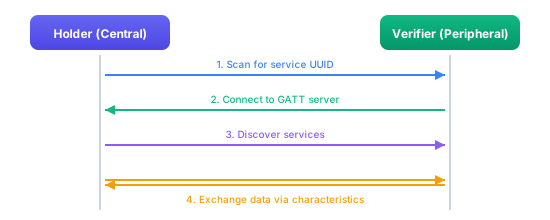
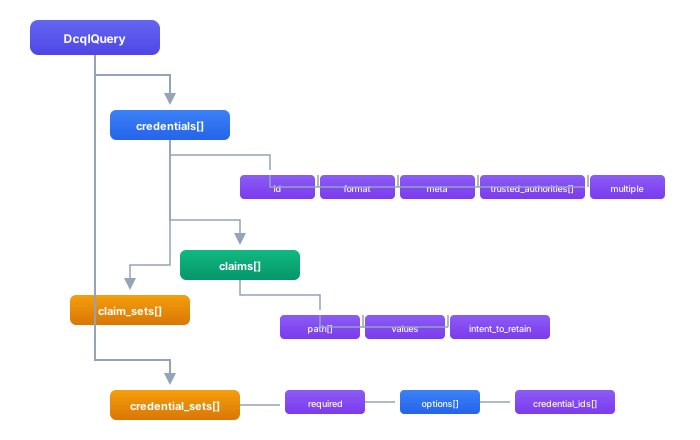
{status === 'initializing' &&

Starting verification...

} {status === 'waiting' && ( <>

Verify Your Credentials

{qrCode && ( Scan with your wallet )}

Scan with your wallet app

{deepLink && ( Open Wallet )} )} {status === 'success' && (
Verification successful
)} {status === 'error' && (
Verification failed
)}
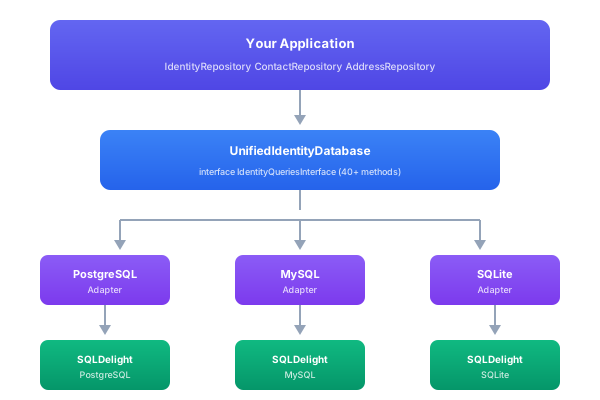
); } ``` ## Best Practices ### Security 1. **Always use HTTPS** for your callback URLs 2. **Validate webhook signatures** if your implementation supports them 3. **Use short session TTLs** (10 minutes is recommended) 4. **Clean up sessions** after completion to prevent replay attacks ### User Experience 1. **Show status updates** as the wallet interacts with the request 2. **Provide a deep link** for same-device flows 3. **Handle timeouts gracefully** with clear messaging 4. **Allow retry** if verification fails ### Performance 1. **Use webhooks** instead of polling when possible 2. **Cache access tokens** to avoid repeated OAuth flows ## Troubleshooting ### Common Issues | Issue | Cause | Solution | |-------|-------|----------| | QR code not scanning | Wrong URL scheme | Ensure wallet supports `openid4vp://` | | Wallet shows error | Invalid query configuration | Contact administrator | | Timeout | User abandoned flow | Implement retry mechanism | | No verified data | Wrong status check | Poll until `authorization_response_verified` | ### Debug Mode Enable verbose logging to diagnose issues: ```kotlin // In your application configuration sphereon.oid4vp.debug = true ``` ## Next Steps - **[OID4VP Verifier REST API](/edk/rest-apis/verifiable-credentials/oid4vp-verifier)** - Full OpenAPI documentation - **[OID4VP Overview](./overview)** - Architecture and concepts --- # DCQL Store # DCQL Store The IDK ships a `DcqlQueryConfigurationStore` interface and a default key-value-backed implementation that is fine for tests and single-tenant developer setups but loses history on every write. The EDK replaces it with `VersionedDcqlQueryConfigurationStore`: same contract for ordinary reads and writes, plus an immutable per-query version trail backed by a relational database. Every write produces a new immutable row in a shared `config_version` table and advances a current-version pointer in a typed `dcql_query` header table. Reads through the IDK interface continue to return the body the current-version pointer references, so existing IDK-facing code keeps working without changes. The version-history operations are exposed as a small additional REST surface alongside the existing IDK DCQL admin endpoints. ## Storage Model The store keeps two related rows for every DCQL query: The `dcql_query` table holds the **mutable header** keyed by `(tenant_id, identifier)`. It stores the logical query identity (`name`, `description`, `enabled`), the current-version pointer (`current_version`), a soft-delete timestamp (`deleted_at`, omitted from normal reads), and `created_at` / `updated_at` audit columns. Updates to header metadata happen in place; only the DCQL body is versioned. The shared `config_version` table holds the **immutable history**. Each row carries the full serialized DCQL body for one version of one query, plus `created_at` and `created_by` audit columns. The `config_version` table is also used by other versioned configuration types in the EDK (credential designs, for example), so the same versioning infrastructure is reused; the `domain` column on each row distinguishes them (`"oid4vp-dcql"` for DCQL). ```kotlin data class DcqlQueryHeaderRow( val tenantId: String, val identifier: String, val name: String, val description: String? = null, val enabled: Boolean = true, val currentVersion: Int, val createdAt: Long, val updatedAt: Long, ) data class DcqlQueryVersionRecord( val identifier: String, val version: Int, val dcqlQuery: DcqlQuery, val createdAt: Long, val createdBy: String? = null, ) data class DcqlQueryVersionSummary( val version: Int, val createdAt: Long, val createdBy: String? = null, ) ``` Tenant isolation is enforced at the query layer: every repository method filters by `tenantId`, which is resolved from the session context, not from a wire-supplied argument. The store has no concept of a verifier; that's a layer above, handled by the [verifier-DCQL binding](./verifier-bindings) system. ## What Counts as a New Version Every write through the IDK `DcqlQueryConfigurationStore.put`/`putPersistent` path appends a new immutable `config_version` row and advances the header's `currentVersion`. Translated to the HTTP surface: - `POST /api/v1/oid4vp/dcql` writes version 1 along with the header. - `PUT /api/v1/oid4vp/dcql/{queryId}` appends a new version. - `PATCH /api/v1/oid4vp/dcql/{queryId}` also appends a new version, even when only `name`, `description`, or `enabled` is touched. The version row carries the DCQL body; for a header-only PATCH the new row's body is identical to the previous one. This is a deliberate trade-off: the version history is monotonic and every admin action shows up as a row, at the cost of "no-op" body rows. - `POST /api/v1/oid4vp/dcql/{queryId}/versions/{version}/restore` appends a new version whose body equals the chosen historical version and advances the pointer. History rows are never mutated. Deletes are soft: the header's `deleted_at` is set and the row stops appearing in normal reads. The version history is preserved internally even though the version-history endpoints return `404` for soft-deleted queries. ## REST API The full HTTP surface for managing DCQL queries and walking version history is documented on its own page, with request and response shapes per endpoint, error mapping, tenancy rules, and policy considerations: see [DCQL REST API](./dcql-rest-api). In brief, the basic CRUD endpoints come from the IDK `DcqlQueryAdminHttpAdapter` (`lib-oid4vp-dcql-store-rest`) and the version-history endpoints come from the EDK `DcqlQueryVersionHttpAdapter` (`lib-oid4vp-dcql-store-versioned-rest`); both mount under `/api/v1/oid4vp/dcql` and share the `oid4vp-dcql` OpenAPI tag. ## Choosing a Backend Two persistence backends are shipped. PostgreSQL is the recommended default for new deployments; MySQL is provided for organisations that have standardised on MySQL. | Module | Backend | |--------|---------| | `lib-oid4vp-dcql-store-versioned-persistence-postgresql` | PostgreSQL via SQLDelight | | `lib-oid4vp-dcql-store-versioned-persistence-mysql` | MySQL via SQLDelight | Both backends share the same SQLDelight-generated repository surface (`DcqlQueryHeaderRepository`), so the rest of the EDK does not care which one is wired in. Include exactly one of the persistence modules; the version-history rows go into the shared `config_version` table that the EDK provides as part of its versioned-config infrastructure, so no additional setup is needed. The repositories run inside the same multi-tenant database routing layer the rest of the EDK uses, so per-tenant database selection and shared-schema-with-tenant-column deployments both work without DCQL-specific configuration. ## Resolution at Authorization-Request Creation Time When the universal OID4VP backend (`POST /oid4vp/backend/auth/requests`) creates an authorization request for a given `query_id`, it does not embed the DCQL body inline. It resolves the body through the registered `DcqlQueryResolver`, which by default in the EDK is the version-aware resolver (`EdkDcqlQueryResolver`) and, when the VDX binding module is on the classpath, the verifier-aware resolver (`VdxDcqlQueryResolver`). The resolver picks the body from the versioned store, snapshots both the `queryId` and the `version` into the authorization session, and uses that pair to render the DCQL body in the authorization request the wallet eventually fetches. The version is part of the snapshot, so a DCQL update committed after the session was created does not affect the wallet's view of the request. ## Audit Every write through the versioned store and every version-history endpoint goes through the EDK `PolicyCommandExtension`, so [authorization](/edk/guides/authorization/overview) policies can scope DCQL admin and history operations independently. The standard EDK [audit](/edk/guides/audit/overview) pipeline records every command execution; the `createdBy` column on the version row carries the actor for the data-side audit. Together, the audit event timestamp and the version row's audit columns let an investigator answer both "who did this" and "what did the DCQL body look like at any past moment". --- # DCQL REST API import ApiCapability from '@site/src/components/ApiCapability'; # DCQL REST API The DCQL query configurations that the [Universal OID4VP API](./integration) references by `query_id` are managed through a REST surface mounted under `/api/dcql/v1`. The basic CRUD operations come from the IDK `DcqlQueryAdminHttpAdapter` and work against any DCQL store (the in-memory IDK default or the EDK versioned store). When the EDK versioned store is wired in, a second adapter, the `DcqlQueryVersionHttpAdapter`, mounts the version-history endpoints alongside the admin endpoints under the same base path. Both adapters are wired automatically once the relevant module is on the classpath of the host service. The IDK admin endpoints come from `lib-oid4vp-dcql-store-rest`. The EDK version endpoints come from `lib-oid4vp-dcql-store-versioned-rest`. They share the OpenAPI tag `oid4vp-dcql` and the operation-id prefix `oid4vpDcql`, so tools like Swagger UI present them as one logical group. This page assumes you have read the [DCQL Store](./dcql-store) page for the storage model (header + immutable `config_version` rows) and the semantics of "current version". ## Quick Reference ### Admin Endpoints (IDK) | Method | Path | Description | |--------|------|-------------| | GET | `/api/dcql/v1/queries` | List every DCQL query configuration in the tenant | | POST | `/api/dcql/v1/queries` | Create a new DCQL query configuration | | GET | `/api/dcql/v1/queries/{queryId}` | Read one DCQL query configuration | | PUT | `/api/dcql/v1/queries/{queryId}` | Replace a DCQL query configuration in full | | PATCH | `/api/dcql/v1/queries/{queryId}` | Partially update a DCQL query configuration | | DELETE | `/api/dcql/v1/queries/{queryId}` | Delete a DCQL query configuration | ### Version Endpoints (EDK, present when the versioned store is wired) | Method | Path | Description | |--------|------|-------------| | GET | `/api/dcql/v1/queries/{queryId}/versions` | List the version history of a DCQL query | | GET | `/api/dcql/v1/queries/{queryId}/versions/{version}` | Read the body of one historical version | | POST | `/api/dcql/v1/queries/{queryId}/versions/{version}/restore` | Append a copy of a historical version as the new current version | All endpoints require an OIDC bearer token. The tenant is resolved by the EDK Layer 1 tenant pipeline from the validated JWT, the `Host` header, or the configured default; it is never read from a client-supplied header. Responses are `application/json` with `Cache-Control: no-store`. ## Authoring a DCQL Query Before walking the endpoint shapes it helps to know what goes inside a query. A `DcqlQueryConfiguration` carries the operator-facing metadata plus an embedded `DcqlQuery` body. The body is the OpenID4VP-spec DCQL JSON (credentials and credential_sets) that the wallet eventually sees. The wrapper adds the `queryId` (the stable identifier `query_id` callers reference), `name`, `description`, and `enabled`. If you do not want to compose the DCQL body by hand, the EDK ships the [semantic-to-DCQL authoring](./dcql-authoring) helper that takes a list of semantic-attribute selections and produces the body for you. The authoring helper output is what you would POST as the `dcqlQuery` field below. ## Create Returns `201 Created` with the full `DcqlQueryConfiguration` (server-assigned `createdAt`, `updatedAt`, and on the EDK versioned store, `currentVersion = 1`). Errors: - `409 Conflict` with `ALREADY_EXISTS_ERROR` if a query with that `queryId` already exists in the tenant. - `400 Bad Request` with `ILLEGAL_ARGUMENT_ERROR` for a malformed body. Supply the `queryId`, `name`, the `dcqlQuery` body, and `enabled`. The result is the stored `DcqlQueryConfiguration` with server-assigned timestamps (and `currentVersion` on the versioned store). ## Read Returns `200 OK` with the current `DcqlQueryConfiguration`. `createdAt` and `updatedAt` are epoch milliseconds. `currentVersion` is present when the versioned store is in use and null for the IDK in-memory backings. `404 Not Found` with `NOT_FOUND_ERROR` if no query with that `queryId` exists. Reads the current configuration for the `queryId` taken from the path. ## List Returns `200 OK` with a JSON array of every `DcqlQueryConfiguration` in the current tenant. There is no filtering or pagination at this endpoint; if your tenant has many queries, the list is the full set. Lists every configuration in the caller's tenant. The command takes no arguments; the tenant comes from the session. ## Update (PUT vs PATCH) Both `PUT` and `PATCH` accept the same body shape and merge it into the stored configuration. The semantic difference is *intent*, not server behaviour: convention says a `PUT` supplies every field, a `PATCH` supplies a subset and leaves others unchanged. The actual merge rule is the same in both methods: **a `null` (or omitted) field leaves the stored value unchanged**. Returns `200 OK` with the updated `DcqlQueryConfiguration`. In the EDK versioned store, the call also appends a new version row and advances `currentVersion`, even for header-only changes that do not touch `dcqlQuery`. Each version row carries the DCQL body at the time of the write; the header fields (`name`, `description`, `enabled`) are not part of the versioned payload. This is intentional: every write produces a complete `(queryId, version)` snapshot of the body, so the version history is monotonic and a header-only edit is a no-op in body terms but still produces an audit row. If you are concerned about version-table growth, batch your edits. Errors: - `404 Not Found` if the query does not exist. - `400 Bad Request` for malformed body. Both methods carry the same `UpdateDcqlQueryArgs` and resolve to the same `oid4vp.dcql.update` command; a `null` field leaves the stored value unchanged. Replace intent: supply every field. The `queryId` comes from the path; any `null` field still leaves the stored value unchanged. Patch intent: supply only the fields to change. Same command and merge rule as the replace above. ## Delete Returns `204 No Content` on success. `404 Not Found` if the query does not exist. On the EDK versioned store the delete is a soft-delete: the header row's `deleted_at` is set and the header stops appearing in normal reads, but the `config_version` history rows are preserved. The history can still be retrieved through the version endpoints if needed for an audit; the query is otherwise inaccessible. Deletes the query named by the path `queryId`. The command returns `true` when an entry was removed and `false` when none existed (the REST surface maps both to `204`/`404`). ## Version History The endpoints in this section are only present when `lib-oid4vp-dcql-store-versioned-rest` is on the classpath. On the IDK default in-memory store they return 404. ### List Versions Returns `200 OK` with a JSON array of `DcqlQueryVersionSummary`, newest first. `createdBy` is the session principal id at write time; it is null when the write was unauthenticated (typically only in test harnesses). The summary intentionally omits the DCQL body; fetch each version individually if you need it, so an audit UI can render the list without loading possibly-large bodies. `404 Not Found` if the query does not exist (including soft-deleted queries, even though their version rows are preserved internally). Lists the version history (newest first) for the `queryId` from the path. Each `DcqlQueryVersionSummary` carries the `version`, `createdAt`, and `createdBy`, but not the body. ### Get One Version Returns `200 OK` with the full `DcqlQueryVersionRecord`. `dcqlQuery` is the body as it was at that point in time, deserialised from the `config_version` row. The header metadata (`name`, `description`, `enabled`) is *not* part of the version record; only the body is versioned. If you need to diff a historical body against the current one, fetch this and `GET /api/dcql/v1/queries/{queryId}` separately. Errors: - `404 Not Found` with `NOT_FOUND_ERROR` if the query does not exist, or if `{version}` does not exist for that query. - `400 Bad Request` with `ILLEGAL_ARGUMENT_ERROR` if `{version}` is not a positive integer. Reads one historical version: the `queryId` and `version` come from the path. The `DcqlQueryVersionRecord` carries the `dcqlQuery` body as it was at that version; the header metadata is not versioned. ### Restore a Version The request body is optional. An empty body or `{}` is equivalent to `{ "note": null }`. The `note` is carried with the audit event for the restore command; it is not stored on the resulting version row, so do not rely on it as the long-term audit trail (use the standard EDK audit log for that). Returns `200 OK` with the resulting `DcqlQueryConfiguration` (now reflecting the restored content; `currentVersion` is the *new* version number, not `3`). Behaviour: the server reads the body of version `3`, appends it as a new version row with the next sequential version number, advances `currentVersion`, and returns the new state. The historical rows (including the original version `3`) are unchanged. Subsequent `GET /api/dcql/v1/queries/age_verification` returns the restored body; subsequent `GET /api/dcql/v1/queries/age_verification/versions` lists the new version at the top with `version` greater than every previous version. Errors: - `404 Not Found` if the query or the specified version does not exist. - `400 Bad Request` if `{version}` is not a positive integer or the request body is malformed. The `queryId` and `version` come from the path; the optional `note` is carried on the restore audit event. The server appends the historical body as a new current version and returns the resulting `DcqlQueryConfiguration` (its `currentVersion` is the new number). ## Tenancy and Authorization Every endpoint operates in a single tenant resolved by the EDK Layer 1 tenant pipeline before the request reaches the adapter. A wire-side `X-Tenant-Id` header may be set for observability but is **never** consulted for tenant resolution or access control. The implications are the same as for the [credential design REST API](../credential-design/rest-api#tenancy): calls without a tenant-resolvable JWT fail before the DCQL adapter sees them, every read is implicitly scoped to the caller's tenant, and writes land in the caller's tenant regardless of any tenant-shaped field in the payload. All endpoints pass through the EDK `PolicyCommandExtension`, so [authorization](/edk/guides/authorization/overview) policies can be applied per command. Typical policies grant reads (`list`, `get`, `list-versions`, `get-version`) to any authenticated principal and restrict writes (`create`, `replace`, `patch`, `delete`, `restore-version`) to administrators. The action names match the underlying command IDs (`oid4vp.dcql.http.*` for the adapters in this surface), which is what the policy engine keys on. ## Error Envelope Failures use the standard EDK `IdkError` envelope: ```json { "code": "NOT_FOUND_ERROR", "message": "DCQL query configuration not found: age_verification" } ``` Mapping from the codes you will see on this surface to HTTP statuses: | Error code | HTTP status | When | |------------|-------------|------| | `ILLEGAL_ARGUMENT_ERROR` | 400 | Malformed body, non-integer version, bad `{queryId}` | | `NOT_FOUND_ERROR` | 404 | Missing query, missing version | | `ALREADY_EXISTS_ERROR` | 409 | Create with an existing `queryId` | | `UNKNOWN_ERROR` or other | 500 | Unexpected server failure | Authorization failures from the `PolicyCommandExtension` are 403 with the policy decision in the message; authentication failures are handled by the surrounding bearer-token middleware and never reach the adapter. ## Resolution Snapshots Are Independent of the Admin API A wallet that fetches an authorization request does *not* go through this REST surface. The Universal OID4VP backend calls the in-process `DcqlQueryResolver`, which reads the body directly from the versioned store and snapshots `(queryId, version)` into the authorization session at the moment the session is created. Subsequent edits through the admin API do not retroactively change the body the wallet sees, because the wallet's view is pinned by the session snapshot. See [DCQL Store](./dcql-store#resolution-at-authorization-request-creation-time) for the resolution-time detail. If you want different verifiers in the same tenant to use the same `query_id` at different versions, layer the [verifier bindings](./verifier-bindings) module on top: that adds a per-verifier `pinnedVersion` and its own REST surface for managing per-verifier pins and scheduled future activations. --- # DCQL Authoring # DCQL Authoring A DCQL query asks a wallet for a set of credentials and the specific claims to disclose. Writing one by hand requires knowing the credential-type binding registry, the claim path conventions used by every credential format the tenant accepts, and the `credential_sets` semantics for combining required and alternative credentials. The EDK lets the author work at a higher level: select attributes from semantic attribute sets that the tenant has already published, set a small number of flags, and let `SemanticToDcqlConverter` produce the DCQL JSON mechanically. The same converter sits behind two different authoring entry points. A lightweight "give me a query that asks for these three attributes" call (used by tooling, scripts, and the admin UI's quick-create) builds a request directly. The enterprise authoring path layers a richer UI on top with set browsing, attribute search, and preview, then still produces the same request and hands it to the same converter. The DCQL it emits is identical in both cases. ## The Conversion Contract ```kotlin interface SemanticToDcqlConverter { suspend fun convert( request: SemanticToDcqlConversionRequest, ): IdkResult } ``` The request lists which attribute sets the author wants to include, optionally restricts the attributes within each set to a chosen subset, and sets two DCQL-level flags. The result carries the assembled `DcqlQuery` plus the provenance information that the authoring layer needs to snapshot per version (which sets contributed, which attribute paths were resolved, which claim paths the converter emitted, and any warnings). ```kotlin data class AttributeSelection( val attributeSetId: Uuid, val selectedPaths: List = emptyList(), ) data class SemanticToDcqlConversionRequest( val selections: List, val intentToRetain: Boolean = false, val useCredentialSets: Boolean = false, ) data class DcqlConversionResult( val dcqlQuery: DcqlQuery, val attributeSetIds: List, val selectedAttributePaths: List, val generatedClaimPaths: Map>>, val warnings: List = emptyList(), ) ``` An empty `selectedPaths` means "include every attribute in this set". A non-empty list filters to the attributes whose path matches one of the strings; unresolved paths produce a warning in the result rather than a hard failure, so the caller can show the author what was missing and let them decide whether to commit anyway. ## How the Converter Works The converter walks the request in four phases. **Resolve sets.** Every `attributeSetId` is looked up in the `SemanticAttributeSet` registry. A missing set is a fatal error; missing attribute paths within a present set are non-fatal warnings. **Resolve candidate credentials.** Each set has an associated `CredentialTypeBinding` registry entry listing the credential-type candidates that carry its attributes (for example, an "identity" attribute set might bind to both `org.iso.18013.5.1.mDL` and the SD-JWT `identity_credential` VCT). The converter pulls the candidate list per set. **Emit claim queries.** For each candidate credential, the converter emits a `DcqlClaimQuery` per resolved attribute path. The claim path is translated from the attribute's semantic path to the credential format's actual claim path through the binding. `intent_to_retain` from the request is stamped on every emitted claim query when set. **Wrap as needed.** When `useCredentialSets` is true, the converter wraps every candidate credential id in a single `DcqlCredentialSetQuery` with `required = true` and a single options list naming all candidates. This is the right shape when the author wants "any one of these credentials is acceptable", as opposed to the default behaviour where each candidate is an independent credential the wallet may or may not have. The result preserves the input order of `selections` in `attributeSetIds`, and groups the emitted claim paths by credential-query id in `generatedClaimPaths`. The authoring layer uses these to display a structured preview of the DCQL the wallet will see before the author commits. ## Wiring Authoring into the Versioned Store The converter is stateless and does not write to the DCQL store. The authoring flow is: 1. The author selects attribute sets and paths in the UI (or in code). 2. The UI calls `SemanticToDcqlConverter.convert(...)` and renders the result. 3. The author reviews `dcqlQuery`, `generatedClaimPaths`, and any `warnings`. 4. The UI calls the [DCQL admin REST API](./dcql-store#rest-api) to persist the result: `POST /api/v1/oid4vp/dcql` for a new query, `PUT` or `PATCH /api/v1/oid4vp/dcql/{queryId}` to update an existing one. The body is a `DcqlQueryConfiguration` carrying the converter's `dcqlQuery` as the body. 5. The store appends a new immutable version and advances the current-version pointer. The provenance fields on `DcqlConversionResult` (which attribute sets contributed, which paths were resolved) are typically persisted alongside the DCQL query by the authoring layer in a separate table, so that the author can later open the same query, see what it was generated from, and re-author it without rebuilding the selection from scratch. The version history in the DCQL store proper only holds the resulting `DcqlQuery` body; the authoring provenance lives in the authoring module's own store. ## Example A tenant publishes an "Identity basics" attribute set with paths `given_name`, `family_name`, `birth_date`. The bindings registry says this set is carried by two credential candidates: SD-JWT VCT `https://issuer.example.com/identity` and mDoc doctype `org.iso.18013.5.1.mDL`. The author wants a query asking for first and last name only, accepting either credential. ```kotlin val result = converter.convert( SemanticToDcqlConversionRequest( selections = listOf( AttributeSelection( attributeSetId = identityBasicsSetId, selectedPaths = listOf("given_name", "family_name"), ), ), intentToRetain = false, useCredentialSets = true, ), ) ``` The converter resolves the set, finds the two candidates, emits a `DcqlCredentialQuery` for each (with claim queries for `given_name` and `family_name` translated to the SD-JWT and mDoc claim paths respectively), and wraps both candidate ids in a `DcqlCredentialSetQuery` with `required = true`. The author commits the result through `POST /api/v1/oid4vp/dcql` and the versioned store writes version 1. ## Errors and Warnings Errors come back as `IdkError` and are fatal: - Missing or deleted attribute set: `NOT_FOUND_ERROR`. - No credential-type bindings registered for the set: `ILLEGAL_ARGUMENT_ERROR` (the converter cannot emit a `DcqlCredentialQuery` without at least one candidate). Warnings are returned in the successful result and are not fatal: - An entry in `selectedPaths` did not match any attribute in the set, the warning names the path and the set. - A candidate credential's binding does not cover one of the selected attributes; the converter skips that attribute for that candidate (it may still be emitted for other candidates) and warns. The authoring UI is expected to display warnings and let the author decide whether to commit. The DCQL store does not re-validate against the binding registry on write, so a query committed with warnings remains as-authored. --- # Verifier DCQL Bindings import ApiCapability from '@site/src/components/ApiCapability'; # Verifier DCQL Bindings A tenant typically defines its DCQL queries once at the tenant level. The same `age_verification` query lives in the [versioned DCQL store](./dcql-store) and gets edited over time. But a tenant also typically hosts multiple verifiers (a checkout flow, a customer-portal flow, a third-party-relying-party integration), each of which may want to use the shared query at a *specific* version. The VDX `VerifierDcqlBinding` is the thin layer that captures that pin: which verifier uses which shared DCQL query, at which version, with which local alias and enabled flag. This is a VDX-level concern, not a base EDK one. The IDK and the bare EDK ship a tenant-level versioned DCQL resolver; this module adds the per-verifier binding store, the verifier-aware resolver that replaces the tenant-level one, the REST surface for managing bindings, and the scheduled-activation projection over the EDK scheduler. ## The Binding Model ```kotlin data class VerifierDcqlBinding( val id: String, val tenantId: String, val verifierId: String, val dcqlQueryId: String, val pinnedVersion: Int, val enabled: Boolean = true, val alias: String? = null, val createdAt: Instant, val updatedAt: Instant, ) ``` A binding is identified by `(tenantId, verifierId, dcqlQueryId)` and points at a specific `pinnedVersion` of the shared query. The binding never copies the DCQL body or its history; that lives in the versioned DCQL store. Two verifiers binding the same `dcqlQueryId` at different versions consume two pointers into the same history, not two copies of the body. `enabled` lets an operator disable a binding without deleting it; a disabled binding is rejected at authorization-request creation time with an `ILLEGAL_ARGUMENT_ERROR`. `alias` is a verifier-local short name for the query, useful when the same shared query is used in a UI that needs to label it per verifier (for example, "Age check (checkout)" vs "Age check (customer portal)" backed by the same `age_verification` query). Bindings are soft-deleted (a `deletedAt` timestamp); live reads exclude soft-deleted rows. ## How Resolution Uses the Binding When the universal OID4VP backend creates an authorization request for a `query_id`, it calls `DcqlQueryResolver.resolveForCreate(queryId, verifierId)`. When the VDX binding module is on the classpath, the resolver is `VdxDcqlQueryResolver`, which behaves as follows: If `verifierId` is null, fall back to current-version resolution on the versioned store. This matches the EDK base behaviour and is what the Universal API uses when no per-verifier context is in scope. If `verifierId` is not null, look up the live binding for `(tenantId, verifierId, queryId)`. Reject with `NOT_FOUND_ERROR` if no binding exists. Reject with `ILLEGAL_ARGUMENT_ERROR` if the binding is disabled. Otherwise read the body for `binding.pinnedVersion` from the versioned store and snapshot `(queryId, pinnedVersion)` into the authorization session. The wallet's view of the request is therefore frozen at the pinned version regardless of what subsequent DCQL edits do. The pinned version is also returned in `ResolvedDcqlQuery.version`, so the audit log and the authorization-session record both capture it. ## REST API The binding surface is exposed by two HTTP adapters, both mounted under the DCQL admin base path `/api/dcql/v1`. The verifier-scoped adapter (`/api/dcql/v1/verifiers/{verifierId}/bindings`) is what a verifier admin uses to manage that verifier's bindings and their scheduled activations. The reverse-lookup adapter (`/api/dcql/v1/queries/{queryId}/verifiers`) is what a tenant admin uses to find every verifier bound to a shared query. Every endpoint requires an OIDC bearer token; the tenant is resolved from the validated JWT, never from a client-supplied header. Each REST endpoint delegates to a `ServiceCommand` (the `oid4vp.dcql.*` ids below), so the same operation is reachable in-process through the command invoker and over the internal transport. ### Verifier-Scoped Bindings Base path: `/api/dcql/v1/verifiers/{verifierId}/bindings`. #### Bind a query to a verifier Pins a shared DCQL query to the verifier. Returns `201 Created` with the resulting `VerifierDcqlBinding`. A `400` is returned for a malformed body and a `404` if the verifier or query does not exist. Supply the `queryId` to bind; the `verifierId` comes from the path. `version` is optional — when omitted the binding pins the DCQL query's current version at the moment of the call. The result is the stored `VerifierDcqlBinding`. #### Read and list bindings Lists every binding held by the verifier named in the path. Reads the single binding for the `(verifierId, queryId)` pair taken from the path. `404` if no such binding exists. #### Update a binding Immediately advances or rolls back the pinned version, toggles `enabled`, or sets the `alias`. A `null` (or omitted) field leaves the stored value unchanged. For a change that should land at a future time, schedule an activation instead. Returns `200 OK` with the updated binding. Supply only the fields to change; the `verifierId` and `queryId` come from the path. A `pinnedVersion` update takes effect immediately. #### Unbind Removes the binding for `(verifierId, queryId)`. Returns `200 OK` with the `VerifierDcqlBinding` that was removed, so the caller gets the resource it acted on rather than a bare flag; a missing binding is `404`. ### Scheduled Activations A scheduled activation moves the binding's pinned version on a future date. It is projected over the EDK scheduler's `scheduled_command` table, not a dedicated activations table. When the scheduler fires at `effectiveAt`, it runs an internal command that calls the binding update path; from the binding's perspective this is identical to an operator calling the update endpoint with `pinnedVersion` set to the target. The activation appears in the binding's history through the audit trail. Supply the `effectiveAt` timestamp and an optional `pinnedVersion` (defaults to the query's current version when omitted). The `verifierId` and `queryId` come from the path. Returns `201 Created` with the resulting `VerifierDcqlScheduledActivation` in `PENDING` status. Lists the scheduled activations for the binding named by the path. Cancels a pending activation by `activationId`, deleting the corresponding scheduled-command row. Returns `200 OK` with the cancelled `VerifierDcqlScheduledActivation` (its `status` is now `CANCELLED`). Activations that have already executed cannot be cancelled (they appear with `APPLIED` status and are not part of any cancellable set). The activation's `status` is projected from the underlying scheduled-command lifecycle: | Status | Meaning | |--------|---------| | `PENDING` | Scheduled, not yet executed | | `APPLIED` | Executed successfully; the binding's `pinnedVersion` was updated | | `CANCELLED` | The activation was cancelled before its `effectiveAt` | | `FAILED` | Execution threw; the binding's `pinnedVersion` is unchanged and the error is in the audit log | ### Reverse Lookup When you need to find every verifier in a tenant that is currently bound to a shared DCQL query (for example, before publishing a new version, to know who is going to be affected): Lists every binding that references the `queryId` from the path — one `VerifierDcqlBinding` per bound verifier, each carrying the version it pins. Returns an empty array in single-verifier deployments. ## Why Two Bind Paths The binding system shows up in two places for a reason. The verifier-scoped surface (`/api/dcql/v1/verifiers/{verifierId}/bindings`) is what a verifier admin uses: they manage *their* verifier's bindings. The reverse-lookup surface (`/api/dcql/v1/queries/{queryId}/verifiers`) is what a tenant admin uses when they own the shared DCQL queries and want to understand or plan an organisation-wide change. The same data is exposed from both angles; the access policy on each surface is configured independently through the EDK [authorization](/edk/guides/authorization/overview) layer. ## Persistence Two backends are shipped, paralleling the DCQL store itself: | Module | Backend | |--------|---------| | `lib-data-store-oid4vp-dcql-binding-persistence-postgres` | PostgreSQL via SQLDelight | | `lib-data-store-oid4vp-dcql-binding-persistence-mysql` | MySQL via SQLDelight | Both implement the `VerifierDcqlBindingRepository` interface from the public module. The schema is small (one `verifier_dcql_binding` table keyed by `(tenant_id, verifier_id, dcql_query_id)` with the mutable fields plus `deleted_at`); no shared infrastructure table is needed. The scheduled-activations projection has no table of its own; it queries the EDK scheduler's `scheduled_command` rows whose target command id and arguments encode "advance binding X to version Y" and groups them by `(verifierId, dcqlQueryId)`. ## Wiring Include the binding module alongside the versioned DCQL store. The `VdxDcqlQueryResolver` is bound with `replaces = [EdkDcqlQueryResolver::class]`, so the verifier-aware resolver automatically takes the place of the tenant-only resolver in any assembly that has both on the classpath. Code that calls `DcqlQueryResolver.resolveForCreate(...)` keeps the same signature. --- # REST API import Tabs from '@theme/Tabs'; import TabItem from '@theme/TabItem'; import ApiCapability from '@site/src/components/ApiCapability'; # REST API The EDK exposes the credential design registry over HTTP under the base path `/api/credential-design/v1`. One adapter covers credential designs, issuer designs, verifier designs, render variants, imports, refreshes, resolution, source snapshots, and binary assets. The full request and response schema for every operation is in the [Credential Design API reference](/edk/rest-apis/verifiable-credentials/credential-design). The endpoints that list or find designs return a plain JSON array rather than a paginated page. ## Credential designs A credential design holds the bindings a credential is matched by, its localized displays, the claim presentation (labels, ordering, selective disclosure policy), and the render variants it points at. Bindings are the protocol identifiers a credential is keyed on, set as an object rather than a key/value pair: ```json { "bindings": [ { "vct": "https://issuer.example.com/identity", "credentialConfigurationId": "IdentityCredential" } ] } ``` Each claim is addressed by a `path`, a list of polymorphic segments discriminated by `type` (`property`, `index`, or `any`). The path to `given_name` is `[{ "type": "property", "name": "given_name" }]`. `sdPolicy` is `ALWAYS`, `ALLOWED`, or `NEVER`; `valueKind` and `widgetHint` drive form rendering. The full field set is in the API reference. ### Create a credential design Creates a credential design in the caller's tenant from its bindings, displays, and claims. Returns the stored `CredentialDesignRecord` with the server-assigned `id`, `tenantId`, and timestamps. Fails with `409` when a binding already maps to a design. ### List credential designs Returns every credential design in the tenant matching the optional query filters: `entityType`, `hostingMode`, `bindingKey` + `bindingValue`, `aliasContains`, and `sourceType`. Unknown enum values are ignored. The response is a plain array. ### Find credential designs by binding Finds the credential designs whose binding has a given value for one dimension, for example all designs bound to a `VCT`. The companion `POST /designs/credentials/find/binding` matches against a full binding object instead. ### Import a credential design Imports a design from an external source. The server fetches `sourceUrl` through an SSRF-protected fetcher, stores a source snapshot, runs the mapper for the declared `sourceType` (one of the `DesignSourceType` values, for example `OID4VCI_CREDENTIAL_CONFIGURATION`, `SD_JWT_VCT_METADATA`, or `OCA_BUNDLE`), and persists the canonical design with `hostingMode` set to `CACHED_EXTERNAL`. ### Resolve a credential design Resolves a design into its merged form: the design combined with its issuer and verifier designs, the matching render variants, derived render hints, the ordered list of applied source layers, the fields locked by authoritative layers, and an ETag for caching. Select the design by `designId`, a full `binding`, or a `bindingKey` + `bindingValue` pair. Pass external material inline through `externalMetadata` (for example an `ocaBundle`) to fold it into the result without importing first. ### Get a credential design Returns one credential design exactly as stored. To get the merged result with everything that contributes to it, use the resolve endpoint instead. ### Update a credential design Updates a credential design. Every field on the body is optional; omitted fields are left unchanged. ### Delete a credential design Deletes a credential design, returning `true` when a design was removed. ### Refresh an imported design Re-fetches an imported design from its source and re-applies the mapper, using the snapshot's ETag for a conditional request. Returns the updated design. ## Issuer and verifier designs Issuer and verifier designs describe how the issuing or verifying party presents itself, matched by issuer or verifier identity bindings (`issuerDid`, `issuerUri`, `verifierClientId`). Their endpoints mirror the credential design set exactly under `/designs/issuers` and `/designs/verifiers`: create, list, find by binding, find by binding key, import, resolve, get, update, delete, and refresh. The request and response bodies are the same shape with the issuer or verifier record type, and the command ids follow the `credential-design.issuers.*` and `credential-design.verifiers.*` namespaces. A credential design links the issuer design it is issued under through `issuerDesignId`. ### Create an issuer design Creates an issuer design. The verifier equivalent is `POST /designs/verifiers` (`credential-design.verifiers.create`), with the same body shape. ### Resolve an issuer design Resolves an issuer design selected by id or binding into its merged form with render variants, applied layers, and locked fields. The verifier equivalent is `POST /designs/verifiers/resolve` (`credential-design.resolution.verifier-resolve`). ## Render variants A render variant is a reusable rendering technique that designs point at: a simple card (colors plus a logo and background image), an SVG template, a W3C VC `renderMethod` reference, a PDF template, or an external reference. The `kind` field selects which, and the relevant fields are populated for that kind. ### Create a render variant Creates a render variant. A design references it by id in `renderVariantIds`, and resolution returns the full variant records. ### List render variants Lists the render variants in the tenant. Get, update, and delete a single variant by id at `/designs/render/variants/{variantId}` (`credential-design.render-variants.get` / `.update` / `.delete`). ## Source snapshots When a design is imported, the raw fetched payload is stored as a source snapshot, retained so the design can be refreshed and audited. A snapshot carries the source type and URL, the ETag and integrity digest used for conditional refresh, and a reference to the stored bytes. ### Get a source snapshot Returns the metadata and stored payload reference for one snapshot. ### Refresh a source snapshot Re-fetches the snapshot's source, using its stored ETag for a conditional request, and returns the updated snapshot. ## Design assets Branding assets (logo, background image, SVG template, PDF template) are stored and served as raw bytes, addressed by design id, locale, and asset type. `{locale}` is a BCP-47 tag (`en`, `nl`, `en-GB`); `{assetType}` is one of `LOGO`, `BACKGROUND_IMAGE`, `SVG_TEMPLATE`, or `PDF_TEMPLATE`. Upload sends the bytes with the asset's MIME type in the request `Content-Type` header and returns an `AssetReference`; download returns the bytes with the stored `Content-Type`. ### Upload a design asset Uploads a branding asset as `application/octet-stream`. The design id, locale, and asset type come from the path; the content type comes from the request header. Returns a reference to the stored asset. ### Download a design asset Downloads a stored asset as raw bytes, with the `Content-Type` it was stored as (for example `image/png`, `image/svg+xml`, or `application/pdf`). The wire shape of every request and response, including all model fields and their types, is in the [Credential Design API reference](/edk/rest-apis/verifiable-credentials/credential-design). --- # Versioning # Versioning The EDK credential design store has explicit version-snapshot operations on top of the IDK CRUD interface. They are useful when you need a permanent record of what a design looked like at a particular moment ("this is the version approved for production on 2026-05-01"), or when you want to be able to recover an earlier state after a regrettable edit. They are not a change log: ordinary `createCredentialDesign`, `updateCredentialDesign`, and import/refresh operations **do not produce versions automatically**. You decide when a snapshot is meaningful and call `createDesignVersion` for it. Read this page if you are building tooling that needs to operate on the version history (an admin UI with a "save as version" button, a CI step that snapshots after a promotion, an audit report). If you only consume designs at runtime, you can ignore this layer: `getCredentialDesign` and `resolveCredentialDesign` always return the current live state and never look at the version history. ## What a Version Is A version is an immutable JSON snapshot of one `CredentialDesignRecord` at the moment `createDesignVersion` is called. Snapshots are stored in a generic `config_version` table that the EDK uses for all versioned configuration types (design, DCQL, others); the per-design active-version pointer is stored separately in `design_current_version`. The metadata you get back is: ```kotlin data class DesignVersion( val designId: Uuid, val tenantId: String, val version: Int, // monotonically increasing per (tenantId, designId), starting at 1 val isLatest: Boolean, // true for the version the current-version pointer references val createdAt: Instant, val createdBy: String?, // session principal at snapshot time ) ``` `CreateDesignVersionInput` carries an optional `description`. It is recorded with the audit event for the snapshot operation; it is not stored on the version row itself, so do not rely on it as the audit trail. ## What `createDesignVersion` Actually Does It reads the current row from the credential repository and serialises it to the `config_version` table. That is the entire operation. From the implementation: ```kotlin override suspend fun createDesignVersion( tenantId: String, designId: Uuid, input: CreateDesignVersionInput, ): IdkResult { val design = credentialRepo.findById(tenantId, designId) ?: return Err(IdkError.NOT_FOUND_ERROR(...)) val contentJson = json.encodeToString(CredentialDesignRecord.serializer(), design) val row = configVersionRepo.appendVersion( tenantId = tenantId, domain = DOMAIN, ownerKey = designId.toString(), contentJson = contentJson, createdBy = execution.principalId, ) currentVersionRepo.setCurrentVersion(tenantId, designId, row.version) return Ok(DesignVersion(... isLatest = true ...)) } ``` The newly written version automatically becomes the current version. The live design row is untouched: snapshotting does not modify what `getCredentialDesign` returns. Implication: if you edit a design (via `updateCredentialDesign`, `importExternalDesign`, or `refreshCredentialDesign`) after taking a snapshot, the snapshot still reflects the pre-edit state. If you want a new snapshot of the post-edit state, you must call `createDesignVersion` again. ## How the Current-Version Pointer Is Used The current-version pointer is a label. It marks one version as "the latest" for display in `listDesignVersions`. It is **not** consulted by `getCredentialDesign`, `findCredentialDesignByBinding`, `resolveCredentialDesign`, or any other read path. The live design content always comes from the live row in the credential repository; the pointer never reroutes reads. This matters if you are designing a workflow around versions. "Roll back to version 3" cannot be done by repointing alone; see [Rollback](#rollback) below. ## Reading the History `listDesignVersions` returns the version metadata for one design, with `isLatest` set on whichever row the pointer references: ```kotlin val versions: List = service .listDesignVersions(tenantId, designId) .getOrElse { return } for (v in versions) { val marker = if (v.isLatest) " (current pointer)" else "" println("v${v.version} by ${v.createdBy ?: "system"} at ${v.createdAt}$marker") } ``` `getDesignVersionContent` returns the full snapshot for one version, deserialised into a `CredentialDesignRecord`: ```kotlin val snapshot: CredentialDesignRecord = service .getDesignVersionContent(tenantId, designId, version = 3) .getOrElse { return } ``` The snapshot is the same record type as a live read, so anything that consumes a current design (rendering, the resolution engine, OID4VCI metadata generation) can also consume a historical snapshot. ## What `setLatestDesignVersion` Does It updates only the current-version pointer. The live design row is untouched, and (as above) ordinary reads do not consult the pointer. Use it to label a different version as "current" for the purposes of `listDesignVersions` display and any tooling you build that filters on `isLatest`. Do not use it expecting the live design to change. ```kotlin service.setLatestDesignVersion(tenantId, designId, version = 4) // `listDesignVersions` now flags v4 as isLatest = true. // `getCredentialDesign` still returns whatever the live row says. ``` If your operator UI needs "click here to make this version live", that UI must do two things, in this order: read the content with `getDesignVersionContent`, then apply it with `updateCredentialDesign` (covered below). ## Rollback To actually restore an earlier state into the live design, read the snapshot and write it back through the regular update path: ```kotlin suspend fun rollback( service: VersionedCredentialDesignService, tenantId: String, designId: Uuid, version: Int, ): IdkResult { val snapshot = service .getDesignVersionContent(tenantId, designId, version) .getOrElse { return Err(it) } val updateInput = UpdateCredentialDesignInput( alias = snapshot.alias, bindings = snapshot.bindings, credentialTemplateId = snapshot.credentialTemplateId, issuerDesignId = snapshot.issuerDesignId, displays = snapshot.displays, claims = snapshot.claims, renderVariantIds = snapshot.renderVariantIds, hostingMode = snapshot.hostingMode, ) return service.updateCredentialDesign(tenantId, designId, updateInput) } ``` After this, you almost certainly want to call `createDesignVersion(designId, ...)` so the rollback action itself is recorded as a fresh version. That gives you a clean trail: "v3 was the live design. v4 was an edit. v5 is a rollback to v3's content." If you skip the snapshot, the rollback is invisible in the version history (only the live row's `updatedAt` changes). Render variants and assets are referenced by id from `renderVariantIds`. The snapshot preserves those ids, but the variants themselves are separate records that are *not* part of the credential design's version history. If you have also deleted or changed a render variant since the snapshot was taken, a rollback restores the id list but the referenced variants may no longer exist or may have different content. Treat render variants as long-lived shared resources rather than per-version data. ## When to Take a Snapshot There is no general right answer; pattern by what your operations team needs to be able to prove or recover. Common triggers: - After importing a design from an external source (`importExternalDesign`, `refreshCredentialDesign`). The snapshot captures the imported state so a later upstream change can be compared. - Before a risky edit (a binding change, a claim removal, a render variant swap) where you want a guaranteed restore point. - At a compliance checkpoint ("approved by the compliance review on 2026-05-01"). The `description` field on `CreateDesignVersionInput` is the right place for that text. - After a promotion from staging to production (in CI, immediately after `updateCredentialDesign` lands the staged content). There is no garbage collection of old versions. The history grows monotonically per design. ## Audit Trail `DesignVersion.createdBy` is the session principal at snapshot time; `createdAt` is the snapshot timestamp. The standard EDK [audit](/edk/guides/audit/overview) pipeline also records the `credential-design.versions.*` command executions with the actor, tenant, correlation id, and trace id, so for a compliance investigation you can correlate the version row with the originating audit event. Edits between snapshots leave `updatedAt` on the live row and a normal audit event for the `updateCredentialDesign` command, but no version row of their own. --- # Persistence & Offline Cache # Persistence and Offline Cache The EDK has two unrelated storage stories for credential designs and they solve different problems. The **server-side persistence** modules back the design service with PostgreSQL or MySQL, so a multi-tenant service can store designs durably and read them with normal database semantics. The **client-side cache** wrapper sits in front of a remote design service and keeps a local copy of what has been read, so a wallet or verifier UI can keep rendering credentials when the network is unreachable. Most services need one or the other, not both. ## Server-Side Persistence Pick one of the persistence modules and add it to your service alongside `lib-data-store-credential-design-impl`. The repository implementations are bound through Metro DI and the rest of the EDK does not need to know which dialect is in use. | Module | Backend | |--------|---------| | `lib-data-store-credential-design-persistence-postgresql` | PostgreSQL via SQLDelight | | `lib-data-store-credential-design-persistence-mysql` | MySQL via SQLDelight | Inside the chosen module you get implementations of every repository the design service depends on: - `CredentialDesignRepository`, `IssuerDesignRepository`, `VerifierDesignRepository` for the three entity types - `RenderVariantRepository` for render variants - `DerivedRenderHintsRepository` for hints produced by the OCA mapper and other deriving sources - `SourceSnapshotRepository` for the raw payloads cached when a design is imported from an external source - `DesignCurrentVersionRepository` for the per-design current-version pointer described in [Versioning](./versioning) Both backends share the same SQLDelight schema with dialect-specific tweaks for JSON column types (PostgreSQL uses `JSONB`, MySQL uses `JSON`). The repository APIs are identical, so a service can move between dialects without code changes; only the dependency on the matching `-persistence-{dialect}` module changes. The schema for one design row is a small set of indexed top-level columns (`id`, `tenant_id`, `alias`, `hosting_mode`, `created_at`, `updated_at`) plus a JSON column for the polymorphic parts (bindings, displays, claims, render variant ids). Lookups by binding key go through generated indexes; lookups inside claim arrays are not indexed and are done at the JSON level. ### Tenant Isolation Every repository method takes `tenantId` and filters by it at the SQL level. The IDK service interface takes `tenantId` as a method argument, so it stays explicit through to the database. In a multi-tenant deployment, the EDK [database routing](/edk/guides/database/routing) layer can route per-tenant requests to per-tenant databases or schemas; the credential design store does not have its own routing and relies on the shared platform mechanism. ### Imports and Source Snapshots When you call `importExternalDesign`, the service fetches the source URL through the SSRF-protected `DesignExternalFetcher`, stores the raw response as a `SourceSnapshotRecord`, runs the matching format mapper, and writes the resulting `CredentialDesignRecord`. The snapshot row keeps the body and any `ETag`/`Last-Modified` headers; `refreshCredentialDesign` uses them for conditional re-fetches, so unchanged sources do not redownload. The snapshot is the audit answer for "what did the upstream metadata actually look like when this design was last imported?" Snapshot rows are kept until the design is deleted; there is no time-based cleanup. ### Wiring Checklist ``` 1. Add the EDK base module: lib-data-store-credential-design-impl 2. Add one persistence module: lib-data-store-credential-design-persistence-postgresql or lib-data-store-credential-design-persistence-mysql 3. Configure your DataSource (standard EDK pattern, see /edk/guides/persistence/...) 4. (Optional) REST adapter: lib-data-store-credential-design-rest-vdx (registers CredentialDesignHttpAdapter at /api/v1/designs) ``` The Metro `replaces` mechanism swaps the IDK in-memory `DefaultCredentialDesignService` binding for the EDK `DefaultVersionedCredentialDesignService` binding automatically, with no explicit unbinding or wiring code. ## Offline Cache The cache wrapper solves a narrow problem: **a client process needs to keep returning credential designs when the call to the design service fails.** Typical case is a mobile wallet or a verifier UI rendering a credential while the network is down. It is not a performance cache; it does not save round-trips on the happy path. ### Behaviour `CachingCredentialDesignService` wraps two collaborators: a remote `CredentialDesignService` (usually the routed-command client that talks to the design service over HTTP RPC) and a local `BlobService` (filesystem, SQLite-backed, in-memory). It implements the same `CredentialDesignService` interface, so consumers do not see the difference. For reads of an individual entity (`getCredentialDesign`, `getIssuerDesign`, `getVerifierDesign`, `getRenderVariant`, asset get, snapshot get), the order is: 1. Call the remote. 2. **If remote succeeds**: write the result to the local blob store as a side effect, return the remote result. The cache is updated; the remote answer wins. 3. **If remote fails**: look up the local blob store. If a cached entry exists, return it. If not, return the remote failure. For listing (`listCredentialDesigns`, `findCredentialDesignByBinding`, `findCredentialDesignByBindingKey`, `listRenderVariants`), there is **no caching and no fallback**. The remote is the only source. The list operations are pass-through. This is intentional: caching a list is meaningless when the list itself can change between calls and the cache cannot know. For writes (`create*`, `update*`, `import*`, `refresh*`, asset upload), the order is: call the remote; on success, update the cache; return the remote result. The cache is consistent with the last successful write the client made through this wrapper, not with arbitrary changes that other clients may have applied to the remote. For deletes, the same pattern: delete on the remote, then invalidate the cached entry on success. ### What the Cache Cannot Do - It cannot serve a `findCredentialDesignByBindingKey` lookup when the remote is down, because that operation is not cached. A wallet that wants to render a credential by its `VCT` should first do the lookup while the network is up and remember the design id, then use `getCredentialDesign(id)` when offline. Calling `resolveCredentialDesign` while offline likewise fails (it is not a cached read path). - It cannot detect remote-side changes. A design that another client updated will not be reflected in the cache until this client makes a read against the remote successfully. There is no background invalidation. - It does not have a TTL. A cached entry stays until the next successful write through this wrapper or an explicit invalidation through the underlying blob store. ### Wiring ```kotlin val remote: CredentialDesignService = /* routed-command client to the design service */ val localBlobs: BlobService = /* FileSystemBlobService, SqliteBlobService, ... */ val designService: CredentialDesignService = CachingCredentialDesignService( remote = remote, localBlobService = localBlobs, ) ``` Inject the wrapper as your `CredentialDesignService` and consumers (renderers, OID4VCI clients, anything that holds the IDK interface) read through it transparently. ### Sync Helper `CredentialDesignSyncService.syncAll(tenantId, filter)` is a companion that pulls every design matching the filter from the remote and routes each one through the caching wrapper's `getCredentialDesign(id)`. The effect is that every design in the filtered set is in the local blob store afterwards. Call this at app startup or before going offline to pre-warm the cache. ```kotlin val syncService = CredentialDesignSyncService( remote = remote, cachingService = designService as CachingCredentialDesignService, ) val synced = syncService.syncAll(tenantId).getOrElse { return } // `synced` is the list of designs that were fetched. After this call, getCredentialDesign(id) // for any of these ids will succeed even if the network later goes down. ``` The sync calls the remote for each design id; it does not currently do server-side delta detection. If you are syncing thousands of designs you will pay for one round-trip each. ### Blob Storage Options `BlobService` is the IDK abstraction. Pick the implementation that matches your platform: | BlobService | Use case | |------------|----------| | `InMemoryBlobService` | Tests, short-lived process caches | | `FileSystemBlobService` | Desktop apps, server-side temporary caches | | `SqliteBlobService` | Mobile wallets where the cache must survive restarts | The cache wrapper treats the blob store as opaque: it serialises each record to JSON, writes it under a path derived from `(tenantId, entityType, id)`, and reads it back the same way. Any custom `BlobService` implementation works. ## When You Need Both A multi-tenant EDK service that hosts the design registry uses the server-side persistence. A wallet that talks to that service uses the offline cache in front of a routed-command client. The two ends of the same architecture: the cache is on the consuming side, the persistence is on the serving side, and the wire format between them is the routed `CredentialDesignService` interface. A single process almost never needs both. If your service has direct database access through the persistence modules, do not put the cache in front of it; the cache is meant for callers that are at least one network hop away from the database. --- # Bundle Service # Bundle Service The `OcaBundleService` is the entry point for working with OCA bundles in the EDK. It coordinates three things: parsing raw OCA JSON into a structured `ParsedOcaBundle`, processing the parsed form to flatten every overlay into a single typed `OcaProcessedBundle`, and verifying the bundle's SAID integrity. The interface is intentionally small; the heavy lifting happens in the dedicated parser and processor classes. ```kotlin interface OcaBundleService { fun parseBundle(bundleJson: JsonObject): ParsedOcaBundle fun processBundle(bundle: ParsedOcaBundle): OcaProcessedBundle fun parseAndProcess(bundleJson: JsonObject): OcaProcessedBundle fun verifySaid(bundle: ParsedOcaBundle): Boolean } ``` The default implementation, `DefaultOcaBundleService`, lives in `lib-data-oca-impl` and is wired through Metro at session scope. Code that needs to consume OCA bundles injects the interface and gets the default; tests can substitute their own implementation as needed. Bundles also drive OID4VCI attribute provisioning — see [Compact attribute provisioning](../oid4vci/rest-api.mdx#push-attributes). ## Parsing Parsing turns the raw bundle JSON into a `ParsedOcaBundle`: ```kotlin data class ParsedOcaBundle( val bundleSaid: String, val captureBaseSaid: String, val ocaVersion: String, val attributes: Map, val overlays: List, val rawJson: JsonObject, ) data class ParsedOcaOverlay( val type: String, val language: String?, val said: String, val captureBaseSaid: String, val payload: JsonObject, ) ``` The parser reads the bundle SAID (`d` or `digest`), the capture base, and every overlay. It accepts both the v1 array layout and the v2 object layout for `overlays`, and it accepts both `d` and `digest` as the SAID field name on individual elements. Unknown fields are preserved in the original `rawJson` so writers and round-trippers do not lose information. ```kotlin val parsed = ocaService.parseBundle(bundleJson) println("Bundle SAID: ${parsed.bundleSaid}") println("Capture Base SAID: ${parsed.captureBaseSaid}") println("OCA Version: ${parsed.ocaVersion}") parsed.attributes.forEach { (name, type) -> println(" $name: $type") } parsed.overlays.forEach { overlay -> println("Overlay: ${overlay.type}, language: ${overlay.language ?: "(global)"}") } ``` A `ParsedOcaBundle` is the right type to keep around if you need the original overlay structure (for example, to display the bundle's overlay layout in an admin UI, or to feed it into the native persistence service unchanged). For consumers that just want the flattened metadata, the next step is processing. ## Processing Processing walks the parsed overlays and produces a single typed result: ```kotlin data class OcaProcessedBundle( val captureBaseSaid: String, val bundleSaid: String, val ocaVersion: String, val attributes: Map, val characterEncodings: Map, val formatPatterns: Map, val standards: Map, val mandatoryAttributes: Set, val cardinalities: Map, val entryCodes: Map>, val units: Map, val sensitiveAttributes: Set, val metaDisplays: Map, val labels: Map>, val descriptions: Map>, val entryValues: Map>>, val groups: Map, ) ``` Most fields are keyed by attribute name. The ones that depend on locale (`labels`, `descriptions`, `entryValues`, `metaDisplays`) carry the locale as the inner key. ```kotlin val processed = ocaService.processBundle(parsed) processed.metaDisplays.forEach { (locale, display) -> println("[$locale] ${display.name}: ${display.description ?: ""}") } processed.labels.forEach { (attribute, perLocale) -> perLocale.forEach { (locale, label) -> println(" $attribute [$locale]: $label") } } println("Mandatory: ${processed.mandatoryAttributes}") println("Sensitive: ${processed.sensitiveAttributes}") processed.entryValues.forEach { (attribute, perLocale) -> perLocale.forEach { (locale, codeToDisplay) -> codeToDisplay.forEach { (code, display) -> println(" $attribute [$locale]: $code -> $display") } } } ``` The `OcaOverlayProcessor` that backs `processBundle` is defensive about overlay shapes. When the conformance overlay uses the OCA v2 object form (`{"given_name": "M", "family_name": "O"}`) the result is the set of mandatory attribute names; when it uses the legacy array form (a plain list of mandatory attribute names) the result is the same set. The same kind of dual-shape handling applies to `entry_code`, `cardinality`, and `attribute_unit`. Wrongly shaped values do not throw; they are skipped, so a single malformed overlay does not break the entire processing run. ## Combined Parse-and-Process `parseAndProcess` is the convenience method for the common case where you do not need the intermediate `ParsedOcaBundle`: ```kotlin val processed = ocaService.parseAndProcess(bundleJson) ``` Use this when you are reading a bundle for display, validation, or conversion to credential design. Use the explicit two-step form when you need the parsed bundle for SAID verification, native persistence, or any flow that wants the original overlay structure. ## Cardinality Parsing OCA cardinality strings are stored as strings in `OcaProcessedBundle.cardinalities` so the processor stays neutral. The static helper `OcaOverlayProcessor.parseCardinality` turns them into a structured `(min, max)` pair when consumers need numeric bounds: | Input | Result | |-------|--------| | `"3"` | `(3, 3)` | | `"1-5"` | `(1, 5)` | | `"0-*"` | `(0, null)` | | invalid | `null` | The credential design mapper uses this helper to convert OCA cardinality into the design system's `ClaimCardinality` type; consumers can do the same when they need typed bounds. ## Field-Name Constants The OCA v2 specification uses a small set of canonical JSON field names (`d`, `type`, `capture_base`, `overlays`, `attributes`, `attribute_labels`, `attribute_information`, `attribute_formats`, `attribute_conformance`, `attribute_entry_codes`, `attribute_entries`, `attribute_cardinality`, `attribute_unit`, `language`, `name`, `description`). The constants for those names are exposed as `OcaFieldNames`. Code that reads or writes OCA JSON should reference the constants rather than string literals so the wire format stays in sync with a single source of truth. The OCA spec version constant (`OcaSpec.VERSION_2 = "2.0.0"`) is the default version written by builders and the fallback assumed by readers when no `type` version segment is present. ## Tips for Bundle Authors When constructing OCA bundles programmatically (for example, in a credential issuance pipeline that emits an OCA companion bundle alongside every credential), the order is: build the capture base, compute its SAID, build each overlay with the capture base SAID pinned in `captureBaseSaid`, compute each overlay's SAID, then build the bundle wrapper with the capture base embedded and the overlay list filled in, and compute the bundle SAID last. The `OcaSaidVerifier.applySaid` helper takes care of the placeholder-then-recompute step at each level. --- # SAID Verification # SAID Verification Every OCA object carries a Self-Addressing Identifier (SAID) under its `d` field. The SAID is a content-derived hash that lets any consumer verify that the object has not been altered since it was issued, without needing a separate signature or trust anchor. The EDK's `OcaSaidVerifier` provides three progressively strict verification levels: format, structural, and cryptographic. A SAID begins with a one-character algorithm prefix (`E` for SHA-256, `F` for SHA-512, `G` for BLAKE3-256, `H` for BLAKE2b-256, `I` for BLAKE2s-256) followed by the Base64url-encoded hash. The total length depends on the algorithm. The hash itself is computed over the object's canonical JSON with the SAID field temporarily replaced by a placeholder of the same length, so two different objects whose only difference is the SAID value can be told apart by recomputing. ## Format Verification The cheapest check looks only at the SAID string itself: ```kotlin val ok = OcaSaidVerifier.isValidSaidFormat(said) ``` It verifies that the SAID starts with a known algorithm prefix, has the correct length for that algorithm, and contains only Base64url characters (A-Z, a-z, 0-9, `-`, `_`). It does not look at any content and cannot detect tampering. Use this when you only need to reject obviously malformed identifiers before doing more expensive work. ## Structural Verification The next level checks that the bundle and its overlays are wired together correctly: ```kotlin val ok = OcaSaidVerifier.verifyBundle(parsed) ``` Or, with detailed failure reasons: ```kotlin val result = OcaSaidVerifier.verifyBundleDetailed(parsed) if (!result.valid) { println("Bundle invalid: ${result.reason}") } ``` Structural verification confirms that the bundle SAID and capture base SAID are present and formatted correctly, every overlay has a SAID, and every overlay's `captureBaseSaid` reference matches the bundle's capture base. This catches the common "we glued two unrelated bundles together" failure mode and the "this overlay was authored for a different capture base" failure mode without recomputing any hashes. `OcaBundleService.verifySaid` is the same as `OcaSaidVerifier.verifyBundle`: it returns a boolean for the structural check. It is the default sanity check the EDK runs before importing an OCA bundle. ## Cryptographic Verification The strictest level recomputes each SAID and compares it against the value embedded in the object: ```kotlin val hasher: SaidHasher = SaidHasherImpl() // SHA-256 implementation from lib-data-oca-impl val result = OcaSaidVerifier.verifyBundleCryptographic(parsed, hasher) if (!result.valid) { println("Cryptographic verification failed: ${result.reason}") } ``` This catches any tampering with the content of any overlay, the capture base, or the bundle itself. The algorithm follows the OCA specification: 1. Replace the SAID field with `#` placeholder characters matching the Base64url output length of the hash algorithm (44 characters for SHA-256). 2. Compute the hash over the canonical (sorted-keys) JSON serialization. 3. Prepend the version byte `0x00`. 4. Encode as Base64 URL-safe without padding. 5. Replace the first character with the algorithm prefix (`E` for SHA-256). `OcaSaidVerifier.verifyBundleCryptographic` runs the structural check first and then verifies each overlay's SAID, the capture base SAID, and the bundle-level SAID in turn. The first failure short-circuits and is reported with a human-readable reason. ## The SaidHasher Contract The OCA public module does not carry a crypto dependency. Cryptographic verification requires the caller to supply a `SaidHasher` implementation: ```kotlin fun interface SaidHasher { fun hash(input: ByteArray): ByteArray } ``` The expected algorithm is implied by the SAID prefix being verified, so a `SaidHasher` that computes SHA-256 is sufficient for verifying any SAID with prefix `E`. The default implementation `SaidHasherImpl` in `lib-data-oca-impl` provides SHA-256 on every supported Kotlin Multiplatform target. Custom algorithms are supplied by injecting an alternative `SaidHasher`. ## Computing and Applying SAIDs When constructing OCA objects programmatically, the writer pattern is: ```kotlin // Build the object with a placeholder in `d` val withPlaceholder = buildJsonObject { put("d", JsonPrimitive("#".repeat(44))) put("type", JsonPrimitive("spec/capture_base/2.0.0")) put("attributes", JsonObject(...)) } // Recompute the SAID and write it into `d` val finalised = OcaSaidVerifier.applySaid(withPlaceholder, hasher) ``` `applySaid` does the compute step (`computeSaid`) and the field-overwrite step in one call. The resulting object is structurally identical to the input, except the `d` field now holds a cryptographically valid SAID. For multi-level objects (bundles containing capture bases containing overlays), apply SAIDs from the innermost level outwards: overlays first, then the capture base, then the bundle. ## Choosing a Verification Level at Import Time The EDK's design import flow uses structural verification by default: it is fast, it catches the obvious mistakes (mismatched capture base references, missing SAIDs), and it does not require a `SaidHasher` to be present in the DI graph for every consumer. When you need stronger guarantees (importing bundles from an untrusted source, accepting bundles in a federation where any participant can publish), upgrade to cryptographic verification by injecting a `SaidHasher` and calling `verifyBundleCryptographic` explicitly before passing the parsed bundle to the design mapper. The cost is a SHA-256 over the canonical JSON of every object, which is negligible for any realistic bundle size. Format verification is rarely useful on its own; it is a building block for the other levels and for input sanitisation in admin UIs that surface SAIDs as user-editable strings. --- # Credential Design Integration # Credential Design Integration The EDK glues OCA into the credential design system through three components. The `OcaDesignMapper` converts a parsed OCA bundle into the canonical credential design model used by the IDK (claim presentations, displays, derived render hints). The `OcaBundleDesignProvider` plugs OCA into the IDK's design resolution pipeline as a layer provider, so calls to `resolveCredentialDesign` can fold OCA-derived metadata into the result alongside OID4VCI metadata, SD-JWT VCT, and local overrides. The `OcaNativePersistenceService` stores the original OCA records alongside the canonical design so the bundle remains round-trippable even after the design has been mapped, edited, and republished. This page explains how the three components fit together and what each one is responsible for. The underlying credential design model (claim paths, value kinds, widget hints, render variants) is documented in the [IDK credential design guide](/idk/guides/credential-design/overview) and is not reshaped by the OCA integration; OCA is one of several sources that feed it. ## The Mapper `OcaDesignMapper.toCanonical(bundle, bindings)` is the conversion entry point. It accepts a `ParsedOcaBundle` and a list of `DesignBinding`s and returns an `OcaCanonicalResult` containing: - A `CredentialDesignRecord` with the bindings, locale-aware displays, and a `ClaimPresentation` per attribute, ordered as they appear in the capture base - A `DerivedRenderHintsRecord` with per-field `FieldRenderHint` entries carrying the OCA-derived value kind, widget hint, character encoding, format pattern, standard reference, parsed cardinality, and sensitivity flag - The same displays and claims as flat lists, in case the caller wants them directly The mapper delegates the overlay walk to `OcaOverlayProcessor` (described in [Bundle Service](./bundle-service)), then maps the processed result onto the design model types. The translation is mechanical: | OCA Concept | Canonical Mapping | |-------------|-------------------| | Attribute and its type | `ClaimPresentation` with `valueKind` from `OcaTypeMapping.valueKind` | | Attribute with no entry codes | `widgetHint` from `OcaTypeMapping.defaultWidget` | | Attribute with entry codes | `widgetHint = ClaimWidgetHint.PICKLIST` (overrides the default) | | `label` overlay per locale | `ClaimLabel(locale, label)` added to the claim's `labels` | | `information` overlay per locale | `ClaimLabel.description` for the matching locale | | `entry` overlay per locale | `ClaimLabel.entryValues` for the matching locale | | `conformance` mandatory flag | `ClaimPresentation.mandatory = true` | | `cardinality` string | `ClaimCardinality(min, max)` via `parseCardinality` | | `sensitive` overlay | `FieldRenderHint.sensitive = true` | | `unit` overlay | `ClaimPresentation.unit` | | `meta` overlay per locale | `LocalizedCredentialDisplay(locale, name, description)` | | `format` overlay | `FieldRenderHint.formatHint` | | `character_encoding` overlay | `FieldRenderHint.characterEncoding` | | `standard` overlay | `FieldRenderHint.standard` | The `bindings` parameter lets the caller decide how the resulting design should be matched to credentials at resolution time. When no bindings are provided the mapper falls back to a single OCA-SAID binding (`DesignBinding(ocaSaid = bundleCaptureBaseSaid)`), which makes the design match credentials referenced by their capture base SAID. In practice, callers usually pass an explicit binding such as a `CREDENTIAL_CONFIGURATION_ID` or `VCT` so the OCA-derived design slots into the same binding identifiers as designs from other inputs. The mapper does not touch render variants; those are the responsibility of separate ingestion paths (SVG templates, W3C render method references, simple cards). An OCA bundle that wants to carry a render template should attach the template through a render variant in the credential design system, not through OCA itself. ## The Layer Provider `OcaBundleDesignProvider` implements the IDK's `DesignLayerProvider` interface and registers itself with the design resolution engine. At resolve time, the provider looks for an OCA bundle in `ResolveCredentialDesignInput.externalMetadata.ocaBundle`, parses it, runs the SAID structural check, and runs the mapper to produce a `CredentialDesignLayerResult`. The layer result carries the displays, claims, and derived render hints contributed by OCA, plus a set of `providedFields` markers the engine uses to track which fields the OCA layer touched. The provider's `sourceType` is `DesignSourceType.OCA_BUNDLE` and its `authoritative` flag is `false` by default, which means lower-priority providers can still contribute fields the OCA bundle did not cover, and higher-priority providers (notably `LOCAL_OVERRIDE`) win on conflict. If your deployment treats OCA as the canonical source for a particular credential type, set `authoritative = true` on a custom subclass and bind that instead; the engine will then field-lock everything the OCA layer contributes. ```kotlin val resolved = designService.resolveCredentialDesign( tenantId = tenantId, input = ResolveCredentialDesignInput( bindingKey = DesignBindingKey.VCT, bindingValue = "https://issuer.example.com/identity", preferredLocales = listOf("en", "nl"), externalMetadata = ExternalDesignMetadata( ocaBundle = bundleJson, ), ), ) ``` When the provider returns a non-null layer, the resolution engine merges its contributions in priority order with everything else (schema inference, JSON-LD context, OID4VCI metadata, SD-JWT VCT, W3C render method, local override). The full priority list is in the [IDK resolution and import guide](/idk/guides/credential-design/resolution). ## Native Persistence When an OCA bundle is imported through the design service, the canonical credential design produced by the mapper is what the IDK stores. The original OCA records are not kept by the design store itself. The EDK provides a parallel native persistence path so the original bundle and overlays can be retrieved unchanged later, for republication, for export, or just for audit. `OcaNativePersistenceService.persistBundle(tenantId, bundle, designId, sourceSnapshotId)` writes an `OcaBundleRecord` for the bundle and an `OcaOverlayRecord` for each overlay, linked back to the corresponding `CredentialDesignRecord` via `designId` and to the original fetched payload via `sourceSnapshotId`. The records carry every overlay type and language present in the bundle, plus the original payload JSON, so the bundle can be reassembled byte-for-byte. The two repository interfaces: ```kotlin interface OcaBundleRepository { suspend fun findById(tenantId: String, id: Uuid): OcaBundleRecord? suspend fun findByBundleSaid(tenantId: String, bundleSaid: String): OcaBundleRecord? suspend fun findByDesignId(tenantId: String, designId: Uuid): List suspend fun create(record: OcaBundleRecord): OcaBundleRecord suspend fun delete(tenantId: String, id: Uuid): Boolean } interface OcaOverlayRepository { suspend fun findById(tenantId: String, id: Uuid): OcaOverlayRecord? suspend fun findByBundleId(tenantId: String, bundleId: Uuid): List suspend fun create(record: OcaOverlayRecord): OcaOverlayRecord suspend fun delete(tenantId: String, id: Uuid): Boolean } ``` The dialect-specific implementations follow the same `Postgres*Repository` / `Mysql*Repository` pattern as the rest of the credential design persistence layer (see [Persistence and Caching](../credential-design/persistence)). The records persist as native JSON for the overlay payloads with a small number of indexed top-level columns (`bundle_said`, `capture_base_said`, `design_id`, `tenant_id`) for efficient lookups. Two additional record types exist for richer OCA workflows: `OcaOverlayDefinitionRecord` describes a custom overlay schema. OCA supports user-defined overlay types beyond the core spec; this record stores the definition (namespace, name, version, unique-key fields, definition JSON) so an ecosystem can publish and reference its own overlays. `OcaAuthoringArtifactRecord` describes the source files used to author a bundle (raw bundle JSON, capture base JSON, individual overlay JSON, OCAfile or overlay-file declarations). The `kind` enum (`BUNDLE_JSON`, `CAPTURE_BASE_JSON`, `OVERLAY_JSON`, `OCAFILE`, `OVERLAYFILE`) drives interpretation. The actual content is stored in the blob store under `contentBlobPath`; the record carries the metadata and links back to the design and source snapshot. Both additional record types have their own repositories with the same dialect-specific implementations. ## End-to-End Import Flow The typical OCA import looks like this: 1. The client calls `importCredentialDesign` (or the OCA-specific import variant) with the source URL or raw bundle. 2. The design service fetches the bundle through the `DesignExternalFetcher`, which enforces SSRF protection and size limits. 3. The fetched content is stored as a `SourceSnapshotRecord`, producing `sourceSnapshotId`. 4. The bundle is parsed and the SAID is structurally verified. 5. The mapper produces a canonical `CredentialDesignRecord` and `DerivedRenderHintsRecord`. 6. The design service persists those records and creates a `DesignVersion` (see [Versioning](../credential-design/versioning)). 7. The `OcaNativePersistenceService` writes the native `OcaBundleRecord` and `OcaOverlayRecord`s, linked to the new `designId` and `sourceSnapshotId`. After import, two consumers can read the design: - The IDK design service returns the canonical `CredentialDesignRecord` from `getCredentialDesign` (or any resolution call). - The OCA repositories return the native `OcaBundleRecord` and overlays from `findByDesignId`, which can be reassembled into the original bundle JSON for export or republication. If the bundle is later refreshed because the external source changed, a new `SourceSnapshotRecord` is stored, the mapper runs again, a new `DesignVersion` is committed, and a new set of native OCA records is written. The historical OCA records remain queryable through the version-aware repository methods. ## Driving Attribute Provisioning from a Bundle The EDK OID4VCI attribute-contribution endpoint accepts an OCA bundle id directly in its compact request body. Inside each contribution group, a `semanticAttributeSets` entry carries a `bundleId` (and an optional `version`) plus a `values` map of `term -> JSON value`. The decoder resolves the bundle through the `SemanticAttributeSetService`, indexes the resulting `SemanticAttributeDefinition`s by attribute term, and for each `term` derives the wire-side fields the integrator would otherwise have to spell out: - `path` (the JSON Pointer the attribute lands at in the session bag) - `valueKind` (how the JSON value is wrapped as an `AttributeValue`) - `dataClassification` (e.g. PII, sensitive PII) - `legalBasis` (GDPR Art. 6 lawful basis, jurisdiction-specific values supported) - `retentionPolicy` (ephemeral, session, or retained with `retentionDays` and friends) - `sensitive` (drives masking and PII-handling pathways) - `sdPolicy` (selective-disclosure policy at credential-assembly time) The same `semanticAttributeSets[i].bundleId` field is accepted by `POST /api/v1/oid4vci/offers` under `preSeededGroups[i].semanticAttributeSets[i].bundleId`, so an integrator can seed attributes at offer creation time using exactly the same notation. A typical contribution becomes a small JSON payload that names the bundle and lists term-value pairs: ```json { "groups": [ { "contributorId": "hr-backend", "phase": "oid4vci_credential_request", "semanticAttributeSets": [ { "bundleId": "eu.europa.ec.eudi.pid.1", "values": { "given_name": "Alice", "family_name": "Smith", "birth_date": "1990-04-01" } } ] } ] } ``` The server-side resolver call goes through `SemanticAttributeSetService.getAttributeSetByName(bundleId, version)`. When `version` is omitted, the service returns the tenant's pinned active bundle version (falling back to the highest available version), so tenants pinned to an earlier bundle get deterministic resolution rather than silent drift. Unknown terms short-circuit the entire request with a single `400` response listing every unresolved item across all sets; the session is never partially updated. Per-attribute overrides (retention, priority, assurance, verified, contributorDetail, sdPolicy) remain available through the `semanticAttributeSets[i].attributes[]` form, with the precedence per-item > set-level > group-level > semantic-derived > default. The wire shape and the precedence rules are documented in the [OID4VCI REST API](../oid4vci/rest-api.mdx#push-attributes). ## When to Pass OCA Inline vs. Import It Two distinct flows use OCA bundles, and they call into different parts of the integration: **Inline resolution.** A wallet has a credential and an OCA bundle that came with it (for example, attached to an OID4VCI offer or fetched on the side from a published location). The wallet calls `resolveCredentialDesign` with the bundle in `externalMetadata.ocaBundle`. The layer provider parses, maps, and contributes claims and displays for this single call, but nothing is persisted. The OCA bundle is treated as transient data. **Registry import.** An issuer admin uploads or references an OCA bundle that should become a long-lived credential design in the registry. The bundle goes through the full import flow above: it is fetched, snapshotted, parsed, verified, mapped, persisted as a design, persisted natively as OCA records, and versioned. Subsequent resolution calls find the canonical design through its bindings and do not need to pass the OCA bundle again. The inline path is what mobile wallets and one-off rendering use. The registry path is what issuer onboarding and verifier-side credential type catalogs use. --- # eIDAS Signature Client # eIDAS Signature Client The eIDAS signature client provides a command-based API for signing, validating, and timestamping documents. The client integrates with the IDK's key management system for automatic key resolution. ## Commands | Command | Description | |---------|-------------| | `SignDocumentCommand` | Sign a document in one step | | `CreateDigestCommand` | Create digest for remote signing (step 1) | | `CompleteSignatureCommand` | Complete remote signature (step 2) | | `ValidateSignatureCommand` | Validate existing signatures | | `TimestampCommand` | Request RFC 3161 timestamps | ## SignDocumentCommand Signs a document using a key from the configured KMS provider. ### Arguments ```kotlin data class SignDocumentArgs( val input: SignInput, val keyInfo: KeyInfoType<*>, val signatureLevel: SignatureLevel, val signaturePackaging: SignaturePackaging = SignaturePackaging.ENVELOPED, val parameters: SignatureParameters? = null, val timestampParameters: TimestampParameters? = null ) ``` ### SignInput Factory methods for creating input documents: ```kotlin // PDF document val pdfInput = SignInput.pdf(pdfBytes) // XML document val xmlInput = SignInput.xml(xmlBytes) // JSON document val jsonInput = SignInput.json(jsonBytes) // Binary data val binaryInput = SignInput.binary(dataBytes) // Pre-computed digest (for special cases) val digestInput = SignInput.digest(hashBytes) // Custom MIME type val customInput = SignInput( data = fileBytes, name = "document.docx", mimeType = "application/vnd.openxmlformats-officedocument.wordprocessingml.document" ) ``` ### SignOutput ```kotlin data class SignOutput( val signedData: ByteArray, // Signed document bytes val signatureLevel: SignatureLevel, // Applied signature level val signingTime: Instant, // When signature was created val signatureId: String?, // Signature identifier val certificateInfo: CertificateInfo?, val timestampInfo: TimestampInfo?, val name: String?, val mimeType: String? ) data class CertificateInfo( val subjectDN: String, // "CN=John Doe, O=Company" val issuerDN: String, // "CN=CA, O=Authority" val serialNumber: String?, val notBefore: Instant?, val notAfter: Instant?, val fingerprint: String? // SHA-256 fingerprint ) data class TimestampInfo( val timestampTime: Instant, val timestampAuthority: String?, val policyOid: String?, val serialNumber: String? ) ``` ## Signature Parameters ### CAdES Parameters (Binary Data) ```kotlin data class CAdESParameters( val signatureLevel: SignatureLevel = SignatureLevel.CAdES_BASELINE_B, val signaturePackaging: SignaturePackaging = SignaturePackaging.ENVELOPING, val digestAlgorithm: DigestAlg = DigestAlg.SHA256, val signWithExpiredCertificate: Boolean = false, val generateTBSWithoutCertificate: Boolean = false ) // Usage val params = CAdESParameters( signatureLevel = SignatureLevel.CAdES_BASELINE_LT, digestAlgorithm = DigestAlg.SHA384 ) ``` ### PAdES Parameters (PDF) ```kotlin data class PAdESParameters( val signatureLevel: SignatureLevel = SignatureLevel.PAdES_BASELINE_B, val signaturePackaging: SignaturePackaging = SignaturePackaging.ENVELOPED, val digestAlgorithm: DigestAlg = DigestAlg.SHA256, val visualSignatureParameters: VisualSignatureParameters? = null, val signatureFieldId: String? = null, // Use existing signature field val reason: String? = null, // Signing reason val location: String? = null, // Signing location val contactInfo: String? = null, // Contact information val permission: PdfPermission = PdfPermission.NO_CHANGES_PERMITTED ) enum class PdfPermission { NO_CHANGES_PERMITTED, // Lock document after signing MINIMAL_CHANGES_PERMITTED, // Allow form filling CHANGES_PERMITTED // Allow annotations } ``` ### Visual Signature (PDF) ```kotlin data class VisualSignatureParameters( val fieldParameters: SignatureFieldParameters? = null, val imageParameters: SignatureImageParameters? = null, val textParameters: SignatureTextParameters? = null, val rotation: VisualSignatureRotation = VisualSignatureRotation.NONE, val zoom: Int = 100 ) data class SignatureFieldParameters( val page: Int = 1, // Page number (1-based) val originX: Float = 0f, // X position from left val originY: Float = 0f, // Y position from bottom val width: Float = 200f, // Field width val height: Float = 50f, // Field height val fieldId: String? = null // Optional field identifier ) data class SignatureImageParameters( val image: ByteArray, // PNG, JPEG image bytes val dpi: Int = 96, val alignmentHorizontal: VisualSignatureAlignmentHorizontal = LEFT, val alignmentVertical: VisualSignatureAlignmentVertical = TOP ) data class SignatureTextParameters( val text: String? = null, val font: String = "Helvetica", val size: Float = 10f, val textColor: String = "#000000", val backgroundColor: String? = null, val signerNamePosition: SignerTextPosition = SignerTextPosition.TOP, val textWrapping: TextWrapping = TextWrapping.FILL_BOX ) ``` ### JAdES Parameters (JSON) ```kotlin data class JAdESParameters( val signatureLevel: SignatureLevel = SignatureLevel.JAdES_BASELINE_B, val signaturePackaging: SignaturePackaging = SignaturePackaging.ENVELOPING, val digestAlgorithm: DigestAlg = DigestAlg.SHA256, val jwsSerializationType: JwsSerializationType = JwsSerializationType.COMPACT_SERIALIZATION, val sigDPolicy: String? = null, val base64UrlEncodedPayload: Boolean = true ) enum class JwsSerializationType { COMPACT_SERIALIZATION, // Three-part dot-separated JSON_SERIALIZATION, // Full JSON structure FLATTENED_JSON_SERIALIZATION } ``` ### XAdES Parameters (XML) ```kotlin data class XAdESParameters( val signatureLevel: SignatureLevel = SignatureLevel.XAdES_BASELINE_B, val signaturePackaging: SignaturePackaging = SignaturePackaging.ENVELOPED, val digestAlgorithm: DigestAlg = DigestAlg.SHA256, val xPathLocationString: String? = null, val signedInfoCanonicalizationMethod: CanonicalizationMethod = CanonicalizationMethod.EXCLUSIVE, val signedPropertiesCanonicalizationMethod: CanonicalizationMethod = CanonicalizationMethod.EXCLUSIVE ) enum class CanonicalizationMethod { INCLUSIVE, // http://www.w3.org/TR/2001/REC-xml-c14n-20010315 INCLUSIVE_WITH_COMMENTS, EXCLUSIVE, // http://www.w3.org/2001/10/xml-exc-c14n# EXCLUSIVE_WITH_COMMENTS } ``` ## Timestamp Parameters ```kotlin data class TimestampParameters( val tsaUrl: String, // TSA endpoint val tsaPolicyOid: String? = null, // Timestamp policy val digestAlgorithm: DigestAlg = DigestAlg.SHA256, val includeNonce: Boolean = true, val includeCertificates: Boolean = true, val username: String? = null, // TSA authentication val password: String? = null ) { companion object { fun simple(url: String) = TimestampParameters(tsaUrl = url) fun withAuth(url: String, username: String, password: String) = TimestampParameters( tsaUrl = url, username = username, password = password ) } } ``` ## Validation ### ValidateSignatureArgs ```kotlin data class ValidateSignatureArgs( val signedDocument: ByteArray, val originalDocument: ByteArray? = null, // For detached signatures val signatureForm: SignatureForm? = null, // Auto-detect if null val validationTime: Instant? = null, // Validate at specific time val checkCertificateRevocation: Boolean = true ) ``` ### ValidationResult ```kotlin data class ValidationResult( val isValid: Boolean, val signatures: List, val documentName: String? = null, val signatureForm: SignatureForm? = null ) data class SignatureValidation( val signatureId: String, val isValid: Boolean, val indication: ValidationIndication, val subIndication: ValidationSubIndication? = null, val signatureLevel: SignatureLevel? = null, val signingTime: Instant? = null, val certificateInfo: CertificateInfo? = null, val timestampInfo: TimestampInfo? = null, val errors: List = emptyList(), val warnings: List = emptyList() ) enum class ValidationIndication { TOTAL_PASSED, // Signature valid TOTAL_FAILED, // Signature invalid INDETERMINATE // Cannot determine validity } ``` ## Complete Examples ### Sign with Visual Signature ```kotlin val visualParams = VisualSignatureParameters( fieldParameters = SignatureFieldParameters( page = 1, originX = 400f, originY = 100f, width = 150f, height = 60f ), imageParameters = SignatureImageParameters( image = logoBytes, dpi = 150 ), textParameters = SignatureTextParameters( text = "Digitally signed by\n${signerName}\n${LocalDate.now()}", font = "Courier", size = 8f ) ) val result = signDocumentCommand.execute( SignDocumentArgs( input = SignInput.pdf(pdfBytes), keyInfo = keyInfo, signatureLevel = SignatureLevel.PAdES_BASELINE_LT, parameters = PAdESParameters( visualSignatureParameters = visualParams, reason = "Document approval", location = "Amsterdam" ), timestampParameters = TimestampParameters.simple(tsaUrl) ), sessionContext ) ``` ### Sign JSON with JAdES ```kotlin val jsonData = """{"contract": "Agreement #123", "amount": 50000}""" val result = signDocumentCommand.execute( SignDocumentArgs( input = SignInput.json(jsonData.encodeToByteArray()), keyInfo = keyInfo, signatureLevel = SignatureLevel.JAdES_BASELINE_T, parameters = JAdESParameters( jwsSerializationType = JwsSerializationType.JSON_SERIALIZATION, base64UrlEncodedPayload = true ), timestampParameters = TimestampParameters.simple(tsaUrl) ), sessionContext ) ``` ### Validate Multiple Signatures ```kotlin val result = validateSignatureCommand.execute( ValidateSignatureArgs( signedDocument = signedPdfBytes, checkCertificateRevocation = true ), sessionContext ) result.fold( success = { validation -> println("Document has ${validation.signatures.size} signature(s)") println("Overall valid: ${validation.isValid}") validation.signatures.forEachIndexed { index, sig -> println("\nSignature ${index + 1}:") println(" ID: ${sig.signatureId}") println(" Valid: ${sig.isValid}") println(" Indication: ${sig.indication}") sig.subIndication?.let { println(" Sub-indication: $it") } println(" Signer: ${sig.certificateInfo?.subjectDN}") println(" Signed at: ${sig.signingTime}") sig.timestampInfo?.let { println(" Timestamped at: ${it.timestampTime}") println(" TSA: ${it.timestampAuthority}") } if (sig.errors.isNotEmpty()) { println(" Errors: ${sig.errors.joinToString()}") } if (sig.warnings.isNotEmpty()) { println(" Warnings: ${sig.warnings.joinToString()}") } } }, failure = { error -> println("Validation failed: ${error.message}") } ) ``` ## Signature Providers The EDK offers two `SignatureProvider` implementations that share the same interface: ### DSS Provider (Local) For in-process signing using the EU DSS library (JVM only): ```kotlin dependencies { // Core signing client (multiplatform) implementation("com.sphereon.edk:lib-eidas-signature-client-impl:0.13.0") // JVM provider for full eIDAS compliance implementation("com.sphereon.edk:lib-eidas-signature-client-dss:0.13.0") } ``` The DSS provider supports all signature formats (CAdES, PAdES, JAdES, XAdES), all baseline levels (B, T, LT, LTA), timestamping, and validation with revocation checking. ### REST Client Provider (Remote) For delegating signing to a remote eIDAS server: ```kotlin dependencies { // Core signing client implementation("com.sphereon.edk:lib-eidas-signature-client-impl:0.13.0") // REST client provider implementation("com.sphereon.edk:lib-eidas-signature-rest-client:0.13.0") } ``` The REST client implements the same `SignatureProvider` interface, allowing seamless switching between local and remote signing: ```kotlin // Configuration for REST client @Inject @SingleIn(AppScope::class) @ContributesBinding(AppScope::class) class MyRestSignatureConfig : RestSignatureClientConfig { override val baseUrl: String = "https://signature-server.example.com/api/v1" override val defaultConfigId: String = "pdf-lt-config" } ``` Once configured, use the same commands as with local signing: ```kotlin // The RestSignatureProvider is automatically used when DSS is not on classpath val result = signDocumentCommand.execute( SignDocumentArgs( input = SignInput.pdf(pdfBytes), keyInfo = keyInfo, signatureLevel = SignatureLevel.PAdES_BASELINE_LT ), sessionContext ) ``` ### Hybrid Signing For maximum flexibility, use both providers: 1. **Local digest creation** - Document never leaves your infrastructure 2. **Remote signing** - Only the hash is sent to the server 3. **Local completion** - Combine signature with document locally ```kotlin // Step 1: Create digest locally (document stays on-premise) val dssProvider: DssSignatureProvider = session.component.dssSignatureProvider val digest = dssProvider.createDigest(input, keyInfo, params, sessionContext) // Step 2: Sign hash remotely (only hash leaves your network) val restProvider: RestSignatureProvider = session.component.restSignatureProvider val signatureValue = restProvider.signDigest(digest.value.digestToSign) // Step 3: Complete locally (final document created on-premise) val signed = dssProvider.completeSignature( signatureValue, digest.value.signatureDocumentBytes, keyInfo, params, sessionContext ) ``` --- # eIDAS REST Server # eIDAS REST Server The eIDAS REST Server is part of **VDX** (Verifiable Data Exchange), providing enterprise deployment with multi-database persistence. For server documentation, see: - [VDX eIDAS Signature REST API](/vdx/rest-apis/identity-crypto/eidas-signature) - REST API reference ## Architecture The eIDAS functionality is split between EDK and VDX: | Component | Location | Description | |-----------|----------|-------------| | **Signature Client** | EDK | Core signing commands with DI integration | | **DSS Provider** | EDK | Local in-process signing using EU DSS library | | **REST Client** | EDK | HTTP client implementing SignatureProvider | | **REST Server** | VDX | Full REST server with persistence | This separation enables: - **Mobile apps**: Use REST client to delegate signing to a server - **Desktop apps**: Use DSS provider for local in-process signing - **Hybrid**: Create digest locally, sign remotely, complete locally ## Using the REST Client To call a VDX eIDAS server from your application, use the EDK REST client: ```kotlin dependencies { implementation("com.sphereon.edk:lib-eidas-signature-client-impl:0.13.0") implementation("com.sphereon.edk:lib-eidas-signature-rest-client:0.13.0") } ``` Configure the client to point to your VDX server: ```kotlin @Inject @SingleIn(AppScope::class) @ContributesBinding(AppScope::class) class MyRestSignatureConfig : RestSignatureClientConfig { override val baseUrl: String = "https://my-vdx-server.example.com/api/v1" override val defaultConfigId: String = "pdf-lt-config" } ``` See [Client API](./client#rest-client-provider-remote) for complete usage documentation. --- # Party Persistence # Party Persistence The EDK provides database persistence for parties, identities, contacts, and physical addresses. The persistence layer supports PostgreSQL, MySQL, and SQLite through a unified adapter pattern. ## Overview The party persistence system extends the IDK's party data models with: - **Multi-dialect support** - Same API works with PostgreSQL, MySQL, or SQLite - **Unified adapter pattern** - Dialect-specific SQLDelight databases behind a common interface - **Tenant isolation** - All queries filtered by tenant ID - **Multi-tenant routing** - Route to different databases per tenant - **Extended models** - Contacts, physical addresses, electronic identifiers, registration numbers ## Data Models ### Core Entities The persistence layer stores these entity types: | Entity | Description | |--------|-------------| | **Tenant** | Organizational isolation boundary | | **Party** | Person, organization, or service | | **Identity** | Role a party plays (issuer, verifier, holder) | | **CorrelationIdentifier** | External identifier mapping (DID, X.509, email) | | **Contact** | External party encountered during credential exchange | | **PhysicalAddress** | Physical/postal addresses linked to identities | ### Contact Represents an external party discovered during credential exchanges: ```kotlin data class Contact( val contactId: String, val partyId: String, // Links to Party val tenantId: String, val firstIdentityId: String, // First identity encountered val discoveryMethod: DiscoveryMethod, val notes: String?, val firstEncounteredAt: Instant, val createdAt: Instant, val updatedAt: Instant, val deletedAt: Instant? // Soft delete ) ``` **Discovery Methods:** | Method | Description | |--------|-------------| | `MANUAL` | Manually added by user | | `X509_CERTIFICATE` | Discovered from X.509 certificate | | `OPENID_FEDERATION` | Discovered via OpenID Federation | | `CREDENTIAL_EXCHANGE` | Discovered during OID4VP/OID4VCI | | `IMPORT` | Imported from external source | | `AUTO` | Auto-discovered by system | ### Physical Address Postal/physical addresses with validity periods: ```kotlin data class PhysicalAddress( val addressId: String, val identityId: String, // Links to Identity val tenantId: String, val addressType: AddressType, val label: String?, val isPrimary: Boolean, val streetAddress: String?, val city: String?, val province: String?, // State/province/region val postalCode: String?, val countryCode: String?, // ISO 3166-1 alpha-2 val latitude: Double?, val longitude: Double?, val validFrom: Instant?, // Address history support val validUntil: Instant?, val createdAt: Instant, val updatedAt: Instant, val deletedAt: Instant? ) ``` **Address Types:** | Type | Description | |------|-------------| | `WORK` | Work/office address | | `HOME` | Residential address | | `BILLING` | Billing address | | `SHIPPING` | Shipping/delivery address | | `MAILING` | Postal mailing address | | `HEADQUARTERS` | Organization headquarters | | `BRANCH` | Branch office | | `LEGAL` | Legal/registered address | ### Identifier Extensions Additional identifier types beyond the IDK's base correlation identifiers: **IdentifierElectronic** - For EMAIL, PHONE, URL types: ```kotlin data class IdentifierElectronic( val identifierId: String, // Same ID as CorrelationIdentifier val electronicType: String, // EMAIL, PHONE, URL val label: String? // "Work Email", "Mobile", etc. ) ``` **IdentifierRegistration** - For registration numbers: ```kotlin data class IdentifierRegistration( val identifierId: String, val registrationType: String, // VAT, LEI, KVK, EIN, DUNS val issuingAuthority: String?, // Who issued the registration val jurisdictionCountry: String? // Country of jurisdiction ) ``` ## Unified Adapter Pattern The persistence layer uses a unified adapter pattern to support multiple database dialects: Unified Adapter Pattern ### UnifiedIdentityDatabase The common interface for all database operations: ```kotlin interface UnifiedIdentityDatabase { val dialect: DatabaseDialect val identityQueries: IdentityQueriesInterface fun getRawDatabase(): Any // For advanced/dialect-specific operations } ``` ### IdentityQueriesInterface The unified query interface with 40+ methods: ```kotlin interface IdentityQueriesInterface { // Tenant operations fun findTenantById(tenantId: String): TenantRecord? fun listTenants(): List fun countTenants(): Long fun insertTenant(...) fun updateTenant(...) fun softDeleteTenant(...) // Identity operations fun findIdentityById(tenantId: String, identityId: String): IdentityRecord? fun listIdentities(tenantId: String): List fun listIdentitiesByRole(tenantId: String, role: String): List fun findDefaultIdentity(tenantId: String, partyId: String): IdentityRecord? fun insertIdentity(...) fun updateIdentity(...) fun softDeleteIdentity(...) // Correlation identifier operations fun findCorrelationIdentifierById(tenantId: String, id: String): CorrelationIdentifierRecord? fun findIdentityByCorrelationValue(tenantId: String, type: String, value: String): IdentityRecord? fun listCorrelationIdentifiersByIdentity(tenantId: String, identityId: String): List // ... more methods // Physical address operations fun findPhysicalAddressById(tenantId: String, addressId: String): PhysicalAddressRecord? fun listPhysicalAddressesByIdentity(tenantId: String, identityId: String): List fun insertPhysicalAddress(...) fun updatePhysicalAddress(...) fun softDeletePhysicalAddress(...) // Contact operations fun findContactById(tenantId: String, contactId: String): ContactRecord? fun findContactByPartyId(tenantId: String, partyId: String): ContactRecord? fun listContacts(tenantId: String): List fun insertContact(...) fun updateContact(...) fun softDeleteContact(...) // Filtered/paginated queries fun listIdentitiesFiltered(tenantId: String, filter: IdentityFilter, offset: Long, limit: Long): List fun listContactsFiltered(tenantId: String, filter: ContactFilter, offset: Long, limit: Long): List // ... more filtered queries // Superadmin operations (cross-tenant) fun superadminListAllTenants(): List fun superadminFindIdentityById(identityId: String): IdentityRecord? // ... more superadmin methods } ``` ## Repository Interfaces ### IdentityRepository High-level repository for identity operations: ```kotlin interface IdentityRepository { // Read operations suspend fun findById(tenantId: String, identityId: String): Identity? suspend fun findAll(tenantId: String): List suspend fun findDefault(tenantId: String, partyId: String): Identity? suspend fun findByCorrelationValue(tenantId: String, type: String, value: String): Identity? suspend fun count(tenantId: String): Long // Write operations suspend fun create(identity: Identity): Identity suspend fun update(identity: Identity): Identity suspend fun softDelete(tenantId: String, identityId: String, deletedBy: String?) // Correlation identifier operations suspend fun findCorrelationIdentifierById(tenantId: String, id: String): CorrelationIdentifier? suspend fun findCorrelationIdentifiers(tenantId: String, identityId: String): List suspend fun createCorrelationIdentifier(identifier: CorrelationIdentifier): CorrelationIdentifier suspend fun updateCorrelationIdentifier(identifier: CorrelationIdentifier): CorrelationIdentifier suspend fun softDeleteCorrelationIdentifier(tenantId: String, id: String, deletedBy: String?) suspend fun deleteCorrelationIdentifier(tenantId: String, id: String) } ``` ### ContactRepository Repository for contact operations: ```kotlin interface ContactRepository { suspend fun findById(tenantId: String, contactId: String): Contact? suspend fun findByPartyId(tenantId: String, partyId: String): Contact? suspend fun findAll(tenantId: String): List suspend fun findFiltered(tenantId: String, filter: ContactFilter, offset: Long, limit: Long): List suspend fun create(contact: Contact): Contact suspend fun update(contact: Contact): Contact suspend fun softDelete(tenantId: String, contactId: String, deletedBy: String?) } ``` ### PhysicalAddressRepository Repository for address operations: ```kotlin interface PhysicalAddressRepository { suspend fun findById(tenantId: String, addressId: String): PhysicalAddress? suspend fun findByIdentity(tenantId: String, identityId: String): List suspend fun findPrimary(tenantId: String, identityId: String): PhysicalAddress? suspend fun create(address: PhysicalAddress): PhysicalAddress suspend fun update(address: PhysicalAddress): PhysicalAddress suspend fun softDelete(tenantId: String, addressId: String, deletedBy: String?) } ``` ## Multi-Tenant Routing ### TenantDatabaseRegistry Stores the mapping between tenants and their database configurations: ```kotlin interface TenantDatabaseRegistry { suspend fun getTenantDatabaseConfig(tenantId: String): TenantDatabaseConfig? suspend fun registerTenant(tenantId: String, config: TenantDatabaseConfig) suspend fun unregisterTenant(tenantId: String) suspend fun listTenants(): List suspend fun listTenantsByDialect(dialect: DatabaseDialect): List suspend fun isRegistered(tenantId: String): Boolean suspend fun enableTenant(tenantId: String) suspend fun disableTenant(tenantId: String) } ``` ### TenantDatabaseRouter Routes database operations to the correct tenant database: ```kotlin interface TenantDatabaseRouter { suspend fun getDialectForTenant(tenantId: String): DatabaseDialect suspend fun getDatabaseForTenant(tenantId: String): UnifiedIdentityDatabase suspend fun hasTenantDatabase(tenantId: String): Boolean suspend fun invalidateCache(tenantId: String) suspend fun invalidateAllCaches() suspend fun isHealthy(tenantId: String): Boolean } ``` ### Usage Example ```kotlin @Singleton class PartyService @Inject constructor( private val router: TenantDatabaseRouter ) { suspend fun getIdentitiesForTenant(tenantId: String): List { // Get the correct database for this tenant val database = router.getDatabaseForTenant(tenantId) // Query using unified interface val records = database.identityQueries.listIdentities(tenantId) // Map to domain objects return records.map { it.toIdentity() } } suspend fun findContactByDid(tenantId: String, did: String): Contact? { val database = router.getDatabaseForTenant(tenantId) // Find identity by DID correlation val identity = database.identityQueries .findIdentityByCorrelationValue(tenantId, "DID", did) ?: return null // Find contact for that party return database.identityQueries .findContactByPartyId(tenantId, identity.partyId) ?.toContact() } } ``` ## Database Provider Architecture ### DatabaseProvider Abstracts database connections: ```kotlin interface DatabaseProvider { val dialect: DatabaseDialect fun getDatabase(): Any // Dialect-specific SQLDelight database fun close() fun isHealthy(): Boolean } ``` ### DatabaseProviderFactory Creates providers with optional connection pooling: ```kotlin interface DatabaseProviderFactory { val dialect: DatabaseDialect fun create(config: DatabaseConfig): DatabaseProvider fun createPooled(config: DatabaseConfig, poolName: String): DatabaseProvider } ``` ### Dialect-Specific Factories Each database dialect provides its own factory: **PostgreSQL:** ```kotlin class PostgresDatabaseProviderFactory : DatabaseProviderFactory { override val dialect = DatabaseDialect.POSTGRESQL override fun createPooled(config: DatabaseConfig, poolName: String): DatabaseProvider { val hikariConfig = HikariConfig().apply { jdbcUrl = "jdbc:postgresql://${config.host}:${config.port}/${config.database}" username = config.username password = config.password maximumPoolSize = config.poolSize poolName = poolName // PostgreSQL-specific settings addDataSourceProperty("prepStmtCacheSize", "250") addDataSourceProperty("prepStmtCacheSqlLimit", "2048") } return PostgresDatabaseProvider(HikariDataSource(hikariConfig)) } } ``` **MySQL and SQLite** follow similar patterns with dialect-specific configurations. ## Configuration ### TenantDatabaseConfig Configuration for a tenant's database: ```kotlin data class TenantDatabaseConfig( val tenantId: String, val dialect: DatabaseDialect, val host: String, val port: Int, val database: String, val username: String, val password: String, val schema: String? = null, val poolSize: Int = 10, val enabled: Boolean = true, val tier: ServiceTier = ServiceTier.STANDARD, val isolationStrategy: IsolationStrategy = IsolationStrategy.Shared, val properties: Map = emptyMap() ) ``` ### Registering Tenants ```kotlin // In-memory registry for development val registry = InMemoryTenantDatabaseRegistry() // Register a tenant with PostgreSQL registry.registerTenant( tenantId = "tenant-acme", config = TenantDatabaseConfig( tenantId = "tenant-acme", dialect = DatabaseDialect.POSTGRESQL, host = "db.example.com", port = 5432, database = "vdx_acme", username = "vdx_app", password = secrets.getPassword("tenant-acme"), schema = "acme", poolSize = 20, tier = ServiceTier.PREMIUM ) ) // Register a tenant with SQLite (edge deployment) registry.registerTenant( tenantId = "tenant-edge", config = TenantDatabaseConfig( tenantId = "tenant-edge", dialect = DatabaseDialect.SQLITE, host = "", port = 0, database = "/data/edge.db", username = "", password = "", poolSize = 1 ) ) ``` ## Best Practices **Use the unified adapter pattern** - Always work through `UnifiedIdentityDatabase` and `IdentityQueriesInterface` for portability across databases. **Enable connection pooling** - Use `createPooled()` in production for efficient connection management. **Implement tenant caching** - The `TenantDatabaseRouter` caches database connections; call `invalidateCache()` when tenant configuration changes. **Handle soft deletes** - Most entities support soft delete via `deletedAt`. Query active records only unless specifically needing deleted data. **Use filtered queries for pagination** - For large datasets, use the filtered/paginated query methods instead of loading all records. **Monitor connection pools** - Track HikariCP metrics to detect connection exhaustion or slow queries. --- # Settings Persistence # Settings Persistence The EDK provides database-backed settings persistence with hierarchical scope inheritance. Configuration values can be stored at application, tenant, or principal (user) levels, with automatic inheritance from parent scopes. ## Overview The settings persistence system provides: - **Hierarchical scopes** - APP > TENANT > PRINCIPAL inheritance - **Type-safe storage** - Typed values with automatic serialization - **Multi-dialect support** - PostgreSQL, MySQL, SQLite - **Cache layer** - TTL-based caching for performance - **Soft delete** - Audit trail with deletedAt/deletedBy ## Scope Hierarchy Settings are organized in a three-level hierarchy. More specific scopes override less specific ones: Settings Scope Hierarchy **Resolution Example:** For property `feature.enabled`: 1. Check PRINCIPAL scope for user "alice" → not found 2. Check TENANT scope for "tenant-acme" → found: `true` 3. Return `true` If not found at any level, returns null or default. ## Data Model ### SettingEntity Each setting is stored as an entity: ```kotlin data class SettingEntity( val id: String, // Unique setting ID val tenantId: String, // Tenant context val scope: ConfigLevel, // APP, TENANT, or PRINCIPAL val scopeIdentifier: String?, // null for APP, tenantId for TENANT, principalId for PRINCIPAL val propertyKey: String, // Normalized key (e.g., "feature.enabled") val propertyValue: String, // Serialized value val valueType: String, // STRING, INT, LONG, FLOAT, DOUBLE, BOOLEAN, JSON, NULL val createdAt: Instant, val createdBy: String?, val updatedAt: Instant, val updatedBy: String?, val deletedAt: Instant?, // Soft delete val deletedBy: String? ) ``` ### Value Types | Type | Description | Example | |------|-------------|---------| | `STRING` | Plain text | `"hello"` | | `INT` | 32-bit integer | `42` | | `LONG` | 64-bit integer | `9223372036854775807` | | `FLOAT` | 32-bit floating point | `3.14` | | `DOUBLE` | 64-bit floating point | `3.141592653589793` | | `BOOLEAN` | True/false | `true` | | `JSON` | Serialized JSON | `{"key": "value"}` | | `NULL` | Explicit null value | — | ## Repository Interface ### SettingsRepository The core repository interface for settings operations: ```kotlin interface SettingsRepository { // Read operations suspend fun findSetting( tenantId: String, scope: ConfigLevel, scopeIdentifier: String?, key: String ): SettingEntity? suspend fun findAllByScope( tenantId: String, scope: ConfigLevel, scopeIdentifier: String? ): List suspend fun getAllKeys( tenantId: String, scope: ConfigLevel, scopeIdentifier: String? ): List suspend fun exists( tenantId: String, scope: ConfigLevel, scopeIdentifier: String?, key: String ): Boolean // Write operations suspend fun upsertSetting(setting: SettingEntity) suspend fun deleteSetting( tenantId: String, scope: ConfigLevel, scopeIdentifier: String?, key: String, deletedBy: String? ) } ``` ## Property Sources The settings persistence integrates with the IDK's property source abstraction through three scope-specific implementations: ### DatabasePropertySource Base interface extending IDK's `PropertySource`: ```kotlin interface DatabasePropertySource : PropertySource { fun hasProperty(name: String): Boolean fun getProperty(name: String, targetType: KClass): T? fun setProperty(key: String, targetType: KClass, value: T?) fun removeProperty(name: String) fun getAllPropertyNames(): List } ``` ### Scope-Specific Sources **DatabaseAppPropertySource** - Application-wide settings: ```kotlin @SingleIn(AppScope::class) class DatabaseAppPropertySource @Inject constructor( repository: SettingsRepository, cache: SettingsCache ) : AbstractDatabasePropertySource( name = "database-app", configLevel = ConfigLevel.APP, tenantId = "system", // System-wide scopeIdentifier = null, // No specific scope repository = repository, cache = cache ) ``` **DatabaseTenantPropertySource** - Tenant-level settings: ```kotlin @SingleIn(UserScope::class) class DatabaseTenantPropertySource @Inject constructor( @Named("tenantId") tenantId: String, repository: SettingsRepository, cache: SettingsCache ) : AbstractDatabasePropertySource( name = "database-tenant", configLevel = ConfigLevel.TENANT, tenantId = tenantId, scopeIdentifier = tenantId, repository = repository, cache = cache ) ``` **DatabasePrincipalPropertySource** - User-level settings: ```kotlin @SingleIn(UserScope::class) class DatabasePrincipalPropertySource @Inject constructor( @Named("tenantId") tenantId: String, @Named("principalId") principalId: String, repository: SettingsRepository, cache: SettingsCache ) : AbstractDatabasePropertySource( name = "database-principal", configLevel = ConfigLevel.PRINCIPAL, tenantId = tenantId, scopeIdentifier = principalId, principalId = principalId, repository = repository, cache = cache ) ``` ## Caching ### SettingsCache TTL-based cache for settings to reduce database load: ```kotlin interface SettingsCache { fun get(scope: ConfigLevel, scopeIdentifier: String?, key: String): CachedSetting? fun put(scope: ConfigLevel, scopeIdentifier: String?, key: String, setting: CachedSetting) fun invalidate(scope: ConfigLevel, scopeIdentifier: String?, key: String) fun invalidateScope(scope: ConfigLevel, scopeIdentifier: String?) fun invalidateAll() } ``` ### CachedSetting Wrapper for cached values with TTL: ```kotlin data class CachedSetting( val value: Any?, val valueType: String, val cachedAt: Instant, val exists: Boolean = true // Enables negative caching ) ``` ### KacheSettingsCache Default implementation using the Kache library: ```kotlin @SingleIn(AppScope::class) class KacheSettingsCache @Inject constructor() : SettingsCache { private val cache = Kache( maxSize = 10_000, strategy = LruStrategy() ) private val ttl = 5.minutes // Default TTL override fun get(scope: ConfigLevel, scopeIdentifier: String?, key: String): CachedSetting? { val cacheKey = SettingsCacheKey(scope, scopeIdentifier, key) val cached = cache.get(cacheKey) ?: return null // Check TTL if (Clock.System.now() - cached.cachedAt > ttl) { cache.remove(cacheKey) return null } return cached } } ``` ## Usage Examples ### Reading Settings ```kotlin @Singleton class FeatureService @Inject constructor( private val appSettings: DatabaseAppPropertySource, private val tenantSettings: DatabaseTenantPropertySource, private val userSettings: DatabasePrincipalPropertySource ) { fun isFeatureEnabled(feature: String): Boolean { // Check user preference first userSettings.getProperty("feature.$feature.enabled", Boolean::class)?.let { return it } // Fall back to tenant setting tenantSettings.getProperty("feature.$feature.enabled", Boolean::class)?.let { return it } // Fall back to app default return appSettings.getProperty("feature.$feature.enabled", Boolean::class) ?: false } } ``` ### Writing Settings ```kotlin @Singleton class PreferencesService @Inject constructor( private val userSettings: DatabasePrincipalPropertySource ) { fun setUserPreference(key: String, value: String) { userSettings.setProperty(key, String::class, value) } fun setUserTheme(theme: Theme) { // Store complex object as JSON userSettings.setProperty("ui.theme", Theme::class, theme) } } ``` ### Managing Tenant Configuration ```kotlin @Singleton class TenantConfigService @Inject constructor( private val repository: SettingsRepository ) { suspend fun configureTenant(tenantId: String, config: TenantConfig) { // Store tenant-level settings repository.upsertSetting(SettingEntity( id = UUID.randomUUID().toString(), tenantId = tenantId, scope = ConfigLevel.TENANT, scopeIdentifier = tenantId, propertyKey = "branding.logo-url", propertyValue = config.logoUrl, valueType = "STRING", createdAt = Clock.System.now(), updatedAt = Clock.System.now() )) repository.upsertSetting(SettingEntity( id = UUID.randomUUID().toString(), tenantId = tenantId, scope = ConfigLevel.TENANT, scopeIdentifier = tenantId, propertyKey = "limits.max-credentials", propertyValue = config.maxCredentials.toString(), valueType = "INT", createdAt = Clock.System.now(), updatedAt = Clock.System.now() )) } suspend fun getTenantConfig(tenantId: String): TenantConfig { val settings = repository.findAllByScope(tenantId, ConfigLevel.TENANT, tenantId) return TenantConfig( logoUrl = settings.find { it.propertyKey == "branding.logo-url" }?.propertyValue, maxCredentials = settings.find { it.propertyKey == "limits.max-credentials" } ?.propertyValue?.toIntOrNull() ?: 100 ) } } ``` ## Database Schema ### PostgreSQL ```sql CREATE TABLE config_setting ( id TEXT PRIMARY KEY, tenant_id TEXT NOT NULL, scope TEXT NOT NULL, -- 'APP', 'TENANT', 'PRINCIPAL' scope_identifier TEXT, property_key TEXT NOT NULL, property_value TEXT, value_type TEXT NOT NULL, created_at TIMESTAMP WITH TIME ZONE NOT NULL, created_by TEXT, updated_at TIMESTAMP WITH TIME ZONE NOT NULL, updated_by TEXT, deleted_at TIMESTAMP WITH TIME ZONE, deleted_by TEXT, UNIQUE (tenant_id, scope, scope_identifier, property_key) ); CREATE INDEX idx_config_setting_scope ON config_setting(tenant_id, scope, scope_identifier); CREATE INDEX idx_config_setting_key ON config_setting(property_key); ``` ### MySQL Uses `DATETIME(6)` for timestamps instead of `TIMESTAMP WITH TIME ZONE`. ### SQLite Uses `TEXT` for timestamps in ISO8601 format. ## Configuration ### Properties Configure the settings persistence via application properties: ```yaml sphereon: persistence: settings: dialect: postgresql # postgresql, mysql, sqlite cache: enabled: true ttl-seconds: 300 # 5 minutes max-size: 10000 ``` ### Database Connection The settings repository uses the same database routing as other persistence modules: ```kotlin @Singleton class SettingsRepositoryProvider @Inject constructor( private val router: TenantDatabaseRouter ) { suspend fun getRepository(tenantId: String): SettingsRepository { val database = router.getDatabaseForTenant(tenantId) return when (database.dialect) { DatabaseDialect.POSTGRESQL -> PostgresSettingsRepository(database) DatabaseDialect.MYSQL -> MysqlSettingsRepository(database) DatabaseDialect.SQLITE -> SqliteSettingsRepository(database) } } } ``` ## Best Practices **Use appropriate scopes** - Store settings at the most appropriate level. User preferences at PRINCIPAL, organization settings at TENANT, system defaults at APP. **Cache invalidation** - Call `invalidate()` or `invalidateScope()` when settings change to ensure consistency across instances. **Key naming conventions** - Use dotted notation for hierarchical keys: `feature.oauth.enabled`, `branding.colors.primary`. **Type consistency** - Always use the same type for a key. Changing types can cause deserialization errors. **Audit trail** - Populate `createdBy`, `updatedBy`, and `deletedBy` for compliance and debugging. **Default values** - Always provide sensible defaults in your application code; don't rely on database values existing. --- # KV Store Persistence # KV Store Persistence The EDK extends the IDK's KvStore abstraction with database-backed implementations. Store key-value data in PostgreSQL, MySQL, or SQLite with full multi-tenant and multi-scope isolation. ## Overview The database KV store provides: - **Multi-dialect support** - PostgreSQL, MySQL, SQLite backends - **Multi-scope isolation** - APP, TENANT, PRINCIPAL, SESSION partitioning - **TTL support** - Automatic expiration of entries - **Namespace isolation** - Type-safe namespaces with codecs - **IDK compatibility** - Implements the same `KvStore` interface ## Architecture The database KV store implements the IDK's `KvStoreListing` interface: KV Store Architecture ## Data Model ### KvEntryEntity Each key-value entry is stored as: ```kotlin data class KvEntryEntity( val id: String, // Unique entry ID val storeId: String, // KV store identifier val tenantId: String, // Tenant isolation val principalId: String?, // User isolation (null for APP/TENANT) val sessionId: String?, // Session isolation (null except SESSION scope) val namespace: String, // Namespace isolation val key: String, // Key within namespace val value: ByteArray, // Serialized value val expiresAt: Instant?, // Expiration time (null = never) val createdAt: Instant, val updatedAt: Instant ) ``` ### Partition Key Structure The partition key provides multi-level isolation: | Scope | Partition Key Components | |-------|-------------------------| | **APP** | `(storeId, tenantId, null, null, namespace, key)` | | **TENANT** | `(storeId, tenantId, null, null, namespace, key)` | | **PRINCIPAL** | `(storeId, tenantId, principalId, null, namespace, key)` | | **SESSION** | `(storeId, tenantId, principalId, sessionId, namespace, key)` | ## Repository Interface ### KvRepository The core repository interface: ```kotlin interface KvRepository { // Read operations suspend fun findEntry( storeId: String, tenantId: String, principalId: String?, sessionId: String?, namespace: String, key: String ): KvEntryEntity? // Returns null if expired or not found suspend fun existsEntry( storeId: String, tenantId: String, principalId: String?, sessionId: String?, namespace: String, key: String ): Boolean // Excludes expired entries suspend fun listKeys( storeId: String, tenantId: String, principalId: String?, sessionId: String?, namespace: String ): List // Non-expired keys only suspend fun findAllEntries( storeId: String, tenantId: String, principalId: String?, sessionId: String?, namespace: String ): List // Non-expired entries only // Write operations suspend fun upsertEntry(entity: KvEntryEntity) suspend fun deleteEntry( storeId: String, tenantId: String, principalId: String?, sessionId: String?, namespace: String, key: String ): Boolean // Returns true if entry was deleted suspend fun touchEntry( storeId: String, tenantId: String, principalId: String?, sessionId: String?, namespace: String, key: String, newExpiresAt: Instant? ): Boolean // Update TTL without changing value // Maintenance suspend fun cleanupExpired(namespace: String?): Int // Returns count deleted } ``` ## DatabaseKvStore The main KV store implementation: ```kotlin class DatabaseKvStore( private val config: KvStoreConfig, private val repositoryProvider: () -> KvRepository, private val partitionKey: PartitionKey // Contains scope identifiers ) : KvStoreListing { override suspend fun put( namespace: KvNamespace, key: String, value: V, ttl: Duration ): IdkResult { return try { val encoded = namespace.codec.encode(value) val expiresAt = if (ttl.isInfinite()) null else Clock.System.now() + ttl val entity = KvEntryEntity( id = UUID.randomUUID().toString(), storeId = config.id, tenantId = partitionKey.tenantId, principalId = partitionKey.principalId, sessionId = partitionKey.sessionId, namespace = namespace.name, key = key, value = encoded, expiresAt = expiresAt, createdAt = Clock.System.now(), updatedAt = Clock.System.now() ) repository.upsertEntry(entity) Ok(KvPutResult( metadata = KvEntryMetadata( createdAtEpochMillis = entity.createdAt.toEpochMilliseconds(), expiresAtEpochMillis = entity.expiresAt?.toEpochMilliseconds() ) )) } catch (e: Exception) { Err(IdkError( code = "KV_PUT_FAILED", message = IdkError.Message( i18nKey = "com.sphereon.kv.error.put-failed", defaultMessage = "Failed to store value: ${e.message}" ) )) } } override suspend fun get( namespace: KvNamespace, key: String ): IdkResult { return try { val entity = repository.findEntry( storeId = config.id, tenantId = partitionKey.tenantId, principalId = partitionKey.principalId, sessionId = partitionKey.sessionId, namespace = namespace.name, key = key ) if (entity == null) { Ok(null) } else { val decoded = namespace.codec.decode(entity.value) Ok(decoded) } } catch (e: Exception) { Err(IdkError(code = "KV_GET_FAILED", ...)) } } // ... other KvStore methods } ``` ## Usage Examples ### Basic Operations ```kotlin import com.sphereon.data.store.kv.* import kotlinx.serialization.Serializable import kotlin.time.Duration.Companion.hours @Serializable data class CacheEntry( val data: String, val cachedAt: Long ) // Define a namespace with JSON codec val cacheNamespace = KvNamespace( name = "api.cache", codec = KotlinxSerializationJsonKvCodec( json = Json { ignoreUnknownKeys = true }, serializer = CacheEntry.serializer() ) ) // Store a value with TTL val result = kvStore.put( namespace = cacheNamespace, key = "user-profile-123", value = CacheEntry( data = """{"name": "Alice"}""", cachedAt = System.currentTimeMillis() ), ttl = 1.hours ) when (result) { is IdkResult.Success -> { println("Stored, expires at: ${result.value.metadata.expiresAtEpochMillis}") } is IdkResult.Failure -> { println("Failed: ${result.error.message}") } } // Retrieve the value val getResult = kvStore.get(cacheNamespace, "user-profile-123") when (getResult) { is IdkResult.Success -> { val entry = getResult.value if (entry != null) { println("Cached data: ${entry.data}") } else { println("Not found or expired") } } is IdkResult.Failure -> { println("Error: ${getResult.error}") } } ``` ### Multi-Tenant Usage ```kotlin @Singleton class TenantCacheService @Inject constructor( private val kvStoreService: KvStoreService ) { private val cacheNamespace = KvNamespace( name = "tenant.cache", codec = StringKvCodec() ) suspend fun getCachedValue(tenantId: String, key: String): String? { // Get tenant-scoped KV store val store = kvStoreService.getStoreForTenant(tenantId) return store.get(cacheNamespace, key) .getOrNull() } suspend fun setCachedValue(tenantId: String, key: String, value: String, ttl: Duration) { val store = kvStoreService.getStoreForTenant(tenantId) store.put(cacheNamespace, key, value, ttl) .getOrThrow() } } ``` ### Session-Scoped Storage ```kotlin @Singleton class SessionDataService @Inject constructor( private val kvStoreService: KvStoreService ) { private val sessionNamespace = KvNamespace( name = "session.data", codec = KotlinxSerializationJsonKvCodec( json = Json, serializer = SessionData.serializer() ) ) suspend fun getSessionData(sessionId: String): SessionData? { // Get session-scoped KV store val store = kvStoreService.getStoreForSession(sessionId) return store.get(sessionNamespace, "current") .getOrNull() } suspend fun setSessionData(sessionId: String, data: SessionData) { val store = kvStoreService.getStoreForSession(sessionId) // Session data expires with session (30 minutes) store.put(sessionNamespace, "current", data, 30.minutes) .getOrThrow() } } ``` ### Listing and Cleanup ```kotlin // List all keys in namespace val keysResult = kvStore.listKeys(cacheNamespace) when (keysResult) { is IdkResult.Success -> { keysResult.value.forEach { key -> println("Key: $key") } } } // Get all entries with metadata val entriesResult = kvStore.getAllEntries(cacheNamespace) when (entriesResult) { is IdkResult.Success -> { entriesResult.value.forEach { (key, entry) -> println("$key: ${entry.value}, expires: ${entry.metadata.expiresAtEpochMillis}") } } } // Clean up expired entries val cleanupResult = kvStore.cleanupExpired(cacheNamespace) when (cleanupResult) { is IdkResult.Success -> { println("Cleaned up ${cleanupResult.value} expired entries") } } ``` ## Database Schema ### PostgreSQL ```sql CREATE TABLE kv_entry ( id TEXT PRIMARY KEY, store_id TEXT NOT NULL, tenant_id TEXT NOT NULL, principal_id TEXT, session_id TEXT, namespace TEXT NOT NULL, key TEXT NOT NULL, value BYTEA NOT NULL, expires_at TIMESTAMP WITH TIME ZONE, created_at TIMESTAMP WITH TIME ZONE NOT NULL, updated_at TIMESTAMP WITH TIME ZONE NOT NULL, UNIQUE (store_id, tenant_id, principal_id, session_id, namespace, key) ); CREATE INDEX idx_kv_entry_lookup ON kv_entry(store_id, tenant_id, principal_id, session_id, namespace); CREATE INDEX idx_kv_entry_expires ON kv_entry(expires_at) WHERE expires_at IS NOT NULL; ``` ### MySQL Uses `DATETIME(6)` for timestamps and `BLOB` for value storage. ### SQLite Uses `TEXT` for timestamps and `BLOB` for value storage. ## Configuration ### Backend Identifiers ```kotlin object DatabaseKvStoreBackends { const val DATABASE = "database" // Generic database backend const val POSTGRESQL = "postgresql" // PostgreSQL-specific const val MYSQL = "mysql" // MySQL-specific const val SQLITE = "sqlite" // SQLite-specific } ``` ### Store Configuration ```kotlin val config = KvStoreConfig( id = "cache-store", scopeBinding = KvStoreScopeBinding.TENANT, // Partition by tenant backendId = DatabaseKvStoreBackends.POSTGRESQL, enabled = true, order = 0 ) ``` ### Properties Configuration ```yaml sphereon: kv: stores: cache: backend: postgresql scope-binding: TENANT enabled: true session: backend: postgresql scope-binding: SESSION enabled: true ``` ## Scope Bindings | Binding | Partition By | Use Case | |---------|-------------|----------| | `APP` | Application only | Global cache, feature flags | | `TENANT` | Tenant ID | Tenant-specific data | | `PRINCIPAL_TENANT` | Tenant + Principal | User data within tenant | | `SESSION` | Tenant + Principal + Session | Session-specific state | ## Best Practices **Choose appropriate scope binding** - Use the most restrictive scope that meets your needs for proper data isolation. **Set meaningful TTLs** - Always set TTL for temporary data. Use `Duration.INFINITE` only for permanent data. **Run periodic cleanup** - Schedule `cleanupExpired()` to remove expired entries if your database doesn't support automatic TTL enforcement. **Use typed namespaces** - Define namespaces with proper codecs for type safety and consistent serialization. **Handle errors with IdkResult** - All operations return `IdkResult`; handle both success and failure cases. **Monitor storage growth** - Track namespace sizes and implement cleanup policies for high-volume stores. --- # Database Routing # Database Routing The EDK provides a flexible database routing system that directs database operations to the correct database, schema, or host based on the current scope (application, tenant, or user). This enables true multi-tenant isolation at the database level. ## Overview The database routing system consists of several components: - **DatabaseRouter** - Routes operations to the appropriate database based on scope - **DatabaseScope** - Defines the isolation level (APP, TENANT, USER) - **IsolationStrategy** - Determines how databases are isolated (shared, schema, database, host) - **ConnectionPoolManager** - Manages connection pools with HikariCP - **DatabaseRegistry** - Stores and retrieves database configurations ## Database Scopes The EDK supports three levels of database scoping: ```kotlin enum class DatabaseScope { APP, // Application-wide data shared across all tenants TENANT, // Tenant-specific data (most common) USER // User-specific data (e.g., wallet backends) } ``` | Scope | Use Case | Entity ID | |-------|----------|-----------| | `APP` | System config, feature flags, global lookups | `null` or `"default"` | | `TENANT` | Organization data, party management, credentials | Tenant UUID | | `USER` | Personal wallet data, user preferences | User/Principal UUID | ## Isolation Strategies The isolation strategy determines how data is physically separated at the infrastructure level: ### Shared All entities use the same database and schema. Isolation is achieved via discriminator columns (`tenant_id`, `user_id`). ```kotlin IsolationStrategy.Shared ``` **Best for:** Standard tenants with moderate data volumes where row-level isolation is sufficient. **Pool behavior:** Single shared connection pool for the database. ### Schema Per Entity Each entity gets its own schema within a shared database. PostgreSQL supports this well. ```kotlin IsolationStrategy.SchemaPerEntity( schemaNamePattern = "tenant_{id}" // Results in: tenant_abc123 ) ``` **Best for:** Premium tenants needing stronger isolation, or user-scoped databases in wallet scenarios. **Pool behavior:** Shared pool at database level; schema is set per connection. ### Database Per Entity Each entity gets a dedicated database instance. ```kotlin IsolationStrategy.DatabasePerEntity( databaseNamePattern = "vdx_{scope}_{id}" // Results in: vdx_tenant_abc123 ) ``` **Best for:** Large data volumes or stricter isolation requirements. **Pool behavior:** Separate connection pool per database. ### Host Per Entity Each entity gets a dedicated database server/host. Used for enterprise tenants with regulatory requirements. ```kotlin IsolationStrategy.HostPerEntity( requireDedicatedPool = true ) ``` **Best for:** Enterprise tenants with compliance requirements (data residency, dedicated resources). **Pool behavior:** Dedicated pool per host. ## Strategy Comparison | Strategy | Isolation | Resource Usage | Complexity | Use Case | |----------|-----------|----------------|------------|----------| | Shared | Row-level | Low | Low | Most tenants | | SchemaPerEntity | Schema-level | Medium | Medium | Premium tenants | | DatabasePerEntity | Database-level | High | High | Large tenants | | HostPerEntity | Server-level | Highest | Highest | Enterprise/Regulated | ## Using the DatabaseRouter ### Basic Usage ```kotlin import com.sphereon.data.store.db.routing.DatabaseRouter import com.sphereon.data.store.db.routing.DatabaseScope import jakarta.inject.Inject import jakarta.inject.Singleton @Singleton class TenantDataService @Inject constructor( private val router: DatabaseRouter ) { suspend fun getParties(tenantId: String): List { // Get driver for tenant's database val driver = router.getDriver(DatabaseScope.TENANT, tenantId) // Use the driver with your database queries val database = PartyDatabase(driver) return database.partyQueries.findAll().executeAsList() } } ``` ### Convenience Methods The `DatabaseRouter` provides convenience methods for common scopes: ```kotlin // Tenant-scoped database (most common) val tenantDriver = router.getDriverForTenant(tenantUuid) // User-scoped database (wallet data) val userDriver = router.getDriverForUser(userUuid) // App-scoped database (global data) val appDriver = router.getDriverForApp("default") ``` ### Getting Database Metadata ```kotlin // Get the dialect for a scoped entity val dialect = router.getDialect(DatabaseScope.TENANT, tenantId) // Get the isolation strategy val strategy = router.getIsolationStrategy(DatabaseScope.TENANT, tenantId) // Get the effective schema name (for SchemaPerEntity) val schema = router.getSchema(DatabaseScope.TENANT, tenantId) ``` ### Health Checks ```kotlin // Check if a database is healthy val isHealthy = router.isHealthy(DatabaseScope.TENANT, tenantId) ``` ### Resource Cleanup When a tenant is disabled or deleted: ```kotlin // Release cached drivers and connection pools router.releaseResources(DatabaseScope.TENANT, tenantId) ``` ## Database Configuration ### ScopedDatabaseConfig Each database is configured with `ScopedDatabaseConfig`: ```kotlin import com.sphereon.data.store.db.routing.ScopedDatabaseConfig import com.sphereon.data.store.db.routing.DatabaseDialect import com.sphereon.data.store.db.routing.IsolationStrategy // Tenant-scoped configuration val tenantConfig = ScopedDatabaseConfig.forTenant( tenantId = "tenant-abc123", dialect = DatabaseDialect.POSTGRESQL, host = "db.example.com", port = 5432, database = "vdx", username = "vdx_app", password = secrets.getDatabasePassword(), isolationStrategy = IsolationStrategy.SchemaPerEntity( schemaNamePattern = "tenant_{id}" ), tier = ServiceTier.PREMIUM ) // App-scoped configuration val appConfig = ScopedDatabaseConfig.forApp( dialect = DatabaseDialect.POSTGRESQL, host = "db.example.com", port = 5432, database = "vdx_system", username = "vdx_system", password = secrets.getSystemPassword() ) // User-scoped configuration val userConfig = ScopedDatabaseConfig.forUser( userId = "user-xyz789", dialect = DatabaseDialect.SQLITE, host = "", port = 0, database = "/data/wallets/user_xyz789.db", username = "", password = "" ) ``` ### Configuration Properties Configure databases via properties files: ```properties # Default tenant database configuration db.routing.tenant.default.dialect=POSTGRESQL db.routing.tenant.default.host=localhost db.routing.tenant.default.port=5432 db.routing.tenant.default.database=vdx db.routing.tenant.default.username=vdx_app db.routing.tenant.default.password=${DB_PASSWORD} db.routing.tenant.default.isolation=SHARED # Premium tenant with schema isolation db.routing.tenant.premium.isolation=SCHEMA_PER_ENTITY db.routing.tenant.premium.schema-pattern=tenant_{id} # Enterprise tenant with dedicated host db.routing.tenant.enterprise-acme.dialect=POSTGRESQL db.routing.tenant.enterprise-acme.host=acme.db.example.com db.routing.tenant.enterprise-acme.isolation=HOST_PER_ENTITY ``` ## Connection Pooling ### ConnectionPoolConfig Configure connection pools for optimal performance: ```kotlin import com.sphereon.data.store.db.routing.ConnectionPoolConfig // Default configuration val defaultPool = ConnectionPoolConfig.DEFAULT // High-throughput configuration val highThroughput = ConnectionPoolConfig.HIGH_THROUGHPUT // Low-resource configuration val lowResource = ConnectionPoolConfig.LOW_RESOURCE // Custom configuration val customPool = ConnectionPoolConfig( maximumPoolSize = 20, minimumIdle = 5, connectionTimeout = 15_000, // 15 seconds idleTimeout = 300_000, // 5 minutes maxLifetime = 1_200_000, // 20 minutes keepaliveTime = 60_000, // 1 minute validationTimeout = 5_000, // 5 seconds dedicatedPool = false ) ``` ### Pool Configuration Presets | Preset | Max Pool | Min Idle | Timeout | Use Case | |--------|----------|----------|---------|----------| | `DEFAULT` | 10 | 2 | 30s | General purpose | | `HIGH_THROUGHPUT` | 25 | 10 | 10s | High-traffic services | | `LOW_RESOURCE` | 5 | 1 | 60s | Edge/embedded deployments | ### Pool Sharing Pool sharing is determined by the isolation strategy: | Strategy | Pool Sharing | |----------|-------------| | Shared | Single pool for entire database | | SchemaPerEntity | Pool shared at database level | | DatabasePerEntity | Pool per database instance | | HostPerEntity | Dedicated pool per host | Force a dedicated pool for specific entities: ```kotlin val config = ScopedDatabaseConfig.forTenant( tenantId = "high-priority-tenant", // ... other config poolConfig = ConnectionPoolConfig( dedicatedPool = true, maximumPoolSize = 20 ) ) ``` ## Database Registry The EDK provides two registry implementations for storing database configurations: ### Configuration-Based Registry Reads configurations from property files. Best for static deployments. ```kotlin import com.sphereon.data.store.db.routing.config.ConfigDatabaseRegistryImpl // Automatically configured via DI @Singleton class MyService @Inject constructor( private val registry: DatabaseRegistry ) { suspend fun getTenantConfig(tenantId: String): ScopedDatabaseConfig? { return registry.getConfig(DatabaseScope.TENANT, tenantId) } } ``` ### Database-Backed Registry Stores configurations in a bootstrap database. Enables runtime configuration changes. ```kotlin import com.sphereon.data.store.db.routing.database.DatabaseRegistryImpl import com.sphereon.data.store.db.routing.database.BootstrapDatabaseProvider // Bootstrap database stores routing configurations val bootstrapProvider = BootstrapDatabaseProvider( jdbcUrl = "jdbc:postgresql://localhost:5432/vdx_bootstrap", username = "vdx_admin", password = secrets.getBootstrapPassword() ) // Registry reads/writes to bootstrap database val registry = DatabaseRegistryImpl(bootstrapProvider) // Add a new tenant at runtime registry.register(newTenantConfig) ``` ## Integration with Spring Boot When using `@EnableSphereonRestApi`, the `DatabaseRouter` is automatically available: ```kotlin @RestController class PartyController @Inject constructor( private val router: DatabaseRouter, private val userContext: UserContext // Contains tenantId ) { @GetMapping("/parties") suspend fun getParties(): List { val driver = router.getDriverForTenant(userContext.tenantId) // ... execute queries } } ``` ## Supported Databases | Database | Dialect | Features | |----------|---------|----------| | PostgreSQL | `POSTGRESQL` | Full support, schemas, JSONB | | MySQL | `MYSQL` | Full support, JSON columns | | SQLite | `SQLITE` | Single-file, edge deployments | | H2 | `H2` | Testing and development | ## Best Practices **Choose the right isolation strategy** based on tenant requirements. Start with `Shared` and upgrade to stronger isolation as needed. **Size connection pools appropriately.** Too few connections causes contention; too many wastes resources. Monitor pool metrics and adjust. **Use the database-backed registry** for dynamic tenant onboarding where configurations change at runtime. **Implement health checks** in your monitoring to detect database connectivity issues early. **Clean up resources** when tenants are deactivated to release connections and memory. --- # Spring Boot Integration # Spring Boot Integration The EDK provides first-class Spring Boot integration that bridges the IDK's kotlin-inject dependency injection system with Spring's IoC container. This enables you to build production-ready identity services with multi-tenant support. ## Two Integration Modes The Spring Boot integration offers two modes depending on your application type: | Mode | Annotation | Use Case | |------|------------|----------| | **REST API** | `@EnableSphereonRestApi` | Multi-tenant REST APIs with request-scoped contexts | | **Application** | `@EnableSphereonApplication` | Desktop/server apps with login/logout lifecycle | ## REST API Mode For multi-tenant REST APIs where each HTTP request may have a different tenant and user: ```kotlin import com.sphereon.spring.annotation.EnableSphereonRestApi import org.springframework.boot.autoconfigure.SpringBootApplication import org.springframework.boot.runApplication @SpringBootApplication @EnableSphereonRestApi class IdentityServiceApplication fun main(args: Array) { runApplication(*args) } ``` ### Key Features - **Request-scoped contexts** - Each HTTP request gets its own tenant/user context - **Thread-safe** - No global state; contexts resolved per-request via IDs - **Automatic HTTP filter** - Extracts tenant and principal from headers - **kotlin-inject bridge** - IDK services available as Spring beans ### Request Flow Spring Boot Request Flow ### Configuration ```yaml sphereon: app: id: identity-service profile: ${spring.profiles.active:development} kotlin-inject: scan-packages: - com.sphereon - com.yourcompany auto-register: true rest-api: auto-filter: true filter-order: -100 auth: methods: - header - oauth2 - oidc auth-header: Authorization tenant-header: X-Tenant-ID principal-header: X-User-ID ``` ### Using IDK Services IDK services are automatically registered as Spring beans: ```kotlin import com.sphereon.data.store.db.routing.DatabaseRouter import org.springframework.web.bind.annotation.* @RestController @RequestMapping("/api/v1/parties") class PartyController( private val router: DatabaseRouter, // From IDK private val partyService: PartyService // Your service ) { @GetMapping suspend fun listParties( @RequestHeader("X-Tenant-ID") tenantId: String ): List { val driver = router.getDriver(DatabaseScope.TENANT, tenantId) return partyService.findAll(driver) } @PostMapping suspend fun createParty( @RequestHeader("X-Tenant-ID") tenantId: String, @RequestBody input: CreatePartyInput ): PartyDto { val driver = router.getDriver(DatabaseScope.TENANT, tenantId) return partyService.create(driver, input) } } ``` ## Application Mode For desktop or server applications with a single active user (login/logout lifecycle): ```kotlin import com.sphereon.spring.annotation.EnableSphereonApplication import org.springframework.boot.autoconfigure.SpringBootApplication import org.springframework.boot.runApplication @SpringBootApplication @EnableSphereonApplication class WalletDesktopApplication fun main(args: Array) { runApplication(*args) } ``` ### Key Features - **Application-wide context holder** - Single active user context - **Login/logout lifecycle** - Spring events for state changes - **User switch support** - Switch between users in multi-profile apps - **Services scoped to active user** - Automatic scoping ### User Lifecycle Events Subscribe to user state changes: ```kotlin import com.sphereon.spring.event.* import org.springframework.context.event.EventListener import org.springframework.stereotype.Component @Component class UserLifecycleListener { @EventListener fun onLogin(event: UserLoggedInEvent) { logger.info("User logged in: ${event.context.principal}") // Initialize user-specific resources } @EventListener fun onLogout(event: UserLoggedOutEvent) { logger.info("User logged out: ${event.context.principal}") // Clean up user resources } @EventListener fun onSwitch(event: UserSwitchedEvent) { logger.info("User switched from ${event.previousContext} to ${event.newContext}") } } ``` ### Managing User Sessions ```kotlin import com.sphereon.spring.service.SpringUserContextService import org.springframework.stereotype.Service @Service class AuthService( private val userContextService: SpringUserContextService ) { fun login(username: String, tenantId: String) { // Create and activate user context userContextService.login( tenantId = tenantId, principalId = username ) } fun logout() { userContextService.logout() } fun switchUser(newUsername: String, newTenantId: String) { userContextService.switchUser( tenantId = newTenantId, principalId = newUsername ) } } ``` ### Configuration ```yaml sphereon: app: id: desktop-wallet application: auto-login: false # Don't auto-login with anonymous remember-user: true # Remember last user across restarts ``` ## Configuration Properties ### SphereonProperties The root configuration class: ```kotlin @ConfigurationProperties(prefix = "sphereon") data class SphereonProperties( var app: AppProperties, var kotlinInject: KotlinInjectProperties, var restApi: RestApiProperties, var application: ApplicationProperties ) ``` ### App Properties ```yaml sphereon: app: id: my-app # Application ID profile: production # IDK profile (defaults to Spring profile) ``` ### kotlin-inject Properties ```yaml sphereon: kotlin-inject: scan-packages: # Packages to scan for @SingleIn services - com.sphereon - com.mycompany auto-register: true # Register as Spring beans ``` ### REST API Properties ```yaml sphereon: rest-api: auto-filter: true # Register UserContextFilter filter-order: -100 # Filter priority auth: methods: # Allowed auth methods - header - oauth2 - oidc auth-header: Authorization # Bearer token header tenant-header: X-Tenant-ID # Tenant ID header principal-header: X-User-ID # Principal/User ID header ``` ### Application Properties ```yaml sphereon: application: auto-login: false # Auto-login on startup remember-user: true # Persist last user ``` ## Custom Resolvers ### Custom Tenant Resolver Extract tenant from JWT claims instead of headers: ```kotlin import com.sphereon.di.context.TenantInput import com.sphereon.di.context.TenantInputString import com.sphereon.spring.resolver.TenantResolver import jakarta.servlet.http.HttpServletRequest import org.springframework.stereotype.Component @Component class JwtTenantResolver : TenantResolver { override fun resolve(request: HttpServletRequest): TenantInput { val authHeader = request.getHeader("Authorization") ?: return TenantInputString("default") val jwt = parseJwt(authHeader.removePrefix("Bearer ")) val tenantId = jwt.getClaim("tenant_id") as String? ?: return TenantInputString("default") return TenantInputString(tenantId) } private fun parseJwt(token: String): Claims { // Parse and validate JWT } } ``` ### Custom Principal Resolver Extract principal from OIDC subject: ```kotlin import com.sphereon.di.context.PrincipalInput import com.sphereon.di.context.PrincipalInputString import com.sphereon.spring.resolver.PrincipalResolver import jakarta.servlet.http.HttpServletRequest import org.springframework.security.core.context.SecurityContextHolder import org.springframework.security.oauth2.server.resource.authentication.JwtAuthenticationToken import org.springframework.stereotype.Component @Component class OidcPrincipalResolver : PrincipalResolver { override fun resolve(request: HttpServletRequest): PrincipalInput { val authentication = SecurityContextHolder.getContext().authentication ?: return PrincipalInputString("anonymous") if (authentication is JwtAuthenticationToken) { val subject = authentication.token.subject return PrincipalInputString(subject) } return PrincipalInputString(authentication.name) } } ``` ## Environment Integration The IDK's configuration system integrates with Spring's Environment: ### SpringEnvironmentConfiguration Backs the IDK's `ConfigService` with Spring's property sources: ```kotlin // Automatically configured // IDK services can read Spring properties via ConfigService @Singleton class MyService @Inject constructor( private val configService: ConfigService ) { fun getDbUrl(): String { // Reads from Spring's Environment return configService.getProperty("spring.datasource.url") ?: throw IllegalStateException("Database URL not configured") } } ``` ### Profile Alignment The IDK profile aligns with Spring profiles by default: ```yaml # Spring profile spring: profiles: active: production # IDK profile (defaults to Spring's if not set) sphereon: app: profile: ${spring.profiles.active} ``` ## kotlin-inject Bridge The integration bridges kotlin-inject's `@SingleIn` with Spring: ### Service Scanning Services annotated with `@SingleIn` are discovered and registered as Spring beans: ```kotlin import amazon.lastmile.inject.anvil.SingleIn import com.sphereon.di.scope.AppScope import jakarta.inject.Inject @SingleIn(AppScope::class) class MyIdkService @Inject constructor( private val database: DatabaseRouter ) { // This class is available as a Spring bean } ``` ### Named Qualifiers The `@Named` qualifier from kotlin-inject works with Spring's autowiring: ```kotlin @SingleIn(AppScope::class) @Named("primary") class PrimaryDataSource @Inject constructor() : DataSource @SingleIn(AppScope::class) @Named("replica") class ReplicaDataSource @Inject constructor() : DataSource // Spring can inject by name @Service class DataService( @Named("primary") private val primary: DataSource, @Named("replica") private val replica: DataSource ) ``` ## Best Practices **Use REST API mode for microservices.** Request-scoped contexts ensure thread safety in concurrent environments. **Implement custom resolvers for production.** Extract tenant/principal from JWTs rather than headers for security. **Align IDK and Spring profiles.** Keep configuration consistent across both systems. **Monitor user lifecycle events.** Use events to initialize and clean up user-specific resources. **Configure proper filter ordering.** Ensure `UserContextFilter` runs before your business logic filters. --- # Per-Tenant Configuration # Per-Tenant Configuration The EDK has one layered configuration model that every service uses. There are three scopes: - **App scope.** Deployment-wide config from YAML, environment variables, and cloud config providers. - **Tenant scope.** Per-tenant config stored in the database and read at runtime. - **Principal scope.** Per-user overrides. The narrowest scope, rarely used outside specialised flows. The runtime combines the three, and the rule is **narrower wins**: a property defined at both the app and tenant level resolves to the tenant value inside a request bound to that tenant, and to the app value otherwise. This page covers the tenant scope; the app scope is covered in the [Roles and Topology configuration page](../../deployment/container-deployment/configuration). ## What Per-Tenant Config Holds A per-tenant property is a dotted key (`oauth2.servers.default.issuer`, `oid4vci.issuer.signing_key_alias`, `webhook.dispatch.timeout_ms`) bound to one tenant. Two flavours: - **Non-secret.** The value is stored directly. Examples: a tenant-specific cache TTL, a feature toggle, a per-tenant URL base. - **Secret-bearing.** Only a reference into the configured secret backend is stored; the secret value itself lives in the backend, never in the database. Examples: an IdP client secret, an SMTP password, a webhook signing key. Whether a property is secret-bearing is determined by the config domain that owns it, not by the caller; secret writes are routed to the secret backend automatically. ## Writing Tenant Config Tenant administrators do not write raw config rows. Each configuration domain exposes a typed admin API that knows its own schema, its secret-bearing fields, and its validation rules: the OID4VCI issuer config (credential designs, attribute suppliers), the OID4VP verifier config (DCQL, trust), the AS config (servers, clients, federation providers), the DID method config, the integration registry, the webhook config, and the tenant admin itself for tenant-scoped infrastructure overrides. Behind each, the endpoint writes the non-secret value directly and routes the secret half through the secret backend, leaving only the reference in tenant config. There is no raw key/value or JSONB tenant-config endpoint, by design. A raw endpoint removes type safety, makes secret classification unenforceable, and lets an administrator write values the runtime is unprepared for. Every config domain has a typed surface instead. ## Reading Tenant Config The runtime reads through the scope chain: principal scope (usually empty), then tenant scope, then app scope. The narrowest scope that has the property wins. For a request bound to tenant `acme`, a read checks the principal scope, then `acme`'s tenant config, then falls through to the app scope. Typed config blocks bind at the appropriate scope the same way. Tenant reads are cached so a per-tenant lookup stays off the hot path. ## Secret References A secret reference is a typed URI naming a backend and a key path: ```text secret:vault:edk/tenant-acme/idp-client-secret secret:aws:edk/acme/webhook-hmac secret:azure:edk-vault/acme/oauth-client-secret secret:k8s:acme-secrets/idp-secret ``` The same `${secret:...}` syntax works in YAML and environment variables. At read time the runtime resolves the reference through the configured backend, caches the value for a short TTL, and returns it. The reference itself is non-secret: storing references in tenant config is safe even if the database is exfiltrated, because the actual secret lives only in the backend. When a typed admin command stores a secret-bearing property, it writes the secret value to the backend under a path derived from the tenant and property, stores the resulting reference, and records an audit event with the reference (never the plaintext) and the writer principal. The backend selection is deployment-wide; see [Application Tenant and Bootstrap](./application-tenant) for choosing it. ## Propagation Across Replicas A tenant admin updating config on one replica must not be silently overridden by another replica serving a stale cached value. After a config write commits, the change propagates over the shared event channel to every replica, which invalidates the affected entry (or the whole tenant scope for a broad change). The next read repopulates from the database. A cache TTL covers a missed notification, so a change is visible everywhere at most one TTL window later. A deployment standardised on a different event bus (Kafka, NATS, a service mesh's eventing) can substitute its own propagation mechanism; the EDK default uses Postgres `LISTEN`/`NOTIFY`. ## The Scope Chain in Practice A few examples that show how scopes compose: - **Per-tenant signing key alias.** Override the default issuer signing alias for one tenant with `oid4vci.issuer.signing_key_alias = "acme-custom-alias"`. Only `acme`'s issuance reads it; other tenants keep their own or the default. - **Per-tenant webhook timeout.** The default is 5s. Set `webhook.dispatch.timeout_ms = "30000"` for a tenant with a slow consumer; other tenants stay at 5s. - **Per-tenant SMTP.** A tenant can ship its owner invitation emails through its own SMTP server by setting the SMTP host and a credentials reference in its tenant config; the email service consults the tenant scope when picking a transport. - **Per-tenant external IdP client secret.** Stored as a secret reference and resolved at the federation handshake, not at config-read time. - **Per-tenant audit signing.** Enable audit checkpoint signing for one tenant with `audit.events.signing.enabled = "true"` without enabling it deployment-wide. ## Auditing Config Changes Every typed admin command emits a structured audit event when it writes config or a secret. The event carries the tenant id, the acting principal, the operation, the property keys touched, and (for secret writes) the new reference, never the plaintext. The audit stream is the operator's "who changed what when" record and can replicate to an external SIEM; see [Operations](../../deployment/container-deployment/operations). --- # Deployment Architecture # Deployment Architecture An EDK enterprise deployment runs the published enterprise service images with the Compose stack, Helm chart, gateway examples, Postman collection, and provisioning scripts from the [Enterprise Development Kit Deployment repository](https://github.com/Sphereon-Opensource/Enterprise-Development-Kit-Deployment). This page is the canonical description of the public shape: the host scheme, the gateway contract a fronting layer must satisfy, and the routing table that maps host and path to a backend service. The install guides for Docker, Kubernetes, and cloud load balancers all implement what is described here, using the published `nexus.sphereon.com/edk-docker/enterprise-*` images and the deployment repository. ## Single Port, Many Tenants The stack runs a central platform container plus the tenant runtime services. Each environment exposes one external port, `443`. Tenants are addressed by subdomain, and the gateway fans out by host and path. The only traffic that does not pass through this port is internal service-to-service traffic, including gRPC to the platform and tenant-KMS services. This keeps the public surface small. There is one port to open and one place where TLS terminates. Adding a tenant adds a subdomain, not a port or a load balancer. ## Host Scheme Two host classes share the single port, where `` is the customer-controlled deployment base domain (for example `example.com`). - The operator host `platform.` carries the platform setup and admin APIs, the operator login (the platform's own authorization server), and the admin user interface at `https://platform./admin-console`. - Tenant hosts `.`, matched by the wildcard `*.`, carry the per-tenant protocol surface and the per-tenant management APIs. The tenant is identified by the host, so `acme.` resolves tenant `acme`. The platform and tenants are not separate DNS zones in the EDK application model. They are sibling subdomains under the same base domain. Use either a wildcard certificate for `*.` plus the operator host, or individual certificates for every deployed host. A wildcard certificate is the normal operating model because new tenants are created as `.`. If you use individual certificates, automation must issue and renew a certificate before each tenant host goes live. EDK base domain and tenant subdomain model `platform` is a reserved tenant slug, so no tenant can claim the operator host. The default reserved-slug set does not include it, so a deployment adds it through configuration: ```yaml tenant: resolution: reserved-slugs: ["platform"] ``` Reserved slugs only extend the set, they never shrink it. ## The Gateway Contract Any fronting layer is conformant when it meets all six rules. This holds for Cilium Gateway, Traefik, AWS ALB, GKE Gateway, Azure Application Gateway, or a customer's own proxy. 1. Terminate TLS on one external port, `443`, with certificates valid for the operator host and all tenant hosts. In most deployments this is a wildcard certificate for `*.` plus `platform.`. Let's Encrypt is fine when issued with DNS-01 validation; HTTP-01 cannot validate a wildcard SAN. 2. Route by host and path to the backend service per the routing table below. 3. Preserve the inbound `Host` header end to end. The gateway must not rewrite Host to the upstream service name. This is the most important rule. 4. Set `X-Forwarded-Proto: https`, and overwrite any client-supplied `X-Forwarded-*` values rather than passing them through. 5. Do not require the tenant in the path. Tenant resolution is host-based. 6. Leave gRPC `9090` strictly east-west, never on the public port. ### Why Host Preservation Is Mandatory Tenant resolution reads the raw `Host` header. The stack deliberately does not install the Ktor `XForwardedHeaders` plugin, and it rejects `X-Forwarded-Host` and `X-Tenant-ID` as client-controlled values. A gateway that rewrites Host to the backend name, which is a common default on some controllers including Azure AGIC, makes every request resolve to the wrong tenant or to none. Configure the gateway to forward the original public host. The [Cloud load balancers](./cloud-load-balancers) guide covers the one caveat per platform. ## Routing Table Tenant identity comes from the host, so the gateway never peels a tenant out of the path. It matches the path prefix and forwards to the backend service on its REST port, `8080`. EDK single-port gateway routing ### Operator Host `platform.` | Path prefix | Service | | --- | --- | | `/api/platform/setup/v1` | platform | | `/api/platform/admin/v1` | platform | | `/authorize`, `/token`, `/login`, `/oauth2`, `/userinfo` | platform (operator AS) | | `/.well-known/oauth-authorization-server`, `/.well-known/openid-configuration` | platform | | `/admin-console` | admin-console | ### Tenant Host `*.` | Path prefix | Service | | --- | --- | | `/oid4vci`, `/credential`, `/credential_deferred`, `/nonce`, `/notification`, `/public/statuslists` | issuer | | `/.well-known/openid-credential-issuer` | issuer | | `/api/oid4vci/v1`, `/api/credential-design/v1`, `/api/statuslist/v1` | issuer | | `/oid4vp`, `/request_uri`, `/direct_post` | verifier | | `/api/dcql/v1` | verifier | | `/authorize`, `/token`, `/userinfo`, `/oauth2` | tenant-as | | `/.well-known/oauth-authorization-server`, `/.well-known/openid-configuration`, `/.well-known/jwks.json` | tenant-as | | `/1.0/identifiers`, `/.well-known/did.json` | did | | `/api/did/v1` | did | | `/api/kms/v1` | tenant-kms | A few points about the table: - `/authorize` and `/token` exist on both the platform AS and the tenant AS. They never collide because they live on different host classes: the operator host versus a tenant host. - Management APIs follow the `/api//v1` convention, so every service owns a distinct prefix and they all fan out on the single tenant host with no rewrite. See the [REST API reference](/edk/api) for the wire shapes. Administrative routes are not anonymous public traffic; expose them only through the documented gateway policy with bearer-token authorization. - Tenant KMS administration is exposed only as the protected `/api/kms/v1` gateway route on the tenant host. Do not expose the KMS container hostname, container port, health route, or gRPC receiver directly. Runtime service-to-service signing traffic still stays east-west. ## Scheme and Advertised URLs Each service advertises absolute URLs in issuer metadata, AS discovery documents, and OID4VP request URIs. Those URLs come from, in order of precedence: 1. The per-tenant public-endpoint binding (`tenant_public_endpoint`), bound for `OID4VCI_ISSUER`, `OID4VP_VERIFIER`, and `OAUTH2_AUTHORIZATION_SERVER` with `host=.`. Provisioning binds all three per tenant. For the default hosted issuer, the OID4VCI `credential_issuer` identifier is the tenant origin, for example `https://acme.example.com`. 2. A configured issuer URL (`EXTERNAL_BASE_URL`), used by the operator AS. 3. `X-Forwarded-Proto` and `X-Forwarded-Host` when trusted, then a localhost fallback. Because the bindings and the configured issuer URL cover every public AS, issuer, and verifier URL in this deployment, the `X-Forwarded` fallback is a backstop. The gateway still sets `X-Forwarded-Proto: https` so the fallback resolves `https` rather than the localhost default. ## What Stays Internal The platform container is the central control service. It owns first-run setup, license activation, operator login, platform administration, platform configuration, and the small runtime bootstrap projection used by browser apps and satellites. The browser-safe endpoint is `GET /api/platform/bootstrap/v1/runtime-config/{applicationId}`. It returns an envelope with `metadata` for revision/cache diagnostics and `data.services` for allowlisted service objects: each object owns its browser-facing `baseUrl`, optional token `audience`, and named `endpoints`. Platform service objects point at the platform origin; tenant service objects such as tenant-KMS and DID point at the tenant origin when a tenant selector/public base is known. It does not return secrets, database settings, internal service DNS names, container ports, or business artifact bodies. The admin console is a separate UI container reached at `https://platform./admin-console`; it loads that runtime projection first and then calls the platform APIs directly with the operator token or, in BFF mode, through same-origin `/admin-console/api/*` requests while the BFF keeps OAuth tokens server-side and uses configured internal service URLs for server-side platform and tenant API calls. gRPC `9090` stays east-west only, never on the public port. The platform, tenant-KMS, wallet-unit, and wallet-interaction containers run inbound gRPC receivers. DID, tenant-AS, issuer, verifier, tenant-KMS, wallet-unit, and wallet-interaction use internal gRPC to the platform service for bootstrap discovery, platform configuration, and platform-managed data. DID, tenant-AS, issuer, and verifier use internal gRPC to tenant-KMS for key generation, signing, verification, and public-key access. Issuer and verifier call wallet-interaction, and wallet-interaction calls wallet-unit, over internal gRPC for headless wallet protocol operations. These internal routes need no public hostname. They do need platform-issued workload JWTs with the receiver audience; trusted tenant/principal headers are honored only after JWT validation and service-id binding. The [Roles and Topology](./container-deployment/topology) page covers the internal service relationships in detail. ## Next Steps - [Install on Docker](./install-docker): the Traefik gateway overlay and a local wildcard certificate. - [Install on Kubernetes (Cilium)](./install-kubernetes-cilium): the Cilium Gateway API and wildcard TLS. - [Cloud load balancers](./cloud-load-balancers): ALB, GKE Gateway, and Azure AGIC conformance. - [Provisioning and onboarding](./provisioning-and-onboarding): bring up a platform with three fully deployed tenants. --- # Install on Docker # Install on Docker This guide brings up the EDK enterprise stack on Docker Compose behind the single-port Traefik gateway, using the published `nexus.sphereon.com/edk-docker/enterprise-*` images and the Docker Compose files from the [Enterprise Development Kit Deployment repository](https://github.com/Sphereon-Opensource/Enterprise-Development-Kit-Deployment). Customer deployments use the repository's `compose/` and `scripts/` directories. The result matches the [deployment architecture](./architecture): one external port on `443`, the operator host and tenant hosts on TLS certificates valid for those hosts, and the gateway routing by host and path. The same steps work for local evaluation and for a Docker-based environment, because the gateway implements the same contract as the Kubernetes and cloud paths. This Compose path is for evaluation; for a cluster use the [Kubernetes install](./install-kubernetes-cilium). ## Pull the Published Images The service images are published as `nexus.sphereon.com/edk-docker/enterprise-platform`, `nexus.sphereon.com/edk-docker/enterprise-tenant-kms`, `nexus.sphereon.com/edk-docker/enterprise-did`, `nexus.sphereon.com/edk-docker/enterprise-tenant-as`, `nexus.sphereon.com/edk-docker/enterprise-wallet-unit`, `nexus.sphereon.com/edk-docker/enterprise-wallet-interaction`, `nexus.sphereon.com/edk-docker/enterprise-issuer`, and `nexus.sphereon.com/edk-docker/enterprise-verifier`; the admin UI uses `nexus.sphereon.com/edk-docker/admin-console` when enabled. The deployment repository Compose files reference these tags, so Docker pulls them on first bring-up. See [Images and Helm chart](./enterprise-deployment/images-and-chart) for the registry coordinates and the pull secret. ## The Traefik Gateway Overlay The deployment repository ships a base Compose file for the enterprise services and admin console, plus a gateway overlay that adds Traefik in front of them, under `compose/`. Traefik is the Docker equivalent of the Kubernetes Cilium Gateway. Its static configuration terminates TLS on `443`, redirects `80` to `443`, and loads a hot-reloaded dynamic routing table. The dynamic configuration matches the operator host and the tenant wildcard host and forwards by path to each service, with `passHostHeader: true` so the inbound Host reaches the backend unchanged. Traefik sets `X-Forwarded-Proto` on the TLS entrypoint and overwrites untrusted client `X-Forwarded-*` values, which is exactly what the services rely on for `https` scheme detection. That satisfies the [gateway contract](./architecture#the-gateway-contract). ## Local Wildcard DNS The base domain for local runs is `saas.localtest.me`. The `localtest.me` domain and all of its subdomains resolve to `127.0.0.1` with no host-file edits and no local DNS server. So `https://platform.saas.localtest.me` and `https://.saas.localtest.me` both reach the gateway on your machine. The stack starts with no customer tenants. First-run setup creates the platform operator; tenant registration later chooses each tenant slug and binds `.saas.localtest.me`. The automated E2E suite uses `acme`, `globex`, and `initech`, but normal Compose startup does not create them. ## Local Wildcard TLS Certificate The gateway terminates TLS, so it needs a certificate valid for `*.saas.localtest.me` and `platform.saas.localtest.me`. Generate it with the script in the deployment repository: ```bash scripts/gen-local-wildcard-cert.sh ``` On Windows, run the PowerShell variant: ```powershell scripts\gen-local-wildcard-cert.ps1 ``` The script writes to `compose/gateway/certs/`: - `wildcard.crt` and `wildcard.key`: the server certificate for `*.saas.localtest.me` and the platform host, mounted into Traefik. - `local-ca.crt`: the local certificate authority. Trust this in your operating system, browser, and wallet. - `local-truststore.p12`: a TLS truststore holding the CA, mounted into the service containers so they trust the gateway when they fetch per-tenant JWKS over TLS in development. The default password is `changeit`. If `mkcert` is installed, the script uses it and its CA is auto-trusted once you run `mkcert -install`. Otherwise it falls back to a self-signed OpenSSL CA that you trust manually. You can re-run the script at any time; it overwrites the certificate material. ## Trust the Local CA Browsers and wallets reject a certificate signed by an untrusted CA, so the local CA must be trusted before TLS connections succeed. - With `mkcert`, run `mkcert -install` once. The browser then trusts the generated certificate. - Without `mkcert`, import `compose/gateway/certs/local-ca.crt` into your operating system or browser trust store. A real phone wallet on a separate device needs the same trust and public DNS; for that, see [Local multi-domain development](./local-multi-domain-development). ## Configure the stack Copy `compose/.env.example` to `compose/.env` and provide the required values before starting: ```bash cd compose cp .env.example .env ``` At minimum, set the pinned `EDK_TAG`, separate platform and tenant database passwords, `EDK_KEYSTORE_PASSWORD`, `EDK_INTERNAL_CLIENT_SECRET`, and the two issuer pipeline keys. Generate every credential independently and keep `.env` out of version control. The keystore password protects the software PKCS#12 stores. The internal client secret is shared by satellite confidential clients when obtaining short-lived platform-issued east-west tokens. ## Run the Stack Start the stack with the base Compose file and the gateway overlay from the deployment repository: ```bash docker compose \ -f compose/docker-compose.yml \ -f compose/docker-compose.gateway.yml \ up -d ``` Compose pulls the eight published `nexus.sphereon.com/edk-docker/enterprise-*` images, brings up the services, and starts Traefik on the single port. Generate the local wildcard certificate first if it is missing, as described above. With the gateway overlay, all customer traffic goes through `443` and the host-based routing described in the [architecture](./architecture#routing-table) takes effect. The service container ports are implementation details of the Compose network and are not customer endpoints. Provide the deployment license during first-run setup, covered in [Provisioning and onboarding](./provisioning-and-onboarding) and [Platform onboarding](./enterprise-deployment/platform-onboarding). For a real domain, replace the local certificate with a publicly trusted wildcard certificate for `*.` plus `platform.`, or configure individual certificates for every tenant host and the operator host. Because tenants are hosted as `.`, wildcard TLS is the simplest production model. Let's Encrypt is supported; use DNS-01 validation for wildcard issuance. ## Open the Platform Once the stack is ready, open the operator host: ``` https://platform.saas.localtest.me ``` Complete first-run setup there: activate the license and create the first platform operator account. After that first run, sign in with that operator account at: ``` https://platform.saas.localtest.me/admin-console ``` The two onboarding paths, interactive and scripted, are covered in [Provisioning and onboarding](./provisioning-and-onboarding). The platform first-run flow itself is detailed in [Platform onboarding](./enterprise-deployment/platform-onboarding). ## Next Steps - [Provisioning and onboarding](./provisioning-and-onboarding): onboard the platform and create its first tenant. - [Local multi-domain development](./local-multi-domain-development): expose the local stack to a real phone wallet. - [Install on Kubernetes (Cilium)](./install-kubernetes-cilium): the same contract on a cluster. --- # Install on Kubernetes (Cilium) # Install on Kubernetes (Cilium) This guide deploys the EDK enterprise stack on Kubernetes using the Cilium Gateway API as the single-port front door, with the published `nexus.sphereon.com/edk-docker/enterprise-*` images and the `edk-enterprise` Helm chart from `https://nexus.sphereon.com/repository/edk-helm`. The [Enterprise Development Kit Deployment repository](https://github.com/Sphereon-Opensource/Enterprise-Development-Kit-Deployment) provides example values files and scripts. One `Gateway` with a wildcard HTTPS listener terminates TLS for the operator host and all tenant hosts, and `HTTPRoute`s fan out by host and path. The result satisfies the [gateway contract](./architecture#the-gateway-contract): Cilium Gateway preserves the inbound Host header by default, so tenant resolution works without extra tuning. ## Prerequisites Before installing, create the target namespace and all credentials described in [Images and Helm chart](./enterprise-deployment/images-and-chart): - registry pull credentials; - separate platform and tenant database credential Secrets; - a runtime Secret containing independently generated `internal-client-secret` and `keystore-password` values; - a wildcard TLS Secret, unless cert-manager will create it; - a pinned enterprise image tag from your OEM, MSP, or EDK distribution channel. The chart does not deploy PostgreSQL or generate these credentials. The runtime Secret name must be configured through `serviceIdentity.internalClientExistingSecret` and `keystore.existingSecret`. ## The edk-enterprise Helm Gateway Values The `edk-enterprise` Helm chart renders the `Gateway` and the per-service `HTTPRoute`s from a `gateway.*` values block. The deployment repository ships an example values file at `helm/edk-enterprise/examples/gateway-cilium-values.yaml`: ```yaml gateway: enabled: true className: cilium operatorHost: platform baseDomain: example.com tls: mode: secret secretName: edk-wildcard-tls httpRedirect: true ingress: legacy: enabled: false ``` The fields map directly to the host scheme and contract: - `enabled: true` turns on the Gateway and HTTPRoutes. - `className: cilium` selects the Cilium GatewayClass. - `operatorHost: platform` and `baseDomain: example.com` produce the operator host `platform.example.com` and the tenant wildcard `*.example.com`. - `tls.mode` and the cert fields configure wildcard TLS, covered below. - `httpRedirect: true` adds an HTTP listener on `80` that redirects to HTTPS. The rendered `Gateway` has a single HTTPS listener on port `443` with hostname `*.example.com`, `tls.mode: Terminate`, and a certificate reference. That one wildcard listener serves both the operator host and every tenant host. ## Wildcard TLS The listener needs TLS material valid for the operator host and every tenant host. A wildcard certificate for `*.example.com` covers first-level subdomains, including `platform.example.com` and tenant hosts such as `acme.example.com`. You may still list `platform.example.com` explicitly as a SAN when your CA, gateway, or audit policy expects it. Individual certificates per tenant host also work, but tenant onboarding must provision the certificate before that tenant host is made public. ### TLS Secret Set `tls.mode: secret` and reference a pre-created Kubernetes TLS secret holding the wildcard certificate and key: ```yaml gateway: tls: mode: secret secretName: edk-wildcard-tls ``` Create the secret from a certificate you already hold, for example one issued by your corporate CA or an external ACME flow. ### cert-manager with DNS-01 To issue and renew the wildcard automatically, use cert-manager with a DNS-01 solver. A wildcard SAN cannot be validated with HTTP-01, so DNS-01 is required. Set `tls.mode: certManager` and the cluster issuer; the chart then annotates the Gateway with `cert-manager.io/cluster-issuer` so cert-manager provisions the wildcard certificate into the referenced secret: ```yaml gateway: tls: mode: certManager clusterIssuer: letsencrypt-dns01 secretName: edk-wildcard-tls ``` Configure the cluster issuer with a DNS provider that can answer the `_acme-challenge` records for your base domain. ## Disabling the Legacy Ingress `ingress.legacy.enabled: false` turns off the classic per-service Ingress objects so the Gateway is the only public entry point. Leave the legacy ingress disabled on Cilium; it exists for cloud load balancer paths that route through classic Ingress, covered in [Cloud load balancers](./cloud-load-balancers). ## Install the Chart Install or upgrade the chart with a database overlay, the Cilium gateway overlay, and your environment-specific domain and image settings. The example below uses the in-cluster Postgres overlay; use the managed Postgres overlay when applicable: ```bash helm repo add edk-helm https://nexus.sphereon.com/repository/edk-helm --username --password helm upgrade --install edk-enterprise edk-helm/edk-enterprise \ --namespace edk \ -f helm/edk-enterprise/examples/shared-postgres-values.yaml \ -f helm/edk-enterprise/examples/gateway-cilium-values.yaml \ --set global.imageTag= \ --set 'global.imagePullSecrets[0]=edk-registry-credentials' \ --set global.platformBaseDomain=example.com \ --set gateway.baseDomain=example.com \ --set platform.externalBaseUrl=https://platform.example.com \ --set platform.bootstrap.issuer=https://platform.example.com \ --set serviceIdentity.internalClientExistingSecret=edk-runtime-secrets \ --set keystore.existingSecret=edk-runtime-secrets ``` Render with the same values before installing. Missing runtime Secret references are Helm errors. A configured name whose Secret object or keys do not exist is a Kubernetes startup error; inspect pod events for `secret ... not found` or `couldn't find key ...` without printing Secret data. After the release is ready, point your wildcard DNS record `*.example.com` and the operator host at the Gateway's external address. The operator host then resolves at `https://platform.example.com` and each tenant at `https://.example.com`. ## Relationship to the East-West Network Policy The Gateway handles north-south public traffic. Internal service-to-service traffic, including KMS command routing over gRPC `9090`, stays east-west and is governed by a separate `CiliumNetworkPolicy`. The gRPC port is never placed on the public Gateway. Keep the east-west policy in place so the tenant runtime services can reach tenant KMS and the platform configuration service while the public surface stays limited to the single HTTPS listener. The [Roles and Topology](./container-deployment/topology) page describes which services talk to which. ## Next Steps - [Cloud load balancers](./cloud-load-balancers): ALB, GKE Gateway, and Azure AGIC. - [Provisioning and onboarding](./provisioning-and-onboarding): onboard a platform with three fully deployed tenants. - [Deployment architecture](./architecture): the contract and routing table this install implements. --- # Cloud Load Balancers # Cloud Load Balancers The [gateway contract](./architecture#the-gateway-contract) is provider-neutral. AWS, Google Cloud, and Azure each have a managed load balancer that can front the EDK enterprise stack on a single port, terminate wildcard TLS, and route by host and path. This page covers how each one conforms and the single gotcha to watch for on each platform. The `edk-enterprise` chart ships an example values file per platform under `helm/edk-enterprise/examples/`. Two general shapes appear across the three platforms: - Gateway API path: set `gateway.enabled: true` with the platform's GatewayClass, and `ingress.legacy.enabled: false`. The Gateway and HTTPRoutes fan out by host and path exactly as the [Cilium install](./install-kubernetes-cilium) does. - Classic Ingress path: set `gateway.enabled: false` and `ingress.legacy.enabled: true`, then configure per-service public ingress hosts and the platform's load balancer annotations. ## AWS Application Load Balancer Example values: `helm/edk-enterprise/examples/gateway-aws-alb-values.yaml`. On AWS you can either use the AWS Gateway API controller (set `gateway.enabled: true` with the ALB Gateway class) or the classic Ingress path with the AWS Load Balancer Controller. The example file uses the classic path, which is the common choice: one internet-facing ALB terminates TLS on `443` and routes by host and path. The ALB controller groups Ingress objects that share a `group.name` annotation into a single load balancer, so all public hosts land on one ALB and one port. ALB preserves the inbound Host header and sets `X-Forwarded-Proto` by default, so it satisfies the contract without extra tuning. The gotcha is the certificate. Use one ACM wildcard certificate for `*.example.com`, which covers the operator host `platform.example.com` and every tenant host such as `acme.example.com`, and reference it by ARN: ```yaml ingress: legacy: enabled: true public: annotations: alb.ingress.kubernetes.io/scheme: internet-facing alb.ingress.kubernetes.io/listen-ports: '[{"HTTPS":443}]' alb.ingress.kubernetes.io/certificate-arn: arn:aws:acm:us-east-1:123456789012:certificate/REPLACE-WITH-WILDCARD-CERT alb.ingress.kubernetes.io/ssl-redirect: "443" alb.ingress.kubernetes.io/group.name: edk-enterprise ``` ## GKE Gateway Example values: `helm/edk-enterprise/examples/gateway-gke-values.yaml`. On GKE, use the Gateway API. One wildcard HTTPS listener terminates TLS for the operator host and all tenant hosts, and HTTPRoutes fan out by host and path. The classic per-service Ingress objects are disabled so the Gateway is the only public entry point. GKE Gateway preserves the inbound Host header and sets `X-Forwarded-Proto` by default, so it satisfies the contract without extra tuning. The gotcha is the managed certificate and DNS. Wildcard TLS for `*.example.com` has two options. The simple one is `tls.mode: secret`, which references a pre-created Kubernetes TLS secret. The Google-managed option provisions a Certificate Manager managed certificate for `*.example.com`, and a wildcard SAN requires DNS authorization rather than load-balancer authorization. Bind the managed certificate to the Gateway with a `networking.gke.io/certmap` annotation instead of a secret reference. ```yaml gateway: enabled: true className: gke-l7-global-external-managed operatorHost: platform baseDomain: example.com tls: mode: secret secretName: edk-wildcard-tls httpRedirect: true ingress: legacy: enabled: false ``` ## Azure Application Gateway (AGIC) Example values: `helm/edk-enterprise/examples/gateway-azure-agic-values.yaml`. On Azure, the example uses the Application Gateway Ingress Controller (AGIC) classic Ingress path. One Application Gateway terminates TLS on `443` and routes by host and path. The gotcha on Azure is host preservation, and it is the one that breaks tenant routing if missed. AGIC by default rewrites the Host header to the backend pool address before forwarding upstream. Tenant resolution reads the raw inbound Host header, so a rewritten Host makes every request resolve to the wrong tenant or to none. You must keep the original public Host on the way to the backend. Do one of the following: - Set `appgw.ingress.kubernetes.io/backend-hostname` to the public host per service so the forwarded Host matches the inbound host. For tenant hosts this is the wildcard tenant host. - Or disable host override on the Application Gateway HTTP setting or backend pool so the inbound Host passes through unchanged. Verify with a request to a tenant host that the backend sees the original Host and not the pod or service name. ```yaml ingress: legacy: enabled: true public: annotations: kubernetes.io/ingress.class: azure/application-gateway appgw.ingress.kubernetes.io/ssl-redirect: "true" appgw.ingress.kubernetes.io/appgw-ssl-certificate: edk-wildcard services: platform: publicIngress: className: azure-application-gateway host: platform.example.com annotations: appgw.ingress.kubernetes.io/backend-hostname: platform.example.com ``` Wildcard TLS for `*.example.com` is supplied either from Azure Key Vault, with `appgw-ssl-certificate` referencing a pre-uploaded certificate as shown, or from a Kubernetes TLS secret referenced in the Ingress `tls` block. ## Next Steps - [Deployment architecture](./architecture): the full contract and routing table. - [Install on Kubernetes (Cilium)](./install-kubernetes-cilium): the Gateway API path on a self-managed cluster. - [Provisioning and onboarding](./provisioning-and-onboarding): bring up a platform with three tenants. --- # Local Multi-Domain Development # Local Multi-Domain Development The single-port multi-tenant model needs a base domain with a wildcard so the operator host and the tenant hosts resolve. Locally this works with no DNS setup at all. To test with a real phone wallet on a separate device, expose the stack on a public wildcard domain. This page covers both. :::note Deployment repository boundary The loopback default in the first section uses the [Enterprise Development Kit Deployment repository](https://github.com/Sphereon-Opensource/Enterprise-Development-Kit-Deployment): the Compose stack and the single-port Traefik gateway under `compose/`, with the local wildcard certificate from `scripts/gen-local-wildcard-cert`. For phone-wallet testing, bring your own tunnel or public DNS/TLS setup while keeping the same gateway contract. ::: ## Default: saas.localtest.me, No DNS The default base domain for local runs is `saas.localtest.me`. The `localtest.me` domain and all of its subdomains resolve to `127.0.0.1` without any host-file edits or a local DNS server. So both the operator host and the tenant hosts work immediately: - `https://platform.saas.localtest.me` is the operator host. - `https://acme.saas.localtest.me`, `https://globex.saas.localtest.me`, and `https://initech.saas.localtest.me` are the three default tenants. This is enough for browser-based development on the same machine that runs the stack. Follow [Install on Docker](./install-docker) to bring it up behind the Traefik gateway, generate the local wildcard certificate, and trust the local CA. Because `localtest.me` resolves to loopback, this path does not reach a phone or another device. ## Public Overlay for a Real Phone Wallet A real wallet on a phone needs two things the loopback default cannot give it: public DNS that resolves from the phone, and a certificate the phone trusts. The wildcard requirement does not change: the public domain still needs `platform.` and `*.` to reach the operator host and the tenant hosts on one port. Two tunnels provide this. Configure your tunnel to terminate or pass through TLS for `platform.` and `*.`, forward traffic to the local gateway on `443`, and preserve the original Host header. Set the deployment base domain in the deployment repository environment to the public base domain before bringing the stack up, then run the normal Compose files. ### ngrok Wildcard An ngrok wildcard endpoint gives a public `*.{subdomain}.ngrok.dev` style domain that tunnels to the local gateway on `443`. Point the deployment base domain at the ngrok wildcard so the operator host and tenant hosts resolve publicly, and ngrok terminates TLS with a publicly trusted certificate, so the phone wallet trusts it with no local CA import. A reserved wildcard domain keeps the host stable across runs, which matters because issued credentials and advertised issuer URLs embed the host. ### Cloudflare Tunnel A Cloudflare Tunnel maps a wildcard hostname on a domain you control to the local gateway. Cloudflare serves a publicly trusted certificate for the wildcard, so the phone wallet trusts the connection without importing the local CA. Configure the tunnel to forward to the gateway on `443` and preserve the Host header so tenant resolution still reads the right tenant. Either overlay keeps the single-port model intact: the tunnel is the public front, and behind it the gateway routes by host and path exactly as in [Install on Docker](./install-docker). ## Tier 3: Your Own Domain plus Let's Encrypt The tunnel overlays put someone else's front in the path. If you control a domain and can point its public DNS at this machine, Traefik can obtain and renew a publicly trusted Let's Encrypt certificate directly, with no tunnel. The single-port model is unchanged: the operator host is `platform.`, tenants are `*.`, the tenant is identified by the inbound `Host`, and the gateway preserves that Host end to end. Configure Traefik, your gateway, or your DNS provider to obtain certificates for the operator host and tenant hosts. For arbitrary tenants, use DNS-01 and issue a wildcard certificate for `*.` plus `platform.`. If you use per-host certificates, issue certificates for every tenant host before exposing that tenant. The operator host `platform.` and the wildcard `*.` must both resolve publicly to this machine's external IP. ### Certificate Modes Two certificate models work: - Per-host certificates for the operator host and each named tenant host. This is useful for a fixed demo tenant set, but every new tenant needs certificate issuance before it can go live. - A wildcard certificate for `*.` plus the operator host `platform.`. This is the recommended model for arbitrary tenant subdomains. Use DNS-01 validation with your DNS provider when using ACME, because HTTP-01 cannot validate a wildcard SAN. ### Pointing DNS at This Machine Public DNS for `platform.` and `*.` must resolve to this machine's external IPv4 (an `A` record) and, if used, external IPv6 (an `AAAA` record). Keep any CDN or proxy mode off (orange-cloud off on Cloudflare) so the gateway sees the raw `Host` and terminates TLS itself. Tenant resolution reads the unrewritten Host, and TLS-ALPN requires the gateway to own the TLS handshake. If you run dynamic DNS, update the records before starting the public test and confirm they resolve from outside your network. ### Port Forwarding Forward inbound TCP `443` from the external IP to this machine. The two challenge modes differ in what `443` is for: - `tls-alpn` rides `443` for both issuance and serving, so `443` is all it needs. - `dns` validates over DNS, so `443` is needed only to serve traffic, not to issue the certificate. Forward `:80` only if you want the `web` to `websecure` HTTP-to-HTTPS redirect reachable from outside. Neither challenge needs `:80` for issuance, because this option does not use the HTTP-01 challenge. The box reaching its own public hostnames through NAT needs router hairpin (loopback) support, which many home routers lack. If hairpin is unavailable, add a local hosts or `dnsmasq` entry mapping `platform.` and the tenant hosts to `127.0.0.1` or the box's LAN IP. The Let's Encrypt certificate stays valid either way, because certificate validity does not depend on how the name resolves locally. In-compose service-to-service calls already work through the Traefik network aliases, and because the certificate is publicly trusted, the services validate the gateway TLS with the image trust roots. This mode mounts no private CA truststore, unlike the self-signed overlay. ### Staging First When you use ACME automation, run against the ACME staging endpoint first to validate DNS and reachability without burning production rate limits. Switch to the production endpoint only after the gateway serves the staging certificate correctly. ### Public Exposure Warning This option binds the machine to the public internet on `443` and exposes the operator console and every tenant endpoint publicly. Use a disposable test domain, keep the machine patched, restrict the router forward to `443` only, and tear the stack down when you are done. ## CA Trust How you handle CA trust depends on the front: - With the loopback default and a self-signed local CA, import `local-ca.crt` into the device's trust store, or run `mkcert -install` when `mkcert` issued the certificate. See [Install on Docker](./install-docker#trust-the-local-ca). - With an ngrok wildcard or a Cloudflare Tunnel, the public front terminates TLS with a publicly trusted certificate, so no local CA import is needed on the phone. - With your own domain plus Let's Encrypt, Traefik serves a publicly trusted certificate directly, so no local CA import is needed on the phone. When the public overlay terminates TLS itself, the local wildcard certificate is no longer on the public path. It still serves any direct browser access on the loopback host during the same run. ## Local Equals Production The host scheme, the gateway contract, and the routing table are the same locally and in production. The only differences are the base domain and where TLS terminates. A flow that works at `https://acme.saas.localtest.me` works the same way at `https://acme.example.com`, because both resolve the tenant from the Host header and route by the same paths. See the [deployment architecture](./architecture) for the contract that holds across every environment. ## Next Steps - [Install on Docker](./install-docker): the local gateway and certificate setup. - [Provisioning and onboarding](./provisioning-and-onboarding): onboard a platform with three fully deployed tenants. - [Deployment architecture](./architecture): the host scheme and routing table. --- # Provisioning and Onboarding # Provisioning and Onboarding This page takes a freshly installed EDK deployment to a working platform with its first tenant. There are two paths to the same end state. The interactive path uses the onboarding web interface and the admin UI; the scripted path uses the provision script from the deployment repository. Pick whichever fits how you operate. Both produce an identical result: an active license, a closed setup gate, an operator account that can sign in at `https://platform./admin-console`, and a tenant with an issuer, a verifier, and an authorization server bound to public endpoints. The deployment being onboarded must use the matched enterprise image and chart versions delivered through your OEM, MSP, or EDK distribution channel. The default distribution coordinates use the private Nexus Docker repository `nexus.sphereon.com/edk-docker` and Helm repository `https://nexus.sphereon.com/repository/edk-helm`; a distributor may provide mirrors. Before starting, complete one of the install guides so the stack is running: - [Install on Docker](./install-docker) for a local or Docker-based environment. - [Install on Kubernetes (Cilium)](./install-kubernetes-cilium) for a cluster. Before onboarding, confirm every required workload is running. Kubernetes pods must not be in `CreateContainerConfigError`; the runtime Secret must contain both `internal-client-secret` and `keystore-password`. In Compose, `.env` must contain the corresponding `EDK_INTERNAL_CLIENT_SECRET` and `EDK_KEYSTORE_PASSWORD` values. Tenant registration provisions keys and endpoints through these already-running east-west services. On the local base domain a tenant is reachable at `.saas.localtest.me`, with the operator at `platform.saas.localtest.me`. ## Local Equals Production The steps below are the same locally and in production. Only the base domain and the TLS termination point differ. A platform onboarded at `https://platform.saas.localtest.me` follows the exact same setup, tenant creation, and public-endpoint binding as one onboarded at `https://platform.example.com`. Treat the local run as a faithful rehearsal of the production onboarding. ## Path 1: Interactive The interactive path is the recommended one when a person is installing or evaluating the platform. 1. Open the operator host in a browser: `https://platform.` (locally `https://platform.saas.localtest.me`). 2. Complete first-run setup in the onboarding web interface: establish the license (generate a license request or import an issued token) and create the first platform operator account. Both must complete before the deployment is usable; the setup gate then closes. The full first-run contract and the onboarding paths are covered in [Platform onboarding](./enterprise-deployment/platform-onboarding). 3. Sign in as the platform operator through the platform authorization server. After the license is active and the operator account exists, the normal entry point is `https://platform./admin-console`. See [Operator sign-in](./enterprise-deployment/operator-sign-in). 4. Create the tenant in the admin UI. Registering a tenant gives it routing, isolation, and an owner. 5. For the tenant, configure its services and bind a public endpoint for the issuer, the verifier, and the authorization server, so the tenant advertises and serves them at its own host. The binding step is covered in [Instance deployment](./instance-deployment), and the per-service configuration in [Roles and Topology](./container-deployment/overview). After the tenant's endpoints are bound, the platform is onboarded. The tenant resolves from its host and serves its protocol surface on the single port. Repeat the tenant steps for each additional tenant. ## Path 2: Scripted The scripted path suits a deployment that is CI-driven or managed by your own installer. It uses the provision script from the [Enterprise Development Kit Deployment repository](https://github.com/Sphereon-Opensource/Enterprise-Development-Kit-Deployment) (`scripts/provision.ps1` on Windows, `scripts/provision.sh` elsewhere), which calls the published REST APIs directly against the running deployment. 1. Fill in the Postman customer environment file (`postman/EDK-Enterprise-Deployment.customer.postman_environment.json`) with the base domain, platform gateway URL, tenant slug, operator credentials, operator sign-in parameters, and the protected license bundle path. The script derives `https://platform.` and `https://.` routes from those values and never calls workload containers directly. 2. Run the provision script: ```bash scripts/provision.sh ``` On Windows, run `scripts\provision.ps1`. The script checks the platform gateway setup route, runs platform setup only if the setup gate is still open, signs the operator in through the authorization-code flow with PKCE, registers the tenant, waits for tenant onboarding to complete, and verifies the tenant gateway bindings. Setup is idempotent: when the gate is already closed, the script skips it and continues, so it is safe to re-run. 3. Override values per run with the flags: `--env-file` selects a different environment file, `--tenant-name` and `--tenant-slug` set the tenant, and `--skip-setup` skips platform setup when the platform is already initialized. On Windows the equivalents are `-EnvFile`, `-TenantName`, `-TenantSlug`, and `-SkipSetup`. 4. When the run finishes, the script prints the operator console URL, the tenant id, and the public tenant gateway URLs for issuer metadata, AS metadata, and `did.json` so you can confirm the tenant is live. The Postman collection and the customer environment ship in the deployment repository under `postman/` and are also available from the walkthrough [downloads page](./enterprise-deployment/downloads). The collection walks the same onboarding flow request by request, plus the later keys, credential design, status list, issuance, and verification steps. The request and response examples for every call are shown across the [Enterprise deployment walkthrough](./enterprise-deployment/overview); for the wire shapes, follow the [REST API reference](/edk/api) links on each page rather than hand-copying request bodies. ## Verifying the End State Whichever path you took, the deployment is onboarded when all of the following hold: - The license is active and the setup gate is closed; the anonymous setup API returns `404`. - The platform operator can sign in at `https://platform./admin-console` and call the Platform Admin API at `/api/platform/admin/v1`. - The tenant resolves from its host and has a bound issuer, verifier, and authorization server public endpoint. From here, exercise credential issuance and verification per tenant. The [Enterprise deployment walkthrough](./enterprise-deployment/overview) covers keys and `did:web`, credential designs, status lists, issuance over OID4VCI, DCQL queries, and verification over OID4VP. ## Next Steps - [Platform onboarding](./enterprise-deployment/platform-onboarding): the first-run setup contract in depth. - [Instance deployment](./instance-deployment): binding a tenant's public endpoints. - [Enterprise deployment walkthrough](./enterprise-deployment/overview): the full end-to-end API run. --- # Roles and Topology Overview --- id: overview title: Roles and Topology Overview sidebar_label: Overview description: The EDK enterprise containers delivered to customers, how the platform service and tenant runtime services relate, and how a typical deployment is laid out --- # Roles and Topology The EDK is consumable in two ways. Library customers depend on EDK modules from the authenticated Maven repository supplied through their distribution channel and assemble whatever process shape suits them; see [Installation](../../guides/getting-started#installation) for the repository and dependency setup. Container customers run pre-built enterprise service images and configure them through REST and YAML. This section is for the second group. :::important Enterprise container images and the `edk-enterprise` Helm chart are delivered through an OEM, MSP, or EDK distribution channel. A customer deployment pulls the delivered images and installs the chart from the [Enterprise Development Kit Deployment repository](https://github.com/Sphereon-Opensource/Enterprise-Development-Kit-Deployment). Use the matched image tag and Helm chart version supplied with that delivery. ::: The shipped images are enterprise runtime assemblies. Customers consume them as published artifacts; they do not build them from source. The enterprise distribution contains eight service images: - `nexus.sphereon.com/edk-docker/enterprise-platform`: the internal platform service for first-run setup, platform administration, platform configuration, license/config distribution, and the platform-only authorization server. - `nexus.sphereon.com/edk-docker/enterprise-tenant-kms`: the cryptographic authority for tenant runtime services. Every other tenant service delegates key generation, signing, encryption, and public-key lookup to it. Customers reach its protected management API only through the tenant gateway route. - `nexus.sphereon.com/edk-docker/enterprise-did`: a public DID resolver plus an internal admin and registrar surface for `did:web`, `did:webvh`, `did:jwk`, and `did:key`. - `nexus.sphereon.com/edk-docker/enterprise-tenant-as`: an OAuth 2.0 / OpenID authorization server scoped to the flows that EDK needs first-hand: the OID4VCI pre-authorized code grant, the OID4VCI authorization code grant via wallet federation, and client-credentials issuance for tenant service clients. - `nexus.sphereon.com/edk-docker/enterprise-wallet-unit`: the server-side wallet-unit lifecycle and policy gate for wallet-held key operations. - `nexus.sphereon.com/edk-docker/enterprise-wallet-interaction`: the headless wallet interaction runtime used by issuer and verifier flows for OID4VCI, OID4VP, and wallet-mediated presentation handling. - `nexus.sphereon.com/edk-docker/enterprise-issuer`: the OpenID4VCI credential issuer: protocol endpoints (`/credential`, `/credential_deferred`, `/nonce`, `/notification`), the attribute pipeline, the credential-design store, deferred and approved issuance, and the async-callback ingress. - `nexus.sphereon.com/edk-docker/enterprise-verifier`: the OpenID4VP verifier: `request_uri`, `direct_post`, DCQL query store with versioning, per-tenant trust frames, and presentation callbacks. - `nexus.sphereon.com/edk-docker/admin-console`: the operator admin UI, served at `https://platform./admin-console` through the gateway. These are exactly the container roles. There is no combined "everything" image, and there is no per-tenant fan-out at the EDK level. Each image is one process. Each runtime image is one logical entity (one issuer, one verifier, one tenant AS, one wallet-interaction service, and so on) that becomes multi-tenant by resolving the active tenant from each request. ## Distribution The default distribution serves the service and admin-console images through the authenticated Docker registry at `nexus.sphereon.com/edk-docker`. Your OEM, MSP, or EDK distributor may supply mirror coordinates and credentials. Customers use standard Docker authentication and pin the delivered version tag. The `edk-enterprise` Helm chart and baseline `application.yaml` profiles are delivered alongside the images. Each published image carries a version tag and records its source revision in the OCI labels and `/version` output. Pin the exact tag supplied for the delivery rather than tracking `:latest`. Each native service image carries one service application and its static default configuration. It runs as a non-root user (uid 10001) and serves REST on port 8080. The admin console is a Next.js server on port 3000. All runtime behaviour is driven through the standard EDK configuration layering: environment variables, mounted YAML overlays, platform configuration, cloud config providers, and per-tenant configuration in the tenant workload database. Platform, tenant-KMS, wallet-unit, and wallet-interaction run inbound gRPC command receivers. Satellite services call the platform over internal gRPC for platform configuration and platform-managed state. DID, tenant-AS, issuer, and verifier call tenant-KMS for KMS operations. Issuer and verifier call wallet-interaction, which calls wallet-unit for policy-gated wallet operations. gRPC is east-west only and is never published through the public gateway. Internal calls carry platform-issued workload JWTs for the receiver audience; trusted tenant/principal headers are accepted only after JWT validation and service-id binding. EDK roles and topology ## How the Roles Were Drawn The split into platform, KMS, DID, AS, Issuer, Verifier, and admin console follows where attack surfaces and access patterns actually diverge, not microservice fashion. The platform is the central control service. It owns first-run setup, license activation, operator login, platform administration, and platform configuration. Keeping it separate from the tenant AS prevents operator administration flows from being confused with customer tenant OAuth/OIDC flows. The KMS sees raw key material and signing requests, so it has no business being exposed as a raw container endpoint. Runtime services call it from the internal cluster network. Tenant operators use the protected `/api/kms/v1` tenant gateway route for provider and key administration; container hostnames, health routes, and gRPC stay private. The DID service is the inverse: its primary value is public resolution. Wallets, other issuers, other verifiers, and arbitrary internet clients need to be able to fetch `did:web` documents and Universal Resolver responses. Splitting DID out of the issuer and verifier images keeps the public surface they expose down to just their protocol endpoints, and lets DID scale horizontally for resolution traffic independently of the issuer's pipeline workload. The AS, Issuer, and Verifier each own one OAuth or OpenID protocol family. They have both wallet-facing protocol routes and protected tenant-administration routes. The deployment template puts both behind the tenant gateway host, with bearer-JWT authorization on the administrative routes. ## Tenant Resolution Across The Runtime Images The tenant runtime images embed the same EDK tenant resolution stack. The resolved tenant is the unit of routing and the unit of authorization. Tenants are recognised from the incoming request through a layered resolver chain: - **JWT** is the primary source for any authenticated call. The `tenant_id` claim in the bearer token is authoritative. The `X-Tenant-Id` header is informational only and is never trusted on its own. - **Subdomain** of the configured platform base host. `acme.example.com` resolves to the `acme` tenant. - **Custom domain** mapped to a tenant via the `TenantDomain` registry once the domain has been verified. - **Path slug** prefix. `/{tenant-slug}/oid4vci/credential` and the various `.well-known` URL forms route into the same tenant. For the protocol metadata endpoints, the EDK supports both the spec-canonical form and the legacy slug-before-`.well-known` form, because clients in the field use both: - OID4VCI: `/.well-known/openid-credential-issuer/{tenant-slug}` (spec) and `/{tenant-slug}/.well-known/openid-credential-issuer` (legacy). - OAuth AS metadata: `/.well-known/oauth-authorization-server/{tenant-slug}` (spec) and the legacy variant. - OpenID Connect: `/{tenant-slug}/.well-known/openid-configuration` (the spec form expects slug-before). The tenant administrator declares slugs and verified custom domains through the tenant admin REST. Runtime services consume from the registry; they never invent slugs or guess. ## How the Enterprise Images Compose A typical deployment looks like this: - One platform instance for setup, license activation, operator login, platform administration, platform configuration, and central platform-managed distribution. - One tenant KMS instance, sized for the deployment's signing rate. Backed by the tenant workload database for key-reference bookkeeping; actual key material lives in the configured provider backend (software keystore, AWS KMS, Azure Key Vault, Digidentity CSC, an HSM). - One DID resolver instance behind the tenant gateway, scaled horizontally if resolution traffic warrants it. Protected DID management paths are routed through the same tenant gateway policy. - One tenant AS instance handling the wallet-facing OAuth surface and the per-tenant federation/discovery/JWKS endpoints. - One Issuer instance handling the wallet-facing OID4VCI protocol surface plus the credential design, attribute supplier, integration, and webhook admin surfaces. - One Verifier instance handling the wallet-facing OID4VP surface plus the DCQL versioned store, trust-frame admin, and webhook admin surfaces. - One admin-console instance routed at `/admin-console` on the platform host. - Two PostgreSQL database roles: a platform database owned by the platform service, and a tenant workload database shared by the tenant runtime images with one schema per tenant. Replicas of a runtime image share the same tenant workload database and route into the schema for the resolved tenant. For a high-traffic deployment, each role scales horizontally. Cross-replica cache invalidation is handled through Postgres `LISTEN/NOTIFY` plus a TTL fallback, so tenant routing, public-endpoint binding, and per-tenant config mutations made on one replica become visible on the others without a restart and without rebooting the cluster. ## What This Section Covers - [Topology](./topology): the gateway routes, network policies, service-to-service auth, the split platform and tenant workload databases, and how a customer typically lays out namespaces and ingress classes. - [KMS Container](./kms): provider registration, per-tenant key aliases, the protected tenant REST surface, and the internal gRPC command route that runtime services use for signing and key operations. - [DID Container](./did): the public resolver, the manager admin, per-tenant method allowlists, the `did:web` and `did:webvh` publishing model. - [AS Container](./as): the tenant OAuth/OIDC surface that EDK currently supports, tenant federation, signing-key binding to KMS, the discovery URL forms. - [Issuer Container](./issuer): protocol endpoints, the attribute pipeline, the credential-design store, integration kinds for AS binding and attribute suppliers, webhooks. - [Verifier Container](./verifier): protocol endpoints, the DCQL versioned store, per-tenant trust-frame binding, presentation callbacks. - [Configuration & Secrets](./configuration): the `application.yaml` profile, environment variable mapping, per-tenant config storage, secret backends. - [Operations](./operations): health, readiness, OpenTelemetry, audit, backup and restore. ## What This Section Does Not Cover Several capabilities that are sometimes associated with a broader production platform are deliberately out of scope for this EDK deployment section: - Multi-instance per tenant (N issuers, N verifiers, N AS instances per tenant for different credential programs or business units). - Building or publishing the enterprise images locally. - Tenant self-service onboarding flows beyond the REST endpoints. - License validation, billing, and metering. - Durable workflow execution (sagas, long-running schedulable commands). - Cross-tenant catalog projection. - MFA, account self-service, and a full IAM admin UI on the AS. Treat those as separate platform capabilities, not as features of the EDK deployment kit. --- # Deployment Topology # Deployment Topology The EDK enterprise images are split because the network surface, the access pattern, and the operational lifecycle of each role are genuinely different. The platform container is the central control service. Tenant-KMS is the internal cryptographic authority. Wallet-unit and wallet-interaction provide the internal headless wallet runtime. DID, tenant-AS, issuer, and verifier are tenant runtime services. The admin console is a UI container served on the platform host. ## Public Versus Internal Surface Each container has both a public and an internal surface, but the proportions are very different. The platform exposes the operator authorization-server protocol surface and the `/admin-console` UI on `platform.`. Setup and platform-admin APIs are available only under the platform host and must be protected after first run. The platform service is also the central configuration/control service that other services call internally. The KMS is never exposed as a raw container endpoint. Issuer, verifier, tenant-AS, and DID call into it across the cluster network. Operators reach KMS administration through the protected tenant gateway route, not by publishing KMS container ports or service DNS names to the internet. The DID container has public resolver/document routes and protected management routes (`did:web` publishing, `did:webvh` log management, manager admin REST, method enable/disable per tenant). Public DID resolution is its primary job, so the deployment template binds the resolver and document paths to the tenant gateway and protects the management paths with bearer-token policy. The AS, Issuer, and Verifier each have wallet-facing protocol routes and protected tenant-administrator routes. The protocol surface is what wallets and external clients hit (`/oid4vci/...`, `/oid4vp/...`, `/authorize`, `/token`, `/.well-known/...`). The admin surface lives under `/api/.../v1/...` and is meant for tenant operators and the platform admin only. Wallet-unit and wallet-interaction are internal services; customers do not publish their raw container endpoints. The gateway enforces the split: unauthenticated protocol and well-known paths are allowed where the protocol requires them, while administrative paths require a bearer JWT with the right scopes. ## Service-to-Service Auth Once a request lands on the issuer, the verifier, or the AS, those containers may call the platform for tenant/platform configuration, the KMS for signing, the DID resolver for verifying counterparty signatures, or each other for cross-protocol operations. Those calls cross trust boundaries inside the cluster, so they are not unauthenticated. The Helm chart renders one service-identity contract from `serviceIdentity.clientIds`, `serviceIdentity.serviceIds`, and `serviceIdentity.audiences`. The platform authorization server is the STS for workload tokens. Each runtime service presents its confidential client id to the platform AS, receives a short-lived JWT for the downstream receiver audience, and asserts its workload id as `X-Service-Id` on the internal command transport. The receiving service's expected audience and the caller route's requested audience must resolve to the same `serviceIdentity.audiences.` value. They are different from the caller registration's `default-access-token-audience` and `allowed-access-token-audiences`: the default is used only when the caller requests no audience, while the allowlist contains explicit non-default targets. The client id and asserted service id form the workload binding. The Helm-derived caller matrix is: | Caller | Default target | Allowed additional targets | | --- | --- | --- | | tenant-KMS | `audiences.platform` | none | | wallet-unit | `audiences.platform` | none | | tenant-AS | `audiences.platform` | `audiences.tenant-kms` | | DID | `audiences.platform` | `audiences.tenant-kms` | | issuer | `audiences.platform` | `audiences.tenant-kms`, `audiences.wallet-interaction` | | verifier | `audiences.platform` | `audiences.tenant-kms`, `audiences.wallet-interaction` | | wallet-interaction | `audiences.platform` | `audiences.wallet-unit` | The STS accepts an omitted target only with a nonblank default and accepts exactly one explicit target only when it is the default or an allowed additional target. Missing defaults, multiple or duplicate targets, and unregistered targets fail with `invalid_target`. A route with an explicit `serviceTokenAudience` or `preferServiceTokenOverSessionBearer=true` cannot fall back to a session bearer, delegation, or anonymous access when workload token acquisition fails. The default receiver audiences are: | Receiver | Audience | | --- | --- | | platform | `enterprise-platform` | | tenant-KMS | `enterprise-tenant-kms` | | DID | `enterprise-tenant-did` | | issuer | `enterprise-issuer` | | verifier | `enterprise-verifier` | | wallet-unit | `enterprise-wallet-unit` | | wallet-interaction | `enterprise-wallet-interaction` | Internal identity headers are never credentials by themselves. A receiver may honor `X-Tenant-Id` or `X-Principal-Id` only after the JWT validates cryptographically, the token is a workload token, the JWT client id or subject is bound to the asserted `X-Service-Id`, the token audience matches the receiver, and the receiver trust policy permits the override. Cluster mTLS or NetworkPolicy is still useful transport hardening, but it does not replace JWT validation for these trusted-header paths. DID, tenant-AS, issuer, and verifier use two distinct JWT audiences when they route KMS work. The inbound token is addressed to the route-only service and is validated there; the KMS route then asks the platform STS for a fresh workload token addressed to the tenant-KMS receiver audience. Issuer and verifier use the same pattern for wallet operations: their wallet route uses an `enterprise-wallet-interaction` token, and wallet-interaction uses an `enterprise-wallet-unit` token for policy-gated wallet-key commands. Tenant-AS signing-key provisioning is the strictest case: the platform calls tenant-AS with a short-lived provisioning token addressed to the tenant-AS provisioning endpoint, tenant-AS validates and terminates that token, and the AS-to-KMS hop uses its own `tenant-as-service` workload token. The provisioning token is never forwarded to tenant-KMS. ## Peer Transport The enterprise images package the generated gRPC client stubs and routed `-remote` command implementations. Platform, tenant-KMS, wallet-unit, and wallet-interaction run the inbound gRPC receivers. Runtime services route platform-config commands to the platform service, KMS commands to tenant-KMS, and wallet commands to wallet-interaction or wallet-unit over the internal network. ```yaml grpc: enabled: true port: 9090 authMode: service-jwt ``` The public gateway never routes gRPC. NetworkPolicy or mesh policy should allow gRPC only on the east-west paths that need it: runtime services to platform, runtime services to tenant-KMS, issuer/verifier to wallet-interaction, wallet-interaction to wallet-unit, and receiver services back to platform as needed. The platform, tenant-KMS, wallet-unit, and wallet-interaction gRPC receivers also enforce their expected JWT audience. Runtime services bootstrap their east-west wiring from the platform before fetching richer configuration slices. The internal `platform.bootstrap.get` command and protected `/api/platform/bootstrap/v1/consumer-config/{consumerId}` REST endpoint return service objects with named endpoints, audiences, config domains, and optional Kubernetes or Docker network addresses. Browser applications use the separate public runtime-config endpoint, which never includes internal service DNS names or container ports. Platform-owned REST APIs stay on `platform.`. Tenant-owned APIs such as tenant-KMS and DID stay on `.` or another tenant-bound public endpoint. A frontend proxy path such as `/admin-console/api/*` is a deployment convenience only; it is not the canonical service owner or API base URL. If the admin-console BFF resolves runtime config through the internal platform service, it forwards the public host and scheme so the returned browser service URLs remain public tenant/platform gateway URLs. The BFF can still call platform-owned and tenant-owned APIs through configured internal service URLs because those calls are server-side and never exposed to the browser. For tenant-owned internal calls, it preserves the public tenant Host and forwarded scheme so service-side tenant resolution does not collapse to the internal Docker or Kubernetes service name. ## Data Plane Databases The enterprise deployment uses two PostgreSQL database roles by default: - **Platform database.** The platform service owns this database. It stores first-run setup state, license activation state, the application tenant, tenant registry, routing records, platform configuration, and the platform-only authorization server state. - **Tenant workload database.** Tenant-KMS, DID, tenant-AS, issuer, verifier, wallet-unit, and wallet-interaction read and write tenant runtime data here. Isolation is schema-per-tenant: each tenant gets its own schema, for example `tenant_acme` and `tenant_globex`, and the database router sets the tenant schema on each request. The platform service may connect to the tenant workload database for tenant onboarding and schema provisioning, but its own platform tables are not co-located with tenant runtime tables. Runtime services do not connect to the platform database. When a customer requires stronger isolation than schema-per-tenant, the same database routing layer can route selected tenants to a dedicated database or PostgreSQL instance. Connection pooling is per-target via HikariCP. The container code is unchanged; only the routing configuration changes. Per-tenant configuration that runtime services read through the `TenantConfigPropertySource` lives in the tenant workload database under the resolved tenant schema. Tenant admins write configuration through the admin REST; runtime services pick it up on the next resolver cache miss and through Postgres `LISTEN/NOTIFY` invalidation. ## Cross-Replica Cache Invalidation Each runtime container caches the tenant routing table, the per-tenant config, and the public-endpoint bindings in process. With multiple replicas behind a load balancer, a mutation on replica A must be visible on replica B without a restart, or behaviour diverges between replicas. The EDK solves this through the shared event subsystem: admin commands emit domain events on mutation, a Postgres `LISTEN/NOTIFY` bridge fans them out to subscribers in every replica, and the local caches invalidate. A TTL fallback covers the case where a notification is missed. The mechanism is the same for tenant routing, public-endpoint bindings, and `tenant_config_property` updates. ## Tenant-Aware Public Endpoint Bindings A tenant typically owns at least one host that the wallet reaches it at: in the hosted EDK model that is `.`, for example `acme.example.com`; in a custom-domain model it might be `wallet.acme.com`. The `tenant_public_endpoint` row binds a tenant + service type (OID4VCI issuer, OID4VP verifier, OAuth AS, DID resolver) to the host and optional path layout (`.well-known` path layout, `pathPrefix`) under which that service is reachable for that tenant. The metadata that runtime services advertise (the `credential_issuer` value in OID4VCI metadata, the `issuer` in OAuth AS metadata, the `request_uri_base` in an OID4VP authorization request, the `status_uri` in a credential offer) comes from the tenant public-endpoint binding rather than from the bare request host. This matters in production: when the tenant is reached via a CDN, a reverse proxy, or a custom domain that does not match the cluster's hostname, the metadata still advertises URLs the wallet can actually reach. The Helm chart's default behaviour is fail-closed: if no `tenant_public_endpoint` binding exists for the resolved tenant and service type, the runtime service refuses to advertise anything rather than falling back to the request host. The fallback is configurable per environment. ## Putting It Together EDK roles and topology layout A canonical small-to-medium deployment runs: - One platform replica for setup, license activation, operator AS, platform admin, and platform config. - One replica of each tenant runtime container (tenant-KMS, DID, tenant-AS, issuer, verifier) sized to the workload, on Kubernetes through the `edk-enterprise` Helm chart. - One admin-console replica routed at `platform./admin-console`. - A platform PostgreSQL database for platform state, plus a tenant workload PostgreSQL database using one schema per tenant. Use separate managed instances when operational isolation requires it. - A public gateway with TLS termination, routing `platform.` to the platform and admin-console paths, and `.` to DID, tenant-KMS, tenant-AS, issuer, and verifier by path. Use a wildcard certificate for `*.` plus the operator host, or automate individual certificates for every tenant host and the operator host. - NetworkPolicy or service-mesh policy that keeps service DNS names, container ports, health routes, metrics, and gRPC east-west only. Customer API access goes through the gateway hostnames. - A monitoring stack subscribed to `/metrics` on each container and to the OpenTelemetry collector wired through the EDK telemetry module. The chart defaults to Nexus image coordinates under `nexus.sphereon.com/edk-docker`, with the delivered enterprise tag supplied through `global.imageTag` and registry credentials supplied through `global.imagePullSecrets`. The KMS service itself remains private even though selected protected REST paths are reachable through the tenant gateway. For a high-traffic deployment, the issuer, verifier, AS, and DID containers scale horizontally. The KMS scales as well, but more conservatively, most deployments find the bottleneck is the provider backend (AWS KMS rate limits, HSM throughput) rather than the container itself. --- # KMS Container --- id: kms title: KMS Container sidebar_label: KMS description: The nexus.sphereon.com/edk-docker/enterprise-tenant-kms image, the protected crypto authority for tenant runtime services. Provider registration, per-tenant key aliases, protected tenant REST administration, and internal gRPC command routing. --- # KMS Container `nexus.sphereon.com/edk-docker/enterprise-tenant-kms` is the cryptographic authority for tenant runtime services. Every key the issuer signs credentials with, every signing key on an OID4VP request object, every key alias a tenant AS uses to sign access tokens, and every audit-checkpoint signing key lives on this container. The other runtime containers do not generate or hold key material; they reference keys by alias and route KMS commands to tenant-KMS over the internal gRPC network. That centralisation is deliberate. It lets a deployment use a single provider backend (an HSM, AWS KMS, Azure Key Vault) across all of its issuer, verifier, AS, and DID activity, with one place to manage key lifecycles and one audit trail for crypto operations. It also keeps the issuer, verifier, and AS images free of provider SDKs they would otherwise need to ship. KMS container internal architecture ## Why the KMS Is Protected The KMS sees raw key material on its way in to the provider backend and sees plaintext payloads on their way in to be signed. There is no scenario in which a wallet or relying party should call it directly. Runtime signing traffic comes from the EDK's own issuer, verifier, AS, and DID containers on the east-west network. Customer-facing administration goes through the tenant gateway route `https://./api/kms/v1` with a tenant-scoped bearer token. The KMS container hostname, service DNS name, health routes, metrics, and gRPC receiver are not customer endpoints. If a deployment needs extra controls around KMS administration, add policy at the gateway or service mesh. Do not expose the KMS container itself. ## Providers A provider is the actual backend that holds the key material and performs the operations. The EDK ships first-party providers for: - **Software keystore.** Keys generated and held in process. Useful for development and for non-critical signing duties. - **AWS KMS.** Keys live in AWS KMS; the EDK provider issues `Sign`, `Verify`, and `GetPublicKey` calls. Provider configuration carries the AWS region, credential strategy, and the key id mapping. - **Azure Key Vault.** Keys live in Azure Key Vault under the configured vault URL. Authentication via the Azure credential chain (managed identity, service principal, environment). - **Digidentity CSC.** Keys held in a Digidentity Cloud Signature Consortium account, suitable for eIDAS qualified signing. - **HTTP provider facade.** A KMS provider that itself fronts another KMS through a REST-compatible EDK KMS facade. Useful when a tenant needs to route to a remote KMS instance behind that facade. Providers register through the admin REST as typed configuration, never as raw JSONB. The provider id is a stable identifier (`software-default`, `aws-eu-west-1`, `azure-vault-prod`) that tenants reference when they bind a key alias. A KMS instance can have any number of providers registered simultaneously. A tenant chooses which provider to use per signing duty by binding a `kms_provider` integration row on the tenant that uses the key (the issuer, verifier, or AS), pointing at the provider id on this KMS. ## Key Aliases A key alias is a logical name a runtime service uses to refer to a key. The alias structure is `(tenant, service, purpose)`: - `tenant`: the tenant slug the key belongs to. - `service`: which service uses it: `issuer`, `verifier`, `as`, `did`, `audit`. - `purpose`: what the key signs: `credential-signing`, `request-object-signing`, `access-token-signing`, `audit-checkpoint`, `did-update`. The first time a runtime service needs a key for a given alias, it either resolves to a system-provisioned default (the deployment template generates one per tenant on first activity) or to an operator-supplied alias the tenant admin has configured through the signing-key admin REST. Either way, the service never sees the raw key, it only sees the alias and the provider routing. Key rotation is per-alias and per-tenant. The KMS holds the key history; the runtime service queries the current public key when it needs to publish JWKS or to verify a counterparty signature. ## What the REST Surface Provides The protected REST surface exposes several HTTP adapter families for tenant and operator administration. The same command families back service-to-service KMS operations, but runtime issuer, verifier, tenant AS, and DID traffic reaches tenant-KMS over internal gRPC rather than through the public gateway: - `KeysHttpAdapter`: global key generation, key import, key registration, key listing, key deletion, and key metadata read. Tenant context is JWT-bound. - `ProvidersHttpAdapter`: provider registration, provider configuration, provider listing. Platform-admin scoped. - `CapabilitiesHttpAdapter`: provider capability listing and provider matching via `/capabilities`, `/providers/{providerId}/capabilities`, `/providers/query`, and `/providers/query/best`. - `ResolversHttpAdapter`: public-key resolution by alias or key id. Runtime services use the corresponding command family when they publish JWKS or verify a counterparty signature. - `SignaturesHttpAdapter`: raw signature creation and verification. These commands back issuer credential signing, AS access-token signing, OID4VP request-object signing, and audit-checkpoint signing. - `EncryptionHttpAdapter`: content encryption/decryption, key wrap/unwrap, and key agreement. - `CertificatesHttpAdapter`: CSR generation, certificate issuing, trusted certificate storage, and certificate-chain storage. For keys, generation is the normal `POST /keys` and `POST /providers/{providerId}/keys` flow. Externally supplied key material is imported through `/keys/import` or `/providers/{providerId}/keys/import`. `POST /keys/register` is reserved for registering an existing provider-side key reference. Multi-tenant isolation is enforced on every call: a tenant can only operate on its own keys, and no call can reach another tenant's key material. ## Persistence The KMS stores only key-reference bookkeeping in the tenant workload database: the `key_reference` table maps `(tenant, alias)` to `(provider_id, kid, metadata)` inside the resolved tenant schema. The actual key material lives in the provider backend. That separation is important: even if the database is exfiltrated, no key material is in it. The persistence module is `lib-crypto-key-persistence-postgresql`. It also has a MySQL counterpart (`lib-crypto-key-persistence-mysql`) for deployments that standardise on MySQL. ## Image and Runtime The image is `nexus.sphereon.com/edk-docker/enterprise-tenant-kms:`, or the equivalent mirror supplied through your distribution channel. It runs as a non-root `appuser` (uid 10001) on port 8080. The Helm chart keeps the KMS service private and routes selected REST paths through the tenant gateway. Operators use `https://./api/kms/v1` with a tenant-scoped token; service-to-service KMS commands remain on the internal gRPC network. The minimal `application.yaml` shipped in the image is intentionally permissive for local testing: ```yaml server: rest: port: 8080 auth: enabled: false anonymous: allowed: true ``` A production deployment overrides this through the standard EDK config layering (environment variables, mounted YAML overlays, cloud config providers) to require bearer-JWT auth on every call and to disable anonymous access. Per-tenant configuration, including provider routing and key alias overrides, lives in the tenant workload database under `tenant_config_property` in the resolved tenant schema. ## Operational Notes - **Capacity.** The KMS is rarely the bottleneck for low-to-medium throughput. When it is, the bottleneck is usually the provider backend (AWS KMS rate limits, HSM throughput) rather than the container. - **Failure modes.** If the KMS is unreachable, signing-dependent paths fail immediately on the calling service. There is no fallback to a local key, by design. The deployment template's readiness probes consider the KMS dependency healthy before marking issuer/verifier/AS ready. - **Provider failover.** A tenant can configure multiple `kms_provider` integration rows and switch between them at the application level. The KMS itself does not currently sequence cross-provider failover automatically. - **Auditing.** Every signing operation emits an audit event with the tenant, alias, provider id, kid, and timestamp. The audit signing key alias is a KMS key in its own right (`(tenant, audit, audit-checkpoint)`). --- # DID Container --- id: did title: DID Container sidebar_label: DID description: The nexus.sphereon.com/edk-docker/enterprise-did image, a public Universal Resolver plus internal admin and registrar for did:web, did:webvh, did:jwk, and did:key. Per-tenant method allowlists, document publishing, and webvh log management. --- # DID Container `nexus.sphereon.com/edk-docker/enterprise-did` is the only EDK container with a significant public surface that is not protocol-shaped. Where the issuer, verifier, and AS expose protocol endpoints (OID4VCI, OID4VP, OAuth/OIDC) on the public ingress, the DID container exposes a Universal Resolver path and, when `did:web` is enabled for a tenant, the served DID document URLs themselves. Anything else lives on the internal admin surface. That asymmetry is intentional. DID resolution is a public good in the verifiable-credentials ecosystem: wallets, issuers, verifiers, and arbitrary third parties need to be able to resolve DIDs that the deployment hosts. Splitting the resolver into its own container keeps that public surface isolated from the issuer's and verifier's protocol surfaces, lets resolution scale horizontally independent of credential issuance volume, and keeps the admin functions (publishing, log management, method allowlists) safely internal. DID container public and internal surface ## Public Surface: The Universal Resolver The public side serves the Universal Resolver path: `GET /1.0/identifiers/{did}` returns the resolved DID document with the standard W3C resolver result shape. This is what external clients hit. When `did:web` is enabled for a tenant, the tenant's `did:web` document URLs are also public: tenant `acme` on base domain `example.com` can publish `did:web:acme.example.com`, and the document is served at `https://acme.example.com/.well-known/did.json` through the gateway. The DID container serves that document behind the gateway route. Per-tenant multi-tenancy on the public surface works through subdomain resolution and verified custom domains, the same resolver stack the other EDK containers use. `acme.example.com` resolves to the `acme` tenant and serves only that tenant's documents and method registrations. The public surface is rate-limited and cached. The `DidResolutionCache` sits in front of the four method libraries (`did:web`, `did:webvh`, `did:jwk`, `did:key`) with a configurable TTL. Cache invalidation flows through the same event subsystem that handles tenant routing and config updates. ## Internal Surface: Manager, Registrar, Webvh Three families of admin endpoints sit behind protected gateway policy. The **manager admin** is the larger set: more than ten HTTP adapters that handle `did:` document lifecycle (`DidManager`, `DidLifecycle`, `DidService`, `Controller`, `VerificationMethod`, `VerificationRelationship`, `KeyMapping`, `AlsoKnownAs`, `Capability`, `EquivalentId`, `DocumentCache`). Tenant administrators use this surface to manage the documents they publish and the cache behaviour for resolution. The **Universal Registrar** (`POST /1.0/create`, `POST /1.0/update`, `POST /1.0/deactivate`) is the EDK implementation of the standard Universal Registrar shape for creating, updating, and deactivating DIDs. It is internal because creating DIDs is privileged: the registrar generates key material on the KMS, writes the DID document, and (for `did:webvh`) writes the first log entry. The **`did:webvh` log server** serves the verifiable history log for `did:webvh` DIDs. The log itself is public (any verifier needs to walk the log to validate `did:webvh` resolution), but the **writing** of new log entries, the witness-proof generation, and the log replay are internal admin operations. ## The Four Methods The container ships all four EDK-supported DID methods: - **`did:key`**: fully self-contained, no infrastructure dependency. Resolution is a pure function of the DID string. - **`did:jwk`**: similar to `did:key` but with the public key embedded as a JWK. Pure resolution. - **`did:web`**: the DID document is served at a well-known URL on the tenant's host. Suitable when the tenant controls a stable domain and wants identifiers that anyone can resolve over plain HTTPS. - **`did:webvh`**: a verifiable history extension to `did:web` with a tamper-evident log, witness proofs (multiple independent parties co-sign), and the SCID (Self-Certifying Identifier) bound at creation. Suitable when third parties need to verify that a DID document has not been silently rewritten by its controller. The four method libraries (resolver, provider, plus webvh's log writer, log replayer, witness-proof tooling, and SCID hasher) are all on the classpath. Tenants opt each method in or out individually through the per-tenant method allowlist. ## Per-Tenant Method Allowlist By default, nothing is enabled for a new tenant: the deployment never blanket-trusts a method on a tenant's behalf. The tenant administrator opts each method in through the admin REST (`POST /api/v1/did/methods`), setting the enabled flag and any method-specific configuration (the `did:web` document base path, the `did:webvh` witness policy, the trust policy for resolution). Disabling a method blocks both resolution (the public resolver path returns a 404 for that method on that tenant) and registration (the registrar refuses to create new identifiers using that method on that tenant). Existing identifiers remain in storage but become inert until the method is re-enabled. ## Persistence The DID container's Postgres schema covers: - `did_resolution_cache(tenant_id, did, document_jsonb, resolved_at, ttl_seconds)`: backing for `DidResolutionCacheImpl`. Replaces the in-memory cache when running in production. - `did_web_document(tenant_id, did_url, document_jsonb, path, …)`: per-tenant published `did:web` documents. - `webvh_log_entry(tenant_id, did, version_id, entry_jsonb, signed_at, …)`: `did:webvh` log storage. The log server reads from this table. - `tenant_did_method(tenant_id, method, enabled, config_jsonb)`: the per-tenant method allowlist plus method-specific configuration. Postgres impls live in `lib-did-persistence-postgresql`. The MySQL counterpart (`lib-did-persistence-mysql`) ships for MySQL-standardised deployments. ## Image and Runtime The image is `nexus.sphereon.com/edk-docker/enterprise-did:`, or the equivalent mirror supplied through your distribution channel. It runs as a non-root `appuser` (uid 10001) on port 8080. The assembly is an EDK/IDK service assembly: IDK DID manager/resolver/hosting modules plus the EDK registrar and tenant-aware deployment wiring. The Helm chart wires the DID routes through the customer gateway and keeps container ports private: - **Public routes.** Route the resolver path (`/1.0/identifiers/...`) and, when `did:web` is in use, the document paths. These are TLS-terminated by the gateway and unauthenticated where DID resolution requires it. - **Protected routes.** Carry `/api/did/v1/...` management paths through the tenant gateway with bearer-JWT authorization. Registrar and webvh write paths remain restricted to the deployment's internal policy when enabled. The container reaches the KMS over the internal network for any key operation (registrar creating a new identifier, `did:webvh` log entry signing). ## Trust Policy for Resolution `did:web` and `did:webvh` are both fetched from external hosts during resolution, so the container needs an explicit trust policy for what it will resolve from where. Two questions matter: - **What hosts are we willing to resolve from?** A per-tenant allowlist or denylist, configurable through the manager admin. The default is no restriction. - **For `did:webvh`, what witness signatures count as sufficient?** The witness policy declares the required number of witness signatures, the witness identities, and the validity window. The policy is per-tenant and configurable. For `did:web` documents the container itself publishes, the trust policy is moot, the document is read from local Postgres rather than fetched. ## Operational Notes - **Resolution traffic dwarfs registration traffic.** Plan for the public resolver to handle most of the load, with the manager admin sitting comparatively idle most of the time. - **Cache hit rate is the main lever.** The `did_resolution_cache` TTL is configurable per method and per tenant. For `did:key` and `did:jwk`, the cache adds little because resolution is already pure; for `did:web` and `did:webvh` it matters a great deal. - **`did:webvh` log latency.** Resolving a `did:webvh` involves walking the log. Long logs incur per-resolution cost. The Postgres `webvh_log_entry` table is indexed on `(tenant_id, did, version_id)`; an in-memory log cache sits in front of it. - **Public route hygiene.** Because the resolver path is public and unauthenticated, the container deliberately exposes no admin information through it. Resolving an unknown DID returns a standard W3C resolver result with the appropriate error code; it does not reveal whether the DID is in storage or what tenants exist. --- # AS Container --- id: as title: AS Container sidebar_label: Authorization Server (AS) description: The nexus.sphereon.com/edk-docker/enterprise-tenant-as image, an OAuth 2.0 / OpenID authorization server scoped to tenant runtime flows. Pre-authorized code, wallet federation, client credentials, per-tenant federation provider binding. --- # AS Container `nexus.sphereon.com/edk-docker/enterprise-tenant-as` is the OAuth 2.0 / OpenID authorization server that issuer-side flows need to delegate token issuance to. It is deliberately not a general-purpose IAM product. Its scope is the flows OID4VCI and OID4VP actually require, plus the minimum machine-to-machine surface for tenant service clients. Platform operator sign-in lives on the separate `enterprise-platform` container. That scope is precise enough to call out: - The **OID4VCI pre-authorized code grant**, end to end. The AS mints pre-authorized codes for the issuer, exchanges them for access tokens, and emits the `c_nonce` the wallet binds its proof to. - The **OID4VCI authorization code grant via wallet federation**. The AS is the OAuth endpoint the wallet talks to. `/authorize` delegates the actual user-authentication step to the tenant's configured upstream IdP via the federation flow; the AS owns the protocol mechanics (state, PKCE, code issuance, token exchange, claims projection). - **Per-tenant OAuth 2.0 `client_id`/`client_secret` issuance** for backend service clients. Available regardless of whether the tenant has an external AS configured. User account management, MFA, account self-service, password authentication, and an in-AS user store are deferred. The `UserAuthenticationProvider` SPI stays open in the EDK so a future release can add an in-AS user store without rewriting the surface, but as shipped, the AS routes user authentication to an upstream IdP through the federation flow rather than authenticating users itself. AS container endpoints and tenant flows ## Public Protocol Surface Thirteen HTTP adapters together cover the OAuth and OpenID protocol: - `OAuth2AuthorizationHttpAdapter`: `/authorize`. Handles the wallet-federation handoff and the standard authorization flow. - `OAuth2TokenHttpAdapter`: `/token`. Code exchange, pre-auth-code exchange, client-credentials exchange, refresh exchange. - `OAuth2DiscoveryHttpAdapter`: `/.well-known/oauth-authorization-server` (with tenant slug per the well-known URL forms). - `OAuth2OpenidDiscoveryPathIssuerHttpAdapter`: `/{tenant-slug}/.well-known/openid-configuration`. - `OAuth2UserInfoHttpAdapter`: `/userinfo`. - `OAuth2EndSessionHttpAdapter`: RP-initiated logout. - `OAuth2FederationHttpAdapter`: the federation handshake with upstream IdPs (the EDK's bridge to OIDC providers the tenant uses for user authentication). - `OAuth2DeviceAuthorizationHttpAdapter` / `OAuth2DeviceVerificationHttpAdapter`, the device flow. - `OAuth2LoginHttpAdapter`: the consent/login UI shell. - `OAuth2AttestationHttpAdapter`: wallet attestation handling. - `OAuth2InternalHttpAdapter` and `AbstractOAuth2HttpAdapter`, internal plumbing. Of these, the device flow, attestation, the login UI, and end-session are at a varying state of completeness across releases. The pre-auth + federation + client-credentials path is the production-ready core. ## Per-Tenant Federation Providers The federation flow is where the AS connects to the tenant's upstream IdP for user authentication. A tenant administrator registers federation providers through the tenant-IdP admin REST (`/api/v1/oauth2/federation/providers`). Each provider entry carries the discovery URL, client credentials, scopes, and the claim mapping that translates the upstream IdP's userinfo into the claims projected into the AS-issued access token. The federation REST surface includes: - `TenantIdpCrudHttpEndpointCommands`: registering, listing, updating, and deleting federation providers per tenant. - `TenantIdpStateHttpEndpointCommands`: enabling, disabling, and reading the runtime state of a provider. - `TenantIdpConnectivityHttpEndpointCommands`: a test-connection endpoint that drives the discovery fetch and surfaces network and JWKS errors before the provider is enabled for live traffic. The runtime federation endpoint commands (`FederationAuthorizeHttpEndpointCommandImpl`, `FederationCallbackHttpEndpointCommandImpl`, `ReconciliationAuthorizeHttpEndpointCommandImpl`, `ReconciliationCallbackHttpEndpointCommandImpl`) drive the handshake itself. The `FederationBaseUrlResolver` keeps callback URLs consistent with the tenant's public-endpoint binding. When a tenant has multiple federation providers configured, the wallet can pick at the IdP-discovery step. When a tenant has none, the federation flow is unavailable for that tenant and only the pre-authorized code and client-credentials flows are usable. ## Per-Tenant Client Registry Clients are tenant-scoped. The AS admin REST (`/api/v1/oauth2/clients`) covers registering, listing, updating, and deleting `client_id`/`client_secret` pairs. Dynamic registration (`/oidc/register`) is also wired through, with per-tenant policy controlling whether it is allowed. Client secrets are not stored in plaintext. The AS hashes them on registration and verifies against the hash on `/token`. Refresh tokens, access tokens, and pre-authorized codes are stored hashed where they need to be persisted at all. ## Tenant-Aware URL Generation Every URL the AS advertises (the `issuer` value in metadata, the `jwks_uri`, the `authorization_endpoint`, the `token_endpoint`, the `userinfo_endpoint`, the `end_session_endpoint`, the federation callback URLs) comes from the tenant's public-endpoint binding rather than the request host. The `lib-oauth2-server-rest-tenant` overlay replaces the IDK default URL resolver with one backed by `tenant_public_endpoint`. This is what makes the AS work behind CDNs, reverse proxies, and custom domains: the metadata advertises URLs the wallet can actually reach, even when the request lands on the AS through a hostname different from the cluster's own hostname. For the discovery URLs themselves, the AS supports the spec form (`/.well-known/oauth-authorization-server/{tenant-slug}`) and the legacy slug-before form (`/{tenant-slug}/.well-known/oauth-authorization-server`) for OAuth metadata, and the OpenID Discovery spec form (`/{tenant-slug}/.well-known/openid-configuration`) for OIDC. ## Signing Keys Every AS-issued artifact that needs to be signed (access tokens, id tokens, the AS's own JWKS) is signed with a per-tenant KMS key. The default alias is `(tenant, as, access-token-signing)`; the tenant admin can override the alias through the signing-key admin REST. Rotation is per-tenant and per-alias. The `jwks_uri` in the AS metadata resolves to the union of the current and previous signing keys for the tenant, so wallets and downstream services can continue to verify recently-issued tokens during a rotation. ## Persistence Postgres-backed stores in the EDK overlay include: - `PostgresSigningKeyStore`: the per-tenant signing key alias binding. - `PostgresSingleUseObjectStore`: the consolidated single-use object store that covers nonces, JTI replay caches, attestation PoPs, and back-channel logout token caches. - `PostgresTermsAcceptanceStore`: terms-of-service acceptance per principal per tenant. - `PostgreSqlSessionStorage`: the OAuth2 session storage from `lib-data-store-session/persistence-oauth2`. - `PostgresAuthenticationSessionStore`, `PostgresFederationSessionStore`, `PostgresCredentialStore`, `PostgresAuthRateLimiter`, `PostgresBackChannelLogoutRetryQueue`, `PostgresIdempotencyStore`, `DatabaseOid4vpAuthSessionStore`. - `PostgresTenantIdpRegistry`: the tenant-IdP federation provider registry. A subset of the AS storage interfaces run on in-memory implementations in the current EDK release (the device-flow, attestation-challenge, and PAR session stores in particular). Deployments that need full multi-replica durability for those flows should consult the deployment notes for the current EDK version. ## Image and Runtime The image is `nexus.sphereon.com/edk-docker/enterprise-tenant-as:`, or the equivalent mirror supplied through your distribution channel. It runs as a non-root `appuser` (uid 10001) on port 8080. The entry point starts the Ktor server (`EnterpriseOAuth2AsKtorServer`), which installs the tenant resolution plugin first (so tenant context is on the call before the DI graph is consulted) and then installs the Universal HTTP adapters that mount every endpoint command into Ktor. The minimal `application.yaml` shipped with the image enables anonymous access on port 8080 for local testing. A production deployment overrides this through environment variables, mounted YAML overlays, and cloud config providers to require admin-scoped bearer JWTs on `/api/v1/...` and to enable the per-tenant federation, KMS, and Postgres routing wiring. ## Operational Notes - **Token signing latency.** Every `/token` response involves a KMS signing operation. KMS round-trip latency directly translates into token-endpoint p99. For high-throughput deployments, co-locate the AS replica with the KMS, and consider provider backends with low signing latency. - **Federation resilience.** If an upstream IdP is down, the federation authorize step fails. The AS does not silently fall back to another provider. Tenants that need resilience configure multiple providers and let the wallet pick. - **Pre-auth code TTL.** Pre-authorized codes are short-lived single-use objects. A wallet that takes too long between offer acceptance and `/token` exchange will see the code expire. The default TTL is configurable per tenant. - **DPoP.** When tenants enable DPoP for their clients, the `htu` claim is checked against the tenant's public-endpoint binding rather than the request host. The same fail-closed default applies, if no binding is configured, DPoP-protected calls are rejected rather than accepted on the request host. --- # Issuer Container # Issuer Container `nexus.sphereon.com/edk-docker/enterprise-issuer` is the OpenID4VCI credential issuer. It owns the wallet-facing protocol endpoints, the multi-phase connector-backed pipeline that assembles credential claims, the credential-design store that defines what credentials the deployment offers, and the webhook subsystem that fires issuance status events to tenant-configured callbacks. VDX deployments add the durable connector registry, route grants, throttling, and run-lineage surfaces around the EDK pipeline. The issuer is one of the two larger EDK images by surface area (the other being the AS), because it carries both the protocol layer and the credential-data layer above it. The protocol layer is shared with the IDK reference implementation; the credential-data layer (attribute pipeline, credential designs, semantic attribute sets, connector invocation bindings, integration kinds) is the EDK-specific extension that this container exists to deliver. Issuer container layout ## Public Protocol Surface The wallet-facing endpoints are the standard OID4VCI set. The IDK protocol handlers (`/credential`, `/credential_deferred`, `/nonce`, `/notification`, `/.well-known/openid-credential-issuer`) ship in this container unchanged from their IDK reference implementation. The EDK additions sit around them: the connector-backed attribute pipeline runs before `/credential` returns, the deferred ingress handles the case where a connector cannot answer in the synchronous window, and the credential offer endpoint and the various status URIs are tenant-aware through the `lib-openid-oid4vci-issuer-rest-tenant` overlay. The metadata document is built dynamically from the credential designs registered for the tenant. As a tenant administrator adds or removes a credential design, the `credential_configurations_supported` map in the metadata picks up the change at the next cache refresh. ## The Attribute Pipeline The pipeline is the largest EDK addition relative to a vanilla OID4VCI issuer. Each issuance is an `IssuancePipelineSession` that carries an attribute bag, connector-field context, and a status. The IDK issuer exposes lifecycle hooks for offer creation, authorization/pre-authorized setup, token exchange, credential requests, deferred polling, pre-issue evaluation, post-issuance handling, and notification receipt. EDK binds those lifecycle phases to connector invocations through `PipelineConfiguration.invocationBindings`; VDX can register and operate those connectors durably across routes, grants, throttles, and run lineage. A typical employee-credential pipeline binds: - `invitation-context` during offer initialization to pre-seed an `employee_id` connector field from the offer. - `auth-session-claim` during authorization or token handling to pick up the authenticated user's email from the AS-issued access token. - `identity-resolver` during token or credential-request handling to resolve email to an internal identity record. - `database` during credential-request handling to read the HR record for that identity. - `vault` after issuance to retain the assembled attributes for re-issuance without re-running external connector calls. When the wallet calls `/credential`, the engine has the full assembled bag, applies the per-credential claim mapping declared on the design, and hands the result to the protocol handler to sign and return. Connectors that cannot answer synchronously (an upstream HR system that takes thirty seconds, an async approval workflow) defer: the wallet receives `202 Accepted` with a deferred-credential transaction, the connector or operator answers later via a callback URL, and the next `/credential_deferred` poll completes synchronously. The pipeline session is persisted with attribute-bag encryption (three modes: `PlaintextMode` for dev, `PlatformEncryptedMode` AEAD under a tenant KEK, `ClientBoundMode` additionally bound to the session's `correlationId`). For the full reference, see the dedicated [OpenID4VCI](../../guides/oid4vci/overview) section: [attribute pipeline](../../guides/oid4vci/attribute-pipeline), [connector invocation](../../guides/oid4vci/connector-invocations), [REST API](../../guides/oid4vci/rest-api), [persistence](../../guides/oid4vci/persistence). ## Internal Admin Surface The admin REST under `/api/v1/...` covers everything a tenant administrator needs to configure the issuer: - **Credential designs.** `/api/v1/credential/designs` is the CRUD over designs. A design declares the credential's claims, the claim policy (which attributes are required, which optional), the rendering bindings, the issuer signing key alias, and the format (SD-JWT VC, JWT VC, mDoc). Versioning is built in: changing a design produces a new version; previous versions remain resolvable. - **Semantic attribute sets.** `/api/v1/data/semantic/attributes` defines reusable attribute groupings that designs reference rather than redefining attribute shapes per design. - **Credential type bindings.** `/api/v1/credentials/typebindings` ties OID4VCI credential configuration ids to credential designs. - **AS instance binding.** Per-tenant binding between the issuer and the AS instance the wallet uses for this tenant's issuance. Identifies the AS issuer URI, the JWKS URI, and the supported grants. - **Connector-backed attribute pipeline.** EDK binds issuer lifecycle phases to connector invocations. In VDX deployments, connector definitions, route exposure grants, throttling, run lineage, and audit history are managed by the VDX connector services. - **Integrations.** A first-class kind-discriminated registry for `kms_provider`, `as_binding`, `issuer_attribute_supplier`, `webhook`, `did_method`, `trust_source`, and `federation_provider` bindings. - **Webhooks.** Per-tenant webhook configuration for issuance status events: subscription model with event-type filter, per-tenant HMAC signing key alias on KMS, durable retry queue with exponential backoff, idempotency keys, configurable timeout, circuit breaker per destination. - **Issuance session admin.** List, inspect, cancel, and replay issuance sessions for debugging and operator intervention. - **Tenant admin.** The shared `TenantAdminHttpAdapter` for tenant CRUD, domain registration, public-endpoint bindings, and onboarding flows. The admin surface is tenant-scoped: an `acme`-tenant administrator can only see and modify resources belonging to `acme`. A platform-admin acting on a tenant's resources asserts the target tenant through the JWT impersonation pattern rather than through a path slug. ## Tenant-Aware Metadata and Offers The `lib-openid-oid4vci-issuer-rest-tenant` overlay replaces the IDK default URL resolver and the IDK default offer-creation command with EDK implementations that consult `tenant_public_endpoint`. The effect: - The `credential_issuer` value is the tenant's public base URL, for example `https://acme.example.com` in the hosted subdomain model, not the platform host and not a platform path on the base domain. - The `credential_endpoint`, `nonce_endpoint`, `deferred_credential_endpoint`, and `notification_endpoint` URLs in the metadata point at the tenant's public OID4VCI backend base. - `POST /oid4vci/offer` (the offer-creation endpoint) returns a `credential_offer_uri` rooted at the tenant's public endpoint, and the `status_uri` in the offer body uses the same binding. For a bare tenant-origin issuer, metadata is exposed at `/.well-known/openid-credential-issuer` on the tenant host. Path-bearing issuer identifiers are exposed in both the spec form (`/.well-known/openid-credential-issuer/{issuer-path}`) and the legacy prefix form (`/{issuer-path}/.well-known/openid-credential-issuer`). ## Signing Keys The issuer's credential signing key alias defaults to `(tenant, issuer, credential-signing)` on the KMS. The tenant administrator can override the alias per credential design through the signing-key binding on the design. Rotation is per-tenant and per-alias. The webhook signing key alias (the HMAC the issuer signs outbound webhook calls with) defaults to `(tenant, issuer, webhook-signing)`. Distinct alias, distinct rotation. ## Persistence The issuer adds the following EDK-overlay tables to the tenant workload database in each tenant schema: - The credential design tables (design, issuer design, verifier design, render variant, source snapshot, derived render hints, design current version) under `lib-data-store-credential-design-persistence-postgresql`. - The semantic attribute and semantic vocabulary tables under their respective `persistence-postgresql` modules. - The integration registry tables under `lib-integration-persistence-postgresql`. - The webhook configuration and dispatch queue tables under `lib-webhook-persistence-postgresql`. - The connector-backed pipeline session store and, in VDX deployments, the connector registry and run-audit tables. - The tenant IDP registry tables (shared with the AS). - The issuance pipeline session store (KV-on-Postgres by default; promotable to dedicated session tables in future releases). The credential offer session and the issuance pipeline session both carry sensitive intermediate state and use the encrypted session storage modes described in the OpenID4VCI [persistence](../../guides/oid4vci/persistence) page. ## Image and Runtime The image is `nexus.sphereon.com/edk-docker/enterprise-issuer:`, or the equivalent mirror supplied through your distribution channel. It runs as a non-root `appuser` (uid 10001) on port 8080. The entry point starts `EnterpriseOid4vciIssuerKtorServer`, which installs the tenant resolution plugin before the DI graph and then mounts the universal HTTP adapters. The Metro graph for the enterprise issuer pulls in `lib-openid-oid4vci-issuer-rest-tenant`, `services-tenant-rest`, `lib-tenant-resolution-impl`, `lib-tenant-persistence-postgresql`, the DB-routing modules, the issuer pipeline implementation, the credential design Postgres modules, the remote KMS/client transport modules, and the connector adapters the deployment uses. A production deployment overrides the shipped `application.yaml` to require admin-scoped bearer JWTs on `/api/v1/...`, to point at the tenant workload database with schema-per-tenant routing, to register the KMS endpoint as a `kms_provider` integration on each tenant, to register the AS as the `as_binding` integration on each tenant, and to bind tenant public endpoints (subdomains, custom domains, path slugs) through the tenant admin REST. ## Operational Notes - **Pipeline timeouts and the deferred ingress.** The `syncWaitWindow` on each connector invocation binding controls how long the engine waits inside the synchronous `/credential` window before falling through to a deferred response. Set it shorter than the wallet's expected `/credential` timeout; the EDK marks the contributor as awaiting deferred and the wallet retries via `/credential_deferred`. - **Credential design hot-reload.** Changing a credential design through `/api/v1/credential/designs` invalidates the metadata cache for the tenant via the cross-replica invalidation channel, so the next metadata fetch picks up the new design without a restart. - **Webhook reliability.** The outbound dispatcher uses a durable retry queue with exponential backoff and a dead-letter table. Tenant administrators can inspect delivery status through the webhook admin REST. Per-destination circuit breakers prevent a single broken consumer from saturating the dispatch pool. - **Multi-replica behaviour.** The issuance pipeline session store is the tenant workload database KV-on-Postgres backing, so deferred sessions started on replica A are pollable from replica B without sticky sessions. --- # Verifier Container --- id: verifier title: Verifier Container sidebar_label: Verifier description: The nexus.sphereon.com/edk-docker/enterprise-verifier image, the OpenID4VP verifier. Protocol endpoints, DCQL versioned store, per-tenant trust frames, presentation callbacks. --- # Verifier Container `nexus.sphereon.com/edk-docker/enterprise-verifier` is the OpenID4VP verifier. It accepts presentation requests from relying-party-side callers, hosts the protocol endpoints the wallet interacts with, validates incoming presentations against per-tenant trust frames, and fires callbacks to tenant-configured webhooks when a presentation completes. Like the issuer, the verifier inherits the protocol layer from the IDK and adds the EDK layers around it: the DCQL versioned store with multi-binding per verifier, per-tenant trust-frame binding over the IDK trust engine, presentation session admin, and the same webhook infrastructure the issuer uses. Verifier container layout ## Public Protocol Surface The wallet-facing endpoints are the OID4VP set plus the universal-verifier integration: - `Oid4vpVerifierHttpAdapter`: `request_uri`, `direct_post`, `ready`. Standard OID4VP protocol mechanics. - `UniversalOid4vpHttpAdapter`: the EDK universal-verifier surface for create-auth-request, returning the request URI for the wallet to fetch, and the response surface. - `TenantAwareOid4vpVerifierHttpAdapter`: the tenant-aware adapter contributed by `lib-openid-oid4vp-verifier-rest-tenant`. Mounts the verifier under `/{tenant-slug}/oid4vp/...` and consults the public-endpoint binding for outbound URLs. The IDK verifier descriptor provider publishes a `TenantPathPolicy.LeadingSlug(maxDepth = 1)`, which is what makes the `/{tenant-slug}/oid4vp/...` path form route into the verifier through catalog dispatch. The integration with the OID4VP authorization-server bridge (`Oid4vpAuthHttpAdapter`) lets a tenant use OID4VP as the authentication step for an OAuth flow. This is the same wallet-as-authenticator pattern the EDK auth bridge implements, but exposed at the verifier rather than as a separate service. ## Internal Admin Surface The verifier admin REST under `/api/v1/...` covers: - **Per-tenant verifier configuration.** `/api/v1/verifier/oid4vp` is the typed CRUD for the verifier's per-tenant settings: display metadata, `response_uri` base, signing key alias for request objects, supported credential types. - **DCQL versioned store.** Two admin surfaces. `DcqlQueryAdminHttpAdapter` (from the IDK) handles the latest-version-only CRUD for development convenience. `DcqlQueryVersionHttpAdapter` (the EDK versioned overlay) handles versioned authoring: a header is stable, each save produces a new version, previous versions stay resolvable. A single verifier can have multiple DCQL queries bound concurrently and route between them by query id. - **Per-tenant trust-frame admin.** `/api/v1/verifier/oid4vp/integrations/trust` is the per-tenant CRUD over trust sources. Each trust source binding identifies a kind (X.509, OIDF, ETSI TSL, DID) and a source (PEM bundle, federation endpoint, TSL URL). The operational trust engine itself ships in the IDK trust modules (`lib-trust-core-impl`, `lib-trust-x509`, `lib-trust-did`, `lib-trust-etsi`, `lib-trust-oidfed`); the verifier overlay is a per-tenant binding layer over it. - **Webhook configuration.** Same webhook subsystem the issuer uses, configured for verifier event types (presentation status, callback success, callback failure). - **Presentation session admin.** List, inspect, and cancel presentation sessions for debugging. Adapts the existing generic session persistence at `lib-data-store-session/persistence-postgresql` rather than creating a new session table family. - **Tenant admin.** Shared `TenantAdminHttpAdapter` for tenant CRUD, domain registration, public-endpoint bindings. For the protocol-level reference and the DCQL authoring guide, see the OpenID4VP section: [overview](../../guides/oid4vp/overview), [integration](../../guides/oid4vp/integration), [DCQL store](../../guides/oid4vp/dcql-store), [DCQL REST API](../../guides/oid4vp/dcql-rest-api), [DCQL authoring](../../guides/oid4vp/dcql-authoring), [verifier bindings](../../guides/oid4vp/verifier-bindings). ## Tenant-Aware URL Generation The `lib-openid-oid4vp-verifier-rest-tenant` overlay replaces the IDK default Universal OID4VP create-auth-request command with an EDK implementation that consults `tenant_public_endpoint`. The effect: - `request_uri_base` in a returned authorization request points at the tenant's public OID4VP base. - For signed request objects using `direct_post`, the `response_uri` is the tenant's public OID4VP response endpoint. - `status_uri` in the returned status is rooted at the tenant's public OID4VP backend base. The fail-closed default applies: if no `tenant_public_endpoint` binding for `OID4VP_VERIFIER` is configured for the resolved tenant, the verifier refuses to generate URLs against the request host. Tenant administrators set the binding through the tenant admin REST before enabling the verifier for live wallet traffic. ## Trust Frames A trust frame describes what credentials a verifier is willing to accept for a given verification job. Trust sources within a frame can be: - **X.509.** A PEM bundle of trust anchors. The IDK X.509 trust engine validates the certificate chain on incoming presentations against this set. - **DID.** A list of trusted issuer DIDs. The IDK DID trust engine resolves the credential issuer's DID, walks the verification methods, and matches against the trusted set. - **ETSI TSL.** A trusted list URL conforming to the ETSI Trust Service List format. The engine fetches and refreshes the TSL on the configured schedule and validates issuers against entries in the list. - **OIDF.** An OpenID Federation entity statement chain. The engine walks the federation and validates issuers against the federation policy. Frames compose: a verifier can use multiple trust sources in one frame, and any source's positive result is sufficient unless the per-tenant policy requires more specific behaviour. The trust admin REST is a CRUD over the per-tenant binding. The underlying trust engine and trust-anchor refresh logic ship in the IDK; the verifier container only adds the per-tenant configuration and the integration with the verifier's presentation validation path. ## DCQL Versioning DCQL queries are the verifier's declaration of what it wants the wallet to present. Each query has a stable header (an identifier and a label) and a sequence of versions (each carrying the query body itself). When a verifier evolves its DCQL query, it produces a new version against the same header; previous versions stay resolvable so in-flight presentations against the previous version still validate. The header lives in `dcql_query_header`. Versions live in `dcql_query_version`. The `DcqlQueryVersionHttpAdapter` allows clients to fetch the current version, fetch by version id, list versions, and create a new version against an existing header. The Postgres impl ships in `lib-openid-oid4vp-dcql-store-versioned-persistence-postgresql`. A verifier can also bind multiple distinct DCQL queries simultaneously, addressed by the query header id. Different presentation flows can each reference the appropriate query. ## Signing Keys The verifier's request-object signing key alias defaults to `(tenant, verifier, request-object-signing)` on the KMS. Used when the verifier signs the authorization request object for `request_uri` flows. The webhook signing key alias defaults to `(tenant, verifier, webhook-signing)`. Used to HMAC outbound webhook calls so consumers can verify authenticity. Both aliases are per-tenant; the tenant admin can override either through the signing-key admin REST. ## Persistence The verifier overlay adds the following tables to the tenant workload database in each tenant schema: - The DCQL versioned store tables (`dcql_query_header`, `dcql_query_version`). - The integration registry tables (shared with the issuer). - The webhook configuration and dispatch queue tables (shared with the issuer). - The OID4VP-as-OAuth session store (`PostgreSqlOid4vpAuthSessionRepository`), backed through `DatabaseOid4vpAuthSessionStore`. - The presentation session admin uses the existing generic session persistence at `lib-data-store-session/persistence-postgresql`. ## Image and Runtime The image is `nexus.sphereon.com/edk-docker/enterprise-verifier:`, or the equivalent mirror supplied through your distribution channel. It runs as a non-root `appuser` (uid 10001) on port 8080. The entry point starts `EnterpriseOid4vpVerifierKtorServer`, which installs the tenant resolution plugin first and then mounts the universal HTTP adapters. The Metro graph for the enterprise verifier pulls in `lib-openid-oid4vp-verifier-rest-tenant`, `services-tenant-rest`, `lib-tenant-resolution-impl`, `lib-tenant-persistence-postgresql`, the DCQL versioned store with its Postgres impl, the remote KMS/client transport modules, the IDK trust engine modules (`lib-trust-core-impl`, `lib-trust-x509`), and the core events implementation that the session emitter uses to dispatch callbacks. A production deployment overrides the shipped `application.yaml` to require admin-scoped bearer JWTs on `/api/v1/...`, points at the tenant workload database with schema-per-tenant routing, registers the KMS endpoint, registers trust sources per tenant, and binds tenant public endpoints through the tenant admin REST. ## Operational Notes - **Trust source refresh.** ETSI TSL and OIDF federation entries refresh on a schedule. The default schedule is conservative; high-throughput deployments tune it through the per-tenant trust-source admin or via global configuration. A refresh failure does not invalidate the cached trust set, the engine continues to validate against the last successful refresh until it succeeds again. - **Presentation session retention.** Successful presentation sessions are retained for the audit window (configurable per tenant), then archived. The `presentation-session.list` admin endpoint reads from the live table; archived sessions are accessible through the audit pipeline. - **Multi-DCQL routing.** When a verifier is bound to multiple DCQL queries, the create-auth-request call carries the query header id. The dispatch logic looks up the current version of that header and embeds the query body in the authorization request. - **Webhook reliability.** Same dispatcher as the issuer. The verifier emits `presentation-completed` and `presentation-failed` event types; tenants subscribe through the webhook admin REST. --- # Configuration & Secrets # Configuration & Secrets The EDK enterprise containers share a configuration model with mounted YAML, environment variables, platform configuration, and per-tenant configuration stored in the tenant workload database. Secrets are kept out of those layers through secret-reference interpolation, with the actual values resolved at runtime from the configured secret backend. ## The Layered Configuration Model Configuration in an EDK container is the result of a chain of `PropertySource` instances composed by the IDK config system and enriched by the EDK overlay: 1. **Shipped `application.yaml`.** Lives at `/app/config/application.yaml` inside the image. Carries safe defaults for local testing. 2. **Mounted YAML overlays.** A deployment mounts additional YAML files (or replaces the shipped one) at known paths under `/app/config/`. Files are merged in lexical order. 3. **Environment variables.** Standard EDK env-var mapping translates `OAUTH2__SERVERS__ACME__ISSUER_URI` into the `oauth2.servers.acme.issuer_uri` property. 4. **Cloud config providers.** Optional Azure App Configuration or REST Config providers are wired through `lib-conf-azure-appconfig` or `lib-conf-rest-config`. Both layer in as standard property sources. 5. **Platform bootstrap and config services.** Runtime services first resolve bootstrap metadata from the platform service, then resolve platform-owned configuration slices through the same platform route. In the enterprise deployment these peer calls are internal and normally use gRPC to `enterprise-platform:9090`. 6. **Per-tenant workload-database config.** The `TenantConfigPropertySource` reads `tenant_config_property` rows from the schema for the currently resolved tenant in the tenant workload database. This is the layer that tenant administrators write through platform administration and configuration APIs. Resolution within a request is `App -> Tenant -> Principal` (the three `ConfigService` scopes). A property that exists at both the app and tenant level resolves to the tenant value within a request bound to that tenant, and to the app value otherwise. ## The Shipped application.yaml The `application.yaml` shipped in each container is deliberately minimal and permissive, for local testing: ```yaml server: rest: port: 8080 auth: enabled: false anonymous: allowed: true ``` It ships permissive rather than locked-down so a first `docker run` reaches the health endpoint without configuring JWT issuance up front. A production deployment overrides `server.rest.auth` to `enabled: true` and configures the JWT issuer the admin REST validates bearer tokens against. Layered onto this, a typical production overlay sets: - The PostgreSQL JDBC URLs and credentials for the platform database and the tenant workload database (referenced through secret interpolation). - The KMS endpoint and the service-JWT key alias the container uses to authenticate to it. - The tenant resolution settings: the platform base host, the trusted reverse-proxy hop count, the cache TTL. - The container-specific routing: the AS issuer URL and JWKS for the issuer container, the trust source registry refresh schedule for the verifier container, the DID method allowlist for the DID container. ## Environment Variables Env-var mapping follows the EDK convention: double-underscore for property-path separators, single underscore inside a single path segment, uppercase. `database.url` becomes `DATABASE__URL`. `oauth2.servers.acme.issuer_uri` becomes `OAUTH2__SERVERS__ACME__ISSUER_URI`. Two env vars are read directly by the container startup code and never via the property resolver, because they need to be available before the DI graph is composed: - `APP_PROFILE`: the profile name passed into the Metro app graph factory. Used by config sources that key on profile. - `PORT`: the HTTP listen port. Defaults to 8080 if not set. The Helm chart sets the standard image and platform values under `global` and injects per-service environment overrides through `services..env`: ```yaml global: imageRegistry: nexus.sphereon.com/edk-docker imageTag: "" imagePullPolicy: IfNotPresent imagePullSecrets: [] platformBaseDomain: example.com services: issuer: env: - name: APP_PROFILE value: production ``` Use the exact `global.imageTag` supplied through your OEM, MSP, or EDK distribution channel. The tag is the product version for that delivery; the source revision is reported separately through image metadata and `/version`. Use `global.imagePullSecrets` for authenticated registry pulls. Do not put Docker credentials in `services..env`. ## Secret References ### Kubernetes deployment bootstrap Secrets The Helm chart needs two deployment bootstrap values before application-level secret providers can initialize: ```yaml serviceIdentity: internalClientExistingSecret: edk-runtime-secrets internalClientSecretKey: internal-client-secret keystore: existingSecret: edk-runtime-secrets passwordKey: keystore-password ``` `edk-runtime-secrets` is an example Kubernetes Secret name. Its `internal-client-secret` value is the confidential-client credential used by satellites to obtain platform-issued workload tokens. Its `keystore-password` value protects the platform and tenant-KMS software PKCS#12 stores. Generate the values independently, keep them out of Git and values files, and have the cluster's secret-management mechanism create the Secret in the release namespace. These values are injected with Kubernetes `secretKeyRef`; they are not `${secret:...}` property-source references. Helm validates the configured names. Kubernetes validates the Secret object and key names when a container starts. Missing objects and keys therefore surface as `CreateContainerConfigError` pod events. Restart affected Deployments after rotating data under an existing Secret name. ### Application-level secret providers Secrets in YAML and env vars are stored as references, never as plaintext, through the EDK secret-interpolation syntax: ```yaml database: url: jdbc:postgresql://postgres:5432/edk username: edk_app password: ${secret:vault:edk/postgres/app-password} ``` `${secret:vault:...}` is resolved at startup by the configured `SecretProvider` SPI implementation. The EDK ships three production-grade implementations: - **HashiCorp Vault.** Configured against any KV v2 secret engine. Authentication via AppRole, Kubernetes auth, or token. Module: `lib-conf-vault`. - **AWS Secrets Manager.** Configured against the regional Secrets Manager endpoint. Authentication via the AWS credential chain (IAM role for service accounts on EKS, environment, profile). Module: `lib-conf-aws-secrets`. - **Azure Key Vault.** Configured against a vault URL. Authentication via the Azure credential chain (managed identity, service principal, environment). Module: `lib-conf-azure-keyvault`. When the deployment standardises on Kubernetes secrets, secrets are mounted as files and referenced through the `${file:...}` interpolation rather than `${secret:...}`. The result is the same: no plaintext secret in the YAML, no plaintext secret in the env var, no plaintext secret in the image. A deployment may have multiple secret providers wired simultaneously, distinguished by the prefix after `secret:` (`secret:vault:`, `secret:aws:`, `secret:azure:`). Per-tenant secret backend selection is supported through the `TenantConfigSecretClassifier`. ## Per-Tenant Configuration in the Workload Database Per-tenant configuration lives in `tenant_config_property` inside the resolved tenant's schema in the tenant workload database. Each row is `(tenant_id, key, value, secret_reference, updated_at)`. The runtime reads these rows through `TenantConfigPropertySource` when a tenant is in scope on the call. Tenant administrators write to this table indirectly, through the typed admin REST per configuration domain. The EDK does not expose a raw JSONB config endpoint; every config domain has a typed REST surface (the AS instance admin, the issuer config admin, the verifier config admin, the DID method admin, the trust source admin, the federation provider admin, the integration registry, the webhook admin). Behind those surfaces, the values land in `tenant_config_property` as typed properties. Secret values written through the admin REST never land in `tenant_config_property` as plaintext. The `TenantConfigSecretClassifier` recognises secret-bearing properties and persists only a secret reference; the actual value lands in the configured secret backend under a key path that includes the tenant id. Cross-replica invalidation when a tenant administrator updates configuration goes through the shared event subsystem: the admin command emits an `application.tenant.config-updated` event, a Postgres `LISTEN/NOTIFY` bridge on the tenant workload database fans out, and each replica's `TenantConfigPropertySource` cache invalidates for the affected tenant. A TTL fallback covers missed notifications. ## Tenant Resolution Settings The tenant resolution stack reads its settings from the top of the property resolver chain (the app-scope, not per-tenant, because tenant resolution runs before any tenant is in scope). The relevant properties: - `tenant.resolution.platform_base_host`: the host suffix that subdomain resolution treats as the platform base. Subdomains of this resolve to tenant slugs. - `tenant.resolution.trusted_proxy_hop_count`: how many `X-Forwarded-Host` hops the resolver trusts. Important behind reverse proxies and CDNs. - `tenant.resolution.cache_ttl_seconds`: fallback TTL on the in-memory tenant routing cache. Cross-replica invalidation handles the typical case; the TTL covers missed notifications. - `tenant.resolution.well_known_path_modes`: which `.well-known` URL forms each protocol supports (spec form only, spec + legacy, or custom). The defaults match the discovery URL forms described in the topology page. The `TenantResolutionSettingsBinder` reads these properties and feeds them into the Ktor `TenantResolutionPlugin` at server startup. ## Database Routing The enterprise deployment has two database roles. The platform service owns the platform database. Tenant-KMS, DID, tenant-AS, wallet-unit, wallet-interaction, issuer, and verifier use the tenant workload database, with schema-per-tenant isolation: ```yaml database: platform: url: jdbc:postgresql://platform-postgres:5432/edk_platform username: edk_platform password: ${secret:vault:edk/postgres/platform/password} tenant: url: jdbc:postgresql://tenant-postgres:5432/edk_tenant username: edk_tenant password: ${secret:vault:edk/postgres/tenant/password} isolation: schema schemaPattern: tenant_{id} ``` At tenant registration time, the platform provisions the workload schema for the tenant. A request bound to the `acme` tenant routes repository calls to the tenant workload database with the search path set to that tenant's schema. Replicas of a runtime service share the same workload database and route by the resolved tenant. When a tenant needs stronger isolation than schema-per-tenant, the `lib-data-store-db-routing-config` and `lib-data-store-db-routing-pooling` modules can route that tenant to a dedicated database or PostgreSQL instance. Connection pooling is per-target via HikariCP, and routing changes take effect on the next resolver cache miss and cross-replica invalidation without restarting the container. ## Service-to-Service Auth Configuration Internal service calls use short-lived workload JWTs issued by the platform authorization server. Each satellite authenticates as a registered confidential client using the shared runtime Secret, then sends the resulting bearer to the intended receiver audience. The service client id, asserted service id, and receiver audience are one contract: ```yaml serviceIdentity: internalClientExistingSecret: edk-runtime-secrets clientIds: tenant-as: tenant-as-service tenant-kms: kms-service issuer: issuer-service serviceIds: tenant-as: service-tenant-as tenant-kms: service-crypto issuer: service-oid4vci audiences: platform: enterprise-platform tenant-kms: enterprise-tenant-kms issuer: enterprise-issuer ``` Receivers validate the platform-issued JWT, workload-token class, client-to-service binding, and audience before trusted tenant or principal headers can affect request context. `grpc.authMode=service-jwt` uses this in-process contract. `grpc.authMode=mesh-mtls` delegates peer authentication to the service mesh and requires the matching mesh policy on both caller and receiver. The audience controls have separate jobs. A receiver expected audience is `serviceIdentity.audiences.`. A caller's route-requested audience is its effective `serviceTokenAudience`. The platform AS internal-client key `default-access-token-audience` supplies a target only when the `client_credentials` request omits one; `allowed-access-token-audiences` contains the permitted explicit non-default targets. The caller's client id is also bound to its asserted service id. The chart derives this registration matrix from the `serviceIdentity` maps: | Caller | Client/service binding | Default | Allowed additional audiences | | --- | --- | --- | --- | | tenant-KMS | `clientIds.tenant-kms` / `serviceIds.tenant-kms` | `audiences.platform` | none | | wallet-unit | `clientIds.wallet-unit` / `serviceIds.wallet-unit` | `audiences.platform` | none | | tenant-AS | `clientIds.tenant-as` / `serviceIds.tenant-as` | `audiences.platform` | `audiences.tenant-kms` | | DID | `clientIds.did` / `serviceIds.did` | `audiences.platform` | `audiences.tenant-kms` | | issuer | `clientIds.issuer` / `serviceIds.issuer` | `audiences.platform` | `audiences.tenant-kms`, `audiences.wallet-interaction` | | verifier | `clientIds.verifier` / `serviceIds.verifier` | `audiences.platform` | `audiences.tenant-kms`, `audiences.wallet-interaction` | | wallet-interaction | `clientIds.wallet-interaction` / `serviceIds.wallet-interaction` | `audiences.platform` | `audiences.wallet-unit` | An audience-free client-credentials request requires a nonblank default. One explicit audience is allowed only when it is the default or an allowed additional target. Missing defaults, multiple or duplicate targets, and unregistered targets return HTTP 400 `invalid_target`. An explicit route `serviceTokenAudience` or `preferServiceTokenOverSessionBearer=true` is fail-closed: a missing service token cannot fall back to the session bearer, delegation, or anonymous access. A partial `server.service-identity` is also a configuration error. ## Peer Transport Configuration Peer transport is separate from peer authentication. The enterprise images include generated gRPC client stubs and routed remote command dependencies. Platform, tenant-KMS, wallet-unit, and wallet-interaction run the inbound gRPC receivers; the other runtime services use outbound routes to them: ```yaml grpc: enabled: true port: 9090 authMode: service-jwt ``` Keep gRPC east-west only. Runtime services route platform configuration commands to the platform service, KMS commands to tenant-KMS, and wallet commands to wallet-interaction or wallet-unit. The public gateway routes only HTTPS REST/protocol traffic. Platform, tenant-KMS, wallet-unit, and wallet-interaction receivers validate the workload JWT audience before any trusted internal tenant or principal header can affect request context. ## Configuration Hot-Reload The boundary for hot-reload is the property source. Property sources that support change notifications (`TenantConfigPropertySource`, the Azure App Configuration provider, the REST config provider) propagate changes into the running container without a restart. The shipped `application.yaml`, mounted YAML files, and environment variables are read at startup only. Tenant administrators changing per-tenant config through the admin REST is the most common hot-reload path. App-level config changes typically require a rolling restart of the affected container. ## Bootstrap Runtime Config The platform exposes a narrow bootstrap projection for values needed before a service or browser app can call the richer APIs: - satellites use the internal `platform.bootstrap.get` command, or the protected `GET /api/platform/bootstrap/v1/consumer-config/{consumerId}` REST endpoint, for platform metadata, service endpoint objects, service identity hints, audiences, config domains, license role/capabilities, telemetry hints, revision, TTL, and diagnostics. This internal projection may include Kubernetes or Docker service DNS names, ports, namespaces, and gRPC URLs; - browser apps call `GET /api/platform/bootstrap/v1/runtime-config/{applicationId}` for an allowlisted public projection. The REST response is shaped as `{ metadata, data }`; browser service wiring lives under `data.services`, where each service owns its `baseUrl`, optional `audience`, and named `endpoints`. The current application ids are `admin-console`, `platform-onboarding`, and `license-portal`. Browser runtime config derives the platform public base URL from the incoming request origin and forwarded headers unless an explicit platform external base URL is configured. Platform APIs remain on the platform origin, for example `https://platform./api/platform/admin/v1`. Tenant APIs are not platform APIs: tenant-KMS and DID browser URLs resolve to the tenant origin, for example `https://./api/kms/v1` and `https://./api/did/v1`, or are omitted until a tenant selector/public base is known. An admin-console `/admin-console/api/*` proxy is only an explicit frontend BFF deployment mode, not the canonical service topology. In BFF mode the admin console may fetch runtime config through the internal platform URL, but it must forward the browser-visible public origin with `X-Forwarded-Host` and `X-Forwarded-Proto`. The BFF also uses server-only internal upstreams for platform-admin, platform-config, token, setup-status, tenant-KMS, DID, issuer-owned, and verifier-owned API calls. For tenant-owned internal calls, the BFF still preserves the public tenant Host and forwarded scheme so tenant resolution and generated links remain tenant-bound. Compose and Helm set these as `ADMIN_CONSOLE_PLATFORM_BASE_URL`, `ADMIN_CONSOLE_TENANT_KMS_BASE_URL`, `ADMIN_CONSOLE_TENANT_DID_BASE_URL`, `ADMIN_CONSOLE_ISSUER_BASE_URL`, and `ADMIN_CONSOLE_VERIFIER_BASE_URL`. The runtime-config `baseUrl` values still stay public (`platform.` and `.`); Docker or Kubernetes service DNS names belong only in server-side BFF/consumer-config/bootstrap projections. This projection is intentionally not a replacement for platform config or the domain APIs. Service definitions and service runtime settings remain in Platform Config (`/api/platform/config/v1`). Credential designs, issuer and verifier designs, render variants, status-list policy artifacts, DCQL query bodies, and verifier presentation definitions remain in their dedicated credential-design, issuer, verifier, and DCQL APIs. Platform config may reference those resources by id/version, but bootstrap never carries their bodies. The public bootstrap path is anonymous because it is needed before browser sign-in, but its payload is browser-safe only: no secrets, database coordinates, secret-backend paths, KMS credentials, internal-only URLs, or unrestricted config keys. Everything beyond that projection requires a bearer or an internal workload token. Protocol metadata is the exception to request-origin derivation. OAuth/OIDC, OID4VCI, OID4VP, DID, and other `.well-known` documents must continue to advertise the canonical public endpoint binding for the resolved tenant/service rather than blindly echoing the request host. --- # Operations --- id: operations title: Operations sidebar_label: Operations description: Running the EDK containers in production. Health and readiness, OpenTelemetry tracing and metrics, audit, backup and restore, image distribution and delivered versions, and the operator hardening checklist. --- # Operations The EDK containers ship with the observability and operational endpoints expected of any production Java service: health, readiness, version metadata, Prometheus metrics, structured logging, distributed tracing through OpenTelemetry, and tamper-evident audit events. This page covers how those surfaces work in practice and what an operator typically wires into them. ## Health, Readiness, and Version Metadata Each container exposes: - `GET /health`: liveness. Returns `200 OK` while the container is alive and able to serve. Used by Kubernetes liveness probes and container orchestrators. - `GET /ready`: readiness. Returns `200 OK` only when the role-specific database pool is healthy, the KMS dependency is reachable where that service uses KMS, and the tenant resolver cache has loaded its initial state. The platform checks its platform database; tenant runtime services check the tenant workload database. Used by Kubernetes readiness probes and load-balancer health checks. - `GET /version`: release metadata. Returns the container version, the Git commit SHA, the build timestamp, and the IDK version range it was built against. Useful for verifying which delivered version is actually running after a rolling deploy. These are orchestrator and monitoring probes on the deployment network. They are not customer API endpoints and should not be routed through the public gateway. Readiness is more stringent than liveness on purpose. A container with a healthy `/health` but a failing `/ready` is alive but not yet able to serve traffic. The deployment template uses this to keep traffic off a freshly-started replica until its dependencies are confirmed reachable. ## OpenTelemetry The EDK telemetry module is wired into every container. Spans propagate through the command transport layer, so a single trace ID covers the API gateway, the issuer or verifier protocol handler, the attribute pipeline phases, the KMS signing call, and the webhook dispatch. The container reads OpenTelemetry configuration from the standard env vars: `OTEL_EXPORTER_OTLP_ENDPOINT`, `OTEL_EXPORTER_OTLP_HEADERS`, `OTEL_SERVICE_NAME` (defaulted by the container to `enterprise-issuer`, `enterprise-verifier`, and so on), and the standard sampler configuration. When OTEL is not configured, the telemetry module is a no-op. Metrics are exposed on `/metrics` in Prometheus exposition format. The metrics set includes process/runtime metrics, HTTP server metrics (request rate, latency histograms by route, error rates), command execution metrics (per command id), pipeline metrics on the issuer (phase duration, source duration, deferral rates), DCQL query metrics on the verifier, and KMS call metrics on every runtime container. W3C Trace Context propagation is on by default. The `traceparent` and `tracestate` headers flow through the EDK transport layer, so a trace started at the API gateway or upstream caller stays continuous through the issuer/verifier/AS/KMS chain. ## Structured Logging Logging is JSON to stdout by default. Each log entry carries the standard severity, message, and exception fields plus EDK-specific structured fields: - `tenant_id`: the resolved tenant on the call, when applicable. - `correlation_id`: the cross-request correlation identifier. - `command_id`: the EDK command id, when the log entry was emitted inside command execution. - `trace_id` and `span_id`, the OpenTelemetry trace context. - `principal_id`: the authenticated principal, when applicable. For sensitive operations (a credential issuance, an OID4VP presentation, a federation handshake), the log message itself is deliberately abstract; the structured fields carry the operational detail. This keeps the log stream useful for debugging without leaking credential subject claims, federation user attributes, or other PII into a downstream log aggregator. ## Audit Audit is a separate stream from the operational log. Every command execution, authorization decision, authentication event, and admin REST mutation emits a structured audit event with the tenant, the principal, the command id, the result, and the relevant business identifiers. The audit subsystem ships with sensitive-data redaction (configurable per command), multiple output formats (JSON, CEF, OCSF), and tamper evidence via hash chaining plus signed checkpoints. The default audit sink is a Postgres-backed event store (`PostgresDatabaseEventStore`). A read REST surface (`/api/v1/audit/events`) lets platform administrators query by tenant, principal, command, time range, and result. For long-term retention, the audit pipeline can replicate events to an external SIEM through the SSF (Shared Signals Framework) module or through a generic event transmitter. Audit signing is per-tenant and optional. When enabled, each event is signed with a tenant-scoped audit key on the KMS (`(tenant, audit, audit-checkpoint)`), and periodic signed checkpoints make tampering with stored events detectable. The default is signing off; enable per tenant through `audit.events.signing.enabled`. ## Backup and Restore Postgres backup and restore is the principal data-protection story. Back up both database roles: the platform database and the tenant workload database with its per-tenant schemas. The EDK does not run its own scheduled backups; the deployment uses whatever backup tooling the operator runs against Postgres in general (`pg_basebackup`, managed-service snapshots, WAL archiving). For a clean tenant export (for compliance or for moving a tenant to a different deployment), the tenant export REST emits a self-contained JSON document with all of a tenant's CRUD-managed entities: tenant registration, public-endpoint bindings, integrations, credential designs, attribute supplier registrations, federation providers, DCQL queries, trust source bindings, signing key aliases. Re-importing the document on a target deployment recreates the tenant configuration. Tenant export does not include credential subject data, presentation records, audit history, or KMS-held key material. Subject data and audit history follow the standard data-retention policy; key material does not move (the new deployment generates new keys for the tenant under its own KMS). KMS key material is the special case. The provider backends (AWS KMS, Azure Key Vault, HSMs) have their own key backup and recovery stories. The EDK does not export private key material out of the provider backend. For the software keystore provider, the backup is a copy of the keystore file; for everything else, the backup is whatever the backend supports. ## Image Distribution and Delivered Versions The default enterprise distribution publishes authenticated images under `nexus.sphereon.com/edk-docker`. The customer deployment consumes the delivered image tags and uses the [Enterprise Development Kit Deployment repository](https://github.com/Sphereon-Opensource/Enterprise-Development-Kit-Deployment) for Compose, Helm, gateway examples, Postman, and provisioning scripts. An OEM, MSP, or EDK distributor supplies registry coordinates and credentials through its delivery channel; customers pull via standard Docker auth: ```bash docker login nexus.sphereon.com docker pull nexus.sphereon.com/edk-docker/enterprise-issuer: ``` A typical pull-and-pin pattern in the customer's deployment: ```yaml image: nexus.sphereon.com/edk-docker/enterprise-issuer: ``` Use the version tag supplied through your EDK distribution channel in production deployments, not `:latest`. Verifying the image is straightforward: the metadata at `/version`, the image OCI labels, and the SBOM published alongside each image all identify the product version, the source revision, and the included module versions. Use the exact tag provided for the delivery. ## Helm Deployment The `edk-enterprise` Helm chart is delivered alongside the images. Create the registry, database, and runtime Secrets in the target namespace before installing: ```powershell kubectl create namespace edk kubectl -n edk create secret docker-registry edk-registry-credentials ` --docker-server=nexus.sphereon.com ` --docker-username= ` --docker-password= ` --docker-email= kubectl -n edk create secret generic edk-platform-postgres ` --from-literal=username= ` --from-literal=password= kubectl -n edk create secret generic edk-tenant-postgres ` --from-literal=username= ` --from-literal=password= kubectl -n edk create secret generic edk-runtime-secrets ` --from-literal=internal-client-secret='' ` --from-literal=keystore-password='' ``` Add the Helm repository using the coordinates and credentials supplied through your distribution channel. Then install or upgrade: ```powershell helm repo add edk-helm https://nexus.sphereon.com/repository/edk-helm --username --password helm upgrade --install edk-enterprise edk-helm/edk-enterprise ` --namespace edk ` --set global.imageTag= ` --set "global.imagePullSecrets[0]=edk-registry-credentials" ` --set database.platform.existingSecret=edk-platform-postgres ` --set database.tenant.existingSecret=edk-tenant-postgres ` --set serviceIdentity.internalClientExistingSecret=edk-runtime-secrets ` --set keystore.existingSecret=edk-runtime-secrets ``` The chart defaults to `global.imageRegistry=nexus.sphereon.com/edk-docker` and deploys `enterprise-platform`, `enterprise-tenant-kms`, `enterprise-did`, `enterprise-tenant-as`, `enterprise-wallet-unit`, `enterprise-wallet-interaction`, `enterprise-issuer`, `enterprise-verifier`, and the optional `admin-console`. Customer API access goes through `platform.` and `.` only. Container ports, health routes, metrics, and gRPC stay private to the deployment. The admin console is routed at `/admin-console` on the platform host. The chart keeps gRPC internal. Platform, tenant-KMS, wallet-unit, and wallet-interaction expose gRPC receivers on the cluster network. Satellite services use the platform route for configuration and platform-managed calls; DID, tenant-AS, issuer, and verifier use the tenant-KMS route for key operations; issuer and verifier call wallet-interaction, which calls wallet-unit. Never publish gRPC on the external gateway. ## Operator Hardening Checklist A production-ready deployment of the EDK enterprise containers ticks the following: - **Network isolation.** Customer traffic enters only through the gateway hosts. Protected tenant administration routes require bearer-JWT auth. Container ports, health routes, metrics, and gRPC are scoped by NetworkPolicy or mesh policy to the actual east-west call graph. - **TLS.** Public ingresses terminate TLS at the gateway. Internal communication uses mTLS (mesh) or service JWT (in-process), per the topology choice. - **Secrets.** No plaintext secret in values files, config templates, images, or Git. Kubernetes deployment bootstrap credentials use `secretKeyRef`; application-level secrets use `${secret:...}` references or mounted-file references resolved through the configured backend. - **JWT validation.** Admin REST requires a bearer JWT with the right scopes. JWT issuer URL configured per environment. JWKS refresh schedule sized to expected key rotation cadence. - **Postgres.** TLS in transit for both the platform database and the tenant workload database. Backups verified by periodic restore, including schema-per-tenant restore checks. Connection pools sized to each container's actual throughput, with the pool max below the relevant Postgres target's `max_connections` divided across replicas. - **OpenTelemetry.** Wired to the deployment's collector. Sampling configured to the desired retention budget. - **Metrics.** Prometheus or compatible scraper subscribed to `/metrics` on every container. Alerts on the standard SLIs: error rate, latency p99, KMS call failure rate, webhook dispatch backlog, Postgres connection pool exhaustion. - **Logs.** Centralised aggregation. Retention sized for the deployment's compliance requirements. - **Audit.** Sink configured (Postgres by default, replication to SIEM if applicable). Signing enabled per tenant where required. - **Image hygiene.** Pull only the delivered enterprise tags from the authenticated registry supplied through your distribution channel. Verify image metadata, signatures or registry attestations when provided, and the SBOM against the operator's dependency policy. - **Capacity probes.** Load test the deployment against expected traffic before going live, sized to the tenant count and credential volume of the actual workload. - **Failover.** Platform and tenant workload database failover tested. KMS failover (where applicable) tested. The deployment template's readiness probes correctly remove a replica from rotation when its dependencies fail. - **Runbook.** Document the deployment's tenant onboarding flow, key rotation procedure, federation provider rotation procedure, and incident response for a credential-compromise event (typically: revoke through the audit pipeline, rotate the affected tenant signing key, re-issue affected credentials). ## When Something Goes Wrong A few standard diagnostics: - **`/credential` returning `202` more often than expected** on the issuer container points at connector invocations timing out within the `syncWaitWindow`. Check the issuer's pipeline metrics for per-connector latency; raise the `syncWaitWindow` on the slow invocation binding, move it to a later phase, or accept the deferred flow. - **Wallet metadata fetch returning the wrong host URL** points at a missing or stale `tenant_public_endpoint` binding. Verify the binding through the tenant admin REST; the runtime URL resolver is fail-closed by default, so an absent binding produces a refusal rather than a silent fallback. - **Webhook deliveries failing on one consumer but the dispatcher is healthy** points at a per-destination circuit breaker opening. Check the webhook delivery status REST for the affected destination; the circuit breaker auto-closes after the cool-down window once the destination recovers. - **Federation provider connectivity errors** are surfaced by the `TenantIdpConnectivity` test endpoint. Re-run the connectivity test after the upstream IdP recovers; the AS keeps the cached JWKS and discovery document until the test passes again. - **Cross-replica config not propagating** points at the Postgres `LISTEN/NOTIFY` bridge being interrupted. The TTL fallback covers this within the configured cache TTL; if a permanent block exists (network policy, Postgres permission), the event subsystem's health metric surfaces it. --- # Onboarding Walkthrough # Onboarding Walkthrough This is the ordered customer runbook for bringing up an EDK deployment and onboarding the first tenant. All calls go through the gateway: - `https://platform.` for setup, operator sign-in, platform administration, and the admin console. - `https://.` for tenant protocol routes and protected tenant administration APIs. Do not call workload container hostnames, container ports, health routes, or gRPC receivers directly. TLS terminates at the customer gateway with a certificate valid for `platform.` and `*.`. ## Prerequisites The enterprise stack is running from the published Nexus artifacts: - Docker images from `nexus.sphereon.com/edk-docker`. - Helm chart from `https://nexus.sphereon.com/repository/edk-helm` when deploying on Kubernetes. - A platform database owned by the platform service. - A separate tenant workload database used by tenant-KMS, DID, tenant-AS, issuer, and verifier, with schema-per-tenant isolation by default. ## Step 1: Complete Platform Setup Open the platform host: ```text https://platform. ``` Complete first-run setup there. Setup installs or imports the protected license bundle and creates the first platform operator account. The setup API exists at `/api/platform/setup/v1` only while the setup gate is open; after setup it returns `404`. Reference: [Platform onboarding](./enterprise-deployment/platform-onboarding). ## Step 2: Sign In as Platform Operator After setup, open: ```text https://platform./admin-console ``` The operator signs in through the platform authorization server using the authorization-code flow with PKCE. Platform-admin calls carry the resulting operator bearer token. Reference: [Operator sign-in](./enterprise-deployment/operator-sign-in). ## Step 3: Create the Tenant Create the tenant from the admin console or through: ```text POST /api/platform/admin/v1/tenants ``` Tenant setup provisions the default tenant authorization server, the tenant-named KMS provider and default key aliases, the tenant did:web identifier, and the tenant gateway endpoint bindings. If issuer and verifier are selected, setup also creates and binds those instances. Poll the onboarding correlation id until the workflow reports `COMPLETED`, then verify the tenant and gateway endpoint bindings through the Platform Admin API. Reference: [First tenant](./enterprise-deployment/first-tenant). ## Step 4: Use the Tenant Gateway After onboarding, tenant calls use: ```text https://. ``` Wallet-facing protocol paths and well-known documents are unauthenticated where the protocol requires it. Tenant administration paths, including KMS, DID, issuer, verifier, and DCQL administration APIs, require a tenant-scoped bearer token and are still reached through the tenant gateway host. Reference: [Tenant keys and did:web](./enterprise-deployment/keys-and-did) and [Enterprise deployment walkthrough](./enterprise-deployment/overview). ## Scripted Path For automation, use the Postman collection and provisioning scripts from the deployment repository. The customer environment uses `baseDomain`, `platformUrl`, and `tenantGatewayUrl`; it does not contain per-container service URLs. Reference: [Downloads](./enterprise-deployment/downloads) and [Provisioning and onboarding](./provisioning-and-onboarding). --- # Instance Deployment # Instance Deployment A registered tenant has routing, isolation, and an owner, but its issuer, verifier, and authorization server are not yet reachable at the tenant's own URLs. This is the final onboarding step: bind a public endpoint for each service so the tenant advertises and serves it at the right host and path. :::note One issuer, verifier, and AS per tenant The EDK runs at most one OID4VCI issuer, one OID4VP verifier, and one OAuth2 authorization server per tenant. Running many instances of a service per tenant, for example several issuer programs under one tenant, is outside the scope of this deployment flow. ::: ## How a Service Becomes Reachable The three services are configuration-driven. The bootstrap provisions the tenant's default authorization server, and the per-tenant issuer and verifier configuration (credential designs, connector invocation bindings, verifier DCQL, AS clients and federation providers) lives in the tenant's configuration. What turns a configured service into one reachable at the tenant's URLs is a **public-endpoint binding**: it tells the service what host and path to advertise and serve for that tenant. Bind a service with `PUT /tenants/{tenantId}/public-endpoints/{serviceType}` (`upsertTenantPublicEndpoint`), where `{serviceType}` is `OID4VCI_ISSUER`, `OID4VP_VERIFIER`, or `OAUTH2_AUTHORIZATION_SERVER`. In the hosted EDK model, set `host` to the tenant subdomain, for example `acme.example.com`; for bring-your-own-domain deployments, set `host` to the verified custom domain. Use `pathPrefix` only when the service intentionally lives below a path on that host, and set `wellKnownPath` for the spec-canonical well-known route. See the [Platform Admin API reference](/edk/rest-apis/platform/platform-admin) for the request and response shapes. Once the binding exists, the service advertises itself at the bound host and path: the issuer's well-known document, `credential_offer_uri`, and `status_uri` all root at the binding rather than at the request host. For the default hosted OID4VCI issuer, `credential_issuer` is the tenant origin, for example `https://acme.example.com`; it is not the platform host and it is not `https:///platform`. The same binding rule applies to the verifier and authorization server. Read the bindings back with `GET /tenants/{tenantId}/public-endpoints` to confirm the host, path prefix, well-known path, and `enabled` state took effect. A binding must reference a verified domain for the same tenant, and at most one binding per `(tenant, serviceType)` is allowed. The binding rules and hardening are covered in [Domains and Public Endpoints](../guides/tenant/domains-and-endpoints). ## Per-Service Configuration Each service's own configuration is covered in the Roles and Topology section: - [Issuer role](./container-deployment/issuer): credential designs and connector invocation bindings. - [Verifier role](./container-deployment/verifier): verifier DCQL and trust. - [AS role](./container-deployment/as): AS clients and federation providers. --- # Overview # Enterprise Deployment Walkthrough This walkthrough takes a fresh EDK enterprise deployment from container installation to issuing and verifying credentials. First-run onboarding can be completed with the onboarding web interface, the setup REST API, or offline license resources. The API examples shown here are sanitized captures from the published enterprise containers, so the examples reflect actual wire behavior. The walkthrough has two parts: - **Part 1, Deploying EDK**: installing the enterprise containers and the Helm chart, then onboarding the platform itself: license request or offline license activation, platform administrator bootstrap, setup gate closure, and operator sign-in. - **Part 2, Using the REST APIs**: signing in as the platform operator, creating the first tenant, obtaining a tenant-AS service token for runtime services, and building out tenant credential capabilities: signing keys and a did:web identifier, credential designs for an EU Personal ID (SD-JWT) and a mobile driving licence (ISO mdoc), a token status list, issuance over OID4VCI, DCQL queries with selective disclosure, verification over OID4VP, and the authorization code flow. ## The services An EDK enterprise deployment runs a central platform service plus the tenant runtime services. The platform role is its own service so first-run setup, license activation, platform administration, platform configuration, and the platform-only authorization server are separate from the customer tenant-bearing AS. The platform service is also the internal peer that other services call over gRPC for platform configuration. Customer traffic enters only through the gateway: `https://platform.` for setup, operator sign-in, platform administration, and the admin console, and `https://.` for tenant protocol routes plus protected tenant administration APIs. Tenant runtime services call tenant-KMS over internal gRPC for service-to-service key generation, signing, verification, and public-key access. Do not publish workload container hosts, container ports, health routes, or gRPC receivers as customer endpoints. | Service | Role | | --- | --- | | Platform | Internal first-run setup, platform administration, platform configuration, and the platform-only authorization server. | | Tenant KMS | Key generation and signing. Keys never leave this service; protected administration goes through the tenant gateway and service-to-service signing traffic stays internal. | | DID | DID management and public did:web resolution. | | Tenant AS | Customer tenant-bearing OAuth2 authorization server. | | Wallet Unit | Internal server-side wallet lifecycle and policy-gated wallet-key operations. | | Wallet Interaction | Internal headless wallet protocol runtime used by issuer and verifier flows. | | Issuer | OID4VCI credential issuance, credential designs, and status list management. | | Verifier | OID4VP verification and DCQL query management. | | Admin console | Browser UI for platform operators, served at `/admin-console` on the platform host. | ## Following along Each page links to the relevant [API reference](/edk/api) for full request and response schemas. To run the same calls yourself, use the Postman collection and environment from the deployment repository under `postman/`, also available on the [downloads page](./downloads). The collection starts from a small set of seed values, then discovers platform and tenant API bases from runtime config instead of asking you to maintain separate URL variables for every service. The first-run setup API at `/api/platform/setup/v1` is available only while the durable setup gate is open. It creates the signed local license request when needed, installs or consumes the issued license, and enables the platform operator login. A mounted license token alone is not enough on a fresh instance: an operator account still has to be created through setup or supplied as part of a complete mounted bootstrap profile. After setup, open `https://platform./admin-console` and sign in with that operator account. The admin console, onboarding UI, and license portal load browser-safe runtime settings from `/api/platform/bootstrap/v1/runtime-config/{applicationId}` before sign-in. Service base URLs, audiences, and named endpoints live under `data.services`. Platform-owned APIs are returned on the platform origin, for example `/api/platform/admin/v1` and `/api/platform/config/v1`. Tenant-owned APIs are returned on tenant origins, for example `https://./api/kms/v1` and `https://./api/did/v1`; they are not platform endpoints. The admin console always uses its same-origin `/admin-console/api/*` BFF for browser API calls. The BFF uses configured internal service URLs for platform and tenant API calls, forwards the public host and scheme when loading runtime config, and keeps OAuth access and refresh tokens server-side in an HttpOnly session-backed flow. The apps then call the protected APIs with the operator token or a tenant-scoped service token. Platform-admin requests require the platform operator token from [operator sign-in](./operator-sign-in). Tenant runtime services such as KMS, DID, issuer, verifier, wallet-interaction, and wallet-unit use tenant-scoped or workload service tokens where required. Issuer and verifier call wallet-interaction, and wallet-interaction calls wallet-unit, only over the internal network. Only the setup/bootstrap runtime projection, wallet-facing protocol endpoints, and the public well-known documents accept unauthenticated requests. --- # Images and Helm chart # Getting the Images and Helm Chart The [Enterprise Development Kit Deployment repository](https://github.com/Sphereon-Opensource/Enterprise-Development-Kit-Deployment) uses published images only. The public customer deployment surface is the deployment repository: Compose, Helm, gateway examples, Postman, and provisioning scripts. The enterprise service images are published as: - `nexus.sphereon.com/edk-docker/enterprise-platform` - `nexus.sphereon.com/edk-docker/enterprise-tenant-kms` - `nexus.sphereon.com/edk-docker/enterprise-did` - `nexus.sphereon.com/edk-docker/enterprise-tenant-as` - `nexus.sphereon.com/edk-docker/enterprise-wallet-unit` - `nexus.sphereon.com/edk-docker/enterprise-wallet-interaction` - `nexus.sphereon.com/edk-docker/enterprise-issuer` - `nexus.sphereon.com/edk-docker/enterprise-verifier` - `nexus.sphereon.com/edk-docker/admin-console` The eight native service images run as a non-root user, expose REST on port 8080 unless documented otherwise, and read their configuration from mounted YAML and environment variables. The `admin-console` image is a Next.js server on port 3000 and is routed at `/admin-console` on the platform host. Database credentials, JWT issuers, license material, and public hostnames are never baked into the images. :::note The default enterprise distribution uses the private Nexus Docker repository `nexus.sphereon.com/edk-docker` and Helm repository `https://nexus.sphereon.com/repository/edk-helm`. Your OEM, MSP, or EDK distributor may provide mirrored coordinates and supplies the corresponding credentials through its delivery channel. ::: ## Installing with Helm The `edk-enterprise` chart is published from `https://nexus.sphereon.com/repository/edk-helm` and deploys the platform, tenant runtime services, and admin console with hardened defaults: non-root pods, read-only root filesystems, network policies, and a gateway route set that exposes only `platform.` and `.` as customer endpoints. Workload container hosts, health routes, and gRPC ports stay private to the cluster. ```bash kubectl create namespace edk kubectl -n edk create secret docker-registry edk-registry-credentials \ --docker-server=nexus.sphereon.com \ --docker-username= --docker-password= kubectl -n edk create secret generic edk-platform-postgres \ --from-literal=username= --from-literal=password= kubectl -n edk create secret generic edk-tenant-postgres \ --from-literal=username= --from-literal=password= kubectl -n edk create secret generic edk-runtime-secrets \ --from-literal=internal-client-secret='' \ --from-literal=keystore-password='' helm repo add edk-helm https://nexus.sphereon.com/repository/edk-helm --username --password helm upgrade --install edk edk-helm/edk-enterprise \ --namespace edk \ --set global.imageTag= \ --set 'global.imagePullSecrets[0]=edk-registry-credentials' \ --set global.platformBaseDomain= \ --set platform.externalBaseUrl=https://platform. \ --set platform.bootstrap.issuer=https://platform. \ --set platform.bootstrap.owner.email= \ --set database.platform.host= \ --set database.platform.name= \ --set database.platform.existingSecret=edk-platform-postgres \ --set database.tenant.host= \ --set database.tenant.name= \ --set database.tenant.existingSecret=edk-tenant-postgres \ --set database.tenant.isolation=schema \ --set database.tenant.schemaPattern='tenant_{id}' \ --set serviceIdentity.internalClientExistingSecret=edk-runtime-secrets \ --set keystore.existingSecret=edk-runtime-secrets ``` The chart does not deploy PostgreSQL or generate runtime credentials. Point it at a platform database for the platform service and a tenant workload database for tenant-KMS, DID, tenant-AS, wallet-unit, wallet-interaction, issuer, and verifier. The tenant workload database uses one schema per tenant by default. Generate the two runtime Secret values independently with at least 32 random bytes each and keep them out of values files and Git. Example values files in the deployment repository cover external managed Postgres, JWT service authentication, mesh mTLS, and OpenTelemetry export. The chart rejects an empty runtime Secret reference while rendering. Kubernetes checks the referenced object and keys when containers start: a missing object produces `CreateContainerConfigError: secret ... not found`, while an empty or incorrect object reports a missing `internal-client-secret` or `keystore-password` key. Once the pods report ready, continue with [platform onboarding](./platform-onboarding). After first run completes and the license is active, operators sign in at `https://platform./admin-console`. --- # Platform onboarding --- title: Platform onboarding --- # Platform Onboarding A fresh deployment starts with first-run setup on the platform container. First-run setup has two jobs: - establish the deployment license; and - create at least one platform administrator. Both must be complete before the deployment is usable. A license token by itself does not create an operator account, and an operator account by itself does not make an unlicensed deployment usable. The anonymous setup API is exposed at `/api/platform/setup/v1` only while the durable setup gate is open. Once setup is complete, the setup adapter returns `404` and day-2 administration moves to authenticated Platform Admin calls under `/api/platform/admin/v1`. This page assumes the platform container is part of the published enterprise image set from `nexus.sphereon.com/edk-docker`, and that Kubernetes installs use the `edk-enterprise` chart from `https://nexus.sphereon.com/repository/edk-helm`. Use the private Nexus coordinates for the enterprise stack. The setup contract is in the [Platform Setup API reference](/edk/rest-apis/platform/platform-setup). Day-2 administration uses the [Platform Admin API reference](/edk/rest-apis/platform/platform-admin). ## Choose an Onboarding Path EDK supports three first-run paths. They all end in the same state: the license is active, the setup gate is closed, and the operator signs in through the platform authorization server at `https://platform./admin-console`. | Path | Use when | What still has to happen locally | | --- | --- | --- | | Onboarding web interface | A person is installing or evaluating the platform. | Use the web interface to generate or import the license, then create the operator account. | | Setup REST API | The deployment is scripted, CI-driven, or managed by your own installer. | Call the setup endpoints directly in the same order the web interface uses. | | Offline license resources | Your EDK license issuer has already issued a token for this deployment, including evaluation, development, or production licenses. | Mount the license material, then either create the operator account through the setup API/web interface or mount complete operator provisioning material. | ## Onboarding Web Interface The onboarding web interface is the recommended path for interactive first-run setup. Customers open it through the platform gateway at `https://platform.`; the setup API remains under the same platform host at `/api/platform/setup/v1`. The web interface drives the same setup API described below. It collects organization details, technical and administrator contacts, license material, and administrator details. When no license has been issued yet, it generates the complete license request artifact for out-of-band delivery to the license issuer provided through your EDK distribution channel. When an offline license token has already been provided, skip request generation and paste or upload the issued token in the license install step. After the setup gate closes, open `https://platform./admin-console` and sign in with the operator account. The UI redirects the operator through the platform authorization server and then to platform administration. ## Setup REST API Use the setup REST API when first-run setup is automated by scripts, Helm jobs, or an external installer. The API surface is anonymous only while setup is open. Check setup readiness first: ```text GET /api/platform/setup/v1/status GET /api/platform/setup/v1/license-request GET /api/platform/setup/v1/onboarding/state ``` If the deployment does not already have an issued license token, generate a license request: ```text POST /api/platform/setup/v1/license-request/generate ``` The generated response is the artifact sent to your EDK license issuer. It contains the canonical request JSON, the local X.509 instance certificate, and the signature over the request JSON. License delivery is `MANUAL` in setup v1. Install the issued token: ```text POST /api/platform/setup/v1/license/verify POST /api/platform/setup/v1/license/install ``` Create the platform operator account before leaving first-run setup: ```text POST /api/platform/setup/v1/bootstrap ``` The operator can be based on the technical contact, the administrator contact, or a new natural person. The setup surface closes only after the license and operator-account steps have been completed. ## Offline License Resources Offline license resources are useful when your EDK license issuer provides a ready-to-use license token instead of asking the customer to generate a license request first. This is valid for evaluation, development, and production deployments. For example, a customer may receive a time-limited unlimited license for development against the EDK containers, while a production deployment may receive a production license token through the same offline delivery channel. There are two distinct offline patterns: - **License-only mount**: mount the issued token as a runtime license source with `license.path` or `license.token`. Then use the onboarding web interface or setup REST API to create the operator account and close first-run setup. - **Full mounted bootstrap**: mount the license token under `platform.onboarding.license-token-path` together with operator provisioning material. This activates the license, seeds the operator record, and closes the setup gate during boot. Prefer the license-only mount when the operator should be created interactively or by an installer. Use full mounted bootstrap only when the mounted profile also provisions or activates the operator through the deployment's chosen account-activation path. This avoids closing the setup gate before an operator can sign in. ### License-Only Mount Mount the issued token and recipient key in the platform config directory, then point `license.path` at the token: ```yaml platform: config: mount-path: /app/config license: path: /app/config/license-token.txt recipient: key-id: license-recipient private-key-path: /app/config/license-recipient.jwk.json trust: embedded: enabled: true ``` With this profile, `/api/platform/setup/v1/status` can report that a license source is configured, but first-run setup is still open until the operator account is created. Continue with the web interface or call: ```text POST /api/platform/setup/v1/bootstrap ``` ### Full Mounted Bootstrap Use full mounted bootstrap only when the mount includes both license material and operator provisioning material. Offline license material is not limited to dev or trial deployments. The restriction is on mounted break-glass credentials: `platform.onboarding.operator.initial-credential` is a dev-mode shortcut and must not be used for production account activation. Mount an `application.yml` plus the license materials under the platform config directory, for example: ```yaml platform: config: mount-path: /app/config onboarding: installation-base-domain: example.com deployment-id: deployment-1 license-token-path: license-token.txt recipient-key-path: license-recipient.jwk.json trust-bundle-path: license-root-ca.pem operator: email: operator@example.com display-name: Platform Operator license: recipient: key-id: license-recipient private-key-path: /app/config/license-recipient.jwk.json trust: embedded: enabled: true ``` The platform container reads this through the normal YAML-backed config loader. `platform.onboarding.license-token-path` is resolved against `platform.config.mount-path`, activated through the same license store used by setup install, and then the setup gate is claimed. After boot, `/api/platform/setup/v1/status` returns `404`; continue directly with [operator sign-in](./operator-sign-in). Do not mount `platform.onboarding.license-token-path` without also providing a way to create or activate the operator account. Once that profile claims the setup gate, the anonymous setup API is no longer available. For local development only, a mounted `platform.onboarding.operator.initial-credential` can be used as a break-glass credential when the deployment mode permits it. With the license active and the operator account available, continue with [operator sign-in](./operator-sign-in), or open `https://platform./admin-console` directly. --- # Operator sign-in import CapturedCall from '@site/src/components/CapturedCall'; import startAuth from './_snapshots/02-operator-sign-in/01-start-authorization-request.json'; import loginPage from './_snapshots/02-operator-sign-in/02-open-login-page.json'; import submitCredentials from './_snapshots/02-operator-sign-in/03-submit-operator-credentials.json'; import resumeCallback from './_snapshots/02-operator-sign-in/04-resume-authorization-callback.json'; import exchangeToken from './_snapshots/02-operator-sign-in/05-exchange-code-for-operator-token.json'; # Operator Sign-in Platform administration calls, from tenant registration onward, carry a bearer token for the platform operator. Setup creates or reconciles the platform tenant, its hosted authorization server, and the operator account before the setup gate closes. This page shows how the operator obtains the token after the issued license has been installed. ## The operator account First-run setup provisions the operator account from the values posted to `/api/platform/setup/v1/bootstrap`. Full mounted-bootstrap deployments can seed the same values from `platform.onboarding.operator.*`. A license-only offline mount does not create this account; use the onboarding web interface or setup REST API to create the operator before sign-in. Offline license resources are valid for production as well as evaluation and development. The mounted initial credential is the dev-mode-only part: development deployments may use it as a break-glass credential, while production deployments use the normal account activation flow. After the license is active and the account exists, the normal operator entry point is: ```text https://platform./admin-console ``` For example, a deployment on `example.com` uses `https://platform.example.com/admin-console`. ## The client The operator authenticates with the OAuth2 authorization code flow with PKCE, through a public client registered in the AS configuration under `oauth2.clients.`. A public client has a token-endpoint-auth-method of none: it holds no client secret, and PKCE binds the authorization code to the party that started the flow. This suits both command-line tooling and browser-based admin frontends, since neither can keep a secret. ## The flow The same chain of requests below is what a browser performs when a person signs in interactively, and what the provisioning scripts run headlessly. The client opens the authorization endpoint with a PKCE challenge. The AS responds with a redirect to its hosted login page: The login page is a plain HTML form served by the AS. The hidden fields carry the authorization session, so the form post resumes the right flow: Submitting the operator username and password validates the credentials against the platform tenant's identity store and redirects back into the authorization flow: The callback completes the authorization request and redirects to the client's registered redirect URI with the authorization code: The client exchanges the code at the token endpoint, presenting the PKCE verifier: ## The token The access token is an RFC 9068 JWT. Two claims matter for platform administration: - `roles` is the RFC 9068 authorization claim and includes `platform-admin` for the operator. - `tenant_id` identifies the platform tenant the token is bound to. Platform-admin endpoints validate the bearer token against the authorization server's JWKS and bind the session to the token's tenant. The endpoints this token is used against are documented in the [Platform Admin API reference](/edk/rest-apis/platform/platform-admin). With the operator token in hand, continue with [registering the first tenant](./first-tenant). --- # First tenant import CapturedCall from '@site/src/components/CapturedCall'; import registerTenant from './_snapshots/03-tenant-onboarding/01-register-tenant.json'; import onboardingStatus from './_snapshots/03-tenant-onboarding/02-get-tenant-onboarding-status.json'; import getTenant from './_snapshots/03-tenant-onboarding/03-get-tenant.json'; import listTenants from './_snapshots/03-tenant-onboarding/04-list-tenants.json'; import listEndpoints from './_snapshots/03-tenant-onboarding/05-list-tenant-gateway-endpoint-bindings.json'; import runtimeDiscovery from './_snapshots/03-tenant-onboarding/06-resolve-tenant-runtime-service-discovery.json'; import verifierParty from './_snapshots/03-tenant-onboarding/07-resolve-verifier-party-id.json'; # Creating the First Tenant Tenants are registered through the Platform Admin API on the platform host. These calls carry the operator bearer token obtained through [operator sign-in](./operator-sign-in). Schemas are in the [Platform Admin API reference](/edk/rest-apis/platform/platform-admin). ## Register the tenant Registration creates the tenant with an owner account and runs tenant setup. Setup provisions the tenant authorization server, the tenant-named KMS provider and default keys, the tenant did:web identifier, issuer and verifier instances when requested, and the gateway endpoint bindings for the tenant host. Owner credentials are delivered by email in production; the example below disables delivery: The correlation id tracks the setup workflow. A completed workflow means the tenant runtime defaults and gateway bindings are in place: If registration returns `503 SERVICE_UNAVAILABLE` and the platform or tenant-AS logs mention `REMOTE_PLATFORM_CONFIG_UNAVAILABLE`, `platform.config.get`, or `Missing Authorization header`, inspect the deployment runtime Secret before retrying. `serviceIdentity.internalClientExistingSecret` must reference a Secret in the release namespace containing `internal-client-secret`; platform and tenant-AS must both be restarted after that credential is created or rotated. Also verify `keystore.existingSecret` and its `keystore-password` key. This is an east-west service-identity failure, not an operator bearer-token or database migration failure. See [Images and Helm chart](./images-and-chart) for the required Secret and [container operations](../container-deployment/operations) for deployment checks. If the STS response is HTTP 400 `invalid_target`, diagnose in this order: caller `serviceIdentity.clientIds` entry, effective route `serviceTokenAudience`, the caller registration's `default-access-token-audience` and `allowed-access-token-audiences`, then the receiver expected audience. An omitted audience requires a nonblank default; one explicit audience must be that default or an allowed additional target. Missing defaults, multiple or duplicate values, and unregistered targets are rejected. Routes declaring `serviceTokenAudience` or `preferServiceTokenOverSessionBearer=true` fail closed and do not fall back to the operator/session bearer, delegation, or anonymous access. Match the response's exact description to the failed rule: - `Invalid target: No audience was requested and this client has no default access-token audience` - `Invalid target: Client credentials access tokens are restricted to one audience per request` - `Invalid target: Requested audience is not registered for this client` The tenant identifier returned here is used in every tenant-scoped call that follows: The list endpoint confirms the tenant is visible to the platform operator: ## Gateway endpoint bindings Tenant setup creates route metadata records for the tenant host. These are gateway bindings, not direct workload URLs. Wallets resolve issuer metadata, authorization-server metadata, verification requests, and DID documents through `https://.`: ## Runtime service discovery After tenant onboarding, the collection resolves the browser-safe runtime-config projection for the selected tenant. This returns the tenant-scoped API bases and endpoint paths used by later KMS, DID, issuer, verifier, credential-design, status-list, and DCQL calls. The deployment still exposes tenant services through the tenant host; it does not ask clients to call `issuer.` or `verifier.` service hosts. The verifier runtime APIs key DCQL bindings by the verifier party id, not by the public instance slug. The collection resolves the platform-created verifier party id before it creates DCQL bindings or OID4VP verification requests: Next, [configure sign-in for the tenant](./service-configuration). --- # Service configuration import CapturedCall from '@site/src/components/CapturedCall'; import ApiCapability from '@site/src/components/ApiCapability'; import registerIdp from './_snapshots/04-tenant-federation/01-register-federation-idp.json'; import listIdps from './_snapshots/04-tenant-federation/02-list-federation-idps.json'; # Configuring the Authorization Server, Issuer, and Verifier Tenant-owned service instances are configured through the Platform Config API at `https://platform./api/platform/config/v1`. This surface is separate from Platform Admin: Platform Admin manages tenants, domains, signup, operator onboarding, and federation IdPs; Platform Config manages service instances and typed configuration sections for those instances. It is also separate from platform bootstrap. Bootstrap tells a satellite or browser app how to reach the platform and tenant services, which public/runtime metadata to use, and which internal endpoints a protected workload may call. Platform Config is where application administrators manage service definitions and service settings. Business groups manage operational artifacts such as credential designs, issuer/verifier designs, render variants, and DCQL query versions through their dedicated APIs; Platform Config may reference those artifacts by id/version, but it does not become their authoring store. In EDK, a tenant has at most one authorization server, one OID4VCI issuer, and one OID4VP verifier. The configuration paths therefore do not include an instance id; the runtime couples the configuration to the tenant. See the [Platform Config API reference](/edk/rest-apis/platform/platform-config) for the live schema and examples. ## Authorization server configuration The EDK authorization-server configuration endpoints live under: ```text /api/platform/config/v1/tenants/{tenantId}/oauth2/as ``` The AS management resources are proper subresources, not a generic configuration-item endpoint: - `/tokens`: access token, refresh token, authorization code, and ID token lifetimes, token format, and refresh token rotation. - `/grants`: enabled grant types, supported response types, and supported scopes. - `/features`: feature policy values such as OIDC, logout, introspection, revocation, PAR, PKCE, DPoP, JAR/JARM, and signed metadata. - `/clients`: public and confidential OAuth2 client registrations consumed by the AS runtime. Reads return effective values with source markers: ```json { "accessTokenLifetimeSeconds": { "value": 1800, "source": "tenant" }, "refreshTokenLifetimeSeconds": { "value": 2592000, "source": "default" } } ``` `PUT` replaces one settings resource and clears omitted fields back to defaults. `PATCH` follows JSON Merge Patch semantics: absent fields stay unchanged and explicit `null` clears a tenant override. Clients are first-class resources with `clientType: public` or `clientType: confidential`; confidential client secrets are accepted on write and never returned. ### Patch token settings Patch AS token settings with JSON Merge Patch semantics. Send only the token fields to change. An explicit `null` removes the tenant override so the field falls back to the resolved default. ### Register an OAuth2 client Register a public or confidential OAuth2 client for the AS runtime. Public wallet and browser clients use `clientType: public` with `tokenEndpointAuthMethod: none`; backend clients use `clientType: confidential` and a configured authentication method such as `client_secret_basic`. ## Federated identity providers External IdPs are registered in the tenant's federation registry on the AS service. The client secret is written into the secret backend selected during onboarding; responses only ever carry an opaque reference. Schemas are in the [Platform Admin API reference](/edk/rest-apis/platform/platform-admin). Register an IdP disabled, run the connectivity test endpoint to confirm the issuer is reachable and its metadata is valid, and then enable it for sign-in. ## Issuer configuration The EDK OID4VCI issuer has singleton configuration paths: ```text /api/platform/config/v1/tenants/{tenantId}/oid4vci/issuer/metadata /api/platform/config/v1/tenants/{tenantId}/oid4vci/issuer/security /api/platform/config/v1/tenants/{tenantId}/oid4vci/issuer/issuance ``` These sections configure issuer runtime behavior. Credential designs, status lists, and per-credential authoring stay in their own APIs; issuer configuration references those resources rather than copying their bodies. ### Patch issuer metadata Set issuer metadata such as the issuer identifier, authorization-server references, wallet display name, locale, and metadata-signing key alias plus KMS provider id. ### Patch issuer security Configure credential response encryption metadata and request-decryption key alias plus KMS provider id. Key material remains in KMS or the configured secrets backend; platform config stores descriptors and references only. ### Patch issuer issuance Tune issuer runtime behavior such as batch credential issuance size and accepted issuance clock skew. Credential configuration definitions themselves stay in the credential-design API. ## Verifier configuration The EDK OID4VP verifier has singleton configuration paths: ```text /api/platform/config/v1/tenants/{tenantId}/oid4vp/verifier/client /api/platform/config/v1/tenants/{tenantId}/oid4vp/verifier/request-object-signing /api/platform/config/v1/tenants/{tenantId}/oid4vp/verifier/sessions /api/platform/config/v1/tenants/{tenantId}/oid4vp/verifier/identity-reconciliation ``` These sections configure verifier defaults. DCQL query bodies remain in the DCQL API and are referenced by id from verifier flows instead of being duplicated here. ### Patch verifier client settings Configure the verifier's external base URL, response URI, auth-bridge client id, and auth-bridge response URI. ### Patch request-object signing Configure request-object signing mode, KMS key alias, provider id, issuer inclusion, audience, expiry, and DID or x509 binding details. ### Patch session settings Configure the authorization session lifetime used by the verifier runtime. ### Patch identity reconciliation Configure post-presentation reconciliation behavior, including whether users may be auto-created, whether reconciliation is required, and which claim path identifies the user. Next, [create signing keys and the tenant's did:web identifier](./keys-and-did). --- # Keys and did:web import CapturedCall from '@site/src/components/CapturedCall'; import listProviders from './_snapshots/06-tenant-keys-and-did/01-list-kms-providers.json'; import listKeys from './_snapshots/06-tenant-keys-and-did/03-list-tenant-setup-kms-keys.json'; import listDids from './_snapshots/06-tenant-keys-and-did/04-list-activation-created-did-identifiers.json'; import resolveDid from './_snapshots/06-tenant-keys-and-did/05-resolve-activation-created-did.json'; import listMethods from './_snapshots/06-tenant-keys-and-did/06-list-activation-created-did-verification-methods.json'; import hostedDoc from './_snapshots/06-tenant-keys-and-did/07-fetch-hosted-activation-did-json.json'; # Tenant Keys and the did:web Identifier Tenant setup creates the default tenant KMS provider, the signing keys used by AS, issuer, and verifier, and a did:web identifier anchored on the tenant gateway host. Customer calls go through `https://.` with a tenant-scoped bearer token; they do not address workload containers or east-west gRPC ports directly. ## Verify the tenant KMS defaults The provider id is the tenant slug. A new tenant should have exactly the tenant-named provider for tenant runtime operations: Tenant setup also creates the default key aliases used by the runtime services. Key material stays in the KMS provider: ## Resolve the activation DID The default did:web identifier uses the tenant gateway host. Resolvers turn `did:web:acme.example.com` into `https://acme.example.com/.well-known/did.json`: The DID document references the setup-created authentication and assertion keys: The public hosting surface serves the DID document at the standard well-known location, unauthenticated and cacheable. This is the URL external resolvers use: Next, [bind the issuing identity to this DID](./issuer-tenant-config). --- # Issuer settings import CapturedCall from '@site/src/components/CapturedCall'; import issuerDesign from './_snapshots/07-issuer-settings/01-create-issuer-design.json'; import issuerLogo from './_snapshots/07-issuer-settings/02-upload-issuer-logo-asset.json'; import issuerRenderVariant from './_snapshots/07-issuer-settings/03-create-issuer-render-variant.json'; import attachIssuerRenderVariant from './_snapshots/07-issuer-settings/04-attach-render-variant-to-issuer-design.json'; # Issuer Settings for the Tenant The issuer design is the tenant's issuing identity: the party name and branding wallets display, bound to the did:web identifier whose assertion key signs the credentials. Schemas are in the [Credential Design API reference](/edk/rest-apis/verifiable-credentials/credential-design). Issuer branding is built from assets and render variants. Upload the logo asset, create the render variant, and attach it to the issuer design: Credential designs created in the next step are issued under this identity. Wallets show the issuer display name, description, and render assets during the offer and store them with the credential. Next, [create the credential designs](./credential-designs). --- # Credential designs import CapturedCall from '@site/src/components/CapturedCall'; import eupidDesign from './_snapshots/08-credential-designs/01-create-eupid-sd-jwt-design.json'; import eupidLogo from './_snapshots/08-credential-designs/02-upload-eupid-logo-asset.json'; import eupidRenderEn from './_snapshots/08-credential-designs/03-create-eupid-render-variant-en.json'; import eupidRenderNl from './_snapshots/08-credential-designs/04-create-eupid-render-variant-nl.json'; import attachEupidRenderVariants from './_snapshots/08-credential-designs/05-attach-render-variants-to-eupid-design.json'; import mdlDesign from './_snapshots/08-credential-designs/06-create-mdl-mdoc-design.json'; import mdlLogo from './_snapshots/08-credential-designs/07-upload-mdl-logo-asset.json'; import mdlRenderEn from './_snapshots/08-credential-designs/08-create-mdl-render-variant-en.json'; import attachMdlRenderVariant from './_snapshots/08-credential-designs/09-attach-render-variant-to-mdl-design.json'; import listDesigns from './_snapshots/08-credential-designs/10-list-credential-designs.json'; # Credential Designs: EuPid and Mdl A credential design defines a credential type: its format bindings, its claims with display labels, and per-claim policy such as selective disclosure. This walkthrough creates two designs through the credential-design API ([API reference](/edk/rest-apis/verifiable-credentials/credential-design)): - **EuPid**, a European personal identity credential in `dc+sd-jwt` format, bound by its verifiable credential type (vct) and credential configuration id. - **Mdl**, a mobile driving licence in `mso_mdoc` format, bound by the ISO 18013-5 doctype `org.iso.18013.5.1.mDL`. ## EuPid (SD-JWT) SD-JWT claims carry an `sdPolicy`. Claims marked `ALWAYS` are selectively disclosable: the holder chooses whether to reveal them at presentation time. Here family name, given name, and issuing country are disclosable while date of birth and nationality are always present: The display layer is attached separately. Upload the EuPid logo asset, create localized render variants, and attach those variants to the credential design: ## Mdl (ISO mdoc) mdoc claims are namespace-qualified: every claim path starts with the ISO 18013-5 namespace. The portrait is transported as base64 image data and driving privileges as a structured array: The Mdl uses the same asset and render-variant flow: ## Listing designs The issuer service uses the bound `credentialConfigurationId` values to publish entries in `credential_configurations_supported`. For SD-JWT VC credentials, the bound `vct` also drives the hosted VCT metadata; the render variants and assets above are what wallets use to display the branded credential. Next, [create the status list that revocation will use](./status-lists). --- # Status lists import CapturedCall from '@site/src/components/CapturedCall'; import createList from './_snapshots/09-status-lists/01-create-token-status-list.json'; import fetchToken from './_snapshots/09-status-lists/04-fetch-hosted-status-list-token.json'; import revoke from './_snapshots/09-status-lists/05-revoke-a-status-entry.json'; import reactivate from './_snapshots/09-status-lists/06-reactivate-the-status-entry.json'; # Token Status List Revocation for the EuPid uses an IETF Token Status List: a signed, compressed bit array hosted at a public URL. Each issued SD-JWT carries a `status` claim pointing at the list URI and an index in the array. Management schemas are in the [Status List Management API reference](/edk/rest-apis/verifiable-credentials/statuslist-management); the public surface in the [Status List Hosting API reference](/edk/rest-apis/verifiable-credentials/statuslist-hosting). ## Create the list The correlation id is the stable business identifier: issuance references it, and the hosted URL embeds it. Indexes are allocated randomly when credentials are issued, never sequentially, so the list does not leak issuance volume or order: ## The hosted token Verifiers dereference the status list URI from the credential's `status` claim. The hosting surface is public, unauthenticated, and cacheable: ## Updating status A status update sets the bit at an index. The read side exposes only the bit value: whether an index has been allocated to a credential is intentionally not observable, because an unallocated index is indistinguishable from a valid one: With designs and the status list in place, [issue the credentials](./issuing). --- # Issuing credentials import CapturedCall from '@site/src/components/CapturedCall'; import walletKey from './_snapshots/11-issue-credentials-simple/01-generate-wallet-holder-key.json'; import createOffer from './_snapshots/11-issue-credentials-simple/02-create-eupid-offer.json'; import resolveOffer from './_snapshots/11-issue-credentials-simple/03-resolve-credential-offer.json'; import issuerMeta from './_snapshots/11-issue-credentials-simple/04-fetch-oid4vci-metadata.json'; import token from './_snapshots/11-issue-credentials-simple/05-exchange-pre-authorized-code-for-token.json'; import requestCred from './_snapshots/11-issue-credentials-simple/06-request-eupid-credential.json'; import offerStatus from './_snapshots/11-issue-credentials-simple/07-check-eupid-offer-status.json'; import mdlOffer from './_snapshots/11-issue-credentials-simple/08-create-mdl-offer.json'; import mdlCred from './_snapshots/11-issue-credentials-simple/11-request-mdl-credential.json'; import pipeInit from './_snapshots/12-issue-credentials-pipeline/01-initialize-pipeline-session.json'; import pipeContribute from './_snapshots/12-issue-credentials-pipeline/02-contribute-attributes.json'; import pipeRead from './_snapshots/12-issue-credentials-pipeline/03-read-accumulated-attributes.json'; import pipeCompleteness from './_snapshots/12-issue-credentials-pipeline/04-evaluate-completeness.json'; import pipeApprove from './_snapshots/12-issue-credentials-pipeline/05-approve-issuance.json'; # Issuing the Credentials over OID4VCI There are two ways to get subject data into an issuance: supply it inline when creating the offer (the simple approach), or let connector invocations and manual contributions populate a pipeline session (the pipeline API). Both end in the same wallet-facing OID4VCI protocol. Backend schemas are in the [OID4VCI Issuer API reference](/edk/rest-apis/verifiable-credentials/oid4vci-issuer). ## Simple approach: subject data in the offer The backend creates a credential offer carrying the subject data and a pre-authorized code grant. The wallet scans the offer URI, exchanges the code for a token, and requests the credential. In this walkthrough the wallet's holder key is generated through the tenant gateway so the proof of possession can be signed during the run; in production the key lives in the holder's wallet: The wallet resolves the offer and reads the pre-authorized code: Issuer metadata announces the credential configurations and endpoints. The credential configuration entries are derived from the credential designs bound in the previous steps, including the SD-JWT VC `vct`, mdoc doctype, claim policy, and display/render data: The token request uses the pre-authorized code grant. The response carries the access token for the credential endpoint and the nonce that must appear in the proof of possession: The credential request includes an ES256 proof JWT (type `openid4vci-proof+jwt`) signed by the holder key, with the issuer as audience and the nonce from the token response. The issued SD-JWT carries the selectively disclosable claims and the `status` claim referencing the hosted status list: The backend session reflects the completed lifecycle: The Mdl follows the same sequence with namespace-qualified subject data; the response carries the ISO 18013-5 mdoc bound to the holder key: ## Pipeline API: attributes from connector invocations When subject data comes from multiple systems, or issuance needs an approval gate, use the pipeline API instead of inline subject data. Automatic integrations are connector invocation bindings in `PipelineConfiguration.invocationBindings`; backend/admin systems can also manually contribute attributes into the same session keyed by correlation id. Completeness is evaluated against the credential's mandatory claims, and an approval decision releases issuance: After approval, the offer and wallet protocol proceed exactly as in the simple approach, with the pipeline-collected attributes as subject data. Next, [define what verifiers may ask for](./dcql-queries). --- # DCQL queries import CapturedCall from '@site/src/components/CapturedCall'; import eupidQuery from './_snapshots/13-dcql-queries/01-create-eupid-query.json'; import mdlQuery from './_snapshots/13-dcql-queries/02-create-mdl-query.json'; import combinedQuery from './_snapshots/13-dcql-queries/03-create-combined-query.json'; import listQueries from './_snapshots/13-dcql-queries/04-list-queries.json'; import listVersions from './_snapshots/13-dcql-queries/05-list-combined-query-versions.json'; import bindCombined from './_snapshots/13-dcql-queries/06-bind-combined-query-to-verifier.json'; import listVerifierBindings from './_snapshots/13-dcql-queries/07-list-verifier-dcql-bindings.json'; import listQueryBindings from './_snapshots/13-dcql-queries/08-list-combined-query-verifier-bindings.json'; # DCQL Queries with Selective Disclosure DCQL (Digital Credentials Query Language) describes what a verifier requests: which credential types, matched how, and which claims. The claim selection is what drives selective disclosure: claims a query does not name are not revealed. Queries are stored on the verifier service ([DCQL API reference](/edk/rest-apis/verifiable-credentials/dcql-edk)). ## SD-JWT query Matches the EuPid by vct and requests only three of its claims. The holder's wallet discloses family name, given name, and the age attestation; everything else in the credential stays hidden: ## mdoc query Matches the Mdl by doctype. mdoc claim paths name the namespace first: ## Combined query One query can request multiple credentials in a single presentation, each with its own claim selection: ## Listing and versioning Stored queries are versioned; earlier versions can be inspected and restored through the version-history endpoints: ## Bind the query to the verifier Creating a DCQL query does not automatically enable a verifier instance to use it. Bind the query to the platform-created verifier party id resolved during tenant onboarding. The public verifier instance slug is routing/display data; the binding API keys the verifier by its party id: The binding can be listed from the verifier side or from the query side: Next, [run a verification with the bound query](./verifier-binding). --- # Verifier and verification import CapturedCall from '@site/src/components/CapturedCall'; import createRequest from './_snapshots/14-verification/01-create-verification-request.json'; import pollStatus from './_snapshots/14-verification/02-poll-verification-status.json'; import cancel from './_snapshots/14-verification/03-cancel-verification-session.json'; # Running Verifications A verification session references a stored DCQL query by its id, so what production verifications request is governed by the stored, versioned query rather than by inline request bodies. The query must already be bound to the verifier party id as shown in the previous step. Schemas are in the [OID4VP Verifier API reference](/edk/rest-apis/verifiable-credentials/oid4vp-verifier). ## Run a verification session The backend opens a session referencing the stored query and returns the authorization request URI a wallet opens (typically rendered as a QR code): The session is polled by correlation id. After the wallet presents, the status reaches `authorization_response_verified` and the response carries the disclosed claims: Next, [accounts for the authorization server](./accounts-and-identities). --- # Accounts and identities # Accounts and Identities for the Authorization Server The hosted authorization server distinguishes two kinds of principals, with different rules: - **Platform administration** uses operator accounts that live in the EDK identity store. The platform owner is provisioned during platform tenant bootstrap as a natural person with an identity and protected email identifier, and the credential is written through the hosted AS credential store. The operator signs in through the hosted AS form flow described on the [operator sign-in](./operator-sign-in) page. Platform administration does not use federated sign-in: the platform AS is an internal authorization server whose sole job is providing admin accounts for platform management, and it is intentionally kept minimal. - **Tenant users** sign in through the identity providers registered in the tenant's federation registry. Your IdP remains the system of record for tenant users; the enterprise AS brokers authentication. The [authorization code flow](./authorization-code-issuance) page shows how an authenticated user drives credential issuance. --- # Authorization code flow import CapturedCall from '@site/src/components/CapturedCall'; import authCodeOffer from './_snapshots/15-authorization-code-offer/01-create-offer-with-authorization-code-grant.json'; import asMetadata from './_snapshots/15-authorization-code-offer/02-fetch-authorization-server-metadata.json'; # Issuing with the Authorization Code Flow The pre-authorized code flow used earlier suits backend-initiated issuance where the subject is already known. The authorization code flow inverts this: the wallet sends the user to the authorization server to authenticate first, and the issuer resolves the subject's claims from the authenticated identity. ## The offer An offer with an `authorization_code` grant carries no subject data. The `issuer_state` ties the wallet's authorization request back to this offer: ## The flow The wallet reads the authorization server metadata, then drives a standard OAuth2 authorization code flow with PKCE: 1. The wallet opens the authorization endpoint with `response_type=code`, its client id, a redirect URI, the `issuer_state`, and a PKCE challenge. 2. The user authenticates: against the hosted AS, or through a federated IdP registered in step 4 of this walkthrough. 3. The wallet exchanges the authorization code for an access token at the token endpoint. 4. The credential request proceeds exactly as in the pre-authorized flow: a proof of possession signed by the holder key, answered with the credential. The issuance session on the backend moves through the same lifecycle states either way, so status polling and callbacks work identically for both grants. --- # Downloads # Postman Collection and Environment The post-provisioning customer walkthrough is available as a Postman collection. It ships in the deployment repository under `postman/`. Install the license and complete platform setup in the Admin Console UI first. The collection starts after that point and covers operator sign-in, tenant onboarding, tenant runtime discovery, issuer configuration, credential design, issuance, DCQL binding, status lists, and verification. The same files are available here for direct download: - [EDK-Enterprise-Deployment.postman_collection.json](/downloads/edk/EDK-Enterprise-Deployment.postman_collection.json) - [EDK-Enterprise-Deployment.customer.postman_environment.json](/downloads/edk/EDK-Enterprise-Deployment.customer.postman_environment.json) ## Using the collection 1. Import both files into Postman and select the environment. 2. Use the Admin Console UI to install the license and complete platform setup. 3. Fill in the seed environment values: `baseDomain`, `tenantSlug`, `tenantName`, and the platform operator credentials. 4. Run operator sign-in, tenant onboarding, and tenant runtime service discovery first. These folders derive `platformUrl`, `tenantGatewayUrl`, redirect URIs, service API base URLs, audiences, tenant ids, issuer ids, and the verifier party id from the platform runtime-config and platform-config APIs. 5. After discovery has run, the resource folders can be rerun independently when their own prerequisite ids already exist. For example, DCQL binding needs a created DCQL query and the discovered verifier party id; issuing needs the credential design ids, status list id, and tenant runtime service token. | Variable | Meaning | | --- | --- | | `baseDomain` | Customer-controlled base domain. The gateway must terminate TLS for `platform.` and `*.`. | | `tenantSlug`, `tenantName` | Tenant identity used by the onboarding folder. The tenant gateway host is `.`. | | `operatorEmail`, `operatorPassword` | Platform operator credentials used for sign-in and tenant administration. | The collection deliberately does not ask you to maintain separate KMS, DID, issuer, verifier, AS, DCQL, credential-design, or status-list URLs. It derives those from `baseDomain`, tenant onboarding output, and `/api/platform/bootstrap/v1/runtime-config/admin-console`, then stores the discovered API bases as collection variables for later folders. --- # eIDAS Signature REST API import SingleApiReference from '@site/src/components/SingleApiReference'; --- # Trust Domain API import SingleApiReference from '@site/src/components/SingleApiReference'; --- # OID4VCI Issuer Integration API import SingleApiReference from '@site/src/components/SingleApiReference'; --- # OID4VP Verifier Integration API import SingleApiReference from '@site/src/components/SingleApiReference'; --- # Credential Design API import SingleApiReference from '@site/src/components/SingleApiReference'; --- # OID4VP DCQL Query Configuration Admin API (Enterprise) import SingleApiReference from '@site/src/components/SingleApiReference'; --- # Credential Status List Management API import SingleApiReference from '@site/src/components/SingleApiReference'; --- # Semantic Model Authoring API import SingleApiReference from '@site/src/components/SingleApiReference'; --- # Party Manager API import SingleApiReference from '@site/src/components/SingleApiReference'; --- # Identity Auth API import SingleApiReference from '@site/src/components/SingleApiReference'; --- # Asset API import SingleApiReference from '@site/src/components/SingleApiReference'; --- # Theme API import SingleApiReference from '@site/src/components/SingleApiReference'; --- # Platform Admin API import SingleApiReference from '@site/src/components/SingleApiReference'; --- # Platform Setup API import SingleApiReference from '@site/src/components/SingleApiReference'; --- # Platform Bootstrap API import SingleApiReference from '@site/src/components/SingleApiReference'; --- # Platform Config API import SingleApiReference from '@site/src/components/SingleApiReference'; --- # Application BFF OAuth Client API import SingleApiReference from '@site/src/components/SingleApiReference'; --- # Audit API import SingleApiReference from '@site/src/components/SingleApiReference'; --- # Wallet Unit API import SingleApiReference from '@site/src/components/SingleApiReference'; --- # Wallet Entitlement API import SingleApiReference from '@site/src/components/SingleApiReference'; --- # OID4VCI Issuance Template API import SingleApiReference from '@site/src/components/SingleApiReference'; --- # OID4VP Verification Template API import SingleApiReference from '@site/src/components/SingleApiReference'; --- # Platform & Tenant Onboarding # Platform & Tenant Onboarding VDX is the platform layer above the EDK. It shares the EDK onboarding flow, application tenant bootstrap, license activation, secret backend selection, onboarding policy, tenant creation, owner activation, and tenant identity-provider setup, and adds white-labeled portals and dashboards plus the ability to run **many** service instances per tenant. This page gives the ordered onboarding sequence and calls out the VDX-specific deltas. For step-by-step detail on each shared stage, see the EDK platform and tenant guides (Onboarding Walkthrough, Application Tenant, License & Policy, Registration Journeys, Owner Activation, and Tenant Federation). Two REST surfaces drive onboarding. The exact request and response shapes for every operation are documented interactively in the Scalar API references linked below. | Surface | Base path | Reference | Purpose | |---------|-----------|-----------|---------| | **Platform Admin** | `/api/platform/admin/v1` | [Platform Admin API](/vdx/rest-apis/platform/platform-admin) | Application tenant bootstrap, license, secret backend, onboarding policy, tenant lifecycle, domains, public endpoints, federation, owner redemption | | **Software / Instance Manager** | `/api/services/v1` | [Software / Instance Manager API](/vdx/rest-apis/services/software-manager) | Provision and manage issuer, verifier, and authorization-server instances per tenant | Every authenticated call carries a bearer JWT. Tenant context is resolved from that token, never from a request parameter. The application tenant is always authenticated through the platform's own hosted identity provider, so operators can always reach the platform administration surface, including before any customer tenant exists. --- ## The Onboarding Sequence ```text 1. Bootstrap the application (platform) tenant + hosted IdP 2. Activate the license 3. Select the secret backend 4. Set the onboarding policy 5. Create a tenant (admin-direct, admin-invite, or self-service signup) 6. Owner activation 7. Tenant configures its own IdP / federation 8. Provision MANY service instances + bind public endpoints ← VDX delta ``` Steps 1 through 7 are the shared EDK flow. Step 8 is the VDX delta: a tenant runs many service instances per type instead of one. --- ### 1. Bootstrap the platform tenant A VDX deployment starts by bootstrapping the **application tenant**, the tenant that administers the deployment. It always has a hosted authorization server, so operators can sign in even before any customer tenant exists, and independently of any customer tenant's later external IdP configuration. The platform tenant is initialized from `application.tenant.*` configuration on the container deployment, or by calling `POST /application/tenant/bootstrap` (`bootstrapApplicationTenant`) with the operator contact details. The call creates the application tenant and its hosted authorization server, or reconciles them if they already exist, and reports whether the platform can register its first real tenant. The configuration keys are `application.tenant.id` (the tenant identifier), `application.tenant.hosted-as.issuer` (the hosted authorization server issuer), and `application.tenant.owner.email` with `application.tenant.owner.display-name` (the operator owner identity). See the [Platform Admin API reference](/vdx/rest-apis/platform/platform-admin) for the request schema. VDX also seeds the **platform application** inside the application tenant: a service party whose OAuth client id comes from `vdx.platform.oauth-client-id` (default `platform-admin`). The platform application is the login surface for the platform admin API; operators and tenant owners authenticate against it. Its login configuration accepts password login with email identifiers and keeps self-registration off, so platform access is granted only by binding an identity, never by signing up. Application-bound login is the default (`auth.login.require-application`), so every login resolves against a specific application and a credential only works where it is bound. The seeder also converges the bootstrap owner into a full login identity: a natural-person party with protected identifiers (the email is stored encrypted with a blind index for lookup) and an authenticable binding to the platform application. Seeding runs idempotently on every boot and is gated by `vdx.seed.platform-app.enabled` (default true); `vdx.platform.allowed-idp-ids` restricts which identity providers may authenticate against the platform application. ### 2. Activate the license Production tenant onboarding is gated on an active license. Activate it by submitting the signed license token with `PUT /application/license` (`putApplicationLicense`), read the status projection with `GET /application/license` (`getApplicationLicense`), and check a token without installing it with `POST /application/license/verify` (`verifyApplicationLicense`). The license is signed and encrypted: a JWS whose signing certificate chains to the Sphereon licensing root CA, wrapped in a JWE addressed to the deployment's recipient key (`license.recipient.key-id`, `license.recipient.private-key-path`). The root CA bundle (`license.trust.root-ca-bundle-path`) is the only trust anchor; missing or unverifiable material is fail-closed and blocks entitlement checks. Development deployments can opt in to a development license with `license.dev.enabled` and `license.dev.path`; it passes the same trust validation and may be valid for at most 31 days. The full `license.*` key set, the runtime recovery and grace keys, and the trust model with the `license.trust.*` policy OID checks are documented in the EDK [License, Quota, and Policy](/edk/guides/tenant/license-and-policy) guide. Container deployments can also load license material at startup. The Kubernetes overlays mount license files at `/var/run/secrets/vdx/license`, and the runtime reads the signed license envelope, recipient key, and trust material from that directory. The expected runtime files are: ```text /var/run/secrets/vdx/license/license.jwe /var/run/secrets/vdx/license/recipient-private-key.pem /var/run/secrets/vdx/license/root-ca-bundle.pem /var/run/secrets/vdx/license/crl-bundle.pem ``` The development overlay also mounts `/var/run/secrets/vdx/license/dev-license.jwe` for local license material. The object names in the shipped overlays are `vdx-dev-license-material` and `vdx-dev-license-trust` for development, `vdx-staging-license-material` and `vdx-staging-license-trust` for staging, and `vdx-production-license-material` and `vdx-production-license-trust` for production. Operators may replace those names in their own Helm values, but the mounted filenames must stay aligned with the runtime paths. The admin API exposes a sanitized **status projection** of the license: the effective `status` (`ACTIVE`, `GRACE`, `RECOVERY`, `MISSING`, `INVALID`, `EXPIRED`, or `BLOCKED`), one summary per licensed product (product, edition, licensed module names, quota key names), the customer and deployment identifiers, the issuer, the hex SHA-256 fingerprint of the leaf signing certificate, the expiry instant with days to expiry, the recovery and grace flags, and warnings. The raw license token, the decoded claims, and the entitlement graph are never exposed; entitlement and quota decisions read the full license internally. Self-service signup, subtenant journeys, and tenant count limits are gated on the licensed entitlements, and the license also bounds **per-service instance limits**, the ceiling on how many issuer, verifier, and authorization-server instances a tenant may run (see [Many Instances per Tenant](#many-instances-per-tenant)). Configuration can further restrict a licensed capability, but cannot enable one the license disallows. The schemas are in the [Platform Admin API reference](/vdx/rest-apis/platform/platform-admin). ### 3. Select the secret backend Per-tenant secrets (identity-provider client secrets, SMTP passwords, integration secrets) are stored in a single selected backend. Tenant configuration keeps only opaque references such as `clientSecretRef`; plaintext secrets are write-only on the way in and are never echoed. The `backend` enum decides where they go: - `azure-key-vault`: Azure Key Vault. Use it on Azure deployments. - `hashicorp-vault`: HashiCorp Vault. Use it for a Vault-centric or cloud-neutral deployment. - `kubernetes-secret-mount`: secrets that Kubernetes mounts into the pod. Use it when secrets are provisioned as Kubernetes Secrets. - `config-system-dev-only`: the config system itself. Local and development only, never production. Set or reconfigure the backend with `PUT /application/secrets/backend` (`putSecretBackend`) and read the current selection with `GET /application/secrets/backend` (`getSecretBackend`). A non-dev backend is required before invite or self-service signup journeys are enabled. See the [Platform Admin API reference](/vdx/rest-apis/platform/platform-admin). ### 4. Set the onboarding policy The onboarding policy toggles which tenant-creation routes the platform accepts: root-tenant creation, admin invite, self-service signup, subtenant signup, and whether self-signup requires operator approval. Set it with `PUT /application/onboarding` (`putApplicationOnboarding`). A toggle being on does not mean the route is usable. Read `GET /application/onboarding/availability` (`getApplicationOnboardingAvailability`) to see the evaluated result, which combines the policy with the license features and limits, email readiness, and the secret backend selection, and reports a `reason` for each route that is not enabled. The license is evaluated before policy: a toggle can turn off or constrain a licensed route, but cannot enable a route the license disallows. See the [Platform Admin API reference](/vdx/rest-apis/platform/platform-admin). ### 5. Create a tenant A tenant is created with `POST /tenants` (`registerTenant`), with a default authorization server and an owner bootstrap. Owner identity is supplied as local contact details; the owner's external IdP is **not** collected at creation time. The decision that shapes this step is `ownerDelivery.mode`: `none` has the operator complete owner activation out of band (works without an email service), and `email` has the platform email the owner an invitation (needs the email service). (`manual` is not accepted over REST.) A root tenant leaves `parentTenantId` null; a subtenant sets it to the parent's id. For the public path, use `POST /tenants/signup/request` (`requestTenantSignup`). The request schemas are in the [Platform Admin API reference](/vdx/rest-apis/platform/platform-admin). There are three ways to drive this step: | Route | How the owner is reached | Email service required | |-------|--------------------------|------------------------| | **Admin-direct** | Operator creates the tenant and completes owner onboarding through authenticated admin flows | No | | **Admin-invite** | Operator creates the tenant; the platform emails the owner an activation link | Yes | | **Self-service signup** | A prospective owner signs up from a public page; the platform emails a verification link, with optional operator approval | Yes | Admin-direct creation is the only route that works without an email service configured. Self-service signup additionally requires the `selfSignup` license feature; any subtenant route requires the `subtenants` feature with `subtenantsAllowed = true`, within `maxHierarchyDepth`. Identity-provider settings (federation provider, OIDC issuer, OAuth client id and secret) are never collected during tenant creation. They belong to post-activation tenant IdP setup. ### 6. Owner activation The tenant owner activates through the owner bootstrap path with `POST /owner/redeem` (`redeemOwnerInvitation`), a public, unauthenticated endpoint where the owner submits the one-time token plus the new credential they set. For admin-invite and self-service routes the platform delivers the token to the owner by email server-side; the token is delivered out of band and is never returned by any API. See the [Platform Admin API reference](/vdx/rest-apis/platform/platform-admin). Owner identities converge in the application tenant. One email address resolves to exactly one login identity there, no matter how many tenants that person owns: the platform looks the email up by its blind index, reuses the identity when it exists, and binds it to the platform application. Each owned tenant carries its own user projection row referencing that shared identity, and redeeming the invitation creates the password credential keyed by the identity id, so an owner of several tenants signs in once with one credential. Deprovisioning a tenant removes only that tenant's projection row; the shared login identity, its protected identifiers, and its credential remain. ### 7. Tenant configures its own IdP Once the owner is active, the tenant chooses how its users sign in: platform-hosted (the platform authorization server acts as the tenant's IdP, the default) or external (federate to the tenant's own OIDC IdP). To federate, register the IdP with `POST /federation/idps` (`createTenantIdp`), supplying the `issuer`, `clientId`, and `claimsMapping` (which maps `subject`, `email`, and `displayName`). The `clientSecret` is write-only in, stored in the selected secret backend, and returned only as a `clientSecretRef`. Probe it with `POST /federation/idps/{idpId}/test`, then enable it with `POST /federation/idps/{idpId}/enable`. Tenant federation is license-gated on the `federation` feature. Configuring a tenant IdP never affects application-tenant login, which always stays on the platform's hosted authorization server. The schemas are in the [Platform Admin API reference](/vdx/rest-apis/platform/platform-admin). --- ## Many Instances per Tenant :::info EDK vs VDX: instances per tenant On the **EDK**, a tenant runs at most **one** OID4VCI issuer, **one** OID4VP verifier, and **one** OAuth2 authorization server. On **VDX**, a tenant can run **many** instances of each service type, bounded only by the license's per-service instance limits. Each instance is configured, deployed, and routed independently. ::: A VDX tenant provisions as many issuer, verifier, and authorization-server instances as its license allows, for example a separate issuer per credential program, or distinct verifiers for distinct relying-party contexts, all under one tenant. Instances are provisioned through the Software / Instance Manager API at `/api/services/v1`. There is a generic surface and three typed surfaces: | Endpoint | Manages | |----------|---------| | `POST /api/services/v1/services/instances` | Generic cross-type instance creation | | `POST /api/services/v1/oid4vci/issuers` | OID4VCI issuer instances | | `POST /api/services/v1/oid4vp/verifiers` | OID4VP verifier instances | | `POST /api/services/v1/oauth2/servers` | OAuth2 authorization-server instances | Create a typed issuer instance with `POST /oid4vci/issuers`. The decisions here are the `managementMode` (whether the platform manages the instance lifecycle) and which authorization server it binds to. A second issuer for the same tenant is created the same way with a different display name. Each instance has its own id, lifecycle, and configuration, and supports lifecycle actions (`deploy`, `suspend`, `resume`, `decommission`) and deployment and endpoint sub-resources under `/services/instances/{instanceId}`. See the [Software / Instance Manager API reference](/vdx/rest-apis/services/software-manager) for the full request and response shapes. ### Independent routing per instance Because a tenant runs several instances of the same type, each needs a distinct public URL. A **public-endpoint binding** makes an instance independently routable by a custom host or a path prefix. Bind one with `PUT /tenants/{tenantId}/public-endpoints/{serviceType}` (`upsertTenantPublicEndpoint`), where `serviceType` is `OID4VCI_ISSUER`, `OID4VP_VERIFIER`, or `OAUTH2_AUTHORIZATION_SERVER`. The body sets where the named `instanceId` is advertised: a verified custom `host`, or a `pathPrefix` under the platform subdomain, plus the `wellKnownPath`. By assigning a distinct `host` or `pathPrefix` per instance, issuer A and issuer B of the same tenant are reachable at separate, stable URLs. List a tenant's bindings with `GET /tenants/{tenantId}/public-endpoints`. The schemas are in the [Platform Admin API reference](/vdx/rest-apis/platform/platform-admin). --- ## Platform Container Deployment VDX is delivered as a platform container deployment on top of the EDK service set. The platform tenant is initialized the same way on every deployment target, Kubernetes, Docker Compose, cloud, or on-premise, from `application.tenant.*` configuration or the `POST /api/platform/admin/v1/application/tenant/bootstrap` call described above. The platform tenant always has a hosted IdP and is the home of the `/api/platform/admin/v1` API. In Kubernetes, each service pod can receive common license material through the shared Helm chart volume hooks. The chart exposes generic extra pod volumes and container volume mounts; the environment overlays use those hooks to attach the license Secret and trust ConfigMap as one read-only directory. This keeps secret contents out of Git and keeps license material provisioning in the operator's secret management flow. See [Operations & Management](/vdx/guides/operations) for the full deployment model across Kubernetes, Docker Compose, cloud native, and on-premise. --- ## Operator Surfaces VDX adds white-labeled per-tenant portals and dashboards over this flow. Operators drive license activation, secret-backend selection, tenant creation, and instance provisioning through the platform admin surfaces and the management dashboards: - **Admin Console**, platform administration, tenant management, policy configuration, and onboarding status, over `/api/platform/admin/v1`. - **Issuer Management** and **Verifier Management**, provision and operate the per-tenant issuer and verifier instances over `/api/services/v1`. Each tenant's portals and dashboards are branded as the tenant's own product, while the underlying admin APIs and instance manager are shared. See [Operations & Management](/vdx/guides/operations) for portals, dashboards, and branding. --- # Credentials & Trust # Credentials & Trust VDX manages the full credential lifecycle, from schema design through issuance, wallet storage, selective disclosure presentation, and verification against trusted issuers. Organizations control every aspect: what credentials they issue, who can verify them, which trust frameworks govern the process, and how credentials integrate with their authorization infrastructure. Credential Lifecycle --- ## Credential Design & Issuance The **Credential Designer** is a visual tool for defining credential schemas. Administrators specify which claims to include, which are mandatory, which support selective disclosure, and what display metadata (names, descriptions, icons, colors) wallets should present to users. No code required, schemas are defined through the admin portal and published as OID4VCI credential configurations. **Issuer Management** handles the operational side. Each issuer has its own DID, signing keys, and issuance policies. Multiple issuers can operate within a single tenant, useful when different departments issue different credential types. The platform tracks the full credential lifecycle: issuance events, usage, expiration, and revocation. ### Supported Formats | Format | Standard | Key feature | |--------|----------|-------------| | **SD-JWT VC** | IETF | Selective disclosure, holder chooses which claims to reveal per presentation | | **mDL / mdoc** | ISO 18013-5/7 | CBOR-based mobile documents, mobile driving license, national ID | | **W3C VC** | W3C | JSON-LD and JWT with Linked Data Proofs, broadest ecosystem compatibility | All three formats are supported for both issuance and verification. The claims mapping service translates between formats automatically, an mdoc credential can be verified against the same requirements as an SD-JWT credential. --- ## Verification The **Verifier Management** console defines what credentials your organization accepts. Verification requirements are configured per resource or service: - A building entrance requires a student credential from a specific university - A financial service requires a government-issued PID with eIDAS `high` assurance - A conference registration accepts any of three credential types from trusted issuers Requirements can be composed: "present A AND B" or "present A OR B." The platform supports **DCQL** (Digital Credentials Query Language) for complex credential set matching where multiple credentials from different issuers are evaluated together. Verification works in two modes: **Online**: real-time OID4VP flow with QR code or deep link. The user presents credentials from their wallet, and the platform verifies signatures, holder binding, issuer trust, and credential status in real time. **Offline**: signature validation against cached trust material. For environments without reliable connectivity (kiosks, border control, field verification), the platform validates cryptographic signatures locally using pre-fetched trusted issuer keys. --- ## Trust Establishment Credentials are only as valuable as your trust in the issuer. VDX supports multiple trust frameworks, configurable per tenant: | Framework | What it provides | |-----------|-----------------| | **ETSI TS 119 612/602** | EU Trusted Lists, automatic resolution and validation against EU member state trust service provider lists | | **OpenID Federation** | Trust chain resolution for federated identity ecosystems | | **DID-based trust** | Configurable trusted issuer DID lists per credential type and tenant | | **X.509 PKI** | Certificate chain validation with CA bundles and fingerprint matching | Trust configuration is tenant-scoped, each organization defines which issuers they trust for which credential types, without affecting other tenants on the same platform. --- ## Device & Kiosk Verification VDX extends credential verification to physical devices: reception kiosks, access terminals, event check-in tablets, and NFC readers. The **Mobile RP SDK** enables building relying party experiences on mobile devices. **NFC proximity verification** supports ISO 18013-5 flows for mDL and other mdoc credentials. Devices can operate in **online mode** (connected to VDX) or **offline mode** (validating locally against cached trust material). **Device Management** tracks which devices are authorized, their last-known status, firmware versions, and which verification policies apply to each device or device group. Push verification initiates the flow from the device, a reception kiosk starts the verification when it detects a visitor, rather than waiting for the user to trigger it. --- ## Authorization Server The VDX Security Token Service (STS) integrates credential-based authentication with standard OAuth2/OIDC infrastructure. **RFC 8693 Token Exchange**: tokens from any authentication source (wallet VP, institutional OIDC, Azure AD, Keycloak) are exchanged for uniform STS tokens with standardized claims. Enterprise applications keep using standard OIDC tokens, no code changes needed. **Identity Broker**: connects upstream OIDC providers while maintaining control over token issuance. Unlike direct federation, the broker preserves `issuer_state` for OID4VCI correlation, which is critical for credential issuance flows that span multiple authentication steps. **Claims Mapping**: translates between credential formats and OIDC claims output, with provenance tracking that records which credentials contributed each claim. Output includes `verified_claims` structure per OIDC Identity Assurance, downstream consumers know what was verified, how, and to what assurance level. --- # Identity & Authentication # Identity & Authentication VDX bridges the gap between digital wallets and enterprise identity systems. When a user presents credentials from their wallet, the platform handles verification, privacy-preserving identity matching, optional identity proofing, and user resolution, then returns standard OIDC claims to your existing authorization infrastructure. Wallet Authentication Flow --- ## Instant Recognition, Privacy Preserved The first time a wallet appears, VDX links it to an internal identity through privacy-preserving HMAC fingerprinting. **Raw public keys are never stored**: only `HMAC-SHA-256(tenant_pepper, canonical_key_bytes)`. Tenant-isolated peppers prevent cross-tenant correlation. For **returning users**, recognition is instant: hash the key, check the blind index, decrypt cached attributes, issue a token. No external calls, no user interaction, no delay. For **new users**, the reconciliation engine evaluates configurable rules and decides: run identity verification, accept the wallet claims directly, or reject. The decision depends on the credential type, the issuer, the tenant's policies, and the available claims. --- ## Composable Verification When identity proofing is required, VDX orchestrates configurable verification pipelines that combine multiple methods:
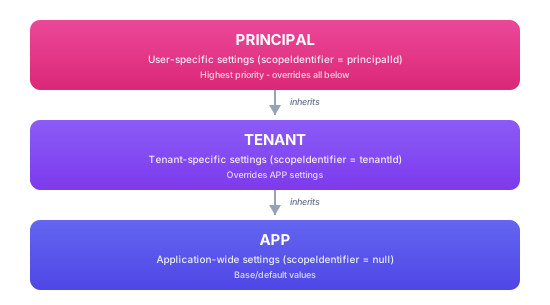
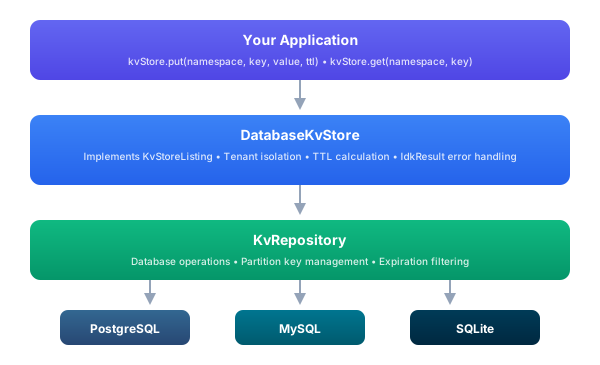
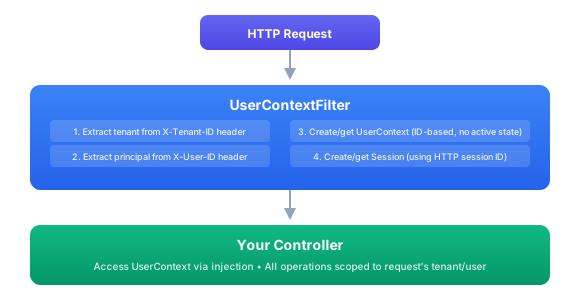
**OIDC** SURFconext, DigiD, FranceConnect, Azure AD
**Document** Passport NFC, ID card OCR via ReadID, Onfido, Jumio
**Biometric** Face liveness via iProov, Onfido, Jumio
**OTP** Email, SMS, authenticator app
**Wallet** EUDIW PID, mDL credential
**Registry** Chamber of commerce, civil registry, REST API
Methods compose in four modes: **ALL** (every method must pass), **ANY** (user chooses one), **THRESHOLD(n)** (at least N pass), and **SEQUENCE** (ordered, with claims flowing between steps). Each method produces identifiers, claims, assurance level (eIDAS LoA, NIST AAL), authentication methods (RFC 8176 AMR), and evidence strength, enabling downstream systems to make assurance-based access decisions. --- ## Assurance Grows Over Time A person can be verified through multiple channels over time, wallet PID, institutional OIDC, email OTP, document scan, each contributing its own assurance level. VDX computes the **derived assurance dynamically**: the highest LoA across all bindings, with stale bindings degrading after a configurable age. **Step-up authentication** triggers automatically when an operation requires higher assurance than the current session provides. A user browsing a catalog might need only `low` assurance, but signing a contract requires `high`, VDX challenges them to re-authenticate through a stronger method without the application needing to know about assurance levels. --- ## Enterprise IAM Integration VDX integrates with your existing identity infrastructure rather than replacing it: | Integration | What it does | |------------|-------------| | **Identity Broker** | Connects to upstream OIDC providers (Keycloak, Azure AD, SURFconext) while preserving `issuer_state` for OID4VCI correlation | | **Token Exchange** | RFC 8693, normalizes tokens from any source into uniform STS tokens with standardized claims, ACR/AMR, and `verified_claims` | | **Claims Mapping** | Translates between credential formats (SD-JWT, mdoc, JSON) and OIDC claims, with provenance tracking per claim | | **Impersonation & Delegation** | Service acts AS the user or ON BEHALF OF the user, with nested `act` claims for full audit trail | Enterprise applications keep using standard OIDC tokens. They don't need to know that behind the scenes, a wallet presentation was verified, an identity was matched, and claims were projected from encrypted canonical bindings. --- ## Per-Identity Encryption Sensitive identity data is encrypted at rest using a two-layer key hierarchy. An **Identity Access Key** (per-identity, random 256-bit symmetric) wraps per-document **Document Encryption Keys** (AES-256-GCM). Access is controlled through grants: | Grant type | How it works | |-----------|-------------| | **Org Grant** | IAK wrapped by KMS/HSM org root key, organization can decrypt | | **Wallet Grant** | IAK sealed with wallet's public key (HPKE), holder can decrypt | | **Knowledge Grant** | IAK derived from passphrase (Argon2id), user can decrypt with PIN/password | | **Sharing Grant** | DEK re-wrapped for a specific recipient, controlled data sharing | **GDPR compliance is cryptographic:** destroying the IAK makes all data for that identity irrecoverable in O(1), crypto-shredding without data migration. Data portability is an export command. Consent is modeled as grants with purpose, validity period, and instant revocation. --- # Security & Governance # Security & Governance Every data breach starts with an implicit trust assumption that shouldn't have been there, a service that wasn't authorized, an API call that wasn't logged, a permission change that nobody reviewed. VDX eliminates implicit trust from your identity infrastructure. Every command is policy-checked before execution. Every action is recorded in a tamper-evident audit trail. Every decision is traceable across services, tenants, and time. This isn't a security layer bolted onto the platform. It's how the platform works. The same governance model applies whether you're issuing a credential, verifying a presentation, signing a document, or returning a query result. Nothing executes without authorization, nothing happens without a record. --- ## Policy-Driven Authorization Before any command executes, issuing a credential, reading an identity, signing a document, querying a record, it passes through the policy enforcement layer. The decision is made by an external policy engine, not by application code. Command Authorization Flow Three policy engines are supported. **Cedar** (AWS) provides formally verifiable policies that can be mathematically proven correct, you can ask "is there any scenario where an unauthorized user can access this resource?" and get a definitive answer. **Open Policy Agent** uses the industry-standard Rego language, widely adopted in cloud-native environments. **Any AuthZEN-compliant PDP** works out of the box. What makes this different from role-based access control scattered through code: - **Policies are data, not code.** Update who can do what without redeployment. Different tenants can have entirely different policy sets. - **Dual-principal evaluation.** Both the end user AND the calling service are authorized on every request. A compromised service can't escalate its own privileges. - **Step-up authentication.** Policies can require higher assurance for sensitive operations, viewing a record needs `low`, but exporting it needs `high`. The platform challenges the user automatically. - **Fail-closed by default.** If the policy engine is unreachable, everything is denied. No security degradation under failure. - **Progressive rollout.** Log-only mode lets you see what would be denied before enforcing, validate policies against production traffic without breaking anything. --- ## Immutable Audit Trail Every operation produces an audit record. Not just "user X did Y", the full context: who, what, when, why it was allowed (or denied), how long it took, which service handled it, and the distributed trace ID linking it to every other operation in the request chain. Audit Pipeline The audit pipeline automatically enriches events with tenant and actor context from the session, redacts sensitive data (passwords, tokens, API keys are stripped before persistence), and writes to an append-only store where records cannot be modified or deleted, not even by administrators. **Tamper evidence** goes further: every audit event is hash-chained to the previous one. Modifying any event breaks the chain. Periodic signed checkpoints provide independent verification points. An auditor can prove that no records were altered between any two points in time. ### What Gets Recorded | Event type | What it captures | |-----------|-----------------| | **Command execution** | Every business operation, credential issuance, identity verification, document signing, data queries | | **Authorization decisions** | PERMIT and DENY with policy engine reasons, including which rules matched | | **Authentication events** | Wallet presentations, OIDC logins, step-up challenges, session lifecycle | | **Data access** | Who read what, from which service, at what assurance level | | **Configuration changes** | Policy updates, tenant settings, credential schema modifications | | **Security events** | Failed authentication attempts, suspicious patterns, credential revocations | ### SIEM Integration Audit records export to your existing security infrastructure in three formats: - **JSON**: for Elasticsearch, Splunk, Datadog, Loki, and modern log platforms - **CEF** (Common Event Format), for ArcSight, QRadar, and legacy SIEM systems - **OCSF** (Open Cybersecurity Schema Framework), the emerging standard for security telemetry Export is asynchronous, it never blocks command execution. Failed exports retry with exponential backoff and dead-letter queuing so nothing is silently lost. --- ## End-to-End Tracing A single user action, presenting a credential, signing a document, verifying an identity, might flow through multiple microservices. Without tracing, investigating an incident means correlating logs from different services by timestamp and hoping. VDX uses OpenTelemetry with W3C Trace Context propagation. A single **trace ID** follows the request from the API gateway through every service that participates. Spans within the trace show where time was spent. The trace ID appears in every audit record, every log line, and every SIEM export, so investigating an incident starts with one ID and reveals the complete picture. Distributed Trace --- ## Cross-Domain Security Signals When a credential is compromised, a session is revoked, or an account is disabled, every system that trusts that identity needs to know, immediately, not hours later. VDX implements the **OpenID Shared Signals Framework** (SSF) for real-time security event exchange. CAEP events handle session revocation and token claim changes. RISC events handle account compromise, disablement, and purge. All signals are transmitted as signed Security Event Tokens (SETs) with replay protection. This means VDX doesn't operate in isolation. When an upstream identity provider detects a compromise, the signal propagates to VDX, which revokes sessions, invalidates cached decisions, and notifies downstream systems, all within seconds. --- ## Data Protection Identity data is encrypted at rest with per-identity keys. The organization can access data through its KMS-wrapped grant. The wallet holder can access it through their public key. Optional knowledge-based grants add passphrase protection. **No plaintext identifiers in the database.** External identifiers (wallet keys, email addresses, institutional IDs) are stored as HMAC hashes. Canonical attributes are encrypted with AES-256-GCM. Even with full database access, an attacker sees only ciphertext and hashes. **GDPR by architecture:** - **Crypto-shredding**: destroying one key makes all data for an identity irrecoverable. No data migration, no record-by-record deletion. O(1) erasure. - **Selective disclosure**: holders choose which claims to reveal per presentation. The verifier never sees more than what's needed. - **Consent-as-grants**: access grants carry purpose, validity period, and revocation. Revoking consent = revoking the grant = immediate access termination. - **Data portability**: export command bundles all data for an identity in a portable format. --- ## Attribute Sources as Parties External systems that feed attributes into the platform, a database, an IAM, a REST API, a static dataset, are not configuration entries. Each registered attribute source is a party: an executable system is a software party, a non-executing dataset is an asset party, and the source carries an `ATTRIBUTE_SOURCE` capability on that party. The managed-versus-external distinction rides on the party itself (its origin and, for a server, its management mode), the same pattern the platform uses for an external OID4VCI issuer. Registration creates the full identity picture in one step. The source party receives an identity it owns, and the source's endpoint URL is stored on that identity as a protected correlation identifier under the tenant's protection policy for URLs, so connection endpoints follow the same at-rest protection rules as personal identifiers. Connector secrets are never identifiers and never stored inline; they live in the selected secret backend and the source references them through its software credential's secret reference. Because sources are parties, they are visible where parties are visible: the polymorphic party API returns them as typed `Software` and `Asset` shapes alongside persons and organizations, so a tenant's inventory of participants includes the systems its data comes from. That visibility makes governance derivable rather than hand-maintained. Governance derivation reads each source's operator and runtime mode from its server-party record and produces complete processor-map entries: a third-party-operated source appears as a processor under its operator, the systems it depends on appear as sub-processors behind that operator, and the result feeds the processor map, transfer facts, and register reporting without a separately maintained inventory. When attribute values flow out of identifiers at issuance time, the attribute pipeline's identity source emits identifier claims protection-aware: reversible values are revealed, and blinded lookup values are never emitted as claims. --- ## Governance at Every Layer The same governance model applies across all platform operations: | Layer | How governance applies | |-------|----------------------| | **Credential issuance** | Policy check before issuing. Audit record of what was issued, to whom, by which authority. | | **Credential verification** | Policy check on what to accept. Audit record of what was verified, from whom, with what assurance. | | **Identity matching** | HMAC-hashed links, no plaintext. Audit record of matching decisions and IDV outcomes. | | **Data access** | Policy check on every read/write. Encryption at rest. LoA-gated decryption grants. | | **Configuration changes** | Policy check on who can modify settings. Audit record of every change with before/after values. | | **Service-to-service** | mTLS and workload identity. Dual-principal authorization. No shared secrets. | The result is a platform where every business decision, from "should we issue this credential?" to "should this service access this record?", goes through the same policy-audit-trace pipeline. No exceptions, no bypasses, no implicit trust. --- # Operations & Management # Operations & Management VDX is not just a set of APIs, it's a complete operational platform. Management portals for administrators, issuers, verifiers, and end users. A workflow engine that orchestrates multi-step identity processes. A forms editor for code-free data collection. White-label branding down to the individual design token. And the deployment flexibility to run anywhere from a single Docker container to a distributed Kubernetes cluster. --- ## Portals VDX Portals Portals are where organizations interact with their customers, partners, employees, and citizens. A portal is a collection of forms and workflows that guide users through identity processes, onboarding a new employee, verifying a student's enrollment, signing a contract, issuing a credential, or granting access to a resource. Each portal integrates the full VDX capability set: credential issuance and retrieval, verification of presented credentials, wallet-based authentication, approval workflows, encrypted vault storage, and document signing. The organization defines which capabilities each portal exposes, and the portal handles the user-facing experience, forms, consent collection, status tracking, and notifications. Portals are fully white-labeled per tenant. An educational institution's student onboarding portal looks and feels like the institution's own product. A government agency's citizen services portal carries the agency's branding and language. The underlying infrastructure is shared, but each tenant's users see only their organization's brand. ### VDX Applications Alongside portals, VDX includes purpose-built applications for platform operations: - **Admin Console**: platform administration, tenant management, policy configuration, device management, audit review, system health monitoring - **Issuer Management**: credential schema design, issuance configuration, batch and individual issuance, revocation, lifecycle analytics - **Verifier Management**: verification requirement configuration, trusted issuer lists, event monitoring, compliance reporting These are operational tools for the teams that run the platform, separate from the portals that end users interact with. --- ## Workflows & Forms Real-world identity processes aren't single API calls. Credential issuance might require data collection, manager approval, identity verification, and notification. Onboarding might combine document verification with organizational checks and compliance review. These multi-step, multi-actor processes are modeled as workflows. Workflow Engine The **Workflow Engine** orchestrates these processes. Each step in a workflow is a command, the same command abstraction that powers the rest of the platform. This means every step is automatically authorized by the policy engine, recorded in the audit trail, traced with OpenTelemetry, and can execute locally or on a remote microservice. If a step fails midway through, saga-based compensation rolls back completed steps in reverse order. The **Forms Editor** lets administrators design input forms without writing code. Forms collect structured data for workflow steps, credential issuance requests, identity verification inputs, approval decisions, and any process that needs user input. Form definitions include: - Validation rules (required fields, regex patterns, value ranges) - Conditional visibility (show field B only when field A has value X) - Multi-language labels and descriptions - Accessibility metadata (ARIA labels, keyboard navigation) Forms are versioned and tenant-scoped, different organizations can have different forms for the same workflow type. --- ## White-Label Branding Every visual aspect of the platform is customizable per tenant through a Material Design 3 token-based theming system. Organizations deploy VDX as their own product, under their own brand.
**Simple Branding** Pick one seed color. The platform generates the full M3 palette, 89 color tokens across light, dark, and high-contrast variants. Upload a logo and custom fonts. 15 typography styles, 6 elevation levels, motion tokens, and responsive scales, all derived automatically.
**Full Customization** Override any of the 200+ design tokens, colors, typography, spacing, border radius, elevation, motion, for pixel-perfect brand alignment. Export as CSS custom properties for web. Use the Compose Multiplatform SDK for native iOS and Android.
The scope hierarchy (SYSTEM → APP → TENANT → PRINCIPAL) means platform defaults cascade through organizational overrides down to individual user preferences. A tenant only needs to define the tokens it wants to change, everything else inherits from the level above. --- ## Deployment VDX Microservices VDX runs as microservices or as a monolith, same codebase, different configuration. Choose the deployment model that fits your scale and operational maturity.
**Kubernetes** Helm charts per service. Environment overlays for dev, staging, and production. Horizontal scaling per service. Health and readiness probes. License material is mounted as Secret and ConfigMap backed files, so the deployment references `license.jwe`, the recipient key, and trust bundles without storing secret contents in Git.
**Docker Compose** Single-command local setup. Microservices or monolith mode. PostgreSQL and Keycloak included. Environment file configuration.
**Cloud Native** AWS ECS/EKS, Azure AKS, or any container platform. Prebuilt service images on Eclipse Temurin 21 base images.
**On-Premise** Fat JAR or GraalVM native images. Air-gapped environment support. Full control over data residency. No container runtime required.
All deployment modes include PostgreSQL for persistence and integrate with Keycloak or any OIDC-compliant provider for administrative authentication. --- ## Device Management VDX manages the physical devices that participate in your identity ecosystem, not just software clients. **Verification devices**: tablets at reception desks, kiosks at building entrances, card readers at access points, terminals at border control. Each device is registered in the platform, assigned to a tenant, given verification policies that control what credentials it accepts, and monitored for health and activity. **Push verification** flips the traditional flow. Instead of waiting for the user to start the process, the device initiates it. A reception kiosk starts an OID4VP flow when it detects a visitor. A turnstile triggers NFC verification. A customs terminal requests specific credentials. The platform manages the device-initiated sessions the same way it manages user-initiated ones, same verification, same policies, same audit trail. **Workload identity** (SPIFFE/SPIRE) provides zero-trust service-to-service authentication. Every microservice in a VDX deployment has a cryptographic workload identity, eliminating shared secrets, API keys, and static credentials for internal communication. Combined with dual-principal authorization, this means even compromised internal services can't escalate privileges. --- ## Observability Every operation in VDX is observable through three complementary systems:
**Distributed Tracing** OpenTelemetry with W3C Trace Context. One trace ID follows a request through every service. Latency breakdown per span.
**Audit Logging** Immutable, tamper-evident trail. Automatic data redaction. JSON, CEF, OCSF export to any SIEM.
**Shared Signals** OpenID SSF (CAEP/RISC). Real-time cross-domain security event exchange. Instant session revocation.
--- ## Get Started VDX is available as a managed service or for on-premise deployment. Contact Sphereon to discuss your requirements: - **Website:** [sphereon.com](https://sphereon.com) - **Email:** [info@sphereon.com](mailto:info@sphereon.com) - **GitHub (open source):** [github.com/Sphereon-OpenSource](https://github.com/Sphereon-Opensource) --- # OID4VP DCQL Query Configuration Admin API (Platform) import SingleApiReference from '@site/src/components/SingleApiReference'; --- # Semantic Binding API import SingleApiReference from '@site/src/components/SingleApiReference'; --- # Semantic Vocabulary API import SingleApiReference from '@site/src/components/SingleApiReference'; --- # User Manager API import SingleApiReference from '@site/src/components/SingleApiReference'; --- # Software / Instance Manager API import SingleApiReference from '@site/src/components/SingleApiReference'; --- # Connector Registry API import SingleApiReference from '@site/src/components/SingleApiReference'; --- # Connector Integration Profile API import SingleApiReference from '@site/src/components/SingleApiReference'; --- # Resource & Booking API import SingleApiReference from '@site/src/components/SingleApiReference'; --- # Email API import SingleApiReference from '@site/src/components/SingleApiReference'; --- # Invitation API import SingleApiReference from '@site/src/components/SingleApiReference'; --- # Forms API import SingleApiReference from '@site/src/components/SingleApiReference'; --- # License Portal API import SingleApiReference from '@site/src/components/SingleApiReference'; --- # Identity Manager API import SingleApiReference from '@site/src/components/SingleApiReference'; --- # Dependency Injection ## Setup app with scopes The Kiwa eLicense Holder SDK is using scopes to manage the lifecycle of the various components. More information about scopes can be found in the [scopes section](/idk/v0.10/guides/di/scopes) of the Identity Development Kit that the Kiwa SDK uses. See the IDK documentation for more information. ### Initialize application component and scope Typically there is only one application scope within a single app or service. Technically however multiple instances could be created. The app scope has an app component, that is initialized with some information. The app component acts as a singleton in the app scope. The `application` parameter below for instance is the typically the Android context or Apple app object. The `appId` is the name of your application. It is mainly being used in configuration management. All configuration properties being used, will use the `appId` internally. Same for the `profile`. Within a single app you can support multiple profiles. However, a single app instance will only be started with a single profile. What a profile exactly is, is up to you as a developer. A typical use case is the type of environment the app is running in. The profile is also being used in the configuration service to distinguish, for instance, between different configuration values between your production and test app. Lastly there is the app version. Although the component expects your app version to be supplied there, currently it is not in use in the Kiwa SDK. ```kotlin // Create your application component val appComponent = KiwaSdkAppComponent.init( application = yourApplication, // This can be your mobile app reference instance appId = "your-app-id", // A string denoting your app profile = "prod", // A profile so you could have different properties for different environments or profiles of the app version = "1.0.0" // The version of your app. ) ``` Now you get access to a few objects in the app scope via the `appComponent` above. The app component however knows about quite a lot more interfaces it can injects. Its primary function is to ensure that any objects being created with these interfaces are using Dependency Injection, so a developer does not directly provide an actual implementation. This allows for clean, cohesive code with low coupling. One of the most important objects on the app component is the `contextManager` which we will use next. ### Initialize user context scope Once the application component has been created it is time to create the context scope, which contains the tenant and principal values. A principal either is a natural person (user) or system account. This scope is used to allow separation of object instances and asynchronous code. It is also being used by the configuration system, meaning that it is possible to have different configuration values for different tenants, or even principals. If multi-tenancy is not needed in your use case, you can either always initialize with a fake tenant and principal, or simply leverage the anonymous context scope. ```kotlin // Initialize context with tenant and principal information val userContextComponent = appComponent.contextManager .getOrCreateFromInputs( TenantInputString("your-tenant-id"), PrincipalInputString("your-principal-id@for-instance-an-email.com") ) // As an anonymous user, or if you don't use multi-tenancy at all: // val contextComponent = appComponent.contextManager.getOrCreateAnonymous() ``` ### Initialize Session scope Now we have a singleton app scope, and a context scope for the tenant and principal, it is time to create a session. You can define what a session entails. It could be a long-lived session (from user login to logout in a mobile app) or a short-lived one (a single request/response in a REST API, for instance). The session scope is mainly used to bind all objects and asynchronous code together. This means that any outstanding work within a session will be stopped once the session is destroyed. ```kotlin // Initialize session val sessionContextManager = userContextComponent.sessionContextManager val sessionComponent = sessionContextManager.getOrCreateFromId("unique-example-session") // A unique value for the session ``` ### Get Service Instances Now that the app scope, context scope, and session scope have been initialized, you can get the main entry point into the Kiwa eLicense SDK services: ```kotlin // Get the service factory val kiwaServices = sessionContextManager.getService(IKiwaServices.SERVICE_ID) // Get the holder, auth, and verifier services val holderService = kiwaHolderServices.holder // Provides access to license holder operations including issue, assign, confirm, and decode commands. val authService = kiwaHolderServices.auth // Provides access to wallet certificate authentication and management operations. ``` It makes sense to have the above code somewhere early in your application. For instance during app start, or close to the authentication process. :::note You could be using [kotlin-inject](https://github.com/evant/kotlin-inject) in your own code as well, in which case you could inject an IKiwaHolderServices property as constructor argument. You would automatically be provided with an instance. See also the [IDK DI documentation](/idk/v0.10/guides/di/amazon-app-platform) ::: --- # Holder Functions This section guides you through the essential steps required to integrate with the Kiwa eLicense SDK. You’ll learn how to set up an application with the appropriate scopes, request a wallet certificate, and interact with the licensing system. Specifically, you'll cover: - Creating an application with the correct scopes - Requesting a wallet certificate - Assigning a license to a device - Issuing a license for a license holder - Confirming that license issuance was successful By the end of this section, you will have a working setup capable of securely communicating with the Kiwa APIs and managing license lifecycles. ## Prerequisites Before using the Kiwa eLicense SDK, please ensure the following setup is complete: ### Dependencies Ensure your project includes the necessary Kiwa eLicense SDK modules. For Android this is `com.sphereon.kiwa:kiwa-holder-sdk-impl:`. See [getting started](getting-started) and [installation](installation) for more information. ### Setup Dependency Injection Generate your components or use predefined DI components for the scopes available in the Kiwa eLicense SDK. See [dependency injection](di) for more information. ### Environment Variables Set the necessary environment variables to authenticate with Kiwa APIs: - `KIWA_SUBSCRIPTION_KEY`: Your unique subscription key provided by Kiwa. Example: ` KIWA_SUBSCRIPTION_KEY=your_subscription_key_here ` ## Obtaining a wallet certificate :::note The below code uses service names that can be found in the [dependency injection](di) page. ::: Before performing any license operations, you need to authenticate and obtain a wallet certificate: ```kotlin // Request a certificate, with the optional environment parameter. If omitted, the default environment will be used from the configuration service (Acc by default if nothing is configured) val certificateResult = authService.getWalletCertificate(GetWalletCertificateRequestOpts(environment = ApiEnvironment.ACC)) certificateResult.onSuccess { result -> // Certificate successfully obtained println("Certificate obtained: ${result.success}") }.onFailure { error -> // Handle error println("Error obtaining certificate: ${error.message.defaultMessage}") } ``` ## License Operations ### Assigning a License The following command can be executed once an e-license has been issued to a user's email address via the Kiwa IA API. This will also provide the activation code needed to assign the license. To assign a license to a device/holder: ```kotlin // Create a request with activation code and email val assignRequest = AssignDeviceLicenseRequest( code = "your_activation_code_here", email = "user@example.com" ) // Assign the license val assignResult = holderService.assignLicense(assignRequest) assignResult.onSuccess { result -> // License successfully assigned println("License assigned successfully: ${result.success}") }.onFailure { error -> // Handle error println("Error assigning license: ${error.message.defaultMessage}") } ``` ### Issuing a license The below command will retrieve all available licenses in Mdoc format. Internally, it will also validate the licenses for correctness, like signatures, dates, certificates, and CBOR document structure. To retrieve licenses available for the authenticated holder: ```kotlin // Issue the license val issueResult = holderService.issueLicense() issueResult.onSuccess { result -> // Process the raw license data val encodedCbor: ByteArray = result.raw // Decode the CBOR-encoded license val license = ElicenseIssueDocuments.decodeCbor(encodedCbor) // Convert to JSON for display or processing val licenseJson = license.toJson() println(licenseJson.toJsonString()) // Convert to a simplified display format val simpleDisplay = license.toSimpleDisplay() println(CborJsonSupport.serializer.encodeToString(simpleDisplay)) }.onFailure { error -> println("Error issuing license: ${error.message.defaultMessage}") } ``` ### Confirming license issuance After successfully retrieving license(s), confirm the issuance: ```kotlin // Confirm the license issuance val confirmResult = holderService.confirmLicense() confirmResult.onSuccess { result -> println("License confirmation successful: ${result.success}") }.onFailure { error -> println("Error confirming license: ${error.message.defaultMessage}") } ``` ## Complete example Here's a complete example that demonstrates the entire process of getting an mTLS certificate and then getting the licenses: ```kotlin // Create your components val appComponent = KiwaAppComponent.init( application = yourApplication, // This can be your mobile app reference instance appId = "your-app-id", // A string denoting your app profile = "prod", // A profile so you could have different properties for different environments or profiles of the app version = "1.0.0" // The version of your app. ) val contextComponent = appComponent.contextManager.initAnonymous() val sessionContextManager = contextComponent.sessionContextManager val sessionComponent = sessionContextManager.initSession("unique-example-session") // A unique value for the session // Get the main Kiwa service val kiwa = sessionContextManager.getService( IKiwaServices.SERVICE_ID ) // Get a device certificate kiwa.auth.getWalletCertificate(GetWalletCertificateRequestOpts()) .onSuccess { result -> println("Certificate obtained: ${result.success}") }.onFailure { error -> println("Error obtaining certificate: ${error.message.defaultMessage}") return } // Step 2: Assign license val activationCode = "your_mailed_activation_code_here" val assignRequest = AssignDeviceLicenseRequest( code = activationCode, email = "user@example.com" ) // kiwa.holderService.cmd.assign() <= This is the same call as below but then using the command pattern interface kiwa.holder.assignLicense(assignRequest) .onSuccess { result -> println("License assigned successfully: ${result.success}") }.onFailure { error -> println("Error assigning license: ${error.message.defaultMessage}") return } // Step 3: Issue license kiwa.holder.issueLicense() .onSuccess { result -> println("License issued successfully") // The default way to access the license documents. They have been validated already at this point val documents: ElicenseIssueDocumentsCbor = issueLicensResult.documents // If you really want access to the raw bytes of the mDoc documents val encodedCbor: ByteArray = issueLicenseResult.raw // Decode the CBOR-encoded licenses val licenses = ElicenseIssueDocumentsCbor.decodeCbor(encodedCbor) // Convert to JSON for display or processing val licenseJson = licenses.toJson() println("License JSON: ${licenseJson.toJsonString()}") // Convert to a simplified display format val simpleDisplay = license.toSimpleDisplay() println("Simple display: ${CborJsonSupport.serializer.encodeToString(simpleDisplay)}") }.onFailure { error -> println("Error issuing license: ${error.message.defaultMessage}") return } // Step 4: Confirm license issuance kiwa.holder.confirmLicense() .onSuccess { result -> println("License confirmation successful: ${result.success}") }.onFailure { error -> println("Error confirming license: ${error.message.defaultMessage}") } ``` ## eLicense Mdoc and verification More information about the eLicense Mdoc format, display formats and engagement/presentation to verifiers can be found in the [Kiwa eLicense Mdoc](elicense-mdocs) and [IDK Mdoc engagemnet documentation](/idk/v0.10/guides/mdoc/engagement/intro). --- # eLicense Mdoc display and verification The e-licenses returned from the Kiwa APIs are Mobile Documents (Mdocs) in CBOR encoding according to the ISO 18013-5 specification. The Kiwa eLicense SDK internally thus also uses the [Mdoc library](https://github.com/Sphereon-OpenSource/identity-development-kit/tree/develop/libraries/mdoc) for JSON conversion, presentations, and validations ([see next chapter](#manual-holder-or-relying-party-validation)). ## Mdoc format The [Issuing a license](#issuing-a-license) service returns an array of issued licenses. Each of these licenses is a Mdoc. That means they contain a document according to `8.3.2.1.2.2` of the ISO 18013-5 specification, which in turn contains the cryptographic material for validations. You can use the lower level Mdoc SDK to manually interact with the Mdocs, but the Kiwa eLicense SDK has convenience methods, ensuring you do not have to interact at that level. The main exposed methods in the SDK are: - Verification and validation of the e-license (see [next chapter](#manual-holder-or-relying-party-validation)) - Displaying the Mdoc CBOR data in simplified or full JSON format. The simplified version removes items not needed for display purposes (this chapter) - Presenting licenses to 3rd party Relying Parties (mdoc readers) In [Issuing a license](#issuing-a-license) we saw how the Kiwa API returned one or more licenses. The response contains a result called `decode` in which a property `mobileeIDdocuments` is found. This is an array of `ELicenseDocument` objects, which in turn are the regular Mdoc CBOR objects. These can be represented as a bytearray, or decoded into the `ELicenseDocument` objects, which the response already has done for you. You can use the decode command/service when you have the bytearray of a single ELicense: ```kotlin val decodeResult = holderService.cmd.decode(licenseByteArray) decodeResult.onSuccess { documentsCbor -> ... }.onFailure { error -> println("Failed to decode license: ${error.message.defaultMessage}") } ``` ### Simple Json display The above document contains all kinds of sub objects, mainly wrapping the CBOR structures. As these provide low-level access, it might be useful in advanced cases, but for regular display, the SDK provides a convenient method. ```kotlin // Convert the Mdoc CBOR object into a simple JSON display object. Not to be confused with the .toJson() method (see below) val licenseSimple: ElicenseDocumentSimpleDisplay = licenseDocument.toSimpleDisplay() // Convert the JSON data object to a JSON string val asString: String = licenseSimple.toJsonString() ``` The result should look something like: ```json { "docType": "org.iso.23220.1.nl.kiwa.sampcert", "nameSpaces": { "org.iso.23220.1.nl.kiwa.sampcert": { "family_name": "Doe", "given_name": "John", "birth_date": "1998-06-11", "issue_date": "2024-10-24", "issue_place": "Nieuwegein", "starting_date": "2024-09-25", "expiry_date": "2024-09-26" // SNIP FOR READABILITY } }, "validityInfo": { "signed": "2025-06-23T13:47:31.0962123Z", "validFrom": "2025-06-23T13:47:31.0962123Z", "validUntil": "2027-12-22T00:00:00Z" } } ``` The `validityInfo` object contains the cryptographic dates about the validity of the license/Mdoc. Be aware that an e-license is only valid as long as the current date is between `validFrom` and `validUntil`. Relying parties doing validations will throw errors if the current date is not within the validity window! It makes sense that any holder app also takes this information into account when displaying information. The `docType` value will match the key used in the nameSpaces map. For Kiwa licenses, there will only be one `nameSpaces` object for now. The easiest solution is to first look at the docType and then use that value as the lookup key under the `nameSpaces` key :::note > If you really have a need to look into more properties than the simple display provides you, without all the CBOR complexities, then there is also a generic `toJson()` object > available you can use. That translates all the CBOR properties into JSON properties, but be aware that it still contains the same structure as an ISO 18013-5 Mdoc, meaning it > will be harder to interact with, unless you know the 18013-5 spec well. ::: Example of CBOR to JSON: ```json { "docType": "org.iso.23220.1.nl.kiwa.sampcert", "issuerSigned": { "nameSpaces": { "org.iso.23220.1.nl.kiwa.sampcert": [ { "digestID": 0, "random": "7w3AjRPhPxNiNzo5FlyoBA", "key": "family_name", "value": { "cddl": "tstr", "value": "Doe" }, "cddl": "tstr" }, { "digestID": 1, "random": "_rcKB4PnjOTpCB5-1FGmug", "key": "given_name", "value": { "cddl": "tstr", "value": "John" }, "cddl": "tstr" }, { "digestID": 2, "random": "Iw9Fg5OsE3YxJL5DEef-ZA", "key": "birth_date", "value": { "cddl": "tstr", "value": "1998-06-11" }, "cddl": "tstr" } // SNIP FOR READABILITY // Be Aware that Mdocs can have sub elements as well here ] }, "issuerAuth": { "protectedHeader": { "alg": -7 }, "unprotectedHeader": { "x5chain": [ "MIIBujCCAV+gAwIBAgIQCTaKSPbXo+IrZFXgcdNGpTAKBggqhkjOPQQDAjBAMT4wPAYDVQQDEzVBY2MgS2l3YSBEaWdpdGFsIENlcnRpZmljYXRpb24gU2lnbmVyIEludGVybWVkaWF0ZSBDQTAeFw0yNTAzMjYwOTQ3MzJaFw0yNzEyMjIwMDAwMDBaMCgxJjAkBgNVBAMTHUFjYyBTcGhlcmVvbiBJYURvY3VtZW50U2lnbmVyMFkwEwYHKoZIzj0CAQYIKoZIzj0DAQcDQgAEK+9UZCeDyzToPg2Nr8gvrs4rpOkpZI/R4y6Yp+GcltGetTLO58fmFjNAObcLgM/+QMBPy6kmlkYfj56DJOX4YKNTMFEwCQYDVR0TBAIwADAdBgNVHQ4EFgQUIa6Dtg25fjqcYy9Xv/z1upQ7OY0wDgYDVR0PAQH/BAQDAgeAMBUGA1UdJQEB/wQLMAkGByiBjF0FAQMwCgYIKoZIzj0EAwIDSQAwRgIhAPsuK9aH0BCYnlBTuPNA4gAogkxr3cB+UCs6b1xb03sfAiEAuwKZY2XNrlGMQBE+ib0iSfIcY8lJQtFUxA/XDhbJ0JQ" ] }, "payload": "2BhZBTumZ2RvY1R5cGV4IG9yZy5pc28uMjMyMjAuMS5ubC5raXdhLnNhbXBjZXJ0Z3ZlcnNpb25jMS4wbHZhbGlkaXR5SW5mb6Nmc2lnbmVkwHgcMjAyNS0wNi0yM1QxMzo0NzozMS4wOTYyMTIzWml2YWxpZEZyb23AeBwyMDI1LTA2LTIzVDEzOjQ3OjMxLjA5NjIxMjNaanZhbGlkVW50aWzAdDIwMjctMTItMjJUMDA6MDA6MDBabHZhbHVlRGlnZXN0c6F4IG9yZy5pc28uMjMyMjAuMS5ubC5raXdhLnNhbXBjZXJ0uBwAWCDVxzGarB2o9wRH4wRLVhTTiwlwZMtUaA0BQzBH38QzggFYIF9WqSpm047yPHFfDdsts_Q7asiyqrowz-vJeWjbfwVqAlggDwFm804y_lTPll_LDWI9Hhg3nEu01UCAs-P86dpGdpUDWCC4sRrfCVcUpS2mF1sZUvzBXAn2Z7XRt2isFcRT-M1wJARYIMRrKDsz135pSEU60XqUEX4WMHTQF0MZROqBBTednSH2BVggW9Rlr07L4wH2rIPi9QZw0gshkFmsGhDvIt5MjxArX5sGWCDhSywYAXwvnqVTxSvi62K-qkv3xFPjP3cI3K3gYmcSKgdYIKw4vZ2cOC5SdBU9sS98MlB21t7xryhqJVK7k2J6tk9tCFggkcZrkprBQ0sbrN3y4SInywawSorQcyu1weVfFAIyEbkJWCC32OUGRfibVYal1r0YUUPiZNLmrukPab4Kxa-JY_N04ApYII4-6JwgphhnzazMSgzA-X39_VGDYucsTt7WY9JDYZ_DC1gg1r0oMgucx-tW0v3LHqzqrUsQ6WUx0U5AeWIi1dcCOtYMWCD5whlv6l6Y1bR8ZS9Z2YblKQ5tBPb-9AjEKzG6eY_9Gg1YIHMGPwSolOM5JOf85gzwoVxpue9h2AKn_pUdTTvzE-d9Dlggsraz_yYQ0xuLm5xbnoAsRVWiWV2MZZ0aHiVOboMmz10PWCCUmXoRKrw67W1lQWdOEZK2Y8kLFWBgN4EYm5_ogK5BchBYIGk0s5We2nKSrYfRV2DDNQ7HF0x9FpH7c6illYJ0SYZ6EVggVX5norPWI_Yvw9DOPm64A1v2mXnyALlAnLwR_XS_BRQSWCBzxH19yp6viBEybQYt6SIy2ojVGB7XdhAP4IHfGytGfhNYIJ-P1-Aur_tIkdA7qxlZXVt1CtyXMoU5jDMpJh1tm70UFFggfDGJnDBYGhBx5rMLY8jBCgbUHAv-LBak4L4LKhHXiC8VWCD5e0u3DnAimMCIsdWmlak4LrQzGWSZM2zVHEkK-I9UXBZYIEHtYln3azFih-T-i_S__j2L22MqOaJP-J37Mj-nXfk1F1ggr_3uOoNSTITinggiQmYvpKaJEd9j2sOh3Ubm3ixAt0wYGFggs4I-1tiEH0HW6io6ueDYhQ0VlP5axHzGqsU9TJwb93EYGVggUdxGJk0cYFll2Lv3RvTd4OpMjGOK3Bq8JNVbySw3vrQYGlggvNLAto-xMMHK7uk6My57O0NqYZB5L81W6QsR_Ev1MwAYG1ggtIesqsTY6njFu2QIkv64nWqUD8TT9VHQExH-jh7eeY5tZGV2aWNlS2V5SW5mb6FpZGV2aWNlS2V5pAECIAEhWCCHkukVQVqtqcPLQCatsIj_s0GuLqUB7u_8FZsERwhjKSJYIHsplWP5I1JsXy_9MztpLEoJXdOvttfk_f1SwJ-tOsMxb2RpZ2VzdEFsZ29yaXRobWdTSEEtMjU2", "signature": "_2j8GQLWCB_AfoM1nJhF-L2g5f9HPh6FhcDrT5y1N11LWdYv7cQvAKVxU-j9fLC-AWZXNkYnAvti5vOih7NhWQ" } } } ``` ## Manual holder or Relying Party validation When acting as a holder, the code to get the licenses automatically performs checks to validate the correctness of the licenses. However, as a holder, you can check individual licenses as well. Or when acting as a verifier (also called Relying Party), you want to make sure licenses are being validated upon receipt. The service delegates to the low level Mdoc library internally. If you need more control for whatever reason, you could use that library directly as well. The verification performs the following steps: 1. Validate the certificate included in the Mdoc License Mobile Security Object (MSO) header according to ISO18013-5 `9.3.3`. 2. Verify the digital signature of the IssuerAuth structure (ISO1813-5 `9.1.2.4`) using the public_key, public_key_parameters, and public_key_algorithm from the certificate validation procedure of step 1. 3. Calculate the digest value for every IssuerSignedItem returned in the DeviceResponse structure according to `9.1.2.5` and verify that these calculated digests equal the corresponding digest values in the MSO. 4. Verify that the DocType in the MSO matches the relevant DocType in the Documents structure. 5. Validate the elements in the ValidityInfo structure, i.e., verify that: * the 'signed' date is within the validity period of the certificate in the MSO header, * the current timestamp shall be equal or later than the ‘validFrom’ element, * the 'validUntil' element shall be equal or later than the current timestamp. In the below code, we will validate a single e-license/Mdoc document. Be aware that this validation also automatically happens when you get the license(s) from the [Kiwa REST API](#issuing-a-license), so there is no need to manually perform the below verification at that point. ```kotlin val results: VerifyResultsType = verifierService.verifyLicenseBytes(/*byte array of e-license*/) // Or when you already have the license as mdoc/ElicenseIssueDocumentCbor decoded object: // val results: VerifyResultsType = verifierService.verifyLicense(licenseDocument) ``` The results object consists of multiple sub objects, which contain information about the above steps being successful or not. It contains an overall boolean value called `error`, which means that at least one of the validations contained an error and that error was deemed critical for the overall validation. It also contains a `verifications` array of type `VerifyResultType` containing individual verification step results. ```kotlin /** * Interface representing the results of a verification process. * * Provides information about the overall success or failure of the verification, * the individual verification results, and associated key information. * * @param KeyType The specific type of key implementing the KeyType interface. */ interface VerifyResultsType { /** * Indicates whether an error has occurred. * * This variable can be used to determine if an operation resulted in an error state. * A value of `true` means an error is present, while `false` means no error has occurred. */ val error: Boolean /** * Holds an array of verification results. * * Each element of the array represents a specific verification result, * detailing aspects such as the name of the verification, whether it resulted * in an error, an optional message describing the result, and whether the * result is critical. */ val verifications: Array /** * Represents information about a specific key. * * This variable holds an instance of the [KeyInfoType] interface which is parameterized with [KeyType]. * It encapsulates various details related to a key, such as its type and other metadata. * * @property keyInfo an instance of [KeyInfoType] for the specified [KeyType], or null if no key information is present. */ val keyInfo: KeyInfoType? } /** * Interface representing the result of a verification process. */ interface VerifyResultType { /** * Stores the name of a verification. */ val name: String /** * Indicates whether an error has occurred. * * This boolean variable is used to represent the presence of an error condition. * When set to `true`, it means an error has been detected; when set to `false`, * it indicates that no error is currently present. */ val error: Boolean /** * An optional message that provides additional information about the verification result. */ val message: String? val detailMessage: String? /** * Indicates whether the condition is critical. * * This boolean variable is used to flag a critical state or condition within the application. When set to true, * it denotes that the error condition was unsuccessful and requires immediate attention or handling. */ val critical: Boolean } ``` ![img.png](/kiwa/v0.6/images/img.png) ## Engaging as a holder/mdoc with a verifier (Relying Party) Once one or more eLicenses in mdoc format are in the holders possession there is a large chance that the holder needs to prove the license(s) to a Verifier, called a Relying Party. The Kiwa SDK leverages the Mdoc libraries for the lower level support in these cases. Although the entire lower level functionalities would be available the SDK is tailored towards the license holder, also called the Mdoc as opposed to the Relying Party, typically called verifier or Mdoc reader. When initiating the verification process as a license holder, it means you will have to start the so-called engagement. The engagement acts like the initialization of typically an attended "offline" peer-to-peer connection. It is called offline because there is no necessity for an active internet connection for either the Relying Party or the license holder when sharing the license. The engagement typically involves a QR or NFC tag. So either the Relying Party (mdoc reader) or the license holder (mdoc) will show a QR code, containing information on how to establish a connection. Then the connection can be established using NFC (slower) or Bluetooth Low Energy. That connection setup is being handled in the background, fully opaque to the users. All they do is show or scan a QR code, or tap 2 devices via NFC. Then the transfer/connection happens in the background The Idententy Development Kit (IDK) on which the Kiwa eLicense Holder SDK is based, is capable of handling the different engagement scenarios. More information on the IDK can be found in: - [engagement intro](/idk/v0.10/guides/mdoc/engagement/intro). - [engagement retrieval](/idk/v0.10/guides/mdoc/engagement/engagement-retrieval). --- # Example app We provide an example app to demonstrate how to use the Kiwa eLicense Holder SDK and the Identity Development Kit. Although the example app is not meant to be used in production, it does give a complete example of how to integrate the Kiwa eLicense Holder SDK into your application from retrieving the licenses, to verifying, displaying and presenting them to 3rd parties including NFC and QR engagements and BLE retrieval. :::note Be aware that the example app depends on the Kiwa eLicense Holder Sdk which is proprietary. Please see the install instructions for the Kiwa eLicense Holder SDK. ::: Some screenshots of the app are shown below:
Sample App Screenshot 1 { e.target.style.transform = 'scale(1.05)'; e.target.style.boxShadow = '0 4px 12px rgba(0,0,0,0.3)'; }} onMouseOut={(e) => { e.target.style.transform = 'scale(1)'; e.target.style.boxShadow = 'none'; }} onClick={(e) => { const overlay = document.createElement('div'); overlay.style.cssText = ` position: fixed; top: 0; left: 0; width: 100vw; height: 100vh; background: rgba(0,0,0,0.9); display: flex; justify-content: center; align-items: center; z-index: 9999; cursor: pointer; `; const img = document.createElement('img'); img.src = e.target.src; img.style.cssText = ` max-width: 90vw; max-height: 90vh; object-fit: contain; border-radius: 8px; `; overlay.appendChild(img); overlay.onclick = () => document.body.removeChild(overlay); document.body.appendChild(overlay); }} />

License list

Sample App Screenshot 2 { e.target.style.transform = 'scale(1.05)'; e.target.style.boxShadow = '0 4px 12px rgba(0,0,0,0.3)'; }} onMouseOut={(e) => { e.target.style.transform = 'scale(1)'; e.target.style.boxShadow = 'none'; }} onClick={(e) => { const overlay = document.createElement('div'); overlay.style.cssText = ` position: fixed; top: 0; left: 0; width: 100vw; height: 100vh; background: rgba(0,0,0,0.9); display: flex; justify-content: center; align-items: center; z-index: 9999; cursor: pointer; `; const img = document.createElement('img'); img.src = e.target.src; img.style.cssText = ` max-width: 90vw; max-height: 90vh; object-fit: contain; border-radius: 8px; `; overlay.appendChild(img); overlay.onclick = () => document.body.removeChild(overlay); document.body.appendChild(overlay); }} />

License details

Sample App Screenshot 3 { e.target.style.transform = 'scale(1.05)'; e.target.style.boxShadow = '0 4px 12px rgba(0,0,0,0.3)'; }} onMouseOut={(e) => { e.target.style.transform = 'scale(1)'; e.target.style.boxShadow = 'none'; }} onClick={(e) => { const overlay = document.createElement('div'); overlay.style.cssText = ` position: fixed; top: 0; left: 0; width: 100vw; height: 100vh; background: rgba(0,0,0,0.9); display: flex; justify-content: center; align-items: center; z-index: 9999; cursor: pointer; `; const img = document.createElement('img'); img.src = e.target.src; img.style.cssText = ` max-width: 90vw; max-height: 90vh; object-fit: contain; border-radius: 8px; `; overlay.appendChild(img); overlay.onclick = () => document.body.removeChild(overlay); document.body.appendChild(overlay); }} />

Log view

Sample App Screenshot 4 { e.target.style.transform = 'scale(1.05)'; e.target.style.boxShadow = '0 4px 12px rgba(0,0,0,0.3)'; }} onMouseOut={(e) => { e.target.style.transform = 'scale(1)'; e.target.style.boxShadow = 'none'; }} onClick={(e) => { const overlay = document.createElement('div'); overlay.style.cssText = ` position: fixed; top: 0; left: 0; width: 100vw; height: 100vh; background: rgba(0,0,0,0.9); display: flex; justify-content: center; align-items: center; z-index: 9999; cursor: pointer; `; const img = document.createElement('img'); img.src = e.target.src; img.style.cssText = ` max-width: 90vw; max-height: 90vh; object-fit: contain; border-radius: 8px; `; overlay.appendChild(img); overlay.onclick = () => document.body.removeChild(overlay); document.body.appendChild(overlay); }} />

QR engagement

Sample App Screenshot 5 { e.target.style.transform = 'scale(1.05)'; e.target.style.boxShadow = '0 4px 12px rgba(0,0,0,0.3)'; }} onMouseOut={(e) => { e.target.style.transform = 'scale(1)'; e.target.style.boxShadow = 'none'; }} onClick={(e) => { const overlay = document.createElement('div'); overlay.style.cssText = ` position: fixed; top: 0; left: 0; width: 100vw; height: 100vh; background: rgba(0,0,0,0.9); display: flex; justify-content: center; align-items: center; z-index: 9999; cursor: pointer; `; const img = document.createElement('img'); img.src = e.target.src; img.style.cssText = ` max-width: 90vw; max-height: 90vh; object-fit: contain; border-radius: 8px; `; overlay.appendChild(img); overlay.onclick = () => document.body.removeChild(overlay); document.body.appendChild(overlay); }} />

NFC engagement

## Source code The source code for the example app is available on [GitHub](https://github.com/Sphereon-OpenSource/kiwa-sample) and the code of the sample app itself is available with an Open-Source Apache2 license. ### Running and installing the example app The example app can be compiled and run using Android Studio, or any other IDE that support Gradle. Make sure you have everything setup to perform Android development, and debugging. That is out of the scope of this document. ```console .\gradlew clean build installDebug ``` The sample app now should be installed and your phone should start it automatically. :::warning Although you can use a simulator be aware that attended engagement needs BLE and NFC to work, which is not available in the simulator. So please use a real device! ::: --- # Changelog # Changelog ## 0.13.0 — 2026-01-08 - Based on Kiwa SDK 0.13.0 and Identity Development Kit 0.13.0 - Version bump to 0.13.0 of the Kiwa SDK to align with IDK 0.13.0 - minSdk to 30, because of external library dependencies - Add sample Swift app, next to the iOS and Android Compose app - XCFramework building added - CocoaPods support - Removed direct dependencies on the Sphereon Identity Development Kit, as they are exposed via the Kiwa SDK ### Breaking Changes #### IdkResult API Overhaul (from IDK 0.13.0) The `IdkResult` type has been completely redesigned for better iOS/Swift/ObjC interoperability: - **Changed from typealias to wrapper class**: `IdkResult` is now a proper class wrapping kotlin-result's `Result`, instead of a simple typealias - **New `Ok` and `Err` subclasses**: Use `Ok(value)` and `Err(error)` constructors instead of kotlin-result's functions directly - **Import changes**: Import `com.sphereon.core.api.Ok` and `com.sphereon.core.api.Err` (top-level functions) - **New methods**: `component1()`, `component2()` for destructuring; `getOrThrow()` for exception-based handling - **No more need to depend on `com.github.michaelbull.result`** **Migration example:** ```kotlin // Old (0.10) import com.github.michaelbull.result.Ok import com.github.michaelbull.result.Err return Ok(value) // New (0.13) import com.sphereon.core.api.Ok import com.sphereon.core.api.Err return Ok(value) ``` --- ## 0.1.1 — Internal release ### Highlights - Based on Kiwa SDK 0.7.0 and Identity Development Kit 0.10.0 - Usage of new Engagement features: - Separate NFC and QR access to engagement. Creating new engagements cancels existing ones for ease of use - EventHub for access to all engagement and transfer events - UI Projector for easy UI integration - Cleanup of ephemeral keys that made the sample app slower over time - Fixed the back button not working on the share screen - NFC engagement for Android hooked up to new engagement UI Projector - Display sub properties in case an object contains an array or map - Thumbnail images shown in the details view, open in full-screen when clicked with close button ### Android - minSdk lowered to 27, compileSdk 35 (extension 15), Java 17 toolchain --- # FAQ # FAQ **Q:** Does the Kiwa eLicense SDK require REST APIs?
**A:** Yes, The Kiwa eLicense SDK integrates with Kiwa REST APIs for license management operations. Once a license is stored in an application, they can be presented and viewed without consulting Kiwa APIs. There are no other REST APIs involved, except for the Kiwa license and certificate management APIs. --- **Q:** Is the Kiwa eLicense SDK open-source?
**A:** No the Kiwa eLicense SDK is not open-source. However it is built on top of the Identity Development Kit (IDK), which is open-source. The Kiwa SDK is only available for Kiwa customers with a license agreement. Licensed customers will get source-code access to the Kiwa SDK. --- **Q:** Where can I find the public API reference?
**A:** In the **Kotlin API** section (generated via Dokka). --- **Q:** Where can I download the SDK?
**A:** The SDK is distributed via our Nexus (maven) repository for all platforms. Licensed customers will get an account on our Nexus repository. --- **Q:** Which platforms are supported for the Kiwa eLicense holder SDK?
**A:** The SDK is currently available for Android/Jvm and iOS (testing). Future platforms might be added when requested. --- **Q:** Is there support for multi-tenancy?
**A:** The holder SDK is focused on mobile apps, however any SDK and application built on top of our Identity Development Kit (IDK) can be used in a multi-tenant environment. --- # License Agreement # License Agreement :::warning **Be aware the Kiwa eLicense SDK eLicense is governed by a license agreement and is proprietary. Licensees will have source code access** ::: --- ## 1. Grant of License **Sphereon International B.V.** (“Licensor”) grants Licensee a limited, non-exclusive, non-transferable, revocable license to install, access, and use the Software, including the Source Code provided under this Agreement, solely for Licensee’s internal business purposes, during the Term, and only in accordance with the terms of this Agreement. --- ## 2. Source Code Access and Restrictions ### 2.1 Access Rights Source Code is provided to Licensee as part of the licensed Software to permit internal customization, debugging, and audit. ### 2.2 No Redistribution Licensee shall not: - disclose, sublicense, lease, loan, rent, sell, transfer, assign, or otherwise make available the Source Code (or any modifications thereof) to any third party; - publish, host, or distribute the Source Code in any form; - use the Source Code to create derivative products intended for commercial distribution or competing services. ### 2.3 Permitted Copies Licensee may make a reasonable number of copies of the Source Code solely for internal use and backup purposes. All copies must include Licensor’s copyright and proprietary notices. --- ## 3. Modifications and Derivative Works ### 3.1 Internal Use Only Licensee may modify the Source Code for internal business purposes only. Any modifications or derivative works remain subject to this Agreement. ### 3.2 Ownership All intellectual property rights in modifications or derivative works are retained by **Sphereon International B.V.**, except to the extent Licensee’s confidential business information is embedded. Licensee hereby assigns such rights to **Sphereon International B.V.** --- ## 4. Confidentiality ### 4.1 Confidential Information Licensee acknowledges that the Source Code constitutes confidential and proprietary information of **Sphereon International B.V.** ### 4.2 Obligations Licensee shall protect the Source Code with at least the same degree of care it uses to protect its own confidential information, and not less than a reasonable degree of care. ### 4.3 Exceptions Disclosure is permitted only to employees and contractors of Licensee who have a need to know and are bound by confidentiality obligations no less protective than this Agreement. --- ## 5. Prohibited Acts Licensee shall not, except as expressly permitted herein: - reverse engineer, disassemble, or decompile the Software, except as required by applicable law for interoperability; - disclose results of benchmark tests without **Sphereon International B.V.**’s prior written consent; - remove or modify any proprietary notices or markings in the Software or Source Code. --- ## 6. Term and Termination ### 6.1 Term This Agreement is effective as of the Effective Date and continues until terminated. ### 6.2 Termination for Breach **Sphereon International B.V.** may terminate this Agreement immediately upon notice if Licensee breaches any material term (including unauthorized use, copying, or disclosure of Source Code). ### 6.3 Effect of Termination Upon termination, Licensee must immediately cease all use of the Software and Source Code, and destroy all copies in its possession or control. --- ## 7. Ownership and Intellectual Property **Sphereon International B.V.** retains all rights, title, and interest in and to the Software and Source Code, including all modifications and derivative works, except as expressly licensed herein. No rights are granted by implication. --- ## 8. Limitation of Liability To the maximum extent permitted by law, **Sphereon International B.V.** shall not be liable for any indirect, incidental, consequential, or punitive damages arising out of the use or inability to use the Software or Source Code. --- ## 9. Governing Law and Jurisdiction This Agreement shall be governed by and construed under the laws of **The Netherlands**. Any disputes shall be resolved exclusively in the competent courts located in **Amsterdam, The Netherlands**. --- # System Architecture # System Architecture The eduID Wallet Matching Portal follows a microservices architecture with clear separation of concerns. Four services collaborate to authenticate users, match wallet-based identities to institutional accounts, and issue standardized OIDC tokens. Each service has a well-defined responsibility boundary, its own configuration surface, and can be scaled, deployed, and updated independently. This page describes each service in detail, explains how they communicate, and discusses the technology decisions that shaped the architecture. --- ## Architecture Diagram System Architecture The diagram above shows the four services and their primary communication paths. The browser only ever talks to the Portal. The Portal proxies requests to the STS and Auth Bridge. The STS delegates wallet authentication to the Auth Bridge and federates upstream to SURFconext. The Auth Bridge communicates with the database and KMS for persistence and cryptographic operations. --- ## Service Descriptions ### Portal (Next.js BFF) -- Port 3000 The Portal is the only service directly exposed to end users. It implements the Backend-for-Frontend (BFF) pattern, which means the browser never communicates directly with the STS or the Auth Bridge. Every API call from the frontend passes through server-side Next.js API routes that attach the appropriate authentication tokens, enforce access control, and proxy the request to the correct backend service. This eliminates an entire class of security concerns: tokens are never exposed to browser JavaScript, CORS complexity is avoided, and the attack surface is minimized to a single entry point. The Portal is built with Next.js 15 and React 19, taking advantage of React Server Components for server-side rendering and reduced client-side JavaScript. NextAuth.js v5 manages the OAuth2 session lifecycle with the STS, using a JWT session strategy where session data is stored in encrypted HTTP-only cookies rather than in a server-side session store. This means the Portal itself is stateless and can be horizontally scaled without session affinity. The Portal provides several key user-facing capabilities: - **Login page** with two clear options: "Login with institution account" (federated path) and "Login with wallet" (wallet path). The interface is designed to be self-explanatory, requiring no prior knowledge of the underlying protocols. - **QR code display** for wallet authentication. When the user selects wallet login, the Portal creates an OID4VP session via the Auth Bridge and renders the resulting QR code. The QR code encodes a request URI that the wallet app fetches to obtain the presentation request. - **Status polling** that monitors the OID4VP session state. The Portal polls the Auth Bridge at regular intervals to detect when the wallet has submitted a Verifiable Presentation, when reconciliation is required, or when authentication is complete. - **IDV reconciliation UI** that guides first-time wallet users through the one-time institutional login needed to link their wallet to their eduid. This interface explains why the step is necessary, initiates the reconciliation flow, and handles the callback when the user returns from SURFconext. All sensitive configuration -- client secrets, STS endpoints, Auth Bridge URLs -- lives in server-side environment variables and is never bundled into the client-side JavaScript payload. ### Service-STS (Security Token Service) -- Port 8080 The STS is a full-featured OAuth2 and OIDC authorization server. It is the single point of token issuance for the entire portal ecosystem. No matter how a user authenticates -- through SURFconext federation or through their wallet -- the STS is the service that mints the final access token and ID token that downstream systems consume. The STS exposes the standard OIDC endpoints that any compliant relying party expects: | Endpoint | Purpose | |---|---| | `/.well-known/openid-configuration` | Discovery document with all endpoint URLs and supported capabilities | | `/authorize` | Authorization endpoint; initiates the OIDC code flow | | `/token` | Token endpoint; exchanges authorization codes for tokens | | `/introspect` | Token introspection for resource servers | | `/revoke` | Token revocation | | `/userinfo` | Claims endpoint returning user attributes for a valid access token | | `/.well-known/jwks.json` | JSON Web Key Set for token signature verification | The STS supports two authentication paths, determined by the parameters on the `/authorize` request: **Upstream Federation (SURF/Keycloak OIDC RP):** When the Portal initiates a standard login, the STS acts as an OIDC Relying Party to the configured upstream provider (SURFconext, or a Keycloak instance in development). It generates its own PKCE challenge, state, and nonce, redirects the user to the upstream provider, and processes the callback. Once the upstream tokens are received, the STS extracts claims from the ID token and userinfo endpoint, applies canonical attribute mapping rules, and issues its own tokens with the mapped claims. **Wallet Login (Delegates to Auth Bridge):** When the Portal initiates a wallet login with a `login_hint` parameter of the form `oid4vp:{sessionId}`, the STS recognizes this as a wallet authentication request. Instead of redirecting to an upstream provider, it calls the Auth Bridge to retrieve the resolved identity for the given session. The Auth Bridge returns the canonical claims that were either loaded from a cached identity link binding (fast path) or established through reconciliation (new holder path). The STS then issues tokens with those claims, just as it would for a federated login. PKCE (Proof Key for Code Exchange) is required on all authorization flows. The STS does not support the implicit flow or any flow without PKCE. This is a deliberate security decision that prevents authorization code interception attacks. The STS also supports RFC 8693 token exchange, enabling scenarios where a service needs to exchange one token for another with different scopes or audiences. Claim mapping is entirely configuration-driven: a set of attribute rules defines how upstream claims are projected into the canonical token schema, including default values, required claims, and merge strategies for when claims come from multiple sources. ### Service-Auth-Bridge -- Port 8090 The Auth Bridge is the heart of the portal's identity matching and reconciliation capabilities. While the STS handles token minting and OIDC protocol compliance, the Auth Bridge handles the harder problem: figuring out who a wallet holder is, matching them to an institutional identity, and caching the result for future use. The Auth Bridge's responsibilities span several domains: **OID4VP Session Management.** The Auth Bridge creates and manages OID4VP (OpenID for Verifiable Presentations) sessions. When a user initiates wallet login, the Auth Bridge generates a session containing a request URI that the wallet will fetch. The request object -- a signed JWT -- specifies which credentials the wallet should present, using DCQL (Digital Credentials Query Language) to express the query. The Auth Bridge tracks the session through its lifecycle: created, interaction started (wallet fetched the request), verifying (VP received), verified (VP valid), and onwards to either completion or reconciliation. **Verifiable Presentation Verification.** When a wallet submits a Verifiable Presentation, the Auth Bridge runs it through the Universal OID4VP Verifier provided by the IDK. This verifier validates the VP's cryptographic signatures, checks credential status (revocation), verifies the holder binding (proving the presenter controls the private key), and extracts the credential attributes and the holder's public key. **HMAC-Based Identity Matching.** After extracting the holder's public key from a verified VP, the Auth Bridge computes an HMAC-SHA256 hash of the key's fingerprint using Key A (the holder key hashing key). This hash becomes the `identifier_hash` used for database lookups. If a matching `identity_match` record exists, the holder is known and the fast path proceeds. If not, the holder is new and reconciliation begins. A separate key, Key B, is used for hashing institutional identifiers (like eduid), ensuring that the compromise of one key cannot be used to reverse hashes created with the other. **Encrypted Identity Link Bindings.** When a holder is matched, the Auth Bridge retrieves the associated `identity_link_binding` record, which contains the cached canonical attributes encrypted with Key C. These attributes -- eduid, name, email, assurance metadata -- are what the STS needs to issue a token. The encryption uses AES-256-GCM with a unique initialization vector per record, ensuring that identical attributes produce different ciphertext. **Reconciliation Orchestration.** When a holder key is unknown, the Auth Bridge evaluates a set of reconciliation selector rules to determine which reconciliation plan to execute. The default plan, `RunIdv`, initiates an Identity Verification flow by redirecting the user to SURFconext for institutional authentication. The Auth Bridge acts as an OIDC Relying Party during this flow, receiving the callback, extracting the institutional claims, and creating the identity match and link binding records that enable future fast-path authentication. The reconciliation framework is extensible: new plans can be added through configuration to support alternative identity verification methods. **External REST API.** The Auth Bridge exposes a REST API that allows third-party systems to interact with the identity matching infrastructure. This API supports session creation, status queries, and identity resolution, enabling integration scenarios beyond the Portal's own UI. **PostgreSQL Persistence.** All data persistence is handled through SqlDelight, which generates type-safe Kotlin data access code from SQL definitions. The Auth Bridge never constructs raw SQL strings. Schema changes are managed through SqlDelight migrations, and the generated code ensures compile-time type safety for all database operations. ### PostgreSQL PostgreSQL serves as the shared persistence layer for the Auth Bridge. It stores all identity matching data, session state, reconciliation records, and encrypted auxiliary data across seven tables. The database is designed with several non-negotiable constraints: **All sensitive data is encrypted at rest.** Cached identity attributes are stored as AES-256-GCM encrypted envelopes. The database never contains plaintext names, email addresses, or institutional identifiers. Even if an attacker gains full read access to the database, they obtain only ciphertext that is useless without the corresponding KMS-managed encryption keys. **All identifier lookups use HMAC-SHA256 hashes.** Rather than indexing on plaintext identifiers, the database indexes on HMAC hashes. A query like "find the identity match for this holder key" translates to a lookup on `HMAC-SHA256(holder_key_fingerprint, Key_A)`. This means the database can perform efficient equality lookups without ever storing or indexing the original identifier. **Multi-tenancy is built in from the ground up.** Every table includes a `tenant_id` column, and every query filters by tenant. This enables a single deployment to serve multiple institutions with complete data isolation at the application level. **SqlDelight generates all data access code.** The SQL definitions in `.sq` files are the single source of truth for the database schema. SqlDelight compiles these into type-safe Kotlin interfaces and data classes. This eliminates entire categories of bugs: typos in column names, type mismatches between Kotlin and SQL, and forgotten WHERE clauses are all caught at compile time rather than at runtime. --- ## Inter-Service Communication All inter-service communication within the portal uses HTTP. There is no message queue, no event bus, and no shared state beyond the database. This keeps the architecture simple, debuggable, and easy to reason about. | From | To | Path | Purpose | |---|---|---|---| | Browser | Portal | HTTPS | User interaction, session cookies | | Portal | STS | HTTP `/authorize`, `/token` | OAuth2 authorization code flow | | Portal | Auth Bridge | HTTP `/auth/oid4vp/*` | Wallet session management (create, poll, IDV) | | STS | Auth Bridge | HTTP `/auth/oid4vp/sessions/{id}/complete` | Retrieve resolved identity for wallet auth | | STS | SURF/Keycloak | HTTPS OIDC | Federation upstream (authorize, token, userinfo) | | Auth Bridge | SURF/Keycloak | HTTPS OIDC | IDV reconciliation (authorize, token, userinfo) | | Auth Bridge | PostgreSQL | JDBC | Data persistence | | Auth Bridge | KMS | API | Cryptographic operations (HMAC, encrypt, decrypt) | | Wallet App | Auth Bridge | HTTPS | VP submission via `request_uri` | A few things are worth noting about this communication topology: - The **browser never talks to the STS or Auth Bridge directly**. All communication is proxied through the Portal's server-side routes. This is the BFF pattern in action. - The **STS and Auth Bridge communicate only for wallet authentication**. During federated login, the Auth Bridge is not involved at all. This clean separation means federated login continues to work even if the Auth Bridge is temporarily unavailable. - The **wallet app communicates directly with the Auth Bridge** for VP submission. The QR code the user scans contains a `request_uri` pointing to the Auth Bridge. The wallet fetches the request object and submits the VP directly. This is necessary because the wallet is an external application that cannot use the Portal's session cookies. - **KMS calls are made only by the Auth Bridge**. The STS does not directly interact with the KMS. It relies on the Auth Bridge to perform all cryptographic operations related to identity matching and return the decrypted results. --- ## Technology Decisions ### Why Kotlin Multiplatform The IDK libraries that underpin the portal are built with Kotlin Multiplatform, enabling shared code across JVM, JavaScript, and native targets. The portal's backend services (STS and Auth Bridge) run on the JVM, but the same cryptographic and protocol code could be compiled for other platforms if needed. Within the JVM services, dependency injection is handled at compile time using kotlin-inject, which generates DI code during compilation rather than resolving dependencies at runtime through reflection. This eliminates an entire class of runtime errors (missing bindings, circular dependencies) by catching them at build time. ### Why Next.js Next.js was chosen for the Portal because it natively supports the Backend-for-Frontend pattern through server-side API routes and React Server Components. Server Components execute on the server and never ship their code to the browser, which means sensitive logic -- token handling, API proxying, session management -- stays on the server by default. There is no risk of accidentally exposing a token in client-side JavaScript because the token-handling code physically cannot run in the browser. Additionally, Next.js 15's App Router provides a clean way to organize the Portal's routes and middleware, and its built-in support for environment variables keeps configuration management straightforward. ### Why PostgreSQL Identity data demands ACID guarantees. When the Auth Bridge creates an identity match and a corresponding link binding during reconciliation, those two records must be created atomically. If one succeeds and the other fails, the system is in an inconsistent state: a holder key might be matched but have no cached attributes, or attributes might exist with no matching lookup hash. PostgreSQL's transaction support ensures that reconciliation operations are all-or-nothing. Its mature indexing capabilities also support the HMAC hash lookups that are central to the matching engine's performance. ### Why Separate STS from Auth Bridge It would have been simpler to build a single service that handles both token minting and identity matching. The decision to separate them was driven by several factors: **Different responsibilities.** The STS is an OAuth2/OIDC authorization server. Its job is to implement the OIDC specification correctly, manage client registrations, issue tokens, and handle federation. The Auth Bridge is an identity matching engine. Its job is to manage OID4VP sessions, verify credentials, perform HMAC lookups, and orchestrate reconciliation. These are fundamentally different domains with different complexity profiles. **Different lifecycle.** Changes to reconciliation logic (new providers, different selector rules, updated credential schemas) should not require redeploying the token minting infrastructure. Conversely, updates to the OIDC configuration (new clients, claim mapping changes) should not affect the identity matching engine. Separate services mean separate deployment pipelines and separate release schedules. **Different scaling needs.** The STS handles every authentication request -- both federated and wallet-based. The Auth Bridge handles only wallet-based requests. In a deployment where 80% of authentication is federated, the STS needs more capacity than the Auth Bridge. Separate services enable independent scaling. **Different trust boundaries.** The STS holds the signing keys for tokens and manages client credentials. The Auth Bridge holds the KMS access credentials for HMAC and encryption keys. Neither service needs the other's secrets. Separation enforces the principle of least privilege at the service level. --- # Authentication Flows # Authentication Flows Three distinct authentication paths all produce the same output: a standard OIDC access token and ID token from the Security Token Service. The choice of authentication method is invisible to downstream systems. A student information system, a learning management platform, or any other relying party receives the same token schema regardless of whether the user clicked a button and logged in through SURFconext, or scanned a QR code with their wallet. What differs between the three paths is how the user's identity is established and how the canonical claims are sourced. The federated path retrieves claims live from SURFconext. The wallet fast path loads cached claims from an encrypted local binding. The wallet reconciliation path establishes that binding for the first time through a one-time institutional login. Once you understand these three paths, you understand the full authentication surface of the portal. --- ## Flow 1: Federated Login (eduID via SURFconext) Federated Login Flow The federated login flow is the traditional authentication path that institutions already know from existing SURFconext integrations. The user authenticates at their institutional identity provider, and the resulting claims flow back through SURFconext and the STS to produce the final tokens. ### Step-by-Step Walkthrough **Step 1: User selects "Login with institution account."** On the Portal's login page, the user clicks the button for institutional login. This is the familiar path for anyone who has used SURFconext before. **Step 2: Portal initiates the OIDC flow with the STS.** The Portal calls `signIn('sts')` via NextAuth.js, which constructs an authorization request and redirects the user's browser to the STS `/authorize` endpoint. This request includes a PKCE code challenge (using the S256 method), a random state parameter for CSRF protection, and a nonce for ID token replay prevention. **Step 3: STS redirects to the upstream federation provider.** The STS recognizes this as a federation login (no `login_hint` indicating wallet authentication) and redirects the user to the configured upstream OIDC provider -- SURFconext in production, or a Keycloak instance in development environments. The STS generates its own PKCE challenge, state, and nonce for this upstream request, maintaining a complete security context independent of the downstream session with the Portal. **Step 4: User authenticates at their institution.** SURFconext presents the institutional identity provider selection screen (the "Where Are You From" or WAYF page). The user selects their institution and authenticates using whatever method their institution requires -- typically username/password, possibly with multi-factor authentication. This step is entirely outside the portal's control and happens at the institution's identity provider. **Step 5: SURFconext calls back to the STS.** After successful authentication, SURFconext redirects the user's browser back to the STS's federation callback endpoint with an authorization code. The STS validates the state parameter to ensure the callback matches the original request. **Step 6: STS exchanges the authorization code for tokens.** The STS sends a back-channel request to SURFconext's token endpoint, presenting the authorization code and the PKCE code verifier. SURFconext validates the code and verifier, then returns an access token, an ID token, and optionally a refresh token. **Step 7: STS extracts and enriches claims.** The STS decodes the ID token from SURFconext to obtain the initial set of claims. It then calls SURFconext's `/userinfo` endpoint with the access token to retrieve additional claims. The combined claim set typically includes: the institution-scoped `eduid`, `eduperson_principal_name`, `given_name`, `family_name`, and `email`. **Step 8: STS applies canonical attribute mapping.** The raw claims from SURFconext are transformed according to the STS's attribute rules configuration. This mapping normalizes claim names, applies default values where needed, and constructs the canonical claim schema that all portal tokens share. The mapping is configuration-driven, so changes to the upstream claim format can be accommodated without code changes. **Step 9: STS issues an authorization code to the Portal.** With the canonical claims established, the STS auto-approves consent (the Portal is a trusted first-party client) and generates an authorization code. The user's browser is redirected back to the Portal's callback URL with this code. **Step 10: Portal exchanges the STS authorization code for tokens.** NextAuth.js's callback handler receives the authorization code and exchanges it at the STS token endpoint, presenting the original PKCE code verifier. The STS validates everything and returns the final access token and ID token. **Step 11: Session established.** NextAuth.js stores the tokens using its JWT session strategy. The session data -- including the access token, ID token, and extracted user claims -- is encrypted and stored in an HTTP-only cookie. The user is now authenticated, and subsequent requests to the Portal include this session cookie. ### Claims Produced The STS token from a federated login contains all canonical attributes sourced from SURFconext. The most critical claims are the institution-scoped `eduid` and the `eduperson_principal_name`, which are the identifiers that downstream systems use for identity resolution. The `acr` (Authentication Context Class Reference) is set to `urn:mace:surfnet.nl:assurance:loa2`, and the `amr` (Authentication Methods References) contains `["pwd"]`, reflecting that the user authenticated with a password-based mechanism at their institution. --- ## Flow 2: Wallet Login (Known Holder -- Fast Path) Wallet Login Fast Path The wallet fast path is the optimized authentication flow for returning wallet users. When a user's wallet holder key has been previously linked to an institutional identity through reconciliation, subsequent wallet logins resolve entirely from local data. No external calls to SURFconext are required. This makes wallet authentication faster than traditional federation and reduces dependency on external services. ### Step-by-Step Walkthrough **Step 1: User selects "Login with wallet."** On the Portal's login page, the user clicks the button for wallet login. The Portal prepares to display a QR code that the user will scan with their wallet application. **Step 2: Portal creates an OID4VP session.** The Portal sends a POST request to the Auth Bridge at `/auth/oid4vp/sessions` to create a new OID4VP session. The request specifies which credential types are required from the wallet, expressed using DCQL (Digital Credentials Query Language). This is a critical trust boundary: the DCQL query defines exactly which credentials the system accepts -- in this case, an eduID credential from a trusted issuer. Only wallets that hold a valid eduID credential can participate in the authentication flow. **Step 3: Auth Bridge returns session details.** The Auth Bridge creates the session, generates a signed request object (a JAR -- JWT-Secured Authorization Request), and returns a response containing the `sessionId`, a `qrCodeDataUri` (a base64-encoded PNG of the QR code), and the `requestUri` that the wallet will fetch. The QR code encodes a URI that points back to the Auth Bridge where the wallet can retrieve the full request object. **Step 4: Portal displays the QR code.** The Portal renders the QR code in the browser. The user opens their wallet application and scans the QR code with their device's camera. **Step 5: Wallet processes the request.** The wallet application decodes the QR code to obtain the request URI, fetches the JAR-signed request object from that URI, and validates the signature. The request object specifies that an eduID credential is required -- the wallet identifies a matching eduID credential in its store and prompts the user to consent to sharing the requested attributes (such as the eduPersonPrincipalName). **Step 6: Wallet submits a Verifiable Presentation.** The wallet constructs a Verifiable Presentation containing the eduID credential and signs it with the holder's private key, proving control of the key that is bound to the credential. The wallet sends this VP to the Auth Bridge's response endpoint. **Step 7: Auth Bridge verifies the Verifiable Presentation.** The Auth Bridge runs the VP through the Universal OID4VP Verifier provided by the IDK. This verification checks the cryptographic signatures, validates the credential's status (checking for revocation), verifies the holder binding (proving the presenter holds the private key corresponding to the credential's holder key), and extracts the credential attributes and the holder's public key. **Step 8: Auth Bridge computes the holder key hash.** With the holder's public key extracted, the Auth Bridge computes `HMAC-SHA256(holder_public_key_fingerprint, Key_A)` to produce the `holder_identifier_hash`. This hash is the lookup key for the identity matching database. Key A is the domain-separated cryptographic key dedicated to holder key hashing, managed in the KMS. **Step 9: Database lookup finds a match.** The Auth Bridge queries the database: `SELECT * FROM identity_match WHERE tenant_id = ? AND identifier_hash = ? AND identifier_type = 'KEY'`. Because this holder has previously completed reconciliation, a matching record exists. The query returns the `identity_match` record, which includes the `internal_identity_id` that links to the corresponding `identity_link_binding` record. **Step 10: Auth Bridge loads and decrypts cached attributes.** Using the `internal_identity_id`, the Auth Bridge retrieves the `identity_link_binding` record. This record contains a `persisted_attributes_envelope` -- an AES-256-GCM encrypted payload containing the canonical claims that were cached during the original reconciliation. The Auth Bridge requests decryption from the KMS using Key C, recovering the plaintext canonical attributes (the institution-scoped eduID, eduPersonPrincipalName, name, email, assurance metadata). **Step 11: Session completes.** The OID4VP session status transitions to `COMPLETED`. The Auth Bridge stores the resolved identity data in the session record, ready for retrieval by the STS. **Step 12: Portal detects completion.** The Portal has been polling the Auth Bridge at regular intervals, checking the session status. When it detects the `COMPLETED` status, it proceeds with the authentication flow. **Step 13: Portal initiates STS authentication with wallet context.** The Portal calls `signIn('sts-wallet', { login_hint: 'oid4vp:{sessionId}' })`, which redirects the user's browser to the STS `/authorize` endpoint. The `login_hint` parameter tells the STS that this is a wallet authentication and provides the session ID for identity retrieval. **Step 14: STS retrieves the resolved identity.** The STS calls the Auth Bridge at `/auth/oid4vp/sessions/{sessionId}/complete` to retrieve the resolved canonical claims for the given session. **Step 15: STS issues tokens.** With the canonical claims in hand, the STS applies its attribute mapping rules, projects the claims into the standard token schema, and issues the access token and ID token. The Portal receives these tokens through the same OIDC code flow as in the federated path. ### Key Insight The critical characteristic of the fast path is that **zero external calls are required**. The entire identity resolution happens from the local database and KMS. SURFconext is not contacted. No external OIDC provider is involved. The only network calls are between the portal's own services and the KMS. This has two important consequences: the authentication is significantly faster (sub-second rather than the multiple-second round trips involved in federation), and the authentication is resilient to upstream outages (if SURFconext is temporarily unavailable, wallet logins still work). --- ## Flow 3: Wallet Login (Unknown Holder -- Reconciliation) Wallet Reconciliation Flow The reconciliation flow handles the case where a wallet holder is encountered for the first time. The wallet presents a valid eduID credential (verified against the trusted issuer), and the system extracts both the credential attributes (like the eduPersonPrincipalName) and the holder key. However, the system has never seen this holder key before, so it cannot resolve the holder to the institution-scoped eduID that backend systems require. The user must perform a one-time institutional login through SURFconext to obtain the institution-scoped eduID and establish the link. Once this reconciliation completes, all future wallet logins use the fast path. ### Step-by-Step Walkthrough **Steps 1 through 8: Identical to the fast path.** The user selects wallet login, the Portal creates an OID4VP session, the QR code is displayed, the wallet scans and submits a Verifiable Presentation, the Auth Bridge verifies it, extracts the holder key, and computes the HMAC hash. These steps are exactly the same as the fast path described above. **Step 9: No match found.** The database query for `identity_match WHERE identifier_hash = ? AND identifier_type = 'KEY'` returns no results. This holder key has never been seen before. The Auth Bridge cannot resolve the holder to any institutional identity. **Step 10: Auth Bridge evaluates reconciliation selector rules.** The Auth Bridge consults its configuration to determine what to do with an unrecognized holder. The reconciliation selector rules are evaluated against the current context -- the credential type presented, the issuer, the assurance level, and other contextual attributes. The default rule matches and selects the `RunIdv` (Run Identity Verification) plan, which will verify the holder's institutional identity through an OIDC flow to SURFconext. **Step 11: Session transitions to IDV_REQUIRED.** The OID4VP session status is updated to `IDV_REQUIRED`, signaling that the authentication cannot complete without additional identity verification. The session now waits for the user to initiate the IDV flow. **Step 12: Portal detects the IDV requirement.** The Portal's status polling detects the `IDV_REQUIRED` status. Instead of completing the login, the Portal transitions to the IDV reconciliation UI. **Step 13: Portal displays the reconciliation interface.** The user sees a screen explaining that this is their first time logging in with their wallet, and that a one-time link to their institutional account is needed. The explanation is designed to be non-technical and reassuring: "To connect your wallet to your institution account, please log in once with your institution credentials. This only needs to happen once -- after this, your wallet login will be instant." **Step 14: User initiates IDV.** The user clicks "Link with institution account." The Portal sends a POST request to the Auth Bridge at `.../idv/initiate` to start the reconciliation flow. **Step 15: Auth Bridge creates a reconciliation session.** The Auth Bridge generates a new OIDC authorization request targeting SURFconext. It creates its own PKCE challenge, state, and nonce, stores them in the reconciliation session for later validation, and returns an `authorizationUrl` to the Portal. **Step 16: User authenticates at SURFconext.** The Portal redirects the user's browser to the authorization URL. The user goes through the familiar SURFconext institutional authentication flow: selecting their institution, entering their credentials, and completing any required multi-factor authentication. **Step 17: SURFconext calls back to the Auth Bridge.** After successful authentication, SURFconext redirects the user's browser to the Auth Bridge's IDV callback endpoint with an authorization code. The Auth Bridge validates the state parameter against the stored reconciliation session. **Step 18: Auth Bridge exchanges the code and extracts claims.** The Auth Bridge sends the authorization code to SURFconext's token endpoint along with the PKCE code verifier. SURFconext returns tokens. The Auth Bridge validates the ID token, extracts the claims, and calls the userinfo endpoint for additional attributes. The critical claim is the `eduid` -- the institutional identifier that downstream systems need. **Step 19: Auth Bridge creates identity records.** This is the core of the reconciliation. Three records are created atomically within a single database transaction: - An `identity_match` record mapping `HMAC(holder_key_fingerprint, Key_A)` to a new `internal_identity_id` with `identifier_type = 'KEY'`. This enables future fast-path lookups by holder key. - An `identity_match` record mapping `HMAC(eduid, Key_B)` to the same `internal_identity_id` with `identifier_type = 'EDUID'`. This enables reverse lookups -- given an eduid, the system can find the associated identity and any linked holder keys. - An `identity_link_binding` record associated with the `internal_identity_id`, containing the canonical claims (eduid, name, email, assurance metadata) encrypted with Key C. This is the cached attribute data that the fast path will decrypt on future logins. The use of separate HMAC keys (Key A for holder keys, Key B for institutional identifiers) is a deliberate security measure. Even if Key A is compromised, an attacker cannot use it to reverse-engineer the institutional identifier hashes created with Key B. **Step 20: Session transitions to COMPLETED.** With the identity records created, the OID4VP session status transitions to `COMPLETED`. The reconciliation is done. **Step 21: Portal resumes the wallet login flow.** The Portal detects the `COMPLETED` status and resumes the authentication flow. From this point, the process is identical to the fast path: the Portal initiates STS authentication with the `login_hint` containing the session ID, the STS retrieves the resolved identity from the Auth Bridge, and tokens are issued. ### One-Time Cost, Permanent Benefit This reconciliation flow happens **once per holder key**. After the identity records are created, every subsequent wallet login with that holder key resolves through the fast path -- no SURFconext involvement, no institutional login, sub-second authentication. The one-time reconciliation cost buys permanent fast-path access. If a user gets a new device or a new wallet, they will have a new holder key and will need to reconcile again. But the process is the same: one institutional login, and they are linked forever (or until the records are deleted for a right-to-erasure request). --- ## Session Status State Machine Session Status State Machine Every OID4VP session progresses through a defined set of states. The Portal polls the session status to determine what to display to the user, and the Auth Bridge transitions the session through states as the authentication progresses. | Status | Description | |---|---| | `CREATED` / `PENDING` | The session has been created and the QR code is displayed. The system is waiting for the wallet to scan the QR code and fetch the request object. | | `INTERACTION_STARTED` | The wallet has fetched the request object from the request URI. The user is being prompted to consent to sharing their credentials. | | `VERIFYING` | The wallet has submitted a Verifiable Presentation and it is being validated by the Universal Verifier. | | `VERIFIED` | The VP has been successfully validated. The holder's public key has been extracted and the HMAC lookup is about to begin. | | `IDV_REQUIRED` | The HMAC lookup found no match for this holder key. Identity verification (reconciliation) is required before authentication can complete. | | `RECONCILING` | The IDV flow is in progress. The user has been redirected to SURFconext and is authenticating at their institution. | | `COMPLETED` | The identity has been resolved -- either through the fast path (existing match found) or through reconciliation (new match created). The canonical claims are available for token issuance. | | `EXPIRED` | The session has timed out. The default timeout is 5 minutes from session creation. The user must start a new wallet login. | | `FAILED` / `ERROR` | Something went wrong during verification or reconciliation. The VP might have been invalid, a credential might have been revoked, or the reconciliation callback might have failed. Error details are logged for debugging. | The Portal uses these states to drive the user interface. During `CREATED`/`PENDING`, the QR code is displayed with a "Waiting for wallet..." message. During `IDV_REQUIRED`, the reconciliation UI is shown. During `COMPLETED`, the login completes automatically. During `EXPIRED` or `FAILED`, an error message is shown with an option to retry. --- ## Token Output Comparison Regardless of which authentication flow is used, the STS issues tokens with a standardized claims schema. This is the fundamental guarantee that makes wallet authentication a drop-in enhancement for institutions: downstream systems do not need to be modified. | Claim | Federated Source | Wallet Source | |---|---|---| | `sub` | Generated internal ID | Generated internal ID | | `eduid` | SURFconext userinfo | Cached from reconciliation binding | | `eduperson_principal_name` | SURFconext userinfo | Wallet credential + OIDC (merge: OIDC_WINS) | | `given_name` | SURFconext userinfo | Wallet credential (merge: OIDC_WINS) | | `family_name` | SURFconext userinfo | Wallet credential (merge: OIDC_WINS) | | `email` | SURFconext userinfo | Wallet credential (merge: OIDC_WINS) | | `acr` | `urn:mace:surfnet.nl:assurance:loa2` | `urn:sphereon:oid4vp:vp` | | `amr` | `["pwd"]` | `["vp"]` | The merge strategy `OIDC_WINS` means that when both the wallet credential and the OIDC reconciliation flow provide a value for the same claim, the OIDC value (from SURFconext) takes precedence. This ensures that the authoritative institutional data always wins over self-asserted wallet credential data for claims like name and email. There are two intentional differences between the flows: **The `acr` claim** reflects the authentication context. Federated login through SURFconext produces `urn:mace:surfnet.nl:assurance:loa2`, indicating Level of Assurance 2 within the SURFconext federation. Wallet login produces `urn:sphereon:oid4vp:vp`, indicating that authentication was performed via a Verifiable Presentation. Downstream systems that need to distinguish authentication methods can inspect this claim. **The `amr` claim** reflects the authentication method. Federated login produces `["pwd"]` (password-based), while wallet login produces `["vp"]` (Verifiable Presentation). Like `acr`, this allows downstream systems to make policy decisions based on how the user authenticated -- for instance, requiring federated login for administrative actions while accepting wallet login for general access. The identity data itself -- `eduid`, `eduperson_principal_name`, `given_name`, `family_name`, `email` -- is always present and always sourced from the same authoritative origin (SURFconext claims, either live or cached). A downstream system that only inspects the identity claims will see no difference between a federated login and a wallet login. This is by design: the portal's purpose is to make wallet authentication seamless and invisible to existing institutional infrastructure. --- # Identity Matching # Identity Matching Identity matching is the core mechanism that links external identifiers -- wallet holder keys, institutional subject IDs (the institution-scoped eduID, the eduPersonPrincipalName), and other credentials -- to internal identity IDs without storing any plaintext identifiers in the database. When a user presents a trusted eduID credential through an OID4VP wallet presentation, or authenticates through a federated OIDC login via SURFconext, the system converts their identifier into an HMAC-SHA256 hash using a domain-separated key, then looks up that hash in the database. If a match is found, the system resolves the user's internal identity and decrypts the cached canonical attributes associated with it. It is important to note that matching only occurs for credentials that the system trusts. The DCQL query configuration defines which credential types and issuers are accepted. Only a valid eduID credential from a trusted issuer triggers the matching process. The wallet does not just present "a key" -- it presents a verified eduID credential that contains identity attributes, and the system uses both the credential's holder key (for matching) and its attributes (like the eduPersonPrincipalName) in the reconciliation process. This approach means the database is cryptographically useless to an attacker. Even with full read access to every table, an adversary sees only one-way HMAC hashes and AES-256-GCM ciphertext. There are no plaintext wallet keys, no plaintext institutional identifiers, and no plaintext personal attributes stored anywhere in the matching tables. The cryptographic keys that produced these hashes and ciphertexts reside in a Hardware Security Module (HSM) or Key Management Service (KMS), entirely separate from the application database. ## Why HMAC Instead of Plaintext The decision to use HMAC-SHA256 rather than storing identifiers in plaintext -- or even using bare SHA-256 hashes -- is driven by a careful threat model analysis. **Plaintext storage is vulnerable to data breach.** If an attacker gains read access to the database (through SQL injection, a misconfigured backup, or a compromised admin account), they immediately obtain every user's wallet public key and institutional identifier. This enables impersonation, tracking, and correlation attacks across systems. **Bare SHA-256 hashes are vulnerable to rainbow table attacks.** While SHA-256 is a strong hash function, it is deterministic and keyless. An attacker who knows the format of the input (for example, a JWK thumbprint or a SURFconext subject identifier) can precompute hashes for a large set of plausible inputs and match them against the database. This is especially feasible when the input space is structured, as it is with OIDC subject identifiers. **HMAC-SHA256 eliminates rainbow table attacks** because it requires a secret key. Without the key, an attacker cannot compute the hash for any input, no matter how much they know about the input format. The key is not stored in the database or in the application configuration files -- it lives in the HSM or KMS, accessible only through authenticated API calls. **Domain separation prevents cross-key correlation.** The system uses separate HMAC keys for different identifier types (Key A for wallet holder keys, Key B for institutional identifiers). This means that even if an attacker somehow obtained Key A, they could not use it to reverse or correlate Key B hashes. Each domain is cryptographically isolated. ## Three-Key Architecture The matching system uses three distinct cryptographic keys, each serving a different purpose. This separation of concerns ensures that compromising one key does not compromise the entire system. Three Keys ### Key A -- Holder HMAC Key (`reconciliation:holder`, HMAC-SHA256) Key A is used to hash wallet public key fingerprints. When a holder presents a Verifiable Presentation (VP) through the OID4VP protocol, the system extracts the holder's public key from the VP proof and computes its JWK Thumbprint according to RFC 7638. This thumbprint is a deterministic, canonical representation of the key that is independent of serialization format. The thumbprint is then passed through HMAC-SHA256 with Key A, and the resulting hash is stored as `holder_identifier_hash` in the database. This means the system never stores the actual public key. It stores only a keyed hash of the key's thumbprint, which cannot be reversed without access to both the original key material and the HMAC secret. ### Key B -- Institution HMAC Key (`reconciliation:institution`, HMAC-SHA256) Key B is used to hash institutional identifiers. When a user completes a reconciliation flow through SURFconext (or another OIDC provider), the system receives the `sub` claim from the OIDC token. This subject identifier is passed through HMAC-SHA256 with Key B, and the resulting hash is stored as `institution_identifier_hash`. Using a separate key from Key A ensures that wallet hashes and institutional hashes are cryptographically independent. An attacker who somehow obtained Key A could not use it to look up or correlate institutional identifiers, and vice versa. ### Key C -- Encryption Key (`reconciliation:encryption`, AES-256-GCM) Key C is fundamentally different from Keys A and B. While the HMAC keys produce irreversible hashes (used for lookup), Key C performs reversible encryption using AES-256-GCM. This key encrypts data that must be recoverable: the actual eduID identifier, canonical claims (name, email, affiliation), and auxiliary metadata. Key C is used only when data must be read back in its original form. The encrypted payloads include the `persisted_attributes_envelope` (the cached canonical claims bundle) and `encrypted_institution_id` (the plaintext institutional identifier needed for token generation). On read, the system decrypts these values using Key C and projects the attributes into the OIDC response. ## Data Model Overview The matching system uses a two-table design that separates fast lookup from detailed storage. Matching Data Model ### `identity_match` -- The Fast-Lookup Index The `identity_match` table is the primary lookup structure. Given an HMAC-hashed identifier and its type, it returns the internal identity ID in a single indexed query. This table supports multiple identifier types per identity, meaning a single person can be looked up by their wallet key, their institutional subject ID, their email address, or any other registered identifier type. The table is intentionally lightweight. It contains only the hashed identifier, the identifier type, the resolved internal identity ID, and metadata for key versioning, timestamps, and soft deletion. No encrypted payloads, no canonical attributes, no assurance metadata. This keeps the index small and the lookups fast. ### `identity_link_binding` -- The Full Dossier The `identity_link_binding` table stores everything else: encrypted canonical attributes from the reconciliation, assurance metadata about how the identity was verified, version tracking for staleness detection, and both holder and institution hashes for bidirectional lookup. This table is linked to `identity_match` via a `match_id` foreign key. When a known wallet holder returns, the system first queries `identity_match` to resolve their identity, then loads the associated `identity_link_binding` to decrypt the cached attributes and project them into the token. This two-step process keeps the common lookup path (identity resolution) fast while still providing access to the full attribute set when needed. ## Lookup Flow The following pseudocode illustrates how an external identifier is resolved to an internal identity with decrypted attributes. ```text 1. Receive external identifier (e.g., wallet public key from VP proof) 2. Compute fingerprint = JWK_Thumbprint(public_key) [RFC 7638] 3. Compute identifier_hash = HMAC-SHA256(fingerprint, Key_A) 4. Query: SELECT * FROM identity_match WHERE tenant_id = :tenant AND identifier_hash = :identifier_hash AND identifier_type = 'KEY' AND deleted_at IS NULL 5. If found -> load identity_link_binding by match_id 6. Decrypt persisted_attributes_envelope using Key C (AES-256-GCM) 7. Validate canonical_schema_version against current configuration 8. Return resolved identity with decrypted canonical attributes ``` Step 3 is where the privacy protection happens: the raw public key is never sent to the database. Only the HMAC hash is used in the query, and the database index is built on these hashes. If dual-read is active during a key rotation, step 3 may also compute a hash with the previous key version and attempt a second lookup if the first returns no results. Step 7 is a staleness check. If the schema version stored in the binding does not match the currently configured schema version, the system knows the cached attributes may be outdated and can trigger a re-materialization on the next reconciliation opportunity. ## Identifier Types The system supports multiple identifier types, each representing a different way a user can be identified. | Type | Description | When Used | |------|-------------|-----------| | `KEY` | Wallet holder key fingerprint (JWK thumbprint per RFC 7638) | OID4VP wallet authentication. The holder's public key from the VP proof is thumbprinted and HMAC-hashed with Key A. | | `SUBJECT_ID` | OIDC subject identifier (`sub` claim) | After reconciliation completes. The `sub` claim from SURFconext is HMAC-hashed with Key B and stored as a reverse-lookup path. | | `EMAIL` | Email address hash | Alternative identifier matching when email is the only available correlating attribute. | | `DID` | Decentralized Identifier | DID-based authentication flows where the user presents a DID rather than a raw public key. | | `CLAIM_TUPLE` | Composite hash of multiple claims | Multi-attribute matching where no single claim is sufficient for unique identification. Multiple claims are concatenated in canonical order and hashed together. | Each identifier type uses its own HMAC key (Key A for holder-side identifiers like `KEY` and `DID`, Key B for institution-side identifiers like `SUBJECT_ID`). The `EMAIL` and `CLAIM_TUPLE` types use whichever key corresponds to the context in which they are being matched. ## Multi-Match Design A single internal identity can have multiple matches pointing to it from different identifier types. This is not an edge case -- it is the expected outcome of a successful reconciliation. Consider a first-time wallet user who completes the reconciliation flow. Before reconciliation, the system has only a `KEY` match from the wallet presentation. After reconciliation links the wallet identity to an institutional identity, the system creates a second `SUBJECT_ID` match pointing to the same `internal_identity_id`. The result is two matches for one identity: - **Match 1** (type `KEY`): `HMAC(wallet_thumbprint, Key_A)` maps to `internal_identity_id = abc-123` - **Match 2** (type `SUBJECT_ID`): `HMAC(surfconext_sub, Key_B)` maps to `internal_identity_id = abc-123` This enables bidirectional lookup. When the user returns with their wallet, the system finds them through Match 1 (the `KEY` path). When an external system queries the REST API with an institutional identifier, the system finds them through Match 2 (the `SUBJECT_ID` path). Both paths resolve to the same internal identity and the same cached attributes. Over time, additional identifier types may be added to the same identity. For example, if the user later authenticates with a DID, a third match of type `DID` is created, still pointing to `abc-123`. The identity accumulates matches as the user interacts with the system through different channels, building a richer but still privacy-preserving identity graph. --- # IdentityMatch Record # IdentityMatch Record The `identity_match` table is the fast-lookup index at the heart of the matching system. Given an HMAC-hashed external identifier and its type, it returns the internal identity ID. This single lookup is what makes returning-wallet-user authentication sub-second: one database query to resolve the identity, then decrypt the cached attributes from the associated binding. Every time a user presents a credential -- whether a wallet public key, an OIDC subject identifier, or any other supported identifier type -- the system computes the HMAC hash of that identifier, queries `identity_match` with the hash, and either finds an existing identity or determines that this is a new, unrecognized user. The table is indexed for this exact access pattern, making the lookup operation efficient even as the number of registered identities grows. ## Record Structure The `identity_match` table contains the following columns. Each record represents a single mapping from one hashed external identifier to one internal identity. | Column | Type | Description | |--------|------|-------------| | `id` | TEXT (UUID) | Primary key. A unique identifier for this match record, generated as a UUID v4 at creation time. | | `tenant_id` | TEXT | Multi-tenant isolation key. Every query includes a tenant filter to ensure strict data separation between tenants. | | `identifier_hash` | TEXT | The HMAC-SHA256 hash of the external identifier. Computed using Key A (for holder identifiers) or Key B (for institutional identifiers). This is the primary lookup value. | | `identifier_type` | TEXT | The type of identifier that was hashed. One of: `KEY`, `SUBJECT_ID`, `EMAIL`, `DID`, `CLAIM_TUPLE`. Combined with the hash, this forms the lookup key. | | `internal_identity_id` | TEXT (UUID) | The resolved internal identity that this match points to. Multiple match records can share the same `internal_identity_id`, representing different ways to look up the same person. | | `hash_key_version` | INTEGER | The version of the HMAC key that was used to compute `identifier_hash`. This field is critical for key rotation: it tells the system whether this hash was computed with the current key or a previous key. | | `metadata_json` | TEXT | Optional JSON metadata about the match. This can store additional context such as the source of the match, the authentication method used, or diagnostic information. The schema of this JSON is not enforced at the database level. | | `created_at` | TEXT (ISO 8601) | Timestamp of when this match record was first created. Set once at insertion time and never modified. | | `updated_at` | TEXT (ISO 8601) | Timestamp of the most recent modification to this record. Updated whenever any field changes, including during key rotation migrations. | | `last_used_at` | TEXT (ISO 8601) | Timestamp of the most recent lookup that accessed this record. Updated each time the record is used for identity resolution. This field drives inactivity-based cleanup: records not accessed within the configured threshold (default 2 years) are candidates for deletion. | | `deleted_at` | TEXT (ISO 8601) | Soft-delete timestamp. When set, this record is considered logically deleted and is excluded from normal lookups. The record is retained during the configurable retention period (default 30 days) before permanent removal. | | `deletion_reason` | TEXT | The reason for deletion. Possible values: `gdpr_request` (user-initiated erasure under GDPR Art. 17), `inactivity` (exceeded the 2-year inactivity threshold), `key_rotation` (old key version cleanup during migration). | ## Unique Constraint The table enforces a unique constraint on the combination of `(tenant_id, identifier_hash, identifier_type)`. This constraint guarantees three important properties. **One identifier maps to exactly one identity within a tenant.** A given wallet key fingerprint (hashed) can only resolve to one internal identity within the same tenant. If the system encounters a conflict -- for example, if a wallet key that was previously matched to identity A is now being matched to identity B -- the upsert operation updates the existing record rather than creating a duplicate. **Cross-tenant isolation.** The same identifier hash appearing in two different tenants is treated as two completely independent matches. Tenant A's identity resolution is invisible to tenant B, even if the underlying user happens to be the same person. This is fundamental to the multi-tenant architecture. **Multiple identifier types per identity.** The same `internal_identity_id` can appear in multiple rows, each with a different `identifier_type`. This is the mechanism that enables multi-match identity resolution. The unique constraint allows this because the `identifier_type` is part of the uniqueness tuple: a `KEY` match and a `SUBJECT_ID` match are distinct records even if they point to the same identity. ## Multiple Matches Per Identity After a first-time wallet login with successful reconciliation, two match records are created pointing to the same internal identity. This is the normal and expected outcome. ```text Match 1: identifier_hash = HMAC(wallet_key_thumbprint, Key_A) identifier_type = KEY internal_identity_id = abc-123 Match 2: identifier_hash = HMAC(surfconext_sub, Key_B) identifier_type = SUBJECT_ID internal_identity_id = abc-123 ``` Both records resolve to `abc-123`. Match 1 is used when the user returns with their wallet (the common fast-path). Match 2 is used when an external system queries the REST API with the institutional identifier (the reverse-lookup path). This design also supports future expansion. If the system later supports DID-based authentication, a third match of type `DID` can be added to the same identity without modifying the existing records. The identity accumulates lookup paths over time. ## Soft Delete and GDPR Art. 17 The `identity_match` table supports soft deletion to comply with GDPR Article 17 (Right to Erasure). When a deletion is requested, the system does not immediately remove the record from the database. Instead, it sets the `deleted_at` timestamp and the `deletion_reason` field. During the retention period (configurable, default 30 days), the record remains in the database but is excluded from normal lookups. All queries that resolve identities include a `WHERE deleted_at IS NULL` filter, so soft-deleted records are invisible to the matching logic. The retention period exists to support audit trails, incident investigation, and the possibility of undoing an accidental deletion. After the retention period expires, the `hardDeleteMatch` operation permanently removes the record from the database. This is an irreversible operation -- once hard-deleted, the match cannot be recovered. Three deletion reasons are supported: - **`gdpr_request`**: The user has exercised their right to erasure under GDPR Article 17. This triggers deletion of all matches associated with the user's `internal_identity_id`, along with all associated `identity_link_binding` records. - **`inactivity`**: The record has not been accessed within the configured inactivity threshold (default 2 years). The `last_used_at` timestamp is compared against the threshold, and records that exceed it are marked for deletion. - **`key_rotation`**: During a key rotation migration, records using an old key version that cannot be migrated (for example, because the identity is inactive and scheduled for cleanup) are soft-deleted rather than migrated to the new key. ## Indexes The table uses carefully chosen indexes to support the two primary access patterns. ### Primary Lookup Index The unique constraint on `(tenant_id, identifier_hash, identifier_type)` serves as the primary lookup index. This is the index used by the `findMatchByIdentifierHash` query, which is the hottest query in the system -- executed on every wallet authentication request. The index enables the database to resolve an identity in a single B-tree traversal, regardless of how many total matches exist. ### Identity Reverse-Lookup Index The index `idx_match_identity(tenant_id, internal_identity_id)` supports the reverse direction: given an internal identity ID, find all matches associated with it. This access pattern is used in two critical scenarios: - **GDPR erasure**: When a user requests deletion, the system must find and soft-delete every match record associated with their identity. Without this index, the operation would require a full table scan. - **External API lookup**: When a third-party system queries the REST API with an identity ID, the system uses this index to find all associated matches and their linked bindings. ## Key Queries The following queries from the SqlDelight schema define the primary operations on the `identity_match` table. ### `findMatchByIdentifierHash` The primary lookup query. Given a tenant, an identifier hash, and an identifier type, returns the match record if it exists and has not been soft-deleted. This is the query executed on every authentication request. ```sql SELECT * FROM identity_match WHERE tenant_id = :tenant_id AND identifier_hash = :identifier_hash AND identifier_type = :identifier_type AND deleted_at IS NULL; ``` ### `findMatchesByIdentityId` The reverse-lookup query. Given a tenant and an internal identity ID, returns all match records associated with that identity. Used for GDPR erasure and external API responses. ```sql SELECT * FROM identity_match WHERE tenant_id = :tenant_id AND internal_identity_id = :internal_identity_id; ``` ### `upsertMatch` Insert a new match record, or update the existing record if a conflict occurs on the unique constraint `(tenant_id, identifier_hash, identifier_type)`. On conflict, the `internal_identity_id`, `hash_key_version`, `metadata_json`, and `updated_at` fields are updated. This operation is used during reconciliation to create or update matches atomically. ### `softDeleteMatch` Set the `deleted_at` and `deletion_reason` fields on an existing match record. The record remains in the database but is excluded from normal lookups. ### `hardDeleteMatch` Permanently remove a match record from the database. This operation is irreversible and is executed only after the retention period has expired. The system checks that `deleted_at` is older than the retention threshold before proceeding. --- # IdentityLinkBinding Record # IdentityLinkBinding Record While `identity_match` is the index, `identity_link_binding` is the full dossier. It stores the encrypted canonical attributes captured during reconciliation, assurance metadata about how the identity was verified, and version tracking fields for staleness detection. This is the record that enables the wallet fast-path: when a known holder returns, the system decrypts the cached attributes from the binding and projects them directly into the OIDC token without contacting any external provider. The binding is created during the reconciliation flow, when the system links a wallet holder identity to an institutional identity. At that moment, the canonical attributes selected by the attribute rules (name, email, affiliation, eduID, and others) are serialized to JSON, encrypted as a single AES-256-GCM blob using Key C, and stored in the `persisted_attributes_envelope` field. From that point forward, the system can serve returning wallet users entirely from its local database. ## Why Bindings Exist The primary motivation for bindings is the fast-path optimization. Without bindings, every wallet login would require a real-time round-trip to SURFconext (or another OIDC provider) to fetch the user's institutional attributes. This introduces several problems: - **Latency**: A round-trip to an external OIDC provider adds multiple seconds to the authentication flow. Wallet users expect near-instant authentication, especially on mobile devices where network conditions may be poor. - **Availability dependency**: If SURFconext is down or experiencing degraded performance, wallet authentication would fail entirely. This creates a runtime dependency on an external system that the portal does not control. - **User experience**: The reconciliation flow requires user interaction (logging in through the institutional IdP). Requiring this on every wallet login would defeat the purpose of wallet-based authentication. With bindings, the first reconciliation caches everything needed. The user logs in through SURFconext once, the system captures and encrypts the canonical attributes, and all subsequent wallet logins are resolved entirely locally. The result is sub-second identity resolution with no external dependencies after the initial reconciliation. ## Record Structure The `identity_link_binding` table contains the following columns. Each record represents a complete holder-to-institution mapping with all associated metadata. | Column | Type | Encryption | Description | |--------|------|------------|-------------| | `id` | TEXT (UUID) | -- | Primary key. A unique identifier for this binding record. | | `tenant_id` | TEXT | -- | Multi-tenant isolation key. All queries include a tenant filter. | | `match_id` | TEXT (FK) | -- | Foreign key to `identity_match.id`. Links this binding to the match record that serves as the lookup index. | | `holder_identifier_hash` | TEXT | HMAC (Key A) | HMAC-SHA256 hash of the wallet holder's key fingerprint (JWK thumbprint). Computed using Key A. | | `holder_hash_key_version` | INTEGER | -- | Version of Key A used to compute `holder_identifier_hash`. Used for key rotation tracking. | | `institution_identifier_hash` | TEXT | HMAC (Key B) | HMAC-SHA256 hash of the institutional identifier (e.g., SURFconext `sub` claim). Computed using Key B. | | `institution_hash_key_version` | INTEGER | -- | Version of Key B used to compute `institution_identifier_hash`. Used for key rotation tracking. | | `encrypted_institution_id` | TEXT | AES (Key C) | The plaintext institutional identifier (e.g., the actual eduID), encrypted with AES-256-GCM using Key C. This is the only place where the reversible institutional ID is stored. | | `encrypted_institution_id_key_version` | INTEGER | -- | Version of Key C used to encrypt `encrypted_institution_id`. Used for key rotation tracking. | | `persisted_attributes_envelope` | TEXT | AES (Key C) | The canonical claims bundle, serialized to JSON and encrypted as a single AES-256-GCM blob using Key C. This is the primary data payload of the binding. | | `provider_id` | TEXT | -- | Identifies which reconciliation provider was used to create this binding. For example, `"surf"` for SURFconext-based reconciliation. Enables the system to support multiple reconciliation providers per tenant. | | `institution_id_label` | TEXT | -- | A human-readable label for the institution, such as `"University of Amsterdam"` or `"TU Delft"`. Used for display purposes in administrative interfaces and audit logs. Not encrypted because it does not contain personally identifiable information. | | `assurance_summary` | TEXT (JSON) | -- | Authentication assurance metadata captured during reconciliation. Contains the wallet assurance level, OIDC ACR and AMR values, and evidence references. Stored as a JSON blob. | | `canonical_schema_version` | TEXT | -- | Version identifier for the canonical attribute schema that was in effect when this binding was created. When the attribute rules change, this version is compared against the current configuration to detect stale bindings. | | `material_profile_version` | TEXT | -- | Version identifier for the material profile configuration used during reconciliation. Material profiles define which attributes are requested and how they are mapped. | | `selector_rule_version` | TEXT | -- | Version identifier for the selector rule that triggered the reconciliation. Selector rules determine when and how reconciliation is initiated based on the attributes available in the VP. | | `material_fingerprints` | TEXT | -- | A hash of the material inputs (attribute values, rule configurations) that were used to create this binding. If the same inputs would produce a different fingerprint today, the binding is stale. | | `created_at` | TEXT | -- | Timestamp of when this binding was first created. | | `updated_at` | TEXT | -- | Timestamp of the most recent modification. | | `last_used_at` | TEXT | -- | Timestamp of the most recent access. Drives inactivity-based cleanup, similar to `identity_match.last_used_at`. | | `reconcile_time` | TEXT | -- | Timestamp of the original reconciliation event that created or last refreshed this binding. Distinct from `created_at` because a binding may be refreshed (re-reconciled) without being recreated. | ## Dual-Hash Design The binding stores both `holder_identifier_hash` (computed with Key A) and `institution_identifier_hash` (computed with Key B). This dual-hash design enables bidirectional lookup: **Wallet key to institution binding (forward path).** When a wallet holder authenticates, the system computes the HMAC of their key fingerprint with Key A and looks up the binding by `holder_identifier_hash`. This is the primary fast-path used during wallet login. The system does not need to know anything about the user's institutional identity -- the wallet key alone is sufficient to find the binding and decrypt the cached attributes. **Institution ID to wallet binding (reverse path).** When an external system (such as a student information system or a credential issuer) queries the REST API with an institutional identifier, the system computes the HMAC of that identifier with Key B and looks up the binding by `institution_identifier_hash`. This enables third-party systems to discover whether a given institutional user has a wallet binding, and to retrieve the associated identity information. Both lookup paths are supported by database indexes and return the same binding record. The dual-hash approach avoids the need for a join through the `identity_match` table when looking up by institution identifier, keeping the reverse-lookup path fast. ## Persisted Attributes Envelope The `persisted_attributes_envelope` is the core data payload of the binding. It contains the canonical claims that were selected by the attribute rules during reconciliation, specifically those marked with `persist: true` in the rule configuration. Typical contents include: - **eduid**: The user's eduID identifier - **eduperson_principal_name**: The scoped institutional identifier (e.g., `user@university.nl`) - **email**: The user's institutional email address - **given_name**: The user's first name - **family_name**: The user's surname - **eduperson_affiliation**: The user's role within the institution (e.g., `student`, `employee`) - **schac_home_organization**: The institution's domain identifier These attributes are serialized to a JSON object, then encrypted as a single AES-256-GCM blob using Key C. The encryption uses a unique nonce for each write, ensuring that two bindings with identical attributes produce different ciphertext. On read, the system decrypts the blob using Key C, deserializes the JSON, and projects the individual attributes into the OIDC token according to the `project` rules in the attribute configuration. Not all persisted attributes are necessarily projected into every token -- the projection rules determine which attributes appear in the final response based on the requested scopes and the relying party's configuration. The `canonical_schema_version` field tracks which version of the attribute rules was in effect when the envelope was created. When the rules change (for example, when a new attribute is added or an existing attribute's mapping is modified), the schema version is incremented. On read, the system compares the binding's schema version against the current configuration. If they differ, the binding is flagged as stale and will be refreshed on the next reconciliation opportunity. ## Assurance Summary The `assurance_summary` field is a JSON blob containing authentication assurance metadata captured at the time of reconciliation. This metadata describes the strength and method of the authentication that established the binding. ```json { "walletAssuranceLevel": "high", "oidcAcr": "urn:mace:surfnet.nl:assurance:loa2", "oidcAmr": ["pwd"], "executionId": "550e8400-e29b-41d4-a716-446655440000", "evidenceReferenceHash": "sha256-a1b2c3d4e5f6..." } ``` The fields in the assurance summary serve the following purposes: - **walletAssuranceLevel**: The assurance level of the wallet itself, as determined by the wallet attestation or the VP metadata. Values such as `"high"`, `"substantial"`, or `"low"` correspond to eIDAS assurance levels. - **oidcAcr**: The Authentication Context Class Reference from the OIDC token issued by SURFconext. This indicates the level of assurance of the institutional authentication (e.g., single-factor vs. multi-factor). - **oidcAmr**: The Authentication Methods Reference from the OIDC token. This is an array listing the authentication methods used (e.g., `"pwd"` for password, `"mfa"` for multi-factor authentication). - **executionId**: A unique identifier for the specific reconciliation execution that created this binding. Useful for audit trail correlation. - **evidenceReferenceHash**: A SHA-256 hash of the evidence that was evaluated during reconciliation. This provides a tamper-evident reference to the original evidence without storing the evidence itself. This metadata enables step-up authentication decisions. If a relying party requires a higher assurance level than what is recorded in the binding's `assurance_summary`, the system can request re-verification rather than serving the cached attributes. For example, a financial service might require `loa3` while the binding was established at `loa2`, triggering a step-up flow. ## Version Tracking and Staleness Detection The binding includes three version fields and a fingerprint field that together enable the system to detect when a binding's cached data may be outdated. ### `canonical_schema_version` This version tracks the attribute rules configuration. When the rules that define which claims are canonical, how they are mapped, and which are persisted are updated, the schema version is incremented. A binding whose `canonical_schema_version` does not match the current configuration may be missing newly added attributes or may contain attributes that have been remapped. ### `material_profile_version` This version tracks the material profile configuration. Material profiles define the full set of parameters used during reconciliation, including which OIDC scopes to request, which claims to extract, and how to handle optional vs. required attributes. When the material profile changes, bindings created under the old profile may need to be refreshed. ### `selector_rule_version` This version tracks the reconciliation selector rules. These rules determine the conditions under which reconciliation is triggered (for example, "reconcile when the VP contains a PID credential but no institutional affiliation"). When the rules change, existing bindings may have been created under different triggering conditions and may need re-evaluation. ### `material_fingerprints` This is a hash of the material inputs (attribute values, rule configurations, profile settings) that were used to create the binding. Unlike the version fields, which track configuration changes, the fingerprint detects changes in the actual data. If the same reconciliation were performed today with the same configuration but different input data (because the user's institutional attributes have changed), the fingerprint would differ. When any of these versions or the fingerprint do not match the current configuration or expected values, the binding is considered stale. Stale bindings continue to function -- the cached attributes are still served to avoid disrupting the user experience -- but the system flags the binding for refresh on the next reconciliation opportunity. This lazy refresh approach avoids the need for bulk re-materialization when configurations change. --- # Key Rotation # Key Rotation Cryptographic key rotation is essential for security compliance and incident response. Regulatory frameworks such as eIDAS and institutional security policies typically mandate periodic key rotation, and the ability to rotate keys immediately is critical when a key compromise is suspected. The challenge with HMAC keys is that changing the key changes every hash -- which would break all existing lookups if handled naively. A wallet user who was registered under Key A version 1 would become invisible to lookups using Key A version 2, because the HMAC of the same input with a different key produces a completely different hash. The portal solves this with a dual-read mechanism that enables zero-downtime key rotation without requiring a bulk migration before the new key can be activated. The moment a new key is configured, the system begins using it for all new writes while continuing to recognize records created with the previous key. ## The Dual-Read Mechanism During a rotation window, the system maintains both the current key and the previous key in its configuration. The dual-read mechanism works as follows: **For writes**, only the new key is used. Any new `identity_match` records or `identity_link_binding` records are created with hashes computed using the current key version. This ensures that the system is always moving forward -- no new records are created with the old key. **For reads**, the system attempts the current key first, then falls back to the previous key: ```text 1. Receive external identifier (e.g., wallet public key fingerprint) 2. Compute hash_current = HMAC-SHA256(identifier, current_key) 3. Query database: SELECT * FROM identity_match WHERE identifier_hash = hash_current AND ... 4. If found -> return result (current key match) 5. If NOT found -> compute hash_previous = HMAC-SHA256(identifier, previous_key) 6. Query database: SELECT * FROM identity_match WHERE identifier_hash = hash_previous AND ... 7. If found via old key -> return result AND optionally re-hash with new key on next write operation 8. If neither found -> identifier is genuinely unknown ``` This approach has several important properties: - **Zero downtime.** The moment the new key is deployed, the system is fully functional. There is no migration window during which some users cannot authenticate. - **No bulk re-hashing required upfront.** Existing records are migrated lazily as they are accessed, or proactively through an optional background migration job. Either way, the system works correctly throughout. - **Transparent to users.** A returning wallet user experiences no difference whether their record has been migrated to the new key or is still being resolved through the dual-read fallback. - **Bounded performance impact.** The worst case is two database queries instead of one, but this only affects records that have not yet been migrated. As migration progresses, more lookups are resolved on the first query. ## Key Version Tracking Every record in the matching system stores the version of the key that was used to create its hashes and ciphertexts. This version tracking is what makes targeted migration possible -- the system knows exactly which records need processing without scanning every row. The following version fields are maintained: - **`identity_match.hash_key_version`**: Records which HMAC key version produced the `identifier_hash` in the match record. During dual-read, if a match is found via the previous key (step 7 above), this field's value will be less than the current key version. - **`identity_link_binding.holder_hash_key_version`**: Records which version of Key A was used to compute the `holder_identifier_hash`. Independent of the match record's key version because the binding may have been created or migrated at a different time. - **`identity_link_binding.institution_hash_key_version`**: Records which version of Key B was used to compute the `institution_identifier_hash`. Key A and Key B can be rotated independently, so their version tracking is separate. - **`identity_link_binding.encrypted_institution_id_key_version`**: Records which version of Key C was used to encrypt the `encrypted_institution_id` and the `persisted_attributes_envelope`. Unlike HMAC key rotation (which changes lookup hashes), encryption key rotation requires decrypting with the old key and re-encrypting with the new key. ## Configuration Key rotation is configured through the application's YAML configuration. The configuration supports both the current key and the previous key for each of the three key types. ```yaml sphereon: app: identity: reconciliation: crypto: # Key A - Holder HMAC key holder-hmac-key-alias: "reconciliation:holder" holder-hmac-key-version: 2 # Previous Key A for dual-read during rotation previous-holder-hmac-key-alias: "reconciliation:holder-v1" previous-holder-hmac-key-version: 1 # Key B - Institution HMAC key institution-hmac-key-alias: "reconciliation:institution" institution-hmac-key-version: 2 previous-institution-hmac-key-alias: "reconciliation:institution-v1" previous-institution-hmac-key-version: 1 # Key C - Encryption key encryption-key-alias: "reconciliation:encryption" encryption-key-version: 2 previous-encryption-key-alias: "reconciliation:encryption-v1" previous-encryption-key-version: 1 ``` Each key type has four configuration properties: - **`*-key-alias`**: The alias of the current key in the KMS or HSM. This is the key used for all new writes. - **`*-key-version`**: The version number of the current key. This value is stored in every new record's key version field. - **`previous-*-key-alias`**: The alias of the previous key. This key is used only for dual-read fallback during the rotation window. When set to null or omitted, dual-read is disabled for this key type. - **`previous-*-key-version`**: The version number of the previous key. Used to identify which records in the database were created with this key and need migration. The three key types (A, B, C) can be rotated independently. For example, you can rotate Key A (holder HMAC) without touching Key B (institution HMAC) or Key C (encryption). This is useful when only one key type is affected by a policy change or security incident. ## Migration Job While the dual-read mechanism ensures that the system works correctly without any migration, it is advisable to proactively migrate all records to the new key. This eliminates the dual-read fallback overhead and allows the previous key to be deactivated. The migration job is a background process that iterates through all records with old key versions and re-hashes or re-encrypts them with the current key. Progress is tracked in the `key_migration_history` table. ### Migration Configuration ```yaml sphereon: app: identity: reconciliation: migration: enabled: true target-version: 2 operations: FULL # Migrate all record types batch-size: 100 # Records per batch ``` - **`enabled`**: Whether the migration job is active. Set to `true` to start migration, `false` to pause or disable. - **`target-version`**: The key version to migrate to. Must match the current key version in the crypto configuration. - **`operations`**: Which record types to migrate. `FULL` migrates both `identity_match` and `identity_link_binding` records. Other options may include `MATCH_ONLY` or `BINDING_ONLY` for targeted migration. - **`batch-size`**: The number of records processed in each batch. Smaller batches reduce the impact on database performance but increase the total migration time. A value of 100 is a reasonable default for most deployments. ### Migration Process For each batch, the migration job performs the following steps: 1. **Select records** with key versions older than the target version. 2. **For HMAC fields** (in `identity_match` and `identity_link_binding`): Decrypt the original identifier using the old key is not possible (HMAC is one-way), so the migration job must have access to a mapping or must re-derive the hash. In practice, the system re-hashes from the original identifier only if it is available. For records where the original identifier is not available, the record is flagged and the dual-read mechanism continues to handle lookups. 3. **For AES fields** (in `identity_link_binding`): Decrypt the ciphertext using the old Key C, then re-encrypt with the new Key C. Update the `encrypted_institution_id_key_version` field. 4. **Update key version fields** on all migrated records. 5. **Record progress** in `key_migration_history`, including `records_processed`, `records_failed`, and `records_skipped`. ### Migration History The `key_migration_history` table tracks the progress and outcome of each migration run: | Field | Description | |-------|-------------| | `id` | Primary key for the migration run | | `tenant_id` | Which tenant this migration run applies to | | `source_version` | The key version being migrated from | | `target_version` | The key version being migrated to | | `records_processed` | Number of records successfully migrated | | `records_failed` | Number of records that failed migration (logged for investigation) | | `records_skipped` | Number of records skipped (e.g., already at target version) | | `started_at` | When the migration run began | | `completed_at` | When the migration run finished | | `status` | Current status: `RUNNING`, `COMPLETED`, `FAILED`, `PAUSED` | ## Rotation Procedure The following step-by-step procedure describes how to perform a key rotation in a production environment. ### Step 1: Generate New Key Generate a new cryptographic key in the KMS or HSM under a new alias. For example, if the current Key A alias is `reconciliation:holder` (version 1), create a new key under `reconciliation:holder` (version 2) or a new alias like `reconciliation:holder-v2`, depending on the KMS's key versioning model. Verify that the new key is functional by performing a test HMAC operation (for Keys A and B) or a test encrypt/decrypt round-trip (for Key C). ### Step 2: Update Configuration Update the application configuration to set the new key as primary and the old key as previous: - Set `holder-hmac-key-version: 2` (or the appropriate new version number) - Set `previous-holder-hmac-key-alias` and `previous-holder-hmac-key-version` to the old key's values - Repeat for Key B and Key C if they are also being rotated ### Step 3: Deploy Deploy the updated configuration. The moment the new configuration is active, dual-read begins. All new records are created with the new key. Lookups for existing records fall back to the previous key transparently. There is no downtime during this step. The deployment can be a rolling update, a blue-green deployment, or any other deployment strategy -- the dual-read mechanism is stateless and works correctly even if different application instances are temporarily running different configurations. ### Step 4: Run Migration Job (Optional but Recommended) Enable the migration job to proactively migrate all existing records to the new key version. Monitor the `key_migration_history` table to track progress. ```yaml migration: enabled: true target-version: 2 operations: FULL batch-size: 100 ``` The migration job can run concurrently with normal operations. It does not lock records or block lookups. If a record is accessed during migration, the dual-read mechanism handles it transparently. ### Step 5: Monitor Completion Monitor the `key_migration_history` table until the migration run reports `status: COMPLETED` with zero `records_failed`. If any records failed, investigate the failures and re-run the migration for those records. You can also query the database directly to verify that no records remain with the old key version: ```sql SELECT COUNT(*) FROM identity_match WHERE hash_key_version < 2 AND deleted_at IS NULL; ``` ### Step 6: Remove Previous Key Configuration Once all records have been migrated, remove the `previous-*` configuration entries. This disables dual-read, which means the system will no longer attempt fallback lookups with the old key. Deploy this configuration change. ### Step 7: Deactivate Old Key Deactivate (or schedule for deletion) the old key in the KMS or HSM. This is the final step -- once the old key is deactivated, it cannot be used for any operation. Ensure that the migration is fully complete before taking this step, as it is irreversible. ## Inactive Key Cleanup Records that have not been accessed within the inactivity threshold (default 2 years) and still use the old key version are candidates for purge rather than migration. There is no value in migrating a record to the new key if the record is going to be deleted for inactivity anyway. The `findInactiveOldKeyMatches` query identifies these records: ```sql SELECT * FROM identity_match WHERE tenant_id = :tenant_id AND hash_key_version < :target_version AND last_used_at < :inactivity_threshold AND deleted_at IS NULL; ``` These records are soft-deleted with `deletion_reason = 'inactivity'` rather than being migrated. This reduces the workload of the migration job and ensures that inactive records do not consume migration resources. The soft-deleted records follow the standard retention and hard-delete lifecycle. ## ReconciliationCryptoService Interface The cryptographic operations for key rotation are encapsulated in the `ReconciliationCryptoService` interface. This interface abstracts the underlying KMS or HSM, providing a clean API for the matching logic. ```kotlin interface ReconciliationCryptoService { /** * Compute HMAC-SHA256 of the given value using the current key. * Returns the hex-encoded hash string. */ suspend fun hmacHash(value: String): String /** * Encrypt the given plaintext using AES-256-GCM with the current Key C. * Returns the Base64-encoded ciphertext (including nonce and auth tag). */ suspend fun encrypt(plaintext: String): String /** * Decrypt the given ciphertext using AES-256-GCM. * Automatically detects the key version from the ciphertext envelope * and uses the appropriate key (current or previous). */ suspend fun decrypt(ciphertext: String): String /** * Compute HMAC-SHA256 of the given value using the PREVIOUS key. * Returns null if no previous key is configured (dual-read is not active). * Used by the dual-read mechanism to attempt fallback lookups. */ suspend fun hmacHashWithPrevious(value: String): String? } ``` The key method for dual-read support is `hmacHashWithPrevious`. When this method returns `null`, it signals that no previous key is configured and dual-read is not active -- the system should not attempt a fallback lookup. When it returns a hash string, the system uses that hash for the fallback query. The `decrypt` method is designed to handle both current and previous key versions transparently. The ciphertext envelope includes metadata that identifies which key version was used for encryption, allowing the method to select the correct key without the caller needing to specify a version. This simplifies the calling code: it simply calls `decrypt` and the service handles key version detection internally. This interface is implemented by a KMS-backed service in production and by an in-memory service in tests. The in-memory implementation uses the same algorithms (HMAC-SHA256 and AES-256-GCM) with locally generated keys, ensuring that the test behavior matches production behavior without requiring access to a real KMS. --- # Identity Reconciliation # Identity Reconciliation Reconciliation answers the fundamental question: **"What should the system do when this user presents their wallet credentials?"** The answer depends on context. Is the holder key already known? Has the binding expired? Does the credential match any rules? The reconciliation engine is a policy-driven decision system that evaluates these conditions and produces a plan of action -- without any hard-coded business logic. Every authentication attempt that involves a verifiable credential passes through the reconciliation engine. The engine inspects the current state of the world -- the tenant configuration, the entry point that triggered the flow, the credential presented, and any existing bindings in the database -- and decides what to do next. The output is always one of five possible plans, each representing a distinct operational path. This design makes the system predictable, auditable, and configurable per tenant without touching application code. ## Why Reconciliation Exists A wallet credential -- specifically, a trusted eduID credential from a verified issuer -- proves the holder possesses a cryptographic key and carries identity attributes like the eduPersonPrincipalName. However, the institution's backend systems also need the institution-scoped eduID, which is only available through SURFconext federation. The wallet credential and the institution-scoped identifier live in fundamentally different namespaces with no inherent connection between them. It is important to understand that the system does not accept arbitrary credentials. The DCQL (Digital Credentials Query Language) configuration defines exactly which credential types and issuers are trusted for reconciliation. Only a valid eduID credential from a trusted issuer triggers the matching and reconciliation process. This trust boundary is the first line of defense. Reconciliation bridges the gap between the wallet credential and the institutional identity by establishing a trusted link -- once, securely, and with user consent. The first time a user presents their eduID credential from their wallet, the system verifies the credential, extracts the holder key and credential attributes, and then asks the user to authenticate with their institutional account (via an OIDC redirect to SURFconext). This one-time ceremony provides the institution-scoped eduID from SURFconext and creates a cryptographic binding: an HMAC-hashed association between the wallet holder key and the institutional identity, stored in the database with an encrypted attribute envelope containing both the wallet-sourced and OIDC-sourced attributes. After reconciliation, the link persists in the database, and all future wallet logins resolve instantly. The system looks up the holder key hash, finds the existing binding, decrypts the attribute envelope, and produces an STS token -- all without any user interaction or external calls. This "fast path" is the steady-state experience for returning users, and it completes in milliseconds. ## Decision Tree The following diagram illustrates the reconciliation decision tree. Each branch corresponds to a different evaluation of the input context, and each leaf corresponds to one of the five reconciliation plans. Decision Tree The decision tree is evaluated top-down. The first condition that matches determines the plan. If no condition matches, the engine falls through to the default behavior, which is typically `FailClosed` (deny access) unless a catch-all rule has been configured. ## Five Reconciliation Plans The reconciliation engine produces exactly one of five plans. Each plan is a sealed interface variant -- there are no other possibilities. This exhaustive enumeration makes the system's behavior fully predictable and testable. ### SkipReconciliation No action is needed. This plan is used when reconciliation is disabled for the current tenant or not applicable for the entry point type. The authentication completes without identity matching, and the downstream system receives whatever claims were available from the credential alone. This plan is appropriate for entry points where the wallet credential is used purely for attribute presentation rather than identity binding (for example, age verification scenarios where no institutional identity is required). ### UseExistingBinding A valid, non-expired binding already exists for this holder key. The system uses the cached binding directly, decrypts the attribute envelope, and proceeds to STS token generation. This is the "fast path" -- the most common case for returning users after their initial reconciliation. No external calls are made, no user interaction is required, and the entire operation completes from local database state. The binding's `last_used_at` timestamp is updated to track activity and support inactivity-based expiration policies. ### RunIdv (Identity Verification) The holder key is unknown -- no binding exists in the database for this wallet. The system initiates an identity verification flow: typically, an OIDC redirect to SURFconext where the user authenticates with their institutional credentials. This is the one-time reconciliation ceremony that happens on a user's first wallet login. The flow creates a reconciliation session to track the OIDC state (PKCE verifier, nonce, state parameter), redirects the user to the identity provider, receives the callback with an authorization code, exchanges it for tokens, extracts the institutional identity claims, and creates both an `identity_match` record (the HMAC-hashed lookup key) and an `identity_link_binding` record (the encrypted attribute envelope). After this ceremony, all subsequent logins for the same wallet key follow the `UseExistingBinding` fast path. ### StepUp A binding exists but does not meet the current assurance requirements. The user needs to re-verify at a higher assurance level. This plan is similar to `RunIdv` in its mechanics -- it creates a reconciliation session and redirects to an identity provider -- but it is triggered by assurance policy rather than an unknown key. Step-up scenarios arise when institutional policy changes after the initial binding was created. For example, if an institution raises its minimum assurance level from "low" to "substantial," existing bindings created at the "low" level would trigger `StepUp` on the next authentication attempt. The user re-authenticates at the higher level, and the binding is updated with the new assurance metadata. ### FailClosed No matching rule applies, and the system is configured to deny access rather than allow unreconciled authentication. This is the safe default when no selector rule matches the input context. The authentication attempt is rejected with an appropriate error, and no binding is created or used. `FailClosed` is a deliberate security design choice. In a defense-in-depth configuration, the lowest-priority selector rule should always be a catch-all that produces `FailClosed`. This ensures that unanticipated combinations of tenant, entry point, credential type, and holder state are denied rather than silently allowed. ## How It Works The reconciliation engine takes an input context and evaluates it against configured selector rules. The process is deterministic: the same input always produces the same plan. **Input context:** - **Tenant ID** -- which institution or organizational unit initiated the authentication - **Entry point type** -- how the authentication was triggered (e.g., `oid4vp` for wallet presentation, `oidc` for traditional login) - **Credential types** -- which verifiable credential types are present in the VP (Verifiable Presentation) - **Credential issuers** -- which issuers signed the credentials - **Known holder state** -- the result of the database lookup for the holder key (matched, not found, expired, etc.) - **Extracted attributes** -- claim values from the credential that can be used in predicate matching **Evaluation process:** 1. **Filter** -- remove all disabled rules from consideration 2. **Match** -- for each remaining rule, check all non-null conditions against the input context; a null condition matches anything, but all non-null conditions must match for the rule to qualify 3. **Sort** -- order qualifying rules by priority (descending), with rule ID as an alphabetical tiebreaker 4. **Select** -- the first qualifying rule wins; its plan template becomes the reconciliation plan 5. **Default** -- if no rule qualifies, the engine returns null, which the caller interprets as `FailClosed` All decisions are data-driven configuration, not code. Different tenants can have different rules. Rules can be updated, reordered, enabled, or disabled without redeployment. The rule evaluation logic itself is fixed and well-tested; the variability lives entirely in the rule definitions. ## Further Reading - **[Selector Rules](./selector-rules)** -- how to define, configure, and extend the declarative rule engine that drives reconciliation decisions - **[Material Profiles](./material-profiles)** -- recipes for constructing identity link bindings, controlling which identifiers are hashed and which attributes are encrypted - **[Reconciliation Sessions](./reconciliation-session)** -- the OIDC-based session lifecycle for identity verification flows, including PKCE, state management, and token exchange --- # Selector Rules # Selector Rules Selector rules are the reconciliation engine's decision table. Each rule specifies a set of conditions and a plan to execute when those conditions match. Rules are evaluated in priority order, and the first matching rule determines the outcome. This declarative approach means reconciliation behavior can be changed entirely through configuration -- no code changes, no redeployment. The rule engine is intentionally simple. There are no nested conditionals, no scripting languages, and no dynamic evaluation. Each rule is a flat list of conditions with AND semantics: every non-null condition must match for the rule to fire. This simplicity makes rules easy to reason about, easy to audit, and easy to test. If you can read a table, you can understand the reconciliation policy. ## Rule Structure Every selector rule consists of an identifier, an enabled flag, a priority, a set of optional conditions, and a plan template. Conditions that are not specified (null) are treated as wildcards -- they match any value. Only conditions that are explicitly set participate in matching. | Field | Type | Description | |---|---|---| | `id` | String | Unique rule identifier (e.g., `"default-surf"`). Used for logging, auditing, and as a tiebreaker when two rules share the same priority. | | `enabled` | Boolean | Whether this rule is active. Disabled rules are skipped during evaluation, allowing rules to be temporarily deactivated without deletion. | | `priority` | Integer | Evaluation order. Higher values are evaluated first. When two rules match, the one with the higher priority wins. If priorities are equal, the rule ID is used as an alphabetical tiebreaker. | | `tenants` | List<String>? | If set, this rule only applies to the listed tenant IDs. If null, the rule applies to all tenants. Use this to create tenant-specific reconciliation policies. | | `entryPointTypes` | List<String>? | If set, this rule only applies to the listed entry point types (e.g., `"oid4vp"`, `"oidc"`). If null, the rule applies regardless of how the authentication was initiated. | | `triggerTypes` | List<String>? | If set, this rule only applies when the evaluation was triggered by one of the listed trigger types. Trigger types represent the reason the reconciliation engine was invoked. | | `credentialTypes` | List<String>? | If set, the Verifiable Presentation must contain at least one credential of a listed type. Used to differentiate reconciliation behavior based on the kind of credential presented. | | `issuers` | List<String>? | If set, at least one credential in the VP must be issued by a listed issuer. Used to apply different reconciliation policies based on credential provenance. | | `knownHolderStates` | List<String>? | If set, the holder key's database lookup result must be one of the listed states. This is the most commonly used condition, as it determines whether the user is new, returning, or expired. | | `attributePredicates` | Map? | If set, attribute values extracted from the credential must satisfy the specified predicates. Used for fine-grained matching based on claim values (e.g., only match credentials where `assurance_level` equals `"high"`). | | `plan` | PlanTemplate | The reconciliation plan to execute when this rule matches. Specifies the plan type and any additional parameters (provider ID, material profile ID, etc.). | ## Evaluation Algorithm The evaluation algorithm is deterministic and straightforward. Given an input context, the engine applies the following steps: ### Step 1: Filter disabled rules All rules with `enabled: false` are removed from consideration. This is a simple boolean check that runs before any condition evaluation. ### Step 2: Match conditions For each remaining rule, the engine checks every non-null condition against the input context. The matching semantics are: - **Null condition**: matches anything. If a rule does not specify `tenants`, it matches all tenants. If it does not specify `credentialTypes`, it matches all credential types. And so on. - **Non-null condition**: must match. For list-type conditions (tenants, credentialTypes, issuers, etc.), the input value must be present in the list. For map-type conditions (attributePredicates), all predicates must be satisfied. - **AND semantics**: ALL non-null conditions on a rule must match for the rule to be considered a candidate. If even one non-null condition fails, the entire rule is rejected. This means a rule with no conditions set (all nulls) matches everything -- it is a universal catch-all. A rule with multiple conditions set is highly specific -- it only matches when all conditions are simultaneously satisfied. ### Step 3: Sort candidates All matching rules are sorted by priority in descending order (highest priority first). If two rules share the same priority, their IDs are compared alphabetically in ascending order as a tiebreaker. This ensures deterministic ordering even when priorities collide. ### Step 4: Select the winner The first rule in the sorted list is selected. Its plan template becomes the reconciliation plan for this evaluation. No further rules are examined. ### Step 5: Handle no match If no rules matched (the candidate list is empty), the engine returns null. The calling code interprets a null result as `FailClosed` -- the authentication is denied. This fail-safe behavior ensures that a misconfigured rule set (or an empty rule set) never accidentally permits access. ## KnownHolderState Values The `knownHolderStates` condition is the most frequently used discriminator in selector rules. It reflects the result of the database lookup that runs before reconciliation evaluation begins. | State | Description | |---|---| | `MATCHED_HOLDER_KEY` | The database contains an active, non-expired `identity_link_binding` for this holder key hash. The binding was found via a KEY-type `identity_match` record. This is the normal state for returning users. | | `MATCHED_CLAIM_TUPLE` | The database matched via a composite attribute hash (CLAIM_TUPLE-type `identity_match`) rather than the holder key directly. This occurs when the wallet key has changed but the user's attribute combination still maps to an existing binding. | | `NOT_FOUND` | No existing binding was found for any identifier associated with this holder. This is the state for first-time users who have never completed reconciliation. | | `EXPIRED_BINDING` | A binding exists for this holder key, but it has exceeded the configured inactivity threshold (`binding-inactivity-threshold`). The binding's `last_used_at` timestamp is too far in the past. The binding still exists in the database but is not considered valid for authentication. | ## Portal's Default Rule Configuration The portal ships with a minimal rule configuration that is sufficient for the proof-of-concept deployment: ```yaml sphereon: app: identity: reconciliation: rule-version: "2026-03-24" selector-rules: - id: "default-surf" enabled: true priority: 0 plan: type: "RUN_IDV" provider-id: "surf" material-profile-id: "holder-only-v1" ``` This single rule means: **"For any authentication attempt, regardless of tenant, entry point, credential type, or holder state, run identity verification via the SURF provider using the holder-only-v1 material profile."** Since no conditions are set (no `tenants`, no `credentialTypes`, no `knownHolderStates`, etc.), this rule matches everything. It sits at priority 0, which is irrelevant when there is only one rule. The `rule-version` field is a metadata tag for tracking configuration changes -- it does not affect evaluation. This configuration is sufficient for the PoC because: - There is only one reconciliation path (SURFconext via OIDC). - The `UseExistingBinding` fast path is handled by the engine's built-in binding lookup, which runs before selector rule evaluation. If a valid binding exists, reconciliation is skipped entirely before any rule is consulted. - There are no tenant-specific policies, no credential-type-specific behavior, and no assurance-level requirements. ## Extended Rule Examples In a production deployment, you would typically configure multiple rules with different priorities to handle various scenarios. Here is an example of a defense-in-depth rule set: ```yaml selector-rules: - id: "known-holder-accept" enabled: true priority: 100 knownHolderStates: ["MATCHED_HOLDER_KEY"] plan: type: "USE_EXISTING_BINDING" - id: "expired-step-up" enabled: true priority: 75 knownHolderStates: ["EXPIRED_BINDING"] plan: type: "STEP_UP" provider-id: "surf" material-profile-id: "holder-only-v1" - id: "new-holder-idv" enabled: true priority: 50 knownHolderStates: ["NOT_FOUND"] plan: type: "RUN_IDV" provider-id: "surf" material-profile-id: "holder-only-v1" - id: "fallback-deny" enabled: true priority: 0 plan: type: "FAIL_CLOSED" ``` ### Priority ordering explained The priority values determine evaluation order: 1. **`known-holder-accept` (priority 100)** -- Evaluated first. If the holder key is already known and the binding is active, accept immediately. This is the fast path for returning users. No external calls, no user interaction. 2. **`expired-step-up` (priority 75)** -- Evaluated second. If the holder key is known but the binding has expired due to inactivity, require the user to re-verify. The `STEP_UP` plan creates a reconciliation session and redirects to SURFconext, similar to initial IDV. After successful re-verification, the existing binding is refreshed. 3. **`new-holder-idv` (priority 50)** -- Evaluated third. If no binding exists at all, this is a new user. Run the full identity verification flow to create the initial binding. 4. **`fallback-deny` (priority 0)** -- Evaluated last. This catch-all rule has no conditions, so it matches anything that was not caught by the higher-priority rules. Any unanticipated holder state (such as `MATCHED_CLAIM_TUPLE` without a specific rule) is denied. This defense-in-depth approach ensures no unanticipated case slips through. ### Tenant-specific overrides You can layer tenant-specific rules on top of the default set: ```yaml selector-rules: - id: "tenant-a-skip" enabled: true priority: 200 tenants: ["tenant-a"] plan: type: "SKIP_RECONCILIATION" # ... default rules at lower priorities ... ``` This adds a rule at priority 200 that matches only `tenant-a` and skips reconciliation entirely. Because it has the highest priority, it is evaluated before any other rule, and `tenant-a` authentication attempts never reach the lower-priority rules. All other tenants are unaffected and continue to use the default rule set. --- # Material Profiles # Material Profiles A material profile defines the recipe for constructing an identity link binding during reconciliation. It specifies which identifiers to hash and store (the "materials"), which attributes to persist in the encrypted envelope, and how to merge attributes from different sources. Think of it as a template that controls what data gets captured during the one-time reconciliation event. Material profiles are referenced by selector rules. When a rule's plan is `RUN_IDV` or `STEP_UP`, it includes a `material-profile-id` that points to the profile to use. This indirection means you can change what data gets captured without changing the rules themselves, and you can share a single profile across multiple rules. ## Material Types Four types of materials can be specified in a profile. Each material type produces a different kind of `identity_match` record in the database, representing a different lookup path to the same `identity_link_binding`. ### HolderKeyMaterial Hashes the wallet holder's public key fingerprint using Key A (the holder HMAC key). The fingerprint is computed as the JWK thumbprint ([RFC 7638](https://datatracker.ietf.org/doc/html/rfc7638)) of the holder key extracted from the Verifiable Presentation's proof. The resulting HMAC hash is stored as a KEY-type `identity_match` record. This is the primary lookup path for wallet authentication. When a user presents their wallet, the system computes the JWK thumbprint of the holder key, HMACs it with Key A, and searches for a matching `identity_match` record. If found, the associated `identity_link_binding` is retrieved and used. The JWK thumbprint is a deterministic, canonical representation of the public key that is independent of key serialization format. This means the same physical key always produces the same thumbprint regardless of how it is encoded in the VP. ### ProviderSubjectMaterial Hashes the OIDC subject identifier (the `sub` claim or another configured claim) from the reconciliation provider's response using Key B (the institution HMAC key). The resulting hash is stored as a SUBJECT_ID-type `identity_match` record. This material enables reverse lookup: given an institutional identifier, find the associated wallet binding. The external REST API uses this path to look up identities by institutional ID hash. Without this material, lookups can only go in one direction (wallet key to identity). With it, lookups are bidirectional (wallet key to identity, and institutional ID to identity). The choice of which claim to hash is configured on the reconciliation provider via the `identifier-attribute-name` field. For SURFconext, this is typically the `sub` claim, which is a persistent, pairwise pseudonymous identifier unique to each user-client combination. ### AttributeTupleMaterial Creates a composite hash from multiple claim values extracted from the OIDC provider's response. For example, a hash of `given_name + family_name + date_of_birth` could be used as a composite lookup key. The resulting hash is stored as a CLAIM_TUPLE-type `identity_match` record. This material is useful for matching when no unique single identifier exists, or as a fallback when the primary identifier changes. For example, if a user's institutional `sub` claim changes (perhaps due to a migration), the attribute tuple can still match them to their existing binding. The composite hash is order-dependent: the claim values are concatenated in the order specified in the profile, separated by a delimiter, and then HMAC-hashed. Changing the order or adding/removing claims produces a different hash, so the tuple definition should be treated as immutable once bindings have been created with it. ### CredentialAttributeTupleMaterial Similar to AttributeTupleMaterial but uses claims extracted from the wallet credential itself rather than from the OIDC provider's response. This is useful when the wallet credential contains identifying attributes that should serve as an additional lookup path. For example, if the wallet credential includes a student number or national identifier, a CredentialAttributeTupleMaterial can hash that value to create a lookup path from the credential attribute to the binding. This enables scenarios where the wallet key has changed (e.g., the user reinstalled their wallet app) but the credential still contains the same identifying attributes. ## Portal's Default Profile The portal ships with a minimal material profile that creates a single lookup path: ```yaml material-profiles: - id: "holder-only-v1" version: "1" materials: - type: "holder_key_fp" hmac-domain: "holder" ``` This profile creates a single `identity_match` record of type KEY, derived from the wallet holder key fingerprint hashed with the "holder" HMAC domain (Key A). What this means in practice: - **The system can look up an identity from a wallet key.** When a user presents their wallet, the holder key fingerprint is hashed and used to find the binding. This is the primary authentication path. - **The system cannot look up an identity from an institutional ID alone.** There is no `ProviderSubjectMaterial`, so the reverse lookup path does not exist. The external REST API's "lookup by institutional ID" endpoint will not find any matches. - **There is no fallback matching.** If the user's wallet key changes (e.g., they reinstall their wallet app), the system will treat them as a new user and require fresh reconciliation. This is sufficient for the PoC, where all lookups originate from wallet authentication and there are no external API consumers that need reverse lookup. For production deployments, a more complete profile is recommended. ## Extended Profile Example A production-ready profile might include multiple materials for bidirectional lookup: ```yaml material-profiles: - id: "holder-plus-institution-v1" version: "1" materials: - type: "holder_key_fp" hmac-domain: "holder" - type: "provider_subject" hmac-domain: "institution" claim-name: "sub" ``` This profile creates two `identity_match` records for each binding: 1. **KEY type** -- from the holder key fingerprint, hashed with Key A ("holder" domain). Used for wallet-initiated lookups during authentication. 2. **SUBJECT_ID type** -- from the OIDC provider's `sub` claim, hashed with Key B ("institution" domain). Used for institution-initiated lookups via the external REST API. With both materials in place, the identity graph supports bidirectional traversal: - **Wallet to identity**: User presents wallet credential, system hashes holder key with Key A, finds KEY-type match, retrieves binding. - **Institution to identity**: External system provides institutional ID, system hashes it with Key B, finds SUBJECT_ID-type match, retrieves binding. The two HMAC domains (Key A and Key B) are deliberately separate. Even if one key is compromised, the attacker cannot use it to forge lookups in the other direction. This key separation is a core privacy design principle. ## Attribute Rules Attribute rules control what gets persisted in the encrypted binding envelope and what gets projected into the STS token. They are defined within the material profile and apply during the reconciliation ceremony when claims are collected from both the wallet credential and the OIDC provider. ```yaml attribute-rules: - canonical-name: "eduid" merge-mode: "OIDC_ONLY" persist: true project: true source-aliases: - "eduid" - canonical-name: "eduperson_principal_name" merge-mode: "OIDC_WINS" persist: true project: true source-aliases: - "eduperson_principal_name" - "urn:mace:dir:attribute-def:eduPersonPrincipalName" - canonical-name: "given_name" merge-mode: "OIDC_WINS" persist: false project: true ``` Each attribute rule has the following fields: ### merge-mode Determines how to resolve conflicts when both the wallet credential and the OIDC provider supply a value for the same canonical attribute. - **`OIDC_WINS`** -- Use the OIDC provider's value if available. If the OIDC provider does not supply the attribute, fall back to the wallet credential's value. This is the most common mode, as institutional identity providers are generally considered the authoritative source for identity attributes. - **`WALLET_ONLY`** -- Only use the value from the wallet credential. Ignore the OIDC provider's value entirely, even if available. Use this for attributes that are specifically attested by the credential issuer and should not be overridden by the identity provider. - **`OIDC_ONLY`** -- Only use the value from the OIDC provider. Never source this attribute from the wallet credential. Use this for institution-specific identifiers (like `eduid`) that only the identity provider can authoritatively supply. ### persist Whether to include this attribute in the encrypted binding envelope that is written to the database. Persisted attributes are available on subsequent authentications without requiring a fresh OIDC call. Set to `true` for attributes that are needed on the fast path (UseExistingBinding) and `false` for attributes that are only needed during the initial reconciliation. Consider data minimization when deciding what to persist. Every persisted attribute increases the sensitivity of the encrypted envelope. Only persist attributes that are genuinely needed for subsequent authentications. ### project Whether to include this attribute in the STS token claims that are made available to downstream systems (relying parties). An attribute can be projected without being persisted (it is included in the token during the reconciliation flow but not stored for future use) or persisted without being projected (stored for internal use but not exposed to relying parties). ### source-aliases A list of alternative claim names from different providers that map to this canonical attribute name. During reconciliation, the system collects claims from both the wallet credential and the OIDC provider. These claims may use different names for the same semantic attribute. Source aliases handle this normalization. ## Canonical Attribute Normalization Different identity providers and credential issuers use different claim names for the same data. This is a practical reality of federated identity: OIDC providers use one naming convention, SAML providers use URN-based names, and wallet credentials may use yet another vocabulary. Source aliases handle this mapping transparently. For example, the canonical attribute `eduperson_principal_name` might arrive as: - `eduperson_principal_name` from a modern OIDC provider - `urn:mace:dir:attribute-def:eduPersonPrincipalName` from a SAML-to-OIDC bridge - `eppn` from a simplified claim mapping By listing all known aliases in the `source-aliases` array, the reconciliation engine can recognize the attribute regardless of which name the provider uses. The canonical name is what gets persisted and projected -- the aliases are only used during claim collection. This normalization happens once, during reconciliation. After that, the binding envelope contains only canonical names, and all downstream systems see a consistent attribute vocabulary. ## Version Tracking Every material profile has a `version` field, and every `identity_link_binding` record stores the `material_profile_version` that was used when the binding was created. This enables detecting when a profile has changed since a binding was last created or refreshed. When the reconciliation engine encounters an existing binding whose `material_profile_version` does not match the current profile's version, it knows the profile has been updated. Depending on the deployment's policy, the system can: - **Ignore the mismatch** and continue using the existing binding as-is. The binding still works, but it may be missing materials or attributes that were added in the newer profile version. - **Trigger re-materialization** on the next authentication. The user goes through a fresh reconciliation flow, and the binding is recreated with the new profile's materials and attribute rules. This ensures the binding is up-to-date but requires user interaction. - **Flag the binding** for batch migration. An administrative process can identify all bindings with outdated profile versions and schedule them for re-materialization. The version field is an opaque string -- there is no automatic comparison or ordering. It is the operator's responsibility to set a new version when the profile changes meaningfully. A common convention is to use a date string (e.g., `"2026-03-24"`) or a sequential number. --- # Reconciliation Sessions # Reconciliation Sessions When the reconciliation engine decides to run IDV (identity verification), it creates a reconciliation session to manage the OIDC flow state. The session tracks the authorization parameters (PKCE code verifier, state, nonce), the redirect to the external identity provider (SURFconext), and the resulting identity claims. Sessions are short-lived (default 5 minutes) and encrypted at rest. A reconciliation session exists for exactly one purpose: to carry state across the asynchronous OIDC authorization code flow. The flow involves a browser redirect to an external identity provider, user interaction at that provider, and a callback to the portal. The session ensures that the callback can be securely correlated with the original request and that no state is lost during the redirect. ## Session State Machine The following diagram illustrates the session state transitions from creation through completion or failure. Reconciliation Session State Machine Each session passes through a well-defined sequence of states. Forward transitions are the only valid transitions -- a session never moves backward. | State | Description | |---|---| | **CREATED** | Session initialized. PKCE code challenge, state parameter, and nonce have been generated. The authorization URL has been constructed but the user has not yet been redirected. | | **REDIRECTED** | The authorization URL has been returned to the frontend, and the user's browser is being redirected to the external identity provider. The session is now waiting for the callback. | | **CALLBACK_RECEIVED** | The identity provider has called back with an authorization code and the state parameter. The state has been validated against the session's stored value. Token exchange has not yet occurred. | | **COMPLETED** | Token exchange succeeded. The ID token has been validated. Identity claims have been extracted. The `identity_match` and `identity_link_binding` records have been created. The resolved identity is encrypted and stored on the session. This is a terminal state. | | **EXPIRED** | The session exceeded its TTL (default 300 seconds) without reaching COMPLETED. This typically happens when the user takes too long at the institutional login page or abandons the flow. This is a terminal state. | | **ERROR** | An error occurred during processing. This could be a failed token exchange, an invalid ID token, a network error contacting the provider, or any other unrecoverable failure. The `error_message` field contains details. This is a terminal state. | COMPLETED, EXPIRED, and ERROR are terminal states -- no further transitions are possible once a session reaches one of these states. ## Session Record Structure Each reconciliation session is persisted as a database record with the following columns: | Column | Type | Description | |---|---|---| | `id` | TEXT (UUID) | Primary key. A randomly generated UUID that uniquely identifies this session. Used in the callback URL to correlate the response with the session. | | `tenant_id` | TEXT | The tenant that initiated the authentication. Used for multi-tenant isolation -- sessions from one tenant cannot interfere with sessions from another. | | `status` | TEXT | Current state of the session (CREATED, REDIRECTED, CALLBACK_RECEIVED, COMPLETED, EXPIRED, or ERROR). | | `identifier_hash` | TEXT | HMAC hash of the authenticated user's identifier (typically the holder key fingerprint). Links the session to the wallet authentication that triggered it. | | `identifier_type` | TEXT | Type of the identifier being reconciled (e.g., KEY for holder key, SUBJECT_ID for institutional ID). | | `provider_id` | TEXT | Which reconciliation provider is being used (e.g., `"surf"`). References the provider configuration in the application settings. | | `authorization_url` | TEXT | The full OIDC authorization URL with all parameters (client_id, redirect_uri, response_type, scope, code_challenge, state, nonce). This is the URL the frontend redirects the user to. | | `state` | TEXT | The OIDC state parameter. A cryptographically random string generated for this session, used for CSRF protection. Validated when the callback is received. | | `nonce` | TEXT | The OIDC nonce parameter. A cryptographically random string included in the authorization request and expected in the ID token. Used for replay protection. | | `code_verifier` | TEXT | The PKCE code verifier. A cryptographically random string generated for this session. Stored encrypted in the database. Sent to the token endpoint during code exchange to prove that the caller is the same entity that initiated the authorization request. | | `redirect_uri` | TEXT | The callback URL registered with the OIDC provider. The provider sends the authorization code to this URL after the user authenticates. | | `token_endpoint` | TEXT | The provider's token endpoint URL, discovered from the OIDC discovery document. Used during the authorization code exchange. | | `encrypted_identity` | TEXT | The resolved identity, encrypted with AES-256-GCM using Key C. Only populated when the session reaches COMPLETED status. Contains the merged and normalized claim set that will be used to create the identity link binding. | | `encrypted_identity_key_version` | INTEGER | The version of Key C that was used to encrypt the `encrypted_identity` field. Enables key rotation -- the system can decrypt using the correct key version even after rotation. | | `error_message` | TEXT | Human-readable error details. Only populated when the session reaches ERROR status. Useful for debugging but never exposed to end users. | | `created_at` | TEXT | ISO 8601 timestamp of when the session was created. Used together with `expires_at` to determine session validity. | | `expires_at` | TEXT | ISO 8601 timestamp of when this session expires. Computed as `created_at + TTL` (default TTL is 300 seconds). After this time, the session is considered expired and the callback will be rejected. | ## Session Lifecycle Walkthrough The following sections walk through each phase of the session lifecycle in detail, explaining what happens at each step and why. ### Step 1: Creation (CREATED) The Auth Bridge creates a reconciliation session when the reconciliation plan is `RunIdv` (or `StepUp`). This happens after the wallet credential has been verified and the holder key has been extracted, but before any external identity provider is contacted. During creation, the following cryptographic parameters are generated: - **State parameter**: A cryptographically random string (typically 32 bytes, base64url-encoded) used for CSRF protection. This value is included in the authorization URL as the `state` query parameter and is validated when the callback is received. If the callback's state does not match the session's state, the callback is rejected. - **Nonce**: A cryptographically random string used for ID token replay protection. This value is included in the authorization URL as the `nonce` query parameter and is expected to appear in the `nonce` claim of the returned ID token. If the ID token's nonce does not match, the token is rejected. - **PKCE code verifier**: A cryptographically random string (43-128 characters per RFC 7636) used for Proof Key for Code Exchange. The code verifier is stored (encrypted) in the session record. A SHA-256 hash of the verifier (the "code challenge") is included in the authorization URL. During token exchange, the original verifier is sent to the token endpoint, which verifies it against the stored challenge. The provider's OIDC discovery document is fetched (or retrieved from cache) to determine the authorization endpoint and token endpoint URLs. The full authorization URL is constructed with the following parameters: - `client_id` -- the registered client identifier for this provider - `redirect_uri` -- the portal's callback URL - `response_type=code` -- authorization code flow - `scope` -- the configured scopes (e.g., `openid profile email eduid`) - `code_challenge` -- S256 hash of the code verifier - `code_challenge_method=S256` -- indicates PKCE with SHA-256 - `state` -- the session's state parameter - `nonce` -- the session's nonce ### Step 2: Redirect (REDIRECTED) The authorization URL is returned to the frontend as part of the authentication response. The frontend redirects the user's browser to this URL. At this point, control passes entirely to the external identity provider -- the portal has no visibility into what happens at the provider's login page. The session transitions to REDIRECTED status, and the session timer is effectively running. The user must complete authentication at the identity provider and return via the callback before the session's TTL expires. From the user's perspective, this is the moment they see their institution's login page (via SURFconext). They authenticate with their institutional credentials (username/password, multi-factor, etc.) and consent to sharing their identity attributes with the portal. ### Step 3: Callback (CALLBACK_RECEIVED) After the user authenticates at their institution, the identity provider redirects the browser back to the portal's callback URL with two query parameters: - `code` -- the authorization code, a one-time-use token that can be exchanged for identity tokens - `state` -- the state parameter that was included in the original authorization URL The Auth Bridge receives the callback and performs the following validation: 1. **State validation**: The `state` parameter from the callback is compared against the session's stored `state` value. If they do not match, the callback is rejected (this would indicate a CSRF attack or a session confusion error). 2. **Session lookup**: The session is retrieved from the database using the session ID embedded in the callback URL. 3. **Expiry check**: The session's `expires_at` timestamp is compared against the current time. If the session has expired, the callback is rejected with an appropriate error. 4. **Status check**: The session must be in REDIRECTED status. If it is already COMPLETED, EXPIRED, or ERROR, the callback is rejected (preventing replay of the authorization code). If all validations pass, the session transitions to CALLBACK_RECEIVED and the authorization code is retained for the next step. ### Step 4: Completion (COMPLETED) The Auth Bridge exchanges the authorization code for tokens by sending a POST request to the provider's token endpoint. The request includes: - `grant_type=authorization_code` - `code` -- the authorization code from the callback - `redirect_uri` -- the same redirect URI used in the authorization request - `client_id` -- the registered client identifier - `client_secret` -- the client secret (retrieved from the configured secret reference) - `code_verifier` -- the PKCE code verifier stored in the session (this proves the token request comes from the same entity that initiated the authorization) The token endpoint responds with an access token, an ID token, and optionally a refresh token. The Auth Bridge then validates the ID token: 1. **Signature verification**: The ID token's JWS signature is verified against the provider's published JWK set (from the discovery document). 2. **Issuer validation**: The `iss` claim must match the expected issuer URL. 3. **Audience validation**: The `aud` claim must contain the portal's client ID. 4. **Expiry validation**: The `exp` claim must be in the future. 5. **Nonce validation**: The `nonce` claim must match the session's stored nonce value. If `user-info-enabled` is true for the provider, the Auth Bridge also calls the userinfo endpoint using the access token to retrieve additional claims that may not be present in the ID token. Claims from the ID token and userinfo response are merged and then mapped through the material profile's canonical attribute rules. The merge mode for each attribute determines which source takes precedence when both provide a value. With the merged claim set in hand, the Auth Bridge creates the identity records: - **identity_match records**: One for each material in the profile (e.g., a KEY-type match for the holder key fingerprint, a SUBJECT_ID-type match for the institutional sub claim). - **identity_link_binding**: The binding record that ties the matches together, containing the encrypted attribute envelope (encrypted with Key C via AES-256-GCM). The resolved identity is encrypted and stored in the session's `encrypted_identity` field. The session transitions to COMPLETED. From this point forward, the wallet holder key is bound to the institutional identity, and all subsequent authentications will follow the UseExistingBinding fast path. ## Session TTL The default session TTL is 300 seconds (5 minutes), configurable via the `session-ttl-seconds` property: ```yaml sphereon: app: identity: reconciliation: session-ttl-seconds: 300 ``` The TTL covers the entire round-trip duration: session creation, user redirect to SURFconext, user authentication at their institution (which may involve multi-factor authentication), callback to the portal, and token exchange. If the user takes too long at the institutional login page -- perhaps they need to look up a password, complete an MFA challenge, or step away from their computer -- the session expires and they must restart the reconciliation flow. Five minutes is generally sufficient for the round-trip, but institutions with slow MFA flows or complex authentication chains may need a longer TTL. The TTL should be kept as short as practical to limit the window for session-related attacks. A background cleanup job runs at a configurable interval (default every 5 minutes, set via `session-cleanup.interval-minutes`) and deletes expired sessions from the database. This prevents the accumulation of abandoned sessions and reduces the database's storage footprint. The cleanup job is idempotent and safe to run concurrently across multiple application instances. ## Reconciliation Provider Configuration Reconciliation providers define the external identity providers that can be used for identity verification. Each provider wraps an OIDC client configuration with additional reconciliation-specific settings. ```yaml sphereon: app: identity: reconciliation: oidc-clients: surf-oidc: discovery-url: "https://connect.test.surfconext.nl/.well-known/openid-configuration" client-id-ref: key: "IDENTITY_RECONCILIATION_PROVIDERS_SURF_CLIENT_ID" client-secret-ref: key: "IDENTITY_RECONCILIATION_PROVIDERS_SURF_CLIENT_SECRET" provider-id: "env" scopes: - "openid" - "profile" - "email" - "eduid" user-info-enabled: true providers: - id: "surf" name: "SURFconext" oidc-client-id: "surf-oidc" identifier-attribute-name: "sub" enabled: true ``` ### Configuration breakdown **OIDC client (`oidc-clients.surf-oidc`)**: - `discovery-url`: The OIDC discovery endpoint for SURFconext. The portal fetches this document to discover the authorization endpoint, token endpoint, JWK set URL, and supported features. The discovery document is cached to avoid repeated network calls. - `client-id-ref`: A reference to the client ID. The `key` field names an environment variable that contains the actual client ID. This keeps credentials out of the configuration file. - `client-secret-ref`: A reference to the client secret. The `provider-id: "env"` indicates that the secret is stored in an environment variable named by the `key` field. Other provider types (e.g., vault, secrets manager) could be supported. - `scopes`: The OIDC scopes to request during the authorization flow. `openid` is mandatory. `profile` and `email` provide standard identity claims. `eduid` is a SURFconext-specific scope that provides the eduID identifier. - `user-info-enabled`: When true, the portal calls the userinfo endpoint after token exchange to retrieve additional claims. Some providers include all claims in the ID token; others require a separate userinfo call for certain attributes. **Provider (`providers[0]`)**: - `id`: The provider identifier referenced by selector rules' plan templates (e.g., `provider-id: "surf"`). - `name`: A human-readable display name for the provider. - `oidc-client-id`: References the OIDC client configuration defined above. - `identifier-attribute-name`: Which claim from the provider's response is used as the institutional identifier. This claim is hashed with Key B to create the SUBJECT_ID-type `identity_match` record (if the material profile includes a `provider_subject` material). For SURFconext, this is typically `"sub"`. - `enabled`: Whether this provider is active. Disabled providers cannot be used by selector rules. ## Security Properties Reconciliation sessions incorporate multiple layers of security to protect against common attacks on OIDC authorization code flows. ### PKCE (Proof Key for Code Exchange) The code verifier is generated on the server side and stored encrypted in the session record. The code challenge (S256 hash of the verifier) is sent to the authorization endpoint. During token exchange, the original verifier is sent to the token endpoint. This prevents authorization code interception attacks: even if an attacker intercepts the authorization code from the callback URL, they cannot exchange it for tokens without the code verifier, which never leaves the server. ### State parameter (CSRF protection) The state parameter is a cryptographically random string unique to each session. It is included in the authorization URL and validated on the callback. This prevents cross-site request forgery attacks where an attacker tricks a user's browser into completing an authorization flow initiated by the attacker. Without a matching state parameter, the callback is rejected. ### Nonce (ID token replay protection) The nonce is a cryptographically random string included in the authorization request and expected in the returned ID token's claims. This prevents ID token replay attacks: an attacker cannot reuse an ID token from a previous session because the nonce will not match the current session's expected value. ### Session isolation Each reconciliation session has its own state, nonce, and code verifier. There is no shared state between sessions. This prevents session confusion attacks where an attacker attempts to mix parameters from different sessions. The session ID, state parameter, and nonce are all independently generated random values, making it computationally infeasible to correlate or substitute them. ### Short TTL The default 5-minute TTL limits the window during which a session is valid. An abandoned session (where the user started but did not complete the flow) becomes unusable after 5 minutes, reducing the risk of stale authorization codes being replayed or sessions being hijacked after the user has walked away. --- # Encryption & Key Management # Encryption & Key Management The portal's security model ensures that no plaintext identifiers or sensitive attributes are ever stored in the database. Every external identifier is either **HMAC-hashed** (irreversible, used for lookup) or **AES-256-GCM encrypted** (reversible, used for attribute retrieval). Three domain-separated cryptographic keys provide distinct protections, so the compromise of one key does not cascade to the others. This design means that even an attacker with full read access to the database sees only opaque hashes and ciphertext. Recovering any meaningful data requires access to the corresponding key material, which is managed by a dedicated Key Management Service (KMS) and, in production, never leaves the HSM boundary. ## Three-Key Architecture The following diagram illustrates the three cryptographic keys and their roles within the portal: Three Keys Each key operates in its own domain. Key A and Key B are HMAC keys used exclusively for irreversible hashing of different identifier types, while Key C is a symmetric encryption key used for reversible encryption of sensitive payloads. This separation is fundamental to the security model. ## Key Summary | Key | Alias | Algorithm | Purpose | Reversible? | |-----|-------|-----------|---------|-------------| | **Key A** | `reconciliation:holder` | HMAC-SHA256 | Hash wallet holder key fingerprints | No | | **Key B** | `reconciliation:institution` | HMAC-SHA256 | Hash institutional identifiers (eduid) | No | | **Key C** | `reconciliation:encryption` | AES-256-GCM | Encrypt sensitive data (claims, IDs) | Yes | Key A and Key B are both HMAC-SHA256 keys, but they are entirely separate secrets. Using two distinct HMAC keys rather than one prevents cross-correlation between wallet-side identifiers and institution-side identifiers, even if one key is compromised. Key C is a 256-bit AES key operating in Galois/Counter Mode (GCM), which provides both confidentiality and integrity. Every encryption operation generates a fresh random initialization vector (IV), so encrypting the same plaintext twice produces different ciphertext. ## Why Domain Separation? Using three keys instead of one provides defense in depth. Each compromise scenario is isolated: - **If Key A is compromised:** An attacker can compute holder key hashes and potentially match them against known public keys, but they cannot reverse institution hashes (protected by Key B) or decrypt any sensitive data (protected by Key C). The attacker gains no access to institutional identifiers or encrypted claims. - **If Key B is compromised:** An attacker can compute institution identifier hashes and potentially match them against known institutional IDs, but they cannot correlate those hashes with holder keys (protected by Key A) or decrypt any data (protected by Key C). The link between wallet holders and institutional accounts remains hidden. - **If Key C is compromised:** An attacker can decrypt encrypted data such as claims, institutional IDs, and auxiliary payloads, but they cannot correlate the hashed identifiers stored alongside that data with external identifiers (protected by Keys A and B). They can see what data exists but cannot easily determine which external identity it belongs to. - **Full database access without any key:** An attacker sees only meaningless hashes and ciphertext. No identifiers, no claims, no institutional IDs, and no way to correlate records with external systems. Each key serves a fundamentally different purpose (lookup indexing vs. data protection), and domain separation prevents a single point of cryptographic failure. This architecture also supports independent key rotation schedules, different access control policies per key, and regulatory compliance requirements that may mandate separate key management for different data categories. ## KMS Providers The portal uses a pluggable Key Management Service (KMS) that supports multiple backends. The KMS abstraction layer means that application code never directly handles raw key material in production. Instead, it sends data to the KMS for cryptographic operations (HMAC, encrypt, decrypt), and the KMS performs those operations using its internally managed keys. ### Software (Development) For local development and testing, keys are generated and stored in a PKCS#12 keystore file on disk. This provider is straightforward to set up and requires no external infrastructure, but it offers no hardware protection for key material. ```yaml kms: providers: - id: "software" type: "SOFTWARE" config: keystore-path: "data/keystore/auth-bridge.p12" keystore-password-ref: key: "KMS_KEYSTORE_PASSWORD" ``` :::caution The software KMS provider stores key material in a file on the local filesystem. This is acceptable for development and testing but is **not recommended for production** deployments. In production, use an HSM-backed provider such as Azure Key Vault or AWS KMS. ::: ### Azure Key Vault (Production) For production deployments on Azure, the portal integrates with Azure Key Vault backed by HSM (Hardware Security Module) protection. Keys are generated inside the HSM and marked as non-exportable, meaning the raw key material never leaves the hardware boundary. All cryptographic operations (HMAC computation, AES-GCM encryption, AES-GCM decryption) are performed within the HSM itself. Azure Key Vault also provides comprehensive audit logging, role-based access control (RBAC), and automatic key versioning. Access to the Key Vault is authenticated via Azure Managed Identity, eliminating the need for stored credentials. ### AWS KMS (Production) For deployments on AWS, the portal supports AWS Key Management Service, which provides similar HSM-backed key storage and management. Like Azure Key Vault, AWS KMS ensures that key material is non-exportable and that cryptographic operations occur within the HSM boundary. Access is controlled via IAM policies and CloudTrail provides audit logging. ## Key Initialization On first startup, the Auth Bridge service initializes the required keys if they do not already exist. The initialization process creates four keys: 1. **JAR signing key (ES256/P-256):** Used to sign OID4VP authorization request objects (JARs). The corresponding public key is published as a `did:jwk` identifier that wallets use to verify the verifier's identity. 2. **Key A (HMAC-SHA256):** A 32-byte (256-bit) secret used exclusively for computing HMAC hashes of wallet holder key fingerprints. This key is used during the OID4VP verification flow when the holder's public key is extracted from the Verifiable Presentation. 3. **Key B (HMAC-SHA256):** A 32-byte (256-bit) secret used exclusively for computing HMAC hashes of institutional identifiers (such as the SURFconext `sub` claim or `eduperson_principal_name`). This key is used during the reconciliation flow when the institution authenticates the user. 4. **Key C (AES-256-GCM):** A 32-byte (256-bit) secret used for encrypting and decrypting all sensitive data that must be recoverable, including the actual eduid, canonical claims, reconciliation session data, and auxiliary data. In production environments using Azure Key Vault, keys are pre-provisioned by infrastructure automation and marked as non-exportable. The initializer verifies that the expected keys exist and are accessible, but does not attempt to create them. ## Next Steps For detailed specifications of each key, including their algorithms, configuration parameters, and version management strategy, see [Cryptographic Keys](./cryptographic-keys). To understand how data is encrypted before persistence and decrypted on read, including the envelope encryption pattern and the zero-plaintext guarantee, see [Encrypted Storage](./encrypted-storage). --- # Cryptographic Keys # Cryptographic Keys This page provides detailed specifications for the three domain-separated cryptographic keys used by the portal: Key A (holder HMAC), Key B (institution HMAC), and Key C (data encryption). Each key has a distinct alias, algorithm, and purpose. Understanding how each key is used is essential for security auditing, key rotation planning, and incident response. ## Key A: `reconciliation:holder` (HMAC-SHA256) **Purpose:** Hashes wallet holder public key fingerprints for identity matching lookup. Key A is used exclusively in the wallet verification flow. When a holder presents a Verifiable Presentation via OID4VP, the portal needs a way to recognize that holder in future interactions without storing the raw public key. Key A enables this by producing a deterministic but irreversible hash of the holder's key fingerprint. ### How It Works The hashing process follows these steps: 1. **Public key extraction:** The holder's public key is extracted from the Verifiable Presentation (VP) submitted via the OID4VP protocol. This key is typically an EC key on the P-256 curve. 2. **JWK thumbprint computation:** The JWK thumbprint is computed according to [RFC 7638](https://datatracker.ietf.org/doc/html/rfc7638). This produces a deterministic fingerprint of the key by serializing the key's essential parameters in a canonical JSON form and hashing the result with SHA-256. The thumbprint is the same regardless of how the key is represented (PEM, JWK, etc.). 3. **HMAC computation:** `HMAC-SHA256(jwk_thumbprint, Key_A)` is computed. The HMAC function takes the JWK thumbprint as the message and Key A as the secret, producing a 256-bit (32-byte) output. 4. **Encoding:** The HMAC output is encoded as a multibase-encoded multihash string. This self-describing format includes the hash algorithm identifier and the hash length, making it forward-compatible with future algorithm changes. 5. **Storage:** The encoded hash is stored as `identifier_hash` in the `identity_match` table (with `type=KEY`) and as `holder_identifier_hash` in the `identity_link_binding` table. ### Properties - **Deterministic:** The same holder public key always produces the same hash, enabling reliable lookup across sessions and time. - **Irreversible:** It is computationally infeasible to recover the original public key or JWK thumbprint from the hash. HMAC-SHA256 is a one-way function. - **Collision-resistant:** It is practically impossible for two different public keys to produce the same hash. The probability of a collision is approximately 1 in 2^128. - **Key-dependent:** Without Key A, the hash cannot be computed or verified. An attacker with database access but no key access cannot determine which hash corresponds to which public key, even if they know the public keys. ### Configuration ```yaml identity.reconciliation.crypto: holder-hmac-key-alias: "reconciliation:holder" holder-hmac-key-version: 1 ``` The `holder-hmac-key-alias` specifies the key alias in the KMS provider. The `holder-hmac-key-version` tracks the current active version of the key, which is important for key rotation (see [Key Version Management](#key-version-management) below). --- ## Key B: `reconciliation:institution` (HMAC-SHA256) **Purpose:** Hashes institutional identifiers (SURFconext subject IDs, `eduperson_principal_name`) for identity matching lookup. Key B serves a parallel role to Key A but operates on a completely different class of identifiers. While Key A hashes wallet-side cryptographic key fingerprints, Key B hashes institution-side user identifiers. These are the identifiers that SURFconext (or another OIDC provider) returns when a user authenticates with their institutional account. ### How It Works 1. **Identifier retrieval:** During the reconciliation flow, the user authenticates with their institutional identity provider via SURFconext. The OIDC provider returns the user's institutional identifier, typically the `sub` claim (a persistent, pairwise pseudonymous identifier) or the `eduperson_principal_name`. 2. **HMAC computation:** `HMAC-SHA256(institutional_id, Key_B)` is computed. Key B is used as the HMAC secret, and the institutional identifier is the message. 3. **Encoding and storage:** The result is encoded as a multibase-encoded multihash string and stored as `identifier_hash` in the `identity_match` table (with `type=SUBJECT_ID`) and as `institution_identifier_hash` in the `identity_link_binding` table. ### Why a Separate Key from Key A? It may seem simpler to use a single HMAC key for both holder keys and institutional identifiers, but domain separation provides critical security benefits: - **Cross-correlation prevention:** Even with full database access and one compromised key, an attacker cannot determine which wallet belongs to which institutional account. Compromising Key A reveals which database rows correspond to known public keys, but without Key B, those rows cannot be linked to institutional identifiers. The reverse is also true. - **Independent compromise containment:** If Key A is compromised through a vulnerability in the wallet verification flow, Key B remains secure. The attacker's ability to compute holder key hashes does not extend to institutional identifier hashes. - **Regulatory compliance:** Different data categories (wallet identifiers vs. institutional identifiers) may be subject to different regulatory requirements regarding key lifecycle, rotation frequency, and access control. Separate keys enable separate policies. - **Incident response clarity:** In the event of a key compromise, the blast radius is immediately clear. Security teams know exactly which data category is affected and can scope their response accordingly. ### Configuration ```yaml identity.reconciliation.crypto: institution-hmac-key-alias: "reconciliation:institution" institution-hmac-key-version: 1 ``` --- ## Key C: `reconciliation:encryption` (AES-256-GCM) **Purpose:** Encrypts all sensitive data that must be recoverable -- the institution-scoped eduID, canonical claims, auxiliary data, and reconciliation session data. While Keys A and B produce irreversible hashes suitable for lookup, Key C provides reversible encryption for data that the portal must be able to read back. This includes the user's actual institutional identifier (needed for token issuance), cached user attributes (needed for fast-path token projection), and institution-specific metadata. ### What Gets Encrypted with Key C | Data | Storage Location | Why It Is Encrypted | |------|-----------------|---------------------| | Institution-scoped eduID | `identity_link_binding.encrypted_institution_id` | The actual institutional identifier must be recoverable for STS token issuance, but must not be stored in plaintext | | Canonical claims | `identity_link_binding.persisted_attributes_envelope` | Cached user attributes (name, email, etc.) for fast-path token projection without re-authenticating | | Resolved identity | `reconciliation_session.encrypted_identity` | Temporary storage of claims during the reconciliation flow; short-lived but still protected | | Auxiliary data | `auxiliary_data.encrypted_payload` | Institution-specific metadata such as enrollment status, role, or programme information | ### How AES-256-GCM Works AES-256-GCM (Advanced Encryption Standard with 256-bit key in Galois/Counter Mode) is an authenticated encryption algorithm. It provides both confidentiality (data cannot be read without the key) and integrity (any tampering with the ciphertext is detected on decryption). Here is how it operates in the portal: - **256-bit key:** Provides a 128-bit security level, which is considered secure against both classical and near-term quantum attacks. The key is 32 bytes long and is generated by the KMS provider. - **Unique IV per operation:** Each encryption operation generates a fresh random 12-byte initialization vector (IV), also called a nonce. This ensures that encrypting the same plaintext twice produces different ciphertext, preventing pattern analysis. - **Galois/Counter Mode:** GCM combines counter-mode encryption (for confidentiality) with Galois-field multiplication (for authentication). The counter mode turns AES into a stream cipher, and the Galois-field computation produces an authentication tag. - **Authentication tag:** Each encryption produces a 16-byte authentication tag that is stored alongside the ciphertext. On decryption, the tag is verified first. If the ciphertext has been modified in any way (even a single bit flip), the tag verification fails and decryption is rejected. This prevents both accidental corruption and deliberate tampering. - **Output format:** The encrypted output is structured as `IV (12 bytes) + ciphertext + authentication tag (16 bytes)`. This is encoded and stored as a TEXT column in the database. ### Configuration ```yaml identity.reconciliation.crypto: encryption-key-alias: "reconciliation:encryption" encryption-key-version: 1 ``` --- ## Key Version Management Every record in the database stores the key version that was used when it was created or last updated. This is essential for supporting key rotation without requiring a full database re-encryption in a single operation. The version is tracked in the following columns: ``` identity_match.hash_key_version → Key A or Key B version (depending on match type) identity_link_binding.holder_hash_key_version → Key A version identity_link_binding.institution_hash_key_version → Key B version identity_link_binding.encrypted_institution_id_key_version → Key C version auxiliary_data (implicitly via schema_version) → Key C version ``` ### What Version Tracking Enables - **Targeted migration during key rotation:** When a key is rotated, only records created with the old version need to be re-processed. The system can query for records with a specific `key_version` and re-hash or re-encrypt them with the new key version. This avoids a costly full-table migration. - **Audit trail:** For any given record, you can determine exactly which key version was used to create it. This is valuable for security audits, incident investigations, and compliance reporting. - **Dual-read during rotation:** During a key rotation window, the system can attempt decryption or hash verification with the current key version first, and if that fails, fall back to the previous version. This enables zero-downtime key rotation where old and new versions coexist temporarily. - **Forward compatibility:** If the cryptographic algorithm itself needs to change in the future (for example, migrating from HMAC-SHA256 to a post-quantum hash), the version tracking infrastructure is already in place to support a gradual migration. --- ## AuthBridgeKeyInitializer On application startup, the `AuthBridgeKeyInitializer` ensures that all required cryptographic keys exist in the configured KMS provider. If a key does not yet exist (typical for first-time setup with the software KMS provider), it is generated automatically. ```kotlin // Simplified from AuthBridgeKeyInitializer.kt object AuthBridgeKeyInitializer { suspend fun initialize(kms: KeyManagerService, config: AuthBridgeConfig) { // JAR Signing Key (ES256 for OID4VP request objects) kms.getOrGenerateKey( alias = config.jarSigningKeyAlias, // "auth-bridge-jar-signing-key" algorithm = Algorithm.ES256, keyType = KeyType.EC_P256 ) // Key A: Holder HMAC kms.getOrGenerateKey( alias = config.holderHmacKeyAlias, // "reconciliation:holder" algorithm = Algorithm.HS256, keyLength = 256 ) // Key B: Institution HMAC kms.getOrGenerateKey( alias = config.institutionHmacKeyAlias, // "reconciliation:institution" algorithm = Algorithm.HS256, keyLength = 256 ) // Key C: Encryption kms.getOrGenerateKey( alias = config.encryptionKeyAlias, // "reconciliation:encryption" algorithm = Algorithm.A256GCM, keyLength = 256 ) } } ``` The `getOrGenerateKey` method is idempotent: if the key already exists under the given alias, it returns the existing key without modification. If the key does not exist, it generates a new one with the specified algorithm and key length. :::note In production deployments using Azure Key Vault, keys are pre-provisioned by infrastructure automation (such as Terraform or ARM templates) and marked as non-exportable. The initializer in this case only verifies that the expected keys exist and are accessible. It does not attempt to create new keys, as the KMS provider's access policy would not permit key creation from the application. ::: The JAR signing key (ES256/P-256) is listed here for completeness, but it is not part of the three-key encryption model. It is an asymmetric key used for signing OID4VP request objects, and its public key is published as part of the verifier's `did:jwk` identity. See the [Authentication Flows](../authentication-flows) documentation for details on how the JAR signing key is used in OID4VP request objects. --- # Encrypted Storage Patterns # Encrypted Storage Patterns The portal implements a strict **zero-plaintext-at-rest policy**. Every sensitive field in the database is either HMAC-hashed (irreversible, for lookup) or AES-256-GCM encrypted (reversible, for attribute retrieval). The encryption and decryption happen transparently in the service layer -- HTTP endpoints and reconciliation orchestrators work with plaintext objects, while the persistence layer never sees or stores plaintext. This page describes the encryption patterns used throughout the portal, the data structures involved, and the guarantees they provide. ## Encrypt-on-Write, Decrypt-on-Read The service layer acts as the encryption boundary. All encryption and decryption operations occur at this layer, creating a clean separation between application logic (which works with plaintext) and storage (which only ever contains ciphertext). ``` [HTTP Endpoint] → plaintext → [Service Layer] → encrypt(plaintext, Key_C) → [Store/DB] [HTTP Endpoint] ← plaintext ← [Service Layer] ← decrypt(ciphertext, Key_C) ← [Store/DB] ``` Application code above the service layer never needs to think about encryption. Controllers, orchestrators, and business logic work exclusively with plaintext domain objects. Application code below the service layer (SQL queries, repository implementations, database drivers) never sees plaintext sensitive data. This clean separation provides several important benefits: - **Automatic coverage for new features:** Any new feature that reads or writes sensitive data through the service layer automatically gets encryption. Developers do not need to remember to add encryption calls -- the service layer handles it transparently. - **Secure database backups:** Database dumps and backups contain only encrypted data. A backup file that falls into the wrong hands reveals nothing without KMS access. - **DBA isolation:** Database administrators can perform their duties (monitoring, query optimization, schema migrations) without ever having access to sensitive content. They see ciphertext in their query results, which is operationally sufficient for performance analysis. - **Safe read replicas:** Read replicas used for analytics or reporting contain only encrypted data, reducing the security surface of the replication infrastructure. ## Persisted Attributes Envelope The persisted attributes envelope is the primary encrypted data structure in the portal. It contains the canonical claims selected by attribute rules that have `persist: true` configured in the tenant's attribute mapping. ### What Goes Inside The envelope contains the subset of user attributes that the portal needs to persist for fast-path token projection. A typical envelope might contain: ```json { "eduid": "urn:mace:surf.nl:eduid:12345", "eduperson_principal_name": "student@institution.nl", "email": "student@institution.nl", "schemaVersion": "2026-03-24" } ``` The `schemaVersion` field tracks the attribute mapping version that was used to produce this envelope. If the tenant's attribute rules change, the portal can detect that the persisted envelope was produced under an older schema and trigger a re-reconciliation to refresh the attributes. ### How It Is Stored The storage process works as follows: 1. The JSON object is serialized to a UTF-8 string. 2. The string is encrypted with AES-256-GCM using Key C, producing an output consisting of: IV (12 bytes) + ciphertext + authentication tag (16 bytes). 3. The encrypted output is encoded and stored as a TEXT column in `identity_link_binding.persisted_attributes_envelope`. On read, the process is reversed: the TEXT value is decoded, decrypted with Key C (which also verifies the authentication tag), and deserialized back into a JSON object. ### Data Minimization It is important to note that attributes with `persist: false` in the tenant's attribute rules are **not** included in the envelope. For example, if the default configuration marks `given_name` and `family_name` as `persist: false`, those attributes are projected into the STS token during the current active session (because the OIDC provider's response is still in memory) but are never written to the database. This implements the principle of data minimization: only the minimum necessary data is persisted. Attributes that are needed only during the live session (such as display names for the UI) are never stored, reducing both the security risk and the GDPR compliance burden. If those attributes are needed in a future session, the user must re-authenticate with their institution, which fetches fresh values from the OIDC provider. ## Auxiliary Data Encryption The `AuxiliaryDataService` provides encrypted storage for institution-specific metadata that does not fit into the standard identity link model. This includes information such as enrollment status, academic role, programme of study, or any other institution-specific attributes that need to be stored alongside the identity link. ```kotlin interface AuxiliaryDataService { suspend fun store( tenantId: String, internalIdentityId: String, category: String, data: Map, expiresAt: Instant? = null, ): AuxiliaryDataRecord suspend fun getDecrypted( tenantId: String, internalIdentityId: String, category: String? = null, ): List suspend fun deleteAll(tenantId: String, internalIdentityId: String): Int suspend fun delete(tenantId: String, id: String): Boolean suspend fun findExpired(tenantId: String, cutoff: Instant): List } ``` ### How It Works The `store()` method accepts plaintext data as a `Map`, encrypts it with Key C, and persists the ciphertext to the `auxiliary_data` table. The caller never needs to handle encryption directly. The `getDecrypted()` method retrieves records from the database and decrypts them on the fly. It returns `DecryptedAuxiliaryData` objects containing the original plaintext map. It never returns or exposes raw ciphertext to callers. If the optional `category` parameter is provided, only records of that category are returned. ### Categories and TTL Categories allow organizing auxiliary data into logical groups. For example, a tenant might store enrollment data under the `"enrollment"` category, role information under `"role"`, and programme details under `"programme"`. Each category is stored as a separate record, enabling fine-grained retrieval and deletion. The optional `expiresAt` parameter enables automatic expiration of auxiliary data. The `findExpired()` method returns records that have passed their expiration time, and a background cleanup process periodically removes them. This is useful for data that is inherently time-limited, such as a temporary enrollment status or a session-scoped authorization. ## What Gets Encrypted Where The following table provides a complete inventory of encrypted fields in the database: | Data | Table.Column | Key | Purpose | |------|-------------|-----|---------| | Institution-scoped eduID | `identity_link_binding.encrypted_institution_id` | Key C | Recoverable institutional identifier for token issuance | | Canonical claims | `identity_link_binding.persisted_attributes_envelope` | Key C | Cached attributes for fast-path token projection | | Resolved identity | `reconciliation_session.encrypted_identity` | Key C | Temporary session data during IDV flow | | Auxiliary payload | `auxiliary_data.encrypted_payload` | Key C | Institution-specific metadata (enrollment, grades, etc.) | All four fields use the same key (Key C) and the same algorithm (AES-256-GCM), but each encryption operation uses a unique random IV, so identical plaintext values stored in different fields or different rows produce different ciphertext. ## Zero-Plaintext Database Guarantee The combination of HMAC hashing (Keys A and B) and AES-256-GCM encryption (Key C) ensures that the database contains zero plaintext sensitive data. Here is exactly what an attacker would see with full database read access but no access to the KMS: | Column | What Is Stored | What the Attacker Sees | |--------|---------------|----------------------| | `identifier_hash` | `HMAC(identifier, Key_A or Key_B)` | Opaque hash string with no discernible pattern | | `holder_identifier_hash` | `HMAC(holder_key, Key_A)` | Opaque hash string | | `institution_identifier_hash` | `HMAC(institution_id, Key_B)` | Opaque hash string | | `encrypted_institution_id` | `AES-GCM(eduid, Key_C)` | Opaque ciphertext blob | | `persisted_attributes_envelope` | `AES-GCM(claims_json, Key_C)` | Opaque ciphertext blob | | `encrypted_payload` | `AES-GCM(aux_data, Key_C)` | Opaque ciphertext blob | | `subject_hash` (audit) | `HMAC(subject_id, Key_A or Key_B)` | Opaque hash string | Non-sensitive metadata such as timestamps (`created_at`, `updated_at`), status enums (`ACTIVE`, `PENDING`), configuration IDs, and tenant IDs is stored in plaintext. This metadata is necessary for database operations (indexing, querying, cleanup) and does not identify individuals. The determination of what constitutes "sensitive" vs. "non-sensitive" is made based on whether the data could be used to identify, correlate, or profile an individual. ### What the Attacker Cannot Do Even with full database access, an attacker without KMS access cannot: - Determine which wallet holder is linked to which institutional account - Recover any institutional identifier (eduid, subject ID, email) - Read any cached user attributes (name, email, affiliation) - Read any auxiliary data (enrollment status, programme, role) - Correlate database records with external systems - Determine whether two hash values in different tables refer to the same entity (because different keys produce different hashes for the same input) ### What the Attacker Can See The attacker can observe: - How many identity links exist (row count) - When they were created and last updated (timestamps) - Their status (active, pending, etc.) - Which tenant they belong to (tenant ID) - The structure of the data (table schema) This metadata is considered acceptable exposure because it does not reveal personal data or enable identification of individuals. ## Crypto-Shredding for GDPR An elegant property of this architecture is that destroying Key C makes **all** AES-256-GCM encrypted data permanently and irreversibly irrecoverable. Combined with deleting the HMAC hashes from the database, this achieves complete data erasure in O(1) time -- regardless of how many records exist. No need to find and delete individual records across multiple tables and backups; simply destroying the encryption key renders all encrypted data meaningless. In practice, GDPR erasure for a single user uses per-record deletion through the external API's `DELETE` endpoint, which removes specific rows from the database. This is the normal path for individual right-to-erasure requests. However, crypto-shredding provides a nuclear option for catastrophic scenarios: - **Complete tenant decommissioning:** If a tenant (institution) leaves the portal, destroying the encryption key immediately renders all their encrypted data irrecoverable, even in database backups that have not yet been purged. - **Catastrophic breach response:** If the database is known to have been exfiltrated, destroying the encryption key ensures that the stolen data is permanently unreadable. - **End-of-life data destruction:** When the portal is decommissioned, destroying the encryption keys provides a verifiable guarantee that no encrypted data can ever be recovered. It is worth noting that crypto-shredding only affects data encrypted with Key C. HMAC hashes (produced by Keys A and B) are already irreversible -- they cannot be "decrypted" regardless of whether the HMAC keys exist. However, the HMAC keys should also be destroyed during full decommissioning to prevent an attacker from computing hashes of known identifiers and matching them against a stolen database. ## Encryption in Reconciliation Sessions During the identity verification (IDV) reconciliation flow, the user authenticates with their institutional identity provider, and the OIDC provider returns a set of claims (name, email, institutional ID, etc.). These claims need to be temporarily stored while the reconciliation process completes, which may involve additional steps such as user consent or attribute selection. The resolved identity (the full set of claims from SURFconext) is encrypted with Key C before being stored in the `reconciliation_session.encrypted_identity` column. This ensures that even temporary session data is protected at rest. Reconciliation sessions have a short time-to-live (TTL) of 5 minutes. After the TTL expires, a background cleanup process deletes expired sessions. However, the encryption ensures that the data is protected regardless of timing: - If the cleanup process runs on schedule, the encrypted data is deleted promptly. - If the cleanup process is delayed (due to load, errors, or maintenance), the data remains encrypted and unreadable without KMS access. - If the database is backed up during the session's brief lifetime, the backup contains only ciphertext. This belt-and-suspenders approach (short TTL combined with encryption) reflects the principle that security mechanisms should not depend on a single control working perfectly. The TTL minimizes the window of exposure, and the encryption ensures that exposure during that window is harmless. --- # REST API Overview # REST API Overview The eduID Wallet Matching Portal exposes its functionality through five distinct API groups spread across three backend services. Every endpoint communicates with JSON request and response bodies and follows standard HTTP status-code semantics: `2xx` for success, `4xx` for client errors (validation, authentication, not-found), and `5xx` for unexpected server-side failures. Understanding the boundary between these API groups is essential for integrating with the portal, debugging issues, and reasoning about the security model. The three services are: - **Auth Bridge** (Java / Spring Boot) -- handles wallet presentation verification, identity reconciliation, and the external third-party API. - **STS** (Java / Spring Boot) -- a lightweight OAuth2 / OIDC authorization server that issues tokens consumed by the portal frontend and, optionally, by external clients. - **Portal** (Next.js) -- the user-facing web application whose server-side API routes act as a Backend-For-Frontend (BFF), ensuring that no browser-originated request ever reaches Auth Bridge or STS directly. ## API Surface Summary The table below lists every API group, the service that hosts it, the base URL used to reach it, the authentication mechanism it expects, and a short description of its purpose. | API Group | Service | Base URL | Auth | Description | |---|---|---|---|---| | **OID4VP Sessions** | Auth Bridge | `:8090/auth/oid4vp` | Internal (service-to-service) | Wallet authentication session lifecycle -- create, poll, and complete OID4VP presentation sessions | | **IDV Reconciliation** | Auth Bridge | `:8090/auth/oid4vp/sessions/{id}/idv` | Internal (service-to-service) | Identity verification during reconciliation -- initiate OIDC-based IDV, handle callbacks, check status | | **External API** | Auth Bridge | `:8090/api/external/v1/reconciliation` | OAuth2 Bearer token | Third-party access to reconciled identity data, auxiliary data storage, and GDPR erasure | | **STS Endpoints** | STS | `:8080` (or `:8092`) | OIDC / OAuth2 | Full OAuth2 authorization server -- authorization, token, introspection, revocation, JWKS, and discovery | | **Frontend BFF** | Portal | `:3000/api` | Session Cookie (NextAuth.js) | Browser-to-backend proxy routes that mediate all frontend communication with STS and Auth Bridge | ## Service Ports and Environment Configuration Each service listens on a well-known port. In the default Docker Compose configuration the ports are mapped as follows: | Service | Container Port | Docker Compose Host Port | Environment Variable | |---|---|---|---| | Auth Bridge | 8090 | 8090 | `AUTH_BRIDGE_URL` | | STS | 8080 | 8092 | `STS_ISSUER_URL`, `STS_INTERNAL_URL` | | Portal (Next.js) | 3000 | 3000 | `NEXTAUTH_URL` | The STS port deserves special attention. Inside the Docker network the STS container listens on its default port `8080`, but the `docker-compose.yml` file maps it to **`8092`** on the host to avoid conflicts with other services (such as Keycloak) that might also claim port `8080`. When configuring environment variables, use the host-mapped port for any URL that the browser or an external client will resolve, and the container port for URLs resolved inside the Docker network: ```bash # Resolved by the browser (host port) STS_ISSUER_URL=http://localhost:8092 # Resolved inside Docker network (container port) STS_INTERNAL_URL=http://sts:8080 ``` The `AUTH_BRIDGE_URL` follows the same pattern. The portal's server-side code uses the internal Docker hostname (`http://auth-bridge:8090`), while any documentation or tooling running outside Docker should target `http://localhost:8090`. ## Authentication Patterns The portal uses three distinct authentication patterns, each tailored to the trust relationship between the caller and the service being called. ### 1. STS Tokens for User-Facing Flows When a human user authenticates -- whether through institutional federation or wallet presentation -- the STS issues a standard OAuth2 authorization-code-with-PKCE flow. The resulting `access_token` (a signed JWT) and `refresh_token` are stored in the NextAuth.js session on the portal backend. The frontend never sees or stores raw tokens; it relies on its HTTP-only session cookie to prove its identity to the BFF layer, which then attaches the appropriate bearer token when proxying requests to Auth Bridge. ``` Browser --[session cookie]--> Portal BFF --[Bearer access_token]--> Auth Bridge ``` ### 2. Client Credentials for the External API Third-party systems that need to query reconciled identity data or store auxiliary information authenticate using the OAuth2 `client_credentials` grant. They obtain a bearer token from the STS (or a configured external identity provider such as Keycloak) and present it in the `Authorization` header when calling the External API. The token is validated against the configured JWKS endpoint, and the client's allowed scopes and projected claims are enforced server-side. ``` External System --[client_credentials grant]--> STS/Keycloak External System --[Bearer token]--> Auth Bridge External API ``` ### 3. Session Cookies for the Frontend The portal frontend communicates exclusively through the BFF routes at `/api/*`. These routes are protected by the NextAuth.js session middleware, which validates the encrypted HTTP-only cookie attached to every browser request. No token or credential is ever exposed to client-side JavaScript. This design eliminates an entire class of token-theft attacks and keeps the browser's security surface minimal. ``` Browser --[encrypted cookie]--> Next.js API route --[internal call]--> Auth Bridge / STS ``` ## What to Read Next Each API group has its own dedicated page with full request/response schemas, status codes, error formats, and integration guidance: - [OID4VP Sessions](./oid4vp-sessions) -- create, poll, and complete wallet authentication sessions. - [IDV Reconciliation](./idv-reconciliation) -- initiate identity verification when the wallet holder is unknown. - [External API](./external-api) -- third-party access to reconciled identities and auxiliary data. - [STS Endpoints](./sts-endpoints) -- the OAuth2/OIDC authorization server surface. - [Frontend BFF](./frontend-bff) -- the Next.js proxy routes that tie everything together for the browser. --- # OID4VP Session API # OID4VP Session API The OID4VP Session API is the primary integration surface for wallet-based authentication. It lives on the Auth Bridge service at base path `/auth/oid4vp/sessions` (port `8090`) and manages the full lifecycle of a verifiable presentation session: creation, status polling, and completion. Every wallet login begins with the frontend (via the BFF) creating a session, rendering the returned QR code, polling until the wallet holder has presented their credentials, and finally completing the session to obtain resolved identity claims. These endpoints are designed for internal service-to-service communication. The portal's BFF layer calls them on behalf of the browser; external clients should not call them directly. ## POST /auth/oid4vp/sessions Creates a new OID4VP session. The Auth Bridge generates a presentation request according to the referenced DCQL query configuration, produces a QR code encoding the `request_uri`, and returns all the data the frontend needs to render the QR and begin polling. ### Request Body ```json { "queryId": "portal-eduid-vc", "oauthSessionId": "optional-correlation-id", "forceReconciliation": false } ``` | Field | Type | Required | Description | |---|---|---|---| | `queryId` | string | Yes | References a named DCQL (Digital Credentials Query Language) query in the Auth Bridge configuration. This determines which credential types and claims are requested from the wallet. | | `oauthSessionId` | string | No | An opaque correlation identifier, typically the STS session ID, used to tie the OID4VP session back to the OAuth2 authorization flow that triggered it. | | `forceReconciliation` | boolean | No | When `true`, forces the reconciliation flow even if the wallet holder already has a known binding. Useful for re-verification or account-linking scenarios. Defaults to `false`. | The `queryId` is the key link between the session API and the credential request logic. It tells the Auth Bridge which presentation definition to embed in the authorization request object. See the [DCQL Query Configuration](#dcql-query-configuration) section below for details. ### Response (200 OK) ```json { "sessionId": "550e8400-e29b-41d4-a716-446655440000", "qrCodeDataUri": "data:image/png;base64,iVBORw0KGgoAAAANSUhEUgAA...", "requestUri": "openid4vp://authorize?request_uri=https://auth-bridge.example.com/auth/oid4vp/requests/550e8400...", "statusUri": "/auth/oid4vp/sessions/550e8400-e29b-41d4-a716-446655440000/status", "qrPageUri": "/auth/oid4vp/qr/550e8400-e29b-41d4-a716-446655440000" } ``` | Field | Type | Description | |---|---|---| | `sessionId` | string (UUID) | Unique identifier for this session. Used in all subsequent status and completion calls. | | `qrCodeDataUri` | string | A Base64-encoded PNG image of the QR code, ready to be rendered in an `` tag's `src` attribute. The QR encodes the `requestUri`. | | `requestUri` | string | The full `openid4vp://` deep link that the wallet app will open. On mobile devices, this can be used directly as a clickable link instead of the QR code. | | `statusUri` | string | The relative path to poll for session status updates. The frontend should append this to the Auth Bridge base URL. | | `qrPageUri` | string | A relative path to a standalone HTML page that renders the QR code. Useful for iframe embedding or as a fallback. | ### How It Works When this endpoint is called, the Auth Bridge performs the following steps internally: 1. Looks up the DCQL query configuration identified by `queryId`. 2. Generates a cryptographic nonce and creates an OID4VP authorization request object. 3. Stores the request object at a unique `request_uri` that the wallet will fetch. 4. Generates a QR code image encoding the `openid4vp://` URI. 5. Creates a session record in the in-memory session store with status `CREATED`. 6. Returns the session metadata to the caller. ## GET /auth/oid4vp/sessions/\{sessionId\}/status Polls the current status of an OID4VP session. The frontend calls this endpoint at regular intervals after rendering the QR code, waiting for the wallet holder to scan and present their credentials. ### Path Parameters | Parameter | Type | Description | |---|---|---| | `sessionId` | string (UUID) | The session identifier returned by the creation endpoint. | ### Response (200 OK) ```json { "sessionId": "550e8400-e29b-41d4-a716-446655440000", "status": "VERIFIED", "idvRequired": false, "idvRequirementReason": null, "reconciliationPlanType": "USE_EXISTING_BINDING" } ``` | Field | Type | Description | |---|---|---| | `sessionId` | string (UUID) | Echo of the requested session ID. | | `status` | string (enum) | Current session status. See the [Status Values](#session-status-values) table below. | | `idvRequired` | boolean | Whether identity verification is needed before the session can be completed. Only meaningful when status is `VERIFIED` or `IDV_REQUIRED`. | | `idvRequirementReason` | string or null | Human-readable explanation of why IDV is required, e.g. `"No existing binding found for this wallet holder"`. Null when IDV is not required. | | `reconciliationPlanType` | string or null | The reconciliation strategy the Auth Bridge has selected. Values include `USE_EXISTING_BINDING`, `RECONCILE_VIA_IDV`, `AUTO_MATCH_BY_ATTRIBUTE`. Null until the status reaches `VERIFIED`. | ### Polling Strategy The recommended polling interval is **2 seconds**. This provides responsive feedback to the user without placing excessive load on the Auth Bridge. The frontend should: 1. Start polling immediately after rendering the QR code. 2. Continue polling while the status is `CREATED`, `PENDING`, `INTERACTION_STARTED`, or `VERIFYING`. 3. Stop polling when the status reaches a terminal state: `VERIFIED`, `IDV_REQUIRED`, `COMPLETED`, `EXPIRED`, or `ERROR`. 4. Implement a maximum polling duration (recommended: 5 minutes) as a client-side safeguard against stuck sessions. ```typescript const pollStatus = async (sessionId: string): Promise => { const MAX_POLL_DURATION_MS = 5 * 60 * 1000; const POLL_INTERVAL_MS = 2000; const startTime = Date.now(); while (Date.now() - startTime < MAX_POLL_DURATION_MS) { const response = await fetch(`/api/wallet/sessions/${sessionId}/status`); const data = await response.json(); if (['VERIFIED', 'IDV_REQUIRED', 'COMPLETED', 'EXPIRED', 'ERROR'].includes(data.status)) { return data; } await new Promise((resolve) => setTimeout(resolve, POLL_INTERVAL_MS)); } throw new Error('Session polling timed out'); }; ``` ## POST /auth/oid4vp/sessions/\{sessionId\}/complete Completes the wallet authentication session and returns the resolved identity claims. This endpoint must be called after the status has reached `VERIFIED` (or `COMPLETED` if auto-reconciliation succeeded). The response varies depending on whether the wallet holder is already known to the system. ### Path Parameters | Parameter | Type | Description | |---|---|---| | `sessionId` | string (UUID) | The session identifier. | ### Response for Known Holder (200 OK) When the wallet holder has an existing identity binding, the Auth Bridge resolves their canonical identity and returns the full claim set: ```json { "userId": "internal-identity-id", "claims": { "eduid": "urn:mace:surf.nl:eduid:12345", "eduperson_principal_name": "student@institution.nl", "email": "student@institution.nl" }, "isNewUser": false, "authenticatedAt": "2026-03-27T10:30:00Z", "acr": "urn:sphereon:oid4vp:vp", "amr": ["vp"], "claimSource": "CANONICAL_BINDING" } ``` | Field | Type | Description | |---|---|---| | `userId` | string | The internal identity identifier that the STS will embed as the `sub` claim in the issued tokens. | | `claims` | object | The resolved identity claims. The exact set depends on the DCQL query and the reconciliation outcome. | | `isNewUser` | boolean | `false` for known holders with an existing binding, `true` for newly reconciled identities. | | `authenticatedAt` | string (ISO 8601) | Timestamp of the wallet authentication event. | | `acr` | string | Authentication Context Class Reference, always `urn:sphereon:oid4vp:vp` for wallet-based login. | | `amr` | array of strings | Authentication Methods References. Includes `"vp"` for verifiable presentation. | | `claimSource` | string | Indicates where the claims were resolved from. `CANONICAL_BINDING` means the identity was found via an existing wallet-to-identity link. | ### Response for Unknown Holder (202 Accepted) When the wallet holder is not yet known to the system, the Auth Bridge cannot resolve an identity and instead signals that identity verification is required: ```json { "idvRequired": true, "idvMethod": "oidc", "idvSteps": ["Authenticate with your institution account to link your wallet"] } ``` | Field | Type | Description | |---|---|---| | `idvRequired` | boolean | Always `true` in this response. | | `idvMethod` | string | The verification method to use. Currently always `"oidc"`, meaning the user must authenticate with an external OIDC provider (e.g., SURFconext). | | `idvSteps` | array of strings | Human-readable instructions that the frontend can display to guide the user through the verification process. | The **200 vs 202 distinction** is deliberate and meaningful. A `200 OK` response means the authentication is fully resolved -- the STS can issue tokens immediately. A `202 Accepted` response means the request was valid but the identity resolution is incomplete -- the frontend must now redirect the user into the [IDV Reconciliation](./idv-reconciliation) flow before the session can be completed. After IDV completes successfully, the frontend should call this endpoint again to obtain the `200` response with full claims. ## Session Status Values The following table describes every status value a session can have, along with the expected frontend behavior for each. | Status | Description | Frontend Action | |---|---|---| | `CREATED` | Session has been created; QR code is ready for scanning. | Display QR code, begin polling. | | `PENDING` | Alias for `CREATED`. Waiting for the wallet to scan. | Continue polling. | | `INTERACTION_STARTED` | The wallet has fetched the request object from the `request_uri`. | Optionally update the UI to indicate the wallet is processing. Continue polling. | | `VERIFYING` | The verifiable presentation has been received and is being validated (signature checks, credential status, revocation). | Show a "Verifying..." indicator. Continue polling. | | `VERIFIED` | The VP is valid and the identity resolution process has begun. Check `idvRequired` to determine next steps. | Stop polling. If `idvRequired` is `false`, call the complete endpoint. If `true`, begin the IDV flow. | | `IDV_REQUIRED` | The wallet holder is unknown and identity verification must be performed before completion. | Stop polling. Redirect user to the IDV flow. | | `COMPLETED` | The session is fully resolved. Claims are available via the complete endpoint. | Stop polling. Call the complete endpoint. | | `EXPIRED` | The session has timed out. The default timeout is 5 minutes from creation. | Stop polling. Show an expiration message. Offer to create a new session. | | `ERROR` | Verification or processing failed. | Stop polling. Show an error message. Offer to retry. | ## Error Responses All error responses follow a consistent JSON structure: ```json { "error": "session_not_found", "error_description": "No OID4VP session exists with the given identifier" } ``` | HTTP Status | Error Code | When It Occurs | |---|---|---| | `404 Not Found` | `session_not_found` | The `sessionId` does not match any known session. The session may have been cleaned up after expiration. | | `409 Conflict` | `invalid_session_state` | The operation is not valid for the session's current status. For example, calling `complete` on a session that is still in `CREATED` status. | | `410 Gone` | `session_expired` | The session existed but has expired. Unlike `404`, this confirms the session did exist. The client should create a new session. | | `400 Bad Request` | `invalid_request` | The request body is malformed or missing required fields. | | `500 Internal Server Error` | `server_error` | An unexpected error occurred during processing. The error is logged server-side for investigation. | ## DCQL Query Configuration The `queryId` parameter in the session creation request references a named DCQL (Digital Credentials Query Language) query defined in the Auth Bridge configuration. DCQL is the mechanism used in OpenID4VP to specify which credentials and claims the verifier (Auth Bridge) wants the wallet to present. A typical configuration entry looks like this: ```yaml oid4vp: queries: portal-eduid-vc: credentials: - id: "eduid-credential" format: "jwt_vc" type: "EduIDCredential" claims: - path: "$.credentialSubject.eduid" required: true - path: "$.credentialSubject.eduperson_principal_name" required: true - path: "$.credentialSubject.email" required: false - path: "$.credentialSubject.given_name" required: false - path: "$.credentialSubject.family_name" required: false trusted_issuers: - "did:web:eduid.nl" - "did:web:test.eduid.nl" ``` This configuration tells the Auth Bridge to request a `jwt_vc`-format credential of type `EduIDCredential`, requiring at minimum the `eduid` and `eduperson_principal_name` claims, while optionally requesting `email`, `given_name`, and `family_name`. Only credentials issued by the listed trusted issuers will be accepted. The query configuration is entirely server-side. The frontend does not need to know which credentials are being requested; it simply passes the `queryId` and lets the Auth Bridge handle the rest. This separation of concerns keeps the presentation logic out of the browser and allows the credential requirements to be changed without redeploying the frontend. --- # IDV Reconciliation API # IDV Reconciliation API When a wallet holder presents a verifiable credential but has no existing identity binding in the system, the Auth Bridge cannot resolve their institutional identity. The IDV (Identity Verification) Reconciliation API handles this gap by orchestrating an out-of-band verification flow -- typically an OIDC authentication against an institutional identity provider like SURFconext -- that establishes the link between the wallet credential and the institutional identity. All IDV endpoints are scoped to a specific OID4VP session and live under the base path `/auth/oid4vp/sessions/{sessionId}/idv` on the Auth Bridge (port `8090`). The one exception is the OIDC callback endpoint, which uses a fixed path that the external identity provider redirects to. ## POST /auth/oid4vp/sessions/\{sessionId\}/idv/initiate Starts the identity verification flow by generating an OIDC authorization request for the configured identity provider (e.g., SURFconext). The Auth Bridge creates a PKCE challenge, generates state and nonce parameters, and returns a fully formed authorization URL that the frontend should redirect the user's browser to. ### Path Parameters | Parameter | Type | Description | |---|---|---| | `sessionId` | string (UUID) | The OID4VP session that requires identity verification. The session must be in `VERIFIED` or `IDV_REQUIRED` status. | ### Response (200 OK) ```json { "reconciliationSessionId": "a1b2c3d4-e5f6-7890-abcd-ef1234567890", "authorizationUrl": "https://connect.test.surfconext.nl/oidc/authorize?client_id=portal-auth-bridge&redirect_uri=https%3A%2F%2Fauth-bridge.example.com%2Fauth%2Foid4vp%2Fidv%2Fcallback&response_type=code&scope=openid+profile+email+eduid&code_challenge=E9Melhoa2OwvFrEMTJguCHaoeK1t8URWbuGJSstw-cM&code_challenge_method=S256&state=xyz123&nonce=abc456", "providerId": "surf" } ``` | Field | Type | Description | |---|---|---| | `reconciliationSessionId` | string (UUID) | A unique identifier for this reconciliation attempt. Used internally to correlate the OIDC callback with the correct OID4VP session. | | `authorizationUrl` | string | The complete OIDC authorization URL. The frontend must redirect the user's browser to this URL. The user will authenticate at SURFconext (or whichever provider is configured), and the provider will redirect back to the Auth Bridge callback endpoint. | | `providerId` | string | An identifier for the identity provider being used. Currently always `"surf"` for the SURFconext integration. | ### What the Frontend Should Do After receiving this response, the frontend should redirect the user's browser to the `authorizationUrl`. This takes the user away from the portal and into the SURFconext login flow. The frontend should persist the `sessionId` and `reconciliationSessionId` (e.g., in session storage or in the URL state) so it can resume polling after the user returns. ```typescript const initiateIdv = async (sessionId: string) => { const response = await fetch(`/api/wallet/sessions/${sessionId}/idv/initiate`, { method: 'POST', }); const data = await response.json(); // Persist session info for after the redirect sessionStorage.setItem('idv_session_id', sessionId); sessionStorage.setItem('idv_reconciliation_id', data.reconciliationSessionId); // Redirect the browser to the identity provider window.location.href = data.authorizationUrl; }; ``` ### Internal PKCE and State Management The Auth Bridge generates a fresh PKCE `code_verifier` and `code_challenge` pair for each IDV initiation. The `code_verifier` is stored server-side alongside the reconciliation session and is never exposed to the frontend. The `state` parameter is a signed, opaque token that encodes the OID4VP session ID and reconciliation session ID, ensuring that the callback can be matched to the correct session even if multiple reconciliations are in progress simultaneously. ## GET /auth/oid4vp/idv/callback This endpoint is called by the external identity provider (SURFconext) after the user has authenticated -- it is not called by the frontend. The identity provider redirects the user's browser here with an authorization code and state parameter. ### Query Parameters | Parameter | Type | Description | |---|---|---| | `code` | string | The authorization code issued by the identity provider. | | `state` | string | The state parameter that was sent in the authorization request. Contains the encrypted session correlation data. | ### Processing Steps When the callback arrives, the Auth Bridge performs the following sequence: 1. **Validate state**: Decrypts and verifies the `state` parameter to recover the OID4VP session ID and reconciliation session ID. Rejects the request if the state is invalid, expired, or has already been used (replay protection). 2. **Exchange code for tokens**: Sends the authorization `code` to the identity provider's token endpoint, along with the stored PKCE `code_verifier`, the `client_id`, and the `client_secret`. This exchange happens server-to-server, never through the browser. 3. **Validate ID token**: Verifies the signature of the returned ID token against the identity provider's JWKS endpoint. Checks the `iss`, `aud`, `exp`, `nonce`, and other standard claims. 4. **Extract claims**: Reads the identity claims from the ID token (and optionally from the UserInfo endpoint). The critical claims for reconciliation are: - `eduid` -- the user's eduID identifier - `eduperson_principal_name` -- the institutional principal name - `email` -- the user's email address - `sub` -- the identity provider's subject identifier 5. **Create identity records**: Stores the extracted claims as a new identity record and creates a binding that links the wallet credential's holder DID to this institutional identity. 6. **Encrypt resolved identity**: Packages the resolved identity into an encrypted token that the session completion endpoint will use to construct the final claims. 7. **Redirect the user**: After processing, the Auth Bridge redirects the user's browser back to the portal frontend, typically to a page that resumes the wallet authentication flow. ### Callback Redirect After successful processing, the browser is redirected to: ``` https://portal.example.com/wallet/callback?session={sessionId}&status=success ``` On error, the redirect includes an error indicator: ``` https://portal.example.com/wallet/callback?session={sessionId}&status=error&reason=token_exchange_failed ``` ## GET /auth/oid4vp/sessions/\{sessionId\}/idv/status Checks the current status of the IDV reconciliation flow. The frontend polls this endpoint after the user returns from the identity provider to determine whether the reconciliation completed successfully. ### Path Parameters | Parameter | Type | Description | |---|---|---| | `sessionId` | string (UUID) | The OID4VP session ID. | ### Response (200 OK) ```json { "reconciliationStatus": "COMPLETED", "errorMessage": null } ``` | Field | Type | Description | |---|---|---| | `reconciliationStatus` | string (enum) | The current status of the IDV reconciliation. See the status table below. | | `errorMessage` | string or null | A human-readable error description when the status is `ERROR`. Null for all other statuses. | ### IDV Status Values | Status | Description | |---|---| | `CREATED` | The IDV reconciliation has been initiated but the user has not yet been redirected to the identity provider. | | `REDIRECTED` | The user's browser has been redirected to the identity provider's authorization endpoint. The Auth Bridge is waiting for the callback. | | `CALLBACK_RECEIVED` | The identity provider has redirected back to the callback endpoint and the Auth Bridge is processing the authorization code. | | `COMPLETED` | The identity verification succeeded. The claims were extracted, identity records were created, and the wallet-to-identity binding was established. The OID4VP session can now be completed. | | `ERROR` | The identity verification failed. Check `errorMessage` for details. Common causes include token exchange failure, invalid ID token, or missing required claims. | ### Polling Example After the user returns from SURFconext, the frontend should poll the IDV status before attempting to complete the session: ```typescript const waitForIdvCompletion = async (sessionId: string): Promise => { const MAX_ATTEMPTS = 30; const POLL_INTERVAL_MS = 2000; for (let attempt = 0; attempt < MAX_ATTEMPTS; attempt++) { const response = await fetch(`/api/wallet/sessions/${sessionId}/idv/status`); const data = await response.json(); if (data.reconciliationStatus === 'COMPLETED') { return; // IDV succeeded, session can be completed } if (data.reconciliationStatus === 'ERROR') { throw new Error(`IDV failed: ${data.errorMessage}`); } await new Promise((resolve) => setTimeout(resolve, POLL_INTERVAL_MS)); } throw new Error('IDV polling timed out'); }; ``` ## POST /auth/oid4vp/sessions/\{sessionId\}/idv/submit Submits the reconciliation for final processing. This endpoint is used when manual confirmation is required -- for example, when the system detects a potential match but wants the user to confirm that the institutional identity belongs to them before creating the binding. ### Path Parameters | Parameter | Type | Description | |---|---|---| | `sessionId` | string (UUID) | The OID4VP session ID. | ### Request Body ```json { "confirmed": true, "selectedMatchId": "optional-match-id-if-multiple-candidates" } ``` | Field | Type | Required | Description | |---|---|---|---| | `confirmed` | boolean | Yes | Whether the user confirms the identity match. If `false`, the reconciliation is aborted and a new IDV attempt can be started. | | `selectedMatchId` | string | No | When multiple potential identity matches are found, this field specifies which one the user has selected. | ### Response (200 OK) ```json { "reconciliationStatus": "COMPLETED", "message": "Identity binding created successfully" } ``` After a successful submit, the OID4VP session status transitions to `COMPLETED` and the session's complete endpoint will return a `200` response with full identity claims. ## Complete IDV Flow Walkthrough The following sequence describes the entire IDV reconciliation flow from the frontend's perspective, from the moment the wallet session reports that IDV is required to the point where the user is fully authenticated. ```typescript const handleWalletLoginWithIdv = async () => { // Step 1: Create OID4VP session and display QR code const session = await createWalletSession('portal-eduid-vc'); displayQrCode(session.qrCodeDataUri); // Step 2: Poll until session reaches a terminal status const status = await pollSessionStatus(session.sessionId); if (status.status === 'VERIFIED' && !status.idvRequired) { // Happy path: known holder, complete immediately const result = await completeSession(session.sessionId); onAuthenticated(result); return; } if (status.status === 'VERIFIED' && status.idvRequired) { // Unknown holder: start IDV reconciliation showMessage('Please authenticate with your institution to link your wallet.'); // Step 3: Initiate IDV and redirect to SURFconext const idv = await initiateIdv(session.sessionId); // This redirects the browser away from the portal window.location.href = idv.authorizationUrl; return; // Browser navigates away here } // Handle other terminal states if (status.status === 'EXPIRED') { showError('Session expired. Please try again.'); } else if (status.status === 'ERROR') { showError('Wallet verification failed. Please try again.'); } }; // This function runs when the user returns from SURFconext const handleIdvCallback = async () => { const sessionId = sessionStorage.getItem('idv_session_id'); if (!sessionId) { showError('Session context lost. Please start over.'); return; } // Step 4: Wait for IDV to complete try { await waitForIdvCompletion(sessionId); } catch (error) { showError(`Identity verification failed: ${error.message}`); return; } // Step 5: Complete the OID4VP session (now with resolved identity) const result = await completeSession(sessionId); onAuthenticated(result); }; ``` ## Error Handling ### SURFconext Authentication Failure If the user cancels the SURFconext login or the authentication fails at the identity provider, the callback endpoint receives an error response instead of an authorization code. The Auth Bridge sets the IDV status to `ERROR` with a descriptive message: ```json { "reconciliationStatus": "ERROR", "errorMessage": "Identity provider authentication failed: user_cancelled" } ``` The frontend should display an appropriate message and offer the user the option to retry the IDV flow from the beginning. ### Session Expiry During IDV OID4VP sessions have a configurable timeout (default: 5 minutes). If the user takes too long at the SURFconext login, the underlying OID4VP session may expire. When this happens, the IDV callback will fail because the session is no longer valid: ```json { "reconciliationStatus": "ERROR", "errorMessage": "OID4VP session has expired. Please start a new wallet authentication." } ``` To mitigate this, the session timeout should be configured generously enough to account for the time the user spends at the identity provider. A timeout of 10 to 15 minutes is recommended for deployments that use IDV reconciliation. ### Attribute Mapping Failure The Auth Bridge expects certain claims from the identity provider's ID token (at minimum, `eduid` or `sub`). If these claims are missing, the reconciliation fails: ```json { "reconciliationStatus": "ERROR", "errorMessage": "Required claim 'eduid' not present in identity provider response" } ``` This typically indicates a misconfiguration in the OIDC scope or a change in the identity provider's claim mapping. The error should be escalated to an administrator. ### Duplicate Binding Detection If the institutional identity extracted during IDV is already bound to a different wallet, the Auth Bridge raises a conflict: ```json { "reconciliationStatus": "ERROR", "errorMessage": "Institutional identity is already bound to a different wallet holder" } ``` This situation requires manual intervention or an explicit unbinding of the previous wallet before the new binding can be created. --- # External Reconciliation API # External Reconciliation API The External Reconciliation API enables authorized third-party systems -- such as student information systems, learning management platforms, or institutional enrollment services -- to interact with reconciled identity data managed by the Auth Bridge. Unlike the OID4VP Session and IDV APIs, which are designed for internal service-to-service communication, this API is explicitly designed for consumption by external clients. All endpoints live under the base path `/api/external/v1/reconciliation` on the Auth Bridge (port `8090`). Every request must include a valid OAuth2 bearer token obtained through the `client_credentials` grant. The API enforces per-client projection rules that restrict which claims and auxiliary data categories each client can access. ## Authentication External clients authenticate using OAuth2 bearer tokens. The typical flow is: 1. The client obtains an access token from the configured OAuth2 authorization server (e.g., Keycloak or the STS) using the `client_credentials` grant with the scope `reconciliation:read`. 2. The client includes the token in the `Authorization` header of every API request. 3. The Auth Bridge validates the JWT against the configured JWKS endpoint, checks the issuer, audience, expiration, and scopes. ### Obtaining a Token ```bash curl -X POST https://keycloak.example.com/realms/portal/protocol/openid-connect/token \ -H "Content-Type: application/x-www-form-urlencoded" \ -d "grant_type=client_credentials" \ -d "client_id=enrollment-service" \ -d "client_secret=" \ -d "scope=reconciliation:read" ``` Response: ```json { "access_token": "eyJhbGciOiJSUzI1NiIsInR5cCI6IkpXVCJ9...", "token_type": "Bearer", "expires_in": 300, "scope": "reconciliation:read" } ``` ### Using the Token ```bash curl -X GET https://auth-bridge.example.com/api/external/v1/reconciliation/{id}/claims \ -H "Authorization: Bearer eyJhbGciOiJSUzI1NiIsInR5cCI6IkpXVCJ9..." ``` If the token is missing, expired, or lacks the required scope, the API responds with `401 Unauthorized` or `403 Forbidden`. ## Per-Client Projection Configuration A key security feature of the External API is per-client projection. Each registered client is configured with explicit lists of which identity claims and auxiliary data categories it is allowed to access. The Auth Bridge enforces these restrictions server-side; even if a client requests data outside its projection, the response will only contain the authorized subset. The configuration lives in the Auth Bridge's `application.yml`: ```yaml external-api: enabled: true jwt: issuer: "http://keycloak:8080/realms/portal" jwks-uri: "http://keycloak:8080/realms/portal/protocol/openid-connect/certs" clients: enrollment-service: scopes: ["reconciliation:read"] projected-claims: ["eduid", "eduperson_principal_name", "email"] auxiliary-categories: ["enrollment", "role"] analytics-platform: scopes: ["reconciliation:read"] projected-claims: ["eduid"] auxiliary-categories: ["enrollment"] ``` In this example, `enrollment-service` can access three identity claims and two auxiliary data categories, while `analytics-platform` can only see the `eduid` claim and `enrollment` auxiliary data. The client identity is extracted from the `azp` (authorized party) or `client_id` claim in the JWT. If a client is not listed in the configuration, all requests are rejected with `403 Forbidden`. This projection model follows the principle of least privilege: each client receives only the data it needs to perform its function, reducing the blast radius of a compromised credential. ## POST /lookup Looks up an identity by a hashed identifier. This is the primary entry point for external systems that know a user's wallet key or credential identifier but need to resolve it to the internal identity record. ### Request ```json { "identifierHash": "dGhpcyBpcyBhIGJhc2U2NHVybC1lbmNvZGVkLWhtYWMtaGFzaA", "identifierType": "KEY" } ``` | Field | Type | Required | Description | |---|---|---|---| | `identifierHash` | string | Yes | A Base64url-encoded HMAC-SHA256 hash of the identifier. The caller computes this hash using a shared HMAC key that has been exchanged out-of-band. This design ensures that raw identifiers are never transmitted over the wire. | | `identifierType` | string | Yes | The type of identifier being looked up. Supported values: `KEY` (wallet holder key/DID), `EDUID` (eduID URN), `EPPN` (eduPersonPrincipalName). | ### Response (200 OK) ```json { "internalIdentityId": "f47ac10b-58cc-4372-a567-0e02b2c3d479", "claims": { "eduid": "urn:mace:surf.nl:eduid:12345", "email": "student@institution.nl" }, "auxiliaryCategories": ["enrollment"], "assurance": { "acr": "urn:sphereon:oid4vp:vp", "amr": ["vp"] } } ``` | Field | Type | Description | |---|---|---| | `internalIdentityId` | string (UUID) | The internal identity ID. Use this to call the other endpoints for this identity. | | `claims` | object | The identity claims, filtered to only those allowed by the client's projection configuration. | | `auxiliaryCategories` | array of strings | The auxiliary data categories that have data stored for this identity, filtered to those the client is allowed to access. | | `assurance` | object | Authentication assurance metadata describing how the identity was verified. | ### Response (404 Not Found) ```json { "error": "identity_not_found", "error_description": "No identity record matches the provided identifier hash" } ``` ### HMAC Hash Computation The caller is responsible for computing the HMAC-SHA256 hash of the identifier before sending it to the API. The shared HMAC key is provisioned during client onboarding and must be stored securely. Here is an example in Python: ```python import hmac import hashlib import base64 shared_key = b"your-shared-hmac-key" identifier = b"did:key:z6Mkf5rGMoatrSj1f..." hash_bytes = hmac.new(shared_key, identifier, hashlib.sha256).digest() identifier_hash = base64.urlsafe_b64encode(hash_bytes).rstrip(b"=").decode("ascii") # Use identifier_hash in the lookup request ``` ## GET /\{internalIdentityId\} Retrieves the full identity record for a given internal identity ID. The response includes claims (subject to projection), auxiliary data category availability, assurance metadata, and binding information. ### Path Parameters | Parameter | Type | Description | |---|---|---| | `internalIdentityId` | string (UUID) | The internal identity identifier, obtained from the lookup endpoint or from a previous API call. | ### Response (200 OK) ```json { "internalIdentityId": "f47ac10b-58cc-4372-a567-0e02b2c3d479", "claims": { "eduid": "urn:mace:surf.nl:eduid:12345", "eduperson_principal_name": "student@institution.nl", "email": "student@institution.nl" }, "auxiliaryCategories": ["enrollment", "role"], "assurance": { "acr": "urn:sphereon:oid4vp:vp", "amr": ["vp"] }, "bindings": { "walletBound": true, "federationBound": true, "lastAuthenticatedAt": "2026-03-27T10:30:00Z" } } ``` ## GET /\{internalIdentityId\}/claims Retrieves only the projected identity claims for this identity, without binding or auxiliary metadata. This is a lightweight endpoint for systems that only need to resolve claim values. ### Response (200 OK) ```json { "eduid": "urn:mace:surf.nl:eduid:12345", "eduperson_principal_name": "student@institution.nl", "email": "student@institution.nl" } ``` The response body is a flat JSON object containing only the claims that the calling client is authorized to see. If the client's projection allows `["eduid", "email"]` but not `eduperson_principal_name`, the response would omit that field entirely. ## GET /\{internalIdentityId\}/auxiliary/\{category\} Retrieves auxiliary data stored under a specific category for this identity. Auxiliary data is arbitrary JSON that external systems store alongside the reconciled identity to enrich it with domain-specific information. ### Path Parameters | Parameter | Type | Description | |---|---|---| | `internalIdentityId` | string (UUID) | The internal identity identifier. | | `category` | string | The auxiliary data category (e.g., `enrollment`, `role`, `preferences`). Must be in the client's allowed `auxiliary-categories` list. | ### Response (200 OK) ```json { "category": "enrollment", "data": { "enrollment_status": "active", "programme": "Computer Science", "institution": "University of Amsterdam", "start_date": "2025-09-01" }, "storedBy": "enrollment-service", "storedAt": "2026-03-15T14:22:00Z", "expiresAt": "2027-01-01T00:00:00Z" } ``` ### Response (404 Not Found) Returned if no auxiliary data exists under the specified category for this identity, or if the client is not authorized to access the category. ## PUT /\{internalIdentityId\}/auxiliary/\{category\} Stores or updates auxiliary data for a specific category. If data already exists under this category for this identity, it is replaced entirely (not merged). The `storedBy` field is automatically set to the calling client's identifier. ### Request Body ```json { "data": { "enrollment_status": "active", "programme": "Computer Science", "institution": "University of Amsterdam", "start_date": "2025-09-01" }, "expiresAt": "2027-01-01T00:00:00Z" } ``` | Field | Type | Required | Description | |---|---|---|---| | `data` | object | Yes | Arbitrary JSON data to store. The structure is entirely defined by the calling system; the Auth Bridge treats it as an opaque blob. Maximum size is 64 KB. | | `expiresAt` | string (ISO 8601) | No | Optional expiration timestamp. After this time, the data is eligible for automatic cleanup. If omitted, the data does not expire. | ### Response (200 OK) ```json { "category": "enrollment", "storedBy": "enrollment-service", "storedAt": "2026-03-27T11:00:00Z", "expiresAt": "2027-01-01T00:00:00Z" } ``` ### Response (201 Created) Returned when the auxiliary category did not previously exist for this identity. The response body is identical to the `200` case. ## DELETE /\{internalIdentityId\}/auxiliary/\{category\} Deletes all auxiliary data stored under a specific category for this identity. This operation is idempotent; calling it when no data exists returns `204 No Content` without error. ### Response (204 No Content) No response body. The auxiliary data has been deleted (or did not exist). ## DELETE /\{internalIdentityId\} **GDPR erasure endpoint.** Permanently and irreversibly deletes all data associated with this identity, including: - All `identity_match` records (the reconciled identity claims) - All `identity_link_binding` records (the wallet-to-identity and federation-to-identity links) - All `auxiliary_data` records across every category - All session artifacts and cached tokens related to this identity This operation is designed to fulfill GDPR Article 17 (Right to Erasure) requests. It is **irreversible** -- once executed, the identity cannot be recovered. The user would need to go through the full wallet authentication and IDV reconciliation flow again to re-establish their identity in the system. ### Response (204 No Content) No response body. All data has been deleted. ### Audit Trail Even though the identity data itself is deleted, the Auth Bridge logs an audit event recording that an erasure was performed, who requested it (the client ID from the JWT), the internal identity ID that was erased, and the timestamp. This audit log is retained separately for compliance purposes and does not contain any personal data. ``` [AUDIT] GDPR_ERASURE client=enrollment-service identity=f47ac10b-58cc-4372-a567-0e02b2c3d479 timestamp=2026-03-27T12:00:00Z ``` ### Safety Considerations Because this operation is destructive and irreversible, consider the following: - Ensure the calling client has been explicitly authorized for erasure operations. The `reconciliation:read` scope alone is not sufficient; a separate `reconciliation:delete` scope (or equivalent policy) should be required. - Implement a confirmation step in the calling system's workflow before invoking this endpoint. - Test erasure behavior in a staging environment before enabling it in production. ## Common Error Responses All endpoints share a consistent error response format: ```json { "error": "error_code", "error_description": "Human-readable description of the problem" } ``` | HTTP Status | Error Code | Description | |---|---|---| | `400 Bad Request` | `invalid_request` | The request body is malformed or missing required fields. | | `401 Unauthorized` | `invalid_token` | The bearer token is missing, expired, or has an invalid signature. | | `403 Forbidden` | `insufficient_scope` | The token does not include the required scope, or the client is not configured for this API. | | `403 Forbidden` | `category_not_allowed` | The client attempted to access an auxiliary category outside its projection. | | `404 Not Found` | `identity_not_found` | No identity exists with the given internal ID. | | `404 Not Found` | `auxiliary_not_found` | No auxiliary data exists under the requested category. | | `413 Payload Too Large` | `data_too_large` | The auxiliary data payload exceeds the 64 KB limit. | | `429 Too Many Requests` | `rate_limited` | The client has exceeded the configured rate limit. Retry after the duration indicated in the `Retry-After` header. | | `500 Internal Server Error` | `server_error` | An unexpected error occurred. Logged server-side for investigation. | --- # STS (OAuth2/OIDC) Endpoints # STS (OAuth2/OIDC) Endpoints The Security Token Service (STS) is a lightweight OAuth2 / OpenID Connect authorization server that issues and manages tokens for the eduID Wallet Matching Portal. It acts as the single point of trust for token issuance: the portal frontend obtains its access and refresh tokens from the STS, and any service that needs to verify a token checks its signature against the STS's published JWKS. The STS base URL is configured via the `STS_ISSUER_URL` environment variable. In the default Docker Compose deployment, the STS container listens on port `8080` internally but is mapped to **port `8092`** on the host. This means: - Inside the Docker network: `http://sts:8080` - From the host or browser: `http://localhost:8092` All OIDC-standard paths are relative to this base URL. ## Discovery The STS publishes its full configuration at the standard OpenID Connect discovery endpoint. Any OIDC-compliant client library can auto-configure itself by fetching this document. ### GET /.well-known/openid-configuration ```bash curl http://localhost:8092/.well-known/openid-configuration ``` Response (abbreviated): ```json { "issuer": "http://localhost:8092", "authorization_endpoint": "http://localhost:8092/authorize", "token_endpoint": "http://localhost:8092/token", "introspection_endpoint": "http://localhost:8092/introspect", "revocation_endpoint": "http://localhost:8092/revoke", "jwks_uri": "http://localhost:8092/.well-known/jwks.json", "userinfo_endpoint": "http://localhost:8092/userinfo", "response_types_supported": ["code"], "grant_types_supported": ["authorization_code", "refresh_token"], "subject_types_supported": ["public"], "id_token_signing_alg_values_supported": ["RS256"], "token_endpoint_auth_methods_supported": ["client_secret_basic", "client_secret_post"], "code_challenge_methods_supported": ["S256"], "scopes_supported": ["openid", "profile", "email", "eduid", "offline_access"] } ``` ### GET /.well-known/oauth-authorization-server The STS also publishes OAuth2 Authorization Server Metadata per [RFC 8414](https://datatracker.ietf.org/doc/html/rfc8414). This document contains the same information as the OpenID discovery document but follows the OAuth2 metadata format. Most clients will use the OpenID discovery endpoint, but this is available for OAuth2-only clients that do not support OpenID Connect discovery. ## Standard Endpoints | Endpoint | Method | Purpose | |---|---|---| | `/authorize` | GET | Authorization code request (PKCE required) | | `/token` | POST | Token exchange (`authorization_code`, `refresh_token`) | | `/introspect` | POST | Token introspection ([RFC 7662](https://datatracker.ietf.org/doc/html/rfc7662)) | | `/revoke` | POST | Token revocation ([RFC 7009](https://datatracker.ietf.org/doc/html/rfc7009)) | | `/.well-known/jwks.json` | GET | JSON Web Key Set for token signature verification | | `/userinfo` | GET | OpenID Connect UserInfo endpoint | | `/.well-known/openid-configuration` | GET | OpenID Connect Discovery document | | `/.well-known/oauth-authorization-server` | GET | OAuth2 server metadata ([RFC 8414](https://datatracker.ietf.org/doc/html/rfc8414)) | ## Authorization Code Flow with PKCE The STS requires PKCE (Proof Key for Code Exchange) for all authorization code flows. Plain authorization code grants without PKCE are rejected. This is a security best practice that prevents authorization code interception attacks. ### Step 1: Generate PKCE Parameters The client generates a random `code_verifier` (43-128 characters, URL-safe) and derives the `code_challenge` from it using SHA-256: ```typescript import crypto from 'crypto'; const codeVerifier = crypto.randomBytes(32).toString('base64url'); const codeChallenge = crypto .createHash('sha256') .update(codeVerifier) .digest('base64url'); ``` ### Step 2: Authorization Request Redirect the user's browser to the authorization endpoint with the required parameters: ``` GET /authorize? response_type=code &client_id=portal-frontend &redirect_uri=http://localhost:3000/api/auth/callback/sts &scope=openid profile email eduid offline_access &state=random-state-value &nonce=random-nonce-value &code_challenge=E9Melhoa2OwvFrEMTJguCHaoeK1t8URWbuGJSstw-cM &code_challenge_method=S256 ``` | Parameter | Required | Description | |---|---|---| | `response_type` | Yes | Must be `code`. | | `client_id` | Yes | The registered client identifier. | | `redirect_uri` | Yes | Must exactly match a registered redirect URI for this client. | | `scope` | Yes | Space-separated scopes. `openid` is required for OIDC. `offline_access` requests a refresh token. | | `state` | Recommended | An opaque value for CSRF protection. The STS returns it unchanged in the callback. | | `nonce` | Recommended | A random value bound to the session. Included in the ID token for replay protection. | | `code_challenge` | Yes | The PKCE challenge derived from the `code_verifier`. | | `code_challenge_method` | Yes | Must be `S256`. | | `login_hint` | No | Optional hint that influences the authentication method. See [Authentication Paths](#authentication-paths). | ### Step 3: Token Exchange After the user authenticates, the STS redirects back to the `redirect_uri` with an authorization `code`. The client exchanges this code for tokens: ```bash curl -X POST http://localhost:8092/token \ -H "Content-Type: application/x-www-form-urlencoded" \ -d "grant_type=authorization_code" \ -d "code=SplxlOBeZQQYbYS6WxSbIA" \ -d "redirect_uri=http://localhost:3000/api/auth/callback/sts" \ -d "client_id=portal-frontend" \ -d "client_secret=portal-frontend-secret" \ -d "code_verifier=dBjftJeZ4CVP-mB92K27uhbUJU1p1r_wW1gFWFOEjXk" ``` ### Token Response ```json { "access_token": "eyJhbGciOiJSUzI1NiIsInR5cCI6IkpXVCJ9.eyJpc3MiOiJodHRwOi8vbG9jYWxob3N0OjgwOTIiLCJzdWIiOiJpbnRlcm5hbC1pZGVudGl0eS1pZCIsImF1ZCI6InBvcnRhbC1mcm9udGVuZCIsImV4cCI6MTcxMTUzNjIwMCwiaWF0IjoxNzExNTMyNjAwLCJzY29wZSI6Im9wZW5pZCBwcm9maWxlIGVtYWlsIGVkdWlkIn0.signature", "token_type": "Bearer", "expires_in": 3600, "refresh_token": "tGzv3JOkF0XG5Qx2TlKWIA", "id_token": "eyJhbGciOiJSUzI1NiIsInR5cCI6IkpXVCJ9.eyJpc3MiOiJodHRwOi8vbG9jYWxob3N0OjgwOTIiLCJzdWIiOiJpbnRlcm5hbC1pZGVudGl0eS1pZCIsImF1ZCI6InBvcnRhbC1mcm9udGVuZCIsImV4cCI6MTcxMTUzNjIwMCwiaWF0IjoxNzExNTMyNjAwLCJub25jZSI6InJhbmRvbS1ub25jZS12YWx1ZSIsImVkdWlkIjoidXJuOm1hY2U6c3VyZi5ubDplZHVpZDoxMjM0NSJ9.signature", "scope": "openid profile email eduid offline_access" } ``` The `access_token` is a signed JWT containing the following claims: | Claim | Description | |---|---| | `iss` | The STS issuer URL. | | `sub` | The internal identity ID of the authenticated user. | | `aud` | The client ID that requested the token. | | `exp` | Token expiration time (Unix timestamp). | | `iat` | Token issuance time (Unix timestamp). | | `scope` | The granted scopes. | | `eduid` | The user's eduID (if the `eduid` scope was granted). | | `acr` | Authentication Context Class Reference (e.g., `urn:sphereon:oid4vp:vp` for wallet login). | | `amr` | Authentication Methods References (e.g., `["vp"]` for wallet, `["federation"]` for institutional login). | ## Token Configuration The STS token lifetimes and security parameters are configured in its `application.yml`: | Parameter | Default Value | Description | |---|---|---| | Access token lifetime | `3600` seconds (1 hour) | How long an access token remains valid. | | Refresh token lifetime | `86400` seconds (24 hours) | How long a refresh token remains valid. | | ID token lifetime | `3600` seconds (1 hour) | How long an ID token remains valid. | | PKCE required | `true` | Authorization code grants without PKCE are rejected. | | DPoP (Demonstrating Proof-of-Possession) | `false` | DPoP is disabled for the proof-of-concept. May be enabled in production. | | Signing algorithm | `RS256` | The algorithm used to sign JWTs. The corresponding public key is published via JWKS. | ## Refresh Token Rotation The STS implements refresh token rotation for security. Each time a refresh token is used to obtain a new access token, the STS issues a **new** refresh token and invalidates the old one. This limits the window of exposure if a refresh token is compromised. ```bash curl -X POST http://localhost:8092/token \ -H "Content-Type: application/x-www-form-urlencoded" \ -d "grant_type=refresh_token" \ -d "refresh_token=tGzv3JOkF0XG5Qx2TlKWIA" \ -d "client_id=portal-frontend" \ -d "client_secret=portal-frontend-secret" ``` Response: ```json { "access_token": "eyJhbGciOiJSUzI1NiIs...", "token_type": "Bearer", "expires_in": 3600, "refresh_token": "dGhpcyBpcyBhIG5ldyByZWZyZXNoIHRva2Vu", "scope": "openid profile email eduid offline_access" } ``` Note that the response includes a **new** `refresh_token`. The client must store this new token and discard the old one. If the old refresh token is used again (for example, by an attacker who intercepted it), the STS detects the reuse, revokes the entire token family, and forces re-authentication. This is known as **refresh token reuse detection** and provides a strong defense against token theft. ## Authentication Paths The STS supports two distinct authentication paths, selected based on how the authorization request is initiated. ### 1. Federation (Upstream OIDC) The standard authentication path uses an upstream OIDC identity provider (e.g., SURFconext) for institutional login. When the user navigates to the `/authorize` endpoint without a wallet-specific `login_hint`, the STS initiates an OIDC authorization code flow with the configured upstream provider. The user authenticates at the institution, and the STS receives the institutional identity claims. This path sets `acr` to the upstream provider's assurance level and `amr` to `["federation"]`. ### 2. Wallet (Delegation to Auth Bridge) When the authorization request includes a `login_hint` in the format `oid4vp:{sessionId}`, the STS delegates authentication to the Auth Bridge's OID4VP Session API. Instead of redirecting the user to an upstream OIDC provider, the STS renders the wallet QR code page and monitors the OID4VP session for completion. ``` GET /authorize? response_type=code &client_id=portal-frontend &redirect_uri=http://localhost:3000/api/auth/callback/sts-wallet &scope=openid profile email eduid offline_access &state=random-state-value &nonce=random-nonce-value &code_challenge=... &code_challenge_method=S256 &login_hint=oid4vp:550e8400-e29b-41d4-a716-446655440000 ``` The `login_hint` parameter tells the STS to: 1. Look up the OID4VP session identified by the UUID after the `oid4vp:` prefix. 2. Wait for the session to reach `COMPLETED` status. 3. Retrieve the resolved identity claims from the Auth Bridge. 4. Issue tokens with `acr` set to `urn:sphereon:oid4vp:vp` and `amr` set to `["vp"]`. This mechanism allows the STS to remain a standard OIDC provider while supporting wallet-based authentication as an alternative to institutional federation. ## Client Configuration Clients are registered in the STS's `application.yml`. Each client entry specifies the client credentials, allowed redirect URIs, grant types, and scopes: ```yaml sts: clients: portal-frontend: client-id: "portal-frontend" client-secret: "{noop}portal-frontend-secret" redirect-uris: - "http://localhost:3000/api/auth/callback/sts" - "http://localhost:3000/api/auth/callback/sts-wallet" grant-types: - "authorization_code" - "refresh_token" scopes: - "openid" - "profile" - "email" - "eduid" - "offline_access" token-settings: access-token-time-to-live: "PT1H" refresh-token-time-to-live: "PT24H" require-pkce: true ``` Key points about client configuration: - **`{noop}` prefix**: Indicates the client secret is stored in plaintext. In production, use `{bcrypt}` or another supported encoder. - **Multiple redirect URIs**: The portal registers separate callback URLs for the federation (`/callback/sts`) and wallet (`/callback/sts-wallet`) authentication paths because they use different NextAuth.js provider configurations. - **`require-pkce: true`**: Enforced per-client. All portal clients must use PKCE. - **Token lifetimes**: Can be customized per client. The values shown above are suitable for a web application with active session management. ## Token Introspection Services that receive a bearer token can verify it by calling the introspection endpoint ([RFC 7662](https://datatracker.ietf.org/doc/html/rfc7662)): ```bash curl -X POST http://localhost:8092/introspect \ -u "resource-server:resource-server-secret" \ -H "Content-Type: application/x-www-form-urlencoded" \ -d "token=eyJhbGciOiJSUzI1NiIs..." ``` Response for a valid token: ```json { "active": true, "sub": "internal-identity-id", "client_id": "portal-frontend", "scope": "openid profile email eduid", "exp": 1711536200, "iat": 1711532600, "iss": "http://localhost:8092", "token_type": "Bearer" } ``` Response for an invalid or expired token: ```json { "active": false } ``` ## Token Revocation Tokens can be explicitly revoked before their natural expiration using the revocation endpoint ([RFC 7009](https://datatracker.ietf.org/doc/html/rfc7009)): ```bash curl -X POST http://localhost:8092/revoke \ -u "portal-frontend:portal-frontend-secret" \ -H "Content-Type: application/x-www-form-urlencoded" \ -d "token=tGzv3JOkF0XG5Qx2TlKWIA" \ -d "token_type_hint=refresh_token" ``` The endpoint always returns `200 OK`, regardless of whether the token was found or already revoked. This is by design (per RFC 7009) to prevent token-existence oracle attacks. --- # Frontend BFF Routes # Frontend BFF Routes The eduID Wallet Matching Portal follows the Backend-For-Frontend (BFF) pattern: the browser never communicates directly with the STS or Auth Bridge. Instead, every API call from the browser goes through server-side Next.js API routes running at `http://localhost:3000/api`. These routes authenticate the browser session, attach the appropriate backend credentials, proxy the request to the correct internal service, and return the response. This architecture provides several important security properties: - **No token exposure**: Access tokens, refresh tokens, and client secrets never reach client-side JavaScript. They are stored in the server-side session and attached to proxied requests server-side. - **Reduced attack surface**: The browser only needs to manage an encrypted HTTP-only session cookie. XSS attacks cannot steal tokens they cannot access. - **Centralized auth logic**: Token refresh, error handling, and retry logic live in one place (the BFF layer) rather than being duplicated across frontend components. - **Network isolation**: The Auth Bridge and STS can be deployed on an internal network unreachable from the public internet, with only the Next.js server having access. ## API Routes The following table lists all BFF routes, their HTTP methods, which backend service they proxy to, and their purpose. | Route | Method | Proxies To | Purpose | |---|---|---|---| | `/api/auth/[...nextauth]` | GET, POST | STS OAuth2 endpoints | NextAuth.js catch-all route handling OIDC authorization, callbacks, session management, and sign-out | | `/api/wallet/sessions` | POST | Auth Bridge `/auth/oid4vp/sessions` | Create a new OID4VP session and receive QR code data | | `/api/wallet/sessions/{id}/status` | GET | Auth Bridge `/auth/oid4vp/sessions/{id}/status` | Poll the current status of a wallet authentication session | | `/api/wallet/sessions/{id}/complete` | POST | Auth Bridge `/auth/oid4vp/sessions/{id}/complete` | Complete a wallet session and retrieve resolved identity claims | | `/api/wallet/sessions/{id}/idv/initiate` | POST | Auth Bridge `/auth/oid4vp/sessions/{id}/idv/initiate` | Start the IDV reconciliation flow for an unknown wallet holder | | `/api/wallet/sessions/{id}/idv/callback` | GET | Auth Bridge `/auth/oid4vp/idv/callback` | Handle the OIDC callback from the identity provider after IDV | | `/api/wallet/sessions/{id}/idv/status` | GET | Auth Bridge `/auth/oid4vp/sessions/{id}/idv/status` | Poll the status of the IDV reconciliation flow | | `/api/wallet/sessions/{id}/idv/submit` | POST | Auth Bridge `/auth/oid4vp/sessions/{id}/idv/submit` | Submit IDV reconciliation data for manual confirmation | | `/api/health` | GET | -- (handled locally) | Health check endpoint returning the portal's status and version | ## NextAuth.js Integration The portal uses [NextAuth.js](https://next-auth.js.org/) (v4) to manage OIDC authentication with the STS. NextAuth.js handles the authorization code flow, token storage, session management, and automatic token refresh. The catch-all route at `/api/auth/[...nextauth]` handles all NextAuth.js operations. ### Two Providers The portal registers two distinct NextAuth.js providers, both pointing at the same STS but configured for different authentication paths: ```typescript import NextAuth from 'next-auth'; import type { NextAuthOptions } from 'next-auth'; export const authOptions: NextAuthOptions = { providers: [ { id: 'sts', name: 'Institutional Login', type: 'oauth', wellKnown: `${process.env.STS_ISSUER_URL}/.well-known/openid-configuration`, clientId: process.env.STS_CLIENT_ID, clientSecret: process.env.STS_CLIENT_SECRET, authorization: { params: { scope: 'openid profile email eduid offline_access', }, }, idToken: true, checks: ['pkce', 'state', 'nonce'], profile(profile) { return { id: profile.sub, name: profile.name, email: profile.email, eduid: profile.eduid, }; }, }, { id: 'sts-wallet', name: 'Wallet Login', type: 'oauth', wellKnown: `${process.env.STS_ISSUER_URL}/.well-known/openid-configuration`, clientId: process.env.STS_CLIENT_ID, clientSecret: process.env.STS_CLIENT_SECRET, authorization: { params: { scope: 'openid profile email eduid offline_access', login_hint: '', // Set dynamically per request }, }, idToken: true, checks: ['pkce', 'state', 'nonce'], profile(profile) { return { id: profile.sub, name: profile.name, email: profile.email, eduid: profile.eduid, }; }, }, ], session: { strategy: 'jwt', maxAge: 24 * 60 * 60, // 24 hours }, callbacks: { async jwt({ token, account }) { // Persist tokens from the initial sign-in if (account) { token.accessToken = account.access_token; token.refreshToken = account.refresh_token; token.idToken = account.id_token; token.expiresAt = account.expires_at; token.provider = account.provider; } return token; }, async session({ session, token }) { // Expose non-sensitive user info to the frontend session.user.id = token.sub; session.user.eduid = token.eduid; session.provider = token.provider; return session; }, }, }; export default NextAuth(authOptions); ``` The **`sts`** provider handles standard institutional login via federation. The **`sts-wallet`** provider handles wallet-based login by passing a `login_hint` of the form `oid4vp:{sessionId}` to the STS authorization endpoint. Both providers use PKCE, state, and nonce checks for security. ### Callback URLs Each provider has its own callback URL: - Federation: `http://localhost:3000/api/auth/callback/sts` - Wallet: `http://localhost:3000/api/auth/callback/sts-wallet` These must be registered as allowed redirect URIs in the STS client configuration. The two separate callback paths allow NextAuth.js to route the response to the correct provider handler. ## Session Management NextAuth.js is configured with the `jwt` session strategy, meaning the session data is stored in an encrypted JWT cookie rather than in a server-side session store. This makes the portal stateless and horizontally scalable. The JWT session contains: | Field | Description | |---|---| | `sub` | The user's internal identity ID (from the STS `sub` claim). | | `accessToken` | The STS-issued access token. Used by the BFF when proxying requests to Auth Bridge. | | `refreshToken` | The STS-issued refresh token. Used to obtain new access tokens when the current one expires. | | `idToken` | The OIDC ID token. Contains identity claims like `eduid` and `email`. | | `expiresAt` | The Unix timestamp when the access token expires. The BFF checks this before each proxied request. | | `provider` | Which authentication path was used (`sts` or `sts-wallet`). | The session cookie is encrypted using `NEXTAUTH_SECRET`, is marked `HttpOnly` (inaccessible to JavaScript), `Secure` (sent only over HTTPS in production), and `SameSite=Lax` (protects against CSRF in most scenarios). ### Automatic Token Refresh The BFF layer checks `expiresAt` before proxying each request to Auth Bridge. If the access token has expired (or is about to expire within a configurable grace period), the BFF automatically uses the `refreshToken` to obtain a new access token from the STS before proceeding with the proxied request. This happens transparently; the browser is never aware of token refresh cycles. ## Environment Variables The following environment variables configure the BFF layer: | Variable | Required | Default | Description | |---|---|---|---| | `STS_ISSUER_URL` | Yes | -- | The public-facing STS URL used in OIDC discovery and token validation. Example: `http://localhost:8092` | | `STS_INTERNAL_URL` | No | Same as `STS_ISSUER_URL` | The internal STS URL used for server-to-server communication within Docker. Example: `http://sts:8080` | | `STS_CLIENT_ID` | Yes | -- | The OAuth2 client ID registered with the STS for the portal frontend. | | `STS_CLIENT_SECRET` | Yes | -- | The OAuth2 client secret. Must be kept confidential; never exposed to the browser. | | `AUTH_BRIDGE_URL` | Yes | -- | The Auth Bridge URL used by the BFF for proxying wallet session requests. Example: `http://auth-bridge:8090` | | `NEXTAUTH_SECRET` | Yes | -- | A random secret used to encrypt the NextAuth.js session JWT. Must be at least 32 characters. Generate with `openssl rand -base64 32`. | | `NEXTAUTH_URL` | Yes | -- | The canonical URL of the portal. Used by NextAuth.js for callback URL construction. Example: `http://localhost:3000` | | `AUTH_TRUST_HOST` | No | `false` | When set to `true`, NextAuth.js trusts the `Host` header for URL construction. Required when running behind a reverse proxy. | ### Docker Compose Example ```yaml portal: environment: STS_ISSUER_URL: "http://localhost:8092" STS_INTERNAL_URL: "http://sts:8080" STS_CLIENT_ID: "portal-frontend" STS_CLIENT_SECRET: "portal-frontend-secret" AUTH_BRIDGE_URL: "http://auth-bridge:8090" NEXTAUTH_SECRET: "a-very-long-random-secret-at-least-32-chars" NEXTAUTH_URL: "http://localhost:3000" AUTH_TRUST_HOST: "true" ``` ## Auth Bridge Client The BFF uses a typed HTTP client to communicate with the Auth Bridge. This client handles URL construction, bearer token attachment, error mapping, and response parsing. Here is a representative implementation: ```typescript interface AuthBridgeClientConfig { baseUrl: string; } interface WalletSession { sessionId: string; qrCodeDataUri: string; requestUri: string; statusUri: string; qrPageUri: string; } interface SessionStatus { sessionId: string; status: string; idvRequired: boolean; idvRequirementReason: string | null; reconciliationPlanType: string | null; } class AuthBridgeClient { private baseUrl: string; constructor(config: AuthBridgeClientConfig) { this.baseUrl = config.baseUrl; } async createSession( queryId: string, oauthSessionId?: string, forceReconciliation?: boolean ): Promise { const response = await fetch(`${this.baseUrl}/auth/oid4vp/sessions`, { method: 'POST', headers: { 'Content-Type': 'application/json' }, body: JSON.stringify({ queryId, oauthSessionId, forceReconciliation }), }); if (!response.ok) { throw new AuthBridgeError(response.status, await response.json()); } return response.json(); } async getSessionStatus(sessionId: string): Promise { const response = await fetch( `${this.baseUrl}/auth/oid4vp/sessions/${sessionId}/status` ); if (!response.ok) { throw new AuthBridgeError(response.status, await response.json()); } return response.json(); } async completeSession(sessionId: string): Promise { const response = await fetch( `${this.baseUrl}/auth/oid4vp/sessions/${sessionId}/complete`, { method: 'POST' } ); if (!response.ok) { throw new AuthBridgeError(response.status, await response.json()); } return response.json(); } async initiateIdv(sessionId: string): Promise { const response = await fetch( `${this.baseUrl}/auth/oid4vp/sessions/${sessionId}/idv/initiate`, { method: 'POST' } ); if (!response.ok) { throw new AuthBridgeError(response.status, await response.json()); } return response.json(); } async getIdvStatus(sessionId: string): Promise { const response = await fetch( `${this.baseUrl}/auth/oid4vp/sessions/${sessionId}/idv/status` ); if (!response.ok) { throw new AuthBridgeError(response.status, await response.json()); } return response.json(); } } class AuthBridgeError extends Error { constructor( public statusCode: number, public body: { error: string; error_description: string } ) { super(`Auth Bridge error ${statusCode}: ${body.error_description}`); } } // Singleton instance used by all BFF routes export const authBridge = new AuthBridgeClient({ baseUrl: process.env.AUTH_BRIDGE_URL!, }); ``` Each BFF route handler uses this client to forward requests. For example, the session creation route: ```typescript // /api/wallet/sessions/route.ts import { getServerSession } from 'next-auth'; import { authOptions } from '@/app/api/auth/[...nextauth]/route'; import { authBridge } from '@/lib/auth-bridge-client'; export async function POST(request: Request) { const session = await getServerSession(authOptions); if (!session) { return Response.json({ error: 'unauthorized' }, { status: 401 }); } const body = await request.json(); const walletSession = await authBridge.createSession( body.queryId, session.user.id, // correlate with OAuth session body.forceReconciliation ); return Response.json(walletSession); } ``` ## CORS Configuration Because the BFF pattern routes all browser requests through the same origin (`localhost:3000`), cross-origin resource sharing (CORS) is largely a non-issue for the frontend. The browser makes same-origin requests to `/api/*`, and the Next.js server forwards them internally. However, CORS headers are still relevant in two scenarios: 1. **Development with separate frontend dev server**: If the Next.js development server runs on a different port than the API routes (uncommon with Next.js but possible with custom setups), CORS headers must be configured on the API routes. 2. **Auth Bridge and STS direct access**: The Auth Bridge and STS should **not** set permissive CORS headers in production. These services are internal and should only be accessible from the BFF. Restricting CORS on these services acts as defense-in-depth against misconfigured networks. In the default deployment, no additional CORS configuration is needed. The Next.js server handles both the frontend assets and the API routes on the same origin, and the backend services are not exposed to browsers. --- # Database Overview # Database Overview PostgreSQL serves as the single persistence layer for the Auth Bridge service in the eduID Wallet Matching Portal. The database schema is deliberately compact, consisting of seven carefully designed tables that together cover the full spectrum of identity matching, reconciliation workflow state, auxiliary institution metadata, cryptographic key migration tracking, and regulatory audit logging. Every piece of sensitive data stored in these tables is protected at rest. External identifiers are never stored in plaintext; instead, they are transformed through HMAC-SHA256 hashing before being written to any column. Sensitive attributes such as institution identifiers and persisted identity attributes are encrypted using AES-256-GCM before storage. This means that even in the event of a full database breach, an attacker would find only opaque hashes and ciphertext, with no way to recover the original values without simultaneous access to the corresponding cryptographic keys held in the KMS. ## Entity Relationship Diagram The following diagram illustrates the relationships between all seven tables, their primary keys, foreign key references, and the flow of data through the system. Database ERD ## Table Summary The seven tables each serve a distinct role in the system. The following summary provides a quick reference for what each table holds and whether it contains cryptographically protected data. | Table | Purpose | Sensitive Data | |---|---|---| | `identity_match` | Hash-to-identity lookup index. Maps HMAC-hashed external identifiers to internal identity IDs, enabling fast lookups without exposing the original identifier values. | HMAC-SHA256 hashes of external identifiers | | `identity_link_binding` | Encrypted holder-institution mapping. Records the binding between a wallet holder and an institutional identity, including encrypted institution identifiers and persisted attribute envelopes. | HMAC hashes (Key A and Key B) plus AES-256-GCM ciphertext (Key C) | | `reconciliation_session` | IDV session state machine. Tracks the lifecycle of each identity verification reconciliation flow, from authorization URL generation through token exchange to completion or failure. | AES-256-GCM encrypted identity data | | `reconciliation_provider` | OIDC provider configurations. Stores the configuration for each upstream identity provider used during reconciliation, including client IDs and attribute mappings. | None (configuration data only) | | `auxiliary_data` | Encrypted institution metadata. Holds supplementary data associated with an identity, such as enrollment information or institutional attributes, encrypted at rest. | AES-256-GCM ciphertext (Key C) | | `key_migration_history` | Key rotation tracking. Records the progress and outcome of cryptographic key migration operations, enabling operators to monitor and audit key rotation events. | None (operational metadata only) | | `audit_event` | Append-only audit trail. Captures every significant operation performed by the system, including identity lookups, binding creation, GDPR erasure requests, and key migrations. | HMAC-hashed subject identifiers | ## SqlDelight: Type-Safe Database Access The database schema is defined using SqlDelight `.sq` files, which are compiled at build time into type-safe Kotlin code. This approach eliminates raw SQL strings from the application codebase entirely, providing several important benefits: - **Compile-time SQL validation**: Every SQL statement is checked against the schema at compile time. If a query references a column that does not exist or uses an incompatible type, the build fails immediately rather than at runtime. - **Generated type-safe API**: SqlDelight generates Kotlin data classes for query results and type-safe function signatures for all named queries. This means the compiler enforces that all parameters are supplied and that result columns are accessed with their correct types. - **IDE auto-completion**: Because the generated code is standard Kotlin, developers get full auto-completion, navigation, and refactoring support in their IDE for all database operations. - **Schema as source of truth**: The `.sq` files serve as the canonical schema definition. There is no separate migration framework to keep in sync; the schema files are the migrations. ## Connection Pool Configuration The Auth Bridge service maintains a connection pool to PostgreSQL, configurable through the `database.max-pool-size` property in `application.yml`. The default pool size is 5 connections, which is appropriate for typical development and light production workloads. ```yaml sphereon: app: database: url: "jdbc:postgresql://localhost:5432/auth_bridge" username: "auth_bridge" password: "${env:DB_PASSWORD}" max-pool-size: 5 ``` The connection pool is managed through the PostgreSQL JDBC driver as configured by SqlDelight's JDBC driver adapter. For production environments with higher concurrency requirements, the pool size should be tuned based on the expected number of concurrent reconciliation sessions and external API requests. ## Multi-Tenancy The database is designed for multi-tenant operation from the ground up. Every table that holds tenant-specific data includes a `tenant_id` column, and every query that accesses tenant-specific data filters on this column. This design ensures strict data isolation between tenants at the database level. The multi-tenancy model extends beyond simple row filtering. The HMAC hashing scheme incorporates the tenant ID into the hash computation, which means that even if two tenants happen to have a user with the same external identifier, the resulting hash values will be different. This prevents any possibility of cross-tenant correlation through hash comparison. Tenant isolation is enforced at the application layer through the query design. Every named SqlDelight query that touches tenant data requires a `tenant_id` parameter, making it impossible to accidentally omit the tenant filter. There is no "superuser" query that bypasses tenant isolation in the application code. ## Further Reading The remaining pages in this section provide detailed information about each aspect of the database: - **[Schema Reference](./schema-reference)** -- Complete DDL for all seven tables, including column types, constraints, indexes, and encryption annotations. This is the definitive reference for understanding what each column holds and how tables relate to one another. - **[GDPR Data Lifecycle](./gdpr-data-lifecycle)** -- Data retention policies, soft delete and hard delete mechanisms, inactive binding cleanup, GDPR Article 17 erasure implementation, and crypto-shredding. This page explains how data flows through its lifecycle from creation to eventual deletion. --- # Schema Reference # Schema Reference This page provides the complete DDL (Data Definition Language) for all seven tables in the Auth Bridge database. Each table definition is accompanied by detailed explanations of its columns, constraints, indexes, and the role of encryption or hashing on specific columns. The SQL shown here mirrors the SqlDelight `.sq` schema files that serve as the canonical source of truth for the database. All tables use `TEXT` for primary keys, storing UUIDs as strings. Timestamps are stored as ISO-8601 formatted `TEXT` values rather than native PostgreSQL timestamp types, ensuring consistent serialization across all layers of the application. Columns that hold cryptographic material are annotated with comments indicating which key is used for the HMAC or encryption operation. --- ## identity_match The `identity_match` table is the primary lookup index for the identity matching system. When a wallet holder presents a verifiable credential, the system computes an HMAC-SHA256 hash of the relevant identifier and queries this table to find whether a matching internal identity already exists. ```sql CREATE TABLE IF NOT EXISTS identity_match ( id TEXT NOT NULL PRIMARY KEY, tenant_id TEXT NOT NULL, identifier_hash TEXT NOT NULL, -- HMAC-SHA256 (Key A or B) identifier_type TEXT NOT NULL, -- KEY, SUBJECT_ID, EMAIL, DID, CLAIM_TUPLE internal_identity_id TEXT NOT NULL, hash_key_version INTEGER NOT NULL DEFAULT 1, metadata_json TEXT, created_at TEXT NOT NULL, updated_at TEXT NOT NULL, last_used_at TEXT NOT NULL, deleted_at TEXT, deletion_reason TEXT, UNIQUE(tenant_id, identifier_hash, identifier_type) ); CREATE INDEX IF NOT EXISTS idx_match_identity ON identity_match(tenant_id, internal_identity_id); ``` ### Column Details | Column | Type | Description | |---|---|---| | `id` | TEXT, PK | UUID primary key for the match record. | | `tenant_id` | TEXT, NOT NULL | Tenant identifier for multi-tenant isolation. Every query filters on this column. | | `identifier_hash` | TEXT, NOT NULL | HMAC-SHA256 hash of the external identifier. Uses Key A for wallet/holder identifiers or Key B for institution identifiers. The original identifier value is never stored. | | `identifier_type` | TEXT, NOT NULL | Discriminator indicating the type of identifier that was hashed. Valid values include `KEY` (wallet key), `SUBJECT_ID` (OIDC subject), `EMAIL`, `DID` (decentralized identifier), and `CLAIM_TUPLE` (composite claim hash). | | `internal_identity_id` | TEXT, NOT NULL | The system's internal UUID for the identity. Multiple match records can point to the same internal identity, representing different identifiers for the same person. | | `hash_key_version` | INTEGER, NOT NULL | Version of the HMAC key used to compute `identifier_hash`. Incremented during key rotation so the system knows which key version to use for verification. Defaults to 1. | | `metadata_json` | TEXT, nullable | Optional JSON metadata associated with the match, such as the credential type or presentation context. | | `created_at` | TEXT, NOT NULL | ISO-8601 timestamp of when the match record was first created. | | `updated_at` | TEXT, NOT NULL | ISO-8601 timestamp of the most recent update to this record. | | `last_used_at` | TEXT, NOT NULL | ISO-8601 timestamp of the most recent successful lookup against this record. Updated on every access. Used for inactivity detection and GDPR retention. | | `deleted_at` | TEXT, nullable | ISO-8601 timestamp of soft deletion. When set, the record is considered logically deleted but remains in the database for the retention period. | | `deletion_reason` | TEXT, nullable | Human-readable reason for the soft deletion (e.g., `INACTIVE`, `GDPR_ERASURE`, `ADMIN_REQUEST`). | ### Unique Constraint The composite unique constraint on `(tenant_id, identifier_hash, identifier_type)` ensures that within a single tenant, the same hashed identifier of the same type can only map to one match record. This prevents duplicate entries and enforces the one-to-one relationship between an external identifier and its internal identity mapping. ### Index: idx_match_identity The index on `(tenant_id, internal_identity_id)` supports efficient reverse lookups: given an internal identity ID, find all match records (and thus all known identifiers) associated with that identity. This is essential for GDPR erasure operations, which must locate and delete all records for a given identity. ### Soft Delete The `deleted_at` and `deletion_reason` columns implement a soft delete pattern. When a record is soft-deleted, it is no longer returned by standard lookup queries, but it remains in the database for a configurable retention period (default 30 days). After the retention period expires, a background job performs a hard delete, permanently removing the record. This two-phase approach provides a safety window during which accidental deletions can be recovered. --- ## identity_link_binding The `identity_link_binding` table records the binding between a wallet holder and an institutional identity established during the reconciliation process. Each binding represents a verified link between a holder's wallet credential and their identity at a specific institution. ```sql CREATE TABLE IF NOT EXISTS identity_link_binding ( id TEXT NOT NULL PRIMARY KEY, tenant_id TEXT NOT NULL, match_id TEXT NOT NULL REFERENCES identity_match(id), holder_identifier_hash TEXT NOT NULL, -- HMAC (Key A) holder_hash_key_version INTEGER NOT NULL DEFAULT 1, institution_identifier_hash TEXT, -- HMAC (Key B) institution_hash_key_version INTEGER, encrypted_institution_id TEXT, -- AES-256-GCM (Key C) encrypted_institution_id_key_version INTEGER, persisted_attributes_envelope TEXT, -- AES-256-GCM (Key C) provider_id TEXT, institution_id_label TEXT, assurance_summary TEXT, -- JSON canonical_schema_version TEXT, material_profile_version TEXT, selector_rule_version TEXT, material_fingerprints TEXT, created_at TEXT NOT NULL, updated_at TEXT NOT NULL, last_used_at TEXT NOT NULL, reconcile_time TEXT ); CREATE INDEX IF NOT EXISTS idx_binding_match ON identity_link_binding(tenant_id, match_id); CREATE INDEX IF NOT EXISTS idx_binding_holder ON identity_link_binding(tenant_id, holder_identifier_hash); ``` ### Column Details | Column | Type | Description | |---|---|---| | `id` | TEXT, PK | UUID primary key for the binding record. | | `tenant_id` | TEXT, NOT NULL | Tenant identifier for multi-tenant isolation. | | `match_id` | TEXT, FK | Foreign key referencing `identity_match(id)`. Links this binding to the parent match record. | | `holder_identifier_hash` | TEXT, NOT NULL | HMAC-SHA256 hash of the wallet holder's identifier, computed using Key A. Used for looking up all bindings belonging to a specific holder. | | `holder_hash_key_version` | INTEGER, NOT NULL | Version of Key A used for the holder hash. Defaults to 1. | | `institution_identifier_hash` | TEXT, nullable | HMAC-SHA256 hash of the institution-side identifier (e.g., SURF sub), computed using Key B. Nullable because the binding may exist before reconciliation completes. | | `institution_hash_key_version` | INTEGER, nullable | Version of Key B used for the institution hash. | | `encrypted_institution_id` | TEXT, nullable | The institution identifier encrypted with AES-256-GCM using Key C. This allows the system to recover the plaintext institution ID when needed for token issuance, without storing it in the clear. | | `encrypted_institution_id_key_version` | INTEGER, nullable | Version of Key C used for the encryption. | | `persisted_attributes_envelope` | TEXT, nullable | AES-256-GCM encrypted envelope (Key C) containing persisted identity attributes. Only attributes with `persist: true` in the canonical attribute rules are included. | | `provider_id` | TEXT, nullable | Identifier of the reconciliation provider (e.g., SURF) that was used to establish this binding. | | `institution_id_label` | TEXT, nullable | Human-readable label for the institution identifier, such as `eduperson_principal_name` or `sub`. | | `assurance_summary` | TEXT, nullable | JSON object summarizing the assurance level of the binding, including ACR and AMR values from the reconciliation provider. | | `canonical_schema_version` | TEXT, nullable | Version of the canonical attribute schema that was in effect when this binding was created or last updated. | | `material_profile_version` | TEXT, nullable | Version of the material profile configuration used during reconciliation. | | `selector_rule_version` | TEXT, nullable | Version of the selector rule configuration used during reconciliation. | | `material_fingerprints` | TEXT, nullable | Fingerprints of the material (attributes) used to establish the binding. Enables detection of whether the binding needs to be refreshed. | | `created_at` | TEXT, NOT NULL | ISO-8601 timestamp of binding creation. | | `updated_at` | TEXT, NOT NULL | ISO-8601 timestamp of the most recent update. | | `last_used_at` | TEXT, NOT NULL | ISO-8601 timestamp of the most recent access. Used for inactivity detection. | | `reconcile_time` | TEXT, nullable | ISO-8601 timestamp of when the reconciliation that established this binding was completed. | ### Index: idx_binding_match The index on `(tenant_id, match_id)` supports efficient lookups of all bindings associated with a particular identity match. This is the primary access pattern when the system needs to retrieve a holder's institutional bindings after an identity match has been found. ### Index: idx_binding_holder The index on `(tenant_id, holder_identifier_hash)` enables direct lookup of all bindings for a specific wallet holder without first going through the `identity_match` table. This is used when the holder hash is known directly from a wallet presentation. ### Domain-Separated Keys This table is the clearest illustration of the domain-separated key architecture. The `holder_identifier_hash` is computed with Key A, the `institution_identifier_hash` with Key B, and the `encrypted_institution_id` and `persisted_attributes_envelope` are encrypted with Key C. Compromising any single key does not expose the data protected by the other keys. --- ## reconciliation_session The `reconciliation_session` table tracks the lifecycle of each identity verification (IDV) reconciliation flow. A reconciliation session is created when a wallet holder initiates the process of linking their wallet identity to an institutional identity through an upstream OIDC provider such as SURF. ```sql CREATE TABLE IF NOT EXISTS reconciliation_session ( id TEXT NOT NULL PRIMARY KEY, tenant_id TEXT NOT NULL, status TEXT NOT NULL, identifier_hash TEXT, identifier_type TEXT, provider_id TEXT NOT NULL, authorization_url TEXT, state TEXT, nonce TEXT, code_verifier TEXT, redirect_uri TEXT, token_endpoint TEXT, encrypted_identity TEXT, encrypted_identity_key_version INTEGER, error_message TEXT, created_at TEXT NOT NULL, expires_at TEXT NOT NULL ); CREATE UNIQUE INDEX IF NOT EXISTS idx_recon_session_state ON reconciliation_session(state) WHERE state IS NOT NULL; CREATE INDEX IF NOT EXISTS idx_recon_session_status ON reconciliation_session(tenant_id, status); ``` ### Column Details | Column | Type | Description | |---|---|---| | `id` | TEXT, PK | UUID primary key for the session. | | `tenant_id` | TEXT, NOT NULL | Tenant identifier for multi-tenant isolation. | | `status` | TEXT, NOT NULL | Current state of the session. Values include `PENDING`, `AUTHORIZED`, `COMPLETED`, `FAILED`, and `EXPIRED`. | | `identifier_hash` | TEXT, nullable | HMAC hash of the identifier that initiated the reconciliation. Set after the initial identity match is found. | | `identifier_type` | TEXT, nullable | Type of the identifier (e.g., `KEY`, `SUBJECT_ID`). | | `provider_id` | TEXT, NOT NULL | Identifier of the reconciliation provider being used for this session. | | `authorization_url` | TEXT, nullable | The full OIDC authorization URL that the user is redirected to. Stored so it can be logged or debugged. | | `state` | TEXT, nullable | OIDC state parameter, a random value used to prevent CSRF attacks. Must be unique across all active sessions. | | `nonce` | TEXT, nullable | OIDC nonce parameter, bound to the ID token to prevent replay attacks. | | `code_verifier` | TEXT, nullable | PKCE code verifier for the authorization code exchange. Stored temporarily until the token exchange completes. | | `redirect_uri` | TEXT, nullable | The redirect URI registered for this session's OIDC flow. | | `token_endpoint` | TEXT, nullable | The token endpoint URL for the provider, cached at session creation to avoid repeated discovery lookups. | | `encrypted_identity` | TEXT, nullable | AES-256-GCM encrypted identity data received from the provider after successful token exchange. | | `encrypted_identity_key_version` | INTEGER, nullable | Version of the encryption key used for `encrypted_identity`. | | `error_message` | TEXT, nullable | Error description if the session ended in a `FAILED` state. | | `created_at` | TEXT, NOT NULL | ISO-8601 timestamp of session creation. | | `expires_at` | TEXT, NOT NULL | ISO-8601 timestamp after which the session is considered expired and eligible for cleanup. | ### Unique Index: idx_recon_session_state The partial unique index on `state` (where `state IS NOT NULL`) ensures that no two active sessions share the same OIDC state parameter. This is critical for security: when the OIDC callback arrives with a `state` value, the system must be able to unambiguously identify which session it belongs to. ### Index: idx_recon_session_status The index on `(tenant_id, status)` supports efficient queries for sessions in a particular state, such as finding all expired sessions for cleanup or all pending sessions for monitoring. ### Session Lifecycle A reconciliation session progresses through the following states: 1. **PENDING** -- Session created, authorization URL generated, waiting for the user to authenticate with the provider. 2. **AUTHORIZED** -- The OIDC callback has been received with an authorization code, token exchange is in progress. 3. **COMPLETED** -- Token exchange succeeded, identity data received and encrypted, binding created or updated. 4. **FAILED** -- An error occurred at any stage. The `error_message` column contains details. 5. **EXPIRED** -- The session exceeded its TTL without completing. Cleaned up by the background session cleanup job. --- ## reconciliation_provider The `reconciliation_provider` table stores configuration for each upstream OIDC identity provider that can be used during the reconciliation process. This is pure configuration data with no sensitive content. ```sql CREATE TABLE IF NOT EXISTS reconciliation_provider ( id TEXT NOT NULL PRIMARY KEY, name TEXT NOT NULL, oidc_client_id TEXT NOT NULL, identifier_attr_name TEXT NOT NULL DEFAULT 'sub', enabled INTEGER NOT NULL DEFAULT 1, attribute_mappings TEXT, -- JSON assurance_acr TEXT, assurance_amr TEXT, created_at TEXT NOT NULL, updated_at TEXT NOT NULL ); ``` ### Column Details | Column | Type | Description | |---|---|---| | `id` | TEXT, PK | Unique identifier for the provider (e.g., `surf`, `keycloak`). | | `name` | TEXT, NOT NULL | Human-readable display name for the provider (e.g., `SURF eduID`). | | `oidc_client_id` | TEXT, NOT NULL | The OIDC client ID registered with this provider. | | `identifier_attr_name` | TEXT, NOT NULL | The name of the claim in the ID token or userinfo response that serves as the primary institution identifier. Defaults to `sub`. | | `enabled` | INTEGER, NOT NULL | Whether this provider is currently enabled (1) or disabled (0). Disabled providers are not offered during reconciliation. Defaults to 1. | | `attribute_mappings` | TEXT, nullable | JSON object mapping provider-specific claim names to canonical attribute names. Enables normalization of attributes across different providers. | | `assurance_acr` | TEXT, nullable | Expected Authentication Context Class Reference value for tokens from this provider. Used to assess the assurance level of reconciliation. | | `assurance_amr` | TEXT, nullable | Expected Authentication Methods Reference values for tokens from this provider. | | `created_at` | TEXT, NOT NULL | ISO-8601 timestamp of provider creation. | | `updated_at` | TEXT, NOT NULL | ISO-8601 timestamp of the most recent update. | ### Configuration vs. Runtime This table is typically populated during deployment or initial setup and rarely changes during normal operation. Changes to provider configuration (such as updating an OIDC client ID or modifying attribute mappings) take effect immediately for new reconciliation sessions but do not retroactively affect existing bindings. --- ## auxiliary_data The `auxiliary_data` table stores supplementary encrypted data associated with an identity. This is a flexible key-value store where the "key" is the combination of `identity_id` and `category`, and the "value" is an encrypted payload. Common use cases include storing institution-specific metadata such as enrollment status or organizational unit. ```sql CREATE TABLE IF NOT EXISTS auxiliary_data ( id TEXT NOT NULL PRIMARY KEY, tenant_id TEXT NOT NULL, identity_id TEXT NOT NULL, category TEXT NOT NULL, encrypted_payload TEXT NOT NULL, -- AES-256-GCM (Key C) schema_version TEXT NOT NULL DEFAULT '1', created_at TEXT NOT NULL, updated_at TEXT NOT NULL, expires_at TEXT, UNIQUE(tenant_id, identity_id, category) ); CREATE INDEX IF NOT EXISTS idx_aux_identity ON auxiliary_data(tenant_id, identity_id); CREATE INDEX IF NOT EXISTS idx_aux_expires ON auxiliary_data(expires_at) WHERE expires_at IS NOT NULL; ``` ### Column Details | Column | Type | Description | |---|---|---| | `id` | TEXT, PK | UUID primary key. | | `tenant_id` | TEXT, NOT NULL | Tenant identifier for multi-tenant isolation. | | `identity_id` | TEXT, NOT NULL | The internal identity ID that this auxiliary data is associated with. | | `category` | TEXT, NOT NULL | Category label for the data (e.g., `enrollment`, `org_unit`, `student_status`). Together with `identity_id`, forms the logical key. | | `encrypted_payload` | TEXT, NOT NULL | The data payload encrypted with AES-256-GCM using Key C. The plaintext structure depends on the category and schema version. | | `schema_version` | TEXT, NOT NULL | Version of the payload schema, allowing the system to handle schema evolution gracefully. Defaults to `'1'`. | | `created_at` | TEXT, NOT NULL | ISO-8601 timestamp of record creation. | | `updated_at` | TEXT, NOT NULL | ISO-8601 timestamp of the most recent update. | | `expires_at` | TEXT, nullable | Optional ISO-8601 timestamp after which this data is considered expired and eligible for automatic cleanup. Useful for time-limited data such as semester-specific enrollment. | ### Unique Constraint The unique constraint on `(tenant_id, identity_id, category)` ensures that each identity has at most one auxiliary data record per category within a tenant. Writing to the same identity-category pair performs an upsert, replacing the previous encrypted payload. ### Index: idx_aux_identity The index on `(tenant_id, identity_id)` supports efficient retrieval of all auxiliary data records for a given identity, which is needed during token issuance and identity lookup operations. ### Index: idx_aux_expires The partial index on `expires_at` (where `expires_at IS NOT NULL`) supports efficient identification of expired records during background cleanup. Only records that actually have an expiration date are included in this index, keeping it compact. --- ## key_migration_history The `key_migration_history` table tracks cryptographic key rotation operations. When a key is rotated, the system must re-hash or re-encrypt all affected records. This table records the progress and outcome of each migration, enabling operators to monitor the process and verify that it completed successfully. ```sql CREATE TABLE IF NOT EXISTS key_migration_history ( version INTEGER NOT NULL PRIMARY KEY, status TEXT NOT NULL, config_snapshot TEXT, records_processed INTEGER NOT NULL DEFAULT 0, records_failed INTEGER NOT NULL DEFAULT 0, records_skipped INTEGER NOT NULL DEFAULT 0, records_purged INTEGER NOT NULL DEFAULT 0, created_at TEXT NOT NULL, completed_at TEXT ); ``` ### Column Details | Column | Type | Description | |---|---|---| | `version` | INTEGER, PK | The target key version that this migration is transitioning to. Serves as both the primary key and a monotonically increasing version counter. | | `status` | TEXT, NOT NULL | Current status of the migration. Values include `IN_PROGRESS`, `COMPLETED`, `FAILED`, and `ROLLED_BACK`. | | `config_snapshot` | TEXT, nullable | JSON snapshot of the key configuration at the time the migration started. Useful for debugging and auditing. | | `records_processed` | INTEGER, NOT NULL | Number of records successfully re-hashed or re-encrypted during the migration. Defaults to 0. | | `records_failed` | INTEGER, NOT NULL | Number of records that could not be migrated due to errors. Defaults to 0. | | `records_skipped` | INTEGER, NOT NULL | Number of records skipped because they were already at the target version. Defaults to 0. | | `records_purged` | INTEGER, NOT NULL | Number of records purged (deleted) during the migration, typically soft-deleted records past their retention period. Defaults to 0. | | `created_at` | TEXT, NOT NULL | ISO-8601 timestamp of when the migration was initiated. | | `completed_at` | TEXT, nullable | ISO-8601 timestamp of when the migration finished (whether successfully, with failures, or rolled back). | ### Migration Workflow A key migration progresses through the following steps: 1. A new migration record is inserted with `status = 'IN_PROGRESS'` and the target version as the primary key. 2. The migration process iterates through all affected records, re-computing hashes or re-encrypting ciphertext with the new key version. 3. As records are processed, the counters (`records_processed`, `records_failed`, `records_skipped`, `records_purged`) are updated. 4. Upon completion, the `status` is updated to `COMPLETED` and `completed_at` is set. 5. If the migration fails partway through, the `status` is set to `FAILED` and operators can investigate using the counter values and config snapshot. --- ## audit_event The `audit_event` table is an append-only log of all significant operations performed by the system. No UPDATE or DELETE operations are ever executed against this table in normal operation, ensuring the integrity of the audit trail for regulatory compliance. ```sql CREATE TABLE IF NOT EXISTS audit_event ( id TEXT NOT NULL PRIMARY KEY, tenant_id TEXT NOT NULL, event_type TEXT NOT NULL, correlation_id TEXT, subject_hash TEXT, client_id TEXT, detail TEXT, -- JSON created_at TEXT NOT NULL ); CREATE INDEX IF NOT EXISTS idx_audit_type ON audit_event(tenant_id, event_type); CREATE INDEX IF NOT EXISTS idx_audit_time ON audit_event(created_at); CREATE INDEX IF NOT EXISTS idx_audit_correlation ON audit_event(correlation_id); ``` ### Column Details | Column | Type | Description | |---|---|---| | `id` | TEXT, PK | UUID primary key for the event. | | `tenant_id` | TEXT, NOT NULL | Tenant identifier for multi-tenant isolation. | | `event_type` | TEXT, NOT NULL | Type of event (e.g., `session_created`, `binding_created`, `gdpr_erasure`). See the [Audit Trail](../security/audit-trail) page for the complete list. | | `correlation_id` | TEXT, nullable | Links related events across a single user flow. For example, all events during a single reconciliation session share the same correlation ID. | | `subject_hash` | TEXT, nullable | HMAC-hashed identifier of the subject of the event. Never stored in plaintext. | | `client_id` | TEXT, nullable | Identifier of the client (application) that triggered the event, when applicable. | | `detail` | TEXT, nullable | JSON object containing additional operational context. The contents vary by event type but never include plaintext PII. | | `created_at` | TEXT, NOT NULL | ISO-8601 timestamp of when the event occurred. | ### Indexes Three indexes support the most common audit query patterns: - **idx_audit_type** on `(tenant_id, event_type)` -- Find all events of a specific type within a tenant, such as retrieving all GDPR erasure events. - **idx_audit_time** on `(created_at)` -- Time-range queries across all tenants, useful for operational dashboards and monitoring. - **idx_audit_correlation** on `(correlation_id)` -- Retrieve all events belonging to a single user flow, enabling end-to-end tracing of a reconciliation session. --- ## Key Queries The following table lists the most important named SqlDelight queries defined in the application, providing a quick reference for what each query does and which table it primarily operates on. | Query Name | Table | Description | |---|---|---| | `findMatchByHash` | identity_match | Look up a match record by tenant, identifier hash, and identifier type. The primary lookup path for identity matching. | | `findMatchesByIdentity` | identity_match | Find all match records for a given internal identity ID. Used during GDPR erasure and identity inspection. | | `insertMatch` | identity_match | Create a new match record with all required fields. | | `softDeleteMatch` | identity_match | Set `deleted_at` and `deletion_reason` on a match record. | | `hardDeleteMatch` | identity_match | Permanently remove a soft-deleted match record from the database. | | `findBindingsByMatch` | identity_link_binding | Retrieve all bindings associated with a match record. | | `findBindingByHolder` | identity_link_binding | Look up bindings by holder identifier hash. | | `findInactiveBindings` | identity_link_binding | Find bindings where `last_used_at` is older than the inactivity threshold. | | `insertBinding` | identity_link_binding | Create a new binding record. | | `updateBinding` | identity_link_binding | Update an existing binding after re-reconciliation. | | `hardDeleteBinding` | identity_link_binding | Permanently remove a binding record. | | `findSoftDeletedMatchesPastRetention` | identity_match | Find soft-deleted matches where the retention period has elapsed. | | `findSoftDeletedBindingsPastRetention` | identity_link_binding | Find soft-deleted bindings where the retention period has elapsed. | | `insertSession` | reconciliation_session | Create a new reconciliation session. | | `findSessionByState` | reconciliation_session | Look up a session by its OIDC state parameter. Used during the callback. | | `updateSessionStatus` | reconciliation_session | Transition a session to a new status. | | `deleteExpiredSessions` | reconciliation_session | Remove sessions past their `expires_at` time. | | `findAuxByIdentity` | auxiliary_data | Retrieve all auxiliary data for an identity. | | `upsertAux` | auxiliary_data | Insert or update auxiliary data for an identity-category pair. | | `findExpiredAux` | auxiliary_data | Find auxiliary data records past their `expires_at` time. | | `deleteAuxByIdentity` | auxiliary_data | Delete all auxiliary data for an identity. Used during GDPR erasure. | | `insertAuditEvent` | audit_event | Append a new audit event. | | `findAuditEventsByType` | audit_event | Paginated query for audit events of a specific type within a tenant. | | `findAuditEventsByCorrelation` | audit_event | Retrieve all audit events sharing a correlation ID. | | `countMatches` | identity_match | Count total match records per tenant. Used for monitoring. | | `countAllBindings` | identity_link_binding | Count total binding records per tenant. | | `countInactiveBindings` | identity_link_binding | Count bindings past the inactivity threshold. | | `countAllAux` | auxiliary_data | Count total auxiliary data records per tenant. | | `insertMigration` | key_migration_history | Record the start of a key migration. | | `updateMigrationProgress` | key_migration_history | Update counters during a running migration. | | `completeMigration` | key_migration_history | Mark a migration as completed. | --- # GDPR Data Lifecycle # GDPR Data Lifecycle The eduID Wallet Matching Portal implements a comprehensive data lifecycle management system designed to comply with the European General Data Protection Regulation (GDPR). Every piece of identity data in the system has a defined lifecycle, from creation through active use to eventual deletion. This page describes the mechanisms that govern how data ages, how inactive data is detected and cleaned up, how deletion requests are handled, and how cryptographic techniques provide an ultimate guarantee of data destruction. GDPR Data Lifecycle ## Active Data When identity data is first created -- whether through a wallet presentation, a reconciliation binding, or an auxiliary data write -- the `created_at` timestamp is set to the current time, and the `last_used_at` timestamp is initialized to the same value. On every subsequent access, the `last_used_at` field is updated to the current timestamp. This applies to identity match lookups, binding retrievals, and auxiliary data reads. The consistent update of this field is the foundation of the inactivity detection system: it provides a reliable signal of whether a piece of data is still being actively used. The `last_used_at` field is updated regardless of whether the access originates from a wallet presentation, an external API lookup, or an internal system operation. This ensures that any form of legitimate use resets the inactivity clock. ## Inactivity Detection The system runs a background job that periodically scans for identity link bindings that have not been accessed within a configurable inactivity threshold. The default threshold is two years (730 days), reflecting the assumption that an identity binding not used for two full years is likely no longer needed. ### Configuration ```yaml sphereon: app: retention: inactive-days: 730 ``` The `inactive-days` property controls the number of days of inactivity after which a binding is considered stale. This value can be adjusted per deployment to meet specific regulatory or institutional requirements. ### How It Works The background cleanup job runs every 60 minutes and executes the `findInactiveBindings` query, which selects all bindings where the `last_used_at` timestamp is older than the current time minus the configured inactivity threshold. The query also filters for records that have not already been soft-deleted (i.e., `deleted_at IS NULL`). For each inactive binding found, the system performs a soft delete: it sets the `deleted_at` timestamp to the current time and the `deletion_reason` to `INACTIVE`. The corresponding `identity_match` record is also checked; if all bindings for a given match have been soft-deleted, the match itself is soft-deleted as well. An audit event of type `binding_soft_deleted` is logged for each affected binding, providing a traceable record of the automated cleanup action. ## Soft Delete Soft deletion is the first phase of the two-phase deletion process. When a record is soft-deleted, it remains physically present in the database but is excluded from all standard queries. The `deleted_at` timestamp records when the deletion occurred, and the `deletion_reason` field documents why. ### Deletion Reasons | Reason | Trigger | |---|---| | `INACTIVE` | Automated inactivity detection exceeded the configured threshold. | | `GDPR_ERASURE` | Explicit deletion request via the external API (Article 17). | | `ADMIN_REQUEST` | Manual administrative action. | | `KEY_MIGRATION` | Record purged during a key rotation migration. | ### Retention Period Soft-deleted records are retained in the database for a configurable period before being permanently removed. The default retention period is 30 days. ```yaml sphereon: app: retention: soft-delete-days: 30 ``` During this retention window, the data is not accessible through normal application operations, but it remains available for recovery if the deletion was made in error. This is particularly important for automated inactivity deletions, where a temporary period of non-use (such as a year-long sabbatical) might be mistaken for permanent abandonment. ## Hard Delete After the soft-delete retention period has elapsed, the background cleanup job identifies candidates for permanent deletion. Two queries are used: - **`findSoftDeletedMatchesPastRetention`**: Finds identity match records where `deleted_at` is older than the current time minus the soft-delete retention period. - **`findSoftDeletedBindingsPastRetention`**: Finds identity link binding records under the same criteria. For each candidate, the system performs a hard delete, which permanently removes the record from the database. This is an irreversible operation; once a record is hard-deleted, it cannot be recovered from the database. The hard delete process follows a specific order to respect foreign key constraints: 1. First, all bindings associated with a match are hard-deleted. 2. Then, the match record itself is hard-deleted. 3. Any auxiliary data associated with the identity is also hard-deleted. An audit event is logged for each hard-deleted record, ensuring that even though the data itself is gone, there is an immutable record that the deletion occurred. ## GDPR Article 17: Right to Erasure The GDPR grants data subjects the right to request the erasure of their personal data (Article 17, commonly known as the "right to be forgotten"). The eduID Wallet Matching Portal implements this through a dedicated external API endpoint. ### Erasure API ``` DELETE /api/v1/identities/{internalIdentityId} ``` When this endpoint is called with a valid internal identity ID, the system performs an immediate and complete deletion of all data associated with that identity: 1. **All `identity_match` records** for the given `internal_identity_id` are permanently deleted (hard delete, not soft delete). 2. **All `identity_link_binding` records** associated with those matches are permanently deleted. 3. **All `auxiliary_data` records** for the given `identity_id` are permanently deleted. Unlike the inactivity-based cleanup process, GDPR erasure does not go through a soft-delete phase. The deletion is immediate and permanent, reflecting the urgency and legal weight of an Article 17 request. ### Audit Trail An audit event of type `gdpr_erasure` is logged with the following details: - The `correlation_id` linking the erasure to the API request that triggered it. - The `subject_hash` (HMAC-hashed, not plaintext) of the erased identity. - A `detail` JSON object recording the number of match records, bindings, and auxiliary data records that were deleted. This audit record serves as evidence that the erasure was performed, satisfying the GDPR requirement to demonstrate compliance. The audit record itself contains no plaintext personal data -- only hashed identifiers and operational counts. ### Important Considerations - **Irreversibility**: GDPR erasure is irreversible. There is no undo mechanism. The API should be called only after appropriate authorization checks have been performed by the calling system. - **Cascading deletion**: The erasure cascades across all three data tables. There is no option for partial deletion; the entire identity is removed. - **Concurrent access**: If a wallet holder happens to be in the middle of a session when their erasure is processed, the session will fail gracefully. The reconciliation session itself is not deleted by the erasure endpoint (sessions are cleaned up by their own expiration mechanism), but any binding creation or update that the session attempts after the erasure will find no match record and will fail. ## Auxiliary Data Expiration Auxiliary data records support an optional `expires_at` timestamp. When set, this timestamp indicates that the data is only valid until a specific point in time. This is useful for time-limited data such as semester-specific enrollment information, temporary access grants, or certification validity periods. ### Background Cleanup A background job periodically executes the `findExpiredAux` query, which identifies auxiliary data records where `expires_at` is in the past. Expired records are permanently deleted. ```yaml # Auxiliary data expiration is handled by the same cleanup job # that manages session and inactive binding cleanup. ``` ### Use Cases | Category | Example Expiration | Rationale | |---|---|---| | `semester_enrollment` | End of academic semester | Enrollment status is only valid for the duration of the semester. | | `temp_access_grant` | 24 hours after issuance | Temporary access tokens should not persist beyond their validity. | | `certification_validity` | Certificate expiry date | Professional certifications have defined validity periods. | | `course_registration` | End of course period | Course-specific data is irrelevant after the course concludes. | Auxiliary data without an `expires_at` value is retained indefinitely (subject to the identity-level inactivity detection and GDPR erasure mechanisms). ## Session Cleanup Reconciliation sessions are inherently ephemeral. Each session has an `expires_at` timestamp set at creation (typically 5 to 15 minutes after creation, depending on configuration). A background job runs every 5 minutes to delete expired sessions. ```yaml sphereon: app: session-cleanup: interval-minutes: 5 ``` The session cleanup process executes the `deleteExpiredSessions` query, which permanently removes all sessions where `expires_at` is in the past. This is a hard delete; there is no soft-delete phase for sessions, as they are transient by nature and contain no long-term value. Session cleanup is particularly important because sessions may contain sensitive temporary data such as PKCE code verifiers and OIDC nonces. Prompt deletion of expired sessions limits the window during which this data is present in the database. ## Crypto-Shredding Crypto-shredding is the ultimate data destruction mechanism. All sensitive data in the database is encrypted with keys managed by the KMS (Key Management Service). If a key is destroyed, all data encrypted with that key becomes permanently irrecoverable, even if the database itself is fully intact. ### How It Works The system uses three domain-separated keys: | Key | Purpose | Tables Affected | |---|---|---| | **Key A** | HMAC hashing of wallet/holder identifiers | `identity_match.identifier_hash`, `identity_link_binding.holder_identifier_hash` | | **Key B** | HMAC hashing of institution identifiers | `identity_match.identifier_hash` (for institution-type identifiers), `identity_link_binding.institution_identifier_hash` | | **Key C** | AES-256-GCM encryption of sensitive data | `identity_link_binding.encrypted_institution_id`, `identity_link_binding.persisted_attributes_envelope`, `reconciliation_session.encrypted_identity`, `auxiliary_data.encrypted_payload` | Destroying **Key C** makes all encrypted institution identifiers, persisted attributes, session identity data, and auxiliary data payloads permanently unreadable. The HMAC hashes (protected by Keys A and B) would remain, but they are one-way functions and cannot be reversed to recover the original identifiers. Destroying **all three keys** renders the entire database contents meaningless: the hashes cannot be correlated with any external identifiers, and the ciphertext cannot be decrypted. The database would contain only opaque strings with no recoverable information. ### When to Use Crypto-Shredding Crypto-shredding is an extreme measure and should be considered only in scenarios such as: - **Tenant decommissioning**: When a tenant is being permanently removed from the system, destroying their keys provides a cryptographic guarantee that no residual data can be recovered. - **Regulatory requirement**: Some data protection frameworks may require the ability to demonstrate that data has been rendered permanently inaccessible, beyond what database deletion alone can provide. - **Breach response**: In the event of a suspected database compromise, destroying the encryption keys immediately neutralizes any exfiltrated data. ## Configuration Reference The following table summarizes all data lifecycle configuration properties: | Property | Default | Description | |---|---|---| | `retention.inactive-days` | `730` | Number of days of inactivity before a binding is soft-deleted. | | `retention.soft-delete-days` | `30` | Number of days a soft-deleted record is retained before hard deletion. | | `session-cleanup.interval-minutes` | `5` | How often the session cleanup background job runs. | | Inactivity check interval | `60 minutes` | How often the inactive binding cleanup job runs (hardcoded). | | Session TTL | Configured per provider | How long a reconciliation session remains valid before expiring. | | Auxiliary data `expires_at` | Set per record | Optional per-record expiration for auxiliary data. | --- # Deployment Guide # Deployment Guide This guide covers the complete deployment process for the eduID Wallet Matching Portal, from a quick-start local development setup using Docker Compose to production deployment considerations. The portal consists of multiple interconnected services that must be configured and orchestrated correctly to function as a cohesive system. ## Prerequisites Before deploying the portal, ensure the following tools and runtimes are available in your environment: | Prerequisite | Version | Purpose | |---|---|---| | Docker | 24+ | Container runtime for all services | | Docker Compose | v2.20+ | Service orchestration and dependency management | | PostgreSQL | 15+ | Primary database (provided via Docker or external) | | Node.js | 20+ | Portal frontend development and build (development only) | | JDK | 21+ | Kotlin backend service development and build (development only) | For local development, Docker and Docker Compose are the only strict requirements, as all other dependencies are encapsulated in the container images. Node.js and JDK are needed only if you intend to build the services from source rather than using pre-built images. ## Quick Start The fastest way to get the full portal running locally is through the provided Docker Compose configuration: ```bash cd deploy/docker docker compose up ``` This single command starts all services with their default development configurations. Once all containers are healthy, the following endpoints become available: | Service | URL | Description | |---|---|---| | Portal (Frontend) | http://localhost:3000 | The web application that wallet holders interact with | | STS (Security Token Service) | http://localhost:8092 | Issues and validates OAuth2/OIDC tokens | | Auth Bridge | http://localhost:8090 | Identity matching, reconciliation, and binding management | To start the services in the background (detached mode): ```bash cd deploy/docker docker compose up -d ``` To stop all services and remove the containers: ```bash cd deploy/docker docker compose down ``` To stop all services and also remove persistent volumes (this deletes all database data): ```bash cd deploy/docker docker compose down -v ``` ## Docker Compose Services The Docker Compose configuration defines five services with explicit dependency relationships. The following table describes each service, its image, exposed port, and what it depends on: | Service | Image | Port | Depends On | Description | |---|---|---|---|---| | `postgres` | `postgres:15` | 5432 | -- | PostgreSQL database shared by the STS and Auth Bridge services. Initialized with the required databases and roles on first startup. | | `service-sts` | `portal/service-sts` | 8092 | `postgres` | Security Token Service. Handles OAuth2 authorization server functionality, token issuance, and upstream federation with providers like SURF and Keycloak. | | `service-auth-bridge` | `portal/service-auth-bridge` | 8090 | `postgres` | Auth Bridge service. Manages identity matching, reconciliation sessions, identity link bindings, and the external API for third-party lookups. | | `service-blobstore-camel` | `portal/blobstore` | 8081 | -- | Blob storage service based on Apache Camel. Handles document and artifact storage. Does not depend on the database. | | `portal` | `portal/frontend` | 3000 | `service-sts`, `service-auth-bridge` | Next.js frontend application. Depends on both backend services being available for API calls. | ### Startup Order Docker Compose manages startup ordering through the `depends_on` configuration with health checks. The startup sequence is: 1. **PostgreSQL** starts first and becomes healthy when it accepts connections. 2. **STS** and **Auth Bridge** start in parallel once PostgreSQL is healthy. Each runs its own database migrations on startup. 3. **Blobstore** starts independently (no database dependency). 4. **Portal** starts last, once both STS and Auth Bridge report healthy status. ## Environment Variables Each service is configured through environment variables. The following sections list the key variables for each service, organized by category. ### PostgreSQL | Variable | Default | Description | |---|---|---| | `POSTGRES_USER` | `portal` | Superuser name for the PostgreSQL instance. | | `POSTGRES_PASSWORD` | `portal` | Superuser password. Must be changed for production. | | `POSTGRES_DB` | `portal` | Default database name. | ### STS (Service Token Service) | Variable | Default | Description | |---|---|---| | `DATABASE_URL` | `jdbc:postgresql://postgres:5432/sts` | JDBC connection URL for the STS database. | | `DATABASE_USERNAME` | `portal` | Database username. | | `DATABASE_PASSWORD` | `portal` | Database password. | | `ISSUER_URL` | `http://localhost:8092` | The issuer URL included in issued tokens. Must match the externally reachable URL in production. | | `SURF_CLIENT_ID` | -- | OIDC client ID registered with SURF for federation. | | `SURF_CLIENT_SECRET` | -- | OIDC client secret for SURF. | | `SURF_DISCOVERY_URL` | -- | OIDC discovery endpoint URL for SURF. | | `KEYCLOAK_URL` | `http://keycloak:8080` | Keycloak instance URL for upstream authentication. | | `KEYCLOAK_REALM` | `portal` | Keycloak realm name. | | `KEYCLOAK_CLIENT_ID` | `portal-sts` | OIDC client ID registered in Keycloak. | | `KEYCLOAK_CLIENT_SECRET` | -- | OIDC client secret for Keycloak. | ### Auth Bridge | Variable | Default | Description | |---|---|---| | `DATABASE_URL` | `jdbc:postgresql://postgres:5432/auth_bridge` | JDBC connection URL for the Auth Bridge database. | | `DATABASE_USERNAME` | `portal` | Database username. | | `DATABASE_PASSWORD` | `portal` | Database password. | | `DATABASE_MAX_POOL_SIZE` | `5` | Maximum number of connections in the connection pool. | | `KMS_PROVIDER` | `software` | KMS provider type. Use `software` for development, `azure` or `aws` for production. | | `KMS_KEY_A_ID` | -- | Key identifier for HMAC Key A (holder hashing). | | `KMS_KEY_B_ID` | -- | Key identifier for HMAC Key B (institution hashing). | | `KMS_KEY_C_ID` | -- | Key identifier for AES Key C (encryption). | | `EXTERNAL_API_JWT_ISSUER` | -- | Expected issuer claim in JWT tokens for the external API. | | `EXTERNAL_API_JWT_AUDIENCE` | -- | Expected audience claim in JWT tokens for the external API. | | `RETENTION_INACTIVE_DAYS` | `730` | Days of inactivity before soft deletion of bindings. | | `RETENTION_SOFT_DELETE_DAYS` | `30` | Days a soft-deleted record is retained before hard deletion. | ### Portal (Frontend) | Variable | Default | Description | |---|---|---| | `NEXTAUTH_URL` | `http://localhost:3000` | The canonical URL of the portal. Must match the externally reachable URL in production. | | `NEXTAUTH_SECRET` | -- | Secret used for encrypting NextAuth.js session tokens. Must be a strong random value in production. | | `STS_URL` | `http://service-sts:8092` | Internal URL of the STS service. | | `AUTH_BRIDGE_URL` | `http://service-auth-bridge:8090` | Internal URL of the Auth Bridge service. | | `NEXT_PUBLIC_STS_URL` | `http://localhost:8092` | Publicly accessible URL of the STS service (used by the browser). | ### Blobstore | Variable | Default | Description | |---|---|---| | `BLOB_STORAGE_PATH` | `/data/blobs` | File system path where blobs are stored inside the container. | | `MAX_FILE_SIZE` | `10MB` | Maximum allowed file size for uploads. | ## Volumes The Docker Compose configuration defines the following persistent volumes: | Volume | Mounted To | Service | Description | |---|---|---|---| | `pgdata` | `/var/lib/postgresql/data` | `postgres` | PostgreSQL data directory. Persists database contents across container restarts. | | `blobdata` | `/data/blobs` | `service-blobstore-camel` | Blob storage directory. Persists uploaded files across container restarts. | | `auth-bridge-keystore` | `/app/keystore` | `service-auth-bridge` | Keystore directory for the Auth Bridge. In development mode with the software KMS provider, key material is stored here. Not used when an external KMS (Azure Key Vault, AWS KMS) is configured. | To inspect the contents of a volume: ```bash docker volume inspect deploy-docker_pgdata ``` ## Production Deployment Considerations The Docker Compose setup is designed for local development and testing. Deploying to production requires several important changes: ### External PostgreSQL In production, use a managed PostgreSQL service (such as Azure Database for PostgreSQL or AWS RDS) rather than the containerized PostgreSQL instance. This provides: - Automated backups and point-in-time recovery - High availability with failover - Monitoring and alerting - Security patching Update the `DATABASE_URL` environment variables for both STS and Auth Bridge to point to the external PostgreSQL instance. ### Azure Key Vault for KMS The software KMS provider stores key material on the local filesystem and is suitable only for development. In production, configure the Auth Bridge to use Azure Key Vault (or AWS KMS) for cryptographic key management: ```yaml sphereon: app: kms: provider: azure azure: vault-url: "https://your-vault.vault.azure.net/" tenant-id: "${env:AZURE_TENANT_ID}" client-id: "${env:AZURE_CLIENT_ID}" client-secret: "${env:AZURE_CLIENT_SECRET}" ``` This ensures that cryptographic keys are managed by a hardware security module (HSM) and never leave the KMS boundary. ### Real SURF Credentials The development setup may use mock or test credentials for SURF federation. In production, register proper OIDC client credentials with SURF and configure them in the STS environment variables. ### HTTPS Termination All services must be accessed over HTTPS in production. Use a reverse proxy (such as NGINX, Traefik, or a cloud load balancer) to terminate TLS and forward traffic to the backend services. Ensure that: - The `ISSUER_URL` for the STS uses the `https://` scheme. - The `NEXTAUTH_URL` for the portal uses the `https://` scheme. - The `NEXT_PUBLIC_STS_URL` uses the `https://` scheme. - All redirect URIs registered with OIDC providers use `https://`. ### NEXTAUTH_SECRET The `NEXTAUTH_SECRET` must be set to a cryptographically strong random value in production. Generate one with: ```bash openssl rand -base64 32 ``` This secret is used to encrypt session tokens and must remain consistent across portal container restarts. Store it in a secrets manager rather than in plain text in the Docker Compose file. ### Image Registry In production, push built images to a private container registry (Azure Container Registry, AWS ECR, GitHub Container Registry) and reference them by digest rather than tag to ensure immutable deployments. ### Resource Limits Set CPU and memory limits on all containers to prevent any single service from consuming all available resources: ```yaml services: service-auth-bridge: deploy: resources: limits: cpus: '2' memory: 1G reservations: cpus: '0.5' memory: 512M ``` ## Health Checks Each service exposes a health check endpoint that can be used for monitoring and orchestration: | Service | Health Endpoint | Healthy Response | |---|---|---| | Portal | `GET /api/health` | 200 OK with `{"status": "ok"}` | | STS | `GET /health` | 200 OK | | Auth Bridge | `GET /health` | 200 OK with readiness details | | PostgreSQL | TCP connection on port 5432 | Connection accepted | Docker Compose uses these health checks to determine when a service is ready to accept traffic and to manage the startup ordering of dependent services. In a Kubernetes deployment, these same endpoints should be configured as liveness and readiness probes. ### Verifying Health After Startup After starting the services, verify that all health checks pass: ```bash # Check portal health curl -s http://localhost:3000/api/health | jq . # Check STS health curl -s http://localhost:8092/health | jq . # Check Auth Bridge health curl -s http://localhost:8090/health | jq . ``` If any service reports unhealthy, check the container logs for error details: ```bash docker compose logs service-auth-bridge --tail 100 ``` --- # Configuration Reference # Configuration Reference Both the STS (Security Token Service) and Auth Bridge services are configured through `application.yml` files, with all custom properties nested under the `sphereon.app.*` prefix. Environment variables can be interpolated into the configuration using the `${env:VARIABLE_NAME:default_value}` syntax, where the portion after the colon is the fallback value used when the environment variable is not set. Secrets are referenced via indirect references (`*-ref.key`) that resolve to environment variables at runtime, ensuring no plaintext secrets ever appear in configuration files. This page provides a comprehensive reference for all configuration properties, organized by service and by functional section within each service. ## Configuration Structure The general structure of an `application.yml` file follows this pattern: ```yaml sphereon: app: section: property: value nested-section: property: "${env:ENV_VAR:default_value}" ``` Environment variable interpolation is resolved at application startup. This approach allows the same configuration file to be used across environments (development, staging, production) by varying only the environment variables. ### Configuration Precedence Configuration values are resolved in the following order of precedence (highest to lowest): 1. **Environment variables** set on the process or container 2. **System properties** passed via `-D` JVM flags 3. **application.yml** values in the working directory 4. **application.yml** values bundled in the JAR 5. **Default values** specified in the `${env:VAR:default}` syntax --- ## STS Configuration The STS service handles OAuth2 authorization server functionality, token issuance, and federation with upstream identity providers. Its configuration is organized into the following sections. ### OAuth2 Server Settings These properties control the behavior of the OAuth2 authorization server built into the STS. ```yaml sphereon: app: oauth2: servers: primary: mode: "HOSTED" issuer: "${env:STS_ISSUER_URL:http://localhost:8092}" access-token-lifetime-seconds: 3600 # 1 hour refresh-token-lifetime-seconds: 86400 # 24 hours id-token-lifetime-seconds: 3600 # 1 hour pkce-mode: "REQUIRED" # Always require PKCE dpop-mode: "DISABLED" # Disabled for PoC token-exchange-mode: "SUPPORTED" # RFC 8693 introspection-mode: "SUPPORTED" # RFC 7662 ``` | Property | Default | Description | |---|---|---| | `mode` | `HOSTED` | Server mode. `HOSTED` means the STS operates as a full OAuth2 authorization server capable of issuing tokens. | | `issuer` | `http://localhost:8092` | The issuer URL included in all issued tokens. Must match the externally reachable URL of the STS. This value appears in the `iss` claim of JWT tokens and must be consistent with the OIDC discovery document at `/.well-known/openid-configuration`. | | `access-token-lifetime-seconds` | `3600` | Lifetime of access tokens in seconds (1 hour). After this period, clients must use a refresh token or re-authenticate. | | `refresh-token-lifetime-seconds` | `86400` | Lifetime of refresh tokens in seconds (24 hours). | | `id-token-lifetime-seconds` | `3600` | Lifetime of ID tokens in seconds (1 hour). | | `pkce-mode` | `REQUIRED` | PKCE (Proof Key for Code Exchange) enforcement level. Valid values: `REQUIRED` (all clients must use PKCE), `SUPPORTED` (PKCE accepted but not mandatory), `DISABLED`. Should always be `REQUIRED` in production to prevent authorization code interception attacks. | | `dpop-mode` | `DISABLED` | DPoP (Demonstrating Proof of Possession) enforcement. `REQUIRED` provides sender-constrained tokens that cannot be replayed by an attacker who intercepts them. Recommended for production but disabled in the proof-of-concept configuration. | | `token-exchange-mode` | `SUPPORTED` | RFC 8693 token exchange support. Allows clients to exchange one token type for another. | | `introspection-mode` | `SUPPORTED` | RFC 7662 token introspection support. Allows resource servers to validate tokens by calling the STS. | ### STS Client Registrations Each registered OAuth2 client is configured under `oauth2.servers.clients`. Client registrations define which applications are permitted to request tokens from the STS and under what conditions. ```yaml clients: - client-id: "portal" client-secret-ref: key: "STS_CLIENT_SECRET" redirect-uris: - "${env:FRONTEND_URL:http://localhost:3000}/api/auth/callback/sts" - "${env:FRONTEND_URL:http://localhost:3000}/api/auth/callback/sts-wallet" scopes: ["openid", "profile", "email"] grant-types: ["authorization_code", "refresh_token"] ``` | Property | Description | |---|---| | `client-id` | Unique identifier for the client application. Used in authorization requests and token exchanges. | | `client-secret-ref.key` | Environment variable name containing the client secret. The STS reads the value from this environment variable at runtime. Never hardcode the secret in the YAML file. | | `redirect-uris` | List of allowed redirect URIs for the authorization code flow. The STS rejects authorization requests with redirect URIs not in this list. Supports environment variable interpolation for the base URL. | | `scopes` | Allowed scopes that this client may request. Requests for scopes not in this list are rejected. | | `grant-types` | Allowed OAuth2 grant types. Common values are `authorization_code` (for interactive browser flows) and `refresh_token` (for silent token renewal). | ### Federation Providers Federation providers are upstream identity providers that the STS delegates authentication to. When a user chooses to authenticate via SURF or Keycloak, the STS acts as an OIDC relying party to the selected upstream provider. ```yaml federation: providers: surf: issuer-url: "${env:SURF_ISSUER_URL:https://connect.test.surfconext.nl}" client-id-ref: key: "FEDERATION_CLIENT_ID" client-secret-ref: key: "FEDERATION_CLIENT_SECRET" provider-id: "env" scopes: ["openid", "profile", "email", "eduid"] user-info-enabled: true state-mode: "JWT" keycloak: enabled: "${env:KEYCLOAK_ENABLED:false}" issuer-url: "${env:KEYCLOAK_ISSUER_URL:http://localhost:8083/realms/portal}" client-id-ref: key: "KEYCLOAK_CLIENT_ID" client-secret-ref: key: "KEYCLOAK_CLIENT_SECRET" provider-id: "env" scopes: ["openid", "profile", "email"] ``` | Property | Default | Description | |---|---|---| | `issuer-url` | -- | OIDC issuer URL of the upstream provider. The STS appends `/.well-known/openid-configuration` to discover endpoints. | | `client-id-ref.key` | -- | Environment variable containing the OIDC client ID registered with this provider. | | `client-secret-ref.key` | -- | Environment variable containing the OIDC client secret. | | `client-secret-ref.provider-id` | `env` | Secret provider type. `env` reads from an environment variable. | | `scopes` | `["openid"]` | Scopes to request from the upstream provider. SURF supports the `eduid` scope for eduID-specific claims. | | `user-info-enabled` | `false` | Whether to call the provider's UserInfo endpoint after token exchange to obtain additional claims. | | `state-mode` | `RANDOM` | How to generate the OIDC state parameter. `JWT` encodes session metadata in the state as a signed JWT; `RANDOM` uses a random opaque string. | | `enabled` | `true` | Whether this provider is active. Set to `false` to disable without removing the configuration. | ### STS Auth Bridge Delegation The STS delegates wallet-based authentication (OID4VP flows) to the Auth Bridge service. When a user presents a verifiable credential from their wallet, the STS forwards the presentation to the Auth Bridge for verification and identity matching. ```yaml oid4vp: auth-bridge: base-url: "${env:AUTH_BRIDGE_URL:http://localhost:8090}" default-query-id: "portal-eduid-vc" ``` | Property | Default | Description | |---|---|---| | `oid4vp.auth-bridge.base-url` | `http://localhost:8090` | Internal base URL of the Auth Bridge service. Used for service-to-service communication. | | `oid4vp.auth-bridge.default-query-id` | `portal-eduid-vc` | The default DCQL query identifier to use when initiating OID4VP sessions. References a query defined in the Auth Bridge configuration. | ### Identity Reconciliation Attribute Rules (STS) The STS includes attribute rules that control how claims from different sources are assembled into tokens. These rules determine which claims appear in ID tokens and access tokens issued to clients. See the [Canonical Attribute Rules](#canonical-attribute-rules) section below for the full definition and attribute table. --- ## Auth Bridge Configuration The Auth Bridge service is the core of the identity matching and reconciliation system. Its configuration is more extensive than the STS, covering OID4VP session management, cryptographic key management, reconciliation provider setup, database access, external API security, and data lifecycle management. ### OID4VP Settings These settings control how the Auth Bridge handles verifiable presentation sessions initiated by wallets. ```yaml sphereon: app: oid4vp: universal: external-base-url: "${env:AUTH_BRIDGE_EXTERNAL_URL:http://localhost:8090}" auth-bridge: session-ttl-seconds: 300 # 5-minute session timeout require-reconciliation: true ``` | Property | Default | Description | |---|---|---| | `oid4vp.universal.external-base-url` | `http://localhost:8090` | The externally reachable base URL of the Auth Bridge. Used to construct authorization request URLs that are sent to wallets. Must be publicly accessible when wallets are external devices. | | `oid4vp.auth-bridge.session-ttl-seconds` | `300` | Lifetime in seconds of an OID4VP presentation session. After this period, the session expires and cannot be completed. The wallet holder must start a new session. | | `oid4vp.auth-bridge.require-reconciliation` | `true` | Whether identity reconciliation is mandatory. When `true`, wallet holders must complete the reconciliation flow (linking to an institutional identity) before a binding is created. When `false`, bindings are created from wallet data alone. | ### DCQL Queries DCQL (Digital Credentials Query Language) queries define what credential types and claims the Auth Bridge requests from wallets during OID4VP sessions. ```yaml oid4vp: dcql-queries: portal-eduid-vc: credential-type: "eu.europa.ec.eudi.pid.1" claims: - "family_name" - "given_name" - "birth_date" - "issuance_date" ``` Each query is identified by a unique ID (e.g., `portal-eduid-vc`) and specifies the credential type to request and the list of claims that should be included in the presentation. The STS references these query IDs when delegating OID4VP flows to the Auth Bridge. ### KMS (Key Management Service) The KMS configuration determines where cryptographic keys are stored and how the Auth Bridge accesses them. The system supports multiple KMS providers, allowing development environments to use a software-based keystore while production environments use a hardware-backed cloud KMS. #### Software Provider (Development) ```yaml kms: providers: - id: "software" type: "SOFTWARE" config: keystore-path: "data/keystore/auth-bridge.p12" keystore-password-ref: key: "KMS_KEYSTORE_PASSWORD" ``` The software provider stores keys in a PKCS#12 keystore file on the local filesystem. This is convenient for development but provides no hardware protection for key material and should never be used in production. #### Azure Key Vault Provider (Production) ```yaml kms: providers: - id: "azure" type: "AZURE_KEY_VAULT" config: vault-url: "https://your-vault.vault.azure.net" tenant-id: "${env:AZURE_TENANT_ID}" client-id: "${env:AZURE_CLIENT_ID}" client-secret-ref: key: "AZURE_CLIENT_SECRET" ``` | Property | Description | |---|---| | `vault-url` | Azure Key Vault URL. | | `tenant-id` | Azure AD tenant ID for authentication. | | `client-id` | Azure AD application (service principal) client ID. | | `client-secret-ref.key` | Environment variable containing the Azure AD client secret. | Azure Key Vault provides HSM-backed key storage, ensuring that key material never leaves the hardware security module boundary. Cryptographic operations (HMAC, encrypt, decrypt) are performed within the HSM. ### Cryptographic Key Configuration Three domain-separated keys are used throughout the system. Each key is referenced by an alias (its name in the KMS) and a version number that tracks key rotation. ```yaml identity: reconciliation: crypto: holder-hmac-key-alias: "reconciliation:holder" holder-hmac-key-version: 1 institution-hmac-key-alias: "reconciliation:institution" institution-hmac-key-version: 1 encryption-key-alias: "reconciliation:encryption" encryption-key-version: 1 # Uncomment during key rotation: # previous-holder-hmac-key-alias: "reconciliation:holder-v1" # previous-holder-hmac-key-version: 1 ``` | Property | Default | Description | |---|---|---| | `crypto.holder-hmac-key-alias` | -- | KMS key alias for Key A. Used for HMAC-SHA256 hashing of wallet/holder identifiers. | | `crypto.holder-hmac-key-version` | `1` | Current version of Key A. Stored on records so the system knows which version to use for verification. | | `crypto.institution-hmac-key-alias` | -- | KMS key alias for Key B. Used for HMAC-SHA256 hashing of institution identifiers. | | `crypto.institution-hmac-key-version` | `1` | Current version of Key B. | | `crypto.encryption-key-alias` | -- | KMS key alias for Key C. Used for AES-256-GCM encryption of sensitive data. | | `crypto.encryption-key-version` | `1` | Current version of Key C. | | `crypto.previous-holder-hmac-key-alias` | -- | Previous Key A alias, used during key rotation. The system will attempt to verify hashes against both the current and previous key. | | `crypto.previous-holder-hmac-key-version` | -- | Previous Key A version. | ### Reconciliation Rules The rule version is a date-stamped identifier that tracks when the reconciliation rules were last updated. This version is stored on each binding so that operators can determine which rule set was in effect when the binding was created. ```yaml rule-version: "2026-03-24" selector-rules: - id: "default-surf" enabled: true priority: 0 plan: type: "RUN_IDV" provider-id: "surf" material-profile-id: "holder-only-v1" ``` #### Selector Rules Selector rules determine which reconciliation provider is used for a given identity match. Rules are evaluated in priority order (lowest number = highest priority), and the first matching enabled rule is selected. | Property | Description | |---|---| | `selector-rules[].id` | Unique identifier for the rule. | | `selector-rules[].enabled` | Whether this rule is active. | | `selector-rules[].priority` | Evaluation order (0 = highest priority). | | `selector-rules[].plan.type` | Action type. `RUN_IDV` initiates identity verification with an upstream provider. | | `selector-rules[].plan.provider-id` | Which reconciliation provider to use (must match a provider ID in the providers list). | | `selector-rules[].plan.material-profile-id` | Which material profile to apply for determining binding staleness. | #### Material Profiles Material profiles define which attributes are considered "material" -- that is, which attributes are significant enough that a change in their values should trigger re-reconciliation of the binding. ```yaml material-profiles: - id: "holder-only-v1" version: "1" materials: - type: "holder_key_fp" hmac-domain: "holder" ``` | Property | Description | |---|---| | `material-profiles[].id` | Unique identifier for the profile. | | `material-profiles[].version` | Version of this profile. Stored on bindings for traceability. | | `material-profiles[].materials` | List of material definitions. Each material specifies a type and the HMAC domain used for fingerprinting. | ### Reconciliation Providers Each reconciliation provider represents an upstream identity verification source (such as SURF) that users authenticate with to link their wallet identity to an institutional identity. ```yaml oidc-clients: surf-oidc: discovery-url: "https://connect.test.surfconext.nl/.well-known/openid-configuration" client-id-ref: key: "IDENTITY_RECONCILIATION_PROVIDERS_SURF_CLIENT_ID" client-secret-ref: key: "IDENTITY_RECONCILIATION_PROVIDERS_SURF_CLIENT_SECRET" provider-id: "env" scopes: ["openid", "profile", "email", "eduid"] user-info-enabled: true providers: - id: "surf" name: "SURFconext" oidc-client-id: "surf-oidc" identifier-attribute-name: "sub" enabled: true ``` The configuration separates OIDC client settings (`oidc-clients`) from provider definitions (`providers`). This allows multiple providers to share the same OIDC client if needed, or for a provider to be reconfigured to use a different OIDC client without changing its identity. | Property | Default | Description | |---|---|---| | `oidc-clients[].discovery-url` | -- | OIDC discovery endpoint URL for automatic endpoint discovery. | | `oidc-clients[].client-id-ref.key` | -- | Environment variable containing the OIDC client ID. | | `oidc-clients[].client-secret-ref.key` | -- | Environment variable containing the OIDC client secret. | | `oidc-clients[].scopes` | `["openid"]` | Scopes to request during reconciliation. | | `oidc-clients[].user-info-enabled` | `false` | Whether to call UserInfo for additional claims. | | `providers[].id` | -- | Unique provider identifier. Referenced by selector rules and stored on bindings. | | `providers[].name` | -- | Display name shown to users during the reconciliation flow. | | `providers[].oidc-client-id` | -- | References an OIDC client definition from the `oidc-clients` section. | | `providers[].identifier-attribute-name` | `sub` | The claim name to use as the institution identifier. The value of this claim is HMAC-hashed with Key B and stored as `institution_identifier_hash`. | | `providers[].enabled` | `true` | Whether this provider is currently active. | ### Database ```yaml database: url: "${env:DATABASE_URL:jdbc:postgresql://localhost:5432/authbridge}" username: "${env:DATABASE_USERNAME:postgres}" password-ref: key: "DATABASE_PASSWORD" max-pool-size: 5 ``` | Property | Default | Description | |---|---|---| | `database.url` | `jdbc:postgresql://localhost:5432/authbridge` | JDBC connection URL for the Auth Bridge database. | | `database.username` | `postgres` | Database username. | | `database.password-ref.key` | -- | Environment variable containing the database password. | | `database.max-pool-size` | `5` | Maximum number of connections in the connection pool. Tune based on expected concurrency. | ### External API The external API allows authorized third-party systems to look up identity information. Access is controlled through JWT bearer tokens and client-specific attribute projections. ```yaml external-api: enabled: true jwt: issuer: "${env:EXTERNAL_API_JWT_ISSUER:http://keycloak:8080/realms/portal}" jwks-uri: "${env:EXTERNAL_API_JWT_JWKS_URI}" clients: api: scopes: ["reconciliation:read"] projected-claims: ["eduid", "eduperson_principal_name", "email"] auxiliary-categories: ["enrollment", "role"] ``` | Property | Default | Description | |---|---|---| | `external-api.enabled` | `true` | Whether the external API is active. | | `external-api.jwt.issuer` | -- | Expected `iss` claim in JWT bearer tokens. Tokens from other issuers are rejected. | | `external-api.jwt.jwks-uri` | -- | JWKS endpoint URL for validating JWT signatures. The Auth Bridge fetches the signing keys from this endpoint. | | `external-api.clients[].scopes` | -- | Required scopes in the JWT token for this client. | | `external-api.clients[].projected-claims` | -- | List of canonical attribute names this client is allowed to receive in identity lookup responses. Claims not in this list are filtered out even if they exist on the binding. | | `external-api.clients[].auxiliary-categories` | -- | List of auxiliary data categories this client may access. Requests for categories not in this list are denied. | Client projections implement the principle of least privilege at the data level. Each API consumer sees only the attributes they need, even though the system may have more data available for the identity. ### Retention and Cleanup ```yaml retention: inactive-days: 730 # 2-year inactivity threshold soft-delete-days: 30 # 30-day soft-delete retention cleanup-interval-minutes: 60 # Inactivity check frequency session-cleanup: interval-minutes: 5 # Expired session cleanup frequency session-ttl-seconds: 300 # Reconciliation session timeout ``` | Property | Default | Description | |---|---|---| | `retention.inactive-days` | `730` | Number of days of inactivity after which a binding is soft-deleted. Based on the `last_used_at` timestamp. | | `retention.soft-delete-days` | `30` | Number of days a soft-deleted record is retained before permanent hard deletion. | | `retention.cleanup-interval-minutes` | `60` | How often (in minutes) the background job checks for inactive bindings. | | `session-cleanup.interval-minutes` | `5` | How often (in minutes) the background job cleans up expired reconciliation sessions. | | `session-ttl-seconds` | `300` | Default lifetime of a reconciliation session in seconds. | --- ## Canonical Attribute Rules Attribute rules control how claims from different sources (wallet credentials and OIDC providers) are merged, which claims are persisted in the encrypted binding envelope, and which claims are projected into STS tokens and API responses. Both the STS and Auth Bridge have attribute rules: the Auth Bridge rules govern persistence, while the STS rules govern token projection. ### Merge Modes | Mode | Behavior | |---|---| | `OIDC_WINS` | Use the OIDC provider's value if available; fall back to the wallet credential value if the OIDC provider does not supply this claim. This is the default for most attributes, reflecting the higher assurance of institutionally verified data. | | `WALLET_ONLY` | Only use values from the wallet credential. OIDC provider values for this claim are ignored. Appropriate for claims that are inherent to the wallet identity itself. | | `OIDC_ONLY` | Only use values from the OIDC provider. Wallet credential values for this claim are ignored. Used for claims like `eduid` and `sub` that are definitionally tied to the institution. | ### Auth Bridge Attribute Rules (Persistence) The following table shows the complete set of canonical attributes as configured for the Auth Bridge. The `persist` column determines whether the attribute is stored (encrypted) in the binding's `persisted_attributes_envelope`. The `project` column determines whether the attribute is included in API responses and STS token assembly. | Canonical Name | Merge Mode | Persist | Project | Source Aliases | |---|---|---|---|---| | `eduid` | OIDC_ONLY | true | true | `eduid` | | `eduperson_principal_name` | OIDC_WINS | true | true | `eduperson_principal_name`, `urn:mace:dir:attribute-def:eduPersonPrincipalName` | | `email` | OIDC_WINS | true | true | `email` | | `given_name` | OIDC_WINS | false | true | `given_name` | | `family_name` | OIDC_WINS | false | true | `family_name` | | `sub` | OIDC_ONLY | true | true | `sub` | | `schac_home_organization` | OIDC_ONLY | true | true | `schac_home_organization` | | `eduperson_affiliation` | OIDC_WINS | true | true | `eduperson_affiliation` | | `eduperson_scoped_affiliation` | OIDC_WINS | true | true | `eduperson_scoped_affiliation` | The data minimization principle is visible in the `persist` column: `given_name` and `family_name` have `persist: false`. These personally identifiable information (PII) fields are available during the active session -- they flow through the system and may appear in tokens issued by the STS -- but they are **never written to the database**. If the database is compromised, an attacker will find no names or other directly identifying PII, only encrypted institutional identifiers and affiliation data. ### Source Aliases The `Source Aliases` column lists all claim names that map to a given canonical attribute. Different OIDC providers may use different claim names for the same concept (e.g., `eduperson_principal_name` vs. the URN-based `urn:mace:dir:attribute-def:eduPersonPrincipalName`). The attribute mapping normalizes these into a single canonical name. --- ## Secret References Secrets are never stored in configuration files. Instead, they use indirect references that are resolved at runtime from environment variables: ```yaml # Reference an environment variable client-secret-ref: key: "ENVIRONMENT_VARIABLE_NAME" provider-id: "env" # Optional, defaults to env # The service reads the secret at runtime: # System.getenv("ENVIRONMENT_VARIABLE_NAME") ``` This indirection pattern ensures that `application.yml` files can be safely committed to version control without exposing credentials. The actual secret values live exclusively in the runtime environment. ### Production Secret Management For production deployments, populate the environment variables from a dedicated secrets manager: - **Azure Key Vault**: Use the Azure Key Vault CSI driver (Kubernetes) or Azure App Service key references to inject secrets as environment variables. - **AWS Secrets Manager**: Use the AWS Secrets and Config Provider for Kubernetes, or ECS task definition secrets. - **HashiCorp Vault**: Use the Vault Agent sidecar or CSI provider to inject secrets. - **Kubernetes Secrets**: As a baseline, create Kubernetes Secret objects and reference them in pod specifications: ```yaml # In Kubernetes, the environment variable is populated from a Secret: # envFrom: # - secretRef: # name: portal-secrets ``` Never commit `.env` files, `.pem` files, `.key` files, or any other files containing plaintext secrets to version control. The repository's `.gitignore` should include entries for all such file patterns. --- # Monitoring & Observability # Monitoring and Observability The eduID Wallet Matching Portal provides several mechanisms for monitoring the health and operational status of the system. Because the system handles sensitive identity data, traditional application performance monitoring (APM) approaches must be adapted to avoid inadvertently logging or exposing personal information. The monitoring strategy relies on aggregate counts, event types, and operational metadata rather than data content. This page covers the key monitoring areas: audit event analysis, database-level health metrics, background job monitoring, key migration tracking, and service health indicators. ## Audit Events The `audit_event` table is the primary source of operational visibility into the system. Every significant operation -- identity lookups, binding creation, reconciliation flows, GDPR erasure requests, and key migrations -- generates an audit event. Each event includes a `correlation_id` that links related events across a single user flow, enabling end-to-end tracing of authentication and reconciliation operations. These events provide a structured, queryable record of system activity without exposing personal data. For the complete event type reference, structure details, and querying patterns, see the [Audit Trail](../security/audit-trail) page. ### Key Metrics from Audit Events Audit events can be aggregated to derive several important operational metrics. The following table lists the most useful metrics, how to compute them, and what thresholds should trigger alerts. | Metric | Query Approach | Normal Range | Alert Threshold | |---|---|---|---| | Reconciliation rate | Count `idv_completed` events per hour | Varies by deployment | Sudden spike may indicate an automated attack or misconfigured client | | Reconciliation completion rate | Ratio of `idv_completed` to `idv_initiated` | 80-95% | Sustained drop below 70% indicates upstream provider issues or UX problems | | Authentication failures | Count `session_failed` events per hour | Near zero | Sustained increase needs investigation; high volume may indicate credential stuffing | | GDPR erasures | Count `gdpr_erasure` events per day | Low, sporadic | Unexpected bulk erasures require immediate investigation | | External API usage | Count `external_api_lookup` events by `client_id` per hour | Varies per client | Unusual patterns or unknown client IDs warrant review | | Binding creation rate | Count `binding_created` events per day | Proportional to reconciliation rate | Divergence from reconciliation rate suggests errors in binding logic | ### Monitoring Approach Audit events are best consumed through a log aggregation pipeline. The recommended approach is to forward audit events (or the application logs that record them) to a centralized logging system such as Elasticsearch/Kibana, Azure Monitor, or Grafana Loki. This enables: - Real-time dashboards showing event volume by type - Alerting rules triggered by abnormal event patterns - Historical analysis for compliance reporting and incident investigation ## Capacity Monitoring via Database Count Queries The Auth Bridge database includes several named SqlDelight queries designed specifically for monitoring purposes. These queries return aggregate counts rather than individual records, making them safe to expose to monitoring systems without risk of data leakage. ### Available Count Queries | Query | Table | Description | Recommended Check Interval | |---|---|---|---| | `countMatches` | `identity_match` | Returns the total number of active (non-deleted) identity match records for a given tenant. | Daily | | `countAllBindings` | `identity_link_binding` | Returns the total number of identity link binding records for a given tenant. | Daily | | `countInactiveBindings` | `identity_link_binding` | Returns the number of bindings where `last_used_at` is older than the inactivity threshold. | Weekly | | `countAllAux` | `auxiliary_data` | Returns the total number of auxiliary data records for a given tenant. | Daily | ### How to Use These Metrics These counts serve several important operational purposes: - **Capacity planning**: Track the growth rate of each table over time to project storage requirements and database performance characteristics. If the identity match table is growing by 1,000 records per month, you can extrapolate when index sizes will require attention. - **Cleanup validation**: After the inactive binding cleanup job runs, the `countInactiveBindings` value should decrease (or remain stable if new bindings are aging into the inactive window at the same rate they are being cleaned up). If this number only ever increases, the cleanup job may not be running. - **Tenant monitoring**: Compare counts across tenants to detect disproportionate growth. A tenant with 10x the bindings of other tenants may need investigation (is this legitimate growth, or a misconfigured client creating duplicate bindings?). - **Ratio analysis**: The ratio of `countAllBindings` to `countMatches` indicates how many institutional links each identity has on average. A ratio significantly greater than 1.0 may indicate that some identities have an unusually large number of bindings. ### Dashboard Recommendations Recommended dashboard panels for a monitoring system: - **Total identities** (from `countMatches`): Line chart over time, per tenant. - **Total bindings** (from `countAllBindings`): Line chart over time, per tenant. - **Inactive binding ratio** (`countInactiveBindings` / `countAllBindings`): Gauge showing what percentage of bindings are approaching the inactivity threshold. - **Auxiliary data volume** (from `countAllAux`): Bar chart per tenant. ## Background Job Monitoring The Auth Bridge runs several background jobs that perform essential maintenance tasks. Each job should be monitored to ensure it is running on schedule and completing successfully. ### Session Cleanup (Every 5 Minutes) The session cleanup job removes expired reconciliation sessions from the `reconciliation_session` table. Reconciliation sessions are inherently ephemeral (typical TTL is 5 minutes), so expired sessions should be cleaned up promptly to prevent the table from growing unboundedly and to minimize the window during which sensitive temporary data (PKCE code verifiers, OIDC nonces) exists in the database. | Indicator | Normal Range | Concern | |---|---|---| | Sessions deleted per run | 0-50 | Hundreds of expired sessions per cleanup cycle may indicate that the session TTL is too short, that users are abandoning sessions frequently, or that an automated process is creating sessions without completing them. | | Time since last cleanup | 0-10 minutes | If the cleanup job has not run for significantly longer than the configured interval (default 5 minutes), the background scheduler may be stuck, the service may be under memory pressure, or the JVM may be in a prolonged garbage collection pause. | | Total active sessions | 0-100 | A very large number of active (non-expired) sessions may indicate a session creation leak or an ongoing denial-of-service attack. | | Accumulated expired sessions | Near zero between runs | If the count of expired sessions grows despite cleanup running, the job may be failing silently or the session creation rate exceeds cleanup capacity. The query `findExpiredSessions` with the current timestamp should return zero or near-zero results between cleanup runs. | The session cleanup job logs the number of deleted sessions at the INFO level after each run. Monitor application logs for messages like: ``` Session cleanup completed: deleted 12 expired sessions ``` ### Inactive Binding Cleanup (Every 60 Minutes) The retention cleanup job scans for identity link bindings that have not been accessed within the configured inactivity threshold (default: 730 days / 2 years) and soft-deletes them. It also performs hard deletes on records that have been soft-deleted for longer than the retention period (default: 30 days). | Indicator | Normal Range | Concern | |---|---|---| | Bindings soft-deleted per run | 0-10 | A large number of soft-deletions in a single run may indicate a mass inactivity event (e.g., an institution discontinuing the service) or a recent configuration change that lowered the inactivity threshold. | | Hard deletions per run | 0-10 | Hard deletions remove data permanently. A sudden increase may indicate that a batch of soft-deleted records from a previous bulk operation has reached the end of the retention period. | | Soft-delete backlog | Low and stable | If soft-deleted records are accumulating without being hard-deleted, the hard-delete job may not be running or may be encountering errors. | The cleanup job logs its activity at the INFO level: ``` Inactive binding cleanup: soft-deleted 3 bindings, hard-deleted 7 past-retention records ``` ### Auxiliary Data Expiration Expired auxiliary data (records where `expires_at` is in the past) is cleaned up alongside the general cleanup jobs. Monitor `findExpiredAux` results to ensure that records with `expires_at` in the past are being removed promptly. Auxiliary data with no `expires_at` value is retained indefinitely (subject to identity-level GDPR erasure). ## Key Migration Tracking Key rotation is a critical security operation, and monitoring its progress is essential to ensure that all records are successfully migrated to the new key version. The `key_migration_history` table provides detailed status and progress information for each migration. ### Migration Status Values | Status | Description | Expected Duration | |---|---|---| | `IN_PROGRESS` | The migration is currently running. Records are being re-hashed or re-encrypted with the new key version. | Minutes to hours, depending on data volume. | | `COMPLETED` | The migration finished successfully. All records have been migrated to the new key version. | Terminal state. | | `FAILED` | The migration encountered an error that prevented completion. Check `records_failed` for the count of unmigrated records. | Terminal state. Requires investigation. | | `ROLLED_BACK` | The migration was rolled back to the previous key version, either automatically on failure or manually by an operator. | Terminal state. | ### Migration Progress Counters | Counter | Description | What to Watch | |---|---|---| | `records_processed` | Number of records successfully re-hashed or re-encrypted. | Should increase steadily during an `IN_PROGRESS` migration. Stalling indicates a problem. | | `records_failed` | Number of records that could not be migrated due to errors. | Any non-zero value requires immediate investigation. Failed records remain on the old key version and may become inaccessible if the old key is decommissioned. | | `records_skipped` | Number of records skipped because they were already at the target key version. | A high skip count is normal if the migration was restarted after a partial completion. | | `records_purged` | Number of inactive records deleted instead of migrated. | These are soft-deleted records past their retention period that were cleaned up opportunistically during migration. A high purge count is acceptable. | ### Alerting Rules for Key Migrations The following alerting rules should be configured for any environment that performs key rotations: - **Alert on `FAILED` status**: Any migration that enters the `FAILED` state should trigger an immediate alert to the operations team. The old key must be retained in the KMS until the failure is resolved and the migration is retried or completed manually. - **Alert on `IN_PROGRESS` exceeding expected duration**: Set a timeout alert based on the expected migration duration for your data volume. A general guideline is to allow 1 second per 100 records; a migration of 100,000 records should complete within roughly 20 minutes. A migration that exceeds 2x the expected duration may need manual intervention. - **Alert on `records_failed` greater than zero**: Even a single failed record means that some data was not migrated. This record will remain on the old key version, and if that key is decommissioned, the data will be unrecoverable. - **Alert if migration has not started after key configuration change**: If the configuration is updated with a new key version but no migration record appears in `key_migration_history`, the migration may not have been triggered. ## Database Connection Pool Monitoring The Auth Bridge maintains a connection pool to PostgreSQL (default: `max-pool-size: 5`). Connection pool health is a critical factor in overall service performance, as pool exhaustion is one of the most common causes of service degradation in database-backed applications. ### Key Metrics | Metric | Description | Concern Threshold | |---|---|---| | Active connections | Number of connections currently checked out from the pool and in use. | Sustained values near `max-pool-size` indicate the pool may be undersized for the workload. | | Idle connections | Number of connections waiting in the pool, available for use. | Zero idle connections under load indicates all connections are in use and new requests must wait. | | Connection wait time | Time a database request waits for a connection to become available in the pool. | Any non-zero wait time indicates pool contention. Sustained wait times directly degrade response latency. | | Connection creation failures | Failed attempts to establish new connections to PostgreSQL. | Any failure indicates a PostgreSQL connectivity issue (network, authentication, max_connections exceeded). | | Slow queries | Queries taking longer than expected to execute. | May indicate missing indexes, lock contention, or resource exhaustion on the PostgreSQL server. Particularly watch for slow queries during key migration. | ### Pool Sizing Guidelines For production deployments, size the connection pool based on: - **Expected concurrent reconciliation sessions**: Each active session may hold a connection during database operations (session creation, status update, binding write). - **External API request concurrency**: Each API request requires a connection for the identity lookup query. - **Background job connections**: Session cleanup, inactive binding cleanup, and key migration each require connections when they run. A common rule of thumb is to set the pool size to 2-3x the expected peak concurrent request count. However, never set it higher than the PostgreSQL `max_connections` setting minus a buffer for administrative connections and connections from other services (such as the STS). ## Health Check Endpoints Each service exposes a health check endpoint that can be used for monitoring and orchestration. These endpoints are lightweight and designed to be polled frequently without impacting service performance. ### Service Health Summary | Service | Endpoint | Checks Performed | Healthy Response | |---|---|---|---| | Portal (Frontend) | `GET /api/health` | Next.js server running, API routes accessible | `200 OK` with `{"status": "ok"}` | | STS | `GET /.well-known/openid-configuration` | JVM running, OIDC discovery document can be generated | `200 OK` with the OIDC discovery document | | Auth Bridge | `GET /health` | JVM running, database accessible, KMS accessible | `200 OK` with readiness details | | PostgreSQL | TCP connection on port 5432 | PostgreSQL accepting connections | Connection accepted | ### Auth Bridge Health Details The Auth Bridge health endpoint provides additional detail about the readiness of its subsystems: | Subsystem | Healthy When | Unhealthy Indicator | |---|---|---| | Database | Connection pool has available connections and a test query succeeds. | Connection failures, query timeouts, pool exhaustion. | | KMS | The configured KMS provider responds to a test operation. | KMS connectivity failure, authentication failure, key not found. | | Session Cleanup | The background job has run within the last 2x the configured interval. | Job has not run for an extended period, indicating the scheduler may be stuck. | | Inactive Binding Cleanup | The background job has run within the last 2x the configured interval. | Job has not run for an extended period. | ### Verifying Health After Startup After starting the services, verify that all health checks pass: ```bash # Check portal health curl -s http://localhost:3000/api/health | jq . # Check STS health (via OIDC discovery) curl -s http://localhost:8092/.well-known/openid-configuration | jq . # Check Auth Bridge health curl -s http://localhost:8090/health | jq . # Check PostgreSQL health pg_isready -h localhost -p 5432 -U portal ``` ### Integration with Orchestrators In Docker Compose, health checks are configured directly in the `docker-compose.yml` file. Docker uses these to determine when a service is ready and to manage startup ordering of dependent services. In Kubernetes, configure liveness and readiness probes on each pod: - **Liveness probe**: Determines whether the container should be restarted. Use for unrecoverable failures (e.g., deadlocked threads, corrupted state). - **Readiness probe**: Determines whether the container should receive traffic. Use for temporary conditions (e.g., database connection issues, KMS initialization still in progress). ## Operational Runbooks The following runbooks provide step-by-step guidance for investigating common operational scenarios. ### High Reconciliation Volume If reconciliation events spike unexpectedly: 1. Check audit events for `idv_initiated` and `idv_completed` patterns. Is the spike correlated with a specific tenant or client? 2. Verify the reconciliation selector rules have not changed recently (a misconfiguration could cause unnecessary re-reconciliation). 3. Check if a key rotation caused bindings to become unresolvable, triggering mass re-reconciliation. 4. Review external API usage for unusual patterns that might be driving reconciliation requests. 5. If the spike appears malicious, consider rate-limiting at the load balancer or temporarily disabling the affected provider. ### Expired Session Accumulation If expired sessions are accumulating in the database: 1. Verify the cleanup job is running by checking application logs for cleanup execution messages. 2. Check database connectivity -- the cleanup job requires write access to delete expired sessions. 3. Verify the `session-cleanup.interval-minutes` configuration has not been accidentally set to an extremely high value. 4. Check for database lock contention that might prevent the DELETE operations from completing. 5. As a last resort, manually delete expired sessions with a direct SQL query (after verifying that all expired sessions have passed their TTL). ### Key Migration Stalled If a key migration stops progressing: 1. Check the `key_migration_history` table for the current `status` and `records_failed` count. 2. Review application logs for migration-related error messages (search for the migration version number). 3. Verify that both the old and new keys are accessible in the KMS. A common cause of stalled migrations is that the old key was decommissioned before the migration completed. 4. Check database connection pool availability. The migration process uses connections from the same pool as normal operations, so a heavily loaded system may starve the migration of connections. 5. If the migration is stuck on specific records, investigate those records individually. They may have corrupted data or reference a key version that no longer exists in the KMS. --- # Privacy Architecture # Privacy Architecture The eduID Wallet Matching Portal is designed around a single foundational principle: **the database should be useless to an attacker**. Even with complete, unrestricted access to every table, every row, and every column in the database, an attacker would find only HMAC hashes and AES-256-GCM ciphertext. No plaintext identifiers, no cleartext names, no recoverable email addresses. This is not an add-on security layer bolted onto a conventional application; it is the fundamental architecture of the system, built in from the first line of schema design. This page describes the privacy-by-design principles that govern the system, explains how each principle is implemented, and provides a comprehensive threat model analysis. ## Core Principle: No Plaintext Identifiers Every external identifier that enters the system is cryptographically transformed before it touches the persistence layer. The transformation happens in the service layer (Kotlin application code), before data reaches any database query or storage operation. - **Wallet holder keys** are HMAC-hashed with Key A before any database operation. The hash is used for lookup and matching; the original key value is never stored. - **Institutional identifiers** (eduID, OIDC subject IDs, eduPerson principal names) are HMAC-hashed with Key B before storage. This prevents an attacker from correlating database records with known institutional identities. - **Sensitive attributes** (the actual institution ID, canonical identity claims) are encrypted with AES-256-GCM using Key C. Only the encrypted ciphertext is stored; the plaintext is reconstructed only when needed for token issuance, and only in memory. The following table illustrates what an attacker with full database access would actually see: | Column | Stored Value | Can Attacker Recover Original? | |---|---|---| | `identifier_hash` | `zQmXk7f9a2b...` (HMAC-SHA256) | No -- requires Key A or Key B, held in KMS | | `holder_identifier_hash` | `zQm8hJ3kL9...` (HMAC-SHA256) | No -- requires Key A | | `institution_identifier_hash` | `zQmP4nR7wQ...` (HMAC-SHA256) | No -- requires Key B | | `encrypted_institution_id` | AES-GCM ciphertext blob | No -- requires Key C | | `persisted_attributes_envelope` | AES-GCM ciphertext blob | No -- requires Key C | | `encrypted_payload` (auxiliary) | AES-GCM ciphertext blob | No -- requires Key C | | `subject_hash` (audit) | `zQmY9kM2nP...` (HMAC-SHA256) | No -- requires Key A or Key B | | `tenant_id` | `kw1c` (plaintext) | Yes -- but this is not PII | | `status` | `COMPLETED` (plaintext) | Yes -- but this is not PII | | `created_at` | `2026-03-27T10:00:00Z` (plaintext) | Yes -- but this is not PII | Non-sensitive metadata -- timestamps, status enumerations, configuration references, tenant identifiers, version numbers -- is stored in plaintext because it does not identify individuals. The system draws a clear line between operational metadata (safe to store in the clear) and identity data (always hashed or encrypted). ## Domain-Separated Keys The system uses three cryptographic keys, each serving a distinct and non-overlapping purpose. This domain separation means that the compromise of any single key does not cascade to data protected by the other keys. An attacker must compromise multiple independent keys simultaneously to achieve meaningful data access. | Key | Algorithm | Purpose | Data Protected | |---|---|---|---| | **Key A** | HMAC-SHA256 | Hashing wallet/holder identifiers | `identity_match.identifier_hash` (holder type), `identity_link_binding.holder_identifier_hash` | | **Key B** | HMAC-SHA256 | Hashing institution identifiers | `identity_match.identifier_hash` (institution type), `identity_link_binding.institution_identifier_hash` | | **Key C** | AES-256-GCM | Encrypting sensitive data at rest | `identity_link_binding.encrypted_institution_id`, `identity_link_binding.persisted_attributes_envelope`, `reconciliation_session.encrypted_identity`, `auxiliary_data.encrypted_payload` | The following table analyzes every possible key compromise scenario and its impact: | Scenario | Impact | What Remains Protected | |---|---|---| | Key A compromised alone | Attacker can compute holder key hashes and identify which rows belong to which wallet holder | Cannot reverse institution hashes (Key B). Cannot decrypt any stored data (Key C). Cannot determine which institution a holder is linked to. | | Key B compromised alone | Attacker can compute institution ID hashes and identify which rows reference which institution | Cannot reverse holder key hashes (Key A). Cannot decrypt any stored data (Key C). Cannot determine which wallet holder is linked to which institution. | | Key C compromised alone | Attacker can decrypt encrypted attributes and institution IDs | Cannot correlate the decrypted data with any specific wallet holder (Key A) or identify which hash corresponds to which institution (Key B). The decrypted data is orphaned. | | Key A + Key B compromised | Attacker can correlate holder keys with institution IDs through hash comparison | Still cannot decrypt any data (Key C). Can build a mapping of "wallet X is linked to institution Y" but cannot see what attributes are stored. | | Key A + Key C compromised | Attacker can identify holders and decrypt their stored data | Cannot identify which institution the data belongs to (Key B). Knows "wallet X has these attributes" but not "at institution Y". | | Key B + Key C compromised | Attacker can identify institutions and decrypt stored data | Cannot identify which wallet holder the data belongs to (Key A). Knows "institution Y has these attributes" but not "for wallet X". | | All three keys + database | Complete data access, full correlation | Requires simultaneous compromise of both the database AND the KMS -- two separate systems with independent access controls, authentication, and audit trails. | | Database breach only (no keys) | Attacker has hashes and ciphertext | All three keys are in the KMS, not in the database. The data is cryptographically inert without the keys. | The defense-in-depth design means an attacker needs to compromise multiple independent systems to gain meaningful access. Each additional system the attacker must breach dramatically increases the difficulty and the likelihood of detection. ## Tenant Isolation Every table that holds tenant-specific data includes a `tenant_id` column. Every query that accesses tenant-specific data filters on `tenant_id`. Every HMAC computation includes the tenant context as part of the hash input. This comprehensive tenant isolation means: - **Hash isolation**: A hash computed for Tenant A cannot match a record belonging to Tenant B, even if the underlying identifier is identical. The tenant ID is mixed into the HMAC computation, producing different hashes for the same input across tenants. - **Query isolation**: Every named SqlDelight query that operates on tenant data requires a `tenant_id` parameter. There are no "superuser" queries that bypass tenant filtering. It is architecturally impossible to accidentally query across tenants. - **Correlation prevention**: Even with full database access, an attacker cannot determine whether two identifiers from different tenants represent the same person. The hash values will be different due to the tenant-scoped HMAC computation. - **Cryptographic silos**: Each tenant effectively operates in its own cryptographic silo. While the same KMS keys are used across tenants (the key material is shared), the tenant-scoped hashing means that cross-tenant correlation is impossible at the data level. ## Data Minimization The canonical attribute rules system enforces data minimization at the configuration level, implementing the GDPR principle that personal data processing should be limited to what is necessary for the specified purpose. Each attribute in the system has a `persist` flag: - **`persist: true`**: The attribute is encrypted and stored in the binding's `persisted_attributes_envelope`. These are attributes necessary for ongoing identity resolution and token issuance (e.g., `eduid`, `eduperson_principal_name`, `schac_home_organization`). - **`persist: false`**: The attribute is used transiently during the current session -- it may flow through the system and appear in JWT tokens issued by the STS -- but it is **never written to the database**. These are attributes that are useful for the user experience but not necessary for the core identity linking function (e.g., `given_name`, `family_name`, `email`). This means that names and other directly identifying PII are ephemeral. They exist only in memory during an active session and in the JWT token for its lifetime (typically 1 hour). After the session ends and the token expires, these values are gone. They are not stored in the database, not in the encrypted binding envelope, and not recoverable by any means. The default configuration persists only the minimum necessary for identity resolution: the institutional identifier (eduid), the scoped principal name, affiliation data, and the home organization. Human-readable names are intentionally excluded from persistence, dramatically reducing the value of a database breach to an attacker. ## Encryption at Rest All sensitive attributes stored in the database are encrypted with AES-256-GCM (Galois/Counter Mode). This encryption algorithm provides two guarantees: - **Confidentiality**: The data is unreadable without the encryption key (Key C). The ciphertext reveals nothing about the plaintext. - **Authenticity**: Any tampering with the ciphertext is detected on decryption. AES-GCM produces an authentication tag that validates the integrity of both the ciphertext and any associated data. If an attacker modifies even a single bit of the ciphertext, decryption will fail. Each encryption operation uses a unique random nonce (number used once), preventing ciphertext analysis attacks. Even if the same plaintext is encrypted twice, the resulting ciphertext will be different because a new random nonce is generated for each operation. The following columns contain AES-256-GCM encrypted data: | Table | Column | Contents When Decrypted | |---|---|---| | `identity_link_binding` | `encrypted_institution_id` | The institution identifier (e.g., eduID) in plaintext | | `identity_link_binding` | `persisted_attributes_envelope` | JSON object containing all `persist: true` canonical attributes | | `reconciliation_session` | `encrypted_identity` | The resolved identity data from the OIDC provider | | `auxiliary_data` | `encrypted_payload` | Arbitrary supplementary data (enrollment info, organizational metadata) | ## Crypto-Shredding Crypto-shredding is the ultimate data destruction mechanism enabled by the encryption architecture. Because all sensitive data is encrypted with Key C, destroying that key in the KMS makes all encrypted data permanently and irrecoverably unreadable. Combined with the fact that HMAC hashes are one-way functions, destroying all three keys renders the entire database contents meaningless. This property provides several important capabilities: - **O(1) data destruction**: Rather than scanning and deleting millions of individual records, a single key deletion operation in the KMS destroys all encrypted data instantly. - **Provable destruction**: The KMS provides audit logs proving that the key was destroyed at a specific time. This is stronger evidence of data destruction than database record deletion, which could potentially be recovered from backups or transaction logs. - **Complete system decommissioning**: When a deployment is being permanently retired, crypto-shredding provides a cryptographic guarantee that no residual data can be recovered from the database, backups, or any other storage. In normal operation, per-record deletion (via the GDPR erasure API or automatic inactivity cleanup) is preferred because it is targeted and preserves other identities. Crypto-shredding is reserved for scenarios where blanket destruction is appropriate. ## Consent by Design The reconciliation process requires explicit user action at every step, implementing the GDPR principle of consent-based processing: 1. **Wallet presentation**: The holder actively chooses to present their credential by scanning the QR code displayed in the portal. The system cannot initiate a wallet presentation without the holder's participation. 2. **IDV reconciliation**: The user explicitly clicks through the reconciliation flow and authenticates at their institution. The system cannot link a wallet to an institution without the user completing this multi-step process. 3. **No silent tracking**: There is no background correlation, no passive fingerprinting, no automatic identity linking. Every link between a wallet identity and an institutional identity is the result of a deliberate, conscious action by the holder. An important privacy property of the reconciliation design is that **SURF (the federation provider) receives no wallet-related data** during the reconciliation flow. From SURF's perspective, the reconciliation is a standard OIDC login. SURF does not know that the login was triggered by a wallet authentication, and it receives no holder key, wallet credential, or binding information. This prevents the federation provider from building a correlation between wallet identities and institutional identities. ## Privacy Flow Summary The following diagram illustrates the privacy transformations at each stage of the system -- from wallet authentication through reconciliation, token issuance, and GDPR erasure: Privacy Flow Summary ## Threat Model Summary The following table provides a comprehensive analysis of attack scenarios and the mitigations the privacy architecture provides against each one. | Attack Scenario | Mitigation | |---|---| | Database breach (external attacker) | Only HMAC hashes and AES-256-GCM ciphertext are stored. Keys reside in a separate KMS with independent access controls. The attacker gains no usable personal data. | | Database breach (insider / DB admin) | Same protection as external breach. A database administrator sees only hashes and ciphertext. No amount of SQL access reveals plaintext identifiers. | | KMS Key A compromise | Attacker can compute holder key hashes but cannot reverse Key B hashes (institution identifiers) or decrypt Key C data (encrypted attributes). Can identify wallet holders but not their institutional links. | | KMS Key C compromise | Attacker can decrypt encrypted attributes but cannot correlate them with specific wallet holders (Key A) or specific institutions (Key B). The decrypted data is orphaned without the hash keys. | | Full database + all 3 keys | Requires simultaneous compromise of the database server AND the KMS -- two separate systems with independent authentication, authorization, network controls, and audit trails. This is the highest-cost attack. | | Cross-tenant correlation | Tenant ID is mixed into HMAC computation, producing different hashes for the same identifier across tenants. Even with full database access, cross-tenant identity correlation is cryptographically impossible. | | SURF tracking wallet users | SURF receives no wallet or holder key data during reconciliation. From SURF's perspective, it processes a standard OIDC login. No correlation between wallet identity and institutional identity is possible at the SURF side. | | Historical traffic analysis / correlation | The one-time nature of the reconciliation flow limits the correlation time window. Timestamps and operational metadata in the database are non-identifying. No persistent session cookies or tracking mechanisms exist. | | Replay of reconciliation flow | PKCE (S256 challenge method) prevents authorization code interception. Single-use OIDC state parameters prevent session fixation. Nonces bound to ID tokens prevent token replay. | | Session hijacking | HttpOnly, Secure, and SameSite cookie attributes prevent client-side script access and cross-site request inclusion. The BFF (Backend for Frontend) pattern ensures no tokens are accessible in the browser. | | Authorization code interception | PKCE S256 is required on all authorization code flows. An intercepted authorization code is useless without the corresponding code verifier, which is held server-side. | --- # Audit Trail # Audit Trail Every significant operation in the eduID Wallet Matching Portal is recorded in the `audit_event` table, an append-only log where records are only ever inserted, never updated or deleted. This design provides three critical capabilities: compliance evidence for GDPR accountability obligations, operational visibility for monitoring and incident investigation, and a complete, tamper-evident history of identity lifecycle events. The audit trail is designed to be thorough without compromising privacy. Every event captures enough operational context to reconstruct what happened and why, but it never stores plaintext personal data. Subject identifiers are HMAC-hashed before being written to the audit log, and the JSON detail field contains operational metadata (session IDs, provider names, status transitions, error codes) but never names, email addresses, or other PII. ## Audit Event Structure Each audit event is a single row in the `audit_event` table with the following fields: | Field | Type | Description | |---|---|---| | `id` | TEXT (UUID) | Unique identifier for the event. Generated at the time the event is created. No two events share the same ID. | | `tenant_id` | TEXT | The tenant that the event belongs to. All monitoring and compliance queries should filter by tenant to maintain multi-tenant isolation. | | `event_type` | TEXT | Categorizes the event into one of the defined event types (see the complete list below). This field is the primary filter for operational dashboards and compliance reports. | | `correlation_id` | TEXT | A UUID that links related events across a single user flow. For example, all events generated during one reconciliation session -- from session creation through IDV initiation to binding creation -- share the same correlation ID. This enables end-to-end tracing. | | `subject_hash` | TEXT | HMAC-hashed identifier of the user (subject) involved in the event. This is not a plaintext identifier. It allows correlation of events for the same subject (same hash means same person) without revealing who the person is. | | `client_id` | TEXT | The identifier of the API client or application that triggered the event. For external API operations, this is the client ID from the JWT bearer token. For user-initiated operations, this identifies the portal frontend. | | `detail` | TEXT (JSON) | A structured JSON object containing additional operational context. The exact contents vary by event type but always follow the principle of containing operational metadata only, never PII. Examples include record counts, provider names, status codes, and error descriptions. | | `created_at` | TEXT (ISO 8601) | The timestamp of when the event occurred, in ISO 8601 format with timezone. This field supports time-range queries for operational monitoring and historical investigation. | ### Privacy in the Audit Trail The privacy design of the audit trail deserves special attention because audit logs are inherently long-lived and broadly accessed. The `subject_hash` field contains an HMAC hash of the subject's identifier, computed using the same key (Key A or Key B) used for the main identity tables. This means even the audit trail does not contain PII. An investigator can correlate events for the same subject (same hash equals same person) without knowing who the person is. If identification is required for a specific investigation, the hash can be matched against the `identity_match` table -- but this requires deliberate action, appropriate authorization, and access to the KMS key. The `detail` JSON contains operational context such as session IDs, provider names, status transitions, error codes, and record counts. It never contains names, email addresses, plaintext identifiers, or any other directly identifying information. This ensures that even if audit logs are exported to a SIEM or log aggregation system with broader access controls than the main database, no PII is exposed. ## Event Types The following table lists all audit event types, with descriptions of what each event represents and when it is logged. | Event Type | Description | When Logged | |---|---|---| | `session_created` | An OID4VP wallet authentication session has been initiated. The portal has generated a QR code and is waiting for the wallet to respond. | When `POST /auth/oid4vp/sessions` is called and a new session is created. | | `session_completed` | A wallet authentication session has completed successfully. The wallet presented valid credentials and the system processed them. | When `POST /auth/oid4vp/sessions/{id}/complete` returns a 200 status. | | `session_expired` | An OID4VP session timed out without being completed. The wallet holder did not present credentials within the session TTL. | When the background session cleanup job detects and removes an expired session. | | `session_failed` | A wallet authentication session failed. This could be due to an invalid verifiable presentation, an unsupported credential type, or a verification error. | When VP verification fails or the session transitions to a FAILED state. | | `idv_initiated` | An identity verification (IDV) reconciliation flow has been started. The user has been redirected to the upstream OIDC provider to authenticate. | When `POST .../idv/initiate` is called and the authorization URL is generated. | | `idv_completed` | An IDV reconciliation flow has completed successfully. The user authenticated with the upstream provider, and the system received and processed the identity claims. | When the OIDC callback is processed, the token exchange succeeds, and the identity is resolved. | | `idv_failed` | An IDV reconciliation flow failed. This could be due to a token exchange failure, missing required claims, or an error in the upstream provider's response. | When the token exchange fails, claim extraction encounters an error, or the provider returns an error. | | `binding_created` | A new identity link binding has been created, linking a wallet holder to an institutional identity for the first time. | When the reconciliation process creates a new `identity_link_binding` record. | | `binding_updated` | An existing identity link binding has been refreshed. The user completed re-reconciliation, and the binding's attributes or timestamps were updated. | When the reconciliation process updates an existing binding (e.g., after step-up authentication or attribute refresh). | | `binding_soft_deleted` | A binding has been marked for deletion (soft-deleted). The record remains in the database for the retention period. | When the inactivity cleanup job or an administrative action soft-deletes a binding. | | `binding_hard_deleted` | A binding has been permanently removed from the database. This is irreversible. | When the hard-delete cleanup job removes a soft-deleted binding that has exceeded the retention period. | | `gdpr_erasure` | A complete identity deletion has been performed in response to a GDPR Article 17 (right to erasure) request. All match records, bindings, and auxiliary data for the identity have been permanently deleted. | When `DELETE /api/external/v1/reconciliation/{id}` is called and the deletion completes. | | `external_api_lookup` | A third-party system has performed an identity lookup through the external API. | When `POST /api/external/v1/reconciliation/lookup` is called. | | `auxiliary_data_write` | Auxiliary data has been stored or updated for an identity. | When `PUT .../auxiliary/{category}` creates or updates an auxiliary data record. | | `auxiliary_data_delete` | Auxiliary data has been deleted for an identity. | When `DELETE .../auxiliary/{category}` removes an auxiliary data record. | | `key_migration_started` | A key rotation migration has begun. The system is re-hashing or re-encrypting records with a new key version. | When the migration job starts processing and inserts a new `key_migration_history` record. | | `key_migration_completed` | A key rotation migration has finished. The `detail` field includes the final counts (processed, failed, skipped, purged). | When the migration job completes and updates the `key_migration_history` record to COMPLETED. | ## Correlation The `correlation_id` field is one of the most powerful features of the audit trail. It is a UUID that links related events across a single user flow, enabling an investigator to reconstruct the complete sequence of operations that occurred during a specific interaction. ### Example: Complete Wallet Authentication with Reconciliation A user scans a QR code, presents their wallet credential, and then completes the reconciliation flow by authenticating with SURF. The following sequence of correlated audit events would be generated: 1. `session_created` (correlation_id: `abc-123`) -- The OID4VP session is created and the QR code is displayed. 2. `idv_initiated` (correlation_id: `abc-123`) -- The user clicks "Link with institution account" and is redirected to SURF. 3. `idv_completed` (correlation_id: `abc-123`) -- The user authenticates with SURF, the callback is processed, and identity claims are received. 4. `binding_created` (correlation_id: `abc-123`) -- A new binding is created linking the wallet holder to their institutional identity. 5. `session_completed` (correlation_id: `abc-123`) -- The overall wallet authentication session is marked as completed. By querying for all events with `correlation_id = 'abc-123'`, an investigator can see the complete flow from start to finish, including the exact timestamps of each step, which provider was used, and whether any errors occurred along the way. ### Querying Correlated Events The named SqlDelight query for retrieving correlated events: ```sql -- Named query: findAuditEventsByCorrelation(tenant_id, correlation_id) SELECT * FROM audit_event WHERE tenant_id = :tenant_id AND correlation_id = :correlation_id ORDER BY created_at ASC; ``` The `idx_audit_correlation` index on the `correlation_id` column ensures this query executes efficiently even against a large audit table. ## Querying by Event Type For operational monitoring and compliance reporting, events can be queried by type with pagination support: ```sql -- Named query: findAuditEventsByType(tenant_id, event_type, limit, offset) SELECT * FROM audit_event WHERE tenant_id = :tenant_id AND event_type = :event_type ORDER BY created_at DESC LIMIT :limit OFFSET :offset; ``` The `idx_audit_type` index on `(tenant_id, event_type)` supports efficient filtering by event type within a tenant. ### Example: GDPR Erasure Report To generate a compliance report of all GDPR erasure events in the last 30 days: ```sql SELECT * FROM audit_event WHERE tenant_id = 'kw1c' AND event_type = 'gdpr_erasure' AND created_at >= '2026-02-25T00:00:00Z' ORDER BY created_at DESC; ``` This query uses both the `idx_audit_type` index (for tenant and event type filtering) and the `idx_audit_time` index (for the time range predicate) to execute efficiently. ### Useful Query Patterns The following table suggests which event types to query for common operational and compliance tasks: | Purpose | Event Type Filter | |---|---| | Authentication activity overview | `session_completed`, `session_failed` | | Reconciliation activity | `idv_initiated`, `idv_completed`, `idv_failed` | | Data lifecycle monitoring | `binding_created`, `binding_soft_deleted`, `binding_hard_deleted` | | GDPR compliance reporting | `gdpr_erasure` | | External API usage tracking | `external_api_lookup`, `auxiliary_data_write` | | Key management operations | `key_migration_started`, `key_migration_completed` | | Security incident investigation | `session_failed`, `idv_failed` (high volume may indicate an attack) | ## Retention Audit events are retained **indefinitely** by default. There is no automatic cleanup or expiration mechanism for audit records. This is an intentional design decision based on several considerations: - **Regulatory compliance**: Different jurisdictions and regulatory frameworks may require different retention periods. Rather than imposing a specific period, the system retains all events and delegates the retention policy decision to the deploying organization. - **GDPR accountability**: Article 5(2) of the GDPR requires controllers to demonstrate compliance with data processing principles. The audit trail provides evidence of lawful processing, and this evidence may need to be produced years after the events occurred. - **Incident investigation**: Security incidents may not be discovered until months or years after they occur. A complete audit trail is essential for forensic analysis and determining the scope and impact of a breach. Organizations should define a retention policy based on their specific regulatory requirements and configure periodic archival or deletion accordingly. A common approach is to archive events older than a specified period (e.g., 5 years) to cold storage, and delete events older than the maximum regulatory requirement (e.g., 10 years). Note that because audit events contain no plaintext PII (only HMAC-hashed subject identifiers), the GDPR storage limitation principle (Article 5(1)(e)) is less directly applicable. The hashed identifiers cannot be used to identify individuals without access to the HMAC keys, so the privacy impact of long-term retention is minimal. ## Immutability The audit trail is append-only by design. In the application layer, only INSERT operations are ever performed on the `audit_event` table. The SqlDelight schema defines no UPDATE or DELETE queries for audit events. This application-level guarantee means that under normal operation, once an audit event is written, it cannot be modified or removed. However, application-level guarantees are insufficient to protect against scenarios where an attacker (or a malicious insider) gains direct database access and executes raw SQL. For production deployments, additional immutability guarantees are strongly recommended. ### Database-Level Protection A PostgreSQL trigger can enforce immutability at the database engine level, preventing UPDATE and DELETE operations regardless of how they are issued: ```sql CREATE OR REPLACE FUNCTION prevent_audit_modification() RETURNS TRIGGER AS $$ BEGIN RAISE EXCEPTION 'audit_event table is append-only: % not allowed', TG_OP; END; $$ LANGUAGE plpgsql; CREATE TRIGGER audit_immutability BEFORE UPDATE OR DELETE ON audit_event FOR EACH ROW EXECUTE FUNCTION prevent_audit_modification(); ``` This trigger causes any UPDATE or DELETE operation on the `audit_event` table to fail with an exception, regardless of whether the operation originates from the application or from a direct SQL session. Even a database superuser cannot silently modify audit records without first dropping the trigger, which would itself be logged in the PostgreSQL activity log. ### External Immutable Storage For the strongest audit guarantees, forward audit events to an external immutable store in addition to the database. This provides defense-in-depth against scenarios where an attacker gains database superuser access and could bypass even trigger-based protections. Recommended external immutable storage options: - **Azure Append Blobs**: Azure Blob Storage in append-only mode prevents any modification of written data. Each audit event is appended as a new block, and the blob cannot be modified or deleted while the immutability policy is in effect. - **AWS S3 Object Lock**: S3 Object Lock in WORM (Write Once Read Many) compliance mode prevents object deletion or modification for a specified retention period. This provides a regulatory-grade immutability guarantee. - **Dedicated SIEM**: Security Information and Event Management systems (such as Splunk, Azure Sentinel, or Elastic Security) with immutable log storage provide both immutability and sophisticated querying, alerting, and correlation capabilities. The external store serves as an independent verification source. If there is any suspicion that the database audit trail has been tampered with, the external store provides an authoritative reference. ## Audit Event Example The following is a complete example of a GDPR erasure audit event as it would appear in the database: ```json { "id": "evt-550e8400-e29b-41d4-a716-446655440000", "tenant_id": "kw1c", "event_type": "gdpr_erasure", "correlation_id": "req-661e9500-f39c-52e5-b827-557766551111", "subject_hash": "zQmXk7f9a2bC3dE4fG5hI6jK7lM8nO9pQ0rS1tU2vW3xY4z", "client_id": "student-info-system", "detail": "{\"matches_deleted\":2,\"bindings_deleted\":1,\"auxiliary_deleted\":3,\"requested_by\":\"privacy-officer\"}", "created_at": "2026-03-27T14:30:00Z" } ``` Key observations about this event: - The `subject_hash` is an HMAC hash, not a plaintext identifier. An investigator can search for other events with the same hash to find all operations related to this subject, but cannot determine the subject's identity from the hash alone. - The `detail` JSON contains counts (`matches_deleted`, `bindings_deleted`, `auxiliary_deleted`) and operational context (`requested_by`) but no PII. The `requested_by` field identifies the role that authorized the request, not the individual. - The `client_id` identifies which system initiated the request (`student-info-system`), enabling tracking of which systems are exercising the erasure API. - The `correlation_id` links this event to any other events that were generated as part of the same API request, enabling full reconstruction of the erasure operation. ## Database Schema The audit event table and its indexes are defined as follows: ```sql CREATE TABLE IF NOT EXISTS audit_event ( id TEXT NOT NULL PRIMARY KEY, tenant_id TEXT NOT NULL, event_type TEXT NOT NULL, correlation_id TEXT, subject_hash TEXT, client_id TEXT, detail TEXT, created_at TEXT NOT NULL ); CREATE INDEX IF NOT EXISTS idx_audit_type ON audit_event(tenant_id, event_type); CREATE INDEX IF NOT EXISTS idx_audit_time ON audit_event(created_at); CREATE INDEX IF NOT EXISTS idx_audit_correlation ON audit_event(correlation_id); ``` Three indexes optimize the most common query patterns: - **idx_audit_type** on `(tenant_id, event_type)`: Supports filtering by event type within a tenant. This is the most common query pattern for operational dashboards and compliance reports (e.g., "show all GDPR erasure events for tenant X in the last 30 days"). - **idx_audit_time** on `(created_at)`: Supports time-range queries across all tenants. Used for operational monitoring (e.g., "show all events in the last hour") and historical investigation (e.g., "show all events between March 1 and March 15"). - **idx_audit_correlation** on `(correlation_id)`: Supports reconstruction of complete user flows from a single correlation ID. This is the primary tool for incident investigation and debugging. As the audit table grows over time (it is never cleaned up by default), these indexes will also grow. For very large deployments, consider partitioning the `audit_event` table by `created_at` (e.g., monthly partitions) to manage index size and enable efficient archival of historical partitions.